Slashdot Mirror
Domain: newegg.com
Stories and comments across the archive that link to newegg.com.
Comments · 4,505
-
Re:Interesting!
I just hang around on the NCIX forums, and every day or two there's a person complaining about having to RMA their SSD because programs started crashing, and then finally they couldn't even boot it.
I saw lots of people replying in threads, saying theirs were still working fine. I started asking everyone how long they had owned theirs. Most with working SSDs were in the 8-15 months range, and most with serious problems were in the 12-24 months range.
I've noticed that SSD warranties from a lot of manufacturers have dropped from the original 5 years down to ~2. That's quite a drop. There must be a reason.
I suspect a heavy disk user like myself would burn through one well before the warranty is up.
Note: My sample is pretty small compared to the amount sold, but I do wonder how many die without the owners being vocal about it.
I'm wondering if close to two years ago manufacturers flipped to cheaper NAND to get the prices down? Now prices are going back up, so maybe manufacturers realized their mistake? Even since January, SSD prices have gone up 20-30% on average. $89.99 SSDs are now $120+
http://www.newegg.com/Product/Product.aspx?item=N82E16820167025&Local=y
-
Re:Groan
For anyone stuck with an Intel GMA chipset: GMA Booster may help solve some of your problems. Just make sure you have a decent cooling solution, as it can ramp up the heat output of your system considerably. Still, if you're stuck with GMA, it can make the difference between a game being unplayable and being smooth.
-
Re:I didn't know Nero AG had time for this
Must be nice to have the money and time and modern hardware to get rid of optical media!
Unless you're living under a bridge (yes, pun intended) you should have no problem embracing the future, either.
Why buy a BD-R or flash drive when you only have 1 GB of photos to give to Aunt Mabel, anyway? A blank DVD only costs a few cents.
Yeah? And a 1 gig flash drive is often bundled free these days with purchases because they're so cheap. I mean, really, come on. Ninety-nine cents new on eBay. That's, like, two postage stamps.
Burning CDs to listen in your car is cheaper than buying an mp3 player.
You can get a Sansa Clip for $30.00. That also plays FLAC, OGG, MP3, WAV, has a built-in radio and can record from the radio. Combine that with any run-of-the-mill car stereos that support USB, or just go old-school and use a tape-adapter.
CD/DVD-ROM discs will outlast a frequently-used USB drive.
But you're not using it for archival storage. You throw some files on to copy for a friend. Or listen to some music. Short durations. The longevity of the medium is basically irrelevant since you won't be needing it to store things for longer than a couple of months, max, anyway.
In the business world, $100,000+ software is still distributed on CD and DVD, or an image thereof.
Sure, DVDs are still cheaper to produce when you're a business making a few thousand copies. When you're Joe Consumer, you usually only need one.
So, just because something's obsolete on the cutting edge, doesn't mean hordes of people aren't still using it.
Of course, but there's no reason they couldn't be using something better. Certainly not price.
-
Re:Give me Laser Toner any day of the week
I've seen HP mono laser printers go for $150. Newegg's got a Brother mono laser for $70 + $2 shipping right now.
I've had a Brother HL5280DW for 4 years and counting. I did add a 512MB Ram chip to max it out, but the printer is a little beast. The replacement model and it's color brother are now even more powerful and less expensive. At the time I spent around $315 for that model plus $65 for the TN-580 7,000 page toner. I added the memory for around $100 six months later.
It looks like they removed the LED display [I like that feature] for the newer model and dropped the price nearly $100. http://www.newegg.com/Product/Product.aspx?Item=N82E16828113428&cm_re=HL-5370DW-_-28-113-428-_-Product
-
Re:Hmmm...
-
Re:Hmmm...
-
Price Comparisons
Anyone want to speculate why NewEgg is hiding the prices for the ones with Windows?
http://www.newegg.com/Product/ProductList.aspx?Submit=ENE&DEPA=0&Order=BESTMATCH&Description=EEE+1201&x=0&y=0
The polite thing would be to say that it's simply because it's "high". At least they aren't doing the reverse and hiding the price of the no-OS one. -
Re:Hell Yes
Since you apparently missed the difference, DPI != resolution.
A 50 inch screen at 1080p is going to have a much lower per inch pixel count than the same 1080p packed into a smaller space.
So to take his statement piece by piece,
Even three low end 20 inch monitors will give a much higher resolution, and much, much higher DPI than I could get for the same amount of money spent on a single large display.
3X20 inch screens at 1920x1080 == 5760x1080 or 6220800 total pixels.
or the cheap option
3x20 inch screen at 1680x1050 == 5040x1050 or 5292000 total pixels .
compared to
1x60inch display (approx same diagonal length/ desk space) @ 1920x1080 == 2073600 total pixels .So, yes, you get a much higher resolution with 3 smaller screens compared to one huge one.
Now, for the second (and Imho the more important ) half of the statement.
much, much higher DPI than I could get for the same amount of money
I'm going to use your 37inch display as an example for this one, as it will be easier for you to test.
1080p == 1920x1080. if we assume that both your screen and my 20 inch are using the standard 16:9 aspect ratio, then we can calculate physical dimensions and Thus DPI/PPI ( dots per inch/pixels per square inch ).
37 inches at 16:9 1080p == 32.25" * 18.14" ( averaged from amazon's listings )
20 inches at 16:9 1080p == 17.43" × 9.81"Now, common sense would probably tell us that the same number of pixels on a larger surface would require larger or more spread out pixels, but i'm going to assume that common sense isn't so common.
If you've already gotten the point, stop reading here.
1920/32.25 = 59.53
1080/18.14 = 59.53So that's a 60 DPI screen.
60 * 60 == 3600 pixels per square inch.
17.43" × 9.81"
1920/17.43 = 110.15
1080/9.81 = 110.10so that's a 110DPI screen
110 * 110 = 12100 pixels per square inch.
That's almost twice the DPI, and more than three times the PPI.
Which do you think causes less eye strain?
I'll stick to my 20 inch displays until the larger screens can catch up, thanks.
BTW: Just to rub it in a bit, My used Sun CRT monitor can handle 1600*1200 at 22 inches. Sun That's 90DPI, or 8264 PPI. Still more than your $1500 screen, and it only cost me $20.
I've also got 2 of These that are almost 10 years old now.
2048 x 1536 @ 20 inches. 128 DPI and 16384 PPI.
They cost me $300 each. -
Re:So maybe they could
Ok genius, answer this:
We're talking about people who are willing to fork over the money for a new 4TB hard drive. Why is it so hard to believe that they would also be willing to buy a new SATA controller with it? Do you have any idea how cheap they are? Here's a hint. Compared to the price of the drive itself it's a drop in the bucket. Or did you, in your infinite wisdom, believe that the entire motherboard would need to be changed out? Noob.
-
Re:Disturbing?
No, it's that it took this long to resolve the issue. Memory prices had been following Moore's law for a long time (since the last antitrust action) and then for four years they were fairly flat because of prix fixe. The companies made more money in higher prices than they're paying in fines, so for them it's a net win and that's disturbing too.
Now can we get some 8GB DDR3 RDIMMS that cost less than my car? I've got a few high volume VDI deployments that are stalled for economic feasibility and that's not good for the platform vendor, the network hardware vendor, the server processor vendor, the thin client vendor, the software vendor, or me - the integrator/services vendor.
And while we're at it, would somebody please slap the shit out of the enterprise flash SSD vendors for me? I could beat their price and performance and capacity metrics all at once if I cared to design/build an add-in card with a lot of these that would fit and some linux-based os onboard to RAID them in a fault-tolerant way. Maybe I should, just to show that there's nothing magical about multiplexing storage for performance, capacity and reliability yet again. How many times must this simple concept be proved?
-
Re:KVM
I'm sure you are disappointed that your 200Mhz Pentium Pro doesn't support vt-x, but the rest of the world owns (or will soon purchase) processors that do. To see what I mean, just go to newegg.com. 63 out of the 76 (83%) desktop-class processors they sell have virtualization technology built in. 78 out of the 80 (98%) of the server-class (ones that really matter) processors they sell support it.
And, if you still don't believe me, check out this page on Wikipedia for a list of the Intel processors that support VT-X. Among the crapload of processors listed, you'll notice that 100% of their newest, i3, i5 and i7 processors have virtualization support.
-
Re:KVM
I'm sure you are disappointed that your 200Mhz Pentium Pro doesn't support vt-x, but the rest of the world owns (or will soon purchase) processors that do. To see what I mean, just go to newegg.com. 63 out of the 76 (83%) desktop-class processors they sell have virtualization technology built in. 78 out of the 80 (98%) of the server-class (ones that really matter) processors they sell support it.
And, if you still don't believe me, check out this page on Wikipedia for a list of the Intel processors that support VT-X. Among the crapload of processors listed, you'll notice that 100% of their newest, i3, i5 and i7 processors have virtualization support.
-
Re:End of Firefox?
Uhhhh...explain please, because I'm getting a bit if a head scratcher from your question. Why exactly would you need PCI, if you have AGP? It isn't like the old days where the card only does MPG acceleration, any Radeon 4xxx would give you an excellent picture AND H.26x, WMV 7-9, MPG 1&2, and MP4/DivX/Xvid acceleration OOTB, all while probably using less power than your CPU trying to do it by itself.
But to answer your question yes they do make PCI cards that will accelerate H.26x and the above formats. While I can't speak for the 2400 Pro, I have sold a few of the 4350s and for a low power card it certainly accelerates video just fine.
But if you have an AGP slot I would recommend this card as it has a full Gb of RAM for buffering and can even game decently as long as you aren't talking Crysis (I play Bioshock I, SoF 3, and Far cry on mine and it looks good and plays fine) or if you wanted to go cheap and only care about video here is an open box 3650 for less than $50. So breathing new life into an AGP equipped PC really isn't hard or expensive, and any of the above with give you good hardware acceleration for less than $100.
-
Re:End of Firefox?
Uhhhh...explain please, because I'm getting a bit if a head scratcher from your question. Why exactly would you need PCI, if you have AGP? It isn't like the old days where the card only does MPG acceleration, any Radeon 4xxx would give you an excellent picture AND H.26x, WMV 7-9, MPG 1&2, and MP4/DivX/Xvid acceleration OOTB, all while probably using less power than your CPU trying to do it by itself.
But to answer your question yes they do make PCI cards that will accelerate H.26x and the above formats. While I can't speak for the 2400 Pro, I have sold a few of the 4350s and for a low power card it certainly accelerates video just fine.
But if you have an AGP slot I would recommend this card as it has a full Gb of RAM for buffering and can even game decently as long as you aren't talking Crysis (I play Bioshock I, SoF 3, and Far cry on mine and it looks good and plays fine) or if you wanted to go cheap and only care about video here is an open box 3650 for less than $50. So breathing new life into an AGP equipped PC really isn't hard or expensive, and any of the above with give you good hardware acceleration for less than $100.
-
Re:End of Firefox?
Uhhhh...explain please, because I'm getting a bit if a head scratcher from your question. Why exactly would you need PCI, if you have AGP? It isn't like the old days where the card only does MPG acceleration, any Radeon 4xxx would give you an excellent picture AND H.26x, WMV 7-9, MPG 1&2, and MP4/DivX/Xvid acceleration OOTB, all while probably using less power than your CPU trying to do it by itself.
But to answer your question yes they do make PCI cards that will accelerate H.26x and the above formats. While I can't speak for the 2400 Pro, I have sold a few of the 4350s and for a low power card it certainly accelerates video just fine.
But if you have an AGP slot I would recommend this card as it has a full Gb of RAM for buffering and can even game decently as long as you aren't talking Crysis (I play Bioshock I, SoF 3, and Far cry on mine and it looks good and plays fine) or if you wanted to go cheap and only care about video here is an open box 3650 for less than $50. So breathing new life into an AGP equipped PC really isn't hard or expensive, and any of the above with give you good hardware acceleration for less than $100.
-
Re:End of Firefox?
Uhhhh...explain please, because I'm getting a bit if a head scratcher from your question. Why exactly would you need PCI, if you have AGP? It isn't like the old days where the card only does MPG acceleration, any Radeon 4xxx would give you an excellent picture AND H.26x, WMV 7-9, MPG 1&2, and MP4/DivX/Xvid acceleration OOTB, all while probably using less power than your CPU trying to do it by itself.
But to answer your question yes they do make PCI cards that will accelerate H.26x and the above formats. While I can't speak for the 2400 Pro, I have sold a few of the 4350s and for a low power card it certainly accelerates video just fine.
But if you have an AGP slot I would recommend this card as it has a full Gb of RAM for buffering and can even game decently as long as you aren't talking Crysis (I play Bioshock I, SoF 3, and Far cry on mine and it looks good and plays fine) or if you wanted to go cheap and only care about video here is an open box 3650 for less than $50. So breathing new life into an AGP equipped PC really isn't hard or expensive, and any of the above with give you good hardware acceleration for less than $100.
-
Re:Define "massive"
If you are considering installing Windows on a NAS, I would go with http://www.newegg.com/Product/Product.aspx?Item=N82E16832116550&cm_re=windows_home_server-_-32-116-550-_-ProductWindows Home Server instead of any of the desktop editions of Windows. It's a lot smaller than the desktop editions, offers remote administration, and media streaming if that's your cup of tea. If you don't need streaming capabilities, OpenFiler or FreeNAS is the better choice.
-
Re:ZFS
I went a different way, unRAID, but chances are good you look for the same sorts of hardware that we do
I bang the drum pretty hard for unRAID but what you've said about ZFS is pretty interesting. Being able to lose two drives and survive would be nice although I'm not sure I'm willing to give up very much storage to do it. Can any of your drives spin down when the system isn't being used much? That's one thing I really like about what I'm using. Anyway, i'll check more into it but honestly it would take some doing to move me from unRAID. Nice to know there are options though!
-
Re:How much is a lot?
You may be able to fit more drives than that using these http://www.newegg.com/Product/Product.aspx?Item=N82E16817121405&Tpk=supermicro%20cse-m35t-1b the pic is misleading as it's turned on it's side but it fits 5 drives where 3 would normally go. Hard to tell from the pic you linked but I think you could fit at least 3 of these in your case and gain *easy* access to the drives.
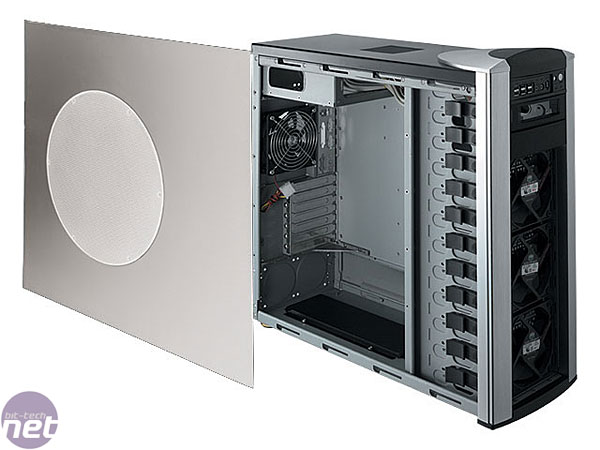
I use two full sized CoolerMaster Stacker cases on casters but I think they've discontinued it. The Centurian looks pretty close to it though but is maybe cheaper in construction, mine sure didn't cost $70! http://www.newegg.com/Product/Product.aspx?Item=N82E16811119152&Tpk=coolermaster Something like this http://images.bit-tech.net/content_images/2007/03/cm_stacker_mod_by_snakez_and_ediejo/page1-2.jpg but get the one with just the single PSU slot. I have two machines and one of them has room for two PSU - not needed. I've found that I need a pretty hefty UPS though, mine squeal like pigs on cold power-up!
-
Re:How much is a lot?
You may be able to fit more drives than that using these http://www.newegg.com/Product/Product.aspx?Item=N82E16817121405&Tpk=supermicro%20cse-m35t-1b the pic is misleading as it's turned on it's side but it fits 5 drives where 3 would normally go. Hard to tell from the pic you linked but I think you could fit at least 3 of these in your case and gain *easy* access to the drives.
I use two full sized CoolerMaster Stacker cases on casters but I think they've discontinued it. The Centurian looks pretty close to it though but is maybe cheaper in construction, mine sure didn't cost $70! http://www.newegg.com/Product/Product.aspx?Item=N82E16811119152&Tpk=coolermaster Something like this http://images.bit-tech.net/content_images/2007/03/cm_stacker_mod_by_snakez_and_ediejo/page1-2.jpg but get the one with just the single PSU slot. I have two machines and one of them has room for two PSU - not needed. I've found that I need a pretty hefty UPS though, mine squeal like pigs on cold power-up!
-
Re:ZFS
4n3? You can do better!
-
42TB for under $4k
Here's my setup that's currently capable of holding 44TB of storage (I have 18TB so far). Nothing fancy, Just something to hold all my media that isn't horribly noisy or hot and that was still relatively cheap. I have it sitting on a coffee table in my home office so you could put it pretty much anywhere.
A $320 Norco 4020 case that has 20 hot swappable drive bays plus 2 more fixed drive bays inside. http://www.newegg.com/Product/Product.aspx?Item=N82E16811219021
A $250 server motherboard with at least 2 PCI-X slots. I chose http://www.newegg.com/Product/Product.aspx?Item=N82E16813182142 because it takes a Core 2 CPU and DDR2 and I already had plenty of those laying around so I saved a few bucks in parts. I also had a CORSAIR CMPSU-850HX laying around and used it for a power supply which runs about $190.
$99 SUPERMICRO AOC-SAT2-MV8 SATA card. 2 of them will fill the server if you pull the DVD drive (I use an external anyway). 6 sata on the Mobo + 16 more from the 2 cards. Some people complain they're slow but I can pull 60+ Mb/s over the network from them. My guess is they're putting them in regular PCI slots on regular MoBos and not PCI-X slots on a server board.
For an OS, I simply use Windows Home Server. It's $99, windows simple, and is perfect for just storing video files. Reinstalling the OS can be a massive pain though as WHS reinstall script thing never works when there's a controller that WHS doesn't support out of the box (ie. the Supermicro cards). And the new version of WHS based on WS 2008R2 is on the way and there won't be an easy way to migrate.
I also use Flex Raid (Software Raid 4) and sacrifice one disk as a parity drive because duplication isn't much safer but eats a lot more of my space. I just have it do the rSync when no one is likely to be doing anything with the server so it's never a hassle.
So the base cost is within a few hundred bucks on either side of a grand. Less, if you have parts that can be cannibalized from old machines
From there, I just add Western Digital Caviar Green 2TB drives as needed. They're cheap, quiet and run cool. The EARS ones need a jumper (and none are included with the drive) to run under WHS but are $15 cheaper than the EADS ones on Newegg. And of course you can use any old drives you have laying around too.
I have Acer Aspire Revos ($330 http://www.newegg.com/Product/Product.aspx?Item=N82E16883103235) running XBMC Live installed on a USB Drive (xbmc.org) hooked up to each of the TVs in the house and use wired Gigabit (provided by whatever the cheapest 5 port Gigabit switch was on Newegg at the time, I think it was about $25) to stream DVD ISOs from the server to the TV. I don't have much HD stuff and the Revo can get bogged down when you try to play really high def video. 10Mbps works fine with XBMC using vdpau, but an 18Mbps MKV was a bit too much and went slideshow in places. -
42TB for under $4k
Here's my setup that's currently capable of holding 44TB of storage (I have 18TB so far). Nothing fancy, Just something to hold all my media that isn't horribly noisy or hot and that was still relatively cheap. I have it sitting on a coffee table in my home office so you could put it pretty much anywhere.
A $320 Norco 4020 case that has 20 hot swappable drive bays plus 2 more fixed drive bays inside. http://www.newegg.com/Product/Product.aspx?Item=N82E16811219021
A $250 server motherboard with at least 2 PCI-X slots. I chose http://www.newegg.com/Product/Product.aspx?Item=N82E16813182142 because it takes a Core 2 CPU and DDR2 and I already had plenty of those laying around so I saved a few bucks in parts. I also had a CORSAIR CMPSU-850HX laying around and used it for a power supply which runs about $190.
$99 SUPERMICRO AOC-SAT2-MV8 SATA card. 2 of them will fill the server if you pull the DVD drive (I use an external anyway). 6 sata on the Mobo + 16 more from the 2 cards. Some people complain they're slow but I can pull 60+ Mb/s over the network from them. My guess is they're putting them in regular PCI slots on regular MoBos and not PCI-X slots on a server board.
For an OS, I simply use Windows Home Server. It's $99, windows simple, and is perfect for just storing video files. Reinstalling the OS can be a massive pain though as WHS reinstall script thing never works when there's a controller that WHS doesn't support out of the box (ie. the Supermicro cards). And the new version of WHS based on WS 2008R2 is on the way and there won't be an easy way to migrate.
I also use Flex Raid (Software Raid 4) and sacrifice one disk as a parity drive because duplication isn't much safer but eats a lot more of my space. I just have it do the rSync when no one is likely to be doing anything with the server so it's never a hassle.
So the base cost is within a few hundred bucks on either side of a grand. Less, if you have parts that can be cannibalized from old machines
From there, I just add Western Digital Caviar Green 2TB drives as needed. They're cheap, quiet and run cool. The EARS ones need a jumper (and none are included with the drive) to run under WHS but are $15 cheaper than the EADS ones on Newegg. And of course you can use any old drives you have laying around too.
I have Acer Aspire Revos ($330 http://www.newegg.com/Product/Product.aspx?Item=N82E16883103235) running XBMC Live installed on a USB Drive (xbmc.org) hooked up to each of the TVs in the house and use wired Gigabit (provided by whatever the cheapest 5 port Gigabit switch was on Newegg at the time, I think it was about $25) to stream DVD ISOs from the server to the TV. I don't have much HD stuff and the Revo can get bogged down when you try to play really high def video. 10Mbps works fine with XBMC using vdpau, but an 18Mbps MKV was a bit too much and went slideshow in places. -
42TB for under $4k
Here's my setup that's currently capable of holding 44TB of storage (I have 18TB so far). Nothing fancy, Just something to hold all my media that isn't horribly noisy or hot and that was still relatively cheap. I have it sitting on a coffee table in my home office so you could put it pretty much anywhere.
A $320 Norco 4020 case that has 20 hot swappable drive bays plus 2 more fixed drive bays inside. http://www.newegg.com/Product/Product.aspx?Item=N82E16811219021
A $250 server motherboard with at least 2 PCI-X slots. I chose http://www.newegg.com/Product/Product.aspx?Item=N82E16813182142 because it takes a Core 2 CPU and DDR2 and I already had plenty of those laying around so I saved a few bucks in parts. I also had a CORSAIR CMPSU-850HX laying around and used it for a power supply which runs about $190.
$99 SUPERMICRO AOC-SAT2-MV8 SATA card. 2 of them will fill the server if you pull the DVD drive (I use an external anyway). 6 sata on the Mobo + 16 more from the 2 cards. Some people complain they're slow but I can pull 60+ Mb/s over the network from them. My guess is they're putting them in regular PCI slots on regular MoBos and not PCI-X slots on a server board.
For an OS, I simply use Windows Home Server. It's $99, windows simple, and is perfect for just storing video files. Reinstalling the OS can be a massive pain though as WHS reinstall script thing never works when there's a controller that WHS doesn't support out of the box (ie. the Supermicro cards). And the new version of WHS based on WS 2008R2 is on the way and there won't be an easy way to migrate.
I also use Flex Raid (Software Raid 4) and sacrifice one disk as a parity drive because duplication isn't much safer but eats a lot more of my space. I just have it do the rSync when no one is likely to be doing anything with the server so it's never a hassle.
So the base cost is within a few hundred bucks on either side of a grand. Less, if you have parts that can be cannibalized from old machines
From there, I just add Western Digital Caviar Green 2TB drives as needed. They're cheap, quiet and run cool. The EARS ones need a jumper (and none are included with the drive) to run under WHS but are $15 cheaper than the EADS ones on Newegg. And of course you can use any old drives you have laying around too.
I have Acer Aspire Revos ($330 http://www.newegg.com/Product/Product.aspx?Item=N82E16883103235) running XBMC Live installed on a USB Drive (xbmc.org) hooked up to each of the TVs in the house and use wired Gigabit (provided by whatever the cheapest 5 port Gigabit switch was on Newegg at the time, I think it was about $25) to stream DVD ISOs from the server to the TV. I don't have much HD stuff and the Revo can get bogged down when you try to play really high def video. 10Mbps works fine with XBMC using vdpau, but an 18Mbps MKV was a bit too much and went slideshow in places. -
Re:ZFS
I'll enthusiastically second this. I have been running FreeNAS solidly for 2 months now. I have configured 5 x 1.5TB drives in RAID-Z2 configuration. That gives me 4.01Tb of storage, allowing for two simultaneous drive failures without data loss. My final build uses an ECS 945GCD-M(1.0) Atom 330 Micro ATX board with an Intel 1Gb PCI card; I had a lot of trouble getting the network working with a pure intel board (which did NOT have an Intel network controller on it, GRR). While a highly regarded SATA controller worked with the original Intel MoBo, it didn't with my current one, but a cheaper one does. I'm using a 400MW 80 Plus PSU, and Kill-a-Watt says I pull about 75W total while running, motherboard reports that it's running at about 30C. I have 4Gb of RAM, of which maybe 30% gets used, and CPU seems to be around 10-20% generally. Discounting the hardware that didn't work, it comes to about $1000. I also invested in $130 of UPS (which brought it through a 5 second mini-blackout), and a Gb switch. I get sustained 30-40MB/sec, both to/from Vista and Ubuntu systems over a wired Cat-5e home network; far more than needed for use as a HTPC.
ZFS is stunning. I was sure I was missing something when I set it up but - it's - just - that - easy. It's like encountering a bullet train after spending two decades using hand-drawn sledges to get around. Copy-on-write, self-healing, snapshots as easy as sneezing. RAID configuration that would fit into a Twitter message. Hot spares, automatic re-silvering when adding or removing disks. It's about 4 tech levels above what I'm conversant in, which does make me nervous; I have not tried to recover from a drive failure yet. I'd also like to move the OS off the ancient 30Gb boot drive and onto a flash disk, but want to make sure my tertiary backups (mostly external USB drives) are *really* up-to-date. FreeNAS allows export and import of configuration XML files, so hopefully that will be relatively easy.
I did learn that while you don't need to explicitly format the drives, if you have used them for a prior ZFS system you should wipe them before reusing them. I lost three weekends of my life to trying to configure OpenSolaris (the time would have been better spent getting femur piercings). In the process, I briefly had a four drive ZFS zpool. When I tried to build a pool with those plus one more in FreeNAS, Bad Things Happened. I had to use DBAN to clear off the drives, after which everything went fine. I earlier tried FreeBSD, but it refused to boot from a USB CD with the EliteGroup motherboard. Ah, and I did need to modify vm.kmem_size and vm.kmem_size_max, I think both to 4G. That can be done from the FreeNAS config page (99% of FreeNAS management is done from a webpage, similar to router configuration).
-
Re:ZFS
I'll enthusiastically second this. I have been running FreeNAS solidly for 2 months now. I have configured 5 x 1.5TB drives in RAID-Z2 configuration. That gives me 4.01Tb of storage, allowing for two simultaneous drive failures without data loss. My final build uses an ECS 945GCD-M(1.0) Atom 330 Micro ATX board with an Intel 1Gb PCI card; I had a lot of trouble getting the network working with a pure intel board (which did NOT have an Intel network controller on it, GRR). While a highly regarded SATA controller worked with the original Intel MoBo, it didn't with my current one, but a cheaper one does. I'm using a 400MW 80 Plus PSU, and Kill-a-Watt says I pull about 75W total while running, motherboard reports that it's running at about 30C. I have 4Gb of RAM, of which maybe 30% gets used, and CPU seems to be around 10-20% generally. Discounting the hardware that didn't work, it comes to about $1000. I also invested in $130 of UPS (which brought it through a 5 second mini-blackout), and a Gb switch. I get sustained 30-40MB/sec, both to/from Vista and Ubuntu systems over a wired Cat-5e home network; far more than needed for use as a HTPC.
ZFS is stunning. I was sure I was missing something when I set it up but - it's - just - that - easy. It's like encountering a bullet train after spending two decades using hand-drawn sledges to get around. Copy-on-write, self-healing, snapshots as easy as sneezing. RAID configuration that would fit into a Twitter message. Hot spares, automatic re-silvering when adding or removing disks. It's about 4 tech levels above what I'm conversant in, which does make me nervous; I have not tried to recover from a drive failure yet. I'd also like to move the OS off the ancient 30Gb boot drive and onto a flash disk, but want to make sure my tertiary backups (mostly external USB drives) are *really* up-to-date. FreeNAS allows export and import of configuration XML files, so hopefully that will be relatively easy.
I did learn that while you don't need to explicitly format the drives, if you have used them for a prior ZFS system you should wipe them before reusing them. I lost three weekends of my life to trying to configure OpenSolaris (the time would have been better spent getting femur piercings). In the process, I briefly had a four drive ZFS zpool. When I tried to build a pool with those plus one more in FreeNAS, Bad Things Happened. I had to use DBAN to clear off the drives, after which everything went fine. I earlier tried FreeBSD, but it refused to boot from a USB CD with the EliteGroup motherboard. Ah, and I did need to modify vm.kmem_size and vm.kmem_size_max, I think both to 4G. That can be done from the FreeNAS config page (99% of FreeNAS management is done from a webpage, similar to router configuration).
-
Re:ZFS
I'll enthusiastically second this. I have been running FreeNAS solidly for 2 months now. I have configured 5 x 1.5TB drives in RAID-Z2 configuration. That gives me 4.01Tb of storage, allowing for two simultaneous drive failures without data loss. My final build uses an ECS 945GCD-M(1.0) Atom 330 Micro ATX board with an Intel 1Gb PCI card; I had a lot of trouble getting the network working with a pure intel board (which did NOT have an Intel network controller on it, GRR). While a highly regarded SATA controller worked with the original Intel MoBo, it didn't with my current one, but a cheaper one does. I'm using a 400MW 80 Plus PSU, and Kill-a-Watt says I pull about 75W total while running, motherboard reports that it's running at about 30C. I have 4Gb of RAM, of which maybe 30% gets used, and CPU seems to be around 10-20% generally. Discounting the hardware that didn't work, it comes to about $1000. I also invested in $130 of UPS (which brought it through a 5 second mini-blackout), and a Gb switch. I get sustained 30-40MB/sec, both to/from Vista and Ubuntu systems over a wired Cat-5e home network; far more than needed for use as a HTPC.
ZFS is stunning. I was sure I was missing something when I set it up but - it's - just - that - easy. It's like encountering a bullet train after spending two decades using hand-drawn sledges to get around. Copy-on-write, self-healing, snapshots as easy as sneezing. RAID configuration that would fit into a Twitter message. Hot spares, automatic re-silvering when adding or removing disks. It's about 4 tech levels above what I'm conversant in, which does make me nervous; I have not tried to recover from a drive failure yet. I'd also like to move the OS off the ancient 30Gb boot drive and onto a flash disk, but want to make sure my tertiary backups (mostly external USB drives) are *really* up-to-date. FreeNAS allows export and import of configuration XML files, so hopefully that will be relatively easy.
I did learn that while you don't need to explicitly format the drives, if you have used them for a prior ZFS system you should wipe them before reusing them. I lost three weekends of my life to trying to configure OpenSolaris (the time would have been better spent getting femur piercings). In the process, I briefly had a four drive ZFS zpool. When I tried to build a pool with those plus one more in FreeNAS, Bad Things Happened. I had to use DBAN to clear off the drives, after which everything went fine. I earlier tried FreeBSD, but it refused to boot from a USB CD with the EliteGroup motherboard. Ah, and I did need to modify vm.kmem_size and vm.kmem_size_max, I think both to 4G. That can be done from the FreeNAS config page (99% of FreeNAS management is done from a webpage, similar to router configuration).
-
Re:ZFS
I'll enthusiastically second this. I have been running FreeNAS solidly for 2 months now. I have configured 5 x 1.5TB drives in RAID-Z2 configuration. That gives me 4.01Tb of storage, allowing for two simultaneous drive failures without data loss. My final build uses an ECS 945GCD-M(1.0) Atom 330 Micro ATX board with an Intel 1Gb PCI card; I had a lot of trouble getting the network working with a pure intel board (which did NOT have an Intel network controller on it, GRR). While a highly regarded SATA controller worked with the original Intel MoBo, it didn't with my current one, but a cheaper one does. I'm using a 400MW 80 Plus PSU, and Kill-a-Watt says I pull about 75W total while running, motherboard reports that it's running at about 30C. I have 4Gb of RAM, of which maybe 30% gets used, and CPU seems to be around 10-20% generally. Discounting the hardware that didn't work, it comes to about $1000. I also invested in $130 of UPS (which brought it through a 5 second mini-blackout), and a Gb switch. I get sustained 30-40MB/sec, both to/from Vista and Ubuntu systems over a wired Cat-5e home network; far more than needed for use as a HTPC.
ZFS is stunning. I was sure I was missing something when I set it up but - it's - just - that - easy. It's like encountering a bullet train after spending two decades using hand-drawn sledges to get around. Copy-on-write, self-healing, snapshots as easy as sneezing. RAID configuration that would fit into a Twitter message. Hot spares, automatic re-silvering when adding or removing disks. It's about 4 tech levels above what I'm conversant in, which does make me nervous; I have not tried to recover from a drive failure yet. I'd also like to move the OS off the ancient 30Gb boot drive and onto a flash disk, but want to make sure my tertiary backups (mostly external USB drives) are *really* up-to-date. FreeNAS allows export and import of configuration XML files, so hopefully that will be relatively easy.
I did learn that while you don't need to explicitly format the drives, if you have used them for a prior ZFS system you should wipe them before reusing them. I lost three weekends of my life to trying to configure OpenSolaris (the time would have been better spent getting femur piercings). In the process, I briefly had a four drive ZFS zpool. When I tried to build a pool with those plus one more in FreeNAS, Bad Things Happened. I had to use DBAN to clear off the drives, after which everything went fine. I earlier tried FreeBSD, but it refused to boot from a USB CD with the EliteGroup motherboard. Ah, and I did need to modify vm.kmem_size and vm.kmem_size_max, I think both to 4G. That can be done from the FreeNAS config page (99% of FreeNAS management is done from a webpage, similar to router configuration).
-
Re:ZFS
I'll enthusiastically second this. I have been running FreeNAS solidly for 2 months now. I have configured 5 x 1.5TB drives in RAID-Z2 configuration. That gives me 4.01Tb of storage, allowing for two simultaneous drive failures without data loss. My final build uses an ECS 945GCD-M(1.0) Atom 330 Micro ATX board with an Intel 1Gb PCI card; I had a lot of trouble getting the network working with a pure intel board (which did NOT have an Intel network controller on it, GRR). While a highly regarded SATA controller worked with the original Intel MoBo, it didn't with my current one, but a cheaper one does. I'm using a 400MW 80 Plus PSU, and Kill-a-Watt says I pull about 75W total while running, motherboard reports that it's running at about 30C. I have 4Gb of RAM, of which maybe 30% gets used, and CPU seems to be around 10-20% generally. Discounting the hardware that didn't work, it comes to about $1000. I also invested in $130 of UPS (which brought it through a 5 second mini-blackout), and a Gb switch. I get sustained 30-40MB/sec, both to/from Vista and Ubuntu systems over a wired Cat-5e home network; far more than needed for use as a HTPC.
ZFS is stunning. I was sure I was missing something when I set it up but - it's - just - that - easy. It's like encountering a bullet train after spending two decades using hand-drawn sledges to get around. Copy-on-write, self-healing, snapshots as easy as sneezing. RAID configuration that would fit into a Twitter message. Hot spares, automatic re-silvering when adding or removing disks. It's about 4 tech levels above what I'm conversant in, which does make me nervous; I have not tried to recover from a drive failure yet. I'd also like to move the OS off the ancient 30Gb boot drive and onto a flash disk, but want to make sure my tertiary backups (mostly external USB drives) are *really* up-to-date. FreeNAS allows export and import of configuration XML files, so hopefully that will be relatively easy.
I did learn that while you don't need to explicitly format the drives, if you have used them for a prior ZFS system you should wipe them before reusing them. I lost three weekends of my life to trying to configure OpenSolaris (the time would have been better spent getting femur piercings). In the process, I briefly had a four drive ZFS zpool. When I tried to build a pool with those plus one more in FreeNAS, Bad Things Happened. I had to use DBAN to clear off the drives, after which everything went fine. I earlier tried FreeBSD, but it refused to boot from a USB CD with the EliteGroup motherboard. Ah, and I did need to modify vm.kmem_size and vm.kmem_size_max, I think both to 4G. That can be done from the FreeNAS config page (99% of FreeNAS management is done from a webpage, similar to router configuration).
-
Re:ZFS
I'll enthusiastically second this. I have been running FreeNAS solidly for 2 months now. I have configured 5 x 1.5TB drives in RAID-Z2 configuration. That gives me 4.01Tb of storage, allowing for two simultaneous drive failures without data loss. My final build uses an ECS 945GCD-M(1.0) Atom 330 Micro ATX board with an Intel 1Gb PCI card; I had a lot of trouble getting the network working with a pure intel board (which did NOT have an Intel network controller on it, GRR). While a highly regarded SATA controller worked with the original Intel MoBo, it didn't with my current one, but a cheaper one does. I'm using a 400MW 80 Plus PSU, and Kill-a-Watt says I pull about 75W total while running, motherboard reports that it's running at about 30C. I have 4Gb of RAM, of which maybe 30% gets used, and CPU seems to be around 10-20% generally. Discounting the hardware that didn't work, it comes to about $1000. I also invested in $130 of UPS (which brought it through a 5 second mini-blackout), and a Gb switch. I get sustained 30-40MB/sec, both to/from Vista and Ubuntu systems over a wired Cat-5e home network; far more than needed for use as a HTPC.
ZFS is stunning. I was sure I was missing something when I set it up but - it's - just - that - easy. It's like encountering a bullet train after spending two decades using hand-drawn sledges to get around. Copy-on-write, self-healing, snapshots as easy as sneezing. RAID configuration that would fit into a Twitter message. Hot spares, automatic re-silvering when adding or removing disks. It's about 4 tech levels above what I'm conversant in, which does make me nervous; I have not tried to recover from a drive failure yet. I'd also like to move the OS off the ancient 30Gb boot drive and onto a flash disk, but want to make sure my tertiary backups (mostly external USB drives) are *really* up-to-date. FreeNAS allows export and import of configuration XML files, so hopefully that will be relatively easy.
I did learn that while you don't need to explicitly format the drives, if you have used them for a prior ZFS system you should wipe them before reusing them. I lost three weekends of my life to trying to configure OpenSolaris (the time would have been better spent getting femur piercings). In the process, I briefly had a four drive ZFS zpool. When I tried to build a pool with those plus one more in FreeNAS, Bad Things Happened. I had to use DBAN to clear off the drives, after which everything went fine. I earlier tried FreeBSD, but it refused to boot from a USB CD with the EliteGroup motherboard. Ah, and I did need to modify vm.kmem_size and vm.kmem_size_max, I think both to 4G. That can be done from the FreeNAS config page (99% of FreeNAS management is done from a webpage, similar to router configuration).
-
Re:ZFS
I'll enthusiastically second this. I have been running FreeNAS solidly for 2 months now. I have configured 5 x 1.5TB drives in RAID-Z2 configuration. That gives me 4.01Tb of storage, allowing for two simultaneous drive failures without data loss. My final build uses an ECS 945GCD-M(1.0) Atom 330 Micro ATX board with an Intel 1Gb PCI card; I had a lot of trouble getting the network working with a pure intel board (which did NOT have an Intel network controller on it, GRR). While a highly regarded SATA controller worked with the original Intel MoBo, it didn't with my current one, but a cheaper one does. I'm using a 400MW 80 Plus PSU, and Kill-a-Watt says I pull about 75W total while running, motherboard reports that it's running at about 30C. I have 4Gb of RAM, of which maybe 30% gets used, and CPU seems to be around 10-20% generally. Discounting the hardware that didn't work, it comes to about $1000. I also invested in $130 of UPS (which brought it through a 5 second mini-blackout), and a Gb switch. I get sustained 30-40MB/sec, both to/from Vista and Ubuntu systems over a wired Cat-5e home network; far more than needed for use as a HTPC.
ZFS is stunning. I was sure I was missing something when I set it up but - it's - just - that - easy. It's like encountering a bullet train after spending two decades using hand-drawn sledges to get around. Copy-on-write, self-healing, snapshots as easy as sneezing. RAID configuration that would fit into a Twitter message. Hot spares, automatic re-silvering when adding or removing disks. It's about 4 tech levels above what I'm conversant in, which does make me nervous; I have not tried to recover from a drive failure yet. I'd also like to move the OS off the ancient 30Gb boot drive and onto a flash disk, but want to make sure my tertiary backups (mostly external USB drives) are *really* up-to-date. FreeNAS allows export and import of configuration XML files, so hopefully that will be relatively easy.
I did learn that while you don't need to explicitly format the drives, if you have used them for a prior ZFS system you should wipe them before reusing them. I lost three weekends of my life to trying to configure OpenSolaris (the time would have been better spent getting femur piercings). In the process, I briefly had a four drive ZFS zpool. When I tried to build a pool with those plus one more in FreeNAS, Bad Things Happened. I had to use DBAN to clear off the drives, after which everything went fine. I earlier tried FreeBSD, but it refused to boot from a USB CD with the EliteGroup motherboard. Ah, and I did need to modify vm.kmem_size and vm.kmem_size_max, I think both to 4G. That can be done from the FreeNAS config page (99% of FreeNAS management is done from a webpage, similar to router configuration).
-
Re:Forget NAS
Correct.
Big ass case - for example this one with 10 internal hard drive slots and 5 DVD sized slots which you can convert using something like this that converts 3 x 5.25" into 4 x 3.5" drives, so you'd have 14 hard drives in total.
There are cheaper cases with only 8 or 9 standard 3.5 inch slots for hard drives and at least 3 x 5.25" slots, so the least amount of hard drives you could store is 12. But you don't have to be limited by the slots already made. You could get 2 metal plates, drill some holes and screw the drives in a column on the plates and lock this column with some screws to the bottom of the case or to the side panel.
Motherboard - any will do, most have 5-6 sata connectors. There are cheap 50$ sata controllers that add 4 sata ports so you can plug two of these and you have 14 sata ports in the computer.
You don't even need to get 1 to 5 port extenders which only slow down the transfer.The only thing you have to worry with something like this is to get a good power supply - ideally one of those with a single voltage rail or 4 independent voltage rails in which case you make sure to attach 4-5 drives on each rail so that the load is balanced.
As for the hard drives themselves, check the specifications on WD's site, on Seagate's site, and pick the ones that heat the less and maybe even check reviews for heat information. Though it's enough to have some 120 mm fans in front of the case blowing air to keep them chilled. 5900 rpm drives are fast enough for your needs.
-
sun $1k 2 TB ISCSI server
4 of these
http://www.newegg.com/Product/Product.aspx?Item=N82E16822145276 (or whatever your fav is)
1 of these that supports 4 drives
http://computers.shop.ebay.com/Servers-/11211/i.html?_nkw=1u+server&_catref=1&_fln=1&_trksid=p3286.c0.m282
and then install this
http://freenas.org/freenas
$800 4 TB server (raid 10) -
Kind of pricey, but this would work...
-
Synology 410 and 4 1T HD's (1.6T NAS for ~$1K)
I used to have a 4U rackmount with 8 JBOD drives + a master drive, etc, etc, etc. that I built up over two years wasting about 3K on it. It died.
I ended up replacing it all for about $1000 shipped (1.7T Raid 5). It can support 4 2T HD's and
The NAS server is the 409+ non-rackmount from Synology (same-as/replaced-by the 410):
http://www.newegg.com/Product/Product.aspx?Item=N82E16822108050&cm_re=synology-_-22-108-050-_-Product
http://www.synology.com/us/products/ds410/index.php
I spent quite some time researching the HD's to use and settled on these:
http://www.newegg.com/Product/Product.aspx?Item=N82E16822152185
The newegg support was quite nice in helping m get drives from different batches (overkill, but nice).
It has worked fantastic. Supports timemachine and itunes naively, is a media server (integrates with my segate freeagent theater+ and PS3 seamlessly), the download manager rocks, and all our photo's are served up to the extended family (yea dyndns integration). Also integrates with UPS, external drives, and broadcasts the UPS issue to all my machines on the network. support for everything (and I mean everything.)
the admin interface this thing comes with is fantastic (linux on it with busybox and the ability to add your own packages):
http://www.synology.com/us/products/features/index.php
little box seriously rocks. -
Synology 410 and 4 1T HD's (1.6T NAS for ~$1K)
I used to have a 4U rackmount with 8 JBOD drives + a master drive, etc, etc, etc. that I built up over two years wasting about 3K on it. It died.
I ended up replacing it all for about $1000 shipped (1.7T Raid 5). It can support 4 2T HD's and
The NAS server is the 409+ non-rackmount from Synology (same-as/replaced-by the 410):
http://www.newegg.com/Product/Product.aspx?Item=N82E16822108050&cm_re=synology-_-22-108-050-_-Product
http://www.synology.com/us/products/ds410/index.php
I spent quite some time researching the HD's to use and settled on these:
http://www.newegg.com/Product/Product.aspx?Item=N82E16822152185
The newegg support was quite nice in helping m get drives from different batches (overkill, but nice).
It has worked fantastic. Supports timemachine and itunes naively, is a media server (integrates with my segate freeagent theater+ and PS3 seamlessly), the download manager rocks, and all our photo's are served up to the extended family (yea dyndns integration). Also integrates with UPS, external drives, and broadcasts the UPS issue to all my machines on the network. support for everything (and I mean everything.)
the admin interface this thing comes with is fantastic (linux on it with busybox and the ability to add your own packages):
http://www.synology.com/us/products/features/index.php
little box seriously rocks. -
Suggestions
Here's a case I've seen suggested.
http://www.servercase.com/Merchant2/merchant.mvc?Screen=PROD&Product_Code=CK4020&Category_Code=4UBKBLN
Norco has a similar one; I'm not sure about the exact differences.
http://www.newegg.com/Product/Product.aspx?Item=N82E16811219033You can pick up SAS controllers at the usual sorts of places, newegg, supermicro, whatever. Watch out for the newer couple series of DELL PERC controllers since I hear they've started restricting you to only use them with dell branded drives.
I don't yet use the above types of enclosures, but may pick some up for a work project soon.
As for OS -- just look at FreeBSD 8.0/8.x with ZFS or maybe OpenSolaris with ZFS if they ever release a public B138 / 2010.03 release or better (which are both now long past expected due).
Both should be thoroughly checked under load / production simulation conditions for stability and FS integrity before trusting data to them. Since you deal with large (video) files and not millions of small ones you probably won't be using anything too new / fancy like dedup so you should be safer without the more esoteric / bleeding edge FS features in use.I'd suggest getting three or more chassis and populating each with about 4-6 1TB HDDs in RAIDZ or RAID-1 mirrored pairs to start with, and set up a redundant cluster of NAS shareed volumes from each of these drive pools from each of the servers such that any one of the server machines itself could totally fail and the other 2+ servers would redundantly have your data preserved via use of a second level RAIDZ/mirror off of the server pool exports. There's discussion about this on the zfs-discuss mailing list archives lately as I recall as well as on the freebsd zfs list IIRC.
Use dedicated 1Gbit LAN links between the servers of course.
If you really don't want to sysadmin an OS look at FreeNAS or NexentaStor's community edition or OpenFiler and see if any of those suit you, but given your space/performance needs, I suspect just running an OS on the servers will work.
As for the PC motherboard, you don't need anything especially high end, a mini-ITX like the D510MO or one of the Zotac ATOM boards from newegg will get you a CPU and motherboard for $80-$200, though usually getting in on one of the fry's weekend bundle sales of a CPU+microatx motherboard will often get you a CPU+Motherboard in the $30-$100 range. All that matters is having enough of the right kind of slots for a SAS controller or whatever you want to use (SATA for lower end), and of course a slot for a gigabit NIC if the motherboard doesn't already have enough of those for you.
Supermicro / tyan have some serverish motherboards if you're interested in those, but usually those are closer to $250-$350 and proabably don't do you much good. Just put 4GB or 8GB RAM into the things and ZFS will be happy running under a 64 bit OS.Look at putting your cache/ZIL on the main "head" server onto a SSD if you want better performance.
The backblaze design is interesting, though I don't personally see that it is needed at the scales you're talking about which can be readily enough handled with an off the shelf case with a few drives per case and multiple servers for redundancy / backup.
Tahoe-LAFS may be of interest to you if you want to check that out, though it sounds like ZFS itself should just work for you.
Anyway read the freebsd-zfs and zfs-discuss related lists, they're full of good into on DIY SAN/NAS solutions.
-
Re:ZFS
ZFS + Solaris.
I have a standard ATX case with 4-in-3 adapter from Newegg. I didn't get the more expensive ones with trays because I didn't need to hot swap.
I have 2x1TB drives in ZFS mirror for boot. 5x1.5TB drives in RaidZ as a tank and 2x200GB drives in mirror with a virtual block device for Xen Debian and Windows 7.
OpenSolaris is amazingly simple to use, if you're just doing your home network.
At the most basic level:
zpool create tank c5t0d0s0 c5t1d0s0
zfs sharenfs=on tank
zfs sharesmb=on tank
zfs shareiscsi=on tankNow your new drives are all shared over NFS, SMB and iSCSI.
I keep looking for the old school full height 'desktops' at a bargain store or so. Search newegg. 3.5" external works just as well as internal.
This has 11 3.5" bays and 3 x 5.25" bays. With a 4 in 3 linked above you could have 15 hard drives in a case for $100. Or if you care about hot swappability This one has 20 hot swap bays (at 3x the cost).
If you want more performance, get some SSDs to work as the ZFS "cache".
-
Re:ZFS
ZFS + Solaris.
I have a standard ATX case with 4-in-3 adapter from Newegg. I didn't get the more expensive ones with trays because I didn't need to hot swap.
I have 2x1TB drives in ZFS mirror for boot. 5x1.5TB drives in RaidZ as a tank and 2x200GB drives in mirror with a virtual block device for Xen Debian and Windows 7.
OpenSolaris is amazingly simple to use, if you're just doing your home network.
At the most basic level:
zpool create tank c5t0d0s0 c5t1d0s0
zfs sharenfs=on tank
zfs sharesmb=on tank
zfs shareiscsi=on tankNow your new drives are all shared over NFS, SMB and iSCSI.
I keep looking for the old school full height 'desktops' at a bargain store or so. Search newegg. 3.5" external works just as well as internal.
This has 11 3.5" bays and 3 x 5.25" bays. With a 4 in 3 linked above you could have 15 hard drives in a case for $100. Or if you care about hot swappability This one has 20 hot swap bays (at 3x the cost).
If you want more performance, get some SSDs to work as the ZFS "cache".
-
Re:ZFS
ZFS + Solaris.
I have a standard ATX case with 4-in-3 adapter from Newegg. I didn't get the more expensive ones with trays because I didn't need to hot swap.
I have 2x1TB drives in ZFS mirror for boot. 5x1.5TB drives in RaidZ as a tank and 2x200GB drives in mirror with a virtual block device for Xen Debian and Windows 7.
OpenSolaris is amazingly simple to use, if you're just doing your home network.
At the most basic level:
zpool create tank c5t0d0s0 c5t1d0s0
zfs sharenfs=on tank
zfs sharesmb=on tank
zfs shareiscsi=on tankNow your new drives are all shared over NFS, SMB and iSCSI.
I keep looking for the old school full height 'desktops' at a bargain store or so. Search newegg. 3.5" external works just as well as internal.
This has 11 3.5" bays and 3 x 5.25" bays. With a 4 in 3 linked above you could have 15 hard drives in a case for $100. Or if you care about hot swappability This one has 20 hot swap bays (at 3x the cost).
If you want more performance, get some SSDs to work as the ZFS "cache".
-
NAS
I've tried a variety of approaches, but overall I've been happiest with just buying a NAS box.
I have a Synology DS209, and I've been very satisfied. It's a relatively cheap way to get 2 TB RAID 1 storage with really simple backup to an external USB drive. If you need more storage, you can buy NAS devices with more than just two bays.
-
Sneakernet
This is why you pool your media on NAS devices like these. And rip your media to it. And arrange with friends for offsite backups in case of disaster.
Sharing parties are where it's at, don'tcha know. Never underestimate the bandwidth of a station wagon full of backup tapes. The first rule of Ufenet is "don't talk about Ufenet". If it's not online then as far as the RIAA, MPAA and BSA are concerned, it didn't happen.
Until fairly recently I was personally opposed (though tolerant) of media piracy - unwilling to do it myself. Some time ago though I came around. Perhaps it was when they called transcoding DVDs I had bought into a useful media for me to watch it (3gp) stealing that did it. More likely it was the copyright extensions and DMCA. With the DMCA they can self-regulate the expiration of copyright with their DRM and so make us buy the same content over and over. Due to the efforts of the RIAA and the MPAA and their ilk in extending copyright, I now figure they have stolen from me and my heirs far more content than I could take back from them in a hundred lifetimes. I could not possibly even read the titles of the books they've stolen from me while I yet live, let alone the books too. The photos? If I browsed a slideshow from now until the end of my days with every waking hour I could not touch one hundredth of one percent of the photos they've stolen from me. Screw 'em.
Until today I was equally opposed to software piracy, but just now I realized they're working the same tools to the same ends. Their work on software patents is preventing me from getting good progress. Screw them too. If your profits get in the way of Progress, then to hell with you.
If you needed my encouragement, have at it. I am hereby encouraging all of you to pirate any media you desire: audio, video, software, books and other, software and hardware patents too, no matter how current by any means expedient. Until the bastards give back our "limited times" and "fair use" all of their stuff is fair game. Just don't get caught.
So tell me again... what peril am I in?
-
Re:and...
Thanks. If you want to build a small HTPC style rig for gaming I would suggest this one as I've built a couple of these for customers and they are pretty easy to work with. Also the bang for the buck is firmly in the AMD camp right now and with a $105 AMD quad you'd have plenty of power for gaming or pretty much anything else. Add a couple of wireless x360 controller and lazy gaming shall ensue.
Just add a low profile Radeon 5xxx later (I played games like Bioshock I for nearly 3 months on the same onboard chip before getting around to picking up a HD4650) and you have a nice small HTPC that is good for gaming. And don't forget to check out Good Old Games, as I have been buying from them for a couple of months now and they really do treat you like a valued customer. Oh and their older games have a custom built DOSBox that needs NO tweaking, so even on W7 HP X64 it is just install and go, and if you add yourself to their mailing list they have crazy sales at the first and end of the month. I got the ENTIRE descent series, from Descent 1-Freespace 2, with ALL the expansion packs, for less than $20!
-
Re:and...
Thanks. If you want to build a small HTPC style rig for gaming I would suggest this one as I've built a couple of these for customers and they are pretty easy to work with. Also the bang for the buck is firmly in the AMD camp right now and with a $105 AMD quad you'd have plenty of power for gaming or pretty much anything else. Add a couple of wireless x360 controller and lazy gaming shall ensue.
Just add a low profile Radeon 5xxx later (I played games like Bioshock I for nearly 3 months on the same onboard chip before getting around to picking up a HD4650) and you have a nice small HTPC that is good for gaming. And don't forget to check out Good Old Games, as I have been buying from them for a couple of months now and they really do treat you like a valued customer. Oh and their older games have a custom built DOSBox that needs NO tweaking, so even on W7 HP X64 it is just install and go, and if you add yourself to their mailing list they have crazy sales at the first and end of the month. I got the ENTIRE descent series, from Descent 1-Freespace 2, with ALL the expansion packs, for less than $20!
-
Re:Good news, I suppose
Pft, or like how they (Cisco) sell ram for routers at astonishingly high rates: like this over the-top example, and it's essentially just a 256MB DDR SDRAM. Sure, it's ECC, but last I checked you couldn't GIVE away 256MB SDRAMs. This is a standard PC or Laptop form factor. They also sell compact flash cards, which are regular CF cards, with a Cisco sticker, for 433 bucks, here's one that's 256MB (bigger) for 10.99!. So if idiots are buying them, maybe someone in China says "hey, we buy these surplus compact flash cards for $4/piece, spend $1 to print Cisco stickers and sell them on the web for $400, that's a nice 8000% profit.
-
Re:ECC Support
Wait - so your defense is Intel only costs $170 more for ECC support?
(High end AMD boards are going for $150 or less - not $200)
http://www.newegg.com/product/product.aspx?Item=N82E16813131631 (cheaper if you know where to look)
Maybe I'm a cheapskate, but I'd rather buy an AMD 6-core for $200, and save $280 ($110+$170) across all components.
-
Re:Also has nice overclocking prospects
You are getting ripped off on that AMD CPU, NewEgg has it for $204 http://www.newegg.com/Product/Product.aspx?Item=N82E16819103851
That isn't the unlocked 1090T you are referencing, this is.
-
Re:Also has nice overclocking prospects
You are getting ripped off on that AMD CPU, NewEgg has it for $204 http://www.newegg.com/Product/Product.aspx?Item=N82E16819103851
That isn't the unlocked 1090T you are referencing, this is.
-
Re:I need a new computer
Because the quad was less than $125, which for a quad CPU was frankly beyond cheap. Hell if you built your dad an AMD you might want to look at an Athlon X4 while they are just $99, and use his X2 for a good netbox (or in my case the 7550 is gonna go into a BDay prezzy for my GF). Don't forget that CPUs quit being manufactured all the time, and if you miss out you might not get another chance. I tried it your way with dad's P4, but I held off on buying a Pentium D figuring I could get one later. Instead by the time his P4 was slogged down I found a Pentium D that would fit his motherboard would damned near cost more than a new CPU plus motherboard!
So don't be too skimpy, now is the time to score AMD quads. Believe me it won't be long before the 6 and 8 core CPUs are the norm, and it will be harder and harder to find the quads. If you used a good budget or business class board like I did for dad and me you'll find they don't get the BIOS updates for new CPUs nearly as much as the gamer boards. That is why I went ahead and got the biggest quads both mine and my dad's boards will take, because I know that mine will probably last me a good 7 years or more, hell maybe even a decade with the light gaming I do, and I honestly think that new AMD quad will last dad until the machine finally dies of old age.
Oh and OT, but does anybody know of a good remote desktop solution for someone old and completely clueless on W7 HP x64? Dad refused to listen to me on OSes and got W7 HP on both his office and home machine and would love to be able to remote in from home whenever the weather is bad, but everything I try is deemed "too complicated" for him to use. I can't leave him wired in 24/7 because he ends up screwing something up, so I need something simple enough he can just "clicky clicky" and at worst put in a password. So far I've tried both VNC and Comodo remote, but both never seemed to work well for him and I spent more time troubleshooting than he did using it. He has static IPs at both work and home, so all I need is a good and most importantly butt simple way for dad to get his work desktop at home. Anybody got any suggestions?
-
Re:ECC Support
To get ECC support from Intel, you need to buy a Xeon, at which point they charge you an extra $800-$1000 for the gates to be enabled.
Boy, when you make up numbers, you really reach deep into your ass, don't you?
Core i7-920 for $280 and the same-socket, indentical spec Xeon W3520 for $310.
The only issue might be that you need a motherboard that supports ECC, but $270 for this one isn't a lot more than the $200 or so you'd pay for a non-server board with equivalent build quality. Unless things have changed drastically since the last time I looked at AMD motherboards, not all of them support ECC, either.