Slashdot Mirror
Domain: ollydbg.de
Stories and comments across the archive that link to ollydbg.de.
Comments · 32
-
RAID
RAID systems can protect online data (to a degree), but what about offline storage?
Still RAID is a good choice for your redundancy of choice.
Or paper: http://ollydbg.de/Paperbak/#1
-
Re:A question I keep asking that no one ever answe
Don't forget about dead-tree file encoding.
Tens of kilobytes fit on each side of a page. -
Re:No, nobody has run into this
-
Re:No, nobody has run into this
For those curious, I am guessing AC is refering to this:
-
Re:What are these shiny discs you speak of?
This is a phenomenon known as "bitrot." It is for this reason tape drive backups are still around but since SATA allows hotplugging and there are SATA docks now some people just buy hard drives and use those for long term storage. Hard drives as a backup medium I imagine would work pretty good as long as you keep them in a dark, dry and cool place mostly safe from any shock like drops or heavy vibrations. In fact I had a computer from the mid-80's once and its hard drive, file system and data was still intact.
I've always wanted to try tape drives mostly for the novelty but they're excessively expensive which is why I think hard drives as a long term storage medium have started to take off but ultimately I don't think they'll displace tapes for storage meant to last a magnitude of half a century or longer.
I suppose if you're daring enough you could try paper as a backup medium.
-
Re:Text, but why?
+1 Paperbak
-
Re:QR codes?
Here's a link for Paperbak: http://ollydbg.de/Paperbak/
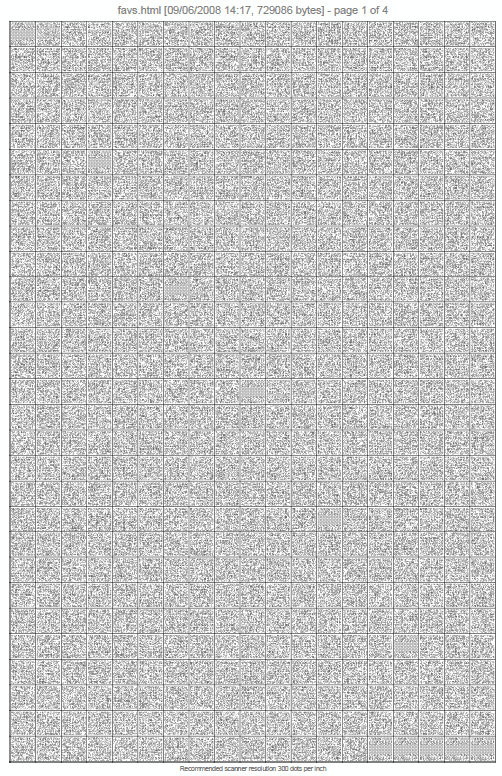
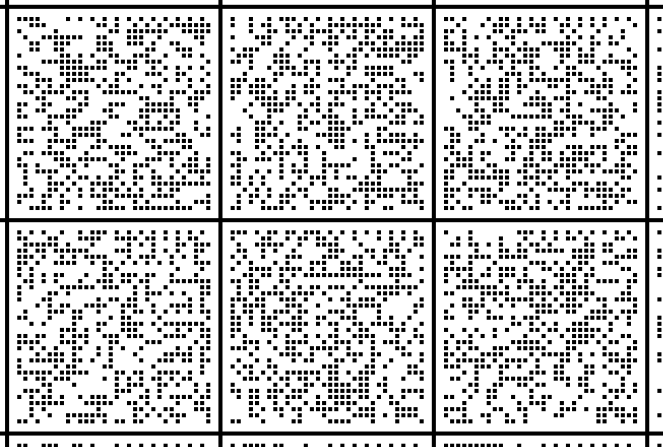
PaperBack is a free application that allows you to back up your precious files on the ordinary paper in the form of the oversized bitmaps. If you have a good laser printer with the 600 dpi resolution, you can save up to 500,000 bytes of uncompressed data on the single A4/Letter sheet. Integrated packer allows for much better data density - up to 3,000,000+ (three megabytes) of C code per page.
Actual version is for Windows only, but it's free and open source, and there is nothing that prevents you from porting PaperBack to Linux or Mac, and the chances are good that it still will work under Windows XXXP or Trillenium Edition. And, of course, you can mail your printouts to the recipients anywhere in the world, even if they have no Internet access or live in the countries where such access is restricted by the regiment.
-
Whats the purpose of this
You can read and manipulate stack in debuggers like Ollydbg. It's much better way than trying to do so via games console. And you can modify the code too. I just don't see whats the use of this.
-
Visual Studio
I've personally fallen in love with Visual Studio. It's definitely the planets most feature-rich and capable IDE. It supports wide array of languages, has great debugging options and performs really well. The best thing is that Visual Studio Express is completely free.
It's also great to see Microsoft Research's latest offerings. They have always been the monolith research club of the industry. It's nice to see that Microsoft is really dedicated to support research.
That being said, I'm quite sure we will see the fruits of this research in an even better Visual Studio based product. Microsoft really cares about programmers and developers and helps all of them write efficient and clean code. Helping the debugging process is just second part of it.
I would, however, also love to see better support for debuggers like OllyDbg. It's basically assembler level debugger for programs that have been already compiled. It's binary code analysis is unmatched in the industry. Compiling these two will lead to synergies.
All in all, Microsoft Visual Studio keeps getting better! -
Re:No persuasion required
Better secure the printer. Paperback can copy 3 megabytes per page, maybe 50MB or more if you hack in support for color images.
-
Re:let's see...linux kernel source
You can get about 500 kilobytes uncompressed per printed page (on one side) using PaperBack. Is the source code really 35 gigs?
-
Argh, link in original post is a typo
-
Re:Towns
There's tons of games with scripting support. Hell, if you are a programmer (like you would have to be for this), you can do this for practically any game. Get ollydbg, debug some and patch any existing game to run commands automatically. It's much more interesting too.
-
Paperback
Paperback, a printer and some paper: http://www.ollydbg.de/Paperbak/index.html#1
-
Powershell and other tools
Powershell. The only tool that knows how to talk to all the different frameworks in Windows is Powershell. No other tool can talk to
Since the test guy usually has to be a part time sysadmin too, you should be aware of these tools:
System update readiness tool: http://support.microsoft.com/kb/947821/en-us
WMI diagnostic utility: http://www.microsoft.com/downloads/en/details.aspx?familyid=d7ba3cd6-18d1-4d05-b11e-4c64192ae97d&displaylang=en
gplogview: http://www.microsoft.com/downloads/en/confirmation.aspx?familyId=BCFB1955-CA1D-4F00-9CFF-6F541BAD4563
Windows SDK (including debugging tools for windows): http://www.microsoft.com/downloads/en/details.aspx?FamilyID=35AEDA01-421D-4BA5-B44B-543DC8C33A20
ollydbg: http://www.ollydbg.de/
sysinternals suite: http://technet.microsoft.com/en-us/sysinternals/bb842062
Windows Management Framework: http://support.microsoft.com/kb/968929
WDK: http://www.microsoft.com/downloads/en/details.aspx?displaylang=en&FamilyID=36a2630f-5d56-43b5-b996-7633f2ec14ff
WAIK: http://www.microsoft.com/downloads/en/details.aspx?familyid=696DD665-9F76-4177-A811-39C26D3B3B34&displaylang=en
Windows 7 SP1 WAIK supplement: http://www.microsoft.com/downloads/en/details.aspx?FamilyID=0AEE2B4B-494B-4ADC-B174-33BC62F02C5DIf XP is involved, check out Windows SteadyState. It's like deepfreeze, if you've ever used that. qemu is also a great way to boot test machines and capture output at scale; using CoW disks you can have fresh machines every time you boot regardless if the test machines are XP or not.
-
Re:Print
That would obviously be very fast for text, but what about binary attachments?
-
saving data by printing and restoring by scanning
Oleh Yushuk did it long ago - http://www.ollydbg.de/Paperbak/index.html
just save your key to a text file, print it with paperbak. -
PaperBak anyone ?
PaperBak anyone ? http://ollydbg.de/Paperbak/
It gives you this kind of prints:
http://sebsauvage.net/i/ccm/paperback_a4.png
http://sebsauvage.net/i/ccm/paperback_detail.png
I save my private GPG key on paper this way. -
Re:ffs.. the "zomg how to preserve" story -again-!
Still, in previous stories I didn't find any reference to PaperBack.
It just lacks a textual description of the matrix format to attach at your centuries-lasting data.
-
Re:Density
You can store half a megabyte per side of page side, if you use PaperBack (has been discussed here before).
Now you can store your 5 minutes video on about 78 pages. Would be great if that sources zip file made it into archive.org
-
use paper and describe the algorithm
You don't need to go as far as http://www.ollydbg.de/Paperbak/.
But he managed to put 500k of Data onto a single sheet of A4 paper.
Implementing an algorithm, which decodes such data should still be possible in 16 years (if the supplied USB stick doesn't work any longer).
Just be sure to document the algorithm on paper as well
good luck
-
Re:Tape
Though it's presented as a bit of a joke, PaperBack might be something that could handle this.
-
Re:Previous art
Another vaguely similar hack at
http://www.ollydbg.de/Paperbak/index.html
Backing up your data on paper (and restoring with a scanner). Author claims 500K bytes of uncompressed data per standard page (A4). You can store it as ain image file if you like I think (it's a Windows app so I didn't actually try it)You din't get any pretty pictures (unless you're very lucky) though.
-
Paper of course!
-
Hardly off topic
Ronja is pretty much on topic. http://ronja.twibright.com/
From their FAQ:
Material for one Ronja 10M Metropolis device costs 2000CZK and building the device takes 70 hours.
2000CZK; about $120. 70 hours though is even at minimum wage ($6.55) $500 or so. You need two of them, so really a minimum of $1,240 in costs. Then add markup, even here the devices are going to cost $2,500 just for the hardware to set up a link, add consultancy, site surveys and you're into the same ballpark as the existing commercial FSO providers.
What is off topic though, the fact that same bunch of people seem to have largely solved the problem of archiving data for 500 years. Possibly longer if vellum were used.
http://ronja.twibright.com/optar/
another tool along the same lines
http://ollydbg.de/Paperbak/index.htmlCourse, the first 100 pages of any archive would have to be the ascii source code of the application to read the data encoded on the last page.
-
Paperback is the kind of things I called 2D barcod
I think this is a much better solution than barcodes.
Well technically that's what I named *2D* bar codes in my previous post. Not a peculiar 2D implementation. Just any dot pattern with sufficient error tolerance (Reed-Solomon).
(And in fact, I think that Paper Back was the first implementation of 2D Barcode-as-a-backup that I saw when it was mentioned onBut basically yeah, that's the sort of things I would have imagined.
And opensource, so you can print the source code of the software too.
Well in paperback's case the situation has a small problem : PaperBack is a Windows-only application. And is almost guaranteed to be worthless after 25 years (for the time-capsule usage that the question's author wanted)
(Microsoft won't necessarily be still around by then nor be in the same business - see IBM - and they have a history of average quality of backward compatibility - on one hand they always try to keep the same hacks so major product relying on bugs could still work, but on the other hand lots of things break after each major revision).
It would be better to have the source code of some implementation which remotely has some chance to still be usable after 25 years and thus, with lots of luck, could still be used as-is to extract back the data (whereas the current Paperback will have to be rewritten anyway).For exemple : maybe it will be better to rewrite Paperback as a POSIX-compliant code now. And print that code on the paper along with the dot-patterns (the "2d barcodes")
-
Re:Rust prevention / Paper printouts
I think this is a much better solution than barcodes. More data per page.
And opensource, so you can print the source code of the software too.
-
Re:Paper copy
Wonder no more. PaperBack is already available for Windows.
-
Re:Paper copy
You obviously missed holloway's post above,but you describe is almost exactly the brilliant idea that has become a GPL tool: here's linkage: http://www.ollydbg.de/Paperbak/index.html#1
Requires a good printer, and a TWAIN scanner with somewhat higher dpi than what you printed your data at. The nominal limit is 2-3mb per page.
The question to ask there though is how long does a inkjet printed page last?
I have boxes of b&w and some color inkjet pages from 1993 that are perfectly readable, so this is a interesting data storage method if you were printing with high-grade toner on archival paper!
I once wondered about using film/photographic paper to do something like this. High quality and even archival photographic paper could be used. A digital camera would be used to scan back in data. 'Printing' the data would be difficult, perhaps using a digital projector, custom lenses and shutter.
The printed dots + scanner + software method has a drawback, 3mb is the nominal limit with common printer/scanner hardware, although a stack of 300 pages would get you 1x CD-R of data easily. I can imagine upwards of 10-20mb being encoded on a sheet of photographic paper.
So to summarise, printing a compressed digital image on a photographic media then scanning back into a digital system.... Could this get more Rube Goldberg-esque? -
Re:SATA, not IDE
What about backing up on paper? With a good printer you can store up to 3 megabytes per page
-
Re:Hard Copies
What you need is PaperBack, which prints the bits on paper. And the data can actually be recovered using a decent scanner.
-
Re:Stupid stupid idea
Well, not quite that easy given that any prog paranoid enough to be using a dongle should also be wrapped, full of anti-debugger and detection routines, and in the worst case actually run some of its code on/from the dongle (e.g. some high-end music packages do this.) Softice in particular was always pretty easy to detect historically.
Incidentally for anyone who wants to start playing around with basic win32 reversing I would strongly recommend Ollydbg, it's free (shareware but doesn't time out etc), powerful and suprisingly easy to use. Don't expect to be able to crack hard targets like games straight away (they will have commercial protection wrappers) but with fairly basic understanding of what I was doing I've cracked quite a few significant products with it and it's fun / satisfying to do so. There are various forums and other resources dedicated to the subject out there. Have fun!