Slashdot Mirror
Domain: opera.com
Stories and comments across the archive that link to opera.com.
Comments · 2,722
-
Re:Fuck Debian
Actually, more like fuck iceweasel and the fork it rode in on, why would you want to use that shit in the first place when there are better alternatives
-
Re:It has wi-fi give it a browser
Official release date for a browser is June 4. It's going to be a version of Opera.
http://press.nintendo.com/articles.jsp?id=11634
http://www.opera.com/pressreleases/en/2006/02/15/ -
Re:It will fail for other reasons tooThey are two quite different things. Microformats and tagging is for making data available and simple one-data-source applications. And it is very useful for that. The Semantic Web is a consistent data model and more elaborate data access methods for larger things that involve multiple data sources.
Also, GRDDL has just made microformats a part of the Semantic Web, and I have just created a system to marry taxonomies and folksonomies, (i.e. big controlled vocabularies and tags).
There is no conflict here. People can safely use microformats for a lot of stuff (even when it doesn't make sense!
-
Re:How about ctrl-l or F8
I'm in the middle of making the switch to Opera and I use alt-d. The reason I do so is because alt-d is easily reachable and has consistant behaviour between Firefox and IE. F8 doesn't behave consistently across browsers and ctrl-l (my former muscle memory) pops up an annoying dialog in IE. Plus I swtiched to Dvorak, so my L is where the qwerty P is.
Bonus tip for FF -> Oprea switchers. Change Oprea's tab behaviour in the address bar to be closer to Firefox/IE. -
finally!
I was looking for this over four years ago!
-
Re:20 is too many
I must say that is what I like about Opera. It has a good core set of features e.g. sessions, mouse gestures, integrated search, content blocking, ad blocking, integrated email, spell checking, etc. Since these are core features I know there will be no compatibility problems with them. It also now has Widgets though they can't alter the browser as much as Firefox extensions can.
Before I'm modded as a troll I'm not saying "Opera rulez, FF sucks", there are features that are superior to Firefox too, like the kick ass Web Developer extension. I just think it would do better to have certain key extensions brought into the core browser. -
Re:20 is too many
I must say that is what I like about Opera. It has a good core set of features e.g. sessions, mouse gestures, integrated search, content blocking, ad blocking, integrated email, spell checking, etc. Since these are core features I know there will be no compatibility problems with them. It also now has Widgets though they can't alter the browser as much as Firefox extensions can.
Before I'm modded as a troll I'm not saying "Opera rulez, FF sucks", there are features that are superior to Firefox too, like the kick ass Web Developer extension. I just think it would do better to have certain key extensions brought into the core browser. -
One must have browser
-
Three more
Little Snitch from ObDev.
BBEdit or TextWrangler from Bare Bones Software.
Opera. -
Re:Um... NO
It's a standard for office documents including spreadsheets, presentation and word processing.
You are on your own when it comes to spreadsheets, though.
ODF is actually an opportunity for opera
The Hakon dude also came up with the CSS specification. I'm fairly certain it was this hat he was wearing, not his CTO, Opera Inc hat (which, truth be told, is a great red hat and pays his bills, but that's not the real reason you ought to listen to him).
-
Re:Is it mature enough?
File | Export to Web? Am I missing something here?
Yes, the fact that he used a program called Prince to generate a reasonably professional-looking "book". Not "printed web page". Book.
Funny, he didn't mention that he "wrote" the book in HTML, just that he "published" it in HTML.
"It is now possible, even feasible, to use HTML as the document format for books." (Granted, that's two links off the
That PDF posted above was generated entirely from an HTML + CSS document. -
Re:I don't know that I agree completely
Instead of taking one of two specifications created just for rich document formats, he suggests making a brand new specification by extending CSS/HTML to do something it doesn't yet seem ready to do.
Did you RTFA? He's not suggesting making NEW specifications because THEY ARE ALREADY MADE. There is a proof-of-concept "book" linked from the page that demonstrates that the technology to do this at least reasonably well already exists. -
Re:huh?
Not really when it's rendered into, say, a PDF formatted like any book. Based on that sample, I'd say that if that's not a (proof-of-concept) book possibly nothing you download is. It looks pretty reasonable.
Did you RTFA? -
Re:Seems reasonable to me
To quote another poster, some poetic license may have been taken
Ahh. I getcha now.
I'm usually the first one at the office to scream bloody murder when a site favors one browser or another: as a web developer, myself, I get really angry when something I've written doesn't work identical in each browser I have access to (I develop in Firefox, and then tweak for IE6/7 -- which our clients tend to favor).
But for some reason, given the circumstances I can't...start yellin'. Here is a website hawking an almost defective product that only works in Windows and requires a locked down bunch of custom crapola that only Windows Media Player is going to provide to even use that product. If they're going to lock down the product that hard, it seems almost a waste of time to me to make the ordering page work on browsers and platforms the product will never be seen on.
If they're being asked to sweat over, for example, Safari compatibility, we might as well make sure it's serviceable on the Wii's browser. Wii can't run the DRM'd videos they're selling, either. (I know I'm exaggerating here, but you get the gist, I think.)
AND NOW, TO DO PLAY IT THE OTHER WAY:
I guess an argument could be made to make the site standards compliant so people could window shop, at the very least on that hypothetical Wii. Or at work on their Mac. Or whatever.
See, this is why I never argue with myself, because I can talk myself out of a rant, and now I don't know where I stand.
All I know is, if I was the developer of that site...I'd be pretty embarrassed.In the latest XP Service Pack they added the ability to launch multiple processes, so you can have Firefox and IE going at the same time. I even tried loading calc.exe once while doing that, and it ran all three at once just fine.
I'm assuming this is sarcasm, but referring to a specific XP service pack makes it sound oddly specific. Perhaps you should have said, "I hear now XP has the ability to run multiple processes, so you can run both Firefox and IE at, *gasp*, the same time!" Then there would be less ambiguity in what you meant.
Nah, I was trying for the extra comedy of implying that you couldn't do multitasking in XP until a service pack (a recent one, no less) came along to add it in. -
Re:Google will fund them if nec.
Why don't you save yourself some time and just get a Wikipedia search bar for your browser? I used to do the same thing, but got tired of going through a Google search just to wind up clicking on the Wikipedia entry link anyway. Might as well spare yourself the extra steps and have a direct Wikipedia search in the corner of your browser window.
For Firefox:
https://addons.mozilla.org/search-engines.php
For Opera:
http://widgets.opera.com/search/?search=wikipedia& x=0&y=0&scope=all
For Internet Explorer:
http://www.google.com/search?q=help+me+i'm+still+u sing+internet+explorer&btnG=Google+Search -
Re:What about opera users?
We already have this presentation thing!
-
Re:No more dirty screen ?
which was a nice perk I mentioned when I wrote about this
-
Re:Garmin GPS did this 10 years ago
I already added my DAP to the list
-
Your link is wrong
-
Re:What about opera users?
Not a bad guess. One of the latest areas where Embedded Opera is actually getting used is on the Nintendo Wii and DS. It's mostly been used for accessing Flash games like those at Wiicade, but some Javascript applications that take advantage of the Wiimote have already started showing up.
It's an odd thought, but some people seem to like being able to access the Internet on their TV while sitting on the couch. It seems to be a convenience thing.
That being said, if Google supported Opera, they could advertise the Wii as a portable viewer for their Powerpoint-ish presentations. No need for a laptop TV card, just hook up the Wii and go. Hmm. My boss with a Wii. Scary thought. -
Re:My list.
The problem with OSS is that there are just too many choices.
You're entirely right. Thank god that with closed source, there's only one media player to choose from. And only one web browser. I'm so happy that there's only one closed source mail client too!
I would make my point further, but my comment would be rejected as spam...
-
Re:My list.
The problem with OSS is that there are just too many choices.
You're entirely right. Thank god that with closed source, there's only one media player to choose from. And only one web browser. I'm so happy that there's only one closed source mail client too!
I would make my point further, but my comment would be rejected as spam...
-
Re:3 was the last worthwhile version.
-
Safari and hotmail
When Safari came out, I downloaded version 1.0 the very first day, and used it to go to hotmail, check out my messages, download attachement, everything worked fine.
Three days later, I could no longer download attachments... My version of Safari hadn't changed, but somehow, after three days, it didn't work as well as it did. Hmmm...
In a less anecdotal way, you might remember Microsoft "borking" Opera, or the infamous Microsoft hack that screwed with Netscape back in the 90s.
If we're lucky, "leaked" memos will show up in a few years detailing how Microsoft purposefully decided to screw with their competition for their new zune. -
Don't worry, a patch is out already
You can get it here
-
Email Tagging
I'm unable to install to review- can someone give me a "more than one sentence" description of the email tagging? How robust is it? How are the tags used? How are the tags arranged in the UI? How easy is it to tag? Can you "auto-tag" on meta data? Can you setup a "rule" like auto-tag? etc... I've been interested in this for awhile.
-
Re:The REAL reason they are suing
And the implementation of a real web browser
I've been using the Series 60 v3 browser for quite a while now, which (ironically enough) is based on Safari. Furthermore, one can get a J2ME (which is available in almost every cell phone nowadays... but not the iPhone) version of Opera for free. Whether the iPhone will be as revolutionary as it is hyped to be remains to be seen, but "implementation of a real web browser" is hardly the first. -
Re:This phone has nothing new
You know of a phone with a full-sized web browser?
Um, yes, Opera Software has been doing them for years. Its main success so far has, in fact, been in the mobile market with its full browser which uses the same core as the PC version. Nokia has used Opera for many years, Motorola signed up to use Opera a while ago, and recently Samsung joined in and wanted Opera's full mobile browser too. Lately, the full Opera browser has been included on Motorola ROKR, Razrx, MOTORAZR, A910, and more, and several Sony Ericsson models such as W950, P990, M600, and so on. Nokia keeps shipping Opera too, even though the company has created its own full browser based on Safari. -
Problem isn't exactly fixed yet ...
You can still crash Opera 9.1 simply by opening this image:
http://img206.imageshack.us/img206/5597/img000211u q0.jpg
Perhaps it is even possible to exploit the problem in one way or another. I've sent that info to Operas bug-tracking system about a week ago.
Opera-side discussion for this bug is here:
http://my.opera.com/community/forums/topic.dml?id= 172354&t=1168112391&page=1 -
Re:Where are the apps?
How about Opera?
http://people.opera.com/howcome/2006/olpc/ -
your solution locks you into Windoze Forever...
mine gives me not only reduced maintenance, especially in the area of Windoze Internet Security, but an easy migration path to Linux, The complexity is in terms of setup, which presumably isn't going to be done by the end user. Though setup isn't that hard if you can get a good distro-specific how-to. Post-install setup is required to get the most out of it (i.e. if you want it to run like a bat out of hell), but I can't point you to the how-to yet because my techbuilder.com article isn't posted yet. I can replace my Windows apps with Linux apps easily as Linux apps with equal-better performance appear. All I have to do is
You get to be locked into the MS upgrade treadmill. I've got a couple of years worth of not having to worry much about my hardware or base OS... I'm running W98SE on VMware Server, and am completely unmotivated about upgrading. As for upgrading Debian, I can do that automatically, including upgrade to the next version if I feel like it.
The question of "which apps run on guest/host" is a red herring, most office users only work with a handful of apps on a daily basis, though the number appears greater for Mac users. A person who can't keep track of where a handful of apps are probably isn't somebody you want in your workplace. As for "training"
On a day to day basis, I strongly prefer Opera for Linux over Firefox.
As for memory/CPU use, I'm running 1G of DDR2, run VMware Server and a major app or two in Linux practically all the time. I haven't used the swap file since I upgraded to the current system, and unless I'm running a game in Windows, the only time I ever see the CPU go to 100% is when I'm booting VMware Server... typical is under 5% and I spend a lot of time running 1%. -
Re:Double Profits - Verizon Screws Customers AgainOn my computer's web browser I surf with plugins disabled. On my cell phone I disable loading of images. That gets me right to the things I want to read and keeps the data flow low. Also Opera software has some great phone browsers that reduce image sizes and format pages to work on your phone better, http://www.opera.com/products/mobile/
-
"Comic" Link from Game|Life
Along with a video and screenshots, Game|Life links to a comic by Opera explaining how to get it working:
http://www.opera.com/products/devices/nintendo/wii /comic/
Video: http://www.opera.com/nintendo/wii/video
Pictures: http://www.opera.com/nintendo/wii/screenshots -
"Comic" Link from Game|Life
Along with a video and screenshots, Game|Life links to a comic by Opera explaining how to get it working:
http://www.opera.com/products/devices/nintendo/wii /comic/
Video: http://www.opera.com/nintendo/wii/video
Pictures: http://www.opera.com/nintendo/wii/screenshots -
"Comic" Link from Game|Life
Along with a video and screenshots, Game|Life links to a comic by Opera explaining how to get it working:
http://www.opera.com/products/devices/nintendo/wii /comic/
Video: http://www.opera.com/nintendo/wii/video
Pictures: http://www.opera.com/nintendo/wii/screenshots -
Re:It was worth it
You make many true statements in your post. However, this one is false:
While I think that CSS is far from perfect (it WAS, ironically enough, inspired by a concept from Microsoft after all)
CSS found inspirations in many places, but not at Microsoft. Microsoft were actively involved in the W3C group that produced CSS1, but they didn't inspire it.
-
Re:In the eye
dpi? fonts? OK, but how does he get from an appreciation of those elements to a "revelation" about the "browser" "being" beautiful?
I understand that the OPCL gizmo has a non-standard resolution screen. Opera wasn't designed for this screen, but it still apparently runs smoothly out-of-the-box.
It sounds like he looked at some content on a high res screen with good fonts and said "wow. My browser is good".
I wouldn't say this website has good fonts or a nice aesthetic sense. Too much green for me.
Or perhaps I should say, howcome they were testing Opera with Slashdot?
-
What I want
-
10 years of "how come"
-
Re:Ten Year Anniversary Page @ w3c.org
It was about ten years ago that I saw Hakon present CSS to some of the engineers and product managers at Netscape, where I was a technology evangelist. That was a great moment in my career, where I knew how much trouble we had with the rendering engine as well as how much responsibility we had to fight the good fight for standards.
Wow. Thank you for remembering. And posting.
-
Re:What a bargain!!
Psst... you do know Opera's been free for over a year, right? You might want to get some new trolling material. Just a suggestion.
-
Re:ACID2 Compliance
Time to get a new computer.
Heck, chances are Opera will run on his current computer.
Isn't it interesting, though, that most of the Acid2-compliant browsers are either Mac or Unix-based? I suppose that has to do with the fact that most Windows-only browsers just embed the IE rendering engine, and most cross-platform browsers use Gecko (here's to Gecko 1.9 passing Acid2 when it's finished!). That basically leaves KHTML and Webkit, which are firmly entrenched in *nix and MacOS respectively, and a couple of independent engines: Opera (cross-platform) and iCab (Mac).
-
When accounts conflict, only report the nicer one.
"Opera runs beautifully on it. The machine is not really the fastest, but Opera's performance is excellent -- the browsing experience is beautifully smooth: all sites load fine and quickly, and even complex DHTML pages with heavy animations do not suffer." - http://my.opera.com/csant/blog/2006/12/18/opera-o
n -the-olpc "At the moment, we are struggling with a problem that seems to be caused by Opera. When visiting sites that use JavaScript heavily, the machine freezes intermittently." - http://people.opera.com/howcome/2006/olpc/ Discrepancy anyone? -
When accounts conflict, only report the nicer one.
"Opera runs beautifully on it. The machine is not really the fastest, but Opera's performance is excellent -- the browsing experience is beautifully smooth: all sites load fine and quickly, and even complex DHTML pages with heavy animations do not suffer." - http://my.opera.com/csant/blog/2006/12/18/opera-o
n -the-olpc "At the moment, we are struggling with a problem that seems to be caused by Opera. When visiting sites that use JavaScript heavily, the machine freezes intermittently." - http://people.opera.com/howcome/2006/olpc/ Discrepancy anyone? -
Re:Opera is better on any systemWhats interesting, and quite damming in its own way, is that the test systems had to have extra memory included because of the requirements of a certain other browser. From the article: Keep in mind that the additional RAM that now has been added mainly to allow the bundled browser to run, will be removed again. Unless I'm mistaken, that refers to the Mozilla-based browser.
-
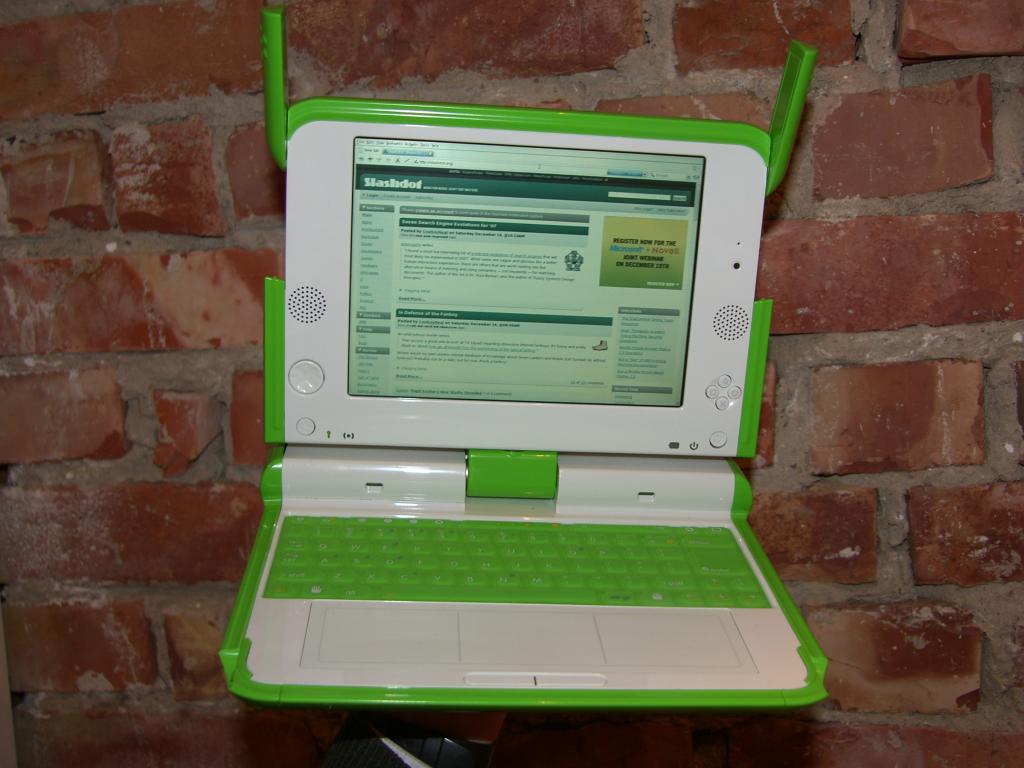
Most important image ;)
http://people.opera.com/howcome/2006/olpc/img/SH1
0 6875-m.JPG Yes, that thing can display slashdot. Just what the third world needs, more geeks! -
Site is slow - here's the textAs A/C - I've plenty of karma.
Opera on the green machine
On Friday, I received a call from Opera's accounting department. That normally means trouble. My warning lights starts flashing.
There's a package for you waiting here. I'm looking for the invoice for customs purposes. Can I open it?
Sure, I said, hoping to quickly return to whatever I was doing.
There's no invoice inside. Strange. The value has been declared to be 100 dollars
100 dollars?
Yes. There's a machine inside the package. It's cute. Green.
GREEN? A GREEN MACHINE? 100 DOLLARS?
Yes.
DON'T MOVE. DON'T LET ANYONE ELSE SEE IT. LOCK THE DOORS. I'LL BE RIGHT THERE!
As the alert reader has figured out by now, the machine inside the box was a prototype of the $100 laptop from the OLPC project. Since then, I've kept the machine close to me, but lots of people around here have seen it. The Opera geeks gathered around it at the Friday night beer bash. Someone suggested testing to see if the machine could keep running in rough environments. For example, would the rubbery keyboard withstand beer? Better not try.
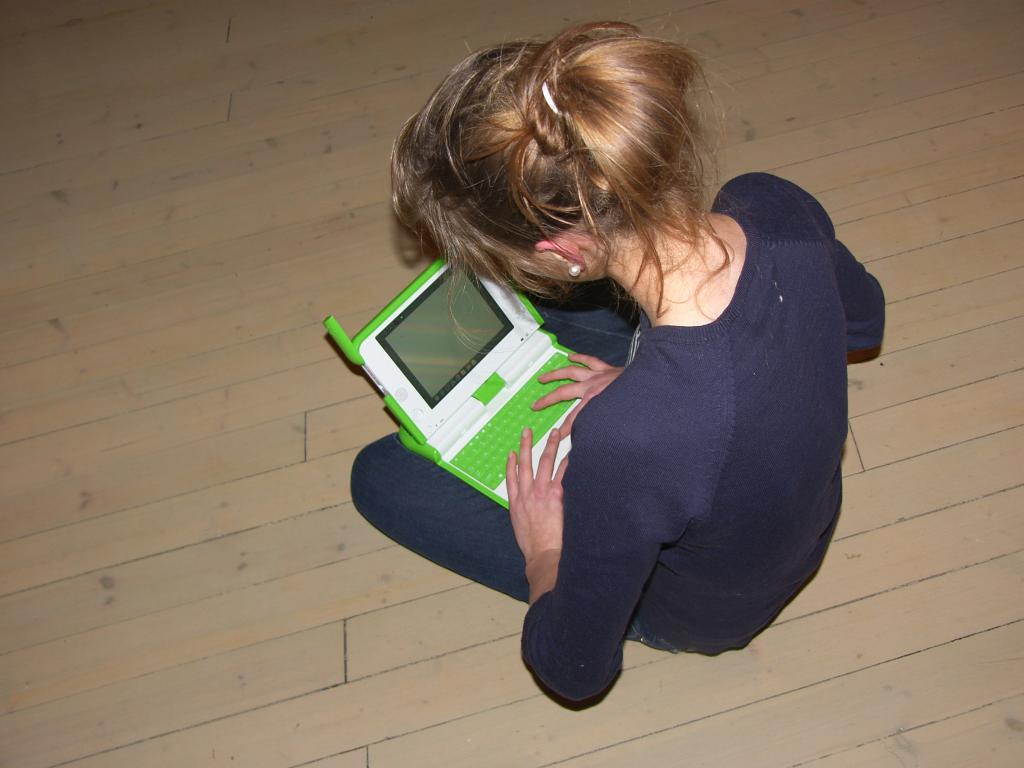
Invariably, the machine gets attention. It attracts people more than any other unit I've seen. (Only Wii comes close.) People want to see it, touch it, and feel it. They want to know why the USB ports are placed where they are (on both sides of the screen), how the SD card can be inserted (the SD port is under the screen), and where the crank is. The crank, meant to generate power to run the machine, was part of an early design. It has been replaced with a foot pedal which is still under construction. However, it seems that people somehow got emotionally attached to the hand crank and want it back.
Once the machine is turned on, a Linux boot sequence appears. Red Hat is one of the sponsors and the machine comes with a tuned version of Fedora. New boot images are published regularly, and the first thing to do was to install the latest build. All of this is documented at the project's Wiki. The next thing to do was to find a shell. The magical key combination is Alt-Shift-F11. However, the keys don't have function numbers and finding F11 requires counting. When you get it right, a shell appears and you can start typing. Typing would have been easier if my hands were smaller. That's a feature, not a bug.
For me, the next thing to do was to install Opera. This is also the reason why the OLPC people are kind enough to send us an early prototype: we want to make sure the machine has a choice of good browsers. The browser is easily the most important application on the machine. In fact, a modern browser is more than an application — it could be the platform onto which OLPC applications are built, like Opera Platform is for mobile phones. OLPC has decided to only include open source software on the machine. I have discussed this issue at length with Nicholas, Walter and Mako. At Opera, we think that what really counts is open standards. It's less important what runs inside the box as long as what crosses the wire is standards-compliant. They argue that, in an education project, students must be allowed to peek inside the box. That's nice, I say, but if Opera makes the difference between a usable or an unusable machine, perhaps you will reconsider?
Getting Opera to run was quite simp
-
Site is slow - here's the textAs A/C - I've plenty of karma.
Opera on the green machine
On Friday, I received a call from Opera's accounting department. That normally means trouble. My warning lights starts flashing.
There's a package for you waiting here. I'm looking for the invoice for customs purposes. Can I open it?
Sure, I said, hoping to quickly return to whatever I was doing.
There's no invoice inside. Strange. The value has been declared to be 100 dollars
100 dollars?
Yes. There's a machine inside the package. It's cute. Green.
GREEN? A GREEN MACHINE? 100 DOLLARS?
Yes.
DON'T MOVE. DON'T LET ANYONE ELSE SEE IT. LOCK THE DOORS. I'LL BE RIGHT THERE!
As the alert reader has figured out by now, the machine inside the box was a prototype of the $100 laptop from the OLPC project. Since then, I've kept the machine close to me, but lots of people around here have seen it. The Opera geeks gathered around it at the Friday night beer bash. Someone suggested testing to see if the machine could keep running in rough environments. For example, would the rubbery keyboard withstand beer? Better not try.
Invariably, the machine gets attention. It attracts people more than any other unit I've seen. (Only Wii comes close.) People want to see it, touch it, and feel it. They want to know why the USB ports are placed where they are (on both sides of the screen), how the SD card can be inserted (the SD port is under the screen), and where the crank is. The crank, meant to generate power to run the machine, was part of an early design. It has been replaced with a foot pedal which is still under construction. However, it seems that people somehow got emotionally attached to the hand crank and want it back.
Once the machine is turned on, a Linux boot sequence appears. Red Hat is one of the sponsors and the machine comes with a tuned version of Fedora. New boot images are published regularly, and the first thing to do was to install the latest build. All of this is documented at the project's Wiki. The next thing to do was to find a shell. The magical key combination is Alt-Shift-F11. However, the keys don't have function numbers and finding F11 requires counting. When you get it right, a shell appears and you can start typing. Typing would have been easier if my hands were smaller. That's a feature, not a bug.
For me, the next thing to do was to install Opera. This is also the reason why the OLPC people are kind enough to send us an early prototype: we want to make sure the machine has a choice of good browsers. The browser is easily the most important application on the machine. In fact, a modern browser is more than an application — it could be the platform onto which OLPC applications are built, like Opera Platform is for mobile phones. OLPC has decided to only include open source software on the machine. I have discussed this issue at length with Nicholas, Walter and Mako. At Opera, we think that what really counts is open standards. It's less important what runs inside the box as long as what crosses the wire is standards-compliant. They argue that, in an education project, students must be allowed to peek inside the box. That's nice, I say, but if Opera makes the difference between a usable or an unusable machine, perhaps you will reconsider?
Getting Opera to run was quite simp
-
Site is slow - here's the textAs A/C - I've plenty of karma.
Opera on the green machine
On Friday, I received a call from Opera's accounting department. That normally means trouble. My warning lights starts flashing.
There's a package for you waiting here. I'm looking for the invoice for customs purposes. Can I open it?
Sure, I said, hoping to quickly return to whatever I was doing.
There's no invoice inside. Strange. The value has been declared to be 100 dollars
100 dollars?
Yes. There's a machine inside the package. It's cute. Green.
GREEN? A GREEN MACHINE? 100 DOLLARS?
Yes.
DON'T MOVE. DON'T LET ANYONE ELSE SEE IT. LOCK THE DOORS. I'LL BE RIGHT THERE!
As the alert reader has figured out by now, the machine inside the box was a prototype of the $100 laptop from the OLPC project. Since then, I've kept the machine close to me, but lots of people around here have seen it. The Opera geeks gathered around it at the Friday night beer bash. Someone suggested testing to see if the machine could keep running in rough environments. For example, would the rubbery keyboard withstand beer? Better not try.
Invariably, the machine gets attention. It attracts people more than any other unit I've seen. (Only Wii comes close.) People want to see it, touch it, and feel it. They want to know why the USB ports are placed where they are (on both sides of the screen), how the SD card can be inserted (the SD port is under the screen), and where the crank is. The crank, meant to generate power to run the machine, was part of an early design. It has been replaced with a foot pedal which is still under construction. However, it seems that people somehow got emotionally attached to the hand crank and want it back.
Once the machine is turned on, a Linux boot sequence appears. Red Hat is one of the sponsors and the machine comes with a tuned version of Fedora. New boot images are published regularly, and the first thing to do was to install the latest build. All of this is documented at the project's Wiki. The next thing to do was to find a shell. The magical key combination is Alt-Shift-F11. However, the keys don't have function numbers and finding F11 requires counting. When you get it right, a shell appears and you can start typing. Typing would have been easier if my hands were smaller. That's a feature, not a bug.
For me, the next thing to do was to install Opera. This is also the reason why the OLPC people are kind enough to send us an early prototype: we want to make sure the machine has a choice of good browsers. The browser is easily the most important application on the machine. In fact, a modern browser is more than an application — it could be the platform onto which OLPC applications are built, like Opera Platform is for mobile phones. OLPC has decided to only include open source software on the machine. I have discussed this issue at length with Nicholas, Walter and Mako. At Opera, we think that what really counts is open standards. It's less important what runs inside the box as long as what crosses the wire is standards-compliant. They argue that, in an education project, students must be allowed to peek inside the box. That's nice, I say, but if Opera makes the difference between a usable or an unusable machine, perhaps you will reconsider?
Getting Opera to run was quite simp
-
Re:Protected blog, full text of post
Who knows if they knew it when designing the website...but checking what kind of browsers people use from the road should probably have been thought of as part of the design process. In any case, here's the mobile device list where Opera can be or (more to the point) is by default installed: http://www.opera.com/products/mobile/products/?gr
o up=manufacturer Also, Nintendo Wii's have Opera installed by default (or will)