Slashdot Mirror
Domain: sourceforge.net
Stories and comments across the archive that link to sourceforge.net.
Comments · 31,462
-
Ettercap
Sounds like a good time to check out Ettercap
Short Description:
Ettercap is a multipurpose sniffer/interceptor/logger for switched LAN.
It supports active and passive dissection of many protocols (even ciphered ones) and includes many feature for network and host analysis. -
Re:No mystery there
However, the majority of open source projects are not at the stage (and may never be) where someone makes the effort to publish documentation.
Those that are mature enough are probably using $EDITOR + DOCBOOK.
Quanta may be a killer app for this in the very near future.
-
Re:My Input
Hmmm... what about this?
Maybe the chargeable ones are better... I haven't tried 'em. But there's at least one free one for Windows.
Garg -
I've said it before and I'll say it again...
I hope the RIAA gets what they want -- the p2p networks free of their music.
Won't it be nice to log onto Kazaa, Gnutella, etc, and find only copyrighted mp3s by artists/owners who give permission to share their work?
Lets let the RIAA bitch and moan about how piracy is killing them -- when we can only share music by small, unknown bands outside of their control, we'll finally see if Brittany & Co. can survive the competition.
And, as always, a manditory iRATE link -- because someone needs to seperate the chaff from the good stuff -- why not let it be you?
-
Re:not that different
To a normal person, there is almost no difference between a diesel motor and a petrol motor. That doesn't mean they are the same thing, in fact, there are some fundamental differences between the two; for example: A petrol motor uses electrical ignition, while a diesel motor doesn't have any ignition at all, since the air is compressed enough to heat it beyond the flash point of diesel. Try putting some diesel in a petrol motor (or visa versa) and see what happens.
Just because somethings may seem superficially similiar to "average Joe" doesn't mean you can glue them together and expect them to work. GNOME and KDE are programmed in different languages (C vs C++, though each has bindings for the other) and use different toolkits - Gtk+ and Qt, respectively - as well as different object models - Bonobo vs KParts. Trying to merge them would achieve nothing, rather than a unified desktop you would get a third desktop standard, most likely partially or mostly incompatible with the existing ones to the same or a similiar extent that they are incompatible with each other.
The future doesn't lie in integration, it lies in interoperability. For example, it is very important that clipboard functionality between KDE and GNOME is harmonised, as this is likely to be one thing that normal users will notice. Also desirable is the adoption of a common sound server, such as JACK and some way to embed Bonobo components in KDE applications and KParts in GNOME applications. -
Re:It's all swell and shit, but
I don't think GIMP ever supported more than 8 bits per channel. There is a version of GIMP called CinePaint that supports up to 32 bits per channel (128 bits RGBA)
-
Re:OSX and Fink
Sorry...heres the lazy link to OSX gimp.
-
Re:new approach
Congratulations. You've just invented Freenet.
-
Re:Sweet
Projects like 'beep' are cool, but I think they're a bit overkill, I just want a dirt-simple winamp2 clone
Methings you're a bit confused here.
Beep basically IS the no-frills, no-overkill port of winamp2-style xmms1 to gtk2, it doesn't have a shitload of new features, and it has released a working player for quite a some time. They're almost at 1.0 point by now. -
Re:Sweet
Projects like 'beep' are cool, but I think they're a bit overkill, I just want a dirt-simple winamp2 clone
Methings you're a bit confused here.
Beep basically IS the no-frills, no-overkill port of winamp2-style xmms1 to gtk2, it doesn't have a shitload of new features, and it has released a working player for quite a some time. They're almost at 1.0 point by now. -
Slashdot is not the place to ask.
First, I'm going to have to agree with a lot of the other posters and say that this is a poor question for Ask Slashdot; it shouldn't have been hard to research on your own.
Second, Slashdot is not the best place to ask. The quality of your responses would be much better from forums that focus on video capture, such as Ars Technica's Audio/Visual forum and doom9.org's DV forum.
Now, back to your question:
With most DV camcorders, you should be able to feed a composite or s-video source into the camcorder, and then you can use whatever DV software you normally use. I've heard that there are a handful of DV camcorder models that require you to record to tape first, but I don't think they're Sony's. Unfortunately, there will be significant latency.
As for some of the other Slashdot responses so far: No, you don't need a Mac, and no, you don't need Premiere. If you're using Windows and want a lightweight DV capturing app, try Scenalyzer Live! (~$40) or WinDV (free).
Heck, on Windows, a DV camcorder should show up as a DirectShow capture device. If you don't care about recompressing the video stream (e.g. for machine vision), then you can use any DirectShow-based TV/capture app. There are a number of open-source ones out there (e.g. Virtual VCR).
-
Re:Windows?
Oh wait... you said Lunix. Never heard of that...
Its an operating system that, due to being targeted at the C64, is doomed to obscurity -
Re:Call me ignorant, but...
Regina, the free implementation of Rexx, works at linux well. And it has documentation superior to anything from IBM
-
Re:Rexx and Kedit
I send mansfield an e-mail every so often requesting a Linux version or ask to open source the code but they just ignore me. Kedit would be a good replacement for vi on linux.
You are looking for The Hessling Editor.
-
Here it is.What is Rexx, anyway?
According to the article,
"REXX is a procedural language that allows programs and algorithms to be written in a clear and structured way."At least one of the implementations has been ported to tons of platforms and, to me, it doesn't seem to be dead.
-
IPCop
IPCop v1.3 w/ Wondershaper or wait a couple more weeks for 1.4 which will have bandwidth shaping built in. It's a linux distro just for firewall/routers, runs on anything from a 486 up.
-
system frameworks
Okay, can somebody please explain why an iChat update requires a reboot?
A lot of iChat is within the
Whatever. It's still not as good (or pretty!) as the nightly builds of Adium.
-
DecentralisationCentral control has a tendency to breakdown, or become corrupted/perverted over time. Centralised control also impairs the ability of the Internet to route around such 'damage'.
A (the only??) long term solution is to have a completely decentralised Internet. A corollary of a decentralised Internet is no IP addresses, no domain names, no coordinating body to make bad decisions.
How to do this? Beats me. It's an active research topic. The closest I have seen is freenet, but it still has a long way (and many answerless problems to be solve) before it can be said to work properly.
Anyone know of any other projects/research which are heading in a similar direction?
-
Gnome / KDE specific things that shouldn't be
Yes, Gnome has IOSlaves. They're called Gnome VFS modules, and, just like KIOSlaves, they're limited to programs written for their desktop environment with no good reason why this is the case.
LUFS works with any program - KDE, Gnome, the shell, or whatever else, and allows you to mount shares via SSH, HTTP, or whatever else.
If I were a Linux distributor I'd actually cut out the desktop-specific IOSlave / VFS crap and use this instead, thereby providing a consistent experience for my users. -
OSX and Fink
Fink is still showing a version 1.XXX
Hopefully they will get it updated to 2 soon.. -
For those looking for some privacy:
Mute has been making some substantial gains. Even if it's not 100% bulletproof, it's still small enough that the RIAA doesn't bother with it when there are bigger fish to fry such as Kazaa and Mp2p.
-
Re:Sweet
Xmms2 is supposed to be GTK2 but I don't know how off aways that is.
beep is pretty much a xmms fork that's Gtk2. Its not as refined as xmms (and there's no flac support) but I use it as my everyday multimedia player. I recommend if you build it, you use the cvs as thats way more up to date than the last release. -
Re:Photoshop!
CinePaint (formerly known as FilmGimp) has been used in quite a few well known films and was forked from Gimp 1.x.
Link to CinePaint -
Re:Problem that doesn't exist big time...
I don't think I explained the program properly. There isn't any token-based authentication. What I should have said is that you don't have to install the program, that is, it doesn't require any dll's or registry entries. You only need to run the executable. Since you only need to run the executable, you can have it on removable media; ie., a floppy, cd, dvd, memory stick, and therefore use it on a computer that you only have user rights. (I was thinking along the lines of your work PC)
PS, there is also a Linux version -
Re:Favorite quote from TFAWell actually he's got a point. A keystroke logger will obviously pick up my slashdot password if I log in on a public terminal. BUT, my NYTimes password is not the same, so the keystroke logger won't be able to get it unless I also log into the NYTimes on the terminal. (Ditto for the bank password).
On the other hand, if I was using a passport single sign on, I only have one thing to steal. Therefore when I use a public terminal I must risk everything associated with that single sign on.
Personally I keep all my passwords on my keychain protected with Password Safe and I don't plug the keychain into untrusted computers. The number of things I want to access from an unsafe terminal is so low that I just memorize the passwords.
-
Re:Windows MediaI agree, Real is horrible if you use their SW. So, use RealAlternative or get Realplayer via the BBC, they seem to have done a deal with Real to package less of the crapware with it.
Or Xine will play Real with the win32 codecs installed. Some info here.
-
Re:Good luck
I think it has more to do with blocking servers and preventing people from using their home DSL account to host a Counterstrike server.
If that's the purpose, then it's horribly ineffective. It's trivial to set up a dynamic DNS solution which is virtually transparent to the outside world. It's not a perfect solution, but for a low-traffic domain, it's satisfactory.In my setup, I have a cron job on my Linux box which runs zoneclient every 10 minutes. Zoneclient queries my router for it's external IP address, and if it has changed since the last check, it tells my DNS provider to update the appropriate A records. 10 minutes is a pretty arbitrary number, it's good enough for my purposes. I could crank the cron job up to run 1/min without any trouble, but that seems like overkill to me, since I usually only wind up getting a new address once or twice a month. Dynamic DNS probably isn't good enough for a serious production server; but it's adequate for a private mail server, especially if you have an external store-and-forward backup server to hold your mail temporarily. For a game server used by you and your friends, this setup works perfectly.
-
Re:Divx only?
Actually, mplayer can be a quick fix solution if mplayer is used directly on a bootable linux distribution designed for playing videos. No need to install linux on your hard drive to play videos.
-
Re:torrennts...
A quote from Azureus' changelog:
Tracker - various performance enhancements such as announce/scrape caching. Tested to 500,000 peers on single torrent
http://azureus.sourceforge.net/changelog_v2.php
Also torrents with thousands of peers and seeds aren't unusual so this won't go down with puny few thousand users downloading at once. -
Re:Speak for yourself
Download and install Azureus. Forward TCP port 6881 to the machine you will be downloading to (you can tell Azureus to listen on a different port if you don't like 6881.)
With my cablemodem, setting the max uploads to 4 and the max upload speed to 16KB per second lets me attain speeds up to 400KB per second.
These are good settings to start with, but you might be able to tweak it to get better speeds depending on your connection. A nice thing about Azureus is when you change your transfer settings they take immediate effect--no applying settings or restarting transfers required.
If you don't forward a TCP port from your firewall it will still work, but you won't be able to connect to anyone else who doesn't have port forwarding on. Unfortunately, this drastically reduces the number of peers your client can download from.
Under the server settings I have my override address set to my external IP address and my bind address set to the IP address of the machine I'm downloading to. Not sure if this is necessary, but it works great for me.
YMMV. -
Re:Divx only?
-
Re:watch the torrent go...
-
My $0.02
As I write this, there are 89 comments viewable at level 3, so it's not real likely that this will "go anywhere" - but here's my experience.
I work as an independent consultant. My largest client has about 130 staff. I do database engineering, software design, and Linux system administration for a total customer base of around a dozen clients.
Every day is unique. Yesterday I developed, tested, and began using a new template system for PHP that is much, much faster than the PHPLib template system I've used for the past 4 years.
Today, I'm going to be refining an application framework for a company I'm partner in, writing a backup system based on rsync, and working on transferring Internet services from a couple of servers to a couple of other newer replacements.
I deal with customers directly, and get to hear the shreiks and exclamations when they realize how much easier I've just made their life...
I spend an average about 1-3 hours on the phone every single day, dealing with clients all over North America, and I put in an average of around 4-7 hours of billable time.
My average workday is generally between 8-12 hours a day. Sometimes, I take the day off with no prior planning. Sometimes I work 18 hours straight.
I love my job, and it loves me! -
Here's text GUI ;-)
-
OSCAR 3.0 Link correction
The link in the story to OSCAR 3.0 should be to http://oscar.sourceforge.net The other site is just the parent organization's info page.
-
I still like The Grinder better
I looked through the article, it doesn't look like much more than a slightly sophisticated wget for loop
The Grinder on the other hand, allows for distributed workers, following the same or different 'scripts' all controlled from a single console. It provides you with a slew of configuration options and all sorts of data at your fingertips. The scripts are jython which is easy to learn and very flexible. If you want to stress test a complex app, especially something interactive, or requiring sessions, check out the grinder, it's a god send. -
Other 3D file system visualizers
Here are some other 3D file system visualizers:
- FSV is modelled after FSN, but runs on Linux. FSV lays out files and directories in 3D, geometrically representing the file system hierarchy to allow visual overview and analysis.
[Screenshot] | [Download] (Linux)
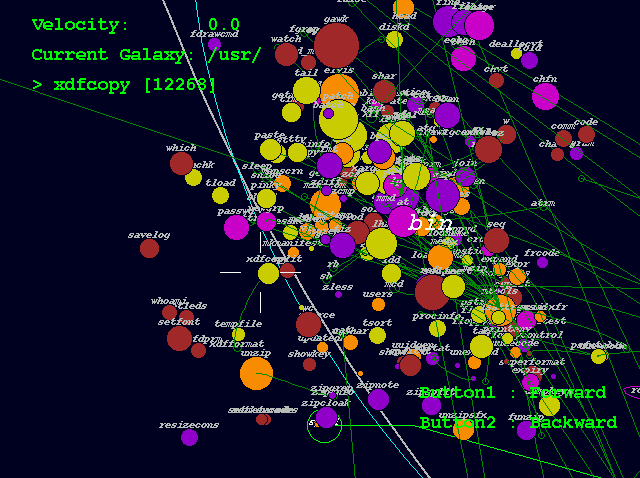
- Xcruiser lets you fly through a filesystem in 3D as if it were interplanetary space. Directories are represented as galaxies, files are represented as planets (whose mass is determined by the file size), and symbolic links are represented as wormholes.
[Screenshot] | [Download] (Linux)
- TDFSB is a 3D filesystem browser for Linux. Take a walk through your filesystem!
[Screenshot] | [Download] (Linux)
- 3Dtop is an extension for Windows that represents desktop icons in 3D, letting you to fly around your desktop. You can create coloured spotlights, background and floor textures, "paintings" (bitmaps), clocks, and "flags" that represent shortcuts.
[Screenshot] | [Download] (Windows)
- ROOMS turns a Windows desktop into a 3D world. You can see the world either through a first person perspective or with a map view, and you can populate the world with sounds, animated images, and 3D icons.
[Screenshot] | [Download] (Windows)
- CubicEye organizes windows into a navigable cube. Cubes can be arranged by thematic or functional subject matter, and can be explored either individually or collectively as part of a more comprehensive structure of multiple cubes representing various areas of interest.
[Screenshot] | [Download] (Windows) -
Other 3D file system visualizers
Here are some other 3D file system visualizers:
- FSV is modelled after FSN, but runs on Linux. FSV lays out files and directories in 3D, geometrically representing the file system hierarchy to allow visual overview and analysis.
[Screenshot] | [Download] (Linux)
- Xcruiser lets you fly through a filesystem in 3D as if it were interplanetary space. Directories are represented as galaxies, files are represented as planets (whose mass is determined by the file size), and symbolic links are represented as wormholes.
[Screenshot] | [Download] (Linux)
- TDFSB is a 3D filesystem browser for Linux. Take a walk through your filesystem!
[Screenshot] | [Download] (Linux)
- 3Dtop is an extension for Windows that represents desktop icons in 3D, letting you to fly around your desktop. You can create coloured spotlights, background and floor textures, "paintings" (bitmaps), clocks, and "flags" that represent shortcuts.
[Screenshot] | [Download] (Windows)
- ROOMS turns a Windows desktop into a 3D world. You can see the world either through a first person perspective or with a map view, and you can populate the world with sounds, animated images, and 3D icons.
[Screenshot] | [Download] (Windows)
- CubicEye organizes windows into a navigable cube. Cubes can be arranged by thematic or functional subject matter, and can be explored either individually or collectively as part of a more comprehensive structure of multiple cubes representing various areas of interest.
[Screenshot] | [Download] (Windows) -
Other 3D file system visualizers
Here are some other 3D file system visualizers:
- FSV is modelled after FSN, but runs on Linux. FSV lays out files and directories in 3D, geometrically representing the file system hierarchy to allow visual overview and analysis.
[Screenshot] | [Download] (Linux)
- Xcruiser lets you fly through a filesystem in 3D as if it were interplanetary space. Directories are represented as galaxies, files are represented as planets (whose mass is determined by the file size), and symbolic links are represented as wormholes.
[Screenshot] | [Download] (Linux)
- TDFSB is a 3D filesystem browser for Linux. Take a walk through your filesystem!
[Screenshot] | [Download] (Linux)
- 3Dtop is an extension for Windows that represents desktop icons in 3D, letting you to fly around your desktop. You can create coloured spotlights, background and floor textures, "paintings" (bitmaps), clocks, and "flags" that represent shortcuts.
[Screenshot] | [Download] (Windows)
- ROOMS turns a Windows desktop into a 3D world. You can see the world either through a first person perspective or with a map view, and you can populate the world with sounds, animated images, and 3D icons.
[Screenshot] | [Download] (Windows)
- CubicEye organizes windows into a navigable cube. Cubes can be arranged by thematic or functional subject matter, and can be explored either individually or collectively as part of a more comprehensive structure of multiple cubes representing various areas of interest.
[Screenshot] | [Download] (Windows) -
Other 3D file system visualizers
Here are some other 3D file system visualizers:
- FSV is modelled after FSN, but runs on Linux. FSV lays out files and directories in 3D, geometrically representing the file system hierarchy to allow visual overview and analysis.
[Screenshot] | [Download] (Linux)
- Xcruiser lets you fly through a filesystem in 3D as if it were interplanetary space. Directories are represented as galaxies, files are represented as planets (whose mass is determined by the file size), and symbolic links are represented as wormholes.
[Screenshot] | [Download] (Linux)
- TDFSB is a 3D filesystem browser for Linux. Take a walk through your filesystem!
[Screenshot] | [Download] (Linux)
- 3Dtop is an extension for Windows that represents desktop icons in 3D, letting you to fly around your desktop. You can create coloured spotlights, background and floor textures, "paintings" (bitmaps), clocks, and "flags" that represent shortcuts.
[Screenshot] | [Download] (Windows)
- ROOMS turns a Windows desktop into a 3D world. You can see the world either through a first person perspective or with a map view, and you can populate the world with sounds, animated images, and 3D icons.
[Screenshot] | [Download] (Windows)
- CubicEye organizes windows into a navigable cube. Cubes can be arranged by thematic or functional subject matter, and can be explored either individually or collectively as part of a more comprehensive structure of multiple cubes representing various areas of interest.
[Screenshot] | [Download] (Windows) -
Re:Killer App- Here are some
Here are some potential "killer apps" for a 3D desktop:
Hydra is a three-dimensional extensible markup language (XML) instance viewer/editor that was developed to aid in standards development efforts. It uses OpenGL to display XML documents as a tree structure that can be manipulated in various ways by the user. Additional information is displayed in the tree using shapes, colors, and varying sizes and positions.
Croquet is a software architecture designed to enable collaboration between users across the Web in a shared 3D space. Croquet is not merely a 3D user interface for visualizing file systems or web sites, but a complete development and delivery platform for doing real collaborative work in a distributed 3D space.
kernel3d produces a 3D animation of Linux source code development. Shapes and different colored lines are used to represent files, function dependencies, variable dependencies, file size modifications, files being moved across directories, and new files (see screenshot). -
Re:Whats worst.....
Yeah, Trolltech's Qt comes to mind. It's GPL on all platforms - except Windows. And it's not even L-GPL, so you can't use it for a closed-source release even if you merely link with their libraries.
You'd realise, if you bothered to google before you post, that the GPL nature of Qt has certain beneficial effects... like, oh, the GPL Windows version becoming possible? -
CUA Text-Mode Editors for Linux
and there really isn't a simple console (text-mode) editor geared for DOS/Windows users available on Linux.
I assume you are looking for an interface with the basic CUA (Windows) keybindings? Unfortunately, AFAIK, full support for CUA seems to be virtually impossible in the generic case of remote terminals (due to ESCaping keycodes and the ancient keyboard limitations kept alive by terminal emulators -- e.g. this is the reason you have to hit ESC twice in mc to register a single ESC), but in the specific case of the Linux Console (which has direct access to hardware), this is possible.
Many editors have CUA bindings, though to varying degrees of success. e.g. Emacs or Jed. Unfortunately, some of the time it feels like a hack and a few might even require manually modifying Linux's keymappings.
Perhaps the closest I've found is SetEdit, which is based on a port of the TurboVision text-mode windowing library, which is very comfortable for me since I used to use the old DOS Borland IDE, which also happens to have an OSS Linux version called Rhide.
I love text-mode and I think a lot could be done to improve it in Linux; particularly, "fixing" the ancient terminal system and providing for modular non-linear behavior. Sometimes I don't want to deal with the 100MB+ required for X (not to mention GNOME & KDE for apps that are dependent upon them), but I'd like a non-linear interface.
Screen is a step in the right direction, though it is not (initially) very user-friendly (not using Windows/CUA keybindings
I don't know why more non-linear text mode applications aren't created. I've found a few that are made as independent ncurses apps, but, ideally, I think they should all use some standard text windowing environment. Recently, I noticed Twin which looks familiar (tvision?), but doesn't seem to be very actively used... and I don't know if it supports CUA keybindings.
Hope this helps. -
CUA Text-Mode Editors for Linux
and there really isn't a simple console (text-mode) editor geared for DOS/Windows users available on Linux.
I assume you are looking for an interface with the basic CUA (Windows) keybindings? Unfortunately, AFAIK, full support for CUA seems to be virtually impossible in the generic case of remote terminals (due to ESCaping keycodes and the ancient keyboard limitations kept alive by terminal emulators -- e.g. this is the reason you have to hit ESC twice in mc to register a single ESC), but in the specific case of the Linux Console (which has direct access to hardware), this is possible.
Many editors have CUA bindings, though to varying degrees of success. e.g. Emacs or Jed. Unfortunately, some of the time it feels like a hack and a few might even require manually modifying Linux's keymappings.
Perhaps the closest I've found is SetEdit, which is based on a port of the TurboVision text-mode windowing library, which is very comfortable for me since I used to use the old DOS Borland IDE, which also happens to have an OSS Linux version called Rhide.
I love text-mode and I think a lot could be done to improve it in Linux; particularly, "fixing" the ancient terminal system and providing for modular non-linear behavior. Sometimes I don't want to deal with the 100MB+ required for X (not to mention GNOME & KDE for apps that are dependent upon them), but I'd like a non-linear interface.
Screen is a step in the right direction, though it is not (initially) very user-friendly (not using Windows/CUA keybindings
I don't know why more non-linear text mode applications aren't created. I've found a few that are made as independent ncurses apps, but, ideally, I think they should all use some standard text windowing environment. Recently, I noticed Twin which looks familiar (tvision?), but doesn't seem to be very actively used... and I don't know if it supports CUA keybindings.
Hope this helps. -
Re:Does this make them...
Not to mention DosBox, which works much better for playing DOS games on any platform.
-
Re:Troll? You must be joking...
I agree that Java could be considered DOA on the browser because no one wants to deal with AWT classes.
However checkout Thinlets , if this ever got widespread adoption I think we would start seeing more and more applets popping up. Being able to define interfaces with using xml allows people to just rip through and create interfaces likity-split, and the speed amazing.
I guess the need for applets isn't as important anymore for rich-client applications due to the ease and success of Java Web Start. -
Re:Good idea, but....
-
Re:good for Sony...
How about k3b?
It burns DVDs and CD-R/RW and has evolved quite a bit since the last time I used it, no weird configurations or root privileges required
in mandrake type as root: urpmi k3b -
Re:No Media Player!
I've got no problems with MediaPlayer per se, I just prefer the old one
Media Player Classic 6.4.8.0
-
Moderation abuse in this article
Please would a moderator kindly up-moderate this comment about FLAC configuration problems which has been wrongly moderated to -1:Off-Topic. FLAC is on-topic in an article about Theora because Theora is meant be able to work with FLAC . FLAC is actually an important part of the Xiph.org project. If you haven't heard much about them, have a look at Ogg and FLAC and please re-moderate the -1 comment so it might get some replies.