Slashdot Mirror
Domain: uni-koeln.de
Stories and comments across the archive that link to uni-koeln.de.
Comments · 34
-
Re:Will we know chemical elements when we see them
Yes, read up on spectral lines. Scientists can detect the unique signatures of all sorts of interesting molecules from vast distances.
-
Re:How can a civilization perish without AGW?
I think the evidence suggests a longer-range climate cycle, rather than a man-made event, at least based on some of the material summarised in wikipedia on the Sahara:
Sahara pump theory with long periods of increased rainfall
Neolithic subpluvial with a wet phase from about 10000 years ago to about 5000 years ago
and then a very specific paper from 1987, for those who like their research in detailed PDFs, describing the evidence (bones, different alluvial deposits etc) for the wet period
-
Fully automatic install
I would say that FAI is worth looking at. You will have full control over which updates are applied.
-
Re:rambling comments from a labtech...
One that includes an image-casting process that allows 100s of computers to be managed (deployed, updated, etc.) from a central console (PXE boot, the works).
Then you might want to take a look at RedHat Satellite or RedHat Spacewalk. Debian has a similar project called FAI - Fully Automated Installer.
I've seen a managed environment of over 1000 servers in RH Satellite done by about 6 people (including developers extending the Satellite default capabilities), impressive. Spacewalk is kind of the next generation of Satellite, but completely free (and thus only community supported). FAI is used for rollout of small and big projects alike, they have an acknowledgement section on their site where you can look around.
-
Re:Ubuntu
- There is,
- Debian has this (dpkg --get-selections and dpkg --set-selections), gentoo has a single worlds file that can be backed up and I'm sure you can do it on red hat/suse etc as well. And FAI for debian is managing cloned installation on my uni with central package/config control, no problems.
- FAI, fully automated install, for debian and others. http://www.informatik.uni-koeln.de/fai/. There are probably others that do the same.
- More hardware makers that write drivers for linux and/or open specs? You expect everyone to reverse engineer all hardware? Of course this is the usual catch-22, but it seems to be getting better slowly. For now, choose hardware with known linux support.
- That's an ongoing work, see Linux Standards Base.
- I don't do accounting, but pester your Windows accounting software providing company to provide a linux version of their software. You can't expect all software for free...
- There is,
-
FAI
3 words. Fully Automatic Install
http://www.informatik.uni-koeln.de/fai/
-P -
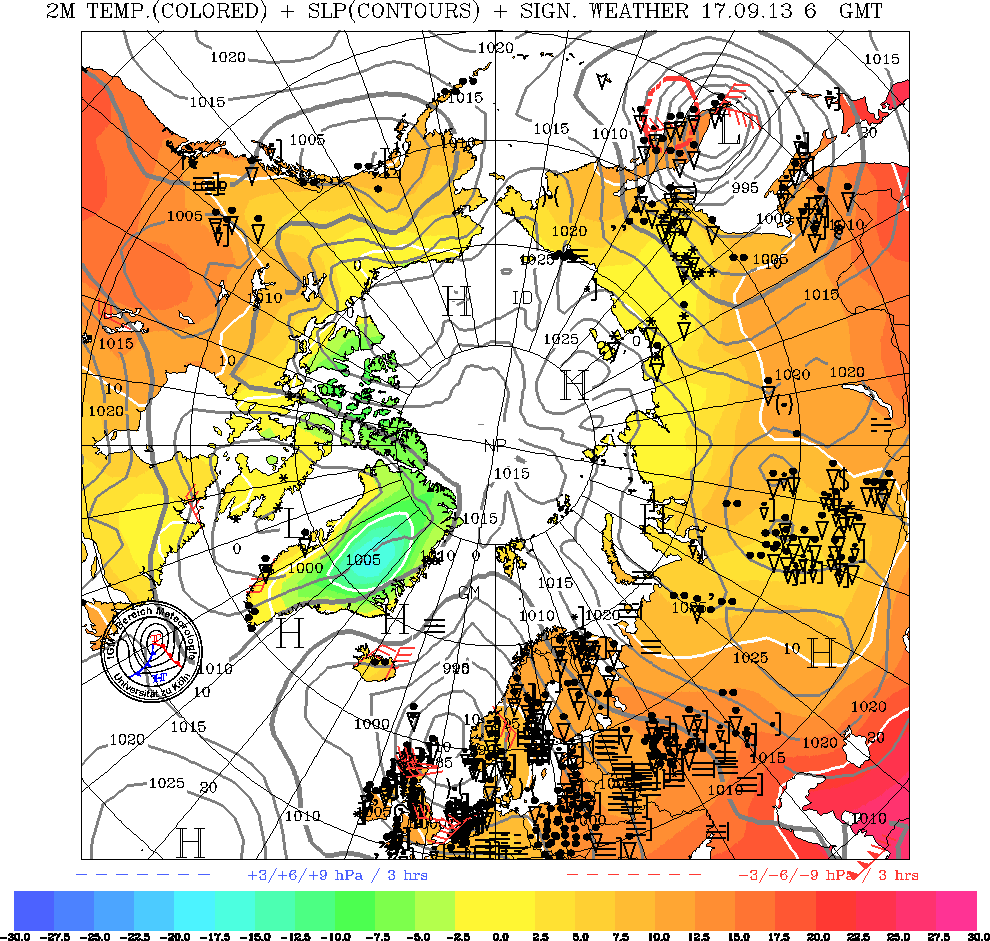
Re:What is your source?I have used the Environment Canada site for my local forecast for years - it's world-class and hey, I pay for it through my taxes. Plus, the weather office is right across town so I know the measurements are locally-accurate. For a time I even screen-scraped the pre-CSS version of the page for my city every 15 minutes to add a META REFRESH tag and a set of the other links I use. I'm a weather nerd, yes. I have a set of pages loaded into tabs in Konqueror and set the ones I can to refresh every half-hour. It occupies a permanent spot on my main virtual desktop and I have a couple old monitors burned with the image of that page from when I had a separate machine for my "weather console".
The forecast for my city:
http://weatheroffice.ec.gc.ca/forecast/city_e.html ?ab-50&unit=m&b_templatePrint=trueAnd radar:
http://gfx.weatheroffice.ec.gc.ca/radar/index_e.ht ml?id=wrnThen continental satellite imagery in the Infrared band:
http://gfx.weatheroffice.ec.gc.ca/data/satellite/g oes_nam_1070_100.jpgAnd the big (polar) picture, a meteorological map:
http://www.uni-koeln.de/math-nat-fak/geomet/meteo/ winfos/arcisoTTPPWW.gifFinally, for the super-big picture (I have this for fun):
http://sohowww.nascom.nasa.gov/data/realtime/realt ime-update.htmlFunny that this item came along - I was just thinking today of resurrecting a page I used to have for weather links that friends used to use to get their weather. There's a weekend project...
-
Re:I am not an embedded devices development manage
> There are several reasons why by itself won't work...
Of course, IANAEDDM, and a slashbox is not enough space to fully explain good development practices.
>
Or run debian in "no questions, defaults only" mode, or FAI or debconf answers, etc.
>
Hrm... Appliance... Toaster... All the same... Toaster configurations... Probably not an insurmountable problem.
> an appliance like this needs to last a long time in the field. One of the problems with Debian is that policy demands they only support the OS until a new stable is declared. This may mean a need to do full upgrades on live or semi-live boxes...
One- have you *seen* Debian's release cycle?
Two- have you ever *run* apt-get update ; apt-get upgrade? Even if the "remote repository" is http://127.0.0.1/debs-copied-locally-for-updates/* .deb and the "firmware update command" is: scp newfirmware.deb device.my.net:/var/local-archive/debs-copied-local ly-for-updates/
'nuff said, no harm intended. Fun discussion and fun to think about.
--Robert -
Re:Ubuntu's There
What? Are you comparing PXE and Kickstart like they're similar in any way? Lemme see if I can help clear up some of your confusion...
PXE is a standardized boot environment for network booting. Your network card and TFTP + DHCP servers work together to set that up. Most modern NICs support PXE as their netboot option. It's OS neutral.
Kickstart is a file format that describes what packages to install, where to get them, and what installer options to use. It's redHat's format, but Ubuntu supports Kickstart files. On Debian-based distros, though, better than that is FAI (Fully Automatic Installer). It not only specifies the installer options, package sources, and packages to install, it lets you pre-configure the packages in lots of cases, and it's easy to build from an installed system. Kickstart lets you run scripts at differnet times, sure, but so does FAI. The RHEL installer builds a kickstart file based on your install settings, but that doesn't packages installed later - you can build an FAI file from a running system's current configuration at any time.
Anyway, to network install a RedHat-based distro, you have to network boot the installer. Same thing as with Ubuntu or any other distro. Both support PXE, and AFAIK that's it for netboot. Unless you count EFI, which I'm sure Ubuntu supports, and I assume FC does since RHEL does. Both also support making bootable images for CDs that have setup options. But, like RPM, RedHat's option is "ok" but still lacking some nice features compared to other systems.
Also interesting to note about Ubuntu is the presence of http://packages.ubuntulinux.org/dapper/misc/initrd -netboot-tools and http://packages.ubuntulinux.org/dapper/misc/kernel -image-netbootable - as long as we're talking about network booting... -
I started with the installer.
I feel that making a clean well preconfigured install is the first step in configuration management. It is also crucial to your backup plan, as it relieves you from making complete system backups. This is not to say that you shouldn't be tracking your installed files via IDS, but the actual files should be already in your repository. I use debian with apt-repositories, but the general idea should be universal. This method lets me make more selective (and smaller) backups.
I started with FAI - http://www.informatik.uni-koeln.de/fai/
which is really good. FAI shares its configuration style with cfengine. You can even use fai and cfengine in tandem with some sort of install/update strategy. I would highly recommend taking a good look at both of these systems.
Both fai and cfengine are written in perl. I can't stand perl, and since I have desperate need of similar tools, I decided to roll my own in python. The project is here -> http://paella.berlios.de/ . This code is still immature and isn't fit to be used for any activites deemed to be critical.
Another method I am using is simple tracking of changes in the
This program really shines a little more if you have multiple similar hosts, because you can manage some config files with a working copy, patch the corresponding files in the relevant host config directories, commit the changes, and then restore/update the config on those hosts. Its really nothing more than a simple tool to keep your
I am currently looking at bcfg2 http://www.mcs.anl.gov/cobalt/bcfg2/, as a replacement for cfengine. I just found out about it recently, but it's also written in python and has limited client-side dependencies.
Probably the most important thing is to be prepared to spend a great deal of time in planning, implementing and testing your system. Every tool I have seen so far makes assumptions, or has requirements, that don't match yours. Mine do too, and there is really no way to get around this.
As a general rule, you will want to look for a system that stores the configuration in a manner that you can deal with it the easiest, regardless of the configuration that it exports. The mechanics of the configuration processing should be implemented by a language that you are comfortable enough with to make the changes necessary for future strategies. -
Technical advise
You could find some techniques to install a Linux system automatically on a lot of computers at http://linuxmafia.com/faq/Debian/kickstart.html
Copy'n'paste:
Kickstart is a Red Hat package that deploys Red Hat to multiple
installation targets with minimal customisation. SystemImager is a
third-party tool that does a better job. http://systemimager.org/
fai (fully automated install) is a Debian-based tool to do likewise.
http://www.informatik.uni-koeln.de/fai/ Like System Imager, it's
suitable for building clusters.
Replicator is similar. http://replicator.sourceforge.net/ It tries to
do some customisation for differences in hard disk sizes, video cards,
etc.
Partition Image is a semi-automated tool for replicating a Linux
partition to multiple targets. http://www.partimage.org/
(Of course, you can also use an LNX-BBC maintenance disk and "dd"
or dump/restore images. Pick your poison.) -
Re:Ubuntu?
FAI can do similar centralized management for any Debian based distribution. Distro wars are pretty much useless, though; you can do whatever is needed with many of them.
What we truly need is someone to tie it all together into an enterprise desktop trial system.
Have the top distros available with centralized management tools; test out a few distributions with a small handful of end users/system admins, and select the one you wish to install company wide. The easiest approach would probably be incremental.
-
Use FAI to deploy Ubuntu
Here is a good description for using FAI to install Ubuntu http://faiwiki.informatik.uni-koeln.de/index.php/
I nstalling_Ubuntu_Linux_with_FAI -
Automated installs, packaging managersAre you covering desktop machines or mostly servers?
Either way, show them how to make a kickstart disk or other ways to automate a custom installation.
Packaging managers are a must. Whether it's dpkg or rpm or yast, show them the different tricks and options. Also, if show how to roll a custom package, but choose one of the simpler ones.
For servers, cover iptables, tcpwrappers, inetd/xinetd, sshd, sudo and apache. System log file analysis is another must.
For desktop machines, cover KDE/Fluxbox/Gnome. Kiosk mode might be useful for some parts of your work environment.
-
Re:This is what a normal person just read above.However, back in the mid 90's (I think) there was a German scientist who managed to send a Mozart symphony several times faster than light (And reproduce the results).
That was Günter Nimtz, but he used tunneling, not quantum entanglement.
His papers on the subject can be found here.
-
Re:Pre-emptive analysis?
There were and are several projects in Germany that develope traffic models in conjunction with models simulating the route choices of people depending on their lifestyles. The problem is that there are people that do not believe that people can be simulated by cellular automata and reject those simulation. But there are also city planers who use those models when planning new structures like stadiums, airports and others that need road connections.
There is a sourceforge project thatsimulates multimodal traffic with cellular automata. Also have a look at this link for more information about traffic simulation. -
Re:OS X Panther Here
Sorry, I'm not trying to be argumentative, I'm just surprised that the clean installs are so much faster -- I had no idea that it made that much difference.
But please, humor me for a minute: will a clean install preserve things like user accounts, network settings, install applications, application settings under
If a clean install wipes all this stuff out, then the 20 minutes saved isn't worth it if I have to go around and reconfigure every machine manually. Of the machines I was setting up, for example, each has one or two local user accounts with local home directories, and gets dozens of network user accounts with network home directories via NIS and NFS. That all has to be reconstructed after a clean install, right? Even if that can be scripted, it can still be a pain in the ass to do that many times.
In any case, I think net-booting or net-installing systems is going to be easier in the long run. We're doing that now with all the Debian machines we've got, and while setting up the infrastructure to support it is a pain in the ass, it does make management of individual machines much easier in the long run. We were using FAI to install Debian over the network in 3-5 minutes, but even that doesn't compare to the benefits of network booting. Now we (I) just have to set up the same thing on the Mac side...
-
Re:Building from source is often just a bloody was
The original poster has obviously never dealt with any number of machines. Building from source (with or without a package/ports system) is great fun for a single user systm. Once you get to multiple multi-user systems, it's just not worth the trouble to optimize one program by 5% when nobody ever cares about speed, just that they deleted an important email they've had sitting on the server for the last 18mo and never bothered reading.
For some things, building from source is unescapable, but with a large number of systems what you want is something that can easily be done itendically to any number of systems with little to no effort.
Right now, at work, we're trying to transition over to a system that uses Debian with FAI to do roll-outs/reimages and Cfengine to handle updates & other administrative changes (all the while, putting config files in CVS). About the only thing that's going to be custom compiled is going to be our kernel and we're only doing that 'cuz we like some custom patches applied to it. -
Re:YaST - great for newbs but...
Supposedly FAI is supperior to all of the above.
Because it seems more vendor neutral. It's not something I've checked, though. It's definitly something to look at, if you need such a thing. -
Re:RedHat kickstart
you are looking for debian's fai package, the Fully Automated Installer.
-
Have you looked at FAI?
I have not used it but I have seen a little bit about Debian's FAI
It looks like it combines a lot of the good ideas from the other suggestions (no CD's required and Kickstart type of install) And, if you combined it with a cache of the packages for apt-get or used the mkdebmirror script, you would also lessen the network load.
-I learned in health class that sig's will stunt yoru growth -
Debian: Fully Automatic Installation
FAI (http://www.informatik.uni-koeln.de/fai/) is a system that can be used to automatically install Debian on any kinds of different machinery (you define the differentiating classes yourself). Documentation on its site states that "Booting and installing from CD-ROM is in progress".
If you happen to need that level of complexity, maybe you can lend in a helping hand for them to finish that CD-ROM version.
Just thought FAI would deserve to be mentioned here along with all the others. It might very well be overly complex for your purposes. -
Debian: Fully Automatic Installation
FAI (http://www.informatik.uni-koeln.de/fai/) is a system that can be used to automatically install Debian on any kinds of different machinery (you define the differentiating classes yourself). Documentation on its site states that "Booting and installing from CD-ROM is in progress".
If you happen to need that level of complexity, maybe you can lend in a helping hand for them to finish that CD-ROM version.
Just thought FAI would deserve to be mentioned here along with all the others. It might very well be overly complex for your purposes. -
Re:Other than installation and patching...
Debian. Cron apt updates installed packages on the schedule you specify. apt-proxy sits between you and the net and keeps a local mirror of the packages requested, so 100 requests = 1 outside request. Plus you can add your own custom packages to it so that your machines are configured properly. Upgrades? Well by hand it's apt-get -y dist-upgrade. The stable branch is just that, and the testing branch is really production ready for most definitions of production.
Seconded, with reservations. We have recently transitioned from a jumbled mess of Windows, Macs, Suns, Redhat to something more manageable; that includes Debian Woody PCs, installed by FAI. No apt-proxy but we already maintain a local mirror.
The process is not complete. We are just beginning to deploy cron-apt. And apart from the difficulty of making some "historical" sysadmins to think in terms of an infrastructure instead of installing machines every which way; and the fact that we can't transition all software away from Windows (CAD tools, electromagnetic simulators...) or rip Office and Macs away from the addicts (no, even MacOSX isn't ready for integration into an infrastructure IMHO); there are still technical gripes:
- Unattended package install and upgrades: it took us a while to silence some undisciplined packages which insist on being installed and asking questions such as "Change anything? [Y/n]" (lilo comes to mind); and a few days ago there was a security update of X, Debconf decided to take charge of
- Keeping systems up-to-date, not only for security but also which packages are installed, configuration files, and so on. Machines installed at different times tend to diverge quickly, as we adjust FAI configuration. The solution we are currently considering is to develop a special package with ad hoc dependencies and post-install scripts. Again, all this doesn't just happen by magic.
- Debian-stable is indeed stable, but is aging rapidly. Not only graphics card support is problematic (we had to make a xserver-xfree86-4.3 package and install it alongside the rest of XFree-4.1), but users (and I) want KDE-3, teTeX-2, Mozilla-1.4... Sure, we can recompile packages from testing or sid (I did that a lot before Woody's release), but then dependencies kick in; and if you're not going to enjoy Debian's polished packaging, you might as well use FreeBSD or even RedHat.
- Finally, you can't beat Solaris for serving NFS, which means we have to keep a Sun Enterprise server to store the users' home directories etc., and handle Samba and e-mail: at least the latter must run on the same machine which serves $HOME (think
All in all, I'd recommend such a move, with Debian indeed, but it definitely isn't as easy as you make it sound...
- Unattended package install and upgrades: it took us a while to silence some undisciplined packages which insist on being installed and asking questions such as "Change anything? [Y/n]" (lilo comes to mind); and a few days ago there was a security update of X, Debconf decided to take charge of
-
Re:What My Organization Did:until Debian has such a custimizable install that allows for easy to reproduce server installs
I'm not an enterprise sysadmin by any means, but this appears to fit the bill.
-
Re:Not full courseware
One you have not mentioned is Ilias. Not pretty (yet), but it works well.
The rotisserie that they describe does not seem to be a collaborative tool, but rather an asynchronous discussion tool.
The obvious comparison is not other [expensive] courseware type systems, but Slashdot. Slashdot's system of open, anonymous graded peer review is probably at least as good a way of refining knowledge in this way. A side by side comparison would be very interesting.
Just think, if they had dropped a million on slashcode - it might even be able to spot dupes! -
Re:Word of the DayIt's not Malayalam (the world's only palindrome-name language). It's Sanskrit. And it means something like "own will" or, loosely, self-determination or the ability to subsist independently. Gandhi used it in the struggle for independence from the British Empire (swaraj (same prefix meaning self)), but I think others had used it with regard to political independence before (e.g., Tilak).
Okay, I looked it up in an online Sanskrit dictionary:
Entry svAtantrya
Meaning n. (fr. %{sva-tantra}) the following one's own will , freedom of the will , independence (%{At} and %{ena} , `" by one's own will , of one's own free choice , voluntarily , freely "') La1t2y. MaitrUp. MBh. &c.Some of the words don't print properly because I don't have a diacritics font installed on this computer, but you get the gist of it. Whoever said that taking Sanskrit in college was impractical?
-
For Debian GNU/Linux there is FAI
See fais homepage or Debians package page for fai
marko -
Re:WHY PAY ?
Have 350 Deb machines to manage? Check out FAI. We're using it with about 20 machines, and it works OK. Initial setup is a pain, but once that's done, it's quite powerful and flexible.
-
Debian Network InstallSuSE has done this for a while and installing one DVD is a lot less "sitting in front of the computer changing disks" of a hassle. Only problem is: what if you have multiple machines, some of which only have a CD drive, with others having both? I know SuSE, at least with Professionl, give you both. Call me a SuSE fanboy, but I am.
Well Debian can easily be installed over a network, so to answer your question, if you have many machines but one dvd drive you just mount the DVD on one machine, setup a ftp or http server, and do a standard network install. Now if you have a many simler machines that require the same config you would want to setup FAI (fully automatic installation) on a master node and use the DVD as the package source.
-
Re:dd is not good enough to erase data
Correct me if I am wrong, but I thought that urandom was only slightly less random than
-
Re:I trust Debian...Uhh hhmmmm... I'll bite
First, my rant about windows (hehe, this is bound to get me some carma
What's your best thing to test and compare operating systems? mine, as stupid as it may sound is to put it on a laptop and check what happens:The more the system is processor hungry, the shorter the battery life and/or the warmer the power suply.
Agree with me or not, this is my opinion. I don't have all the figures, but bear with me.Win 2000 on a tecra 8100 (tosh) is a dooggggggggg. I thought the power supply was going to melt! Deleted it straight away to install win98 on it and it was much better. If you change in your system.ini the shell to read:
shell=PROGMAN.EXE
it's slightly better. YMMV.Compare win to linux (Y-A silly comparison, and still on my laptop) The computer requirements are always low, unless you are hammering the computer with a specific task (running vim won't, starting solving some equation systems will).
Also, be careful what widgetset you're using... like, try pressing on something in xv and keep pressing: mhhh... where did this 100% CPU coming from?Finally, just to get back in the subject of debian
I'm running debian and upgrading the kernel the debian way is as difficult as
make menuconfig
(from somewhere in the debian docs)
make-kpkg clean
fakeroot make-kpkg --revision=custom.1.0 kernel_image
dpkg -i
shutdown -r now
What Debian needs is not a prettier install (or maybe it does) it's an automatic one (... oh wait!)
Also, we-need-a-better-dselect! (oh, wait again!) Actually, looking at the state of aptitude, people may do just fine with dselect and apt-get... that's why it hasn't been upgraded (I guess) in a lonnng time
I think debian is great, linux is cool especially on a laptop and that when it comes to windows, yeah YMMV! If you like it and can do anything you like/want in it, go for it... mmhhh uhhh and talking about 'doze in good terms on
---
-
Re:Cygwin progress?
It seems to be slowing but I think is still progressing. There are a few key areas that still need to be worked on. Lack of a good IPC library, for example, is standing in the way of a working port of PostgreSQL.
Lots of working stuff is ported to Cygwin, though. My favorite site for that stuff is the Cygwin Porting Project.
-
A few links
Here are some I found:
TeraLogic
Hauppauge Computer Works
BTTV page