Slashdot Mirror
Domain: webwizardry.net
Stories and comments across the archive that link to webwizardry.net.
Comments · 25
-
Re:What HTML 5 should have been
Even if the javascript "promised" not to use document.write() somehow, the DOM manipulations may still require redrawing the entire page, in which case the browser may still say "well, we'll wait until the javascript is done, then show the page". There's no solution to this at all, other than to tell people not to use JS to create the whole page.
You can dynamically manipulate the DOM from JavaScript without using document.write at all; for example this page I made generates the entire Search section dynamically. Notice the performance doesn't suck. If you're doing something more complicated than that with your JavaScript, then you're right, there's no solution - the browser can't guess what the results of your JS code is eventually going to be, so it will have to redraw.
All the major browsers are working on improving JS performance. Perhaps that will help.
-
Re:/. - are you listening?
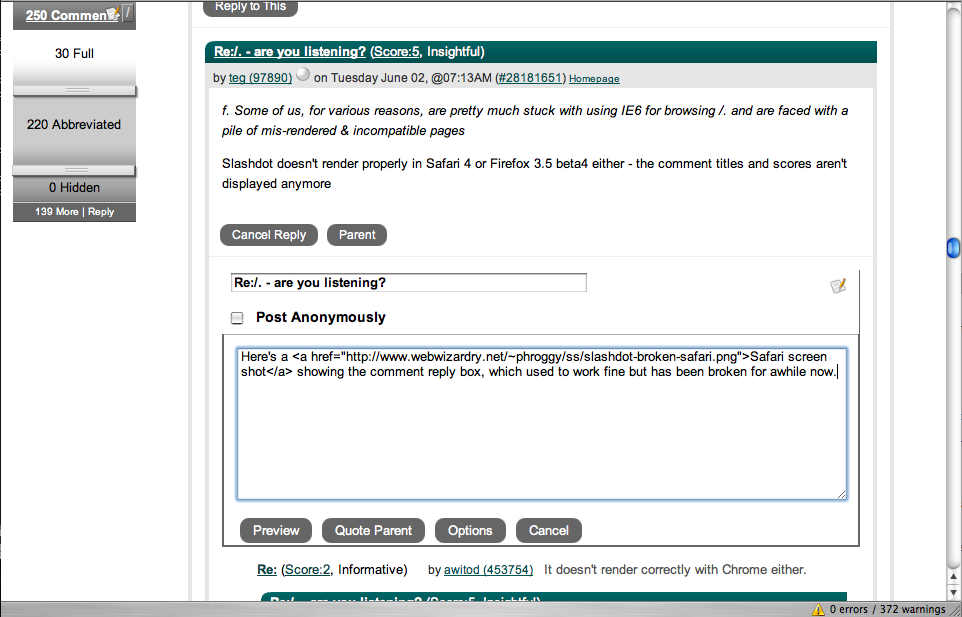
Here's a Safari screen shot showing the comment reply box, which used to work fine but has been broken for awhile now.
-
Re:question and answer seem to work well
...until AI gets smart enough to answer questions intuitively.
It's REALLY HARD to automatically generate random questions that an average human can answer easily, but that current AI technology can't answer just as easily. Of course you can come up with questions yourself, and compile a list of them, but if you've only got a list of a hundred questions, then all the spammer has to do is figure out the answers to your hundred questions, and then he has free reign to do whatever he wants. Or, come up with the answer to ONE of them, and he has free reign to do whatever he wants at 1% the speed he could otherwise, which is still a hell of a lot of spam.
If you don't believe me, you try writing software that will generate random questions. Here's my stab at it, which would barely slow a spammer down.
-
SleepIRCing
I swear to you this really happened a few years ago. The transcript was slightly edited for clarity (a few unrelated comments were removed), but f0rked claimed to have no memory of this.
Note the reference to Ripper, which he thought was funny at the time.
-
Re:How about
I tried something like this. Here was my attempt. It was a pain in the ass to write, and it didn't take me long to realize that it would be trivial for a botnet to break it.
Feel free to write a better one.
-
Re:I don't get it
You could ask things that require human thought, not just parsing. Something like object A is larger than B and C is smaller than A, then put some options like C is the smallest, B is the largest, etc. Then bots would need a new level of thinking and we'll be safe for a few more (tens of?) years.
Here was my attempt. It was a pain in the ass to write, and I quickly realized that it would be trivial to break it if you had access to a botnet.
-
Re:Why
What about a system that takes photos of everyday objects and dynamically layers them into a new picture. The user is then asked to name a random amount of the objects in the photo (for example, name the closest and furthest objects in the photo). This would be random each time like current methods.
Good luck developing computer software that can generate such a composite picture and know the answers to those types of questions.
I dabbled with a text-based CAPTCHA that generates random questions. It's HARD. Generating questions that make sense to a human (the questions aren't self-contradictory and there's only one right answer) is a lot more complicated than it sounds like it should be. I'd be very surprised if you can design a program that generates an image from composite photographs that knows what the closest and furthest objects are.
You'd have much better luck not using photos, but generating a cartoon-like drawing. Imagine a drawing of an apple tree with three apples on it, four on the ground under it, two on a picnic table, and one being held by a monkey. Other similarly-sized and -shaped items (oranges, pears, alarm clocks, baseballs) are scattered around as well. The user is asked to identify something that there are ten of ("apple"), or where there are only two apples ("table"), or what kind of tree is in the picture ("apple"), or how many of what the monkey is holding have not yet fallen ("four").
-
Re:I'll stick with Firefox
Honestly how often do you actually use the home button?
I can't remember the last time I clicked it.
Some of us have useful home pages, but most people don't bother setting their home page to anything more interesting than Google's search page. If all you're going to use as your home page is a Google search, and you can do a Google search from the address bar (or a dedicated search box), why would you bother clicking the Home button before typing your search terms?
There's a huge number of people who have never changed their home page from MSN. They don't understand that you can, don't understand why you would, and don't understand what happened to it if you change it for them. When installing Firefox, I often change the home page to MSN, because I know certain users will switch back to IE if I don't.
-
Re:Mix it up a bit?
Precisely. Anything that requires a human to set up the problem (by taking a photo and identifying what color each person's hair is, which computers are currently incapable of doing) doesn't work.
Here is my experiment in coming up with a text-based CAPTCHA using randomly generated questions. It is VERY difficult to generate questions that actually make sense and are not contradictory... and the a botnet could breeze through my current implementation like it wasn't even there, if anybody bothered to write a parser for it. There's a lot I could do to make it more complex and harder to crack, but it will take a lot of work figuring out how, and I haven't had the time.
-
Re:Defcon 14 had a talk about this
What would you say this sounds like? 2.5" Fujitsu drive.
-
screen shot
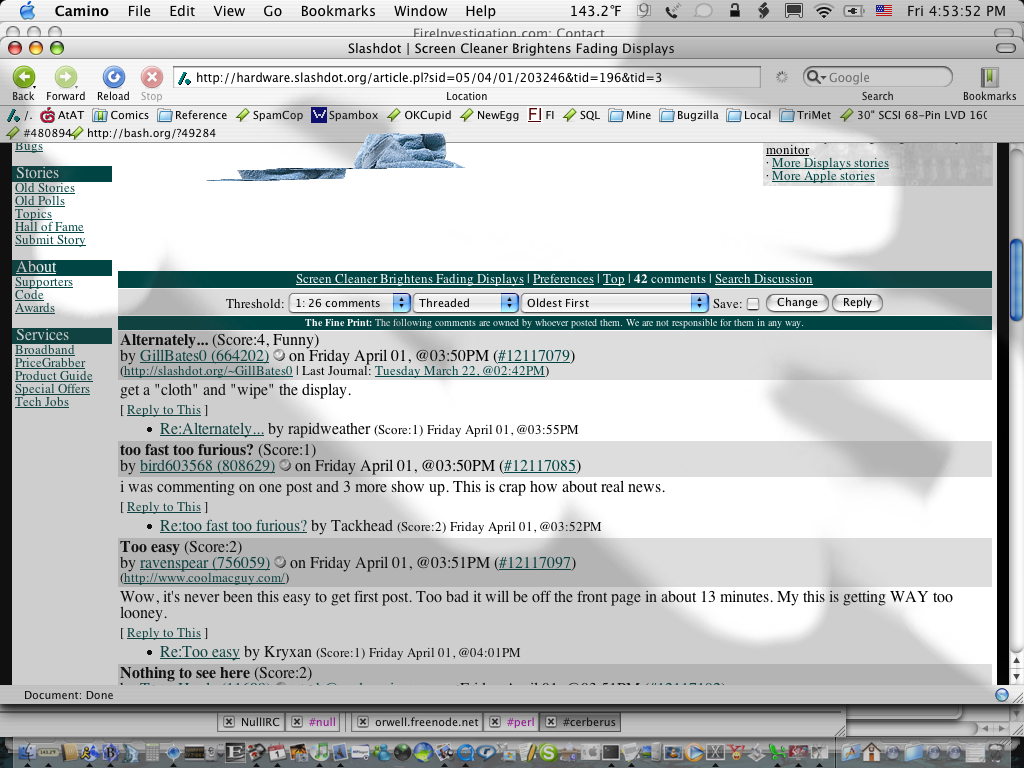
Grab.app wasn't able to properly capture the dustcloth while it was moving, but this should give you some idea of what Screen Cleaner Pro looks like.
-
Re:In other news...
-
Re:BSD licence
-
Mac OS X comparison
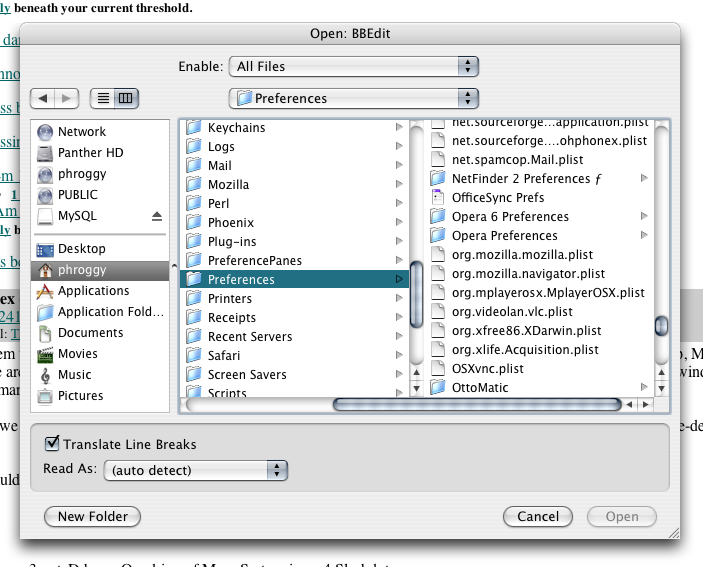
Here is a screen shot from BBEdit (text editor of the gods) on Mac OS X 10.3, for comparison. The list of mounted volumes (top left) wouldn't really apply on Linux I suppose. Columns to navigate are kinda nice (it's a NeXT thing), but we got along without them just fine in Mac OS 9.
-
Re:Stock?
-
Re:Yeah but
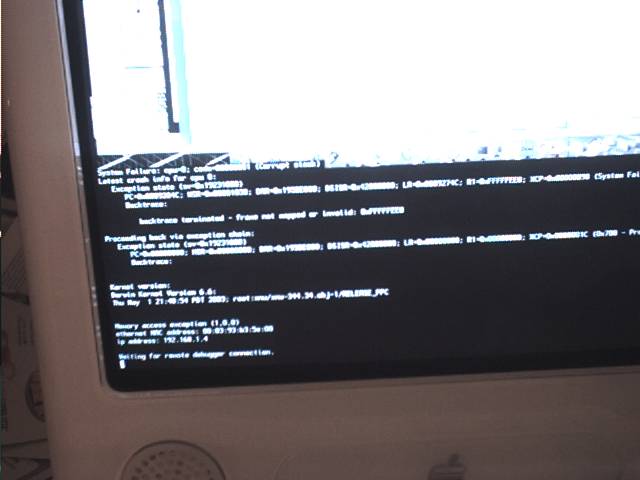
Heh, weird. I get kernel panics pretty often. Had three in one day once, although going a few months without one is just as common. One time I got a pre-10.2-style kernel panic in 10.2.6 - that freaked me out because I had assumed all kernel panics had been completely replaced in 10.2 and that wouldn't ever happen. I took a picture of it.
Pictures here if you don't know what they look like, and technical docs here. -
Re:When BBS's were the "cool thing"
kat@webwizardry.net
spambot prank day -
Re:Goodbye "Not Invented Here" days
No it isn't. Otherwise why are Apple buying up app vendors (I don't recall the name of the product i'm thinking of, some graphics/music program), and scaring all the customers silly because they think Apple will make them Mac only?
You may be thinking of Shake.
Except OS X isn't tinkerable at all. Practically all the code Apple has written is closed source, and the Mac parts of MacOS are generally only capable of doing things one way.
Hogwash. Just because it's closed-source doen't mean it's not tinkerable. Perhaps not to the extent you'd like, but really, how many end users hack the source code of their GUI? OSX has a ways to go, but it's quickly becoming more hackable than OS9 ever was, and if you don't think OS9 was hackable, well, you haven't known many Mac users.
Unlike every Linux and Windows, MacOS is still not capable of being themed by 3rd parties (unless you consider a grey version of the default a "theme").
Hogwash. I'm using a third-party theme right now. It happens to be an imitation of the Platinum theme from Mac OS 9, because that's what I happen to like, but there are others. Not a huge number of themes available, but it's a relatively new OS. They'll come.
And yes, this Platinum theme is a little quirky - it's got a funny little piece of something at the top of the scrollbar, no window borders, and a few other details aren't quite right. And, I've combined it with the Mozilla Classic theme from Mac OS 9, which is even quirkier with the OSX version of Mozilla. I'll probably go back to Modern. Anyway, like I said, give it time. -
VirtualPC inside VirtualPC
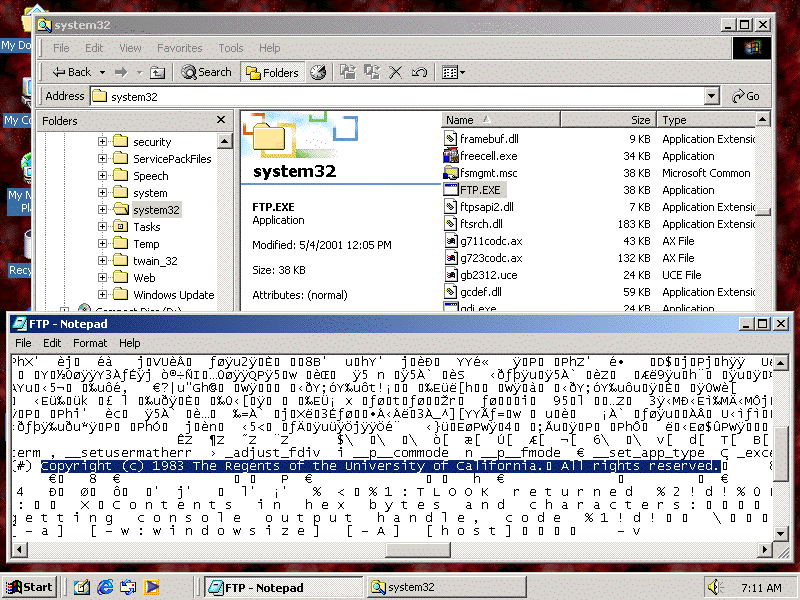
An amusing error I got when trying to run VirtualPC for Windows inside VirtualPC for Mac. Yes, this is real.
-
Re:Here it is, for all you MSIE trolls
There it is! You now have MSIE 5 under linux. The mysterious hidden MS internet experience we all hear of (but no one can quite point to) can now be had under Linux. If it's like that dog for unix, it loads most of DOS with it. Linux to run Mac to run DOS, ahhhh! infinite regresion!
MSIE for Mac really has nothing to do with MSIE for Windows. MSIE for Mac is a decent, well-behaved Mac app, following basic Mac rules. Parts of the rendering engine may be derived from MSIE/Win source code, but most of the app was rewritten from scratch by Microsoft's Macintosh Business Unit in California. It's one of the most standards-compliant browsers available (much moreso than MSIE/Win).
A few differences:
Preferences at the bottom of the Edit menu, nice and organized, not hiding under Tools with convoluted tabs and buttons
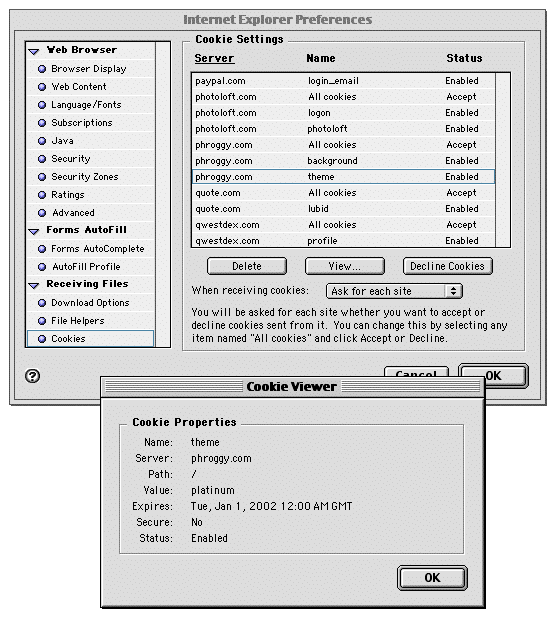
MSIE/Mac lets you manage cookies; you can see all stored cookies in a list, show their values, delete them, etc. You can also choose which domains to accept and deny cookies from.
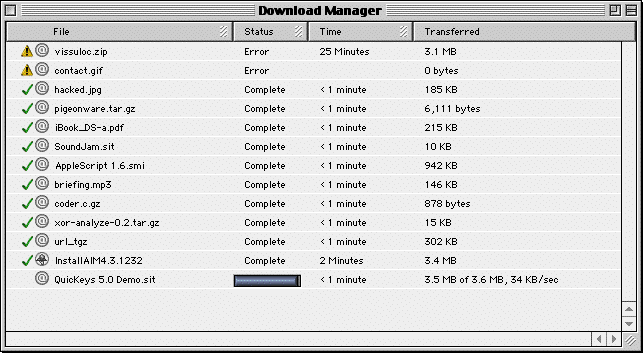
MSIE/Mac has its own Download Manager. All downloads are listed in one window, and they remain listed there (as a history) after downloading.
MSIE/Mac is MUCH prettier than MSIE/Win. It also includes multiple color schemes for the buttons and stuff.
Of course, it supports Internet Config, ColorSync, Location Manager and other Mac OS goodies.
It's easy to install (download and mount a disk image, drag the folder to your hard drive, launch the app) and easy to uninstall (drag the folder to the trash). To be thorough, trash some libraries in the Extensions folder, and the cache and other stuff in Preferences. MSIE/Win thinks it's part of the OS and can't be installed.
Basic features like right-clicking a graphic and selecting "Open Image In New Window" are missing from MSIE/Win. If you do open a graphic, MSIE/Mac shows you the dimensions in the title bar, like Netscape does; MSIE/Win does not. These two features come in very handy when doing Web design.
View Source shows a decent source window, in the same app (instead of launching Notepad), and it marks HTML tags in blue and comments in red. Much more readable.
Oh yeah, and it still works with Netscape plug-ins.
</RANT> -
Re:Here it is, for all you MSIE trolls
There it is! You now have MSIE 5 under linux. The mysterious hidden MS internet experience we all hear of (but no one can quite point to) can now be had under Linux. If it's like that dog for unix, it loads most of DOS with it. Linux to run Mac to run DOS, ahhhh! infinite regresion!
MSIE for Mac really has nothing to do with MSIE for Windows. MSIE for Mac is a decent, well-behaved Mac app, following basic Mac rules. Parts of the rendering engine may be derived from MSIE/Win source code, but most of the app was rewritten from scratch by Microsoft's Macintosh Business Unit in California. It's one of the most standards-compliant browsers available (much moreso than MSIE/Win).
A few differences:
Preferences at the bottom of the Edit menu, nice and organized, not hiding under Tools with convoluted tabs and buttons
MSIE/Mac lets you manage cookies; you can see all stored cookies in a list, show their values, delete them, etc. You can also choose which domains to accept and deny cookies from.
MSIE/Mac has its own Download Manager. All downloads are listed in one window, and they remain listed there (as a history) after downloading.
MSIE/Mac is MUCH prettier than MSIE/Win. It also includes multiple color schemes for the buttons and stuff.
Of course, it supports Internet Config, ColorSync, Location Manager and other Mac OS goodies.
It's easy to install (download and mount a disk image, drag the folder to your hard drive, launch the app) and easy to uninstall (drag the folder to the trash). To be thorough, trash some libraries in the Extensions folder, and the cache and other stuff in Preferences. MSIE/Win thinks it's part of the OS and can't be installed.
Basic features like right-clicking a graphic and selecting "Open Image In New Window" are missing from MSIE/Win. If you do open a graphic, MSIE/Mac shows you the dimensions in the title bar, like Netscape does; MSIE/Win does not. These two features come in very handy when doing Web design.
View Source shows a decent source window, in the same app (instead of launching Notepad), and it marks HTML tags in blue and comments in red. Much more readable.
Oh yeah, and it still works with Netscape plug-ins.
</RANT> -
Web sites
Here's mine.
...stupid lameness filter. -
Re:Dissapointed in Apple
I don't think "let's write something to put on our web site, and get one of the graphics guys to make a pretty logo with an American flag or something, so everyone on Slashdot will see how much we care" was the first thing that came to their mind. I think they were busy watching CNN. I know I was. When I did go to Apple's Web site, I was very impressed that they had replaced their entire front page.
Snapshots from around the Web on 9/14/01 -
Re:Cost
If anyone's interested, a couple months ago I did some price shopping on the Web, and tried to match specs among various laptops. Results are here.
-
Re:Who Cares?Those are pretty annoying, yes. I hang out in Computing Chat when I'm bored sometimes, though, and sometimes run into interesting people. What's nice about Computing Chat is, Windows is very often the minority platform. Mac, Linux and FreeBSD often dominate - especially in any heated argument, since we almost always win, because most Windows users are stupid.
IhateAIM2 has a bunch of screen shots of AIM users' desktops on his home page. An interesting collection, definitely. Also, several of us put together a FAQ for the room, so we had someplace to easily direct the lamers and newbies.
--