 Slashdot Mirror
Surviving Slashdotting with a Small Server
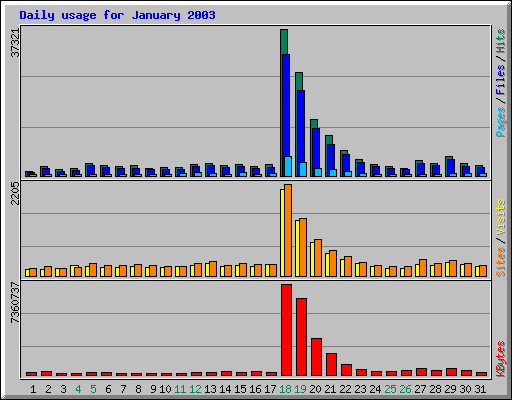
S.BartFarst writes "Our little departmental server has been slashdotted twice in the last year and survived! Implementation of a two-headed redundant hardware scheme using linux virtual server and backup and failover capabilities enhanced by the linux high-availability tools has produced a nifty low-cost solution. Gotta love those little white boxes!
(also having a university-supplied BIG PIPE doesn't hurt). More interesting is the documentation of the apparent exponentially decaying attention span of slashdotters. Anybody else observed similar phenomena?"
I was under the impression that a 20k fiber or 100mbs one that can dynamically shift traffic would be needed.
http://saveie6.com/
hey look at this mpeg about rocks or somthing!!! MUAHAHAHAHAA
It's also interesting that there was a second little bump about a week later. Anyone have any ideas why?
What I want to know is, how fat a pipe do you need to survive a slashdotting, given that your server structure is viable? Will a 10mbps pipe keep the barbarians from trampling the gate?
My server has been slashdotted a few times and I can tell you it's pretty simple to not get overloaded.
The first time I learned my lesson. The server was on a T1 line that was 2/3 full already, and slashdot linked to a page full of large photos. That'll kill your link pretty quickly. Low-budget solution: sign up for a burstable web hosting account somewhere and just put all your large images there.
Later when we got some actual office space for the business, I moved the main server up to a colo facility in fremont. All slahdottable content is hosted there on a fast server with a 100mbps ethernet link. Other oddball services that need their own machine are hosted from the other end of a point-to-point T1 line going directly back to the office from the colo.
So depending on your budget it's really not hard to set up your site to survive a slashdotting. If you don't have a lot of dough to spend but you want to run your own server for configurability/security reasons, just host the static stuff somewhere else. Or if you're serving enough to make it economical, get a colo account with a burstable link.
There's a widespread misconception here that slashdotting is caused by server overload. In reality this is almost never the case. It's caused by insufficient bandwith. This in turn may cause server overload because of too many slow clients being connected, but that is purely a secondary effect.
Also, there was an article on a hardware review site, if I remember correctly, where their approach to handling extreme load was discussed after their site was linked on Slashdot. Unfortunately, I can't find the article right now. Anyone around here who remembers?
I really don't think the Slashdotter attention span is any different (or if different, it is longer) than the average Internet user.
When articles appear on the first page, they get attention, as they scroll to the bottom they get less, as they move to background pages they get significant;y less.
While I often look beyond the front page, I am less likely to delve into the articles or discussions there, since almost everything that needs to be said HAS been said by then.
I've carried on conversations with people regarding Slashdot articles long after the article appears. This can take place in journal entries or via e-mail where the discussion material can be easily kept as opposed to Slashdot comments which ultimately disappear anyway.
The fact that people don't continue to click on the original source URLs doesn't mean anything.
With static web pages, server power is rarely a problem, it's all about the pipes. However, if the pages are dynamically generated, and don't have a lot of caching, then you've got yourself a big problem.
So take, for example, loading a forum page in UltimateBB. AntiOnline handily tells you how many db requests it takes to create a page, and how long it took. This one over here says 61 requests and .3 seconds. Now, the poster claims to be peaking at ~37000 page views/hour, which is 10 hits per second. Now in that .3 seconds, where 61 database connections were established, there were another 3 requests coming in, making it an average of 240 database connections every .3 seconds. That's not an unreasonable number of connections, but what if your DB server can't keep up? What if, due to the load, the queries take 10x longer than usual? At that point, over .3 seconds, you get 240 connections, but only service 24 of them. Over the next .3 seconds, you get another 240 requests, but service only another 24, leaving you with 436 pending. After 30 seconds, you've serviced 2400 requests, but have another 21,600 pending. before too long, you're out of possible TCP ports.
There are ways to keep your servers from crapping out under heavy load. One is to buy a studly, fire-breathing DB server that can process requests faster than your web servers can send them. Another (cheaper) solution would be to pool and marshall your DB requests, being sure to remove requests from the queue when the remote user times out (either by clicking the stop button or running up against a built-in limit of their browser). This way, your site may get slow, but nothing will crash. A final method is to use enough caching on the web server that you pages are, essentially, static. This is, for instance, what Vignette does, which is why all the major news sites use it. This method combines the flexibility of database-backed CMS systems with the database load of static web pages.
So, essentially, there are many ways to let your database-backed web site survive a slashdoting, but embedding a bunch of PHP SQL queries against a locally-running installation of MySQL is not one of them. Unless you have a big honkin' cluster.
Congratulations on surviving /.ing. I have a few questions.
How were LVS and HA configured? With two systems, I can only guess that each was a real server (using the LVS terminology). Also both would be load balancers, with one being selected as active using HA.
How did using HA or LVS help surivive a /.ing? Were there failovers? How many? When? Why? If surviving /.ing consisted of a high rate of failovers then the hardware wasn't up to the job.
What is the "automated backup system?" Are you rsyncing the contents? From each other? From another system? Or does it refer to regular "tar" backups to tape?
Having separate UPSs is overkill, unless the one UPS could not handle the load of both systems.
Is there any dynamic content on the servers? Databases? How was keeping these synchronized handled?
What I'd really like to see would be a graph of a BIG site when we Slashdot them now. It would be very interesting to see the subscribers and what they do before the /.ing public sees it. I couldn't seem to see one on the graph that they posted. Is it just that small? Just wondering.
Comment forecast: Bits of genius surrounded by a sea of mediocrity.
Given the sharp decline, this highlights another way that /. could help alleviate /.ing of sites: stagger the time that a certain client gets informed of a new article.
... 2 hours for full distribution is going to be friendlier to the /.ed sites, but 1 hour total would probably still be effective.
/.
1) RSS feeds would get the update -last- or in some form of randomness.
2) Anonymous (no cookie) clients get the same treatment
3) People logged in get the article sooner but are also stretched out. An example:
a) If your UID is in the 25% of the oldest active users you get the article as soon as it is published (after going out to subscribers, who always get it first, another very mild reason to subscribe especially if you like to FP)
b) If your UID is in the 26-50% of the oldest active users you get the article 30 minutes after it is published.
c) If your UID is in the 51%-75% you get it 1 hour after it is published
d) If your UID is in the last block you get it 90 minutes after publishing.
e) If you are pulling from RSS or anonymously you get it 120 minutes after publishing.
This also gives a little treat to the folks who have been around the longest while not removing the benfit of subscribing.
Another example could work like the above but randomly change which order each block of UIDs will get the article (with RSS and Anon getting it last) if you wanted to not show preferrence to older users.
Increments could be adjusted
The only people this would affect negatively are FPers, SPAMboarders and people who have a cow-orker walk by and go "hey d00d, seen that new article yet?". No one else would probably even be aware of it unless they find it from another site that found it on
It is more productive to voice thoughtful opinions (reply) than to judge (moderate) others.
It simply stops serving images at anything but a really slow rate
What's the point? Either way you're slashdotted.
Besides, I think in the case of server overload (as opposed to network overload), throttling will only exacerbate the problem by increasing the number of slow clients you have to deal with. This is the #1 bottleneck in web servers, the more clients you have, the longer it takes to deal with each one of them. Losts of processes to switch between, long arrays in an out of select(), etc.
Also, when a user doesn't get a page in his browser, what does he do? He clicks the link again and again.... even more connections to handle.
Really the only way to cure an overloaded server is to drop incoming SYNs. Any other measure is just pouring gasoline on the fire.
That's not true at all.
Configure your maximum number of users to something your server/bandwidth can handle, and then send everyone else an error page that says they need to wait. That error page can automatically try to re-load the main page every 1-5 minutes, until it is successful.
Even on your dial-up connection you could survive a slashdotting.
Slashdot gets worse every day... Pipedot: News for nerds, without the corporate slant
Even though only a small percentage of Slashdot readers look at the comments, Slashdot's readership is so huge that the number of people reading the comments is still significant. It's not enough to kill a server, but I posted links to three images, around 80KB each, on my home server a few days ago fairly deep down in the discussion and got 3904 hits from it. It didn't kill my server (Pentium 133MHz, 64MB RAM, Debian 3.0, Apache 1.3.26, 3000/256 cable) and didn't result in any nasty letters from my ISP.
OT: It was interesting reading the logs. There are quite a few Linux users on here (but even more Windows users), and I saw lots of people using Mozilla, Opera, Safari, etc. Compare that to sites aimed at the average user where 95% of visitors are using IE or AOL and don't know that there's anything better out there.
It's an operating system, not a religion.
The guy is talking about bursts of 42,000 hits per day, and talking about it "bringing their system down". Now I could see that on Windows, but not on Linux.
Now, before you think I'm talking out of my posterior orifice, when my company was young and bright, we had a server built on a single 450 MHz Pentium 2, and 256 megs of RAM. It ran both Apache and PostgreSQL. Many of our pages were database-driven, which of course is a much larger load on the server than simple static pages.
That little machine would peak out at around 60,000 hits per day. At that point, it was slow enough to be self-limitting, but there was never any fear (or realization) of having the machine "brought down".
So, still "back in the day", I replaced it with a dual P3/650. That machine would peak out at around 100,000 hits/day (database driven!), without much problem at all. Also, as time goes on, and we develop new apps that make further use of our data, we tend to need more power to generate every page. Even still, we could crank out 40,000 hits per day on what would now be a relatively anemic server.
Now, with 7 front-end web servers and a dedicated DB machine, we crank out 5 million hits/day without problem. And even when our systems have been IMMENSELY overloaded from both legitimate and illegitimate traffic, the systems have still responded, and never once have I ever worried about a machine "going down" from the load. Failed hardware, perhaps, but not the load.
steve
Oh, you're not stuck, you're just unable to let go of the onion rings.
Well, it's 8:20pm EST and I'm not getting through from a T1.
Marxist evolution is just N generations away!
What's the big deal? .... KPLUG.ORG (http://www.kplug.org) survived a slashdotting just fine... and we run on a P75 w/ 48 megs of RAM.
Static pages and a big pipe. What's the mystery?
Probably the best way to survive being slashdotted is to run Windows Server 2003 and make sure you are making use of the kernel mode cache - serving up many thousands of pages per second.
:-)
Even if you are generating pages dynamically (aspx, etc), if they can be served from the kernel cache you will get close to 2x the performance than you would get from serving boring/static pages from Apache on Linux.
my server survived a slashdotting just fine - IIS 5.0 / win2k sp3, 512 ram, single IDE HDD, P3-800mhz, etc.
The problem was, as it is for most people who get slashdotted, I didn't have a big enough pipe. Nothing to be done about that. I can't afford an OC3.
Natural != (nontoxic || beneficial)
I did a little test a while ago when setting up a site (CGI applications in C with MySQL API) on a dual Athlon MP 2000+.
Apache could serve about 1100 static pages/sec (~40 kB file), 1800 404s/sec (~300 bytes or so) and 41 CGI app requests/sec (~4 kB).
No one is expecting 41 hits/sec anytime soon so it's no problem, but I can imagine what would happen if I pasted a link here.