Slashdot Mirror


GNOME Settings Area Getting a Refurbishment (gnome.org)

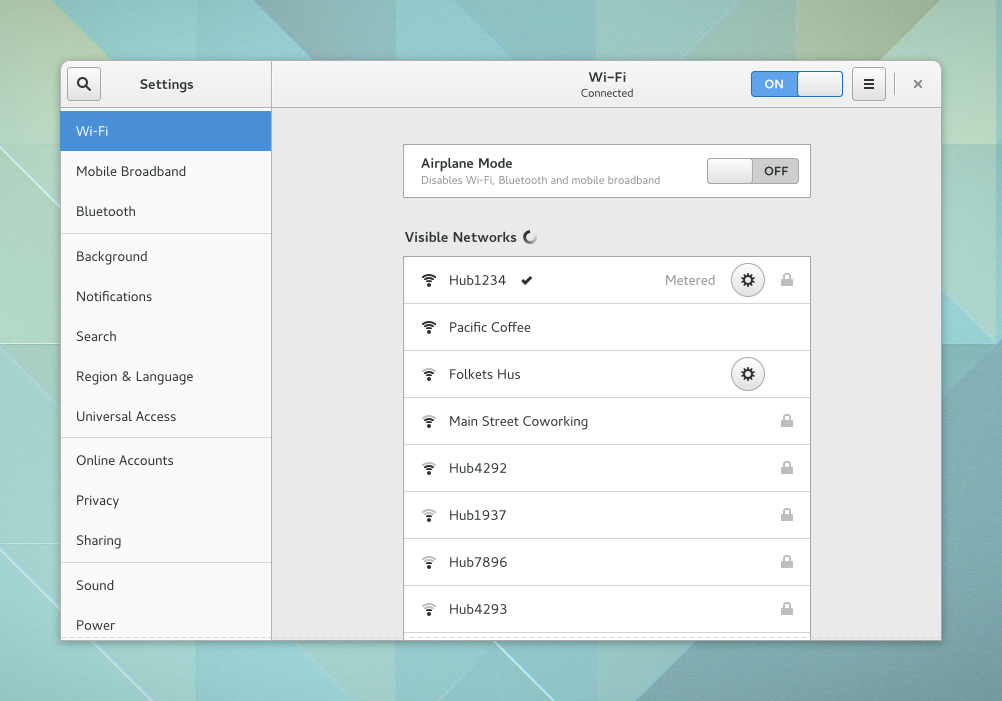
jones_supa writes: Allan Day has written a blog post today about some of the improvements that are being worked on for GNOME's settings area. The new GNOME Settings area is working toward a model that uses a list sidebar for navigation. The window is now resizable, and overall should be a nice upgrade. The new GNOME settings area certainly bears some resemblance to the Windows 10 settings app. Work is also ongoing specifically around improving GNOME's network settings, redesigned sound settings, experiments around improved display support, and various other enhancements to GNOME's settings area. For now, this work is considered experimental and all may not be completed in time for the GNOME 3.20 release in March.
151 comments

  1. For fuck's sake. by Anonymous Coward · · Score: 0, Insightful

    Just buy Windows 10 already. By the time Gnome gets close the same usability, we'll have Windows 13. Stop cutting off your nose to spite your face.

    1. Re: For fuck's sake. by Anonymous Coward · · Score: 0

      GTK has been ruined, so I doubt usability would ever get close

    2. Re:For fuck's sake. by Anonymous Coward · · Score: 0

      Yes, but that just brings a truck load of other problems that we use Linux to avoid in the first place.

      I don't want my computing infrastructure to be dependent on some corporation in a foreign country that I have no control over and only have their own self-interest in mind.

      On the other hand, Gnome has no reason to exist. KDE was there before Gnome and has been working just fine since last century.


    3. Re:For fuck's sake. by Anonymous Coward · · Score: 0

      I don't want my computing infrastructure to be dependent on some corporation in a foreign country that I have no control over and only have their own self-interest in mind.

      No, it's much better to have your computing infrastructure dependent on a handful of volunteers in a foreign country that you have no control over, and only have their own self-interest in mind.

      Get stuffed, freetard.

    4. Re:For fuck's sake. by Lunix+Nutcase · · Score: 2

      Protip: Linux kernel development is highly dependent on corporations.

    5. Re:For fuck's sake. by Anonymous Coward · · Score: 0

      Linux was fine before big corporations jumped on it.

    6. Re:For fuck's sake. by Anonymous Coward · · Score: 0

      I'm 50 years old, I've been using Linux since Slackware 1.0, I like Gome - and the direction it's going, and I would never in a million years consider using Windows 10 for anything other than hosting Steam for my kids.

    7. Re:For fuck's sake. by Anonymous Coward · · Score: 0

      Typical response. Posts valid reason to enjoy Gnome despite problems, cites other projects that do just fine as well and you insult him. Totally makes your point. Does that make you a paytard?

    8. Re:For fuck's sake. by Anonymous Coward · · Score: 0

      i'd rather shove magic beans up my ass!

    9. Re: For fuck's sake. by cfalcon · · Score: 1

      GTK isn't GNOME at all. Why is GTK ruined?

    10. Re: For fuck's sake. by JamesKeane7745 · · Score: 1

      Don't personally think GTK is ruined, but this is a story about Gnome's UI so it follows that GTK may also follow the widget styles, so GTK does seem relevant in this context.

    11. Re: For fuck's sake. by arth1 · · Score: 2

      GTK isn't GNOME at all. Why is GTK ruined?

      I'm not saying I agree or disagree, but here's one take on it from a developer using gtk.

    12. Re: For fuck's sake. by kthreadd · · Score: 2

      GTK widgets don't have any style at all, it's all done via css themes. GTK does ship with the Adwaita theme by default, early versions of gtk3 did not do that and could look very badly if a theme was not installed.

    13. Re: For fuck's sake. by kthreadd · · Score: 1

      Bugs were introduced (probably not on purpose) into GTK2 after GTK3 was released, and those bugs will never be fixed. For example I periodically get bug reports for one of my applications which I’ve traced down to GtkFileChooserButton and it’s a known issue noone will fix in GTK2.

      Gtk2 is still maintained and as far as I know there are no immediate plans to stop that. We had a gtk2 release just last month which fixed eight bugs.

      Huge parts of GTK2 have been deprecated, for example:
      The horizontal/vertical Box layout scheme, which is how you were supposed to do all layouts in GTK2, and despite the deprecation warnings from the compiler there has been no alternative layout mechanism identified in the documentation.
      The entire thread API, which is at the centre of any multi-threaded application. I don’t know if this was replaced with something else or dropped completely.

      The GtkVBox/GtkHBox classes are deprecated but the documentation names several alternatives, the primary one being GtkGrid which combines the functionality of both classes.

      I don't know what he means by the thread API. The GThread API is not going anywhere if that's what he mean.

      The new library is clearly unfinished. For example the GtkAboutDialog is simply broken in the current version of GTK3.

      Not sure what he means here. As far as I know it's used by several applications.

      Serious bugs in GTK3 are ignored. For example I spent a day researching why they broke the scrollbars in GTK3, found that it was probably done accidentally (the new functionality doesn’t fit even their own designs), filed a bug, and five months later – still not so much as an acknowledgement that this is a problem.

      I completely agree that this is a problem. The team developing and maintaining Gtk+ is understaffed and this is an unfortunate side affect.

    14. Re: For fuck's sake. by Fly+Swatter · · Score: 1

      The article looks about right to me. The many deprecations and resulting breakage was annoying. I was losing interest in most of my projects by then, but GTK 3 and the effort needed to move to it spelled the end for me.

    15. Re: For fuck's sake. by unixisc · · Score: 1

      GTK has been ruined, so I doubt usability would ever get close

      Is it GTK, or is it the built in dependence on systemd? Like I gave GNOME 3.x a try on this PC-BSD laptop, and it took ages to load, and was REALLLY slow. Ultimately, I got rid of it.

    16. Re: For fuck's sake. by belgianpainter · · Score: 1

      Thanks for that link - very interesting. I'm curious if the author of that blog has found a suitable replacement. He didn't seem to like any of the alternatives.

    17. Re:For fuck's sake. by Anonymous Coward · · Score: 0

      On the other hand, Gnome has no reason to exist. KDE was there before Gnome and has been working just fine since last century.

      Agreed, but we're in dire straits with KDE. They're removing customization options. KDE5 doesn't even let you modify your locale info (Want your locale but with Y-M-D date format? Too bad!). What do we do?

    18. Re:For fuck's sake. by unixisc · · Score: 1

      Yes, but that just brings a truck load of other problems that we use Linux to avoid in the first place.

      I don't want my computing infrastructure to be dependent on some corporation in a foreign country that I have no control over and only have their own self-interest in mind.

      On the other hand, Gnome has no reason to exist. KDE was there before Gnome and has been working just fine since last century.

      Yeah, I switched to PC-BSD after my introduction to Windows 8. I do have a different work laptop that had Windows 8 and which I've upgraded to Windows 10, but I do love the PC-BSD one and use it for most of my personal work.

      I agree on GNOME. It was initially an interesting concept and project, and had they embraced a few GNUSTEP concepts to incorporate some Object oriented aspects that were so good in NEXTSTEP, it would have had something really great going for it. It could have combined those aspects of GNUSTEP w/ making a DE for the GNU project - not just Linux. Instead of some stupid things like 'Bonobo'. But they failed, while KDE did more or less a good job. In its current form, GNOME has no reason to exist.

    19. Re:For fuck's sake. by unixisc · · Score: 1

      Steam? Doesn't Slackware have any VMs or jails that could run SteamOS?

    20. Re:For fuck's sake. by Anonymous Coward · · Score: 0

      Posts valid reason to enjoy Gnome despite problems, cites other projects that do just fine as well and you insult him.

      It's not a valid reason - unless you happen to think that "anything done by a corporation" is inherently evil, which... well, makes you a retard, I'm sorry to say.

      If he wanted to make a point about open source, he should probably have mentioned the fact that, if you're so inclined, you can build, tinker, and support the thing yourself, on account of having access to the source code. Not make some vapid karma-whoring post about how "self-interested foreigners I don't control" are in charge of the project. His objection, as I demonstrated, is equally true for open source projects - they are run by self-interested foreigners who he doesn't control.

      Totally makes your point.

      The insult doesn't make my point, the first line does. The insult is a natural and logical response to someone who tries to make an ideological point that is equally true of both sides, without taking the moment of self-reflection to realize that his objection amounts to is an insubstantial, "Corporations, AMIRITE?"

      Does that make you a paytard?

      No, all of this makes me a rational being who doesn't uncritically accept every pile of horseshit someone tries to feed me.

    21. Re: For fuck's sake. by innocent_white_lamb · · Score: 1

      I spent several years looking for an alternative to GTK for C programming (not C++) and eventually found the xforms toolkit:

      http://xforms-toolkit.org/

      I do most all of my programming in C and mostly use ncurses but now for the occasions that I really want a gui I use the xforms toolkit.

      It's similar to ncurses in that it hasn't changed significantly in many years, isn't likely to, and isn't going anywhere. It has an old-school X11/CDE look, but that suits me fine since I'm an old-school programmer.

      I can recompile something that I wrote five or ten or twenty years ago with ncurses and it still works fine. Can't say the same for gtk, but now I can do that with xforms. So I'm very happy with xforms.

      If you want long term stability in a gui widget toolkit, there's your answer.

      --
      If you're a zombie and you know it, bite your friend!
    22. Re: For fuck's sake. by Anonymous Coward · · Score: 0

      GTK, despite the name, requires components of Gnome. e.g. gtkhtml area was deliberately made to require Gnome, as a matter of policy, explicitly to foster adoption of Gnome. (See the cschtml fork for that spat.)

  2. These are things you touch once by Anonymous Coward · · Score: 1

    So why masturbate over it?

  3. I think you meant... by Anonymous Coward · · Score: 0

    MATE. Nobody seriously uses GNOME anymore.

    1. Re:I think you meant... by Anonymous Coward · · Score: 0

      Tons of people use Gnome. Even this highly nonscientific study shows it's fairly well used: https://brashear.me/blog/2015/08/24/results-of-the-2015-slash-r-slash-linux-distribution-survey/

      MATE is perfectly fine, but GNOME isn't the hot mess it was when it first came out.

  4. Gnome devs - how to improve Gnome by Viol8 · · Score: 5, Insightful

    Try listening to your users instead of implementing whatever eye candy and widgets you dreamt up after the 5th pint and 2 shots the night before. Just a thought.

    1. Re:Gnome devs - how to improve Gnome by Anonymous Coward · · Score: 0

      If you ask your users what they want, you'll deliver just that, not what they're going to want when the next release is delivered. I seem to recall that there is a (possibly apocryphal) Henry Ford quote "If I gave my customer's what they wanted, I'd be making faster horses."

    2. Re:Gnome devs - how to improve Gnome by ADRA · · Score: 1

      I'd say a good deal of their speaking users shed out of the ecosystem years ago when then adopted the 3 abortion, but that's just my opinion IMHO. I just dropped into the thread for morbid curiosity. But hell, if its better for their existing users then Kudos?

      --
      Bye!
    3. Re:Gnome devs - how to improve Gnome by Anonymous Coward · · Score: 0

      If they really want to improve things, they need to stop removing features and configuration options. Stopping the dumb stuff like client side decorations would also be nice: http://www.omgubuntu.co.uk/wp-content/uploads/2014/01/gedit2.jpg

    4. Re: Gnome devs - how to improve Gnome by Anonymous Coward · · Score: 4, Insightful

      Henry Ford consistently gave his customers something useful, even if they didn't initially know that they wanted it.

      The GNOME 3 devs consistently give their users something terrible, even after the users clearly explain that they hate it and don't want it.

    5. Re:Gnome devs - how to improve Gnome by Pseudonymous+Powers · · Score: 4, Funny

      If you ask your users what they want, you'll deliver just that, not what they're going to want when the next release is delivered.

      Hear, hear! Look, listening to users is a obviously a dead end. Users, selfish as they are, only care about usability. I mean, just imagine: If UI designers listened to users, there would have been no Windows 8! That means there'd be no tiles, active or otherwise. We'd all still be putzing around with old-fashioned desktops like a bunch of putzes. That, in turn, means that users might be able to feasbily use more than one program at a time! Shudder!

      In Gnome, there would be no hot corners and no overview. There would still be minimize and maximize buttons on the windows, and they might even be on the right side of the title bar. For God's sake, the taskbar might still be on the bottom of the screen! Heavens preserve us!

      So count your blessings. If not for the selfless charity of our modern rockstar UX gurus, gracing our poor selves with their genius innovations, we'd be living in a veritable Stone Age where the applications running on on operating system were actually considered more important than the OS itself.

    6. Re:Gnome devs - how to improve Gnome by Anonymous Coward · · Score: 0

      How to improve Gnome: replace it with MATE.

    7. Re: Gnome devs - how to improve Gnome by kthreadd · · Score: 1

      I'm a GNOME user and I want would certainly appreciate the new way that the settings looks. It looks like an improvement over the old icon grid where you had to go back and forth just to get to another settings pane.

    8. Re:Gnome devs - how to improve Gnome by kthreadd · · Score: 2

      CSD has led to many improvements. Just look at the gedit screenshot you linked to. Since we're able to reuse the title area for widgets we don't have to put a big toolbar under it. The editor actually has more space now compared to the old UI without loosing any features.

    9. Re:Gnome devs - how to improve Gnome by Hognoxious · · Score: 1

      without loosing any features

      Spoken like a true Gnoome fanbooy.

      --
      Confucius say, "Find worm in apple - bad. Find half a worm - worse."
    10. Re:Gnome devs - how to improve Gnome by kthreadd · · Score: 1

      Please correct me if I'm wrong but as far as I know gedit's GUI redesign did not remove any features. Some of the visual clutter was removed, like the toolbar buttons from where you could cut, copy and paste. There are of course other ways to access those features.

    11. Re:Gnome devs - how to improve Gnome by Anonymous Coward · · Score: 0

      Really? Titlebar is now so thick, that it could host a titlebar, menubar and toolbars with old design.

    12. Re:Gnome devs - how to improve Gnome by Anonymous Coward · · Score: 0
      You mean the tools for navigation were cunningly hidden so a casual user would not be able to find them?

      In that case, you should be dropped onto President Assad from 29,000 feet!
      --

      There is no woman so beautiful that a wig and some makeup cannot make her look worse!

    13. Re:Gnome devs - how to improve Gnome by Anonymous Coward · · Score: 0

      It sounds Sir, as if you weight exactly the same as a duck. This will not end well.

    14. Re: Gnome devs - how to improve Gnome by Anonymous Coward · · Score: 0

      The GNOME development cycle consists of releasing code, listening to complaints, assuming all complaints are due to users being unable to use the existing code, and as a result lobotomize some options/settings/features, then shove the lobotomy patient out again with some UX glop thrown into the mix. Repeat cycle to the point that the screen savers are apparently too complicated and as such have all their options removed.

      And somewhere in there, someone spends the development money on political agendas.

      It's unfortunate - earlier Gnome was pretty good. But, well, there are reasons MATE and Cinnamon exist, particularly MATE.

    15. Re:Gnome devs - how to improve Gnome by thegarbz · · Score: 1

      Hear, hear! Look, listening to users is a obviously a dead end.

      You joke, but if you were listening to users we'd also not have iPhones or cars. Sometimes you just need to do something and see where it lands.

    16. Re:Gnome devs - how to improve Gnome by Pseudonymous+Powers · · Score: 1

      As for the iPhone: well, who's "we", kemo sabe?

      As for the automobile, in some ways it really is just a better horse. We use the automobile for exactly the same reasons as we used the horse: to move people and things from place to place. Only you don't have to feed the car as much, house it as well, or treat it as carefully. If something breaks on it, you can generally just replace that part, instead of shooting it and burying it in a giant hole. The car's waste products are easier to deal with, at least for the individual user And, of course, cars can be much faster.

      Rest assured, users of horses had complained about all these many relative inconveniences before the advent of the car. They just didn't know what the inconveniences were relative to, so to speak. So, despite Henry Ford's charming, irascible, I-didn't-hire-you-to-think, industrialist-plutocrat attitude, I would contend that the invention of the automobile could indeed be viewed as simply a response to user demand. And that all of the subsequent improvements to the car were also responses to user demands, from "I wish I could start this thing from inside" to "I wish I could listen to the Little Orphan Annie program while driving" to "I wish my butt didn't get so cold in the winter".

      Speaking for myself, I don't remember ever saying anything close to "I wish that some mysterious buttons would appear whenever I moved the mouse pointer to the edge of the screen" or "You know what I hate about Windows? All the windows!" Of all the people I know, only about 2% of them actually claim to be happy about the latest wave of UI design, whereas about 80% complain about them. That, to me, means they need to be turned off, at least by default.

    17. Re:Gnome devs - how to improve Gnome by lsatenstein · · Score: 1

      If you ask your users what they want, you'll deliver just that, not what they're going to want when the next release is delivered.

      Hear, hear! Look, listening to users is a obviously a dead end. Users, selfish as they are, only care about usability. I mean, just imagine: If UI designers listened to users, there would have been no Windows 8! That means there'd be no tiles, active or otherwise. We'd all still be putzing around with old-fashioned desktops like a bunch of putzes. That, in turn, means that users might be able to feasbily use more than one program at a time! Shudder!

      In Gnome, there would be no hot corners and no overview. There would still be minimize and maximize buttons on the windows, and they might even be on the right side of the title bar. For God's sake, the taskbar might still be on the bottom of the screen! Heavens preserve us!

      So count your blessings. If not for the selfless charity of our modern rockstar UX gurus, gracing our poor selves with their genius innovations, we'd be living in a veritable Stone Age where the applications running on on operating system were actually considered more important than the OS itself.

      A problem I have more with Gnome than with KDE or xfce is the emphasis on the left mouse button. You can hardly do anything without clicking that forefinger button. With Gnome it can take 7 mouse clicks to get something done, with the others mentioned, it takes two. Try that for 8 hrs of software development per day.

      And I kid you not, I have carpal tunnel problems with the ligaments/muscles controlling my forefinger. Gnome is a health hazard.

      --
      Leslie Satenstein Montreal Quebec Canada
    18. Re:Gnome devs - how to improve Gnome by thegarbz · · Score: 1

      As for the iPhone: well, who's "we", kemo sabe?

      A large portion of the Slashdot crowd for one. Don't think I've forgotten about the days where people were talking about a concept that would never work due to a lack of buttons, no keyboard, it being too hard to type, too small, too fragile, too %insert other reason here%. There was a time before people would rabidly salivate at the prospect of an iPhone release announcement. Ironically enough a large portion of the people are the same.

      Speaking for myself, I don't remember ever saying anything close to "I wish that some mysterious buttons would appear whenever I moved the mouse pointer to the edge of the screen"

      Oh I agree. Guess what? Windows 10 doesn't do that. That's the entire point of releasing something seeing where it lands and refining the concept. The edge bar no longer reacts to the mouse and is not critical to operation of the system. It does however still react to finger swipe. It's like they came up with a concept, refined what people liked about, and removed the things people hated. Is it finished? Is it a masterpiece? No. But that's the whole point of evolving human interaction. Much like the comments about a touchscreen keypad never working. (Posted this from Android using swipe).

  5. Make like a tree, and get outta here. by Anonymous Coward · · Score: 0

    /i hate manure! //fsck you, use openbox!

  6. Not bad by squiggleslash · · Score: 0

    It looks rather good. As far as being somehow connected to Windows 10, operating systems have had the "list of categories on the left, control panel on the right" format for a very long time. Android's Tablet UI predates Windows 10 by a very long time for example.

    What I wish is that GNOME would focus on the usability of their GNOME Classic system (you need to visit an external website to customize the panels. I'm not kidding about this, I don't mean "You need to go to a website to download add-ons", I mean GNOME's site for providing extensions is also where you change their settings, etc.) I appreciate though that one person working on improving a control panel doesn't mean they'd be working on improving the rest of the desktop if they weren't.

    For now, there's Cinnamon.

    --
    You are not alone. This is not normal. None of this is normal.
    1. Re:Not bad by jopsen · · Score: 1

      The installation of extentions from a website is really smart... Before it used to be copy this zip, there, do that, and hope for the best.

      The time from extension development to deployment of an extension with the end-users is much lower. I think that's generally good.

    2. Re:Not bad by squiggleslash · · Score: 1

      It's fine to download or perhaps install extensions from a website, though a built-in client would alleviate the need to depend upon Firefox with a specific Firefox extension (and that built-in client could also use a local repository rather than require the Internet be used.)

      What's inanely silly is the idea you'd configure your widgets from there. Why not right click and bring up a preferences pane like everyone else? Why do I need to connect to the Internet to modify them in what's essentially a completely different environment with no intuitive connection to the widgets in the first place?

      --
      You are not alone. This is not normal. None of this is normal.
    3. Re:Not bad by Anonymous Coward · · Score: 0

      This is the single biggest improvement for GNOME I can think of, and it's going to happen soon anyways, because it has to it won't function properly for much longer under Firefox either. I'm actually liking the redesign of the settings look.

    4. Re: Not bad by Anonymous Coward · · Score: 0

      What? Why the fuck should we be relying on Firefox to change OS settings. That is just absurd.

  7. Linux Desktops by jetkust · · Score: 1

    Do people really care that much about them? There's really not that much of a difference between them all. There's not even that much of a difference between them and Windows in the first place.

    1. Re:Linux Desktops by QuietLagoon · · Score: 2

      There's not even that much of a difference between them and Windows in the first place.

      The Linux desktops appear to have not yet discovered the concept of remembering the size and position of a window when the window is closed, and using that size and position the next time the window is opened.

      .
      I made a similar comment a few days ago about KDE, and was told the new version does that. Well, yes, but it has to be manually enabled on a per-window basis, instead of with a global setting.

      I could find the global setting to center all windows when they're open, and a bunch of other global settings, but I still cannot find any global setting to have all the windows remember their size and position when they are closed.

    2. Re:Linux Desktops by caseih · · Score: 1

      As with Windows, this is really up to the application. Windows apps store this information on the registry and then request that size and position on next launch. Linux apps often do similar things, at least with size. Many apps are poorly written. But quite a few seen to remember their last size. Position is harder to get right because users may use multiple desktops so fixing the position isn't always the right thing to do.

    3. Re:Linux Desktops by Anonymous Coward · · Score: 0

      Under X11 applications are responsible for remembering their own positions, because they're the only ones that can actually know a window's identity (ie. what it represents). To a window manager a window is a picture with just a couple parameters, eg. the title.

      And a lot of applications do that.

    4. Re:Linux Desktops by QuietLagoon · · Score: 1

      As with Windows, this is really up to the application.

      Yet Windows apps tend to do that by default. All of them that I use do that.

      Many apps are poorly written. But quite a few seen to remember their last size.

      Very few seem to remember their last size, in fact not one of the apps I have used on a GNU/Linux desktop remembered its last size/position. So far, it's just been major apps like Firefox, Thunderbird, the KDE apps, etc. because I get too frustrated with it before I have a chance to move on to the more minor apps I need.

      So instead of the constant stream of excuses and rationalizations why a windows on a GNU/Linux desktop cannot do something as simple as remember its size and position when it is closed, why doesn't the Linux community try to fix the problem?

    5. Re:Linux Desktops by QuietLagoon · · Score: 1

      Under X11 applications are responsible for remembering their own positions,

      When I was trying out the latest version of KDE a couple of days ago, I found the menu on the top left of the window that provided the ability for me to manually set the "remember" options manually on a per application basis.

      .
      That menu looked the same across all the applications, with the same options, leading me to think it was more of a KDE type of function than an application type of function.

      To your point, isn't KDE an application in the eyes of the X11 system that it runs atop>

    6. Re:Linux Desktops by arth1 · · Score: 1

      Under X11 applications are responsible for remembering their own positions, because they're the only ones that can actually know a window's identity (ie. what it represents). To a window manager a window is a picture with just a couple parameters, eg. the title.

      This is not accurate. Under X11, the X server may not always be on the local machine, and the window size and position may vary depending on where the display is. Files like $HOME/.Xdefaults-$hostname are meant to keep track of this, so different settings can take effect depending on where your X server is.
      Of course, gnome has screwed this up big time, and invented their own system that doesn't work well remotely.

    7. Re:Linux Desktops by Anonymous Coward · · Score: 0

      I haven't used KDE in a while but I remember it had the ability to set options based on window attributes, but leaving the heuristics to the user - you can choose whether to remember a window's title or other attributes, because no educated guess will fit every application.

    8. Re:Linux Desktops by arth1 · · Score: 1

      So instead of the constant stream of excuses and rationalizations why a windows on a GNU/Linux desktop cannot do something as simple as remember its size and position when it is closed, why doesn't the Linux community try to fix the problem?

      What should it do if you run multiple copies?
      On multiple displays?
      On multiple servers?

      There's also another good reason why the starting position is calculated, and that is to preserve the ability to use overlapping windows. To mark/paste between windows you need to see at least some of the window, and the window positioning algorithms take this into account.
      The Windows approach where only the front window is active and positions are remembered pretty much breaks any mark/paste functionality, which is a big productivity loss for people who use it effectively.

    9. Re:Linux Desktops by Anne+Thwacks · · Score: 1
      What should it do if you run multiple copies?

      On multiple displays?
      On multiple servers?

      What all reasonably sensible software should do when faced with a choice:
      Ask the user what he wants with a default that is useable in all plausible circumstances.

      There. That was not so hard, was it?

      --
      Sent from my ASR33 using ASCII
    10. Re:Linux Desktops by Anonymous Coward · · Score: 0

      a default that is useable in all plausible circumstances.
      There. That was not so hard, was it?

      That sounds pretty hard, actually.

    11. Re:Linux Desktops by Anonymous Coward · · Score: 0

      constant stream of excuses and rationalizations

      People are giving you reasons and you're being an entitled twat. If some app isn't saving its position, file a bug report for it ffs.

    12. Re:Linux Desktops by dbIII · · Score: 1

      concept of remembering the size and position of a window when the window is closed

      That's one of the features of Enlightenment since about 1997. It probably has a setting for the centre thing as well.

    13. Re:Linux Desktops by dbIII · · Score: 1

      The have, frequently and for many years, just not in gnome where the feature just wasn't on the list of things to do. Take a look at the enlightenment window manager for one example of size/position settings being retained. It's been one of the features in that WM since the late 1990s and probably in a few others as well.

    14. Re:Linux Desktops by dbIII · · Score: 1

      What should it do if you run multiple copies?

      Understand that it's a second window of the same type and act accordingly.
      Think back guys, it's a thing that was handled well before this site even existed! Rob Malda wrote themes and applications for the a window manager that could do it FFS!

  8. SO MUCH WASTED SCREEN SPACE! by Anonymous Coward · · Score: 0

    Holy fuck! When I look at the screenshots I see huge areas of empty grey and white space. Yeah, I know some spacing is visually helpful, but in those screenshots HALF OR MORE of the goddamn window's area is this useless empty space! What the fuck! When I paid damn good money for a 28" monitor it was because I wanted the fucking screen space to be filled with useful information, not wasted with fucking idiotic amounts of totally useless empty space!

    1. Re:SO MUCH WASTED SCREEN SPACE! by Hognoxious · · Score: 1

      Yes, but ... no, but ... FLAT!

      --
      Confucius say, "Find worm in apple - bad. Find half a worm - worse."
    2. Re:SO MUCH WASTED SCREEN SPACE! by arth1 · · Score: 2

      Welcome to the Metro design philosophy:

      - Make all containers as big as possible instead of based on the content.
      - Assume that everybody runs just one app at a time, full screen, with no Z order support.
      - Remove resizing.
      - Convert any text you can to upper case. (The two gentlemen named Davis and daVis should obviously both be called DAVIS.)
      - Use the same visual presentation for bread text and links.
      - Remove borders, especially on clickable elements.
      - Remove rollover hints.
      - Avoid color shades like the plague.

    3. Re:SO MUCH WASTED SCREEN SPACE! by Hognoxious · · Score: 1

      Make all containers as big as possible instead of based on the content and never, ever take the size of the display into account

      FTFY.

      --
      Confucius say, "Find worm in apple - bad. Find half a worm - worse."
    4. Re:SO MUCH WASTED SCREEN SPACE! by unixisc · · Score: 1

      Holy fuck! When I look at the screenshots I see huge areas of empty grey and white space. Yeah, I know some spacing is visually helpful, but in those screenshots HALF OR MORE of the goddamn window's area is this useless empty space! What the fuck! When I paid damn good money for a 28" monitor it was because I wanted the fucking screen space to be filled with useful information, not wasted with fucking idiotic amounts of totally useless empty space!

      I have an 8" Winbook tablet, and it just won't take the version of Windows 10 that allows you to have 4 columns of tiles instead of 3. So I have 1" borders on either side in tablet mode. Ridiculous!!!

      It'd be more useful to use that 28" w/ a Mac. If you have the budget for a 28", you'd probably do best w/ a Mac Pro.

  9. Apple by Anonymous Coward · · Score: 0

    The color scheme and widgets look more IOS-esque rather than Windows 10.
    I'm not an Apple fan by the way.

    1. Re:Apple by dos1 · · Score: 1

      Yes. This screen just looks like iPad's settings screen made uglier.

    2. Re:Apple by Anonymous Coward · · Score: 0

      Yosemite and Gnome look very familiar, especially when using the dark theme on OSX. I think it has to do with usability on touch devices.

  10. The window is now resizable, by QuietLagoon · · Score: 1

    Does it remember the new size and position when you close it?

    1. Re:The window is now resizable, by armanox · · Score: 1

      Isn't that the application's responsibility?

      --
      I'm starting to think GNU is the problem with "GNU/Linux" these days.
    2. Re:The window is now resizable, by cfalcon · · Score: 1

      >>Does it remember the new size and position when you close it?
      > Isn't that the application's responsibility?

      Just like calculating which disk cylinder and head you should write your data to, it sure becomes the application's responsibility if the OS doesn't do it.

    3. Re:The window is now resizable, by dbIII · · Score: 1

      A window managers task is to manage windows. "Isn't that the application's responsibility?" may be the Wayland way of looking at things but X typically has it handled elsewhere.

  11. systemd is a bigger problem than GNOME 3. by Anonymous Coward · · Score: 2, Interesting

    A couple of years ago, I thought it was GNOME 3 and Unity that would be most responsible for retarding the adoption of GNU/Linux on the desktop. Both are, in my opinion, fucking awful to use. I find them extraordinarily inefficient to use, I find that they look like shit, and their UIs are completely unintuitive. No normal user would want to use them, and no poweruser would want to use them either.

    But then systemd was installed on my Debian GNU/Linux desktop, and GNOME 3 because the least of my problems. All of a sudden the desktop doesn't matter when the computer doesn't boot properly. I quickly became more concerned with getting access to the boot lots, which are now stored in some godawful binary format.

    Long story short, I don't use Linux any longer. I now use FreeBSD, which does not come with systemd, and does not come with GNOME 3 by default. I couldn't be happier! My desktop boots properly each and every time, I can still use pretty much all of the good (that is, non-GNOME 3) software that I want to use, and I can use good desktop environments like XFCE and KDE.

    1. Re:systemd is a bigger problem than GNOME 3. by SumDog · · Score: 2

      I don't like SystemD ... at all. But I'm also sick of people crying "My system won't boot .. crashes .. whatever"

      SystemD does actually work. It has a horrible command line interface, bad command line UI, does too much and is probably filled with insane amounts of security bugs.

      It does solve the problem of full process management (sorta...I've had processes that have stayed alive after SystemD killed them...which shouldn't be possible) and it has created a unified init file configuration (upstart did this though too).

      If you're going to hate on SystemD, hate on the real issues with it and not whatever made up bullshit you think you know.

    2. Re:systemd is a bigger problem than GNOME 3. by Anonymous Coward · · Score: 0

      If systemd "does actually work", like you incorrectly claim, then why the hell do we see so many problem reports about it all over the place?

      I see many problem reports here. I see many problem reports at Reddit. I see many problem reports at Hacker News. I see many problem reports at Stack Overflow. I see many problem reports in the mailing lists of the distros that have adopted it. I see many bug reports about it in the bug trackers of the distros that reported it. I see many blog articles describing problems with systemd.

      For something that "does actually work", there sure are a hell of a lot of people encountering serious problems with it!

      You may incorrectly call these complaints "bullshit", but that doesn't change the fact that they're legitimate, valid complaints.

      I don't know about you, but if my computer fails to boot because the init system crashed out, that's a pretty damn serious issue! It renders the computer unusable. That's one of the worst kinds of bugs that an operating system can have. An operating system that doesn't initialize properly is a disaster.

      It'd be one thing if systemd supporters said, "Yes, our init system is severely broken and architecturally flawed, but we'll try to improve it by throwing away our bad ideas and returning to the tried-and-tested UNIX way." There might be some hope for salvation then.

      But all we get instead are people like you who go up to the many victims of systemd, and scream at them to "fuck off and die", rather than listening to their concerns and trying to fix the many problems they've encountered.

    3. Re:systemd is a bigger problem than GNOME 3. by Anonymous Coward · · Score: 0

      SystemD

      It's systemd, halfwit.

    4. Re:systemd is a bigger problem than GNOME 3. by Anonymous Coward · · Score: 0

      So long, you won't be missed.

      I've been using Linux distros exclusively for a decade now and I find GNOME 3 aesthetically pleasing and functional enough. Can't say a lot of nice things about its technical design, I think the whole javascript deal is going to bite them sooner or later, but it works ok so far.

    5. Re:systemd is a bigger problem than GNOME 3. by Anonymous Coward · · Score: 0

      If systemd "does actually work", like you incorrectly claim, then why the hell do we see so many problem reports about it all over the place?

      Initially there was a lot of problems which turned out to be cheap VPSs (primarily OpenVZ based). OpenVZ uses a really old kernel (2.6.32) and it lacked several important features that systemd required. So when people upgraded their guest systems to systemd and rebooted the old kernel was still used. In OpenVZ all guests share the same kernel, so the system was not able to boot because they kernel was way too old. OpenVZ has since backported the required patches but a lot of hosts where really slow at applying them.

    6. Re:systemd is a bigger problem than GNOME 3. by Anonymous Coward · · Score: 0

      how was it possible to install an init system that was incompatible with the kernel?

      why couldn't the init system installer check the kernel capabilities first?

    7. Re:systemd is a bigger problem than GNOME 3. by Anonymous Coward · · Score: 0

      But then systemd was installed on my Debian GNU/Linux desktop. All of a sudden the desktop doesn't matter when the computer doesn't boot properly.

      This makes me think it wasn't a clean install. An in-place upgrade of conflicting stuff is bound to cause headache. Try installing something with the Gnome/GDM stack then making a clean switch to KDE/KDM. Similar headache.

        I quickly became more concerned with getting access to the boot lots, which are now stored in some godawful binary format.

      Did you happen to do a search and find any number of readers for said logs? As long as you can get into runlevel 3, your ethernet will work and you could install whatever (unless somethings really borked).

      Long story short, I don't use Linux any longer.

      Quitter. You didn't even figure out the nature of the problem. I don't like fighting computer issues any more than the next guy, but I at least figure out where the screwup happened so I don't go down that road again. Learn from my mistakes, all that. All you've said is "I couldn't read a boot log in my text editor, so I installed BSD instead". I'm not convinced that the technology you complain about is as bad as you believe.

      As for me, I've run Linux Mint KDE edition, Kubuntu (Up to 15.10), and am now back to Fedora 23 with Gnome 3. Clean install. No issues on my 4 year old Intel laptop. Yes, it's running SystemD and Gnome 3. The hardest problem I had to solve so far was getting flash working for a couple of my favorite sites that still use the blasted technology.

    8. Re:systemd is a bigger problem than GNOME 3. by Anonymous Coward · · Score: 0

      cool story, bro

    9. Re:systemd is a bigger problem than GNOME 3. by dbIII · · Score: 1

      I don't like SystemD ... at all. But I'm also sick of people crying "My system won't boot

      Yet sometimes it does not. Hanging on a wireless mouse USB dongle in one case with me, halting while trying to start ZFS where /home was mounted in dozens of instances for another. Those are both situations where an init system should not just hang there with no chance of user intervention. The previous system had fallbacks and allowed services to be skipped.
      It's beta software pushed as if it was release quality and it just keeps on expanding without addressing core problems first.

    10. Re:systemd is a bigger problem than GNOME 3. by Anonymous Coward · · Score: 0

      It doesn't matter which kernels the guests install, they can install the kernel packages all they want. In OpenVZ all guests share the host's kernel even if a newer kernel is available in the guest.

  12. in other news, Kim Kardashian has a new pet by Anonymous Coward · · Score: 0

    seriously guys, this is as much non-news as that.

  13. All settings moved to gconf-editor. by Anonymous Coward · · Score: 0

    Gnome has no GUI selectable settings, all are accessed using Gconf-editor.

    I wasted my life between 2003-2009 trying to improve GNOME, but the HIG zealots forced me out. Now I use MATE and Windows 10.

    1. Re:All settings moved to gconf-editor. by kthreadd · · Score: 1

      They don't use gconf anymore, they switched to dconf a couple of years ago. And a lot of settings that can't be accessed from the settings app can be accessed from the GNOME tweak tool, which is also a GUI.

    2. Re:All settings moved to gconf-editor. by Blaskowicz · · Score: 2

      Reminds me of Microsoft TweakUI which I swore by 10/15 years ago. Although it was for little things (Autorun, auto-login, make arrows on shortcuts smaller etc.) not a replacement for control panel and start menu editing and so on.

    3. Re:All settings moved to gconf-editor. by halfdan+the+black · · Score: 1

      Why isn't there a normal standard control panel pane to change basic things like color or font, like Windows 3.0 had 20 years ago. Why do I have to find and download a frankly crap application (gnome tweak tool) to change basic settings that every user would want to change.

      Windows and OS X have had this ability since the beginning, how hard could it possibly be to have built in control panel page to change color and font like Windows.

    4. Re: All settings moved to gconf-editor. by bestweasel · · Score: 1

      I assumed dconf is what the settings tool would replace. dconf seems to be the best or only place to find some of the settings removed from the Gnome apps but it's not installed by default (on Fedora 23). I did like the feature when I clicked dconf and it offered to install it. dconf isn't very user friendly though (org -> gnome -> ).

      The trouble with Gnome is that it has left the large desktop behind and is now optimized for small touch screens. The cynic in me has concluded that this is to attract money from smartphone and tablet manufacturers because end users aren't willing to pay for Linux on their desktops.

      I mostly use KDE now but prefer Windows 8.1 overall.

    5. Re:All settings moved to gconf-editor. by kthreadd · · Score: 1

      What makes you think that every user wants to change things like color or font? I don't think most users want has any need to do that. There is a universal access pane in the settings app where users can enable larger fonts and higher contrast for accessibility reasons.

    6. Re:All settings moved to gconf-editor. by Fly+Swatter · · Score: 1

      What makes you think that every user wants to change things like color or font? I don't think most users want has any need to do that. There is a universal access pane in the settings app where users can enable larger fonts and higher contrast for accessibility reasons.

      This thinking is gnome in a nutshell. It's why I stopped using it, and it's why I stopped bothering to develop anything with GTK.

    7. Re:All settings moved to gconf-editor. by halfdan+the+black · · Score: 1

      Its a normal standard thing to change the color, why should we thing everybody like the same color, especially with such a horrid default theme.

      Windows let you change color and font since I think Windows 1.0, which was what 1990? How come Microsoft could figure out how to let users change color 25 years ago, but Gnome still can't figure it out.

      What is so insanely hard about making a standard control panel pane to do this. Why does it have to be a separate download. What kind of impression do you think this gives users? Think about it, somebody's been using Windows for a while, and they try Linux/Gnome, and they want to do something insanely trivial like change a wallpaper or font, and they then need to try to figure out how to use a package manager for that???

      No wonder nobody uses desktop Linux.

      I'm sorry if this sounds like a rant, I'm a Gnome user, have been for a long time, I just want them to provide some basic features that users expect without having to download 3rd party add ons.

    8. Re:All settings moved to gconf-editor. by Anonymous Coward · · Score: 0

      Windows let you change color and font since I think Windows 1.0, which was what 1990? How come Microsoft could figure out how to let users change color 25 years ago, but Gnome still can't figure it out.

      That's why

    9. Re:All settings moved to gconf-editor. by onkelonkel · · Score: 1

      Here it is kids - the obligatory, passive aggressive, bullshit, answer a question with a question, non-answer used everywhere by apologists for bad design.
       
      Q. - How do I change colors and fonts?
      A. - Why would you want to do that?

      --
      None of them can see the clouds; The polished wings don't care.
  14. Stop whining by bobintetley · · Score: 0

    I like GNOME, I think the devs are doing a great job. I'm sure other people like GNOME. If you don't like GNOME then please stop whining about it and use something you do like. It really pisses me off that every time there's a GNOME story, the comments just get filled with off-topic moaning (yes, like this post).

    1. Re: Stop whining by Anonymous Coward · · Score: 0

      Your attitude is why the GNOME project is dying. The overwhelming majority of users hate GNOME 3. Instead of accepting this fact, you just ridicule them and deny that the many real problems they have encountered exist. It's no wonder these users use KDE or some other environment instead of GNOME. Why would they keep using GNOME when GNOME supporters treat them so disrespectfully?

    2. Re: Stop whining by bobintetley · · Score: 1

      Sensitive much? Who did I ridicule and what problems did I deny? Is GNOME dying? How do you know that the overwhelming majority of users hate GNOME3? Do you have any sources to back up those assertions?

      I find it annoying that whenever there's a GNOME story that instead of talking about the story (in this case, a new settings dialog), there are many comments from people stating that they dislike GNOME and what they're using instead. It's irrelevant and nothing to do with the story.

      To stay on-topic, it seems like a step in the right direction - the tree/selection on the left with a panel on the right is much more intuitive than the OSX-style settings panel GNOME currently has where clicking an icon loads the panel in place over the top of the available options. The existing scheme means you need an extra click to return to the available settings.

    3. Re: Stop whining by Anonymous Coward · · Score: 0

      >KDE

      Fuck KDE. It's as awful as GNOME3 *and* looks like garbage too.

      Use MATE. It's a continuation of the best linux desktop ever produced.

    4. Re: Stop whining by Anonymous Coward · · Score: 0

      GNOME is dying? I don't actually know anyone using MATE and the few people I know who use linux use GNOME, KDE, and Cinnamon. I think there was some major problems when GNOME changed, but I think that a lot of those issues have been mostly ironed out, though I dislike some of the changes made and that some functionality has been stripped out.

    5. Re: Stop whining by Anonymous Coward · · Score: 0

      Why don't you just shut up, you arrogant little wanker? Just take a UI design class, and you'll be amazed at how often GNOME is held up, and laughed at, as an excellent example of how not to do. GNOME is all about wanking off the egos of the people involved in its degeneration, and not one shit is given about its users, or usability.

      It's become a 100% ego project driven by ignorant morons sitting in an echo chamber, people who call them self "designers". You know, the kind who walk around in pink bunny slippers with their phallus substitute in the mouth, thinking they are cool. They have turned themselves into an ironic joke, and their precious "product" to crap, a joke, applauded only by themselves and their ignorant syncopates.

    6. Re: Stop whining by arth1 · · Score: 1

      Use MATE. It's a continuation of the best linux desktop ever produced.

      Unless you're a command line user who doesn't speak the lingo and has a hard time remembering all the renames to things like "caja", "engrampa", "pluma", "atril" and so on. In an OS that's based on English commands, it's not very intuitive.

    7. Re:Stop whining by cfalcon · · Score: 1

      > I'm sure other people like GNOME.

      If that was true you would have met one IRL, at least once.

    8. Re: Stop whining by Blaskowicz · · Score: 1

      Not sure what "evince" or "nautilus" are supposed to mean.
      On the command line, try this one : gvfs-open. It's good if you simply want to open a file.

    9. Re: Stop whining by arth1 · · Score: 1

      On the command line, try this one : gvfs-open. It's good if you simply want to open a file.

      Unless you have a non-heterogenous environment and use X remotely.

      ~ $ gvfs-open .bashrc
      GConf Error: Failed to contact configuration server; some possible causes are that you need to enable TCP/IP networking for ORBit, or you have stale NFS locks due to a system crash. See http://projects.gnome.org/gcon... for information. (Details - 1: Failed to get connection to session: /bin/dbus-launch terminated abnormally without any error message)
      ~ $ Gtk-Message: Failed to load module "pk-gtk-module"

    10. Re: Stop whining by Blaskowicz · · Score: 1

      Ah yes, makes sense.
      Like that time I was trying to use xrandr not in the Xorg session context. "Can't open display". Duh.
      To script xrandr, I ended up doing a setuid on xrandr and running the script in Mate's "start up programs" for what would have been Modelines in the xorg.conf, if that feature hadn't been removed.

      I'm not sure what better way I should use to please the session gods and the display gods.

    11. Re: Stop whining by cfalcon · · Score: 1

      Please link me to some solid takedowns of GNOME. GNOME 3 drove me away from Linux for quite awhile, and I'm only back on my main box now because I switched to XFCE. It may not do every single thing, but I know that I won't update one day and lose just like, every single fucking button.

    12. Re: Stop whining by bobintetley · · Score: 1

      Quality argument, guess you have no rebuttal over the usual "I don't use GNOME yet it makes me mad enough to spout irrational bilge". I don't need to take a UI design class as I've designed UIs professionally for 20 years. Design is subjective. Also lookup syncopates, cretin.

  15. Resizable windows by Dragonslicer · · Score: 5, Insightful

    The window is now resizable

    When this is listed as a new feature of an application, I think you might be a couple decades behind the state of the art.

    1. Re:Resizable windows by Anonymous Coward · · Score: 1

      I never realized how ahead of its time the Amiga was. Only a few short years ago modern desktops were near UI feature quality: singly-active, full-screen programs that you can drag down to get to another one. Now all these modern desktops are working on their version of Workbench. I'm so giddy with joy waiting for them to start meditating.

      The computing industry runs in circles. Learn to live with it. Ignore all upgrades and changes until it runs around to the part of the circle you like best. We're slowly starting to move off completely flat UIs. Expect to see them come back in 10-15 years. Flat 3D holograms. That'll be annoying.

    2. Re:Resizable windows by dstyle5 · · Score: 1

      Maybe they will start letting users put things on the desktop again, by 2025.

    3. Re:Resizable windows by kthreadd · · Score: 1

      Desktop icons are still supported in GNOME 3, it's just not enabled by default. There's a setting for it in the tweak tool.

    4. Re:Resizable windows by cfalcon · · Score: 1

      I have several problems with the gnome-tweak-tool.

      First: The devs just randomly delete stuff, and for a long time there was no tweak tool. Now that there is one, it's not really official in the way you'd ideally like. This means that in order to get BASIC functionality, you have to go dick around with the tweak tool. Given that most UIs are functional without a bunch of shenanigans, screw that.

      Second: Settings in the tool aren't guaranteed to be supported forever, and there's no amazing way that I know of to save the settings and walk them with you. This means that when you sit down to work, your first concern is ensuring that gnome tweak tool can run, and then running it to get common sense things.

      Third: Simply being made to feel that you are deviant for wanting Linux behavior on Linux leaves a bad taste in my mouth.

      It's nice that people are able to put back a semblance of functionality, but until all that shit is in the fucking control panel, screw that. Frankly, even after- I just don't even remotely trust the Gnome devs to have my interest in mind, so I'll stick to UIs whose designers seem to be on a human wavelength.

    5. Re:Resizable windows by kthreadd · · Score: 1

      The Gnome Tweak Tool has been around since GNOME 3.0, it's not particularly new.
      Settings are stored in dconf and can easily be exported from there. The tweak tool is just a fancy GUI on top of dconf.
      I guess the problem is that no everyone agrees on what Linux behavior is.

    6. Re:Resizable windows by HiThere · · Score: 1

      IIRC, when I heard of the Gnome3 tweak tool a year or so ago (or whenever Gnome3 started being pushed at people) it was explicitly stated that the tweaks were temporary, and would be disabled in a future version. As I believed them, I stopped seriously considering Gnome3 as a potential desktop. If even resizing windows requires using the tweak tool, this sounds like an excellent decision on my part.

      FWIW, I have no idea what Gnome3 currently looks like. Nobody's been singing its praises, though. And during development I discovered that the screen shots they showed as samples were not adequate reflections of the horrible actuality. Perhaps they've improved things...but nobody's been saying so.

      --

      I think we've pushed this "anyone can grow up to be president" thing too far.
    7. Re:Resizable windows by KGIII · · Score: 1

      FWIW, I recently (past six months to a year) went on a rampage and tried pretty much every DE out there. There aren't a whole lot of us but there are a few of us who really actually like LXDE. Yeah, it's not fancy but it works, it's light, and it can be quite elegant.

      --
      "So long and thanks for all the fish."
  16. Gnome is broke by Anonymous Coward · · Score: 0

    Gnome out of the box is almost always completely inadequate. I installed debian and gnome on a laptop and there were a whole host of things that weren't configurable yet. Previously on Fedora I needed to install gnome tweaks to change settings which should have been available to everyone. The choices made to limit the complexity for users are a joke. If this current gnome group built windows 7 they wouldn't even give you the "Power Options" settings tool. "Advanced" things might be advanced but they must be available for those who want to change them. You shouldn't have to install X, Y, and Z to get the option. A lot of people just assume the functionality isn't available at all since it isn't available by default. Ironically most of these modern UI dolts think things should just work right out of the box.

  17. Plagiarize much? by R.Mo_Robert · · Score: 1

    A large portion of the submitter's words were stolen verbatim from the second link without any attribution.

    --
    R.Mo
    1. Re:Plagiarize much? by dbIII · · Score: 1

      Since the link is included we can probably blame an editor for removing quotes or something instead of assuming the submitter made the mistake alone.

  18. Just use MATE by Blaskowicz · · Score: 2

    I've even tried the latest Cinnamon and I thought there were some paper cuts in there still.
    Although maybe a wider monitor (to get more task bar space) and a recent graphics card or GPU would fix some of that.

    Mate is predictable regardless of your hardware or whether you use a bleeding edge distro or a stable one.
    No hunt for applets : too bad if you wanted an ecosystem of little applet and widget things, but the built-in ones are dependable.

    1. Re:Just use MATE by loufoque · · Score: 1

      There is no reason to use MATE when standard gnome-panel does the same thing but in gtk3 with better compatibility with everything else.

    2. Re:Just use MATE by Anonymous Coward · · Score: 0

      MATE inherited Gnome 2's applets, unlike Gnome 3, which threw them away.

      MATE survives despite a lack of funding due to maintaining Gnome 2, which had a significant amount of resources poured into it before the asshats at the Gnome Foundation decided to throw it all away because they know how you should use a computer while they threw away their foundation money on random, non-project-related stuff.

      Gnome 3 wasn't second system syndrome like the initial releases of Mozilla. Gnome 3 and Starcraft 2 were a different type of second system syndrome, where the name of a popular program is given to a different program and its userbase are forced to switch.

      Also, the name Cadbury Creme Eggs was bought in the US by Hershey, so the ones sold in the US are manufactured by Hershey according to a different recipe, and it is illegal to import Cadbury Creme Eggs from England to the US.

      I never thought I would oppose trademarks. But when trademarks are used to facilitate fraud, instead of prevent it, well, it's like when a printer manufacturer asserts copyright over a driver and tries to make it illegal to fix.

    3. Re:Just use MATE by Anonymous Coward · · Score: 0

      It's sad that you don't realize how wrong you are.

  19. Not a concern for me yet by Blaskowicz · · Score: 1

    I am among some many users still on Ubuntu 14.04 and waiting for 16.04 or on Mint 17, waiting for Mint 18 so not caring much yet.
    In fact, I'm more concerned about whether the driver support will get better and the applications better and less buggy.

  20. Will settings app actually let you change theme? by halfdan+the+black · · Score: 1

    I use Gnome, but I think one of the most truly ludicrous, flipping insane ideas is you need a freaking 3rd party app (gnome tweak tool) to change basic things like color or font.

    Whats even worse is the 3rd party app is some python scripted crap.

    Hello, I mean Windows 3.0 let you change colors and fonts, we're living in 2016 and Gnome still won't let you do what Windows could in 1993?????

    Whats so insanely hard about having a built in control panel pane that lets you configure basic things without having to download a 3rd party app.

  21. Is this PoS still around? by Anonymous Coward · · Score: 0

    How quaint.

  22. Re:Will settings app actually let you change theme by kthreadd · · Score: 1

    Gnome Tweak Tool is not third party. It's an official GNOME app developed as part of GNOME and hosted on the GNOME git service.

  23. Re:Will settings app actually let you change theme by halfdan+the+black · · Score: 1

    Then why is there ZERO integration with it? Why is it some python scripted separate app instead of being a normal control panel pane, like changing color is in every other operating system on the planet. Why do you have do a separate download. Thats it just utterly crazy that it does not have the ability built in to change color.

  24. Re:Will settings app actually let you change theme by Anne+Thwacks · · Score: 1
    Then why is there ZERO integration with it? Why is it some python scripted separate app instead of being a normal control panel pane, like changing color is in every other operating system on the planet. Why do you have do a separate download. Thats it just utterly crazy that it does not have the ability built in to change color.

    Because it was produced by a bunch of deranged Gnomes Or is there some other explanation?

    --
    Sent from my ASR33 using ASCII
  25. Wow. Just wow. by Qbertino · · Score: 1

    They actually had a settings window you *coudln't* resize??? WTF?
    I didn't understand all the hype & rage in the last 15 years but not having your settings window (or *any* window for that matter) resizable is abysmally retarded. I've been making fun of Windows for this shit for the last 20 years. What harebrain had the briliiant idea to make a window in Gnome non-resizable? ... This is really unbelievable.

    I'd be ashamed to brag about a window now being resizable again.

    --
    We suffer more in our imagination than in reality. - Seneca
    1. Re:Wow. Just wow. by epyT-R · · Score: 1

      Even in windows it's gotten worse. Look at the control panel in win2k, then xp, then vista, then 8, then 10 (the new 'settings' one).. Each refresh takes more white space while offering less functionality. This is an industry wide problem that gnome has embraced wholeheartedly.

    2. Re:Wow. Just wow. by dbIII · · Score: 1

      but not having your settings window (or *any* window for that matter) resizable is abysmally retarded

      I had to buy a pile of new monitors after an inhouse developer made the same stupid newbie mistake. It's the "everyone's setup must be identical to mine" idiocy that also gave us so many MS Windows applications that would only run as Admin.

  26. NO! Are you MAD!? by johannesg · · Score: 2

    Cathegorically, *no*. X11 forbids the application from having any say over where its windows appear. At best it can give a hint. The Window manager is totally free to ignore this hint.

    I know this, because I was tasked with implementing an application on Linux once that had a user requirement that the windows should come up where the user last left them. I couldn't figure out which arcane combination of window hints and X11 calls made a window appear at those coordinates, so I asked on the internet - and had a ton of drek deposited on me for not respecting the One Unix Way, the True Unix Philosophy, and My Users' Right To Choice. Of course they had made their choice, and they wanted the windows to appear where they last left them, which the window manager did not do, but that was hardly important.

    So there's your answer, as provided by the veritable gods of UNIX. It is not the application's responsibility, it is entirely up to the window manager.

    1. Re:NO! Are you MAD!? by whoever57 · · Score: 1

      Cathegorically, *no*. X11 forbids the application from having any say over where its windows appear. At best it can give a hint. The Window manager is totally free to ignore this hint

      From the QT documentation:

      Furthermore, a toolkit cannot simply place windows on the screen. All Qt can do is to send certain hints to the window manager. The window manager, a separate process, may either obey, ignore or misunderstand them. Due to the partially unclear Inter-Client Communication Conventions Manual (ICCCM), window placement is handled quite differently in existing window managers.

      X11 provides no standard or easy way to get the frame geometry once the window is decorated. Qt solves this problem with nifty heuristics and clever code that works on a wide range of window managers that exist today. Don't be surprised if you find one where QWidget::frameGeometry() returns wrong results though.

      --
      The real "Libtards" are the Libertarians!
  27. Automated Slashdotter Comment by Anonymous Coward · · Score: 0

    ARG! $thing is new, and therefore bad!
    My edge case is not taken into account, therefore $company is not listening to its users!
    If only it were done my way, then everyone would be happy. I won't actually take it upon myself to build anything though, lest I be shown wrong.

  28. I like some Gnome programs, but not Gnome Shell... by Parker+Lewis · · Score: 1

    ... and for this reason, while some users left Ubuntu due Unity, I started to use default Ubuntu exactly because they've replaced with Unity (previously, used Kubuntu).

  29. Automated Automated Slashdotter Comment Criticizer by epyT-R · · Score: 1

    ARG! slashdot users criticize specific aspects of yet another change that $VENDOR insists is an improvement.
    Slashdot $USER has triggered me by not taking the feelings of mouthbreathing idiots into account, despite the fact there are plenty of simpleton alternatives for them.
    If only more useful features were stripped out for lots of wizards that force workflow unnecessarily, and sensible layouts replaced with oversized widgets that waste screen real estate, then the bottom denominator would be happy. They're all that matters, after all. Professionals and enthusiasts are just whiny spectrum disorders who should be shunned from society anyway. I will always submit to whatever $VENDOR throws in my face as an improvement because newer is always better.

  30. Oh great by JustAnotherOldGuy · · Score: 1

    "GNOME Settings Area Getting a Refurbishment", also known as, "What Can We Fuck Up Today?"

    They'll 'improve' it until it's so ruined that totally unusable, and then they'll slap a "Done" sticker on it.

    --
    Just cruising through this digital world at 33 1/3 rpm...
    1. Re:Oh great by HiThere · · Score: 1

      It sounds as if they may be making a marginal improvement. Not with any of the major things that caused me to drop Gnome as my desktop, but still and improvement. Of course, that's PR that I'm listening to, and the actuality is as yet unknown. (And will stay unknown by me, as they aren't fixing any of that things that caused me to consider them totally broken.)

      P.S.: I preferred KDE3 over Gnome2, and Gnome2 over KDE4, and KDE4 over Gnome3. KDE4 has gotten a lot better. Nobody seems to be saying that about Gnome3. (And Trinity wasn't as good as KDE3, because too many of the applications didn't work well anymore. This is probably due to a change in the applications...but it affects how well the entire system works.)

      --

      I think we've pushed this "anyone can grow up to be president" thing too far.
    2. Re:Oh great by jmv · · Score: 1

      Settings are for advanced users, so we're getting rid of them. Using Gnome is now easier than ever!

  31. Just use MATE - it's far superior by walterbyrd · · Score: 1

    MATE is more customizable, and has way less useless crap.

  32. Gobsmacked. by Yourself · · Score: 0

    WTF! Gnome has settings???

  33. Gnome Teak Tool by Anonymous Coward · · Score: 0

    Both Gnome Settings and Win10 Settings are designed after Gnome Tweak Tool. Please, update the original post, that is plain wrong.

  34. First they try and emulate OSX UI now Windows 10? by Tighe_L · · Score: 1

    Funny thing is that Gnome 2 was pretty good, and ever since it has gotten worse and worse.