Slashdot Mirror
Domain: 4sysops.com
Stories and comments across the archive that link to 4sysops.com.
Comments · 17
-
Re:For those too lazy to use Google
One way is to enable "metered connection" on the network connection
http://www.pcadvisor.co.uk/how...
that's probably the simplest wayAnother way
https://4sysops.com/archives/d...dump the following into a
Windows Registry Editor Version 5.00
[HKEY_LOCAL_MACHINE\SOFTWARE\Policies\Microsoft\Windows\WindowsUpdate]
[HKEY_LOCAL_MACHINE\SOFTWARE\Policies\Microsoft\Windows\WindowsUpdate\AU]
"NoAutoUpdate"=dword:00000001 -
Re:In Other News...
Your Welcome: https://4sysops.com/archives/h...
-
Re:Forced Updates-- What could POSSIBLY go wrong?
No update cycle is perfect. Problems happen. But being unable to refuse an update, or roll it back, etc., is a recipe for problems galore.
You can do all of those things, although the means are extremely non-obvious.
-
Re:I Wish Mine Had Been Blocked
Or, like EVERYONE tells you to - backup your damn machine. P.S. If your backup doesn't get you back to exactly where you were last week, it's not a backup, just a bad data copy.
Also:
https://4sysops.com/archives/d...
However, for years, people have mocked my decision to NOT have auto-updates turned on. I only press update when I know that my machine is backed up, there's a fix I need to deploy, and I have the time / willingness to do it.
No, my machine doesn't have viruses etc. (I've had precisely one in my life and that was from a demo copy of Sin on a PC magazine coverdisc - which shows you how long ago that was!) because I abide by simple security practices that mean Windows doesn't NEED to run lots of random third-party executables to do what I want.
There's a reason that MS *can't* block WSUS for business users being used to stop automatic updates for Windows 10. Because we'd tear their fucking heads off. Windows updates have caused shit like you describe since their introduction. Sure, most people won't notice, but if it only happens to 1% of computers regularly deploying updates the chances are that none of your friends will have had those problems. But similarly, with the same odds the chances are that in any large deployment AT LEAST one machine will fuck up from automatic updates every month. Fuck adding that to my IT burden.
In work the other day, one of my users was accidentally given a brief window when they could receive updates from Windows Update instead of WSUS (I'd accidentally pulled them out of the client group on WSUS while looking for a test machine). In that short opportunity, it took it upon itself to update from 8 to 8.1, thereby breaking the finance software that we use permanently. Additionally, the desktop now gets a crash in in a mp4 video dll every 10 seconds that you can't stop crashing without reverting the update associated with it. Seriously, no newer patch fixes it or I'd deploy it in a second. And I had to give them RDP to a plain Windows 8 machine to finish their finance stuff temporarily while I revert their config.
Seriously, automatic system-level updates without user interaction is the most stupid fucking idea in the history of bad ideas, not to mention not being able to PERMANENTLY say no to a particular update, and having NO proper way to system restore to a point before the update applied and stop it (in the majority of cases - I've yet to see system restore do what it promises but I've dealt with lots of users have accidentally restored their personal laptops back to factory settings or unrecoverable states using it!).
If you work in IT and haven't yet realised this, I really pity you. Servers, internet-facing services, maybe but there you have the tools to deal with this crap and STILL shouldn't be blindly pushing updates anyway.
Unmanaged clients that aren't eligible for WSUS because they are home-use? Back those fuckers up and turn off automatic Windows Update.
-
Re:ESX is Not for Home
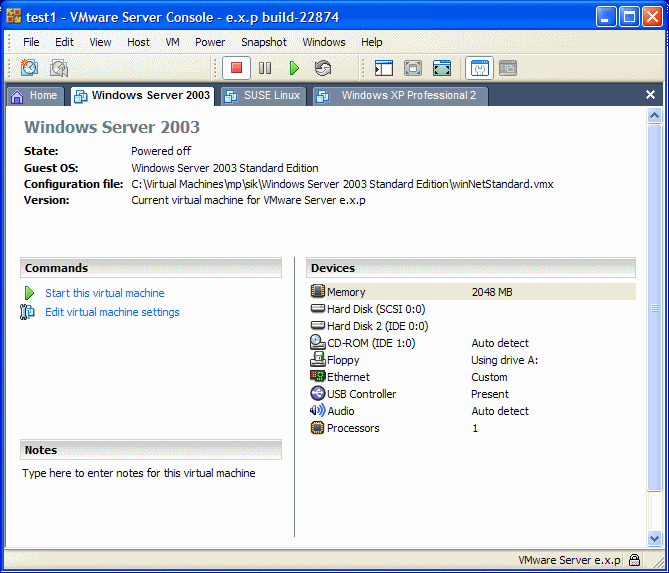
The version I am using (1.x.x) has a separate Console program. You can use it locally or over the network. Version 2 also has a separate Console program but you need to launch it from the browser (but it's a separate
At least on Windows, the console program is installed with the server, but also I downloaded it separately, so I could control the virtual machines from another computer.
This is what the 1.x.x console looks like: http://4sysops.com/wp-content/uploads/2006/04/vmware_server_console.gif
When you power on the virtual machine the tab contents are replaced by what is on the "monitor" of your virtual machine.
-
Re:Archaic file manager?
even had an XTree style view
The XTree style view was based on a DOS product called the Norton Commander. The Linux Midnight Commander is based on it you can see the similarity.
-
Amen. And to further your point...
Lets talk again when group policies are present in Firefox/Chrome
I came in to say this myself. I can't believe the article didn't even really hit this point. It's a huge issue once your organization scales past a few dozen machines.
I think it's kindof a systemic open source blind spot, actually, a product of the fact that most open source developers are (a) unlikely to have an itch involving centralized administration and (b) probably not keen on the principle of centralized administration in general, since software freedom in the end means control of your own machine.
Of course, at work, it's not your *own* machine, and it serves the purpose of software freedom if free software can circulate more broadly. Plus, Firefox is just a better too. So people have been talking about this very point for years. And amazingly, nobody at Mozilla seems to get it. I'd bet Firefox could have another 10-15% of browsershare if they did.
There is at least one project out there which is aiming to change this, but I think it's going to take more than one isolated and barely known project to get around this issue.
-
Re:windows "installs" applications
AppLocker restricts which applications are allowed to run, not which are allowed to be installed. See e.g. this review.
-
Re:35 million data records stolen ..
I don't know... from what I read, Windows 2008 adoption is "unusually" high...
http://4sysops.com/archives/windows-server-2008-adoption-is-better-than-vistas/
http://www.microsoft.com/presspass/features/2007/jun07/06-05WinServer08.mspx
http://news.zdnet.co.uk/software/0,1000000121,39359154,00.htm
I don't know if you can draw a correlation from that though.
-
Re:Idiots
You can turn off the reboot nag... http://4sysops.com/archives/disable-restart-after-windows-automatic-updates/
-
Re:Why give an option?
you can see it... but once you have you'll wish you hadn't
google for bootlog.txt, its a log file of everything Windows does when booting if you enable it. Googling to remind myself of the instructions to enable it tells me that Process Monitor now has an 'enable boot logging' option that's all nice and gui and easy to use.
-
Re:Well let's just be honest here
And right now, Macs are the wedge in the door of the Microsoft stranglehold. Linux might slip in, but it's Macs doing the ramming. For example this report puts Macs at 7.9% and Linux at 0.8%. Maybe it's envy that Macs are so popular, but it's stupid. I've very long been a fan of Opera the web browser, but it got a lot more pleasant when we passed 10% "not IE" due to Firefox. I'm quite certain that running Linux as I am will become a lot more pleasant if we pass 10% "not Windows" due to Macs. The positive thinking rrowd could say it would promote cross-platform solutions. The machiavellians can say it's divide and conquer. In any case, Macs are good for Linux. Including shamelessly copying the good parts while still letting you run xfce if you want...
-
It's the Price, Stupid...
I can't believe this entire thread doesn't mention the price of Windows Server 2008 - list price is $999 (see http://4sysops.com/archives/windows-server-2008-prices/) and you can get it in the UK for equivalent of about $850 US.
If you are in a corporate, maybe you can get it for free, but it assumes you can install whatever you want, rather than having to run your standard corporate XP or Vista - so that's already a small subset of most corporate IT users, and only applies to people who are in IT and have some latitude. If you're an independent developer you can get it from MSDN.
For home use, your options are to pirate it from somewhere with the obvious risks, or to pay $850!
XP OEM version is about $110, and Ubuntu is $0. However good Server 2008 may be, I really don't think it's worth an extra $700 - go buy a low-end PC or laptop, or an eee PC instead.
-
2nd Gen SSD benchmarks.
All the brand notebooks with SSD options use first generation SSDs. These have the shattering access speeds, high durability, no noise, and power efficient benefits, but read/write performance is still mediocre.
The second generation SSDs would cost you more than a whole notebook, but have significant performance improvements:
Memoright GT vs Mtron vs Raptor vs Seagate
Memoright nails it. It is easily twice as fast as what Mac puts in their notebooks.
If you *really* want an SSD, buy one separately and install it yourself. You will not be disappointed.
BTW the file indexing that causes SSDs to slow cause HDDs to slow as well. Many people have reported unbearable slowdown, and that is with HDDs. I am sure anything slower than that would make you want to return the whole thing, but this can be fixed. Most people will tell you to just turn it off. Google has also complainted about Microsoft pre-installing an indexing system that sucks. -
Re:Allegedly? Do Tell...
He, solution is in sight for you and others:
Just yesterday Stu posted about this problem in WServerNews "More On Thumbs Down On Vista For Admins".
Installing the Windows Server 2003 admin tools actually is said to help very much. Read http://4sysops.com/archives/install-windows-server -2003-adminpak-administration-tools-pack-on-vista/ for the details.
This is funny in at least two ways:
1. The dreaded command prompt, so arrogantly looked down onto by 'we-are-so-advanced-Windows-GUI'-users comes in
2. So you are buying crap software for a hell of money, and then you have to share tips on the Internet, on how to nicely dissect pieces from here, and others from there, in order to gobble together a functional operating system !?
Welcome to the world of GNU/Linux before 1998 ! -
Re:God damn it.
Then disable the indexing service: http://4sysops.com/?p=457
IS THAT REALLY HARD? Yes, it's confusing that they renamed the search service. BOO FSCKING HOO! -
Re:Forced Reboot = BAD
So here is how you can disable the restart reminder of Windows Automatic Updates (XP only!):
1. Click Start -> Run
2. Enter "gpedit.msc"
3. Go to Local Computer Policy -> Computer Configuration -> Administrative Templates -> Windows Components -> Windows Update
4. Double-click on "Re-prompt for restart with scheduled installations"
5. Disable it!
6. Reboot the computer
Taken from http://4sysops.com/archives/disable-restart-after- windows-automatic-updates/