Slashdot Mirror
Domain: androidcentral.com
Stories and comments across the archive that link to androidcentral.com.
Stories · 21
-
'YouTube Music is a Bad Product in Desperate Need of Improvement Before Anyone Will Care To Use It' (androidcentral.com)
Andrew Martonik, writing for AndroidCentral: YouTube Music as a service has been around for about three years now, though it really only existed in earnest once the revamped version of the YouTube Music app and dedicated website, as we know it today, launched in May. Whether you look at it as three years or just six months old, one thing is clear: YouTube Music isn't finished yet, is filled with issues and is incredibly frustrating to use on a daily basis considering it costs the industry-standard $10 per month.
YouTube Music is so unfinished and lacking features that I question whether Google has any intentions of following through with its vision of replacing Google Play Music entirely. Put simply, I can't believe Google thinks anyone will pay $10 per month for it when all signs point to Google itself not caring about YouTube Music's success. YouTube Music effectively doesn't work with Google Home. [...] YouTube Music also still doesn't work with Android Auto, which is just as inexcusable as not working with Google Home. -
Epic's First Fortnite Installer Allowed Hackers To Covertly Download and Install Anything on Users' Android Phones, Google Researchers Say (androidcentral.com)
Epic decided to ditch Google Play Store for its sleeper hit Fortnite. By doing so, while Epic may have saved some money that it would have had to split with Google, it also ran into an issue that it could have avoided had it not parted ways with Google. AndroidCentral reports: Google has just publicly disclosed that it discovered an extremely serious vulnerability in Epic's first Fortnite installer for Android that allowed any app on your phone to download and install anything in the background, including apps with full permissions granted, without the user's knowledge. Google's security team first disclosed the vulnerability privately to Epic Games on August 15, and has since released the information publicly following confirmation from Epic that the vulnerability was patched.
[...] When you go to download "Fortnite" you don't actually download the whole game, you download the Fortnite Installer first. The Fortnite Installer is a simple app that you download and install, which then subsequently downloads the full Fortnite game directly from Epic. The problem, as Google's security team discovered, was that the Fortnite Installer was very easily exploitable to hijack the request to download Fortnite from Epic and instead download anything when you tap the button to download the game. It's what's known as a "man-in-the-disk" attack. -
Google is Adding Anti-Tampering DRM To Android Apps in the Play Store (androidcentral.com)
Google has introduced a small change to Play Store apps that could significantly protect several Android users. From a report: Earlier this week, Google quietly rolled out a feature that adds a string of metadata to all APK files (that's the file type for Android apps) when they are signed by the developer. You can't install an application that hasn't been signed during its final build, so that means that all apps built using the latest APK Signature Scheme will have a nice little chunk of DRM built into them. And eventually, your phone will run a version of Android that won't be able to install apps without it. -
Google Maps Apps Add 'Mario Kart' Feature (wlwt.com)
An anonymous reader quotes WLWT News: Starting Saturday, "Mario Time" will be available on the Google Maps app for iOS and Android, letting you drive around town with Mario as your guide, cruising the app in a go-kart similar to the iconic "Mario Kart" video game. When users launch the latest version of the app, the feature is activated by tapping a "?" beside the start button normally used to start navigation.
It includes sound effects -- "Woo-hoo! Let's-a go!" says Mario -- and will be available for the next week. It's to commemorate "Mario Day" -- Mar.10 -- that magical time of year one Portland newspaper has described as "the most manufactured of corporate holidays," on which Nintendo lowers the price on their Super Mario Run app and offers other discounts. -
Chrome Update Kills Annoying Redirects and Trick-To-Click Popups (androidcentral.com)
Google is releasing updates to Chrome 64 and Chrome 65 to put a halt to page redirects and trick-to-click popups. The update is coming to both the desktop and Android apps. Android Central reports: With Chrome 64, every redirect from a third-party iframe will show an info bar instead of sending you off to some other page. This way we can decide if we want to navigate away or stay on the page we're looking at. If we're interacting with an iframe, like clicking an embedded YouTube video to open it on YouTube in a new tab, the request goes through as normal -- this only applies to things you didn't click and didn't expect to send you off. We can get more than we asked for when we are interacting with a web page, too. Google has two things planned that should help. With Chrome 65, websites that try to circumvent Chrome's pop-up blocker by opening a new tab for a thing you clicked while navigating the original tab to some other page will be blocked with the same style of info bar. This gives us the choice of taking a look versus being forced. Some abusive experiences are harder to autodetect, but Google plans to use the same type of data as its Safe Browsing feature to kill off deceptive page elements. -
HTC Keyboard Ads Likely an Error, But Damage is Already Done (androidcentral.com)
An anonymous reader shares a report: Ads in the stock keyboard app on a flagship smartphone added quietly via an app update, which then asks you to pay to remove them. You'd be hard pressed to come up with a more comically villainous thing for a phone manufacturer, or app developer, to pull on its users. Yet that's what's been happening to some HTC phone owners over the past day. HTC 10 owners seem to be worst affected (we're not seeing it on the newer U11 for what it's worth), with the ad bar taking up a good chunk of screen real estate. There's understandable outrage among HTC owners whose phones have started coughing up ads every time they open the keyboard. The consensus, obviously, is that this is not an OK place for ads to be appearing. In a statement, HTC said it was an error, and a fix is underway. -
Verizon and T-Mobile Are In a Virtual Tie For the Best Network In the US (androidcentral.com)
Verizon has tied T-Mobile for the fastest carrier in the United States and both carriers are virtually tied for the "best" in overall LTE download speeds, according to Open Signal's State of Mobile Networks: USA report. Android Central reports: Using data collected from 169,683 users, 4,599,231,167 data points were used to measure network speeds on both 4G and 3G, network availability and latency. The data is collected by users installing the Open Signal app from Google Play or the App Store and going about their daily routine. In their analysis of the collected data, they say that Verizon has improved their 4G network speeds to pull even with T-Mobile who has traditionally done well in this category. They also mention that the average overall network speeds in the U.S. have risen slightly, and over 81% of U.S. residents have access to LTE networks. Availability of high-speed data services shows that all four carriers have improved, but T-Mobile (86.6%) is now within two percentage points of Verizon (88.2%) when it comes to finding an LTE signal. The company with the most improvement here is Sprint, who jumped from covering 69.9% in August to 76.8% in February 2017. -
Galaxy S7 Display Defaults To Full HD After Nougat Update, But You Can Switch Back (androidcentral.com)
An anonymous reader writes: Samsung's new display scaling options change the default resolution of the Galaxy S7 and S7 edge. The Nougat update to the Galaxy S7 and S7 edge introduces a new display scaling option that lets you reduce the screen resolution as a way to conserve battery life. With the update, you can now choose between three modes -- WQHD (2560x1440), FHD (1920x1080), and HD (1280x720). While it's a nifty feature to have, the display on the Galaxy S7 and S7 edge is automatically defaulting to Full HD for those that have installed the update. Fortunately, you can easily switch back to the native Quad HD resolution by navigating to Settings -> Display. -
Samsung Unveils 256GB MicroSD Card, Highest Capacity In Its Class (thenextweb.com)
Samsung recently unveiled its EVO Plus 256GB microSD card, capable of storing more than 12 hours of 4K video footage, 33 hours of full HD recording, 55,200 photos or 23,500 MP3s. While you most likely do not need such a large microSD card in your life, you'll probably want one. The card features Samsung's newest V-NAND technology, with read/write speeds of 95MB/s and 90MB/s, respectively. It will be available in June to over 50 countries at a price of $250, which includes a 10 year warranty. Personally, I have no need for such a high-capacity card at this time, but I marvel how far technology has progressed in the last few years, let alone months. SanDisk, for example, revealed a 200GB microSD card back in March, 2015, which was the highest capacity microSD card up until now. -
Google Helped Cause the Mysterious Increase In 911 Calls SF Asked It To Solve (bbc.com)
theodp writes: Android users have long complained publicly that it's way too easy to accidentally dial 911. So it's pretty astonishing that it took a team of Google Researchers and San Francisco Department of Emergency Management government employees to figure out that butt-dialing was increasing the number of 911 calls. The Google 9-1-1 Team presented its results in How Googlers helped San Francisco Use Data Science to Understand a Surge in 911 Calls, a Google-sponsored presentation at the Code for America Summit, and in San Francisco's 9-1-1 Call Volume Increase, an accompanying 26-page paper. -
LG Arbitrarily Denying Android Lollipop Update To the G2 In Canada?
Lirodon writes: Its funky rear-mounted buttons may have left critics divided, but the LG G2 is still a pretty capable Android device. While it has gotten an update to Android 5.0 "Lollipop" in some major markets (including the United States, of course), one major holdout is Canada. Reports are surfacing that LG's Canadian subsidiary has decided not to release the update for unknown reasons. But, what about custom ROMs? Well, they handled that too: they have refused to release Lollipop kernel source for the Canadian variant of the device. It is arbitrary actions like this that cause Android's fragmentation problems. A curious note, LG has not specifically made reference to the bugs other users have been having with the update. -
An Early Look At Android M's Multi-Window Mode For Tablets
Ars Technica has a look at the experimental multi-window mode in the just-announced Android M. It's not a headlining feature yet: "buggy, busted, and buried, but intriguing nonetheless" is how Ars describes it. Android Police is similarly faint in its praise. All that might be true, but to many users even a partly working multi-window mode would be welcome, especially one blessed by Google. (Some Samsung users have had multi-window support for a while, but not built into the OS proper, and multi-window capabilities can be found via app, too.) -
Putting a Panic Button In Smartphone Users' Hands
theodp writes "If you own an Android phone, you may have inadvertently butt-dialed 911 from time-to-time. So, wonders Kix Panganiban, why don't our phones come with a universal 'Panic Button', that would make it just as easy to intentionally dial the police when it's truly needed? Panganiban envisions "a smartphone app that when triggered, would discreetly send out a distress message to contacts of your choice, and perhaps do some other functions that can get you out of bad (and maybe even life-threatening) situations." While a quick search reveals that some have taken a crack at apps that put a Panic Button in smartphone users' hands, are there good reasons why such a feature isn't just standard on mobile devices? And, with GPS and always-watching and always-listening tech only becoming cheaper and more ubiquitous, how far out in the future is it before your person can be continuously remotely monitored like your residence, even while mobile, and what might that look like?" -
How Did My Stratosphere Ever Get Shipped?
Bennett Haselton writes "How did a $400-billion company ship millions of units of a phone with a calendar app that displays the wrong date, a texting app that can't reply to group texts, a screen capture function that doesn't work, and a phone app that won't let me use the keypad unless the speakerphone is on? The answer, perhaps, suggests deeper questions about why market forces fix certain problems but not others, and what to do about it." Read on for the rest of Bennett's thoughts.I've been using either a Samsung Stratosphere or a Samsung Stratosphere 2 from September 2012 to the present. Where to begin?
-
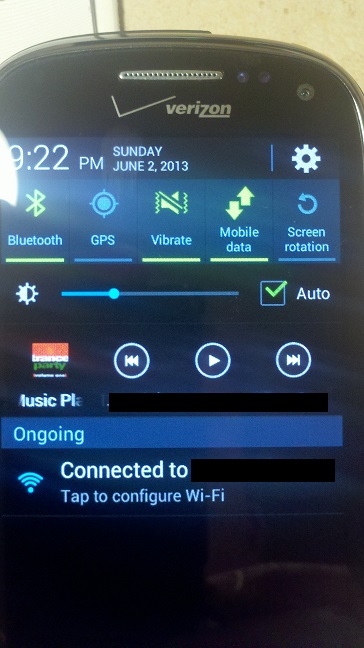
If you open the calendar application on the Stratosphere 2, it usually highlights tomorrow's date as "Today," and lists tomorrow's calendar entries as your list of things to do "Today." Here is a picture of my phone's screen taken on June 2, with the calendar app displaying "Today, Mon, Jun 3 2013" — despite the phone knowing the correct time is 9:22 PM on June 2.
Strangely, in the morning the calendar app would display the correct day as "Today," but would switch to the wrong day some time in the afternoon, and eventually I decided that the calendar app was probably using Coordinated Universal Time to decide what "Today" was, which is 9 hours ahead of Pacific Standard Time.
-
You'll notice that these images are not screen captures, but photos taken with another phone. This is because some time between the Stratosphere 1 and 2, the screen capture function broke — every support site says you're supposed to be able to take a screen cap on a Stratosphere by pressing the Home and Power buttons at the same time, and that works on the 1, but not on the 2.
-
If someone else sends a text to multiple recipients including you, the Stratosphere gives you no indication that it's a group text, and there's no way for you to see the other recipients or reply to the whole group. (I had a lot of awkward "What, you were asking everybody, not just me?" moments before I realized what was going on.) Other users have been complaining about this for months, and it apparently affects more Android phones than just the Stratosphere.
-
The built-in camera refuses to take a picture if the battery is low — it just says "Warning: low battery" and exits. Yes, I know they think they're doing it for my own good since the camera is a battery hog, but a few times I've wanted to take a picture where it was well worth using up a half a percent of my remaining battery life or however much it would have taken, but the phone wouldn't let me. That should be the user's decision, dammit.
-
When I was in Canada last week, if I tried sending a text message longer than 160 characters, the phone would tell me that the message sent, but it would actually fail silently and never get delivered. I'm not sure whether to blame Verizon, Android, or Samsung for this one (or just, you know), but in the end someone has to take responsibility for the product, and the phone telling you that a message was sent when it actually got lost, is a complete fail. If it doesn't work, fine, give me an error message, but never tell the user a message got sent successfully if it didn't.
-
During a phone call, the on-screen keypad doesn't work unless the phone is on speakerphone. If the speakerphone is off, the screen goes dark after about 1 second of inactivity, making it impossible to enter an account number or anything else. I can avoid this bug by turning on a speakerphone (which is how I know it's a software bug, not a problem with the touchscreen), but this is a pain if I'm in a public place and don't want to annoy everyone around me who would have to listen to all the voice prompts. (The phone's software seems to be following a rule like: "If the speakerphone is not on, then when the phone moves away from the user's face, assume the user is not actively using the phone and let the screen go dark" — where the bug is that it doesn't make an exception and keep the screen on if the user is actively pressing keys on the keypad.)
At first, these and many, many other bugs produce a state of mind that transcends annoyance to reach a kind of genuine curiosity, where you're asking "How did this happen?" not rhetorically, but because you actually want to know. But eventually the surprise wears off, and you're just left with bugs that are disproportionately aggravating because they obviously would have been caught during even the most basic UI testing. They're aggravating to me not because of how much they get in the way (you eventually get used to them), but because the existence of those bugs conveys a certain lazy attitude towards finding and fixing bugs at all.
I realize this is not a logical reaction. The aggravation you feel towards a bug should depend on how much the bug actually interferes with the user experience, not on how easily the manufacturer should have found it. Rationally speaking, the biggest problem with the phone right now (and the reason I'm having to mail to back to the manufacturer for a replacement) is that the charging port spontaneously broke, so that unless the micro USB charger is plugged in exactly right, the phone can't charge (even if you get it right and form a connection successfully, the connection breaks if you move the phone half an inch). Needless to say, that's exasperating — but it's hard for me to get mad at Samsung over that, because it's not an easy defect to catch at the manufacturing stage. On the other hand, if the calendar app displays the wrong day, I would say that someone should be fired over that except that probably nobody was assigned to do that testing in the first place.
I also posted questions about each of these problems on AndroidForums.com and AndroidCentral.com (those links show all questions recently posted from my username on each site), which have so far received hundreds of "views" but no replies. I mention this because some people think that if you do run into problems like these, all you have to do is post a question and The Community will help you out with a workaround. Nope.
Also, lest you think you can do away with these bugs by downloading third-party replacements for all of these apps, I spent part of an afternoon downloading different texting apps to see if any of them would fix even part of the problems I had with the built-in one. None of them worked much better, although several of them displayed pop-up ads over every third incoming text message, and most of them did not play nicely with each other, giving me no way to disable them so that their notifications would double and triple up on top of each other for every received text. So I gave up. Even if I thought I might eventually find a better app for texting, I didn't have time to test multiple replacements for every built-in default app that didn't work.
Farhad Manjoo has a column up at Slate arguing that the reason many Android phones suck is that they're laden down with adware attempting to extract more personal information and money from the user. I'm sure that's part of the problem, but I can't see how the manufacturer is making any money off of the bugs I ran into; they were just being lazy.
The problem, I think, is that phone manufacturers know that phone reviewers (and users, when they're choosing between models in the store) will focus on easily quanitifiable attributes, such as size, weight, battery life, and the number of megapixels in the camera. The number of aggravating bugs in the user interface is not something that is easy to compare across phones (and in any case would not be printed on the box). Thus market forces simply don't favor the development of a hassle-free interface, because in most cases the phone manufacturers wouldn't be rewarded for it.
And — I don't consider this too much of a stretch — this is where it connects with larger issues for me, because I've been arguing for years that the free market will usually fail to fix certain types of problems, often in the context of threats to free speech and civil liberties, especially if the user lacks information they need to compare multiple options. A major argument in favor of Net Neutrality is that the typical user wouldn't realize it if their ISP were throttling access to certain sites; they would just think that the remote site was responding slowly. Since that information would be hidden from the user, "the marketplace" won't solve the problem on its own. Similarly, every time I say that my Circumventor mailing list keeps getting blocked as "spam" by Yahoo, Hotmail, Gmail, or AOL (despite being 100% verified-opt-in, natch), someone tells me that if the free market is blocking my emails as unwanted, it must be because the users don't want them. That the free market might make a mistake (in this case, because users don't have full information about what is getting blocked as spam), doesn't occur to them. I think the belief in the infallibility of the free market, is one of the most widespread fallacies of our era — people who would never make the mistake of confusing correlation with causation, have no problem thinking that if a product or service gets blocked by a third-party intermediary, it must be because the end user didn't want it.
And so when I'm staring at my Stratosphere's calendar telling me that tomorrow is actually today, it brings out my aggravation not just towards Samsung, Google, and Verizon, but towards all the people I've heard over the years claiming that the marketplace will automatically reward good products and punish bad ones. If there weren't so many people who believed that, maybe we could have collectively put more effort into rating phones according to their usability, knowing that the "invisible hand" of the marketplace was not likely to solve those problems on its own, and maybe these bugs would have gotten fixed. Instead, the "marketplace" focuses disproportionately on attributes like dimensions, weight, and processor speed that are easily quantifiable.
So perhaps the solution — seriously — would be for some third-party review company to rate each new phone on the Stupid S#!% Index. They test the phone under normal usage, and each time they run into an idiotic bug like the calendar application not knowing what day it is, they file it under Stupid S#!%, and after some fixed period of phone usage they count up all the problems and rate the phone under the Stupid S#!% Index. For greater precision, you could compile multiple scores from different users for each phone and take the average. Now you have a quantifiable rating that can be used to compare one phone to another, and could incentivize manufacturers to do more testing on their phones in order to get a better Stupid S#!% Index score.
The message that Apple keeps pushing about the iPhone, after all, is essentially that it would get a good Stupid S#!% Index rating. In his keynote address at the 2011 Apple Worldwide Developers Conference, Steve Jobs repeated the words "It just works" like a mantra — unlike, presumably, everyone else's stuff. iPhones don't score well on price, openness, or compatibility with other companies' products (I always have to tell people that my car charger is not an iPhone charger, it's a literally-every-other-smartphone-in-the-entire-world charger) — but all of that scarcely matters to some people as long as It Just Works.
Well, I couldn't tell you. I can't test an iPhone under normal usage because I'm too addicted to the Stratosphere's slide-out keyboard, which enables me to type much faster than a touchscreen but which only comes on a few Android and Windows phones, and not on any version of the iPhone. Maybe I'll try one more time to make the switch to a touchscreen while my Stratosphere is in the shop.
Yes, these most First-World of First World Problems — especially the bugs specific to the Stratosphere — only apply to a small fraction of the population. But it should be a lesson for anyone who thinks the "free market" would prevent this sort of thing from happening.
Meanwhile, every time I hear an ad talking about how "thin" some new phone is going to be, I just want to say to the phone the same thing that I want to tell all the anorexic girls in nightclubs: You're already thin enough. So stop worrying about being thin, and just try to work on not being so f@#$ing stupid.
-
-
Three Low-Tech Hacks for Phones and Tablets
Bennett Haselton writes "Here are three hacks that I adopted in the last few weeks, each of which solved a minor problem that I had lived with for so long that I no longer thought of it as a problem — until a solution came along, which was like a small weight off my shoulders. None of these hacks will help impress anyone with your technical prowess; I'm just putting them here because they made my life easier." Read on for the rest of Bennett's thoughts. 1. Fully charged spare batteries for your smartphoneOK, now before everyone starts shouting "DUH!", I can tell you that I was at a conference right before New Year's, and every day from about 11 a.m. onward, I heard people saying that their phones were about to die, that they would either about to drop off the grid or would have to spend the next half-hour shackled to an outlet via their phone charger, etc. I never once heard anyone mentioning swapping in a spare phone battery, and according to my own survey of my friends, none of them have ever tried it either. But that conference was my first trip after ordering two spare batteries for my Stratosphere from Verizon ($10 each), and it was also the first trip where I never had to waste a second thinking about how to stretch out the phone's battery life or how much time I had left. Just swap in the second battery at around 3 PM, and then swap in the third one at around 10 PM, if there was still anything worth staying out for.
You could instead get "extended life" batteries for certain models of phones as well, but they cost much more than the standard batteries, and some users report that they make the phone noticeably heavier and bulkier. There are also portable phone chargers — which charge themselves from wall outlets, and then carry a charge that can be used to re-charge the phone through the micro-USB connection — but of course they're bigger and heavier than spare batteries, and you have to leave the phone connected to it while the phone is recharging. I didn't see the need for either of those products after picking up two regular spare batteries.
The most inconvenient part of the process was recharging the multiple batteries at the end of the day — since I didn't have a standalone battery charger, I could only recharge the batteries by charging them in the phone itself, swapping each one out after it had spent an hour charging (if I stayed awake that long). To that end, it would be convenient if more phone manufacturers would make battery-only chargers, so that at the end of the day you could plug your depleted spare batteries into their own re-charger at the same time that you're using the normal phone charger to charge the battery currently in the phone, then go to sleep and let everything charge up overnight. There standalone chargers for some phone batteries, like the Blackberry, but they're in the minority. (Meanwhile, iPhones do not have user-serviceable batteries at all; when the battery dies and becomes non-rechargeable, you're supposed to take it to an Apple repair center to be replaced.)
It seems odd to me that phone manufacturers spend millions of dollars figuring out how to extend the battery life of their phones, and here's a solution that works for almost everyone who has a zippered pocket for spare batteries (and a phone other than an iPhone). But I didn't think of it for years, nobody else that I've talked to ever thought of it either, phone manufacturers don't steer people toward this option, and most of them don't make standalone chargers that would make the process easier. Well, now you know.
2. Hacked furniture to hold a tablet PC above your bed
For years I'd occasionally watched movies on my laptop in bed, and I always felt bit of a strain on my back or neck while sitting up and leaning against a pillow, but eventually the movie would distract me if it was any good at all. Then a week ago, in an act laden with heavy-handed but unintentional symbolism, I dumped all of the books out of one of my bookshelves to make it easier to watch TV without getting out of bed:
The protruding shelf is attached to the bookcase with a pair of metal clamps, and then weighed down with some heavy books to counterbalance the weight of the tablet. (You want the clamps tight enough that the shelf can't move at all, relative to the bookcase.) The tablet holder, a Zuwit 360 Degree tablet stand, is attached to the end of the shelf using its own built-in clamp, and then bent into a downward arc to hold the tablet.
In case you're wondering why I didn't just clamp the tablet holder to a nightstand next to the bed, the answer is that none of the tablet holders I looked at had a flexible gooseneck that would extend far enough. (Remember, the gooseneck doesn't just have to reach from the edge of the bed to above your head; it has to arch up and then bend downward to hold the tablet from above, all while giving you enough slack to reposition the tablet in the air if you want to.) I assume there's a practical upper limit on how long the manufacturers want the gooseneck to be; if it's too long, then when it's extended sideways it could bend under its own weight plus the weight of whatever it's holding. Hence the shelf extending out over the mattress.
To make this work, you need a gooseneck tablet holder like the Zuwit that specifically has short teeth protruding over the edge of whatever it's holding, to grip it so that it won't fall when the tablet is held upside-down. (I'd originally tried this with a BESTEK tablet holder, but the tablet gripper didn't have teeth coming down in front of the screen, so the tablet would occasionally fall out and land on my head.)
It was a bit of work to put together, but I've never felt rested in a more comfortable position while watching a 2-hour movie. All cheaper than installing a flatscreen in your ceiling, and better, actually, since you can reach up and rotate the tablet whenever you change position.
But as a proof-of-concept only, this is a pretty ugly piece of furniture, and while I'm able to get in and out of bed easily without hitting the protruding shelf, it gets more complicated if you're ever have "company." In my case, there's enough space behind the bookcase that I can tilt it backward, moving the protruding shelf and the tablet holder so that they're no longer over the bed. This solves the problem of how to get it out of the way, but not the fact that it's still a pretty ugly conversation piece. You can un-clamp the protruding shelf from the bookcase and hide it away, but you're still left with a bulky, empty bookcase oddly perched at the end of your bed, and that's too much of a pain to lift and move some place every time you want to assemble the tablet holder or disassemble it when you have company coming over. I want to take another go at it using a shelf attached to a stack of milk cartons — which would be even uglier, but much lighter and easier to disassemble and move out of the way.
Speaking of milk cartons and ideas that make my chiropractor happy:
3. Hacked furniture to hold a tablet in front of an exercise machine
So that's what I did with the BESTEK tablet holder that didn't work for holding the tablet upside-down in bed; it works perfectly well attached to a stack of milk cartons, where the tablet only has to be held sideways. Again, ugly. But again, easy to disassemble and hide if I know company's coming over.
Of course there's a space on the elliptical trainer (underneath the control panel) for holding books, tablets, and other reading/viewing material, but it requires you to crane your neck downward to focus on that space, and I always felt uncomfortable looking in that direction for more than a few minutes while exercising. The obvious idea was to hold up the tablet by attaching the gooseneck tablet holder to the control panel of the elliptical itself, but (a) the body around the control panel is mostly hollow plastic, which has too much "give" for the clamp to attach to it securely; (b) if the tablet is attached to the machine directly, then it jiggles while the machine is moving, making it hard to watch the screen; and (c) the gooseneck still doesn't reach far enough to hold the tablet higher than eye level, which is best for your posture if you're looking at it while exercising.
Hence, the tower of milk cartons. Now when I first went to the local Container Store and was told that a stack of five milk cartons would cost $60, I assumed I was being subjected to the usual downtown Bellevue yuppie price-gouging that also gave us $500 "minimalist" bookshelves available in the same store, but, no, that is actually what non-stolen milk crates actually cost. (They're so easy to walk off with, and useful as "modular furniture," that the International Dairy Foods Association as launched a campaign to get people to stop stealing them.) With a bit of experimenting, you can find the right height for the gooseneck tablet holder, and position the tablet so that it's far enough from your face for comfortable viewing, while still close enough that you can touch the screen. (The stack of books in the topmost crate keeps it from tipping over from the weight of the tablet.)
Of course if you work out on an elliptical at a gym, it's a bit less convenient to carry a stack of milk crates in with you. Maybe a tablet accessories company should come out with a portable, collapsible tripod that rests securely on the ground while extending upward to provide a thick, flat surface about 5 feet above the floor — where a gooseneck tablet holder could be clamped onto the flat surface and then hold the tablet itself in front of the user's face at the right altitude.
Then if you start watching a movie on the tablet while working out and you don't make it all the way through, you can finish the movie on the tablet while it's suspended above your head in bed. Gives you something to do while swapping out the batteries in your phone and waiting for them to recharge.
-
Samsung Galaxy S3 Stripped of Local Search
DavidGilbert99 writes "Ahead of a legal battle with Apple, Samsung has begun disabling the local Google search functionality on the international version of the Galaxy S3. This mean S3 owners will no longer be able to search contacts, messages, or other content stored locally on their phones using the in-built Google app. The interesting thing is that Apple has yet to sue Samsung over this feature in the EU or the UK and so it seems as if Samsung is being ultra cautious ahead of the the companies' big court date on Monday next." -
Google Rolls Out Official Android 4.0 ICS Update
dell623 writes "Google is rolling out an OTA upgrade to Ice Cream Sandwich for the Nexus S. GSM versions can already be updated manually. An early review is largely positive and comments on the significant visual and performance improvements. The Nexus S upgrade allows for a direct comparison against Gingerbread on the same hardware, and the likely improvement in current phones that will receive the upgrade." -
Asus EeePad Transformer Gets a Thumbs-Up
Android Central has taken a close look at the new Transformer tablet from Asus, giving it an overall positive review, with minor points deducted for a 'plasticy' feel. The Transformer joins the Motorola Xoom in the world of Honeycomb (Android 3.0), and has very similar, high-end specs (though it's Wi-Fi only) with one big difference: the Transformer is marketed with a not-included-in-the-price attachable keyboard that adds a secondary battery. Notably, given inevitable comparison to the Xoom, the SD card slot, and Flash 10.2, work out of the box. The reviewer says Asus has done a credible job of making Honeycomb work well with a keyboard, but I wonder what other OSes will eventually be hacked onto this device. 16 hours of battery life in a netbook-sized computer sure sounds good to me, but I might want that to be with standard Linux apps instead of only with Android. -
Motorola Sticks To Guns On Locking Down Android
jeffmeden writes "'These aren't the droids you're looking for' proclaims Motorola, maker of the popular Android smartphones such as the Droid 2 and Droid X. At least, not if you have any intention of loading a customized operating system. According to Motorola's own YouTube channel, 'If you want to do custom roms, then buy elsewhere, we'll continue with our strategy that is working thanks.' The strategy they are referring to is a feature Motorola pioneered called 'e-fuse', the ability for the phone's CPU to stop working if it detects unauthorized software running." -
Google's Gingerbread Man Has Arrived
Daetrin writes "Last weekend Google received the next statue in the sweets-themed series that commemorates the major updates of the Android OS. In the past this has meant that the release of the next SDK was right around the corner. However this time there's some doubt as to what the version number will actually be. Many sites (including Slashdot) have assumed that 'Gingerbread' was synonymous with '3.0,' but now there's some evidence that everyone may have jumped the gun and the next version will actually be 2.3." -
Android 2.1 Finally Makes It To Droid
MrSmith0011000100110 writes "The lovely people over at AndroidCentral have broken the announcement that Android 2.1 is finally coming to the Motorola Droid, with actual proof on Verizon's Droid support page (PDF). I don't know about my Droid brethren, but I'm pretty excited to see the new series of Android ROMs for the Droid phone that are based on a stock Android 2.1. As most of us know, the existing 2.1 ROMs can be buggy as hell and either running vanilla 2.1 or a custom ROM; but this phone is still a tinkerer's best friend."