Slashdot Mirror
Domain: ask-leo.com
Stories and comments across the archive that link to ask-leo.com.
Comments · 13
-
Re:Right of asylum cannot be assumed
I know and understand enough not to have baseless fears.
You do? http://blog.aw-snap.info/p/examples-of-malicious-javascript.html
That is the first result on Google, out of 1,229,682 in total. JS is a complete programming language; and while it runs mostly sandboxed, its effects are not sandboxed. For example, JS can do portscans of government computers on behalf of a third party. Do you want to probe Pentagon's servers while you read news on a blog? The FBI will come knocking down YOUR door, not the door of the hacker who inserted the code into someone else's server. JS code can upload illegal materials onto servers; that includes materials that you can go to prison for. JS makes your computer into a flexible proxy for a purpose that you do not know. It will cease to run after you leave the page; but with enough hits, the author does not care - every visitor will do his small bit of work. For all that work it will use your IP address. Good luck proving to a judge that it wasn't you who registered for an account and posted a CP photo. All the IP records will point at your PC.
The executive summary here is simple: today you should be fully aware of what your computer is doing. Running obfuscated, untraceable JS on random Web pages is the least wise idea here - especially when you don't need that JS. That's why NoScript defaults to deny. There are few pages that use JS for a reason; if you trust them, enable JS for them. Browsing random sites with JS on is not the best course of action.
-
Re:Neglect the benefits & tablets win...
The Kindle has a distinctive green tint to its substrate, visible more in sunlight. It's visible here to a lesser extent: http://images.ask-leo.com/kindle_askleo_full.jpg and here: http://gravitationalpull.net/wp/wp-content/uploads/2009/09/kindx.jpg
As to glittery effect, the finish on the screen sparkles or shimmers under light. If you've used one and are sensitive to such things, you know exactly what I'm talking about. Like the rainbow effect of a DLP, some are bothered more by it than others.
-
Re:Ubuntu is not up to scratch
That said, the page you linked to sends users into all that unfamiliar territory. It only reinforces the stereotype that you have to know archaic commands to get stuff done in Linux. And ones like this are particularly troublesome, because it's resolving a problem getting online. But you have to be online to learn how to fix it. So what's somebody going to do? Head straight back to their Windows box to get online and look it up, then wonder why they're messing with this Linux stuff.
haha, that is exactly the same I thought when I saw the page, compare that to Windows XP
And you see one example of why Linux Distros are still miles away from the usability and intuitiveness of Windows. -
for winblowz
Run performance monitor by pressing Start, selecting Run, typing "perfmon" and pressing OK. You should get something that looks somewhat like this: Empty Perfmon Right click in the empty chart area and select Add Counters... and you should see something like this: Perfmon Counter Add Dialog The Performance Object dropdown lists several objects on your computer whose performance can be measured. The Processor, for example, is one. In that list select Network Interface, and the result looks like this: Perfmon Counter Add Network Interface The first list at the bottom of the dialog allows you to select which counters relating to that object you want to monitor. The second list allows you to select which object if there are more than one. In this example we'll select my "Intel Pro" network card on the right, and "Bytes Total/Sec" on the left. Press Add and Close and you'll see perfmon start to report the total bytes traversing the network card over time. After a little while in my example, it looks like this: Perfmon Counter Add Network Interface Perfmon is an incredibly powerful monitoring tool. There are lots of things available to monitor, and many display options. I encourage you to play around with it some. Of special note is the Select Counters from Computer option in the Add Counters dialog above. Perfmon allows you to monitor the performance of another Windows XP, 2000 or NT computer remotely, across your LAN. This means, for example, if someone on your network is hogging all the bandwidth then you can monitor each machine remotely in real time to see just who that might be. Monitoring is fairly easy. In addition to Perfmon there are certainly many third party applications that will allow you to do the same with different display and even triggered actions. Control, on the other hand, is the bad news. True control of something shared like a DSL connection can be done, but it gets costly. It's typically performed by high end routers that allow you to specify, often in great detail, how the bandwidth should be allocated or prioritized. Unfortunately that's usually out of reach of the most home LANs. In all honesty if this were my situation I'd just make sure the router was in arms-reach of my desk, and the cables well labeled. Then I'd physically unplug the connection for any computers who's users I felt needed to spend more time in the "real world". But that's just me. from http://ask-leo.com/can_i_monitor_or_control_the_bandwidth_used_on_my_home_network.html
-
Re:Ah, don't underestimate MS
Try to run something that uses 100% CPU and then try to do anything else while that happens. What a great scheduler...
Works fine here. In basic concept, Windows' scheduler (priority values) isn't so different from the Linux scheduler (nice values). Obviously any system starts to bog when it has a high Load Average (Linux) or CPU Queue Length (Windows).
Also, try to fill up your RAM. Kind of hard, isn't it? Windows doesn't seem to think you have as much RAM as you do and starts to swap far too early to be considered useful. This is why people complain about Firefox using $x amount of RAM; Windows starts to swap way too early and causes slowdowns all around.
This comment shows an almost total lack of understanding of the Windows memory model. See any of the Inside Windows or Windows Internals books by Russinovich and Solomon for definitive reference; for a shorter slam-bang course, have a look at this Understanding Virtual Memory article. Pay close attention to the concept of the backing store. I took a quick look at an XP system with 2GB of RAM: 92% of memory in use. And a Vista system with 1GB RAM: 100% memory in use.
Try to delete a file that's in use (something you can do in any Unix-like system). File in use? Whoops, can't do that.
Agreed; this sucks. You can mitigate somewhat with utilities like MoveFile or Process Explorer, but again, I agree. Tracking down the process that locked your file, or scheduling a reboot for the rename or delete operation, is a little too baroque for my taste!
Also, Windows has jack shit support for more filesystems than their own FAT and NTFS families (both of which get fragmented; modern filesystems prevent that on the fly). Sure, you can get more support via plugins (I believe there are two different ways to make a filesystem plugin for Windows: kernel and shell), but that isn't as reliable as having native support for them.
You've noted that plugins exist. Which is how most new filesystem support for Linux originally evolved - either you had to manually compile it into the kernel (until Linus decided to just do that for you) or run a FUSE FS. MS doesn't build {otherFS} support into any Windows 'distro', but that's the only step missing. If you want {otherFS} support in Windows, you find or write it, then install that to your system. With IFS builtin, this can be just as reliable as native. In fact, NTFS/FAT are loaded via IFS. So if your {otherFS} via IFS is less reliable, that's on the {otherFS} coders, not MS.
-
Not easy. Re:It's also not hard to tell
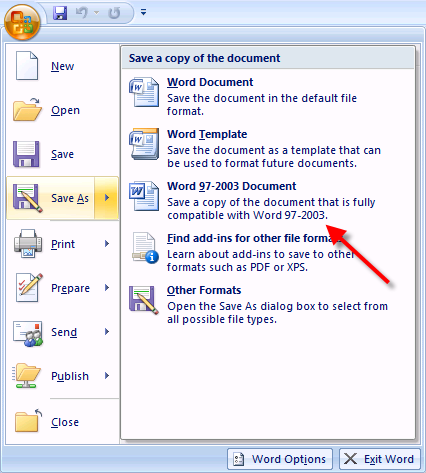
So you can choose if you want the backward compatible version or the new version, and it is easy to know what you chose. Currently we have a some Office 2007 at work but mostly Office 2003. No problems thus far, as the 2007 people know to keep using the old formats and everyone is happy.
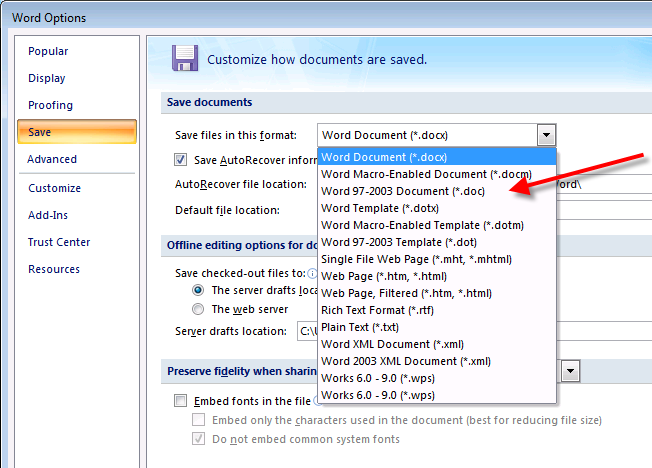
The menu for types is confusing and makes interchange a PITA. There are three options, "default", "Office97-2003" and "other". If this version is like all of the rest, conversion is one way - in but not out - and 97-2003 will be a mess. The other formats are way too confusing for the average user with multiple types defined for the same version of word processor name. Once you get past all of that, you have Vista's default behavior of hiding file extensions to keep you from knowing which file is what.
All of this confusion and complexity has one aim: to make sure people buy a new M$ word processor every few years. The file formats change around to keep other programs from being able to use them. The new formats themselves are used to force others to buy Word. This routine has worked several times.
The only real question is how many times can M$ pull the old switcheroo before people revolt. It's such a transparent rip off.
-
Not easy. Re:It's also not hard to tell
So you can choose if you want the backward compatible version or the new version, and it is easy to know what you chose. Currently we have a some Office 2007 at work but mostly Office 2003. No problems thus far, as the 2007 people know to keep using the old formats and everyone is happy.
The menu for types is confusing and makes interchange a PITA. There are three options, "default", "Office97-2003" and "other". If this version is like all of the rest, conversion is one way - in but not out - and 97-2003 will be a mess. The other formats are way too confusing for the average user with multiple types defined for the same version of word processor name. Once you get past all of that, you have Vista's default behavior of hiding file extensions to keep you from knowing which file is what.
All of this confusion and complexity has one aim: to make sure people buy a new M$ word processor every few years. The file formats change around to keep other programs from being able to use them. The new formats themselves are used to force others to buy Word. This routine has worked several times.
The only real question is how many times can M$ pull the old switcheroo before people revolt. It's such a transparent rip off.
-
What OS?
You fail to state what OS you are running.
If you are running Windows XP Professional (I think Windows 2000 Pro also has it), you can simply turn on process tracking in Group Policy. Every process that starts will now be logged in the security log. View it with the Event Viewer (Start.. Run.. type "eventvwr.msc")
Instructions for how to enable process tracking (for exactly the same problem!)
I don't think the same can be done for Windows XP Home... but I've been wrong before -
Yes, yes you are ...
I guess... Here is a link. WMV files can contain scripting for podcasts and stuff, and can be abused. That's the the easy way. If you were hardcore you'd make a video file that would perform a buffer overflow and infect your target that way...
-
No, Sherman is wrong...
The issue is not that the CD installs software. The issue is that the CD doesn't inform the consumer of its actions and give them the chance to eject the CD. Sony should be fine with it if I'd rather not play the CD on my computer at all than have it install software.
On the other hand, is the CD able to install the software if auto-play is disabled? -
Re:Let's be HONEST here
Here's the link.
I would have written sooner but after my first flaimbait mod I felt I needed to slow down around here and didn't log back in till now. -
IE defaultsI'm actually suprised by this - M$ has a long history of choosing defaults for me that I don't want.
Now if only they could ship Windows with the "Launch every application in an Internet Explorer Window" turned off by default. I just _love_ having an excel spreadsheet open up in explorer instead of Excel.
btw, you can turn this off for any file type, see http://ask-leo.com/archives/000041.html for instructions.
-
It's More Confusing Than You Think...
There are actually three similarly named components: Windows Messenger Service, Windows Messenger and MSN Messenger. I found this article via Google which does a pretty good job of explaining the difference.