Slashdot Mirror
Domain: comodo.com
Stories and comments across the archive that link to comodo.com.
Comments · 240
-
Re: Did the cool-aid taste good?(3/3)
I'm not going to do all your homework but you can start here. [comodo.com]
And, of course, you link to a completely unrelated document detailing one company's policy regarding issuing certificates. That page does link to a couple of standards documents (ratified RFCs), but neither of them support your position. Of course, I point this out, hoping that you simply linked the wrong URL and still might educate me further on this issue. In the end, I'm disappointed, of course.
The
You go on about
You just confirmed that
I never claimed otherwise; but you confirmed, there, that you thought I had. How, exactly? Since you read and understand perfectly what people write (even if they're not writing what they think they are), as you imply in the post you just wrote, surely you noticed that I hadn't mentioned
No, I'm saying you still don't grasp what is going on. [...] For domains you own, so a VERY limited subset of
I don't grasp what is going on? Oh, no, I've gotten that you're a Slashdot troll since way before this particular conversation started. You've missed that I enjoy baiting the trolls here, it keeps me sharp. You also just changed your position yet again; remember when you said "you should not use
And of course I get it, it's what I've been saying this whole time. Thus, I didn't get anything crossed; but you, very clearly, did.
As for the standards, see RFC 1035: DOMAIN NAMES - IMPLEMENTATION AND SPECIFICATION. Specifically, note the complete lack of restriction on where a domain may be used, whether or not it is ICANN-managed and whether or not you own it. Read all 25 updates if you want to be extra sure, and go ahead and read all the updates to those, and so on, and so forth.
If I'm missing something, well, I've been asking you to point it out for the last 5 posts. 6 if you count this one. Which ratified RFC describes the standard you were previously claiming exists? -
Re: Did the cool-aid taste good?
I'm not going to do all your homework but you can start here. I hate posting links from a phone which is all I have to post with at the moment, but this should give you reason to suspect I might know about this issue enough for you to want to research it for yourself.
-
I told you already: OFTEN AS YOU LIKE! apk
See subject & my sources my program gets do it @ diff. intervals ALL AROUND THE CLOCK & I go 'above & beyond it' personally - how?
SECURITY SITES I WILL LIST FOR YOU (these are excellent finding all kinds of exploiters & malicious sites/servers galore for ALL types of threats):
http://blog.talosintelligence....
https://www.welivesecurity.com...
https://blog.malwarebytes.com/
https://researchcenter.paloalt...
https://www.bleepingcomputer.c...
https://securityintelligence.c...
https://www.cyren.com/blog
http://garwarner.blogspot.com/
http://www.malwaretech.com/
https://securelist.com/all/?ca...
https://www.fireeye.com/blog/t...
https://www.secureworks.com/re...
https://research.checkpoint.co...
http://blog.trendmicro.com/tre...
https://www.proofpoint.com/us/...
https://blog.comodo.com/catego...That's 25 sources in total from the security community that UPDATES all the time around the clock - my program makes easy work of consolidating all that data is all! It works (see testimonials I posted in my other replies to you from
APK
P.S.=>
-
that's the POWER that makes the world go round!
Just download a free antivirus livecd and scan your system with that.
Options include but are not limited to:
AVG:
https://www.avg.com/en-us/resc...
https://www.avg.com/en-us/down...Avira:
https://www.avira.com/en/downl...Bitdefender:
http://download.bitdefender.co...Comodo:
https://www.comodo.com/busines...Dr. Web:
https://free.drweb.com/aid_adm...F-Secure:
ftp://ftp.f-secure.com/anti-vi...
https://www.f-secure.com/en/we...Kaspersky:
http://support.kaspersky.com/v...
http://rescuedisk.kaspersky-la... -
Re:accident my ass
and nobody does a single thing about browser fingerprinting
Are you aware that your claim that it's "nobody" can be trivially defeated by showing a single such person? And I can show you more than one...
For example, my approach is that, as there's too many fingerprintable pieces to humanly sanitize, it's better to randomize as much as you can, presenting first-party trackers (RequestPolicy takes care of third-parties) with a nicely unique fingerprint, that just happens to differ the next time I visit.
As well, Comodo has an entire business plan based on the idea of presenting exactly the same browser fingerprint regardless of actual user settings.
So, that's a whole lot more than two examples disproving the claim.
-
Re:garbage article
If you want FF the way it used to be? Use Pale Moon, want FF with a newer UI and some whiz bang features added? Use Comodo Icedragon. That is the nice thing about today, we have real choices and aren't stuck in the old "Netscape VS IE" duopoly where you had to choose the least sucky of 2 sucky choices.
-
Re:Reasonable (free or non-free) Alternatives?
I don't know of any one-stop-shop (certificate issuance and backup MX service are pretty orthogonal to each other), but there's plenty of CAs out there that will issue you certificates.
This Comodo reseller sells PositiveSSL certs for ~$5/year with a validity time up to 3 years. That's about as cheap as you can get. They also offer (for the next few weeks, at least) GeoTrust, Symantec, and Thawte certs, but the costs for those are higher and they'll stop selling them in December. Comodo offers free S/MIME certs that validate only your email address, as well as paid ones that validate your email and name (if it matters). The paid ones start at $12/year.
Of course, Let's Encrypt is a good option: the certs are free and you can run any of a multitude of ACME clients (or write your own) to validate your domain, generate the key (which is made by and stays on your system), request the certificate, and install the certificate. A simple cronjob handles renewals without any interaction from you. That makes life really easy. They don't do S/MIME certs, though.
-
Re:Reasonable (free or non-free) Alternatives?
I don't know of any one-stop-shop (certificate issuance and backup MX service are pretty orthogonal to each other), but there's plenty of CAs out there that will issue you certificates.
This Comodo reseller sells PositiveSSL certs for ~$5/year with a validity time up to 3 years. That's about as cheap as you can get. They also offer (for the next few weeks, at least) GeoTrust, Symantec, and Thawte certs, but the costs for those are higher and they'll stop selling them in December. Comodo offers free S/MIME certs that validate only your email address, as well as paid ones that validate your email and name (if it matters). The paid ones start at $12/year.
Of course, Let's Encrypt is a good option: the certs are free and you can run any of a multitude of ACME clients (or write your own) to validate your domain, generate the key (which is made by and stays on your system), request the certificate, and install the certificate. A simple cronjob handles renewals without any interaction from you. That makes life really easy. They don't do S/MIME certs, though.
-
Re:In today's news
Not just Chinese companies...
How about a NJ company too?
https://www.comodo.com/home/br...
Yeah, the same company behind superfish has a "secure" web browser too.
-
Re:Why the Hell didn't Let's Encrypt register it?!
What's even more bizarre is seeing executives of Comodo claiming LetsEncrypt Stole their business model.
Apparently Comodo was the first to issue 90-day Free SSL Certificates, So any future CA who does that is stealing Comodo's business model.
Doesn't make sense to me. a Key difference with LetsEncrypt, is the 90-Day certificates can be Renewed Indefinitely.
With Comodo, the 90-Day issuance is an Evaluation/Trial per Domain name, and you cannot renew after the 90 days without paying.
-
Re:Surprise!
There is also Comodo IceDragon which I've found is good for your social media types, with its "post to Facebook" integration and its SiteInspector malware scanner. You can remove either if you wish but I've found its a great drag and drop for social media users, just slap in ABP and call it a day.
As for Thunderbird? It doesn't "need" anything and that is the problem as far as Mozilla is concerned. Its a flatline market as the vast majority are using webmail now so there simply is no growth there. Its a mature product for an aging market (I've found the average age for my customers using a dedicated email client is late 40s to mid 50s) and as these customers die out its usage will slowly drop until there are nobody left. I'm sure the Tbird users will get mad at me but hey, I agree it sucks, but kids will be kids and they use webmail. Hell a lot of my early 20s customers don't even use fricking Webmail, its ALL done on fucking social media like Facebook. Is that super stupid? Yep but they give exactly zero shits about privacy and that is where their friends are so that is all they give a fuck about. They just live on that shit, if you've ever had to deal with one of their phones or tablets you know what I'm talking about, you unlock it and you are just assaulted with social media, its all tweets and status updates and I swear it feels like dealing with a PC infected with malware...and they LIKE that shit.
So as much as I think Tbird is a nice client I really do not see how anybody is gonna get more adopters for dedicated email, not with the way kids communicate today. All Tbird will probably need is a maintainer and with Moz bleeding to death from its own dumb moves they just don't have the dough to spare.
-
Comodo Dragon warning for DV certs
Devices running the Comodo Dragon browser visibly distinguish DV from OV certificates. I don't know if it still does, but it at least used to present an interstitial page for DV certificates that resembles other browsers' interstitial for an unknown CA.
It may not be safe to exchange information with this site
The security (or SSL) certificate for this website indicates that the organization operating it may not have undergone trusted third-party validation that it is a legitimate business. Although the information passed between you and this website will be encrypted, you have no assurance of who you are actually exchanging information with, and many websites connected to cyber-crimes use this type of security certificate. Prior to exchanging sensitive information including login/password, personal identity information, or financial details such as credit card numbers with any website that generates this warning, you should find some alternative method of validating this business or consider abandoning the transaction.
-
Re:By Design
Except as TFS points out they are killing the plug in framework thus making their transformation into a shitty ersatz Chrome complete.
If you wish to keep your extensions I suggest you migrate to either Pale Moon or Comodo Icedragon as both of those have forked away and will be keeping the extension framework. The main difference is that Icedragon has the new style UI, Pale Moon has kept the original FF UI, so you can simply pick which UI suits you best and call it a day.
-
Re:Firefox: 8% of the market and dropping.
I don't think it'll help, they burned too many bridges with their "fuck the users!" attitude they've had these past several years. I know that FF was the #1 browser for my customers for several years and since Australis every.single.one has asked me to help them move to something else or gone to Chrome. I don't even bother packing FF in to my default install package anymore, they keep screwing with things so much they leave a bad taste in my customer's mouths.
Instead for those that use extensions or just prefer the originalk FF UI I offer them the choice of Pale Moon or Ice Dragon, Ice Dragon is a little more secure since it can integrate with Comodo IS to auto sandbox on launch while Pale Moon is more like old school Firefox but both are really good browsers.
But sadly I just don't see FF coming back, they have peed in their corn flake one time too many and alienated so many users I just don't see them being able to lure them back, not to mention it looks like Mozilla is about to get fucked by Yahoo with rumors pointing to Yahoo selling off most of their core assets, possibly even selling off everything and shutting down. I think if that happens they are just fucked, as nobody is gonna pay the hundreds of millions they got from Google and Yahoo for their search, not with numbers as low as they are.
-
Re:Always seemed redundant to me.
You are VERY welcome. I can tell you its VERY solid, the UI stays consistent (pre Australis of course) and they are dedicated to keeping FF the way it WAS, with a sane design, extensions, the whole shebang, and have been for a couple years now. they have even gone so far as to set up their own sync servers so you can enjoy that functionality without PM being tied to the FF backend, very nice indeed.
A lot of my customers are SOHO and SMBs and they don't like this "change for change sake" BS so I went and tested browsers and found the ones that were the most solid and dependable. I've been handing out PaleMoon and Comodo Dragon, which is similar as far as consistency but Chromium based, for a couple years now and my customers? Nothing but happy with them both. I also practice what I preach and my own browsers are PaleMoon and Dragon and they've been rock solid and reliable, and I don't have to fear my UI getting shat upon if I update the thing. Both are great, give 'em a spin.
-
Re:S/MIME
Yeah, you just need 200 pages of "how to get a certificate"
https://www.comodo.com/home/em...
Comodo gives out free ones.
-
Re:Ain't Gonna Happen
Chrome with all the crap removed: Comodo Dragon.
The Comodo Secure Browser is supported by advertising revenue and may display advertisements. Advertisements may relate to the content of information as part of the Product or queries made through the Product. The Product may include hyperlinks to other websites or content that Comodo may have no control over or are provided by an entity other than Comodo. You agree that Comodo may place such advertising with the Product in exchange for granting you access to use the Product.
No thanks.
-
Re:Ain't Gonna Happen
Chrome with all the crap removed: Comodo Dragon.
-
Re:Free alternatives?
I've been using MalwareBytes (as suggested above) then installing Comodo Internet Security http://comodo.com/ (free for personal use) if needed, and finally CCleaner from Piriform http://piriform.com/ to rescue peoples PCs after disaster has struck.
I'm thinking of making it a standard "pack" of software for anyone who asks at the Library where I volunteer. -
Re:My Plans for Firefox
The nicest thing I can say about FF is that it opened the floodgates, before Firefox/Phoenix/Mozilla Suite you had crappy IE, broken NS, and adware Opera.
Today there is Comodo Dragon (what I use, better security features and no phone home to Google) Chromium, SWIron, and Opera which my oldest boy swears is the greatest thing ever (hates the new version, went back to using presto) and on the gecko side there is PaleMoon (the other browser I use, I prefer the UI over IceDragon and it seems snappier), SeaMonkey, IceDragon, if you need really low resource there is always Kmeleon which runs really well even on a P3 running Win98SE and if you want to avoid BOTH the Chromium and Gecko engines you can go with QTWeb which is just what it says on the tin, a cross platform browser that uses Webkit and the QT framework...quite nice actually and of course Safari if you are into Apple.
I was using FF before it was called Firefox, and the Suite before that and....yeah, its just not very nice now. The UI feels like a bad Chrome ripoff and it still has "senior moments" where the entire UI can just "hang" for several seconds, which when you have 8 fricking cores and 16GB of RAM? is just inexcusable. I don't know what went wrong with Moz, but for the past few years they seem to have gone out of their way to just ruin the browser, do they no longer care? Has the UI team been taken over by Google? All I know is If I wanted Chrome I'd use Chrome and the current FF feels like a really bad Chrome knockoff, its the "Hipad" that looks kinda sorta like the real thing but once you use it? Yeah its just a knock off.
-
Re:My Plans for Firefox
The nicest thing I can say about FF is that it opened the floodgates, before Firefox/Phoenix/Mozilla Suite you had crappy IE, broken NS, and adware Opera.
Today there is Comodo Dragon (what I use, better security features and no phone home to Google) Chromium, SWIron, and Opera which my oldest boy swears is the greatest thing ever (hates the new version, went back to using presto) and on the gecko side there is PaleMoon (the other browser I use, I prefer the UI over IceDragon and it seems snappier), SeaMonkey, IceDragon, if you need really low resource there is always Kmeleon which runs really well even on a P3 running Win98SE and if you want to avoid BOTH the Chromium and Gecko engines you can go with QTWeb which is just what it says on the tin, a cross platform browser that uses Webkit and the QT framework...quite nice actually and of course Safari if you are into Apple.
I was using FF before it was called Firefox, and the Suite before that and....yeah, its just not very nice now. The UI feels like a bad Chrome ripoff and it still has "senior moments" where the entire UI can just "hang" for several seconds, which when you have 8 fricking cores and 16GB of RAM? is just inexcusable. I don't know what went wrong with Moz, but for the past few years they seem to have gone out of their way to just ruin the browser, do they no longer care? Has the UI team been taken over by Google? All I know is If I wanted Chrome I'd use Chrome and the current FF feels like a really bad Chrome knockoff, its the "Hipad" that looks kinda sorta like the real thing but once you use it? Yeah its just a knock off.
-
Re:Why Firefox pisses me off the least
Luckily this isn't the bad old days where it was just IE and netscape, today you DO have options! There is Comodo Dragon (what I use, better security features and no phone home to Google) Chromium, SWIron, and Opera which my oldest boy swears is the greatest thing ever (boy is he still pissed they quit using presto) and on the gecko side there is Firefox, PaleMoon (the other browser I use, I prefer the UI over IceDragon and it seems snappier), SeaMonkey, IceDragon, if you need really low resource there is always Kmeleon which runs really well even on a P3 running Win98SE and if you want to avoid BOTH the Chromium and Gecko engines you can go with QTWeb which is just what it says on the tin, a cross platform browser that uses Webkit and QT.
-
Re:Why Firefox pisses me off the least
Luckily this isn't the bad old days where it was just IE and netscape, today you DO have options! There is Comodo Dragon (what I use, better security features and no phone home to Google) Chromium, SWIron, and Opera which my oldest boy swears is the greatest thing ever (boy is he still pissed they quit using presto) and on the gecko side there is Firefox, PaleMoon (the other browser I use, I prefer the UI over IceDragon and it seems snappier), SeaMonkey, IceDragon, if you need really low resource there is always Kmeleon which runs really well even on a P3 running Win98SE and if you want to avoid BOTH the Chromium and Gecko engines you can go with QTWeb which is just what it says on the tin, a cross platform browser that uses Webkit and QT.
-
Some LiveCDs ... Re:AVG: People still use it?
Thank you.
Are you a Linux user by chance?
I found this:
http://www.bitdefender.com/bus...
And it appears to be 100% free with a free license.
I know - people say *nix doesn't need antivirus program(s)...but clamav isn't enough to satisfy my needs.
###
Avira continues with popups? What a shame. One would think popups to be a form of adware. I enjoyed the configuration options which Avast didn't provide [several years ago].
MSE makes me wonder if I have any protection at all.
Avast may be the winner here [for free options] if you turn off most of the non-virus related scanning modules.
I like Clamwin for a backup manual scanner, it's caught some trojans MSE couldn't find. I hear detection rate is poor and false positives are common but it's one more tool in my chest.
Here are some free antivirus LiveCDs:
+ AVG:
http://www.avg.com/us-en/avg-r...+ AVG ARL: The latest release version of the AVG Rescue CD GNU/Linux (ARL) with daily updated virus database,
latest alpha or beta version of the ARL and all the resources needed to build the ARL from scratch. Releases are signed!
https://share.avg.com/arl+ Avira:
https://www.avira.com/en/downl...+ BitDefender:
http://download.bitdefender.co...+ Comodo Rescue Disk (CRD):
https://www.comodo.com/busines...+ Dr.Web LiveCD:
http://www.freedrweb.com/lived...+ F-Secure:
https://www.f-secure.com/en/we...
https://www.f-secure.com/en/we...+ Kaspersky:
http://support.kaspersky.com/f...
http://support.kaspersky.com/v...
http://forum.kaspersky.com/ind...As with all antivirus products, please read the greedy EULAs before proceeding.
-
Re:Can't wait for this!
Nope, totally clean install AAMOF just using their very own tool to make a backup of the passwords and bookmarks...suuuucccckkkkkksssss! Any Blip videos are right out, black screen, YouTube is hit or miss with some playing WITH the security risking ads, some playing without, and some not at all like Blip, and again some sites work right and some shit the bed. On my second machine I restored from image back to 24.x and ya know what? Worked fine.
So while I still have it on there and will try it on each new release my go to browser is now Comodo Chromium Secure which blows away both Palemoon AND Comodo Dragon on raw speed, using the Google log in I was able to transfer from Dragon all my data in less than a minute, and most importantly adblock? actually works as intended, with just the content and ONLY the content loading!
if you haven't given it a spin try it, its really nice.
-
Re:Mozilla needs to get its priorities right
If you don't like Chrome's "evil" as you put it you might want to try Comodo Chromium Secure which is just Chromium with a few security enhancements like the ability to scan a page with Comodo Web Inspector and the option of using Comodo DNS in the browser to block malware.
Between this and Comodo Dragon I'd say CCS is more "Chrome like" while Dragon is more conservative with the UI, but both work quite well and unlike Chrome everything is entirely optional. Oh and so far every Chrome extension and theme has worked without a hitch. So if you think Chrome is "evil" you DO have options.
-
Antivirus LiveCDs - boot and scan your system
+ AVG:
http://www.avg.com/us-en/avg-r...+ AVG ARL: The latest release version of the AVG Rescue CD GNU/Linux (ARL) with daily updated virus database,
latest alpha or beta version of the ARL and all the resources needed to build the ARL from scratch.
Releases are signed!
https://share.avg.com/arl+ Avira:
https://www.avira.com/en/downl...+ BitDefender:
http://download.bitdefender.co...+ Comodo Rescue Disk (CRD):
https://www.comodo.com/busines...+ Dr.Web LiveCD & LiveUSB:
http://www.freedrweb.com/livec...
http://www.freedrweb.com/liveu...+ F-Secure:
https://www.f-secure.com/en/we...
https://www.f-secure.com/en/we...+ Kaspersky:
http://support.kaspersky.com/f...
http://support.kaspersky.com/v...
http://forum.kaspersky.com/ind... -
Re:Welcome to your new walled garden
Luckily this isn't the bad old days where it was just IE and netscape, today you DO have options! There is Comodo Dragon (what I use, better security features and no phone home to Google) Chromium, SWIron, and Opera which my oldest boy swears is the greatest thing ever (boy is he still pissed they quit using presto) and on the gecko side there is Firefox, PaleMoon (the other browser I use, I prefer the UI over IceDragon and it seems snappier), SeaMonkey, IceDragon, if you need really low resource there is always Kmeleon which runs really well even on a P3 running Win98SE and if you want to avoid BOTH the Chromium and Gecko engines you can go with QTWeb which is just what it says on the tin, a cross platform browser that uses Webkit and the QT framework...quite nice actually and of course Safari if you are into Apple. There is one other....what was it? Oh yeah the big blue E thing.
So if you don't like the direction Google is going? Don't use their products. After they started getting nasty with the TOS and trying to ram G+ down our throats I dropped Google like a bad habit, I set up a throwaway Gmail I never use just for my Android phone (so they can't tie my desktop and mobile together) and use my main Gmail for a spam dump, switched to Bing for my search and Yahoo for my mail so no one company has access too all my online data and ya know what? couldn't be happier. What DOES really piss me off about Google is how they have become a drive by spammer, you have no idea how many Chrome "infections" I've had to clean off of customers PCs because some "freeware" had Chrome tied into it. We used to get seriously pissed at how McCrappee and Horton used to dump their stupid scanners onto us with freeware so why isn't everyone mad at how Google is spamming Chrome? An unwanted install that takes over defaults...hmmm...if it walks like a duck and quacks like a duck?
-
Re:Welcome to your new walled garden
Luckily this isn't the bad old days where it was just IE and netscape, today you DO have options! There is Comodo Dragon (what I use, better security features and no phone home to Google) Chromium, SWIron, and Opera which my oldest boy swears is the greatest thing ever (boy is he still pissed they quit using presto) and on the gecko side there is Firefox, PaleMoon (the other browser I use, I prefer the UI over IceDragon and it seems snappier), SeaMonkey, IceDragon, if you need really low resource there is always Kmeleon which runs really well even on a P3 running Win98SE and if you want to avoid BOTH the Chromium and Gecko engines you can go with QTWeb which is just what it says on the tin, a cross platform browser that uses Webkit and the QT framework...quite nice actually and of course Safari if you are into Apple. There is one other....what was it? Oh yeah the big blue E thing.
So if you don't like the direction Google is going? Don't use their products. After they started getting nasty with the TOS and trying to ram G+ down our throats I dropped Google like a bad habit, I set up a throwaway Gmail I never use just for my Android phone (so they can't tie my desktop and mobile together) and use my main Gmail for a spam dump, switched to Bing for my search and Yahoo for my mail so no one company has access too all my online data and ya know what? couldn't be happier. What DOES really piss me off about Google is how they have become a drive by spammer, you have no idea how many Chrome "infections" I've had to clean off of customers PCs because some "freeware" had Chrome tied into it. We used to get seriously pissed at how McCrappee and Horton used to dump their stupid scanners onto us with freeware so why isn't everyone mad at how Google is spamming Chrome? An unwanted install that takes over defaults...hmmm...if it walks like a duck and quacks like a duck?
-
Re:New UI?
Well the great thing about today is you don't HAVE to take Moz's shit, you DO have plenty of choices.
I use Comodo Dragon and Pale Moon, but if you don't like those there is Comodo IceDragon, Waterfox, SWIron, hell if you don't want to use anything Chromium or Gecko based there is QTWeb which is webkit and QT. Cross platform and works pretty nice IMHO, works great from a flash too. And if your machine is needing an ultra light browser or which will run on really old Windows versions there is always Kmeleon which by following their docs and adding a couple of files can run on Win98 if you need it to and which flies on anything newer.
So as you can see you DO have more choices, hell I left off plenty of others like Safari and Opera and Chrome but I figured it would be better to list some you may not have tried. Give 'em a go, I bet you'll find one you like. Oh and FYI but nearly all the above? MUCH more conservative when it comes to UI changes. I've been on Dragon since V4 (currently on V31) and the only UI change of note was moving the option button from the right edge to the left. Oh and the reason I use Pale Moon over ICeDragon? I like its UI better and the way its built with the browser targeted at newer CPU features. Nice thing about choice, I can go for the browser with the little things I like..
-
Re:New UI?
Well the great thing about today is you don't HAVE to take Moz's shit, you DO have plenty of choices.
I use Comodo Dragon and Pale Moon, but if you don't like those there is Comodo IceDragon, Waterfox, SWIron, hell if you don't want to use anything Chromium or Gecko based there is QTWeb which is webkit and QT. Cross platform and works pretty nice IMHO, works great from a flash too. And if your machine is needing an ultra light browser or which will run on really old Windows versions there is always Kmeleon which by following their docs and adding a couple of files can run on Win98 if you need it to and which flies on anything newer.
So as you can see you DO have more choices, hell I left off plenty of others like Safari and Opera and Chrome but I figured it would be better to list some you may not have tried. Give 'em a go, I bet you'll find one you like. Oh and FYI but nearly all the above? MUCH more conservative when it comes to UI changes. I've been on Dragon since V4 (currently on V31) and the only UI change of note was moving the option button from the right edge to the left. Oh and the reason I use Pale Moon over ICeDragon? I like its UI better and the way its built with the browser targeted at newer CPU features. Nice thing about choice, I can go for the browser with the little things I like..
-
Re:The Solution is Obvious
Actually as long as they are not on windows 8/8.1? Old Hairy can show you how to make "Windows Washing" as you call it trivial. It'll only take you a few minutes to clean and about an hour to do initial setup. Its so easy that for those whom I've set up this way I charge a flat $40 for any windows washing they need on the unit, its so quick and easy...ready?
1.- Install Comodo Internet Security and be sure to say YES when it comes to having it install Comodo Dragon, you'll see why in a minute. Set Comodo IS to "paranoid mode". 2.- Install Comodo Time Machine and lock the first snapshot. also in the options set it to make a snapshot daily and have it set to dump snapshots older than 30 days. 3.- Toss any links to IE, making sure its nowhere to be seen. For extra performance turn off system restore.
Now what this setup has done is make an encrypted backup with a daily snapshot (in case something manages to get through) while every process and the browser is run by default in a sandbox and treated as suspect. Using this system I've had customers that USED to get every bug, the FBI bug, the Security Tool variants, all the nasties, now? I maybe hear from them one every 6 months (when they refuse to listen to the AV and try to install something dodgy) and it takes less than 20 minutes to restore them back to health. watch how easy it is, I have even walked some over the phone when i didn't have time..1.- reboot system, 2.-When you see the big clock on the screen? Hit the home key, 3.- Pick a day before they screwed up...its THAT easy.
As for the E350? I consider it one of the great little secrets, its like the raspberry pi of X86, you can do so many different things. You can use something like the OpenELEC Fusion Build to make it into an instant HTPC/Roku/Media tank, slap a PCI to IDE? You can pop them into just about any old office box for an instant upgrade. Need a cheap file server? Media Server? Netbox? Not a problem. Hell I even play some light gaming like Torchlight II, GTA Vice City, The Portal games, there are even YouTube vids of guys playing Crysis on E350s with the bling lowered and getting playable framerates.
If you do get one? The one bit of advice i can NOT stress enough is get the fastest RAM the board will take because with an APU the RAM speed DOES matter, you can get as much as 30% more oomph out of one by pairing it with decently fast RAM. I swapped out the 2Gb of 1066 mine came with for 8Gb of 1333 and it was like upgrading the whole system, everything that was skippy went smooth and the things that were choking became usable. Also be DAMN SURE to use the latest drivers, especially in Windows and take the optional codec installs. AMD has optimized codecs that will move a lot of the heavy lifting to the GPU and with the E series it does make a difference.
Anyway I hope your medical situation works itself out and any questions feel free to shoot me an email, but I would have no problem recommending a Bobcat to a member of my family as they really are great little chips.
-
Re:They're dead
As a PC shop guy I run into this problem quite a lot and there are actually a few options. You can have a program like Paragon Backup and Recovery Free set to make daily/weekly/whatever disc images and then easily roll it back when they bone it (because if they are like most older folks no matter how many times you tell them "don't click on that" they will) but the problem with those is that you usually have to be the one to roll it back, too complex to restore from disk image for an old person.
So while this way is no longer supported on Win 8 and above (but since Win 8 is a bomb who cares) this is the way that I do it and it gets the "Hairyfeet seal of approval". This method scores damned near a 10 out of 10 in both keeping infections out and in fixing if they manage to bypass your security and infect it anyway. And yes that is a problem, as i have seen older folks actually turn OFF the AV because an email told them to. As a bonus it costs $0.00 and doesn't take more than an hour tops. Ready?
1.- Install Comodo AV Free and be DAMNED SURE to pick YES when it comes to installing Comodo Dragon, the why will be apparent in a moment. You can go ahead and uncheck geek buddy, that is your job, they don't need some guy at a helpdesk in India to tell them what to do. 2.- Go into Comodo AV after install and turn it to "paranoid mode" this will run everything in a sandbox by default and treat everything as suspect. Now for your not completely clueless you can leave it in clean PC mode, but for those that click the "punch the clown and win an iPad" types paranoid is safest. 3.- the final step is to download and install Comodo Time Machine and LOCK the first image, call it "clean PC" or something else that will be easy to tell grandma over the phone. A bit of warning when it comes to CTS, it dos NOT work on win 8, it does NOT work on dual boots, you should also set it to clean out old snapshots after say 30 days. That said if you want a PC that can recover from pretty much every bug out there? here ya go.
And that is it, stick a fork, there is no step 4. Of course this assumes you have already done the common sense things like set windows update to automatic but other than that you should now have a 100% clean PC that will stay that way. The browser is sandboxed and locked down, runs by default in low rights mode, the AV is watching everything like a hawk and if they manage to talk the old folks into bypassing the AV? Time machine has you covered. I have several users that would get more nasties than a Bangkok whore on coupon night and thanks to this little 3 step program their PCs are pretty much idiot proof. Oh and as a bonus if they screw anything up, uninstall a printer driver or just trash a program? it takes less than 10 minutes over the phone to restore with CTS. You tell them reboot, hit home key when they see the big clock, pick the day before (assuming you set it for daily or snapshot on boot) and leave it alone...and that is it, the CTS will set the machine back and it'll be like they never made the boo boo.
-
Re:Well...
Well I was talking about this more than 5 years ago when the first 128Mb cards came out and everybody said I was batshit but think about it, even back then we were talking 400MHz cards with 128Mb worth of RAM, this is bigger than most of the Win98 PCs that the first pro malware writers cut their teeth on and since most antivirus can't touch the GPU you have a perfect hiding spot.
I think the ONLY reason it hasn't taken off before now is that malware writers really had no reason to learn anything but Windows since XP was so damned easy to infect. The moron who made running as admin the default really gave malware writers an easy target and like all criminals they are lazy and go for the low hanging fruit. Now that WinVista/7/8 brought a sane permissions model, even upping it with low rights mode (taken advantage of by IE and any Chromium based but NOT Gecko based sadly) its becoming harder and harder to infect Windows and since they had to learn to code for other platforms thanks to the Android explosion it only makes sense that they would go for the easiest target left on Windows. But I don't think network cards in and of themselves are much of a threat, routers yes, cards no, simply because nearly everybody uses what came in the system and those chips all use system memory which is scanned by AV.
For those that need a rock solid AV I can't recommend highly enough Comodo Internet Security Free as its free for BOTH home and Small Business, has won several shoot outs, has auto sandboxing by default,memory firewalling and protecting system files from alteration, and while the defaults can be left as is if you want to customize it has incredibly fine grained control of the AV. I have given CAV to some seriously "clicky clicky" customers that would get infected at the drop of a hat, with CAV they have been clean for over a year.
But the days of safe havens are over, if it has a processor and RAM its a target, be it GPUs or mobile devices, windows, Linux, Mac, doesn't matter as the malware guys make billions off this crap.
-
Re:Google Service
It did last I checked which was like 2 versions ago. I too don't like a bunch of background crap running which is why I give my customers Comodo Dragon instead, it has a grand total of one service (dragon update) which is as easy to turn off as unchecking the "automatically check for updates" box whereas i couldn't find a way to kill all the background crap with Chrome.
For those that haven't tried it there is NO phone home, just the option of using their secure DNS in the browser to block phishing but that is totally optional, and all your Chrome extensions WILL work in Dragon as its based on Chromium. It'll take 2 to 3 weeks for this latest change to filter through as they remove any phone home crap but what I like is the fact it never changes UI wise, they moved the option button from the right to the left at version 4 and that was it, its kept the same UI ever since.
As for Chrome what REALLY pisses me off about how Google is handling it is that they have become as bad as the toolbar spammers, you don't know how many times I get called a week because Chrome has hijacked the default browser slot because this or that program is getting paid by Google to spam Chrome. I mean c'mon Google, you have the biggest search engine on the planet hawking your wares, do you REALLY need to spam Chrome with updates to Java and CCleaner?
-
Re: So what ever became of public key escrows?
You can get a free cert from here: http://www.comodo.com/home/email-security/free-email-certificate.php
Which I found out about after paying $50 for a 3 year cert from global sign.I see no reason that S/MIME couldn't be made much easier to install. Preferably through a configuration wizard when setting up an email client, software vendors get need to get on board and hopefully partner with a CA so the certificate verification and installation can be done from within the mail client itself.
-
sounds simple enough?
I have a keypair I got free from comodo, and any email I send is signed by default, which includes my public key. (which isn't visible to most users, using default email viewing settings)
Thus, anyone that gets an email to me can reply back and all they have to do to encrypt the content is to click the padlock.
Owell I suppose it's not as common as it should be. You could tell them to go to comodo and sign up for a key, but it's not as straightforward of a process as it probably needs to be for a non computer tech person to feel comfortable doing.
I suppose the best route would be to direct them to comodo's sign-up form and ask them to get a key and then send you a signed email. If they have problems, or think they've got it set up and you still don't receive a signed email, you might want to fedex a package to them instead. If they prefer an electronic copy, send a pair of usb flash drives with two copies of your data on it, in case one of the drives goes bad. If the person you're talking with isn't a tech, you don't really want to try their patience or make things difficult for them if they aren't able to figure it out immediately.
Here's the link: https://secure.comodo.com/products/frontpage?area=SecureEmailCertificate
-
Re:And this is impressive why?
BTW for those that want a different browser, mind a suggestion? Try Comodo Dragon for those that like the Chromium based and Comodo Ice Dragon for those that prefer the Gecko way of doing things as not only does it have none of the phone home stuff (any and all extra features are opt in and both ask during install and can be turned on and off in settings if you change your mind) but the extra features are all based around increasing security,
I use Comodo firewall It's been rated the best and it's worked very well for me.
At some point Comodo started pushing this GeekBuddy bullcrap even if you select not to install it, it would install a mini version,
then pop up reminders of it. When Comodo went with a different GUI that was so confusing (more so than normal)
I couldn't trust running it as I wasn't sure of it's configuration -almost like I should start paying for help.Comodo is now at Version 6.0.260739.2674 I still run 5.3.176757.1236 as it's much more intuitive than the lastest versions
and as mentioned appears to work just fine.I was all for giving Comodo Dragon Browser a try as long as this GeekBuddy doesn't tag along. Just don't like the Opt in feature
of paying for a more secure browser. Just as well it would have to be very special to replace my Opera. -
Re:And this is impressive why?
BTW for those that want a different browser, mind a suggestion? Try Comodo Dragon for those that like the Chromium based and Comodo Ice Dragon for those that prefer the Gecko way of doing things as not only does it have none of the phone home stuff (any and all extra features are opt in and both ask during install and can be turned on and off in settings if you change your mind) but the extra features are all based around increasing security,
I use Comodo firewall It's been rated the best and it's worked very well for me.
At some point Comodo started pushing this GeekBuddy bullcrap even if you select not to install it, it would install a mini version,
then pop up reminders of it. When Comodo went with a different GUI that was so confusing (more so than normal)
I couldn't trust running it as I wasn't sure of it's configuration -almost like I should start paying for help.Comodo is now at Version 6.0.260739.2674 I still run 5.3.176757.1236 as it's much more intuitive than the lastest versions
and as mentioned appears to work just fine.I was all for giving Comodo Dragon Browser a try as long as this GeekBuddy doesn't tag along. Just don't like the Opt in feature
of paying for a more secure browser. Just as well it would have to be very special to replace my Opera. -
Re:And this is impressive why?
Uhhhh...you just NOW figured this out? Them being more and more tied in has been SOP at Moz for awhile, its pretty dang obvious that like Canonical they are in the "show me the money!" phase instead of listening to users.
BTW for those that want a different browser, mind a suggestion? Try Comodo Dragon for those that like the Chromium based and Comodo Ice Dragon for those that prefer the Gecko way of doing things as not only does it have none of the phone home stuff (any and all extra features are opt in and both ask during install and can be turned on and off in settings if you change your mind) but the extra features are all based around increasing security, Dragon comes with PrivDog (can disable if you choose) to block tracking, both have the option of Comodo Secure DNS which uses the Comodo AV blacklists to block known phishing and malware sites, and if you want you can pair it with the also free Comodo Internet Security which will give both Dragon and Ice Dragon a second icon on your desktop which is virtual mode. In the VM the browser is completely sandboxed which since I've started giving this combo to my customers malware infections have dropped right off the chart, in fact I've not needed to do a single malware cleanup on any system running a Comodo browser and CIS.
This is one place where we have it sooooo much better than we ever did, because now we actually have choice, its no longer "Take Moz or IE or websites won't render right", now we have a wealth of options, nearly all free, so if you don't like FF, Chrome, or IE? There is Dragon and Ice Dragon, SWIron, Opera, Safari, Kmeleon, heck if you need a browser that will run on pretty much anything QTWeb runs on windows, *NIX and BSD, you have a wealth of choices so don't just take what you are given if it doesn't work for you, find one that fits you instead.
-
Re:And this is impressive why?
Uhhhh...you just NOW figured this out? Them being more and more tied in has been SOP at Moz for awhile, its pretty dang obvious that like Canonical they are in the "show me the money!" phase instead of listening to users.
BTW for those that want a different browser, mind a suggestion? Try Comodo Dragon for those that like the Chromium based and Comodo Ice Dragon for those that prefer the Gecko way of doing things as not only does it have none of the phone home stuff (any and all extra features are opt in and both ask during install and can be turned on and off in settings if you change your mind) but the extra features are all based around increasing security, Dragon comes with PrivDog (can disable if you choose) to block tracking, both have the option of Comodo Secure DNS which uses the Comodo AV blacklists to block known phishing and malware sites, and if you want you can pair it with the also free Comodo Internet Security which will give both Dragon and Ice Dragon a second icon on your desktop which is virtual mode. In the VM the browser is completely sandboxed which since I've started giving this combo to my customers malware infections have dropped right off the chart, in fact I've not needed to do a single malware cleanup on any system running a Comodo browser and CIS.
This is one place where we have it sooooo much better than we ever did, because now we actually have choice, its no longer "Take Moz or IE or websites won't render right", now we have a wealth of options, nearly all free, so if you don't like FF, Chrome, or IE? There is Dragon and Ice Dragon, SWIron, Opera, Safari, Kmeleon, heck if you need a browser that will run on pretty much anything QTWeb runs on windows, *NIX and BSD, you have a wealth of choices so don't just take what you are given if it doesn't work for you, find one that fits you instead.
-
Re:And this is impressive why?
Uhhhh...you just NOW figured this out? Them being more and more tied in has been SOP at Moz for awhile, its pretty dang obvious that like Canonical they are in the "show me the money!" phase instead of listening to users.
BTW for those that want a different browser, mind a suggestion? Try Comodo Dragon for those that like the Chromium based and Comodo Ice Dragon for those that prefer the Gecko way of doing things as not only does it have none of the phone home stuff (any and all extra features are opt in and both ask during install and can be turned on and off in settings if you change your mind) but the extra features are all based around increasing security, Dragon comes with PrivDog (can disable if you choose) to block tracking, both have the option of Comodo Secure DNS which uses the Comodo AV blacklists to block known phishing and malware sites, and if you want you can pair it with the also free Comodo Internet Security which will give both Dragon and Ice Dragon a second icon on your desktop which is virtual mode. In the VM the browser is completely sandboxed which since I've started giving this combo to my customers malware infections have dropped right off the chart, in fact I've not needed to do a single malware cleanup on any system running a Comodo browser and CIS.
This is one place where we have it sooooo much better than we ever did, because now we actually have choice, its no longer "Take Moz or IE or websites won't render right", now we have a wealth of options, nearly all free, so if you don't like FF, Chrome, or IE? There is Dragon and Ice Dragon, SWIron, Opera, Safari, Kmeleon, heck if you need a browser that will run on pretty much anything QTWeb runs on windows, *NIX and BSD, you have a wealth of choices so don't just take what you are given if it doesn't work for you, find one that fits you instead.
-
Re:xp still works
I'm sorry you are wrong, Vista and 7 brought a LOT to the table, in fact a LOT of the teething problems with Vista were due to the increased security and no longer running as admin, both were sorely needed. Contrast this with XP that will let ANYTHING from anywhere run, local, web, it don't care where its from it ALL runs at the same rights as the user and many programs simply won't run well or at all if you remove admin rights.
On top of that 7 brought a lot of good changes, for examples Homegroups make setting up file sharing on a LAN as easy as putting in a single password, Windows Remote Assistance is a lifesaver and is easy enough to use I've walked little old ladies over the phone through the steps to let me remote in and fix their PCs, jumplists and breadcrumbs make getting around the file system a breeze, it finally brought a sane memory manager to Windows, unlike XP which will slam the swap while plenty of memory is free 7 will use that free mem for caching most used programs, its just a much better OS all around.
That said lets cut through the bullshit and talk about the REAL reason so many are hanging onto XP for dear life...Windows 8. They claim Win 8 is "easy to use" but that is bullshit, I have given it to Joe Average and seen the frustration, even my own dad who wanted a new Core i3 laptop and got Win 8 with it lasted a whole 4 days before I had to put Start8 in and from the way he is talking I'll probably be ordering a copy of Win 7 for him before the end of the week. XP was low resource, relatively stable, and simple to navigate. Win 8 is bloated by metro and all the bling, comes with fricking ads by default which is just disgusting and shows how low MSFT has sunk when you can't even buy an ad free version of the damned OS from MSFT themselves, and Win 8.1 just adds insult to injury by not only not fixing the problems the average user has with the OS but they added a Goatse by saying "We brought back the start screen!" only to have it...drumroll...take you back to the fucking metro you were trying to get away from!
But if you want to stay on XP...why not? as long as you have a REAL firewall instead of that one way only joke firewall in XP, along with a decent AV which I would recommend Comodo Internet Security Free as it has firewall and AV rolled into one (you can have just one or the other if you don't need both) and can integrate with Comodo dragon and Icedragon browsers to add sandboxing of the browser which of course is the largest attack vector there is.
But if you don't want to get stuck with Win 8 you might want to get a Win 7 system now because once MSFT pulls the plug I'm sure companies will begin phasing out support for XP just as they did for Win2K. Of course none of this applies if you are using XP offline but if that is the case none of this really matters anyway, its all moot.
-
Re:Chrome phones home with ID code
Except that Chrome phones home the first time you start it up to check for upgrades.
If you don't trust Chrome, use one of the other Chromium derivatives. Comodo Dragon, maybe (that one claims to be hardened against privacy leaks).
-
Not a "bad idea", but... apk
"You are better off setting up upstream DNS server on router and use hosts file on that, but you are bound to memory on router." - by Anonymous Coward on Friday April 19, 2013 @05:47PM (#43498681)
That's actually NOT a "bad idea" because it offloads the RAM usage on a computer (once a hosts is cached in RAM by either the faulty with larger custom hosts files local dns clientside caching service OR by the local kernelmode diskcaching subsystem (that caches hosts file data when you have to turn off the faulty dns clientside cache service)).
Yes, you are correct that you'd be "memory-bound" on router memory limits (& NOT all routers have rules tables for that either, OR demand custom firmware mods)... but, it's also a way (other than doing it on a system that houses a DNS server program - most run in RPL 3/Ring 3/usermode though, vs. custom hosts merely acting as a filter for the IP stack itself in Ring 0/RPL 0/kernelmode - fastest mode of operations possible for software on a PC).
A DNS server program WILL respond to & obey blocks (or hardcodes for speed to favorite sites too) in custom hosts files, so yes/again - that IS a valid idea.
I just don't waste CPU cycles, RAM, & other forms of I/O that DNS servers (which waste a lot more power/electricity as a separate 'upstream machine' especially) or even DNS server programs running on a SINGLE system the way I do it... "less moving parts" complexity MY way, too!
HOWEVER:
I don't "hate" DNS servers!
In fact - I use them myself (since I don't attempt to resolve 'every host-domain there is online' via hosts, only my favorites @ the top of the file, 20 of them, which beats hashtable indexing or b-tree binary seeks past 2++ million records no less).
I use specialized REMOTE (not locally here as a separate redundant wasteful recursive server or even as a service/daemon) FILTERING DNS SERVERS that help block out malicious sites/servers/hosts-domains via DNSBLs:
---
Norton DNS:
198.153.192.1
198.153.194.1
198.153.192.60
198.153.194.60
198.153.192.50
198.153.194.50
198.153.192.40
198.153.194.40OpenDNS:
http://www.opendns.com/home-solutions/
208.67.222.222
208.67.220.220ScrubIT DNS:
67.138.54.100
207.225.209.66Comodo Secure DNS:
http://www.comodo.com/secure-dns/switch/windows_vista.html
8.26.56.26
8.20.247.2---
ALL in layered formation in both my network connection AND my Cisco/LinkSys stateful packet inspecting router.
(Again - for the concept of "layered-security"/"defense-in-depth": The best thing we have going currently vs. malicious threats online & otherwise...)
APK
P.S.=> DNS also has KNOWN BIG ISSUES - ones I like to avoid by setting one up in recursive mode (which you DO have to do for them to update/be current) locally here either as a separate system OR even a single program on a single system (especially the unpatched for 1/2 a decade++ now "Kaminsky flaw" from ISP's especially, which also take longer for IP Address resolutions of host-domain names too mind you)... here is a list of SOME of them for your reference:
A DNS FLAWS LIST OVER TIME FOR REFERENCE (only partial):
---
DNS flaw reanimates slain evil sites as ghost domains: -> http://www.theregister.co.uk/2012/02/16/ghost_domains_dns_vuln/
---
BIND vs. what the Chinese are doing to DNS lately?: -> http://yro.slashdot.org/st
-
Re:What about DRM?
Well the guys in combat weren't always the smartest but in the previous games made sense...they were completely batshit. I mean you only had to hide and listen for a little while to hear that their minds were as warped as their bodies and since they too had Plasmid power i could see them thinking their powers would cover their behind. After all if I could throw fricking fireballs I'd probably be a little sloppy and arrogant too.
But if the AI is just okay? That I can handle. For instance the bad guys in the Borderlands games are kinda predictable but they can still give you a damned good fight. Do you feel in any way challenged by the enemies? Have you had any "Oh shit, run for cover, RUN!" moments in the game? The first time I accidently shot a Big Daddy when I wasn't ready made me haul some behind with my heart racing, the only game I've felt the same with since the Bioshock games is Borderlands and the first time I popped over a hill and literally landed in a nest of Alpha Skags.... man I ran like a girl because I was soooo not armed for that encounter!
So I'm not asking for award winning AI here, I'm really not that hard to please honestly, all I ask is that the bad guys aren't so stupid I just stand there going "Really? You are REALLY gonna do that?". If you need an example for comparison FEAR 3 where I could walk right up to an enemy from the side and they would continue to stay behind cover that not only did nothing but I could just walk up and club their stupid asses.
If the AI doesn't ruin the mood, blow the immersion, or get on your nerves by their thumb up their asses stupidity? I'm really not that hard to please, I'm really not. Just don't make the bad guys Far Cry II stupid and I'll play, all that matters in the end is "is it fun?" and if that answer is yes? I'm in.
And if you are on Windows? Try Comodo Dragon as its also based on Chromium but is frankly rock solid, I give it and IceDragon (their version of Firefox) out to my customers and use them myself, very well built. Oh and as a bonus if you use their free Internet Security it will automatically connect with the browser and sandbox it so you really don't have to worry about web based threats. Since I started handing it out to customers frankly the only infections I see now are when they are duped to download and install the malware, Comodo will do everything but reach out and knock the keyboard out their hands trying to stop them, but some people just want to see the dancing bunnies more than stay virus free, so I can't blame the AV and browser for that.
-
Redesign the progress indicator
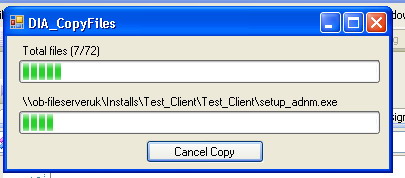
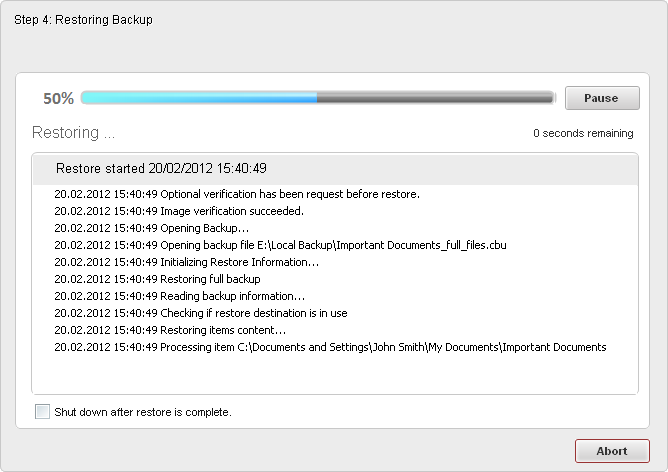
Actually, this has been done. The most useful progress indicators do the following:
1) Show overall progress
2) Show progress of subprocess
3) Have some type of message display that actually tells us what is happening (in fact having this may be more usefull than showing progress of the subprocesses).Here are some examples of great progress indicators (granted, not all are installers, but they are informative):
http://doc.zarafa.com/7.0/Migration_Manual/en-US/html/images/MGR_Progress.png
http://www.codeproject.com/KB/files/Copy_files_with_Progress/copyfiles.jpg
http://openchrom.files.wordpress.com/2011/09/openchrom-installer-unpack.jpg?w=640
The last one I want to show is actually from a game I like, and I was having a ton of issues trying to find a screenshot of the progress indicator, so instead, I found a Youtube video. The installer is about 5 minutes in - when you first launch the game, you have a progress indicator, but, its a little dark in this video, in the upper left hand corner, you can see how many files there are, what file it is on, if its downloading or installing, etc. Probably one of the most helpful progress indicators I have ever seen:
-
Re:Chrome's attitude
Why would the very paranoid want a closed source browser?
-
Re:Chrome's attitude
For the very paranoid, there is a nice chromium variant. Works well, doesn't freeze up like other options I've used, and the defaults make the IE10 "do not track" default look like an exibitionist.
-
How I use BOTH custom hosts & DNS... apk
"That is why you should use a white-list private dns server" - by Anonymous Coward on Monday January 07, @12:36PM (#42506751)
Why should I run a DNS server @ home?
As a separate machine it would EAT UP ELECTRICITY, & truly add complexity I don't NEED!
On my single home system?
It would do the same, as well as eat up CPU cycles, RAM, & other forms of I/O for something I don't need vs. what the combination of custom hosts files (which yes, overcome some issues on DNS like dns poisoning, dns servers going down, slower resolutions from remote DNS) & yes, on the single system I have (@ home)!
---
IMPORTANT: & I can't stress THIS enough!
Also PER MY SUBJECT-LINE ABOVE, which is what I *think* you all mess up on, as to HOW I USE CUSTOM HOSTS FILES?
CLUE: I don't ATTEMPT to have every single host-domain name in existence resolved to IP address here!
What DO I ACTUALLY DO?
I 'hardcode in' only my 20 top favorites sites in it!
The rest of its entries are blocked out KNOWN malicious sites/servers/hosts-domains that serve up malicious script code, malware, phishing/spamming, adbanners, & such (which eat your bandwidth you pay for, as well as poison you).
Once more - I hardcode in where I spend 95% or more of my time online (for reliability vs. downed or DNS poisoned DNS servers, and for faster resolution from local address once they are reverse DNS pinged for proper resolution).
AND?
I use Filtering DNS servers I use (secured vs. malware, malicious scripted sites, phishing/spamming & more) external to my home:
---
Norton DNS:
198.153.192.1
198.153.194.1
198.153.192.60
198.153.194.60
198.153.192.50
198.153.194.50
198.153.192.40
198.153.194.40OpenDNS:
http://www.opendns.com/home-solutions/
208.67.222.222
208.67.220.220ScrubIT DNS:
67.138.54.100
207.225.209.66Comodo Secure DNS:
http://www.comodo.com/secure-dns/switch/windows_vista.html
8.26.56.26
8.20.247.2---
To do the rest!
---
"instead of a blacklist
I generate my custom hosts file via this security (and speed, reliability & performance enhancing) program I wrote:
Both in 32 bit &/or 64 bit form... why?
* Please - DO read what it does for you... it explains it in a short 16 point list, so you can UNDERSTAND how I utilize custom hosts files for security, speed, reliability, privacy, & more... & yes, it works!
APK
P.S.=> Sometimes, I TRULY do *think* you guys THINK I use hosts to "resolve the entire internet" & again, so it "sinks in":
NO, I don't DO that... see above!
(See what I use custom hosts for in that programs' link above (it will explain it to you without ME having to do it for the 100th time here on slashdot))...
... apk