Slashdot Mirror
Domain: gimp-savvy.com
Stories and comments across the archive that link to gimp-savvy.com.
Comments · 33
-
Re:How come no FREE version of this BOOK ??
This fellow: http://gimp-savvy.com/BOOK/ has an excellent free book.
-
How to adjust selections: convert to path first.
I am not sure if this is true, so someone correct me if I'm wrong:
You can convert a selection to a path. This turns the outline of the selection into a curve that has nodes with Bezier-style controls. Then you can reposition and adjust the path. After that, you can convert it back into a selection.
Note that while the selection is an area (2 dimensions), the path is a curve (1 dimension, assuming it's not a Peano curve or something).
Another possibility is to convert the selection to a mask, but that's still working with areas rather than curves.
I wonder what happens if you make the path intersect itself, like a figure-8, and then convert it back into a selection?
Anyway, a bit of a coincidence that I only discovered this book today. (I was shopping for the Solveig Haugland book, OpenOffice 2 Guide, and saw it recommended on the web site where I purchased the book.) I did buy Professional GIMP, by Akkana Peck (sp?), which has been a very handy reference.
By the way, in case no one else mentions it, Grokking the GIMP is a great book available for free online from which I learned a great deal about using GIMP. It talks about removing colour casting from photographs, advanced selection techniques, etc. I downloaded a copy, and use it when I don't have the dead-tree book handy. -
Another book: Grokking the GIMP
I bought "Grokking the GIMP" some time ago
http://gimp-savvy.com/BOOK/
I found it to be very good indeed. It perhaps isn't an absolute beginners book. I learnt a huge amount about making better selections and adjusting colors. These tips would probably work just as well in Ph*toshop but I've never tried it!
It looks like it is now available online too so you can see if you like it first! -
Re:Artists' OS KnowledgeIt's always like this. People charge in going "Gimp can't draw straight lines! Gimp can't draw black-and-white pixels! Gimp can't count to two!" and we patiently point out the three simple menu steps they could have used to do it if only they'd thought to look there, and without missing a beat they go on: "Yeah, but it doesn't SMELL, FEEL, TASTE, LOOK, AND SOUND EXACTLY LIKE PHOTOSHOP!"
but it still doesn't approach Photoshop's ease of use or flexibility.
Yeah, yeah, yeah. Whatever. I suppose pointing out "Layers->Colors->Curves" isn't going to do any good, either, is it? I mean, what the hell is this? Are you people forced to use a computer with your hands cuffed behind your back or something? Right-click. That's what the right mouse button is for. Explore *every* submenu, in order. Open a test image and run *every* menu entry on it. You don't even need to open this free book or read any of my tutorials or read anybody else's tutorials. Everything's right there. If you don't like it, don't use it, but stop insisting that all the functions don't exist. It's dumb. You have just as much access to Google as anybody else, presuming you don't live in China. And then people wonder why we get frustrated.
As I've said before, I'm *dying* to see Photoshop ported. So *Adobe* can deal with you people instead of we GNU/Linux users.
-
Re:Just started using The GIMP...
The ability to combine selections and the perfect rectangle and ellipse selection tool features require both the use of the shift and control keys and when to apply those keys before or after letting go of the mouse button. There is no GUI for doing this. You just have to know.
-
Re:Just started using The GIMP...this program seems to take 'non-intuitive' to a new level
Intuitive means Known or perceived through intuition and intuition means The act or faculty of knowing or sensing without the use of rational processes; immediate cognition. I'm not even sure that really exists. If it does exist, then I'm pretty sure that it doesn't exist in the realm of manipulating software applications.
People say a GUI is intuitive when they really mean that it is easy to use. For most people that means that it is similar to what they are already familiar with. Photoshop has a lot of market share and mind share. I can see why many would believe that any graphics manipulation program that works similar to how the photoshop works would be considered easy to use.
To tell you the truth, I had no clue how to use the Gimp until I read Grokking the Gimp. The Gimp is very easy to use once you understand the concepts because the GUI is a consistent application of those concepts.
Now, I am not a visual interface designer. It is my understanding, however, that one of the basic principles of good visual interface design is that every operation that a user could ask the computer to make at any given point in time should be able to be made visible to the user at the time that the operation is allowed. Thus the application of menus is considered to be good. There are certain operations in the Gimp that violate this principle. I think that is why the Gimp gets such a bad rep.
-
Re:Just started using The GIMP...I'd suggest the book Grokking The Gimp. You can read it online at this URL
It's the best book out there to explain how Gimp works to a novice. It actually explain the image manipulation concepts and how to use them. For exemple, it will explain to you *why* a picture look bad.
It was made for version 1.2 of The Gimp but the interface still works the same way.
Except for bezier paths (check Gimp online help by pressing F1 when you get there) and the author tell you that intelligent scissors is broken but it works pretty well in 2.0+ versions.
-
Re:Replacing?
Just for clarity's sake, that is 8bits/channel, so that means "The GIMP uses 24 bits per pixel to represent color, 8 bits for each of the R, G, and B channels." This is what you get when you set the MS Windows desktop Properties/Settings/Colors to "True Color (32bit)".
-
Re:Niceit's still nice to finally see some real competition to Photoshop, especially considering that the price of Acrylic will be much lower than that of Photoshop.
Corel offer a complete graphics suite with a no strings attached fully featured time limited download of CGS 12, which includes vector drawing (Draw), Trace, a font tool, and Photo-Paint.
Photo-Paint, if it is the first product of its type you have used, is extensive and intuitive. It only takes a modicum of effort to adopt to it if you are a long term Photoshop user.
Personally, nothing is likely to shift me from my Creative Suite 2, but please remember that Corel offer a respectable alternative to Photoshop for the price of two programs that form the Creative Suite.
Lest it also be forgotten, for what is relatively speaking a budget price there is the great PaintShop Pro 9. You can do everything with that which you'd ask of an image mangling program, for a fraction of the Adobe cost.
I find everything about the GIMP counter-intuitive. I started using it back in the day, and it's great that it's free as in beer, so it makes the list too because it is full featured, it does properly support layers, vectors, rasterisation, efficient use of swap, no brainer to set up, and tutorials aplenty online once you've graduated past the Grokking The GIMP stage.
I haven't used the Microsoft program and don't care to. The only way this product would be more "real competition" to Photoshop is the financial backing that is behind it, and the avenues of distribution available to it if it could be bundled pre-installed for an extra fee. Microsoft is arriving very late to the game with this, but if it increases innovation which gives users like me more toys like CS2's Vanishing Point, Warp filter and others, then that's good.
If it's a shallow imitation of something I have a lot of familiarity with, which I can get from a bona fide graphics design company which has not let me down in the past, and who provide OSS for scripting new parts to the program, there's no reason to consider switching. I'm presuming JASC's PSP 9 is going to beat it on price anyway, Corel is going to beat it on value, and Adobe will beat it for quality and extendability.
My $0.02.
-
Re:Grokking.. "Man from Mars" reference?
As another poster mentions, the book you're thinking of is "Stranger in a Strange Land". However, "grok" is fairly common term in places like Slashdot. See the Jargon File entry, and note examples such as Grokking the GIMP.
Ethan -
Slide/Film Scanners
I won a used Minolta DiMAGE II slide/film scanner on ebay for $162.50 a month ago.
I downloaded the GIMP for free.
Grokking the GIMP is available online.
HTH -
Re:Gimp is uncomfortableIts user interface is just so uncomfortable and annoying
I guess Gimp's name was inspired by its user interface. When newbies ask me, I tell them the Gimp can do anything one can imagine, but one just cannot imagine how.
A good starting point is Grokking the GIMP, an online that's also available in paper. There you can follow step by step how some usual image editing tasks are done. -
Image editing for the massesI am not an Apple product user (IANAMPU?), I don't think I have ever used one. I have never seen one but make no mistake I would love to get one of these for starters. I have two close friends who have both used Macs extensively. They swear by them and I believe the reports.
But this elitist drivel is just the type of crap I've come to expect from certain quarters after 5 years of avid browsing. The reason the article drives me nuts really comes down to cost. (FYI) The submission here pretty much sums up the article except to leave out all the sarcasm and jibing.Sure, commercial users who are able to purchase $3,000 worth of hardware without bumping up the mortgage probably 'can't understand why anyone would want to go to so much effort for so little reward'. They probably do honestly think that at $99 Photoshop Elements is 'cheap, painless and produces high quality results'.
So who cares about the unwashed personal use throng?
The cost of obtaining a great quality Digital Camera has made all the difference over the last couple of years. It's one of those cases (like digital music) of people getting a chance to take a part of their real life and combine it with their interest in computers or email or the internet or even just a penchant for electronic wizardry, at a price and personal cost that really is cheap and effortless. My point here is that personal users do matter - more each day in fact.
Whilst I know I am not a GIMP zealot I have used the WIN32 off shoot (The GIMP windows version incidentally, doesn't have to be compiled in an end user sense it comes as an installer executable). As an end user however I am relatively motivated by the general ideas and beliefs of the open source commnuity and in that domain the GIMP is the anti-candle.
Then there is the issue of breaching the User License. For all you folks who don't taint your pure selves with the concerns of warez and all that - Adobe (for as long as I can remember) has always produced software that seems to be notoriously easy to crack. So I guess, sadly, that gives users such as myself another option, that no-one ever seems to acknowledge.
Hmm.. I guess no image editor war is ever going to start here (for the time being), right? Let's be honest - it's like comparing a foot massage with a ho down in the holiest of holies. Everyone knows that.
The article mentions the problem with the help system. (I vaguely remember discovering a fix at some point.. can anyone help?) In any case look no further than here for what I consider to be a remarkable effort, all things considered. It really sums up to me why I (but more importantly GIMP developers) go to all the effort for 'so little reward'. The author of the article says in respect of the MacGIMP that he thought he'd have a look. I guess then he thought he'd wipe his MacNIKEs on the hard and thankless labour of others. Have some respect fulla... -
Re:Digital Photo tutorials
Do you have lots of free time? There are as many ways to touch up photos as there are ways to take bad photos in the first place.
A very good book, not just for GIMP users, is Grokking the GIMP. You can download it or read it for free at the author's site or buy it in any decent bookstore. The author's site requires Javascript for some weird reason, the GIMP User Group has a scriptless version that works just as well. -
Re:1,028,000 photographs I can't use
Don't forget GIMP-Savvy. They have over 4GB of free as in [beer|speech] pics; plus, even if you don't have any images to donate, you can contribute to the site by categorizing existing photos.
-
Re:Is it time.. . .
My overall impression is that GIMP has been designed by highly qualified geeks, but geeks nevertheless. I think it would benefit immensly from a usability expert input. A number of solutions chosen is far from intuitive. While the overall capabilities of GIMP are excellent, it takes some getting-used-to time. Once the initial "who the hell thought that right click plus Ctrl is a natural solution for this operation" types of experiences are over, you might be pleasantly surprised by the power of GIMP. Overall, this is one software that I woulde definitely recomment reading books or tutorials before using it. Ah, and yes, I find that 1.3 series and now 2.0 release candidates have some improvements in usability over 1.2 version. Dockable dialogs and a much better menu systems just to name a few
-
Re:whats wrong with software?
If you are doing the same action 600 times, you might consider memorizing the keyboard shortcut for that action.
-
Re:Difficult to use or?
Book links:
Grokking The GIMP - 100% free online or you can buy a copy.
ORA GIMP Pocket Reference -- prettty handy. You might find that in your local B&N or Borders or whatever.
Of course, both of these are for The GIMP 1.2. -
Re:Difficult to use or?
The "big difference" is that instead of oppening the whole program, images and sibblings in a single window, The GIMP opens the toolboxes and images in separate windows. This allows a serious user to make an optimal use of the multiple desktops avaliable in almost all window manager for X11 out there.
Yes, the current interface of the GIMP (already much improved since the GIMP 1.x days) is very nice if you have a window manager that provides multiple desktops or virtual workspaces. This is good for most Unix users with modern window managers. But it is not as easy to use under Windows because all applications have to share the same workspace. An option for some users is to install some third-party Windows software that provides multiple virtual workspaces, but some users cannot or do not want to install such software.
In any case, even if the current interface is still not ideal when you do not have multiple workspaces, it is easier to use than the 1.x versions. And the best way to know if The GIMP is difficult to use or not is to try it yourself! You may also want to read some books such as Grokking the GIMP. That book was written for GIMP 1.2 and the interface has changed since then, but most of the concepts are still valid so it provides a good introduction to the GIMP.
-
Grokking the Gimp
It's an online book, best I've ever read on the GIMP. The instructions for how to retouch photos is fantastic. You can also buy a hardcopy.
-
GIMP ain't half badAnd with the new additions it sounds like it's certainly getting a nice upgrade. I can't wait for 2.0.
What more could anyone who doesn't need to go to press ask for?
-
Re:Not just software.... images?
gimp-savvy.com's public domain images: here
-
Here's the good news!
Grokking the Gimp
And it's free to download
Oh how I love this stuff...
All the best! -
tutorial on "Make Seamless" GIMP filter
If you want to make background tiles from other non-background tile images, read through the short Make seamless tutorial.
-
GIMP-savvy
An interesting project here: http://gimp-savvy.com/PHOTO-ARCHIVE/
-
Re:Color dimensions
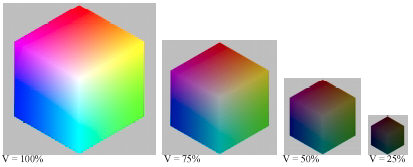
Then why is it alway represented by a two dimensional pallet?
Always? 2 3 4 5 6 7 8 9 10 11 12 13 14
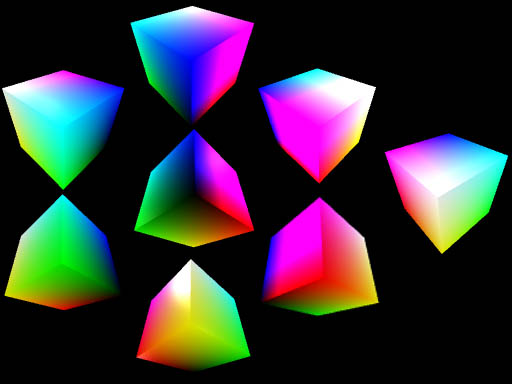
It is often represented two dimensionally because it is difficult to display it three dimensionally. Two dimensional displays most often display Hue and Saturation and completely discard Value.
Color can be coded as RGB (Red/Rreen/Blue) or HSV (Hue/Saturation/Value) or HSL (Hue/SaturationLightness) or YCbCr aka YUV aka YIQ (used in TV) or CMY (Cyan/Magenta/Yellow) or L*a*b* or XYZ. It always requires exactly three components. Note CMYK uses 4, but K is redundant, it improves the quality of ink printing.
it isn't "exact" either, since many humans are missing at least one of the dimensions.
That is precisely why I included the word "normal" in "normal human vision".
- -
My Experience Writing OS Books
Hi, my name is Carey Bunks, and I have written two OS books: Grokking the Gimp and The Lasso: A Rational Guide to Trick Roping.
Here are my two cents on writing books, and on the theory that community participation benefits a book in the same way it benefits code (correcting errors, keeping it up to date, etc). I suspect that this theory is wrong except for some special cases (for example, dictionaries). However, I can warmly recommend the idea of making a book open.
I claim that writing a good book is very different than writing good code. Generally, good code should be well organized, carefully designed, with its components being as modular and as independent as possible. If successful, the result should be an application that evolves more gracefully, and is more easily updated and maintained by multiple developers.
A good book should be well organized, however, does not, indeed must not be modular. Why? Because a human mind does not understand nor process the words in a book the way a computer does a program. Humans like good organization. However, the brain also needs association of ideas and redundancy. We humans like to see the connections between things, and we need to be constantly reminded.
So, although a table of contents may be very organized, a good book contains chapters that are hardly modular. Good chapters should be rich with references to other parts of the book, showing how the ideas presented in different parts work together. Furthermore, chapters will often contain redundant recaps of other chapters, again showing how the pieces fit together. When there is enough of this type of self-referencing, it creates a synergy that helps readers better understand and better appreciate the material.
My conclusion is that a book is more like a cathedral than a bazaar. It requires a master architect who conceives the original design, and then literally weaves the many threads together into a single whole. The very nature of the work resists participation or subsequent updating by third parties. Thus, trying to update chapters is likely to make a book incoherent as the relevancy of references and the synergy of ideas start to break down.
Second, my theory on writing a good book is coherent with the above discussion. I believe that the most important process in writing a good book is re-reading and re-writing. It's kind of like refactoring of code, except instead of making the resulting book more modular, it makes it more connected. As the book starts to take form (near the end of the first draft), it is important to intensely review what has been written. This will give rise to all sorts of small scale revisions -- spelling, grammar, and sentence construction corrections. However, it also allows the author to revisit the overall connectedness of the work. Does the story hold together? Is it coherent? Does it provide insight into the underlying concepts presented by the book? This is the most valuable part of the revision process.
Finally, let's face the facts. The way the publishing industry works, it is very difficult to make any money writing. There are some counter-examples to this, however, the overwhelming majority of books make less than $10k for their authors. Compared to the 6 to 9 months of full-time work needed to produce a quality book, you are better off not trying to write for a living. Thus, it is unlikely that deciding to make a book open will ruin its economic potential. However, in some cases, I think that making a book OS can help improve its market share (see my thoughts on this in this interview on LWN). On the other hand, creating a book is a very rewarding personal experience, and can definitely improve ones professional profile. -
Re:Corrected GGAD address
You might not be interested, but here is an awesome resource on the GIMP. It is called Grokking the GIMP GIMP made me a little nervous at first, but now I'm slapping my friends faces on pr0n stars bodies in no time!!
-
Re:Why do we need it
What you're looking for can be found in the photo archive on Gimp-Savvy.com. It has 15,000 copyright-free photos, the archive can be searched using keywords, and there is a similar photo search function that's neat. In addition, the archive is community indexed (currently, two-thirds of the archive has been indexed). Very cool!
-
Re:I don't think so
If the GIMP people want to increase their market share they need to fix the UI
Market share? Who is interested in market share? The GIMP developers are writing free software. We want the GIMP to be a useful tool that serves the needs of those who contribute to its development, and hopefully also serves the needs of many others. But market share is not a goal in itself.
That being said, the user interface needs to be improved and the developers are aware of this. Some parts of it have already been re-written in the current 1.3 branch and you will get a slightly better look in the Win32 version as soon as the Gimp and other GTK+ applications are converted to GTK+ 2.0.
If I find it bad as a computer guy, you can't bet your bottom dollar that graphic artists are going to hate it.
There are some graphic artists who contribute to the development of the GIMP and make constructive suggestions about how the interface can be improved. Although this may surprise you, some of these artists are happy with the current UI. It can of course be improved, but you should not assume that it is not good for experienced artists just because you do not like it.
If you want to have an idea of the improvements that have already been suggested for the UI and other parts of the GIMP, you can have a look at the list of suggested enhancements or the list of all bug reports about the user interface.
Once the UI has been fixed, then documentation needs to be re-written so that it's not orientated towards computer geeks.
This may sound like a cliché, but the best way to improve it is to contribute... If you do not have programming skills to improve the UI, you could help by writing a better documentation. If the documentation has too much of a "geek style", this is probably because those who contributed to it so far (most of them are not native english speakers) did not have enough time to improve the style. Please contribute if you have some spare time, as this would benefit everybody.
By the way, I assume that you know about the good books and tutorials about the GIMP. Some of these are suitable for non-technical users. One book that is often recommended is "Grokking the GIMP" by Carey Bunks and published by New Riders. The whole book is available online at http://gimp-savvy.com/.
To many people, it won't matter whether it's free, or whether it supports the same features of a commercial product from Adobe that is far more polished.
Maybe. But then again, to many people, it does matter that the GIMP is free software. It does matter that the GIMP has far better scripting abilities than other products (other features like color separation and support for different color spaces are planned for the next version). Some people are happy with Photoshop or other proprietary products... Well, then let them use the product they like. Once again, this is not about market share. This is about making a useful program (that is suitable for those who are interested in free software).
-
This book is available online.And has been for some time. Which is why I'm surprised I haven't seen a link to it posted yet.
So here it is!
--
CmdrTaco broke my sig. -
Re:Mixed vector/pixmap layers, non linear history?
Here are some answers to your suggestions:
- Vector layers. They are no there yet, although this has been discussed several times among the GIMP developers. The current implementation of paths (using the bezier tool) is already using some vectors and the FreeType plug-in can convert text to paths, but this is not exactly what you want. Note that you can apply some basic transformations to the paths (rotation, scaling, shearing), but the support for vectors in the GIMP is still limited. Currently, if you want to work with vectors, it is better to try Gill, the GNOME illustration app. Maybe Gill and GIMP could be merged in the future?
- Non-linear history. This has also been discussed several times, and this will be part of version 2.0. This was even mentioned on a page that the article refers to.
- Line tools. Did you know that you can already draw straight lines, circles, squares and other shapes with the GIMP? To draw a straight line, select any painting tool, click where you want to start your line, then hold shift and click a second time. To draw a circle or a square, use the corresponding selection tools to make a selection, then use Edit->Stroke. The latest development version of the GIMP contains some tips explaining how to do that easily. You can even do some exotic things such as drawing lines with a gradient or with a fading brush.
- Dynamic seletors. Well, I am not sure that I understand what you want. I would be interested in more details...
Many things are already possible with the upcoming version 1.2 of the GIMP. I suggest that you have a look at the tips and on-line help that are distributed with the current version, or that you have a look at some of the recent books, such as Grokking the GIMP or the GIMP handbook by Sven.
-
Oh no! Boycot this GIMP book!
This is too funny. The main site for their book data: http://gimp-savvy.com/BOOK/ has a link for you to buy it (nice), but HORROR!!!, it links to Amazon. $36 bucks is a little pricey though. Maybe 5 bucks too high.