Slashdot Mirror
Domain: headbands.com
Stories and comments across the archive that link to headbands.com.
Comments · 24
-
Simple
Plex was highly recommended, and installed easily, but will see some
MKV is a container. It surrounds whatever codec happens to be inside of it. You could very easily use a tool like gspot to analyze the file for the inner codec, and add the required packages/libraries to open and play said file. I don't think that's a limitation of Plex, but a lack of required codec software packages on your machine. I've heard wonderful things about Plex.
-
Re:If someone integrates F-spot into gnome.....
Shouldn't it then be named G-spot? If a program of such a name were to exist, would any male users be able to find it, let alone use it?
-
Re:If someone integrates F-spot into gnome.....
Shouldn't it then be named G-spot? If a program of such a name were to exist, would any male users be able to find it, let alone use it?
-
I Call Bullshit
-
bs...
Newcomers.. ofcourse GSpot exists. http://www.headbands.com/gspot/
It's just discontinued and we all use this now instead: http://mediainfo.sourceforge.net/en -
Re:The G-Spot is not a myth!
Indeed it does! It cam be downloaded from here: http://gspot.headbands.com/
-
Re:Another stupid move by ubuntu
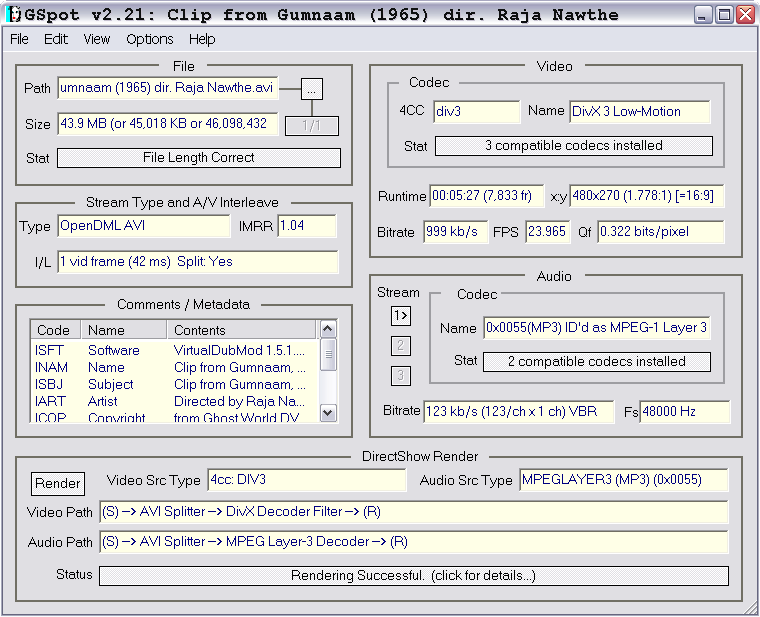
GSpot is a video codec identification tool for windows:
http://www.headbands.com/gspot/I seem to remember writing up a wine bug about it sometime in the distant past. Ah yes, here it is:
-
Re:Vista is #10?
There is absolutely nothing in Vista that will deliberately sabotage playback of unDRM'd AVI files (The AVI format doesn't even support DRM). Try installing the correct codecs, GSpot should be able to identify the video and audio codecs required by the AVI's you're having problems with. If in doubt, try ffdshow which will decode most formats.
Also try other players, particularly ones which may have their own AVI parser rather than using the one shipped with DirectX/Windows, Media Player Classic perhaps. -
A version that works. And a question.As author of the popular GSpot app, I regularly deconstruct and analyze multimedia files. I've just now whipped together a small CLI app called "NIPPIN" that will recursively traverse an M4A file. It can be used for informational purposes only (and I've found that much of the "technical" info in this thread is wrong). Or you can create a "privatized" copy of your iTunes Plus file, that, unlike that "other" app, is "provably correct" (see web page).
Mine does it the right way; it doesn't "blank" any characters, it recalculates all atom lengths, and it recalculates the entire stco table as required. When the input files are the same songs downloaded from different accounts, the resulting output files all have identical MD5 hashes. Hell, even if you're not interested in privacy, it saves a minimum of 32KB per file - which adds up - that's like an extra 75 songs on a 30GB iPod.
And BTW - privacy may not concern some people, but to others it's very "real". Why else would the DMCA, of all things, protect against use of Personally Identifiable Data for copy protection mechanisms? Either the people who wrote the DMCA believe Personally Identifiable Data is a serious and "real" issue, or they put this provision in section 1201 of the DMCA to promote file sharing. Take your pick.
-
Re:I like google as much as the next /.er,GSpot, the program which automatically finds out what codec a movie is in, and if you have it available?
Yep, it is really hard to find between all the porn-sites that show up when searching for it. Its homepage is however here
-
it's been found!
-
Re:not free
There already is a GSpot though, so G-Spot might just appear to be a ripped off name. It is a pretty cool application that will analyze video files and tell you what codecs it is using and if the codec is on the machine your testing on. It can come in handy with some of those wierd videos from Kazaa that people seem to get and are impossible to play.
-
Re:Video
The software you refer to is available from here.
This should prevent lots of people from making the same mistake as me, and clicking the wrong site in their google search for "gspot" while at work -
The drawback with VLC
Many people claim that what's so great about VLC is that it doesn't need codecs to playback video files. Yay! Well, that's just not true, in fact, that's quite impossible. All video files are encoded somehow, and in order to playback the video it must be decoded first. Hence the codec.
VLC uses the libavcodec codec to decode video. This codec handles a lot of different formats (see list) where codecs usually just handle one format. This approach has benefits and drawbacks. The obvious benefit is that the codec-hunting days of yore can be dispensed with. The less-than-obvious drawback is that a multi-purpose tool is almost never as good as a dedicated tool. The truth is that VLC very often doesn't playback video with the same quality as players using dedicated codecs.
I recommend using a player with dedicated codecs. I use BSPlayer, as it is easy on the resources, stable, with extensive, configurable features (it is ugly though, so change the skin for your own sake). Other players are probably just as good, but after having tried all the popular ones, this is my favorite. Install codecs only when necessary; use GSpot to figure out which is needed. Do not use codec packs, they are evil.
This being said, I do use VLC as a can opener for the occasional weird video file. For this use, VLC is great! -
Re:Google Office
Well they would have to buy the rights from these guys first, wait, we are talking about the same thing right?
-
Re:Nothing for you to see here. Please move along.
Doh! Gspot is not a browser!
-
K-Lite Codec Pack
Go get the K-Lite Codec Pack
Install that and it will fix all the problems you have...Every couple months whenever I find something tricky I go get the new version...
As an added bonus, it comes with the GSpot Codec Information utility...This handy program will tell you anything you want about any media file. It will also tell you wether or not the file is complete as it tries to render...Overall a great little tool... -
Answers, and then some...
Having played a lot with video encoding in my spare time (which isn't hard to do when you've been unemployed for seven months), I will bestow on you some tips on the world of encoded video, so that you won't have to go through as much teeth gnashing, hair pulling, and head slapping that I have.
The most likely problem you are facing is that you don't have the right codecs installed to play the files you want. As someone mentioned before, Nimo is your best friend in this case, as it's a file pack that contains a multitude of codecs and filters to play almost everything under the sun.
But say you install Nimo, and things still don't work. What then? Well, assuming you still don't have the right codec, then it's time to meet your other new best friend, AVIcodec. Don't let the name fool you. This little program will identify the codec you need for AVI's, MPEG's, WMV's, ASF's, and probably a few others I'm forgetting. I also hear good things about GSPot, but AVIcodec works too well for me to change.
Now, say you run into a file that uses MPEG2 for video or has an AC3 audio stream. Well, you won't find any codecs for those on the web, because the Motion Picture Experts Group likes to rake in those licensing fees. (Well, you MAY find a codec or two out there, but keep in mind if you download them and don't have to pay a fee, it's almost certainly illegal.) What you then need to do is to install a software DVD player like PowerDVD or WinDVD, and that'll straighten things out for you.
Now let's say you're SURE you have the right codecs installed, and the video STILL won't play. Well, that just blows, because your file is probably damaged, or in the case of an AVI, it's incomplete. If you've got an AVI, run over and grab AVIPreview, which is a nice program that'll let you preview incomplete AVI's (see? "AVIPreview"?
Now... (*takes a breath*), if it isn't an AVI, then the likelyhood you'll be able to fix the problem goes down considerably. Free ASF and WMV editing programs are few and far between (and we all know who owns those file formats), and almost all MPEG issues will continue to niggle you unless you do a full-blown re-encode of the file. You can definitely try downloading VCDGear and checking the "Fix MPEG Errors" checkbox, but this almost NEVER works (i.e., times it worked for me: none).
And keep in mind these are the EASY solutions. If you're actually interested in using video editing/encoding programs, then take a visit to Doom9 or DVDRhelp.com. The forums and guides on these sites are a boon to the video encoding enthusiast, and the forum regulars tend to be pretty friendly, too.
Best of luck and well wishes...
-
GSpot
No. Don't mod this down. It's real. G-Spot goes quite a long way toward identifying codecs. It won't help you get them loaded, but does have magic-cookie-like fingerprints for a very diverse list of codecs. Windows only, but I don't think you need admin privs to run it either.
-
Codec Identification
First step is to determine exactly what codec you _NEED_. AVI, as you probably know, isn't a codec; it's just a container format. Go ahead and download GSpot for Win32/WINE (screenshot) and investigate.
-
Codec Identification
First step is to determine exactly what codec you _NEED_. AVI, as you probably know, isn't a codec; it's just a container format. Go ahead and download GSpot for Win32/WINE (screenshot) and investigate.
-
Play Detective
gspot.
Reports what codec the file needs. -
identify codecs
There are programs out there specifically designed to identify the codec. Not to make a plug but I use a program called G Spot. It tells you what codec is need and where on your system is the codec supposed to be. YMMV if you're a on non windows system. Try to not mod me down for using windows.
-
Re:As if this was a bad thing...
"Last time I tried BSPlayer"
I feel for you. I had the same problems with Outlook Express once and it's a lot harder to deinstall than an external piece of software because 'it's part of the OS'. Caveat Emptor
I must admit that when I went on a hunt for codecs to try and figure the variability of quality in media players, I found an absolute rat's nest of stuff going on. A program called Gspot is good for checking media files and whether you have the right codecs.
See if there's a newer version of BSPlayer and slap a reference file through Gspot to check it first. You might have a crufty codec somewhere.