Slashdot Mirror
Domain: krita.org
Stories and comments across the archive that link to krita.org.
Comments · 31
-
GIMP respects your software freedom, not Paint.net
If you want software that respects your software freedom, you'll want to get off of using Microsoft Windows (because Windows is proprietary, user-subjugating, non-free software) and use the GIMP. Paint.net is non-free software. It's license clearly states "You may not modify, adapt, rent, lease, loan, sell, or create derivative works based upon the Software or any part thereof." which includes free software freedoms—distributing for a fee, making derivative works, and altering the software.
You see Rick Brewster, Paint.NET author, convey the same anti-software freedom sentiment in the Paint.NET blog article referred to in this story alongside Krita, a free software drawing application licensed under the GNU GPL. Consider a quote from Brewster's own blog:
Paint.NET is also not something I want to be chopped up and swept into other projects like Krita. Remember, I make my living off of this — why would I just give away my IP like that? (although, of course, the whole conversation space here is much more complex — please don't assume I'm anti-OSS or something)
If whatever "OSS" refers to (I'm guessing open source software) includes not letting users "chop up" the covered software and include code in other projects, then that's a clear and firm difference between the older free software social movement and the younger, business-centric, reactionary open source developmental methodology. Free software allows the user to do precisely what the Paint.NET license prohibit and what Brewster's comment explains. If Brewster is getting this wrong, and "OSS" doesn't stand for what he prohibits, people should take him to task for misunderstanding what open source software means, and they not allow that name to be conflated with proprietary software. But as of yet, I see no followup posts to his spelling out any misunderstanding of his chosen terms (making Brewster's claim another instance of the pattern I described earlier). Brewster also uses the term "IP" (which I'm assuming means "intellectual property") which is a scam that carries a dangerous assumption and should only be used to point out how bad the phrase is.
-
Re:Subscriptions are going to kill my business..
Krita is a digital paint program. "Krita is a professional FREE and open source painting program." GIMP is the FOSS "counterpart" to PS.
Why are you questioning people without even making the tiniest attempt at educating yourself first?
-
Re:Wacom :(
No problem at all, hope it works out for you. The wacom driver itself should just work out of the box, plug in and it'll get detected. If you need configuration, the major desktop environments, like GNOME and KDE, should also have some GUI configuration options somewhere in their control panel-esque equivalents, though they're usually optional components, so you may have to choose to install from the package manager for them to show up. If the basic options they give you aren't enough, there's also the command-line xsetwacom tool, which gives you everything, and as a bonus can be called from scripts for even more advanced behaviour, like bulk-reassigning the tablet buttons for different applications.
Like I said, though, the weak part of using Linux for tablets is lack of the big-name applications unless you can get them working in wine. It's not as dire as it used to be, though, back when the only option was gimp. Gimp's still around, and still works for photo editing, but I think the stand-out now is Krita, which is a truly excellent piece of art software even stacked against non-free products. If you need vector, I think inkscape's still the best option, and for animation there's Synfig Studio, Krita has some support for it, and possibly other options. Plus, while not specifically made for it, Blender can be used for non-3d video and animation editing in addition to 3d rendering and animation. (Speaking of Blender, there's a UI mod called Sensei Format that I've heard is supposed to make Blender more approachable.)
There's also a fair bit of proprietary software that does support Linux, but it seems to be largely in 3d, animation, and CAD with less of a presence for illustration and photo editing. (Off the top of my head, I know Maya, Houdini, and Lightworks maintain Linux versions.)
And, finally, a random note about desktop environments: most distributions ship with GNOME, but you should consider giving KDE a try if you don't find a bunch of configuration knobs daunting. You have a lot more control over KDE's appearance and behaviour, so you may be able to make it act more like you want instead of the GNOME-like way of having to change your workflow to match what GNOME devs want.
Anyway, good luck with it. Wacom's hardware lasts forever and I agree it's a shame to have to stop using it because of the software.
-
try krita
I've heard about krita https://krita.org/
-
Re:Photoshop
-
Krita 3.1.3.
Just got a program notification message update available. About time too!
Application vers.: 3.3.0.234
Product Name: AfterShot Pro 3 Registered
Built on: Tue Apr 11 2017
Platform: Linux
Issue: Linux Mint 17.1 Rebecca \n \lTowards the end of 2016 just coming into 2017 I purchased a HP workstation and a Ugee UG2150 21.5 Inch HD Resolution IPS Graphic Tablet and AfterShot Pro 3
along with another Canon camera. AfterShot Pro 3 was so bad! It would lose working directions ls/dir and it would crash if a picture was deleted. They issued an upgrade and it did not do anything. They just delivered another one and it seems to work I wonder what took them so long. So long in fact that I ended up purchasing a laptop with a Windows 7 system a i7 processor and Adobe Photoshop Elements 14, Xara Photo & Graphic Designer.And now they have fixed this AfterShot Pro 3 on Linux, the bastards I paid good money for that and it was so bad. I am so annoyed with that company so unprofessional.
Oh Just received another notification from another program:
"Today we're proud to release Krita 3.1.3. A ton of bug fixes, and some nice new features as well."
https://krita.org/en/item/krit...Goodness and another: LibreOffice 4.2.
-
Re:Duh, this is why I switched to Linux
If you need adobe, learn GIMP
Or Krita.
-
Re:Open software
I'm a Graphic designer.
And do you use GIMP for your job? Some other FOSS package?
Probably not or at least any FOSS you have is for some minor utility that you'd didn't want to buy.
PC ecosystem is changing. It's no longer our primary device.
Every just saw 'PC dead' and went all off completely missing the point.
No one understands subtle arguments anymore.
Tools You Need to Grow as an Artist https://krita.org/en/
"App Images For Linux, we offer AppImages These should run on any newer Linux distribution. For Ubuntu 12.04 and CentOS 6.x you need the appimage that is built without support for OpenMP. Be sure to make the appimage executable before launch. 64-bit Appimage"
Windows GNU/Linux Mac OSX Source Code.
-
Re:JMonkeyEngine?
You also see the same issue with graphics programs etc. Photoshop vs GIMP for example. Proponents of GIMP often argue that "But, you can modify the program!" etc, while Photoshop has been designed, over the years, to have a workflow based on aggregate collected advice from artists all over the world.
Gimp isn't the only open source graphics program around, FYI. There are others that take user input seriously and don't shrug off requests or wait years to implement them.
For example, Krita is closer to how you describe Photoshop's development, with the devs getting input from artists and incorporating that into development. Not just unsolicited bug reports and feature requests, either: they post artist interviews on their site occasionally, and they always include "what do you like about Krita?" and "what is Krita missing?" questions in them. Gives the artists some exposure while also helping devs learn what people consider to be Krita's strengths and weaknesses.
MyPaint development is similar, though quieter about it. It used to be very minimal but gained a lot of nice features at the request of illustrators that used the software and asked for improvements.
Blender(*) had to give in and adapt slightly towards a more Maya-style(*) workflow, instead of the old and utter crap in-house workflow designed by programmers for programmers style used at the design studio where it was first written.
I wouldn't really consider that an open source failing either. Some people actually like Blender's original workflow and design, and by the time it got open sourced years later, it had enough of a following that a complete redesign would have pissed off a lot of people. Not just anybody, it would have pissed off the people that liked blender enough to pay €100,000 to have it open sourced. It took a while but I think they came up with a good compromise with the 2.5+ versions. Flexible UI, old workflows still possible, with preset keybindings and layouts to mimic other programs for people that are familiar with something else and not interested in changing anything they don't absolutely have to.
-
Re:Counterpoint
Adobe got away with Creative Cloud because at the time there wasn't really much competition for Photoshop, Illustrator, etc. There weren't many commercial/closed source alternatives, as Corel and the like are now a shadow of their former selves. This being Slashdot, someone will suggest the GIMP, Inkscape and Scribus, and everyone who works with this kind of software professionally will smile kindly and ignore them.
Going a bit off topic here, but what about Krita? It's probably the best open source graphics program right now, putting gimp to shame. Not so much a photo editor, but a very good creation tool and maybe useful as a complement to another graphics program like Photoshop, even if it can't replace it.
-
Re:pay them!!
100% agree!
If businesses were smart they all would chip in $10 say towards LibreOffice, Inkscape, Krita, FreeNAS, GimpShop, etc.
They could be free of the tyranny of proprietary vendor-lock file formats for once and for all. But yet they would rather pay to suffer ! **shrugs**
Could you image how much development could get done if open source alternatives to X could get funding!? Not say money is a silver bullet TM but it certainly would go a long way!
-
Re:Works under Wine?From Krita's FAQ page
We have acquired a Mac Mini and are looking into packages for OSX. There hasn't been much success to date, though you can use the beta ports file for mac ports.
-
Krita is used for "digital painting".
From the top of the Krita documentation page: "The first thing to remember is that Krita is a 2D paint application. Photoshop, for example, is an image manipulation program. Krita has tools that are relevant to digital painting -- concept art, creation of comics and textures for rendering." [Edited for clarity.]
-
Why so Anti-Gimp?
Krita is not competing with Gimp. Gimp is an image manipulation program like Photoshop. Krita is an image creation software like Illustrator. They are slightly different categories of software. Has the author, JDG1980, even looked at Krita's website? Since the author clearly has not read the site, please read "What are Krita's Development Goals?" for yourself here.
-
Re: Drawing in GIMP
Speaking as someone who uses these kinds of programs mainly for drawing/painting, GIMP is useless to me; I've yet to find a way to rotate/flip the viewport (not the image itself), save as/export issues as you've mentioned, no easy way to configure some necessary shortcuts (though it's been some months since I've used it, so I may be misremembering or it may have changed), the number bars for brush size, etc. are fucking awful, etc.
You can't find viewport adjustment because it doesn't exist; GIMP is oriented toward image manipulation, not creation. Using GIMP or Photoshop as a drawing tool is a case of forcing the tool to be used in ways it wasn't originally intended, and unlike Photoshop, GIMP doesn't have the development resources for adding those sorts of things.
What you should really be using is Krita, which lives somewhere between the extremes of GIMP and MyPaint. It isn't as powerful for editing as GIMP is, but it still has various editing tools, while still being focused on creation tools.
Some interesting Krita features:
* Non-destructive (i.e. viewpoint only) canvas rotation.
* Non-destructive mirroring of the canvas.
* Multiple viewports of the same canvas with independent zoom, mirroring, rotation.
* Different layer types, including paint, vector, and filter.
* Layer grouping.
* Filter layers can be applied to either a single layer or a layer group, modifying the composite of the group's layers.
* These Filters are non-destructive: they can be added or removed, and the layer(s) they affect can be edited while they're in use.
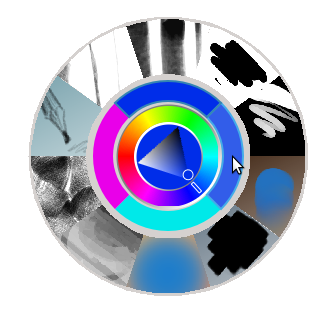
* An excellent pop-up colour and brush selector. The centre is a normal colour selector, the middle ring lists the last twelve used colours, and the outer ring has ten brushes of your choice.
* Multiple brush engines, all very flexible. The normal pixel brush engine is powerful by itself, but there is also a colour smudge brush for smooth blending (not mixing), a brush that emulates the harmony brushes, another that emulates Alchemy's shape brush, and "deform brush" that can nudge and move strokes on the canvas.
* An editable perspective grid. Brush strokes can be forced to follow it for striaght, accurate lines.
* Pseudo-infinite canvas. The canvas is finite, but when you scroll past the edge, an arrow appears; click it and the canvas extends in that direction. Not as nice as MyPaint, but still better than using a resize UI for quick extending.
* Sessions. You can set up different UI layouts and change them on-the-fly with a click.
* Different colour and shade selectors available, including the MyPaint one.
* CMYK, RGB, and other colour models available, as well as varying bit depths -
Re:I tried this...
Gimp will have full 16 bit per channel support in the upcomming 3.0. If you can't wait for that and must have it Krita already supports 16 bits per channel.
Personally, I don't understand this. It does make sense for print ads, or high end photography, but for web, it does not even make a slight bit of difference."
-
Re:I tried this...
what about http://krita.org/ ?
i've only played with it a bit and my image editing needs are very basic anyway, but it would be interesting to see it compared to gimp for professional use -
Freedom vs slavery
Lol. In Linux or free unix desktop land you're a slave to software dependencies and chasing down half-assed solutions to common desktop application type tasks. On my mac, I spend a total of about 1 hour per 18 months on operating system upgrades. I've been there, done that, and will GLADLY pay the software licensing cost to get what I want done with a minimum of fucking about.
On my Mac I run Snow Leopard and Ubuntu 12.04 and I love the freedom to run whatever software I can. Now if Adobe were to port Photoshop CS to Linux, and drop the price, I and many other Linux users would use it too. Because I can't afford CS for OS X I'll try both CinePaint and Krita for deep color editing of my photos. I am willing to give up a little tyme maintaining my system for freedom to do what I want. Giving up freedom is what makes you a slave, not the other way around.
Falcon
-
Re:I'll second that.
I used to be a GNUStep proponent as well. But in the end it was the lack of apps that killed it. Well not killed it but put it in life support. If you want GIMP you have GTK+ as a dependency, same thing goes for Inkscape. Applications rule put simply. Otherwise you could just use a regular window manager.
There are CinePaint and Krita to replace GIMP with. To tell the truth I've been waiting 15 year for GIMP to edit in at least 16 bits per color channels and it still does not.
Falcon
-
Re:You can apparently get GIMP on Android
Gimp is getting some good competition from Krita now. The image editing application that is part of Calligra Suite with a focus on painting is very active with many releases. It has CMYK support, tons of filters and brushes and an active community of artists. And there is a tablet version called Krita Sketch.
-
Re:You can apparently get GIMP on Android
Gimp is getting some good competition from Krita now. The image editing application that is part of Calligra Suite with a focus on painting is very active with many releases. It has CMYK support, tons of filters and brushes and an active community of artists. And there is a tablet version called Krita Sketch.
-
Re:You can apparently get GIMP on Android
Gimp is getting some good competition from Krita now. The image editing application that is part of Calligra Suite with a focus on painting is very active with many releases. It has CMYK support, tons of filters and brushes and an active community of artists. And there is a tablet version called Krita Sketch.
-
Re:CMYK
I would just like to find an alternative to Photoshop that has the capacity of working with CMYK. Evidently, all open source alternatives fail to deliver in this regard, as if CMYK harbors some sort of plague or it's something way out of their league.
Krita supports CMYK. Unfortunately, there is no stable version for Windows.
-
Re:CMYK
I would just like to find an alternative to Photoshop that has the capacity of working with CMYK. Evidently, all open source alternatives fail to deliver in this regard, as if CMYK harbors some sort of plague or it's something way out of their league.
Krita supports CMYK. Unfortunately, there is no stable version for Windows.
-
Re:Have at it, dude!
Can I point to apps like Acorn and Paint.Net and Pixwlmator and Krita and others instead? These are all apps that were started long after GIMP was, and yet have managed to support things like 16 bit colorspaces, and other things.
While they might not all be FLOSS, I would argue that all of them are better than GIMP because they are far more usable, have far better support for colorspaces and high bit depth, were developed AFTER the GIMP was (and in less time), and don't have insulting names. I am not kidding about the latter btw, the GIMP folk have drawn a line in the sand when it comes to the name, but they are simply wrong there (like they are on so many things). It is childish, it is insulting, and it is unprofessional.
But that isn't why I avoid GIMP, it is because of the glacial pace of development, the horrible usability, the utter lack of non-destructive editing, and so many other factors,
As the list at the start of this post, small teams can produce high quality tools. The GIMP team has been spinning its wheels (and arguing what color they should be) for years and years, and after they release 2.8 (sometime this decade?) it will still pale in comparison to Photoshop 7. And that was released a decade ago.
In the mean time I rarely open Photoshop, unless I have something really hardcore to do. 95% of the time the aforementioned Acorn does what I need. I can't say the same about GIMP.
-
Photoshop vs GIMP
well every time I see it come up it starts with "I am used to photoshop but because of XYZ I cant get the newest version, the gimp seems ok but
Once in a while I'll hear or see that however a more common remark as to why people switched to GIMP from PS is because they learned GIMP does everything they need. For them I say bravo, they're not locked into a single vendor and they're saving money. However GIMP isn't suitable for every graphic artist or professional photographer. And for them I would suggest they try CinePaint and or Krita before buying or upgrading PS CS. They're both deep paint editors.
I haven't followed my own advice yet, but then again I haven't used Linux much and I haven't spent the money on PS CS either. Though I did for Photoshop Elements (PE). When PE is no longer adequate and CinePaint and Krita don't work either, that is when I have to get PS CS, I'll buy an older upgradable version on eBay, or somewhere else, first then upgrade. But I'm hoping CinePaint and or Krita is be fine.
Falcon
-
Re:windows does not WORK for me, linux does...
Writing/producing music?
I have been running fl studio just fine under Crossover. No tweaking involved.
Hah! Gaming?
Steam has been working fine for me under Crossover too. No tweaking involved.
Graphic design type stuff?
What's wrong with Krita? Still no tweaking involved.
Having to hunt for a couple of drivers when you install the OS is a small price to pay for actually being able to do the things you need to do with your computer.
I don't have your problems.
-
Re:May be a good time to discuss alternatives
Yes, we are: interim results at http://wiki.koffice.org/index.php?title=Krita/Benchmarking and weekly updates at http://www.krita.org/ Boudewijn Rempt -- Krita Maintainer.
-
Re:May be a good time to discuss alternatives
I've had a lot of luck with Krita.
-
Re:Is there a time to fork?Even having personally gotten some graphic designers to try the GIMP, I have yet to know any professional designers who find it adequate. I'd like to use Linux, but don't find I can come close replicating an equivalent workflow to what I have available using tools like Microsoft Office, Adobe Creative Suite, and Sound Forge. (those are the applications I'm personally stuck with, though I'm sure other people have other applications on their personal lists.)
If you really give some money from time to time, donate for the developer that will work full time on krita, see http://krita.org/
I think Koffice needs quite a way before being on par of MS Office. Personally, I don't use windows since 2003, but then, I'm mainly a programmer, and the apps for other things are more than sufficient for my needs.
-
Re:Smartest workflow move ....ever!
I've always thought that GIMP much more geared to be a photo-editing application, not as much a "paint"-style application with simple shapes and color fills and such. Maybe something like Krita would give you more appropriate functionality for your intended output? Or are you working down at the actual pixel level and then expanding images with no scaling algorithm in order to get your comics? I can see GIMP being ok in that working sense.