Slashdot Mirror
Domain: nvidia.com
Stories and comments across the archive that link to nvidia.com.
Comments · 1,234
-
Re:And the cycle begins again.
I was going to mention physics processing units, but I really don't think they will take off. Not in the way graphics cards have. Physics just isn't as sexy.
That said, I think that some sort of physical calculation support will end up in the CPU. Given that the GPU is basically a massively parallel computer, and that people have already done physics simulations on GPUs, I predict that the GPU on CPU technology will be used for physics more than any external physics card. It's not quite the same as folding the technology from an external device into the CPU, it's a case of reusing existing CPU grunt for a new purpose. -
Re:Tomorrow
Use the "Legacy GPU" drivers. GeForce 256 is still supported.
http://www.nvidia.com/object/unix.html -
Re:Graphics Silicon
Silicon Graphics 'graphics' engineers are now nVidia.
Commodity PC hardware ain't gonna cut it.
http://www.s3graphics.com/en/index.jsp
http://www.matrox.com/
http://www.tridentmicro.com/
have died at the hands of
http://www.leadtek.com/ (foxconn)
http://www.nvidia.com/
http://www.ati.com/
SGI's fu is weak besides.. -
Re:hm
Also, in Slackware there is no official Nvidia package. It's still trivial though. Just fire up the Links browser, point it to http://www.nvidia.com/drivers and download the latest Nvidia linux driver. Su to root, run the driver package, let it build the kernel addon for you, and let it modify your xorg.conf. If you've already toyed with your xorg.conf it might not modify the file for you; just manually change "nv" to "nvidia". Start up X and you should see the Nvidia logo. If so, you're all good. This has worked for me for every version of Slackware from 9.0 up.
-
Re:Universities
Again, nVidia the way to go, as they support both FreeBSD and Solaris x86 with excellent and easy-to-install drivers. I play Doom 3 on FreeBSD without as much as a glitch...
-
Re:Classic quotes
There were no GPUs in the mid 90s, the Voodoo/Voodoo 2 didn't have GPUs, they were mere rasterizers. The first GPU was nvidia with the GeForce 256, Aug 31 1999. It took a long while for it to really catch on, since it's just as easy to do the 3d to 2d conversion in memory (CPU).
The 3D engine used by Quake and Quake 2 was pure software, the CPU did all the heavy lifting geometry wise (and still does, for the most part). AFAIK, the 3d geometry part of it is still mainly CPU based, you can't just send every polygon in the world up to the GPU and expect it to sort the shit out in a timely fashion. BSP trees and face culling and all kindsa nifty hacks abound for such things.
We had no fancy hardware T&L business or programmable pixel shaders, and that's how we liked it.
I remember walking uphill 40 miles in the snow just to frag newbies with my nailgun. -
Re:Industry support
While MS may have stopped supporting win98 in terms of patches etc, the industry stopped supporting it a long time ago. MS also stopped supporting it for much of their office products quite a while back. Even hardware such as printers have been not supporting the old OS in the last few years.
Referring to the use as a gaming OS:
http://www.nvidia.com/object/win9x_81.98.html
Granted, 2k/XP has a newer driver, but this one is still more recent than several years.. -
Re:Crazy Talk!
-
Re:Precision limit.
Not to mention that most scientific applications run mostly under *nix like Linux or BSD, for which GFX driver support isn't always incredible, specially for recent models,
This is nothing but FUD, nVidia has always had great support for *nix OS's http://www.nvidia.com/object/unix.html even ATI has some support for *nix OS's https://support.ati.com/ics/support/default.asp?de ptID=894&task=knowledge&folderID=27 try using them sometime rather than listening to your tech gods at the local geek squad.... -
Re:Article SummaryAnd yet, the SLI driver is the same driver whether you're using it or whether there is a single card (and the hardware manufacturer is so big that they recognize the coming of Vista and actually have beta drivers for Vista).
On the other hand, good luck finding the touch pad driver, random wireless card driver, or any of the other numerous literally non-standardized widgets on a keyboard. The only things that are probably truly standard on a laptop are the keyboard and screen (because screens need to be standardized, luckily).
Not to mention, that every person here saying "run it on a desktop" means a business-class desktop and not some gaming rig that has more tweaks than there are bugs on the planet. Everyone that really knows how to install an OS would still probably tell you that it's much easier to get these gaming rigs (with a few exceptions) running than the laptops for most beta, or weird distributions out there.
-
nVidia Forceware 90 Series
In conjunction with this, nVidia are also today releasing their new Series 90 of drivers for Windows, the biggest visible change is a new configuration panel interface.
-
MXM
Have any of you guys heard of MXM? http://www.nvidia.com/page/mxm.html
-
Re:We need to get hardware going autmagically
While I agree for most people installing these drivers is easier under Windows, that is not because the install procedure is easier or faster, but simply because they are accostumed to doing things this way.
No, the install procedure on Windows really is easier and faster.
- go to ati.com or nvidia.com or whatever
- find and download the driver--usually an
- double-click the
- click 'next' a few times
- reboot
- pretty much always works
Compare that to pages like this and this.
And while it's true that very often we need to compile and/or load some modules in most linux distros for these to work, at least they will work.
Really? -
After much thinking..
this is my understanding; correct me where I'm wrong as I have not dealt with any of this software personally, this just comes from what I've picked up by reading about it.
The drivers you get from Nvidia/ATI (for simplicity I'll just consider the Nvidia case and assume the ATI case is legally identical) consist of (1) the actual binary driver and (2) the source code to a kernel module that you need to build/link with the kernel, BOTH distributed under the same non-GPL-compatible license seen here http://www.nvidia.com/object/nv_swlicense.html
Kororaa (henceforth "the project") is distributing (1) the same binary driver and (3) a COMPILED binary of the kernel module
Nvidia is the sole copyright holder for (1). The project needs Nvidia's permission to distribute it, which is granted in section 2.1.2 of the previously linked license.
(3) is a derivative work of both the Linux kernel (because of included headers) and (2). The project needs permission from Nvidia and the copyright holders of the Linux kernel of them in order to distribute it.
If (3) is distributed under a GPL-compatible license, the copyright holders of the Linux kernel grant their permission via the GPL.
In order for (3) to be distributed under a GPL-compatible license, Nvidia's license for (2) needs to be GPL compatible for the project to avoid infringing Nvidia's copyright for (2).
Nvidia's license for (2) is NOT GPL-compatible because it does not allow for the preparation of derivative works among other reasons.
Therefore (3) may not be distributed under a GPL-compatible license.
Therefore permission is not granted by the copyright holders of the Linux kernel to prepare a derivative work and the project's distribution of such a work (3) is copyright infringement.
Nvidia's distribution of ONLY (1) and (2) is not copyright infringement because they are the sole copyright holders of (1) and (2). -
Place blame here.
-
Re:What?
Then Nvidia, Mandriva, SUSE, and others, are in the wrong.
-
Possible Work Around...
The issue appears to be the distribution of the Linux Kernel and nVidia's/ATI binary drivers together. When the binary drivers are built the GPL'ed code is included in the binary result, which is a violation.
From the nVidia Software License:
2.1.2 Linux/FreeBSD Exception. Notwithstanding the foregoing terms of Section 2.1.1, SOFTWARE designed exclusively for use on the Linux or FreeBSD operating systems, or other operating systems derived from the source code to these operating systems, may be copied and redistributed, provided that the binary files thereof are not modified in any way (except for unzipping of compressed files).
Maybe Koraraa could modify their Live CD such that it only includes the source code for the nVidia drivers, this would certainly be legal under the terms of nVidia's software license. Putting the source code for the kernel module on the same CD as other GPL'ed software is certainly no violation of the GPL or nVidia license. Upon boot you could just automatically compile the kernel module from the source and insert the module. The binary kernel module is not being distributed, therefore there is no violation of the GPL.
Just for clarification (I had to look this up myself), the nVidia Linux drivers have two parts: a closed source, binary only, platform independent component; and a kernel module distruted as (non open) source code which acts as an interface layer to the linux kernel. The binary only portion contains no GPL code and can certainly be placed on the same CD as GPL code. The kernel module which would contain the product of compiling GPL and non GPL code would not be distributed on the CD, it would only be compiled on the user's computer upon install.
Would this solution work?
-
Read the article next time before posting
Perhaps the first point of call is that the nVidia license permits the re-distribution of their driver in Linux distributions. Surely if it was a GPL violation they are not allowed to do this, or perhaps it's just down to the distro maintainer to see if the GPL overrides other package licenses.
I send emails to both ATI and nVidia querying this license issue. ATI didn't even acknowledge my email however nVidia (to their credit) did reply (thank you!). Here is the nVidia license, as quoted in an email from nVidia:
The NVIDIA Software License:
http://www.nvidia.com/object/nv_swlicense.html
permits redistribution of the NVIDIA Linux Graphics driver like you are doing:
"2.1.2 Linux/FreeBSD Exception. Notwithstanding the foregoing terms
of Section 2.1.1, SOFTWARE designed exclusively for use on the Linux
or FreeBSD operating systems, or other operating systems derived
from the source code to these operating systems, may be copied
and redistributed, provided that the binary files thereof are not
modified in any way (except for unzipping of compressed files)." -
Re:Hardware support?
How is the hardware support?
Why don't you check for yourself?
NVidia releases native FreeBSD x86 drivers (no amd64 unfortunately), ATI support blows (what else is new -
Re:FUDFear, uncertainty and doubt that your hardware will stop to function by the next distro release is built into binary drivers, it may even be one of the features! It's certainly not created by slashdot posts.
Had you continued to read the article you would have read that the chipsets were STILL SUPPORTED, just not under the unified driver.
Too bad that there is no other driver to be found... Not in the Unix driver page, not in the Linux Display Driver Archive and not by using the search.The Riva TNT is what, 7 years old?
So?I would hope that code would have worked its way out of the unified driver.
Linux contains a lot of drivers for hardware quite a bit older then 7 years. Are you switching yet? -
Re:FUDFear, uncertainty and doubt that your hardware will stop to function by the next distro release is built into binary drivers, it may even be one of the features! It's certainly not created by slashdot posts.
Had you continued to read the article you would have read that the chipsets were STILL SUPPORTED, just not under the unified driver.
Too bad that there is no other driver to be found... Not in the Unix driver page, not in the Linux Display Driver Archive and not by using the search.The Riva TNT is what, 7 years old?
So?I would hope that code would have worked its way out of the unified driver.
Linux contains a lot of drivers for hardware quite a bit older then 7 years. Are you switching yet? -
Re:FUDFear, uncertainty and doubt that your hardware will stop to function by the next distro release is built into binary drivers, it may even be one of the features! It's certainly not created by slashdot posts.
Had you continued to read the article you would have read that the chipsets were STILL SUPPORTED, just not under the unified driver.
Too bad that there is no other driver to be found... Not in the Unix driver page, not in the Linux Display Driver Archive and not by using the search.The Riva TNT is what, 7 years old?
So?I would hope that code would have worked its way out of the unified driver.
Linux contains a lot of drivers for hardware quite a bit older then 7 years. Are you switching yet? -
Re:except that they WORK FLAWLESSLYYou mean, like when they "[r]emoved support for legacy GPUs" last year, meaning that if you have a perfectly usable older machine then you can never again upgrade its kernel (because the old NVidia drivers aren't compatible with newer kernels)?
What is the output of your Xorg.0.log?
For those users, something along the lines of
(EE) Time to buy new hardware whether you wanted to or not!
-
Re:Screwing it up again?!?
Apple finally broke the chicken and egg problem with their 30" Apple Cinema display. They built dual link into their entire product line in preparation for it's launch.
WTF? I remember when the 30" Cinema Display was launched (June 2004) and they certainly did not build dual-link DVI into their entire product line "in preparation for it's launch." MacCentral's coverage of the WWDC 2004 keynote explains it best:Jobs also introduced a new 30-inch display. The $3,299 display sports 2560 x 1600 pixel resolution, and works only in the Power Mac G5. It requires a new Nvidia GeForce graphics card in order to work, a $599 card that features dual-link DVI interfaces.
That Nvidia card was the first "non-workstation" card (GeForce brand) I can remember that supported dual-link DVI. However, workstation cards (like the Quadro FX 3000) have supported dual-link DVI since at least July 2003. I think the only reason Apple used a "GeForce" card was because they did not support any "workstation" cards at the time (they do now).
Gigabyte's GV-RX16P256DE-RH (Radeon X1600 Pro) supports dual-link DVI and costs about $105 at Newegg. Mainstream workstation cards (Nvidia Quadro, ATI FireGL, etc) have supported dual-link DVI longer than "consumer" cards like GeForce and Radeon.From what I understand this new standard will be incapable of driving monitors at resolutions above what these 30" displays can do now. That's nice but DVI is there and prepared to surpass that. Why create a new standard that limits display size to a resolution that was reached a year before the standard is even released, especially when dual link support is finally taking hold and the original limitations of DVI are starting to melt away.
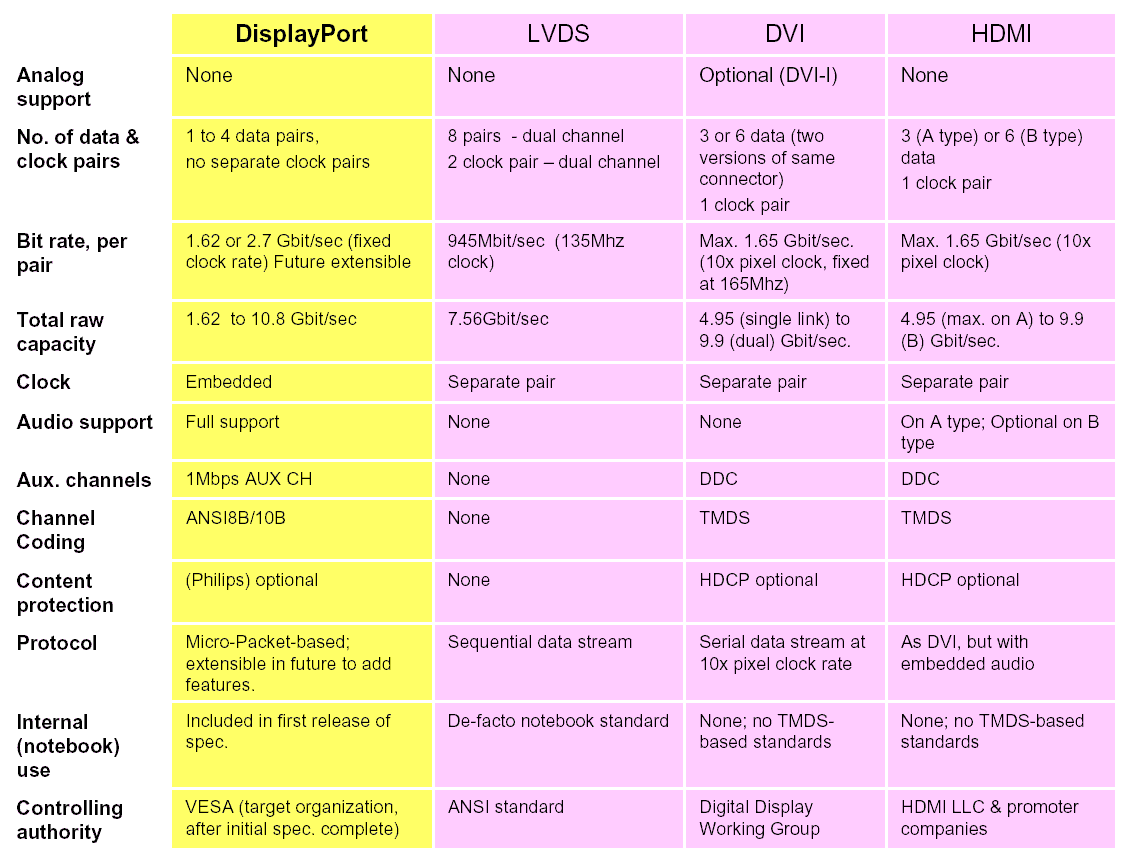
As I said in another comment, VESA claims that DisplayPort's bandwidth is "future extensible" while DVI's bandwidth is maxed out at 9.9 Gbps per dual-link port. However, what they claim and what they implement might be different. Here's VESA's comparison chart anyway:DisplayPort, LVDS, DVI, and HDMI comparison
-
Re:Here's the problem with this
yes, and with newer GPUs, the program size has increased dramatically, which makes them much more versatile. 3 years ago I was cramming a vertex program into 256 lines - now I've got 65535. Fragment programs increased similarly (though I just finally got a card that supports them in the last 3 months to play Oblivion, so I'm still learning the ropes).
Take a look at the GPU based samples (unfortunately, most require Windows) - many are incorporating physics (water, cloth, etc). Another good source is http://www.gpgpu.org/
Unfortunately, I don't know of any open source GPU based physics engines, which sucks, and IIRC, a bunch of patents have been filed on some of the software based solutions. -
Re:GPUs == Worthless Floating Point Precision
http://www.ati.com/products/RadeonX1900/specs.htm
l
"Full speed 128-bit floating point processing for all shader operations"
"64-bit floating point HDR rendering supported throughout the pipeline"
http://www.nvidia.com/object/7_series_techspecs.ht ml
"Full 128-bit studio-quality floating point precision through the entire rendering pipeline" -
Re:On the desktop and haven't looked back...
Nvidia drivers windows only??? I suppose it was the magical elves that live in the walls of nvidia's offices that wrote these.
-
Re:Sometimes
Does NVidia have drivers that work on Sparc Linux? Solaris x86? PPC Linux? The answer is no, and I never expect them to - which IS the problem.
Incorrect about Solaris x86 - I have used those drivers and they work very well. Check it out here. However, the point you are making is valid; if NVidia does not support a platform that you use, you are SOL. -
I'd add errorless CD ripper, DVD player, AvivoThat's a pretty good list. A few of you selections reminded me of some other useful related tools.
Music: Foobar2000 0.8.3 (iTunes and dumbed down fb2k annoy me)
Foobar2000 is a great powerful alternative to iTunes, but every new Windows user should know about Exact Audio Copy (EAC) for making errorless CD rips. The "jitter correction" in other rippers (like iTunes) is not enough!Video: Media Player Classic with ffdshow
That reminded me of the important fact that Windows XP does not come with a DVD decoder by default. This is almost never a problem because DVD decoders are always bundled with retail DVD drives and PCs with DVD drives. However, Apple obviously doesn't bundle a Windows DVD decoder with their Intel Macs, so Boot Camp users need to purchase a DVD decoder (e.g. PowerDVD, WinDVD, PureVideo Decoder) or download a non-DirectShow DVD decoder/player like Media Player Classic or VLC.If you are using an iMac or MacBook Pro, then you might be interested in the Windows-only software that enables the ATI Radeon 1600's GPU-accelerated H.264 playback and video transcoding. For GPU-accelerated H.264, I think you need to purchase CyberLink's H.264 decoder. ATI's Avivo Video Converter is integrated into the latest Catalyst Control Center, which I'm not sure is included on Apple's Windows driver disc image.
Does anybody know if GPU-accelerated H.264 playback and video transcoding is enabled on OS X yet?
-
Re:Vista Graphics could be an issue
My point was why would Apple throw in a DirectX card into a Mac, when its(DirectX's) sole use will be on Windows.
- cyberjessy
this statement is wrong in so many ways. A "DirectX version Y compatible" G{U is simply a GPU that meets a certain threshold for image processing APIs. The marketing departments at ATi and nVidia have turned around and made it a big selling point that the card in your hands will be able to run with all the features enabled by DirectX version Y.
I submit to you cyberjessy, that Core Image has minimum compatible GPU's that all just also happen to be DirectX 9 compatible. (example 1, example 2) Why? Because the GPU is programable. Core Image needs a programable GPU, and DX9 needs a programable GPU.Even when negotiating with card vendors, wouldn't it be cheaper to get a custom graphics card with all the DirectX circuitry taken out? Why waste transistors on capability you will never use.
-cyberjessy
there isn't any DirectX circuitry. The GPU tells the host "hi, i'm capable of A, B, C etc" If the host is windows, and all these capabilities meet the minimum requirements for DirectX 9, than DirectX 9 will run, otherwise, i believe it falls back onto DX 8, or some sort of compatibility mode. If the host is a Mac, and these capabilities meet the minimum requirements for Core Image (or even Quartz2D Extreme) than said technology is enabled, otherwise, it falls back on a CPU driven code path that has fewer special effects. Once again, the main GPU capability that Core Image, and DX 9 are looking for are a programable GPU.
I hope that i have at least partially removed that fishing rod from your throat.... -
Kidding? Way more than enough for Aero Glass
This might just provide laptops with enough power to run Aero Glass.
I'm pretty sure you were kidding, but for those who don't know the AC was kidding, the GeForce Go 7 Series (even the low-end 7200) has WAY more than "enough power to run Aero Glass." Low-end mobile NVIDIA GPUs from two generations ago (GeForceFX Go5100) will support Aero Glass.Aero Glass requires a DirectX 9 class GPU that supports Windows Display Driver Model (WDDM). Low-end mobile GPUs that meet this requirement include GeForceFX Go5100, Mobility Radeon 9500/X300, and Intel GMA 950. Even GMA 900 (which a lot of current Centrino users have) should work if they write WDDM drivers for it, but I doubt they will.
Here's some links for those who want to see the Aero Glass mobile GPU requirements:
- NVIDIA GPUs "Windows Vista Ready"
- ATI Vista Ready GPUs
- Current GPU Guidelines for Windows Vista Capable PCs
BTW, the "Vista Basic user experience" (formerly known as "Aero Basic") does not look like Windows XP (the GPU requirements will be similar to XP). In fact, I think many users will prefer this interface to Aero Glass. Here's some screenshots:
Windows Vista February CTP Screenshot Gallery 8: Windows Vista Home Basic
-
hmm :-/
Start with Fedora Core 4.
Browse to: http://nvidia.com/drivers
Select linux IA32/AMD64 as your platform.
Download, make executable, run. Should automagically set up everything for you.
It worked fine for me... -
Re:Slashdotted - How wide are the floats?
It's difficult to read through the marketing words on the tech sheet, but they claim 128-bit FP precision through the entire pipeline. That figure, however, is from using 32-bit floating point per color channel (RGB and alpha) to represent colors during the rendering process. I can't seem to find any details on how a dedicated graphics pipeline is being adapted to service physics calculations. I'm going to go out on a limb and say it's all happening on the vector units in the T&L engine and not involving the rasterization part very much at all.
FYI, SLI in the nVidia context is 'scalable link interface'. 3dfx did the same thing (Well, similar. Really more like ATI's Crossfire) and used the same acronym, but expanded it to 'scan line interlace'. -
Re:Is this Google's new brain?
i'll be dead before using a gamer chipset for serious usage
what you don't realise is that it's not your regular NForce4 gamer's chipset. nVidia has a separate professional line, see here to which this one (nForce pro 2200) belongs. -
Of course it's going to be slow (missing feature)
*Rolls eyes*
Your graphics driver doesn't yet support the GLX_EXT_texture_from_pixmap extension so every time that call is made (near enough any time the window changes) it is going to be emulated in software. As you do that opaque resize just think how many times it might be being called... Don't worry though - your 3D chipset vendor says they will implement it in their next driver release.
However at the end of the day what is acceptable to me could well not be acceptable to you - just two months ago everyone was complaining window dragging was too slow whereas I thought it was acceptable. On Xgl it seems quite fast to me but now we're on to the next of the never ending issues. I guess since you want something finished yesterday you had better start saving for / using that Mac... -
Re:drivers
just provide the drivers... the community will deal with the rest...
The drivers are here, here, and here.Dell doesn't make the hardware, they integrate it and support Windows users that don't want to deal with the "community." The hardware they use (Intel chipsets/wireless, ATI/NVIDIA graphics, etc.) have Linux drivers available from the hardware manufacturers. The rest are already provided with Linux.
The "community" complains too much.
-
Re:Not againPlease visit http://developer.nvidia.com/object/xdevconf_2006_
p resentations.html and check out NVIDIA's presentation: "Using the Existing
XFree86/X.Org Loadable Driver Framework to Achieve a Composited X Desktop":In this paper, we make the case for using the existing XFree86/X.Org DDX loadable driver framework to achieve a production-quality composited X desktop, as opposed to the X-on-OpenGL model. While the X-on-OpenGL model demonstrates what the graphics hardware is capable of, everything that the X-on-OpenGL model can achieve is equally possible with the current framework. Furthermore, the current framework offers flexibility to driver developers to expose vendor-specific features that may not be possible through the X-on-OpenGL model.
-
Comparison to Novell's XGL effortFrom the FAQ, How is this different than XGL?
"XGL is a different X server. This is a more incremental change which is slated to become part of Xorg. We don't believe that replacing the entire X server is the right path, and that improving it incrementally is a better way to modernize it. After talking to people at xdevconf, it felt like much of the upstream Xorg community shares this view. You can search Adam Jackson's notes for "large work for Xgl" to get the blow-by-blow or NVidia's presentation from XDevConf 2006 on using the existing model.
We've been working on the AIGLX code for a some time with the community, which is in direct contrast with the way that XGL was developed. XGL spent the last few months of its development behind closed doors and was dropped on the community as a finished solution. Unfortunately, it wasn't peer reviewed during its development process, and its architecture doesn't sit well with a lot of people.
The other question is Wait, can I use compiz? The answer there is a theoretical yes, although no one has actually gotten it to work. We love compiz and we think it's great stuff and is well polished, but it's often confused with the underlying architecture of XGL. Much like the code that we've added to metacity, compiz is a composite manager. With a bit of work, it should be possible to get compiz working on this X server. There's an excellent post from Soren on the topic of compiz vs. metacity."
-
Re:SW Dualprocessing
Out of curiosity, do you have a geforce2go, or a geforce4 2 go?
The 4 to go has the nfiniteFX II engine which has pixel shaders.
Ref: http://www.nvidia.com/page/geforce4go.html -
Re:Not a lot
Like I said before, I disagree in theory. However, in practice you're right. The cards would have to have a PCI express-like card-to-card bus to bypass the AGP return data rate limitation (and being handed off across independent busses), but I believe that existing PCI express cards are using the card-to-card link for almost the same purpose (to keep from passing data back through the PCI express switch). In the case of a PCI express card, it's probably just a matter of dedicating a portion of the lanes supported by the GPU to the link. In the case of an AGP card, it would require a wholly different type of bus tacked on in addition to the AGP circuitry, which would make it cost prohibitive and/or impractical.
BTW: According to an NVIDIA GPGPU presentation the AGP return data path in an AGP 8X bus runs at 1/3rd the data rate of the send data path (page 51 of 52). These same people claim that AGP 8X transfers 2.1GB/sec, which means that the AGP 8X return path is around 700MB/sec, which is slightly slower than the 64 bit 133 MHz PCI-X bus (~1064MB/sec). When the graphics people claim that the bus crawls, just remember that their view of bus speeds is jaded in comparison to most.
-
Re:Too bad I have a laptop
http://www.nvidia.com/object/IO_21673.html
COMPUTEX 2005--TAIPEI, TAIWAN--MAY 31, 2005
NVIDIA GeForce Go 6 Series and Mobile PCI Express Module (MXM) brings state-of-the-art NVIDIA GeForce 6 Series performance to notebook platforms with a consistent graphics interface enabling interchangeable graphics cards in notebook PCs.
They have had upgradable video cards for laptops for a while now. All the Dell M170/Insp90000/XPS have them, among others. You just limited yourself by cheaping out on a budget laptop.
You get what you pay for, and you don't get what you don't pay for... in your case: upgradeability. -
Re:Not necessarily bad.
The latest integrated chipset from Nvidia seem to support Shader Model 3.0, which I believe is a requirement for Aero Glass.
I ordered myself an Asus board recently with GeForce6150 + nForce430 onboard, infact it should be arriving tommorow. Will be fun to finally test some Vista beta's but to be honest I didn't have Aero Glass in mind when I made my purchase, and if it doesn't work then I won't give it a second thought.
Heh, I just noticed my choice seems to top of the line integrated from nVidia. That pleases me somewhat, since i'm not a gamer integrated graphics do me fine. -
Re:Not necessarily bad.
The latest integrated chipset from Nvidia seem to support Shader Model 3.0, which I believe is a requirement for Aero Glass.
I ordered myself an Asus board recently with GeForce6150 + nForce430 onboard, infact it should be arriving tommorow. Will be fun to finally test some Vista beta's but to be honest I didn't have Aero Glass in mind when I made my purchase, and if it doesn't work then I won't give it a second thought.
Heh, I just noticed my choice seems to top of the line integrated from nVidia. That pleases me somewhat, since i'm not a gamer integrated graphics do me fine. -
Re:Composite
Yes, but that creates other problems:
http://download.nvidia.com/XFree86/Linux-x86/1.0-8 178/README/appendix-s.html -
Re:PhotoshopNot to mention all the licensing fun of releasing closed plugins for a GPL application. That'd be fun...
You mean like video drivers (http://www.nvidia.com/object/unix.html) for Linux maybe?
-
Re:It can't run 64-bit Windows Vista
The people you know with 64 chips are idiots then. If you own a copy of Windows XP 64, you should have no problem finding 64 bit drivers for most modern hardware, with the exception of some older HP printers:
http://www.nvidia.com/object/winxp64_81.98.html
http://www.nvidia.com/object/nforce_nf4_winxp64_am d_6.69.html
https://support.ati.com/ics/support/default.asp?de ptID=894&task=knowledge&folderID=367
http://h10010.www1.hp.com/wwpc/pscmisc/vac/us/en/s m/network_software/universalprintdriver_overview.h tml
And for the uneducated and/or ignorant, the 64 bit version of windows STILL RUNS 32 BIT APPS JUST FINE. The only time an app may not function is if it communicates to a hardware device like a printer or CD burner. Which, by the way, CD burning apps like Nero 6 & 7 support just fine. Also, McAfee has a 64 bit verison of their antivirus software, which is included in the SAME installer as the 32 bit version, so no need for 2 seperate installers. I won't even got into detail about all the 64 bit linux distributions which have been out for several years now.
If you have a 64 bit chip and you couldn't find drivers for modern based hardware, you didn't try hard enough, or at all for that matter. Windows Vista will be 64 bit by default, yet include a legacy 32 bit version as well that won't have all the features of the 64 bit version, such as requiring signed drivers. All you have to do is google for the info, and you will find it. -
Re:It can't run 64-bit Windows Vista
The people you know with 64 chips are idiots then. If you own a copy of Windows XP 64, you should have no problem finding 64 bit drivers for most modern hardware, with the exception of some older HP printers:
http://www.nvidia.com/object/winxp64_81.98.html
http://www.nvidia.com/object/nforce_nf4_winxp64_am d_6.69.html
https://support.ati.com/ics/support/default.asp?de ptID=894&task=knowledge&folderID=367
http://h10010.www1.hp.com/wwpc/pscmisc/vac/us/en/s m/network_software/universalprintdriver_overview.h tml
And for the uneducated and/or ignorant, the 64 bit version of windows STILL RUNS 32 BIT APPS JUST FINE. The only time an app may not function is if it communicates to a hardware device like a printer or CD burner. Which, by the way, CD burning apps like Nero 6 & 7 support just fine. Also, McAfee has a 64 bit verison of their antivirus software, which is included in the SAME installer as the 32 bit version, so no need for 2 seperate installers. I won't even got into detail about all the 64 bit linux distributions which have been out for several years now.
If you have a 64 bit chip and you couldn't find drivers for modern based hardware, you didn't try hard enough, or at all for that matter. Windows Vista will be 64 bit by default, yet include a legacy 32 bit version as well that won't have all the features of the 64 bit version, such as requiring signed drivers. All you have to do is google for the info, and you will find it. -
Re:Vista Reqs
The parent is gravely mistaken. The following NVIDIA notebook GPUs are "Windows Vista Ready:"
GeForce Go 7800 GPUs
GeForce Go 7600 GPUs
GeForce Go 7400 GPUs
GeForce Go 7300 GPUs
GeForce Go 6800 GPUs
GeForce Go 6600 GPUs
GeForce Go 6400 GPUs
GeForce Go 6200 GPUs
GeForce FX Go5700 GPUs
GeForce FX Go5650 GPUs
GeForce FX Go5600 GPUs
GeForce FX Go5200 GPUs
GeForce FX Go5100 GPUs
http://www.nvidia.com/page/technology_vista_home.h tml -
Vista Reqs
If you want to run Glass (the GUI) you need to make sure you have a compatible video card. I have found in Vista that the biggest perf issues stem from low memory or not having a compatible video card. Here is nvidia's list of supported video cards, note that there are no notebook cards on it right now. Here is ATI's list of supported video cards. If you want the slick UI, just make sure you get a laptop that supports LDDM.
-
Re:Solaris, Linux, BSD drivers?
They are already out
Nvidia has always been good about getting Linux drivers out for desktop parts.