Slashdot Mirror
Domain: openoffice.org
Stories and comments across the archive that link to openoffice.org.
Comments · 2,060
-
Re:wHAAAAA?
Huh? Many Open Source projects or 3rd party companies offer paid technical support for the project. For example, both Sun and a variety of consultants provide paid support for OpenOffice, including its support for ODF.
In short, OO.o natively supports ODF and has technical support, MS Office has an ODF plugin in development, but MS won't offer tech support for it. -
Re:Same goes for OO.oOther than a multi-variable "solver" functionality, I can't think of anything that OOo lacks that I would need. (And the solver that MicoSoft uses was actually developed by others.)
Actually, OOo 2.0 has a bibiography editor which would come in very handy in MSO, and a nice equation editor.
I guess word art and clippy are lacking
-
Re:Isn't their XML format open anyway?
ODF is XML. ODF is XML.
There, say it with me now...
ODF is XML. ODF is XML.
And when I want to use Open Source Software that reads Office files and saves them as ODF, well, I already do sue that. -
Re:Isn't their XML format open anyway?
ODF is XML. ODF is XML.
There, say it with me now...
ODF is XML. ODF is XML.
And when I want to use Open Source Software that reads Office files and saves them as ODF, well, I already do sue that. -
OpenOffice
OpenOffice 2.0.3 got released today.
It is multi-platform, open source and free.
It supports the OpenDocument Format (ODF) standard which is an ISO standard.
It is compatible with Microsoft Office.
http://www.openoffice.org/ -
How about for OpenOffice?
I dont have Microsoft Office, and I dont plan to get it either.
I have OpenOffice which I like just fine.
I was wondering if there was a Creative Common thing to OpenOffice?
* http://www.openoffice.org/
* http://creativecommons.org/ -
Re:Who needs a creative commons add-on
sorry that should be entire office suite 'stupid slashdot code' and 'fuck that slow down cowboy shit'.
-
OpenOffice DocBook
You're obviously not into Docbook, because that would be the obvious choice for freaks who want to do their editing in VI/Emacs/Nedit/Jedit.
Elsewhere, I plugged DocBookWiki & there are many other fine programs for working with DocBook without getting your hands _TOO_ dirty. However, I thought I'd also mention that OO.o has passable filters to import and export DocBook. They aren't perfect, but they beat the MS Word HTML filters. -
Patches Available
-
Re:Free as in Read the "Early Access" FAQ
Three little letters: G. P. L. NeoOffice is 95% OpenOffice.org. Why should I have to pay to be a bug-tester on an open source (read GPL'd) project? Bittorrenting the builds would not be piracy, it would be 100% legal under the GPL. The NeoOffice guys have no right to control the distribution of GPL'd code, duh.
You're right, except...
* NeoOffice is GPL'd, but not because of OpenOffice.org. OO.o is released under the LGPL, not the GPL. NeoOffice, on the other hand, is fully GPLd.
* As long as you are passing along the source (when requested), you can sell and/or give away GPL'd software. But you may not, according to NeoOffice's trademark rules, market NeoOffice under the NeoOffice brand. You must strip out all references to NeoOffice and any logos/graphics that have been trademarked. The exceptions to this are laid out in NO's wiki.
* Evey DURING the pay-for-the-alpha "early access" period (which only lasts a couple of weeks) anyone can download and compile from CVS themselves, no problem.
The Early Access FAQ, as it lays this stuff out pretty clearly. -
*OpenOffice Writer* has this built in !!!
Document Version Control in OOo Writer
http://www.linuxjournal.com/article/8911
DocBook Filters - Read and write docbook xml using OpenOffice.org
http://xml.openoffice.org/xmerge/docbook/ -
Re:That's easy ...
Ahem... http://www.openoffice.org/
-
Bad analogy
un sued Microsoft for their Java support in Windows/IE. Microsoft removed (again) the support and we know where Java is today in terms of client-side browser applets. At the same time Microsoft has managed to spread wide their version of Java:
The situation is a little different :
- Sun managed to pull the plug from MS's own implementation only after a long time. By then, the Java was already I completly bastarized standart. In everybody's mind the initial paradigm of "Write once, run everywhere" has shifted to "Write once, debug everywhere". In short, thanks to microsoft for bringing a subtlely incompatible "enhanced" Java, the whole Java platform was broken. That coupled with the fact that it'll be a long before before all the user base accross the web has a consistent full Sun-compatible Java, made the time appropriate for MS'own clone of the technology :
Couple
- Adobe is being paranoid and is trying to prevent Microsoft from doing the same thing. Just right now, PDF is a standart that works the same and inter-operates between Acrobat Reader, Acrobat, Apple's Quartz engine, PDF Creator, GhostView, OpenOffice.org, Cairo, etc...
Most organisations (at least those I know of...) are used to install either the full Acrobat, or PDF Creator along MS-Office to get PDF export capability, and get full PDF compliance this way.
If Microsoft is allowed to make their own PDF exportation tools, you'll bet that they will come up with some "improved" monsters called Microsoft Visual P++ and
Adobe is trying to avoid that now. -
Re:MS App Tweaks
Hey, I keep hearing about this but can't find some actual proof. Do you have a link?
Why is the original anti-MS claim modded 5, informative, but the response that points out there is no citation for the claim modded only 2--below most people's filters?
I'm as anti-Microsoft and pro-ODF as the next OpenOffice.org Marketing Volunteer, but rumours only serve to discredit the community.
I also googled for support on this claim, and found nada, but it shouldn't be up to me to prove someone else's claim as being true or false, and certainly the moderators shoudln't be tasked with this, either! If/when someone does provide support, I'd love to hear it so I can refer to it.
- RG>
-
Re:Charts are lacking...
The chart component in OpenOffice.org is being written and should support XY charts etc better See http://graphics.openoffice.org/chart/chart.html - you can even get snapshots of the work in progress
-
Re:I guess it HAS to be better to sell it
It's a lot harder than a "re-compiling with larger values". The "OLE container"-based Excel file format (XLS) stores row numbers in a two-byte field, thus creating a hard limitation of 65,536 possible values. In-memory representations of large spreadsheets are easy, of course, but you do have to be able to save these files... that's why Excel 2007 has an entirely new XML-based file format (XLSX), so they don't get stuck in this kind of situation again.
To see what I mean about this limitation (and others) with the binary-based format, you can read the Excel file format specification that the OpenOffice folks published. It's here: http://sc.openoffice.org/excelfileformat.pdf -
a fully featured PC ....
You mean a PC that includes:
An office suite.
A standards compliant browswer
Maybe a simple image editor
And maybe a couple of small utility programs.
Yeah, I guess that would be worth paying for....
I mean, it's not like people are giving it away for free.
-
Re:printing, comma button
Sorry for the delay in replying. The answer is yes, I can provide citations (below) to confirm that the change in right-click behaviour was intentional. None of them specify Microsoft Word as the model, but most comments use phrases like "All Applications I know on Windows move the text cursor to the right click position", "people are used to a different behaviour from other applications", etc., which are manifestly untrue. The issues in which the change was requested are as follows -- I may have missed some -- complete with (I think inane) discussion:
Only the last one actually describes a specific situation where the change would be useful. I have in my turn requested that 1.x-like right click behaviour be enabled as an option (issue 63188). It hasn't been closed yet, which I suppose is a good sign.
-
Re:printing, comma button
Sorry for the delay in replying. The answer is yes, I can provide citations (below) to confirm that the change in right-click behaviour was intentional. None of them specify Microsoft Word as the model, but most comments use phrases like "All Applications I know on Windows move the text cursor to the right click position", "people are used to a different behaviour from other applications", etc., which are manifestly untrue. The issues in which the change was requested are as follows -- I may have missed some -- complete with (I think inane) discussion:
Only the last one actually describes a specific situation where the change would be useful. I have in my turn requested that 1.x-like right click behaviour be enabled as an option (issue 63188). It hasn't been closed yet, which I suppose is a good sign.
-
Re:printing, comma button
Sorry for the delay in replying. The answer is yes, I can provide citations (below) to confirm that the change in right-click behaviour was intentional. None of them specify Microsoft Word as the model, but most comments use phrases like "All Applications I know on Windows move the text cursor to the right click position", "people are used to a different behaviour from other applications", etc., which are manifestly untrue. The issues in which the change was requested are as follows -- I may have missed some -- complete with (I think inane) discussion:
Only the last one actually describes a specific situation where the change would be useful. I have in my turn requested that 1.x-like right click behaviour be enabled as an option (issue 63188). It hasn't been closed yet, which I suppose is a good sign.
-
Re:printing, comma button
Sorry for the delay in replying. The answer is yes, I can provide citations (below) to confirm that the change in right-click behaviour was intentional. None of them specify Microsoft Word as the model, but most comments use phrases like "All Applications I know on Windows move the text cursor to the right click position", "people are used to a different behaviour from other applications", etc., which are manifestly untrue. The issues in which the change was requested are as follows -- I may have missed some -- complete with (I think inane) discussion:
Only the last one actually describes a specific situation where the change would be useful. I have in my turn requested that 1.x-like right click behaviour be enabled as an option (issue 63188). It hasn't been closed yet, which I suppose is a good sign.
-
Re:Patch available
Patch available: http://www.openoffice.org/
Why did that get modded insightful?
If anything, it's barely "informative".
In the corporate world, using Open Office is like driving an electric scooter. Sure, some people think it's cool because it's not a gas-sucking-Hummer, but it's a piece of shit scooter.
Is there perfect compatibility between business users with Word. and OO? Absolutely not. It's totally unacceptable for corporate use with other folks that use MS Word regularly. Same with Excel and the OO varient. Especially if you're dealing with anyone "higher up" or you consult for folks, or you just want to know your files will be opened successfully, without requiring any extra effort from the person you sent it to.
Reccomending OO because MS Word has a critical flaw makes sense for SOME home users, people who don't share files with MS Word users, etc. But for the most part, it's a bad reccomendation unless you're just using OO like a slightly more advanced Notepad. As soon as you tap into truly in depth MS-Word features, compatibility problems arise. In my experience, all open/free/generic word processors are going to have to be used as glorified Notepads if you hope to attain high quality cross-product/platform compability. -
a better workaround
The exploit only works properly in Office 2003 (and crashes Office 2000). Given that emailed DOC files are pretty much required for millions of people to do their jobs, the most effective short-term workaround is use something else to read DOC files.
-
Patch available
Patch available: http://www.openoffice.org/
-
Re:Graphs!
Just FYI, a completely new charting module is currently in development. You can read about it and download a beta here:
http://graphics.openoffice.org/chart/chart.html
If there's specific things you want it to do, feel free to hop on the mailing list and let them know:
dev@graphics.openoffice.org.
I have not been following it too closely, but I know it is substantially improved over the old charting module. -
Re:Video in presentations
Whoops, sorry. Wrong PDF link. Here is the correct one.
-
Re:Video in presentations
I have yet to figure out how to insert a video in a presentation.
I hear you. Recently I needed to display video as part of a presentation, and discovered there was no easy way to do it. I found this note about the current lack of video support in OOo2, but also information about a Java plugin from IBM that could play MPEG4. Unfortunately I was never able to get the Java option to work.
After alot of experimenting, googling and hacking, I came up with a solution that did the job for me: I added small "video" icons to the slides, and edited their "Interaction" properties so that each one ran a specific Bash shell script when I clicked on it. In turn, the shell script would display the desired video with mplayer. The method worked well enough, although there were some annoyances: a confirmation box appeared after the click, as well as a Konqueror window (why?!)
I have since learned that there exists a HOWTO document (PDF warning) that describes a similar way to accomplish what I did. I haven't tried the method explained in this document, but I will the next time I need to show video. -
Re:Video in presentations
I have yet to figure out how to insert a video in a presentation.
I hear you. Recently I needed to display video as part of a presentation, and discovered there was no easy way to do it. I found this note about the current lack of video support in OOo2, but also information about a Java plugin from IBM that could play MPEG4. Unfortunately I was never able to get the Java option to work.
After alot of experimenting, googling and hacking, I came up with a solution that did the job for me: I added small "video" icons to the slides, and edited their "Interaction" properties so that each one ran a specific Bash shell script when I clicked on it. In turn, the shell script would display the desired video with mplayer. The method worked well enough, although there were some annoyances: a confirmation box appeared after the click, as well as a Konqueror window (why?!)
I have since learned that there exists a HOWTO document (PDF warning) that describes a similar way to accomplish what I did. I haven't tried the method explained in this document, but I will the next time I need to show video. -
Re:words
From what I understand the reason that grammar checkers aren't included was a license issue. There were grammar checkers that they wanted to include directly in OOO, but they couldn't just use the code, or bundle the program internally. There are external grammar checker programs and there is work to better integrate these external programs in OOO so they work seemlessly. http://lingucomponent.openoffice.org/grammar.html
-
Strings not treated as numbers
This is mainly an interop issue because OOo does not behave in the same way as Excel, but there are some circumstances in which OOo does what many consider to be "the wrong thing".
Issue 5658 -
OSSHeh, 5 comments in and all are buried
OO is neat package, especially for Linux systems, but there's no denying it has some catching up to do to compete feature for feature with MS Office. One bug that's really annoyed me with the latest 2.0 release is that it crashes everytime I import a csv file into Calc, save it and then try to forward the file via my mail client. I haven't investigated it, so I don't know if it does with all open documents, or if it's specific to what I did above. I've filed a bug report, though.
Anyway, I'd suggest this url: http://wiki.services.openoffice.org/wiki/Main_Pag
e to the submitter, but it does seem to be developer specific. -
Re:tainted kernel
Great. I'll just inform these people that they should stop offering GPL'd stuff based on a system with a non-GPL license.
Now. The question of whether they can be distributed together, not just run together, is addressed in section 3 of the GPL. Briefly, it states that you must make the source available to any GPL binaries you distribute. Since the GPL binaries in question are the kernel and just about everything besides the nVidia/ATi drivers, you need to have the source for those available. Since those drivers aren't GPL, you don't have to have the source for the drivers available.
The GPL says nothing about whatever else you want to distribute with your distribution. -
Get legal!
Not sure if your licenses are in order? Get legal.
-
Some accessibility is already in there...
OOo developers have definitely worked on accessibility. But there is still ample room for improvement. See: http://ui.openoffice.org/accessibility/
-
Re:Genuinely interested
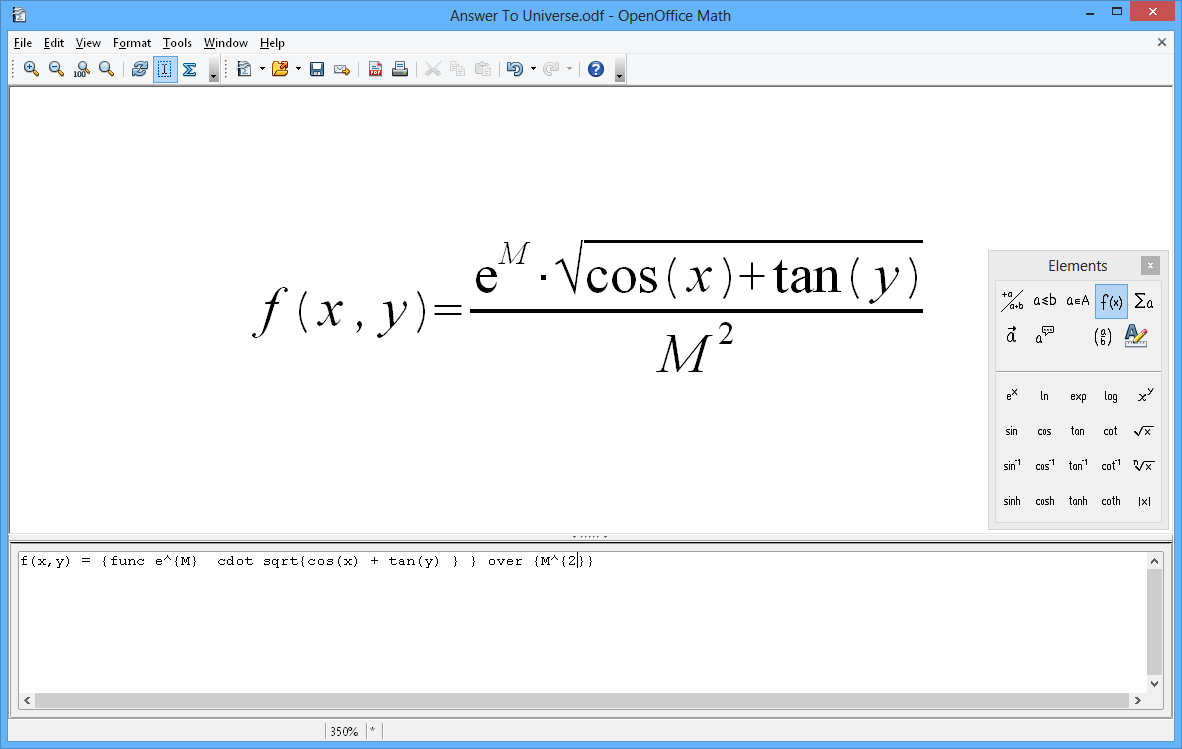
I'm curious what makes you think OpenOffice has worse math support than Word. I used Word for a year in college, and then OpenOffice for a year after that, to submit all my math homework. I found OOo to be much faster to enter formulae AND that the result looked nicer. OOo "Math" objects have a concise markup language so you can go all-keyboard (for speed) once you learn it, but also a simple mouse-based menu system for finding markup or special characters you haven't used before.
Here's a screenshot of someone just working on a standalone math object, but it's trivial to edit them inline from a regular document in OOo Writer, which is how I used it. -
ODF is indeed geared toward OO.o's needs
Also a little confused about this line: "The ODF format is limited to the features and performance of OpenOffice and StarOffice". I thought OpenDoc was created by an open consortium of companies and was based on real world needs instead of an artificial construct to match the features of a particular program.
Allow me to quote from http://xml.openoffice.org/
OpenOffice.org XML file format: The OpenOffice.org XML file format is the native file format of OpenOffice.org 1.0. It has been replaced by the OASIS OpenDocument file format in OpenOffice.org 2.0.
OASIS OpenDocument file format: The OASIS OpenDocument file format is the native file format of OpenOffice.org 2.0. It is developed by a Technical Committee (TC) at OASIS. The OpenDocument format is based on the OpenOffice.org XML file format.
Read the above slowly until it sinks in. ODF is created with OO.o in mind. It was built with OO.o, OO.o's features, and even OO.o's code structure in mind. It's derived from OO.o's previous format.
Let's cut to the chase here. ODF was created so as to provide a way for MS Office competitors to compete, not on the basis of functionaity, but on the basis of, "Use us because we've opened up our format as a standard!". That's good, because it caused Microsoft to respond by opening up Office 2007's formats as a standard too (a move that OO.o and their allies didn't foresee).
So, neither side can honestly play the "use us because of our document formats" game.
Microsoft can't say, "You must use us because because we're the only ones that can understand our formats!" and OO.o (et al) can't say, "You should use us because our format is open and theirs isn't!"
They both have to compete on functionality/price. -
Re:Obsession with Google is smart (Dvorak is wrong
-
Blame the system / (school board)
First id like to say: In my school there are 2 nerds that program. I bieing one of them. This may only be true for my area. Dont get me wrong but outher people take the AP Java corse. But NONE of them program for fun or in "free" time. Personaly I found the Java corse it mostly a how to book, a relly simple one at that. We cover the basics if then loops
-
NotePad == WTF?
NotePad seems to be more-or-less reliable, but as you've found, "less" can be unexpected and big-time.
I have a multi-score-element client LAN set up with Linux workstations using the simple and effective but not superfancy rdesktop(1) app to hit the few remaining MakeBux4BillO$ machines left, and some Win16+ apps runnng well on the workstations under WINE. Although the client is a reasonably large (for any WestAus) publisher, OpenOffice.org has worked out well in practice for much of their work. They also have a few Macintoshes.
The decrease in viruses, spyware and mysterious vanishments of useful stuff has been quite striking, but I don't know if this would suit the original poster's requirements. -
Re:Congrats...
ah, i just feel like commenting
For instance, Word has page view, normal view, outline view, and web view.
have never really liked this one, somehow oo.org approach is good for me
The track changes feature works a lot better in Word (at least starting with 2002).
agreed. there is an issue, so you might want to vote on it
http://qa.openoffice.org/issues/show_bug.cgi?id=23 465
Or what about a grammar checker? Something else OO.o lacks entirely.
never wanted this. though i think there was some development of grammar checker for english, i'm sure it will be long time before something usable for latvian language appears
Has been present since at least version 6.0. I've used a master document running Windows 3.1 on a 386.
i haven't used master document extensively, but i've heard from people who have written long pieces that msoffice master documents are awful and oo.org ones beat them on sight, both in oo.org mailing lists and other resources that compare oo.org to mso.
and then there's this
http://addbalance.com/word/masterdocuments.htm
"there are two kinds of Master Documents: Those that are corrupt and those that will be corrupt soon."
this might be improved in recent versions, but after such a history i really would avoid using them. thankfully, not so in oo.org
> Anchoring images in Word is a pain, it's in 3 dialogs deep worth of crap.
Perhaps you could explain what you mean by this.
i don't know about anchoring, but a friend of mine was trying to lay out a relatively simple two page document with logos, some background images, frames etc. he was cursing like hell after trying to do it in msword for two days (that was a requirement for the result). i suggested oo.org (1.1-something at that time). after 5 minutes he had done everything he wanted (he was using oo.org for the first time and had used msoffice for a lot of years). as i understood, it was about unability to set absolute position without ugly hacks, pictures jumping around and general unability to position objects reliably.
that was msoffice 2002, i think.
And yet a fairly common dialog, page setup, moves to Format -> Page. Sure, if you think about it, it fits better there. However, that argument loses its validity when you take into consideration that almost every other program, at least under Windows,* puts it at file->page setup.
when i first tried oo.org, i was unable to find page setup in file menu. after blinking for five seconds, i looked in format menu. so far i have given/set up oo.org for a lot of people. 3 or four have asked me "where is page setup ?" - i told them "now, think about what you want to do." - "ahh, found it". took 15 seconds at most for less computer savvy person. that seriously is an improvenment.
Actually in my experimentation just now I found one place where OO.o is sorely lacking: right clicking on an edit when using track changes doesn't give you an option to accept or reject.
unfortunately, a very longstanding feature request...
http://qa.openoffice.org/issues/show_bug.cgi?id=61 91
comparing with word, oo.org is lacking one more thing i would like to have - rectangular block selection.
http://qa.openoffice.org/issues/show_bug.cgi?id=15 96
that's one awfully old feature request.
now, i could go on about oo.org features that word either lacks or they suck (pdf output, page styles (!), styles as such (they are much better implemented in oo.org), cross-platform, odf (integrating with document management or any other system is so goddam -
Re:Congrats...
ah, i just feel like commenting
For instance, Word has page view, normal view, outline view, and web view.
have never really liked this one, somehow oo.org approach is good for me
The track changes feature works a lot better in Word (at least starting with 2002).
agreed. there is an issue, so you might want to vote on it
http://qa.openoffice.org/issues/show_bug.cgi?id=23 465
Or what about a grammar checker? Something else OO.o lacks entirely.
never wanted this. though i think there was some development of grammar checker for english, i'm sure it will be long time before something usable for latvian language appears
Has been present since at least version 6.0. I've used a master document running Windows 3.1 on a 386.
i haven't used master document extensively, but i've heard from people who have written long pieces that msoffice master documents are awful and oo.org ones beat them on sight, both in oo.org mailing lists and other resources that compare oo.org to mso.
and then there's this
http://addbalance.com/word/masterdocuments.htm
"there are two kinds of Master Documents: Those that are corrupt and those that will be corrupt soon."
this might be improved in recent versions, but after such a history i really would avoid using them. thankfully, not so in oo.org
> Anchoring images in Word is a pain, it's in 3 dialogs deep worth of crap.
Perhaps you could explain what you mean by this.
i don't know about anchoring, but a friend of mine was trying to lay out a relatively simple two page document with logos, some background images, frames etc. he was cursing like hell after trying to do it in msword for two days (that was a requirement for the result). i suggested oo.org (1.1-something at that time). after 5 minutes he had done everything he wanted (he was using oo.org for the first time and had used msoffice for a lot of years). as i understood, it was about unability to set absolute position without ugly hacks, pictures jumping around and general unability to position objects reliably.
that was msoffice 2002, i think.
And yet a fairly common dialog, page setup, moves to Format -> Page. Sure, if you think about it, it fits better there. However, that argument loses its validity when you take into consideration that almost every other program, at least under Windows,* puts it at file->page setup.
when i first tried oo.org, i was unable to find page setup in file menu. after blinking for five seconds, i looked in format menu. so far i have given/set up oo.org for a lot of people. 3 or four have asked me "where is page setup ?" - i told them "now, think about what you want to do." - "ahh, found it". took 15 seconds at most for less computer savvy person. that seriously is an improvenment.
Actually in my experimentation just now I found one place where OO.o is sorely lacking: right clicking on an edit when using track changes doesn't give you an option to accept or reject.
unfortunately, a very longstanding feature request...
http://qa.openoffice.org/issues/show_bug.cgi?id=61 91
comparing with word, oo.org is lacking one more thing i would like to have - rectangular block selection.
http://qa.openoffice.org/issues/show_bug.cgi?id=15 96
that's one awfully old feature request.
now, i could go on about oo.org features that word either lacks or they suck (pdf output, page styles (!), styles as such (they are much better implemented in oo.org), cross-platform, odf (integrating with document management or any other system is so goddam -
Re:Congrats...
ah, i just feel like commenting
For instance, Word has page view, normal view, outline view, and web view.
have never really liked this one, somehow oo.org approach is good for me
The track changes feature works a lot better in Word (at least starting with 2002).
agreed. there is an issue, so you might want to vote on it
http://qa.openoffice.org/issues/show_bug.cgi?id=23 465
Or what about a grammar checker? Something else OO.o lacks entirely.
never wanted this. though i think there was some development of grammar checker for english, i'm sure it will be long time before something usable for latvian language appears
Has been present since at least version 6.0. I've used a master document running Windows 3.1 on a 386.
i haven't used master document extensively, but i've heard from people who have written long pieces that msoffice master documents are awful and oo.org ones beat them on sight, both in oo.org mailing lists and other resources that compare oo.org to mso.
and then there's this
http://addbalance.com/word/masterdocuments.htm
"there are two kinds of Master Documents: Those that are corrupt and those that will be corrupt soon."
this might be improved in recent versions, but after such a history i really would avoid using them. thankfully, not so in oo.org
> Anchoring images in Word is a pain, it's in 3 dialogs deep worth of crap.
Perhaps you could explain what you mean by this.
i don't know about anchoring, but a friend of mine was trying to lay out a relatively simple two page document with logos, some background images, frames etc. he was cursing like hell after trying to do it in msword for two days (that was a requirement for the result). i suggested oo.org (1.1-something at that time). after 5 minutes he had done everything he wanted (he was using oo.org for the first time and had used msoffice for a lot of years). as i understood, it was about unability to set absolute position without ugly hacks, pictures jumping around and general unability to position objects reliably.
that was msoffice 2002, i think.
And yet a fairly common dialog, page setup, moves to Format -> Page. Sure, if you think about it, it fits better there. However, that argument loses its validity when you take into consideration that almost every other program, at least under Windows,* puts it at file->page setup.
when i first tried oo.org, i was unable to find page setup in file menu. after blinking for five seconds, i looked in format menu. so far i have given/set up oo.org for a lot of people. 3 or four have asked me "where is page setup ?" - i told them "now, think about what you want to do." - "ahh, found it". took 15 seconds at most for less computer savvy person. that seriously is an improvenment.
Actually in my experimentation just now I found one place where OO.o is sorely lacking: right clicking on an edit when using track changes doesn't give you an option to accept or reject.
unfortunately, a very longstanding feature request...
http://qa.openoffice.org/issues/show_bug.cgi?id=61 91
comparing with word, oo.org is lacking one more thing i would like to have - rectangular block selection.
http://qa.openoffice.org/issues/show_bug.cgi?id=15 96
that's one awfully old feature request.
now, i could go on about oo.org features that word either lacks or they suck (pdf output, page styles (!), styles as such (they are much better implemented in oo.org), cross-platform, odf (integrating with document management or any other system is so goddam -
Three essential apps
Firefox
OpenOffice.org
and for the rest of your software needs...
Azureus -
Forgot one...
OpenOffice:
http://www.openoffice.org/
This for good measure:
http://www.officeplayground.com/madball.html -
first thing I'd get
First app I'd buy is vmware (hey, it might be free now!) so you can run OS X on it.
No, really, all seriousness aside, I am a big user and fan in XP of:
- Photoshop Elements. Make sure you're looking at version 4 at least. I'm quite sure this is also a Mac product, so if you're already playing with that in OS X, never mind. PSE is a light version of Photoshop for about 1/4 the price depending on where you purchase. It has most of the digital manipulation functionality I need, and interestingly has some features VERY useful not found in Photoshop.
- AVG Anti virus for antivirus. I'm using the free version -- so far I've found it excellent, and haven't had any problems with the machine at all (note: it's a good idea to ensure you have de-installed all of the commercial products in the meantime -- aside from not working very well, they can step on other running anti-virus programs).
- the Ubiquitous OpenOffice, and it's free. It can be a resource hog, but I've not had any Office product installed on my XP boxes for years now and never had a need, and OO just keeps getting better.
- The OpenCD which includes browsers, all kinds of cool and fun free software. Pick and choose, these'll take you a long way.
- Picasa for organizing and sharing and printing (and minor editing) pictures. I wasn't much of a believer in this one, but because of its simplicity I recommended and installed and consulted this for friends and family. And finally was hooked -- it really does a great job for all of the organizing I need. (I believe it's probably on the OpenCD). It may not rival the iPhoto (or whatever OS X has), but it's a sweet product.
- MoodySoft Screen capture software. I do a lot of work requiring quick and easy screen captures. This one's not free, but it's not expensive either, and I've tried about a gazillion different products, so far this has been the best for me.
- Any combination, or even full suite of cygwin software. If you have ANY scripting needs, to get real work done and already know shell and unix utils, this is ESSENTIAL (and, it has an excellent X Server).
This is really a tiny partial list. It's a shame I have so many programs I like to run in XP, cuz I always prefer the linux or some variant of unix environment. But, this is a small sample of what gets me through an XP kind of day.
-
Re:idiots
Right. An OS is nothing without applications. Explain how Apple can release OS X for a generic PC and have people buy it when there are no applications for it. What's the replacement for Office? Oh, that's right. When Apple competes directly with with MS, there WILL NOT be Office for OS X.
Yeah, it's not nearly as simple as you think.
It is that simple
1 1.pngNews February 2006: Beginning with 2.0.2rc1 OpenOffice.org X11 regular builds for Intel based Macs are avaialable. In order to get them follow the link to non-qa'ed builds on our download site
Late January, 2006: OpenOffice.org announced the first build of OpenOffice.org 2.0.1 for Mac OS X (X11) that can run natively on the newly released Macintosh Intel desktops
-
Re:idiots
Right. An OS is nothing without applications. Explain how Apple can release OS X for a generic PC and have people buy it when there are no applications for it. What's the replacement for Office? Oh, that's right. When Apple competes directly with with MS, there WILL NOT be Office for OS X.
Yeah, it's not nearly as simple as you think.
It is that simple
1 1.pngNews February 2006: Beginning with 2.0.2rc1 OpenOffice.org X11 regular builds for Intel based Macs are avaialable. In order to get them follow the link to non-qa'ed builds on our download site
Late January, 2006: OpenOffice.org announced the first build of OpenOffice.org 2.0.1 for Mac OS X (X11) that can run natively on the newly released Macintosh Intel desktops
-
Old MS Word 5.x for Macintosh files
Every version and variant of OOo I've tried to use to read Word for Mac documents prior to 6.0 fails miserably. This would be trivial except for the fact that Word 6 was received so poorly by the Mac community that most Mac users never switched until the OS X version came out.
I remember that. A lot of computer labs with Macs back then had a site license for MS Word 5.x and tried to force students to use 6 when it came out. But MS Word 6 for Macintosh blew chunks so bad that students were contantly finding ways to re-install 5.x and finally the admins acquiesced and restored 5.x to the loadset.I was unable to find a bug report on the bug list requesting the ability to import those files. Though that may be my inability to use the database. Have you tried filing a description of the problem ? If it's not on the list of things to do, it can't be addressed. However, realize that this would mean reverse engineering the old MS formats. MS, despite court orders from courts on both sides of the Atlantic, has not turned over any documentation for its file formats. So it's not a clear cut task.
-
Old MS Word 5.x for Macintosh files
Every version and variant of OOo I've tried to use to read Word for Mac documents prior to 6.0 fails miserably. This would be trivial except for the fact that Word 6 was received so poorly by the Mac community that most Mac users never switched until the OS X version came out.
I remember that. A lot of computer labs with Macs back then had a site license for MS Word 5.x and tried to force students to use 6 when it came out. But MS Word 6 for Macintosh blew chunks so bad that students were contantly finding ways to re-install 5.x and finally the admins acquiesced and restored 5.x to the loadset.I was unable to find a bug report on the bug list requesting the ability to import those files. Though that may be my inability to use the database. Have you tried filing a description of the problem ? If it's not on the list of things to do, it can't be addressed. However, realize that this would mean reverse engineering the old MS formats. MS, despite court orders from courts on both sides of the Atlantic, has not turned over any documentation for its file formats. So it's not a clear cut task.
-
Re: templates
Well This stuff is not so easy to find unless you really know what you are looking for. I barley have time to learn and keep up with graphics packages I have to know. I really think there should like a beginners guild to OOo. I mean this page has so many links that I just go never mind when I see it. http://www.openoffice.org/about_us/new.html I would like to see something like a side by side comparison with little check boxes like you get when you are buying a new cell phone or laptop. You know like the comparison pages on any wireless provider has for there phones. http://onlinestorez.cingular.com/cell-phone-servi
c e/cell-phones/cell-phones.jsp?v=1&q_categoryId=171 7200027&WT.svl=com2&q_compareIds=%22cdsku9870076re g3%22%2C%22cdsku9870089%22 It might seem really simplistic but UH it should be. Then you can have all the techie wordy long ass description once I know what it does and doesn't do and I want to know more about what it does do.