Slashdot Mirror
Domain: techstuff.ca
Stories and comments across the archive that link to techstuff.ca.
Comments · 7
-
Re:About the Size of My MacBook
It's not even in the same category as the MacBook. It's not a notebook or subnotebook.
Palm hasn't published complete specs yet, but we know that Foleo doesn't have an optical drive or a hard drive. Just Flash memory and slots for CF and SD memory cards.
The most compelling features are instant on/off, e-mail sync, long battery life, and VGA out for presentations.
It's a notebook replacement for people who only use their notebooks to type e-mail and show PowerPoint presentations.
More here. -
Hint:
No one will buy it. No one is going to buy the Nokia/Microsoft thing either. Just like no one bought the Nokia N-Gage. People don't want this sort of thing.
The thing to remember about "convergence" devices is they only make sense if you can perform both functions without either interfering with the other. Let's say someone sells something that is both a video game system and a DVD player. This is a good idea. There is no interference, and the parts compliment the whole nicely; a DVD player needs some kind of MPEG decoder, a video game system needs some kind of optical drive, but the two never interfere-- you will never want to use your DVD player and video game system at the same time. Now let's say someone sells something that is both a video game system and a PVR. It will not sell. True, a hard drive and certain other features are desirable in both video games and PVRs. There is massive interference, though; you very much want to use both of these products at the same time. You want to be able to sit there and play GTA all night without worrying that you're missing Family Guy, because the Tivo will just pick it up. The engineer must thus either duplicate so much hardware that there is little or no benefit to the convergence, or just dictate "you can't use the pvr and video game features at once". (Your PC, of course, can act as both a PVR and a video game system without significant interference! But there you're trading functionality for convenience, ease of use, focus and cost. Someone could try to slap together a PC that plugs into a TV and say "look! it's a pvr and video game system!"... but they'll probably be as hard to use and charge as much as if you'd just bought a small PC.)
Now, let's think: What if someone tries to put an mp3 player in a phone? Even worse idea. The parts compliment each other poorly; you do not want or need the kind of playback quality on a phone that you need in an mp3 player, you do not want or need the kind of disk storage in a phone that you need in an mp3 player (unless you have the ability to record and save phone calls or ambient noise, which is a kickass potential feature, but unlikely due to legality). Meanwhile, there's interference. You want to be able to pause your mp3 player to answer your phone without losing your place; you want to be able to run your mp3 player all night without your phone battery being dead in the morning. The two features subtly, but distinctly, struggle for the hardware. Maybe if Apple is building the thing they can reconcile the two. If Motrorola designs it... probably not so much.
Basically the only benefit here is that unlike with PVRs or video game systems, people have shown themselves ready and willing in large quantities to pay too much for mp3 players and phones. OK... wait, actually that's a pretty good benefit, since people have demonstrated they're willing to pay more for a "luxury" product with the iPod name, and if this is a high-margin product it will make decent profit even if very few people buy one. Um, I might have just seriously damaged my own argument. But, you get the idea.
Someday a PDA, a video game system, a phone, and an mp3 player may all converge in a single cost-effective, battery-efficient device. Until that day it is unlikely consumers will bite on a product that is more than one, but not all of these.
(Note: If you object to anything above, pretend I prepended it with "In my opinion...) -
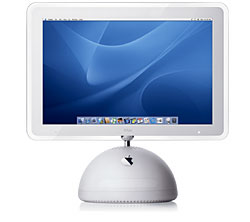
You can't imitate AppleApple has always taken the attitude that its case designs are intellectual property. Which really discourages people from imitating their better designs. (I often wish somebody would imitate the Stalk iMac, but now even Apple seems to have abandoned that design.)
I suppose it would be hard for Apple's lawyers to argue that a simple white box is a Design Trademark. But I suspect nobody but Apple will seee any marketability is a simple and tiny plug-and-play desktop system.
-
Advertise Now!
-
Re:No more attachments.
Thanks to address spoofing, you can't even trust attachments sent by people you know.
Any unexpected attached file is suspect.
How to virus-proof your PC (instructions for beginners) -
PowerBook G4 vs. iBook G4
> If prices are the same, why would I pay the premium for a Powerbook?
Why buy a PowerBook instead of a new iBook?
Bigger Screen - First, the obvious stuff: you can't buy a 15" or 17" iBook. There are only two options: 12" or 14". If you want a really big screen, you have to buy a PowerBook. (However, if you want a small screen, you can buy a 12" PowerBook.)
Bigger Brain - The G4 processor is the computer "brain" that does most of the computer's heavy lifting. The G4 processors inside the new iBooks range from 800 MHz to 1 GHz. The PowerBooks start at 1 GHz and go up to 1.33 GHz. Faster is better.
Bigger Pipes - Behind the scenes, the various "pipes" that transport data from place to place inside PowerBooks (e.g. the data "bus") have more capacity than the data pipes inside the iBooks. In other words, PowerBooks are designed to "think" more quickly.
SuperDrive - PowerBooks have a SuperDrive that can record ("burn") on DVD or CD disks. iBooks can play DVDs, but they can only record on CD. This is one of the least obvious differences between iBook and PowerBook -- you simply can't buy an iBook that records on DVD.
More memory capacity - The iBook G4 can be upgraded to 640 MB of memory (RAM), but that's the limit. The PowerBook G4 can use up to 2 GB of RAM. If you're working with professional quality audio or video stuff, this matters. (The RAM that ships inside PowerBooks is also better (faster) than iBook RAM.)
Better short-term memory - Programs that temporarily store stuff in "cache" memory will perform better on a PowerBook. The PowerBook G4 has a bigger L2 cache (512k vs. 256k). You may never notice the difference, but it's there.
Faster Networking - iBooks support standard Ethernet network connections (10/100BASE-T Fast Ethernet). PowerBooks support Gigabit Ethernet connections, which are ten times faster.
Firewire 800 - The iBook G4 has a standard FireWire connector. PowerBooks add support for Firewire 800, which is twice as fast.
More Video - An iBook can connect to an external computer monitor. PowerBooks can also connected to digital monitors (DVI), and can "span" video images across more than one screen. This is especially useful for video pros (and anyone else who needs lots of screen real estate.)
More Audio - iBooks have headphone and speaker jacks to send audio out. PowerBooks also have a line in jack so you can record from an external source without any additional hardware. (Add-on USB audio input devices are available that work with iBooks.)
Summary:
iBooks are still primarily for students and home users; PowerBooks are still aimed primarily at professionals. Consider all the facts before you make your purchase. -
Re:shutdown /a
Ahem. I should have used the Preview Button.
The required Microsoft patch is available for plain ol' download here:
http://tinyurl.com/h84v
Shameless self-promotion -
Blaster removal instructions in plain language (for your non-technical friends and family) can be found here.
Sandy