Slashdot Mirror
Domain: tldp.org
Stories and comments across the archive that link to tldp.org.
Comments · 642
-
Or, for the free speech *and* beer people
The LDP includes the "Advanced Bash-Scripting Guide" which is available in both HTML and PDF (1MB!) formats, and there is even a version for PalmOS! Since I found it, it's been the only reference I've *ever* needed when I've stumbled over some obscure nuance of shell scripting.
-
Re:Good job NVIDIA
Read every ``Unsupported'' link in the Linux Hardware Compatibility HOWTO
-
Re:One word...Plucker is not, and has never been, an extension of anything other than text, then text + images, then text + images + hrefs, and so on. It matured independantly of any other eBook format or "standard".
Also, AportisDOC is not open, documented, or freely usable, without substantial commercial licensing.
Please drop the false accusations.
Additionally, you can see that LinuxDOC uses Plucker format. Oddly, I don't see their HOWTO docs in AportisDOC format. Project Gutenberg is considering the move to Plucker as well, last I heard.
How about checking out the thousands of Plucker ebooks out there, before spinning your tripe.
-
Re:Thank you Larry!!C is still the dominant language. About 70% of Debian 2.2 was C, and all of the important programs (Linux, Perl, Python, XFree86, GCC) are C programs. C++ is a distant second at around 10%, shell and LISP (err, elisp anyway) 3rd and 4th around 5%, and Perl at ~2.4%. Everything else is below 1%. As C slowly evolves it is gaining very conservative versions of classes and such from C++, and the important C programs and libraries will likely begin using these extra features, where they improve code quality without the penalties and flakiness of full C++. Newer C and C++ string handling libraries are in use in packages like Qmail, postfix, and perl, avoiding the nasty buffer overruns so common in less evolved C programs.
Results for Debian 3.0 do show a decline ~8% decline in C, with about 3% of that going to C++. Shell rose significantly, and Perl rose as well, though this may be biased as these are the two languages of choice for nearly all Debian-specific packaging and management additions. Python, Assembler, Fortran, and TCL all climbed above 1% - not necessarily implying development, but at least packaging interest.
-
Re:Internet does not work that way
-
hahah...
So tell me, what do you do when something goes wrong in Windows? Reinstall? Windows update? Run defrag? Look on the web for an answer?
Anyhow, there are HOWTOs on this sort of thing, and books as well, although I must say that "Linux in a Nutshell" is a very good introductory Linux book.
However, if you're a Windows and MS-DOS Expert and you Know What You're Doing(tm), then you should have no problems learning Linux. First, familiarize yourself with the commands and software packages that you have available; then, run from there! Most distributions have decent graphical help systems and package managers nowadays, and even if they don't, there's always man and man -k.
As to the rest, there's really no replacement for some good old Unix books, or for having a Unix wizard around. They can explain to you why "echo *" doesn't work the same way in Unix (the shell expands the *), and how you'd go about performing tasks by stringing commands together...
How many reboots have there been:
last | grep ^"reboot " | wc -l
Who logs in the most:
last | cut -d ' ' -f 1 | sort | uniq -c | sort -rn | head
On what day of the week have you logged in the most:
last | grep ^`whoami` | cut -c 40-43 | sort | uniq -c | sort -rn
What file types are the most common:
find -type f -exec file -i {} \; | cut -d : -f 2- | cut -d , -f 1 | sort -n | uniq -c | sort -rn | head
etc., etc. -
Re:The Point is?
Look, he doesn't mean that you should randomly go out and search google. If you're a newbie and don't even know the question, you can read the guides.
If you have a straightforward problem that has been solved MANY, MANY times, like how to set up a mail,web, or ftp server, you can check the howtos.
In my experience (and I do the IRC thing a lot), you can't expect to have esoteric/advanced questions answered on IRC. If people don't know the answer immediately, they don't want to put in the work to figuring it out. What they can help you with is understanding the things in TLDP if you don't - like perhaps telling you what question you should be asking, or where you should be reading. -
Re:The Point is?
Look, he doesn't mean that you should randomly go out and search google. If you're a newbie and don't even know the question, you can read the guides.
If you have a straightforward problem that has been solved MANY, MANY times, like how to set up a mail,web, or ftp server, you can check the howtos.
In my experience (and I do the IRC thing a lot), you can't expect to have esoteric/advanced questions answered on IRC. If people don't know the answer immediately, they don't want to put in the work to figuring it out. What they can help you with is understanding the things in TLDP if you don't - like perhaps telling you what question you should be asking, or where you should be reading. -
Re:I use this one at homeMaking a bootable CD is a fair amount of work, but if you're interested a combination of the Linux From Scratch project and the Linux Bootdisk HOWTO will really help out. I also found the Slackware Live CD site very useful.
It's the profit bit that eludes me now
-
Actually, SSC/linuxgazette.com does have a #97
-
Situations alters cases
A montra of a friend of mine years ago.
What you need and how you approch the problem will effect the results.
You list Apache as being a pain to set up correctly but here I do it often on my home computer from remote with little to no effort at all. It takes me a total of 30 seconds.
You mention the total lack of commertal documentation. I wonder why anyone is ever supprised or worse why so few ever bother to consider that a free product has Free documentation and would obveously be lacking in commertal documentation for a lack of NEED. Selling air isn't proffitable when free air is good and plenty.
4)Worse support(usually) from commercial venders.
But... Aren't they all for supporting Linux?
I read it on slashdot it must be true.
Yeah I've noticed. Was a time when you could pop on IRC and get help but that dosen't seam to be an option anymore.
Vareous messages board and you could e-mail the authors but in time critical situations you gotta get somebody on the phone.
I hate phone support myself so the slower e-mails never been a problem for me but that's situations alters cases. Won't work for you I suspect. -
Re:I'm not sure if we'll see it in knoppix
It has been done.
UMSDOS. Old school. -
Re:You know.....
Would the Athlon Powersaving HOWTO be of interest to you? Assuming that CPU isn't too buggy....
Measurements (with an ammeter; sorry, I'm cheap
STPGNT = 0.51 A
HLT = 0.76 A
Full utilization = 0.91 A
This on 110V US AC. I can't tell you what the phase angle is, though. Coincidentally, the difference between STPGNT and HLT is what my 17-inch LCD monitor consumes at 100% brightness.
It makes my ancient UPS (salvaged from a 486 machine) is happy.... -
A distro
-
using dd to clone over the networkdd bs=8192 if=/dev/sda of=/dev/sdb
I'm not sure if this was a serious suggestion or not, but this is exactly how I do it! I use this method to clone linux cluster nodes, but it would work for windows as well.
I use a boot floppy, with the grub bootloader (you could skip the floppy entirely if your hardware supports PXE booting, and you feel like messing with it). The bootloader grabs a kernel and ramdisk image from a tftp server. Then, a shell script creates a fifo, connect it to the tftp server, uses dd to copy to/from the image.
Here's an example of the shell script to make a backup (just do the reverse to restore):tftp_server=192.168.0.253
mknod img0001 p
tftp ${tftp_server} <<-EOT &
binary
put img0001
EOT
dd if=/dev/sda1 > img0001
This method was adapted from the clone HOWTO, which has more in-depth instructions. -
Just Ask ;)
Ask and you shall receive....
-
Re:Flaimbait
The LDP docs are updated all the time. This list shows how many HOWTOs were updated recently -- about one per day on average.
Some of the docs do apply to old versions of Linux, but there are lots of people still using 2.2 kernels out there. Just check the revision date of any document before you use it, and you should get an idea of whether it will apply to a recent distribution.
HAPPY BIRTHDAY, LDP!!! -
Re:Linux DocumentationDisclosure first: I have contributed to TLDP. Now to the meat: I detest being treated as an idiot. Thus I also tend to treat my fellow humans as intelligent until the opposite is proven. One of my lecturer adviced me on tutoring that you should treat people as intelligent though perhaps not always fully informed. That has in my experience alsways been a productive approach. I am still somewhat mystified that it is possible to make money on insulting customers, even calling them dummies. Now of course the quality of the material is uneven. You are welcome to bring these to the attention of the TLDP discuss lists. Do name the documents and please also say exactly what is wrong.
Now, a well rounded HOWTO should combine a number of angles, check the Template for some recommendations and suggestions. You could also check out the Experimental HOWTO Generator.
It is your feedback that helps The Linux Documentation Project.
-
Re:Linux DocumentationDisclosure first: I have contributed to TLDP. Now to the meat: I detest being treated as an idiot. Thus I also tend to treat my fellow humans as intelligent until the opposite is proven. One of my lecturer adviced me on tutoring that you should treat people as intelligent though perhaps not always fully informed. That has in my experience alsways been a productive approach. I am still somewhat mystified that it is possible to make money on insulting customers, even calling them dummies. Now of course the quality of the material is uneven. You are welcome to bring these to the attention of the TLDP discuss lists. Do name the documents and please also say exactly what is wrong.
Now, a well rounded HOWTO should combine a number of angles, check the Template for some recommendations and suggestions. You could also check out the Experimental HOWTO Generator.
It is your feedback that helps The Linux Documentation Project.
-
Re:Open Source Fanatics
Damn, I'll bite - Honestly, there's something else the matter with that box - maybe you should check out the Linux Documentation Project for some help... and you may not want to brag about the fact that your XP box is so screwed up that it takes it 2 minutes to make a copy of a 17Mb file on the same disk! Come to think of it, sounds like I've had to clean up after the mess you've made 'freelancing' on some poor bastard's system...
-
Some people my not know...
...where it is. So here's a link.
Whilst this is obviously a monumental community feat, and I would like to offer my thanks to all those who have contributed over the years, I feel it is sadly lacking howtos for ablution and girlfriend. Oh, and a securing-windows one for Bill too. Happy Birthday LDP! -
start gettin' yoursFor those of you who want to try to make a dent in the billion billion billion billion billion billion whatever addresses, and run Linux, start with the HowTo.
Of course, you can Google for yourself, but it's apparent from some previous posts that some of you don't have access to Google. So, to you, cheers.
-
Re:USB Keycards?
What it is: A method of encrypting a hard drive, and using a USB key-drive device and passphrase to decrypt the hard drive at boot.
Why: To protect computers (especially laptops) from unauthorized access to the hard disk. Bios passwords, login passwords, and the above slashdot story do not prevent the hard drive from being removed from the machine and the data read in another machine.
How it works: The laptop's drive is AES encrypted. At boot, the computer needs the key drive with the passkey and the matching passphrase to transparently decrypt the drive. It keeps a copy of the passkey and passphrase in memory, so the USB drive may be removed after booting. It only decrypts the files that it is using, so if power is lost at any moment, all data will remain protected.
Why its cool: Its high quality encryption, OS tools, and protects your laptop's files from being accessed if its stolen. What more do you need?
( IMHO, way more deserving of a slashdot story then a simple electronic hack that can be bypassed by anyone with electronics knowledge. )
-
Re:That reminds me...umm... tar?
Try reading this . It should apply to OSX, I believe.
-
Re:Samba starter question?
As Steve Jobs would want, here are the 'Lickable Links':
To centralize auth you can use:
NIS/NIS+ + PAM
OpenLDAP + PAM and More
SAMBA + PAM
Advanced LDAP/Samba
PAM is the way to go -
Re:Samba starter question?
to centralize auth you can use
+ NIS/NIS+ + PAM -> http://www.tldp.org/HOWTO/NIS-HOWTO/index.html
+ OpenLDAP + PAM -> http://www.mandrakesecure.net/en/docs/ldap-auth2.p hp
http://www.skills-1st.co.uk/papers/security-with-l dap-jan-2002/security-with-ldap.html
+ SAMBA + PAM -> http://www.unav.es/cti/ldap-smb/smb-ldap-3-howto.h tml
http://www.mandrakesecure.net/en/docs/samba-ldap-a dvanced.php
PAM is the way to go -> http://www.kernel.org/pub/linux/libs/pam/ -
Re:My wish list
Well... uh.... uh.... you can make make coffee from halfway across the world......
-
Re:Learn to script
-
Re:Any excuse is a good excuse....
the video card I bought to facilitate my two-monitor setup
Here's a question:Will Windows handle multiple monitors, each attached to a separate video card, or do I need a dual-head video card?
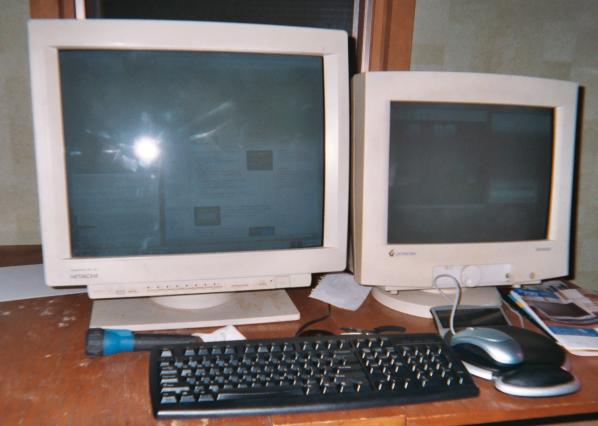
My home Linux machine uses 1 AGP card attached to a 21" Hitachi monitor, and a PCI card attached to a 17" Gateway monitor. (picture)
I do wish, though, that Xinerama (what I use under Linux (RedHat 9, in my case) to handle multiple monitors) was easier to set up (I had to edit my XF86Config file by hand). For those who want to do it, but need instructions, I found a nice web page.
-
Re:The List
Can someone give me an example of a compromise based on a weak password?
Weak passwords remain vulnerable to dictionary attacks, whereby a large collection of everyday words is passed through the same one-way hashing algorithm that the password system uses. These encrypted strings are then compared against the entries in the system password file, which on many systems is readable by any user (typically for historical reasons). If a match is found, then it is trivial to see which plaintext word produced the encrypted string, and therefore what the password is.
To avoid dictionary attacks like this, you can:
- Make sure World+Dog can't read the password file. The shadow suite on Unix systems is one way of doing this; it prevents ordinary users from accessing encrypted passwords, by storing them in
- Choose passwords which are not dictionary words, obviously. A reasonable approach is to join together a number of short dictionary words using punctuation symbols, and mix the case up a bit. I'm paranoid, however, and I go for a completely-random sequence of characters and symbols, which I spend an evening burning into my brain.
- Regularly run crack , which checks for weak passwords. This program was developed by Alec Muffett, one of the original pioneers of dictionary attacks.
- Make sure World+Dog can't read the password file. The shadow suite on Unix systems is one way of doing this; it prevents ordinary users from accessing encrypted passwords, by storing them in
-
Re:Forgive my hardware ignorance but...
It's a little confusing, especially if you're not on an OS X box, but this guy has built a software RAID setup. Essentially, all six disks are acting as one because he's used the OS X Disk Utility to set them up as one.
The problem with this is that OS X's Disk Utility doesn't support RAID 5 in software, at least not out of the box. So, you either have to stripe the six disks (lots of space, no redundancy) or mirror them (as much space as your smallest drive, full redundancy) . It looks like he went for the striping option, which is how he got over a terabyte. However, as it's been pointed out several times already, this is a bad idea because if one of those disks fails, his data is lost. And I seriously doubt he's backing this "disk" up...
What he should do (and quite possibly is doing for all I know, it's not detailed) is use something like Raid Toolkit to create a RAID 5 setup. Since RAID 5 uses both data striping and parity, his data is protected even if a disk gets hosed.
However, software-based RAID 5, at least in my understanding, isn't exactly a performance champ, so if he's doing a lot of reading and writing to that drive, he's probably better off getting a real RAID controller. However, this would make a killer media backup box.
The linux based software RAID HOW-TO is actually pretty informative for a general understanding of software RAID.
Cheers -
Re:I will switch to Linux...
Teach me how to lock a file from a root-level account on Linux.
http://tldp.org/HOWTO/Secure-Programs-HOWTO/files. html -
Kernel Panic on Linux? Sounds like hardware prob.
After 10 years without ever needing to apply the knowledge I forgot how.Would the magic sysrq key help? I bet it is a hardware problem though. And what about logging power outages? That is easy to do. APC probably has Linux software already to do this. For other logging there is ample facilities on Linux. Start a syslog server. Point everything to the loopback address.
-
You can't organize data on disks any more
frequently-used tables spaced far apart on disk
Actually, with modern disks this is something you don't have much control over any more. There's a good description of disk organisation here where you can find the following explanation:
Unfortunately, the BIOS has a design limitation, which makes it impossible to specify a track number that is larger than 1024 in the CMOS RAM, which is too little for a large hard disk. To overcome this, the hard disk controller lies about the geometry, and translates the addresses given by the computer into something that fits reality. For example, a hard disk might have 8 heads, 2048 tracks, and 35 sectors per track. Its controller could lie to the computer and claim that it has 16 heads, 1024 tracks, and 35 sectors per track, thus not exceeding the limit on tracks, and translates the address that the computer gives it by halving the head number, and doubling the track number. The mathematics can be more complicated in reality, because the numbers are not as nice as here (but again, the details are not relevant for understanding the principle). This translation distorts the operating system's view of how the disk is organised, thus making it impractical to use the all-data-on-one-cylinder trick to boost performance.
The translation is only a problem for IDE disks. SCSI disks use a sequential sector number (i.e., the controller translates a sequential sector number to a head, cylinder, and sector triplet), and a completely different method for the CPU to talk with the controller, so they are insulated from the problem. Note, however, that the computer might not know the real geometry of an SCSI disk either.
Since Linux often will not know the real geometry of a disk, its filesystems don't even try to keep files within a single cylinder. Instead, it tries to assign sequentially numbered sectors to files, which almost always gives similar performance. The issue is further complicated by on-controller caches, and automatic prefetches done by the controller.
And disk geometry becomes even more of an abstract when you bring intelligent RAID controllers into the picture (like HP's HSG and EVA controllers). -
Cyrus, Exim, Squirrelmail
I run the Cyrus IMAP server with the Cyrus SASL security libraries, in tandem with Exim as my MTA, and Squirrelmail as a webmailclient. This has been running for some years now, and from what I can recall, the configuration was straightforward and minimal.
The documentation is good, and there is a Cyrus Linux howto at tldp.org. I love this setup, it allows me to read my e-mail with any IMAP-enabled client from any place. Cyrus also supports SSL, if you want it to. -
Re:Two hours into the article...advocate_one should re-read his copy of the Linux Advocacy mini-HOWTO, particulary the Canons of Conduct. Lots of good advice in there. For example
- Focus on what Linux has to offer. There is no need to bash the competition. Linux is a good, solid product that stands on its own.
- Respect the use of other operating systems. While Linux is a wonderful platform, it does not meet everyone's needs.
- Focus on what Linux has to offer. There is no need to bash the competition. Linux is a good, solid product that stands on its own.
-
Re:Two hours into the article...advocate_one should re-read his copy of the Linux Advocacy mini-HOWTO, particulary the Canons of Conduct. Lots of good advice in there. For example
- Focus on what Linux has to offer. There is no need to bash the competition. Linux is a good, solid product that stands on its own.
- Respect the use of other operating systems. While Linux is a wonderful platform, it does not meet everyone's needs.
- Focus on what Linux has to offer. There is no need to bash the competition. Linux is a good, solid product that stands on its own.
-
Nice! Now along with commies we'll be HACKERSSCO needs to change the password on their mail server: sco.txt.
Please.. Do you know what that will look like to the rest of the world? Maybe Michael should read the Linux Advocacy FAQ, or at least what not to do!
-
Re:JavaScript in a Linux Documentation ProjectJust to add some info to the purpose of this thing:
TLDP publishes a lot of documentation and requires it to be made in a markup language such as SGML or XML. There is a learning curve here that, added with the tools, can put off prospective authors. The idea of the prototype tool than is to let an author concentrate on contents, not form and not even markup.Just fill in the form, hit the button at the end and (insert a Ta-daaah if you wish) you get the ready marked up text in the window at the end. Just copy it and paste it into an editor and continue using the pattern you already see. You can also get some more patterns from the Big HOWTO Template(SGML) (HTML).
More authoring help is at Author Resources.
Good to see an example of JavaScript that is not just for making flashy web pages or filling in forms to be spammed with later...
-
JavaScript in a Linux Documentation ProjectThe Linux Documentation Project (TLDP) is developing a prototyping authoring tool that is using a fair bit of JavaScript. If anyone is interested in volunteering/taking over development, you could check out the The LDP HOWTO GENERATOR.
Even just a tips or suggestion to the author would be useful; TLDP is always looking for inputs to the projects and this is a recent project.
-
Re:VLC on lan ?? How the hell do you get it to run
I have not spent a lot of time messing with the streaming, but I have gotten it to work with some files.
On the server:
vlc
On the client:
launch VLC
File->Open Network Stream
Select UDP/RTP, leave port default (1234)
or you can look here -
Oh, you mean this?
Hey, BrokenHalo, thanks for the info. I suppose you mean:
CD-Writing HOWTO and
Linux MP3 CD Burning mini-HOWTO and
CD-Writing HOWTO: Troubleshooting
Yes, I can RTFM, but it is a big time-saver to read the best documentation immediately, and not have to search for it. -
Oh, you mean this?
Hey, BrokenHalo, thanks for the info. I suppose you mean:
CD-Writing HOWTO and
Linux MP3 CD Burning mini-HOWTO and
CD-Writing HOWTO: Troubleshooting
Yes, I can RTFM, but it is a big time-saver to read the best documentation immediately, and not have to search for it. -
Oh, you mean this?
Hey, BrokenHalo, thanks for the info. I suppose you mean:
CD-Writing HOWTO and
Linux MP3 CD Burning mini-HOWTO and
CD-Writing HOWTO: Troubleshooting
Yes, I can RTFM, but it is a big time-saver to read the best documentation immediately, and not have to search for it. -
DocBook is great, but the toolchain is piss-poorDocBook is seriously neat -- if you can get somebody else to do the job of getting it to the end format. Avoid this job at all costs, as it will drive you completely up the wall.
The problem is that the people behind DocBook don't seem to want to have anything to do with the tool chain that takes the source file and turns it into something you can actually publish. This means that putting all the programs together to get DocBook XML to, say, PDF and then getting it looking the way you want can be a royal pain in the ass even if your distributor has included and configured the important stuff for you.
Then, there are two types of DocBook - XML and SGML, so at any given time, you are bound to be looking at the wrong documentation for the wrong tool when trying to get to your target format. DocBook SGML is less of a problem, if you have a choice, use it. Getting from DocBook XML to anything but HTML/XHTML seems to still be rather non-trivial.
Again, if you don't have to deal with any of that (for example, if you are submitting stuff to the Linux Documentation Project) it is pretty neat. If the DocBook people had gone whole hog and provided a comprehensive tool set along with the standard, it would rock big time.
As it is, I'd think twice before recommending it to somebody who just wants to get ink on paper.
-
How to RTFM.
The most important computer skill anyone can learn is, IMO, how to Read The Friendly Manual. If you can teach people how to figure out how to do something, or fix a problem, without having to call tech support or their teenage son (I'm both), you will make the world a much better place.
For MS Windows, the best tool to teach people to use to learn is probably the Help files. Yes, these are all too often poorly written, but it constantly surprises me that not only do people sometimes have a hard time understanding the help files, but how many people don't even know how to use them.
Also, I would recommend teaching people how to read the PDF users manuals most software comes with. Perhaps unfortunatly, most software today only ships with a "Quick Install Guide" on actual paper, so I'm afraid all too many people think their new software doesn't have a manual.
If you intend on teach about Linux at all, make sure they know about The Linux Documentation Project and especially the HOWTOs there.
-
How to RTFM.
The most important computer skill anyone can learn is, IMO, how to Read The Friendly Manual. If you can teach people how to figure out how to do something, or fix a problem, without having to call tech support or their teenage son (I'm both), you will make the world a much better place.
For MS Windows, the best tool to teach people to use to learn is probably the Help files. Yes, these are all too often poorly written, but it constantly surprises me that not only do people sometimes have a hard time understanding the help files, but how many people don't even know how to use them.
Also, I would recommend teaching people how to read the PDF users manuals most software comes with. Perhaps unfortunatly, most software today only ships with a "Quick Install Guide" on actual paper, so I'm afraid all too many people think their new software doesn't have a manual.
If you intend on teach about Linux at all, make sure they know about The Linux Documentation Project and especially the HOWTOs there.
-
Linux Documentation Project?
I noticed that the title of the story is HOWTO: Getting a Windows Refund in California Small Claims Court
Is this going to make it into the official HOWTO archive? -
Re:This is not a good move IMO
Granted, it's not the same as a paper manual but since you mentioned quality, they're really excellent.
Actually, RH's documentation is not "really excellent." Well, if by "excellent" you mean "well-written," then, fine, but there's little or nothing in RH's documentation that couldn't be learned by reading the HOW-TOs at the Linux Documentation Project, which is to say, RH's documentation is way too basic.
When I've hit rough patches - getting my HP inkjet to work before CUPS became standard, for example, or trying to figure out how GRUB worked, or why LILO wasn't working - RH's documentation hasn't helped at all. (And I'm still a Linux newbie.)
One thing I like a lot about RH (besides its easy installation routine) is the Red Hat Network, which is a great way to keep current. But probably the only reason I'd buy a boxed copy of RH is if a period of free telephone-based tech support came with it - and AFAIK it never did.
-
Re:How to install?
Look for the kernel HOWTO in your distribution. Or online here