Slashdot Mirror
Domain: ucalgary.ca
Stories and comments across the archive that link to ucalgary.ca.
Stories · 22
-
Berkeley Law Releases Its First Web Privacy Census
New submitter DeeEff writes "The first report in the University of California, Berkeley Law School's quarterly Web Privacy Census was released on Tuesday, and it shows that popular Web sites are far more aggressive in their consumer tracking practices than most people suspect, and that consumers are trapped in an escalating privacy crisis with limited control over their personal information. Most interestingly noted in the article is that twice the amount of sites are using HTML5 storage as opposed to last year, while Flash Cookies are dying down, as we should expect. It also appears that third-party tracking seems to dominate most sites, such as from Google, Facebook, and other large players." -
Gates' Future of Education Straight Out of '60s
theodp writes "Bill Gates really should have talked more with ex-Microsoft CTO Ray Ozzie. While Khan Academy's new self-paced exercises, coach management options, and game mechanics (merit badges/points) prompted Gates to gush to the high-rollers at Salman Khan's TED Talk that they 'just got a glimpse of the future of education,' Ozzie's seen this movie before, having written similarly-featured PLATO courseware as a student at Illinois. In the '70s. On plasma terminals. With touch screens. Fifty years ago last Friday, 27-year-old EE PhD whiz kid Don Bitzer and partner Peter Braunfeld demonstrated the nascent PLATO system to assembled dignitaries at the 'President's Faculty Conference on Improving Our Educational Aims in the Sixties.' Hey, everything old is new again! Gates is hardly the only tech luminary who don't-know-much-about-PLATO-history — CS Prof Daniel Sleator felt compelled to school the Web's founders on PLATO in '94." -
Next Generation Spam Zombies Will Use Data Mining
branewashd writes "The Globe and Mail is covering some new research on the future of spam. The paper 'Spam Zombies from Outer Space', from researchers at the University of Calgary, will be presented on Sunday at the European Institute for Computer Anti-Virus Research conference. According to the paper, the next generation of spam zombies will employ 'sophisticated data mining of their victims saved email'. When a computer is turned into a spam zombie, it will first be mined of its address book, mail client configuration, and mail archives. Then the spam program will use Natural Language Processing techniques to send spam messages to the victim's contacts that look a lot like messages that the user has previously sent. The researchers predict that this will be extremely hard to detect, but they do offer a few suggestions for combating it." -
RFID + Dart gun = DartMail!
breon.halling writes "Snail mail? Too slow. Email? Too much spam. So what's left? DartMail! Tony Tang and Eric Pattison from the University of Calgary introduce a new (well, new as of January 2003) method of transferring files and possibly shooting your eye out. Using RFID and a toy dart gun, 'DartMail lets people physically shoot electronic information at others.' Be sure to check out the movie, too!" -
20 Years of Virii
DenOfEarth writes "News.com has an article outlining that it was around twenty years ago that a computer security reasearcher coined the term 'virus', and how the things have been running amok. Interestingly enough, when said researcher applyed for research funding to look into a blanket solution to this possible 'virus' problem, he was turned down." -
Are MS, W3C Barking Up Wrong Prior Art Tree?
theodp writes "CNET reports on how Microsoft and the W3C are spotlighting old technology - Pei Wei's Viola browser and W3C staff member Dave Raggett's HTML+ specification - in an effort to defeat Eolas' Web patent. In his ruling, the Eolas judge agreed that a Wei presentation that included an interactive image of a chessboard came close to prior art, but explained that the late 1994 date of invention excluded it from the ambit of prior art. Perhaps the judge might have ruled differently had he been shown January 1994 correspondence between Tim Berners-Lee, Pei Wei, Dave Raggett, and others in response to a challenge to match the prior art of the interactive, networked games that were operational on the PLATO system in the 70s at the University of Illinois to make it possible to develop browser-based chess games." (Read on for more.)theodp continues: "If they were up on PLATO history, Microsoft's lawyers could have shown the judge that operational prior art existed two decades earlier than Eolas', Wei's, and Raggett's efforts. Not only that, there are striking similarities between PLATO and Eolas patents. BTW, Eolas patent holder Michael Doyle obtained his degrees from the University of Illinois, where PLATO was developed and widely used."
-
Are MS, W3C Barking Up Wrong Prior Art Tree?
theodp writes "CNET reports on how Microsoft and the W3C are spotlighting old technology - Pei Wei's Viola browser and W3C staff member Dave Raggett's HTML+ specification - in an effort to defeat Eolas' Web patent. In his ruling, the Eolas judge agreed that a Wei presentation that included an interactive image of a chessboard came close to prior art, but explained that the late 1994 date of invention excluded it from the ambit of prior art. Perhaps the judge might have ruled differently had he been shown January 1994 correspondence between Tim Berners-Lee, Pei Wei, Dave Raggett, and others in response to a challenge to match the prior art of the interactive, networked games that were operational on the PLATO system in the 70s at the University of Illinois to make it possible to develop browser-based chess games." (Read on for more.)theodp continues: "If they were up on PLATO history, Microsoft's lawyers could have shown the judge that operational prior art existed two decades earlier than Eolas', Wei's, and Raggett's efforts. Not only that, there are striking similarities between PLATO and Eolas patents. BTW, Eolas patent holder Michael Doyle obtained his degrees from the University of Illinois, where PLATO was developed and widely used."
-
Are MS, W3C Barking Up Wrong Prior Art Tree?
theodp writes "CNET reports on how Microsoft and the W3C are spotlighting old technology - Pei Wei's Viola browser and W3C staff member Dave Raggett's HTML+ specification - in an effort to defeat Eolas' Web patent. In his ruling, the Eolas judge agreed that a Wei presentation that included an interactive image of a chessboard came close to prior art, but explained that the late 1994 date of invention excluded it from the ambit of prior art. Perhaps the judge might have ruled differently had he been shown January 1994 correspondence between Tim Berners-Lee, Pei Wei, Dave Raggett, and others in response to a challenge to match the prior art of the interactive, networked games that were operational on the PLATO system in the 70s at the University of Illinois to make it possible to develop browser-based chess games." (Read on for more.)theodp continues: "If they were up on PLATO history, Microsoft's lawyers could have shown the judge that operational prior art existed two decades earlier than Eolas', Wei's, and Raggett's efforts. Not only that, there are striking similarities between PLATO and Eolas patents. BTW, Eolas patent holder Michael Doyle obtained his degrees from the University of Illinois, where PLATO was developed and widely used."
-
Slashback: Mars, Linksys, Torrent
Slashback tonight brings updates and followups on several recent Slashdot postings. Among other things, Linksys says they're not violating the GPL, and Tiger Direct says that Michael Robertson's claims about Microsoft targeting Lindows buyers are way off base. Speaking of which, Microsoft has decided it makes more sense to embrace schools than to alienate them with hard-nosed licensing policies on donated PCs. Also, a torrent file for the Red Hat 9 version of Ximian's latest desktop, and more. Read on for the details.Fork carefully or be forked preemptively. BSD Forums writes "The leader of the open-source JBoss Java application server environment said that if the group of developers that left his organization attempts to splitâ"or "fork" as it's called in the industryâ"the JBoss code base, he would sue them. Marc Fleury, president of JBoss Group LLC, Atlanta, said he is prepared to take legal action if the group of developers who left the JBoss Group to form a new company, known as Core Developers Network LLC, attempts to diverge from the JBoss code base."
They can learn in the classroom, or outside it. MVP writes "Fridrik "frisk" Skulason, of F-Prot fame (you know, that good old DOS free for personal use antivirus, up-to-date & usable for windows), has a very acid reaction against the decision of University of Calgary to start teaching virus-writing classes (see previous Slashdot thread)."
Just let me control the textbooks ... After a few stories like this one, it may please some people to see at least a partial turnaround from Microsoft on computers donated to schools without Windows licenses. Patrick Cable II writes "I got an interesting letter from Microsoft today at work. Microsoft has started a "Fresh Start" program for educational instutions that basically makes it so schools who have had computers donated to them without licenses or media can get media and a letter stating the computer is licensed to use a Windows operating system (98 or 2000). More information can be found here. Anyone think they're trying to figure out a way to deal with the whole Linux thing?"
Software in the Public Interest has yet to respond with a lower licensing fee for Debian.
More fun than "The Winds of War." For fans of Kim Stanley Robinson, space exploration and colonization, space elevators et cetera, reader Unbeliever writes with new that Hurd will soon meet Mars. "No, not GNU/Hurd, but Gale Ann Hurd. Hurd just signed a deal with Sci-Fi to produce Kim Stanley Robinson's Red Mars as a Sci-Fi 6-hour miniseries. Red Mars is the first of the Robinson's Red/Green/Blue Mars Trilogy, an 'almost plausible sci-fi' future-history approach about Colonizing and Terraforming Mars. The trilogy looks at the technological, sociological, personal, and political challenges of terraforming a different planet. Also of interest to Slashdotters in general is Robinson's ideas on the growth of multi-national corporations into Meta-Nations, and their effects on world politics."
But doesn't that make it radio their way? In the recent Radio Your Way review, our reviewer said of the device that it had "[n]o off button! As far as I can tell, once you turn the device on there is no way to manually turn it off other than to wait for it to enter sleep mode after several minutes. Very annoying."
Another reader writes with this workaround: "In any mode, hold down the stop button (a little square under the play button) for 2-3 seconds to turn off the unit. This is listed in the manual, which you are right, is a very poorly done Korean effort."
Calm down that jerking knee, then apply ice. In response a post which raised the question of whether Linksys was in violation of the GPL by not distributing, nor offering links to, the source code for the software controlling their 802.11g base stations. A representative from Linksys-PR sent in this note about the "missing" source code:
Linksys is a strong proponent of both Linux and the Open Source movement. The code within our routers is using User Space code without linking dynamically or statically to any GPL (GNU GENERAL PUBLIC LICENSE) code. Any code which does not have a static or dynamic link to anything covered by the General Public License is not GPL'ed, and can be considered closed source.
We regret it took some time to respond to this posting. To assure timely responses to inquiries like this in the future, please use the following procedure which complies with the requirements of the General Public License:
1. Please put your request in writing or in an email addressed to info@Linksys.com
2. You have to request the code for the specific modules you want. It is not valid to issue a request for any "code you may be using."
3. Technically, you are also supposed to provide us with a self-addressed stamped envelope, along with funds to cover the cost of providing the code to you. But Linksys will handle requests on a case-by-case basis. Thank you."Straight from the Tiger's mouth. Tiger Direct Executive Vice President Richard Wallet wrote to contradict Michael Robertson's claims that Microsoft was targeting Tiger Direct customers who purchased Lindows systems to offer them steep discounts on Windows XP. Wallet writes:
"TigerDirect is not selling any version of Windows for $50. We are selling Microsoft Windows XP just like any other reseller and we are in compliance with all of Microsoft's licensing agreements, no better, no worse, and no different.
TigerDirect does sell low-cost systems with the Lindows operating system. TigerDirect also sells low-cost systems with Microsoft Windows XP. TigerDirect even sells systems with NO operating systems. The only parties who can tell us which products are or aren't worth selling are our customers. Neither Microsoft nor Lindows has a significant influence on what we buy and sell. We aim to serve our customers with the products they want at the very best values available and world-class customer service.
TigerDirect did in fact perform a survey of its customers as it does on a regular basis. Contrary to the author's claim, this survey was not only sent to Lindows buyers. It was sent to everybody who bought systems from TigerDirect during a specific time period. The purpose of the survey was to help us better serve the needs of our customers by getting a better understanding of what they're using the systems for, what they're running on them, and why they purchased what they did. The result of the survey is going to be to help us better align our PC product mix to increase sales."
Many monkeys make slick visuals. IamTheRealMike writes "Hi all, there is a BitTorrent of the XD2 RPMs for Red Hat 9 available, please be gentle with it. It comes as a directory that contains a readme and an ISO - make sure you read the readme first as there is a bug in the installer you need to know about. When all is done and you've read the instructions, just mount the ISO using the loopback device and point the installer at it. For all those who have been trying and failing to get it using the mirror network, this might provide a useful alternative."
-
Canadian University to Begin Training Hackers
torok writes "According to an article at The Edmonton Journal, The University of Calgary is going to start teaching select computer science students to write software viruses in a special new disconnected lab. Will Canada be accused of training the world's next generation of cyber-terrorists... or peacekeepers?" -
Microsoft Pirating Their Own Software?
14ghz writes "Microsoft gave out copies of .NET Visual Studio Pro to attendees of the Microsoft .NET Student Tour. Despite the discs saying "UNLICENSED SOFTWARE -- Illegal without separate license from Microsoft", the freebie didn't contain any license document, and one guy decided to ask the MS conference rep about it. Read the in-progress story." -
Issues for the Internet Society
DenOfEarth writes "The Economist has published a series of articles detailing some of the issues facing our current society and the technological leaps and bounds that are leading to the future internet society. They include: Protection of Privacy, Constant internet connectivity, Copyright 's Role in the Future, Technology-based Democratic Process, Government Authority, and Social and Political Ramifications. There's a good deal of information to waste one's time with here, but some good discussion is bound to come out of it." -
The Square Kilometer Array
EyesWideOpen writes "A very ambitious project to build the world's largest radio telescope, named the Square Kilometer Array or SKA, is in its early design stages. As its name suggests the SKA will be one square kilometer in size if it gets built. The SKA consortium (consisting of Cal Tech, Cornell, SETI, the Max Planck Institute and Beijing Astronomical Observatory to name a few) hopes to build the telescope by 2010. "If they succeed the SKA will be so big and precise it will jump the world's current best, the American Very Large Array in New Mexico, by a factor of 100, both in sensitivity and resolution." It's interesting to note that the project is based on technology that will only exist in three, five or seven years -- to account for data rates of tens to hundreds of terabytes per second and storage in the petabytes -- so they're counting on Moore's law to hold true." -
SciFi Motherlode Donated to Canadian University
Freshly Exhumed writes: "SciFan aficionados might soon be lining up to study at the University of Calgary due to an amazing donation: A massive collection of science fiction and pulp magazines spanning the last century has been donated to the University of Calgary which officials say will be a boon for literary and pop culture research. William Gibson had spent many of his 92 years sealing his prized collection in plastic, leaving behind a true motherlode of science fiction writings." -
White LEDs for a Brighter World
deepfry writes "CBC radio today featured an interview with Dr. Dave Irvine-Halliday, an engineering professor at the University of Calgary, who's developed a home lighting system for the developing world using a combination of white LEDs, pedal generators and rechargable batteries. This type of "pico-power" can make a huge difference in the lives of villagers in rural areas where being connected to a power grid is not an option and probably never will be. Read about the Light Up the World project and make a donation." -
Alternative Text Input Methods?
A reader asks: "I've been tentatively researching existing solutions to enter text without a full (QWERTY) keyboard, and besides touchpads, morse code, and the system used in mobile phones (added with dictionary-powered predictive methods) and some wild gesture-based ideas I've come with the following systems: chording, as exemplified in some of the keyboards in this gallery, and Thumbscript (which is patented). Does anybody know any other good methods to enter text on a limited keypad? This issue is likely to become more important as new, smaller devices of all types enter the market." Interesting question. Devices that are already in the market (and those soon to hit the market) which are designed to be portable in size (but not in functionality), this will be a huge issue. Try editing song titles on today's portable MP3 player or writing a paper on your Palm. It's doable but not very pleasant. Such alternative methods would be a welcome addition to such devices. -
Linux Word Processor Showdown
Matthew Mastracci has sent in the first in a series of features comparing the various productivity type apps under Linux. This week is an application I haven't used since college: Word Processors. Specifically he looks KOffice's KWord and Applixware's ApplixWords. Other word processors (including StarOffice Writer, Corel's WordPerfect 8, AbiWord and KLyX will follow).The following was written by Slashdot Reader Matthew Mastracci
Linux Office Showdown (Part 1: Applixware 5.0 M1 vs. KOffice pre-beta)One of the biggest barriers to the acceptance of Linux on the desktop is the perception of those outside the Linux community that Linux has no support for Office suites and applications. As we all know, this is far from the truth. We've seen StarOffice, Corel, Applixware and the up-and-coming KOffice, but how many of these have you used? The choices are so diverse that people just end up trying or buying one of them and sticking with it.
In this series of reviews, I'm going to try to cut through all the hype and mystery surrounding these applications so that you can see exactly what each of these tools offers, without having to go through all the trouble yourself. I've come from the pure Microsoft Office background myself so I know (at least to some extent) what newcomers to the Linux-as-a-desktop environment will be looking for.
This review includes some beta and pre-beta software, meaning that it crashes often. I'm keeping the state of each program in mind as I write this review so you can be sure it won't take anything away from my review. Also note that I've put a quick overview of my installation experiences in this first piece to ensure you'll know what to expect.
These are the office suite word processing components that will be reviewed in this series of articles:
- KOffice: KWord
- Applixware: ApplixWords
- StarOffice: StarOffice Writer
- Corel Wordperfect 8.0
And for completeness, a few stand-alone applications:
- AbiWord
- KLyX
On that note... let the games begin!
KOffice: KWord (CVS Snapshot, Feb. 5)KOffice is one of the new things that's going to be coming along with KDE2. It's not a clone of one of the office giants like StarOffice or Microsoft Office, but instead a full suite of tools for office productivity with a different set of features than others.
KOffice is such a huge suite that I couldn't review every part of it in a single article. If I missed or skimmed over something you're interested in, please send me some mail and I'll try to add it to the piece as a footnote for future reference.
Installation To fit my role as a possible end-user of the software, I decided to install this software in pre-built binary form. There are source packages available, but I wasn't looking forward to spend hours compiling all of the required libraries and applications.
I grabbed the latest RPM build pointed to from the KOffice binaries homepage: http://koffice.kde.org/install-binaries.html. The one I took was the massive 29 MB RPM with everything in it. Once wget had finished, I just logged in as root and installed it using RPM. That was all it took to install. Wow.
Since I had downloaded the monolithic installation RPM, there were no library conflicts, no package installation order issues or anything else that might even consider giving me grief. Unless you have a good reason for it, I suggest you take this path as well.
From tinkering around with a few of the programs, I discovered that I had to start dcopserver and kded - two programs used extensively by all KDE2-based programs. Once those two are going, everything seems to work like magic.
First Impressions with KDE2 (a short digression) Okay, this review is for KOffice, but I'll take a few moments and say some things about KDE2. This is a very slick-looking package. There are way more applications and utilities included in this bundle than with KDE1. A few of the new ones I noticed include:
- KDevelop: a development studio for KDE2 applications
- KDE System Control: a Windows device-manager clone
- AMOR: an "Amusing Misuse of Resources" that sits the titlebars of your windows and supposedly gives tips (the next paperclip clone?)
Back to KOffice KOffice is composed of seven major tools, each with a specific purpose and each with the ability to be embedded in the other applications. These are:- KWord: a frame-based word-processor (you'll see what this means later)
- KSpread: the classic spreadsheet application
- KPresenter: a presentation tool, similar to PowerPoint
- KChart: a dedicated charting application that can be used with or without a spreadsheet
- KIllustrator: a vector-based graphics drawing application
- KImage: an image viewing/processing application
- KImageShop: a layer-based image creation application
KWord is KDE2's answer to Microsoft Word. Don't take that the wrong way, though. It's not a clone of the infamous Word, but rather an amazing program that can act as either a frame-based document editor for desktop publishing (like FrameMaker), or a word-processer in the traditional sense (like Word or WordPerfect).
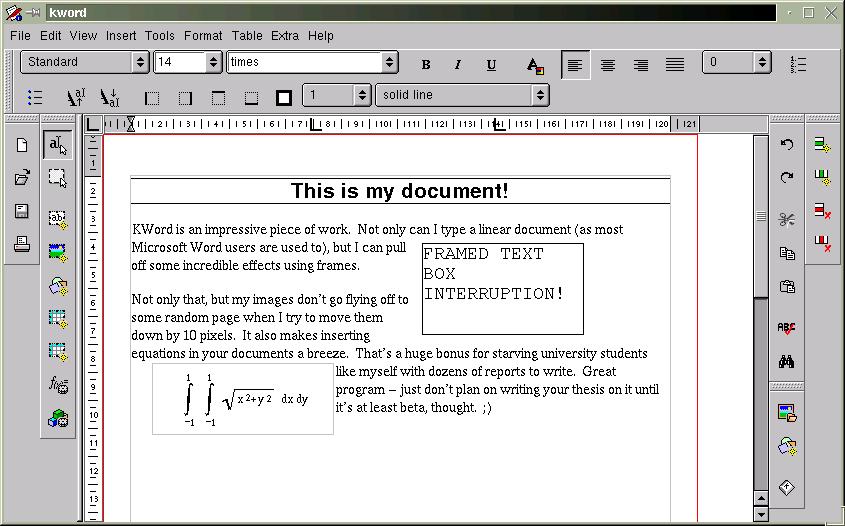
The first thing you'll notice about KWord is how different it feels from a classic word-processor. It sure looks like one, but the layout features take a bit of time to get used to. The first mistake you'll probably make is trying to figure out how to modify a frame you put down. Instead of right-clicking the frame to get its properties while you're in a text-editing mode (sorry, Iguess that's a leftover Windows thing), you need to use the "select frame"tool first (it's the second vertical toolbar from the left, the second button down). Once you have this tool selected, you can move and resize the frames to your heart's content. Right-clicking the frame in this mode will give you that elusive popup menu. Don't forget to go back to text mode after you're finished though (the button right above it).
You might wonder why things are implemented this way -- I assure you there is a good reason. Imagine how much time and frustration you'll save yourself knowing that all of the frame objects on your page are essentially static while you're editing text. One of my biggest beefs with the Office suite is the wonderful habit your images have of moving around the page and possibly moving a number of pages down the document if you aren't careful. As well, if you go back to a program like Word, you'll find yourself cursing every time you go to move a text box and start editing the text inside it instead or vice-versa. You don't have to worry about hitting that magical, invisible grippy border that Microsoft expects you to use to move your objects around.
I don't know if it's possible to tie a frame to a particular piece of text, however. This could be useful to ensure your image always follows a description, for instance. There might be a way to do this in the current version, but it wasn't obvious for me (believe me, I looked). It would be nice to be able to set some sort of reference marker, so the image would have position specified relative to the page (as it currently stands), or to the marker, so that moving the text around would move the frame as well.
To help to write documents with consistent layout, KOffice has a solid text style implementation. You can format your text in a number of different header styles and then generate a table of contents from those directly. The "Stylist" command allows you to go in and change these styles to your heart's content. Unfortunately, it seems as if the only table you can generate is a table of contents, and that seems to be hardwired to generate it from the headings. Allowing arbitrary index generation to the release version would be a big benefit.
There are also a number of other great features in this program, like a spell checker, support for tables, generation of tables of contents and the ability to embed any KPart in a document (like a spreadsheet or chart, for instance).
ConclusionsOverall, I'd say this program is well designed and relatively stable, especially impressive given its current alpha status. It's simple to use (after a half-hour of retraining yourself), intuitive, feels responsive and has most of the features that I'd need to write a great technical report. Of course, there are some issues with layout, but they've got enough time to work these out before the release. Best of all, it's free (as in speech) and has a great team of developers behind it.
My final KWord tip:just be careful not to hit the close button if you've got unsaved work (you did save, didn't you?). There's no warning that you haven't committed your changes to disk and no autosave. Uh oh!
Keep in mind that it's still not even a beta yet and many if not most of these issues will be gone by release time.
As the KOffice team says:
"Note: This is not even alpha so it might compile and might work (normally it does), but we do not recommend writing your master thesis with KOffice yet!"
Applixware: Applix Words (5.0 M1 Development Release)
Applixware is a long-time member of the office suite community. The latest development release version of their software, 5.0 M1, has limited support for the GTK widget set.
At the time of writing, Applixware is currently being chastised for a violation of the LGPL. The application suite is statically linked to the GTK libraries. It seems as if someone from Applix may have noticed this, however, as any official downloads seem to have disappeared from their FTP site. There's still a link off Freshmeat to an alternate download site that still has it, but I assume that it should only be a few days from the time of writing before it comes back up with a dynamically linked version.
At $99 for the 4.4.2 Deluxe Edition for Linux, it's not a bad deal for a commercial office suite. The demo lasts for a couple of months, so you can take your time evaluating the suite before committing yourself to purchasing it.
InstallationAt a whopping 80+ MB, the demo of Applixware might not be in everyone's reach. If you're on dialup, I recommend getting a friend with a Zip drive or CD burner to grab you a copy. Make sure you've got a couple hundred megabytes available on your HD as well. I thought Microsoft Office was big!
Installation of Applixware is just as simple as for KOffice. Applixware is commercial, closed-source software, so there are no source tarballs. You'll need to grab the tarball and run the installation script as room. They've set it up to put all the RPMs in the right spots without any user intervention. If you're planning on uninstalling it in the future, make sure you keep the removal script handy!
Everything should work right out of the box. As mentioned by one of the Freshmeat comments, it seems to have some trouble with pixmap themes. It doesn't affect the operation of the program, so you don't need to worry.
FeaturesApplix Words starts up with a light-weight GUI. Even though they claim GTK compatibility, it looks like they just take the colors from the theme and apply it to their custom menus and toolbars. It still looks good, but reminds more of Netscape than a GTK program.
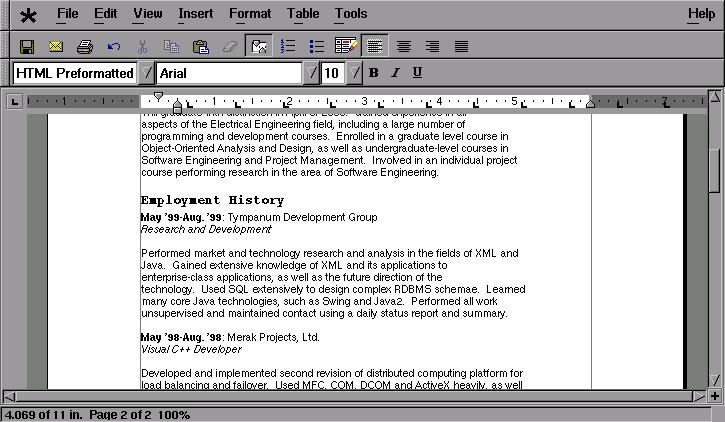
One of their big selling features are the import filters. I decided to try them out by importing my resume from Office 2000. It came out looking virtually identical to the Office version. There were a few minor layout issues, however. One of the header tables had changed size, forcing my telephone number to drop down a few lines and leftward across the page. This was fixed with a simple cut-and-paste. It also insisted on adding space between some bulleted items. Format/Paragraph Settings..., change the insert space before and after text and voila!
Now that I have a beautiful resume in Applixware, how do I get it to the masses? The File/Print... dialog in Applixware is simple and straightforward. It has support for both PostScript and PCL5 printers. In the version I have, there seems to be no way to print other than to a file, but I'm not complaining. It's nice to see my resume in all its Postscript glory. Applix Words is WYSIWYG, too.
Creating original documents isn't quite as straightforward. Coming from a Microsoft Word environment, I'm used to using styles extensively. Even though Word's support tends to be buggy at best, it's still convenient to have a common look-and-feel across a document, as many of you must realize. A blank Applix Words document doesn't come with any of the nice styles, making it virtually useless for anything more than a shopping list. That's okay -- there's an enormous selection of document templates, ranging from letters to reports to press releases. It takes a while sorting through all of the cryptic names, but you can usually find one to fit your purpose and tweak it until you like it. I must say it's nice to have more than just a single style.
In addition to slick styles, Applix Words has support for cross-referencing and a table of contents. These are two features to look for if your job requires technical report writing. As far as I can tell, there aren't any styles for figure and table captions, meaning you'll have to add a couple yourself to create a list of either of these.
If you're one of those people that enjoys using cheesy clip-art, Applixware is the right suite for you. There seems to be thousands of images from all sorts of characters. I still have nightmares about "face 04" in the People category. *shudder*
I have a few minor issues with the user interface. Every once in a while, the flicker of the document pane while using the menus is little annoying. As well, there's a problem scrolling some documents where grey bars appear. That can get annoying at times if you're trying to do a random seek on your document. Applixware is still beta, so hopefully these won't be around in the final build.
ConclusionsApplix Words is neither free as in speech or in beer, but is worth the price if you're looking to spend money on a solid-looking word processor. Add on to that the support for styles, cross-referencing, tables of contents, equations and other nifty features, and you've got yourself a great tool for developing technical documents under Linux. The import and export features ensure you'll never feel left out of the Windows community.
Feature Comparison ChartI hate to say it, but most charts of this kind are biased towards one product or another. I've tried to make this chart unbiased to reflect the requirements of a technical writer, rather than showcase the features of any single product. Any word processor can create a simple document, but there are a number of features that make creation of a technical document much simpler. These are the features (in addition to the required features of the programs) that I've chosen to include here:
- Styles: Support for document text style is important, especially from the view of the technical report writer. It allows someone to spend more time on the content, rather than the layout.
- Tables: Table support is important when organizing data in regularly-spaced, easy-to-read formats. To see why tables are important, try reading table data in a browser like Lynx. Yikes.
- Indexing: Generation of TOCs and Lists of figures and tables makes a document writer's life easier. Without them, you need to go back at each revision and manually change page numbers. I guarantee you'll miss a few.
- Printing: Why word process if you can't print? 'Nuff said.
- Import filters: In a world of Windows, it's inevitable that Word- and Wordperfect-format documents are passed around. Being able to import a number of different formats only adds value to a product and allows it to integrate more seamlessly into the work environment.
- Equation editing: Not all technical writers require equations, but those involved heavily in math, engineering or computing science theory will find this useful.
Product Devel
Status Download Size Cost Styles Tables Indexing
(TOCs and other) Printing
Capability Import Filters Equation Editing Stability Look and feel KWord pre-beta Alpha 29 MB Free Yes Yes Yes PostScript Minimal Yes "Quirky" Excellent Responsive Applix Words 5.0 M1 Beta 80 MB $99 Yes Yes Yes PostScript
or PCL5 Extensive Yes Solid Good
GUI tends to flicker ConclusionsThe concept of "Linux on the desktop" is getting closer to reality on a weekly basis. From the strong showing of KOffice and ApplixWare, we can see that the world of word processing and other office work isn't a dangerous task for Linux fans. The experience of creating documents under Linux is far from painful, especially with the fully featured office suites available.
KOffice is still a ways from being a complete, stable office suite, but is very feature-complete for being alpha status. The interface is busy, but not cluttered, and almost everything necessary for a good document is available. It's fast, responsive and feels very lightweight. Keep your eye on this one -- it's going to be great. Oh yeah... it's free too.
ApplixWare is a lot older, and being so gives it a huge headstart on KOffice in terms of features. It's way bigger and feels a little overwhelming at times. They haven't put work into making it look as pretty as it could, but it gets the job done, and does it well at that. Hopefully by the time it's past beta, they'll have done some work on the UI. At the given price ($99 for the previous version, hopefully the same for this one), it's a pretty good deal.
Whichever package you choose, you can still rest assured that Linux is and will continue to be a productive desktop environment, rather than just a hacker toy it's been seen as in the past.
-
Linux Word Processor Showdown
Matthew Mastracci has sent in the first in a series of features comparing the various productivity type apps under Linux. This week is an application I haven't used since college: Word Processors. Specifically he looks KOffice's KWord and Applixware's ApplixWords. Other word processors (including StarOffice Writer, Corel's WordPerfect 8, AbiWord and KLyX will follow).The following was written by Slashdot Reader Matthew Mastracci
Linux Office Showdown (Part 1: Applixware 5.0 M1 vs. KOffice pre-beta)One of the biggest barriers to the acceptance of Linux on the desktop is the perception of those outside the Linux community that Linux has no support for Office suites and applications. As we all know, this is far from the truth. We've seen StarOffice, Corel, Applixware and the up-and-coming KOffice, but how many of these have you used? The choices are so diverse that people just end up trying or buying one of them and sticking with it.
In this series of reviews, I'm going to try to cut through all the hype and mystery surrounding these applications so that you can see exactly what each of these tools offers, without having to go through all the trouble yourself. I've come from the pure Microsoft Office background myself so I know (at least to some extent) what newcomers to the Linux-as-a-desktop environment will be looking for.
This review includes some beta and pre-beta software, meaning that it crashes often. I'm keeping the state of each program in mind as I write this review so you can be sure it won't take anything away from my review. Also note that I've put a quick overview of my installation experiences in this first piece to ensure you'll know what to expect.
These are the office suite word processing components that will be reviewed in this series of articles:
- KOffice: KWord
- Applixware: ApplixWords
- StarOffice: StarOffice Writer
- Corel Wordperfect 8.0
And for completeness, a few stand-alone applications:
- AbiWord
- KLyX
On that note... let the games begin!
KOffice: KWord (CVS Snapshot, Feb. 5)KOffice is one of the new things that's going to be coming along with KDE2. It's not a clone of one of the office giants like StarOffice or Microsoft Office, but instead a full suite of tools for office productivity with a different set of features than others.
KOffice is such a huge suite that I couldn't review every part of it in a single article. If I missed or skimmed over something you're interested in, please send me some mail and I'll try to add it to the piece as a footnote for future reference.
Installation To fit my role as a possible end-user of the software, I decided to install this software in pre-built binary form. There are source packages available, but I wasn't looking forward to spend hours compiling all of the required libraries and applications.
I grabbed the latest RPM build pointed to from the KOffice binaries homepage: http://koffice.kde.org/install-binaries.html. The one I took was the massive 29 MB RPM with everything in it. Once wget had finished, I just logged in as root and installed it using RPM. That was all it took to install. Wow.
Since I had downloaded the monolithic installation RPM, there were no library conflicts, no package installation order issues or anything else that might even consider giving me grief. Unless you have a good reason for it, I suggest you take this path as well.
From tinkering around with a few of the programs, I discovered that I had to start dcopserver and kded - two programs used extensively by all KDE2-based programs. Once those two are going, everything seems to work like magic.
First Impressions with KDE2 (a short digression) Okay, this review is for KOffice, but I'll take a few moments and say some things about KDE2. This is a very slick-looking package. There are way more applications and utilities included in this bundle than with KDE1. A few of the new ones I noticed include:
- KDevelop: a development studio for KDE2 applications
- KDE System Control: a Windows device-manager clone
- AMOR: an "Amusing Misuse of Resources" that sits the titlebars of your windows and supposedly gives tips (the next paperclip clone?)
Back to KOffice KOffice is composed of seven major tools, each with a specific purpose and each with the ability to be embedded in the other applications. These are:- KWord: a frame-based word-processor (you'll see what this means later)
- KSpread: the classic spreadsheet application
- KPresenter: a presentation tool, similar to PowerPoint
- KChart: a dedicated charting application that can be used with or without a spreadsheet
- KIllustrator: a vector-based graphics drawing application
- KImage: an image viewing/processing application
- KImageShop: a layer-based image creation application
KWord is KDE2's answer to Microsoft Word. Don't take that the wrong way, though. It's not a clone of the infamous Word, but rather an amazing program that can act as either a frame-based document editor for desktop publishing (like FrameMaker), or a word-processer in the traditional sense (like Word or WordPerfect).
The first thing you'll notice about KWord is how different it feels from a classic word-processor. It sure looks like one, but the layout features take a bit of time to get used to. The first mistake you'll probably make is trying to figure out how to modify a frame you put down. Instead of right-clicking the frame to get its properties while you're in a text-editing mode (sorry, Iguess that's a leftover Windows thing), you need to use the "select frame"tool first (it's the second vertical toolbar from the left, the second button down). Once you have this tool selected, you can move and resize the frames to your heart's content. Right-clicking the frame in this mode will give you that elusive popup menu. Don't forget to go back to text mode after you're finished though (the button right above it).
You might wonder why things are implemented this way -- I assure you there is a good reason. Imagine how much time and frustration you'll save yourself knowing that all of the frame objects on your page are essentially static while you're editing text. One of my biggest beefs with the Office suite is the wonderful habit your images have of moving around the page and possibly moving a number of pages down the document if you aren't careful. As well, if you go back to a program like Word, you'll find yourself cursing every time you go to move a text box and start editing the text inside it instead or vice-versa. You don't have to worry about hitting that magical, invisible grippy border that Microsoft expects you to use to move your objects around.
I don't know if it's possible to tie a frame to a particular piece of text, however. This could be useful to ensure your image always follows a description, for instance. There might be a way to do this in the current version, but it wasn't obvious for me (believe me, I looked). It would be nice to be able to set some sort of reference marker, so the image would have position specified relative to the page (as it currently stands), or to the marker, so that moving the text around would move the frame as well.
To help to write documents with consistent layout, KOffice has a solid text style implementation. You can format your text in a number of different header styles and then generate a table of contents from those directly. The "Stylist" command allows you to go in and change these styles to your heart's content. Unfortunately, it seems as if the only table you can generate is a table of contents, and that seems to be hardwired to generate it from the headings. Allowing arbitrary index generation to the release version would be a big benefit.
There are also a number of other great features in this program, like a spell checker, support for tables, generation of tables of contents and the ability to embed any KPart in a document (like a spreadsheet or chart, for instance).
ConclusionsOverall, I'd say this program is well designed and relatively stable, especially impressive given its current alpha status. It's simple to use (after a half-hour of retraining yourself), intuitive, feels responsive and has most of the features that I'd need to write a great technical report. Of course, there are some issues with layout, but they've got enough time to work these out before the release. Best of all, it's free (as in speech) and has a great team of developers behind it.
My final KWord tip:just be careful not to hit the close button if you've got unsaved work (you did save, didn't you?). There's no warning that you haven't committed your changes to disk and no autosave. Uh oh!
Keep in mind that it's still not even a beta yet and many if not most of these issues will be gone by release time.
As the KOffice team says:
"Note: This is not even alpha so it might compile and might work (normally it does), but we do not recommend writing your master thesis with KOffice yet!"
Applixware: Applix Words (5.0 M1 Development Release)
Applixware is a long-time member of the office suite community. The latest development release version of their software, 5.0 M1, has limited support for the GTK widget set.
At the time of writing, Applixware is currently being chastised for a violation of the LGPL. The application suite is statically linked to the GTK libraries. It seems as if someone from Applix may have noticed this, however, as any official downloads seem to have disappeared from their FTP site. There's still a link off Freshmeat to an alternate download site that still has it, but I assume that it should only be a few days from the time of writing before it comes back up with a dynamically linked version.
At $99 for the 4.4.2 Deluxe Edition for Linux, it's not a bad deal for a commercial office suite. The demo lasts for a couple of months, so you can take your time evaluating the suite before committing yourself to purchasing it.
InstallationAt a whopping 80+ MB, the demo of Applixware might not be in everyone's reach. If you're on dialup, I recommend getting a friend with a Zip drive or CD burner to grab you a copy. Make sure you've got a couple hundred megabytes available on your HD as well. I thought Microsoft Office was big!
Installation of Applixware is just as simple as for KOffice. Applixware is commercial, closed-source software, so there are no source tarballs. You'll need to grab the tarball and run the installation script as room. They've set it up to put all the RPMs in the right spots without any user intervention. If you're planning on uninstalling it in the future, make sure you keep the removal script handy!
Everything should work right out of the box. As mentioned by one of the Freshmeat comments, it seems to have some trouble with pixmap themes. It doesn't affect the operation of the program, so you don't need to worry.
FeaturesApplix Words starts up with a light-weight GUI. Even though they claim GTK compatibility, it looks like they just take the colors from the theme and apply it to their custom menus and toolbars. It still looks good, but reminds more of Netscape than a GTK program.
One of their big selling features are the import filters. I decided to try them out by importing my resume from Office 2000. It came out looking virtually identical to the Office version. There were a few minor layout issues, however. One of the header tables had changed size, forcing my telephone number to drop down a few lines and leftward across the page. This was fixed with a simple cut-and-paste. It also insisted on adding space between some bulleted items. Format/Paragraph Settings..., change the insert space before and after text and voila!
Now that I have a beautiful resume in Applixware, how do I get it to the masses? The File/Print... dialog in Applixware is simple and straightforward. It has support for both PostScript and PCL5 printers. In the version I have, there seems to be no way to print other than to a file, but I'm not complaining. It's nice to see my resume in all its Postscript glory. Applix Words is WYSIWYG, too.
Creating original documents isn't quite as straightforward. Coming from a Microsoft Word environment, I'm used to using styles extensively. Even though Word's support tends to be buggy at best, it's still convenient to have a common look-and-feel across a document, as many of you must realize. A blank Applix Words document doesn't come with any of the nice styles, making it virtually useless for anything more than a shopping list. That's okay -- there's an enormous selection of document templates, ranging from letters to reports to press releases. It takes a while sorting through all of the cryptic names, but you can usually find one to fit your purpose and tweak it until you like it. I must say it's nice to have more than just a single style.
In addition to slick styles, Applix Words has support for cross-referencing and a table of contents. These are two features to look for if your job requires technical report writing. As far as I can tell, there aren't any styles for figure and table captions, meaning you'll have to add a couple yourself to create a list of either of these.
If you're one of those people that enjoys using cheesy clip-art, Applixware is the right suite for you. There seems to be thousands of images from all sorts of characters. I still have nightmares about "face 04" in the People category. *shudder*
I have a few minor issues with the user interface. Every once in a while, the flicker of the document pane while using the menus is little annoying. As well, there's a problem scrolling some documents where grey bars appear. That can get annoying at times if you're trying to do a random seek on your document. Applixware is still beta, so hopefully these won't be around in the final build.
ConclusionsApplix Words is neither free as in speech or in beer, but is worth the price if you're looking to spend money on a solid-looking word processor. Add on to that the support for styles, cross-referencing, tables of contents, equations and other nifty features, and you've got yourself a great tool for developing technical documents under Linux. The import and export features ensure you'll never feel left out of the Windows community.
Feature Comparison ChartI hate to say it, but most charts of this kind are biased towards one product or another. I've tried to make this chart unbiased to reflect the requirements of a technical writer, rather than showcase the features of any single product. Any word processor can create a simple document, but there are a number of features that make creation of a technical document much simpler. These are the features (in addition to the required features of the programs) that I've chosen to include here:
- Styles: Support for document text style is important, especially from the view of the technical report writer. It allows someone to spend more time on the content, rather than the layout.
- Tables: Table support is important when organizing data in regularly-spaced, easy-to-read formats. To see why tables are important, try reading table data in a browser like Lynx. Yikes.
- Indexing: Generation of TOCs and Lists of figures and tables makes a document writer's life easier. Without them, you need to go back at each revision and manually change page numbers. I guarantee you'll miss a few.
- Printing: Why word process if you can't print? 'Nuff said.
- Import filters: In a world of Windows, it's inevitable that Word- and Wordperfect-format documents are passed around. Being able to import a number of different formats only adds value to a product and allows it to integrate more seamlessly into the work environment.
- Equation editing: Not all technical writers require equations, but those involved heavily in math, engineering or computing science theory will find this useful.
Product Devel
Status Download Size Cost Styles Tables Indexing
(TOCs and other) Printing
Capability Import Filters Equation Editing Stability Look and feel KWord pre-beta Alpha 29 MB Free Yes Yes Yes PostScript Minimal Yes "Quirky" Excellent Responsive Applix Words 5.0 M1 Beta 80 MB $99 Yes Yes Yes PostScript
or PCL5 Extensive Yes Solid Good
GUI tends to flicker ConclusionsThe concept of "Linux on the desktop" is getting closer to reality on a weekly basis. From the strong showing of KOffice and ApplixWare, we can see that the world of word processing and other office work isn't a dangerous task for Linux fans. The experience of creating documents under Linux is far from painful, especially with the fully featured office suites available.
KOffice is still a ways from being a complete, stable office suite, but is very feature-complete for being alpha status. The interface is busy, but not cluttered, and almost everything necessary for a good document is available. It's fast, responsive and feels very lightweight. Keep your eye on this one -- it's going to be great. Oh yeah... it's free too.
ApplixWare is a lot older, and being so gives it a huge headstart on KOffice in terms of features. It's way bigger and feels a little overwhelming at times. They haven't put work into making it look as pretty as it could, but it gets the job done, and does it well at that. Hopefully by the time it's past beta, they'll have done some work on the UI. At the given price ($99 for the previous version, hopefully the same for this one), it's a pretty good deal.
Whichever package you choose, you can still rest assured that Linux is and will continue to be a productive desktop environment, rather than just a hacker toy it's been seen as in the past.
-
Linux Word Processor Showdown
Matthew Mastracci has sent in the first in a series of features comparing the various productivity type apps under Linux. This week is an application I haven't used since college: Word Processors. Specifically he looks KOffice's KWord and Applixware's ApplixWords. Other word processors (including StarOffice Writer, Corel's WordPerfect 8, AbiWord and KLyX will follow).The following was written by Slashdot Reader Matthew Mastracci
Linux Office Showdown (Part 1: Applixware 5.0 M1 vs. KOffice pre-beta)One of the biggest barriers to the acceptance of Linux on the desktop is the perception of those outside the Linux community that Linux has no support for Office suites and applications. As we all know, this is far from the truth. We've seen StarOffice, Corel, Applixware and the up-and-coming KOffice, but how many of these have you used? The choices are so diverse that people just end up trying or buying one of them and sticking with it.
In this series of reviews, I'm going to try to cut through all the hype and mystery surrounding these applications so that you can see exactly what each of these tools offers, without having to go through all the trouble yourself. I've come from the pure Microsoft Office background myself so I know (at least to some extent) what newcomers to the Linux-as-a-desktop environment will be looking for.
This review includes some beta and pre-beta software, meaning that it crashes often. I'm keeping the state of each program in mind as I write this review so you can be sure it won't take anything away from my review. Also note that I've put a quick overview of my installation experiences in this first piece to ensure you'll know what to expect.
These are the office suite word processing components that will be reviewed in this series of articles:
- KOffice: KWord
- Applixware: ApplixWords
- StarOffice: StarOffice Writer
- Corel Wordperfect 8.0
And for completeness, a few stand-alone applications:
- AbiWord
- KLyX
On that note... let the games begin!
KOffice: KWord (CVS Snapshot, Feb. 5)KOffice is one of the new things that's going to be coming along with KDE2. It's not a clone of one of the office giants like StarOffice or Microsoft Office, but instead a full suite of tools for office productivity with a different set of features than others.
KOffice is such a huge suite that I couldn't review every part of it in a single article. If I missed or skimmed over something you're interested in, please send me some mail and I'll try to add it to the piece as a footnote for future reference.
Installation To fit my role as a possible end-user of the software, I decided to install this software in pre-built binary form. There are source packages available, but I wasn't looking forward to spend hours compiling all of the required libraries and applications.
I grabbed the latest RPM build pointed to from the KOffice binaries homepage: http://koffice.kde.org/install-binaries.html. The one I took was the massive 29 MB RPM with everything in it. Once wget had finished, I just logged in as root and installed it using RPM. That was all it took to install. Wow.
Since I had downloaded the monolithic installation RPM, there were no library conflicts, no package installation order issues or anything else that might even consider giving me grief. Unless you have a good reason for it, I suggest you take this path as well.
From tinkering around with a few of the programs, I discovered that I had to start dcopserver and kded - two programs used extensively by all KDE2-based programs. Once those two are going, everything seems to work like magic.
First Impressions with KDE2 (a short digression) Okay, this review is for KOffice, but I'll take a few moments and say some things about KDE2. This is a very slick-looking package. There are way more applications and utilities included in this bundle than with KDE1. A few of the new ones I noticed include:
- KDevelop: a development studio for KDE2 applications
- KDE System Control: a Windows device-manager clone
- AMOR: an "Amusing Misuse of Resources" that sits the titlebars of your windows and supposedly gives tips (the next paperclip clone?)
Back to KOffice KOffice is composed of seven major tools, each with a specific purpose and each with the ability to be embedded in the other applications. These are:- KWord: a frame-based word-processor (you'll see what this means later)
- KSpread: the classic spreadsheet application
- KPresenter: a presentation tool, similar to PowerPoint
- KChart: a dedicated charting application that can be used with or without a spreadsheet
- KIllustrator: a vector-based graphics drawing application
- KImage: an image viewing/processing application
- KImageShop: a layer-based image creation application
KWord is KDE2's answer to Microsoft Word. Don't take that the wrong way, though. It's not a clone of the infamous Word, but rather an amazing program that can act as either a frame-based document editor for desktop publishing (like FrameMaker), or a word-processer in the traditional sense (like Word or WordPerfect).
The first thing you'll notice about KWord is how different it feels from a classic word-processor. It sure looks like one, but the layout features take a bit of time to get used to. The first mistake you'll probably make is trying to figure out how to modify a frame you put down. Instead of right-clicking the frame to get its properties while you're in a text-editing mode (sorry, Iguess that's a leftover Windows thing), you need to use the "select frame"tool first (it's the second vertical toolbar from the left, the second button down). Once you have this tool selected, you can move and resize the frames to your heart's content. Right-clicking the frame in this mode will give you that elusive popup menu. Don't forget to go back to text mode after you're finished though (the button right above it).
You might wonder why things are implemented this way -- I assure you there is a good reason. Imagine how much time and frustration you'll save yourself knowing that all of the frame objects on your page are essentially static while you're editing text. One of my biggest beefs with the Office suite is the wonderful habit your images have of moving around the page and possibly moving a number of pages down the document if you aren't careful. As well, if you go back to a program like Word, you'll find yourself cursing every time you go to move a text box and start editing the text inside it instead or vice-versa. You don't have to worry about hitting that magical, invisible grippy border that Microsoft expects you to use to move your objects around.
I don't know if it's possible to tie a frame to a particular piece of text, however. This could be useful to ensure your image always follows a description, for instance. There might be a way to do this in the current version, but it wasn't obvious for me (believe me, I looked). It would be nice to be able to set some sort of reference marker, so the image would have position specified relative to the page (as it currently stands), or to the marker, so that moving the text around would move the frame as well.
To help to write documents with consistent layout, KOffice has a solid text style implementation. You can format your text in a number of different header styles and then generate a table of contents from those directly. The "Stylist" command allows you to go in and change these styles to your heart's content. Unfortunately, it seems as if the only table you can generate is a table of contents, and that seems to be hardwired to generate it from the headings. Allowing arbitrary index generation to the release version would be a big benefit.
There are also a number of other great features in this program, like a spell checker, support for tables, generation of tables of contents and the ability to embed any KPart in a document (like a spreadsheet or chart, for instance).
ConclusionsOverall, I'd say this program is well designed and relatively stable, especially impressive given its current alpha status. It's simple to use (after a half-hour of retraining yourself), intuitive, feels responsive and has most of the features that I'd need to write a great technical report. Of course, there are some issues with layout, but they've got enough time to work these out before the release. Best of all, it's free (as in speech) and has a great team of developers behind it.
My final KWord tip:just be careful not to hit the close button if you've got unsaved work (you did save, didn't you?). There's no warning that you haven't committed your changes to disk and no autosave. Uh oh!
Keep in mind that it's still not even a beta yet and many if not most of these issues will be gone by release time.
As the KOffice team says:
"Note: This is not even alpha so it might compile and might work (normally it does), but we do not recommend writing your master thesis with KOffice yet!"
Applixware: Applix Words (5.0 M1 Development Release)
Applixware is a long-time member of the office suite community. The latest development release version of their software, 5.0 M1, has limited support for the GTK widget set.
At the time of writing, Applixware is currently being chastised for a violation of the LGPL. The application suite is statically linked to the GTK libraries. It seems as if someone from Applix may have noticed this, however, as any official downloads seem to have disappeared from their FTP site. There's still a link off Freshmeat to an alternate download site that still has it, but I assume that it should only be a few days from the time of writing before it comes back up with a dynamically linked version.
At $99 for the 4.4.2 Deluxe Edition for Linux, it's not a bad deal for a commercial office suite. The demo lasts for a couple of months, so you can take your time evaluating the suite before committing yourself to purchasing it.
InstallationAt a whopping 80+ MB, the demo of Applixware might not be in everyone's reach. If you're on dialup, I recommend getting a friend with a Zip drive or CD burner to grab you a copy. Make sure you've got a couple hundred megabytes available on your HD as well. I thought Microsoft Office was big!
Installation of Applixware is just as simple as for KOffice. Applixware is commercial, closed-source software, so there are no source tarballs. You'll need to grab the tarball and run the installation script as room. They've set it up to put all the RPMs in the right spots without any user intervention. If you're planning on uninstalling it in the future, make sure you keep the removal script handy!
Everything should work right out of the box. As mentioned by one of the Freshmeat comments, it seems to have some trouble with pixmap themes. It doesn't affect the operation of the program, so you don't need to worry.
FeaturesApplix Words starts up with a light-weight GUI. Even though they claim GTK compatibility, it looks like they just take the colors from the theme and apply it to their custom menus and toolbars. It still looks good, but reminds more of Netscape than a GTK program.
One of their big selling features are the import filters. I decided to try them out by importing my resume from Office 2000. It came out looking virtually identical to the Office version. There were a few minor layout issues, however. One of the header tables had changed size, forcing my telephone number to drop down a few lines and leftward across the page. This was fixed with a simple cut-and-paste. It also insisted on adding space between some bulleted items. Format/Paragraph Settings..., change the insert space before and after text and voila!
Now that I have a beautiful resume in Applixware, how do I get it to the masses? The File/Print... dialog in Applixware is simple and straightforward. It has support for both PostScript and PCL5 printers. In the version I have, there seems to be no way to print other than to a file, but I'm not complaining. It's nice to see my resume in all its Postscript glory. Applix Words is WYSIWYG, too.
Creating original documents isn't quite as straightforward. Coming from a Microsoft Word environment, I'm used to using styles extensively. Even though Word's support tends to be buggy at best, it's still convenient to have a common look-and-feel across a document, as many of you must realize. A blank Applix Words document doesn't come with any of the nice styles, making it virtually useless for anything more than a shopping list. That's okay -- there's an enormous selection of document templates, ranging from letters to reports to press releases. It takes a while sorting through all of the cryptic names, but you can usually find one to fit your purpose and tweak it until you like it. I must say it's nice to have more than just a single style.
In addition to slick styles, Applix Words has support for cross-referencing and a table of contents. These are two features to look for if your job requires technical report writing. As far as I can tell, there aren't any styles for figure and table captions, meaning you'll have to add a couple yourself to create a list of either of these.
If you're one of those people that enjoys using cheesy clip-art, Applixware is the right suite for you. There seems to be thousands of images from all sorts of characters. I still have nightmares about "face 04" in the People category. *shudder*
I have a few minor issues with the user interface. Every once in a while, the flicker of the document pane while using the menus is little annoying. As well, there's a problem scrolling some documents where grey bars appear. That can get annoying at times if you're trying to do a random seek on your document. Applixware is still beta, so hopefully these won't be around in the final build.
ConclusionsApplix Words is neither free as in speech or in beer, but is worth the price if you're looking to spend money on a solid-looking word processor. Add on to that the support for styles, cross-referencing, tables of contents, equations and other nifty features, and you've got yourself a great tool for developing technical documents under Linux. The import and export features ensure you'll never feel left out of the Windows community.
Feature Comparison ChartI hate to say it, but most charts of this kind are biased towards one product or another. I've tried to make this chart unbiased to reflect the requirements of a technical writer, rather than showcase the features of any single product. Any word processor can create a simple document, but there are a number of features that make creation of a technical document much simpler. These are the features (in addition to the required features of the programs) that I've chosen to include here:
- Styles: Support for document text style is important, especially from the view of the technical report writer. It allows someone to spend more time on the content, rather than the layout.
- Tables: Table support is important when organizing data in regularly-spaced, easy-to-read formats. To see why tables are important, try reading table data in a browser like Lynx. Yikes.
- Indexing: Generation of TOCs and Lists of figures and tables makes a document writer's life easier. Without them, you need to go back at each revision and manually change page numbers. I guarantee you'll miss a few.
- Printing: Why word process if you can't print? 'Nuff said.
- Import filters: In a world of Windows, it's inevitable that Word- and Wordperfect-format documents are passed around. Being able to import a number of different formats only adds value to a product and allows it to integrate more seamlessly into the work environment.
- Equation editing: Not all technical writers require equations, but those involved heavily in math, engineering or computing science theory will find this useful.
Product Devel
Status Download Size Cost Styles Tables Indexing
(TOCs and other) Printing
Capability Import Filters Equation Editing Stability Look and feel KWord pre-beta Alpha 29 MB Free Yes Yes Yes PostScript Minimal Yes "Quirky" Excellent Responsive Applix Words 5.0 M1 Beta 80 MB $99 Yes Yes Yes PostScript
or PCL5 Extensive Yes Solid Good
GUI tends to flicker ConclusionsThe concept of "Linux on the desktop" is getting closer to reality on a weekly basis. From the strong showing of KOffice and ApplixWare, we can see that the world of word processing and other office work isn't a dangerous task for Linux fans. The experience of creating documents under Linux is far from painful, especially with the fully featured office suites available.
KOffice is still a ways from being a complete, stable office suite, but is very feature-complete for being alpha status. The interface is busy, but not cluttered, and almost everything necessary for a good document is available. It's fast, responsive and feels very lightweight. Keep your eye on this one -- it's going to be great. Oh yeah... it's free too.
ApplixWare is a lot older, and being so gives it a huge headstart on KOffice in terms of features. It's way bigger and feels a little overwhelming at times. They haven't put work into making it look as pretty as it could, but it gets the job done, and does it well at that. Hopefully by the time it's past beta, they'll have done some work on the UI. At the given price ($99 for the previous version, hopefully the same for this one), it's a pretty good deal.
Whichever package you choose, you can still rest assured that Linux is and will continue to be a productive desktop environment, rather than just a hacker toy it's been seen as in the past.
-
Article on OpenBSD and Theo de Raadt
Marcos Lopez writes "Good article on Theo de Raadt and his developement of the OpenBSD system and why he is based in Canada due to crypto laws in the US. Well written article/interview, was printed todays in the Calgary Herald, Theo's home town. " A generalist overview of OpenBSD and its security-conscious direction. -
Feature:Beowulf, Beyond the Hype
Michael Eilers has written a sort of introduction to Beowulf, what it does, what it doesn't do, and why we should care. It really is a sort of quickie distributed computing FAQ that many of you might enjoy. So hit the link below and find out. The following is a feature by Slashdot Reader Michael Eilers Beowulf beyond the Hype A Quickstart to the Beowulf Concept During the last weeks the Beowulf project got a lot of attention in the PC press and even on Slashdot. With Red Hat's Extreme Linux CD the relevant mailing lists show an increasing number of newbie questions. Unfortunately the informat ion Red Hat provides on their Extreme Linux web pages is less than informative and full of hype. This may result in disappointed users. It seems appropriate to make some comments an hardware and software and give some guidance for the v ery beginner.The name Beowulf stems from an old English tale and was the name of the first e xample of this class of computers. In fact a Beowulf is nothing else as a local computer network. You might say I have a small network in my flat (f.e. an old 486 connected to my newer machine), do I have a Beowulf? The answer is yes. Yo u do own already the hardware to start. Even if your connection is via PLIP/SLI P you can call your construction a Beowulf as soon as ping is successf ul. Forget all the hype about expensive special networking stuff like switches, Myrinet or SCI. For some tasks it is helpful but others won't benefit. A 10/10 0Mb connection seems to be sufficient for serious starting.
A Beowulf is not a solution for all of your speed problems. Building a Beowulf has not the same effect as f.e. the increasing of clock speed. With a Beowulf y ou won't see a speedup of your daily software and the class of software that is already adopted to Beowulfs can have very different speedups.
The hardware part is nothing more than connecting PCs with standard networking hardware. The main idea is to make your PCs to talk to each other. The most com mon solution is message passing. There are two main ways for doing message pass ing: PVM and MPI. The decision between them is mainly a matter of taste (see here for a comparing paper). I will foc us on PVM but keep in mind that MPI is as good. You can get that stuff here. The pvm3.x.x.tar.gz package has a long history and is rock solid stuff. Sinc e 1993 I did install it on half a dozen unices and never met a major problem. A fter unpacking and compiling play around (yes there is a "hello world" example) . After playing with the examples. You will see that the main commands are pvm_ send and pvm_receive and If you think that you do understand the examples start your own programming If you know what matrix multiplication is, try to impleme nt a parallel version. This is an instructive example. If you have problems you may ask for a debugging utility. Try to get xpvm-1.2.5.tar.gz from the above U RL. Its not a debugger but it visualises the behaviour of your parallel code. T he whole thing may take you two or three evenings. After that you know the basi cs of the Beowulf concept of making a pile of PCs looking as one machine.
Now you may have some questions:
Q: Sounds interesting, but I don't have a network at home. What can I do?
A: You have a network (the loopback device) in your Linux box. This means that you can install PVM/MPI and play with it. Of course you won't see a speedup. :-(Q: I have access to a computer pool but I'm only a common user.
A: You don't have to be "root". You can install PVM/MPI as a normal user and tr ansform this pool in your personal Beowulf.Q: I'm not a C programmer, but I use [Perl|Tcl|Python]?
A: There are interfaces available at the PVM home page (MPI??).Q: Im not a programmer. Are there interesting applications?
A: Im sure there are plenty of applications that exploit the power of Beowulfs. Most of the stuff lives in academic environment and this means that availabilit y and quality differs. I use f.e. GAMESS a quantum chemistry program that uses MPI. Maybe one appl ication need's to be specially mentioned. There are two Beowulf-ready patches f or the famous POVray ray-tracing program. PV MPOV is more flexible but less robust and FLY3 is robust but a little inflexible. If you use POVray very o ften and play with the idea of buying a PII[34]00 MHz you may rethink this idea if you checked the povbench res ults at The fastest rendering was done with a messa ge passing version of povray.Q: If you state that building and using of Beowulfs is that easy why aren't the re more Beowulfs?
A: I don't know why there aren't more, but I think this situation will change.Q: I'm a little confused about the many packages that allows computing of Beowu lfs?
A: Indeed there is a whole zoo of packages for programming networked workstatio ns. For a first attempt you don't need them but some of them solve special prob lems. For an overview about the important ones check out the "Linux Parallel Pr ocessing HOWTO" by Hank Dietz.Q: Is there a PVM/MPI version for Windows95?
A: Yes there are Win32 versions of PVM and MPI, but who cares. In fact every (pseudo)multitasking operating system with network support can in principal be used to build a Beowulf (f.e. there is Win 3.x port for PVM).Q: Where can I get more Information?
A: As you may have seen from the above the message passing part is the stuff th at is tricky. You find links to books and tutorial for parallel programming on the PVM/MPI home pages. Hardware related information at introductory level you will find in the "Beowulf HOWTO" by Jacek Radajewski and Doug Eadline. A comprehensive overv iew on hardware and software in the "Linux Parallel Programming HOWTO" by Hank Dietz.Q: Do I need the Beowulf software packages from the Beowulf project at NASA?
A: If you use Linux, then you probably use one of the network driver developed by Donald Becker. So the Beowulf project is already at your home and in this se nse necessary. The rest of NASA's Beowulf software provided for the use with cl usters helps you to manage a large cluster but it's not necessary and probably not the first step to do and beyond the scope of a quickstart. Even the suits a t NASA have realized that Beowulfs are a powerful tool, but the shutdown of the Beowulf web pages is like preventing the production of cars by closing a horn factory.Q: If you can connect local PC's to look as one computer, why not coupling comp uters via Internet to a supercomputer?
Michael Eilers
A: Standard message passing software uses communication protocols that are very sensitive to packet loss. But there are activities in this area. Look for the keywords "metacomputing" or "hypercomputing". -
New Linux JDK
Rich Cannings wrote in to let us know that Steve Byrne has released the JDK 1.1.5 Linux port. Snag it over at Blackdown. They have libc5 and glibc versions as well as diffs.