 Slashdot Mirror
Linux Word Processor Showdown
The following was written by Slashdot Reader Matthew Mastracci
Linux Office Showdown (Part 1: Applixware 5.0 M1 vs. KOffice pre-beta)One of the biggest barriers to the acceptance of Linux on the desktop is the perception of those outside the Linux community that Linux has no support for Office suites and applications. As we all know, this is far from the truth. We've seen StarOffice, Corel, Applixware and the up-and-coming KOffice, but how many of these have you used? The choices are so diverse that people just end up trying or buying one of them and sticking with it.
In this series of reviews, I'm going to try to cut through all the hype and mystery surrounding these applications so that you can see exactly what each of these tools offers, without having to go through all the trouble yourself. I've come from the pure Microsoft Office background myself so I know (at least to some extent) what newcomers to the Linux-as-a-desktop environment will be looking for.
This review includes some beta and pre-beta software, meaning that it crashes often. I'm keeping the state of each program in mind as I write this review so you can be sure it won't take anything away from my review. Also note that I've put a quick overview of my installation experiences in this first piece to ensure you'll know what to expect.
These are the office suite word processing components that will be reviewed in this series of articles:
- KOffice: KWord
- Applixware: ApplixWords
- StarOffice: StarOffice Writer
- Corel Wordperfect 8.0
And for completeness, a few stand-alone applications:
- AbiWord
- KLyX
On that note... let the games begin!
KOffice: KWord (CVS Snapshot, Feb. 5)KOffice is one of the new things that's going to be coming along with KDE2. It's not a clone of one of the office giants like StarOffice or Microsoft Office, but instead a full suite of tools for office productivity with a different set of features than others.
KOffice is such a huge suite that I couldn't review every part
of it in a single article. If I missed or skimmed over something
you're interested in, please send me some mail and I'll try to add it to
the piece as a footnote for future reference.
I grabbed the latest RPM build pointed to from the KOffice binaries homepage: http://koffice.kde.org/install-binaries.html. The one I took was the massive 29 MB RPM with everything in it. Once wget had finished, I just logged in as root and installed it using RPM. That was all it took to install. Wow.
Since I had downloaded the monolithic installation RPM, there were no library conflicts, no package installation order issues or anything else that might even consider giving me grief. Unless you have a good reason for it, I suggest you take this path as well.
From tinkering around with a few of the programs, I discovered that
I had to start dcopserver and kded - two programs used extensively by all
KDE2-based programs. Once those two are going, everything seems to
work like magic.
- KDevelop: a development studio for KDE2 applications
- KDE System Control: a Windows device-manager clone
- AMOR: an "Amusing Misuse of Resources" that sits the titlebars of your windows and supposedly gives tips (the next paperclip clone?)
Back to KOffice KOffice is composed of seven major tools, each with a specific purpose and each with the ability to be embedded in the other applications. These are:
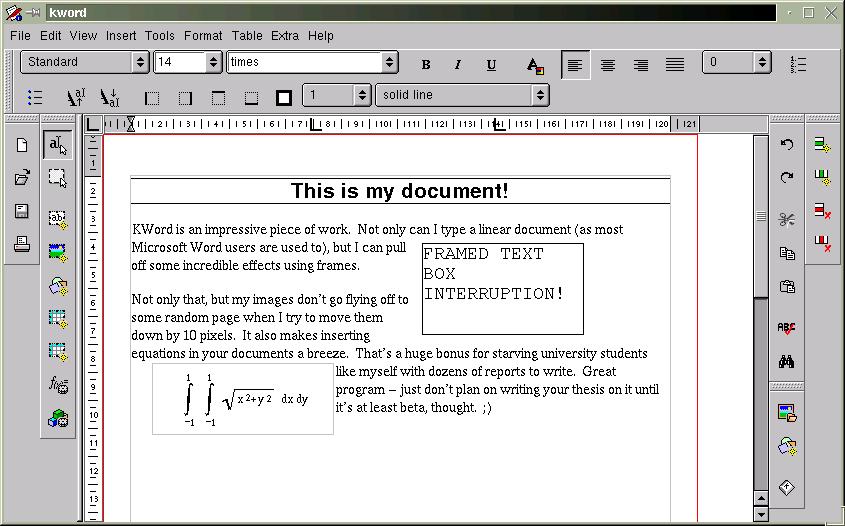
- KWord: a frame-based word-processor (you'll see what this means later)
- KSpread: the classic spreadsheet application
- KPresenter: a presentation tool, similar to PowerPoint
- KChart: a dedicated charting application that can be used with or without a spreadsheet
- KIllustrator: a vector-based graphics drawing application
- KImage: an image viewing/processing application
- KImageShop: a layer-based image creation application
KWord is KDE2's answer to Microsoft Word. Don't take that the wrong way, though. It's not a clone of the infamous Word, but rather an amazing program that can act as either a frame-based document editor for desktop publishing (like FrameMaker), or a word-processer in the traditional sense (like Word or WordPerfect).
The first thing you'll notice about KWord is how different it feels from a classic word-processor. It sure looks like one, but the layout features take a bit of time to get used to. The first mistake you'll probably make is trying to figure out how to modify a frame you put down. Instead of right-clicking the frame to get its properties while you're in a text-editing mode (sorry, Iguess that's a leftover Windows thing), you need to use the "select frame"tool first (it's the second vertical toolbar from the left, the second button down). Once you have this tool selected, you can move and resize the frames to your heart's content. Right-clicking the frame in this mode will give you that elusive popup menu. Don't forget to go back to text mode after you're finished though (the button right above it).
You might wonder why things are implemented this way -- I assure you there is a good reason. Imagine how much time and frustration you'll save yourself knowing that all of the frame objects on your page are essentially static while you're editing text. One of my biggest beefs with the Office suite is the wonderful habit your images have of moving around the page and possibly moving a number of pages down the document if you aren't careful. As well, if you go back to a program like Word, you'll find yourself cursing every time you go to move a text box and start editing the text inside it instead or vice-versa. You don't have to worry about hitting that magical, invisible grippy border that Microsoft expects you to use to move your objects around.
I don't know if it's possible to tie a frame to a particular piece of text, however. This could be useful to ensure your image always follows a description, for instance. There might be a way to do this in the current version, but it wasn't obvious for me (believe me, I looked). It would be nice to be able to set some sort of reference marker, so the image would have position specified relative to the page (as it currently stands), or to the marker, so that moving the text around would move the frame as well.
To help to write documents with consistent layout, KOffice has a solid text style implementation. You can format your text in a number of different header styles and then generate a table of contents from those directly. The "Stylist" command allows you to go in and change these styles to your heart's content. Unfortunately, it seems as if the only table you can generate is a table of contents, and that seems to be hardwired to generate it from the headings. Allowing arbitrary index generation to the release version would be a big benefit.
There are also a number of other great features in this program, like a spell checker, support for tables, generation of tables of contents and the ability to embed any KPart in a document (like a spreadsheet or chart, for instance).
ConclusionsOverall, I'd say this program is well designed and relatively stable, especially impressive given its current alpha status. It's simple to use (after a half-hour of retraining yourself), intuitive, feels responsive and has most of the features that I'd need to write a great technical report. Of course, there are some issues with layout, but they've got enough time to work these out before the release. Best of all, it's free (as in speech) and has a great team of developers behind it.
My final KWord tip:just be careful not to hit the close button if you've got unsaved work (you did save, didn't you?). There's no warning that you haven't committed your changes to disk and no autosave. Uh oh!
Keep in mind that it's still not even a beta yet and many if not most of these issues will be gone by release time.
As the KOffice team says:
"Note: This is not even alpha so it
might compile and might work
(normally it does), but we do not recommend
writing your master thesis with KOffice
yet!"
Applixware is a long-time member of the office suite community. The latest development release version of their software, 5.0 M1, has limited support for the GTK widget set.
At the time of writing, Applixware is currently being chastised for a violation of the LGPL. The application suite is statically linked to the GTK libraries. It seems as if someone from Applix may have noticed this, however, as any official downloads seem to have disappeared from their FTP site. There's still a link off Freshmeat to an alternate download site that still has it, but I assume that it should only be a few days from the time of writing before it comes back up with a dynamically linked version.
At $99 for the 4.4.2 Deluxe Edition for Linux, it's not a bad deal for a commercial office suite. The demo lasts for a couple of months, so you can take your time evaluating the suite before committing yourself to purchasing it.
InstallationAt a whopping 80+ MB, the demo of Applixware might not be in everyone's reach. If you're on dialup, I recommend getting a friend with a Zip drive or CD burner to grab you a copy. Make sure you've got a couple hundred megabytes available on your HD as well. I thought Microsoft Office was big!
Installation of Applixware is just as simple as for KOffice. Applixware is commercial, closed-source software, so there are no source tarballs. You'll need to grab the tarball and run the installation script as room. They've set it up to put all the RPMs in the right spots without any user intervention. If you're planning on uninstalling it in the future, make sure you keep the removal script handy!
Everything should work right out of the box. As mentioned by one of the Freshmeat comments, it seems to have some trouble with pixmap themes. It doesn't affect the operation of the program, so you don't need to worry.
FeaturesApplix Words starts up with a light-weight GUI. Even though they claim GTK compatibility, it looks like they just take the colors from the theme and apply it to their custom menus and toolbars. It still looks good, but reminds more of Netscape than a GTK program.
One of their big selling features are the import filters. I decided to try them out by importing my resume from Office 2000. It came out looking virtually identical to the Office version. There were a few minor layout issues, however. One of the header tables had changed size, forcing my telephone number to drop down a few lines and leftward across the page. This was fixed with a simple cut-and-paste. It also insisted on adding space between some bulleted items. Format/Paragraph Settings..., change the insert space before and after text and voila!
Now that I have a beautiful resume in Applixware, how do I get it to the masses? The File/Print... dialog in Applixware is simple and straightforward. It has support for both PostScript and PCL5 printers. In the version I have, there seems to be no way to print other than to a file, but I'm not complaining. It's nice to see my resume in all its Postscript glory. Applix Words is WYSIWYG, too.
Creating original documents isn't quite as straightforward. Coming from a Microsoft Word environment, I'm used to using styles extensively. Even though Word's support tends to be buggy at best, it's still convenient to have a common look-and-feel across a document, as many of you must realize. A blank Applix Words document doesn't come with any of the nice styles, making it virtually useless for anything more than a shopping list. That's okay -- there's an enormous selection of document templates, ranging from letters to reports to press releases. It takes a while sorting through all of the cryptic names, but you can usually find one to fit your purpose and tweak it until you like it. I must say it's nice to have more than just a single style.
In addition to slick styles, Applix Words has support for cross-referencing and a table of contents. These are two features to look for if your job requires technical report writing. As far as I can tell, there aren't any styles for figure and table captions, meaning you'll have to add a couple yourself to create a list of either of these.
If you're one of those people that enjoys using cheesy clip-art, Applixware is the right suite for you. There seems to be thousands of images from all sorts of characters. I still have nightmares about "face 04" in the People category. *shudder*
I have a few minor issues with the user interface. Every once in a while, the flicker of the document pane while using the menus is little annoying. As well, there's a problem scrolling some documents where grey bars appear. That can get annoying at times if you're trying to do a random seek on your document. Applixware is still beta, so hopefully these won't be around in the final build.
ConclusionsApplix Words is neither free as in speech or in beer, but is worth the price if you're looking to spend money on a solid-looking word processor. Add on to that the support for styles, cross-referencing, tables of contents, equations and other nifty features, and you've got yourself a great tool for developing technical documents under Linux. The import and export features ensure you'll never feel left out of the Windows community.
Feature Comparison Chart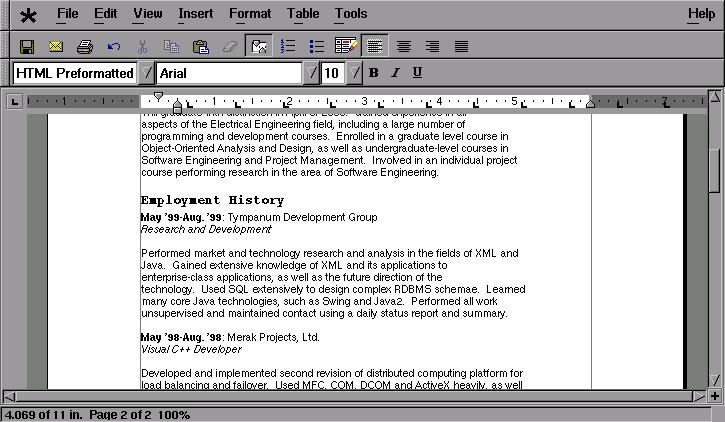
I hate to say it, but most charts of this kind are biased towards one product or another. I've tried to make this chart unbiased to reflect the requirements of a technical writer, rather than showcase the features of any single product. Any word processor can create a simple document, but there are a number of features that make creation of a technical document much simpler. These are the features (in addition to the required features of the programs) that I've chosen to include here:
- Styles: Support for document text style is important, especially from the view of the technical report writer. It allows someone to spend more time on the content, rather than the layout.
- Tables: Table support is important when organizing data in regularly-spaced, easy-to-read formats. To see why tables are important, try reading table data in a browser like Lynx. Yikes.
- Indexing: Generation of TOCs and Lists of figures and tables makes a document writer's life easier. Without them, you need to go back at each revision and manually change page numbers. I guarantee you'll miss a few.
- Printing: Why word process if you can't print? 'Nuff said.
- Import filters: In a world of Windows, it's inevitable that Word- and Wordperfect-format documents are passed around. Being able to import a number of different formats only adds value to a product and allows it to integrate more seamlessly into the work environment.
- Equation editing: Not all technical writers require equations, but those involved heavily in math, engineering or computing science theory will find this useful.
Product Devel
Status Download Size Cost Styles Tables Indexing
(TOCs and other) Printing
Capability Import Filters Equation Editing Stability Look and feel KWord pre-beta Alpha 29 MB Free Yes Yes Yes PostScript Minimal Yes "Quirky" Excellent Responsive Applix Words 5.0 M1 Beta 80 MB $99 Yes Yes Yes PostScript
or PCL5 Extensive Yes Solid Good
GUI tends to flicker Conclusions
The concept of "Linux on the desktop" is getting closer to reality on a weekly basis. From the strong showing of KOffice and ApplixWare, we can see that the world of word processing and other office work isn't a dangerous task for Linux fans. The experience of creating documents under Linux is far from painful, especially with the fully featured office suites available.
KOffice is still a ways from being a complete, stable office suite, but is very feature-complete for being alpha status. The interface is busy, but not cluttered, and almost everything necessary for a good document is available. It's fast, responsive and feels very lightweight. Keep your eye on this one -- it's going to be great. Oh yeah... it's free too.
ApplixWare is a lot older, and being so gives it a huge headstart on KOffice in terms of features. It's way bigger and feels a little overwhelming at times. They haven't put work into making it look as pretty as it could, but it gets the job done, and does it well at that. Hopefully by the time it's past beta, they'll have done some work on the UI. At the given price ($99 for the previous version, hopefully the same for this one), it's a pretty good deal.
Whichever package you choose, you can still rest assured that Linux is and will continue to be a productive desktop environment, rather than just a hacker toy it's been seen as in the past.
I was trying to do something like this at a community center our LUG was helping setup. Right now they are using Windows95 as a microkernel for StarOffice, but as you all know Windows is anything but "micro".
What I wanted to do was migrate them to was very simple local installations of Linux, X and SO only (maybe using remote boot images from the Linux Terminal Server Project. It would have been great, I could have them boot and load SO from a local HDD but have their home directories and mail on the server. SO can do mail, calendar, web browsing, Java, as well as word processing, spreadsheet, presentations, database, etc. so the local admin would only have one program and file tree to maintain.
Unfortunately this won't happen now because they hired a Windows guy to admin and teach, who doesn't know the first thing about Linux. He got frustrated the first day (probably a permissions thing on the Samba shares, maybe he wasn't logging in as himself, who knows?) so he fdisked and formatted the server, without even asking us for help. He is using Win95 File and Print sharing instead of a Samba server, what a maroon.
-- Remember: Wherever you go, there you are!
few observations about KWord's interface:
* drop-down menus' style is clearly Mac-like. this gives noticeable speed gain: dropping the menu not only selects current item (as often elsewhere) but puts it against your mouse pointer (so accidental click doesn't ruin anything: it only selects what you already have).
* toolbars are as well more Mac-ish, and why this is important? most monitors are horizontal rectangles, that is, with the long side on bottom; so that vertical screen real estate is 'more expensive'. have few toolbars in MS Word and there's not much space left for actual document. vertical toolbars are much less obtrusive (coz most documents look like, well, vertical rectangles).
Great! all i wait is Mac-like menu bar (which in some measure is already present in KDE) and consistency, please?
God did not appoint us to suffer wrath but to receive salvation through our Lord Jesus Christ --1Thes5:9
Anyone that has seen the WP Office 2000 beta has signed a NDA. (Like myself) So you really can't talk too much about it. And I don't think Corel wants people to be review a product that's only Beta 1.
One little detail I have forgotten to mention in my previous post -- the full version of FrameMaker is supposed to support RTF as well as MS Word formats for import (and export?). There is also a FrameMaker SGML version (though I am not sure if there is Linux port of it) -- would not this be a great tool for LDP?
--AP
After marking some terribly written lab reports last semester, I wrote a LyX tutorial for use by university students on RedHat boxes. The first half is an intro to the RedHat machines, which can be skipped over. Have a look if you want to see how much of a better system LyX is.
- KOffice is cross licensed between the GNU Public License 2.0 and Artistic (the same as Perl, a very liberal license). You are free to choose between the two.
- KDE Libs are all avalible under the GNU Library/Lesser GPL.
- Other KDE Apps: Depends the Author's Preference. At minium they must be GPL'd to be included as part of the standard KDE distro, many are cross licensed with the GLPL or the Artistic License.
- Qt, is the KDE widgit set. Qt is free as in beer to use for X11 Systems. Programming is also free with Qt, assuming that your software's source code is under a "free-ish" license, like the GPL, artistic, BSD or the alike. The only issue with Qt is you must clearly label patches to the "offical" Qt product, and you can't start your own Qt source tree. Most of the people at Troll are extermely active KDE developers -- so they essentially open to any kind of stable patch that improves Qt, but doesn't damage or break other things. This is much like the Linux Kernel.
And alas, see me post above -- KOffice isn't 29 megs. The KWord binary is only 365k -- it uses shared libraries extensively.
Perhaps we should also consider HTML, the most portable document format. It is not as hard as TeX/LaTeX to learn (or to process) and also give you structural composing. It is my choice when I don't have TeX/LaTeX installed on my Win-tel PC. Give me an editor and a web browser, I can print a beautiful paper. (including images)
A lot of debates are focused on Vi v.s. Pico, Emacs, word processor v.s typesetting program. However, many people omit how computer can help us improving our writing. TeX/LaTeX, HTML/XML/SGML are very good at keeping us thinking about What we are writing and how to present the ideas through styles and fonts. That is the weakness of most WYSIWYG programs.
Dupilcating the functions of WYSIWYG of words on Linux is wasting time for Liunux programmers. The killer application should be something which can help people write there documents with easy to use Interface, shallow learning surve and the power of structual composing. HTML is a language in the right direction for structual composing, however, we need better editors. (Vi is enough for me, but I can not teach my wife vi, the only choice for her is notepad.exe -:)
BTW, wp.html is a very interesting article related to this topic.
liusn
That KOffice RPM is really an RPM of everything from KDE 2.0 jammed into one package (excluding qt 2.0). It's really packed full to the top. Here is a rundown of stuff in it:
:)
- Konqueror, A Full Featured Standards Based Browser, that reguluarly beats Netscape on W3C tests. (It's quite small -- relies heavly on KDE Libs)
- KOffice, KWord (365k binary itself -- uses lots of Sharedlibs -- so it's very efficent!), KSpread (A pretty decent spreadsheet, although some functions are still a bit cryptic to access, KPresenter (A full presentation app -- if you haven't tried it -- it's quite full of effects -- many that are really part of the KDE Core libs). And more....
- KDE 2.0 Libs - A full set of libraries, designed to make writting KDE apps easier by providing developers a full set of functions. From advanced gradient support to many common KDE dialogs to the advanced khtml 2.0 engine.
- KDE Utils - Many popular KDE 1.x add ons (including Caitoo and KCrontab...) plus all of the KDE 1.x packages.
- KDE Games - Again half a dozen new games... Plus all of the classic KDE 1.x.
- The brand new KWin and Kpanel Window Manager. All of the theming stuff, plus several themes, Pixie and more.
- Plus everything else in KDE 1.x, except with more features, and some new apps.
- KDevelop will also be part of it, but I am not sure if it's in the tarball yet.
By the time it ships, with all of the code complete, and debuging symbols removed, the total of all of the packages should weigh around 35 megs for everything + about 2 megs for the QT-2.0 binary. That's a hell of alot of functionality for a complete desktop enviroment, dozens of utils and apps.
Microsoft wouldn't be able to ship that much functionality on a CD
As far as I know KDE 2.0 apps should be able to support multiple keybindings, as set by the recently commited-to-cvs(TM) KDE tool for selecting keybindings.
If they will change the way KWord and the alike edit text, I don't know. I am sure they would be more then happy to accept patches.
First of all, who else is going to get Applixware just to see what that "face 04" is?
Also, I adore Lyx. It is the best thing I have ever seen for writing up math, the equations are excellent.
Ralph Furmaniak
The Great AIP (Artificial Intelligence Project)
http://GreatAIP.sourceforge.net
It's time for Linux advocates to stop putting their fingers in their ears and trying to shout down people that point out its weaknesses, and applications are still a big problem.
Fixing the problem is better than denying it, even if it requires a bit more work. The denials are starting to hurt our credibility.
I use outline mode in Emacs when writing document. When I'm done with it I convert the outline to MML, a format that Framemaker can import and then touch it up with pictures and a TOC. Works pretty fine.
I do this mostly for the nice spell checking Emacs and Ispell provides.
There's a million dinky little features in, say, Word that, even when they work correctly (which is rare) don't work the way I want them to or have zero documentation.
Having the source code would fix all three of those problems:
1) If it doesn't work, fix it.
2) If it does work, but I can't figure out how read the source.
3) If it does work and I know how, but I don't like it change the source.
--
Here is the result of your Slashdot Purity Test.
Linux MAPI Server!
http://www.openone.com/software/MailOne/
(Exchange Migration HOWTO coming soon)
If you think moderation sucks, than login, and meta-moderate. That's how bad moderators are weeded out from the system.
Yeah, I'm that guy.
Who really cares how much of a techonological stud you are? "I can use VI", "I can use Pico", "I can flip bits with my teeth" Big whoopdy doo.
The General Public will never accept Linux if you people keep insisting on clinging onto the blank screens of text editors. People need WYSIWYG. They need a sheet of papar rendered on the screen. They need I-bar cursors, pulldown menu bars, toolbars, ruler bars, scroll bars, drop and drag; things that they are already familar with. The secretary down the hall won't use vi. My Mom will never use emacs. My company's customers probably has never even heard those things. We will be forever bound and stuck in this dammed Micros~1 world until we can SEE something better. Help us. Help us do columns. Help us do spell check. Help us do TrueType fonts. Help us have one common file format for easy file exchange with our coworkers and customers. Help us tell us what other WPs are out there. The only one that people know about is M$ Word. (Sure, there is WordPerfect, but "Who uses that?")
While I live and swear by the "Unix way", I don't think a word processor is its place. A word processor is intended to be easy to use and to give you an integrated environment to do fancy stuff with your text. If you want raw power, use TeX or LaTeX. But sometimes, for typing a quick letter or a table, a word processor is the easiest way to go.
I use Emacs+LaTeX myself for mostly everything, but I see the need for good word processors.
--Diego
I agree with one sentament, the Word Processing/Office Suite market hasn't had any major technical innovation in 10 years. There is very little that I couldn't do with my old, circa 1989, copy of WordPerfect and Lotus 1-2-3 that I can do now.
Not that there hasn't been better, innovative ways to work with words, like LyX (which is based on tech that is older than the hills, TeX and LaTeX) but they haven't caught on. People still make slides as if they were (and some still are) being printed on film, people write letters as if they are using a dumb typewriter (tab stops, underlining, manual labor in formatting, etc.). The only one of these softs that is much different is LyX, everything else is the same old hat.
PS. The preceding post is probably not worth a -1 Troll and should be remoderated up IMHO
-- Remember: Wherever you go, there you are!
I used to think highly of MS Word until the fast few weeks when I tried to do a report with graphs and diagrams imbedded into it. The biggest quirk was that Word had its own mind of where to place the pictures even though I wasn't doing any complex layouts. Second, the line drawing tools are unbelievable crude.
On this point even AbiWord beats Applix. It may not import most of the stuff properly and break most of the layout, but it does not blow up. Also, it does not work for half an hour before blowing up. It does not take X windows on a 192MB machine with it when it goes down on a failed import.
I would suggest you extend your tests with a proper selection of MS antidocs. Especially the ones produced by non-release Word versions. I mean those that MS word has sometimes problems reading.
While on the same topic a good test is also reading exported "compatible" formats. For example Corel Word fails on importing something written by StarOffice in an MSWord format. Applixware blows up, etc...
Baker's Law: Misery no longer loves company. Nowadays it insists on it
http://www.sigsegv.cx/
Some people use wordprocessors for *business*. The Big man upstairs doesn't care what program you used to type up his reports. He just wants them to look good to clients and the stock holders... If theres a tool that makes it easier for someone to put that 87 page document into 2 columns and then reformat it around the bar graphs, that saves time and therefore money because one person can do *all* the work. That's why we need fancy schmancy word processors.
Well, I thought Maxwell looked interesting too, but it's development seems to have stopped (the web pages haven't been updated since August '98). With the current version, I can't AFAIK even have my pages numbered, a feature at least I consider mandatory for a usable WP.
Thanks, I went and read the relevant sections of the LGPL (it's been a while since I've looked at it) and you are absolutly correct. I still find it strange, as previous discussions about the GPL argued that there is no difference in dynamic vs static linking.
If you want to edit file formats, you'll be happy to know that Abiword uses XML as its file format.
The point was LaTex kicks the shit out of all other file formats. TeX is what publishers use to typeset books.. you can even program games in TeX.. and LyX makes it easy to use. SGML and XML are not designed to be portable and simple, not powerful, so they catter to the loest common denominator.
Can't say i agree with the unix feel, while it has its place, the place is not in a word processor.
No, the Unix feal is most definitly desirable in a word processor.. you just don't know what it would be like because no one has figured out how to do it. LyX makes a good attempt.
One really lousy thing in LyX is tables. While they look great in the output, they suck on WYSIWYM side. Whenever your lines are too long you get tables that are as wide as Texas. Also you can never delete a blank line in out of a table (or at least I could not find a way of doing it). [I mean a blank line, not an extra row]
--AP
After being burned by MS Office, I'm not getting ANY "productivity suite" that doesn't come with source. How about adding "licensing" to your review chart?
--
Here is the result of your Slashdot Purity Test.
Linux MAPI Server!
http://www.openone.com/software/MailOne/
(Exchange Migration HOWTO coming soon)
I hate to say this, but Microsoft Office 2000 Premium is by far the best office productivity suite on planet Earth. I'd probably say at least 80% of the business world uses it (or older versions, which are still better than anything on Linux) and is happy with it. Sorry if this bursts your bubble, but its true.
Whats with all the fancy-smancy word processors these days?
Give me vi any day;
1. Exists on every *nix in the known n-verse
2. Makes you look _really_ smart in front of your boss as you use it in front of him/her. Extra points if you are a fast touch typist.
3. It uses rouge-like movement commands. See, those hundreds of hours of Angband are not going to waste.
4. I can use it with eterm and enlightenment and have my spiffy background show through.
:)
The surprise isn't how often we make bad choices; the surprise is how seldom they defeat us.
I used to be an Emacs+LaTeX user myself. But I discovered that KLyX answers most my objections to switching while allowing me to see equations as I'm typing and click on references. Point-by-Point: you can change the key bindings to something very emacs-like---in fact a bindings file is included; KLyX will export fairly readable LaTeX, so I'm not locked in by starting a large writing project with KLyX and I can exchange documents with colleagues who write LaTeX by hand; I can put in LaTeX by hand if I need to; finally, with sensible keybindings I can generate most equations with fewer keystrokes than when hand coding (and I had a .emacs file configured to bind the generation of various LaTeX environments to control keys). I've gained a few things (admittedly I never considered near-WYSIWYG or any of the other things I gained to be essential) and I don't really feel I've lost anything by making the switch. YMMV.
I agree that if they are going to review alpha/beta versions of other packages that they should review the beta of Corel's new suite. Other reviews for Corel's WPO2K4L should be out any time now since it has been out to beta testers since Jan. Gary Krakow already looked at an alpha verson and wrote in his 14 Jan MSNBC review of CLOS "But, I'm saving the best for last. Early next month at Linux World in New York City, Corel is announcing their Office Suite 2000 for Linux. I have a copy of the Alpha. I've seen it in action, and I can tell you that it works really smoothly and seamlessly. Seems like it's part of the operating system. I think that's what they were trying to do. Expect Office Suite 2000 for Linux to ship early this spring. I've been living with Corel on my computers for more than a month and I still find myself marveling at how easy it is to get used to this OS distribution. I also know why other writers and reviews are giving Corel's Linux top marks. If you've been waiting to see what this highly publicized Linux thing is all about, this is the easiest way I've found to do so. Highly recommended."
Today's vices may be tomorrow's virtues.
(Scriptwriter, the Free Film Project's adaptation of AbiWord, is good, but I just feel that KWord is where things are at.)
It's a small world and it smells funny; I'd buy another if it wasn't for the money; Take back what I paid (SoM)
I've used StarOffice since its version 3.0, and I disagree with you whole-heartedly. Sure, SO5.1 still has issues, but they are no more or less annoying or damaging to my productivity than issues with MS Office 97 have been over the years.
The only complaint that I have about StarOffice is that its import filter for MS Word doesn't work quite right. I imagine that this will eventually be fixed, and it only misbehaves some of the time, so it generally isn't a problem.
Now, I will say this: if you're unwilling to learn even the slightest bit of new behaviour, yes, MS Office is the de facto standard. However, packages like StarOffice (and KOffice, ApplixWare, Corel Office, etc.) can usually give you the same results, with the same amount of work involved, as long as you're willing to deviate from the Microsoft Way of Doing Things .
meisenst
Green's Law of Debate: Anything is possible if you don't know what you're talking about.
klyx was a one-time port of lyx. It was severely out of date at the time it was released, relying on lyx .11 rather than the then-current .13. The last I heard, there are absolutely no plans to ever update it.
Currently, lyx is moving towards toolkit independence. Some of the klyx code may be cannibalized, but the customization to change toolkits won't really carry over. It has been the intent from the time that klyx appeared that it be rolled back into the main lyx distribution.
Anyway, a klyx comparison wouldn't be nearly as useful as one for lyx iteslf . . .
If you're not part of the solution, you're part of the precipitate.
Good ol Pico does the trick for me. =-)
It's really too bad that so few of these are free as in speech. If they were truly open-source, we could possibly make the transition to the OSS world a little more smooth for lots of people, in that people could use, say StarOffice on other platforms and then eventually switch the "underlying" system (that is, the OS and everything that comes with it) to GNU/Linux when they're comfortable with that. Also, having people use SOME opensource products would be better that using exclusively proprietary apps, if they're not quite ready to take the complete step yet.
:)
(speaking of beer, check out www.borg.no for the homepages of Borg Breweries in Norway. No english info, unfortunately
I understand and agree with your points. Alot of text based editors have a high learning curve, gui based are easier to learn and are useable to a much larger popluation.
I meant it as a funny comment. (Notice the smilies at the end.)
The surprise isn't how often we make bad choices; the surprise is how seldom they defeat us.
****On the otherhand I have also used both Staroffice and Wordperfect 8 under linux (neither extensively). These also seem to work fine for writing documents for printing elsewhere (never did get my printer properly configured).****
Amen to that my brother. *Configuring my printer* has been on my action item list for the past month but it seems like such a pain in the arse. I downloaded the CUPs demo and aspfilter but I don't know which way to go and I feel like I'm just flailing around. This has to get easier.
That has to be my biggest beef with Linux right now... my printer output just pretty much blows. It's okay if I'm just printing out a todo list or maybe some tricky code snippets for my own viewing, but I couldn't print out my resume and feel good about giving it to somebody.
So.. I guess I'm just bitchin but it feels silly to keep win95 on a partition just to print out my friggin resume.
The last I heard, there are absolutely no plans to ever update [klyx].
<p>
Not entirely true. If you take a look at the KDE 2.0 CVS tree, you'll see it has at least been ported to the KDE 2.0 libraries. There are even plans to make it KParts-compatible, so you can embed klyx documents in other KOffice components.
<p>
I agree it is currently lagging behind plain lyx feature-wise - but that may change soon.
This message is provided under the terms outlined at http://www.bero.org/terms.html
Between the two, I have to say I preferred the Applix philosophy and user interface -- it felt like a successful cross between the traditional GUI platforms and the EMACS windowing philosophy (windows go anywhere; each window has more or less all the functionality of any other). In contrast, StarOffice sticks everything inside a single large "desktop in a window" that acts completely differently than Gnome/KDE/Twm.
Applixware has excellent user support. Let me repeat: Applixware has excellent user support. I have submitted more than ten bug reports and comments, and their technical staff have diligently followed through on every issue with alacrity, competence, and speed. I'm very impressed with these guys' follow-through. On the other hand, Applixware isn't really ready for prime time yet. There are still lots of minor "gotcha" glitches due to sloppy coding (probably because of the rush to market). For example, their olefilter engine for import/export of Microsoft documents doesn't work too well. I exported a 50-cell excel spreadsheet and tried to re-import it, to find that two columns and al the formatting had disappeared. Many microsoft word documents appear to hang the olefilter entirely. Their mailer uses shell script calls, and the address isn't properly escaped from the shell -- so addresses of the form "Joe Blow <blow@foo.com>" disappear semi-silently (the shell picks up the brokets as redirects and spits an error message back to stderr, where you're not likely to see it).
The detailed interface in the Applixware products is just different enough from both my Mac habits and my emacs habits that it's frustrating. For example, neither ^W nor ^X is a key combination for "cut" -- you have to hit F6 or something. Why do vendors seem always to insist on re-inventing keycodes? On the good side, they offer extensive macro changing capabilities; but OTOH I haven't got time to learn a whole new macro editing language just to get my word processor working right (I'm too busy reading /. ..). There are many broken links in the documentation tree. On the good side, they've done a pretty nice job of writing the drool-proof pages online. The tutorial and users' guide is friendly, informative, understandable, and thorough. On the downside, the grease-stained pages aren't there yet. They need some sort of reference manual where I can quickly get the information I want without wading through paragraphs of carefully written handholding that is edited for 6th-grade reading level.
StarOffice is more polished and its keycodes match convention better. If you've ever used a microsoft product, you'll feel right at home -- it feels like a clone of the windoze environment. The downside is that it feels like a clone of the windoze environment. There is so much that is broken about the styling of the user interface that I must constantly deal with low-grade annoyance while operating it. But I'm much more productive in SO than in AW, mostly because I don't spend nearly as much time trying to figure out what clever paradigm the programmers tried to work out.
Neither of the packages is interoperable enough with Microsoft Word that I can do joint document development with my benighted brethren at our other sites. That's unfortunate, as it means I have to support Word on at least some platform -- and I'd been hoping to get rid of my macs (never have used Windoze). Looks like I'll have to hang on to 'em for at least a while yet.
So now, a 'K' is going to be prepended onto LyX so it will work on fewer Linux installations? I'm constantly amazed at the balkanizing that's been going on lately. A few years ago when I was heavily into Linux, apps were apps, not applets for eye-candy Window Managers.
why didn't anybody mention Latex ?
why are linux products always in "pre-beta" or "pre-alpha" stages all the time? how about reviewing a product that is finished?? this is one area where the linux community needs to organize its efforts. releasing a product that is finished. how would a new linux user know whether they were using a pre-alpha version of a product? would they understand if the rather buggy version of KWord hid behind "its not a final release" forever. when would it be finished? are there any release dates? and if the user is blamed for "not understanding the linux development process" then when would a user be confident in using the products?
*or* you can make a word processor which is good (better than ms word) and runs under both windows/mac and linux.
This is the idea behind AbiWord -- a cross-platform open-source word processor that uses an XML-based format as its native file format. The current version runs on Windows, Linux, BeOS, Solaris and other Unix systems. A MacOS port is said to be underway. Don't get me wrong, the features are not there yet, but I think it's a good direction...
Deven
"Simple things should be simple, and complex things should be possible." - Alan Kay
I'll second you. LyX rips, rocks, and rules, and
it imported my hand-made laTeX resume without a hitch. The output is via TeX, and it is so beautiful it makes you want to cry.
http://www.lyx.org
I don't use many tables. There's a solution to that one. I think it's solved the next time you open the file. If all else fails, the .lyx file is plain text, and can be directly edited. That, and this bug may be fixed by now (I haven't read the developers list for a couple of months).
I *really* gained from the plain text file when I was stranded in a motel with a laptop containing an older version of my dissertation, and a couple of printed versions with changes to be made.
I made a copy, edited a copy, and took a diff. When I got back, I used patch to apply the diff to the newer version, and was immediately in business. [B
I searched around everywhere for it, but I can't find this supposed RPM that contains everything in it. Where did you find it? Where can I get it?
Got HTML? Want LaTeX? Try html2latex
Mind, I haven't used the newer version -- I'm at a school, and know this through the Graphics/Design course, which necessarily uses older hard/software.
________________
He who fights and runs away,
Thats the plus side of not being able to spell :)
:)
People CAN NOT fake you properly with out knowing you (and your spelling "fingerpring") in detail
Note [Hemos.] has an invailid e-mail and web url (he includes his added dot in both) but [Hemos] has a valid e-mail and web url
Also if the real Hemos had the addatude tword Katz that the HemosDot guy has Katz wouldn't be a SlashDot author...
I don't actually exist.
As a programmer, I can understand the beauty and sense of control in generating documents using a language, compiling and displaying afterwards.
But you have to realize that it is an incredibly slow way of working. Typing a letter is always much faster than writing-compiling-viewing and going back. Using LaTex, you are wasting a lot of unnecesary time and keystrokes to do the same work.
If you are using a lot of equations, it may make some kind of sense, but only then.
Add to this that LaTex output is actually pretty ugly. I mean, why does everybody use these seemingly homemade fonts?
Beeing a geek should also be about using the best possible tools for a given job - a lot of you would be better of dumping LaTex and use, well, a word processor instead - it is the tool made for the job.
Get more spare time, focus on content rather than codes, make professional-looking documents: Use a word processor.
-JJ
Hey!
You're not the real Hemos!
The real Hemos has a period at the end of his name!
I don't think it is possible to overestimate the importance of the issue of data formats, at least not in the context of looking at word processors. If you want your document to be usable five years from now, it is ludicrously unacceptable to use whatever "document embedding" scheme MSFT uses this year.
The format has several notable effects:
- If it is "text-based," this may mean that you can email documents without worrying about special encodings.
- If it is text-based, this means that you may be able to modify the document using other tools than the word processor.
- If the format is based on some normative standard, this means that you can expect to be able to create documents using external tools.
I believe that KWord uses XML as its native data format, with a disclosed DTD. ApplixWare uses a tagged text format that looks a fair bit like SGML. AbiWord uses XML. StarOffice and WordPerfect use not-particularly-readable binary formats; WordPerfect's formats have historically been disclosed, but writing programs to generate it is a NonTrivial Task, whereas StarOffice's format appears to be a big unknown.Note that the spreadsheet XESS promotes this as a "selling feature."
(Others may say, uuencode is your friend. )
That's useful for debugging, solving problems, modifying the document when you move it over to a laptop that doesn't have the word processor installed and have to use vi.
For instance, if the program uses an XML-based format, it becomes reasonable to write a Perl, Python, or Scheme.
Example-of-the-week: I've been working on generating spreadsheet files for use with Gnumeric. The plan is to write Scheme scripts that pull data out of GnuCash, and generate reports. I haven't gotten to the "extraction" part, but have generated some pretty slick demo spreadsheets.
Someone in a law (or para-law) office might want to create a document template scheme where they run a K001 GUIed program that asks for names and sundry fields, and then generates legal documents. Given a sufficiently "open" format, that's pretty practical.
Using formats where there's at least some visible ASCII text seems to me to be the only reasonable way to go. I'll remain a bit skeptical of XML; just 'cause it's buzzword-compliant doesn't mean that the DTD will be in use in the long term...
If you're not part of the solution, you're part of the precipitate.
-monotype-arial-medium-r-normal--0-0-0-0-p-0-iso8
The end result is that sometimes, your fonts print right and sometimes they don't. Of course, there is a way around this: You simply work out what names Koffice is guessing for the fonts, and add the appropriate mappings to your ghostscript Fontmap
However, they really do IMO need to do something about the screenprint font mapping problem. In fact, IMO one of the main things Linux needs right now is a standard way of providing the developers with the means to grab a shape file ( if there is one available ) from a screen font name.
There was just a good article done in the Linux Journal where they broke down all the components of Applixware and StarOffice and pitted them against one another. Also in the same issue was a breakdown of KDE and GNOME.
a high learning curve
learning curves measure how much learning (y axis) per how much experience (x axis). So, steep learning curves (which I would map onto your "high") mean "easy to learn", the opposite of what you are suggesting.
I keep asking myself why nobody (I hope to be corrected on this one) has created a "word processor" that uses, for example XML, exclusively.
I have been working out there long enough (doesn't take long though) to know that everybody makes their own Template macros/pages so that all their documents will look the same.
Now, with that in mind, why not make a "word processor" that does exactly that;
Stores all information in lets say an XML document and keep that Template-look in another file or whatever, just *not* in the mainfile. Only having the export-feature doesn't help, it only gets used when it's being presented in another environment.
It's the information that we want, not the font style.
Yes I wanna use my Emacs to write my documents and yes this is what WWW could have been, but isn't.
So someone has to start over before it's too late.
As someone pointed out earlier, why do it the MS way.
Something that is often overlooked is support for non-European languages. Many word processors for Unix claim international support but have no support for languages like Japanese or Chinese. StarOffice definitely doesn't support either of these. Does anyone know if Applix Words supports Japanese or Chinese? KWord is the only word processor for Unix I have found so far that supports Japanese (I haven't checked to see if it supports Chinese but I suspect that it does).
It would be nice to see future reviews mention the languages supported by the word processor.
We're going to insert a Linx desktop and office suite into an environment that is Lotus SmartSuite and MS Office today.Most of those aren't going away So Linux and everything else have to coexist and share documents though collaborative authoring is not a high priority. The one thing that will make or break this to us is the degree of interoperability of the documents. Linux desktops HAVE to be able to read/edit/print docs that come from SS or MSO and conversely. This is a thorny enought problem now with both SS and MSO though it will become less so with the eventual demise of SmartSuite (does anyone doubt this?) But AFA Liux is concerned, the easiest way to quash the deployment is to provide a desktop to some higher up volunteers to demonstrate and use where the documents aren't completely compatible.
The _really_ sad part is that no matter how spiffy
documents can be created with any of the available
word processors in Linux, our secretaries sitting
next to NT -boxes can only read and generate MS-Word/Excel/Powerpoint documents. Almost equally sad is the fact that most of the IT people think that there's nothing in the future that can replace the above mentioned "tools" in the foreseeable future (at least before the Sun burns out), kind of "I've seen the the future, and it was just like yesterday".
Seppo P.
Because KOffice as a whole is greater than the sum of its parts. The real edge of Koffice lies in KParts my friends:
for a start the individual components of KOffice wil interoperate in a way that is standardized across KDE. What it means is that all the new applications will be able to take advantage of KOffice rendering capabilities (it should be possible to attach an audio file to a KPresenter presentation or automagically play a movie file embedded in an HTML document).
Basically the strength of Windows is the high degree of applications interoperability that Unix world haven't had up until the dawn of KDE.
Yes, I know that Gnome is trying to do the same but it seems to me that KDE is much further down the integration root.
I can already hear those crying that *nix should avoid desktop integration and rely on small utilities to do everything. Bullshit, I say to them. There is nothing bloated about having a standard protocol for applications talking to each other and exchanging the data (if you do it properly that is).
This is what COM and KParts are all about and it's good. COM was the best idea Bill Gates ever conceived and even his implementation is pretty stable now. KParts is doing the same for Linux. If they don't end up writing a desktop environment that offers a comparable to Windows level of integration I'll be really upset. They have the right ingredients (GUI, OS)and the last time I checked KParts I was truly impressed. Its structure is much cleaner than COM/DCOM - they certainly learned from Bill's mistakes. I'd say, give them a year and we should see something that will make even the Redmond guys take a very close look.
See http://www.rodsbooks.com/wpfonts/ (.) For other WordPerfect Linux links, see http://www.qwkscreen.com/WPLinuxLinks.html (.)
I've rememberd a couple of other bits. File transfer betweek Lyx and Klyx is one-way--lyx can read the old format used by klyx, but not vice versa. Nothing malicious; it's just that new features required changes. There's something major with tables that klyx can't do; I forget what it is.
The biggy: tex import. Lyx can now import virtually any latex using reLyX. reLyX generates modern lyx, rather than the old dialect spoken by klyx.
The version of lyx that klyx comes from (.11.x) is at best beta (but still far more stable than any commercial word processor I've used save Word Star 2.x), while regular LyX is a complete release-grade product. The only thing I know that's anywhere near as stable is vim (and I presume other vi).
If you're talking about Applix Words being 80mb, that is for all of the programs including the presentation program, spreadsheet and other applications.
I agree with a lot of that, in particular the points about beautiful output and excellent equations. It also does really help the structure, and is fairly well suited for writing things from outlines.
I also agree that the write-compile bit gets in the way for some people, but a larger problem is that working in LaTeX makes it generally more difficult to just try a change to see how it looks. WYSIWYG editing may not be perfect or ideal in many situations, but it has its place.
That's why I use LyX (which has already been mentioned several times) for so many things, I get the benefits of a strong equation system and pretty Postscript output, but I get that instant looks-good/looks-bad feedback on things. Admittedly, the displayed document doesn't always exactly match the PS output, but you get a good general picture of it right there in front of you instead of just in your head. LyX also has a preview that creates the PS file and opens it in ghostview or gv for final checks, and the export-as-LaTeX is good for the occasional touch-up.
Actually Unix is just the device driver for Emacs.
But I use VIM!
"At the time of writing, Applixware is currently being chastised for a violation of the LGPL. The application suite is statically linked to the GTK libraries."
So who can explain to me why this is a problem? Isn't that the entire point of using the LGPL instead of the GPL? Has Applix actually done anything wrong, or is this another case of uninformed everything-must-be-open-source bigotry?
I always thought FrameMaker was great. I used it back when I was in school for all my labs. I wasn't aware that it was available for Linux, but I would love to see it reviewed.
I'm not sure how the moderation works, but can this be moderated a little higher so that people know FrameMaker is available.
In particular, many documents in a corporate environment contain templates, input fields, and scripts/macros. MS Office also supports revisions, indexing/search, and database functions. None of the MS Office clones handle the full range of day-to-day documents that appear in a corporate environment, both because they lack compatible macro/scripting capabilities in particular, and because they lack some of the other, seemingly more esotheric features in general.
A lot of people have spent a lot of time learning, and come to depend on, the idiosyncracies of MS Office. Anyone who wants to displace it faces an uphill battle. At the very least, a credible alternative must provide good import/export, scripting, macro, and template support (considerably better than any of the existing systems do). But there also would need to be support for workflow features (a web/server-based system might be an attractive alternative to the MS Office mess). And I think it would be essential to offer any open source Linux office suite on Windows as well to make the migration as easy as possible.
Of course, a more basic question to ask is still: while this could be done, why should the open source community bother? MS Office is ancient technology. Perhaps rather than focussing so much on cloning and displacing MS Office, maybe it would be better to explore new frontiers: better markup-based environments for text processing, data analysis tools that are less limited than spreadsheets, server/web-based workflow and groupware, easy end-user programming, etc. If people come up with something genuinely better, the users will come.
How can Applixware be a beta product, it's more than ten years old,
Release Early, Release Often.
No reason why it can't apply to journalism.
First a few points:
WYSIWYG == graphical != command line
graphical != small programs (in most cases)
It should be easy to see that commmand line pipes to do extend to graphical WYSIWYG programs.
But it should still be possible to extend the "Unix Way" to GUI programs, if we extend the definition a bit. How about "small to medium sized programs which do one function really well and are easily extended and integrated."
How to have the "Unix Way" in a GUI environment:
Modular: A core program which is easily extended though modules. (The GIMP, Apache)
CORBA embedding: Separate programs for separate functions which can run inside each other (Koffice, GNOME)
Scripting: Provide a way to programmatically execute and extend the function(s) provided by the application. (The GIMP)
Component/Glue model: Write the complex parts of the program as components which can be accessed from a scripting language. Glue or wire the components together via the scripting language. (Sketch, TkDesk)
Personally, I advocate the Component/Glue model. You are already modular and scriptable, and most scripting languages support CORBA as well. The interface code is always there for the user to customize, rather than having to install the source and recompile.
Are there any other ways to extend the "Unix Way" to a GUI environment?
I agree with you wholeheartedly. LaTeX and it's related packages have been one of my favorite uses for linux. I used to worry about how I would do my reports and papers until I found LaTeX. I wouldn't even mind seeing LyX gaining popularity, however, I have found KLyX to be less than useable. LaTeX is so fun to use because it's results are stunning when compared to the same document produced with other means...
Many people have mentioned that to beat M$ Word a package MUST read a Word document. This is hard because M$ hides their file specs. Perhaps what the OS community needs is a good set of import/export filters for Word so users can get their damn documents out of the beast and into another program. Big industry might get behind this and improve these filters. Imagine how much money Boeing or GE might save if they could convert thier document base to a none proprietary format and never buy a M$ product again.
As far as features that I would like to see listed in the table:
The net will not be what we demand, but what we make it. Build it well.
While the LyX folks have done a good job in improving the features 'under the hood', the UI is still terrible. Furthermore they've been talking about toolkit independence for months or even *years*, and very little happened to date.
After all, it was a good idea to split off KLyX for those who don't need the latest and greatest in features, but a decent, usable interface.
I do agree, however, that the new file format and features of lyx justify to prefer it in most (advanced user) cases.
Hopefully the lyx team gets their act together and beefs up the interface, even deciding for *one* toolkit like Qt/KDE (at least in the beginning)...
The print quality may not be a problem with Linux,
but rather with the applications. Compare
a printed (La)TeX document with one from your
word processor side-by-side. TeX does a much
better job of kerning, line breaking, and
overall formatting than other packages, even
with a plain old HP Laserjet. It just looks
nicer.
You may also want to compare output -> postscript with
output -> pcl (I'm pretty sure there is a dvi->
hp filter out there somewhere).
-- ac
Not as I understand it. As I recall, a learning curve graphs usefulness (x axis) versus necessary knowledge (y axis). (This does seem a little backward, as the independent variable is generally on the x axis, so I could be wrong, but this is the way everyone uses it.) Thus, a "steep learning curve" represents something the requires a lot of knowledge about the subject to to do anything useful in it.
--Phil (I had a nice little post on the subject a while back, with pretty ASCII charts and everything, but can't find it now.)
355/113 -- Not the famous irrational number PI, but an incredible simulation!
We do not statically link with GTK on our 5.0M1 release, if you looked at the shared library libshelf.so you would see that it is dynamically linked with GTK, et al.
Also the themes are not working because for the M1 release we chose to ship the GTK libraries that we were testing with, however they point to the wrong location for the themes. We will not be installing our own GTK for the final release, however it makes it easier to repro bugs when we we all use the same version of GTK.
An even sadder part is that the same Mac with Word 5.1a2 (well, upgrade it to an LC III, because that's really what I'm comparing it to) is not only better than a Linux system, it's better for most purposes that a Win98 system with Office 97 on it. And far better than a Mac 8100 with Office 98 on it!
I truly feel that Word 5.1a2 for the Mac was/is the best Word Processor ever produced. The stuff added since then is used so rarely that it should NOT be a part of the basic load-this-at-program-start group of "things".
(The a2 version fixed an annoying bug that would occasionally blow up the program when you scrolled upwards).
I think we've pushed this "anyone can grow up to be president" thing too far.
Take a look at Loci:
http://theopenlab.org/loci/d ocumentation/overview.php3
This sort of thing has cropped up before. And it has always been due to human error.
--
This sort of thing has cropped up before. And it has always been due to human error.
HAL9000
I've just finished creating a 3000 page doc with Word '97. Talk about SLOW!!!!! took 3 hours just to create the TOC for headings 1 & 2. Every time you change something it wants to repaginate the whole damn thing!!
Applixware is not really a word processor, it is a RAD package that just happens to have word processing, spreadsheet, and graphics widgets in it. Along with a drag-and-drop OO gui builder, machine independant macro language, database integration, networking capability, C/C++ extensibility, and optional real-time data feeds and a corba interface. Plus a java front end that will run in your browser (Applix Anywhere). Plus Win95/NT versions if you can pry your Windows people away from microsoft products. Oh, and the underlying extension language (SHELF) has been open-sourced. And some of their bug tracking facility is open to the public. Applixware's major problem is the marketing/pr department (although the HTML author needs some work). Plus their support (at least throught the mailing list) is excellent. I often get 20 minute turnaround on problems. And they have made a Linux version of their product available for a Long, long time. -- ac
...although it certainly isn't obvious how to do it. I got a Applix techie at a trade show to show me how.
Under the "*" menu, choose "Customize Menu Bar...". The dialog box a list of top-level menus, which you can open and customize. The entry labeled "Keys->" is not a menu item; it actually is a list of all the key mappings! The interface is not especially intuitive or well-documented, but it works.
I'm much happier since I have been able to make the Delete key work correctly.
What kind of printer do you have, an ImageWriter or something? Seriously, I've used three different printers with both StarOffice and (mainly) with Word Perfect 8 for Linux. I primarily use an HP LaserJet III (a $50 used printer, but a reliable workhorse). I also have a Panasonic KX-SP100 (which emulates an HP LaserJet IIp). I used to have an HP DeskJet Plus (but sold it). The only one that I have ever had any trouble with configuring was the DeskJet Plus (which is very old). The problem then wasn't with StarOffice or Word Perfect (in fact Word Perfect worked with it right out of the box), but was with the version of Ghostscript that shipped with the Linux distribution I was using at the time (older Ghostscript versions had a bug in the driver for that series of printers). All I had to do was install a newer version of Ghostscript and all was well.
The only current printers I can think of that you would have trouble getting to work would be crappy GDI-only printers. Most printers even if they aren't directly supported can emulate something that is (like my Panasonic).
/. readers have a really short attention span; they'll generally complain about anything longer than about 50 lines
The sad part of this shootout is that a 10 year-old Mac SE/30 running Word 5.1 is a far better word processing setup than the latest and greatest intel box running Linux and any of these entries. Until Linux development community can put together an office suite that is on the same level of Microsoft Office the business desktop is just a pipe dream. Thus leaving Linux to the same market it currently occupies -- the server market and the k-k00l desktop processing wasting poser market.
Warning: This message did not advocate Linux, moderate down.
If the article has to be broken down, surely one comparison of the commercial WPs (StarOffice, Applix and WordPerfect) and one of the free WPs (Abiword, Kword, Klyx) would make more sense, rather than comparing the upcoming fifth release of a commercial WP with the upcoming first release of a free WP. Oh yeah, and neither Abiword nor WordPerfect should really be classed as a stand-alone app - Abiword will be part of Gnome Office, and WordPerfect will be part of WordPerfect Office.
Interesting, but lacking :-(
Paranoia isn't an infectious condition, it's a way of life
Of course, someone had to do it... =)
Emacs has everything one desires, including the kitchen sink. Who needs a word processor, when you can have the GOD of text editors. Remember: UNIX is a process that runs under Emacs.
Of course, this entire comment is a complete joke. Sorry, I just could not resist...
Aaaaaah, the smell of flame wars in the wee hours of the morning. =)
The right to offend is far more important than the right not to be offended. (Rowan Atkinson)
Please review LyX instead of KLyX, there is lots of development effort for LyX and many new features. KLyX, which looks nicer, will very soon be reintegrated with LyX.
Also, the goal of LyX is quite different from an Office suite or a Wordprocessor.
More info on this great document processor here .
Since you appear to be reviewing the pre-release versions of the first two programs, then wouldn't the beta release of WP Office 2000 be a fairer comparison than the (relatively) long established WordPerfect 8 standalone product?
Otherwise, I think the qualifications you ahve added to the reviews of the beta versions of KWord and ApplixWords, will make the usefulness of any overall conclusions limited.
Work for Change & GET PAID!
RFC1925
Out of all the word processors mentioned, none of them really pay homage to the traditional UNIX way of doing things, namely small programs that do small things really well, chained together through IO redirections and pipes. While I understand the need for integration of applications, does that integration need to be done the Microsoft way? I'd rather not have an 80 megabyte word processor with 10,000 features built into one program. Maybe I'm just an old fart complaining about what the world has turned into. But I'm 31 and I don't feel like an old fart...
Maybe a word processor really isn't quite suited to traditional UNIX integration. LyX does come closest though. It uses LaTeX as the underlying format, and processes files through dvips to make postscript output. If you want to edit the underlying format by hand, you'll find that it is nice plain old LaTeX code. You're never locked out of the machine in other words. With the other word processors there's a feeling of isolation. When I use them, I'm not running a Windows box or a Linux box, I'm a word processor jockey. To me that feels icky. I *like* being immersed in the UNIX environment. At least there's a choice available that I can live with.
If tits were wings it'd be flying around.
"One item that would be of great benefit to people thinking about the change over from Word to a Linux wordprocessor is a feature by feature table showing if a particular word formatting ability can be properly imported or exported from a Word Document."
t m (.) Get:
Corel has done tables like that for the Win32 version of WordPerfect Office 2000. Since the forthcoming Linux version (actually running under a separate Wine session) is the Win32 code adapted to Wine, the Corel tables should still be good. I don't expect any changes in the conversion filters, but could be wrong.
You can download the Corel conversion tables at http://www.corel.com/support/downloads/wtpapers.h
WordPerfect 9 Conversions (North American and International versions)
WordPerfect Office 2000: Compatible Solutions
WordPerfect 9 Transition Guide
There's some overlap in these guides, which are in PDF format. One (can't remember which) compares the steps needed to invoke a procedure in MS Office and WP Office. The others compare features and spell out what converts directly, what won't convert at all, and what is converted in altered form.
What about going about word processing in an entirely different fashion? What if there is a better way than the direction we have been going?
I am writing about TeX and LaTeX. I am sure that many of you are right rolling your eyes, but stop a moment and think about it. TeX gives the most comprehensive formatting capabilities I have ever seen. It outputs utterly beautiful text. LaTeX gives TeX structural markup. This makes writing consistent documents easier, and has the advantage of easy export to other formats such as HTML and pure text.
In addition to the beautiful text output TeX provides, it also has an extremely capable equation language. I have never seen any system be half as good.
Sure, the write-compile regime is a little bit foreign to Joe Computer User, but that small learning hurdle is worth it. Users are generally intelligent people (with some fairly glaring exceptions) and if something is explained they can grok it.
Besides, in the future every user will be a programmer. All programmers are familiar with write-run anyway.
Porting to the new libraries is one thing. Porting the current version of lyx would not require an update of klyx, but an entirely new port; the klyx changes are not compatable with the current version of lyx (otherwise, it would have been merged in to the main distribution).
A new port also seems similarly futile--it will not be compatible with versions of Lyx proper coming out in a few months,due to the new device independence.
hawk
Abiword is the "coolest" word processor. They are releasing windows versions which I think is fabulous! You develop an awesome product and release it into windows for free. It needs more features but they come every day. Its very good for the windows release. This allows people to check it out! it exposes more people to different things. More people who are genuinely interested in learning about Linux are exposed to some of the nicer aspects of it :-) Its not for everyone yet and until someones gets a mindless point-click-drool thing going Oh well :-)
No, no, no. The Y-axis would be the amount of learning required to addiquately use something. X is (as usual) just time, starting I would guess when you first are put in front of said program. If you already know a little bit about computers/word procs/etc, you may start at Y=5 or something. But assuming the person has no experience in anything, than it would start at the origin (0, 0). Then just out the gates, the need to know a lot is high, so the graph jumps straight up, then plateaus or just increases very slightly, an inverted L if you will (saves me from drawing ASCII graphs :)).
Its good to hear that KLyX isnt all the way dead. I guess Matthias hasnt totally forgotten his old project :-) Anyway, in the true spirit of Open Source LyX will benefit from KLyX and vice versa.
Holy cow! Are you serious? You got a 3000 page doc in Word???? Honestly, back in the Word95 days about 300 pages was all that was possible before the program complained or crashed. I'm not at all suprised that _any_ program would take a long time to paginate 3000 pages (but 3 hours is a bit long). My Framemaker doc was about 300-400 pages of real content followed by 1200+ pages of dynamic links to source code. What was great is that all the source was visible and I could scroll through it fairly quickly even down at page 1000 or so (it would take about 1/2 second to display the footer w/ the page number in it). Scrolling through a doc in Word with just 20 or 30 pages of graphics, tables, blah, is frustrating as hell.
Does your doc have lots of graphics, tables, and/or equations?
-tim
If it's ported to KDE2, then it uses Qt2.1, which means that everything about it is free. Last I heard, LyX still used xforms.
A Government Is a Body of People, Usually Notably Ungoverned
- More flexibility with features like 'AutoCorrect', like the ability to define exclusions for each type of automatic replacement.
- More efficient file format compared with current massive files that it produces.
Having used Applix and StarOffice, I'm not surprised that people don't want to use them.
As for comments about the UNIX way - it's just NOT going to happen for word processors: "Hey secretary, instead of just using one simple app to write a letter in, you now write it in this app and pipe it through about 500 other apps because it's so much better that way."
What we really need is
FreeWord !
with
- exact same window layout, menu arrangement, shortcuts etc as MS Word
- different names for features like 'IntelliSense' to avoid MS lawsuits.
- no irritating paperclip assistant!
- as good as possible file format compatibility.
That's when you'll start getting desktop users switching to Linux, big time.
Is there any outline style word processor for Linux? I write from my outline down. Often considered unconventional, but common enough that several word processors have been developed for (or modified for) it. Any chance of such an animal being available in Linux?
So long and thanks for all the fish . . . !!!
Hi,
:( ).
I usually use a word porcessor for writing my papers and my notes (even if I use emacs for programming).
One of the functionality you REALLY want is a spell checker and a grammar correction. This for me makes the difference.
I usually use StarOffice (5.01). It has pretty much all the functionality you need. It is good for embedding charts, table, images. The spell checker sucks and there is no Grammar correction (Please Sun do something, don't let it die).
On the contrary Word Perfect kicks ass: the spell checker is great and the grammar correction is a gift from heaven! (Printing capability -10
No table/images/chart enbedding stuff though.
Solution? Spell check with wp and cut and paste on StarOffice... a pain!
Consider these options when you chose a word processing!
Max
Its something that is of particular interest to me as I have written the wv library(mswordview) which abiword among others uses to import word documents, along with a sample word to html program (which has a config file allowing word to latex and word to groff possibilities)
Such a table of all possible word features is painstaking to create, and repeating the process of importing and exporting word features from abi/so/corel/applix and kword so as to compare them properly is a huge task, but one that really needs to be done, it is no good saying "the import of word documents is ok, needs a bit of work afterwards to fix it", a company or other heavy word processor user that is thinking of linux needs to have better information, and more precise data as to how good or bad is the import
You can have the best little wp in the world, but you have to have very good word import to be able to interoperate with others and not go completely insane with the poor quality import, so we need to isolate the capabilities of word and address the import of each of them point by point. Text attributes, graphic capabilities, ole import, equations, tables, table attributes, language support, revision support, absolute layout, hypertext capabilities, forms, etc etc etc
This is a task that requires no programming ability only patience and a copy of microsoft word, create a huge amount of documents that are an example of just about every feature of word and make them available as a test suite for various wp's importers. It would help greatly to have a database of word functionality, then you would have some data of enough validity on which you could fairly judge which wp will provide the best value for users which need to work with others in an organization which runs predominately word, i.e. all of them
C.
I sometimes write stuff
Hear hear. I've recently taken to do presentations for my local LUG and find LyX 1.1.2 a great benefit. It is pretty easy to learn (took about a day or two of use, would have been less if I wasn't fighting with KLyX first) and generates really nice documents. Not only is the formats for printing nice but with LaTeX2HTML you get great HTML copy as well as PostScript.
Once you figure out the interface (which is really ugly IMHO) it helps you out in many ways, like the fact that the Table of Contents object in your document is a clickable button that brings a popup with a tree of your document structure, just click on the area you want and you are whisked there.
Anyway, Go LyX 1.1.2!
-- Remember: Wherever you go, there you are!
"(speaking of beer, check out www.borg.no for the homepages of Borg Breweries in Norway. No english info, unfortunately :)
:-)
:)
Okay, you're pluggin your beer, I'll plug mine
(speaking of free beer, check out www.meer.net/~arandir/code.html for home brewing software. English info, fortunately
A Government Is a Body of People, Usually Notably Ungoverned
I am on a crusade to complain about bad moderation. The recent crop of moderators has not been doing their job as detailed in the Guidelines. I was recently a moderator, and read the Guidelines. I moderated fairly. Yesterday I was moderated poorly, and today this post was moderated poorly.
The topic of this blurb is LINUX WORD PROCESSOR SHOWDOWN, thus a message about a problem that elflord is having whilst using KOffice, (a Word Processor reviewed in the above article, if you'd care to read it!) is in fact NOT OFFTOPIC. It is in fact personal experience. Maybe the moderators have complete mastery of Linux, and therefore don't need people to provide information about trials with software package x. However, most people using Linux rely on others to say what their experiences include. Then they make the decision to run the package.
I am on a crusade to stop bad moderation, and I will post responses to every response that is treated unfairly.
Karma:19 and dropping???
ALL HAIL BRAK!!!
No, it is the real Hemos. Note the spelling error. (than/then)
This is an outright abuse. How is this "Off topic" ? The topic is word processors and I discuss one of the reviewed wordprocessors. Are you just trying to cover up the holes in KWord ? Why don't you have the guts to debate instead ???
If the intent is for the only way to create GNOME application documents is via Bonobo automation, this BADLY breaks the UNIX principle of "Data, not Behaviour."
It is a reasonable idea to expect to be able to use text processing tools to generate documents. The notion that the "correct way" is "through bonobo automation" is roughly equivalent to the notion that we need to embed GNOME closure generators into every development tool, and that seems to me to be a desparately terrible idea.
If we're embedding 40MB videos into spreadsheets, I suppose it may be appropriate to enforce a "it's gonna be binary" rule, but it seems to me that that restricts GNOME to being a useful framework for managing complex porn web sites.
If you're not part of the solution, you're part of the precipitate.
This article listed some of the stand-alone products, but failed to mention Maxwell. Although its development seems to have stalled, it is a reasonable WP with a very small footprint... and it appears in many Linux distributions.
A good word processor for Linux would be really nice. I've been burned by MSWord so many times that I'm getting used to the smell of smoke.
The primary feature it *must* have is compatability with Word documents. There are just too many users of Word to ignore their documents. The resume import was a good test since it usually involves frames and styles.
My favorite word processor of all time is Framemaker. And now they have a Linux version!. I don't care if it's not open as long as it works. It writes it documents in ODMA (an open document language) so it's input/output is open. If Adobe stops supporting it, then any other product that can read ODMA can read your doc. It also outputs to XML.
More features that need review:
import of equations and tables from Word
anchors! can you control what they are stuck to? how far will they float?
BIG DOCUMENTS! Framemaker still flew in a doc that was over 400 pages w/ many pics/code/equations/tables. Word chokes after about 50 pages of heavy tables/equations.
good HTML export. Tables/equations again...
Add Wordperfect and Framemaker to the next review.
-tim
Common, really, why is this -1, troll?
Get with it... not EVERYONE out there think linux is the best way to do something. And these people are NEVER going to learn the truth unless people can see their posts/ideas and remind them of the facts.
As long as moderation sucks like this, we all lose.
There is a tutorial on how to use LaTeX over at linuxjournal today.
Let's see: it's complete, if you find a bug Knuth will pay you, it does the world's most beautiful equations (I'm a math student), does indexing, has device independent output, and is free as in thought. The only "problem" is that importing Word documents is sketchy. Plus you get the awesome "look and feel" of your favorite text editor.
It would be nice if we'd see a word processor as full featured as word that's also free (in both senses of the word!).
"It's better to keep your mouth shut and be thought a fool than to open it and remove all doubt."
Your review is quite nice & interesting, lacking in only one thing: it is not full. If you are setting the goal to review just word processing software, than it should not matter whether AbiWord is a standalone app or not. And yes, if reviewing betas (and even pre-alfas as with KOffice) -- better review WP2000 than an outdated WP8.
LyX definitely should be on the least. It is great for many things, while so much different than any other package you might consider stacking against it. With its WYSIWYM vs. WYSIWYG metaphor it lets you put together a document in a much more efficient way without going into LaTeX/TeX/SGML.
You may also want to include Adobe's FrameMaker 5.5.6 Beta for Linux -- this is a great package as well. Bring power of desktop publishing with ordinary word processor ease of use -- all within a beta package set to expire some 10 months from now (31-Dec-2000).
--AP