Slashdot Mirror


Stop Trying To 'Innovate' Keyboards, You're Just Making Them Worse

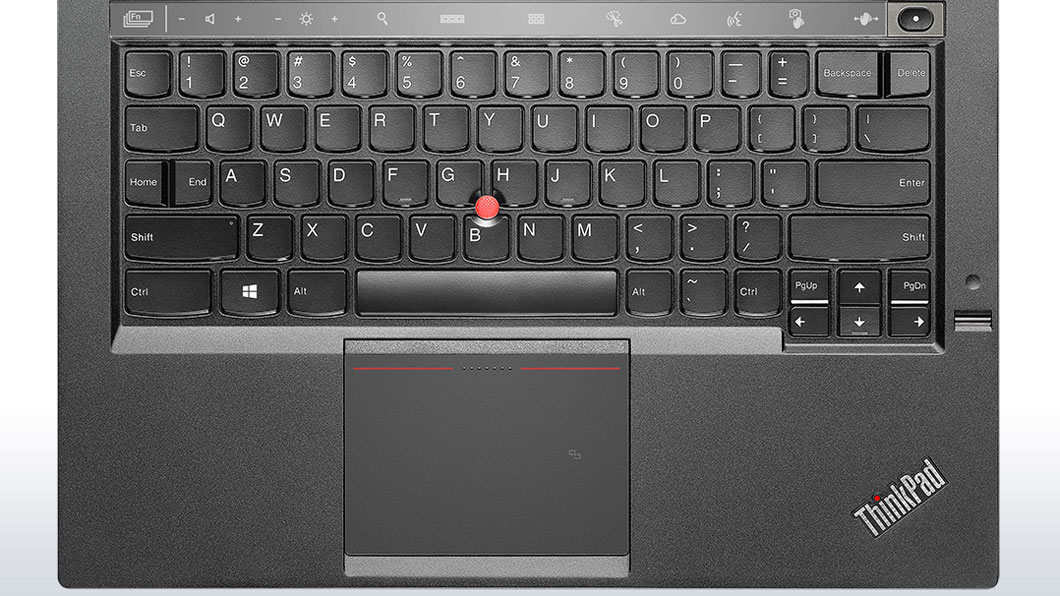
FuzzNugget writes "Peter Bright brings the hammer down on the increasing absurdities of laptop keyboard design, from the frustrating to the downright asinine, like the 'adaptive keyboard' of the new Lenovo X1 Carbon. He says, 'The X1's Adaptive Keyboard may have a superior layout to a regular keyboard (I don't think that it does, but for the sake of argument, let's pretend that it does), but that doesn't matter. As long as I have to use regular keyboard layouts too, the Adaptive Keyboard will be at a huge disadvantage. Every time I use another computer, I'll have to switch to the conventional layout. The standard layout has tremendous momentum behind it, and unless purveyors of new designs are able to engineer widespread industry support—as Microsoft did with the Windows keys, for example—then their innovations are doomed to being annoyances rather than improvements.' When will laptop manufacturers focus on perfecting a standardized design rather than trying to reinvent the wheel with every new generation?"
459 comments

  1. Isn't just the keyboards by Anonymous Coward · · Score: 4, Insightful

    Anyone else find that you cannot get 16:10 laptops these days unless they're made by Apple?

    Damn the "movie nerd" 16:9 ratio!

    1. Re:Isn't just the keyboards by Anonymous Coward · · Score: 5, Insightful

      Forget 16:10. Give me some 4:3 alternatives please. Some of us actually work with our laptop, not just use them as YouTube clients.

    2. Re:Isn't just the keyboards by Anonymous Coward · · Score: 1, Funny

      Most monitors these days can do 1440 x 1080 if you want 4:3

    3. Re:Isn't just the keyboards by Anonymous Coward · · Score: 0

      Thanks, although I think you're missing the point.

    4. Re:Isn't just the keyboards by ByTor-2112 · · Score: 4, Insightful

      Agreed. I need the vertical space WAY more than the horizontal. If all you want to do is watch movies get a f'ing tablet.

    5. Re:Isn't just the keyboards by Anonymous Coward · · Score: 0

      Are you retarded? Just press ctrl alt right cursor key and you have all the vertical space you can use.

    6. Re: Isn't just the keyboards by Anonymous Coward · · Score: 0

      Yes, and its nice to have the keyboard *and* trackpad positioned centrally, relative to that screen.

    7. Re:Isn't just the keyboards by jaymz666 · · Score: 1

      That, and I like my keyboard centrally located, the wider 15" laptops have the stupid number pad, so it offsets the keyboard.

    8. Re: Isn't just the keyboards by Anonymous Coward · · Score: 0

      ah yes some people WON'T use a laptop if it's the wrong shape.
      and some people will eat whatever shit they are fed, because thy're mostly not doing anything useful at work anyway.

    9. Re:Isn't just the keyboards by Anonymous Coward · · Score: 0

      Heh, that was a good one. Nice try.

    10. Re:Isn't just the keyboards by VVelox · · Score: 1

      If you really want vertical space, you an always rotate a wide screen monitor and then have the OS/display server rotate the display. It was worked nicely with xrandr for a long while now and most drivers for Windows support it as well. I assume it works nicely for Apple too.

    11. Re: Isn't just the keyboards by Bing+Tsher+E · · Score: 3, Insightful

      What part of 'the spectrum' does that place them on?

      Is there a pharmaceutical treatment yet?

    12. Re:Isn't just the keyboards by Christopher_G_Lewis · · Score: 1

      Agreed!!!!

      With the number pad, it feels like I'm typing with my whole body slightly twisted to the left - to the point that I much prefer to use my laptop in the docking station.

      Kind of pointless...

    13. Re:Isn't just the keyboards by Anonymous Coward · · Score: 0

      I like my Apple keyboard. I never understood the fetishism about long strokes with huge gaps and high pressure resistance. It's so much easier and faster to type when your finger barely have to move. Sure you need to retrain. But I could never again like an old fashioned keyboard like the IBM M.

      I'm serious. Not kidding. I type much faster with such a flat keyboard layout. You are going to make more mistakes at the beginning, sure, but with training I'm now much faster than before.

    14. Re:Isn't just the keyboards by TWX · · Score: 4, Funny

      *cough*laptop*cough*

      --
      Do not look into laser with remaining eye.
    15. Re: Isn't just the keyboards by taxman_10m · · Score: 2

      Wholeheartedly agree. I consistently hit my Dell trackpad wrong because of this. Enough time has passed that I can say definitely that I did not adapt.

    16. Re:Isn't just the keyboards by taxman_10m · · Score: 4, Insightful

      And a matte screen instead of glossy.

    17. Re:Isn't just the keyboards by Bradmont · · Score: 2

      Or... a TV...

    18. Re:Isn't just the keyboards by Immerman · · Score: 3, Insightful

      >Some people can't use a laptop efficiently if the screen is the wrong shape.

      FTFY

      Try this with an quality monitor with a wide vertical viewing range: rotate the screen 90* into portrait mode and use it to read websites, write software, type documents, work on projects destined to be printed "normally", etc. Give yourself a few days/weeks to get used to it, then switch back and tell me that screen shape isn't a major consideration.

      --
      --- Most topics have many sides worth arguing, allow me to take one opposite you.
    19. Re:Isn't just the keyboards by Anonymous Coward · · Score: 0

      If you want flat keys then you should look at the ThinkPad keyboards (not the new X1 Carbon but rest of them). The keys are not strictly flat. They look flat but are actually curved with a rounded bottom edge. This makes a huge difference for touch typists that you won't get out of an Apple keyboard.

    20. Re:Isn't just the keyboards by Immerman · · Score: 4, Funny

      Yeah, and I love 16:X monitors in portrait-mode, but trying to type on a laptop balanced on edge is a real PITA.

      --
      --- Most topics have many sides worth arguing, allow me to take one opposite you.
    21. Re:Isn't just the keyboards by pepty · · Score: 1

      I need the vertical space WAY more than the horizontal.

      And I need both a document and a webpage/database to be visible at the same time, side by side. 1920x1080 or 2048 x 1152 works great for that. It gives me over 50 vertical lines of legible text visible in the document on a 13" screen - without overlapping the taskbar or the webpage. It does get to be an issue if there are lots of toolbars that I'm forced to dock above/below the workspace, especially if they aren't scaled correctly for HiDPI, but then I don't write much code.

    22. Re:Isn't just the keyboards by Immerman · · Score: 1

      Try docking your taskbar/panel on the right edge of the screen instead of the bottom (probably want to make it at least 2-3 fingers wide as well if you're not a fan of icon-only task buttons or have a lot of quick-launch or tray icons in use) - you get more vertical space and the "working" screen space is better aligned over the keyboard. It can also cleanly list a lot more running programs before the buttons get all cramped up. The biggest downside (to my mind at least) is that the scrollbar for full screen is no longer benefits from the "infinitely width" effect of being on the screen edge, but then I mostly use wheel/two-finger scrolling these days so that's only really an issue when jumping around really long documents. There's also the fact that under Win7 the "All programs->" submenu is now at the far end of the start menu, but that thing is so atrociously painful to use that I've almost entirely switched to winkey-search anyway.

      --
      --- Most topics have many sides worth arguing, allow me to take one opposite you.
    23. Re:Isn't just the keyboards by Hamsterdan · · Score: 4, Informative

      But unless it's IPS, rotating an LCD will shift colors because the viewing angles aren't the same for horizontal vs vertical. It also messes up font smoothing since the order of sub-pixels isn't the same (unless the OS is aware of that)

      Still won't work for a laptop

      --
      I've got better things to do tonight than die.
    24. Re:Isn't just the keyboards by Hamsterdan · · Score: 1

      I find typing sideways harder on the neck TBH

      --
      I've got better things to do tonight than die.
    25. Re:Isn't just the keyboards by Hamsterdan · · Score: 2

      ^THIS

      Glossy screens are a pain for reflections (since you could, i dunno, use a laptop *outside* where that bright evil yellow thing in the sky will make sure the screen is unreadable).

      Besides, glossy is a fingerprint magnet

      --
      I've got better things to do tonight than die.
    26. Re: Isn't just the keyboards by Anonymous Coward · · Score: 0

      Ironically, tablets are probably used in a vertical orientation more than laptops are.

    27. Re:Isn't just the keyboards by Anonymous Coward · · Score: 0

      Yes, for the love of all that is holy, STOP MAKING EVERY SCREEN GLOSSY. Some of us still do work on laptops.

    28. Re:Isn't just the keyboards by Anonymous Coward · · Score: 0

      You type with it like you would play the accordion. Easy as playing Argentinian tango called "dkslfjaäyftjklkÖ."

    29. Re:Isn't just the keyboards by Anonymous Coward · · Score: 0

      Shape still isn't an issue, unless you're saying you prefer 1080 x 1920 to 2560 x 1920.

    30. Re:Isn't just the keyboards by Anonymous Coward · · Score: 0

      And some of us actually produce things that are intended for standard 16:9 aspect. Working with obsolete 4:3 would hinder my ability to do just that.

    31. Re:Isn't just the keyboards by Immerman · · Score: 2

      Not on monitors that can be easily rotated (aside from issues with asymmetric viewing angles, sub-pixel rendering, and even update speeds on some video cards), but if your monitor is firmly attached to a non-rotating stand or, say, a laptop, then the orientation of the screen becomes a non-trivial part of the shape of the monitor.

      --
      --- Most topics have many sides worth arguing, allow me to take one opposite you.
    32. Re: Isn't just the keyboards by Immerman · · Score: 2

      Try moving your taskbar to the right edge of the screen (and making it wider). More vertical space and the "active" part of the screen is better aligned with the keyboard. Or perhaps your trackpad isn't roughly centered below G/H? That would suck.

      --
      --- Most topics have many sides worth arguing, allow me to take one opposite you.
    33. Re:Isn't just the keyboards by Urkki · · Score: 1

      Lately I have been noticing that my FHD laptop screen is too narrow, especially when debugging, and often having 2 documents side-by-side is important (say, looking at diffs, or coding in spec details). I rarely feel any need to see vertically more. OTOH I find it very painful to work without proper mouse wheel for scrolling (a free-wheeling one found ay least in many Logitech models), this might explain something.

      My point is, not everybody finds the 16:9 aspect ratio particularly bad. Lucky me, I guess.

    34. Re:Isn't just the keyboards by npetrov · · Score: 1

      Totally agree. 16:10 or 4:3 as well as NORMAL keyboards with Ins/Del/ Home/End PgUp/PgDn block.

    35. Re:Isn't just the keyboards by ArcadeMan · · Score: 1

      What you should do is shift everything in your basement, two inches to the left. I know a guy for that.

    36. Re:Isn't just the keyboards by mobby_6kl · · Score: 1

      Lenovo really got on my shit list withe the two latest generations of ThinkPads, and this is one of the primary reasons.

      The T520 that I had up until it got stolen last Christmas was pretty much perfect - a 15" laptop with a centered keyboard, whose only deviation were oversized escape and delete keys. Excluding that, it was almost exactly the same as on my T61 and X32, and apparently all the way back to the ancient 700 series.

      Yet in two generations, they
      - Moved to island-style buttons (ok, but why?)
      - Dropped the 7th row, and consequently had to
      -- Bunch up all the F-keys together, making them more difficult to touch-type
      -- Re-shuffle the former occupants, sticking them in stupid places and losing some completely
      - Dropped the trackpad buttons
      - Dropped the trackpoint buttons, making the whole trackpad act as a loud and awkward button
      - Lost the dedicated mute/volume buttons.
      - Removed the ThinkLight
      - Added a fucking numpad, thus moving the keyboard off-center
      - Move speakers god knows where

      All this bullshit makes me much sadder about the loss of my dear T520, which otherwise would've been a good excuse for an upgrade.

    37. Re:Isn't just the keyboards by Anonymous Coward · · Score: 0

      Then the problem is that they aren't wide enough and are too tall. 4:3 worked well for general computer usage. There was no need to get rid of it.

    38. Re:Isn't just the keyboards by Shadow+of+Eternity · · Score: 1

      No, 1920x1080 is *terrible* at it and you're just insisting the emperor's new aspect ratio is wonderful and good. Try a real resolution on a quality 4:3 and you'll not only have substantially higher vertical resolution but *more space overall* at the same diagonal. 16:9 isn't *good* for anything other than lining the manufacturers pockets because they get to sell you a smaller poorer quality screen for more money, and game designers only like it because the resolution being barely over the 768 vertical lines of the late 90's lets them halfass things even more than they already are.

      --
      A bullet may have your name on it but splash damage is addressed "To whom it may concern."
    39. Re:Isn't just the keyboards by dbIII · · Score: 1

      I'm STILL waiting for e-ink in that context but I'll probably have to wait until the patent expires and somebody new gives it a try. At least three places are going to be selling that stuff on phones sometime this year if all goes to plan. Not being able to see the on screen button to press when someone calls is almost enough to want to get a battery for a six year old nokia with real buttons.

    40. Re:Isn't just the keyboards by pepty · · Score: 1

      No, 1920x1080 is *terrible* at it and you're just insisting the emperor's new aspect ratio is wonderful and good. Try a real resolution on a quality 4:3 and you'll not only have substantially higher vertical resolution but *more space overall* at the same diagonal.

      I guess the parts where I said "two pages of text, side by side, 13 inch display" slipped past you? 4:3 would leave me with the pages I need to see either significantly overlapped or the fonts too small for me to be able read or edit quickly. Been there, done that, switched to 16:9. The extra square inches in total screen area can't help me if they're not where I need them. 4:3 makes sense if you are concentrating on a single document, with tools and whatnot spread around it.

      16:9 isn't *good* for anything other than lining the manufacturers pockets because they get to sell you a smaller poorer quality screen for more money

      It's actually a Samsung IPS panel, and the 3 lb Haswell laptop itself was under $800 before taxes. QHD+ is a macguffin for this screen size, but I'm pretty happy with the quality and the price.

    41. Re:Isn't just the keyboards by Blaskowicz · · Score: 1

      1920x1080 sucks sometimes but I find it's somewhat better than 1024x768 anyway.

    42. Re:Isn't just the keyboards by Anonymous Coward · · Score: 0

      I'm on a T510 right now and youre exactly right about all the "improvements" Lenovo has made. I was looking to get a new laptop recently, but everything has the island-style keys (i really dont like them) and all the other shit you mentioned above. I really liked the look and specs of the Carbon X1, but in the end decided to keep rolling with the T510. Dual-code 2.63GHz i7 w/8GB RAM still does anything i need it to do, and it has a Thinklight and fairly-nice keyboard. I hope Lenovo gets their head out of their ass by the time I actually need a new laptop.

    43. Re:Isn't just the keyboards by Miamicanes · · Score: 1

      I used to completely despise 16:9 monitors, too, until I discovered WinSplit Revolution (free, http://winsplit-revolution.com/ which makes it really easy to maximize windows to the left or right 1/2, 1/3, or 2/3 of the screen, and goes a long way towards making it behave like a pair of side-by-side 960x1080 monitors in portrait orientation.

      Tip: I personally redefined WinSplit's default hotkeys to make them more laptop-friendly... ctrl up/down/left/right maximizes to left or right, while ctrl-alt left/right literally throws the window to the adjacent monitor when I'm running with two or more. There are other permutations, but 99.9% of my window moves are to the left or right size.

      A 17" laptop with 16:9 1920x1080 treated like adjacent 640x1080 and 1280x1080 monitors is pretty good, once you have WinSplit handy to make it easy to maximize windows to fully-height partial-width against an edge.

      Now that 15" monitors with 1920x1080 are available on most higher-end laptops, 16:9 is more tolerable at that size, too, and does have one concrete advantage over a 1400x1050 14.1" display... you can use the laptop on a plane without having to tilt the screen forward if the person in front of you reclines... or at least, you can if the laptop's manufacturer minimizes the bezel.

    44. Re:Isn't just the keyboards by vlueboy · · Score: 1

      Agreed!!!!

      With the number pad, it feels like I'm typing with my whole body slightly twisted to the left - to the point that I much prefer to use my laptop in the docking station.

      Kind of pointless...

      Love the industry's hubris to standardize a number pad on 15 inch laptops...redundant!
      and STILL managed to crunch the arrow keys and mess with the Home / End placement. PC gamers have really complicated setups that need the keys to be in specific places. The home row is sometimes used as a secondary WASD control area where you can rest your right hand to issue commands. An N64 emulators I used years ago suffered when I used a laptop because the four c keys to play Link's ocarina were out of order with respect to the fullsize desktop keyboards.

      Why don't they sell fullsize bluetooth keyboards at small stores for the purpose of controlling android phones? no, apparently all cheap keyboards target some sort of tablets-mount standard that was silently pushed out to the world. Even fullsize keyboards are increasingly pushing forced innovation.

    45. Re: Isn't just the keyboards by MidnightBrewer · · Score: 1

      I'm an animator and video editor and need the wider aspect ratio to get my work done. And if I'm writing or programming, the extra space is good for reference material windows.

      --
      "Give a man fire, and he'll be warm for a day; set a man on fire, and he'll be warm for the rest of his life
    46. Re:Isn't just the keyboards by Anonymous Coward · · Score: 0

      Anyone else find that you cannot get 16:10 laptops these days unless they're made by Apple?

      Damn the "movie nerd" 16:9 ratio!

      At least the 16:9 laptop will probably work, unlike the Apple one (see the article posted earlier today about the 2011 MBPs with dying GPUs).

    47. Re:Isn't just the keyboards by Anonymous Coward · · Score: 0

      5:4, Thanks.

    48. Re:Isn't just the keyboards by Anonymous Coward · · Score: 0

      Thinkpad here, 16:10, and I hate 4:3. Reason? I write code. Lots of it. Not every line of code is going to wind up being 80 columns or less (I use 100 as my default, but I don't hesitate to break it if there's a good reason), nor should it necessarily, but when I've got the edge of my window taken up by a project drawer, the widescreen really comes into its own.

    49. Re:Isn't just the keyboards by Anonymous Coward · · Score: 0

      I like a somewhat wider aspect-ratio for working (16:10 on both my desktop and laptop, 16:9 does start feeling a bit awkward); having multiple windows visible side-by-side is much better than having them visible above-and-below (although I do temporarily vertically :split my editor windows when needed). I use small enough fonts that I get more than enough rows of text visible vertically without maxing out vertical space.

      Now if I were into DTP I might not be so happy, but they were never happy with laptops to begin with, and now, there's no need to turn desktop screens sideways when you can cheaply get a much bigger screen.

    50. Re:Isn't just the keyboards by dotancohen · · Score: 1

      But unless it's IPS, rotating an LCD will shift colors because the viewing angles aren't the same for horizontal vs vertical. It also messes up font smoothing since the order of sub-pixels isn't the same (unless the OS is aware of that)

      Still won't work for a laptop

      It's really not so bad. I'm reading slashdot on my landscape monitor, but VIM is always open in the landscape LCD non-IPS monitor (23" LG) and it's fine. With a dark background and light fonts, there is no discernable issue of font smoothing, and the viewing angles are limited but more than adequate. When I do open an application that has a light background and dark fonts (such as a PDF) one can detect font-antialiasing issues but it really isn't a bother.

      --
      It is dangerous to be right when the government is wrong.
    51. Re:Isn't just the keyboards by dotancohen · · Score: 1

      Actually, laptops open stand on edge just fine, as the keyboard/screen makes a nice V. Then connect a real keyboard (which is the subject of this article, anyway) and you've solved _two_ problems.

      --
      It is dangerous to be right when the government is wrong.
    52. Re: Isn't just the keyboards by Anonymous Coward · · Score: 0

      Windows key+left/right arrow will maximize a window to 1/2 of the screen.

    53. Re:Isn't just the keyboards by vikingpower · · Score: 1

      Exactly this. For working, I use 2 monitors. One in "traditional" orientation for overlooking running processes, in many shell windows tiled / staggered behind eachother. And one for coding and reading in portrait mode. It is quite the experience to see what portrait mode does with e.g. your perception of code. NetBeans in portrait mode absolutely rocks ! Now I am all frustrated when I look at the code of colleagues, in "traditional" orientation - especially when they show it on a laptop screen: it gives me the impression of being obliged to forcibly narrow my mindset.

      --
      Religous speak to God. Insane are spoken to by God. When all shut up, one can finally hear Shostakovich in peace
    54. Re:Isn't just the keyboards by Anonymous Coward · · Score: 0

      Which is why my Thinkpad X-60 soldiers on.

    55. Re:Isn't just the keyboards by Anonymous Coward · · Score: 0

      Are you retarded? Just press ctrl alt right cursor key and you have all the vertical space you can use.

      Nah, that just brings up the next virtual desktop.

    56. Re: Isn't just the keyboards by Anonymous Coward · · Score: 0

      What if you want it to maximise to 1/3rd of the screen? That's something Winsplit handles.

    57. Re:Isn't just the keyboards by Anonymous Coward · · Score: 0

      Glossy screens have better colour reproduction. As a graphics artist, I would not be able to get by using a matte screen because of this.

    58. Re:Isn't just the keyboards by Shadow+of+Eternity · · Score: 1

      And 1600x1200 beats the pants off of both of them, with 2048x1536 beating the pants off of that. Imagine if we hadn't been set back a good decade.

      --
      A bullet may have your name on it but splash damage is addressed "To whom it may concern."
    59. Re:Isn't just the keyboards by Shadow+of+Eternity · · Score: 1

      I guess you missed where I mentioned that my resolution and screen space beats yours like a red headed stepchild and I can have two pages of text side by side and NOT be limited to reading something the height of a postage envelope.

      --
      A bullet may have your name on it but splash damage is addressed "To whom it may concern."
    60. Re:Isn't just the keyboards by crowaust · · Score: 1

      You obviously don't type allot of numbers, if you did you would realise that the number pad is a godsend.

    61. Re:Isn't just the keyboards by Anonymous Coward · · Score: 0

      Otherwise they would be unable to sabotage, like turning all agile ERGONOMIC (concave) keyboards into slow FROG, flat-key keyboards. Or rather DUCK typing.

    62. Re:Isn't just the keyboards by jaymz666 · · Score: 1

      I hazard a guess that most people don't type *a lot* of numbers.

    63. Re:Isn't just the keyboards by Immerman · · Score: 1

      You said it! It makes such a huge difference being able to get a decent overview of the code, reminds me of the DOS days when I discovered my IDE supported screen modes with more than 25 lines. Madness! I'm really looking forward to quality affordable 4K screens, I'm thinking a 30"er in portrait mode would be heaven to work on.

      --
      --- Most topics have many sides worth arguing, allow me to take one opposite you.
    64. Re: Isn't just the keyboards by Anonymous Coward · · Score: 0

      Work at Google. Then your C code *will* always be 80 columns or fewer.

    65. Re:Isn't just the keyboards by toddestan · · Score: 1

      Actually, this is one of my favorite little-known Lenovo innovations:
      http://www.thinkwiki.org/wiki/Ultrabay_Plus_Numeric_Keypad

      A solution that should keep everyone happy!

    66. Re:Isn't just the keyboards by toddestan · · Score: 1

      Glossy can be better if you control the lighting in the room that they are used. But trying to do graphics work on a glossy screen in a bright room (or outdoors) has to be hell.

    67. Re:Isn't just the keyboards by Anonymous Coward · · Score: 0

      external keyboard

    68. Re:Isn't just the keyboards by Dushnock · · Score: 1

      +1
      (Hell I wish I could give a +100!)
      How come I could get a quite good 1600x1200 screen on a basic good laptop (with a 15.4" screen) 7 years ago and I can't get more than 1080 pts vertical now ? (if even).
      I've been looking for a good laptop since September and it's frustrating.

      As you put it, "Some of us actually work with our laptop, not just use them..." to view DVDs (or blue-rays, or downloaded vids)
      .

      --
      "Soylent Green is people." (1973)
  2. Oh yes by Anonymous Coward · · Score: 2, Insightful

    Please don't put cursor keys where the right shift key should be. Nothing like pressing cursor-up in a console window when you meant to type a capital letter.

    1. Re: Oh yes by Adriax · · Score: 2

      But without going through annoying changes like that they'll never stumble on that one "Oh yeah, this is much better" change they can patent and make a fortune off of.

      You know, it's really insensitive of you to want a product that works nicely when they're only trying to find their way to dominate the industry and get a slice of everyone else's pie.

      --
      I don't suffer from insanity, I enjoy every minute of it!
    2. Re: Oh yes by Anonymous Coward · · Score: 1

      But without going through annoying changes like that they'll never stumble on that one "Oh yeah, this is much better" change they can patent and make a fortune off of.

      The problem is, that they're doing it to laptops. So for the average user, if the layout stinks, they're stuck with it.

    3. Re: Oh yes by Adriax · · Score: 1

      All the better to get a standard. A captive audience will get used to a shitty design as they forget what a non-shitty design looks like..

      --
      I don't suffer from insanity, I enjoy every minute of it!
    4. Re: Oh yes by Bing+Tsher+E · · Score: 1, Insightful

      You're only stuck with the keyboard layout on the laptop that you bought. In other words: you made your choice.

      Furthermore, you had your choice. And that's the point.

    5. Re: Oh yes by mcgrew · · Score: 4, Insightful

      So then why didn't the Dvorak keyboard take hold? QWERTY was designed to keep keys on mechanical typewriters from jamming, Dvorak should be much faster.

      What the corporate (and yes, some open source) dumbasses don't understand is that if you change my interface there's going to be a learning curve. For someone who has touch-typed for years, it would take years to get up to speed with Dvorak; TFA was right on the money IMO.

      Unity, Windows 8, Lenovo and other keyboards... just stop already! Jesus, if they were designing cars you'd have a joystick instead of a wheel and the brake and gas pedals would be reversed (and have a hand-operated clutch).

      I only want new if old is broken or new is demonstrably superior. Change for the sake of change is stupid and counterproductive.

    6. Re:Oh yes by Immerman · · Score: 1

      Amen! My current laptop pulls that trick. Fortunately I apparently mostly use the left side of the key anyway, but that occasional mis-strike is incredibly annoying. Both shift keys should be sacrosanct. The capslock key though - now that I could see value in altering or replacing, though I would appreciate still having the functionality available somewhere (small button? Fn-shift?). I also really wish they'd stop trying to get rid of the the insert key - I find overstrike valuable you insensitive clods! Not to mention the function keys! I don't really mind the half-height version, but eliminating them entirely, or fn-mapping them onto other keys? Unacceptable!

      --
      --- Most topics have many sides worth arguing, allow me to take one opposite you.
    7. Re: Oh yes by Immerman · · Score: 1

      Hear hear, I'd love to see more experimentation on external keyboards, but even as a long-time spec-obsessed computer geek I've come to the conclusion that purchase considerations for a modern laptop should be:
      #1: touchpad quality (unless you insist on using a mouse).
      #2: Keyboard quality and layout
      #3: screen quality, resolution, and finish
      #4: speaker quality (if you care about music or videos)
      #5: connectivity options (usb, bluetooth, hdmi, SD card reader, etc)
      #6: all that other stuff going on inside that you never directly interact with and which is almost guaranteed to be more than you need unless you're looking at the extreme low end or need high-performance 3D graphics or number crunching capacity.

      And I suppose tablet-mode transformation as well - done well that's actually a really nice feature - why use an anemic little tablet if I have a laptop which can easily transform into the Cadillac of tablets already at hand?

      --
      --- Most topics have many sides worth arguing, allow me to take one opposite you.
    8. Re: Oh yes by MouseTheLuckyDog · · Score: 3, Informative

      So then why didn't the Dvorak keyboard take hold? QWERTY was designed to keep keys on mechanical typewriters from jamming,

      When will people get their facts straight? QWERTYdid not prevent jamming by making people type slower. They prevented jamming by arranging keys in a way that you are very rarely pressing keys next to each other. Which means the strikers are less likely to collide.

    9. Re: Oh yes by aardvarkjoe · · Score: 3, Insightful

      When will people get their facts straight? QWERTYdid not prevent jamming by making people type slower.

      The post you replied to didn't claim that it did. Why do I get the feeling that you were just looking for a place to "correct" somebody about the QWERTY layout, and this was the best place that you could find?

      --

      How can we continue to believe in a just universe and freedom to eat crackers if we have no ale?
    10. Re: Oh yes by Anonymous Coward · · Score: 0

      Unity, Windows 8, Lenovo and other keyboards... just stop already! Jesus, if they were designing cars you'd have a joystick instead of a wheel and the brake and gas pedals would be reversed (and have a hand-operated clutch).

      This. W520 was the last good Lenovo keyboard layout. I purchased mine more than a year after its release instead of a newer unit, precisely because of its keyboard layout.

    11. Re: Oh yes by Teun · · Score: 2
      Yes people are different, like I could easily do without that stupid touchpad and instead select my laptop on the availability of a trackpoint (clit).

      But it's a second consideration after good Linux compatibility.

      --
      "The likes of Facebook and WhatsApp are free to those whose privacy is of zero value."
    12. Re: Oh yes by hankwang · · Score: 3, Interesting

      For someone who has touch-typed for years, it would take years to get up to speed with Dvorak

      As someone who moved to Dvorak after 5 years of touch-typing Qwerty, I can tell you that this is not the case. A lot of the effort of learning to touch-type is in the motor/coordination skills in the fingers, not in memorizing which letter goes where. I think it took me about a month to get up to speed in Dvorak; it didn't help that I was recovering from a rather painful RSI at the time. I ended up being faster on Dvorak than I ever was on Qwerty.

    13. Re: Oh yes by ApplePy · · Score: 1

      Jesus, if they were designing cars you'd have a joystick instead of a wheel and the brake and gas pedals would be reversed (and have a hand-operated clutch).

      That reminded me of this --

      http://www.theonion.com/video/apple-introduces-revolutionary-new-laptop-with-no,14299/

      Enjoy. :)

      --
      That I'm right, and you don't like it, doesn't mean I'm a troll.
    14. Re: Oh yes by Anonymous Coward · · Score: 0

      On average, you loose a full workday on switching to something like Dvorak. And then you are up to speed - or possibly faster if the layout really is better.

      If you type all day, the period of slowness will be rather short. If you type only now and then, you will need more time, but the daily loss will be smaller because you aren't typing all the time anyway.

    15. Re:Oh yes by semi-extrinsic · · Score: 1

      On my work keyboard, I've swapped CapsLock and Backspace. I occasionally get frustrated by it, but that's mainly when I ssh into that machine from a laptop at home. I think there's some mental association between "being on the work machine" and "having Backspace on the left hand".

      --
      for i in `facebook friends "=bday" 2>/dev/null | cut -d " " -f 3-`; do facebook wallpost $i "Happy birthday!"; done
    16. Re: Oh yes by TimboJones · · Score: 1

      "QWERTY was designed to keep keys on mechanical typewriters from jamming, Dvorak should be much faster."

    17. Re: Oh yes by rueger · · Score: 1

      #4: speaker quality (if you care about music or videos)

      If you care about the quality of the music you're listening to you'll understand that it is impossible to achieve anything reasonable with a sub-one inch speaker.

    18. Re: Oh yes by ultranova · · Score: 1

      The post you replied to didn't claim that it did.

      Yes, it did. The statement "QWERTY was designed to keep keys on mechanical typewriters from jamming, Dvorak should be much faster." is a non-sequiter without assuming such claim, thus it's made implicitly.

      --

      Forget magic. Any technology distinguishable from divine power is insufficiently advanced.

    19. Re: Oh yes by Immerman · · Score: 1

      Quite so, we're unlikely to ever get actual *good* speakers in a laptop short of perhaps integrating resonant-plate speakers into the lid. However you can get halfway decent ones, and you can get ones that are so horribly bad that they're almost painful to listen to.

      If you plan to use your laptop as a portable music/video system at all then it's well worth making sure you avoid the latter group.

      --
      --- Most topics have many sides worth arguing, allow me to take one opposite you.
    20. Re: Oh yes by Anonymous Coward · · Score: 0

      The claim was that QWERTY was primarily designed to prevent jamming. Dvorak was designed for easier typing, hence the expectation that it should be faster than the older QWERTY layout. That does not imply that slower typing was a means to achieve the design goal of QWERTY.

    21. Re:Oh yes by Immerman · · Score: 1

      Really? To what end?

      Since writing the above post I've discovered the wonder of the Compose Key, and *that* seems like an actual good use for Capslock, (From the programs seen so far I'd recommend WinCompose - open source, reviewed as very stable (always a consideration for desktop utilities) , and it uses standard xorg composing files to determine compositions so you start out with the complete standard xorg mappings available on most Linux systems and can modify them as you see fit. I can now type ½xV conveniently, along with 100+ other "non-keyboard" characters. Of course since this is slashdot you can't tell that I actually typed 1/2x^2uV using extended characters, but trust me, I did.

      --
      --- Most topics have many sides worth arguing, allow me to take one opposite you.
    22. Re: Oh yes by Immerman · · Score: 1

      Gah! How could I forget compatibility issues? Gods know I've been bit by it enough. And yeah, the clitmouse would definitely replace/augment the touchpad consideration if you're into that kind of thing.

      --
      --- Most topics have many sides worth arguing, allow me to take one opposite you.
    23. Re: Oh yes by Shadow+of+Eternity · · Score: 1

      Are you blind or just stupid? the parent post claims DVORAK should be faster because it's not designed to prevent jams. Why would speed be related to jams? Because of the claim that QWERTY is designed to slow people down.

      --
      A bullet may have your name on it but splash damage is addressed "To whom it may concern."
    24. Re: Oh yes by cfalcon · · Score: 1

      Dvorak is unquestionably better. The only folks who tried to show otherwise had a Bone-Ta-Pick- they were free market types trying to show that QWERTY was not a failure of the market, which it is- it selects for short term gains over long term efficiency.

      The thing is, unlike the shitpile keyboards demonstrated in TFA, I can walk up to a QWERTY box and make it Dvorak. Modern OSes memorize by user, so it doesn't shit on the other users of the machine. Sure, the keyboard still LOOKS dumb- older, nicer keyboards let me swap letters around, after all, and newer ones are not yet smart enough to have the letters generated by LCD or whatever- but it's still fully functional for me or someone who likes the masochistic QWERTY bullshit. Changing caps lock to some split thing, fucking around with the rest of the layout for no reason, breaking the keyboard for anyone but a tippy-tappy casual, is fucked up. I game, I program, I write, and all of these demand a real fucking keyboard, not some shit show. 100% agree with TFA, and no, Dvorak is not any manner of counterexample.

      You know what key I always have to disable in the registry though? Fucking Windows Key. The auto-lose key in any game, and conveniently placed directly between two constantly hit thumb keys. What a debacle.

    25. Re:Oh yes by Anonymous Coward · · Score: 0

      I set CapsLock to the Compose key a few years ago in the KDE control panel as well; it's the most useful customization Ithink I've ever been able to make in an OS. I've tried to teach myself the 3rd &4th USinternational keyboard layouts as a supplement/alternative, but they're not remotely as intuitive.

      I hate Slashdot's character encoding non-support, as Ican never tell exactly which characters will work & which won't, particularly as they usually look correct in the preview. You'd think that a freaking tech site would have gotten that fixed by 2014... What you typed is evidently a perfect example, as the ½ shows up while the rest is merely "xV."

      -- TheSeatOfMyPants

    26. Re: Oh yes by aardvarkjoe · · Score: 1

      Which doesn't make any claims about the intent of QWERTY being to slow typists down. The expectation that a keyboard layout designed specifically for typing speed would result in faster typing than one that was designed primarily to prevent jams is not at all unreasonable.

      --

      How can we continue to believe in a just universe and freedom to eat crackers if we have no ale?
    27. Re: Oh yes by dbIII · · Score: 1

      you loose a full workday

      Plus more typos :)

    28. Re: Oh yes by Anonymous Coward · · Score: 0

      You're an idiot.

    29. Re: Oh yes by Anonymous Coward · · Score: 0

      No the parent post simply claims DVORAK should be faster. That is it. You're reading into something that isn't there.That's a sound theory too given that the layout was designed primarily for typing speed and minimal finger movement when typing.

      No further assertion was made by the post. You're reading in between the lines and then accusing the GP of making a conclusion that came up in your own head.

    30. Re: Oh yes by Anonymous Coward · · Score: 0

      shitpile ... shit ... bullshit ... fucking ... fucked ... fucking ... shit ...Fucking

      It's great that your keyboard layout lets you type more words in a given time.

    31. Re: Oh yes by YukariHirai · · Score: 1

      As someone who moved to Dvorak after 5 years of touch-typing Qwerty, I can tell you that this is not the case. A lot of the effort of learning to touch-type is in the motor/coordination skills in the fingers, not in memorizing which letter goes where.

      If you've only been at it for 5 years, sure. I've been touch typing QWERTY for 20 years, and having to use a keyboard where the backslash is in a stupid spot or the enter key is an odd shape, or those keyboards with a rearranged insert/delete/home/end/pageup/pagedown block throw me off. Even ergonomic keyboards that have all the keys in the standard positions screw me over. Having to switch to Dvorak would be hell, and would take years to get as up to speed with as I am with QWERTY.

    32. Re: Oh yes by YukariHirai · · Score: 1

      Hell with that, if you plan to use your laptop as a portable music/video system, invest in some USB speakers.

    33. Re: Oh yes by Immerman · · Score: 1

      Ugh, I've yet to hear a pair of usb speakers that weren't lousy as well - the speakers may be superior but the cheap USB synthesizer usually introduces a lot of distortion. Or perhaps you simply mean USB *powered* speakers? Why not just go with some nice desktop PC speakers instead, with a little careful shopping the quality/$ can be extremely high, and they can easily be used with audio devices without a USB port.

      The point you're missing though is that a laptop is a relatively compact and streamlined device, depending on usage patterns and battery life much of the time you may not even bother with the power cord. Adding external speakers complicates things significantly, and if they're big enough to sound *good* then they add considerable bulk as well. And I don't want to even imagine the nuisance of using a laptop with external speakers on my actual lap, or if you moved between various work surfaces dozens of times a day like I frequently do.

      If you really want to listen to something in as much of its original glory as possible then by all means get the best external speakers you can afford, there's really no other option. But if you're not a hard-core audiophile and just want to be able to conveniently watch a movie or listen to some music without it sounding mind-bendingly atrocious, then quality laptop speakers are worth considering.

      --
      --- Most topics have many sides worth arguing, allow me to take one opposite you.
    34. Re: Oh yes by Miamicanes · · Score: 1

      On average, you loose a full workday on switching to something like Dvorak.

      On "average", maybe... but "average" is not necessarily the same as "norm".

      When you're talking about people who've mastered QWERTY to the point where they can effortlessly type faster than 100WPM, a forced change to Dvorak wouldn't be a matter of mere "retraining" -- it would require outright physical therapy. At 100+ wpm, the keyboard is basically a synthetic synapse between the nervous system and target CPU. At that speed, typing occurs almost entirely through muscle memory.

    35. Re: Oh yes by Miamicanes · · Score: 1

      Yes, and no. Buying a laptop with a really good keyboard is hard. God knows, I tried 3 months ago. The problem is, if you want a mobile workstation with pointer stick, sculpted keycaps, and tactile snap, you basically have 3 or 4 choices... and NONE of them are sold by normal stores. Every goddamn one of them is a blind act of faith and random dice roll unless you know somebody who has one.

      The sad fact is, laptop keyboards all basically suck, it's hard & expensive to buy one that sucks a lot less than most, and nobody has ever really managed to come up with a viable standard for highly-portable (but non-laptop) mobile workstations that's enough of a standard to be able to buy a case-keyboard-monitor(s)-battery, then add your own motherboard & hard drives. I'd *kill* for something like that... say, with:

      * 20-24" IPS main display, 2560x1440 resolution, flanked by a pair of portrait-oriented (including subpixels) 900-1280x1440 displays hinged to each side that fold over the main monitor and latch together like shutters over a window... all interconnected via displayport, with displayport hub in the case itself.

      * Cherry keyboard (available with all switch colors, including Green and Blue) and pointer stick.

      * power supply and battery to act like built-in UPS.

      * space for microATX motherboard, and riser cards to allow one or two video cards to be mounted sideways. To make up for the 1x slots that the riser would obstruct, the case has a Thunderbolt to PCI Express interface and one or two sets of side-oriented slots elsewhere in the case.

      * Ideally, a storage compartment or two that's big enough to store cables and a gaming mouse.

      The only component for something like this that's still off the radar are the 900-1280 x 1440 portrait-mode LCDs (size-matched to be density-identical to the main monitor). Thanks to DisplayPort and Thunderbolt, the other two problems that would have formerly plagued an open mobile workstation form factor are basically solved. DisplayPort solves the "how do we wire up 3 monitors in a way that's non-proprietary and foolproof" problem, and Thunderbolt provides an easy way to add additional PCI Express 1x ports, not to mention micro PCIe and ExpressCard, that aren't on the motherboard itself. If the LCD problem could be solved, this would be a product a company the size of pre-Dell Alienware could literally manufacture and sell, because all the remaining problems (case, keyboard) are relatively low-tech fabrication and assembly issues. But the LCD problem would be a bitch to solve, because AFAIK, there's literally nobody on earth who'll sell you matched panels suitable for P-L-P where the portrait-mode panels literally have the same subpixel layout and density as the more conventional landscape panel.

    36. Re: Oh yes by Anonymous Coward · · Score: 0

      You're only stuck with the keyboard layout on the laptop that you bought. In other words: you made your choice.

      Furthermore, you had your choice. And that's the point.

      Ha!
      Remember that 16:9 became defacto through laptop sales FIRST, and then landed on our television sets and monitors.

      So after you think back to that well planned and slow con to remove our "choice" in the situation... is it still "my" fault I "had my choice" of NOT finding 4:3 laptop displays or sane keyboards when looking at all choices in a whole store?

    37. Re: Oh yes by hankwang · · Score: 1

      If you've only been at it for 5 years, sure. I've been touch typing QWERTY for 20 years

      5 years of touch-typing, after 10 years of hunt-and-peck. I think I could do about 400 cpm (80 wpm) on Qwerty (Two minutes, English prose) and nowadays after 18 years of Dvorak it's about 500 cpm. (Incidentally, touch typing combined with a few bad habits and lack of breaks thanks to multi-tasking Linux back in 1996 is what caused my RSI)

      Having to switch to Dvorak would be hell, and would take years to get as up to speed with as I am with QWERTY.

      You do not really provide an argument other than your beliefs that it would take that long. At least I have one empirical data point.

    38. Re:Oh yes by semi-extrinsic · · Score: 1

      Really? To what end?

      Well, why not? I found my right-hand little finger was cramping often. Coul be 'cause I use an "ergonomic" keyboard, which is quite good except the slightly bad position of the BackSpace key.

      I see you've bound it to the Compose Key. That's utterly useless to me, since I very rarely write non-ascii characters (with the exception of æøå, and those I have dedicated keys for). When I want to write greek/fraktur/whatever, I write
      $\alpha \to \infty \implies \sum_0^{\infty} n = -\frac{1}{12}$ etc. and then have the rendering engine (LaTeX) take care of it.

      --
      for i in `facebook friends "=bday" 2>/dev/null | cut -d " " -f 3-`; do facebook wallpost $i "Happy birthday!"; done
    39. Re: Oh yes by Anonymous Coward · · Score: 0

      Pretty much ditto, minus the RSI injury anyway. I used QWERTY for many years. Dvorak took a couple weeks to get up to speed on. I'm a bit faster and my hands are more comfortable using it than I am using QWERTY. While it isn't going save your dog and get your girlfriend back, it isn't a big deal to switch to it either.

    40. Re: Oh yes by YukariHirai · · Score: 1

      You do not really provide an argument other than your beliefs that it would take that long. At least I have one empirical data point.

      It's kind of hard to have any data points on how well you would do something that you have never done and have absolutely no intention of doing, nor any compelling reason to do. Your data about typing speed with QWERTY vs Dvorak is interesting, but not conclusive of anything. Sure, you type faster now with Dvorak than you did with QWERTY, but is it certain that you would not have typed that fast with QWERTY given the same amount of time spent using it?

      And even if I really would type faster using Dvorak, I don't feel that's enough to be worth all the trouble changing. Oh, you could provide all the data you like about how it was worth it for you, or even other people, but you and they are not me.

    41. Re:Oh yes by Immerman · · Score: 1

      >Why not?
      Well, in my case, I think I'd find it horribly annoying having such a critical key change positions as I moved between computers.

      As for the Compose Key, I expect to adore the ability to type even limited subscripts and superscripts directly into most text editors, not to mention mathematical notation and other useful punctuation. Greek though, I hadn't even thought of that, brilliant! I may just have to see if I can get gcc to accept unicode variable names.

      --
      --- Most topics have many sides worth arguing, allow me to take one opposite you.
    42. Re: Oh yes by gzuckier · · Score: 1

      last time i looked, which was back when people still used selectrics, all those fastest typist in the world competitors used dvorak keyboards.

      --
      Star Trek transporters are just 3d printers.
    43. Re: Oh yes by mcgrew · · Score: 1

      QWERTYdid not prevent jamming by making people type slower.

      I never said it did. QWERTY wasn't designed with speed in mind, it was designed, as you said, to minimize jamming. Dvorak was designed for speed.

    44. Re: Oh yes by toddestan · · Score: 1

      In which case the criteria should be a reasonably placed headphone jack. I still don't understand all the laptops that put the headphone jack on the front instead of on the left side like god intended.

    45. Re: Oh yes by Dushnock · · Score: 1

      You're only stuck with the keyboard layout on the laptop that you bought. In other words: you made your choice.

      Furthermore, you had your choice. And that's the point.

      You don't always have (much) choice...

      I suppose you live in North America, I live in Europe.

      Here we have (to chose between) several different "standards"... almost every country uses a different "standard"... The UK uses QWERTY (AFAIK), the French (and French-speaking belgians) use (variants of) the AZERTY keyboard, the Germans use QWERTZ, the Swiss use a variant of QWERTZ -- which is mostly used as "international keyboard" as it has both German and French accents. I must admit I have no idea what "standard" is used inSpain or Italy or...

      I personally prefer the QWERTZ with the Swiss-FR layout. But I can work with almost no problem with the German or the US-QWERTY layout. I _cannot_ work with the French AZERTY (efficiently) even though I used it for 4 years at university.

      When I buy a laptop, I have to see what I can get in the store(s)... I don't always have a choice of "this brand, this model... with this keyboard" !
      Several years ago, I got myself a specific laptop, but it came with the French keyboard as there was a price difference of ~700 USD in buying the same laptop in France, Germany or Belgium (~50km or ~35miles distance). So ?
      I ordered the keyboard layout from the manufacturer and replaced the keyboard. It only took 3 trials and 7 months to get the correct keyboard.

      You're only stuck with the keyboard layout on the laptop that you bought. In other words: you made your choice.

      Furthermore, you had your choice. And that's the point.

      Right... Not always right... Serge

      --
      "Soylent Green is people." (1973)
  3. Worst keyboard I ever used by Kell+Bengal · · Score: 4, Interesting

    The worst keyboard I ever used was the Logitech MX5500. Poor design all over - it was clear that whoever designed it was focussing on ideas that sounded nice, but were ergonomically unfeasible. Stupid things like putting keys underneath the keypad such that pressing them from a natural posture caused cramps, or removing the numlock key and replacing it with some calculator function integrated with the LCD display. Perhaps they forgot that computers powerful calculators in of themselves? The list went on - I wrote an eight page engineering design critique (I teach college mechatronic design) and sent it to them. The logitech PR person who answered it said they'd send it on to the design office. From what's come out of there since, I'm sure they just sent it straight to trash. :P

    --
    Scientists point out problems, engineers fix them
    altslashdot.org: The future of slashdot.
    1. Re:Worst keyboard I ever used by Anonymous Coward · · Score: 0

      You should have contacted a tech news site, like Ars or Wired, or a hardware enthusiast site like Tomshardware or ZDNet and had it published as a guest article. Then you should have tweeted links to the article and linked to it from your own blog. The only way to get the attention of most companies these days is to humiliate them publicly and get people tweeting and retweeting how much the company sucks. Of course the PR person threw your letter in the trash. That's what they're paid to do. Was this surprising to you?

    2. Re:Worst keyboard I ever used by Anonymous Coward · · Score: 0

      mechatronic - made up word. it was clear that whoever thought it up was focussing [sic] on ideas that sounded nice, but are just plain stupid.

    3. Re:Worst keyboard I ever used by Anonymous Coward · · Score: 0

      People like you are sometimes why these issues of fad hardware design are stopped. Even if it did get sent to the trash keep it up. You hardware engineering types have so many more magnitudes of patience than I do.

    4. Re:Worst keyboard I ever used by mcgrew · · Score: 1

      I just grinned at the juxtaposition of your comment and sig. Rather than "Scientists point out problems, engineers fix them" shouldn't it be "Scientists point out problems, engineers implement them"?

      That said, I more than agree with what you said. It seems they no longer test anything for real-world use. In today's world, the old design axioms "KISS" and "form follows function" seem to have gone straight into the dumpster.

    5. Re:Worst keyboard I ever used by butchcassidy1717 · · Score: 0

      I have to disagree. I have been using that keyboard since 2006 and I love it (not as much as my new mechanical keyboard mind you but that's another story). I use the calc function alot at work and the layout just seems to work for me. I am all for trying new designs, if it works great if not, return it.

      But hey, I'm an engineer, not a scientist, so what do I know.

    6. Re:Worst keyboard I ever used by hendrips · · Score: 2, Interesting

      Maybe this is the problem with keyboard design. I absolutely love that keyboard. When I got a new computer at work, I specifically requested that keyboard model, and I use a similar model at home. The actual office drones like me who have to use these keyboards seem to have different needs in practice than what your theoretical expertise claims. I certainly use the LCD calculator constantly, and I have no idea how I'm supposed to be giving myself hand cramps with it. As far as I can tell, Logitech has discontinued this model, so I'll be clinging to desperately to the one I have. But, to echo one of the other replies, I don't teach "mechatronic design," I'm just a lowly actuary who has to use the damn thing every day, so what do I know?

    7. Re:Worst keyboard I ever used by Anonymous Coward · · Score: 0

      Newsflash: all words are made up.

    8. Re:Worst keyboard I ever used by Anonymous Coward · · Score: 0

      Mechatronics, since you ask, is a real discipline that merges electronics and mechanical engineering. A corner stone of robotics and systems engineering. Pretty much anything that has an electromechancial system has mechatronic design elements.

    9. Re: Worst keyboard I ever used by Anonymous Coward · · Score: 0

      We put the first page on the bulletin board, the rest went in the trash. It was still there when i left.
        I switched over to WEB design.

  4. eh, it's not that bad by Trepidity · · Score: 4, Interesting

    Many Europeans are already used to using different keyboards at different times. As we speak I'm typing on a Danish-layout keyboard remapped to US-English. Which is... almost like US-English, except that the Enter key is vertical rather than horizontal, so \| is located to the left of enter rather than above it (can't remap the physical shape of the keys...). Oh, and `~ is to the left of Z. Sometimes I use a UK keyboard, which is somewhat different yet again.

    1. Re: eh, it's not that bad by Anonymous Coward · · Score: 0, Insightful

      Aaaaaand that's why most of Europe is bankrupt......

    2. Re: eh, it's not that bad by Trepidity · · Score: 2

      The infidels shifted Scandinavian keyboards' parentheses one key over, so they're on 8 and 9 instead of 9 and 0, might deserve bankruptcy and worse, but somehow their countries are prospering anyway.

    3. Re:eh, it's not that bad by dwater · · Score: 1

      I disagree, but make the same comment with the point that there isn't such a thing as a single 'standard layout'.

      On the other hand, the USA and China both use the same layout, so perhaps that's enough people to count as 'standard'. I wonder what they use in India.

      --
      Max.
    4. Re:eh, it's not that bad by Fusselwurm · · Score: 2

      Many Europeans are already used to using different keyboards at different times.

      Yes. For me it's three.

      Mostly, I'm using the Neo2 layout. When gaming, I use the standard German qwertz layout, and sometimes I have to use US English. It takes time getting used to it, but once you've mastered a layout, you're fine on ANY DEVICE.

      The problem I see here is that the X1, by re-positioning or abandoning physical keys, effectively forces you to not only know 3 different layouts, but 3*2 = 6. Great.

      (Plus, with the caps lock key gone, I'd have to hack Neo2 to get the 3rd level switch on the home or end key, blegh.)

    5. Re:eh, it's not that bad by Anonymous Coward · · Score: 1

      "almost like US-English, except that the Enter key is vertical rather than horizontal"

      That must be awkward, how high does it stick up above the rest of the keys, and in order to press it do you push it to the left, or toward the back of the keyboard

    6. Re:eh, it's not that bad by evilviper · · Score: 4, Interesting

      Many Europeans are already used to using different keyboards at different times. As we speak I'm typing on a Danish-layout keyboard remapped to US-English.

      As someone who touch-types Dvorak at home, and has to switch back to QWERTY at work, I think I can safely say my experience trumps your few symbol keys moving around...

      The thing that bothers me the most is poor visibility... I'd be fine with the CTRL and ALT keys moving all over the place with different laptop keyboards, IF the keyboard was backlit... Those with small, low-contrast ink labels in low-light are the WORST. Without a clear visual indicator to orient yourself to using a different keyboard than usual, it can be painful to switch... Lighting can make all the difference, and a smooth transition.

      Personally, I'd like laptops to standardize keyboard sizes and connectors so we can swap them after-market, as I previously said here: http://slashdot.org/comments.pl?sid=4683675&cid=45998205
      But I prefer the current state of uselessness to laptop makers standardizing on lowest-common-denominator crap that is good for nobody.

      --
      Slashdot gets worse every day... Pipedot: News for nerds, without the corporate slant
    7. Re:eh, it's not that bad by Aphadon · · Score: 1

      Not only can the physical keyboard layout be different, but applications have a habit of overriding the keyboard layout at a whim as well, or not honoring the layout the OS is set to. I use Visual Studio 2012 at work, and it switches between so many keyboard layouts at seemingly random times during the course of a day that my muscle memory has adjusted to automatically try all the different possible keys whenever I need to type symbols like backslash or the at sign. Of course using a US layout keyboard at home and a UK layout at work doesn't help the situation either.

    8. Re:eh, it's not that bad by TheRaven64 · · Score: 1

      I suspect that's a lot true now than it used to be. A decade ago, I would typically type on 3-4 computers a day, and now always the same set. I tried switching to Dvorak, and found it was great on my home desktop and on one other machine where I'd changed the keymap (and the keycaps - it was an old model M that let you pop off the keycaps and rearrange them), but it was painful switching to the other computers that I had to use that day, so eventually I gave up. Now, most days the only keyboard (discounting on-screen keyboards, which suck for motor memory anyway) I type on is my laptop. Now is probably a much better time to try innovative keyboard designs, because most people won't have to switch between them.

      --
      I am TheRaven on Soylent News
    9. Re: eh, it's not that bad by Ceriel+Nosforit · · Score: 3, Informative

      We have  where ~ should be. That's a big clue right there who's responsible for this shit.

      --
      All rites reversed 2010
    10. Re: eh, it's not that bad by Ceriel+Nosforit · · Score: 2

      For the love of... /. it's 2014!

      http://en.wikipedia.org/wiki/Section_sign where ~ should be.

      --
      All rites reversed 2010
    11. Re:eh, it's not that bad by Raumkraut · · Score: 1, Interesting

      As someone who touch-types Dvorak at home, and has to switch back to QWERTY at work, I think I can safely say my experience trumps your few symbol keys moving around...

      I'd argue that no, it actually doesn't trump it.
      IME it is *far* easier to switch between two completely different systems, than to switch between two systems which are exactly the same, except for one or two minor parameters.

      Consider a Brit, who fluently speak both English and Russian, conversing with two people; one of whom speaks Russian, and only Russian; the other speaks US English, and only US English. When speaking with the Russian, the Brit's brain need switch to and maintain Russian only once. When speaking to the USian, the Brit can speak in their native tongue - except when certain words come up, which the brain must anticipate, and engage to translate those to US English.

    12. Re:eh, it's not that bad by Boltronics · · Score: 1

      I just got back from a trip to Hong Kong, and the shape of keyboards I used there somewhat resembled the parent poster's layout description (with the exception of the ~ key relocation). Granted this could be related to Hong Kong's history as a British colony and might well be different to mainland?

      --
      It's GNU/Linux dammit!
    13. Re: eh, it's not that bad by TWX · · Score: 1

      I thought it was because some idiot switched their comma and period keys...

      --
      Do not look into laser with remaining eye.
    14. Re:eh, it's not that bad by hjf · · Score: 1

      It's worse in spanish. For some reason, there are TWO Spanish variations: Spain and Latin America. I have absolutely no idea why. Sure, the spanish keyboard includes the Ñ key (which is dumb, as ñ is not so often used. It's not really difficult to type ~ then n to make ñ. You still have to pres ' then a to make á. And you use áéíóú more than ñ).

      But anyway, spanish vs latin is just dumb. In one, to make an @, you have to type AltGr-Q, in the other is AltGr-2 (there are two Alt keys...). One would guess that the latin american keyboard would include the ç symbol, used in portuguese. But ç is also present in the Spanish keyboard, because it's used in some regions of Spain (and obviously in Portugal).

      The problem? You can get either keyboard. You can never know what you'll get. The people in charge of buying them just ask for a "spanish keyboard". They see the ñ is there, and call it a day.

      And yes: many, MANY systems come with the wrong layout out of the box (spanish keyb vs latin setup and vice versa).

      And don't let me get started on the layout. To make curly braces you have to use AltGr. Parentheses are shifted 1 key. + symbol is up and uses no shift, ; needs a shift (or you get just ,). ñ is where ; is supposed to be... It REALLY SUCKS for programming.

    15. Re: eh, it's not that bad by Anonymous Coward · · Score: 0

      Oh man, this drives me nuts!

    16. Re:eh, it's not that bad by Anonymous Coward · · Score: 0

      That is all fine and dandy, but what the hell is up with the French keyboards. Damn. It is fun to ridicule the French, just because, but their keyboards are messed up.

    17. Re:eh, it's not that bad by swaq · · Score: 1

      As someone who touch-types Dvorak at home, and has to switch back to QWERTY at work, I think I can safely say my experience trumps your few symbol keys moving around...

      Why aren't you using Dvorak at work? I use Dvorak at home and on my work computer as well.

    18. Re:eh, it's not that bad by TWX · · Score: 1

      I use a Sun Type 6, an Apple G3 104 key, a Dell standard 104 key, and a Dell D520 all at work, a Gateway 2000 "Anykey", a Dell D410, a Gearhead wireless with trackpad all at home. Each keyboard has variations in at least two of Ctrl, Alt, backslash, backspace, pgup, pgdn, window, menu, Fn, the arrangement of the F-keys, the arrow keys, or some other thing.

      And I can go seamlessly from keyboard to keyboard. Any nerd worth his chops should also be able to do this.

      --
      Do not look into laser with remaining eye.
    19. Re:eh, it's not that bad by TheP4st · · Score: 2

      Indeed the situation in Europe can be quite horrific, some years ago I would often find myself working on Swiss (qwertz), UK (qwerty), Belgian (azerty) and Scandinavian (qwerty) keyboards during my average day. To make matters worse I were working on the machines remotely so glancing down on the keys to find that "misplaced" comma, period, forward slash, parenthesis and so forth were not an option. My favorite layout to hate is the Belgian/French azerty where digits and period require use of shift as the keyboard design work from the assumption that semi colon is more frequently used than period and section sign () more than the digit six and so on. Seriously! What insane person came up with this?

      --
      "I have downloaded hundreds and hundreds of records, why would I care if somebody downloads ours?" Robin Pecknold
    20. Re:eh, it's not that bad by Anonymous Coward · · Score: 0

      Mainland Chinese use the same layout as the US does. The only exception is that they generally use it to type Pinyin through MS' IME. I know this because I've used probably a dozen or so different computers in China, and no matter what region I was in, the keyboard was always the one that I was familiar with. And,whenever I would see a keyboard it would be the American style.

      What's more, even when they aren't using Pinyin as an input method, the other methods tend to just be memorized where to put their fingers. The silkscreening on keyboards is really just there for people that can't touch type anyways.

    21. Re:eh, it's not that bad by Anonymous Coward · · Score: 0, Troll

      The term you want is American. Usian is a term that just shows that you're some sort of bigot. American is the term that's used for citizens of the USA. In this context talking about residents of the super continent of America makes no sense as you're dealing with at least 5 different languages that would all have their own specific needs for keyboard symbols.

    22. Re:eh, it's not that bad by Anonymous Coward · · Score: 0

      I use Dvorak at home and work. You should be able to set up a profile that maps to Dvorak when you log in on your work machine. Occasionally, IT needs to log in remotely (at my request) while I'm logged in. They get momentarily confused when everything they type comes out gibberish. But other than that it causes no problem.

    23. Re:eh, it's not that bad by mrbester · · Score: 1

      The only reason I keep US layout on my home laptop is because I have no idea where the \ key goes when I switch to UK layout. I don't think there is a key mapped to it. Having Cyrillic chars listed as well on the key caps doesn't help matters either though it is encouraging me to learn Russian...

      --
      "Wait. Something's happening. It's opening up! My God, it's full of apricots!"
    24. Re: eh, it's not that bad by mcgrew · · Score: 1

      That's something I've wondered about for a long time. Why doesn't alt+n type a chr 164 in a word processor, and shift+alt+n make a chr 165? Straightforward logic, yet the logic is ignored.

    25. Re:eh, it's not that bad by mcgrew · · Score: 4, Insightful

      Very few IT departments will let users install anything on "their" computers, which makes sense because otherwise you're going to have security problems.

      It isn't my computer at work, it's my employer's. He pays me to use it.

    26. Re:eh, it's not that bad by Cinder6 · · Score: 2

      I'd argue that no, it actually doesn't trump it.
      IME it is *far* easier to switch between two completely different systems, than to switch between two systems which are exactly the same, except for one or two minor parameters.

      Agreed. I can switch between QWERTY, Dvorak, and Workman on-the-fly without any ramp-up time, but a one-month stint in Germany with QWERTZ threw me off for at least half my stay. And then it took time getting used to QWERTY again when I got home.

      The innovation I would really like to see from laptop keyboards is to make them mechanical. It doesn't bother me that most desktop keyboards are membrane crap, because I can replace them with a good keyboard, such as the Das Keyboard (yes, I know the redundancy of "the Das"). But attaching a mechanical keyboard to a laptop largely defeats the purpose of a laptop.

      At the same time, I'm not sure it could be done in a way that's satisfying. You could never replicate a desktop mechanical keyboard perfectly without drastically increasing the thickness of the case. I'm not sure if a "low-travel" version of mechanical keys would be as satisfying or worth the extra cost. For the time being, my favorite laptop keyboard is Apple's. The keys aren't mushy or sticky like on a lot of keyboards, and their low travel distance lets you bottom out quicker (which is important for this type of keyboard, if not mechanical ones).

      --
      If you can't convince them, convict them.
    27. Re:eh, it's not that bad by spiritplumber · · Score: 1

      Okay, but Dvorak doesn't require installing anything. It exists as part of the OS settings. It even came with windows 98 for crying out loud.

      --
      Liberty - Security - Laziness - Pick any two.
    28. Re: eh, it's not that bad by elfprince13 · · Score: 2

      My officemate has a German laptop. Not only are the symbols like () in the wrong place, they switched z and y keys. Horrific.

    29. Re:eh, it's not that bad by Dahan · · Score: 1

      Very few IT departments will let users install anything on "their" computers, which makes sense because otherwise you're going to have security problems.

      It isn't my computer at work, it's my employer's. He pays me to use it.

      What do you need to install? A keyboard with Dvorak keycaps? I thought if you touch-type, you don't look at the keycaps anyway, so you don't need to change out the QWERTY keyboard. Chances are the work computer uses Windows, which comes with support for Dvorak, so you don't need to install any software either. It's just a configuration change (which doesn't require administrator privileges... a regular user can add the Dvorak layout). Does your employer let you change the mouse speed or double-click time? If so, I don't see why they wouldn't also let you change your keyboard layout.

    30. Re: eh, it's not that bad by ShaunC · · Score: 2

      We have [section sign] where ~ should be. That's a big clue right there who's responsible for this shit.

      The fucking lawyers?

      --
      Thanks to the War on Drugs, it's easier to buy meth than it is to buy cold medicine!
    31. Re: eh, it's not that bad by Immerman · · Score: 1

      So *that's* what that symbol means, somehow I don't remember ever wondering. Also, thank you for starting me on a wiki-walk which revealed to me the awesomeness of the Compose Key, which seems like it might actually be a useful thing to do with that annoying capslock key.

      --
      --- Most topics have many sides worth arguing, allow me to take one opposite you.
    32. Re:eh, it's not that bad by hankwang · · Score: 1

      Chances are the work computer uses Windows, which comes with support for Dvorak, so you don't need to install any software either. It's just a configuration change (which doesn't require administrator privileges

      However, Windows does not have a simple way to put the Control key on where normally the CapsLock is located. It requires editing the registry and if I recall correctly, it is a system-wide setting, which will also change the physical keys needed to log in (Ctrl-Alt-Del). Fortunately, my employer's IT support were willing to do this on my work computer.

      (I really don't understand how the CapsLock ended up on the home row, even though Ctrl is used much more often by the vast majority of people.)

    33. Re:eh, it's not that bad by Anonymous Coward · · Score: 0

      Many Europeans are already used to using different keyboards at different times. As we speak I'm typing on a Danish-layout keyboard remapped to US-English.

      As someone who touch-types Dvorak at home, and has to switch back to QWERTY at work, I think I can safely say my experience trumps your few symbol keys moving around...

      Okay, if this is a pissing contest... touch-type Dvorak, moves to France, bought a MacBook Air... fucking has no tilde key!

      (Okay, alt-N... but seriously?)

    34. Re:eh, it's not that bad by Anonymous Coward · · Score: 0

      Very few IT departments will let users install anything on "their" computers,

      Wrong - this depends on what you need to do your job. Many workers only need some standard stuff, such as emial, word processor,.... These gets standardized computers.

      But I teach software installation. Of course I can install anything on the work computer I use - how else could I do my job at all?

      The IT departments job is to make work easier. For many, this means maintaining their computers completely, for they cannot do this themselves. At least not efficiently. For me, it means keeping the internet connection to my office working, and never touch the computers I use. The manage this reasonably well.

    35. Re:eh, it's not that bad by Anonymous Coward · · Score: 0

      You are doing things wrong. I access machines remotely - and of course the keyboard layout of those machines do not matter. What matter is the layout of the keyboard I am using. Products like 'ssh' transmits letters (a b c 1 2 3), not scancodes. What kind of braindead system would transmit scancodes to be interpreted at the other end? Seriously - who could come up with such a horrible mis-design?

      For me, it doesn't matter if the remote computer has US or scandinavian setup. My keyboard has Norwegian layout, and works with whatever is on the other end.

    36. Re:eh, it's not that bad by Anonymous Coward · · Score: 0

      Forget about security and think about practicality. If a co-worker has a business case for a piece of software or a certain configuration, I research what they are asking and usually, they get it.

      The issues I run into far more often than security are licensing and consistency.

      Licensing: Yes, it's free for personal use but its not for business use. If you are willing to pay the license fee and agree that we will not support your setup, we will install it for you. You don't have a budget for your non-standard software? Well, here's the deal: it's not me saying no, its the terms of the license. Don't shoot the messenger.

      Consistency: We strongly encourage staff not to mess with default interfaces. We may be on the phone and have to make certain assumptions like the location of the start menu or the 'ribbon'. If you want to drag start to the top of the screen or mess with the 'ribbon', that's fine as long as you are willing to pay the cost to the company. You've just created frustration for everyone involved if you do. Specific steps and screenshots in documentation may no longer apply to your setup. A utility that is a 'nice to have' for you personally may conflict with other software required by the company. (You want FireFox but it doesn't work with the company time keeping website. You want to work on company Access databases at home and don't want to upgrade to 2007 or 2010). You've just produced inefficiencies that force everyone else to wait and slow down business. Within reason, we will try to help but there are no expectations if you are off standard - we have a budget as well and it doesn't include supporting non-standard software and everyone else, not just you, has to meet deadlines.

      Customizing things may help one person be more efficient but I've never seen a case where that ended up producing overall efficiency. Staff don't think in terms of other people's time - why did you have to wait an hour for a callback? Well, your co-worker changed some defaults so helping them took far longer than it could have - your co-worker wasted your time so they could save (they believe) their own time. If I can know what's on your machine without having to think about it, I can help you far faster than if you are customized. If I can visualize your screen without having to actually see it, I don't need to drive an hour to visit and anyone else in the que isn't forced to wait longer either.

      Don't you want fast and reliable service when you need it? How would you feel if saying 'yes' to a co-worker's special request means that you will have to wait longer and possibly miss your own deadlines in the future? Are you 'that guy'?

      Its not 'my' computer. I'm not speaking for myself - I'm speaking for the company when I say 'no'. Everyone wants their (business) computer to bend to their (personal) needs and I understand that - totally natural. However, more often than not, personal needs are not the same as business needs. Tragedy of the Commons, Pandora's Box, etc.,... come to mind.

      There is a difference between providing an infrastructure for work, creating savings in time and money for the company as a whole and providing a digital butler attending to personal needs moment to moment. I'm sorry for the fact personal service on that level is reserved for the CEO/Owner/President.

    37. Re: eh, it's not that bad by AmiMoJo · · Score: 1

      Japanese keyboards are like that too, but I can switch between Japanese and UK layouts effortlessly now. I do it at least once a day.

      --
      const int one = 65536; (Silvermoon, Texture.cs)
      SJW, n: "Someone I don't like, and by the way I'm a fuckwit" - AC
    38. Re:eh, it's not that bad by Trepidity · · Score: 1

      The \ key should be between left-shift and Z on a standard UK keyboard (except Apple UK keyboards).

    39. Re:eh, it's not that bad by tlhIngan · · Score: 1

      The innovation I would really like to see from laptop keyboards is to make them mechanical. It doesn't bother me that most desktop keyboards are membrane crap, because I can replace them with a good keyboard, such as the Das Keyboard (yes, I know the redundancy of "the Das"). But attaching a mechanical keyboard to a laptop largely defeats the purpose of a laptop.

      At the same time, I'm not sure it could be done in a way that's satisfying. You could never replicate a desktop mechanical keyboard perfectly without drastically increasing the thickness of the case. I'm not sure if a "low-travel" version of mechanical keys would be as satisfying or worth the extra cost. For the time being, my favorite laptop keyboard is Apple's. The keys aren't mushy or sticky like on a lot of keyboards, and their low travel distance lets you bottom out quicker (which is important for this type of keyboard, if not mechanical ones).

      If you want a mechanical keyboard on your laptop, you're better off carrying it yourself - no one's going to make their laptop 1" thicker to fit in a full mechanical keyboard (and yes, it'll be 1" thicker to accoomodate the switch and keycap travel).

      In the 80s, they had 5mm travel keys. But in the 90s, they moved to 2mm travel, which resulted in rather stiff typing because it always bottomed out right when your fingers were achieving maximum speed. In the late 90s they moved up to 3-4 mm travel keys resulting in a much more satisfying typing experience on laptops.

      I think Apple kept the 3-4mm travel keys throughout the 90s and 2000s and they've standardized on that as a compromise between thickness and travel. And I think they chose that because membrane keys "snap" around that distance (One of the things that makes membrane keyboard "bad" is they "snap" before they register, while mechanical ones snap when they register). So when the key gives, it registers and gives you good feedback.

      The irony of the whole thing is Apple does make some great keyboards, but they make absolutely lousy mice. (Which is probably why they make trackpads now).

      I use Apple keyboards because they're quite decent.

    40. Re:eh, it's not that bad by jez9999 · · Score: 1

      I don't know how americans deal with that small enter key. It drives me mad. So much nicer to have a big enter key I can easily press with my pink without accidentally pressing the wrong key.

    41. Re:eh, it's not that bad by ruir · · Score: 1

      Same pains here with portuguese keyboards. Officially the only thing it needs to be bought is the ç. There are slight variations too. I suspect, no better, I am quite sure, the ç and specially the ñ were just due to laws to protect national distributors, and make sure you cannot brought directly machines from abroad and sell them without getting noticed. (i.e. mandatory to sell machines with manual in the local language and national keyboards. I remember slightly in the old Spectrum days, the passing of the law about the ñ mandated the need for local factories and prevented small electronic shops from importing directly).

    42. Re:eh, it's not that bad by mgcarley · · Score: 1

      US-English, usually. Sometimes "International English" which may mean there's a Euro symbol on the 5 key or something.

      But with 20-something languages - most of which have their own scripture - that seems to be the only reasonable way to maintain any form of standard for typing is to anglicize it first and use an IME... sometimes you can screw it up if you get the wrong anglicized version of a character (for example, typing ch instead of cch may end up getting you the wrong word).

      Unlike the Japanese IME where if you're repeating a consonant sound it will just add a small "tsu" to the Hiragana when you do this (prior to converting it to Kanji, assuming the word isn't a loan-word or you're not typing a particle or whatever), the difference can actually mean a completely different character, although I must confess that this isn't limited to the languages of India - I've encountered it in Russian, Kartuli and Arabic as well (I've not bothered to learn typing with direct input on any of the other languages - it would be a nightmare to condition myself to type effectively).

      --
      Founder & COO, Hayai India (hayai.in) / USA (hayaibroadband.com) // t: @mgcarley
    43. Re: eh, it's not that bad by TeknoHog · · Score: 1

      This is why I use UK or US layouts, unless I have to type anything longer than a few words in Finnish. (For the occasional umlaut, the dead keys come in handy.) Going from UK/US to FI/SE means adding three new letters, so it should not be a huge change, but it seems almost every punctuation is relocated, often to the most painful position. It's hard for me to imagine anyone programming (including latex, html etc.) or using the unix shell with a FI/SE keyboard.

      --
      Escher was the first MC and Giger invented the HR department.
    44. Re:eh, it's not that bad by Cinder6 · · Score: 1

      From a feature standpoint, I quite like the Magic Mouse. From an ergonomic standpoint, not so much.

      --
      If you can't convince them, convict them.
    45. Re:eh, it's not that bad by toddestan · · Score: 1

      That may be because by default Windows assigns something like pressing left shift + left alt key to change the active keyboard layout if you have more than one available. Which is something I'll accidentally press all the time (especially when I'm in an editor) so I pretty much have to turn it off immediately. Luckily they'll let you turn that off. That, and the fact that the keyboard layout is an application-specific setting (WHY??) and the inability to change the layout on the log-in screen really makes me wonder if anyone at Microsoft has ever tried to use Windows with more than one keyboard layout.

    46. Re:eh, it's not that bad by toddestan · · Score: 1

      Then what's the layout that has the \ key between the Z key and left shift and also to the left of an extra-tall Enter key as the original poster described as a Danish keyboard? I'd honestly like to know because there's a keyboard like that at work, and having two \ keys, both in odd places, is just .... bizarre.

    47. Re:eh, it's not that bad by RockDoctor · · Score: 1

      Many Europeans are already used to using different keyboards at different times.

      Yep, absolutely normal. When I'm at work I'll have my employer's laptop (with a UK keyboard) in front of me ; to the far right, a French contractor's machine providing some data, obviously with a French keyboard ; to the rear right, a US contractor (staffed by Nigerians, of course ; actually it's the same company as the French, but a different division ; I forgot they'd merged) has another machine I need to input and extract data from, and that's got US layout (but with a British layout physical keyboard) ; then there's the client's two computers - one with a Norwegian layout for the old data system and the other with a UK layout on a physical Dutch keyboard for the new data system.

      Oh, and my tablet, which is probably a Chinese layout keyboard, but I've never tried to remember. It's got a physical keyboard, but it's in my rucksac and I'm not getting it out.

      Oblig XKCD.

      --
      Birds are not dinosaur descendants;birds are dinosaurs, for all useful meanings of "birds", "are" and "dinosaurs"
  5. "Innovation" needs to correspond to reality by hessian · · Score: 4, Insightful

    Too much "innovation" is appearance only, or the act of making gee-whiz gadgets that look like they might be far out. The clueless buying public falls for it every time.

    Back in the 1990s, I used one of those Microsoft ergonomic keyboards for a little while... but then I learned that it was in fact putting more strain my hands. Back to the old tried-and-true 100-year-old typewriter style configuration.

    Every time I've tried any kind of tricked out keyboard, the result has been the same. It doesn't work better than the original. For innovation to be actual innovation, it must solve a problem and do so in the context of reality, not merely be a nifty concept or look.

    1. Re:"Innovation" needs to correspond to reality by rolfwind · · Score: 1

      I really like my $20 MS comfort curve keyboard. Recently got a new computer and the chicklet style keyboard was unusable for me so I tossed it.

      It's the same reason I don't go for laptops in general. I wish someone did some innovating at least, like make a keyboard that can pop up and split in half or something. Until then, I have to stick with desktops for real work or be prepared to carry a second usb keyboard around, killing portability and laptoppiness.

    2. Re:"Innovation" needs to correspond to reality by jbmartin6 · · Score: 2

      Can you provide a reference for your claim that the ergonomic keyboard produces more stress? Everything I found as well as personal experience says the opposite. Or was this peculiar to you?

      --
      This posting is provided 'AS IS' without warranty of any kind, implied or otherwise.
    3. Re:"Innovation" needs to correspond to reality by jbmartin6 · · Score: 1

      To clarify, I found articles saying "ergo" wasn't proven to be better, but I didn't' find anything claiming it was inherently worse.

      --
      This posting is provided 'AS IS' without warranty of any kind, implied or otherwise.
    4. Re:"Innovation" needs to correspond to reality by mcgrew · · Score: 1

      I like my ten year old Logitech cordless. The key layout is standard but there are extra buttons for media player controls, a scroll wheel, home, back, email keys, etc. It actually was innovative.

      When it was new the extra buttons only worked with Windows but apparently someone has made it work in KDE because they've worked on my Linux box for a few years now.

    5. Re:"Innovation" needs to correspond to reality by Zibodiz · · Score: 1

      This, exactly. I've got pretty bad carpel tunnel syndrome, and my old MS Ergonomic Beige PS/2 keyboard is awesome to use. Unfortunately, nobody makes a laptop with anything close. There was an Acer about 5 years ago that had a slight curve to the keyboard (not even as much as a 'comfort curve' has), but that's the closest I've ever seen (and besides, does anyone really want an Acer?). I just want a laptop with a keyboard that physically splits and raises up when you lift the laptop lid. As long as it's done like a children's pop-up book, and not with electric motors, it would work reliably enough for the masses, wouldn't threaten the LCD, and wouldn't really increase the laptop thickness or weight.

    6. Re:"Innovation" needs to correspond to reality by Misagon · · Score: 1

      The big problem with Microsoft's "Natural" line is that the angles are fixed. They fit some model person, but they are not ideal for everyone.

      The solution is to get a keyboard that is truly split into two separate parts where the split angle, tent angle, inclination and distance between hands can be freely adjusted. Unfortunately, they are quite a bit more expensive.
      Examples include Goldtouch, the Kinesis Maxim (rebranded Fujitsu-Siemens), Kinesis Freestyle and the Matias Ergo Pro (due in August).

      --
      "We mustn't be caught by surprise by our own advancing technology" -- Aldous Huxley
    7. Re:"Innovation" needs to correspond to reality by Mass+Overkiller · · Score: 0

      I agree on the Microsoft Natural 4000 ergonomic keyboard. I had an old MS ergo keyboard and when it died I bought the Natural 4000 and it's the only keyboard I really like to use.

    8. Re:"Innovation" needs to correspond to reality by Anonymous Coward · · Score: 0

      I can't provide a reference, but I am an occupational therapist for professional musicians. I help retrain them to play with less skeletal stress (bones, tendons and muscles combine to form the complex skeletal system) after injuries. I don't specialise in computer injuries, but the general rule is to habitualise movements which minimise action and tension. From this view, ergonomic keyboards are not, because the elbows must be excessively pronated to hold the fingers so the strike line forms a V between the two hands rather than a straight line, as the typical skeleton forms if you relax your wrists and hands and let your elbows fall against your torso. It's possible some people have naturally pronated wrist joints, but for most people if you relax your fingers and wrists, when you place your hands out in front of you, you will notice that your fingers form a nearly straight line, sometimes with the middle finger extending up onto the next keyboard row. Typically with your hands relaxed, your index and little fingers will form a straight line from the left hand to the right hand with you elbows tucked in against your torso, which results in the minimum stress on your shoulder and elbow joints.

      A fairly common correction I make in pianists is to retrain from extending the fingers to reach the black keys or make spans, to the less intuitive, but lower stress technique of moving the elbow in and out from the body and rotating the elbow to move the entire hand to reach spans. This technique is unworkable for large chords, which unavoidably must be played by stressing the hands, but most of my clients find that this change not only results in lower stress, but enables them to play faster and more freely. The basis of this medically is that for the fingers to move more than a small amount requires the tendons to slide in the carpal tunnels, and as the finger contracts, the tendon wears on the tunnel causing abrasion and inflamation. In contrast, small movements can be made by the muscles in the fingers themselves, which allows tension in the carpal tunnels to be relieved. There are no such tunnels in the elbow joint, and so injury here is much less likely from the small amount of movement involved.

      Another source of injury is attempting to have a finger "ready" before the key/string needs to be played. By moving the whole hand rather than holding the fingers in the strained position, higher speed and freedom of movement can be achieved.

      For references, consult the Taubman Method of piano playing. Though not directly applicable to typing, most of the concepts of motion could be adapted.

      To be honest the shape of the keyboard/instrument shouldn't matter as long as you develop the habit of consciously thinking about motion planning and economy of stress. Having correct technique is always more important.

    9. Re:"Innovation" needs to correspond to reality by MtViewGuy · · Score: 1

      I myself have been using a Microsoft Natural Elite keyboard since 1999--and I love it.

      Why? Because after getting used to the Microsoft keyboard, going back to a regular keyboard is awful--it feels "cramped" when typing for long periods of time and my wrists hurt after a while. Logitech's Wave and its wireless successor, the K350, was also designed to have a more "natural" positioning of the wrist, though Logitech didn't split the keyboard layout like Microsoft did.

  6. Oh! Don't buy them! by Anonymous Coward · · Score: 1

    Problem solved. Next?

    As long as we have the option of buying the regular layout (and we do), who cares? If a minority of models make changes, that's great, one of them might be a genuinely better way to interface with your computer and a real innovation. The alternative is stagnation.

  7. Probably... by Opportunist · · Score: 1

    ...as soon as you can patent "improving standardized designs"...

    --
    We used to have a Bill of Rights. Now, with the rights gone, all we have left is the bill.
  8. Windows keys? by guruevi · · Score: 5, Informative

    The "Windows key" location existed before on other systems, it was called the "meta" key. Apple had the Apple logo in that place, Sun keyboards had the diamond logo, even the Symbolics machines had the key well before Microsoft even talked about ripping off DOS.

    --
    Custom electronics and digital signage for your business: www.evcircuits.com
    1. Re:Windows keys? by _Shad0w_ · · Score: 1

      Typing on a Sun Type 5 always screwed me up when I'd been using a PC keyboard for a while; my fingers were all out of place because of the row of keys on the left hand side.

      --

      Yeah, I had a sig once; I got bored of it.

    2. Re:Windows keys? by phayes · · Score: 1

      Ahhh, Symbolics Keyboards...

      Shift-Control-Alt-Meta-Super-V for the WIN!!!

      --
      Democracy is a sheep and two wolves deciding what to have for lunch. Freedom is a well armed sheep contesting the issue
    3. Re:Windows keys? by Anonymous Coward · · Score: 0

      Shift-Control-Alt-Meta-Super-V for the WIN!!!

      SCAMS?

    4. Re:Windows keys? by westlake · · Score: 1

      Symbolics machines had the key well before Microsoft even talked about ripping off DOS

      The serviceable 16 bit CP/M clone was the Holy Grail for every geek in his garage who saw the potential of the 8086. What the geek didn't have was a full suite of programming languages ready to port and the resources to build on the launch of the new IBM micro,

    5. Re:Windows keys? by NoKaOi · · Score: 1

      The "Windows key" location existed before on other systems, it was called the "meta" key. Apple had the Apple logo in that place, Sun keyboards had the diamond logo, even the Symbolics machines had the key well before Microsoft even talked about ripping off DOS.

      The point wasn't that MS was innovative in creating the Windows key, the point was that they got other manufacturers to include the Windows key in their keyboards.

    6. Re:Windows keys? by honestmonkey · · Score: 2, Interesting

      Does anyone actually use the damn Windows Key? I have a Microsoft keyboard (the "split-in-half" one, tilted and all). It has a "Windows" key and another one on the right the is for - menus or something? I never touch either one. Hell, I rarely even hit any of the function keys. The only non-standard key I use is the one that brings up a calculator because at least that's useful.

      --
      Everything you know is wrong, Just forget the words and sing along.
    7. Re:Windows keys? by mrbester · · Score: 1

      Everybody with a keyboard in Windows 8...

      --
      "Wait. Something's happening. It's opening up! My God, it's full of apricots!"
    8. Re:Windows keys? by Zeinfeld · · Score: 2

      Symbolics machines had the key well before Microsoft even talked about ripping off DOS

      The serviceable 16 bit CP/M clone was the Holy Grail for every geek in his garage who saw the potential of the 8086. What the geek didn't have was a full suite of programming languages ready to port and the resources to build on the launch of the new IBM micro,

      Except Gary Kildal who famously refused to sign the IBM NDA on the advice of his wife going surfing instead. Microsoft then bought MSDOS 1.0 from one of said garage geeks. But all they needed it for was to be undetected long enough to be able to sell MSBasic while they worked on a clone.

      The Windows key was appearing on DEC keyboards before it was a Windows thing. And that is from Symbolics as many of the DEC engineers were Symbolics graduates. And when DEC crashed, Microsoft bought up most of the talent. Given the state of Apple at the time, it was pretty much the only option if you hated UNIX.

      I am surprised that nobody has brought up a pathetic piece of bought-by-lobbyists research 'the fable of the keys' written by a couple of K-street hacks for an organization calling itself 'the independent institute'. This tried to claim that path dependence and network effects don't exist. Microsoft funded the 'study' while they were fending off the anti-trust suit.

      One of the examples that the authors tried to expose as 'myth' is that Dvorak was more efficient. And they do actually have some evidence to suggest that the studies on efficiency are unreliable. But that does not prove their case. All it actually shows is that the Navy realized that there was no point in performing further tests because they were not going to switch from Qwerty regardless of what the result was. A 10% improvement in typist productivity was not worth the cost of retraining. Many typists would refuse to be retrained. Nobody would want to learn a keyboard that was only used in the Navy under a program that might be cancelled at any moment.

      The same goes for their effort to 'prove' that VHS was better than Betamax. Like the idiots trying to disprove evolution, they don't make their case and all they do is to show that things are a little more complex than the naive version of the theory they are attacking suggests. The point of VHS and Betamax is that what made a VCR better than a competitor was not picture quality, it was how many movies you could buy and watch on it.

      --
      Looking for an Information Security student project suggestion?
      Try http://dotcrimeManifesto.com/
    9. Re:Windows keys? by sandytaru · · Score: 1

      Yeah, this. The Windows key is the only real way to get to your start menu/screen thing.

      --
      Occasionally living proof of the Ballmer peak.
    10. Re:Windows keys? by freeze128 · · Score: 2

      Yes! Those keys are for stopping the action when you're playing FPS games.

    11. Re:Windows keys? by dmatos · · Score: 2

      For two things only:

      -E opens up the file browser (aka windows explorer)
      -R opens up the "run" dialog box, so I can launch calc, or cmd, or mspaint (useful when snapping and cropping screenshots) without navigating through six layers of menus

      --

      It may look like I'm doing nothing, but I'm actively waiting for my problems to go away.
      --Scott Adams
    12. Re:Windows keys? by Velex · · Score: 1

      In Windows, win+R for the run box, win+D to go to the desktop, win+E for my computer. There are a few others, but those are the ones I use most frequently.

      In Linux, it's much more useful. I have it set up as a 3rd level shift. I hacked together an XKB map that gives me greek letters; punctuation such as em and en dashes, typographical quotes, proper ellipsis, less than/greater than or equal to, etc; and arrows plus times and divide on my numpad. Combined with remapping capslock to the compose key, it makes for a versatile keyboard layout.

      If one wanted, one could also map say some of the F keys (F1-F12) to things like volume up/down, play next track, pause, calculator, run, etc with 3rd level shift, but I haven't bothered.

      On the topic of keyboards themselves, I'm loving my Unicomp black buckling spring USB keyboard. The trackball is wonky, though, and as far as I can tell the extra two mouse buttons are mystery buttons that do nothing (no middle click!), so I'd recommend skipping that to anyone who wants a decent 5 lb USB klacker. The thing in indestructable, and the tactile feedback from the buckling springs makes it a pleasure to type on, improving both speed and accuracy.

      --
      Join the Slashcott! Stay away entirely Feb 10 thru Feb 17! Close all tabs to prevent autorefresh!
    13. Re:Windows keys? by reikae · · Score: 2

      I use it all the time, both in Windows (8.1 currently) and Debian GNU/Linux (with xbindkeys). It has a lot of useful shortcuts in Windows by default and I've configured several on the Linux side too.

      I mean no offense, but someone not using the winkey seems to me as incredulous as it apparently seems to you that people would use it very often. For example, do you really click the start button with a mouse and then select Run... instead of Win+R? Or search without pressing Win+F (or Winkey on its own, or Win+W for settings search)? Not to mention Win+1, Win+2 etc. to run and focus taskbar pinned applications.

    14. Re:Windows keys? by Buzer · · Score: 1

      How do you start applications? Go to desktop and click the icon? Press the Windows menu and find the application from there? Start from Pinned application or whatever it's called (which is okay as long as you don't have tons of applications you are using)? Personally, I find it much easier to just press Windows key, type the few first letters from program name and press enter.

      Also, I like to use it to check the time as I have autohide on (and that's one of the largest reasons I dislike the Windows 8 Start view).

    15. Re:Windows keys? by mcgrew · · Score: 2

      A full suite of programming languages? Kids today are spoiled, what's wrong with assembly? I mean, besides the fact that 8086 assembly is a pain in the ass compared to a Z-80 or 6802?

    16. Re:Windows keys? by mcgrew · · Score: 1

      I don't use it, but a lot of people do. The windows key works in KDE the same way it does in Windows (or did before 8).

    17. Re:Windows keys? by Anonymous Coward · · Score: 0

      you didn't have hyper?

    18. Re:Windows keys? by quacking+duck · · Score: 1

      Does anyone actually use the damn Windows Key? I have a Microsoft keyboard (the "split-in-half" one, tilted and all). It has a "Windows" key and another one on the right the is for - menus or something? I never touch either one. Hell, I rarely even hit any of the function keys.

      Windows key: all the time at my last work (my home computer has always been Mac). It isn't just a "bring up start menu" key, as part of a keyboard shortcut combo it can do lots of other things.

      Examples: as of Win7, Win+R = run prompt, Win+L=lock system, Win+D=show desktop (minimize all other programs), Win+E=new file Explorer window, Win+arrow keys=maximize, restore, window snap-left/right/move to other screen... There's others I forget right now, and there's others I never used but are listed somewhere online.

      The context-menu key is far less useful in that you can't do key combos with it (AFAIK), but still handy when navigating or operating by keyboard alone and don't want to waste time moving hand to mouse/trackpad and back again repeatedly.

    19. Re:Windows keys? by mrbester · · Score: 1

      Well, you can also move the most to the bottom left corner of the screen and hope you don't move off it enough that it disappears before you can click it...

      --
      "Wait. Something's happening. It's opening up! My God, it's full of apricots!"
    20. Re:Windows keys? by dnaumov · · Score: 1

      Does anyone actually use the damn Windows Key?

      In Windows 8, you actually kinda have to.

    21. Re:Windows keys? by Anonymous Coward · · Score: 0

      WIN+L to lock the screen. WIN followed by text to launch stuff from the start menu. WIN+arrows to move windows around. I use all of these daily.

      The menu button is essentially right click. It's only useful if you want to use your computer without using the mouse.

    22. Re:Windows keys? by Anonymous Coward · · Score: 0

      My keyboard had Plaid.

    23. Re:Windows keys? by Tom · · Score: 1

      Thank you!

      Yes, it's just another cheap MS stunt and /. should know better.

      --
      Assorted stuff I do sometimes: Lemuria.org
    24. Re:Windows keys? by novakreo · · Score: 2

      Windows 7 added a lot more functionality to the Windows keys, especially for dual monitor setups. Win+P lets you toggle each monitor on and off, Win+Shift+Left/Right moves windows between screens, Win+Left/Right tiles windows to the left or right side of the current screen, Win+Up maximizes, Win+Down restores or minimizes, Win+E opens a new Explorer window.

      There are a few more, but those are the ones I use frequently. Admittedly, I rarely use the Menu key, but that makes it quite handy to use as the Host Key in VirtualBox.

      --
      O frabjous day! Callooh! Callay!
    25. Re:Windows keys? by VortexCortex · · Score: 1

      The "Windows key" location existed before on other systems, it was called the "meta" key. Apple had the Apple logo in that place, Sun keyboards had the diamond logo, even the Symbolics machines had the key well before Microsoft even talked about ripping off DOS.

      Back in my day we called it the "super" key, not the "meta" key ('meta' meant a modifier, Any of: Ctrl, Alt, Shift, Context, Super, etc). We had a towels on the key because towels are super. Microsoft carried on the tradition until recently, but now that they've adopted W8 they've turned their back on everything we stand for. This shall be their undoing.

    26. Re:Windows keys? by Anonymous Coward · · Score: 0

      They are really useful if you don't use the mouse. Win = Start Bar. Win+L = Lock Screen. Win+M = Desktop. The Context key is like a right-click.

      On Linux, I have those remapped so that Win = Cycle through terminals and Context = Right-click (shift-context = middle click).

  9. Don't stop innovating keyboards yet, please by sideslash · · Score: 5, Interesting

    I would pay a lot of money for a backlit, Microsoft Natural style keyboard. Googling indicates I'm not alone. I don't care about gaming, but when I walk into my home office at night and sit down, I want to see where all the keys are. And I'm used to the Microsoft Natural keyboard shape from many years of exclusive use.

    You getting this, Microsoft / clone manufacturers?

    1. Re:Don't stop innovating keyboards yet, please by Oligonicella · · Score: 1

      Then I **highly** recommend the Verbatim keyboard. Nice and heavy, solid business-like feel with great tactile and audio feedback. I bought two, one for replacement if first breaks. Great keyboard.

    2. Re:Don't stop innovating keyboards yet, please by The+New+Guy+2.0 · · Score: 1

      I'm starting to see a "keyboard matrix" forming here. Backlit seemingly can be added to any working design. Microsoft Natural can be done with any working type of keys... are all the good keyboard patents about to expire on us or something?

    3. Re:Don't stop innovating keyboards yet, please by Ceriel+Nosforit · · Score: 4, Insightful

      The keyboard is a tool for the job... You seem to indicate that you know that by identifying as a touch-typist, but you also seem to be giving general advice as if this was a board for typists.

      Slashdot is frequented by programmers, researchers, analysts, hardware hackers, web designers, students, PC gamers, and and all manner of geeks. Personally I have 4 different keyboards and I'm looking for more.

      --
      All rites reversed 2010
    4. Re:Don't stop innovating keyboards yet, please by Anonymous Coward · · Score: 1

      You forgot trolls. Never forget the trolls. Slashdot abounds with them. Oh, and, once every 15 years, on April 1st, ponies.

    5. Re:Don't stop innovating keyboards yet, please by Anonymous Coward · · Score: 0

      It doesn't look like they make a split keyboard. Personally, I want a bluetooth split-keyboard.

    6. Re:Don't stop innovating keyboards yet, please by Anonymous Coward · · Score: 0

      People still have to look at their keys to type in this day and age? That's cute.

    7. Re:Don't stop innovating keyboards yet, please by sideslash · · Score: 1

      Then I **highly** recommend the Verbatim keyboard.

      I said that I really wanted two features: (1) the Microsoft Natural ergonomic shape, and (2) backlit. As far as I can tell, the Verbatim keyboard is neither of those? At least what I googled up... So I have to ask, are you paid to promote Verbatim keyboards, or why did you post that? Just curious.

    8. Re:Don't stop innovating keyboards yet, please by Zenin · · Score: 1

      Funny....absolutely every use case you listed strongly benefits from having solid keyboard skills (ie, touch typing). Frankly anything less should be considered incompetent, or at least very junior. In this day and age it's more important to know how to use a keyboard fluently than it is to know how to write fluently. That's been the case for decades now.

      --
      My /. uid is better then your /. uid
    9. Re:Don't stop innovating keyboards yet, please by mcgrew · · Score: 1

      I've been writing books on this notebook for years. Damned near impossible to touch type on it, I wind up hitting the wrong keys.

    10. Re:Don't stop innovating keyboards yet, please by Anonymous Coward · · Score: 0

      General: They're invariably poorly designed.
      Specific: They're invariably poorly designed for a touch-typist.

    11. Re:Don't stop innovating keyboards yet, please by Misagon · · Score: 1

      The problem is that with backlit keycaps the opaque coating around the translucent letters tends to wear through quite easily, turning letters into glowing blobs.

      There are backlit keyboards with more durable keys for backlit keyboards (dye-sublimated or double-shot moulded) but those keycaps are much more expensive. We are talking the cost of a couple a complete MS 4000 for just the keycaps.

      There have been lots of clones of the MS "Natural" from Logitech and others throughout the years that don't have backlighting.
      Even better are the keyboards that are truly split in two separate parts without a keypad on the right side and with many more options for adjustment. These are Goldtouch, Kinesis Freestyle and the quiet mechanical Matias Ergo Pro (due to be out in August).

      --
      "We mustn't be caught by surprise by our own advancing technology" -- Aldous Huxley
    12. Re:Don't stop innovating keyboards yet, please by FuzzNugget · · Score: 1

      Funny you should say that. I have a Logitech Illuminated keyboard, which is excellent for touch typing and has just the right amount of click. It's precisely the ANSI en-US layout with a few small and very thoughtful improvements.

      "Small" and "thoughtful" being the operative words, not "random ass bullshit" that Lenovo seems to be using.

    13. Re:Don't stop innovating keyboards yet, please by Mass+Overkiller · · Score: 0

      Please!! A backlit ergo Natural 4000 keyboard would be perfect. I actually use two keyboards - one is my Natural 4000 the other is for night time gaming (Logitech backlit one). I would love to have a backlit Natural keyboard.

    14. Re:Don't stop innovating keyboards yet, please by Anonymous Coward · · Score: 0

      Why do people use their keyboards with no lighting? I've never understood the need of backlit keyboards for people that insist on typing in complete darkness.

    15. Re:Don't stop innovating keyboards yet, please by Zenin · · Score: 1

      (Creative) writing is oddly different for many. Needlessly difficult tools can often help the creative process somehow and writers are frequently drawn to them. Or maybe they're just nostalgic, or mentally masochistic, it's hard to say. Whatever it is book writers often have other productivity issues that far out-shadow poor typing skills.

      It's a special case. For the rest, they'd better have their typing skill shit together.

      --
      My /. uid is better then your /. uid
  10. Dvorak did a good one by Anonymous Coward · · Score: 0

    PC Mag sells this? He is author there.

  11. Standard laptop keyboards. by Anonymous Coward · · Score: 0

    There used to be such a thing up until recently with the IBM / early Lenovo ThinkPad layout. You can pick up an X200 from 2008 and the original 700 from 1992, and they'll have exactly the same keyboard layout.

    Sadly for the last few years, Lenovo have been doing to the ThinkPad what GM did to Cadillac in the 1980's by simply bleeding the brand dry.

    1. Re:Standard laptop keyboards. by TheGavster · · Score: 1

      Putting the home/end/etc cluster in upper right in the same configuration as desktop keyboards is one of the more intuitive pieces of design I've seen. I use home/end a lot while coding, and it took me about 5 minutes to adjust the muscle memory when I got my first Thinkpad (well, only Thinkpad; the T40 is built like a tank).

      --
      "Because Science" is one step from "Because old book". Try "Because of my experiment testing my falsifiable assertion".
    2. Re:Standard laptop keyboards. by Anonymous Coward · · Score: 0

      Which is a huge shame, since the earlier Thinkpad line (even up to a point after the Lenovo acquisition) was great. I'm typing this on an X201, and it's the best laptop I've owned, and it was nearly the cheapest. But now they're getting rid of everything that made them great in favor of becoming Mac-alikes (because forsaking your userbase for the sake of chasing another product's userbase always works, right?)
      Oh well. Ebay is in no danger of running out of used, old Thinkpads that will likely outlive most of us.

  12. Seriously? by Anonymous Coward · · Score: 0

    I was expecting some weird layout where they swapped the position of some of the letters or something.
    But this seems like a very reasonable and also very easy thing to adapt to.
    I use several keyboards all with slightly different layouts for the home, end, etc keys and I after a couple of days I don't even have to think about which one I'm using.
    Note that the only think different in the keyboard in the picture is that it has a home and end key instead of caps lock.
    I rarely ever use caps lock, so I can't really see how this would be a problem.
    I guess there is also a real del key and a smaller backspace, that might be slightly annoying.

    1. Re:Seriously? by Anonymous Coward · · Score: 0

      "I use several keyboards all with slightly different layouts for the home, end, etc keys and I after a couple of days I don't even have to think about which one I'm using."

      This is more than a "slightly different layout". This is cleverness like splitting the backspace key in two and putting delete right by it, which makes "Note that the only think different in the keyboard in the picture is that it has a home and end key instead of caps lock." wrong.

      "I rarely ever use caps lock, so I can't really see how this would be a problem."

      Congratulations! Pity that you're not everyone. Perhaps Peter uses caps lock a lot more than you do.

      "I guess there is also a real del key and a smaller backspace, that might be slightly annoying."

      Oh, you did notice that! Astounding.

    2. Re:Seriously? by tverbeek · · Score: 1

      The manchild who wrote that article needs to take a time-out and grow up a little. It's not like he's talking about Dvorak v. Qwerty or any kind of radical redesign (like we're seeing on on-screen phone/tablet keyboards). It's just trying to figure out what works.

      This is hardly something new. In the early days of the Personal Computer, IBM went through some changes trying different keyboard layouts. The original PC/XT keyboard had the arrow/Home/End/PgDn/PgUp/Del/Ins keys overlaid with the numeric keypad (requiring that now-pointless Num Lock key). The AT gave us an Enter key that also covered the current location of the Backslash key. The 101 keyboard of the PS/2 made further changes. Most of them were improvements, and I'm glad we had them.

      And portable-computer manufacturers have been doing the same kinds of innovations/experiments since the original Compaq: trying to figure out how to fit all the functions of a full-size keyboard in a smaller space. He's just noticed this now? The dozen cursor-control keys are found in dozens of different places on different laptops. Buy the ones you like, don't buy the ones you don't. I hate having a Fn key in the lower left where Ctrl should be, so I avoid those. Meanwhile I will reward with my money any manufacturer who banishes that big useless harm-causing Caps Lock key.

      --
      http://alternatives.rzero.com/
  13. IBM's Thinkpad keyboard was best by Anonymous Coward · · Score: 0

    I *really* wish that Lenovo would stay ***completely*** away from keyboard redesign. NOTHING they have ever done to the layout of the Thinkpad was good. NOTHING. I've been a loyal Thinkpad buyer, but Lenovo sure makes that hard.

    PLEASE!! The Fn key in the lower-left corner is a good thing. An escape key, a normal-sized escape key in the upper-right corner is a good thing. A normal-sized delete key next to page-up/page-down is a good thing. The previous-page/next-page keys above the normal arrow keys is a GREAT thing. IBM's most recent configuration was the very best. They should have stuck with that.

    Also, forget that 16:9 or 16:10. The aspect ratio I want for doing real work is 4:3.

    1. Re:IBM's Thinkpad keyboard was best by Anonymous Coward · · Score: 0

      Oops--I meant to say escape key in the upper-left. I got ahead of myself.

  14. X1 Carbon by Anonymous Coward · · Score: 1

    Funny the stories mentions the X1 Carbon. I have an X1 Carbon and it has a slightly different layout than the picture in the link but it has an equally fk'd up design too.
    I constantly get backspace and delete mixed up and it is frustrating.

    1. Re:X1 Carbon by kthreadd · · Score: 1

      Are you sure it's not the old X1 Carbon? The one in the picture is the new one presented like last week or so.

  15. Optimus keyboards by abies · · Score: 3, Interesting

    Take a look at
    http://www.artlebedev.com/everything/optimus/concept/
    http://www.artlebedev.com/everything/optimus/tactus/
    and other things from this family.

    This is an _adaptive keyboard_.

    Yes, it is plain horrible for coding or text editing, but idea behind it is to support some more niche programs for video/photo editing, 3d modelling etc, with keyboard changing icons on keys depending in which mode are.

    1. Re:Optimus keyboards by Anonymous Coward · · Score: 0

      Yes I want a keyboard that costs 5 times as much as my computer.

    2. Re:Optimus keyboards by Anonymous Coward · · Score: 0

      Professional video editing software usually has specialist keyboards with custom keycaps available or custom controllers, as does audio (Protools).

  16. Fn before CTRL by Anonymous Coward · · Score: 0

    Fn before CTRL makes me want to put my first through the computer.
    I literally returned a laptop after I saw that on it. I didn't even care any more.

    I can adapt easily to things generally, usually doesn't matter how crazy it is.
    I even wrote a keyboard replacement script that replaced the entire middle row, for a community and for fun admittedly.
    Or game controllers, I can easily swap things like move to right analog sticks and look to left, or on PSP, I made movements on the action buttons and used the only analog nub for look, weird as hell but I got used to it after 10 minutes.
    But Fn before CTRL? HELL NAW SON DON'T YOU EVEN DARE. That key position is SACRED!

    1. Re:Fn before CTRL by DarwinSurvivor · · Score: 1

      Funny, I'm the complete opposite. My pinky finger can't even reach the bottom-left corner of my keyboard without causing cramps, so for me it's the perfect place to stash the one key that I don't use while touch typing.

    2. Re:Fn before CTRL by Anonymous Coward · · Score: 0

      What I'd like to see is the SHIFT key placed under the SPACE key so that it's operated by my thumb instead of my little pinkies.
      Then I wouldn't have to keep jumping from pinkie to pinkie when typing more than one caps. I could just hold it down with my thumb and type all the caps I like.

    3. Re:Fn before CTRL by Anonymous Coward · · Score: 0

      Man, I get the same feeling for that row when I borrow a mac laptop for troubleshooting at work.

      It's a horrible pain when you want to figure out
      what the mac needs you to do with their stealth key swaps (to this day I don't know if it's control, fn or alt for apple
      what you needed to do on a PC
      some muscle memory hack to bridge those two

      I frequently use Control + left to edit text earlier in a line, like a url. I also use Control C and Control V.
      The more pressure there is to solve something unknown, the more mistakes are made as you try to take the navigation shortcuts you've taken for granted. Sometimes the only solution is to think like a noob user and just refrain from any advanced shortcuts

    4. Re:Fn before CTRL by DarwinSurvivor · · Score: 1

      Very interesting idea. Consequently, Space is the only key you don't hit in combination with shift (except for gaming), tough if you do it right you should still be able to hit both simultaneously.

      I'm waiting for the day when consumers can layout their own keyboards. We already have custom-fittings for earplugs, car seats (luxury only at this point), clothing, safety equipment and much more. Why not computer hardware?

  17. Going bad by Anonymous Coward · · Score: 0

    Exactly, they are screwing up the keyboards more and more. Why did the desktop switch buttons go away? Same road for the mouse buttons as seen in the latest T series. At least they kept the red stick for now...

  18. Standard sizes & interchangable by evilviper · · Score: 3, Informative

    Input devices are the most important part of any computer, yet we don't worry about keyboards/mice on desktops, because we know we can swap them with something we prefer, at will. With laptops, we're stuck with the cheap junk that's included. And worse, we're stuck with the economics laptop makers are under, and we don't want to pay $500 extra for a high-end laptop, just to get a $20 keyboard we like.

    If laptop makers standardized on a few sizes of keyboard, and made them easy to slide in and out and swap with a different model, life would be good...

    It's POSSIBLE for laptop makers to get it right and include a great keyboard with their laptops. There are innumerable awesome small keyboards out there. In fact, I use nothing but ultra compact keyboards for my home computers, because the ergonomics of super-flat are best, and the lack of a keypad on the side makes reaching over for the mouse vastly quicker and easier. To make an awesome laptop, start with a keyboard like this one: http://typematrix.com/
    But the odds of them doing that are far too slim, and there's just too little incentive to ever expect it to happen. The input market is far too specialized. Instead, just make the parts interchangeable, and not only will your core customers be happy with their input options even on the cheapest laptops, but your products will also sell better to non-English speakers, who want a very different keyboard.

    It's long overdue.

    --
    Slashdot gets worse every day... Pipedot: News for nerds, without the corporate slant
    1. Re:Standard sizes & interchangable by Anonymous Coward · · Score: 0

      The *really* sad thing is that even those willing to pay $500 more can't get a decent laptop keyboard any more.

    2. Re:Standard sizes & interchangable by Anonymous Coward · · Score: 0

      Interfaces should change less frequently than implementations, the principle working everywhere, including nature.

    3. Re:Standard sizes & interchangable by Anonymous Coward · · Score: 0

      That TypeMatrix looks great until you look for the Ctrl key location. This is the first thing I verify on a keyboard, I'm a programmer, the Ctrl key's location is absolutely critical. And on that TM 2030, you can't even swap with the CapsLock. Why do you need two gigantic Shift anyway? For me, this single issue is already a no-no.

    4. Re:Standard sizes & interchangable by Anonymous Coward · · Score: 0

      Well, there was Thinkpads, which were favored by most professionals specifically because they came with good keyboards, but then the Chinese bought it and decided that being a premium marque was not as profitable as being more generic bullshit.

  19. And what about REISUB? by nicomede · · Score: 4, Informative

    As a Linux user it's sometimes necessary to cleanly reboot the machine through the Kernel call Alt+PrintScreen+ REISUB, I don't see how to do that on this laptop?

    1. Re:And what about REISUB? by OiPolloi · · Score: 1

      I've been using Linux every day for most of my life, and I've used this key combination once or twice.

      --
      sena@smux.net, http://smux.net/
    2. Re:And what about REISUB? by mcgrew · · Score: 1

      I just learned something, thank you!

    3. Re:And what about REISUB? by Anonymous Coward · · Score: 0

      You install something other than Linux. :-P

  20. Apple rules by Anonymous Coward · · Score: 0

    More evidence that only Apple understands what the fuck the users want to do with their laptops. IBM used to be it, Lenovo has no clue.

  21. screw you Brite by iggymanz · · Score: 2

    cubic yards of standard keyboards are out there for you. some of the rest of us appreciate some choice and variation. carry a standard USB keyboard for those times you have to use someone else's machine and don't like their keyboard.

    1. Re:screw you Brite by jaymz666 · · Score: 1

      I believe the topic is laptop keyboards, no? So if you're stuck on a laptop with a weird layout, even adjusting back to a standard keyboard can be a problem.

      Just moving between a standard keyboard and a microsoft curve (with only a slight curved layout) can be challenging

    2. Re:screw you Brite by GrandCow · · Score: 1

      I believe the topic is laptop keyboards, no? So if you're stuck on a laptop with a weird layout, even adjusting back to a standard keyboard can be a problem.

      Just moving between a standard keyboard and a microsoft curve (with only a slight curved layout) can be challenging

      Since when do laptops not have USB ports?

      --
      "Well kids, you tried your best, and you failed. The lesson is, never try." -Homer Simpson
    3. Re:screw you Brite by jaymz666 · · Score: 1

      Since when is it feasible to use a laptop with a USB keyboard not at a desk?

  22. Beyond Keyboards by Sponge+Bath · · Score: 2

    This is the same principle that makes heavy customization of OS installations not worth while. If you have to move between a large number of machines, you can't count on that certain editor being installed or your favorite key mapping configured. After a while, you give up and get accustomed to the least common denominator.

    1. Re:Beyond Keyboards by Anonymous Coward · · Score: 0

      >After a while, you give up and get accustomed to the least common denominator.

      Windows Notepad?

  23. timely advice by Anonymous Coward · · Score: 0

    ...like the 'adaptive keyboard' of the new Lenovo X1 Carbon.

    I'm due for a refresh of my company owned work laptop. I was considering the X1 Carbon. I guess now I'll pass.

    What else is there, besides a MB Air? (I work for a major Linux company, you can probably guess who; buying an Apple with company money would a CLM. But I'll replace my personal 2008 MB Air after the next refresh.)

    1. Re:timely advice by Anonymous Coward · · Score: 0

      Depends on what you use it for. You can get a pre-owned Thinkpad for a song off Ebay with some luck, and they play wonderfully well with Linux and are still quite capable. For programming/general typing and the like, I'd recommend it; use this to get an idea of what you should buy and how much you should pay. But to reiterate, it would be more helpful to know what exactly you'd be using it for.

    2. Re:timely advice by Anonymous Coward · · Score: 0

      The company owned laptop I have now is a Thinkpad. It weighs a ton. It's no fun carrying it through airports or even just back and forth to work. If I was going to get another regular Thinkpad I'd just keep this one instead. And since the company is paying for it, I'm not going to replace a three year old laptop with another one, two, or three year old laptop. If it wasn't painfully obvious from what I wrote, I want something like a MB Air or a Carbon X1 – thin and _light_, but without a funky keyboard.

    3. Re:timely advice by Anonymous Coward · · Score: 0

      And since the company is paying for it, I'm not going to replace a three year old laptop with another one, two, or three year old laptop.

      Good luck finding a decent ultraportable from 2013, since you've already mentioned the MBA is off-limits.

  24. I demand my UNIX! by ElectraFlarefire · · Score: 1

    Move the Control(Ctrl) key back to it's rightfull place where CapsLock is on most keyboards..
    And make the 'Windows' key into a Meta key and I'll be happy with the basic layout.

    1. Re:I demand my UNIX! by Anonymous Coward · · Score: 0

      You reallise that takes one line in your .bashrc and a splash of Tipp-Ex?

    2. Re:I demand my UNIX! by rnturn · · Score: 2

      ``Move the Control(Ctrl) key back to it's rightfull place where CapsLock is...''

      I always thought that the change in position of the Ctrl key is what killed off WordStar. It was painful to navigate within documents when you have to contort your hand to get your pinky on the repositioned Ctrl key.

      --
      CUR ALLOC 20195.....5804M
    3. Re:I demand my UNIX! by WillAdams · · Score: 1

      Agree.

        Best keyboard layout ever was the original NeXT Cube keyboard w/ control to the left of A and caps lock being activated by Command shift and indicated by a light.

      --
      Sphinx of black quartz, judge my vow.
    4. Re:I demand my UNIX! by rbrander · · Score: 1

      Oh, lordy, Amen.

      For a while, I found the registry stuff that switched caps-lock and CTRL, and of course on Linux it's just an xmodmap tweak - and I carried around files for both on a key so that I could swap 'em on any machine I was using. For an emacs user in particular, this is huge.

      THEN came Windows 7, which I was compelled to use at work - and it won't let users reprogram keys at user-level; you have to do it with Admin access at the whole-system level and compel all users to do the same....not that my work lets me have Admin access. I was stumped, so I switched back.

      The irony is that while I'm hating on MS for this, I have to admit that their MS Ergonomic Keyboard 4000 is the One True Faith for me. It has a bunch of idiot key along the top I ignore; the main thing is the spacing, size, and 3D curved shape that matches the hand better than any other. That's the funny thing about MS: a hate-worthy software* company that makes fine hardware...the MS Mouse was the best of its time, too, until it spawned a number of great imitators; but the Ergo 4000, no rivals - instead we get the gimmicky keyboards that this article rightfully complains about.

      *with apologies to Excel, Pivot Tables, and VBA, which have saved my job more times than I can count. Credit where due.

    5. Re:I demand my UNIX! by Anonymous Coward · · Score: 0

      There's a small regedit hack for Windows somewhere that swaps caps and control. Not sure about the Windows key.
      I ended up killing it because I was worried about others using the main computer.

  25. You are the 5% that vendors don't care about. by geekmux · · Score: 4, Insightful

    OK, the poster has a valid argument perhaps within the Slashdot community, whom in a given day, may traverse their hands across a dozen or more keyboards in their various tasks, but the argument to manufacturers falls completely flat.

    Believe it or not fellow keyboard jockeys, the other 95% of the planet will buy a laptop...to use that laptop, pretty much exclusively, for the next 4-5 years. The average person does not know nor care about the day-to-day keyboard issues of the 5%.

    To be honest, I'd rather see vendor variety. Backlight keys, increasingly intelligent designs and layouts, and even the return of the buckling-spring design have all come about through constant innovation.

    Let me put this to you another way. Within your demands for a "standard" design, do you really want to subject the world to iKeyboard as the standard? Be careful what you ask for, for the 95% control your fate.

    1. Re:You are the 5% that vendors don't care about. by radish · · Score: 1

      I think the proportion of the population who have a computer at home and use a different one at work is a lot greater than 5%.

      --

      ---- Den ene knappen er powerknapp, den andre er Bender voice knapp "Bite My Shiny Metal Ass"

    2. Re:You are the 5% that vendors don't care about. by jones_supa · · Score: 1

      But maybe bringing up these issues will make also some of that 95% realize "hey, you are correct, it could be improved".

      Let's make things better.

    3. Re:You are the 5% that vendors don't care about. by Anonymous Coward · · Score: 0

      Really? 95%? That much?

      I know 15 people personally who use at least 3 keyboards weekly (work laptop, lab workstation, personal machine(s)). Chances are, everybody else at at the 200+ employee company I work for is in the same situation, but I can't prove it, so I'll stick to the 15 that I've actually seen. Do you personally know 285 people who purchase a single laptop computer and don't use another keyboard at all for 4-5 years? If not, do you have any figures at all to back up your claim?

    4. Re:You are the 5% that vendors don't care about. by Anonymous Coward · · Score: 0

      The article is written by PeterB, (aka DrPizza) known by many an ex-ArsTechnica user to be the most disagreeable, mean, pig-headed idiot on the entire board. They had to modify the ArsTechnica forum software to let users block moderators just because of him.

      You can skip anything this person says, for the rest of your life, and not be missing a single thing of value or interest.

    5. Re:You are the 5% that vendors don't care about. by Anonymous Coward · · Score: 0

      Really? 95%? That much?

      I know 15 people personally who use at least 3 keyboards weekly (work laptop, lab workstation, personal machine(s)). Chances are, everybody else at at the 200+ employee company I work for is in the same situation, but I can't prove it, so I'll stick to the 15 that I've actually seen. Do you personally know 285 people who purchase a single laptop computer and don't use another keyboard at all for 4-5 years? If not, do you have any figures at all to back up your claim?

      Yes, 95%. Yes, that much. Because they don't type enough during the day or give a shit enough to even want a different or standard design.

      Yes, I know plenty of people who are "forced" to type on multiple keyboards. I also know plenty of people who I've never heard once complain about a keyboard unless it's broken.

    6. Re:You are the 5% that vendors don't care about. by geekmux · · Score: 1

      I think the proportion of the population who have a computer at home and use a different one at work is a lot greater than 5%.

      I think the proportion of the population who actually type enough to give a shit about this "problem" is a lot less than you think.

      We know the IT community complains. Again, their complaints are as warranted as a surgeon being handed a dull scalpel. Keyboards are our primary tool and interface.

      Now, how many of your users complain about things like keyboard layout, tactile feedback and ergonomics? Yeah, I thought so.

    7. Re:You are the 5% that vendors don't care about. by Khopesh · · Score: 1

      The problem is that they're trying to make the manufacture process cheaper in order to eek out a slightly higher profit. Plus, multitouch is increasing the amount of space necessary to devote to the touchkpad.

      I really like the keyboard on my Thinkpad X201s, whose only isue is the Escape key being above the F1 rather than to the left of it, but at least it's at the upper-leftmost corner of the keyboard, so it was easy to adapt to (also, I mapped F1 to Esc in a lot of programs). The other problem with this laptop was the small touchpad. It supported multitouch, but it's tiny, measuring about two inches wide by one inch tall.

      Clearing a row of keys obviously translates to increasing the vertical size of the touchpad. I get that, it just needs to be done more intelligently. The X1's touchkpad is about four rows of keys tall and has no buttons. The X201s's touchkpad, including keys, is about 3 1/3 rows tall. There are two rows of function keys up top which are each about two thirds of a row tall. Removing one of them solves the space problem to the millimeter. Don't get rid of those keys though! I think I could survive with that top (function) key row turned into a capacitive row the way the X1 does ... so long as there is still a normal Esc key on its far left (above the tilde, which is to the left of the digits).

      How about:

      • - Backspace must be the rightmost key on the digits row.
      • - Esc must be the upper-leftmost key, one row above the digits' row.
      • - Power is fine at the upper-rightmost key.
      • - Also retain the standard positions for tilde (left of digits), CapsLk (under Tab).
      • - The top row can remain "adaptive" as long as its end keys, Esc and Power, are real.
      • - Give a non-multitouch middle-click option, either via emulation (right+left) or three spots at the touchpad's top.
      • - Grow down instead of up:
        • - Bring back the numeric keypad's 0-9 and dot (default NumLk off) for 4 rows of arrows/numbers. This places PgUp/PgDn, Home/End, and Ins/Del.
        • - New buttons (like Fn and Compose) can go under each Alt key for easy thumb access
      • - Fn is a hardware button, but if you add Compose, it's software (allow setting it as another bucky bit like Hyper or Option)

      I've mocked this up and posted it in ascii art (mostly to scale) to pastebin at http://pastebin.com/sEECJKrh. If any laptop keyboard designers are reading this, it's free for you to use. I just want it to be used.

      --
      Use my userscript to add story images to Slashdot. There's no going back.
    8. Re:You are the 5% that vendors don't care about. by CauseBy · · Score: 1

      Only 5% of people have separate work and home computers? You think? I don't know I think it might be higher than that.

    9. Re:You are the 5% that vendors don't care about. by Anonymous Coward · · Score: 0

      ^ This.

      Yes. Seriously

  26. Best keyboard by mwvdlee · · Score: 2

    In my opinion, the best keyboard for over a decade is the "whatever the cheapest keyboard Microsoft is selling".
    Currently it's this: http://www.microsoft.com/hardware/en-us/p/wired-keyboard-200/JWD-00046

    It's wired.
    It has all the keys, all in the usual place, all actual clickable buttons.
    It doesn't have RSI-inducing wrist-rests.
    It isn't colored like a rainbow.
    It doesn't bend in contortionist ways.
    It doesn't have a "shutdown" button you accidentally hit every once in a while.

    I've been through multiple iterations of this "cheapest MS keyboard", and they're all good.
    (When MS software finally croaks, their hardware division will still be going strong).

    Some other brands have similar keyboards too, also cheap and also better than the more expensive keyboards.

    With keyboards, as you go up in price, you go down in usability.

    --
    Slashdot social media options: AIM, ICQ, Yahoo, Jabber and Mobile Text. Why no MySpace?
    1. Re:Best keyboard by DMUTPeregrine · · Score: 1

      Not always. Unicomp's model Ms are rather expensive ($80 or so), but very usable. I also have a Corsair K60. It's a gaming keyboard, so not as good for long typing sessions due to the lack of "click" in the mechanical switches, but the shorter key travel and lighter activation force are good for fast action, as is the true n-key rollover. It has the same layout as a model M, with a cluster of buttons at the top right for extra functions (media controls, mostly useless due to global hotkeys, though the key to disable the "windows" key from registering is handy.)

      In general, there seem to be four classes of keyboards:
      Cheap, usable enough for most work due to sticking with the standard layout.
      Expensive, useless junk that messes with the standard layout.
      Cheap-end mechanical keyboards, ($80-$100) that stick to the standard layout and are very usable.
      Ultra-expensive mechanical keyboards, which add useless gimmicks and often mess up the standard layout.

      Also, this is purely about physical layout. The logical layout can be changed in software. Both of my keyboards are qwerty, but I use Colemak as the logical layout.

      --
      Not a sentence!
    2. Re:Best keyboard by pellik · · Score: 2

      I've had an IBM model m keyboard I've been using forever and I just now discovered these guys still make them. Thank you.

    3. Re:Best keyboard by egarland · · Score: 1

      Microsoft's keyboards last 1-2 years for me before I start having to press a bit harder on the keys to make them trigger, and that's not good for you. I did them for years, but I've decided I'm switching to mechanical switch keyboards (Cherry MX Brown based) since the prices are coming down and they have become popular as "gaming" keyboards which makes them a lot easier to find in different configurations. I have a few CM Storm ones I like, but I'm eyeing a Logitech backlit one too. It should end up cheaper in the long-run, since I was replacing the old ones so often, and these are much nicer to type on.

      --
      set softtabstop=4 shiftwidth=4 expandtab nocp worlddomination
    4. Re:Best keyboard by rnturn · · Score: 1

      My everyday keyboard is a Model M made in March '94. I'm about to replace it -- while I take it apart for a good cleaning -- with one made the month before. The one I have hanging off the KVM for the servers was made in Sept. '93. The suckers are darned indestructible. When people at work were dumping their desktops for laptops, I grabbed all the Model Ms I could lay my hands on. They're the only keyboards I like to use with the old Digital LK-series being a distant second (quiet and decent springiness in the keys but nothing like the IBMs).

      --
      CUR ALLOC 20195.....5804M
    5. Re:Best keyboard by sandytaru · · Score: 2

      I'm typing on a Microsoft Comfort Curve 2000. I think I paid $11 for it. I'm devastated they discontinued it. The 3000 just isn't the same.

      --
      Occasionally living proof of the Ballmer peak.
    6. Re:Best keyboard by Anonymous Coward · · Score: 0

      Good call.

      I like how, under "related products", they list a similar keyboard that costs $4 more because it has a few extra buttons -- except to make room for those buttons, they SQUASHED ALL THE FUNCTION KEYS TO HALF-HEIGHT. Way to ruin what should have been a perfectly functional keyboard because you couldn't figure out how to add more features without messing up existing functionality, idiots.

    7. Re:Best keyboard by evilviper · · Score: 1

      In my opinion, the best keyboard for over a decade is the "whatever the cheapest keyboard Microsoft is selling".

      It may be less-awful than those from manufacturers who try hard to do something special and fail, but it's certainly not the best keyboard around.

      I recommend one of these:
      http://typematrix.com/

      Or for the cheapskates among us:

      http://www.vpi.us/keyboard-mini.html

      --
      Slashdot gets worse every day... Pipedot: News for nerds, without the corporate slant
    8. Re:Best keyboard by mwvdlee · · Score: 1

      It's certainly not the ultimate keyboard, but at the price it's a lot better than a lot of $50+ keyboards.
      The Unicomp's were mentioned, but they're a lot more expensive and a lot harder (and even more expensive) to get outside the US.

      --
      Slashdot social media options: AIM, ICQ, Yahoo, Jabber and Mobile Text. Why no MySpace?
    9. Re:Best Keyboard by Maxo-Texas · · Score: 1

      grr. won't allow a return between \/.
      Here...

      Monitors
      --/====\
      -/=Desk=\
              You

      Another way of looking at it...

      ===Monitor==Monitor===Monitor
      =====Keyboard==Keyboard===
      ===========You==========

      --
      She was like chocolate when she drank... semi-sweet at first and then increasingly bitter.
    10. Re:Best keyboard by Misagon · · Score: 1

      In my opinion, Microsoft's keyboards have awful key feel.
      I used to use Key Tronic keyboards. From '97 to 2010 I have used ... *drumroll* ... two in succession for my home PC. They lasted that long, and without getting spongy. The last one had very shiny keys but there was nothing wrong with the key feel.

      In 2010 I started getting into mechanical keyboards, and have been using mechanical keyboards exclusively ever since.

      --
      "We mustn't be caught by surprise by our own advancing technology" -- Aldous Huxley
    11. Re:Best keyboard by Blakey+Rat · · Score: 1

      I bought 3 of those and put them in a closet. They're also fucking tanks, so I figure I'm set until 2025 or so as far as keyboards go.

    12. Re:Best keyboard by Anonymous Coward · · Score: 0

      Dell's low-end standard keyboards have been consistently good for me. An added benefit is that they're easy to find in thrift stores. I've been happily sitting on a $3 Dell L100 for the last two years. Once you get past the initial weirdness of the thin frame, it's about as a solid as you can get without going to a mechanical switch.

      Straight layout, no 'magic' keys requiring drivers - just a boring modern 104-key QWERTY with full-profile keys.

    13. Re:Best Keyboard by ath1901 · · Score: 1

      I wish I had mod points! That's one of the simplest solutions I've heard of yet and I will give it a try. I have a slight case of emacs pinkie and would even consider switching the left and right hands to get all the important keys in the middle (asdf on right hand, jkl on left). That would of course require some serious mental gymnastics to get used to though...

      Do you have any examples of small keyboards with GOOD keys?

      Thanks for the suggestions!

    14. Re:Best Keyboard by Maxo-Texas · · Score: 1

      For me, I just got two $10 keyboards from Fry's.

      They have decent key action and they are tiny but have every keys in a standard configuration. The keys are standard size. It worked so well I bought some for a friend and she took to it well and said it her hands got better over time. She works on a laptop and she had to plug one directly into the laptop for this to work. So she has

      Devices+keyboard to HUB to Laptop
      and
      keyboard directly to Laptop.

      My keyboards are tilted different amounts with sticky pads (which you can peel to very precise heights!) for comfort and as I mentioned- I move them slightly once in a while. Basically 1" up/down/left/right from a "home" spot. It keeps the fascia and muscles from locking down.

      I'm happy to hear this might help you!

      There is no real "middle"- you can shift the keyboards left or right to settle your hands wherever you want. I found it easiest to transition to the same side of the keyboard PLUS- your teres muscles (underarm) and your infraspinatus (shoulder blade) and subscapular (between shoulder blade and ribs) muscles get terrific wear from holding your arms inwards. A slight natural outwards tilt allows those muscles to relax.

      I've seen people crippled from those tiny muscles getting mad. If you are already hurting badly- you may want to look up the trigger point book by Clair Davies. Amazing stuff.

      --
      She was like chocolate when she drank... semi-sweet at first and then increasingly bitter.
    15. Re:Best keyboard by Anonymous Coward · · Score: 0

      The best keyboards are not cheap at all. You still can't beat mechanical switches easily, either buckling spring or Alps/Cherry style. The Model M, the Happy Hacker, the Kinesis lineup all have substantial cost and their users swear by them. I paid as much as a netbook for my Kinesis Advantage and take it with me wherever I work. The only keyboard that can claim to be better than a mechanical switch one is the DataHand. That's the craziest sucker ever to call itself a keyboard and uses optical interrupters with a magnetic click action.

  27. Better keyboard standarization by martiniturbide · · Score: 1

    It will be great if all keyboard can have the exact number of key everywhere. And only change the position of the characters according the language, but all have the same number and sizes of keys. Ex: Latin America has a big "enter" key, which in the US is smaller, because the US has a extra key over the "enter" key. I don't care which layout is better, but it will be great to have the same keyboard keys size everywhere.

    There is also a nag that Spain has a different kind of keyboard of Spanish Latin America. Why they don't just merge it together to single one :)

    1. Re:Better keyboard standarization by zippthorne · · Score: 1

      It would be nice if MS operating systems had an easy way to re-map keys built-in to the OS, as other operating systems do (e.g. linux and to a lesser extend, OS X).

      I really like the option of swapping control and caps lock on the left side, and it occurs to me that programming tasks might be a lot more comfortable if I had some mappings for braces, brackets, parentheses, slashes and pipes in the home row. It's not right that programmers should have to type 90% of the time with their pinkies.

      --
      Can you be Even More Awesome?!
  28. Ergonomic 'Split' Keyboards! :D by devphaeton · · Score: 5, Interesting

    The only thing I would ever want from a laptop is a keyboard that's in the ergonomic 'split' style. Yes that would be butt-ugly and probably make the laptop itself the size of an elementary school desk, but with RSI issues I can't type on a standard keyboard for very long. Yes you can plug a standard ergo USB keyboard into a laptop, but that setup requires a desk as it is too big for my lap. Since I'm desk bound with that, I just use the desktop computer I already have.

    Meanwhile, I'm noticing that decent ergo kbs are getting scarce for desktops too. Back 10 or 15 years ago there were dozens of brands and all of them cheap and good, now there are only 2 or 3 to chose from with crappy key layouts and they last about a year or so.

    --


    do() || do_not(); // try();
    1. Re:Ergonomic 'Split' Keyboards! :D by RedHat+Rocky · · Score: 1

      Myself, I'm "stuck" on a keyboard released over 10 years ago, soley because the keyboard layout provided no longer exists (L-enter and big backspace, ergo split).

      Simple solution for me:
      Find and stock from ebay. Yes, I have 3 identical keyboards, still in plastic, sitting in my closet. Right next to the one or two with blank keys due to wear.

      --
      Anything is possible given time and money.
    2. Re:Ergonomic 'Split' Keyboards! :D by Anonymous Coward · · Score: 0

      Back 10 or 15 years ago there were dozens of brands and all of them cheap and good, now there are only 2 or 3 to chose from with crappy key layouts and they last about a year or so.

      That's because everyone who needed one either settled on a brand they liked or built their own.

    3. Re:Ergonomic 'Split' Keyboards! :D by islisis · · Score: 1

      Like some other commenters I would say those like the author are not aware what they are asking for when calling for the protection of this one standard. Please offer a laptop/mobile keyboard with column and not staggered keys. And more thumbs keys while you are at it.

    4. Re:Ergonomic 'Split' Keyboards! :D by Solandri · · Score: 1

      Actually, rather than split and tilt like the current ergonomic keyboards, I was wondering if just split would work. Have the right half the keyboard detach from the laptop and double as a mouse. If you place the two halves about shoulder width apart, there is no need to tilt the two halves (though you could if you wanted). And using the right half as a mouse also gets rid of the annoying time waster of moving your hand back and forth from mouse to keyboard. (I suppose to satisfy the lefties, there should be an option to detach the left half of the keyboard instead.)

      If you think about it, the gaming mice with a gazillion buttons on them are already halfway to this point.

    5. Re:Ergonomic 'Split' Keyboards! :D by Bob9113 · · Score: 1

      Yes you can plug a standard ergo USB keyboard into a laptop, but that setup requires a desk as it is too big for my lap.

      I feel your pain, been there. If you're talking about having to have a place to put the laptop, I can't help you. But if you have a place to put the laptop and it's the width of the keyboard that is causing the problem, you might want to try the new Microsoft Sculpt with the separate number pad. The main keyboard section fits nicely in my lap, between the arms of all the chairs I've tried.

      (I kind of hate the billiard-ball shaped mouse, though)

      disclaimer (claimer?): I'm a Linux user and a passionate foe of distorted markets, so I only recommend Microsoft products that have substantial distinctive value and are sold in a competitive market segment. I think their keyboards qualify.

    6. Re:Ergonomic 'Split' Keyboards! :D by freeze128 · · Score: 1

      How about this for innovation: The laptops should integrate one of those laser projection keyboards, and have the keys projected on the bottom half of the laptop. That way, you could get your split keyboard, anyone else could get their DVORAK or European layout, and there would be only one model to rule them all!

    7. Re:Ergonomic 'Split' Keyboards! :D by Misagon · · Score: 1

      Have you considered getting a Windows 8 tablet with a separate keyboard? I have seen a guy use a Surface Pro with a Happy Hacking Keyboard instead of a laptop.

      There are lots of small foldable bluetooth keyboards out there, for use with tablets and cell phones. I think that a manufacturer could make one that is properly split in the middle.
      Last October, I submitted this design to a small competition held by Ducky (maker of good mechanical keyboards) and got on a shared fourth place.

      --
      "We mustn't be caught by surprise by our own advancing technology" -- Aldous Huxley
    8. Re:Ergonomic 'Split' Keyboards! :D by antdude · · Score: 1

      Ugh(l(y/ee). I hate those split keyboards. My small hands, with four/4 fingers and born with no thumbs, do not work with them. With non-split keyboards, I hate it when they move keys around like insert, home, page up and down, delete, and end keys to vertical layout. I think this was a new USB Lenovo keyboard I got last year. I gave it away IIRC since I kept pressing the wrong keys!! Also, give me clicky keyboards like Model M.

      --
      Ant(Dude) @ Quality Foraged Links (AQFL.net) & The Ant Farm (antfarm.ma.cx / antfarm.home.dhs.org).
    9. Re:Ergonomic 'Split' Keyboards! :D by Anonymous Coward · · Score: 0

      Man, I miss those L enter keys. There's something primal about submitting that input with a nice springy fat key. I also disklike backspace keys that are less than 2 keys wide.

    10. Re:Ergonomic 'Split' Keyboards! :D by CauseBy · · Score: 1

      All I want is keys laid out in columns like the Fingerworks or the Truly Ergonomic. That one change is minor, easy to adjust to, and afterwards greatly more comfortable.

      Well that's not all I want. I also want it split and I want mechanical keys. I also want it backlit and I refuse to have a keyboard with a number pad. I guess there's a lot I want. I haven't found all those in one keyboard yet but today I'm happily using the Truly Ergonomic. I'm interested in the CODE 87-key keyboard but they are sold out. I recently bought a KeyCool 87 and it's pretty good but not columnar and not split.

    11. Re:Ergonomic 'Split' Keyboards! :D by gzuckier · · Score: 1

      gimme that old IBM M13, weighs 50 lbs, with the pointing stick.wish they had a bluetooth version.

      --
      Star Trek transporters are just 3d printers.
  29. Re:Forbidden Knowledge by Anonymous Coward · · Score: 1

    No. You WANT to notice that. It's confirmation bias. You already have the erroneous subconscious opinion that blacks commit more specific crimes, as such you only notice those instances that support your internal bias.

    http://en.wikipedia.org/wiki/Confirmation_bias

  30. No Emacs on the X1 Carbon, I guess. by hey! · · Score: 1

    Personally, I tend not to use my laptop keyboard much. Instead I put the laptop on a folding stand to raise the monitor height and use an external keyboard and mouse. One reason for this is ergonomics; I get less neck strain and can choose a keyboard I like. But the primary reason is that I wear keyboards out. After about eighteen months or so the keycaps are falling off and the identifying marks on them are a distant memory. That's a little more frequently than I like to change laptops and it's a pain to replace laptop keyboards. I haven't had a laptop keyboard that has stood up to two years of use since IBM was making the T series laptops.

    Anyhow, my lightweight folding stand and compact keyboard fit into my laptop case. I hardly ever use the laptop's built-in keyboard, but even so the control key caps are falling off.

    --
    Post may contain irony: discontinue use if experiencing mood swings, nausea or elevated blood pressure.
    1. Re:No Emacs on the X1 Carbon, I guess. by TheP4st · · Score: 1

      I hardly ever use the laptop's built-in keyboard, but even so the control key caps are falling off.

      Hmm... is control the default "stroke" key in Japanese adult games?

      --
      "I have downloaded hundreds and hundreds of records, why would I care if somebody downloads ours?" Robin Pecknold
  31. Stuff your yap-hole by Anonymous Coward · · Score: 0

    Really ?

    They've been doing this Silly thing since the birth of keyboards.
    Those were the days. you'd had to wait patiently in the clinic for your keyboard to be born, and you'd be the proud father, teacher, and apprentice, to this new life, brought into the world.
    Then you'd spend the next years, teaching it how to behave, smacking it around, the way kids these days are no longer allowed to be smacked around, the little pricks. If we should do one thing, it would be to kill most of the mainstream politicians, including their offset base.
    freedom it's the lie with which they keeps you caged.

    [wdw]

  32. Re:Forbidden Knowledge by Anonymous Coward · · Score: 0

    Blacks really, honestly do commit a higher number of violent crimes, relative to their proportion of the population.

    E.g. blacks are about 13-14 percent of the US population. They commit MUCH MORE than 13-14% of all violent crimes. Infact so far as racism goes, black perpetrators attack white victims much much more often than the other way around. You would know that if you would look it up instead of kneejerking like you are doing now.

    No group in people in all of history ever handled it smoothly when all the facts went contrary to their cherished beliefs. The catholic church went so far as to tortore and murder people over this. Times have changed so now people just kneejerk and insist it can't be so. That's what you are doing.

  33. Bad example. by csumpi · · Score: 3, Insightful

    I agree, the ever changing keyboard layout is frustrating. The worst ever offender is macbook keyboards where they made the power button a keyboard button (and in the worst place, where a 'del' or 'backspace' button should be).

    However, the keyboard linked in the article actually has some nice ideas, for example replacing the totally useless caps lock with 'home' and 'end'. It would be a great keyboard for programmers.

    .

    1. Re:Bad example. by Anonymous Coward · · Score: 0

      To some touch typist CAPS is second delete.

    2. Re:Bad example. by Anonymous Coward · · Score: 0

      Having Home and End keys elsewhere than above the UpArrow key is always gonna be bad, because we're so much used to have Ins/Del/Home/End/PgUp/PgDown grouped together above the arrow keys. I combine those keys with Ctrl, using my right hand only, all the time when working with text files.
      I can live without a numeric keypad, but the grouping of the 4 arrow keys and the Ins/Del/Home/End/PgUp/PgDown block is essential for me to feel conformtable.

    3. Re:Bad example. by YoopDaDum · · Score: 1

      But it has a very bad idea, which cannot be fixed: the mechanical functions keys are gone. Instead you have touche sensitive keys, with no travel. One can adapt toa new layout for a product one use often and long (ok, after some grumbling...), and with some utilities remap keys if needed (switching ctrl/caps lock is very common). But you can't add real keys where there are none here. And you can't select an alternative keyboard with the usual functions keys either.

      It's very ironic that their new slogan is "Thinkpad, for those who do". I guess it's for those who don't do enough to remember each function key role in the applications they work with, and need an icon on the key to remember it. And use all this infrequently enough not to care about touch sensitive keys.

      I'm for one very disappointed with this nonsense. I was looking forward to treat myself with a high definition screen, long battery life light laptop with this update. I guess Asus or somebody else can thank the "innovators" at Lenovo who pushed this crap through.

    4. Re:Bad example. by CauseBy · · Score: 1

      I agree. The keyboard is absolutely the worst aspect of the MacBook Pro. I have a recent iteration of the MBP and frankly Apple should be embarrassed. I also have a six-year-old MBP and the keyboard on that was much better, it was non-chiclet and the power key wasn't easily mis-pressed. That keyboard still left something to be desired, but the current Apple laptop keyboard is a mess.

    5. Re:Bad example. by Anonymous Coward · · Score: 0

      Yeah it is good that they removed capslock, a key that clearly belongs to the 80's and should have been gone long time ago, but I don't want home/end there! For me it is also quite important that there is little gap between capslock key and A (making it same size as the Tab key). What I would think would be perfect today is leaving the capslock key blank, and up to the user to map to what they want (I have it as Compose key for example). It should not have any marking on it and no default functionality mapped to it.

      For the rare use of all caps writing, that functionality could certainly be put in a menu, together with overwrite mode and other things from the past. If someone need it often they could perhaps set a keycombo of their choosing, but it should not be on the keyboard by default. Already Apple2c basic let you write commands with non-caps and the system converted it caps automaticly. Peter Bright's IDE of today could perhaps need that, changing case for words that need that, or looks nice that way FOR/IF/REPEAT/UNTIL in pascal anyone?

  34. Get off my lawn? by Vellmont · · Score: 2, Insightful

    I'm not sure about the rest of it, but I HATE the caps lock key. I NEVER use it. I'm glad someone has thought about how it's mostly a nuisance these days for typing in passwords, especially on a crowded laptop keyboard where it's easy to miss-type and hit a key without knowing it. Seriously, who uses freaking caps-lock?

      (Oh, and why yes, I am a software developer and use all kinds of strange keys, but certainly not caps lock). ~ occasionally, but not enough to get me cranked off. I also certainly don't expect a hardware maker to cater to the needs of the 1 person in several thousand that writes software for a living. I run linux too, but I rarely use the function keys. I really have rather a rare need to go to a text console.

    Frankly I think it's people like this guy that hold back any sort of innovation. The standard keyboard layout is archaic, and has needed to change for years. People that use computers these days are everyday people who don't need a freaking scroll lock key. The laptop I'm currently using has home and end on the top right, and doesn't have a scroll lock key at all. I didn't even notice that until just now and have had the laptop for a year. My only real complaint is it's too tight, and not comfortable. But it's a very small laptop that's light and really portable (perfect for travel, or just having a spare machine I can grab in my bedroom when I need it).

    --
    AccountKiller
    1. Re:Get off my lawn? by Anonymous Coward · · Score: 0

      I agree. I changed it into an F13 with this registry script:

      Windows Registry Editor Version 5.00

      [HKEY_LOCAL_MACHINE\SYSTEM\CurrentControlSet\Control\Keyboard Layout]
      "Scancode Map"=hex:00,00,00,00,00,00,00,00,02,00,00,00,64,00,3a,00,00,00,00,00

    2. Re:Get off my lawn? by dokebi · · Score: 3, Interesting

      I have been remapping caps lock to ctrl for years, and it's really nice. Having it (capslock/ctrl) be replaced by home/end would be a disaster for me.

      --
      In Soviet Russia, articles before post read *you*!
    3. Re:Get off my lawn? by mytec · · Score: 1

      ... but I HATE the caps lock key. I NEVER use it

      What you said about the caps lock key, reminded me of this keyboard: "Do you think the Caps Lock key is pointless, and would be more useful as Ctrl?"

    4. Re:Get off my lawn? by HyperQuantum · · Score: 1

      Yeah. And if they don't want to remove it, they should put it back on the bottom where ctrl is now. Ctrl is used way more often.

      --
      I am not really here right now.
    5. Re:Get off my lawn? by Bradmont · · Score: 1

      I use capslock to switch keyboard layouts, as I need to regularly type in two different languages. It's quite handy for that.

    6. Re:Get off my lawn? by Common+Joe · · Score: 2

      Seriously, who uses freaking caps-lock?

      don't expect a hardware maker to cater to the needs of the 1 person in several thousand that writes software for a living

      Who uses the cap locks key? I do. I'm a programmer and a writer and I use it in both of my professions / hobbies. I would use it to type words in all caps like you did. The extra keystrokes or hunt-and-peck method that you must have used to write "HATE" and "NEVER" is too inefficient for me. Want to move the caps lock some place different? I'm open to suggestions. Just don't take it away entirely.

      Next: Who uses the scroll lock? I do. Very rarely, but I do. It's useful on occasion in spreadsheet applications. (Although it seems to be going the way of the do-do. It can still be used in Excel, but not in LibreOffice Calc. Don't professional financial people who use Excel all day long use this key from time to time?) I use the same kind of functionality in IDEs too to scroll my text up and down without moving my cursor, but IDEs use different key strokes to accomplish the same thing. (Ctrl-Up and Ctrl-Down).

      The 1 person in several thousand can be important enough to keep keys around. If it's used heavily by a certain group of people, why not keep special keys around? Some people use keyboards a lot more than mice. I picked up a lot of my keyboard habits from working with people who are blind. (They don't tend to use mice as much as a fully sighted person.) It also sounds like you suggest actually taking away the function keys. You'd be surprised how often they are used in niche fields or custom programs... and the function keys are the keys that are the least in the way when I'm doing heavy duty typing in a word processor (which is what most people probably use).

      I'm all for innovation, but I just don't want to see keys that are rarely used go away entirely because "most people" don't use for it. For instance, I'd love to see a different German layout. The German keyboard sucks for languages like Java, C#, and any bracket languages. (Right Alt+8, Right Alt+9) U.S. keyboard, of course, sucks for writing in German. I switch between the two settings depending on what I'm doing. I'd love to see improvements in the U.S. keyboards too. I also like someone else's idea of backlit keyboard keys.

    7. Re:Get off my lawn? by tverbeek · · Score: 2

      "Seriously, who uses freaking caps-lock?"

      Taking help-desk calls, I've been horrified to find out that there are people who use it for typing any uppercase letters. I'll sometimes use remote-viewing software to watch someone's screen as they're trying to log in to something, and as they're typing their password I'd see the Caps-Lock warning pop up. I'd warn them that they'd accidentally hit Caps-Lock and that would mess up typing their password. "So how am I supposed to type a capital letter?" they'd ask.

      All the more reason that key needs to be removed from keyboards 20 years ago.

      --
      http://alternatives.rzero.com/
    8. Re:Get off my lawn? by Anonymous Coward · · Score: 0

      Yes, I too was happy to see capslock gone, but where are the function keys? And how could they possible make backspace smaller than the other keys and move it away from the edge? With this keyboard I'd be hitting delete or backslash instead of backspace all the time.

    9. Re:Get off my lawn? by dshk · · Score: 1

      I believe every touch-typist use the CAPS LOCK key, if they ever write text in upper case. For example, C macros, Java constants or Bash environment variables are all written in upper case by convention.

      If I would use the SHIFT key, then I have to press the LEFT SHIFT, then the RIGHT SHIFT for the next letter, and so on, depending on whether the letter to be typed is on the left or the right side of the keyboard.

      By the way, basic touch typing can be learnt in ten minutes on a non-staggered keyboard layout, like Kinesis Advantage or the Maltron keyboards.

    10. Re: Get off my lawn? by Anonymous Coward · · Score: 0

      Agreed - I've been mapping caps lock to ctrl for the last 15 years or so - I have limited motion in my pinky's so the regular ctrl is painful to use.

      But where I work, the lab staff use caps lock all the time as the ancient cobol systems that they are using tend to need uppercase and some of the software is case sensitive for the sample barcodes they scan. Due to the mix of keyboards in use there you just have to deal with to all the ridiculous layouts that they keep bringing out.

      Fortunately I managed to acquire a Cherry keyboard with a traditional layout and a nice touch.

    11. Re:Get off my lawn? by Anonymous Coward · · Score: 0

      The extra keystrokes or hunt-and-peck method that you must have used to write "HATE" and "NEVER" is too inefficient for me

      Are you for real? Are you seriously telling me you can't type HATE or NEVER without caps lock, or have to resort to "hunt-and-peck"? Geeze, my caps lock is remapped to be an extra escape (yeah, vi through and through), and I simply keep my right pinky on the right shiftm and type as usual. HATE and NEVER. No hunt-and-pecking, and the two extra shift presses take all of, hmm, i don't know, 0.1s ?

      This, btw, on a Microsoft Wireless Natural keyboard.

      Kids these days...

    12. Re:Get off my lawn? by Anonymous Coward · · Score: 0

      Uh, it's used to type in all caps. If you're entering data in numbers and letters that only uses uppercase letters, why would you want to bobble the shift key on and off? Just turn on caps lock and go to town.

      I doubt it would be a problem to move it, but to remove it is obviously a stupid idea.

    13. Re:Get off my lawn? by Belial6 · · Score: 1

      The F in F keys stands for function. They were supposed to be user programmable keys/application specific keys for doing common tasks. The problem is that a few of them gained "standard" functionality and people started getting upset if an application used them differently than what they perceived as the "Standard". Now we have keyboards with F keys AND Fn keys. Both stand for Function keys.

      Two things need to be done to fix the Function key problem.
      1) OSes need to make it easy for users to bind tasks to those keys without needing to know how to code.
      2) Keyboard manufacturers need to take a queue from old keyboards like the one from the DEC Rainbow 100 and put a spot above the Fkeys for labels so that users know what they are for.

    14. Re:Get off my lawn? by fph+il+quozientatore · · Score: 1

      U.S. keyboard, of course, sucks for writing in German.

      Suggestion: I have successfully switched to the US-international-altgr layout, which is essentially an US layout with lots of extra chords for typing international characters. With that I can comfortably program and type in English, German and Italian without horrible efforts, both on Windows and Linux.

      GrüÃYe! (no, it's not me hitting the wrong keys, it's the slashdot Unicode support).

      --
      My first program:

      Hell Segmentation fault

    15. Re:Get off my lawn? by Common+Joe · · Score: 1

      I'll give it a try. Thanks.

  35. I don't care... by agapeton · · Score: 2

    ...what people do, as LONG AS THEY REMOVE THE CAPS LOCK! Yes, I typed that holding shift. The first thing I've done on every KB since 1998? REMOVED THE CAPS LOCK! Yes, I'm a programmer, yes my #DEFINE are in caps, yes, I type my SQL in CAPS. No, I'm not going to cry about my first-world problem of NEEDING TO HOLD DOWN SHIFT! It's easy to train your pinky to hold it-- it becomes natural real quick.

    1. Re:I don't care... by dshk · · Score: 1

      If you touch-type instead of search and peck, then the problem is not holding the shift key, but the continuous switching between the two shift keys as you type letters from the opposite side of the keyboard.

      So to type your example sentence fragment "LONG AS THEY REMOVE THE CAPS LOCK" without CAPS LOCK I had to switch between shifts 12 times, not counting the release and press of shift at spaces. If I add those too, then CAPS LOCK spares me 17 key presses and releases, that is 34 finger movements in a short sentence.

    2. Re:I don't care... by Anonymous Coward · · Score: 0

      If you touch type for real, you don't even notice pressing shift, it happens subconsciously and automatically.

      The fact that you know how many times you had to switch which shift key you're were pressing reveals that you're not a real touch typist.

    3. Re:I don't care... by dshk · · Score: 1

      As one of the world's fastest typists, Sean Wrona is definitely a real touch typist and he recommends using caps lock even for a single upper case letter.

      Regarding subconsciously pressing shift: I wanted to write a quantitative example, therefore I had to count switching between left and right shifts. I am far from being a professional typist, but as far as I know my 60-70 words/minute (depending on language) speed is above average.

    4. Re:I don't care... by Anonymous Coward · · Score: 0

      Nice story Bro !

        But I went on your Google Plus account and there are several pictures of keyboards.
      Each keyboard still has the Caps Lock key. Why ?

  36. Just fix the %^&**$%$# CAPS LOCK key... by QuietLagoon · · Score: 2

    Give me an easy way to permanently (and independent of the OS in use) disable the CAPS LOCK key. That is all I ask.

    1. Re:Just fix the %^&**$%$# CAPS LOCK key... by TWX · · Score: 1

      Yeah, the article writer lost me with "And let's be honest here. Caps Lock is a fantastic key. It's cruise control for cool. It's probably the best key on the keyboard." I'm sorry, but I use capslock so seldomly that I could easily do without it, and since my first keyboard placed control there anyway I've already gotten used to change in that space.

      --
      Do not look into laser with remaining eye.
    2. Re:Just fix the %^&**$%$# CAPS LOCK key... by Ralph+Spoilsport · · Score: 2
      Pry the key off, glue a washer (or three - cut them to fit with scissors) around the element, then glue the caps lock key down to them. Result? A finger rest for your left pinky that says "CapsLock". TFTFY.

      :-)

      --
      Shoes for Industry. Shoes for the Dead.
    3. Re:Just fix the %^&**$%$# CAPS LOCK key... by Anonymous Coward · · Score: 0

      I use it all the time as my compose key in Linux to add diacritic marks.

    4. Re:Just fix the %^&**$%$# CAPS LOCK key... by gzuckier · · Score: 1

      Give me an easy way to permanently (and independent of the OS in use) disable the CAPS LOCK key. That is all I ask.

      that's easy. pop the keycap off the keyboard. if you ever need it,. you can snap it back on. i'm serious; this is what i do.

      --
      Star Trek transporters are just 3d printers.
    5. Re:Just fix the %^&**$%$# CAPS LOCK key... by Anonymous Coward · · Score: 0

      does it have to be OS-independent? can't you just set all your os's to remove the useless capslock function and/or map the key to something else (at least if your keyboard have the little space between it and the A-key so there is no risk on hitting it by mistake).
      And there is ofcourse other useless keys you can map to other things... the key to the left of 1, the scroll lock key, the numlock key (who would ever want to press arrows there instead of on the arrow keys??), and the two windowskeys.

      Actually having localmenu on capslock key would be interesting (and use the localmenu key for something else, like Compose or something), it could increase the use of local menu function that isn't used much today simply because of its bad location - it can't be found with the fingers alone where it is now, you have to look.

  37. Of course, the best keyboard ever is this one by Anonymous Coward · · Score: 0

    http://www2.b3ta.com/buffyswear/

  38. Give us back IBM Model M 'clicky' by Anonymous Coward · · Score: 0

    I have 2 of them. Perfect after more than 20 years of use. Not a single problem.

    Oh and I tried cherry mx switches too, silent but nothing beats the feeling of the buckling spring mechanism of this great keyboards!!!

    1. Re:Give us back IBM Model M 'clicky' by jonwil · · Score: 1

      What you ask for already exists, its made by Unicomp using the original IBM designs and patents.

  39. Stop making new patents! by Anonymous Coward · · Score: 0

    Anything and everything worth inventing has already been discovered.

  40. Why try to fix poor technique with a keyboard? by John+Allsup · · Score: 1, Informative

    People should learn to sit properly, and type properly.  This greatly increases health and mechanical efficiency.  It is from poor mechanical efficiency and techniques that stress the body that injuries and wear-and-tear come.  Fixing this is a matter of training: stretches like Yoga, on a daily basis, movement like Taiji, again practised daily, studing how one moves in activities they do regularly and striving to understand and refine them, like the way a concert pianist develops from a beginner to what you see perform on stage.  There is no substitute for proper learning, whether a special chair or a weird keyboard.  If you can't sit properly, a fancy chair won't fix that.   If you can't type reasonably effortlessly and with a minimum of stress, changing the keyboard layout won't help.  At best a new layout can give you a few percent improvement in speed, but that is unimportant: time spent learning a new layout should instead be spent improving basic posture and technique, and proper posture and technique will give sufficient speed on a standard layout.

    Obviously if you can't be bothered to learn and practice and improve, you won't develop in terms of posture and technique, and this short-sightedness and laziness is endemic in the West, and is exacerbated by pressures to do more and more in ones job.  But work pressures will not magically make things better, and work pressures plus strange keyboard will not do so either.

    --
    John_Chalisque
    1. Re:Why try to fix poor technique with a keyboard? by ColdWetDog · · Score: 2

      Why are you channeling my high school typing teacher?

      --
      Faster! Faster! Faster would be better!
  41. Windows Key by Anonymous Coward · · Score: 0

    You do know ... the Windows key was not 'new' when Microsoft started using it, and that pretty much everyones keyboards EXCEPT PCs had a meta key for roughly the same general purpose well before that ... right? Macs, Suns, HPs, you name it. PCs were the last to the party by years.

    When Microsoft did it, they weren't as big and the other players were far larger as far as count of keyboards used. It wasn't that they 'got microsoft on board' it was that Microsoft finally caught up to what the rest of the world already had.

    If I join slashdot today, does that make slashdot impressive because it finally got me to join? No. My joining would be nothing.

    As for the idiots whining about the capslock key ... if you're on slashdot, you should damn sure know enough to be able to remap a fucking keyboard key to something you want for fucks sake. In the time you wasted whining about it, you could of google for how to do it, done the tasks needed, and had the output you desire.

    --BitZtream

  42. CAPS LOCK MUST DIE by egarland · · Score: 2

    Messing with keyboard layouts is not something to be taken lightly. Just like you wouldn't reverse the break and gas pedals on a car, moving keys around on the keyboard should not be done trivially. That said, the caps lock key is in one of the most easily accessible locations on the keyboard, and its one of the keys we use the least. It should be moved, and replaced with one we use more often. Personally, I'd like to see a new modifier key here. One thing I have done in the past, is to re-map my caps lock key to alt, which can be done with a Windows registry setting. This makes using key combinations much easier, which is nice when you're playing WoW and need as many keyboard shortcuts as you can get.

    --
    set softtabstop=4 shiftwidth=4 expandtab nocp worlddomination
    1. Re:CAPS LOCK MUST DIE by rasmusbr · · Score: 1

      Messing with keyboard layouts is not something to be taken lightly. Just like you wouldn't reverse the break and gas pedals on a car, moving keys around on the keyboard should not be done trivially. That said, the caps lock key is in one of the most easily accessible locations on the keyboard, and its one of the keys we use the least. It should be moved, and replaced with one we use more often. Personally, I'd like to see a new modifier key here. One thing I have done in the past, is to re-map my caps lock key to alt, which can be done with a Windows registry setting. This makes using key combinations much easier, which is nice when you're playing WoW and need as many keyboard shortcuts as you can get.

      Sure, the actual physical layout shouldn't change since it forces us to retrain our muscle memory at great expense, but now that displays are cheap we could easily have a small display across each key allowing for instant change of key mappings. There are even products like that available (the execution and marketing of those products leaves a lot to be desired) and it would probably be possible to refine that idea into designs that work beautifully, but the laptop manufacturers are (I assume) waiting for Apple to do it so that customers will demand it.

    2. Re:CAPS LOCK MUST DIE by Anonymous Coward · · Score: 0

      The QWERTY layout is like the steering wheel, gas pedal, and brake pedal. Every car has a steering wheel with a horn button, a turn signal stalk, and two or three pedals that do the same thing. That aspect is fixed. The problem is every other non-standard feature that you need to use regularly but are different on every car.

      If you're a frequent business traveler, you will likely have to rent cars frequently, and will rarely get to choose the exact model you get. Can you imagine having to change the layout of all the controls in your car every few days? There's nothing worse that getting on the highway, only to realize you have no idea how to turn on the A/C or headlights.

      Most computers I use are not my own, most microwave ovens I use are not my own, and most cars I drive are not my own. I really wish that things were more standard so I wouldn't have to be discovering everything anew every other day.

      As for Caps Lock, on my computer I simply removed the key. Now I don't hit it accidentally, but there's still a little rubber nub in case I need to access a case-sensitive system that uses all-caps.

      dom

    3. Re:CAPS LOCK MUST DIE by Anonymous Coward · · Score: 0

      This is sometihng Apple NEVER will do.
      Their business case is LESS flexibility and LESS empowering, NOT more.

    4. Re:CAPS LOCK MUST DIE by thoth · · Score: 1

      I do that to, but this is one area Windows is seriously lacking.

      Remapping CapsLock to something else (Control) on OSX is as easy as a System Setting change, usable by normal accounts.
      On Linux (at least the ones I've tried) it is as easy as a config setting available in the UI. I'm sure hardcore users can edit config files too.
      On Windows, you need to be Administrator to install a driver/dll combo (e.g. tool from SysInterals) or edit the registry. WTF?! It's just terrible.

    5. Re:CAPS LOCK MUST DIE by Anonymous Coward · · Score: 0

      Linux Mint 16 Cinnamon has capslock remapping as an option in the keyboard settings.

    6. Re:CAPS LOCK MUST DIE by Uberbah · · Score: 1

      Their business case is LESS flexibility and LESS empowering, NOT more.

      Right. That's why someone had to held a gun to their heads to get Apple to be one of the first big computer manufacturers to have an easy-open case or use an operating system based on UNIX with command line included.

    7. Re:CAPS LOCK MUST DIE by Anonymous Coward · · Score: 0

      You said it. The problem isn't the position of caps lock, it's that the space is wasted being used as caps lock.

      Personally, I'm a vim user -- capslock is remapped to escape.
      WASD, HJKL, and capslock have their text worn off on every single keyboard I own or use regularly...

      (Even WASD on the work one, given I rotate keyboards when I clean them...)

    8. Re:CAPS LOCK MUST DIE by Anonymous Coward · · Score: 0

      Just like you wouldn't reverse the break and gas pedals on a car (...)

      A break pedal is something I expect James Bond to have. Regular cars have brake pedals, so that they can brake. Hopefully the brake pedal doesn't break down though 'cause then braking might lead to breakage.

  43. There is only one keyboard by Ralph+Spoilsport · · Score: 2
    The Model M. You can still buy them here:
    http://www.pckeyboard.com/

    You will buy one, once. It will last you the rest of your life, or, until USB disappears, which ever comes first.

    --
    Shoes for Industry. Shoes for the Dead.
    1. Re:There is only one keyboard by PPH · · Score: 3, Funny

      A keyboard should be sturdy enough to beat a man to death with. And then use to write his obituary.

      --
      Have gnu, will travel.
    2. Re:There is only one keyboard by gnupun · · Score: 1

      The model M is overrated...depressing the keys requires too much force.

    3. Re:There is only one keyboard by Anonymous Coward · · Score: 0

      Amen !

    4. Re:There is only one keyboard by bill_mcgonigle · · Score: 1

      The ABS M1 has better springs for long typing sessions. The people you're speaking with on the phone can still hear just fine that you're still typing. Google Hangouts will even mute your audio. :D

      --
      My God, it's Full of Source!
      OUTSIDE_IP=$(dig +short my.ip @outsideip.net)
    5. Re:There is only one keyboard by Anonymous Coward · · Score: 0

      Not everyone likes hard-to-depress LOUDkeys -- I spend up to 8 hours writing fiction at a stretch, and prefer my keyboards to be as quiet &easy to depress as possible. Mechanical keyboards are fine as long as they're like the reasonably quiet easy-to-depress Apple IIe/IIc/IIgs keyboards, which Igrew up with; ones like the stiff, loud-as-hell IBM Model M2 (it came with the IBM PS/1 my family got in '94) can DIAF.

    6. Re:There is only one keyboard by Anonymous Coward · · Score: 0

      A keyboard should be sturdy enough to beat a man to death with. And then use to write his obituary.

      If someone asks me why I have a box full of them, I tell them it's in case I am attacked by a group.

    7. Re:There is only one keyboard by Anonymous Coward · · Score: 0

      A man proposing a new keyboard design, for example ;)

    8. Re:There is only one keyboard by gzuckier · · Score: 1

      holy moly, thank you for that link; i just finished commenting that i believed in the old ibm m13.

      --
      Star Trek transporters are just 3d printers.
  44. People are adaptive and able to learn by houghi · · Score: 1

    I use a Happy Hacker at home. I use a QWERTY at work and also often need to use BE AZERTY as that is standard where I live. (This is different from e.g. FR AZERTY that I also have used)
    The portable I use is again a little bit bit different. And obviously the phones are different as well in layout.
    I also have a RT MKW01 that I use for watching movies.

    To work, I hate keyboards from a portable and if I can help it, I will always connect a 'real' keyboard to it, no matter what the layout is.

    From experience I know that people can adapt very easy as long as you are willing to learn.

    --
    Don't fight for your country, if your country does not fight for you.
  45. Re: keys on the left side... by rnturn · · Score: 1

    The original IBM PC keyboard --- and most of the clones (say Keytronic) -- had all their function keys on the left-hand side. I recently ran across one of the WordPerfect function key overlays that slipped over those left-hand keys.

    My beef with the Sun keyboards was the mushiness. Oh yeah,.. and the freakin' optical mouse. (I still have an Ultra60 with one of those.)

    --
    CUR ALLOC 20195.....5804M
  46. Ninth Amendment to the US Constitution by nickmalthus · · Score: 0

    Our rights have been frozen for fifty years. Most every communication is electronic these days and the courts have always ruled in favor of warrantless access to this private data by authorities. The premise being that the Constitutional amendments only pertain to physical property of a person which is ridiculous. I would love to see some "Judicial Activism" on the ninth amendment:

    "The enumeration in the Constitution, of certain rights, shall not be construed to deny or disparage others retained by the people."

    I believe the Supreme Court often neglects this important part of the Constitution.

    "The Federalists were also concerned that any constitutional enumeration of liberties might imply that other rights, not enumerated by the Constitution, would be surrendered to the government. A Bill of Rights, they feared, would quickly become the exclusive means by which the American people could secure their freedom and stave off tyranny. Federalist James Madison argued that any attempt to enumerate fundamental liberties would be incomplete and might imperil other freedoms not listed. A "positive declaration of some essential rights could not be obtained in the requisite latitude," Madison said. "If an enumeration be made of all our rights," he queried, "will it not be implied that everything omitted is given to the general government?" source

    --
    If a nation expects to be ignorant and free, in a state of civilization, it expects what never was and never will be-T J
  47. Caps Lock deserves to die by tverbeek · · Score: 1

    Anyone who is in love with the Caps Lock key is obviously fucking insane and deserves to be ignored.

    --
    http://alternatives.rzero.com/
    1. Re:Caps Lock deserves to die by Anonymous Coward · · Score: 0

      Anyone who is in love with the Caps Lock key is obviously fucking insane and deserves to be ignored.

      People say that. But why? It's got a led in it on MBPs and decent keyboards so you can see when it's on. It seems harmless enough to me.

    2. Re:Caps Lock deserves to die by Anonymous Coward · · Score: 0

      Harmless perhaps, but on small laptop computers it would be better to use the area for something useful. They could perhaps put the Fn-key there? (the one to make a numpad on the keys and for screen light control things)

  48. Re: keys on the left side... by mrbester · · Score: 1

    Turning the proprietary mats 90 when leaving the Sun lab at uni caught out so many people it never got old...

    Is it me out does the degree sign only appear in textareas on Android?

    --
    "Wait. Something's happening. It's opening up! My God, it's full of apricots!"
  49. Re:Forbidden Knowledge by Immerman · · Score: 1

    But what is their crime rate relative to their socioeconomic status? That's the single biggest predictor of criminal propensity known within any racial demographic, and blacks are far more likely to be in the high-risk regions - those in the top and bottom ranks commit far more crimes per capita than the bulk of humanity, and of course those at the top are rarely held accountable unless their victims are similarly privileged.

    You also are seeing the results of a bias in enforcement - there's a lot more blacks than whites arrested for marijuana possession for example, but that's not because whites are less likely to use marijuana or even less likely to get caught, it's because whites are far more likely to escape with a stern warning or a slap on the wrist.

    --
    --- Most topics have many sides worth arguing, allow me to take one opposite you.
  50. If you want a big keyboard, get a big laptop by Anonymous Coward · · Score: 0

    Virtually all compact laptops make compromises with the keyboard. As long as the main keys (letters, numbers, enter) are in the right place I can deal with the ancillary keys being moved around a bit. If you want a big keyboard, get a big laptop.

  51. get over it by burdickjp · · Score: 1

    My laptops are all laid out in Dvorak. All the workstations I use are qwerty ( funny to type on a Dvorak ). I have no trouble switching between layouts, and find the advantages of the Dvorak layout were worth the effort.

  52. Who uses CapsLock? by Anonymous Coward · · Score: 0

    Whenever i get a new keyboard i take a screwdriver and flip CapsLock button to trash bin.

  53. You can still buy the best keyboard ever made. by ttucker · · Score: 1

    Unicomp bought the machines to build the old IBM keyboards, they are the only ones I use. Here is the best keyboard available today: http://pckeyboard.com/page/UKBD/UB40P4A

  54. Sorry, but NO ! by Anonymous Coward · · Score: 0

    If it ain't a Model-M it is not a keyboard.

    And anyone who wants to take mine away will be clobbered over the head with it.
    (That's what I call true multi-functional design !)

  55. A lot of moaning over not very much... by damn_registrars · · Score: 1

    The main differences are that the F(n) keys don't work the same as before, and caps lock (which he admits is overused in discussion) is replaced with home and end keys (though caps lock still exists, just not with its own giant key). The vast majority of all typing actions are exactly the same as they always have been. If he's really concerned about being able to use those functions, I'm surprised he would be satisfied with the movement of a laptop keyboard at all; most programmers I know prefer the feel of an external keyboard for their professional work.

    --
    Damn_registrars has no butt-hole. Damn_registrars has no use for a butt-hole.
  56. choice by tleaf100 · · Score: 0

    and looking at most of the comments below,there should be more,different designs of kb's on lappy's.it is all a matter of horses for courses,some folk find type A kb is great for what they want/need,while type B is awful,but the folk next door do something different,have tried type A and B but actualy find that for THEM type C actualy works best. everyone likes/needs/wants something different,because we are all different. so in the end,like so much discusion on many sites,its a matter of your own personal opinion,no-one is right,no-one is wrong. just a lot of people who had no choice or made the wrong choice.

  57. Kind of like the slashdot UI by Anonymous Coward · · Score: 0

    Wish they'd stop trying to "innovate" with that one too.

    Please restore an actual classic mode. The current one isn't classic enough.

  58. Truly Ergonomic by holophrastic · · Score: 4, Interesting

    I've been using the Truly Ergonomic ( https://www.trulyergonomic.com/ ) keyborad for well over a year now. It's totally different from a normal keyboard. I'm also using a blank-keycap one, in dvorak mode, with some personal key-changes.

    I love it being different. I love the way that it's different -- columnar arrangement, tab, backspace, enter down the middle, home-row shifts, delete mirroring escape.

    It took a whopping two weeks to get used to the new layout. Much like it took me two weeks to switch from qwerty to dvorak fifteen years ago. And I've no trouble bouncing back and forth to "normal" keyboards when necessary.

    More important that how I feel, is how I feel. My fingers move a lot less, I type much more fluidly, I'm much more comfortable, and long days feel the same as short days.

    I welcome new designs and layouts. You're not forced to use the ones that you don't like. Which is good, because otherwise I'd be forced to use a qwerty keyboard -- you know, the one designed to be horrible to use. The author might want to focus on that problem first.

    1. Re:Truly Ergonomic by Anonymous Coward · · Score: 0

      I could nearly copy and past your whole post, with a few exceptions:

      I've been using the Kinesis Contoured (http://www.kinesis-ergo.com/contoured.htm) qwerty style. This keyboard took me about a week to get back up to speed on and I use it for work (software development) only. I wouldn't say my fingers move less, just my wrists. The differing heights of the keys based on finger length is brilliant. The only downside is I have to keep a second keyboard at the ready for when I do pair programming and the first few minutes of using a regular keyboard having me hitting the space key to delete things.

    2. Re:Truly Ergonomic by Anonymous Coward · · Score: 0

      "...keyborad for well over a year now."

      Oh the fucking irony.

      Apparently that keyborad hasn't helped you that much. moron.

  59. Can't this argument also be used against... by captainlavender · · Score: 1

    Anything innovative? At all? I mean I know switching standards sucks, but having DVDs instead of VHS tapes sure is nice. This is how improvement works, unfortunately.

    1. Re:Can't this argument also be used against... by kthreadd · · Score: 1

      You have change for the sake of change, and then you have change that makes things better. The article mentions an example of the latter, the ThinkPad butterfly keyboard. That was innovation. Making a keyboard harder to use efficiently because the designers have a resistance to keys and for some reason thinks that fewer is better is not innovation.

    2. Re:Can't this argument also be used against... by captainlavender · · Score: 1

      How are you supposed to know ahead of time whether your invention is for the sake of change, or better? Presumably everybody THINKS their innovation will be an improvement. Just seems like this is the kind of argument used to shut down all of that.

  60. Re:Yes. by jbmartin6 · · Score: 3, Insightful
    You are right, what I should have said was something like this:

    That is interesting. I have had the opposite experience. When you say "in fact" did you mean that you read some study or got doctor's advice indicating that the strain was increased by switching to ergo? Or was that just your experience?

    Rudeness isn't productive. Misunderstandings are common in an online format, where would all of us be if everyone reacted the way you did? Well, I will take a lesson and try to phrase better in the future. But in this case if I had, I would have missed out on the useful data that you're a dickhead.

    --
    This posting is provided 'AS IS' without warranty of any kind, implied or otherwise.
  61. Re:"AN quality monitor" by Immerman · · Score: 4, Informative

    Probably because I modified the original phrasing and failed to update the article preceding it.

    --
    --- Most topics have many sides worth arguing, allow me to take one opposite you.
  62. Rudeness? by hessian · · Score: 1

    What did I do that was rude?

    I consider passive-aggression the #1 problem of this society today.

    It's akin to you posting child porn and no one else has pointed that fact out.

  63. Yes! by Kaenneth · · Score: 1

    Another chance to say my favorite sentence.

    "IBM Model M, the only keyboard you can use to kill a man, then type his obituary."

    Mine was made in 1995, and the silkscreening on the letters hasn't even started to rub off.

    1. Re:Yes! by El_Oscuro · · Score: 1

      Mine was also made in 1995 and had 19 years of crud on it. Best way to clean them:

      Denture cleaner

      Take the key caps off and soak them overnight in water with a couple of the tablets. When you take them out the keys will be like brand new.

      --
      "Be grateful for what you have. You may never know when you may lose it."
    2. Re:Yes! by rpstrong · · Score: 1

      That's because the letters aren't silkscreened. Instead, the keys were 'double shot' in which the lettering is a different color plastic, molded into the key. Google "double shot keycaps" for better explanations.

      [Typed on one of my three Model Ms.]

  64. Best Keyboard by Maxo-Texas · · Score: 1

    Get two, small, $10 keyboards.
    Put them on your desk so they are in the right place for your hands.

    Type as normal- takes 30 seconds to adapt and get back to full speed.
    Hand pain heals or is prevented in the first place.

    Move the keyboards around in a small radius as the day goes by (an inch left-- an inch right)-- this prevents your extensers and flexors from locking in one position.
    Tilt as needed with sticky pads.

    Best "keyboard" I ever owned. Recommended it to friends. Those who tried it converted.

    Basically the set up looks like

    Monitors
    -/====\ /=Desk=\
        You

    Slanty things are the keyboards.
    You only use half of each keyboard.

    --
    She was like chocolate when she drank... semi-sweet at first and then increasingly bitter.
  65. Qwerty-Dvorak transition by hankwang · · Score: 1

    On average, you loose a full workday on switching to something like Dvorak

    How many data points do you have that support such a broad statement?

  66. Re:Yes. by Anonymous Coward · · Score: 0

    >they full well know doesn't exist.

    So, basically, you're admitting you pulled your statement out of thin air. Glad that's settled.

  67. The worst is missing ... by Misagon · · Score: 2

    The article on Ars Technica missed the worst thing about the new ThinkPad keyboard: what happened with the Caps Lock function.
    To enable Caps Lock, you press the Left Shift key twice.

    That's right, one press less than what is required for invoking Sticky Keys under Windows - which everyone hates because it gets invoked when you don't want it. Expect a shitstorm from angry Thinkpad users who will buy laptops with this keyboard.

    --
    "We mustn't be caught by surprise by our own advancing technology" -- Aldous Huxley
    1. Re:The worst is missing ... by Anonymous Coward · · Score: 0

      It's 5 presses to invoke Sticky Keys, not 3.

    2. Re:The worst is missing ... by Anonymous Coward · · Score: 0

      >Expect a shitstorm from angry Thinkpad users
      I don't think there are many "Thinkpad users" that are looking out to buy these new Chinkpads.

  68. No propietary keys on keyboards Initiative by Anonymous Coward · · Score: 0

    What about the key64.org keyboard ? it is a keyboard you can build for yourself (at least for now, because it is not in production), features the lack of propietary keys, It is a Libre * Design, Minimalist, Ergonomic, Splittable, Symmetric, Compact 64 Keys Layout carefully designed with High Quality Cherry Switches similar to those found on ancient IBM Model M keyboards, Firmware with Multiple Layout Support (Colemak, Dvorak and Qwerty)**, Embedded Mouse and Firmware Programmable USB Keyboard and off course 100% compatible with IBM PC101 keys keyboard, It is also Full NKRO or 6KRO as you choose, You can see the demo typing at its homepage. Sorry for so much propaganda 'cause it is my current keyboard ;)
    * Free as in Freedom
    ** Notice I sort them based on personal experience.

  69. I didn't think Lenovo would get much worse by LaughingRadish · · Score: 1

    I didn't think Lenovo could get much worse than the 6-row abomination that that they foisted on the T-series fans. At least on the T-series you still have the whole caps-lock key that can be remapped to Control. Scattering keys like they've been doing for the past few years is inexcusable. I've enjoyed Thinkpads up to the T420, but no further. This is why my next laptop will not be a Thinkpad or Lenovo of any kind.

    1. Re:I didn't think Lenovo would get much worse by Anonymous Coward · · Score: 0

      X220 was the last ThinkPad laptop we bought at our company (large MNC). They don't have X220 in stock anymore and we have no reason to buy X230 (we were buying ThinkPads only because of the keyboards), so we switched to MacBook Air and Lenovo lost around $500k in revenue.

  70. NO. NO NO NO. by Anonymous Coward · · Score: 0

    Oh god. That is easily the most horrid piece of shit keyboard ever.

    1. Re:NO. NO NO NO. by holophrastic · · Score: 1

      Have you tried it for a month? I went blue, so it's quite clicky, the feedback's perfect..

  71. Re:Yes. by Anonymous Coward · · Score: 0

    Wow. You are a huge asshole.

  72. HP Improved keyboard by allypally · · Score: 1

    I have a HP/Compaq laptop where they "improved" the keyboard by adding a column of keys to the left of ctrl/shift/caps lock/tab/esc.

    The added row of keys are useless things like "open print control panel" "start calculator". It took my muscle memory months not to be starting the printer whenever I wanted to press ctrl.

    There were ways to disable all but one of the extraneous keys, but no way to map them to anything useful.

    That one ergonomic horroshow has put HP/Compaq off my preferred supplier list forever.

  73. Re:Forbidden Knowledge by Anonymous Coward · · Score: 0

    White people are FORCED to live with non-whites, agree?

    So whites have every right to complain about something they are being FORCED to do, which most of them don't want to do.

    Don't you agree?

    Perhaps you can tell us why you aren't moving to Haiti tomorrow...

  74. Not just the keyboards either... by Anonymous Coward · · Score: 0

    Stop screwing around with the trackpad & buttons. I don't care if Apple did away with the mouse buttons on their laptops. Lenovo's new buttonless trackpad can only described as "fiddly". I do not not need a fiddly trackpad helping me inadvertantly click on things or drag things around unintentionally. The mouse functionality should be effortless.

  75. The only improvement needed in laptop keyboards: by theguyfromsaturn · · Score: 1

    The only improvement laptop keyboards need really bad, is to be swapped with the touchpad. When I use a mouse, I very naturally extend my hand to do so. When I type, I tend to naturally rest my wrists on the table immediately in front of the keyboard. When I rest my writs on a #!@!%$#@! laptop while typing, the cursor goes wherever on the screen and very unfortunate things happen. Actually keeping my hand closer to me to use the touchpad feels unnatural. Why are they designe this way universally? I never understood. A layout with the touchpad above the keyboard instead of below it would feel much more natural.

    --
    I like my dinosaurs feathery, and my pterosaurs hairy (or is it pycnofibery?)
  76. proper keyboard by Anonymous Coward · · Score: 0

    I wish someone would innovate and develop a laptop keyboard with cherry blue switches in it.

    1. Re:proper keyboard by jpatters · · Score: 1

      Cherry has a low profile mechanical switch, called Cherry ML, but even that would require a laptop to be significantly thicker than modern laptops typically are.

      --
      "Remember, there never were pineapple-almond cookies here."
    2. Re:proper keyboard by Miamicanes · · Score: 1

      Green! Green! Green!

      Aw hell, ok, beggars can't be choosers. I guess blue will do in a pinch. ;-)

  77. You don't "change OUT" anything... by Anonymous Coward · · Score: 0

    Stop inserting unnecessary words, American...

  78. Re: "AN quality monitor" by LocalH · · Score: 1

    Fuck you, racist.

    --
    FC Closer
  79. I was recently burned by a keyboard layout by QuesarVII · · Score: 1

    Accidentally hit enter instead of backslash on an old keyboard. It had an L shaped enter instead of rectangular. That accident meant deleting all of my logical volumes on a big storage array instead of just the one I was trying to. I was very grateful for the automatic backups Linux LVM makes when you delete volumes as I had not yet made my own backup since adding a couple new logical volumes.

  80. Nice feature by manu0601 · · Score: 1

    The only nice feature I found on keyboards during the last decade is to have a USB slot on the keyboard itself. That way you do not have to go under the desk to plug a USB key in the PC.

    1. Re:Nice feature by Anonymous Coward · · Score: 0

      One USB socket is never enough to be useful to me hubs are a much better solution. Also having to teather the keyboard to the wall with a power adapter to help power the hub / usb devices is silly Face it putting a usb hub in a keyboard is like putting a petrol bowser on your car, pointless and the infrastructure to support it makes the car impracticable

    2. Re:Nice feature by gzuckier · · Score: 1

      i vote with the first guy, a usb in the keyboard is nice to have, so you can plug in your whatever without having to find the back of the PC. especially on the compact keyboards with no number pad, so you can plug in an outboard number pad.
      luckily, my outboard number pad has a usb slot, so i plug that into the machine, and the keyboard into that.

      --
      Star Trek transporters are just 3d printers.
  81. This is exactly main reason I stop buying ThinkPad by meam · · Score: 1

    I used to be a ThinkPad user. My first 3 notebooks were ThinkPad. However, 3 years after Lenovo take it from IBM, ThinkPad was changed beyond recognition. Beside the toughness of ThinkPad and a little red track point, I love ThinkPad's keyboard layout. It is the most desktop like layout I ever found.
    Now, I have no reason to buy ThinkPad and blindly compare specification from many brands. This time the winner is Samsung. (Though it has horrible keyboard layout because they try too much to mimic Apple's layout.)

  82. My favorite laptop keyboard was a Lenovo by Junior+J.+Junior+III · · Score: 1

    2007: The T61p. I *still* use mine. I'm typing this post from it. It has the best layout and the best feeling keys I've ever used on a laptop. I especially like the placement of the arrow keys and "back page/fwd page" keys in a 3x2 grid, and the Insert|Delete|Home|End|PgUp|PgDn block. ONLY ONE improvement possible: swap the Fn and Ctrl key on the left side of the keyboard. There are firmware hacks that do this. I'm hoping Lenovo puts out a new model with this keyboard before my T61 dies, or at least before *I* die... but I don't expect that it'll happen. But I keep wishing.

    --
    You see? You see? Your stupid minds! Stupid! Stupid!
  83. HP have done this as well by slincolne · · Score: 1
    I've an HP netbook that I wone as a prize - and some dumb-ass engineer at HP switched the role of the function key and the 'special' functions.

    So when you press the [F5] key (good old refresh) the damn thing does a Suspend instead. And then there are all the other weird features it enables that are of no use.

    I'm still trying to work out what to fscking do with it - basically it's unusable. About all I can think of is dropping it into a blender and feeding the debris to the fool who thought a non-standard keyboard is a good idea.

  84. Hate Rearranged Function Keys by Drethon · · Score: 1

    My biggest nitpick (as I type of one of these computers) is keyboards that look the same but have funciton keys in different places. I contract for two companies, one uses Dell and the other uses Lenovo. Lenovo puts the Fn key in the lower left and Ctrl to the right of that, Lenovo reverses them. I've always used Ctrl-F4 to close tabs, guess what happens when I'm going betwen those two computers and Fn-F4 is used for sleep? Bye-Bye programs with network licensing that requires always being connected...

    I'm glad Lenovo went back to the (IMHO) proper layout of Ctrl in the lower left when i bought my last personal laptop from them... but this kind of makes it even worse when I go back to my work Lenovo and find Fn down there.

  85. Re: Forbidden Knowledge by MidnightBrewer · · Score: 1

    Hispanics represent the biggest slice of the poor class nowadays. Also, you suggested that blacks are more likely to be extremely rich or extremely poor, which I don't see much proof of (the former).

    --
    "Give a man fire, and he'll be warm for a day; set a man on fire, and he'll be warm for the rest of his life
  86. Re: Forbidden Knowledge by Immerman · · Score: 1

    No, I suggested that extremely rich or poor *people* are more likely to commit crimes - and since a disproportionate number of poor people are black, you would reasonably expect that a disproportionate number of "poor people crimes" would be committed by blacks. Just as you would expect a disproportionate number of fraudulent bankers and treasonously corrupt politicians to be white - because that's the color of most bankers and politicians. Not that racial differences might not exist, but until you've corrected for other factors which are known to powerfully bias the behaviors in question your data is useless.

    As for poor hispanics, I've known plenty who I wouldn't trust in a dark alley. Plenty of poor white folks too for that matter. I wouldn't be surprised though if Hispanics turned out to have a disproportionately low criminal propensity - one of the major contributing factors to criminal activity is being raised without strong supportive parenting influences. And while Hispanics are at least as bad as anyone else at starting families before they're ready, they have a long tradition of multi-generational households where the elders take responsibility for most of the child-rearing, so they don't really have to be ready. Grandma has the benefit of a lot more life experience to help her parent wisely than most young couples have between them.

    --
    --- Most topics have many sides worth arguing, allow me to take one opposite you.
  87. Re:Forbidden Knowledge by Immerman · · Score: 1

    Oh come on, you can troll better than *that*.

    >White people are FORCED to live with non-whites, agree?
    Disagree. There's plenty of all-white communities out there, if you want to live in one go right ahead. If a black person moves into the neighborhood you're free to move elsewhere.

    If you want to claim you're being FORCED to tolerate other people moving into other property that you have ZERO legal interest in, and that you should instead be allowed to force them to stay away, then I'd turn the question around - why shouldn't black people be allowed to force *you* to stay away, or even force you to move if they don't like living near a racist? Easy enough I'd think - because it's *your* property, and the government is going to demand a pretty big justification to force you out. Or alternately to force you *not* to sell to a black person.

    And I'm not moving to Haiti because the government and infrastructure is a travesty. On the other hand much of Africa and Asia might be quite nice in another century or two, once they've had as long to recover from British colonialism as we've had in the US.

    --
    --- Most topics have many sides worth arguing, allow me to take one opposite you.
  88. Sometimes PrtScr works as a sub by Anonymous Coward · · Score: 0

    On my rommmate's Dell Inspiron, I was royally pissed when I had the sudden, urgent need to REISUB and he had no SysRq key. I hit the closest key I'd find on a normal keyboard: PrtScr, and it registered, (with Alt, of course) as the Magic SysRq key!

  89. Disagree by jpatters · · Score: 1

    Every convention on a modern computer keyboard is there because of a gradual process of innovation. Some things are for the best, like the inverted "T" arrow layout, and some things are for the worse, like rubber dome membrane actuation, cylindrical keycaps, and pad printing.

    There is plenty of good innovation from the DIY community, see deskthority.net (workshop section) for some great examples.

    --
    "Remember, there never were pineapple-almond cookies here."
  90. Re:This is exactly main reason I stop buying Think by Anonymous Coward · · Score: 0

    I'm actually thankful they dropped the keyboard - it was the only reason I was buying ThinkPads, despite very poor quality. Now, I have no reason to buy ThinkPads anymore and can buy some quality laptops again.

  91. Re:Forbidden Knowledge by Anonymous Coward · · Score: 0

    there's a lot more blacks than whites arrested for marijuana possession

    Marijuana possession is not really a crime, it just happens to be illegal for whatever idiotic reason. I say that the bias in law enforcement goes the other way around: a white has fewer chances to get away with an assault or murder. We have had 16 murders in just one season in a small area of a few city blocks known as Coney Island in Brooklyn (inhabited by african descent). I have had a misfortune to observe them for quite some time here -- they are overly agressive physically and abusive verbally. This goes far above and beyond what could be suggested by their "socioeconomic status", and thus they maintain their "socioeconomic status" despite all the affirmative action that opens every fucking door for them.

  92. Racism or fact? by Anonymous Coward · · Score: 0

    If black people indeed commit more violent crimes proportional to their population size, is he a racist for bringing that fact to the dicsussion?

  93. It takes a lot of searching by vikingpower · · Score: 1

    Almost two years ago I bought a new laptop. My choice fell upon an Asus K53. The thing has been doing some heavy-duty work, and I love its brown, aluminium case. BUT the keyboard is a chicklet one, and is absolutely horrible. So I began looking for THE ultimate keyboard, once more. I tried the classic IBM clickety-click keyboard, clones of that one. I had an old sysadmin dig out a keyboard from 1986 which was so heavy you could actually throw it at a cow and kill the beast with its sheer weight. I used that one for some months, at home ( after I had found a DIN-to-PS/2 adapter cable, of course ). It drove my girlfriend nuts, being louder than a mechanical typewriter.

    Then, one day, I walked into a shop and saw a shiny black monster. It had Cherry MX blue switches, the ones that provide tactile and hearable feedback. It weighed in at a hefty 1.385 kilograms. Once my fingers rested upon it, they seemed to be physically invited to fly through the standard text I had come to use to test keyboards, making my typing speed flirt with the 100 wpm barrier. It had five programmable macro keys, on the far left. I bought it for what I then thought was a staggering price: € 120 ( US $ 162 ).

    It still sits, looming blackly, on the simple white table I use for work. It is a Razer BlackWidow, a gaming keyboard. I use it for programming, browsing, writing emails - anything. It is wonderfully solid, and will prolly last for 20 years. I am thinking of buying an extra one, as one day Razer will certainly stop producing them, and leaving it in its original boxing, just to have a spare item for this wonderful, wonderful tool.

    But it took a lot of patient searching, well worth the time and frustration. Now I pity the people who, at work, get a Dell laptop or workstation with a 4 euro piece of plastic as their main productivity tool, with which their hands have to deal for hours and hours and days and days.

    --
    Religous speak to God. Insane are spoken to by God. When all shut up, one can finally hear Shostakovich in peace
  94. Stop Using Laptops by __aaacif3008 · · Score: 1

    The best solution is to just replace your laptop with something more modular. Get a NUC, or some other small portable computer of the like, an external, usb-powered monitor (look up GeChic), and just use your preferred keyboard. being able to use my HHKB without any keyboard redundancy getting in the way of seeing my screen is the best, and it costs a good deal less as well, as repairs can be made by just replacing a single part rather than getting a new laptop or having to send it in to the manufacturer.

  95. Oblig XKCD by Anonymous Coward · · Score: 0
  96. Re:Forbidden Knowledge by Anonymous Coward · · Score: 0

    Obviously the reason why blacks can't force him out but he could force them, is because whites are superior....DUH.

  97. too complicated by gzuckier · · Score: 1

    make it simple. 8 bit character set; 4 fingers on each hand.... what could be logical? you don't see piano players having a different key for each chord. you put it together by playing one note with each finger. if people can memorize the fingering for all those chords, they can sure memorize the bit fingering for the ascii character set. and that leaves the thumbs free for the control and windows/apple keys.

    --
    Star Trek transporters are just 3d printers.