 Slashdot Mirror
New Windows Look and Feel, Neon, Is Officially the 'Microsoft Fluent Design System' (arstechnica.com)
An anonymous reader quotes a report from Ars Technica: Earlier this year, pictures of a new Windows look and feel leaked. Codenamed Project Neon, the new look builds on Microsoft Design Language 2 (MDL2), the styling currently used in Windows 10, to add elements of translucency and animation. Neon has now been officially announced, and it has an official new name: the Microsoft Fluent Design System. The switch from "design language" to "design system" is deliberate; Fluent is intended to define more than just the appearance, but also the interactivity. Though visually there are common elements, the system is designed to work across virtual/augmented reality, phones, tablets, desktop PCs, games consoles, using mice, keyboards, motion controllers, voice, gestures, touch, and pen, with the interactivity and input optimized to each particular form factor. Fluent is described as having five "fundamentals": light, depth, motion, material, and scale. "Light" means that the interface should avoid distracting and strive to ensure that attention is drawn to where it needs to be. With "depth," Fluent apps will make greater use of layering and the relationships between objects and interface elements. Fluent will use "motion" to indicate relationships and connections between elements, establishing context. Microsoft is using "Material" to mean making best use of the screen space and giving room to content. "Scale" means building interfaces that can go beyond two dimensions, and go beyond the size of a screen, to embrace new form factors and input methods as they arrive.
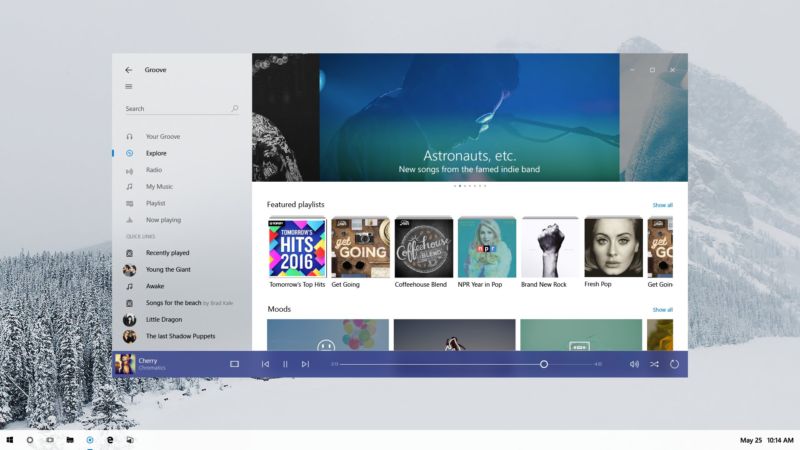
The preview images are of an app called Groove.
I have no idea what it currently looks like, so I have no idea what has changed.
Guess I could start it up, since I have Windows 10, but... meh.
Slashdot social media options: AIM, ICQ, Yahoo, Jabber and Mobile Text. Why no MySpace?
I would think the KDE people would have some sort of trademark on that term for computer interfaces already.
Leak implies lack of intention for something to come out; did anyone from Microsoft (or anyone that would actually be in a position to know) ever actually declare this to be a leak?
There is no XUL, only WebExtensions...
Though visually there are common elements, the system is designed to work across virtual/augmented reality, phones, tablets, desktop PCs, games consoles, using mice, keyboards, motion controllers, voice, gestures, touch, and pen, with the interactivity and input optimized to each particular form factor.
1000 times NO - you cannot use the same definition language across different input strata. You either end up with a least common denominator of interactivity or you sacrifice one for the utopian goals of the idealogy (That is to say Windows 8 and Metro). Its always a grand idea in theory because you immediately think "It's just buttons and scrolling.. how hard can that be?!". It's not - it's text and selection and finding the items you want vs need vs trying to recall the interface paths to access them plus the needs of the input device you're working with. A VR system isn't going to acommodate the subtleties of a touch screen (though they'll try) and a touch screen drops the finer gesture control of a pen which is simillar (but not the same as) a mouse interface. You need a CUSTOM UI and access strategy per device type that interfaces to the underlying control scheme. That's why the iOS is DIFFERENT than MAC OS and not a one-size fits all strategy like Windows 10 which does NOTHING well (and don't even get me started on that craptacular Xbox One UI)
Okay M$, increasing the frequencies of your "news" articles will not distract anyone from the fact that Windows 10 is a spyware "OS" with features that actually work AGAINST the user. I'm starting to think that MS is spending more time doing PR for this POS OS than development.
"Imagination is more important than knowledge" - Einstein
"advertisement"
Can we get an update where we get to decide when to reboot our machines and what info to send to Redmond? Just 'cause you paint the turd in flashy colors doesn't make it smell better.
We used to have a Bill of Rights. Now, with the rights gone, all we have left is the bill.
Nearly all design languages that are pushed out through a marketing department as a form of PR is a lot of ego stroking crap.
The most apt name for this new crap is: The Microsoft Effluent Design System
“Common sense is not so common.” — Voltaire
Shiney new shit all over the shop, but File Explorer STILL cannot handle the files with long paths *that it itself creates*.
It has had this problem for over a DECADE FFS !
Fix the broken windows. Then polish them !
Captcha: "systemic" as in "bugs"
I miss the days when buttons and text/pictures looked different.
The title says it. I skimmed through the articles and the new desktop UI is basically all the horrible web UI trends. I don't want content adjusting itself as I scroll. My keyboard has Home and End buttons. If I want to see the stop of the 'page' its one button press away. Stop wasting my screen space for your company logo or for a profile picture of me. WTF do I need to stare at myself so often? I'm ugly. Put a custom media feed there so I can watch IT porn 24x7, something like a CPU gauge, or better yet cut that shit out so I don't have to scroll past it to get to what I actually wanted.
I can't wait until the UI fads swing back into the productive UIs. Look at those window control buttons, they are far from the window edges. No more shoot your mouse to a corner. And they're on top of active content, so if you miss it'll trigger the media underneath. "Borderless" was supposed to refer to societies, not windows. I hate trying to resize windows with thin or non-existent borders and I'm not even old yet. Thank God for the Linux's resize shortcuts.
While I'm whining about Windows, I'll be fair and whine about Slashdot too. Why is the Preview button a button and the Cancel 'button' a link? WTF?
mid-level manager 1: I love what google is doing with this material design, they cribbed some of our metro stuff but took it to a whole new level.
mid-level manager 2: true dat, but I prefer the soft and smooth translucency Apple has in iOS and macOS.
mid-level manager 1: hmmm...
mid-level manager 2: hmmmm...
mid-level manager 3: why not both?!
mid-level manager 1: but won't we be accused of just copying their stuff?
mid-level manager 2: just throw in some bull about holo-lens and synergy, and everyone will be distracted thinking about drawing dongs in 3d.
mid-level manager 1: genius!
When I read what they're trying to do, I like it. I am not one of those people who thinks handhelds and desktops must necessarily have different UIs. (I'm not saying I have the answers, just that I think answers exist, for solving the same problem in two places.)
Then I look at the screenshots, and "eww." But whatever. Maybe I just don't get it. And also, it's Microsoft, so fuck them.
Yet I think it's a good and reasonable goal, and some day, someone will succeed at it.
As copyright owner of this comment, I authorize everyone to defeat any technological measure which limits access to it.
Been using Windows since 3.1, still haven't gotten used to ribbons (where dafuq did the option I want that used to be here go?). Metro was a huge disaster. Not feeling chippy about a new look and feel for something I spend 10+ hours a day (work & home) working with.
Star Trek: The Next Generation did something like this. The same UI on the bridge displays, the stellar cartography big-as-a-room display, the shuttlecraft, the medical displays. I think later models of the tricorder even approximated the same layout.
Why don't they mimic that??
slashdot: A failed experiment.
Aero is baaaaaaackkk
Oliver's law of assumed responsibility: If you're seen fixing it, you will be blamed for breaking it.
The most optimized way to create a UI that works on all the different input devices is by using an always random well placed UI.
It'll ensure that the users will always be highly interactive as they literally have to search the right buttons everywhere every time and avoid muscle memories.
Also, remember to switch the "OK" and "Cancel" UI every other times. This will greatly stimulate the user's emotion.
For the best results, swap the UI functions opposite to the UI, like "Cancel" is actually "Submit" and "Close" means "Restart and Upgrade". Oh wait...
Microsoft copies Apple. Facebook copies Snapchat. I guess it's the year of copying other people's success instead of innovating.
We'll make great pets
"elements of translucency and animation"....I hate it already. For a while there, it looked like MS was starting to understand that people use applications, not the OS. The only goal of the OS is to make it easy to use applications and stay out of the way otherwise. They sort of got the hint with the Vista fiasco. Looks like everyone who got it has retired and the latest shiny thing crowd is back in the saddle.
This posting is provided 'AS IS' without warranty of any kind, implied or otherwise.
More .NET fail as this will be unavailable with WPF.
I wouldn't care about they constantly altering the UI language if there was an option to get a "classic" grey Windows UI (think Windows 2000 or XP or 7 in classic mode). But it seems letting the user choose is too dangerous or bad for Microsoft
Amazing how it looks just like MacOS with the transparency, etc.
...and just like Jolla's Sailfish OS' "silica" style, for the past nearly 4 years.
...and also just like KDE's own style for the past naerly 10 years, as visible on their own "Neon" project demo CD. (Though that's for the general transparency effects getting popular in style. for the combo with "flat"-looking surface, these appeared more recently with the KDE Plasma 5 around 3 years ago)
Well by now this type of style is really old news.
Which is probably why Microsoft is introducing it now.
"Sufficiently advanced satire is indistinguishable from reality." - [Tips: 1DrYakQDKCQ6y52z6QbnkxHXAocMZJE61o ]
Agreed. Already I can't tell when a Microsoft Office app has focus; it looks like in this New World editor, I won't be able to tell when *any* app has focus.
I did manage to change the awful Win10 color scheme a bit, but no matter what I do, the default button in dialogs (usually the OK button) comes out with a washed out blue font on a slightly more washed out blue background. I have to guess which button does what.