 Slashdot Mirror
All-Radio 4.27 Portable Can't Be Removed? Then Your PC Is Severely Infected (bleepingcomputer.com)
CaptainDork shares a report from Bleeping Computer: Starting yesterday, there have been numerous reports of people's Windows computers being infected with something called "All-Radio 4.27 Portable." After researching this heavily today, it has been determined that seeing this program is a symptom of a much bigger problem on your computer. If your computer is suddenly displaying the above program, then your computer is infected with malware that installs rootkits, miners, information-stealing Trojans, and a program that is using your computer to send send out spam.
Unfortunately, while some security programs are able to remove parts of the infection, the rootkit component needs manual removal help. Due to this, if you are infected with this malware, I strongly suggest that you create a malware removal help topic in our Virus Removal forum in order to receive one-on-one help in cleaning your computer. Some of the VirusTotal scans associated with this infection have also indicated that an information stealing Trojan could have been installed by this malware bundle as well. Therefore, it is strongly suggested that you change your passwords using a clean machine if you had logged into any accounts while infected. 6/29/18: The story has been updated to specify that this malware campaign is targeting Windows computers.
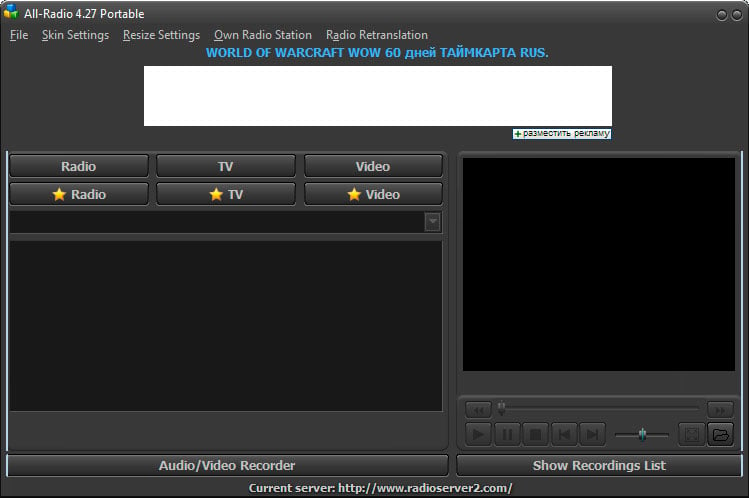
Unfortunately, while some security programs are able to remove parts of the infection, the rootkit component needs manual removal help. Due to this, if you are infected with this malware, I strongly suggest that you create a malware removal help topic in our Virus Removal forum in order to receive one-on-one help in cleaning your computer. Some of the VirusTotal scans associated with this infection have also indicated that an information stealing Trojan could have been installed by this malware bundle as well. Therefore, it is strongly suggested that you change your passwords using a clean machine if you had logged into any accounts while infected. 6/29/18: The story has been updated to specify that this malware campaign is targeting Windows computers.
How about you *don't* go to their forum and instead format everything and start again.
Only $99.99 for the next 48 hours!
Windows users get all the cool stuff.
The shepherds did so well protecting the flock that the sheep no longer believed that wolves existed.
A slashvertisement
" then your computer is infected with malware that installs rootkits, miners, information-stealing Trojans, and"
So, it has Windows 10?
Would it be so difficult to place somewhere in an "Operating System" tagged posting which operating system was affected? Slashdot folks really might have more than one OS in their areas and it would be nice to know which is at risk right at the top.
When malware removal expert, Aura, started helping these victims he noticed a common theme. Most of the users reported being infected after they downloaded and installed game cracks and Windows activation tools such as KMSpico.
So don't do that.
I browse on +1 so AC's need not respond, I won't see it.
Let's talk about the pros of this,
Microsoft must be so poor that they can't afford to hire security experts to fix Windows. How many years have they been trying to secure their OS? Too many, that's how many. Are they even trying anymore?
Comment removed based on user account deletion
Someone tries to post a helpful PSA type message and predictably the comments section is immediately flooded with people who have nothing of any value to say, but can't help but be assholes and make some kind of stupid "Windoze $ux!" type comment. We're all happy that Linux, macOS, or whatever the fuck else you might be using works for you, now kindly take your insecurities back to Linux or Mac forums where you can blissfully live out the rest of your days in a happy echo chamber where no one will ever challenge your views. We don't need the same 50 people making the same 50 useless comments every time there's a post about Windows. We all heard you the last 50 times and didn't care, so the odds of us suddenly caring now are zero.
I have some oceanfront property in Arizona.
Cool - how far forward do you have to set your time machine to visit it?
Yet another reason to not waste your money on "virus protection." Use the free Windows Defender if you must, and make sure you have good backups.
"First they came for the slanderers and i said nothing."
Absolutely you're right the best way to handle a rootkit is restore from a known-good backup. Just like you practiced, last month when you tested it when found and fixed the problem with backup system.
Unfortunately, 90% of people don't have a proper backup system. Probably over half of systems that are being "backed up" can't actually be restored because the backup media went bad a year ago or whatever.
For the people who don't have a solid backup:
> some IT professional who sells himself to a client by claiming he can remove this and leave the user's precious data intact?
What you definitely don't do is try to salvage the operating system and programs. Just re-install those. It was time to upgrade anyway. DATA *can* be painstakingly recovered. It's a heck of a lot easier if your data isn't mixed with code - no MS Office macros, etc. If you keep your data separate from executable code, it absolutely can be recovered, though it's very easy to slip up and let a potentially infected file through.
That's why windows will only live in a VM in my house. Fresh install from an image in seconds.
Comment removed based on user account deletion
Step 1: Throw computer in recycling (reality is most computer aren't properly supported. period.)
Step 2: Purchase a computer that doesn't such ship with malicious proprietary software and for which the source codes available so you can actually run a properly designed, maintained, and supportable operating system. And if the hardware your buying is dependent on proprietary software your still doing it wrong. Though I will forgive anyone for which actually has a mostly freedom friendly system (but only if the graphics and wifi are also free, it's not like that is an impossible task, there are a few vendors shipping with free wifi and graphics, even if all the shitty Linux vendors don't).
i've pirated pretty much every game EVER.
Never been infected that way.
Because pirates tend to have clean systems and aren't a bunch of dodgy fucks. It's the computer illiterate who aren't pirating games on a huge scale that should worry you.
It's when people go for some free utility they found advertised in an email or by private message on Facebook from someone they don't know.
It's rare enough to find actual malware on purchased physical media that it still makes the news as an industry scandal.
I have some oceanfront property in Arizona.
You too? From my front porch, I can see the C++.
Does anyone have a customer service number I can call? I want to complain that this software does not run on Linux.
One technique for data sterilization is to convert to a different format. For example, converting a Word document to WordPerfect will make sure there are no macros, I believe. Then convert back. Even better, convert to plain text if possible, and leave it as plain text. JPG to bump, etc.
People have dismissed this constantly but the evidence is becoming clear, and it's this type of thing that puts the writing on the wall.
Microsoft gives Windows a version of the Linux kernel. They have nothing to lose and everything to gain.
Donâ(TM)t look now, but this All-Radio Trojan seems to have control of your DNS server!
#DeleteChrome
How many years did it take to realize we don't like each other? Anyway you want helpful? Access the internet through an OS running on a VM. Blow away after through surfing. Remember the internet is NOT your friend, it's hostile and will eat you alive if it could.
I like it when pedantic fuckers wanna be pedantic but aren't actually good at it. Your head should be exploding because this is in the RADIO section like it's a fucking boom box. radio.slashdot.org. But hey, at least they didn't put the antenna tag on it.
No, no, no. If you are infected with deep malware, you do not go whining to some dude's Internet forum with a request for help. You run DBAN on your system's disks. Then you enter the combination to your fireproof safe, extract your OS and backup media, and start from scratch.
That's what my Grandma does.
There are two problems with your approach.
Most users will read what you wrote and ask "What the hell is he talking about?"
Second is that most everyone who does what you demand isn't likely to have the problem in the first place.
My backups are similar to yours, except I have multiple. I take the added measure that anything critical is not on my Windows machines. No personal information, or cards, and even the emails on it are throwaway accounts.
I check my Wireshark logs a lot too.
Probably 1 out of every 500 users will do that sort of thing.
The shepherds did so well protecting the flock that the sheep no longer believed that wolves existed.
Comment removed based on user account deletion
Comment removed based on user account deletion
Well, no. Because BeauHD only knows windows, see? As does bleepingcomputer. Who they've completely sold out to.
First it was just the incessant bleepingcomputer posting. Then it became glaringly obvious these "editors" will only give you the bleepingcomputer "article", never the original research paper or blogpost or anything whatsoever. And now it's "COME SIGN UP AT THE BLEEPINGCOMPUTER FORUMS".
Right. selloutvertisement. You know what to do.
Encrypted backups take care of the "massive invasion of privacy" especially when one's paying for the service, instead of being the product themselves.
Thank you for post. You've done great job listing things that fool smart, conscientious people into thinking they have a backup. That's why I said a "proper backup", proper being an important word. Those things all LOOK a lot like proper backup, don't they? And yet people who do those things end up asking me to try forensic techniques to recover their data. You seem like you know a few things, so I don't need to tell you exactly how you should do a backup, but let me point out a few common pitfalls to avoid:
> Windows sets you up with OneDrive and points all of your storage stuff to OneDrive. The result is that all your files are backed up.
The result of the default setup is that all of your infected files are stored on One Drive. This doesn't help. Your files are still infected. There is no backup copy, only the infected copy, so they are not backed up. It doesn't do you any good to have the infected files there rather than here.
So here's our first file of proper backup: backups must store multiple versions going back in time, with old versions immutable.
Recently, Microsoft has offered an option to store old versions if you pay a subscription to Office. If you're paying for it already, you may want to look into that option.
> Windows Backup and Restore or Apple Time Machine which does pretty much the same thing.
For those unfamiliar, Time Machine uses a USB drive connected to your computer, or a network drive to store old versions. The interface is really nice and it's awesome when you realize you screwed up and deleted or overwrote an important file. It's the ultimate undo. When you have a fire, a burglary, a flood, or a ransomware infection, that'll take both your computer itself and the USB drive. So this isn't proper backup - you're not protected a good against most types of catastrophic loss. It's a really cool extension of ctrl-z, though, to get back that file you just messed up.
This illustrates proper backups are off site. I used to do backups for web sites. I pointed out that just in Texas alone, every year for the last four years there had been major disaster at a public datacenter. Anyone who had a server at one of these data centers and had their "backup" in the same datacenter lost everything. In one instance, I had to get creative in retrieving some customers' data from a datacenter after the company operating it failed to pay their lease and took off into the night.
Backups must be in a separate physical location - a fire, flood, or burglary will take or destroy everything in your office.
I mentioned before backups must be tested regularly. Backups that haven't been recently tested have a failure rate of about 50%, in my experience.
They also need to be automated, because most people only do manual systems properly for a little while, then try start slacking off and eventually "forget" to run a backup for six months.
Ransomware reminds us of another requirement - the system being backed up (which may get ransomware) can not have the ability to delete or modify the backups. Sending backups to a network drive just means the ransomware or disgruntled employee will destroy two copies of the data.
> That said, to be honest, I have absolutely no idea how to maintain good backups of my Linux systems.
After I sold one of my companies, I spent a year and half designing and building a very good backup for Linux systems. The new company backup up the web servers for hundreds of web sites. The backups were kept off site, they kept several versions, the protected system had no way to remove the backups, they were fully automated, and you could easily restore any files at any time to test it. Add a bonus, you could click a button and BOOT the backup - they were stored as virtual machines.
It's too bad my skills at running a business aren't nearly as good as my engineering skills. I was like Wozniak without Steve Jobs - I built something really cool, something really useful, but making a successful, stable company from it wasn't my forte. If you actually have a ton of Linux systems, and if you care about any them, maybe we should talk. I still have some pretty awesome backup software for Linux.
Some viruses are hard to remove
Spending one day looking into something is now called "researching heavily".
On the serious side, I've often been annoyed by Windows 10 aggressively pushing updates, but there have been some interesting security features added to recent builds. Microsoft has a demo website with some good information, along with some tools for testing your configuration.
There is also a video online that details the new features.
Computer security is in a sorry state and we aren't doing anything to improve it...
Way to keep readers informed. Oh, by the way, you forgot to mention something kinda important, that this is malware impacting systems running MICROSOFT WINDOWS.
Had to waste time to go read the linked article to learn what you SHOULD have put somewhere in the title or summary. The term PC does NOT imply MS Windows; a device with the same electrical design and functionality running GNU/Linux, Apple macOS/OS X, or some other flavor or variant of UNIX is still very much, just as much, a PC. So saying malware infecting PCs and NOT specifying that itâ(TM)s MICROSOFT WINDOWS that, (if I read and understood the article,) is the targeted system, is a disservice to your readers. I didnâ(TM)t see which version or versions, etc., are impacted, but this was poor journalism from a website that styles itself as being news for nerds... I know you know that WE know that PC does not imply a system running something from Microsoft, and we know you know that. Or should.
Our reign has gone on long enough. Indeed. Summon the meteors.
Wait I meant idots that get infected with virus because they are stupid.
I check my Wireshark logs a lot too. Probably 1 out of every 500 users will do that sort of thing.
I would bet that's closer to one in every 500,000 users. Even security researchers don't do that (of course some do).
"First they came for the slanderers and i said nothing."
Sync to OneDrive, et al, isn't backup.
Most malware doesn't immediately destroy your computer, it cripples it over days or weeks. I can't tell you the number of people who told me "Yeah, I noticed something last week and it's been flaky since then."
Meanwhile, you've been syncing your infection up to the cloud the whole time so now your cloud storage is infected, too. You may get some of it back, but I've also seen people just re-infect themselves, too.
Some cloud storage often at higher tiers will offer some kind of versioning and let you restore pre-infected files, but for most people this isn't the default or isn't even a feature they have.
The only way cloud sync really works as a backup is if you have a spare computer you only bring online periodically that syncs itself and that you then take offline again, but now all you've done is add a complex network transaction to what amounts to a local backup.
"Cleaning your computer"? Geez, if you have this, reformat. Period.
This is NOT a concern at this point for honest people. Read the article and you'll find those infected downloaded their situation by trying to steal IP, and therefore are being stolen from.
No honor amongst theives.
Your reply seemed like an incredible hassle.
Comment removed based on user account deletion
" there have been numerous reports of people being infected with something called 'All-Radio 4.27 Portable'. "
Phishing by means of slashdot post.
Fascinating.
This signature has Super Cow Powers
That's a very good question. You can use diff to see what the differences are between different backups. That normally makes it pretty obvious. You pretty much know which files were supposed to change and which weren't. This can even give you good hints as to HOW you got infected.
There are even faster ways to tell because rootkits tend to re-send the same components. I can normally see a rootkit on a Linux system in seconds, without even actively looking for it. I'm not going to post the trick here because I don't want the rootkit authors to fix it.
'All-Radio 4.27 Portable' is showing up on my PC???? But this computer here runs Mint, oh crap, another idiot born few years ago, go back to your mom milk
> apps will need to be reinstalled but at least on Linux that's fairly easy.
Re-installing the software is REALLY easy if your data includes the output of rpm -qa.
Also sometimes very handy when things go wrong - /proc/mdstat, pvdisplay, lvmbackup, and gdisk -l
cat
I'm recovering an old customer's data right now. He no longer has backups with me and someone built a new, wmpty raid on his drives, making it "impossible" to recover his data. However, the old copies of mdstat and the partition layout were still hanging around from when he uses to have the backup service I used to sell. That info allowed me to reconstruct his storage from a seemingly destroyed state.
It's hilarious that people:
1) bother to install malware in the first place (why?!)
2) forget how to apt-get purge it
3) come to Slashdot for package installation/deinstallation discussion/help/instructions.
I suppose the lesson here is that it's just a stunningly diverse world and it takes all kinds. Even the kind of people who think "oh, hey, I'll try out some new malware."
Several times I've seen the backup server ran out of space. The ssh key was changed. The list of directories to backup or not backup wasn't up to date. Those are a few things that have broken it after it was setup and running.
All of these can be detected by occasionally doing a test restore, perhaps to a VM, and checking that the important files are there and important functionality works.
I have people that call me all the time that want to help fix my computer.
..that while a Windows user is willing to run that root exploit, a typical Linux user is far too lazy to remount /boot as rw and then sudo apt-get install malware. Most Linux users are so lazy they never bother to try out any malware at all, going for decades at a time, never having the tenacity or curiosity to try out "what's it like to have a computer that runs software intended to serve someone not me?"
When you look at that last part, you realize it's not even just laziness, it's fucking selfishness. Linux users like to hoard their computers all to themselves or their users, and the bastards never think to be kind to strangers, letting them control the computer for a while. Sickening and pathetic.
No, not really. Sorry.
I check my Wireshark logs a lot too. Probably 1 out of every 500 users will do that sort of thing.
I would bet that's closer to one in every 500,000 users. Even security researchers don't do that (of course some do).
I suppose some would call me paranoid, but I just kind of enjoy it. And people would be surprised at what they find.
It all started when I was having issues with brittle networking software coupled with bad documentation. Then I got hooked.
The shepherds did so well protecting the flock that the sheep no longer believed that wolves existed.
See subject & APK Hosts File Engine 2.0++ 64-bit for Linux h t t p : / / a p k . i t - m a t e . c o . u k / A P K H o s t s F i l e E n g i n e F o r L i n u x . z i p (pull spaces between link characters).
Yields more security/speed/reliability/anonymity vs. any SINGLE solution (99% of threats = hostnames vs. IP address that most firewalls use) more efficiently/FASTER + NATIVELY 4 less!
(Vs. "Bolt on 'MoAr' illogic-logic" competitors slowing you, hosts speed you up 2 ways (adblocks + hardcodes u spend most time @) vs. competition loaded w/ bugs (DNS/AntiVir) + their overheads (messagepass ('souled-out' to advertiser addons) + filtering drivers) & their complexity leads to exploitation).
* ONLY 1 of its kind in GUI on Linux
Better vs. Windows model in speed/efficiency/merge
0.0.0.0 iplogger.com
0.0.0.0 www.kmspico.info
0.0.0.0 kmspico.info
0.0.0.0 www.officialkmspico.com
0.0.0.0 officialkmspico.com
APK
P.S.=> Blocked URL's per malwarebytes forums... apk
Your software is just fine - well written, functional... I'm going to continue using the Host File Engine by mmell February 17, 2017
his hosts program is actually pretty good by xenotransplant August 10 2015
his hosts tool is actually useful for those cases in which one does indeed want to locally block stuff outright while consuming minimum system resources by alexgieg September 25 2015
I like your host file system by Karmashock September 09 2015
I do use APK's host file on all my systems at home by OrangeTide December 01 2017
I personally use a HOSTS file blocker produced from a genius called APK by 110010001000 October 27 2017
* Best part's the Linux 64-bit model's faster/more efficient (does 2x the work in 1/2 the time)
APK
P.S.=> For a faster/safer/more reliable internet... apk
Yeah, I should do that more. You aare right, every time I do, I find something I didn't expect.
"First they came for the slanderers and i said nothing."
But it's the bit before that which really matters:
That why you don't try anything from within the compromised system.
Either you try all your effort from a known clean bootdisk (CD, USB stick, etc),
or even better, you disconnect the drive and connect it to a known clean machine.
A non compromised OS will not lie about what is on the disk of another system, even if that other (non-currently running system) happens to be compromised.
(The sole exception being malware like ransomware that encrypt your data. Then nobody except the hacker holding the decryption key can read that disk).
Reinstall from original installation media and pray to god that your system's onboard firmware is not compromised.
Well, the attack of firmware (UEFI) or "management chips" running their own firmware (Intel ME engine and co) is indeed an entirely different level of scary.
And given the almost total disappearance of socketed flashchips to hold these firmwares, any chance to recover from that becomes bleak.
"Sufficiently advanced satire is indistinguishable from reality." - [Tips: 1DrYakQDKCQ6y52z6QbnkxHXAocMZJE61o ]
Don't download and install dodgy software designed to violate copyright, and you stand less chance of winding up with root kits on your computer...
I've abandoned my search for truth; now I'm just looking for some useful delusions.
This situation has only escalated to this point in recent times.
I used to have a business on the side doing PC service and upgrading work, on call. About half of my calls were from small businesses or individuals who needed malware and virus cleanups.
Back then, it was definitely possible to clean a system so it was back to normal working condition again, although sometimes it was VERY time consuming. You had to run multiple tools on the system, including ones that booted from recovery OS's you had on bootable CD, DVD or USB stick. Admittedly, you couldn't PROVE you had a system 100% clean, but when over a dozen scanning tools say it's clean and you no longer see any excessive CPU usage or disk chatter, and you can't find anything acting abnormally or showing up in the task manager? It's clean enough to make a paying customer happy.
The best answer was ALWAYS to wipe and reinstall from scratch. But sometimes that's not even viable. (EG. Customer has numerous apps installed that he or she no longer has license keys or installation media for and doesn't want to lose them.) If you really CAN'T get it clean, then you can tell them they're screwed and have to start over fresh -- but they're NOT gonna pay you for that answer.
What's crazy, now, is how these rootkits have gotten so advanced, they're really winning the battle for the first time in computing history. I fought for days to remove malware on a PC for a friend, last month, and despite throwing everything I knew of at it and manually poring over all possible registry locations that can start an app on boot or login? I never did feel confident I had it fully cleaned. It was better/usable instead of freezing up and running so slowly, it was useless. And everything reported it clean. But to me, it just didn't feel quite right. I just saw too many little pauses or hesitations that MAY have been his CPU being too old and slow. But not having used his laptop before the infection, I couldn't say for certain. I wound up advising him to wipe the machine and use it as an opportunity to upgrade to a new SSD.
I ran across a particularly devious malware tactic recently. The malware was purposely setting the NTFS "dirty" flag repeatedly, so the filesystem was flagged as needing repair. That, in turn, prevented most of the bootable virus cleanup/recovery discs from cleaning the system. They'd boot up but report they could only mount the target filesystem as "read only" because it was damaged and needed to be repaired first!
Ransomware typically wipes any network drives using the SMB protocol, as Samba does, if the infected machine has access to the share. That can be made secure by the backup backup pulling files that are shared by machine to be backed up. So the reverse of the typical model.
... I cannot help but wonder if we found a proxy to estimate the ratio of fools to wise folks in the world.
I had envisioned something a tad different when I read your earlier post.
That's fairly similar to part of what I did on the very cool backup service I used to sell. Except I used LVM snapshots rather than ZFS, which gave us the flexibility to do some other really cool stuff.
Sometimes the integration of ZFS is handy, sometimes it's a major limitation. It's a lot more flexible to use a file system as a file system, a volume manager as a volume manager, and RAID for RAID. ZFS tries to be all three, creating coupling that is entirely unnecessary (but convenient if your needs are simple).
Thanks, I hadn't seen that one but will look out for it.
const int one = 65536; (Silvermoon, Texture.cs)
SJW, n: "Someone I don't like, and by the way I'm a fuckwit" - AC
...then your computer is infected with malware that installs rootkits, miners, information-stealing Trojans...
As opposed to the standard Windows libraries that ship with Microsoft's surveillance system?