Slashdot Mirror
Domain: anandtech.com
Stories and comments across the archive that link to anandtech.com.
Comments · 3,318
-
Don't forget Anandtech
-
Re:Cheapest
Here's a review of one of the Zotac ION boards at Anandtec, and here's a link to some customer reviews at newegg. They are sold with an external (brick) power supply or an ATX connector. An interesting little critter, this board, if your CPU demands aren't high, but you need decent video performance and low power usage.
-
Re:No, Steve is right and you prove it!
I play the latest DirectX 10.1 games on a 1400 USD MacBook Pro
I am not sure you know what you are talking about. DirectX is a library. It is not a measure of speed or a processing requirement. Pacman can be written for DirectX 10.1. A $400 laptop running Vista can play DirectX 10.1 games as well. However, unless one invests on an SLI array, a laptop won't play any demanding games at a satisfactory speed.
Here are a few solutions for your problem: http://www.anandtech.com/mobile/showdoc.aspx?i=3660
Bypassing all the humiliating stuff you inflict upon yourself (I am sure your wife assures you that size doesn't matter) -- I also need to inform you that water cooling can be used to either cool an overclocked system which as you say can't be cooled by normal means or to achieve total silence in a normal PC. I could point to fanless water cooling solutions but I don't think its fun anymore.
You simply have no idea of these possibilities because you are a Mac User.
-
Re:Hey Intel, how about unlocking the write speed
I took a look at the AnandTech link you posted and from the data shown, I wonder if you quite truly understand the meaning of "mundane".
Here's a definition from dictionary.com:
2. common; ordinary; banal; unimaginative.
The link
http://www.anandtech.com/storage/showdoc.aspx?i=3667&p=6shows that, for HDDs, the random write rate at 4kb is 0.8 MB/s ( Seagate Momentus 5400.6 ) and 1.5 MB/s ( Velociraptor 300 GB).
Now, since I use primarily a notebook, the Velociraptor is a non-starter.
I'm also excluding all the SLC drives as they are just too expensive right now for a given capacity.
The Intel MLC drives rate at 36-40 MB/s and the Indilinx-based are 13 MB/s - an impressive 3x advantage for Intel.
But, mundane? That would be an accurate description of the HDD performance where the much-vaunted Velociraptor is 3x SLOWER than the Samsung-based MLC and almost 9x slower than the Indilinx ones.The picture for laptop users like myself is even worse ( or better depending on where you stand ).
The Seagate Momentus 5400.6 500GB can barely manage 1/5th the random write speed of the Summit and a mere 6% of any of the Indilinx drives.
Now, THAT is "mundane" -
Better SATA 6G Article
I don't know why the editors didn't include a link to it, but AnandTech has a much better review of the SATA 6G-equipped motherboard and its performance; one that actually gets around to doing real-world tests and not just synthetic tests. It turns out that the 6G Marvell controller is slower than the standard Intel ICH10 controller in virtually all cases. Until someone integrates SATA 6G in to a proper motherboard chipset, it's not just performance limited, it's performance degrading.
-
SATA 3 is for SSDs
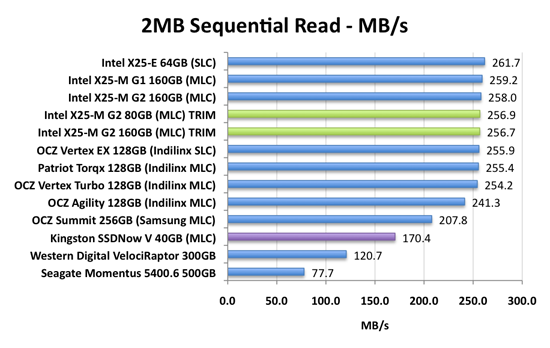
SATA 2 is already a bottleneck for many SSDs as this chart shows them hitting a wall at approximately 260MB/s. SATA 3 should release the proverbial floodgates for sequential reads.
On a tangent, Samsung just started mass production of a 64MB, 60nm phase-change RAM in September. Initially they are going to use them in mobile phones. The chips read, write and erase approximately 7 times faster than Flash memory, and also use less power. Sooner rather than later Samsung or the other PRAM producer Numonyx will put the chips in SSDs that can read and write at around 1GB per second. -
Re:Hey Intel, how about unlocking the read speed
There are extremely few read-world apps that require sequential writes at speeds even reaching 80MB/s, much less 100MB/s. Sure, you can do it with a file copy, but how often does that come up as something you're waiting for? You certainly can't reach that speed with anything network-based. The fact that Intel optimized for smaller writes instead was absolutely the right thing. Sure, the Patriot or OCZ drives manage fast write speeds just as you describe. But they're mundane on random reads and writes, and on everything but the heaviest workloads Intel dominates. They made the right trade-offs here for most situations compared to the competition.
-
Re:Hey Intel, how about unlocking the read speed
There are extremely few read-world apps that require sequential writes at speeds even reaching 80MB/s, much less 100MB/s. Sure, you can do it with a file copy, but how often does that come up as something you're waiting for? You certainly can't reach that speed with anything network-based. The fact that Intel optimized for smaller writes instead was absolutely the right thing. Sure, the Patriot or OCZ drives manage fast write speeds just as you describe. But they're mundane on random reads and writes, and on everything but the heaviest workloads Intel dominates. They made the right trade-offs here for most situations compared to the competition.
-
Re:Hey Intel, how about unlocking the read speed
There are extremely few read-world apps that require sequential writes at speeds even reaching 80MB/s, much less 100MB/s. Sure, you can do it with a file copy, but how often does that come up as something you're waiting for? You certainly can't reach that speed with anything network-based. The fact that Intel optimized for smaller writes instead was absolutely the right thing. Sure, the Patriot or OCZ drives manage fast write speeds just as you describe. But they're mundane on random reads and writes, and on everything but the heaviest workloads Intel dominates. They made the right trade-offs here for most situations compared to the competition.
-
AnandTech's SSD Anthology and Follow-Ups
Mandatory reference below. Read it and get informed about SSD's, performance, and issues with controllers and firmware problems. Long story short, Intel is on top of the market, OCZ Vertex is a very close contender using Indilinx controllers. Samsung, JMicron based drives suck very much.
Below is my own post about this topic a little while back when I got into SSD's.
Slashdot.org - Solid State Disk Benchmarks (Score 3, Informative)
Also, be aware of shrinking flash cell sizes, 50nm was original flash chips, now 34nm in Intel's G2 line of MLC SSDs is popular. Multi-Level Cells store 2 or more bits per cell, decreasing price at the cost of performance and reliability of read back. Also future 3 or more bit MLC drives will offer even lower cost but also a lower reliability and less write cycles. There was a great article about this problem a while back on Slashdot so just search for it.
-
Re:Early days for consumer SSDs
He probably means the TRIM firmware updates discussed on Anandtech from:
* Admittedly, Intel's pulled theirs temporarily due to issues.
-
Re:Certain Manufacturers are Doing It Wrong
Don't get me wrong - I think Indilinux looks to have a good future, and I am glad that they supported their users. I just can't really praise them for not finishing the product before they started selling it.
The real problem here was about "time to market" - companies were hustling to get to a lower price point before their competitors, and build their reputation in a new market. In that race, it happens again and again that corners get cut. No surprise really, and I don't think it will ever change.
As for the best bang for the buck, I find it harder to make as definitive a statement as you have. In any case, I don't think I could add anything to the (fairly nuanced) words of tomshardware or anandtech.
-
Re:Kingston
According to Anand, the Kingston V Series 40GB drive uses Intel's controller; it's basically just one half of the X-25M 80GB drive. Which is really unfortunate and potentially confusing, considering that Kingston has some "older" 64 and 128GB SSDs with a JMicron controller, as you rightfully pointed out, also wearing the V badge.
Incidentally, I've been following Anand's SSD anthology and I'm aware of the poor reputation of the JMicron controller. My first SSDs were Indilinx and Intel-based for this reason. However, a few months back I decided to experiment with the less expensive JMicron-based Kinston V Series, as some had reported the stuttering issues did not plague these drives. All in all I've been very happy with this drive, and the Atom-based Winxp machine it runs in is delightfully peppy--a clear improvement over any HDD system.
I haven't seen any random read/write test results for these JMicron V Series, and haven't bothered to do any benchmarking myself, but for a budget drive I'm totally satisfied with the way it handles itself and I'll be using them in near-future budget builds until something better displaces them as cost/capacity king (the new 40GB V Series perhaps? although 40GB is a little slim in the days of Vista and 7).
-
Linus updated it 5 months later
Linus updated his SSD post 5 months later and in the follow-up mentioned, among other things, an AnandTech article he liked at least parts of.
-
Re:OSX ?
Don't buy an SSD from any major manufacturer as a build-to-order. They almost all use Samsung drives, which have a lot of problems. Let them put a cheap hard drive in your machine and then put your own aftermarket SSD in it - one with either an Indilinx controller or an Intel.
-
Re:chipset inside and utilization?
I'd be more looking at the fact that all of those are JMicron based controller drives and are shitty examples of SSD's in the first place.
http://www.anandtech.com/storage/showdoc.aspx?i=3531&p=17 -
Re:A better write up at anandtech
http://www.anandtech.com/storage/showdoc.aspx?i=3667
People rarely link to Anandtech in summaries, instead giving links to much more superficial articles. Pcper.com is the other really nice site when it comes to consumer SSD issues.
-
Re:Kingston
Never mind, I'll answer my own question: no.
-
A better write up at anandtech
-
PBX PC - Intel Atom 330, 1GB, 30GB SSD, Mini-ITX
Phone System PBX Project
I had to build such a full-fledged system but one that had to be dependable, reliable, small, quiet, unobtrusive, long lasting, cool running, low-power, well performing, be built of standard parts, and be able to accept one PCI or PCIe expansion card for the telephone TDM interface for incoming FXO lines.
I'm in the process of setting up a phone system PBX with up to 4-incoming telephone lines and a phone menu system to provide basic business information (e.g. hours, address, directions, information, etc.) for a friend's business and also offer the standard features such as voice mail, faxing, internal analog extensions, VoIP capability for future expansion, customization, etc. built on Linux using Elastix that is based on Asterisk PBX.
Wishlist - PBX PC - Intel Atom 330, 1GB DDR2 667, OCZ Agility 30GB SSD, 120mm Fan, Apex Mini-ITX - $316.94 USD
Form Factor - Mini-ITX
I checked out my favorite hardware review site AnandTech and read a number of articles about the new Mini-ITX form factor motherboards that came out to get an introduction to the form factor and expectations.
AnandTech.com - Two New Ions: ASUS AT3N7A-I and ASRock Ion 330
TomsHardware.com - Does Intel's Dual-Core Atom Improve Efficiency?
I read the articles with a lot of interest but when I looked at the prices of these Ion based motherboard with well performing graphics chips I found that I wasn't interested in paying so much for a feature that would not be used very much in a server type PBX system. Also some of these systems didn't have any PCI expansion slots so they were no good for my PBX type project.
Processor - Intel Atom 330
So I turned to look at other Mini-ITX based offerings and came across the good 'ol Intel Atom motherboards. I found the Intel Atom 230, 270 based boards to be a little low performing in many of the benchmark results that I saw but that the dual core Intel Atom 330 chip was doing quite well for only a few dollars more and very little increase in power. I looked at the offerings at my favorite retailer, Newegg and saw a nice list of choices.
Motherboards, Motherboard / CPU / VGA Combo - Mini ITX
I started my process of filtering so I ignored low powered systems that came with VIA C7 chips and the Intel Atom 230 chips. I came up with these three choices.
Foxconn 45CSX Intel Atom 330 Intel 945GC Mini ITX Motherboard/CPU Combo - Retail - $69.99 USD
Intel BOXD945GCLF2D Intel Atom processor 330 Intel 945GC Mini ITX Motherboard/CPU Combo - Retail - $79.99 USD
ASUS AT3GC-I Intel Atom 330 479 Intel 945GC Mini ITX Motherboard/CPU Combo - Retail - $89.99
Motherboard - Intel D945GCLF2
Out of these choices, I wasn't too thrilled with a Foxconn built motherboard because I had no experience with this company for any hardware. I wasn't so sure that the extra money spent on the Asus motherboard is really going to offer anything at all, so the choice went down to Intel because I wanted reliability for a system that was being built for someone else. I read a few good review of the Intel motherboard below.
-
PBX PC - Intel Atom 330, 1GB, 30GB SSD, Mini-ITX
Phone System PBX Project
I had to build such a full-fledged system but one that had to be dependable, reliable, small, quiet, unobtrusive, long lasting, cool running, low-power, well performing, be built of standard parts, and be able to accept one PCI or PCIe expansion card for the telephone TDM interface for incoming FXO lines.
I'm in the process of setting up a phone system PBX with up to 4-incoming telephone lines and a phone menu system to provide basic business information (e.g. hours, address, directions, information, etc.) for a friend's business and also offer the standard features such as voice mail, faxing, internal analog extensions, VoIP capability for future expansion, customization, etc. built on Linux using Elastix that is based on Asterisk PBX.
Wishlist - PBX PC - Intel Atom 330, 1GB DDR2 667, OCZ Agility 30GB SSD, 120mm Fan, Apex Mini-ITX - $316.94 USD
Form Factor - Mini-ITX
I checked out my favorite hardware review site AnandTech and read a number of articles about the new Mini-ITX form factor motherboards that came out to get an introduction to the form factor and expectations.
AnandTech.com - Two New Ions: ASUS AT3N7A-I and ASRock Ion 330
TomsHardware.com - Does Intel's Dual-Core Atom Improve Efficiency?
I read the articles with a lot of interest but when I looked at the prices of these Ion based motherboard with well performing graphics chips I found that I wasn't interested in paying so much for a feature that would not be used very much in a server type PBX system. Also some of these systems didn't have any PCI expansion slots so they were no good for my PBX type project.
Processor - Intel Atom 330
So I turned to look at other Mini-ITX based offerings and came across the good 'ol Intel Atom motherboards. I found the Intel Atom 230, 270 based boards to be a little low performing in many of the benchmark results that I saw but that the dual core Intel Atom 330 chip was doing quite well for only a few dollars more and very little increase in power. I looked at the offerings at my favorite retailer, Newegg and saw a nice list of choices.
Motherboards, Motherboard / CPU / VGA Combo - Mini ITX
I started my process of filtering so I ignored low powered systems that came with VIA C7 chips and the Intel Atom 230 chips. I came up with these three choices.
Foxconn 45CSX Intel Atom 330 Intel 945GC Mini ITX Motherboard/CPU Combo - Retail - $69.99 USD
Intel BOXD945GCLF2D Intel Atom processor 330 Intel 945GC Mini ITX Motherboard/CPU Combo - Retail - $79.99 USD
ASUS AT3GC-I Intel Atom 330 479 Intel 945GC Mini ITX Motherboard/CPU Combo - Retail - $89.99
Motherboard - Intel D945GCLF2
Out of these choices, I wasn't too thrilled with a Foxconn built motherboard because I had no experience with this company for any hardware. I wasn't so sure that the extra money spent on the Asus motherboard is really going to offer anything at all, so the choice went down to Intel because I wanted reliability for a system that was being built for someone else. I read a few good review of the Intel motherboard below.
-
Zotac Ionitx
http://www.anandtech.com/video/showdoc.aspx?i=3562&p=12
According to this article, it's between 25-30W, and it fits into any standard Mini-ITX case. Couple it with a low power hard disk or CF drive and it'll be very power efficient. It's also possible to run it completely passively cooled, and if you wanted to use it as a media frontend, it'd be more than capable. You can even get a version that comes with it's own external power brick rather than a PSU.
-
Re:With SSDs, who needs it?
How expensive are they?
If you're looking at hundreds of thousands of writes a day to your database, you really only need somewhere between 10 and 100 IO/second (there are 86,400 seconds in a day). Most hard drives handle that somewhat decently, especially if you use a good RAID configuration.
Looking at 100,000,000 updates a day (1,158 writes/second)? Intel's X25-M is rated at more than 4 times that
Iometer* Queue Depth 32
Random 4 KB Write:
80 GB - Up to 6.6 K IOPS
160 GB - Up to 8.6 K IOPSLet's compare that to a 15k.2 Seagate Savvio harddrive. Oh, right, they don't list their IOPS ratings. Let's look at what they do have though:
Not including controller overhead (msec):
Single track, typical: 0.2 (read) 0.42 (write)
Average, typical: 2.9 (read) 3.3 (write)Intel lists these figures:
Latency Specification:
- Read: 65 micro seconds
- Write: 85 micro secondsIn other words, for a single track, the Intel drive will be almost 5 times as quick to start the write, and on average the Intel drive will be 38 times faster.
Or looking at it in another way, the absolute best case scenario where we simply ignore actually writing something, the Seagate drive can achieve 205,714,286 write operations per day (86,400 seconds/0.42 milliseconds). The Intel drive will hit 1.016.470.588.
While I can't find anyone benchmarking Intel's SSD offerings directly against the Savvio, I can find a mix of tests. From Tom's Hardware we see that SAS drives tops out at about 400 IOPS for any given task.
Using Tom's Hardware for a comparison, their review of the X25-M had it bottoming out at around 900 IPOS, making it perform 225% better at its worst, compared to the SAS drive's best.
Prices:
Newegg.com doesn't have the Savvio, so I'm using Google instead:
Seagate Savvio 15k.2 146 GB edition: US$ 226.44 or US$1.55/GB
Intel X25-M 160 GB edition: US$ 439 or US$ 2.74/GBConsidering the performance advantage of at least 225%, you'd have to spend at least US$ 509.49 just to get the same kind of performance as you'd get from the US$ 439 drive from Intel. And that's just their mainstream edition. AND we're talking SSD's worst case scenario vs. SAS's best case scenario. Realistically we're talking much greater advantages for the SSD.
And you keep talking about "commodity SSDs" but refer to datacenters. A commodity harddrive is a 7.200 RPM 8 MB SATA drive, and they aren't suitable for a datacenter either. Duh! So why the fixation of comparing commodity hardware from one technology to enterprise hardware from another? Stop buying commodity hardware for your datacenter needs.
Sorry, the FACT that SSD has had write performance problems, wear leveling, and write endurance issues is by no means 10 year old information.
And yet you haven't caught on to the fact, that this isn't that big of a problem. Anandtech wrote an excellent paper on write performance problems, and his benchmarks are based on used drives (the drive has to perform deletes before writing), and he got these performances:
4KB Random Write Speed
Intel X25-E 31.7 MB/s
Intel X25-M 23.1 MB/s
Western Digital VelociRaptor 1.63 MB/sThe VelociRaptor i
-
Re:ECC on a home system?
It's been a while since I looked, but I remember seeing benchmarks of 1-2%.
Still, here's what I was talking about
Notice how going from 1066 to 2000 ( 87% faster memory ) gains less than 5% in framerate in HL2.
Assuming that scaling holds in general, the 5% hit of ECC will slow you down by about 0.25% total. That's well within the noise inherent in a benchmark.
Even in the case of Far Cry, which sees the most benefit from faster RAM, the hit from ECC would still be hard to notice at ~2%.
-
Re:Their site...
The only way I have seen to identify the good from the bad is through websites related to solving problems that inevitably arise. I purchased a Viewsonic VX2433 display only after a month of deliberation and review. CNET http://www.cnet.com/ , Anandtech http://www.anandtech.com/ and Consumer Reports http://www.consumerreports.org/ The only way to really budget yourself is through sufficient research. In the end you usually get what you pay for. If you are looking for free stuff then check craigslist.
-
Re:Why I chose Apple for my dev laptop
There was no hostility present. Though it does bug me so much lately how foolish people can be, and how easily they are brainwashed by marketing.
And to refute some points:
Solid block of aluminum: useless to a computer
It's "useless" to have a sturdy computer? Um, OK....
Synaptics touchpad: use a thinkpad trackpoint, and get back to me.
Does not support gestures: fail
Illuminated keyboard: most if not all laptops have this option
Show me one, because I have never seen a PC-laptop with a backlit keyboard. I think Thinkpads have the "thinklight" at the top of the screen, but even there the keyboard is not backlit.
Power adapter: I have not once, in the entire 10 years of using laptops, have carelessly ripped out a power cord
I look over about 40 laptops, and in the last 1.5 years I have had at least two cases where the laptop has been broken because someone tripped on a powercord. And how is a standard powerplug better than magsafe? Isn't magsafe a nice thing to have in any case?
*Decent battery life*: except that it was actually tested recently, and Macs *don't* get more than 3-4 hours (the new ones, with a promised 7-8 hour charge);
Well, Anandtech said "The Best Battery Life Iâ(TM)ve Ever Seen" when testing the new MBP's: here
get yourself a nice battery (see with PC's you have an option) that could last you 8-10 hours.
And have a heavy laptop with a bulging battery. Sounds like fun!
Lithium polymer batteries: again, worthless since macs don't get the 7 hour charge they promise. Though with PCs you can.
In the Anandtech-test, they got over eight hours in real-life use....
Please don't waste any more time spreading bullshit, OK? You only make yourself look like a drooling retard.
-
Re:Predictible answer - Mac.
While the Mac may be a predictable answer, it doesn't answer the challenge of a port replicator or a hot swappable drive bay.
While I have to disclose that I'm typing this on a 24" iMac Merom, and that i own 100 shares of Apple, the MacBook Pro comes closes to the challenge, given the hefty built-in battery and optical drive (and no need to choose between them), but only barely meets the price. You won't find a MacBook Pro docking station either. The processor will be a noticable upgrade, and a few vitrual machines will please you with convenience for the other OSes (but you'll want to cough up 50-100 for more RAM before too long if you go this route I think).
Given the poster's happiness with the previous machine, I'd suggest repair or finding a used machine of the same model. All the legacy hardware will still work. If you're really interested in a little better performance, make sure you have maxed out the RAM (can make a very big difference) and take a good hard look at SSDs that may fit your budget. A good SSD will completely change how you use your machine, and you'll quickly find that lower latency mass storage will greatly impact a variety of tasks you thought had already hit their peak (I recommend this article.
-
Re:Who cares...
Why not count the number of times he was right, divide that by the total number of articles? You could also multiply that by the fraction of text on the page that doesn't read like something from rense.com, and compare the resulting number to a similar calculation on other sites?
Using that view, I think I'll stick with AnandTech, who was saying Q1 and pointing out that it was late for this generation anyway.
-
Re:Havok
Nvidia is not "crippling" their cards, they are trying to insure they keep market share and this is only one of many ways they are trying. The real problem is the Lucid Hydra 200 chip ( http://anandtech.com/video/showdoc.aspx?i=3646 )
-
What are they trying to do?
Stop things like this from working?
-
More reviews
Anandtech
http://anandtech.com/video/showdoc.aspx?i=3643
"At the end of the day, with its impressive performance and next-generation feature set, the Radeon HD 5870 kicks off the DirectX 11 generation with a bang and manages to take home the single-GPU performance crown in the process. It's without a doubt the high-end card to get"Techreport
http://techreport.com/articles.x/17618
"Well, Sherlock, what do you expect me to say? AMD has succeeded in delivering the first DirectX 11 GPU by some number of months, perhaps more than just a few, depending on how quickly Nvidia can get its DX11 part to market. AMD has also managed to double its graphics and compute performance outright from one generation to the next, while ratcheting up image quality at the same time. The Radeon HD 5870 is the fastest GPU on the planet, with the best visual output, and the most compelling set of features. Yet it's still a mid-sized chip by GPU standards. As a result, the 5870's power draw, noise levels, and GPU temperatures are all admirably low. My one gripe: I wish the board wasn't quite so long, because it may face clearance issues in some enclosures. " -
Re:only ATI with ATI, NVIDIA with NVIDIA...
From the Anandtech article on the subject, it appears that multi-vendor GPU scaling has been implemented, as it was demoed with a GTX 260 and an HD 4890. The mixed-vendor implementation apparently requires Windows 7 to get the card's drivers to work properly (the article was light on details on this point), but it does work. And spare me the "M$ is teh suxorz" garbage. This is aimed at gamers, and like it or not, new games come out on Windows, not Linux, so that's where Lucid's priorities will be for the product launch.
-
Re:Idle power consumption
Intel always had the lead in manufacturing capability, and it seems that this is one of the nice results.
This time it's little to do with their manufacturing capability in terms of process size, it's R&D specifically to achieve this. They basicly created a new "shut-off" form of transistor that effectively blocks off everything behind it. You can read more about it here.
-
What was the test!?
Maybe. Maybe not. They don't mention anywhere how they tested the laptops. It's just a bunch of voodoo. The results have no meaning. We don't even know if the IE 8 battery life includes the juice required to run the malware.
I wouldn't recommend it, but if anyone actually wants to read TFA, here is the article on 1 page, rather than 5: http://anandtech.com/printarticle.aspx?i=3636
-
Re:CPU multi-threading
Can anybody give real life examples where the CPU multi-threading brings anything?
Multi-threading per core helps with video encoding. I saw benchmarks just today at http://www.anandtech.com/weblog/showpost.aspx?i=642 showing the results of the same processors run against the same tasks with and without HT enabled. How many thousand more examples do you need to see?
-
Re:Theres no reason why NVIDIA couldnt do this too
The OEMs asked AMD for six possible outputs for DisplayPort from their notebook GPUs: up to two internally for notebook panels, up to two externally for conncetors on the side of the notebook and up to two for use via a docking station. In order to fulfill these needs AMD had to build in 6 lanes of DisplayPort outputs into its GPUs, driven by a single display engine. A single display engine could drive any two outputs, similar to how graphics cards work today.
Eventually someone looked at all of the outputs and realized that without too much effort you could drive six displays off of a single card - you just needed more display engines on the chip. AMD's DX11 GPU family does just that.
-
Re:Merketing trumps reason again... ;)
If you read the Anandtech article it mentions this specifically. Since the new driver can set up the max of six displays any way you want that for FPS game most would use a 5x1 configuration to keep your crosshair in the middle of the center screen.
-
Re:Fishy numbers?
I've got a similar setup (and hence am now eating bricks), the anandtech article I think sheds some light on this: http://anandtech.com/printarticle.aspx?i=3634 - basically this new line-up actually has some smarts in it to properly power down non-utilized cores, whilst being able to operate within the thermal profile to run individual cores at very high speeds. Sounds pretty nifty, for us basically we'll have to wait and see how affordable the gulfstrem line of processors coming out next year is.
Long story short - 1366 is now good for 4+ cores, anything else and this new offering takes the cake (the gulfstream coming out next year is meant to be 4+ cores... so maybe there's hope for the platform not being obsolete yet...) -
Anandtech's version
-
More Reviews
Here are a few more reviews for today: The Tech Report, Phoronix, AnandTech, X-bit labs, and Benchmark Reviews. It's all enough to make your eyes bleed. There's a list for the Core i7 870 at 0x6877.com
-
Re:LGA 1366 dead now?
http://anandtech.com/cpuchipsets/showdoc.aspx?i=3634&p=7
Intel told me something interesting when I was out in LA earlier this summer: it takes at least 3 cores to fully saturate Lynnfield's dual-channel DDR3-1333 memory bus. That's three cores all working on memory bandwidth intensive threads at the same time. That's a pretty stiff requirement. In the vast, vast majority of situations Lynnfield's dual channel DDR3 memory controller won't hurt it.
Move up to 6 or 8 core designs and a third memory channel is necessary, and that's why we'll see those processors debut exclusively on LGA-1366 platforms. In fact, X58 motherboards will only need a BIOS update to work with the 6-core 32nm Gulftown processor next year. P55 looks like it'll be limited to four cores and below.
-
Tests
Lots and lots of tests and bechmarks. Looking good.
Intel 'Lynnfield' Core i5 750 and Core i7 870 Performance Testing Introduction
Intel Core i5 and Core i7: Lynnfield CPUs reviewed - Intel, Core i5, Core i-750, Core i7, Core i7-860, Core i7-870, Lynnfield, Bloomfield, AMD Phenom II X4 - PC Games Hardware
Core i5 750 - Core i7 860 and 870 processor review
HEXUS.net - Review
Legion Hardware
Intel Core i5 750 & i7 870 Review - Page 1 - The Next Nehalem-based CPU lineup
PC Perspective - Intel Lynnfield Core i7-870 and Core i5-750 Processor Review
Introduction - Intel Lynnfield Core i5 and Core i7 Processors | [H]ard|OCP
In Theory: How Does Lynnfield's On-Die PCI Express Affect Gaming? : Introduction - Review Tom's Hardware
AnandTech: Intel's Core i7 870 & i5 750, Lynnfield: Harder, Better, Faster Stronger[/QUOTE]
Intel Core i5 750 Core i7 870 Review - Overclockers Club
Techgage - Intel Core i7-870 & i5-750 - Nehalem for the Mainstream
Core i5-750 and Core i7-870 Processors Review | Hardware Secrets
Intel Core i5 750 Processor Review - TechSpot News
Intel Core i5 And Core i7: Intel?s Mainstream Magnum Opus : Introduction - Review Tom's Hardware
Intel Lynnfield Core i5-750 & Core i7-870 Processor Review
Intel's Core i5-750 and Core i7-870 processors - The Tech Report - Page 1
bit-tech.net | Review - Intel Core i5 and Core i7 Lynnfield review
bit-tech.net | Feature - Intel Lynnfield: Details and Architecture
Intel Core i5, Core i7 800 Processors and P55 Express - HotHardware
Intel Core i5-750 Processor BX80605I5750 | Intel Core i5-750,BX80605I5750,Lynnfield,LGA1156,CPU,Proocessor, Intel Core i5-750 Lynnfield LGA1156 CPU Benchmark Performance Test Processor Review | Benchmark Reviews Performance Tests
Intel Core i7 870/Core i5 750/P55 Express chipset Review -
Re:Who cares?
Compiling with SSD vs. mechanical HD:
http://anandtech.com/storage/showdoc.aspx?i=3631&p=25Compiling is CPU bound.
-
Re:Not so sure
Didn't they already try this with their turbocache stuff? I seem to recall the general consensus being that it doesn't really offer any remarkable benefits. Regardless of how fast the cache is, eventually you run apps or open files that can't live on it 24x7 and you're going to revert to magnetic HD performance limits. This might improve some battery life and performance for some apps, but its not going to give you the across-the-board speed and battery life boosts that SSDs do. While this would certainly result in a better experience for the average computer user, I feel like its going to be relegated as a middle-ground between HDDs and SDDs, augmenting the low end, but by no means obsoleting the high-end.
-
Isn't this just a twist on hybrid drives?
Hybrid drives are a few years old, but apparently not very popular.
Samsung makes some with 256 MB of on drive NAND flash.
I do have to question the effectiveness in multiple drive scenarios. And they talk about 4 GB of space - how do you avoid getting your page file stored on it? And how quickly will the 4 GB be worn out and read only? From the latest AnandTech article on SSDs:
Intel estimates that even if you wrote 20GB of data to your drive per day, its X25-M would be able to last you at least 5 years. Realistically, thats a value far higher than youll use consistently.
My personal desktop saw about 100GB worth of writes (whether from the OS or elsewhere) to my SSD and my data drive over the past 14 days. Thats a bit over 7GB per day of writes.
7 GB of data, 4 GB of space to store it. And since it's only going to be used as a sort of intelligent cache, you'll have a lot of erasures, as you'll be moving data off of the cache onto the harddrive to make room for new stuff, and back onto the cache again.
They say they'll use SLC, but how quickly will the OEMs demand MLC for lower end models and thus cut the number of write cycles by 10?
And at what point can you be certain that the document you've been working on for several hours a day for the two weeks is stored on the laptop's harddrive and not on the cache? It's bad enough when your laptop dies on you and you have to send it in for repairs, but if you cannot be certain that your data is safely tucked away on your removable harddrive
It's a nifty idea, but for stuff like this I'd be worried about data safety more than performance gains. I can get performance gains by putting an SSD into my laptop right now and I know that I can remove the SSD again if the computer needs repairs.
-
Re:I have seen this on a 15" PowerBook
The problem's only gotten worse. I have a ~month-old 13" MacBook Pro. The thing gets ~8 hours (seriously) with my normal use (light PDF reading and web site browsing) under OS X. I actually hate OS X, so I installed Ubuntu. Gave up after the majority of the hardware (trackpad, sound,
It'll be some time before I try Ubuntu again on my MBP, but if any Ubuntu devs out there want to save frustration for other MBP users, your expertise is sorely needed in this area.
-
Wrong comparison
See here
Money quote: "Battery life to die for"...
Simon -
Re:Typical.....
That may or may not be the case in general, however in this particular instance, $99 to buy the App seems significantly cheaper than $9.99/month that the TeleNav app on your blackberry costs. Well they do offer a discount - $99/yr or $249 for a 4 year plan.
I can't believe those blackberry users will pay $10
It looks like Palm/Sprint have you both beat. Every Sprint plan for the Palm Pre comes with the TeleNav-provided Sprint Navigation bundled for free.
-
Re:Uh-huh.
And I'm willing to bet that he has the OLD MacBook Pro, ones that had 4 hour battery lives.
Especially when he says "battery is swapped with another". The 7-8 hour ones aren't hot swappable.
So once again. Learn to fucking read.
If you don't believe Apple, how about AnandTech? Are they an 'approved 3rd party'?
http://www.anandtech.com/printarticle.aspx?i=3580
The wireless web browsing test uses the 802.11n connection to browse a series of 20 web pages varying in size, spending 20 seconds on each page (I timed how long it takes me to read a page on Digg and came up with 36 seconds; I standardized on 20 seconds for the test to make things a little more stressful). The test continues to loop all while playing MP3s in iTunes
Eight, freakin, hours. I couldn't believe it. In my lightest test, the new 15-inch MacBook Pro lasted eight hours and eight minutes. That's with the screen at half brightness (completely usable) and no funny optimizations. The notebook is just playing music and surfing through a lot of my old reviews. There's no way this could be right. Maybe my test was too light?I strung together 8 reviews on AnandTech and put them each on a single page, images and all. I then scoured the web for big, animated Flash ads and added anywhere from 1 - 4 ads per page; all Flash. Each page is designed to forward to the next after 10 seconds and the loop continues indefinitely. On each machine I opened three Safari windows and pointed them at the first page in the sequence. In the background, once more, I had iTunes playing MP3s.
Six and a half hours, out of a 5.5 lbs notebook. For comparison, the older MacBook Pro could only manage 3 hours and 17 minutes in the same test. The new notebook lasted almost twice as long. Mathematically, this doesn't make sense. There's only a 46% increase in battery capacity, there shouldnâ(TM)t be a ~100% increase in battery life...ever.For this benchmark I'm downloading 10GB worth of files from the net (constant writes to the drive), browsing the web (same test as the first one) and watching the first two episodes of Firefly encoded in a 480p XviD format (Quicktime is set to loop the content until the system dies)...
The older MacBook Pro managed 3.25 hours in this test. The new one? Just under 5 -
Re:FAIL
The difference is not quite so stark at Anandtech, I wonder what the difference is between their tests?
http://anandtech.com/cpuchipsets/showdoc.aspx?i=3619&p=8