Slashdot Mirror
Domain: backblaze.com
Stories and comments across the archive that link to backblaze.com.
Comments · 162
-
Re:20-40 terabytes?
A quick search through Amazon for the not cheap Samsung 860 EVOs show's a roughly $160 / TB price. WD Red prices are roughly $30/TB. Still a 5X difference for these specific drives, but the prices are far lower than indicated. And note that other lines or brands of drives are even cheaper. I saw a 2TB AData drive on sale a few weeks ago for roughly $80 / TB. Not that I'd want one in my system but the prices can get much lower for SSDs today.
Yes, the numbers I originally quoted were average prices. Shopping around will yield lower prices. For example, Backblaze was paying about $20/TB two years ago. The ~5x difference has surprisingly held steady for many years.
My point was that those numbers are off, and the numbers I quoted were for the top end of consumer drives. HDDs by definition have less headroom to drop prices. SSD prices in some cases are half those quoted. That means that on average I would pay about 3X the per TB price for SSD over HDDs.
Well, it depends on what "saving" means. HAMR/MAMR are still unproven in a commercial setting. They have been working in the lab for many years, but storage devices have very stringent reliability requirements, so it remains to be seen what the actual reliability of the eventual release products will be. However, the more immediate way that HAMR/MAMR will "save" HDDs is that they will significantly decrease the cost per TB. That will maintain the significant price difference relative to flash, and that price difference is what will keep large-capacity HDDs afloat for the next few years.
I agree it will keep large-capacity HDDs afloat, but the question is how many people will need that capacity at that point. I consider myself a relatively heavy storage user for a consumer, likely in the top 5%. Currently I'd need 10 SSDs minimum for my storage needs, which at $600+ each is a bit pricey since I can get spinning drives to cover those needs in full for less than 2 SSDs. Which is the main reason spinning drives are used. None of my regular machines use spinning drives except for my large projects desktop. And that one will be replaced in the near future and likely not contain any spinning drives either. That is the situation for most people as well - the cost of an SSD vs HDD in their new systems just won't be compelling enough for most to purchase the HDD one, especially as they don't need 8+TB in their systems as a system disk.
Meanwhile, tape will always persist. In contrast to HDDs and SSDs, tape is impervious to device crashes. The tape can always be extracted and read in another device. That recoverability advantage will keep tape around for a long time.
BTW, cloning full 100 TB HDDs is not trivial. Assuming a theoretical max transfer speed of 200 MB/s, it would take almost 6 days to copy the data, and that theoretical speed will likely be hard to achieve.
Well, considering there are only 14TB drives today with 10TB being common - that means a 100TB "drive" is actually a raided drive, and will push an average of roughly 1000MB/s, provided you have the proper controllers in play. But that's probably unfair. I would hope the next iteration of drives do better than up the average transfer by less than 50%. My current external 8TB HDDs are pushing over 120MB/s on copies between them. And that's through a common USB controller (USB 3, so no where near max) with the receiving HDD being the bottleneck. They're pretty cheap drives with slower spindle speeds, hence the slower write transfers.
-
Re:20-40 terabytes?
Even though flash prices have been dropping rapidly, they still have not gotten close to HDD prices.
A quick search through Amazon for the not cheap Samsung 860 EVOs show's a roughly $160 / TB price. WD Red prices are roughly $30/TB. Still a 5X difference for these specific drives, but the prices are far lower than indicated. And note that other lines or brands of drives are even cheaper. I saw a 2TB AData drive on sale a few weeks ago for roughly $80 / TB. Not that I'd want one in my system but the prices can get much lower for SSDs today.
Yes, the numbers I originally quoted were average prices. Shopping around will yield lower prices. For example, Backblaze was paying about $20/TB two years ago. The ~5x difference has surprisingly held steady for many years.
My main point is that HAMR/MAMR aren't going to save hard drives in the next couple of years if history is any indication. In fact, this may mark the switchover for spinning HDDs from main storage to mass storage, replacing tape except where true longevity is needed. And even that may change, because it's rather trivial to clone 100TB from HDD to HDD. With tape - I hope it's better than it used to be, as it was easier to just rotate backups than clone a tape.
Well, it depends on what "saving" means. HAMR/MAMR are still unproven in a commercial setting. They have been working in the lab for many years, but storage devices have very stringent reliability requirements, so it remains to be seen what the actual reliability of the eventual release products will be. However, the more immediate way that HAMR/MAMR will "save" HDDs is that they will significantly decrease the cost per TB. That will maintain the significant price difference relative to flash, and that price difference is what will keep large-capacity HDDs afloat for the next few years.
Meanwhile, tape will always persist. In contrast to HDDs and SSDs, tape is impervious to device crashes. The tape can always be extracted and read in another device. That recoverability advantage will keep tape around for a long time.
BTW, cloning full 100 TB HDDs is not trivial. Assuming a theoretical max transfer speed of 200 MB/s, it would take almost 6 days to copy the data, and that theoretical speed will likely be hard to achieve.
-
Re:Meanwhile
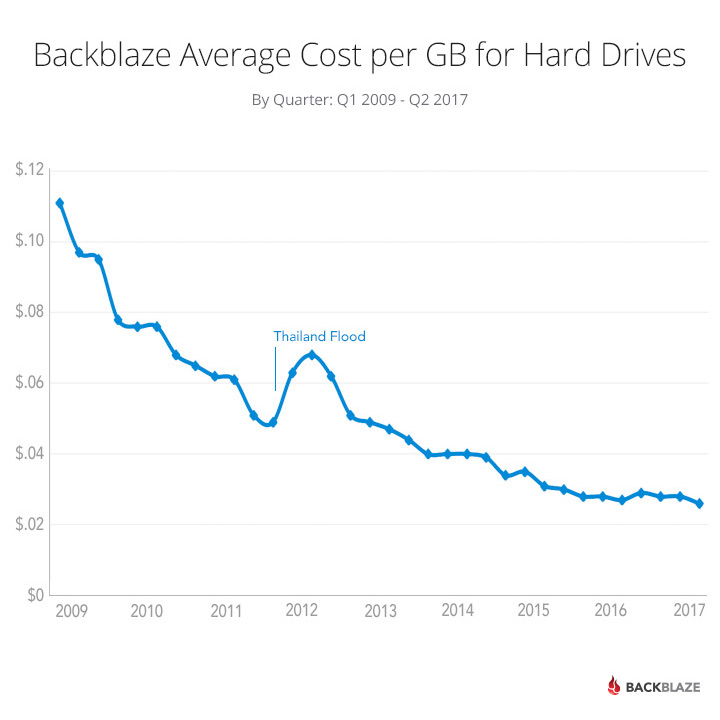
Do you always post nonsense to the internet without 10 seconds of research? Hard Drive Cost per GB Over Time
-
Re:Services
$5 per month for unlimited sounds pretty good, actually.
I currently backup to a network drive and periodically sync that to an offline drive.
How long do they maintain backups? Can I store other things (not just their backups)? For example, can I use my current software and just point it at BlackBlaze?
And if you pop for a year, it's $50, and $95 for 2 years, which works out to a measly $3.95/mo for UNLIMITED storage!
I am not sure about data retention. I assume it is perpetual. They advertise on their site that you can even retrieve VERSIONS of Files for up to 30 days, which is kind of cool (like a temporary Time Machine thing!). Plus there is a mobile app to access files on iOS or Android. And a Web Client for remote access, too. So, in a way, you could certainly use that as a type of "Cloud Storage". Just save the file Locally, and have BackBlaze (which runs CONTINUOUSLY) "back it up" to its Server. Then use the web/mobile portal to Retrieve the file. And if you have your computer with you; then BackBlaze IS backing it up, regardless. Don't have to be hooked to your TM Drive (it will "catch up" when you get back home). Oh, and BackBlaze DOES include External USB (don't know about TB)-connected drives in its Backups. But I don't think it will include a Networked NAS (see Cloud Storage, below).They also have a Free Trial.
Plus, if you're in a hurry, they can send you your Backup on a USB Stick or HDD for faster Restore.
One other thing: Their "Personal Backup" product is understandably (at that price) geared toward SINGLE Macs/PCs. There are other vendors that allow you to Backup multiple desktop and mobile clients on the same network; but those aren't nearly as inexpensive if you start getting above a few hundred GB. BackBlaze also has a "Business Backup" that allows centralized Administration/Provisioning of multiple devices; but I didn't look into the pricing. But a glance at their website makes it look like the pricing is the same as the Personal Backup; but with the addition of centralized Administration. Plus, I don't think they do any mobile-device backups. They also advertise "30-day rollback" of all backed-up machines and FREE loaner "Restore" Drive service (the Personal Backup charges $ to send you your Backup on physical media.
And while BackBlaze Backup isn't a "Cloud Drive" (I don't think), they have a companion product, "B2 Cloud Storage", that is.
Here's the site:
-
one man's huge ...
Even a 1% improvement in compression efficiency can make a huge difference.
Hard Drive Cost Per Gigabyte — July 2017
Looks like we're on track for $20/TB, if you purchase in bulk.
Let's monetize a "huge difference" at $1000 (which I regard as the smallest available value for a "huge difference").
Thus, your 1% extra compression needs to save 50 TB to make a "huge difference" of one large.
Correct me if I'm wrong, but I'm thinking your dataset needs to be on the order of 5 PB for a 1% compression improvement to shave 50 TB.
5 PB works out to 200,000 single-layer Blu-ray disks.
Nice home library. (I think we can already safely assume it's not mostly drama, unless you're Pacman-ratting a good half of the entire IMDB movie list, behind the darknet spider from hell.)
-
Re:About time...
We can argue until we're blue in the face about the PC "dying", but with lower volumes, who in their right mind would be flooding the market with cheap PC components? What else do you expect, honestly.
I was more than willing to pay for a reasonable increase but not 3-5x for 2x the capacity. Despite the drop in sales of PC / laptops and the rise of tablets, SSDs and HDDs didn't have the same ridiculous gouging.
Even HDDs got quite a bit cheaper per GB after the significant jump in price from the 2011 Thailand flooding
https://www.backblaze.com/blog... -
Re:Personally have had good luck with Seagate
Over time I've had pretty good luck with Seagate drives, and if you look at the data it seems some models are more stable than others...
Yeah, I outfitted a RAID array with the infamous ST3000DM001 several years ago and had to replace three or four of them during the two-year warranty period (as I recall, one of the warranty replacements itself crapped out fairly quickly). After the warranties ran out, I started replacing failures with WD and HGST and things have stabilized. Had I originally sprung for 4TB Seagates I probably would have been fine in comparison.
-
Re: So, by the sound of it...
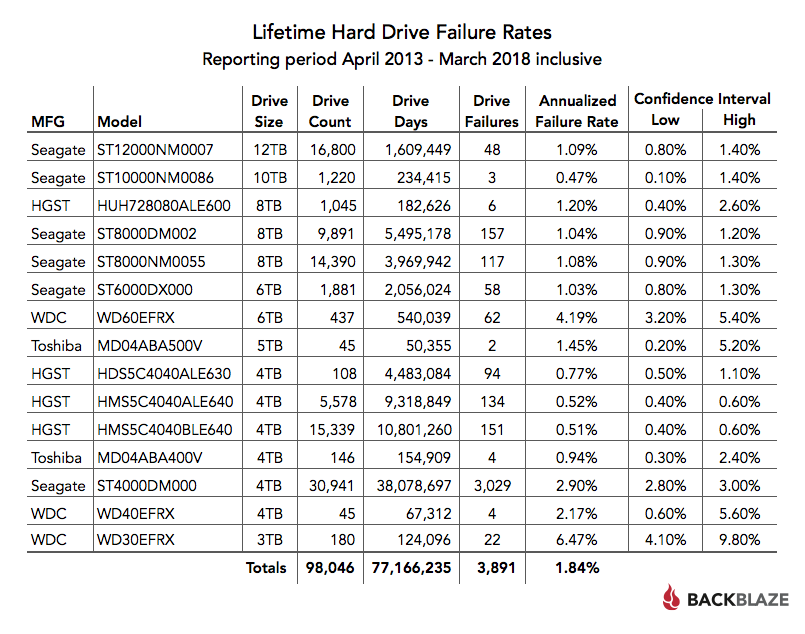
Their "lifetime" chart,however, might reveal a different story...
-
Re:Bummer
Yep. Just look at this graph:
https://www.backblaze.com/blog...
Oh wait, things are flattening out? I better sell my Bitcoin ASAP! -
Re:Bottom line
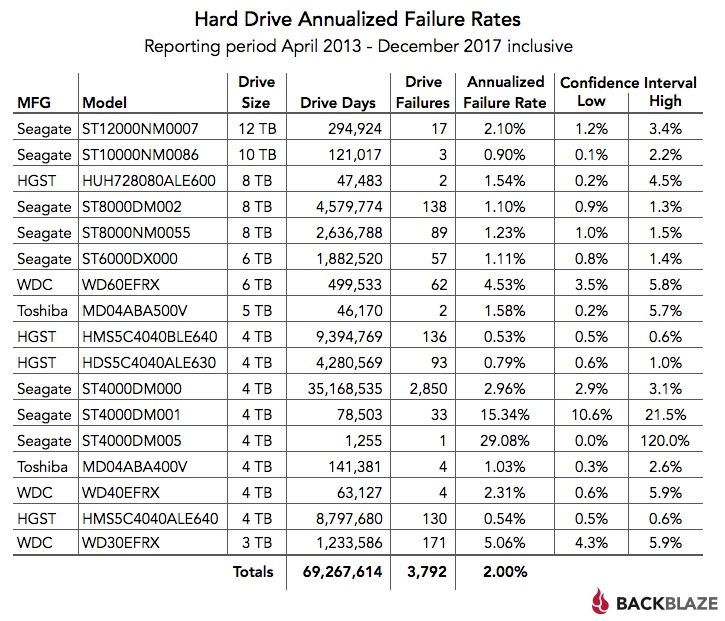
One thing that Backblaze could do to impart some robustness to their numbers is to provide statistical confidence intervals along with the single estimators.
Something like this chart, you mean:
https://www.backblaze.com/blog...Yes, exactly, but actually attached to all tables/charts and not just a few. It's not an accident that the small sample size tables don't have confidence intervals. Those are the tables that need them the most to indicate that the estimated values should be taken with a huge block of salt.
-
Re:Bottom line
One thing that Backblaze could do to impart some robustness to their numbers is to provide statistical confidence intervals along with the single estimators.
Something like this chart, you mean:
https://www.backblaze.com/blog... -
Re:This is the reason I only us HGST
Except that
https://www.backblaze.com/blog...
While I acknowledge that things may have changed since that particular report came out, it is up to Seagate to provide the actual real world testing that BackBlaze has, to prove different.
-
Re:Backblaze
> I want to be able to send ZFS snapshots, encrypted, to a remote location.
This is a REALLY common request and there are TONS of solutions. I think most of them were originally crafted to send your ZFS snapshots to Amazon S3 and/or Microsoft Azure, but now they work for Backblaze B2 also (and it is a LOT cheaper on Backblaze B2). If you look through the "integrations" list on this page you can choose your favorite: https://www.backblaze.com/b2/i...
If you don't have any favorites, one of the Backblaze IT people here uses "Duplicity Linux" to do EXACTLY what you describe. I'm not that familiar with Duplicity but their website claims they ship as a native part of Fedora, Debian, and Ubuntu. More info here: http://duplicity.nongnu.org/ -
Re:Backblaze
Disclaimer: I work at Backblaze.
> it doesn't sound like they have a Linux client
For Linux, Backblaze offers "B2 Object Storage" with a large list of established Linux clients supporting it. You can see the list on this web page: https://www.backblaze.com/b2/i... (for Linux, look for the little pictures of a penguin).
Solutions that backup to Backblaze B2 include: Duplicity, HashBackup, Transmit (by Panic), and rclone -
Backblaze B2
https://www.backblaze.com/b2/i... - Use an application that works, and you're set. If you want to be more cost aware, doing a local NAS and sync'ing what matters up to B2 centrally allows for more instant restores locally, but if the worst of events happens, you can pull the offsite data.
https://www.backblaze.com/blog... has more info -
Backblaze B2
https://www.backblaze.com/b2/i... - Use an application that works, and you're set. If you want to be more cost aware, doing a local NAS and sync'ing what matters up to B2 centrally allows for more instant restores locally, but if the worst of events happens, you can pull the offsite data.
https://www.backblaze.com/blog... has more info -
Re:Backblaze
https://www.backblaze.com/b2/c...
https://help.backblaze.com/hc/...
Disclaimer: No warranty expressed or implied by me, and I have never used it. -
Re:Backblaze
https://www.backblaze.com/b2/c...
https://help.backblaze.com/hc/...
Disclaimer: No warranty expressed or implied by me, and I have never used it. -
Re:Backblaze
B2 works on Linux. https://www.backblaze.com/b2/d...
-
Backblaze
I like this site. https://www.backblaze.com/ They have the basic backups, and also cloud storage options. It seems to met most, if not all, of your criteria.
-
Re: WTF --- So, no backups, at all?
Object storage has made proper archival backups for my company a little more manageable and more affordable.
Each server creates incremental backups of the necessary data every 8 hours (os config files, selective filesystem data, database dumps, etc).
From there the backup files are replicated into our backup cluster. The backup cluster then encrypts and replicates it all into both OVH's object storage and Backblaze's B2 object storage. The cluster only keeps the most recent 7 days on hand.
In object storage, we keep 6 weeks or so. Total cost for ~28TB is only about $300/mo between the two copies.
-
Re:backups
Backblaze allows you to create a private key so only you can decrypt your backups. https://www.backblaze.com/back...
-
Reed-Solomon Erasure Coding
https://www.backblaze.com/blog... There is also rsbep, see https://www.thanassis.space/rs...
-
Backblaze: SMART metrics of imminent failure
Backblaze made a report of what SMART drives they see indicating imminent drive failure: https://www.backblaze.com/blog...
-
Re: Live by the cloud,
Yep. 3 2 1. https://www.backblaze.com/blog...
-
Real article
Arstechnica just borderline copy&pasting from the source. See the actual article at: https://www.backblaze.com/blog...
Shame on Arstechnica for not even bothering to link their source material.
-
Re:Seriously?
I do wish Maxtor was still around. Had good results with them. Them and Seagate used to make my favorite drives. I have Seagate drives in some of my test/recovery machines that are 20 years old now. Mostly SCSI and they have worked flawlessly and continue to do so. Got some WD, mostly SCSI again, that have worked the same way. Hitachi, etc.
Something happened along the way with SG and their crap went down like the Titanic. At least in their consumer line. Last time I used SG, i replaced the drives in two 16 drive units. Granted, these were consumer drives in an enterprise environment, but they were lightly loaded in a 68 degree F server room, dual ac units, power conditioners, UPS, and generator. I had a drive fail the first day, 4 the first month and all had been swapped at least once within the first year. Not much better luck with the 600 other desktops/laptops I managed at that place. If I was lucky, I would have 10% last 2 years. Much better luck with HGST and Toshiba those days. WD ATA/SATA isn't much better. Depends on the batch I guess. Had batches last 5/6 years under server loads and some last just months. Backblaze has some interesting results. Seems all are hit and miss:
https://www.backblaze.com/blog...Right now I have a 42 drive SAN with SG. We'll see how they go. Array has only been up a month. Array it replaced was 8 y/o with 8 original Toshiba SAS drives.
Yes, Sony is to be avoided at all cost. They too used to have a good reputation.
-
Re:Commit it to memory!
Hey! I wrote a blog post about that once -> https://www.backblaze.com/blog...
-
Re:Come the fuck on
Whole manufacturers are not a safe bet, but product lines are. Just look at the stats for Backblaze's quarterly report. Sure, your environment might be more/less harsh, but manufacturing defects are a bigger problem.
Based on their report, there are definitely some great HGST. And some really bad WD Red. My Toshiba drives in my home RAID are going strong, but looks like they are having closer to 4% failure rate overall (though that is more recent, they had much lower stats when I bought).
-
Re:Not an advert - but Backblaze
There is no Backblaze application for *nix, but you can use their B2 storage from any OS: https://www.backblaze.com/b2/c...
Still, I wish they would hurry up and port the proper app to *nix.
-
Cloud vendor - Backblaze
I use https://www.backblaze.com/ and like it. I have about 3.5T backed up with them. You need a fairly speedy upload internet connection to back up that kind of data, but it works great for me. Also, they will not back up NAS, just hard drives on your computer, so keep that in mind.
-
Not an advert - but Backblaze
https://www.backblaze.com/clou...
$5/month unlimited data size (writes).
You can sync files back over or they will actually ship you a HD with your data; if you return the drive you get a refund of the drive cost but you're also free to keep it.
The cost for individual file reads is reasonable too.
No muss no fuss
-
Re:Reliability
Just to be absolutely clear - Backblaze does not use RAID inside each pod anymore, we use our own Reed-Solomon encoding across 20 drives in 20 different pods in 20 separate locations inside the datacenter. We open sourced the Reed-Solmon we use here: https://www.backblaze.com/blog... and you can read about how we organize the 20 different pods into a "Backblaze Vault" here: https://www.backblaze.com/blog...
From my brief skim, the information coding is basically the same technology as Raid6, save you have 3 parity drives instead of 2, which likely ups the complexity a bit.
If you are still reading this, I'm curious, what is the reliability of 17 data drives and 3 parity drives? I suspect I'm missing something. I'm fairly sure the coding for the 17+3 solution could be put back into Linux's software raid without a huge amount of trouble. The storage pods I glance at look like 3 sets of 20 drives. At a guess, you could probably use linux to assemble that same set into 3 sets of 20 drive software raid 6 arrays, and again, could probably do the 17+3 solution with work. With a fast intel cpu (AES-NI), you could probably offer encrypted storage as well, though again, there are details involved in mounting it and such automatically.
I'm not doubting that the Java solution works, nor that it is fast and reliable. It just seems odd not to just modify the Linux Software Raid solution directly.
Either way, much thanks for the hard drive failure data...
-
Re:Reliability
Just to be absolutely clear - Backblaze does not use RAID inside each pod anymore, we use our own Reed-Solomon encoding across 20 drives in 20 different pods in 20 separate locations inside the datacenter. We open sourced the Reed-Solmon we use here: https://www.backblaze.com/blog... and you can read about how we organize the 20 different pods into a "Backblaze Vault" here: https://www.backblaze.com/blog...
From my brief skim, the information coding is basically the same technology as Raid6, save you have 3 parity drives instead of 2, which likely ups the complexity a bit.
If you are still reading this, I'm curious, what is the reliability of 17 data drives and 3 parity drives? I suspect I'm missing something. I'm fairly sure the coding for the 17+3 solution could be put back into Linux's software raid without a huge amount of trouble. The storage pods I glance at look like 3 sets of 20 drives. At a guess, you could probably use linux to assemble that same set into 3 sets of 20 drive software raid 6 arrays, and again, could probably do the 17+3 solution with work. With a fast intel cpu (AES-NI), you could probably offer encrypted storage as well, though again, there are details involved in mounting it and such automatically.
I'm not doubting that the Java solution works, nor that it is fast and reliable. It just seems odd not to just modify the Linux Software Raid solution directly.
Either way, much thanks for the hard drive failure data...
-
Re:If it's working for them
Brian from Backblaze here.
> most reliability studies on electronics overall curiously do not equate temperature with average failure rates.
Backblaze looked into it in 2014 and we found no correlation: https://www.backblaze.com/blog...
In a conversation with some of the Facebook Open Storage people, they had seen increased failure rates at extremely high temperatures (somewhere up near 40 degrees Celsius) but our drives never get anywhere NEAR the temperatures required to correlate with failures. We monitor every drive for temperature, taking readings once every 2 minutes, and in all but a few unusual conditions (such as some fans have failed) most drives are really running cool at around 25 degrees Celsius. -
Re:If it's working for them
Brian from Backblaze here.
> What's the typical drive temperature in Backblaze's cases in their environment?
Short answer: the coolest drives are 21.92 Celcius and the hottest drive was 30.54 degrees.
I wrote this up above in response to a temperature question, copy and pasted here. The raw data dump from Backblaze includes drive temperatures as reported by "smartctl". You can find a complete set of historical data of all drive temperatures in the Backblaze datacenter here: https://www.backblaze.com/b2/h...
We analyzed the failures correlated with temperature in this blog post in 2014: https://www.backblaze.com/blog...
In a conversation with some of the Facebook Open Storage people, they said hard drives have increased failure rates at extremely high temperatures (somewhere up near 40 degrees Celcius) but our drives never get anywhere NEAR the temperatures required to correlate with failures. We monitor every drive for temperature, taking readings once every 2 minutes, and we have had situations where the drive temperatures caused our internal warning alerts to go off (well below those catastrophic levels Facebook saw failures at). When we go to investigate, the most common cause of rising pod drive temperature is that some of our fans in that pod have died. We used to have 6 gigantic fans to keep it cool, but we reduced it to 3 with no increase in drive temperature. If one of the fans dies it doesn't get warm enough to set off any alerts, but if 2 out of 3 fans die it can't move enough air to keep the pod within reasonable operating temperatures. We don't monitor the fans directly, but drive temperature has been such a good proxy for it we don't feel any pressing need to figure out how to monitor the fans. -
Re:If it's working for them
Brian from Backblaze here.
> What's the typical drive temperature in Backblaze's cases in their environment?
Short answer: the coolest drives are 21.92 Celcius and the hottest drive was 30.54 degrees.
I wrote this up above in response to a temperature question, copy and pasted here. The raw data dump from Backblaze includes drive temperatures as reported by "smartctl". You can find a complete set of historical data of all drive temperatures in the Backblaze datacenter here: https://www.backblaze.com/b2/h...
We analyzed the failures correlated with temperature in this blog post in 2014: https://www.backblaze.com/blog...
In a conversation with some of the Facebook Open Storage people, they said hard drives have increased failure rates at extremely high temperatures (somewhere up near 40 degrees Celcius) but our drives never get anywhere NEAR the temperatures required to correlate with failures. We monitor every drive for temperature, taking readings once every 2 minutes, and we have had situations where the drive temperatures caused our internal warning alerts to go off (well below those catastrophic levels Facebook saw failures at). When we go to investigate, the most common cause of rising pod drive temperature is that some of our fans in that pod have died. We used to have 6 gigantic fans to keep it cool, but we reduced it to 3 with no increase in drive temperature. If one of the fans dies it doesn't get warm enough to set off any alerts, but if 2 out of 3 fans die it can't move enough air to keep the pod within reasonable operating temperatures. We don't monitor the fans directly, but drive temperature has been such a good proxy for it we don't feel any pressing need to figure out how to monitor the fans. -
Re:High failure rate
Brian from Backblaze here.
> I think their pods only have GigE interfaces
Originally (up until 3 years ago) that was true, but all new pods have 10 GbE interfaces, and 100% of the pods in our "Backblaze 20 pod Vaults" have 10 GbE interfaces. And there are some really strange (and wonderful) performance twists on using 20 pods to store each file: when you fetch a 1 MByte file from a vault, we need 17 pods to respond each supplying only 60k bytes to reassemble the complete file from the Reed Solomon. So the actual bandwidth when fetching just one medium size file can reach more like 170 Gbit/sec theoretical bandwidth. However, if you tried to fetch ALL the files from a pod all at once, the raw 7200 RPM drive performance is our current limiting factor.
Here is a link to a blog post on the 20 pod Backblaze Vault architecture: https://www.backblaze.com/blog...
Here is a link to the Reed Solomon encoding we open sourced that we use on the 20 pod Vaults: https://www.backblaze.com/blog... -
Re:High failure rate
Brian from Backblaze here.
> I think their pods only have GigE interfaces
Originally (up until 3 years ago) that was true, but all new pods have 10 GbE interfaces, and 100% of the pods in our "Backblaze 20 pod Vaults" have 10 GbE interfaces. And there are some really strange (and wonderful) performance twists on using 20 pods to store each file: when you fetch a 1 MByte file from a vault, we need 17 pods to respond each supplying only 60k bytes to reassemble the complete file from the Reed Solomon. So the actual bandwidth when fetching just one medium size file can reach more like 170 Gbit/sec theoretical bandwidth. However, if you tried to fetch ALL the files from a pod all at once, the raw 7200 RPM drive performance is our current limiting factor.
Here is a link to a blog post on the 20 pod Backblaze Vault architecture: https://www.backblaze.com/blog...
Here is a link to the Reed Solomon encoding we open sourced that we use on the 20 pod Vaults: https://www.backblaze.com/blog... -
Re:High failure rate
Brian from Backblaze here.
> I also wonder if we'll ever get numbers from Backblaze on things like the actual temperature
The raw data dump includes drive temperatures as reported by "smartctl". You can find a dump here: https://www.backblaze.com/b2/h...
We analyzed the failures correlated with temperature in this blog post in 2014: https://www.backblaze.com/blog...
In a conversation with some of the Facebook Open Storage people, they said hard drives have increased failure rates at extremely high temperatures but our drives never get anywhere NEAR the temperatures required to cause failures. We monitor every drive for temperature, taking readings once every 2 minutes, and we have had situations where the drive temperatures caused our internal warning alerts to go off (well below those catastrophic levels Facebook saw failures at). When we go to investigate, the most common cause of rising pod drive temperature is that some of our fans in that pod have died. We used to have 6 gigantic fans to keep it cool, but we reduced it to 3 with no increase in drive temperature. If one of the fans dies it doesn't get warm enough to set off any alerts, but if 2 out of 3 fans die it can't move enough air to keep the pod within reasonable operating temperatures. We don't monitor the fans directly, but drive temperature has been such a good proxy for it we don't feel any pressing need to figure out how to monitor the fans. -
Re:High failure rate
Brian from Backblaze here.
> I also wonder if we'll ever get numbers from Backblaze on things like the actual temperature
The raw data dump includes drive temperatures as reported by "smartctl". You can find a dump here: https://www.backblaze.com/b2/h...
We analyzed the failures correlated with temperature in this blog post in 2014: https://www.backblaze.com/blog...
In a conversation with some of the Facebook Open Storage people, they said hard drives have increased failure rates at extremely high temperatures but our drives never get anywhere NEAR the temperatures required to cause failures. We monitor every drive for temperature, taking readings once every 2 minutes, and we have had situations where the drive temperatures caused our internal warning alerts to go off (well below those catastrophic levels Facebook saw failures at). When we go to investigate, the most common cause of rising pod drive temperature is that some of our fans in that pod have died. We used to have 6 gigantic fans to keep it cool, but we reduced it to 3 with no increase in drive temperature. If one of the fans dies it doesn't get warm enough to set off any alerts, but if 2 out of 3 fans die it can't move enough air to keep the pod within reasonable operating temperatures. We don't monitor the fans directly, but drive temperature has been such a good proxy for it we don't feel any pressing need to figure out how to monitor the fans. -
Re:High failure rate
Brian from Backblaze here.
> Perhaps they don't keep the temperature as cool as they should in order to save a few bucks?
The colocation datacenter is SunGard in Rancho Cordova California and there are other tenants. I assume the temperature of the datacenter is industry standard? But even better, in the raw data dump it includes all the temperatures of all the hard drives, so you (or anybody) could check the correlation. We looked into it in 2014 and didn't find much correlation between temperature and hard drive failure as long as we kept the temperature of any one hard drive well below a tipping point (which we do). Here is the blog article and stats behind our analysis: https://www.backblaze.com/blog... -
Re: Not SSD Drives
Brian from Backblaze here.
> back blaze
That's not true. We provide a COMPLETE dump of the raw data for anybody who wants to download it. Here is a link for the lazy: https://www.backblaze.com/b2/h... -
Re:Reliability
> Protection against data loss is done with backups, not RAID.
RAID helps against data loss for some causes of data loss (like hard drives going bad).
However, RAID doesn't protect against human error or software bugs - if you tell a RAID system to delete a file it is deleted - RAID does not mean you can roll back time. If you have a "backup" from a few days ago, if you realize you just destroyed some data with user error, you can use the backup to recover most of the data you just lost.
Just to be absolutely clear - Backblaze does not use RAID inside each pod anymore, we use our own Reed-Solomon encoding across 20 drives in 20 different pods in 20 separate locations inside the datacenter. We open sourced the Reed-Solmon we use here: https://www.backblaze.com/blog... and you can read about how we organize the 20 different pods into a "Backblaze Vault" here: https://www.backblaze.com/blog... -
Re:Reliability
> Protection against data loss is done with backups, not RAID.
RAID helps against data loss for some causes of data loss (like hard drives going bad).
However, RAID doesn't protect against human error or software bugs - if you tell a RAID system to delete a file it is deleted - RAID does not mean you can roll back time. If you have a "backup" from a few days ago, if you realize you just destroyed some data with user error, you can use the backup to recover most of the data you just lost.
Just to be absolutely clear - Backblaze does not use RAID inside each pod anymore, we use our own Reed-Solomon encoding across 20 drives in 20 different pods in 20 separate locations inside the datacenter. We open sourced the Reed-Solmon we use here: https://www.backblaze.com/blog... and you can read about how we organize the 20 different pods into a "Backblaze Vault" here: https://www.backblaze.com/blog... -
Or because of this:
https://www.backblaze.com/blog...
I'd say the *real* question is will be how reliable will their HD be after they fire 14% of their workforce... of course no one will figure this out for sometime, and they will have made their money by then, at which point it will be some other CEO's problem likely.
Also they probably the only reason they can get away with this is that all the companies have been consolidated in to 4, and they all do the work pretty much in the same geographical location (as we saw as few years ago with that flood and the following profiteering).
-
Re:Is cheaper really better?
> By chance do you guys sell the hardware for the storage boxes?
You are in luck! Backblaze does NOT sell the hardware, but we give the design away entirely for free (and others sell it unassembled or assembled for a tiny markup). You can review the latest design here including downloading schematics and specs and parts lists to assemble your own: https://www.backblaze.com/blog...
It sounds like you only want one, and you may not want to worry about assembling it yourself, so you should definitely check out: http://www.45drives.com/ who will sell you a completely assembled storage pod without drives, or may still even sell you a "kit" of the parts that you have to build yourself to save some money.
Backblaze doesn't get anything at all from this, so you might ask why it is all this way. Two things: first of all, we aren't in the business of making and selling hardware, we sell raw storage as a service (our B2 product line) and also we sell online backup. It doesn't HURT Backblaze to release the designs and we get a little free press and good will about it and people hear our name and might want to purchase the OTHER products we actually charge money for. Also, the very nice people at "45 drives" helped us when we were starting out by prototyping our sheet metal and helping with industry cad drawings and such (we were mostly software people, don't know much about manufacturing) so we simply want good things for them. Finally, Backblaze benefits by a larger ecosystem of people using this design. Some of the past improvements have been contributions from OTHER companies and people improving our original design and giving back the improvements. -
Re:Is cheaper really better?
Brian from Backblaze here. This is exactly correct. We have redundancy across multiple computers in multiple locations in our datacenter, so losing one drive is usually a calm, non critical event that we take up to 24 hours to replace at our leisure during business hours.
If you are interested in details of our redundancy, here is a blog post about our "Vaults": https://www.backblaze.com/blog...
Summary of article: Backblaze uses Reed-Solomon coding across 20 computers in 20 locations in our datacenter. It is a 17 data drive plus 3 parity configuration, so we can lose any 3 entire pods in 3 separate racks in our datacenter and the data is still completely intact and available. -
Re:Why does this matter?
They were still using 3TB Seagates in their last report (Q4 2015). They discontinued all use of them as a result of their findings.
-
Better Source
I realize advertising is king here, but a link to the original and far more detailed report would have been nice. https://www.backblaze.com/blog...