Slashdot Mirror
Domain: backblaze.com
Stories and comments across the archive that link to backblaze.com.
Comments · 162
-
Actual link to report
And not some news website which doesn't even have the courtesy to provide a link to the actual source report.
https://www.backblaze.com/blog/hard-drive-reliability-stats-q1-2016/
It includes historical models as well as statistical confidence intervals - very useful for determining which model drive is more reliable. I know everyone wants to use an easy rule like "Seagate bad" when buying, but it's not that simple. Each new model of drive includes new design changes to try to increase capacity, improve speed and reliability, and/or reduce cost. Sometimes these design changes work, sometimes they don't and the model is less reliable (e.g. Samsung 840 EVO). The statistics have the greatest orthogonality when broken down by model, not by manufacturer. -
Re:That webpage
-
Storage space vs processing power
When it comes to working with servers and cloud storage, there's two different issues.
The first is just storing gobs and gobs of data. That should be considered solved.
Backblaze had to solve that. They got a really good, scalable, cheap system -- and they tell you how they did it, with enough information to replicate what they did. See their blogs: https://www.backblaze.com/blog... for how to make cheap storage _hardware_, and https://www.backblaze.com/blog... for how to design the storage "file system" to spread load around.
But data storage is only step one. You have to have the CPU power to search all that data. You have to have ways to read lots of data, and make it available for people to search through.
That's Google's specialty. They haven't shared everything that they've learned. Other than saying that when you get to their size, all old problems become new ones again, and old solutions need to be challenged/rethought.
How do you manage to replicate data across multiple data centers, such that you know how many copies of a file are still accessible, given that at that size, drive failures are a matter of rate rather than merely probably. How do you manage synchronized data writes when, even if the low-level data at a given site is a RAID that has low-level self correction, the high-level is 7 copies in 7 different data centers, and if you ever think you are down to 3 or fewer live copies you replicate new ones -- and still permit people to update and synchronize changes.
And that's before you even begin to look at processing all that data.
For Apple to be looking at this, they are basically saying, "we are becoming a significant fraction of Google's data/processing size, and starting to run into the same problems that Google had to solve".
-
Storage space vs processing power
When it comes to working with servers and cloud storage, there's two different issues.
The first is just storing gobs and gobs of data. That should be considered solved.
Backblaze had to solve that. They got a really good, scalable, cheap system -- and they tell you how they did it, with enough information to replicate what they did. See their blogs: https://www.backblaze.com/blog... for how to make cheap storage _hardware_, and https://www.backblaze.com/blog... for how to design the storage "file system" to spread load around.
But data storage is only step one. You have to have the CPU power to search all that data. You have to have ways to read lots of data, and make it available for people to search through.
That's Google's specialty. They haven't shared everything that they've learned. Other than saying that when you get to their size, all old problems become new ones again, and old solutions need to be challenged/rethought.
How do you manage to replicate data across multiple data centers, such that you know how many copies of a file are still accessible, given that at that size, drive failures are a matter of rate rather than merely probably. How do you manage synchronized data writes when, even if the low-level data at a given site is a RAID that has low-level self correction, the high-level is 7 copies in 7 different data centers, and if you ever think you are down to 3 or fewer live copies you replicate new ones -- and still permit people to update and synchronize changes.
And that's before you even begin to look at processing all that data.
For Apple to be looking at this, they are basically saying, "we are becoming a significant fraction of Google's data/processing size, and starting to run into the same problems that Google had to solve".
-
Re:"Open Source"
We recently bought a set of servers from ___, Enterprise VMWare destined servers, and the SSDs? LiteOn. Which failed to deliver the performance needed for the job. Flat out didn't work. Granted, the company _____ replaced the drives, eventually, after we proved they were not capable. The problem I have, is I would NEVER have spec'ed LiteOn Drives for anything even close to "Enterprise".
And in the end, we wasted nearly 4 Man Months of time trying to fix the problem.
And my boss, buys Enterprise, even when I can PROVE that they are exactly the same, off the shelf consumer products, for twice the price. Me, I would buy two for the price of "Enterprise" and keep one on the shelf as a Spare. Knowing where you can get the perfomance you need, at a price that isn't "Enterprise" often allows you to stretch your IT budget AND provide the support your organization needs.
I'll pay for support, I'll even pay a lot for support. But I won't pay for "Enterprise" that is only "consumer" with a new label.
Here is BACKBLAZE's article on Drives t hat kind of supports my view
-
Re:So, reinventing the wheel again
That's the point Backblaze *HAVE* opened their storage system so anyone can copy it.
-
been done. Backblaze, Super Micro are well known
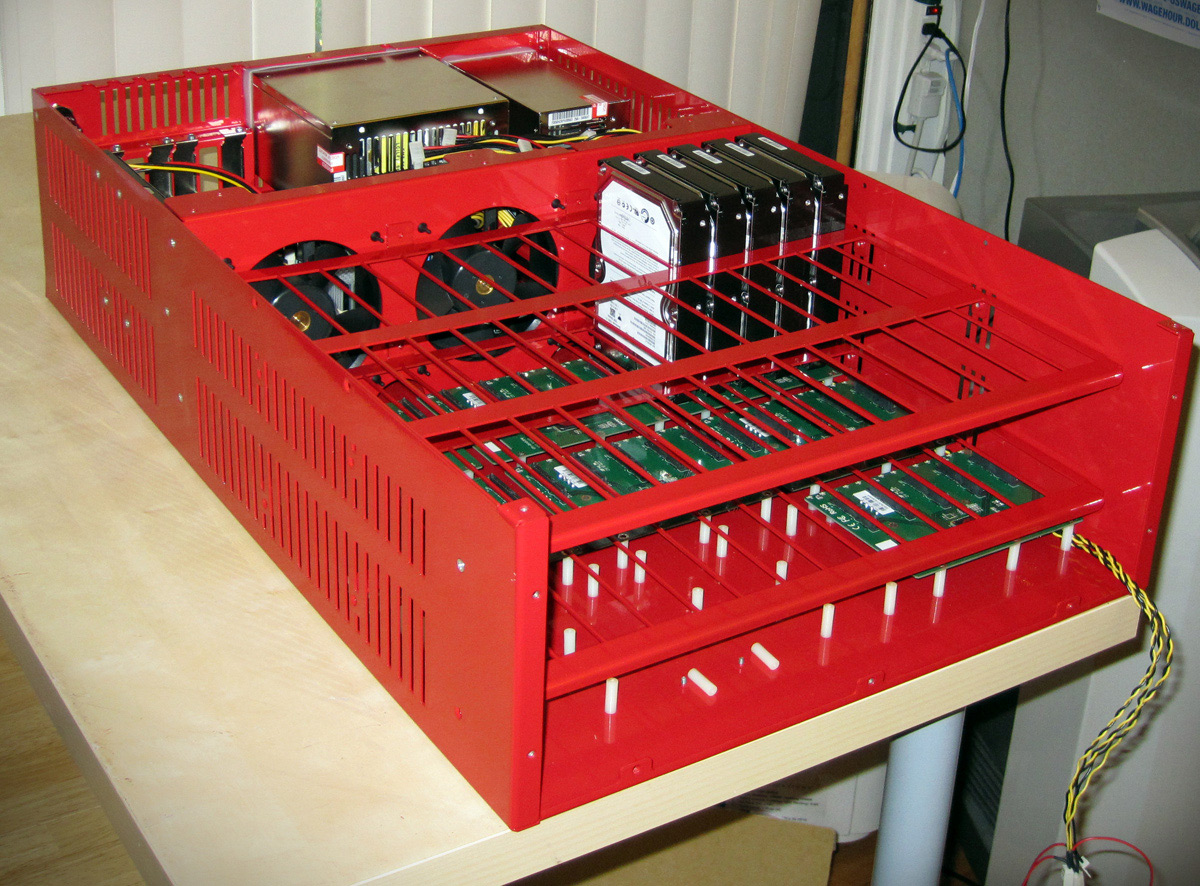
The Backblaze implementation of top-loading drives is one well-known example. They've 45 drives in 3U (or 4U?) for many years.
https://www.backblaze.com/blog...Nowadays you can order a 90-bay top loader off the shelf from Super Micro:
http://www.supermicro.com/prod... -
Re: Not very useful.
I've seen it happen.
Anecdotes are not data.
They don't seem to have seen any problems
"About a year ago, we took a group of Storage Pods and removed the 3 fans at the end, leaving just three middle fans to cool the unit. We placed these pods into production and monitored the temperature of the hard drives utilizing the SMART stats we take each day. Nothing changed, as the drives stayed cool and didn’t fail at higher rates."
The average drive temperatures are overwhelmingly in the 18-26 degree range. That means if there are an appreciable fraction of drives (15-20% you seem to be implying) are typically reaching the 40-50 degree mark, then to keep the overall average so low there must also be a decent percentage of drives at mid-teens, if not lower, temperatures. How do you think operating drives are going to sustain temperatures that low ?
There is no evidence that drives in Backblaze pods are overheating. So either we can take the reasonable and logical conclusion - that they're not - or we can take the conclusion that they're lying about drive temperatures for some reason.
Remember we are describing shoving drives in anywhere they will fit instead of a server case designed by someone that went somewhere near a technical college or university for anything other than coding.
Yeah, you're right. I'm sure a company with a massive business interest in designing high-capacity storage servers hasn't invested a cent in hiring or consulting people with expertise in the field. </SARCASM>
Like I said, their design is largely the same as Sun's X45xx series. So they're far from the first to line up drives one behind the other.
Also with respect, it's the peak temperatures and not the averages that really matter if heat is killing those drives.
What evidence is there that peak temperatures and more significant than sustained temperatures ? What evidence is there heat is killing drives at all ?
-
Re: Not very useful.
It appears you don't understand the situation since they don't have typical servers but have drives packed in very tightly in multiple rows.
I'm quite aware of "the situation" as I've been watching Backblaze's designs for years and I've spent 15+ years dealing with Tier 1 server hardware. They're quite clearly inspired by Sun's X45xx Thumper series, with vertically stacked drives. Yes, the drives at the back will get hotter than those at the front, but it is difficult to see them getting anywhere close to 50. You do not need to shift a huge amount of air over a drive to make a non-trivial difference to how hot it gets. Even a slow-spinning, practically silent fan like some manufacturers put in their 4-in-3 cages will knock 5-10C off the typical operating temperature of drives (unless the ambient is high).
Ambient temperature matters because blowing <20 degree air through a case (datacentre scenario) will obviously have a better cooling effect than blowing 25+ degree air through a case (average home scenario).
Here is some temperature information from Backblaze. It shows what I expect, with the vast majority of drives under 30 degrees. Without bothering to check drive specs, I'm going to guess all the drives at the hotter end of the scale are 7200rpm models.
-
Re: Not very useful.
They keep their drives between 20 and 30 degrees Celsius and find no correlation at all between drive failure and temperature: https://www.backblaze.com/blog...
-
Re:Doesn't make any mention of..
Brian from Backblaze here.
The individual drives in our datacenter run ext4 (the OS is Debian). We do an extremely simple Reed-Solomon encoding that is 17+3 (17 data drives and 3 parity) but the 20 drives are spread across 20 different computers in 20 different locations in our datacenter. This means we can lose any 3 drives and not lose data at all.
We released the Reed-Solomon source code free (open source but even better) for anybody else to use also. You can read about it in this blog post: https://www.backblaze.com/blog... -
Re:Sorry WD fans
They make the Full data set available so you can run your own stats.
-
Re:Oh yeah!
> MTBF means nothing, because of the realy stupid way it's calculated...
I'm not disagreeing with you, but isn't MTBF -- when combined with warranty and AFR -- an overall expression of a hard drive manufacturer's engineering confidence in the product?
Backblaze among others have noted that it's really difficult to estimate failure rates because the sample sizes are too small at present (see https://www.backblaze.com/blog... ). So it's fair to say the jury is still out as to whether the decrease in operating temperature, vibration, and carbon deposits as a result of using a helium-sealed drive represents a real-world improvement in reliability yet, or if it matches AFR rates.
However, MTBF when combined with the AFR estimates -- which I agree are a better measure, and Seagate was an industry leader in implementing them -- the overall picture seems to be higher manufacturer confidence in the product.
Disclaimer: I'm an Oracle employee. My opinions do not necessarily reflect those of Oracle or its affiliates.
-
Re:Same setup for MacBook, except for online backu
I currently use BackBlaze, and it's soooooo damned stable, light-weight and easy to use... I wonder if there's self hosted alternative?
BackBlaze stores your private key on their servers:
https://www.backblaze.com/back...
That doesn't seem very private to me. In fact, when you want to restore your data, the data is decrypted on the BackBlaze server, then zipped and the zip file is sent with the unencrypted files. You can add a passphrase to the private key, but again this passphrase needs to be entered into the BackBlaze website so that the files can be decrypted on the server. They promise not to store the passphrase. I love promises. -
Re:Helium
The MTTF makes a big difference to large installations. (I don't know what MTFB is besides a typo in the article -- Mean Time to Fail Badly, perhaps? In any case, MTTF is the better measure of hard drives as they're pretty much not worth repairing, as MTBF would measure.)
We have one installation that operates 60,000 hard drives that spin a total of 24*60000 = 1,440,000 hours per day. A MTTF of 2.5 million hours means I can expect one of these drives to fail every other day. While that would be much better than our current rate of 12 failures per day, and would save us a lot of money on maintenance contracts, it doesn't mean the drives are impervious to failure. It just means that their failures are less expensive than our current drives.
I also have a hard time believing any disk manufacturer's claims for longevity, because we often prove them wrong. We bought a handful of "enterprise class" drives for a dozen workstations that claimed a 1.2 million hour MTTF. We had 8 out of 24 drives fail within 50,000 hours (5 years), for an actual MTTF of less than 150,000 hours (the failures happened after burn-in but before the 5 year mark, which is when the machines were replaced.) Claims of 2.5 million hours MTTF just don't ring true.
MTBF is what the spec sheet says, but AFR (annualized failure rate) is what the manufacturers pay attention to. A MTBF of 2.5 million hours translates to 0.35% AFR, which is pretty low. However, looking at Backblaze's studies shows that there are drive models that get pretty close to the 1 to 2 million hours MTBF equivalent of AFR. Of course, there's a difference between manufacturers, and this WD drive is actually a HGST drive, and HGST drives tend to be more reliable. There are also differences between models and failure rates reflecting early-life failures versus the "bottom of the bathtub" behavior.
-
Re:They don't want Skylake to be fast
The large cloud providers have already shifted to "consumer" hard drives to save money, knowing that their failure rates will be more than compensated for by lower unit costs.
Consumer drives do NOT have higher failure rates. The myth that "enterprise" drives are more reliable has been debunked by research done by Backblaze and Google.
-
Ignorant people are ignorant.
Sgt. Dave Burke said, "We don't just buy stuff from Amazon as you suggested.
But you should. Looking at the data provided by one of the largest consumers of hard drives, there is little or no difference between Consumer drives and Enterprise drives. The only thing you get with Enterprise is higher prices, used to offset warranty replacements. Replace your drives every 36 Months.
https://www.backblaze.com/blog...
-
Backblaze Storage Pod?
What are your performance requirements. If you just need a giant dump of semi-offline storage then look into building a backblaze Storage Pod.
https://www.backblaze.com/blog...For about $30,000 you could build four storage pods. Speed would not be terrific. Backups are handled through RAID. If you want faster, more redundant or fully serviced your next step up in price is probably a $300,000 NAS solution. Which might serve you better anyway.
-
Buy a Storage Pod
Buy Storage Pods, designed by BackBlaze. You can get 270TB of raw storage in 4U of rackspace for $0.051 per gigabyte. Total cost for half a petabyte of raw storage: $27,686. To back it all up cheaply but relatively effectively, buy a second set to use as a mirror. $55,372. For use with off-the-shelf software (FreeNAS running ZFS or Linux running mdm RAID) to present a unified filesystem that won't self-destruct when a single drive fails, you'll need to over-provision enough to store parity data. Go big or go home. Just buy another pod for each of the primary and the backup sets. Total of 6 pods with 1620TB of raw storage: $83,058. Some assembly required. And 24U of rackspace required, with power and cooling and 10Gbe ethernet and UPSs (another 4-8U of rackspace).
Expect a ballpark price of something a little under $100,000 that will meet your storage requirements with sufficient availability and redundancy to keep people happy. It will require 2 racks of space, and regular care and feeding. Do the care and feeding in house. A support contract where you pay some asshole tens of thousands of dollars a year to show up and swap drives for you is a waste of money. Bearing that in mind, as other posters have said, talk to storage vendors selling turnkey solutions. Come armed with these numbers. When they bid $1 million, laugh in their faces. But there's an outside chance you'll find a vendor with a price that is something less than hyperinflated. Stranger things have happened.
If you don't generate data very quickly, you can ease into it. For around $35,000, you can start with just 2 pods and the surrounding infrastructure, and add pods in pairs as necessary to accommodate data growth. Add $27,000 in 2 chassis next year to double your space. Add $26,000 of space again in 2017 and increase your raw capacity another 50%. (Total storage cost using BackBlaze-inspired pods is dominated by hard drive prices, which trend downwards.) When you find out your users underestimated growth, another $25,000 of space in 2018 takes you to somewhere in the neighborhood of 2 petabytes of raw storage, that you're using with double parity and 100% mirrored backup for a total effective useable space of approximately 918TB. You'll be replacing 2-3 drives per year, starting out, and 0-1 after infant mortality has run its course. Keep extras in a drawer and do it yourself in half an hour each on a Friday night. If you configured ZFS with reasonably sized vdevs, (3-5 devices) the array rebuild should be done by Monday morning. By 2020, you'll be back up to replacing 2-3 drives per year again as you climb the far side of the bathtub curve. While you're at it, you can seriously consider replacing whole vdevs with larger capacity drives, so your total useable space can start to creep up over time, without buying new chassis. By 2025, you will have 8 chassis in two racks hosting 2.88PB of raw storage space that's young and vital and low maintenance, having spent roughly $200,000.
A bargain, really.
-
Re:Goodbye!
If you need storage, take design tips from the experts.
-
Re:Very old news
I would not trust those Backblaze stats.. A quick inspection of blackblaze storage pods indicates an improper(vertical) mounting method.
This vertical configuration would likely cause a premature failure rate for drives that are designed for side or horizontal(preferred) mounting configurations.
Disk drives drive mounted in this particular vertical configuration places abnormal amounts of thermal and mechanical related stress (the entire mass of drive+internal movements) on the SATA Power and Data connections (a condition they were never rated for).
Note: You can probably get away with this type fixed mount configurations(SATA+Power) for 2.5" SATA drives since they have significantly reduced mass (20x less)) per drive. I've designed many different types of drive bays(SCSI, SAS, etc) and would never consider stressing connectors in this manor.
In summary, The observed failure rate may be more indicative of an improper storage array design, rather than the drives themselves, which may have faster seek times, resulting in increased dynamic forces stressing the SATA connections over time.
-
Re:Very old news
I would not trust those Backblaze stats.. A quick inspection of blackblaze storage pods indicates an improper(vertical) mounting method.
This vertical configuration would likely cause a premature failure rate for drives that are designed for side or horizontal(preferred) mounting configurations.
Disk drives drive mounted in this particular vertical configuration places abnormal amounts of thermal and mechanical related stress (the entire mass of drive+internal movements) on the SATA Power and Data connections (a condition they were never rated for).
Note: You can probably get away with this type fixed mount configurations(SATA+Power) for 2.5" SATA drives since they have significantly reduced mass (20x less)) per drive. I've designed many different types of drive bays(SCSI, SAS, etc) and would never consider stressing connectors in this manor.
In summary, The observed failure rate may be more indicative of an improper storage array design, rather than the drives themselves, which may have faster seek times, resulting in increased dynamic forces stressing the SATA connections over time.
-
Re:Interesting , from Seagate
I'm interested to note this source was a representative of Seagate.
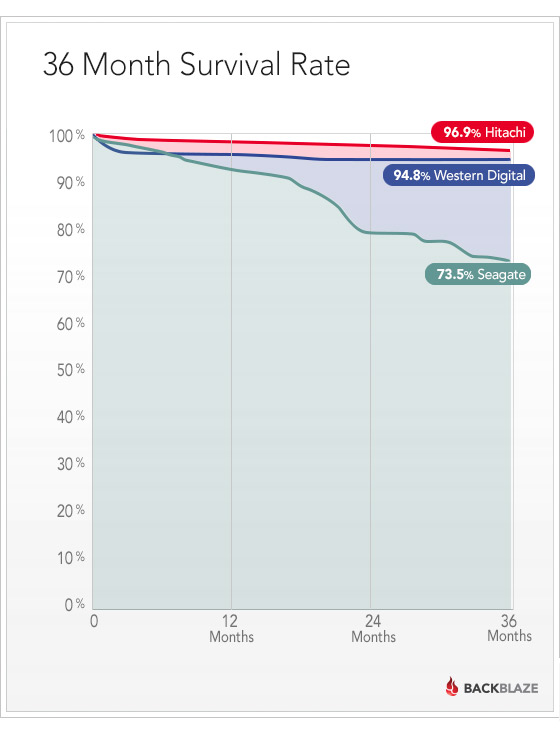
It is also interesting to note that Seagate's HDDs are the least reliable. Hitachi's are the most reliable. I don't know how much Seagate's lack of attention to quality in their HDDs is reflected in their SSDs.
-
Re:How powered off is "powered off"?
You may be right in case of other equipment, but enterprise grade drives are really better.
BackBlaze disagrees with you:
https://www.backblaze.com/blog...
Overall, I argue that the enterprise drives we have are treated as well as the consumer drives. And the enterprise drives are failing more.... Enterprise drives do have one advantage: longer warranties. That’s a benefit only if the higher price you pay for the longer warranty is less than what you expect to spend on replacing the drive. This leads to an obvious conclusion: If you’re OK with buying the replacements yourself after the warranty is up, then buy the cheaper consumer drives.
-
Re:Power Costs
It seems that one assumption in the study is predictable or consistent failure rates or timing.
That would be a very bad assumption. Backblaze looked at 100,000+ drives and found that some models were more than 30 times as likely to fail as others (Hitachi was most reliable, Seagate was worst, for the models they reported). They also found that consumer drives were slightly more reliable than enterprise drives, despite costing half as much.
-
Re:"NAS" hard drives?
They are mechanically better.
Can you provide a citation for that?
But they lack specific mechanical features of enterprise drives that are meant to deal with vibrational issues related to having a large number of drives in a single enclosure.
Wouldn't that make "enterprise" drives more reliable? Except, actual data shows that they are NOT more reliable. So maybe "enterprise drive" is just a BS marketing term to separate fools from their money, and that is why everyone that has actually looked at the facts, such as Google, Facebook, etc. doesn't waste their money on them.
-
Re:To save you the click through trouble...
There are some useful bits in the blog post by Backblaze, as they care a lot about making a good choice between the two 6TB drives.
-
Re:Ok, let's hear all the stories how Seagate suck
Just to ensure that the GP's post is self-fulfilling:
Backblaze's reliability report shows that HGST Deskstar drives are currently the most reliable on the market.As someone who also bought one 75GB Deathstar and ended up returning it 3 times before I put it on the shelf with a red X as a momento I couldn't believe it.
-
Re:How about transfer rate and reliability?
--I'm with you 99% as far as ZFS. The thing is, I *don't need* a 100TB hard drive, that's a single point of failure with WAY too much data on it to try and copy off before it dies.
--I'd like to see a drive that stores multiple copies of files like ZFS natively, so in the event of $badthings, the end-user has some way to recover files. (It might be nice to have RAID1 on the same drive, with independent heads between the platters.) I'd like to see a drive that goes beyond SMART diagnostics and gives you a really good indicator that it will fail soon. And all of this needs to work well / transparently with Linux and other OS's.
--A 5-year HD lifetime should also be a *given* anymore by default, but WD Black drives are about the only ones I trust for that. (I'm open to others tho, but WD's warranty/RMA process is really good as well.) Hitachi looks promising according to the Backblaze report*, but I'm not sure about the prices and their RMA process.
-
Re:ugh
I had three new Seagate 1TB drives fail in less than a year. The variance in failure rates between manufacturers is immense.
HDD failure data on 27,000 drives by Backblaze, showed that Seagate is the least reliable brand. Seagate's 1TB drives are particularly unreliable. They found that Hitachi drives are the most reliable, with WD in the middle.
-
A few ideas
Cheap/offline method: Buy a portable USB drive. Periodically back up your data to it and store it offsite somewhere (e.g at your work, with a friend or family etc...).
Cloud method: Use something like Backblaze or buy a bunch of Dropbox or Amazon S3 storage and sync it.Assuming that you remember your friends/family and physically look the same and/or you remember your passwords then neither of the above methods require
significant hassles in proving your identity. -
Re:Unfortunately, Seagate's reliability is garbage
True. Maxtor infected seagate, and their reliability is generally horrific.
http://blog.backblaze.com/2014/01/21/what-hard-drive-should-i-buy/
25% of seagate drives die within 3 years. Its utterly horrific.
-
Re:Why not?
Because they're trying to maintain their quality.
(Seriously, though, they actually don't seal their hard drives. Hard drives typically have a small hole in the casing with a extremely fine dust- and moisture-proof filter attached. It allows the drive to equalize its pressure with the environment and reduces the mechanical strain on the housing and seals.)
http://www.tweaktown.com/articles/6028/dispelling-backblaze-s-hdd-reliability-myth-the-real-story-covered/index.html
That comparison (and the community response) is like getting angry when you put a heavy equipment trailer behind a couple of compact cars and the transmission explodes on one faster than the other; in other words if you put desktop, or god forbid, drives that were destined to live there lives in consumer external drive enclosures, in some sort of commercial application, you're asking for a LOT of trouble, regardless of HD vendor.
-
Re:Don't buy Seagate drives...
Sometimes, just sometimes, they are on par with the competition reliability-wise. But many of their drives are lemons, far more than from other manufacturers and that has been a very long-term trend. Seagate just does not know or does not care to make drives reliable. Latest data:
http://blog.backblaze.com/2014...This one is unlike to be any better in that regard.
I swear, it seems if you can generate the right kind of FUD that seems to resonate with "storage nerds" biases, it will be keep being thrown around like that damn Wakefield vaccine paper. If I were building network storage (and yeah, I suppose I'm not Backblaze trying to do it on the super cheap), there's no way I would do something as stupid as go buy a bunch of external drives and rip the drives out and put them in server application. Try doing that with HGST, WD, Seagate or Toshiba branded products, and you're going to get bitten.
Using a car analogy, it's like John Doe crying foul because his Camry fell apart quicker than his Sentra when he put a tow hitch on there and was using them routinely to pull heavy equipment. Those drives were NOT designed to be run full-bore in a server environment. If you were actually thinking about the problem (which the a lot of the johnny-come-lately "cloud/app" folks who want to reinvent everything don't seem to do), you should have come to the conclusion, "I need enterprise grade drives", NOT desktop hardware. I want to pull heavy equipment--I should buy a full-ton truck or a dump trucker, not a compact car. Using drives in this capacity is really an invalid metric, and doesn't apply to the average user, where the heads actually get parked once in a blue moon, and the PC isn't necessary always on (or at least hopefully not always writing). Also, if Seagate drives were actually a bad value proposition, why does Backblaze keep buying them?
Also:
http://www.tweaktown.com/articles/6028/dispelling-backblaze-s-hdd-reliability-myth-the-real-story-covered/index.html -
Don't buy Seagate drives...
Sometimes, just sometimes, they are on par with the competition reliability-wise. But many of their drives are lemons, far more than from other manufacturers and that has been a very long-term trend. Seagate just does not know or does not care to make drives reliable. Latest data:
http://blog.backblaze.com/2014...This one is unlike to be any better in that regard.
-
Re:Why not?
Because they're trying to maintain their quality.
(Seriously, though, they actually don't seal their hard drives. Hard drives typically have a small hole in the casing with a extremely fine dust- and moisture-proof filter attached. It allows the drive to equalize its pressure with the environment and reduces the mechanical strain on the housing and seals.)
-
Re:Either don't back up disposable data or unRAID
Yours was the best of the bunch (minus formatting html tags), though I enjoyed reading about the trials and tribulations of punch tape vs punch cards vs tape/dat backup systems. The biggest problem I had many years ago was using a dat format system that I could not longer purchase hardware for. So I had tapes, but no way to read them. That taught me a lesson. Never use a media that I might not be able to read from 10 years from today. Thus I only backup on hard disks today.
I agree that to backup music, videos and other static content that has been downloaded via the internet (and not personally created) is a waste of time and space. As you pointed out, with even a throttled cable connection you can download this fairly quickly. So never waste time backing it up. Totally agree with you.
Now the one exception to video, pictures and music, are those that you create yourself. For your own personal pictures and personally created video. That needs to be backed up and I would suggest a harddrive (or multiple hard disks) for this purpose.
If you work in the video / movie industry creating content, obviously this comment does not apply to you...check into creating your own Linux video sever farm for while-you-sleep-rendering and a homemade Linux SANs like this Petabytes on a budget: How to build cheap cloud storage. You will have to learn some Linux to do this, but it would be well worth it, if you have the need. This article should help you, Thoughts about this DIY-Thumper and storage in general
Just as with industrial and union jobs of yesterday, white collar IT jobs, your movie editing jobs are now being offshored to India and when I was in LA a couple of years ago, a number of studios were relocating to Canada because it was cheaper for them...fyi.
For home users not in an industry creating massive videos, the next few paragraphs should cover you. Give thoughts to what you really need and why. Don't back up anything you do not have too. Like Software, Operating Systems, only focus on the data you create.
Plan your locations for different types of data, since you can label (mount point) your directory whatever you want. You could have one for video, one for audio (music), one for non picture images (your digital camera) and one for everything else. If you have the need, perhaps a DB directory as well. This would look as follows:
/video/ ~ for downloaded video, not home movies, never backed up (this will be your largest directory for most)
/music/ ~ for downloaded music, not self created, never backed up (you could write this to DVR or copy to a USB thumb drive if you want, the files are NOT that big. A 64GB thumb drive costs less than $30 on sale. Get a Micro USB adapter and only purchase micro SD cards and get very large ones. I use to use 8GB in my Nokia N800, now my zareason ZT2 Tablet has a 32GB micro SD card in it. Since I am using it for books, PHP development and research only, it will take a very long time to fill up.)
/myvideo/ ~ personally made video, back it up
/mymusic/ ~ personally created music, back it up
/images/ ~ digital images from your digital camera, back it up
/db/ ~ custom database stuff, back it up
/data/ ~ everything else, back it upFor the majority of you reading this, from
-
Re:Ah, "unlimited"... right. (*cough*)
That's nice, but again, "unlimited" is always a lie. From your BackBlaze ToS:
Backblaze has the right at any time to change, modify, add to or discontinue or retire any aspect or feature of the Backblaze Products including, but not limited to, the software, hours of availability, equipment needed for access or use, the maximum disk space that will be allotted on Backblaze servers on your behalf, or the availability of Backblaze Products on any particular device or communications service. Backblaze has no obligation to provide you with notice of any such changes.
So, just like all these other providers throughout history, BackBlaze will try to make it seem unlimited until the moment they decide to fuck you over.
Marketing deceit like this makes me want to get an account and set up a "dd if=/dev/urandom" job to create low compressibility garbage to crapflood the storage on their servers until they hit me with their "fair use" policy. Which they would... it's only a question of degree.
So, where would they draw the line? 20 TB? 100 TB? I don't know, but dd can pull from urandom all day long...
-
Backblaze
Unlimited storage $5 a month. You're welcome
-
Backblaze
If your ISP doesn't have data caps, look at Backblaze ( http://www.backblaze.com/ ). $5 / month for unlimited storage for one computer. Only available for Mac and Windows, but I'm sure a virtual instance of Windows if you're using a Linux box would work... These are the folks that opensourced their hardware design for their storage "pods." http://blog.backblaze.com/2011...
-
Backblaze
If your ISP doesn't have data caps, look at Backblaze ( http://www.backblaze.com/ ). $5 / month for unlimited storage for one computer. Only available for Mac and Windows, but I'm sure a virtual instance of Windows if you're using a Linux box would work... These are the folks that opensourced their hardware design for their storage "pods." http://blog.backblaze.com/2011...
-
Backblaze just had a piece on this
HereLooks like they like Hitachi a touch above WD. But YMMV.
-
Re:And what about...
Disclaimer: I work at Backblaze. I object to the marketing term "Enterprise grade", it is confusing, and I'm not even sure they have the attributes you think they have. There is a completely different blog post Backblaze did about "Enterprise vs Consumer Drives" which comes to the conclusion Enterprise isn't better: http://blog.backblaze.com/2013...
-
Re:You're buying an extended warranty
The same guys who did this blog post (BackBlaze) did another on failure rates based on age:
http://blog.backblaze.com/2013/11/12/how-long-do-disk-drives-last/
Their basic findings was that the first 18 months has a 5.1% annual failure rate (infant mortality), the following 18 months has a 1.4% annual failure rate (random failures), and 36+ months shows a 11.8% annual failure rate (old age). They had 4 years of data to use.
If you look at their charts, they're not completely flat/straight lines, but it's surprising how straight they are, and how sudden the inflection points are.
Using absolute survival figures, roughly (because I'm reading off a graph) 95% survive one year, 92% survive two years, 90% survive 3 years, 78% survive four years, and their extrapolation is that you hit 50% at about 6 years.
-
Re:Google's own study was 4 times larger
http://hardware.slashdot.org/story/07/02/18/0420247/google-releases-paper-on-disk-reliability
Google study was mentioned in backblaze's own blog on this subject, the article misrepresents things a bit imo. Doing some more reading of their blog and when the floods hit Thailand they actually harvested harddrives from external drives (another blog-entry); makes me think maybe those drives are crappier by default / endure worse treatment on the way from the factory to the consumer.
-
Re:Google's own study was 4 times larger
http://hardware.slashdot.org/story/07/02/18/0420247/google-releases-paper-on-disk-reliability
Google study was mentioned in backblaze's own blog on this subject, the article misrepresents things a bit imo. Doing some more reading of their blog and when the floods hit Thailand they actually harvested harddrives from external drives (another blog-entry); makes me think maybe those drives are crappier by default / endure worse treatment on the way from the factory to the consumer.
-
Re:RAID
Computers are expensive electronics, and have significant resale value. Crooks will happily go after Televisions, Computers, Monitors, iPads, and other similar big-ticket items.
People have laptops stolen with loss of data all the time. This is especially common at airport security checkpoints, or, when a laptop has been left in a vehicle; or briefly left unattended in a public place such as a student union or a library. I know 2 different long time friends who had laptops stolen, and I know of some people who lost their hard drive data to water damage, when there was a flood; I also know of a case where a hot water leak, dripped water from a second floor onto a computer lab, and ruined a whole bunch of machines together..
See this article
Computer Theft and Computer Loss 15% of households annually experience burglary or theft according to the Bureau of Justice. While statistics are not available for what was stolen, when a home is burglarized, a computer is a likely target.
-
Re:Pricing Is For Cloud Storage
Yes, you're modded troll for a fair reason. But this is a nice spot to put that for about that cost ($1943) Backblaze makes a box that you can put drives in up to 180TB, that you can take with you in the event of an emergency. You can even fit three of them - and switches, PDUs and the rest - in an armored roller case like we use to roll about pre-built demo server and SAN solutions. That's a half-petabyte of raw storage, in a rolling case. A pair of those geographically separated with a good 10Gbps fiber link ought to do for most Enterprise storage needs, and software synch is free. The fiber and 10Gbps NICs would cost more than everything else (10G NICs, fiber and drives not included in unit cost).
-
Re:So, correct me if I'm wrong...
You don't even NEED a lot of money to get 50 PB of storage.
Granted, you need some, but it's a lot less than people think.
18 months ago, BackBlaze showed how to build a 135 TB server for $7,384, and the price would be just about the same today.
That's $56,696/TB for a total of $2,834,800
For what Kim has in mind for Mega, 3 million in storage hardware isn't exactly surprising. In fact I'd be surprised if they haven't budgeted for a lot more than that.
(You did ask for correction if you were wrong...)
$7,384 for 135 TB is $54.70/TB or ~$56,000/PB.
This should only serve to strengthen your point of course.
-
Re:So, correct me if I'm wrong...
You don't even NEED a lot of money to get 50 PB of storage.
Granted, you need some, but it's a lot less than people think.
18 months ago, BackBlaze showed how to build a 135 TB server for $7,384, and the price would be just about the same today.
That's $56,696/TB for a total of $2,834,800
For what Kim has in mind for Mega, 3 million in storage hardware isn't exactly surprising. In fact I'd be surprised if they haven't budgeted for a lot more than that.