Slashdot Mirror
Domain: colemak.com
Stories and comments across the archive that link to colemak.com.
Comments · 27
-
Re:QWERTY vs. Dvorak
You're partially right - while Dvorak is unequivocally better than Qwerty, it's not really "better enough" to justify learning in a world covered in Qwerty keyboards. However there are other designs, most notably Colemak, which are better contenders. Colemak is slightly superior to Dvorak while simultaneously being designed to fit into a Qwerty world. Because Colemak is somewhat similar to Qwerty, it's easier to learn for Qwerty users, and it's easier to switch between Colemak and Qwerty when you have to. Oh and Qwerty isn't random, either. Many of the most common letters are on the top row and many of the least common letters are on the bottom row. It is no coincidence that the word "typewriter" consists only of letters on the top row. Not. Random. "ABC"s keyboards ARE effectively random, since the alphabetic order is nearly random and unrelated to keyboard design. The ABC keyboards I've seen are substantially LESS efficient than Qwerty.
Redundancy does not require irregularity. Zamenhof didn't put enough value on redundancy and created similar forms like sep & sek, mi & ni, kiel/kie/kia/kiam (in which only an unstressed syllable differs). Such problems can be avoided without making the language irregular.
Throughout history, language has been molded and folded by war and conquest, clashes & meetings between different cultures, and by games played staying off boredom while working in the fields. Many, many people on this thread are giving ignorant and simplistic views, assuming that there are simple and/or sensible reasons for the irregularities and other features of their language, assuming that language will evolve in modern civilization the same way it did before the year 1800, assuming that a planned language automatically has all the same properties as "natural" languages, etc. All your assumptions are nonsense, folks. We won't actually know how well a planned inter-language will work in practice, or how it will evolve, until we put one into practice. Why are people so eager to put down ideas they've never seen in action? -
Colemak
I tried Dvorak first when ditching QWERTY as well and ran into the same issue. Having to use only my pinky for ls -l was not acceptable. I ended up switching to Colemak instead and haven't looked back. About half of the keys are unchanged from QWERTY so it's easier than Dvorak to switch back and forth with QWERTY in a pinch. I have mine set up with the caps lock key unmodified though, I need it for C macros and PCB layout etc so no left hand backspace for me. In your case, you might want that left backspace key. http://colemak.com/
-
Re:Stenotype
While Dvorak is better than Qwerty, it is not the optimal keyboard layout (e.g. R is a common letter but is not on home row) and Colemak is easier to learn for those that already use Qwerty. I tried learning Dvorak and it was fairly frustrating (it didn't help that punctuation and common keyboard shortcuts like Ctrl+X/C/V had moved); you'll learn Colemak faster because it has some similarity to Qwerty. Asset is even more similar to Qwerty, but it isn't designed to be quite as fast so you probably shouldn't choose it for a world record attempt.
Of course, switching to any other layout will "reset" your speed to almost zero at first, and it could take quite a long time to reach the same speed you had with Qwerty. -
Stenotype
Not sure if stenotype counts. Probably not, because otherwise the record would be much higher than 180wpm continuous. This form of typing is typically used by court reporters and closed captioners, who regularly achieve 250wpm. Plover is an open-source tool you can use to steno-ify your keyboard. (Disclaimer: I've never used it, so I don't know how well it works.) You'd want a keyboard with full n-key rollover (NKRO), since steno involves "chording" keys, i.e. hitting many at once to achieve a desired effect. Many gaming mechanical keyboards are NKRO.
If you aren't interested in stenotype, you can also look at the Colemak keyboard layout, which has been gaining steam more recently, and purports to be better than Dvorak and QWERTY. That said, I think the current world record holder (outside of steno) is a QWERTY typist.
-
Re:Down with QWERTY!
I'd suggest using the Colemak or Workman layouts instead. Both are more modern alternatives to Dvorak, perform about as well and sometimes better according to finger travel distance and other metrics, and most importantly, were build with preserving shortcuts like Ctrl + C and Ctrl + V in mind. Personally, I'm currently switching to Workman at work using PKL and Workman-PKL in Windows.
-
Re:DVORAK & Emacs Pinky
There's a much bigger problem with Dvorak on a nix system: the entire ls -l command is on the right pinky. It's seriously physically painful. If you want to try a different layout, go for Colemak instead. It's slightly better than QWERTY while only moving 17 QWERTY keys (compared to 33 for Dvorak), which makes it much easier to learn as well as switch back and forth with QWERTY on the fly.
-
He will follow in the footsteps of
He will follow in the footsteps of Dvorak, colemak (oh how I wish this was used everywhere), and the the many other layouts into either oblivion or a small number of dedicated users who cannot understand why everyone else doesn't want to switch to their layout.
-
Backspace in Colemak
As a person who types in Colemak, I would be devastated if my CapsLock key was taken away --- though the initial key need not be CapsLock. As long as there's some key in its place, I'd be fine.
-
Re:Title?
I type using the Colemak layout. My D & R keys are approximately 3cm apart, you insensitive clod!
-
Dvorak
At the end of my college career, I noticed my hands and wrists were getting strained, so I spent my last semester switching to Dvorak, Emacs and the Kinesis Ergo Contoured keyboard from qwerty, vi and the Microsoft Natural keyboard.
There's endless debate about these things, and apparently some questions about Dvorak's research methods. There's also new keyboard layouts that are supposedly about as good as Dvorak without sacrificing usability and faster to learn (I'm talking about the Colemak specifically). Ultimately it is very hard to make a strong recommendation for any of these switches based on a solid, unarguably scientific basis.
However, there is a lot of anecdotal evidence that most people who switch to Dvorak and the Kinesis keyboard experience some combination of reduced hand strain and faster typing. My personal impression is that the Kinesis does more for strain and Dvorak does more for speed and comfort. I personally had reached a plateau in the 75-90 WPM range with qwerty and now I think I'm in the 110-125 WPM range. I don't think Emacs had anything to do with the changes. The control/alt/etc. keys are hit with the thumbs on the Kinesis, and the escape key is still in Siberia, but in practice I don't think either one has any tangible ergonomic charm once you're using Dvorak.
Lately I have noticed that there are some keys which I type strangely. But I was taught on a typewriter and I learned the classical method--I even continue to find use for the caps lock key, a victim of a lot of unnecessary derision in the programming community. I sometimes hit keys that should be hit with the pinky with my ring fingers. I don't think it's worth worrying about too much if you're not looking at the keyboard, it doesn't feel uncomfortable, and it's not slowing you down. The greatest danger, IMO, is discomfort, followed by speed and accuracy problems. Accuracy is the least of my concerns, really. I can usually feel when I've typed something wrong and I correct it often without looking at it.
If you're looking at the keyboard, you would probably benefit from starting over from scratch, and if you're going to do that, it would probably help to switch keyboard layouts at the same time. It'll prevent you from getting more frustrated at the relearning process.
-
Re:I would add another problem
This is one of the reasons Colemak and Asset were invented. Asset and Colemak both keep ZXCV and nearly all punctuation keys in the same place as Qwerty. This means that clipboard hotkeys don't need remapping, and the layouts are easier to learn for those that already know Qwerty.
(note: I designed Asset, but recommend Colemak because it is better maintained and promoted - I'm lazy.) -
Consider a modern computer-optimized layout.
Both Dvorak and qwerty were hand-designed layouts for typewriters. Since computers are much better at optimizing over permutations of a large number of objects than humans, anyone considering learning a non-standard layout should strongly consider one of the modern computer-optimized layouts.
If you have a qwerty background and care at least a little about standardization, colemak is a modern layout that includes ease of transition from qwerty in its design. I've been using colemak for about a year, and can touch type in both qwerty and colemak. The transition was very fast and painless for me, especially for conversational English. If you go in with reasonable expectations, you'll probably be surprised how quickly your mind can adapt.
http://colemak.com/If you don't care about standardization at all, you can download software to tune a layout for the sort of typing you do here:
http://mkweb.bcgsc.ca/carpalx/ -
Re:I would add another problem
http://colemak.com/
This layout was designed to be better than either QWERTY or Dvorak, and maintain most common keyboard shortcuts. It's also designed to be easy to switch back and forth between it and QWERTY.
I've only used it for a total of 2 hours before giving up, since I have a non-standard typing style (self-taught), and the rigid "home row" style doesn't fit me. -
Re:Also thwarted by changes in symbol frequencies
It's funny. My programming speed benefits from -_ and = being closer at hand, especially for -> and =>.
The real pain of Dvorak is if you were already proficient in your editor of choice....
Colemak is another interesting choice, if you can tolerate it. It doesn't move any punctuation except semi-colon (up to qwerty's p location.)
-
For ergonomic reasons...
...I use Colemak. Switching from QWERTY took a few weeks to get back up to 85 wpm, and my wrist forearm fatigue left and never returned.
It's not necessarily faster but it sure is more comfortable, at least for me.
-
Judge for yourself with this app.
I, personally, find Dvorak a lot more comfortable.
But try this app out: http://colemak.com/Compare
It's a java app that let's you enter text and compare how far your fingers are traveling each time and other fun stats. -
Re:Dvorak?
You might want to look into Colemak. It is touted as being better than Dvorak.
-
Re:The "White Male Caucasian" layout, obviously...
-
Re:Apparently...
"The whole 'dvorak is better' is just trying to troll"
Not at all -- as much as it's become a joke, it really does considerably drop your daily finger travel, and that is huge if you have RSI problems: http://colemak.com/Compare -
Re:English anyone??
i switched to colemak, you insensitive clod!
-
Colemack?
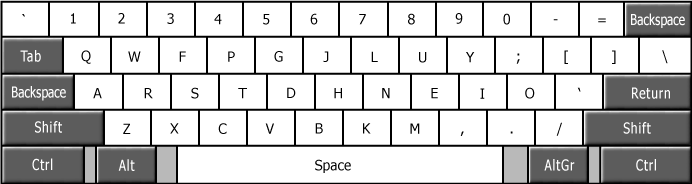
I noticed from http://colemak.com/ that there are two backspace keys....
Any reason, such as more mistakes, maybe?
http://colemak.com/wiki/images/8/80/Colemak_layout _2.png -
Colemack?
I noticed from http://colemak.com/ that there are two backspace keys....
Any reason, such as more mistakes, maybe?
http://colemak.com/wiki/images/8/80/Colemak_layout _2.png -
Re:Vim
I use the Colemak layout, which has a custom mapping for vim.
Colemak is much better than QWERTY, from a research paper listed the Colemak site:
"All things considered, I believe Colemak is better than Dvorak and the best alternative to QWERTY."
The layout is similar to QWERTY in some ways QWZXCVBM stay in the same place, but everything else moves.
CAPS becomes BACKSPACE. Colemak was entered in the CAPSoff competition (a contest for keyboards with CAPS lock), which it won.
Colemak was designed by Shai Colemak after considering the most common digraphs (two letter combinations).
When you start to type quickly, your brain works on it's memory of key combinations, not key locations, so you'll start typing in QWERTY while you're learning, as you speed up.
It took me 3x 10 hour days using ktouch to learn the layout well enough to use it well and about 2 months to equal my QWERTY speed. All progress from there. -
Colemak is best
http://colemak.com/
What's the deal? Is this alternative keyboard week on -
Re:QWERTY, DVORAK, ABCDEF
DVORAK being supposedly the best for speed and ergonomic typing
Not necessarily. There are several newer keybord designs that claim to be even better than Dvorak. This one, for instance.
-
Not really multilingual
Their website cites "multilingual" as a major feature of this layout. Reading a bit more about this however, they've just made up lots of key combos for various "multilingual" characters. So? Anyone can pull a bunch of key combos out of their $ORIFICE and list them on a web page, or even write a custom keyboard map. And speaking as someone who does a lot of typing in my native language, I'd rather have my Ås, Äs and Ös as first-class letters, thankyouverymuch. Putting either under a (non-initiutive) key combo like [AltGr][f] is, principally, the same to me as putting "Q" under [AltGr][O]...
Btw, according to TFA, it's "Colemak" not "COLMAK". The website is even Colemak.com ffs...
I'll stick to QWERTY for the time being. -
Re:Dvorak
There are better choices than Dvorak, the Colemak keyboard layout seems like the most promising alternative.