Slashdot Mirror
Domain: jackaudio.org
Stories and comments across the archive that link to jackaudio.org.
Comments · 30
-
Re: 700 Million Devices
I don't know about "most", but JACK audio is, in a word, awesome. Far in advance of anything available on Windows or Macos. For glitch-free real time audio processing, Linux is without a doubt the best choice for professionals. I expect that many professionals have noticed that.
Uh, professionals would have noticed versions for OS X and Windows on Jack's download page. So it's at best "far in advance of anything else on Windows of Macos.
-
Several ways to do that in Linux
> I wish I knew a way to assign and send browser audio streams explicitly to one audio device output, say a set of headphones while keeping any other audio output attached to the primary playback device (speakers).
On Linux there are many ways to do that. This page lists three (plus another one just for Flash):
http://jackaudio.org/faq/routi...Although the title of the page says Flash, three of the four methods are for the browser.
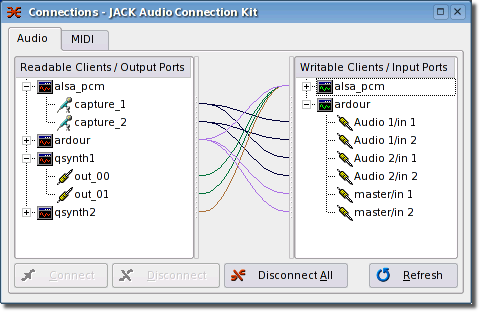
In Linux you can use patch bays to go crazy with arbitrarily complex connections between audio sources, effects, and outputs:
https://qjackctl.sourceforge.i... -
Re:It's a doomed race against timeWhy not go open source for DAW with Ardour ? Combine that with Rosegarden, and maybe some of the other fine applications that all work with Jack Audio Connection Kit.
Pretty cool stuff out there for free, especially if you're just starting out and are a bit of a geek.
-
Re:Ardour
Since he plays guitar and sings he also needs the DAW to accept drivers for audio digital interface devices like MOTU or even Line 6. Without those, or without a simple way to get the software to work with them, you can't do anything reasonable with guitars or microphones. Just plugging into the computer's input gives shite sound quality which is why you need an interface.
I tried a couple years ago and gave up on Linux for recording. Someone suggested 'JACK' and Ardour but bloody hell, JACK was so convoluted and a pain to understand and never seemed to work or never worked simply, that I just said screw it and use Windows 7 with Cubase. My time is worth something too, and considering I already owned the Windows box, another 500 bucks for Cubase was a real deal compared to endless hours getting it to work on Linux (anything is easy if you know how, and I didn't know how on Linux, nor do I think it is worth the hours and hours of time to learn when I can just use something else that simply works). I want to play music when I record, not fuck around configuring the OS and drivers. On Windows I just installed the ASIO driver for my digital interface and selected it in Cubase and I was done. A couple minutes tops.
Until Linux gets its head out of its ass in terms of driver support (even if they are proprietary) I would stay well and gone away from it for recording. Unless you like spending more time configuring the workstation than actually recording stuff.
-
Use Jack Audio Connection Toolkit
Use jack to get the various output devices into a single interface (I'm assuming this "myriad" has windows or Linux drivers) and then use any old sequencer to manage the play lists and announcements. You may find netjack can handle the distribution for you as well.
-
Re:Pardon my ignorance...
You need a different example.
-
Re:Wasted time
Yes. Depending on what you are attempting to accomplish it may not be for you. I use an m-audio delta 44 and have been using it to make music for a couple years now. Have some links, if you are interested:
Jack - Low latency audio server. Allows you to connect together sound applications. Arguably the coolest thing about audio in linux.
Ardour - Multi-track sequencer
Hydrogen - Drum machine
Jamin - Mastering software
LAPSDA - Plugin API
DSSI-VST - Way to run windows compiled VSTs on linux (of course its not always going to work)
Linux has plenty of other software out there. These are just some links to get you started.
There are many reasons one might not want to choose linux for audio tasks. With a windows and mac setup you have many more choices in regards to soundcards, software, plugins, and virtual instruments. It also may take a little effort to setup properly. To get proper latency you may need to use a real-time kernel. You may need to spend a little time configuring jack to get the best results out of your card. A finely tuned linux system can be excellent for creating music. It may not be the best choice, but it works for me and I can avoid dual booting.
-
Re:Oh really?
Ardour is the only Free software DAW suitable for any serious work. It uses JACK, which is an excellent low-latency audio routing system, but actual audio playback on Linux depends on the ALSA backend, which varies in quality depending on your hardware. Check the Alsa SoundCard Matrix for details. Recent Linux kernels have reasonably low latency by default, but for very tight latency requirements you might need a custom kernel configuration or patches.
-
Re:You seem to know what you are talking about.
I have not documented my settings, but I've followed community develop documentation to get my setup going.
Also, I did not install the Ubuntu Studio Distribution, I instead installed Ubuntu 9.10 first, then used the repositories to upgrade my desktop with the ubuntu studio package, and the Linux realtime kernel.
My sources are as follows:
Upgrade Ubuntu to Ubuntu Studio
Excellent Tips/Tutorials from one of the users
These are good starting points. The major issue with documentation and tutorials is that Ardour and Jackd are changing so rapidly that the documents outdate themselves very quickly. Like I said, 4 years ago I wouldn't even think about using Linux for DAW work. In the past two years, especially since the freebob and ffdao projects, the scene has exploded.
If you still have questions after this, feel free to mail me. Depending on your hardware I may be able to help with jackd settings and with general questions.
-
Re:A Guide to Labryinth of Linux Audio Systems?
It's ridiculously complex, but I'm sure I can make it even worse. Audio production is JACK territory. JACK is an "audio connection kit" meant specifically for apps like Ardour (recording), Rosegarden (sequencer), Hydrogen (drummachine), JACK-Rack (virtual rack for effects plugins), ZynAddSubFX (software synthesizer), or Jamin (JAck Mastering INterface). When you run the JACK daemon, these and other apps can talk to JACK rather than fight over access to the sound hardware.
More interestingly, JACK lets you connect the MIDI and audio inputs and outputs of these applications and your sound hardware to each other in meaningful ways. For example, you could (1) let Rosegarden control Hydrogen and an external, physical synthesizer via MIDI, (2) let an external MIDI keyboard control ZynAddSubFX, (3) send Hydrogen's output to JACK-Rack, (4) send JACK-Rack's and ZynAddSubFX's outputs and the soundcard's line-in to Jamin, (5) send Jamin's output to Ardour or Audacity or whatever else you want to use to record the results, (6) and so on. (I don't know if such a setup ever happens in the real world. Perhaps you're now twitching in light of my audio naivety. But it was just an example.)
Check out http://jackaudio.org/intro and http://jackaudio.org/faq for a friendly introduction.
With QJackCtl, you get a graphical JACK front-end that'll let you set stuff up with relative ease. Install it.
What JACK then DOES all the audio buzzing about "within" it is, typically, this: It gives it to ALSA. Unlike Pulse, JACK, GStreamer, Xine, Phonon and many of the other funny names you'll come across, ALSA is part of the kernel (or rather, has parts in the kernel). So ALSA is not an optional convenience. The ALSA project provides soundcard drivers; through ALSA, applications talk to the sound hardware. (Unless you install OSS4, I suppose. Or do something else I don't know about.)
I usually attach JACK to the ALSA interface hw:0. The hw: interfaces provide direct access to the sound hardware, bypassing ALSA's own software mixing, rate conversion, and other niceties that may (?) slow things down or lower quality. hw:x,y means soundcard x, subdevice y. hw:x without a subdevice means use whatever subdevice is available. In my case, subdevice 0 has four hardware audio channels, and subdevice 1 has one. I suppose that's why I can let JACK talk to hw:0 without it blocking out any other, non-JACK applications like the Flash plugin, media players, or games.
There'll be other ALSA interfaces available in QJackCtl besides hw:, in my case: plughw:. And Audacity's preferences offer a different and larger ranger of ALSA devices besides hw:0,0 and hw:0,1, for example: spdif, iec958, dmix, and default. As far as I know, plughw:, dmix and default all provide software mixing, so they may have their uses if you find some application blocked by another (such as the JACK daemon) due to a lack of hardware mixing. And if ALSA's software mixing doesn't work for you either, PulseAudio or something like it comes in as another layer on top of ALSA providing software mixing.
ALSA woes can be mended and virtual ALSA devices with specific properties created in ~/.asoundrc, though if you're lucky you don't need that file at all. See http://alsa.opensrc.org/index.php/.asoundrc for the lowdown.
I said JACK attaches to ALSA, but you can also attach JACK to OSS, for example. OSS these days is something like a compatibility layer provided by ALSA, which has replaced OSS. OSS devices on my system are
There's also OSS4, which isn't "legacy" and which some ALSA-frustrated users swear by. It doesn't come with any distributions I'm aware of, so you might have to install it yourself.
I suppose you could also attach JACK to (say) PulseAudio as an intermediary layer betwe -
Re:A Guide to Labryinth of Linux Audio Systems?
It's ridiculously complex, but I'm sure I can make it even worse. Audio production is JACK territory. JACK is an "audio connection kit" meant specifically for apps like Ardour (recording), Rosegarden (sequencer), Hydrogen (drummachine), JACK-Rack (virtual rack for effects plugins), ZynAddSubFX (software synthesizer), or Jamin (JAck Mastering INterface). When you run the JACK daemon, these and other apps can talk to JACK rather than fight over access to the sound hardware.
More interestingly, JACK lets you connect the MIDI and audio inputs and outputs of these applications and your sound hardware to each other in meaningful ways. For example, you could (1) let Rosegarden control Hydrogen and an external, physical synthesizer via MIDI, (2) let an external MIDI keyboard control ZynAddSubFX, (3) send Hydrogen's output to JACK-Rack, (4) send JACK-Rack's and ZynAddSubFX's outputs and the soundcard's line-in to Jamin, (5) send Jamin's output to Ardour or Audacity or whatever else you want to use to record the results, (6) and so on. (I don't know if such a setup ever happens in the real world. Perhaps you're now twitching in light of my audio naivety. But it was just an example.)
Check out http://jackaudio.org/intro and http://jackaudio.org/faq for a friendly introduction.
With QJackCtl, you get a graphical JACK front-end that'll let you set stuff up with relative ease. Install it.
What JACK then DOES all the audio buzzing about "within" it is, typically, this: It gives it to ALSA. Unlike Pulse, JACK, GStreamer, Xine, Phonon and many of the other funny names you'll come across, ALSA is part of the kernel (or rather, has parts in the kernel). So ALSA is not an optional convenience. The ALSA project provides soundcard drivers; through ALSA, applications talk to the sound hardware. (Unless you install OSS4, I suppose. Or do something else I don't know about.)
I usually attach JACK to the ALSA interface hw:0. The hw: interfaces provide direct access to the sound hardware, bypassing ALSA's own software mixing, rate conversion, and other niceties that may (?) slow things down or lower quality. hw:x,y means soundcard x, subdevice y. hw:x without a subdevice means use whatever subdevice is available. In my case, subdevice 0 has four hardware audio channels, and subdevice 1 has one. I suppose that's why I can let JACK talk to hw:0 without it blocking out any other, non-JACK applications like the Flash plugin, media players, or games.
There'll be other ALSA interfaces available in QJackCtl besides hw:, in my case: plughw:. And Audacity's preferences offer a different and larger ranger of ALSA devices besides hw:0,0 and hw:0,1, for example: spdif, iec958, dmix, and default. As far as I know, plughw:, dmix and default all provide software mixing, so they may have their uses if you find some application blocked by another (such as the JACK daemon) due to a lack of hardware mixing. And if ALSA's software mixing doesn't work for you either, PulseAudio or something like it comes in as another layer on top of ALSA providing software mixing.
ALSA woes can be mended and virtual ALSA devices with specific properties created in ~/.asoundrc, though if you're lucky you don't need that file at all. See http://alsa.opensrc.org/index.php/.asoundrc for the lowdown.
I said JACK attaches to ALSA, but you can also attach JACK to OSS, for example. OSS these days is something like a compatibility layer provided by ALSA, which has replaced OSS. OSS devices on my system are
There's also OSS4, which isn't "legacy" and which some ALSA-frustrated users swear by. It doesn't come with any distributions I'm aware of, so you might have to install it yourself.
I suppose you could also attach JACK to (say) PulseAudio as an intermediary layer betwe -
Re:Big Question...
I'm pretty sure TFA (which is slashdotted ATM) might be referring to some very well-done, production-grade software for pro audio on Linux:
JACK Audio Connection Kit, by Paul Davis, and Ardour - a digital audio workstation also by him (and many contributors of course... really an outstanding piece of software).
These are my favorites and the main pieces around which a DAW is built around.
You can also try looking for Rosegarden, Jack-Rack, Seq29, Qsynth, Zynaddsubfx (a little outdated but still nice synth), aeolus and I'm sure we could go on for a while.
Your hardware interfaces will mostly have a hard time working in Linux, but check out the options, they might be worth it.
-
Re:Not a troll
Well if you were working on music production it would have to be http://jackaudio.org/ .
Also webcams often contain microphones, I expect your computer is treating the webcam as its primary audio device.
Please see the relevant documentation for your audio system on changing this. -
Some complaints are not valid
consistent configuration system
What a dope; because we know this has worked so well for windows. The registry is a nightmare on Windows. Linux/Unix does have a consistent model and it is known as text configuration files. It's powerful and can be leveraged on even the slowest of links. One size does not fit all - although I've seen far too many applications use XML for this where it makes absolutely no sense whatsoever.
native file versioning
Seems Linux is now held to a higher standard. Again, what a dope. Outside of the VMS crowd, I've not seen a huge outpouring of demand for this feature. Having said that, I do believe a versioning FS is in the works and for all I know, some may already be available. Realistically, few people want this and most have no clue what it even means. For the general use case, RC-software already exists to fill this niche. His complaint is empty.
audio APIs
As far as I'm concerned, it's done. Pulseaudio and ALSA are all that you need. If you have more specialized needs, then JACK Audio takes care of you. For the majority of people, Pulseaudio has what you need and is also portable to Windows. Many (most?) distros are already moving or have completed their move to Pulseaudio. As far as I'm concerned, this issue is addressed, save only for migration time for slow adopters.
integration of X11 with apps
This means nothing. What a dope. All GUI applications which communicate with X are integrated.
and integrate better on the back-end with the kernel
Again, what a dope. This means nothing.
In a nutshell, his complaints are silly, meaningless, or have been addressed. As far as I can tell, his only complaint which has any merit is audio API standardization and that has been achieved.
-
Re:If you can listen, you can save
-
Re:service pack
Ever open Activity Monitor? See the memory listed as "Wired"? Those are pages locked in real memory; 'wired' is the Darwin terminology for locking memory.
Wired pages are used as page tables, so they must be resident at all times. Also, if you ever installed new memory modules, the more memory you have, the more wired pages you see. Otherwise, Darwin doesn't allow user locking memory pages according to Jack faq. -
Re:service pack
I second your opinion, but I also want to point out the hard work done by Linux Audio Developers.
For one, they pushed the development of preemptible and low-latency Linux kernel to make it possible to do low-latency stuff, even on relatively aged hardware. Mac OS X's micro-kernel architecture is potentially superior in this regard because you can easily go hard real-time with micro-kernels (Linux is a monolithic kernel), but Linux kernel is more suitable than Windows XP for running audio applications because of these improvements.
They also obsoleted OSS (open sound system) and came up with ALSA, which makes it easier to support new sound devices from the developer's point of view. ALSA supports a range of consumer to professional sound cards, just like CoreAudio. It just works.
Another notable framework, JACK, goes beyond CoreAudio by providing audio routing between applications, like ReWire. JACK is also available on Mac OS X, except it is less robust than on Linux. Thrashing can cause audio drop-out because Mac OS X kernel can't lock pages in real memory.
Finally, if you ever considered audio production work on Linux, you definitely know about Ardour at some point. It's the hard work of Paul Davis, working on it unemployeed and full-time for many years. Ardour also runs on Mac OS X, by the way, because of the generous nature of Linux developers for offering you a choice.
If you do mostly recording, then you can get by on Linux quite sufficiently. If you do a lot of synthesized stuff like Reason or NI, then you'll be disappointed. There is simply no comparable app on Linux.
------
On the other hand, Linux has a lot of architecture catch-up on the graphics stack. Cairo recently has some talk about supporting more color spaces than RGB. However, the lack of end-to-end color management is a serious issue. Colors you see on the screen simply will look different when printed out. The colors are also not even consistent from monitor to monitor.
One thing I'm really impressed with Mac OS X is its monitor calibration. It lets you fine tune gamma by inspecting the monitor response in highlight, mid-tone and shadow for red, green and blue. I can easily color-match two monitors by different manufacturers.
Mac OS X also has superior built-in typesetting support, completely unparalleled by any operating system, and this is available in any application even TextEdit. In TextEdit, you can already turn on common ligatures like "fi" and "fl" as you type. In comparison, you must insert ligature glyphs manually when using Microsoft Word. Mac OS X supports more typesetting feature than that. For example, the Hoefler font has an archaic font variant with a "long s" (so congress looks more like congrefs where the f has shorter middle bar---the s at the end of the word remains the usual form because the long s is a contextual ligature that happens only in the middle of a word) and the "st ligature" (there is a small hook that goes from the top end of s to the top stem of t). Needless to say, contextual ligature is a crucial feature to support scripts like Arabic.
Mac OS X definitely has received a lot of attention in the aesthetics that goes way beyond eye candy. -
I recomend Musix
I like to play music with my friends as a hobby, and looking for free options i stumbled upon Musix . Having used a mac with Reason and found it a little lacking and a bit expensive, i found Musix very usable. Not only it had most things that Reason had, but also came configured to use jackd server with a bunch of applications with no real work involved. Using it in a laptop I did have to use the command line to configure the wireless card but it was easy. I have to say that Linux is ready to be in the studio, yet as all things linux most of the software is in beta stage so bugs might appear. Just don't be afraid of the command line and you will be fine.
-
My Linux Audio Setup
I have just recorded and mixed a live album with this software on Ubuntu Feisty:
http://ardour.org/
http://jackaudio.org/
http://www.ffado.org/ (aka Freebob) with a Mackie Onyx desk & firewire interface
http://jamin.sourceforge.net/
Very very good indeed, I vastly prefer it to my previous Windows based Cubase setup. -
Re:aww
People often doubt if you can do professional grade music production on Linux. I just tell them they don't know JACK.
-
Re:Ubuntu Studio
> The OSS apps are missing support for some sound cards
Not really the apps fault is it? I agree the situation could be better but it's the manufacturers who fail to release drivers or specs.
> file types
One of the reasons SSL funded Ardour was because there's no de-facto file interchange format for multi-track audio sessions.
> Rewire
We're too busy jacking off to care! -
Re:That's hardly an exploit
Ever heard of the JACK audio server?
-
Re:Has potential
Until they realise that most of their professional-level software isn't installed in these packages...
Ardour, Jack and Sweep are not "professional level"? Pixar use and sponsor development of sweep, Ardour is supported by SSL and Harrison. When I was at college, professional level for video editing was a pair of hi-band decks. We trained on VHS with a crappy Panasonic vision mixer and I shot and edited a short on Super8 cine. Tools don't make someone a professional and "professional level" work has been done on systems far less powerful than those offered by linux.
I work in audio and I'll tell you this; being able to use plug-ins in pro-tools has as much to do with being a sound engineer as running a macro has to do with being a writer. Keep your bizarre definition of "professional-level" to yourself. -
Re:Rosegarden and Ardour
Also, don't forget to install the JACK Audio Connection Kit first, optionally with a GUI front end.
JACK will generally give you much lower latency, and it will handle synching between multiple audio apps. -
Re:No S/PDIF?
I am a musican who switched from Windows via OSX to Linux because Linux got some advanced audio features way beyond, its the Jack audiosystem http://jackaudio.org/ which is recently ported to OSX too and soon on Windows, or maybe not because of the Vista protection scheme. It let me easily connect audiosoftware on the same computer like a modular synthesizer/ studio, easier then ReWire or Soundflower ever could do. With http://64studio.com/ I run now a lowlatency 64bit system which is incredible for live performance and recording, feeling like my hardwaresynthesizers regarding timing and snappyness. In the last years a lot of advances happend in the Linux media scene and a whole parallel universum is alive there, which is suppressed by the gatekeepers but alive and growing anyway.
-
Re:Wow, and accurate assessment!
Obviously it depends on your field. I'm more involved with modeling than multimedia. However, my understanding was that professionals were using a forked version of gimp for video editing on linux clusters. Is there a commercial version that scales this far? I really don't know. But in terms of professional use, I don't think amateurs have clusters for their video editing.
Likewise, way back when Alias/Wavefront's Maya was cock-of-the-walk, it was available for Linux. Maya used to be *the* app for pro work. Graphics people seemed to be absolutely snobbish about it. Autodesk bought them from SGI, but it looks like Autodesk Maya 8 is still available for (64-bit only) linux. The hard core mathematical physics geek in me finds myself asking: have you looked at Mathematica for visual transformations? Sorry, had to ask...
I had friends who were into Bluegrass, and looking at recording their jam sessions (we are talking a couple hundred people showing up for three day weekends at least once per month thru the spring, summer, and into the fall). I didn't track their progress, as I graduated and moved on to another university, but the impression I gathered was that tools existed. I think they were using Ardour / Jack with RME Hammerfall cards. Obviously this won't work with SoundBlaster toys. Postings on a recent real time kernel article here at slashdot had a number of people talking about what acceptance of real time patches into the kernel will mean in terms of multi-channel live recording. I don't know if Jack is enough for "real" work, or if other real time patches are needed. Again, it isn't really my field. I do remember wanting to buy this really cool synthesizer, but couldn't rationalize it in my budget. $8,000 for a linux sound system? Thats alot of $$$ even for a Korg...
What made you sound like a troll was suggesting that the tens of thousands of applications that are available for linux aren't. If anything, the abundance of software is more disconcerting than the lack of it. If you want to know, "is MS Word available", well only using Wine or Crossover, which to my thinking means "no." If you want to know, "are there word processors", there are many many many approaches. I'm sorry if I misunderstood, I certainly didn't mean to be offensive.
So these aren't my fields, but hopefully this will point you towards information. My understanding is that for professional (studio labs) work, linux is there for audio and video, using Free tools. In terms of graphics, I won't debate gimp & blender & such, because I just don't know. Maya is supposed to be top of the line, though. Hope this helps -
Re:Linux audio software will now be #1
Ardour is backed by a major company which pays for its development: http://ardour.org/ssl_support_announcement
Ardour has VST support: http://ardour.org/node/280
(On Linux, VST support won't be 100% flawless at least in the midterm because it's relies on Wine, but when the Windows port is complete, VST plugins will be supported fully in it.)
Jack runs on Windows: http://jackaudio.org/node/13
Moreover, Ardour is currently in the process of being ported to Windows (basically only some backend details have to be ported, because all the rest, including GUI, is already portable). Also, Ardour has an OS X version, too.
Also let me know when it upgrades its interface out of 1990s-era Pro Tools
Uhm, does it need to? What's wrong with it?
All in all, it looks like you are pretty ignorant when it comes to Ardour current state. You even characterize Jack as "audio format" which makes you look seriously misinformed to say the least. -
Re:What about media?
For a long time, people using JACK (a low-latency audio server, written for POSIX conformant operating systems such as GNU/Linux and Apple's OS X) have been using real time linux patches to achieve better results. So for this kind of pro audio users, using Linux workstations (not embedded linux) it is quite nice to have included in the official kernel.
-
Re:Sounds like it might be
Ingo Molnar and Andrew Morton's original 2.4 patches for better soft-real-time performance were prompted by complaints from those of us in the linux audio (pro-audio/music) software community. Systems like JACK and applications like Ardour were written around this kind of functionality.
Ingo has picked up the ball and run with it for 2.6 to the point where a kernel patched with his most recent patches is basically hard-time except for cases where a badly written device driver screws it up. And increasingly parts of his work have become part of the vanilla kernel so that even a 2.6 kernel now works pretty well unless you need very low latency (as require for real-time monitoring and FX processing.
-
Re:Hydrogen
Using drum patterns from Hydrogen is indeed useful and I use them along with dubbed recordings using Ardour which allows the usual multi-track recording, editing, etc. A requirement is the brilliant jackd audio connection kit which allows a crazy level of audio processing and manipulation. All in all, I have no need for anything other than linux when recording/dubbing music.