Slashdot Mirror
Domain: kdevelop.org
Stories and comments across the archive that link to kdevelop.org.
Comments · 105
-
FOSS needs discipline. And consistent branding,
And some sort of marketing strategy. Especially finished FOSS.
KDE was matured, by just about all metrics. Konqueror was one of the most brilliant pieces of software, unmatched in utility and power, both as a filemanager and as a browser. They had to fiddle with it and take 5 steps back with dolphin.Same goes for quite a few other components. Instead of constantly rehawling everything, they should iterate and replace dated but working components only when the new thing is truly finished and a worthy replacement. Branding and marketing is also all over the place. There's this new shiny flat design with plasma and Kubuntu and simular project, but the logos, icons and websites of some appstacks and toolkits go back to the year 2000.
Just compare these four websites to see what I mean. In my opinion that says everthing about the state of KDE and quite a few other software projects. Look at the Gnome disaster a few years back. A little marketing and brand management and all would have loved the new strategy. Gnome did a half-assed thing - at least that was the perception and perception is everything - and all hell broke lose and the Gnome project fragmented beyond repair. Mate, Cinamon, Evolution, Whatnot.
People are fed up of fussing about with new totally redone software packages that break existing workflows and intoduce new ones that are only half finished. Especially the FOSS experts.
KDE isn't dead, but if they are interested in gaining traction, they need to offer a compelling system and present it consistently. That doesn't even mean they need to develop much - a brand strategy and a working consistent and complete distro and the will to keep it easy to install and up and running would be enough. KDE is good enough to take it from there.
Bottom line: It's like I've said before - "It's called marketing." FOSS projects need to learn the neccessity of that, or else they will die of lack of attention, users and finally maintainers.
My 2 cents.
-
Re:And KDevelope is what exactly?
There is a huge amount of FOSS that has an entire "front" web page that tells people in exquisite detail what changes have been made, who contributed, how others can get involved and what bugs are outstanding without ever mentioning what the hell the project does
From the KDevelop Front Page.
KDevelop
is a free, open source IDE (Integrated Development Environment) for Linux, Solaris, FreeBSD, Max OS X and other Unix flavours. It is a feature-full, plugin extensible IDE for C/C++ and other programming languages. It is based on KDevPlatform, and the KDE and Qt libraries and is under development since 1998.That seems fairly self explanatory to me.
-
Re:And KDevelope is what exactly?
However, it's not alone. There is a huge amount of FOSS that has an entire "front" web page that tells people in exquisite detail what changes have been made, who contributed, how others can get involved and what bugs are outstanding without ever mentioning what the hell the project does, or what benefits it brings the world. This just adds one more to the tally.
I guess if you are a complete and utter moron, it is hard. The very first words on the KDevelop web site are:
KDevelop is a free, open source IDE (Integrated Development Environment) for Linux, Solaris, FreeBSD, Max OS X and other Unix flavors.
It is a feature-full, plugin extensible IDE for C/C++ and other programming languages.
It is based on KDevPlatform, and the KDE and Qt libraries and is under development since 1998. -
Re:Qt Creator!!
Well, at least as recently as May they said:
Unfortunately there is no ready-made builds for KDevelop on Windows as far as I know, since it lacks someone who is willing and able to work on KDevelop on Windows. Contributions would be very much welcome here!
If anybody is using Visual Studio there's a good bet they're on Windows, so with no Windows build how can KDevelop be an alternative?
-
Re:KDevelop 4.5 Released
It mentions PHP
Although might only be rudimentary
http://www.kdevelop.org/45/kdevelop-450-released -
Re:Visual Studio
I use Qt Creator, it is great for C++ development in general. For everything else, I fire up Eclipse. Eclipse has its own issues, as it is written in Java, you can't expect the same performance as from Qt Creator for example, but it has the best plugin collection and perhaps most supportive community. Virtually all existing language is supported by an Eclipse plugin, and the number of existing ones will let you implement your own.
Also, I'm a great admirer of Emacs, which is my primary environment if I do some work remotely. I love to work with it, for C++, script languages, or just simply text editing.
If you're looking for something more similar to Visual Studio, I suggest you should also give a try to KDevelop. There are plenty of alternatives as you can see.
-
Re:It's a free tool!
Let's see if I've got this straight: "You gave me A, B, and C for free yesterday, and now you're only giving me an improved A and B for free?
What would really happen if Microsoft crippled future versions of Visual Studio Express is that a market would be created for low or no cost alternatives. That would probably be a good thing but it would be annoying for many people to convert. It probably wouldn't be too hard to port KDevelop to Windows, for example.
-
Main competitor KDevelop 4.0 Beta3 released!
Main competitor KDevelop 4.0 Beta3 released! Read more at http://www.kdevelop.org/
-
KDevelop 4 is coming out soonhttp://www.kdevelop.org/
3.5 isn't even too bad.
-
Re:Linux has survived but not prevailed
> One is Games.
Is there a game in your mind that would not work with Wine?
> Something to challenge Visual Studio
-
Re:What sold me..
GIMP and Paint.NET aren't as good as Photoshop
Inkscape isn't as good as Illustrator
VLC isn't as good as The KMPlayer
Songbird isn't as good as foobar2000, Xion, Winamp or iTunes
Jahshaka isn't as good as Premiere or Media Composer
Blender isn't as good as Maya, 3D Studio or LightWave 3D
GCC isn't as good as Visual StudioTry comparing apples with apples.
GIMP 2.6 and later is as capable as Photoshop. It now has 32-bit colourspces even. Considering that Photoshop is about $800, and GIMP is $0
If you don't like the GIMP UI
> Inkscape isn't as good as Illustrator
Debateable. Inkscape is pretty good, and getting better all the time.
> VLC isn't as good as The KMPlayer
Ok
http://kmplayer.kde.org/Oh sorry
http://kmplayer.en.softonic.com/Meh. A Winamp clone. They are a dime a dozen.
http://en.wikipedia.org/wiki/Audacious_Media_Player> Songbird isn't as good as foobar2000, Xion, Winamp or iTunes
OK, you don't like Songbird?
http://en.wikipedia.org/wiki/Amarok_(software)
http://amarok.kde.org/
http://amarok.kde.org/en/screenshots> Blender isn't as good as Maya, 3D Studio or LightWave 3D
You are kidding, surely? Blender is the best by far
> GCC isn't as good as Visual Studio
How do you figure that? GCC is the premier compiler set in the world. It targets more architectures, and handles more software langauges, than any other compiler.
Did you mean an Indetgrated Development Environment, perhaps?
Try Eclipse then.
Or perhaps something like Kdevelop in conjunction with Qt designer is more to your taste:
http://www.kdevelop.org/
http://www.qtsoftware.com/products/appdevReally, if you are going to compare applications, at least choose comparable ones. Oh, and if you want to run decent applications at good speed, then it would help immensely if you weaned yourself off of Windows.
As for *good* open source games, try these:
http://ubuntulinuxhelp.com/top-12-best-games-for-ubuntu-linux-1-tremulous/http://rangit.com/software/top-8-linux-games-of-2007/
Enjoy.
-
Re:Marketing MIA
-
No Professional Tools are from RedmondAll the "First taste is free" comments apart, can some slashdotters recommend an equivalent in the open source software that is as mature and robust as the three said software listed in the page. A *real* development environment, designer tools and a server are given away free by a corporation and suddenly some geeks want to comment on how this is not what they want and Windows source would be the holy grail.
Judging from some of the activity here, that's probably not a serious question. But let's pretend it is. However, a lot of little Bill fans will get their feelings hurt.
Bill's toy bag is just that, a toy bag, that what little it does is on and for Windows -- only. And it's near a few decades late in coming. A comprehensive answer could go on for pages if you start to include various languages like Java, Python, Perl, C, and Ada. or Tomcat, Lenya, Swish, and many others staples. That's not even counting PHP and PHP-based kit, CPAN and others.
However the press release does not say what the MS "tools" do or, more correctly, claim to do. Students would be more employable playing WoW. For those that have been living in a cave for the last 15 years here's a recap of the main professional tools you will find in industry. There are others, but they're mostly open source, too, except a few big items like Oracle and DB2. None are MS.
IDEs
Databases
- MySQL (now Sun)
- Postgresql
GUI toolkits
MS has held back computing far too long. The sooner it gets out of the way, the sooner both business and research can get back on track. Bill and his anti-American movement can go take a hike, there's no place for either MS or MS boosters in today's economy.
-
Re:Has support from Dell and Novell
-
In A Comparison Between Eclipse and Visual Studio
...KDevelop wins!
-
A suggestion for KDEMy humble suggestion is to have a project to make KDE and its whole environment a pleasure to look at especially in the font front by default. I find this Kdevelop screenshot very beautiful and always try to achieve this on KDE.
Fonts are small, clear, sharp and crisp. I wonder whether such a screenshot is possible without MS fonts. If it is, then my request is to have steps involved to achieve this done away with. That's why I emphasize "default" in this submission.
Have a look at http://www.kdevelop.org/graphics/screenshots/3.0/
s ubclassing2.png -
This is my take on KDE
"We've come a long way in ten years, but where must we still improve?"
For me, it's the two major sub-items covered under one big one: Beauty.
- The fonts are ugly. What does it take to make KDE display beautiful fonts. I am particularily impressed by this Kdevelop image. http://kdevelop.org/graphics/screenshots/3.0/full
_ ide.png. If a product is touted as significantly better technologically, it should also be a pleasure to look at.
- The interface by default, is full of huge buttons wasting screen real estate. Why won't these two toolbars be merged? There is so much space wasted above the lower toolbar. Just have a look at this image. http://kde.org/screenshots/images/3.5/02-systemin
f o.png
- They (KDE) should look at hiring a beautification expert. Xandros and Linspire should provide a hint. The point here is that KDE should be a pleasure to look at by default. Thank you.
- The fonts are ugly. What does it take to make KDE display beautiful fonts. I am particularily impressed by this Kdevelop image. http://kdevelop.org/graphics/screenshots/3.0/full
-
Re:Looks interesting, but does it fold?
Well, Visual Studio 2005 does it, but somehow I get the feeling that's not what you were looking for. I believe one of the KDE editors does it (Kate?), KDevelop certainly does (see screenshot).
-
Re:Oh Great!...
Let me go ahead and plug a couple projects for the disillusioned masses reading this:
Free Delphi Alternative:
Lazarus
Free C++ IDEs:
Anjuta, Code::Blocks, KDevelop (works with other langs too I believe)
Free Python IDE:
Stani's Python Editor
Free Visual Basic Alternative:
Gambas
Free Java (and others) IDE:
Eclipse -
Just let time pass...
And have Microsoft realize their empire on software development is no more. Right now we have enough development tools available or in progress:
MONO (alternative for
Gambas (alternative for Visual Basic - linux only tho),
KDevelop (for C++ under Linux),
Code::Blocks (for C++ under Windows),
wxPython, DABO (Foxpro alternative, uses wxPython)...
Soon Bill Gates won't have to worry about people stealing his development tools... because NOBODY WILL USE THEM! X-D -
Re:Plain and simple
The express editions seem a bit light, but do offer redistribution.
It's probably 'way out of price range', though the higher end editions offer a myiad of new and compelling features. You can basically have your own custom toolchain, complete with property sheets and full IDE integration for 'third party' tools, like using NASM/YASM/MASM for assembly. It's enough to (finally) be able to compile various open-source things with the IDE instead of depending on autotools and GCC. I could conceivably integrate 'open source' utilities into it completely, such as bison/flex, even such random things as a SNES C Cross-Compiler.
There are also rather nice setup project utilities, you can deploy a nice installer to anywhere which can 'net install' your program, in addition to any prerequisites and dependencies (like properly setting up C/C++ Runtimes and even MSI; or
As far as Linux codes, there's always KDevelop http://www.kdevelop.org/, and Anjuta http://anjuta.sourceforge.net/. While Microsoft Visual Studio makes a compelling case for use in general, there are quite a few non-Windows IDEs, though noone's forcing you to make Microsoft-specific code with MSVS, either. Personally I'm working on a few open source projects, and somewhat-targetting with a new C# application, will consider using GTK# http://gtk-sharp.sourceforge.net/ instead of WinForms at some point (perhaps when underlying GTK+ bindings get a bit less fickle). -
Re:I am in a similar situation
For starters try Anjuta or KDevelop. Both of them are really complete IDEs.
If you really want to just have fun you should go with Ruby, it is designed 'to enhance the pleasure of programming' according to the author. But that doesn't mean it is not powerful, just look at rails. There are online books that will help you get started. There is also a nice channel on freenode, #ruby-lang, with really helpful folks.If left to me I would say emacs, the learning curve is slightly steep, but there is nothing to beat the versatility.
-
KDE has superior apps, more energetic users &
Mark Shuttleworth and now Linus Torvalds seem realize the value of KDE's superior architecture, on which which many must-have KDE apps. These apps don't have any gnome equivalents that are nearly as useful and feature-rich:
AmaroK music player -- The most feature-rich and polished music player on the Free Software platform.
K3b -- Best CD and DVD authoring program with intuitive wizards, on the fly transcoding between WAV, MP3, FLAC, and Ogg Vorbis, normalization of volume levels, CDDB, DVD Ripping and DivX/XviD encoding, Save/load projects, automatic hardware detection/calibration and much more.
DigiKam -- The most feature-rich application for digital photo management.
Wireless Assistant -- Most user-friendly app for connecting to wireless networks. Managed Networks Support, WEP Encryption Support, Per Network (AP) Configuration Profiles, Automatic (DHCP, both dhcpcd and dhclient) and manual configuration options, Connection status monitoring, etc
KDE Education -- Educational (Science, Literature, Geography, etc) programs for children. Could play a big role in whether school districts decide to use Free Software in their classrooms.
Konqueror File Manager -- Embeded image/PDF/music/video viewing (via KMPlayer [kde.org]) and a tree-view arrangement of the filesystem familiar to Windows users (Nautilus doesn't come anywhere close)
KDE Control Center -- Centralized location for desktop control. Controls _all_ common aspects of the KDE applications: language, power settings, special effects, icon and window themes, shadows, shortcuts, printers, privacy, etc. This is what makes KDE so well integrated -- all KDE apps respect changes made here, so they all have the same feel. SUSE has even made YAST a module of the KDE control center so users can access distro-specific settings from here. Compare this to the dismembered approach Red Hat (and other gnome distros) have been forced to adopt in the absence of a centralized gnome control center. (ie. a bunch of individial programs named redhat-config-**** that nobody can ever remember)
Seamless, transparent network file access on SMB, FTP, SSH and WebDav networks from _any_ KDE application.
Kaffeine -- The most polished FOSS movie player.
MythTV -- The most advanced analog and digital TV viewer/recorder in the Free Software world (built using QT).
Baghira -- A native QT style that faithfully imitates OS X eyecandy, aimed at new users coming from the Mac world.
Klik -- Gives non-expert access to bleeding edge versions of apps without requiring any compilation or permanent installation.
KDE and QT also make up a technically superior platform for developers, drastically lowering the learning curve for programmers new to FOSS development. KDE apps can be built from the ground up using the best development tools in the Free Software world (which also happen to be built on QT/KDE):
Kdevelop for syntax highliting, application templates, and project organization.
QT designer for GUI development
Quanta -- Rich web development environment for PHP, CSS, DocBook, HTML, XML, etc with advanced context sensitive autocompletion, internal preview and more. -
Must-have KDE apps
Good news all round, it would seem.
Indeed, here are some must-have KDE apps that are certainly going to help SuSE's popularity as a desktop operating system
AmaroK music player -- Intuitive, powerful, good-looking music player. Supports transfers to/from iPods and many audio formats.
K3b -- Best CD and DVD authoring program with intuitive wizards, on the fly transcoding between WAV, MP3, FLAC, and Ogg Vorbis, normalization of volume levels, CDDB, DVD Ripping and DivX/XviD encoding, Save/load projects, automatic hardware detection/calibration and much more.
DigiKam -- The most feature-rich application for digital photo management.
Wireless Assistant -- Most user-friendly app for connecting to wireless networks. Managed Networks Support, WEP Encryption Support, Per Network (AP) Configuration Profiles, Automatic (DHCP, both dhcpcd and dhclient) and manual configuration options, Connection status monitoring, etc
KDE Education -- Educational (Science, Literature, Geography, etc) programs for children. Could play a big role in whether school districts decide to use Free Software in their classrooms.
Konqueror File Manager -- Embeded image/PDF/music/video viewing (via KMPlayer [kde.org]) and a tree-view arrangement of the filesystem familiar to Windows users (Nautilus doesn't come anywhere close)
KDE Control Center -- Centralized location for desktop control. Controls _all_ common aspects of the KDE applications: language, power settings, special effects, icon and window themes, shadows, shortcuts, printers, privacy, etc. This is what makes KDE so well integrated -- all KDE apps respect changes made here, so they all have the same feel. SUSE has even made YAST a module of the KDE control center so users can access distro-specific settings from here. Compare this to the dismembered approach Red Hat (and other gnome distros) have been forced to adopt in the absence of a centralized gnome control center. (ie. a bunch of individial programs named redhat-config-**** that nobody can ever remember)
Seamless, transparent network file access on SMB, FTP, SSH and WebDav networks from _any_ KDE application.
Kaffeine -- The most polished FOSS movie player.
MythTV -- The most advanced analog and digital TV viewer/recorder in the Free Software world (built using QT).
Baghira -- A native QT style that faithfully imitates OS X eyecandy, aimed at new users coming from the Mac world.
Klik -- Gives non-expert access to bleeding edge versions of apps without requiring any compilation or permanent installation.
KDE and QT also make up a technically superior platform for developers, drastically lowering the learning curve for programmers new to FOSS development. KDE apps can be built from the ground up using the best development tools in the Free Software world (which also happen to be built on QT/KDE):
Kdevelop for syntax highliting, application templates, and project organization.
QT designer for GUI development
Quanta -- Rich web development environment for PHP, CSS, DocBook, HTML, XML, etc with advanced context sensitive autocompletion, internal preview and more.
BKSys environment for a complete replacement of the autotool chain (libtool -
Must-have KDE apps
The real issue is who is going to pay for the next generation of KDE development if SuSE isn't going to pay.
Mandrake, Kubuntu/Mark Shuttleworth, Trolltech seem realize the value of KDE's superior architecture, on which many must-have KDE apps have been built. These apps don't have any gnome equivalents that are nearly as useful and feature-rich:
AmaroK music player -- Steve Jobs' nightmare, the single greatest threat to Itunes on the Free Software platform.
K3b -- Best CD and DVD authoring program with intuitive wizards, on the fly transcoding between WAV, MP3, FLAC, and Ogg Vorbis, normalization of volume levels, CDDB, DVD Ripping and DivX/XviD encoding, Save/load projects, automatic hardware detection/calibration and much more.
DigiKam -- The most feature-rich application for digital photo management.
Wireless Assistant -- Most user-friendly app for connecting to wireless networks. Managed Networks Support, WEP Encryption Support, Per Network (AP) Configuration Profiles, Automatic (DHCP, both dhcpcd and dhclient) and manual configuration options, Connection status monitoring, etc
KDE Education -- Educational (Science, Literature, Geography, etc) programs for children. Could play a big role in whether school districts decide to use Free Software in their classrooms.
Konqueror File Manager -- Embeded image/PDF/music/video viewing (via KMPlayer) and a tree-view arrangement of the filesystem familiar to Windows users (Nautilus doesn't come anywhere close)
KDE Control Center -- Centralized location for desktop control. Controls _all_ common aspects of the KDE applications: language, power settings, special effects, icon and window themes, shadows, shortcuts, printers, privacy, etc. This is what makes KDE so well integrated -- all KDE apps respect changes made here, so they all have the same feel. SUSE has even made YAST a module of the KDE control center so users can access distro-specific settings from here. Compare this to the dismembered approach Red Hat (and other gnome distros) have been forced to adopt in the absence of a centralized gnome control center. (ie. a bunch of individial programs named redhat-config-**** that nobody can ever remember)
Seamless, transparent network file access on SMB, FTP, SSH and WebDav networks from _any_ KDE application.
Kaffeine -- The most polished FOSS movie player.
MythTV -- The most advanced analog and digital TV viewer/recorder in the Free Software world (built using QT).
Baghira -- A native QT style that faithfully imitates OS X eyecandy, aimed at new users coming from the Mac world.
Klik -- Gives non-expert access to bleeding edge versions of apps without requiring any compilation or permanent installation.
KDE and QT also make up a technically superior platform for developers, drastically lowering the learning curve for programmers new to FOSS development. KDE apps can be built from the ground up using the best development tools in the Free Software world (which also happen to be built on QT/KDE):
Kdevelop for syntax highlighting, application templates, and project organization.
QT designer for GUI development
Quanta -- Rich web development environment for PHP, CSS, DocBook, HTML, XML, etc with advanced con -
KDE must-have apps
I think a lot of Suse customers will not be so pleased.
Of course SUSE customers won't be pleased. There are many must-have desktop apps built on the KDE framework that don't have any good gtk equivalents:
AmaroK music player -- Steve Jobs' nightmare, the single greatest threat to Itunes on the Free Software platform.
DigiKam -- The most feature-rich application for digital photo management.
Konqueror File Manager" -- Embeded image/PDF/music/video viewing (via KMPlayer) and a tree-view arrangement of the filesystem familiar to Windows users (Nautilus doesn't come anywhere close)
Seamless, transparent network file access on SMB, FTP, SSH and WebDav networks from _any_ KDE application.
Kaffeine -- The most polished FOSS movie player.
Baghira -- A native QT style that faithfully imitates OS X eyecandy, aimed at new users coming from the Mac world.
KDE and QT also make up a technically superior platform for developers, drastically lowering the learning curve for programmers new to FOSS development. KDE apps can be built from the ground up using the best development tools in the Free Software world (which also happen to be built on QT/KDE):
QT designer for GUI development
Kdevelop for syntax highliting, application templates, and project organization.
BKSys environmentfor a complete replacement of the autotool chain (libtool+automake+autoconf+make) that will make dependency a whole lot more simpler and efficient.
Gnome is way behind KDE with regards to these features. The only reason Redhat's doing so well with Gnome is because they're targeting geeky sysadmins who don't care about having a good-looking desktop. The other 99% of the world does care, and gnome just doesn't fit the bill. -
Re:That was easy.
Is there a more suitable IDE that works with most popular OSS (and not so OSS) languages including XML, SQL, CSS, PHP, Perl, Java, and C/C++?
Yes. KDevelop. If you wanted more functionality out of each of the components like Java IDE, or PHP IDE, then you'd have to go with something like JBuilder and Zend Studio. But these separate IDEs don't give you the same effect and a single environment what you can get with Eclipse, Emacs and KDevelop.
As far as the virtual environment, I usually need at least 8-12 virtual desktops for different tasks (yes, I multi-task all the time), even if you have multiple monitors. I prefer fvwm2 as my window manager - lightweight, stable, and extremely configurable. -
Re:This is what amazes me
Well, imagine creating an application with nice 3D animation like that is a NO BRAINER. That's what Avalon + the new developer tools +
Avalon? Avalon is supposed to be an XML descriptive language for GUI widgets, something like XUL or gladeXML. The only difference is that these tools exist right now while avalon is vaporware. So I'll go write a GUI in XML and finish it in a few minutes, while you still wait for avalon.
New developer tools? You really believe there are no developer tools on linux? Countless IDEs to choose from. From Anjuta to Kdevelop to Eclipse. Countless simple editors. Countless other tools like profilers, version control, etc etc. Detailed and thorough documentation on every tool you'll ever use. Please keep you uninformed opinions to yourself next time. Saves you the embarrassment.
Now, If you're talking about managed programming languages like C# etc. there's mono. Pretty much everything
So yeah, you wait for your new tools MS fanboy, while we already have them.
-
Re:I get a simular feeling maintaining my Linux boKanotix http://kanotix.com/files/kanotix/
#1 Takes 15 minutes to install the OS from LiveCD.
#2 apt-get install kdevelop3*done. You'll thank me later. Pretty much any Debian will suit your needs, and get you out of this 10hr maintainability problem.
Course you could be one of those sadistic Gentoo users.Did ya try here?http://www.kdevelop.org/index.html?filename=
3 .2/download.html10Hrs, Wow. I have only hit this mark creating/transcoding DVDs. Although Trolltech's QT can be a bitch to compile on a slow machine.
-
Re:PHP editorfor Linux, anyone?
-
Re:Eclipse is slow...
-
Re:Speaking of Java..anyone know
Perhaps if you could tell us why you thought Eclipse and Netbeans suck it would be easier to come with a suggestion?
Anyway, some of the most popular would probably be JBuilder, JDeveloper, IntelliJ IDEA, KDevelop...
If you prefer more light-weight IDEs, you can always use ANT together with something like Emacs or JEdit. -
Re:Screenshots!
You might want to look into KDevelop. It does a lot of the things that you mention, and does them really well.
-
Re:Give the man some credit
Not to mention KDevelop 3.X http://www.kdevelop.org/. I've been using that for about a year now, and am quite happy. By day, I develop C++ code using Microsoft's Visual Studio IDE 2003. I think it compares pretty nicely. And it definitely does not crash (no more so than M$'s IDE, anyway).
-
Cluttered IDE
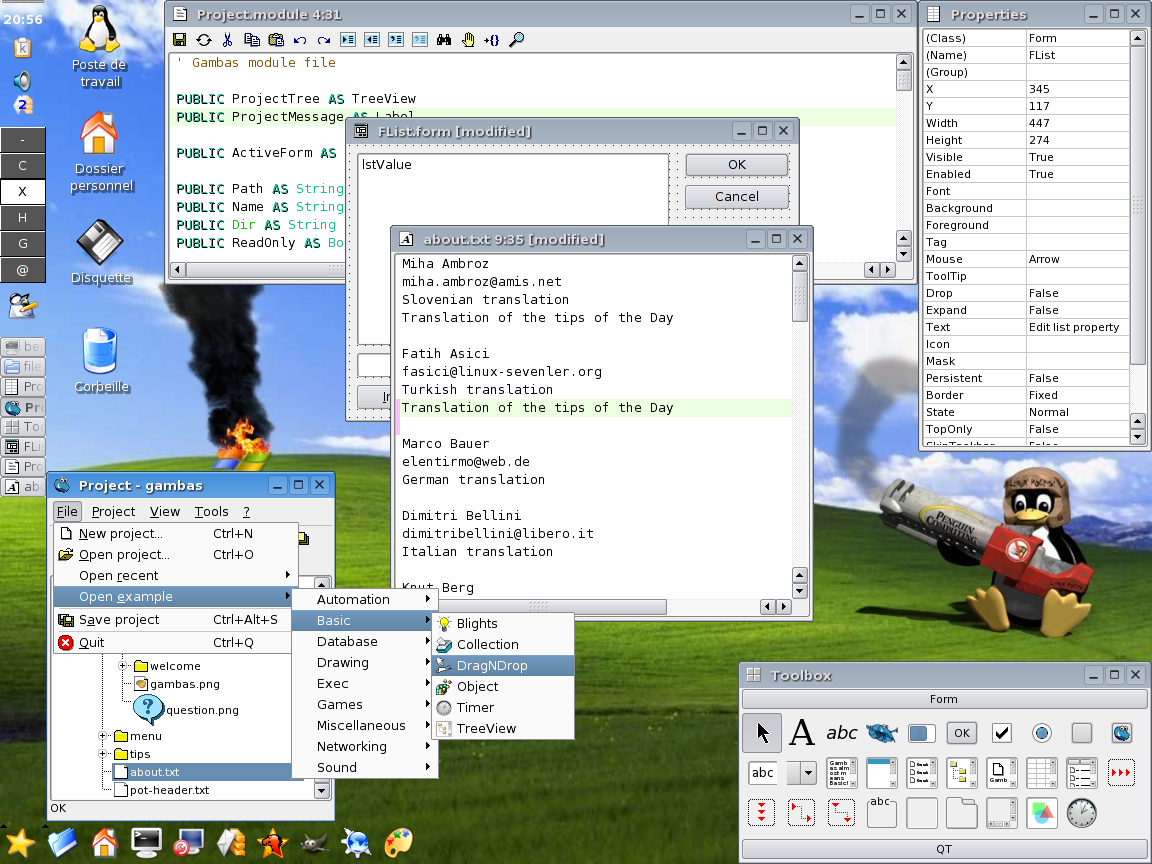
Maybe I'm in the minority here, but I don't like the "spread-out" IDE layout they've got going on here. It reminds me too much of the GIMP, and not in a good way. Perhaps it's my Windows background, but I want a single window with toolboxes and sidebars inside that window (see Visual Studio or KDevelop). This "Let's have a bunch of floating windows with nothing tying them together" approach just makes me think the developers are trying to copy Mac apps rather than Windows apps, with the main drawback of not having a single app menu across the top of the screen to tie everything together (yes, I know that various desktop environments can optionally move app menus to the top of the screen, but how consistent are they? Will they keep the menu from the "Project" window up top when I have the "Toolbox" window focused? Do they know that the "Properties" window and code window are related, and should raise together?). I'm not saying that copying from either is bad or wrong, just that if you're going to do it, do it right.
-
Already there.
Linux _desperately_ needs to have a working, easy to use RAD environment.
I think that the KDevelop IDE already allows for true RAD in Python and Ruby (with an embedded GUI designer that ties into the editor functions), but if you want a VB workalike without the VB idiosyncrasies, give Gambas a go. It's about to reach 1.0, and seems to work really darn well, from what testing I've subjected it to. -
Re:Troll artical...
> Project management is poor to non-existant.
Did you ever see automake manager or qmake manager? Sorry, I can't call those KDevelop tools "poor".
> Ideal mode is bloody anoying.
You can use other UI modes.
> I've tried to produce libraies (just using
> kdevelop and no makefile tweeking), and it
> seems imposible.
Your personal experience has nothing to do with the ability to create libraries only with GUI. Read documentation or forum.
> 1: Kylix supports C++.
Only old Qt library using CLX wrapper, have you ever tried it? Btw, Kylix is not beging developed anymore.
> 2: CBuilder. (which runs under wine) nad is very rad.
And what kind of applications you can produce with CBuilder under wine? Windows applications?
We are not talking about Windows development here.
> 3: QTDesigner (and some of the other trolltech tools), support editing code and GUI at the same time.
Yes, but Qt Designer lacks build system integration, compiler integration, code tools, etc. It is not an IDE, it's still a GUI designer which is now integrated into KDevelop. -
What about Visual Studio .NET?
To be fair, Visual Studio
-
Other options
Ever since I switched from Perl and PHP to Python I've been looking for the perfect Python IDE. Kokodo 3.0 looks interesting. I think ActiveState does a nice job and the folks there put together what I think are the best Perl and Python installations for Windows (although I don't normally use Windows). I like the Komodo Tcl based designer for the the cross platform abilities but the resulting apps always look too "old". If Komodo used XUL and Mozilla to create gui apps then I would be really impressed.
So I have yet to find the perfect Python IDE but here's a start.
Kdevelop is very robust but is more focussed C++.
Leo isn't pretty but the outlining features are very cool.
BoaConstructor hold lots of promise for better cross platform support, zope support, a debugger and form designer but the project seems to have stalled.
Eric might be my best bet with project mgt, CVS/Subversion and Qt-Designer but I've encountered stability problems.
Actually I wish I could have something with the feature set of Eric with the stability, speed and maturity of Kdevelop plus Leo's outlining abilities. Oh yea, and I'd really like an form designer that uses XUL and Mozilla for building cross platform GUIs. -
Re:If I had the time I would
The OSS community needs a decent IDE development application.
Kdevelop may be what you're looking for. It's improved by leaps and bounds recently, so even if you've tried it before and found it lacking, it's well worth another look. -
Re:Why steal software?
-
Re:VS.NETAren't you looking at the problem the other way around ? You first have to decide whether you develop specifically for the Windows (with VS.NET) or for the Linux platform.
I can understand when people hesitate before switching from MS Office to a Linux office suite but it doesn't imply necessarily a platform change (you can run OpenOffice on Windows for instance).
I agree that VS is quite a well designed product but there are quite nice IDEs for Linux (free or not), it just depends on what you want to do.
Komodo is pretty good for Python, as well as KDevelop for C++ (among others). As for Java IDEs the choice is humongous but NetBeans is a neat one. -
Checkout Kdevelop!
Voted the BEST IDE on Linux!
I know a load of visual studio users who have migrated to it. -
Not a joke
KDE's Kdevelop can develop game boy advance games!
-
Gnome is NOT a KDE alternative
Everytime KDE is mentioned, gnome advocates try and convince me why is GNOME is better, when it is NOT! Here is a detailed description WHY GNOME SUCKS KDE RULES!
1) The file dialog.
KDE 0.x ALPHAs had a better file dialog than gnome! Today, the KDE one is the best file dialgog in existance, with influence from all desktops.
2) More apps!
KDE comes with over 150 Apps in the full install, with applications for all fields, plus its sleak integration with non kde apps (eg gimp, openoffice) make things more consistant.
3) Configureable as hell.
The KDE control center has loads of knobs/dials/sliders and boxes to fiddle with, yet keeps things elegent. In gnome, half the options don't exisit and you are rudley told "use gconf-editor n00b by gnome zealots" (not joking about this, telling the truth gets you a -1, troll and footnotes).
4) I-kandy!
The Kde eye candy is really powerful, with styles such as dotNEt, mosfet liquid, kermamik, Crystal and more. Looking at art.gnome.org [gnome.org] reveals the same old theme in different colours. Since gnome dosen't provide a colour changing dialog for its widgets most "themes" are just colour changes. The Crystal from CVS is an Aqua killer, your eyes will want to love it.
5) Its development framework rocks.
Take a good look at kioslaves, kparts, dcop, arts and qt and see why KDE is a programmer's dream. Modern c++, wonderful IDE [kdevelop.org], powerful command line scripting. Gnome gives you obsolete c, with a bunch of kludge libraries such as glib, Orbit, bonobo to hack together a application.
6)The defacto choice on Linux. All major Distributions support it by default. This means Mandrake, SuSE, Xandros, ArkLinux, Jamd, Lindows, Slackware, Knoppix, Gentoo and more. How many gnome ones can you mention (Redhat, sure if you like using server distros as your desktop Debian, nope thats the old 1.4 branch Gnoppix, a retarded knoppix rip off.) Most distributions offer gnome as an unsupported alternative.
Also, the only reason why gnome was created in the first place is null and void. Now that Novell has taken over Ximain you can expect VENDOR lock in. Want groupware for linux? Thats $300 a seat.
Get the new Mandrake 9.2 and see the Quality of KDE vs the Sorry state of Gnome 2.4 (and, they STILL haven't fixed that ****ing file dialog), not to mention they REMOVED ALL THE FEATURES. Gnome 2.2 is probably the only gnome version remotley close to kde, that is, KDE 2.0, not the KDE 3.2. I tried the "brokenboring" alpha of it and when it is released this december it will finally put Gnome out of it's misery and kill it off the Linux desktop. -
Uh, no.
To start with, the GIMP -is- MDI (multiple documents interface). All the panels are toplevel, though, which isn't the same thing. There are different sorts of MDI; you're thinking of the Childframe sort.
Also, what you call SDI is not the 'open source way'. Advanced UIs abound in the open source world.
Lack of MDI styles is a GTK-only thing. This limitation doesn't exist with other toolkits. I note you chose to mention only GTK apps there. Don't blame the whole of open source but just one of its tools, please. It's being worked on. -
Re:gimp interface... grrr...
I wish. GIMP can't be like this, though, because of the four types of MDI interfaces, GTK+ is only able to do the 'all panels are toplevel' and 'tabbed panels' type. The GIMP 2 interface is a mix of both, and frankly, it not not -that- horrible.
Please note that the GIMP devs -are- aware of the UI problems. I hear that a lot of the work that went into GIMP 2 aimed at making the UI code and the backend code independant, so that third parties can provide new UIs for GIMP.
I'm personally drooling for an IDEAl-moded interface. Works so damn well... -
KDevelop supports Subversion natively
KDevelop supports Subversion natively along with CVS, Perforce, and ClearCase.
-
Future market
It's a little confusing when people talk about Kylix. Kylix use to only be an Object Pascal language. Delphi for Linux. However now it contains both Delphi and C++ Builder parts.
I suspect that even though it is the most exciting RAD tool to hit Linux EVER, it didn't have a big following.
The average Joe user has little use for a RAD tool and the average Linux developer for Linux uses C++. The Kdevelop project is pretty tough competition in that area.
Object Pascal hasn't really caught on yet but when it does, one has to wonder if there will be a bid demand for Kylix or Lazarus project.
-
No, Gnome is NOT a KDE alternative.
Everytime KDE is mentioned, gnome advocates try and convince me why is GNOME is better, when it is NOT! Here is a detailed description WHY GNOME SUCKS KDE RULES!
1) The file dialog.
KDE 0.x ALPHAs had a better file dialog than gnome! Today, the KDE one is the best file dialgog in existance, with influence from all desktops.
2) More apps!
KDE comes with over 150 Apps in the full install, with applications for all fields, plus its sleak integration with non kde apps (eg gimp, openoffice) make things more consistant.
3) Configureable as hell.
The KDE control center has loads of knobs/dials/sliders and boxes to fiddle with, yet keeps things elegent. In gnome, half the options don't exisit and you are rudley told "use gconf-editor n00b by gnome zealots" (not joking about this, telling the truth gets you a -1, troll and footnotes).
4) I-kandy!
The Kde eye candy is really powerful, with styles such as dotNEt, mosfet liquid, kermamik, Crystal and more. Looking at art.gnome.org reveals the same old theme in different colours. Since gnome dosen't provide a colour changing dialog for its widgets most "themes" are just colour changes. The Crystal from CVS is an Aqua killer, your eyes will want to love it.
5) Its development framework rocks.
Take a good look at kioslaves, kparts, dcop, arts and qt and see why KDE is a programmer's dream. Modern c++, wonderful IDE, powerful command line scripting. Gnome gives you obsolete c, with a bunch of kludge libraries such as glib, Orbit, bonobo to hack together a application.
6)The defacto choice on Linux. All major Distributions support it by default. This means Mandrake, SuSE, Xandros, ArkLinux, Jamd, Lindows, Slackware, Knoppix, Gentoo and more. How many gnome ones can you mention (Redhat, sure if you like using server distros as your desktop Debian, nope thats the old 1.4 branch Gnoppix, a retarded knoppix rip off.) Most distributions offer gnome as an unsupported alternative.
Also, the only reason why gnome was created in the first place is null and void. Now that Novell has taken over Ximain you can expect VENDOR lock in. Want groupware for linux? Thats $300 a seat.
Get the new Mandrake 9.2 and see the Quality of KDE vs the Sorry state of Gnome 2.4 (and, they STILL haven't fixed that ****ing file dialog), not to mention they REMOVED ALL THE FEATURES. Gnome 2.2 is probably the only gnome version remotley close to kde, that is, KDE 2.0, not the KDE 3.2. I tried the "brokenboring" alpha of it and when it is released this december it will finally put Gnome out of it's misery and kill it off the Linux desktop.