Slashdot Mirror
Domain: ranchero.com
Stories and comments across the archive that link to ranchero.com.
Comments · 33
-
Re:RSS feeds
Amen. This is by far the best way to keep up in the wash of data that's out there. On the mac, you can use NetNewsWire to aggregate open job listing RSS feeds, and then keeping up with what's going on out there is much easier than having to visit 5-10 sites, figure out what you're seen and what you haven't seen yet.
-
Re:Feed Reader
NewsFire has a slick, uncluttered interface, and can be configured to poll FeedTree very frequently. NetNewsWire has been around a bit longer and is quite popular, but its minimum refresh interval is 30 min.
-
RSS is nowhere close to "push technology"
I don't understand hostility to RSS. To me it's one of the best things that ever happened to the Internet. Setting up RSS feeds is not difficult, and obtaining them isn't either. If most people don't use RSS feeds, is that really such a big deal?
And, actually, the old Netnews protocol does the same job. More efficiently, using less bandwidth.
That's great, but if you're arguing that nobody uses RSS because the demand is artificially being driven by content producers, what makes you think netnews is better for real-world use, given that most Internet users in 2006 don't know what netnews is either?
"Now, you can shove your crap right onto user's machines, when you want to." It's about making the Web into a broadcast medium.
Push technology *was* about making the Web a broadcast medium. RSS is not. PointCast and Backweb sucked eggs through a straw. I was tasked with evaluating push for an organization that had a lot of money to spend on cutting-edge Net technology. In the end the single biggest thing that killed push for us was that the apps were absolute resource hogs. It was virtually impossible to get anything else done while they were running. Something that should have been lightweight and nonintrusive became something you had to manage every few minutes.
RSS is a means by which I can quickly skim through a wide variety of information sources that I set up according to my own needs. I actually have more control over how I obtain information using an RSS reader like NetNewsWire than I do by moving from site to site in a browser. For one thing, there is far less extraneous visual crap to manage. If I already know what a site is offering, I don't want to have to see the marketing language on the home page every time I simply want some new information. I can always bounce over to the site and explore further.
I wouldn't call RSS perfect, but it allows me to obtain news and opinions from sites I like about the topics I am interested in far more efficiently than I could if I bounced from website to website in a browser. It's nothing like broadcast, which is about shoving the whole damned thing in your face. RSS provides flexibility and puts power in the hands of the user.
-
Re:I dont 'get' RSS
IMHO, the in-browser (Safari, Firefox) RSS features kind of suck, and are fairly limited in their usefulness.
To really appreciate the technology, you need to be using a good aggregator. For desktop applications, Thunderbird is actually pretty decent (I like that it loads the web pages themselves in the preview pane). Or since you're using a Mac, you might want to try NetNewsWire (I'm not a Mac user so can't say anything about it personally, but I've heard good reviews on that one). Alternative, there are a number of free web-based aggregators out there - Bloglines, Newsgator, Google Reader, probably others I can't think of offhand. All have their own strengths and weaknesses.
For sites like the BBC, I find it's still easier to just go to the site when I want to check the latest news - the problem with it is that it generates so many headlines that your reader quickly gets flooded, and it's unlikely you're interested in all of them anyway.
Where it really shines though is for the sites that don't generate hundreds of headlines, but more like 10 a day, or 10 a week. If you've ever gone to a web site only to find there's no new content since your last visit, or forget to check it because it's updated so infrequently, or if you've missed content because it fell off the front page since your last visit - these are the problem RSS solves.
Personally, I like having a single interface for almost all of the content I like to read on the web. News sites will usually only syndicate the headline and a blurb, but most of the most popular blogs syndicate the entire item, so there's rarely even a need to click through to the web site to read it. I organize my feeds into folders - "Technology", "Politics", etc. It all gets aggregated into one place, and I can effectively read 5-10 sites at once, without seeing what I read already and without ever missing something new. In total I'm subscribed to about 70 feeds that I read - I honestly can't imagine that it would be possible to keep up with that much content manually checking all those sites.
If you've ever used e-mail alerts, it's quite similar, only a better implementation. Another close analog would be usenet, where newsgroups would be downloaded into your reader and there's a distinction between what you've read and haven't.
Plus, there's other uses of the technology besides getting headlines. I wouldn't subscribe to an RSS feed for the weather, but weather widgets certainly make use of them. It's obviously critical to podcasting. My Yahoo and other personalized portals make use of them, and "Friends pages" on social networking sites like Livejournal work by utilizing the RSS feeds. I haven't seen it implemented yet, but it's not hard to imagine their utility for pushing software updates in the future, and there's probably a dozen other uses.
-
Re:horrible
I just looked at your screenshot of Opera on Windows (2000?). It was extremely ugly. Here is a quicktime video showing safari. It's hard to say that Opera looks anywhere near as good as that. http://www.apple.com/macosx/theater/safari.html Right now, I'm using the browser built into netnewswire. http://ranchero.com/netnewswire/ . It's a better RSS reader than safari, but the browser isn't as good, so I only use it for reading the comments to articles in my RSS feeds. Still, the application looks very good.
-
Re:Prediction
Giving me quick access to something like a blog or Flickr isn't "innovative". A bookmark/favorite does the same thing with less overhead.
I thought the same thing until I actually tried the Flock Developer Preview that was just released. (I'm posting this from it now.)
I was all set to be unimpressed but I have to tell you, it's pretty impressive if you have a blog how easy they have made posting Web content to it. There's a "shelf" tool, for starters, that you use by just highlighting any text on a page and dragging-and-dropping it into the Shelf. Then, when you want to post about that text, you just click the "Blog this" button on the toolbar; this opens a new post (Flock autodetects the settings for your blog, so there's no configuration if you use most popular packages) in a WYSIWYG editor. Drag the text from the shelf into the editor and it pops the text in, encloses it in BLOCKQUOTE tags, and adds the cite="" attribute with the URL from the original page.
Revolutionary? Maybe not. But it's so damn slick! Currently when I blog something I copy it from Firefox into an HTML editor (Movable Type's built in editor sucks), mark it up there, log into the admin screen for my blog, then paste the marked-up text into a new post. Oh, and then I have to go back and find the original URL, copy it, and paste it in the appropriate pages. That's a lot of back and forth that Flock eliminates.
Some people use a tool like MarsEdit or wBloggar to combine the "markup" and "posting" steps together in one place. But Flock puts all the features of those products right in my browser -- no switching between programs, no copy/paste gymnastics. There's a market for those products, so it's not a big leap to imagine a market for Flock, either (albeit a small one).
It'll be interesting to see how well Flock holds up to ongoing use over time. But my first impressions are better than I expected them to be. You might want to try it too before you pass judgement...
(Random other observation: Flock changes the default engine for the Firefox search box from Google to Yahoo! A political statement? Is Yahoo! connected to Flock somehow? Veeery interesting...)
-
Data validation
One of the benefits of Del.icio.us is that often the popularity of a particular link tells you something about its quality as a data source--but even better, since you can subscribe a a given user's bookmarks, you can use the link poster as another, more accurate, guide to data validity. I'd also like to point out for Mac OS users, that Buzz Andersen's free Cocoalicious is quite nifty, since it works even when the Del.iciou.us server is unavailable, and that Brent Spiner's news reader/aggregator NetNewsWire works well with Deli.icio.us, in part due to the magic of AppleScript, in part because one of its features allows you to subscribe to tag feeds from Del.iciou.us, Flickr, and Technorati.
-
Data validation
One of the benefits of Del.icio.us is that often the popularity of a particular link tells you something about its quality as a data source--but even better, since you can subscribe a a given user's bookmarks, you can use the link poster as another, more accurate, guide to data validity. I'd also like to point out for Mac OS users, that Buzz Andersen's free Cocoalicious is quite nifty, since it works even when the Del.iciou.us server is unavailable, and that Brent Spiner's news reader/aggregator NetNewsWire works well with Deli.icio.us, in part due to the magic of AppleScript, in part because one of its features allows you to subscribe to tag feeds from Del.iciou.us, Flickr, and Technorati.
-
Re:Buzzword Bingo
The lightbulb didn't come one for me until I tried a really nice RSS reader. It's provides a way to skim large amounts of information looking for nuggets in a very small amount of time. (In my case, it was NetNewsWire). In my opinion the RSS phenomenon is an example of information-consumers re-routing around bogosity, such as poorly designed sites and intrusive advertisements. You could either take control over how you consume information, or you can be a gullet with an upwardly-open maw at the end of a conveyor. Your choice.
-
Like everything else...Switching to Mac development is like switching to the Mac in all other respects. If you're hoping for something that looks and behaves exactly like Windows, but has all the chick appeal of a Mac, you're not going to be happy. Apple does things very differently than Microsoft, and that is true of handling files, users, system programs, and so forth, and also of application development. Conventions are different for users, and they are different for developers as well. Apple gives *very* sage advice wrt interfaces; they've been at it, and been doing it better most of the time, than anyone else in the business.
If you want help programming, plenty of people have given links. If you want help with the interface end of things, try using some of the best Apple applications and see how things "work"--iTunes, The Omni Group, Bare Bones Software, Lemkesoft's Graphic Converter, Rancho's NetNewsWire. There are many others, but trying these on should give you a feel for what makes a great Mac App. Also, it is a commonly-perceived problem that there is no great mac Word-processing software. There are acceptable entries, including MS Office, and several others, but this is one area where OS X is gravely deficient (if you want to write the best Mac WP ever, feel free! I'd even buy a copy).
Lots of people (i.e., Windows & Linux Fanpersons) will deride many interface trends as "fluff"; do not make this mistake. Apple is pretty careful about what stuff they include, and while there might be a few things in there for no real reason (animated screensavers as you desktop background?), most of the "fluff" has a damn good reason to be there.
-
What? You have it wrong. Safari is not bound inNo. No no no no NO!
This isn't that complicated, why do people keep getting it wrong? Apple is doing a good thing with Safari, and in fact makng it easier for people to benefit from it without using it.
Safari's rendering engine, called WebKit in OSX (and KHTML everywhere else), is a library that Safari thinly wraps. WebKit is provided as a service to other OS X developers which lets them render HTML easily. Many parts of the OS use WebKit, but that's no different from any other system library. Nor is its use mandatory.
Safari itself is just a thin wrapper and pref setter on top of WebKit. Safari can safely be deleted and reinstalled at user whim. The only odd thing about Panther is that the Default Browser selection preference is in Safari, not in SystemPreferences. In Jaguar, this was different. I'm not sure what prompted the change, but hopefully they'll move it back in Tiger.
Mac OS X will respect your default browser preferences to the letter. You will recieve no penalty for using FireFox. Other apps will invoke FireFox if that is your default browser. Other apps will only use WebKit if they want an easy way to display HTML. An example of this is the NetNewsWire 2 Beta. Even when they use WebKit internally, when I call out to my default browser it invokes FireFox.
This is in sharp contrast to the IE issue, where for all intents and purposes there was no real default browser setting. Many apps (including MS apps) always opened links in IE, even when Netscape might have been your preferred browser.
Not everything is an evil conspiracy.
-
Re:Stealing Windows customers?
A.) It may be cheap and sexy, but it's hard to find apps for. Best Buy, for example, carries no Mac software.
This has more to do with the software retail industry being a big racket than anything else. Small players, if they can get on the shelves at all, generally don't see a cent of the profits. The costs involved in getting it on the shelves (all that packaging, shipping, etc.) can overshadow what meager returns they see.
All of the large Mac software producers I can think of also produce Windows software. Adobe, Microsoft, Blizzard, etc.
On the web, it's a different story. Some of the most interesting new Mac software available is only available online. OmniOutliner, Delicious Library, NetNewsWire, SubEthaEdit, etc. I don't think that any of these producs are really losing out not being on the shelves at BestBuy. -
Re:Go figure...Some companies view a buggy leak as an opportunity to generate free buzz about the final product
Brent Simmons (a well known and respected Mac developer) released a "buggy" version of NetNewsWire 2.0, presumably to "generate free buzz about the final product."
What did he get for his trouble? How about being publically berated because a clueless user didn't know the definition of "beta."
As another poster put it, "you don't get to decide Apple's strategy for them." You're not the one that's going to have to deal with complaints from clueless users that don't understand why the pre-release version of Tiger has borked their mission-critical data.
-
Nope.
Is the lone coder dead?
No. -
URLs for the various rss feeders
-
Re:Still haven't tried these newfangled RSS reader
If you're using NetNewsWire on OS X, try the Atom Beta, which, I'm sure it will come as no shock to you, adds support for Atom feeds.
-
Re:Still haven't tried these newfangled RSS reader
On Windows I use RSS Bandit. Haven't found a non-sucky one for *nix, although I haven't looked all that hard. On OS X I use NetNewsWire, which while not great, does the job.
-
NetNewsWire Lite
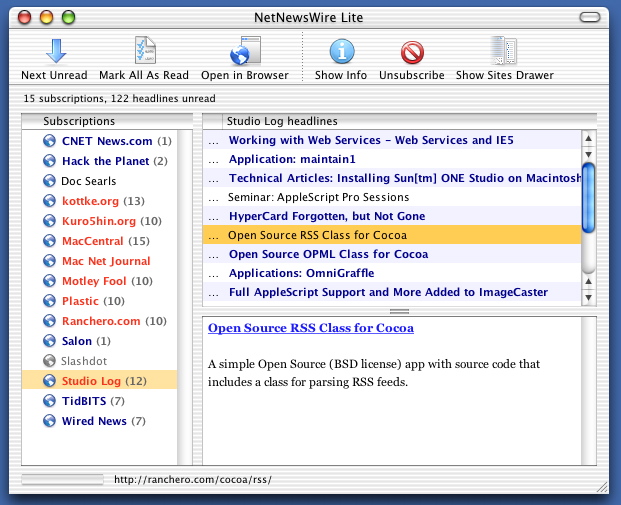
Free version of NetNewsWire is perfect for me, easy to organize subscriptions and fish through headlines quickly. See the link at the bottom for the free version.
-
NetNewsWire Lite
For OS X, I recommend NetNewsWire Lite, which is free-as-in-beer and very functional.
-
Net News WireI've heard good things about Net News Wire. I believe there's a "Lite" free version.
Not affiliated.
-
Apple copying shareware again?
Go ahead and mod me 'Flamebait', but some of the new features very strongly resemble applications written by independent developers. Dashboard? Meet Konfabulator. Spotlight? Meet Launchbar. Safari's new RSS feature? Meet NetNewsWire. IIRC, Apple did the same thing involving Watson when it added channels to Sherlock.
Maybe this is why Apple distributes the Developer Tools free of charge; so they can coopt any product that is created using those Developer Tools? -
Re:From their website
I like MT, and I use it for my blog, but I think their new pricing is just set too high. I'd be glad to pay a lower price, but at $70, it's a bit outside what I'm willing to pay. Give me a $35 version, with no installation support, and 10 blogs and 10 authors, and I'd be happy, it gives me the freedom to do what I want in the future, and still puts coins in SixApart's coffers.
There's nothing I hate more than overpriced software, especially from vendors who make things which are handy, but not critical. I'm not a hard-core Mac user, I just have my first PowerBook shipping to me now, so I've been shopping about for Mac software the last few days. Here's a case in point, the Netware client for Mac OS X. It's $159 per seat. Uh, that's more than I've ever paid for an Operating System, and you want me to pay that for a piece of client software? No thanks.
Howabout ADmitMac? $119 to join my Mac to an ActiveDirectory? No thanks, I'll live without.
Both of these would be handy pieces of software to have, but not at the prices they charge, I'll use FTP to connect to the Netware box before I'll shell out that kind of cash. I can't help but wonder if these companies wouldn't make more money by selling a downloadable copy for $29. That's low enough that a Mac user who can't get their boss to buy it for them will consider buying it out of their own pocket, just to make their lives easier. But once you're over the $50-$75 range, you're outside what most people want to spend on their box, just to enable a "handy" feature.
NetNewsWire Pro, on the other hand, is $39. For an App that I'd use all day, every day, that's quite a reasonable price, and as soon as my new PowerBook arrives, Brent will see some of my cash. But, if that price were doubled, I probably wouldn't be paying for it, and I'd either stick to a free lite version, or use a competing product of lesser quality.
And don't get me wrong, I know that software authors need to make a living, but I wonder if they're being counter-productive in terms of what they make. You make a lot more money selling 10,000 copies of a $29 product than you do selling 1000 copies of a $100 product. And yes, I know that support costs something, so make it an option to purchase it without on-line support, if necessary. I generally don't find support, even from our large vendors to be all that helpful anyhow, just give me an online knowledgebase, and I'll fix it myself. -
Re:They should've never been let go
1. You might try TigerLaunch, which doesn't work from the dock but otherwise seems to be what you require.
-
Re:They should've never been let go
-
Re:hmm
For our mailing lists that go out on a more regular basis, we see bounce rates below 1%.
That's 100 a day for a 10,000 member list. Bounce processing is good but it doesn't catch everything.
RSS doesn't offer anything except more effort for the user.
Are you kidding? Something like NetNewsWire offers your readers listings of all the articles' subjects, just like a mail reader. Unlike email, where every message is downloaded, your users only have to download the articles they are interested in. On the listkeeper side, you have zero bounces because nothing is going out.
-
IronyPeople are moving from email to RSS? That's ironic -- I know someone that just released a service that translates RSS feeds to email, which seems like a knocking good idea to me.
Maybe the real lesson isn't "email bad, rss good", but that RSS has the nice property of allowing the user to select how she would prefer to access the resource in question -- maybe as email, maybe in a custom web page via Amphetadesk, or maybe in a special purpose application such as NetNewsWire. For that matter, maybe they'd like receiving info on a non-traditional device, such as a PDA or video game console, and RSS feeds can be more adaptable than other channels.
Personally, I like email, I've got processes for handling a silly volume of it, and the ability to get RSS feeds I'm interested mailed to me on some kind of schedule appeals to me -- even though the idea hadn't occurred to me before this weekend.
So the next question for me then is, for those of you that like RSS but don't care for email, how would you prefer to access such data? What software are you using today? What problems, if any, do you have with the way your RSS aggregator works? What properties would you like to see in such software tomorrow?
-
Sharecropp^WSlashdottedI've been following some discussions about the future of software applications, and a phrase that came up in my dinner with Robb Beal has been echoing in my mind.
What it comes down to is this: if you want to develop software, you can build for the Web and/or Unix and/or OSS platforms; or alternatively, you can be a sharecropper.
Your choice, but I think it's an easy one.
Especially since the users out there want you to do the right thing.
What Robb actually said, in a conversation about Mac software outputs like Ranchero and Watson and his own Spring, was that building for the Apple OS feels like being a sharecropper.
What's a Sharecropper?
I found a good definition at InterAction Design:A farmer who works a farm owned by someone else. The owner provides the land, seed, and tools exchange for part of the crops and goods produced on the farm.
It's a lousy position to be in, because you're never going to make much, and if the land's owner finds something better to do with the land, you're history.
A practical example of this is Watson, the product mentioned above, which did very nicely, thank you, on the Macintosh, until the owner of the land brought out Sherlock, a very nice program that did many of the same things.
Are You a Sharecropper?
If you're developing software for the Windows platform, yes.
Or for the Apple platform, or the Oracle platform, or the SAP platform, or, well, any platform that is owned and operated by a company.
They own the ground you're building on, and if they decide they don't like you, or they can do something better with the ground, you're toast.
They can ship their own product and give it away till you go bust, then start charging for it; and use secret APIs you can't see; and they can break the published APIs you use.
All of these things have historically been done by platform vendors.
How Not to be a Sharecropper
If you develop server-side software that runs on Unix (by which I mean any platform that runs bash and creates processes with fork(), which includes GNU/Linux, Solaris, AIX, and many others), you're not a sharecropper.
They're not 100% compatible, but they're enough alike that you can move around and nobody really owns the turf.
You're not a sharecropper if you're building around the Apache webserver and the increasingly-large suite of associated software.
Nobody owns it, and it runs on anything; nuff said.
You're not a sharecropper, especially not a sharecropper, if you're building on the Web platform.
If you can define your value-add as a series of interactions via a browser, or an interchange of XML messages, nobody can whip the land out from under you.
Good For the Customers, Too
It's pretty obvious that it's healthier not to be a sharecropper vendor. But a little thought shows that it's better not to be a customer on a sharecropper's platform.
When something good and new comes along, the chances are less that it'll be scooped and monopolized by the landlord, and greater that it'll develop into a healthy ecosystem.
But it's especially good for the customers to be on the Web platform.
The notion of routing everything through the browser (with one significant exception, which I'll discuss below) is incredibly user-centric, user-friendly, and user-empowering.
Because once they know how to use the "Back" button, to click on highlighted text, and to fill out a form, then they don't need much training in how to use your application.
Reactionaries
But there are those who want to break out of the browser mold and go back in -
Re:Karamba
For example, one of its features is the ability to read headlines from news sources such as Slashdot. While its nice to see the headlines right on your desktop, how useful is it? If you want to read the whole story you have to fire up a browser anyways to read it. So whats the point?
The point is that, instead of reloading the Slashdot home page all day, you only have to fire up your browser when you see a headline that piques your interest.
I've never used Karamba, but I find RSS news aggregators (for example, Straw or Netnewswire) quite useful in this regard.
-
Re:What should be improved to beat others
I don't use it particularly often, but it's nice when I do: Tigerlaunch. Displays everything in your Applications folder, you can remove things you don't want to see there. Small, neat, useful.
-
Re:Scroll wheel click
That's what TigerLaunch under OS X is for. Great little free application, that.
I have to admit that I like the modern Start button/bar better than the old button/bar. The modern form finally hides unused items behind a double-down arrow. This is good for speed, but I wouldn't design an interface that hides things from the users. I'd rather write a system that doesn't allow things like text files and minor utilities under the start menu. I don't need WinRAR's console manual or help file under the WinRAR menu. I just need WinRAR. Same goes for un-installers. They need to make this part easier on the user, instead of just hiding elements.
-
Re:MacI'm not a MacHead... nor do I even own a Mac (though on occasion I've worked on some)... however, I don't even see how it can claimed that XP has the best colour scheme. Every time I see OS-X I start drooling and wish that I could afford a Mac to play with...
Come get it! Cheap Karma! Just say you want a mac!
Well, seriously you know this is satire right? It's making a point through humour. Yeah, the titlebars and start bar in the default XP theme are pretty garish, that's the point. On the other hand, I quite like the widget theme, pretty laid back in comparison.
Anyway, personally I think once you get over the big titlebars Windows XP is better than MacOS in terms of themes, the MacOS gui is cool for the first week, then the novelty wears off and it just gets distracting. In particular the stripes that invade it everywhere are just visual noise and ended up irritating me, but there doesn't seem to be anywhere to turn it off, or make it a gradient or something.
Some stuff is just confusing too. Look at this for instance. Look at the bottom, I guess that thing at the bottom left is a progress indicator? It doesn't stand out terribly well, nor is it obvious what it does. On the left hand list view there is what seems to be an empty scrollbar, but it could be anything for all I know. It's just a seemingly pointless gradient.
The main problem with XP of course is that not all the apps use the new theming APIs, meaning you end up with a mix of cruddy old icons and grey UIs. Anyway, you know why Windows and GTK traditionally use shades of grey and brown? It's easier on the eyes.
In fact, if you remember back in the days when the web was a shiny new toy, by default web pages were grey. Modern day browsers use white as the default, but in the beginning it was a similar shade of grey to the one Windows used, because it makes reading for extended periods easier. For the same reason, the old green on black terminals weren't so great.
So, the Mac colour scheme is good for marketing purposes, but I don't really see how it could be objectively classed as "better", it certainly is less usable than the old MacOS 9 style ui. But I guess they had to give it some distinguishing feature.
-
Just use NetNewsWire
NetNewsWire parses rss feeds and does a damn good job of it.
-
Overly Convoluted
Interesting use and integration of standard technologies (iCalender, WebDAV and RDF) but it seems like an overly complex way of checking news-feeds. I'll stick with using SlashDock and NetNewswire.