Slashdot Mirror
Domain: viperlair.com
Stories and comments across the archive that link to viperlair.com.
Comments · 40
-
Re:If you want *good* - arcade controllers
Here are some links to (1) a really nice, (and not *too* pricey) arcade console controller for USB; and (2) a modern gamepad with a port for plugging in original Atari controllers.
http://www.viperlair.com/reviews/misc/input/misc/xarcade/dual/index.shtml
-
HERE IS THE ARTICLE!
Bad form I know, I know. Dang
Here is the article I was referring to... and remember my OP was from memory so be kind...
http://www.viperlair.com/articles/editorials/vista/versus/ -
Re:Show me a good review of Vista.You realize, I hope that by you calling previous efforts dismal doesn't make them so. Countless software shops and corporate establishments are using micro$oft technologies.
Let me try.. M$ has compounded this fundamental problem with digital restrictions and security theater instead of addressing real security and user needs. Vista is a disaster. Digital restrictions aren't invented by microsoft.
Someone makes a bunch of movies, Some of them have digital restrictions, do you want to see them on your PC or not? There, simple enough for ya? Everyone who reviews Vista comes away angry. err.. I'm not even going to bother with that one. Editors who hyped Vista have publically admitted their mistake. It's no better than XP and is in many ways worse. Where? Who?
http://www.viperlair.com/articles/editorials/vista/versus/ Non free development does not work. The faster you move away, the more money, time and effort you save. I think we have had enough platitudes in one post. Come back when you have something rational to say, or documents to back your absurd claims. -
Re:AMD New Brands to Match?
Funny you mention that... AMD has started to rename their processors.
Check out this neat article I stumbled upon not too long ago while pricing an AMD system for a friend:
http://www.viperlair.com/reviews/cpu_mobo/amd/be2350/index.shtml
It's actually a review of one of the processors with the new naming convention... but goes into detail as to how to identify processors. -
It's really made by Etasis in TaiwanThe picture of the data plate shows that it's really an Etasis EFN-300. The UL approval number is E176239, which can be looked up here. to obtain this data.
This is important, because there are too many unapproved power supplies out there. Those are the ones that fail, or worse, catch fire, when loaded up to their rated load.
The heat pipe arrangement looks like an afterthought. A simpler design would have the power semiconductors on the back plate with the fins. That's how industrial power supplies are usually built.
-
*Now* they make one
But sometimes, you just want a little silence. For example, if you're building a home-theater PC, you'll want as quiet a system as possible.
Well, that would have been nice to be able to recommend when I wrote this article. I had also recommended an Asus GeForce 6600, albeit one that didn't cost quite as much. For myself (not being an audiophile), the cheaper card works fine as it rarely spins up to any noticable volume while I'm watching TV. I can understand, though, that for others the background noise can be very annoying.
As you can see, the card is actually designed to take advantage of a preexisting CPU cooling fan to blow air over the passive radiator. If you have a standard active cooling mount, then this is an innovative idea. But it does limit your choice of CPU coolers. For one thing, your processor heat sink can't be taller than the bottom of the card.
So what they're saying is that the ASUS Star Ice Jet Engine^W^W CPU Fan isn't going to work with this card? What a shocker.
(No, I won't let go of it. I've still got mine sitting on my desk, just so I can get all the "What the hell is that?" comments. )
Nvidia's upcoming Release 80 drivers include a number of enhancements for HDTV, including the ability to minimize overscan problems, something which has plagued home-theater PCs for years.
This reminds me, has anyone had any experience with this or any other HDTV-compatible cards that don't cost an arm and a leg? I'm still avoiding HD for now, but it's likely to catch eventually. To date I haven't seen too many inexpensive HDTV tuner cards. Then again, maybe I'm not looking hard enough? -
My favortie board
Base Price: $4,589.00
Holy CRAP that's expensive! And that's (apparently) without the monitor! If I may suggest, you should be able to build the same machine for about half the price, perhaps a bit more.
Asus A8N-SLI Premium nForce4
Sweet! They chose my favorite board! I have the A8N-E board (same thing, but only one Vid card) and I must say that it is a VERY nice board. Practically everything you could ever want is built in. NForce4 chipset, Gigabit ethernet, PCI Express, 8 channel audio, 10 USB ports, hardware firewall, hardware RAID support, 4 SATA-300 (aka SATA-II) connectors, IDE support, nearly all AMD64 chips supported, etc. I haven't found a better board, especially in that price range!
Sound Card: Creative Labs Audigy 2 ZS Platinum INT Drive Sound
Can anyone explain what is up with this? The board comes with 8 channel sound built in. What do you need a separate sound card for? Is the sound quality really that much better?
BTW, if you get the A8N board, don't get the ASUS Star ICE. I've got one of those things and I'm now using it as a desk ornament. I just wanted an extra fan to keep things cool. I had no idea that I'd get a friggin' JET ENGINE! (I'm not kidding either. This thing can barely fit in the case when installed.) It gets great comments from my coworkers though. "What the HELL is that!?"
If you don't believe me on its size (no one ever does) just look at this pic. -
My favortie board
Base Price: $4,589.00
Holy CRAP that's expensive! And that's (apparently) without the monitor! If I may suggest, you should be able to build the same machine for about half the price, perhaps a bit more.
Asus A8N-SLI Premium nForce4
Sweet! They chose my favorite board! I have the A8N-E board (same thing, but only one Vid card) and I must say that it is a VERY nice board. Practically everything you could ever want is built in. NForce4 chipset, Gigabit ethernet, PCI Express, 8 channel audio, 10 USB ports, hardware firewall, hardware RAID support, 4 SATA-300 (aka SATA-II) connectors, IDE support, nearly all AMD64 chips supported, etc. I haven't found a better board, especially in that price range!
Sound Card: Creative Labs Audigy 2 ZS Platinum INT Drive Sound
Can anyone explain what is up with this? The board comes with 8 channel sound built in. What do you need a separate sound card for? Is the sound quality really that much better?
BTW, if you get the A8N board, don't get the ASUS Star ICE. I've got one of those things and I'm now using it as a desk ornament. I just wanted an extra fan to keep things cool. I had no idea that I'd get a friggin' JET ENGINE! (I'm not kidding either. This thing can barely fit in the case when installed.) It gets great comments from my coworkers though. "What the HELL is that!?"
If you don't believe me on its size (no one ever does) just look at this pic. -
Nothing beats...
Nothing beats playing my favorite EA games over my SBC Yahoo! DSL connection using my D-Link DGL-4300 Wireless 108G Gaming Router with a cool, refreshing Pepsi in one hand, my Logitech mouse in the other, wearing my Nike clothes and blasting a ClearChannel affiliate, my source for great new hits from 50 Cent and A Simple Plan.
Whoops, I meant to post that as an article. -
Re:What I do...
But if you're naive about the net and you go online maybe once a month...then you're a raw piece of meat in a pool full of sharks.
I am one of those naive that really don't have a clue what hardware review sites to trust. My comfort is that I am probably far from alone, in this matter.
To assist me and other naives(sp?), please join this silly poll and review the following sites (regarding credibility) with a scale ranging from 1 to 10, where 1 is "No credibility at all" and 10 is "Perfect credibility, these guys wouldn't post a biased review for world domination":
About PC Hardware Reviews
Ace's Hardware
Anandtech
Ars Technica
Beyond 3D
Cnet Reviews
Dan's Data
Dev Hardware
Extremetech
Firingsquad
[H]ard|OCP
Hardware Analysis
Hardwarecentral
Hardwarezone
IT Reviews
OcPrices
Overclockers.com
ProCooling.com
The Tech Report
The Tech Zone
Tom's Hardware
TrustedReviews
Viperlair
Xtreme Resources
If you know only a few of them, give your opinion on those.
Maybe someone with the right facilities could set up an independent poll? -
viperlair did a good writeup
viperlair did a good write up on what i like to call hardware review site payola a while back.
e. -
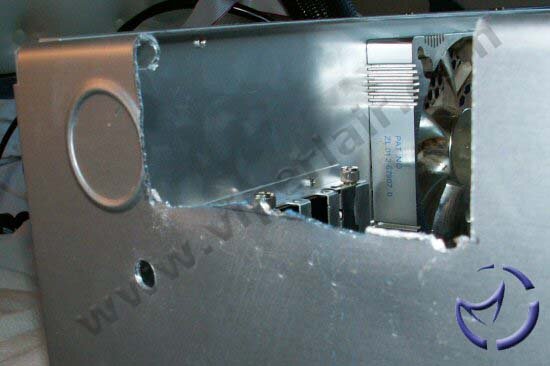
Yikes! Did they use an axe ?
http://www.viperlair.com/images/reviews/cooling/m
i sc/asetek/vpls/in_hole1.jpg That picture looks like they used an axe to cut the hole -
Other outlets for coverage
Here are some more sites covering it... all about the same content, really:
viperlair.com
hardocp.com
techreport.com
thetechzone.com
tweaktown.com
thetechzone.com
hothardware.com
hexus.net
pcper.com
legionhardware.com
thetechlounge.com
bigbruin.com -
Re:Headless Alternative for Less
-
Already Available as Nail Polish
I was surprised to notice that the bottle and applicator in the poster's link looks just like that for regular nail polish.
UV reactive color-changing nail polish has been around for a few years, and is available in many colors. The nail polish changes from Color A to Color B and a few brands have 3-Color transitions. Unlike the Flexiglow product mentioned, I don't think these are available in Clear.
Its available at several nail polish sites like Del Sol and Solar Magic. Its sometimes called Mood Change nail polish.
BTW - I've never used the stuff myself (lol), but I've seen worn by several women. Some of the color changes are quite dramatic. -
Re:Keyboards and goth clubs
Does this look gothic to you?
Maybe I misread what you said and you were suggesting they go nuts with this paint stuff to cheer themselves up.
-
Skip to page 6 for conclusions ...Looks like you gotta wade through each page (rather than be able to jump to the end)
Pros: Good performance, easy to assemble a system, better than average expansion options. Quiet.
Cons: No BIOS tweaks possible. Mere 200W PSU. Poor onboard audio.
-
Re:different cables
am I the only one who couldnt spot the difference in quality between the different cables?
Yes, it is difficult to tell, but if you really look closely, you'll see a difference in the quality of the pictures. A good way to find out it to open each picture (1, 2, 3) in a browser-tab (not in a new window); then flip between the tabs and you'll notice the difference.
In the coax picture you'll notice the 'color bleed' and distortions: on the face (cheek, mouth) of the referee, and on his left arm (especially when compared to the composite picture). Finally the s-video screenshot is slighly sharper and has more contrast (ie. not as blurred) as the other pictures, as you can see if you look at the audience on the right side -
Re:different cables
am I the only one who couldnt spot the difference in quality between the different cables?
Yes, it is difficult to tell, but if you really look closely, you'll see a difference in the quality of the pictures. A good way to find out it to open each picture (1, 2, 3) in a browser-tab (not in a new window); then flip between the tabs and you'll notice the difference.
In the coax picture you'll notice the 'color bleed' and distortions: on the face (cheek, mouth) of the referee, and on his left arm (especially when compared to the composite picture). Finally the s-video screenshot is slighly sharper and has more contrast (ie. not as blurred) as the other pictures, as you can see if you look at the audience on the right side -
Re:different cables
am I the only one who couldnt spot the difference in quality between the different cables?
Yes, it is difficult to tell, but if you really look closely, you'll see a difference in the quality of the pictures. A good way to find out it to open each picture (1, 2, 3) in a browser-tab (not in a new window); then flip between the tabs and you'll notice the difference.
In the coax picture you'll notice the 'color bleed' and distortions: on the face (cheek, mouth) of the referee, and on his left arm (especially when compared to the composite picture). Finally the s-video screenshot is slighly sharper and has more contrast (ie. not as blurred) as the other pictures, as you can see if you look at the audience on the right side -
Re:different cables
am I the only one who couldnt spot the difference in quality between the different cables?
Yes, it is difficult to tell, but if you really look closely, you'll see a difference in the quality of the pictures. A good way to find out it to open each picture (1, 2, 3) in a browser-tab (not in a new window); then flip between the tabs and you'll notice the difference.
In the coax picture you'll notice the 'color bleed' and distortions: on the face (cheek, mouth) of the referee, and on his left arm (especially when compared to the composite picture). Finally the s-video screenshot is slighly sharper and has more contrast (ie. not as blurred) as the other pictures, as you can see if you look at the audience on the right side -
Re:different cables
am I the only one who couldnt spot the difference in quality between the different cables?
Yes, it is difficult to tell, but if you really look closely, you'll see a difference in the quality of the pictures. A good way to find out it to open each picture (1, 2, 3) in a browser-tab (not in a new window); then flip between the tabs and you'll notice the difference.
In the coax picture you'll notice the 'color bleed' and distortions: on the face (cheek, mouth) of the referee, and on his left arm (especially when compared to the composite picture). Finally the s-video screenshot is slighly sharper and has more contrast (ie. not as blurred) as the other pictures, as you can see if you look at the audience on the right side -
Re:different cables
am I the only one who couldnt spot the difference in quality between the different cables?
Yes, it is difficult to tell, but if you really look closely, you'll see a difference in the quality of the pictures. A good way to find out it to open each picture (1, 2, 3) in a browser-tab (not in a new window); then flip between the tabs and you'll notice the difference.
In the coax picture you'll notice the 'color bleed' and distortions: on the face (cheek, mouth) of the referee, and on his left arm (especially when compared to the composite picture). Finally the s-video screenshot is slighly sharper and has more contrast (ie. not as blurred) as the other pictures, as you can see if you look at the audience on the right side -
Re:[OT] weak video card
Here's a web page that has soom good tweaking information:
http://www.viperlair.com/articles/howto/software/t weakd3/
And another page that has a list of recommended settings based on how much RAM your card has:
http://ucguides.savagehelp.com/Doom3/FPSVisuals.ht m
In particular, for some reason the game initially detected my card as having 64 MB of RAM, but I have 128 -- I noticed a huge improvement after manually setting the appropriate values for 128 MB. Sometimes messing with the options in the video menu will reset the values, though, so make sure to make a backup of your config file after you've got it working nicely. -
Rolandpiquepaille-ism
-
Rolandpiquepaille-ism
-
Rolandpiquepaille-ism
-
Rolandpiquepaille-ism
-
Rolandpiquepaille-ism
-
Rolandpiquepaille-ism
-
Rolandpiquepaille-ism
-
Rolandpiquepaille-ism
-
Rolandpiquepaille-ism
-
Re:also available on MSDN
so, uh, whats the difference between this WindowsXP-KB835935-SP2-ENU.exe download and the en_winxp_sp2.iso available on MSDN? is it just the XPSP2.EXE file from that image? No, I imagine the
s lipstream/winxpsp1a/ The guide linked to is for SP1a, but the general idea should hold for SP2. -
Actually, ATI does HW encoding
Excerpt from Viperlair It looks like the ATI does do H/W MPEG.
Usually found in high end pro-sumer video cards, the AIW 9600 Pro brings hardware MPEG-2 decoding and MPEG-2 encoding to the consumer level. The Cobra Engine is capable of Inverse Discrete Cosine Transform (iDCT), which is really a fancy way of saying it can decode MPEG-2 streams with minimal CPU usage. This can make a difference when viewing DVDs on your PC, as you no longer have to shop for a dedicated DVD decoder, and no longer have to rely on software based decoding.
Discrete Cosine Transform (DCT), or MPEG-2 encoding, is done in hardware, which for casual video editing buffs, means less work on your CPU. ATI claims a maximum of 20-25% of the encoding process can be taken off the CPU, which could result in less time needed to encode a movie file, or at least, more CPU processing power to perform other tasks.
Videosoap is a feature found within the Cobra Engine that cleans up the image. It isn't designed for MPEGs you already have, but rather, it uses four filters to clean up the signal coming in from the input video. Other than cleaning up the image, it also serves to reduce the file size since noise isn't something that can easily be compressed, so with less noise, you'll end up with smaller files. -
What, no bathroom PC?
A PC in every room, except the bathroom...
Maybe Intel is just trying to save some room for growth for after every other room in the house has a PC. -
Re:Dual LCDs?
Just bought an XFX with dual DVI outs. It's pretty sweet. chek it out.
-
teh g00gle c4ch3
-
Screw windowsupdate
well, critical updates are *mostly* distributed by the ever-popular windowsupdate service. I recently created a slip-streamed, unattended CD-R for XP Pro that has SP1a && corp activation (via corp $erial) && m$ft jvm && every critical update & patch. And, if you want, you can download WinINSTALLER to create
-
Yeah well..I'd like to see those rocket scientists do the Bubble-Plexi Case Mod..
I can't believe these guys made it on slashdot without even having a *case*.