Slashdot Mirror
Domain: formfactors.org
Stories and comments across the archive that link to formfactors.org.
Comments · 25
-
Re:Unacceptable
pwm doesn't need more than two wires.
Unless you're trying to control a 12V fan with logic level PWM signal.
Or you want more that just a half-assed attempt at being able to accurately control the fan across all usages and speeds.I'm guessing the engineers at Intel would have loved to hear your insight before they came up a spec for 4-wire fans.
-
Re:What is Arduino?
Now can i provide a PWM signal to a 4 pin 12Vdc computer fan with an arduino? because it is looking like a 555 timer won't make the high frequencies(24khz i think) that the PWM fans need.
Yes you can. Not exactly 24kHz. But 32kHz. Which works very well with the Owltech fan (4 pin) I have. http://www.formfactors.org/developer%5Cspecs%5C4_Wire_PWM_Spec.pdf says: 21-28kHz. When I use lower frequencies I can hear a buzzing. It worked at 500Hz just fine, with the exception of the slight but annoying noise. Running the fan at 32kHz PWM works fine. No noise, and the fan spins fast and slow as required.
-
Re:I'd consider the families a little differently.
There are also BTX, which was an Intel attempt at a smaller format but which has been superseded by micro-ATX and flex-ATX since they, unlike BTX, are compatible with ATX cases.
I think I mentioned DTX, which AMD introduced specifically for HTPC and such.
Intel also had WTX specifically for servers and high-end workstations. It was even larger than EATX, but the extra size is really unnecessary these days since you can get dual-socket boards in EATX. Most quad-socket boards are in a form factor called SSI MEB, which is about the same size WTX was. There are also SSI CEB and SSI MEB in that SSI family. Notice Wikipedia knows little about SSI.
Then there's the ETX and XTX family which are actually COM systems rather than true motherboards.
Then there's all the non-?TX stuff like NLX, LPX, EBX, EPIC, and a few more besides. Then there are all the proprietary boards out there.
For a pretty good comparison of the more common formats, Wikipedia has a computer motherboard form factor article and several individual articles for ATX, NLX, LPX, etc.
Then there's formfactors.org which, as the name suggests, is a whole site dedicated to documenting and reporting news updates on motherboard form factors. They have comparisons, specs, guides, info on testing equipment for system designers and builders, and list news on updates to specs and such on their main page.
Then there are embedded systems company sites and small-board enthusiast sites like smallformfactor.com (industry journal), mini-itx.com (small system enthusiasts_), pc104.com (list of PC/104 part suppliers), PC/104 Consortium, and places like Embedded Planet which sells embedded computer stuff including even more specialized small form factors, like AMC, PCI, microPCI, PrPMC, and other "industrial" form factors that typically require a chassis and backplane system designed for rack mounting in the industrial control or telecommunications applications.
-
Re:Requires root privileges or physical access
Now, what I miss is the reset button on the front of the machine. What's up with that?
There's an easy hack for that. Tie the PWR_OK line (it's one of the wires in the ATX connector) to a momentary switch (that opens on push, rather than closes).
Ghetto reset button. It's not even a powercycle type reset either. If you want details or such, check out the ATX specification. Look on page 22, "4.1.3.3 PWR_OK".
For a harder reset, cut the PS_ON# line. This will cause your main rails to drop to neutral, which feed important things like your CPU.
-
Re:Slow down and consider the implications
Bruce, you always get modded +5, so you don't need my praise, but you're so right.
A lot of people don't remember the basic stuff that Intel has made open so that we can enjoy the diverse computing environment that we have. PCI, USB, and SATA are all standards that Intel had a hand in. And then there's formfactors.org. If it weren't for Intel no doubt by now we'd all be referring to motherboards as "planar boards" and HDDs as "fixed disks". And paying $8000 for a basic word processing workstation.
On some level they "get" that they need the chaos of a diverse marketplace to make a fair bazaar in which to offer their product. That's wisdom you can't buy. Kudos to them.
/ no, I don't work for Intel.
-
Re:So...
Er, WTF... make that page 24 of THIS
-
Re:So...
Specifically this signal: See page 19 of http://www.formfactors.org/developer\specs\ATX12V
_ 1_3dg.pdf
If it doesn't actually power down, the system does end up resetting... -
I do not see the advantage to BTX either
The BTX form factor is a desktop form factor designed to provide low profile, efficient cooling, and be "scaleable" in motherboard size. The form factor is quieter, cooler, and will allow smaller cases.
See: http://www.formfactors.org/developer%5Cspecs%5CBTX _Specification%20v1.0b.pdf
That said, case manufacturers have adjusted to the needs of the server market with the ATX standard. They have introduced 1U and 2U systems with effective cooling solutions to deliver low profile, efficient cooling, and be "scaleable" in motherboard size already. With BTX being primarily aimed at desktop, so the motherboards may lack server class features (SCSI, RAID, etc).
A quick search on Google rendered a solution from Supermicro that has more drive bays, uses P4 if thats your thing, and does this all in 2U form factor using an ATX motherboard.
See: http://www.supermicro.com/products/system/2U/5025/ SYS-5025M-4.cfm -
Re:So?Given that for some stupid reason GPUs point DOWN and thus the heat rises through the PCB itself, you're looking at a toasty machine.
Behold the BTX Form Factor
-
More info on the BTX form factor
-
Re:BTX you say?Those two motherboards are both picoBTX boards, designed for small form factor systems. Not all BTX stuff will be that size just as not all ATX boards are microATX or FlexATX sized.
For more info on BTX have a look at this AnandTech article, or check out FormFactors.org if you want to look at the actual specifications.
-
ATX power supplies, anyone?
PC power supplies that conform to the ATX specification have different behaviors depending whether the power button is pressed and released, versus being pressed and held for 3 seconds.
-
Micro ATX doesn't always require half-height PCI
Micro ATX does not require everything to be half-height. That may be the case (pun not intended) with some Mini-ITX cases, but there are quite a few Micro ATX small tower cases that support full-height, half-length PCI and AGP cards, smaller ATX power supplies and standard drives (be it 5.25" or 3.5").
The main difference between standard ATX and Micro ATX is the "length" of the board, which determines the number of slots, usually PCI. ATX gives you a maximum of 7 slots to occupy (be it 0-1 AGP + 1-6 PCI) where as Micro ATX can have at most 3 slots to occupy. Check out formfactors.org for more information. -
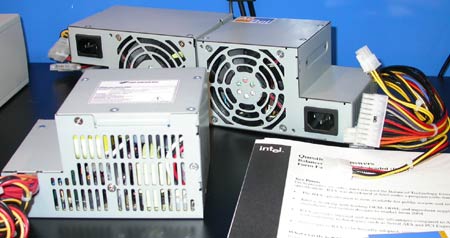
Why the wired shape?
I have asked this questions at Form Factors forum, but no one seams to be able to answer the question. So can any of you Slashdot readers help me on the way?=)
When I look at this picture of the new PSU, I can't help to think; Why the wierd shape? =)
If the tetris shape is because of the power connector, I have an idea:
"Cut off" the block with the power connector, so the case is almost cubic, and move all the output cables to the side of the PSU.
Make the power connection mountable in the tower/desktop just like an USB extenteder.
The wire from the power connector could have a small socket on the other end that is pluged in to the side of the PSU.
Or the wire from the power connector could access the PSU together with all the output cables.
What do you think? -
Some Other Links
-
PDF link
You can download a copy of the BTX spec in PDF from this site.
-
More/better info
More info, greater bandwidth, fewer ads, etc at Form Factors and, of course, Intel.
-
Link to specs
The specs pdf for those whose browser doesn't handle backslashes.
-
Using 2 Slots
... 2 slot card for "heat management"....
Remember, the "2nd slot" would normally (always?) be occupied by a PCI GFX card in a ATX form factor motherboard that features AGP. The AGP and PCI slot are usually (always?) mutually exclusive so the fact the GeForceFX card uses the unused back panel slot to vent 60W is a good idea IMO.
--- Rahul. -
Re:Cheap book PCs?Small doesn't always translate to cheap, as a matter of experience it's the opposite. You can get a lot of current mobos for <$100
For more about form factors, here the definitive site.
-
Re:Where do you want to go today?
WTX (a workstation form factor) would have been another one, but it never really caught on AFAIK and its implementation is now discouraged according to the webpage:
"It is NOT recommend that NEW IA32 based workstations be designed to the WTX- form-factor."
formfactors.org doesn't even mention WTX in their formats summary. -
Re:Uhhh... we already have a small standard.
FlexATX is the basis of the FV24. It's awfully small.
read all about it:
http://www.formfactors.org/developer/specs/flexatx -
Re:Other Form Factors - NLX not NTX
I think yyou mean NLX form factor and not NTX. In any case, you make a valid point. These flexATX boards are a nice idea, however they are a hack job of a standard (ATX) that wasn't designed with compactness in mind (in my opinion). Shrinking the ATX form factor comprimises expandability--typically a tiny ATX board has only one PCI slot and integrated everything. Also, the small flexATX cases strike me as not very serviceable (cramped, awkward layout, cooling issues and so on).
The NLX form factor was designed for compatness, serviceability and flexibility in mind. The mainboard itself is very small and has no expansion slots--rather it has a card edge that plugs into a special slot on a backplane. The backplane contains the mainboard slot plus one or more PCI slots (the only drawback I see is that I havent found an NLX backplane that has an AGP slot--other than that it would be an ideal form factor!). The typical mini-desktop might only have one or two PCI slots, but with this form factor largger cases or industrial racks could have a backplane with many more slots (expandability).
Also, since the mainboard plugs INTO a slot rather than having slots with cards in them it makes expandability/serviceability MUCH easier--it you need to expand memory, upgrade or replace the motherboard, etc. you simply unlatch the board and pull it out the back of the case, without removing any cards or disassembling the chassis. The prime drawback, as sachmet mentions, is the lack of mainboards and cases sold in this form factor. Consequently they fetch larger prices. Why this is is beyond me--I guess it's the inertia of maintaining a modicum of compatibilityh with the 20 year old PC form factor... -
Re:I still say...
Well, there's this thing called FlexATX
-
My quiet case project : it's an answer ... sort of
Well, it seem these days, most of the power user just care to get something like 200fps in Quake III. Why ? Beat's me ! I'm not on a quest to get the ultimate frame rate, I just want my box to be quiet as possibly can be.
To help you understand my take on the subject, here is the background
My PC has the following components :- A OEM case
- A 235W OEM power supply
- ASUS P3B-F
- Intel Pentium II rated 400Mhz @ 400Mhz
- A cheap OEM SECC2 Heat-Sink made of aluminum
- A 128MB CAS2 no-name DIMM
- Two 32MB CAS3 Samsung DIMM slowing down my memory timing, but preventing the appearance of the all mighty evil SwaP
- A ATI All-In-Wonder Rage128 16MB
- A Creative SoundBlaster Live! Value
- A Realtek 8139 Ethernet NIC
- My beloved USR 56Kbps ISA Real Modem. Sorry but to me a component that uses CPU power to do it's processing instead of taking the load off is not worthy of being in my computer. Not to mention the M$ Win part...
- A Creative 48x CD-ROM drive. It's the loudest damned thing in my computer when it's spinning
- A Quantum Fireball AS PLUS 40GB (7200RPM) in a removable tray
- A Quantum Fireball CX1 10GB (5400RPM) mounted inside the case
- Of course the stupid old 1.44 MB floppy drive only used for booting Tomsbrt in case of emergency
Soon to be
- A Adaptec 2940UW
- A Diamond Monster 3D II for Glide games
It turn out that the Quantum Fireball AS makes less noise than the Quantum Fireball CX1. I still have to figure it out
I use my PC for
- Running Linux and learning as much as time allows me (Jez I had so much time when I was a student... Think of all the time I wasted in High-School running the evil W monster)
- Doing some gaming i.e. : Diablo II, Unreal, UT, Undying (Although that thing is going to cost me a new box)
- Spending numerous nights filling my brain @ Slashdot, Tomshardware, Anandtech, Arstechnica, StorageReview, Developper.Intel.com, and most importantly, hounding the web for all the case manufacturers and their take at a quiet box.
As I'm writing this post, that is probably going to be the base documentation for my Silent Case Project, you're guessing that my sleepless night of browsing have not yielded the desired result.
I've check out many options such as water cooling, moving the PC to the closet, returning to the forest where a PC is pretty far from your everyday quest for survival. None of them suits me.
The objective of my project is to build a case that meets the following criteria
- A silent as possible
- Accessible
- Provides sufficient ventilation to maintain all the components running within thermal specs
- Be light enough to be easily transportable (Let's not forget the Lan parties
To attain those goals I have to
- Read all I can about noise, sound, aerodynamics, PC specs
- Find suitable materials : A case is not just a protection against unwanted fingers and dust ; it must provide EMI shielding, proper grounding, resist to impacts, and fit into my conception of the king of object you want in your bedroom (If you were thinking about plywood and a box of rusted leftover nails, forget it)
- Find the tools or the companies or individuals with the means to work the materials I choose to build the casing
For the sound isolation I was thinking about some kind of foam. Mineral lint would be affective but that takes too much space and it's not the kind of thing I want beside my bed. Form the casing itself, metal is almost inevitable if you want EMI shielding and grounding. And as for you who wonder why I have not mentioned water cooling yet, the greatest source of noise is not my CPU cooler and your just moving the problem out of the case (Nice ; you have water heating up but unless your reservoir is like a bathtub or something you will have to transfer the heat for the water to the air).
That about as far as I am. If you have any idea that might help me, please fell free to send me some bits forming ASCII characters at Prozzaks@operamail.com
To finish up, here is a list of thing that might help people wanting to achieve similar goals
- http://www.formfactors.org/ You should be able to find all the documents regarding the ATX form factor and thermal design guides. A must if you want to build a quiet PC.
- http://developer.intel.com/ Intel has contributed a great deal to the ATX definition ; here you will find many relevant documents including thermal design guides for all Intel processors.
- Etract from my favorite's :
Hardware\cases PC CASE
Fong Kai
PowerOn
Enlight Corporation
dir.yahoo Enclosures Manufacturers
procase
YY Computer
Psi
IN WIN
Amtrade
American Suntek
Addtronics
A-Top Technology, Inc
Nikao
Palo Alto Products
Antec
Lian-Li
amaquest
Koolance
Quietpc
PC Power & Cooling
Hardware\Heat Sinks ALPHA
Cooler Master
AVC
ekl
GlobalWIN
globefan
RDJD
Foxconn
Spring Spread
Sanyo Denki
TITAN
TaiSol
ChipCoolers
Orb a
ElanVital
Hardware\Info\Form Factor Platform Development Support
SSI
WTX
Hardware\Info\Standards Fibre Channel Industry Association
PCI SIG
RAB
serialata
SPEC
Hardware\Info\Storage RAID.edu
Hardware\Info\Cours CS 252 - Graduate Computer Architecture
Hardware\Info The PC Guide!
Hardware Bible
FullOn3D
developer.intel.com
HwB The Hardware Book
United Overclockers
Ars Technica
Tech-Junkie
HardwarePub
Webopedia
Illustrated Guide to the PC Hardware
SysOpt
2CPU
Ace's Hardware
Technical Support - RaidHelp v1.0 - Free RAID Technology Guide
Computer Architecture
OPENCORES.ORG
TechFest
MidWest Micro Support
Hardware\Resalers GeekTek!
Micro-Bytes
ALCO
ABC Micro
2CoolTek
Plycon Computers
TCWO
ABC Micro - Lprix
Case Outlet
The Chip Merchant, Inc
Cimsys
OrdiGros
ALIENWARE
SHENTECH
FireStorm
Hyper Microsystems
TWEAKBOX
Hardware\Reviews Tom's Hardware Guide
Sharky Extreme
StorageReview
HardOCP
AnandTech
SystemLogic
x-bit labs
Active-Hardware
FiringSquad
SocketA
Overclockers Australia
HEXUS
dansdata
SysReview
Hardware\Manufacturers AMD
ASUS
Belkin
MassMultiples
Promise
StarTech
VIA Technologies, Inc
ABIT Computer Corp
Comcase
Micron Semiconductor
ECS
Hardware Freeboxen