Slashdot Mirror
Domain: free.fr
Stories and comments across the archive that link to free.fr.
Comments · 1,346
-
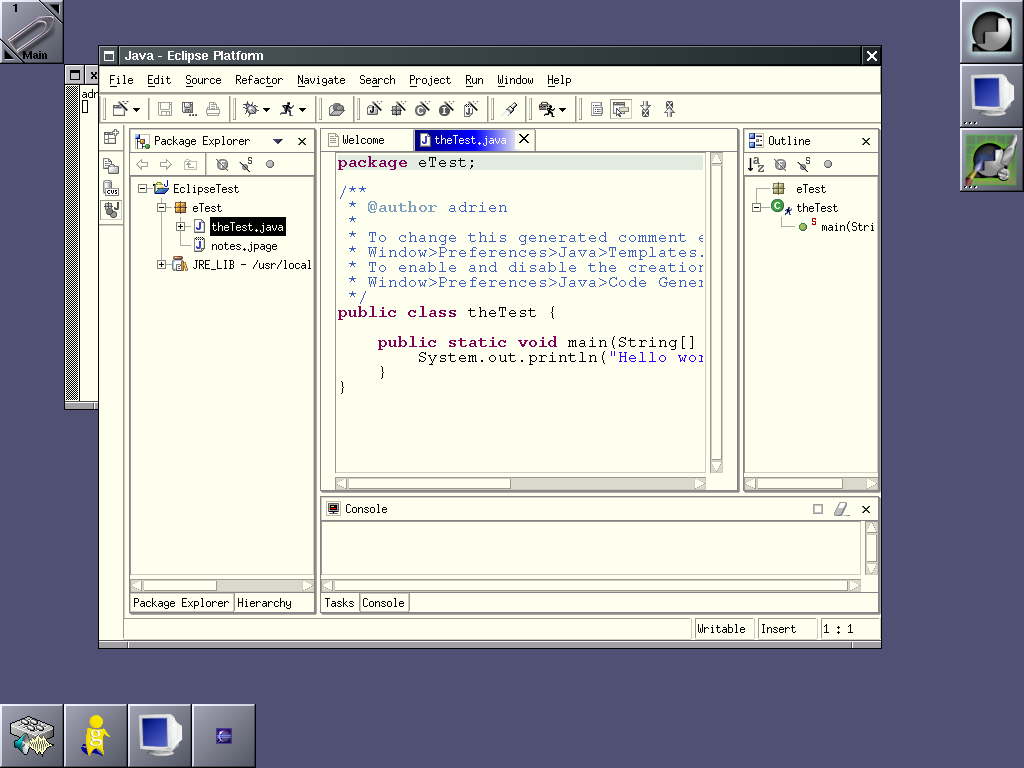
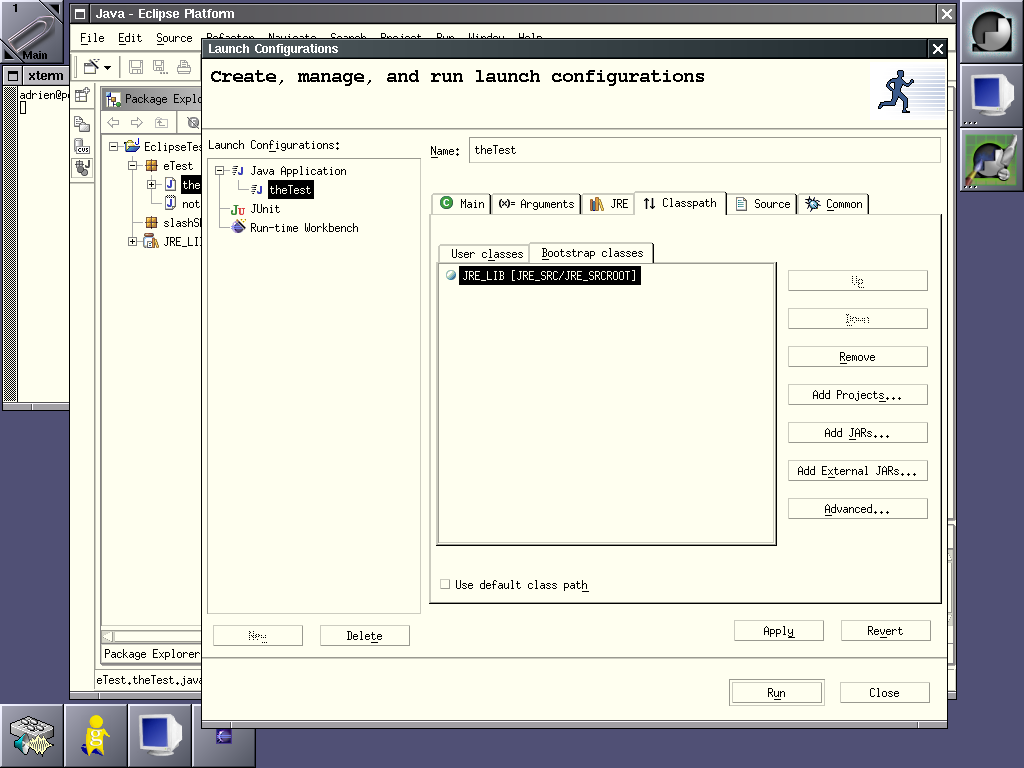
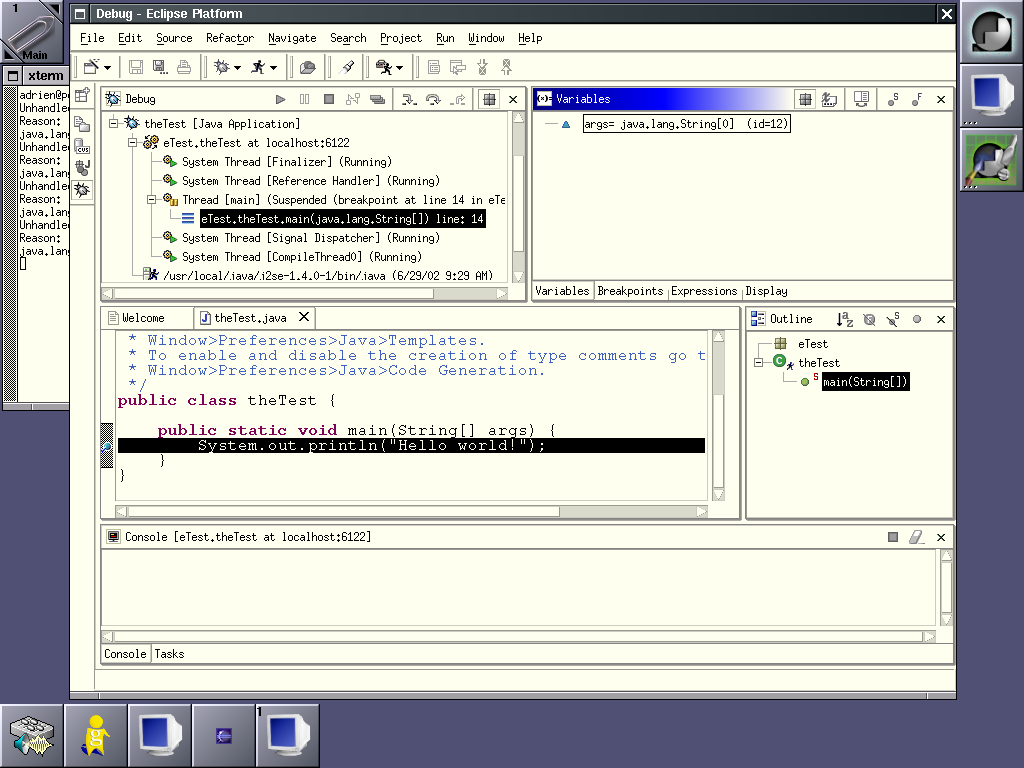
Here are screenshotsI too was quite surprised about the missing screenshots. So, I made some screenshots of Eclipse/Motif. Copy them as long as you want, I hereby give away any copyright I could have had on them. Besides, they won't stay forver on my web space, as soon as I need the space, they're gone.
- Eclipse is starting.
- The first time you start Eclipse.
- Running in basic Java mode.
- I have made some mistakes, the editor is suggesting corrections. It's not an annoying popup: I had to click on the yellow lamp on the side to get these.
- I have saved my mistakes. Now look at the ToDo list. And look at the red zones in the right editor sidebar, too. You can click on them to get quickly to the erroneous lines.
- Let's add a new class.
- Here we define our running environment.
- We can also debug the program.
- Here I configure access to a CVS repository. Couldn't make it work thoug.
Well, that's it! Enjoy! There's also an interesting wiki about Eclipse. -
Here are screenshotsI too was quite surprised about the missing screenshots. So, I made some screenshots of Eclipse/Motif. Copy them as long as you want, I hereby give away any copyright I could have had on them. Besides, they won't stay forver on my web space, as soon as I need the space, they're gone.
- Eclipse is starting.
- The first time you start Eclipse.
- Running in basic Java mode.
- I have made some mistakes, the editor is suggesting corrections. It's not an annoying popup: I had to click on the yellow lamp on the side to get these.
- I have saved my mistakes. Now look at the ToDo list. And look at the red zones in the right editor sidebar, too. You can click on them to get quickly to the erroneous lines.
- Let's add a new class.
- Here we define our running environment.
- We can also debug the program.
- Here I configure access to a CVS repository. Couldn't make it work thoug.
Well, that's it! Enjoy! There's also an interesting wiki about Eclipse. -
Here are screenshotsI too was quite surprised about the missing screenshots. So, I made some screenshots of Eclipse/Motif. Copy them as long as you want, I hereby give away any copyright I could have had on them. Besides, they won't stay forver on my web space, as soon as I need the space, they're gone.
- Eclipse is starting.
- The first time you start Eclipse.
- Running in basic Java mode.
- I have made some mistakes, the editor is suggesting corrections. It's not an annoying popup: I had to click on the yellow lamp on the side to get these.
- I have saved my mistakes. Now look at the ToDo list. And look at the red zones in the right editor sidebar, too. You can click on them to get quickly to the erroneous lines.
- Let's add a new class.
- Here we define our running environment.
- We can also debug the program.
- Here I configure access to a CVS repository. Couldn't make it work thoug.
Well, that's it! Enjoy! There's also an interesting wiki about Eclipse. -
Here are screenshotsI too was quite surprised about the missing screenshots. So, I made some screenshots of Eclipse/Motif. Copy them as long as you want, I hereby give away any copyright I could have had on them. Besides, they won't stay forver on my web space, as soon as I need the space, they're gone.
- Eclipse is starting.
- The first time you start Eclipse.
- Running in basic Java mode.
- I have made some mistakes, the editor is suggesting corrections. It's not an annoying popup: I had to click on the yellow lamp on the side to get these.
- I have saved my mistakes. Now look at the ToDo list. And look at the red zones in the right editor sidebar, too. You can click on them to get quickly to the erroneous lines.
- Let's add a new class.
- Here we define our running environment.
- We can also debug the program.
- Here I configure access to a CVS repository. Couldn't make it work thoug.
Well, that's it! Enjoy! There's also an interesting wiki about Eclipse. -
Here are screenshotsI too was quite surprised about the missing screenshots. So, I made some screenshots of Eclipse/Motif. Copy them as long as you want, I hereby give away any copyright I could have had on them. Besides, they won't stay forver on my web space, as soon as I need the space, they're gone.
- Eclipse is starting.
- The first time you start Eclipse.
- Running in basic Java mode.
- I have made some mistakes, the editor is suggesting corrections. It's not an annoying popup: I had to click on the yellow lamp on the side to get these.
- I have saved my mistakes. Now look at the ToDo list. And look at the red zones in the right editor sidebar, too. You can click on them to get quickly to the erroneous lines.
- Let's add a new class.
- Here we define our running environment.
- We can also debug the program.
- Here I configure access to a CVS repository. Couldn't make it work thoug.
Well, that's it! Enjoy! There's also an interesting wiki about Eclipse. -
Here are screenshotsI too was quite surprised about the missing screenshots. So, I made some screenshots of Eclipse/Motif. Copy them as long as you want, I hereby give away any copyright I could have had on them. Besides, they won't stay forver on my web space, as soon as I need the space, they're gone.
- Eclipse is starting.
- The first time you start Eclipse.
- Running in basic Java mode.
- I have made some mistakes, the editor is suggesting corrections. It's not an annoying popup: I had to click on the yellow lamp on the side to get these.
- I have saved my mistakes. Now look at the ToDo list. And look at the red zones in the right editor sidebar, too. You can click on them to get quickly to the erroneous lines.
- Let's add a new class.
- Here we define our running environment.
- We can also debug the program.
- Here I configure access to a CVS repository. Couldn't make it work thoug.
Well, that's it! Enjoy! There's also an interesting wiki about Eclipse. -
Here are screenshotsI too was quite surprised about the missing screenshots. So, I made some screenshots of Eclipse/Motif. Copy them as long as you want, I hereby give away any copyright I could have had on them. Besides, they won't stay forver on my web space, as soon as I need the space, they're gone.
- Eclipse is starting.
- The first time you start Eclipse.
- Running in basic Java mode.
- I have made some mistakes, the editor is suggesting corrections. It's not an annoying popup: I had to click on the yellow lamp on the side to get these.
- I have saved my mistakes. Now look at the ToDo list. And look at the red zones in the right editor sidebar, too. You can click on them to get quickly to the erroneous lines.
- Let's add a new class.
- Here we define our running environment.
- We can also debug the program.
- Here I configure access to a CVS repository. Couldn't make it work thoug.
Well, that's it! Enjoy! There's also an interesting wiki about Eclipse. -
Testing advice for Delphi programmers
Just thought I'd drop a few links that those of us using Borland's fantastic Delphi should definitely check out:
- DUnit- is an Xtreme testing framework, very similar to JUnit for Java (on which DUnit is based). The basic idea is that you develop appropriate verification tests at the same time you develop your code, and then use these test to make sure you haven't screwed anything up inadvertantly! Free and Open Source (Mozilla 1.1)
- PASDoc is the Pascal equivalent of JAVADoc, which lets you automatically generate HTML and LaTeX documentation directly from your Pascal unit source code files. Nice!
- GPProfile - a nice free and Open Source profiler for Delphi. Does what it says on the tin.
- MemCheck is a debugging tool which hunts memory leaks, memory corruption, use of an object after its destroying, etc. Very useful, if a bit archaic to use. Free and Open Source.
- OptimalCode is a fantastic site dedicated to high-performance Delphi code. If you need to optimise a routine so it's faster than sh*t off a shovel, this site'll show you how.
That should be enough to get your code into shape, get cracking
-
Slackware Eclipse
Since we're all sharing eclipse photos, here's mine.
The photo was taken using my great Canon PowerShot A40. The bluish shadow is due to a reflection inside the Slackware CD I was using as a filter. -
Re:thermometer......
Newtons have a thermometer whose readings are available to any programme. If you leave your Newton on your desk running Newton Personal Data Server you can log in and check your home temperature. If it gets too high, call the fire brigade.
-
Working mirror
I've found a working and up-to-date mirror in korea... ftp://linux.sarang.net/.4/ftp.mozilla.org/pub/ All versions included ! - friedrich - the Messiah
-
Gnoogle?
I just happened to find such a site here.
-
Re: Free software song -- Tompox version rocks!
-
Re: Free software song -- Tompox version rocks!
-
Why not just go satellite?
Ah, when Stellarium gets the ability to track satellites, THEN i'll be more than happy to go wireless with my net connection.
Cheers -
A LimerickI once skipped school to see a movie Just missed Phys. Ed. which was fine for me When Portman got nippy I got a huge stiffy Once home 'net pictures filled me with glee!
Yeah, the rhymes don't really work, but I just wanted to express what I'm sure many other Slashdotters are feeling, a renewed crush on Natalie Portman, stronger than ever, once seeing her in reasonable(ly revealing) clothing and showing a half bit of emotion.
-
Jean-Pierre Petit Les Aventures d'Anselme Lanturlu
The subject "comic book physics" reminded me of the books by Jean-Piere Petite. He wrote some really nice and interesting comic books, and i think he really managed to illustrate some (advanced) physics/mathematics concepts (relativity, black holes, magneto-hydrodynamics, topology,
I read the books when i was about two years into studying physics (and they were still interesting), and i wished i'd have read them earlier (maybe about the age of 14 or so). The best thing about the books was, that they would teach you to be curious about nature/mathematics (provided some interest in the subject), and to play with your imagination and new concepts.
There's this website about the book, but apparently it isn't very forthcoming (yet) if you aren't interested in french versions of Anselms adventures. I know there is a german translation of the (originally french) comics (which you can still order at amazon), but couldn't find an english one (maybe there is no one, or the main characters first name isn't "anselm"). -
Re:More props for Litestep
Sure. Just about any UNIX desktop environment is as flexible as LiteStep. Roll your own...don't feel like you just need to use KDE or GNOME or something like that. I've got a rather nice desktop with sawfish, the sawfish pager, all status information being shown via gkrellm, and programs launched via the keyboard using xbindkeys. No GNOME or KDE flavoring necessary.
AfterStep is probably the closest in functionality to LiteStep, but I personally prefer Enlightenment if you're looking for flash, Sawfish if you're looking for functionality, and Black Box if you're looking for speed.
Steps in roll-your-own:
Choose a base desktop environment (keep in mind that you can just mix and match bits of them...I used to use the GNOME panel without the rest of GNOME, and a roommate uses GNOME apps with the KDE environment):
None
GNOME
KDE
ROX
foXdesktop
Perltop
Equinox
XFce
Once you've chosen a desktop environment (or the lack of one), and possibly removed the parts of it that you don't like (with GNOME, I wholeheartedly suggest trying it without Nautilus, possibly without anything but the panel), then you get to choose a dock. Your current desktop may or may not include a dock/panel/wharf.
If it doesn't, icedock provides an environment-independent wharf for the afterstep-style wharf system -- swallowing apps.
gkrellm (seems to be currently down) makes for a nice status-monitor style dock.
Or you can make your own impromptu dock...I've built them before by starting xload and xlock with proper geometry arguments to stack them on top of each other, and having sawfish make the windows sticky and slap 'em at the edge of the screen.
Now a window manager. There are so many of these that I'm not going to list them all. I'll mention a few notables:
sawfish is a fairly fast, *extremely* flexible (everything's written in lisp, much like emacs) window manager that uses gtk. Currently GNOME's default. I love this thing, but it doesn't come with a pager, so you either need to use a base desktop environment with a pager or use spager.
enlightenment is, at least until the next major release, still a window manager and not a desktop environment. Lots of emphasis on eye candy.
ion, a novel window manager that's designed to be managed entirely with the keyboard and never overlap windows.
blackbox is what I'd suggest if you needed a fast environment that still looked nice.
Most WMs support launching programs with given key combinations. I'd advise against this. The excellent XBindKeys is window-manager independent, quite capable, allows you to kill off your window manager and still use keys to start programs, etc. Plus, there's a nice benefit to using a different program than your window manager to launch programs. If you never launch external programs with your WM, you can renice -10 `pidof sawfish` or whatever your window manager is. Making your window manager (and X) meaner with respect to CPU scheduling makes for a much more snappy environment when edge flipping or the like. Sure, it might take a sec for the mozilla windows in the background to finish redrawing when I flip to a new desktop, but in the meantime I can do my work without waiting around for them.
The reason you don't want to make your WM meaner if you use it to launch programs is that then all the programs will also be equally mean.
Decide on the Big Four applications of any X desktop. Text editor, web browser, file manager, and terminal emulator.
Text editor:
I can't possibly cover this holy war here. My personal preference is xemacs, which is a bit of a learning curve for new users from Windows, but well worth it in power in the long run. You may want something that meshes more with the rest of your chosen desktop environment.
Web browser:
Just because KDE uses Konqueror and GNOME uses galeon by default is no reason to stick with those. Of course, you also can use either Konq without KDE or galeon without GNOME. You're rolling your own environment!
mozilla is now (after years of work) a good web browser. Big, still slow and still RAM-hungry, but usably so.
dillo Lightweight, very fast, pretty stable, very screen-space efficient...I can't say enough good things about dillo. If you use dillo as your primary browser, be aware of the fact that it has fewer features than the large browsers, that it doesn't currently (without a patch) support SSL, that it uses a UNIXish config-file preferences interface, and that it doesn't lay out nested tables or wrap text around images the same way Mozilla does. I keep Mozilla around as a backup browser, but dillo is so freakishly fast that it's hard to want to use anything else.
There are a few other browsers, but Konqueror, Mozilla, and dillo are (IMHO) the big GUI players on Linux. Amaya is a specialty browser, Opera (thanks to its MDI interface) doesn't seem to have caught on much in the Linux world, and Navigator 4.x is definitely on its way out the door.
File manager:
You may choose to simply use a command-line shell and the standard file utilities (cp, rm, ls) to do your file management -- I do, and I've tried hard to give other things a chance. But if you prefer to use a specalized GUI tool:
Konqueror can be used, even if you aren't using KDE (you do, of course, need the KDE libraries installed). Faster than gecko (the engine in mozilla and galeon) and almost as standards compliant, Konqueror has a lot of fans.
GMC is no longer being developed, but it's a reasonable lightweight interface.
Nautilus, the current official GNOME file manager is big, slow, RAM-hungry, and pretty. Not sure how well Nautilus works outside of GNOME (given that Konqueror can work outside of KDE, I would expect this capability of Nautilus).
ROX filer is a very fast little gtk file manager.
There are a lot of file managers out there, so I won't list them all, especially as I'm happy with just bash and the POSIX tools.
Terminal emulator:
GNOME and KDE both come with terminal emulators -- gnome-terminal and Konsole. I'm not very impressed with either -- they're both very slow and aren't available apart from their associated desktop environment. Konsole supports tabbed terminals, which some people may like. Both of them are fairly easy to configure, and are suitable for newbies to work with.
Multi Gnome Terminal extends gnome-terminal significantly with Konsole-style tabs and a set of other features. If you like gnome-terminal, you should probably consider using this instead.
Eterm is a RAM-heavy terminal emulator that was designed to look nice. For all the tinting and blending it can do, reasonably fast.
Aterm seems to be basically a less featureful, less memory-hungry Eterm-like terminal.
xterm is the reasonably fast not-so-pretty fairly RAM-hungry terminal that's used all over the world.
rxvt is easily my favorite terminal emulator. rxvt uses less RAM than anything else out there, and is incredibly fast. You can compile in only the features you want to use (which can, of course, also be disabled at runtime). Background images are supported, but emphasis is not much on eye candy. Very configurable. The biggest drawback is that configuration is through traditional UNIX methods, which may scare away some -- X resources, command line options, compile-time options.
Whatever you do, choose a set of software that you like, and remember -- your desktop environment is based on Linux, which means it should composed of exactly the parts that you like most. Have fun! -
Old hat, again.
This is an old technology. more information here.
-
VDB-1000
I think I'll stick with my 1990 touchscreen VDB-1000.
-
Re:Downloading....
sorry.. seems that the guys running mirror.ac.uk are a bit behind in the rsync schedule.. (still on 7.2.92).
Here is a resonably close mirror that has 7.2.93 on it. -
Re:Lets party
Try here.
And when you want to give it a go
BONE networking stack, themable GUI, new font controls, hardware OpenGL..... Yum. But you didn't hear ir from me -
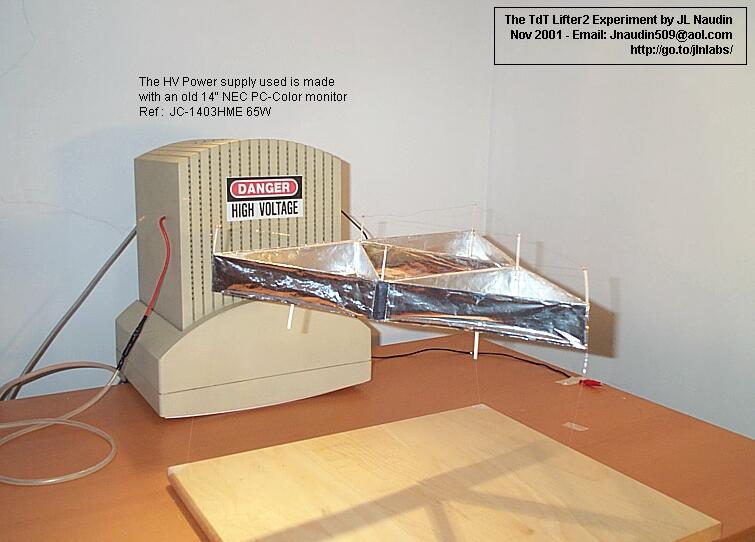
Propellantless motionThis reminds me of a story posted recently about the story on Lifters posted here a while back. Also on that page was a section about A Serrano's Field Propulsion Thruster. This little device can actually propel itself in a vacuum without any moving parts, according to the site. If one of these were combined with the Glider, perhaps that would be even better. Just a thought.
-
Propellantless motionThis reminds me of a story posted recently about the story on Lifters posted here a while back. Also on that page was a section about A Serrano's Field Propulsion Thruster. This little device can actually propel itself in a vacuum without any moving parts, according to the site. If one of these were combined with the Glider, perhaps that would be even better. Just a thought.
-
Re:FUD through "positive assertions"
-
Unofficial Packages
For those of you who are unhappy with the purity aspects of Debian there is at least one place that I have found that has some unofficial packages like mplayer and the flash plugin for Mozilla.
I haven't had any problems with the packaging that has done by the maintainer. -
Re:Too hard to install
Go Here.
-
Re:Idiots...
-
Re:First!
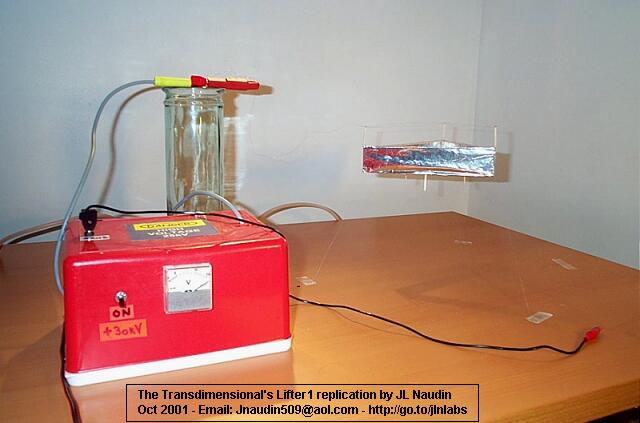
Your theory would explain the lifters pushing themselves off of the ground, but did you see this page? I think it rules out an induced dipole explanation. Could it instead have something to do with ionized air being drawn through the device? I would really like to see this done in a vacuum.
-
Re:UFOs electrogravity antigravity ghosts and gobl
It's not antigravity, the thrust is directional. It works in vacuum (as tested by NASA, sorry no link). The Ion wind has been insulated, and it still works, see both of these pages: Wind tests, and The Ion Wind Tests on Transdimensional's Lifter.
-
successful replications (Re:Two guys from Bost...)
You need to take a look at this page with all the successful replications: The Worldwide Lifters replications.
-
power sourcesRe:Interesting quotes from the patentIt works on high-voltage electricity alone. To be able to do an autonomous flight (i.e. have the power source on board) you nee a power source with a specific mass of somewhat less than 1kg/kWe (kilowatt electric). Naudin used a pulsed HV power supply to achieve 886W/kg lifted (see Lifter Tests with a PULSED High Voltage). You could maybe fly for a couple of seconds by draining a battery very fast, otherwise this kind of energy is nuclear. NASA has some plans on NEP power plants with a specific mass of less than 1kg/kWe. See:
f. Prospects for Nuclear Electric Propulsion Using Closed Cycle MHD Energy Conversion, Ron Litchford, NASA MSFC [abstract] [presentation]
g. Ultralight Vapor Fueled Cavity Reactors with MHD for Powering Multi- Megawatt NEP Systems , Travis Knight et al., New Era Technologies (NeTech), Inc. [abstract] [presentation .
Apparently these power sources could be built for a couple of billion dollars, this is where the military dark budget of $30bn comes into play (see the New York Times quoted in the story).
-
Re:antigravityIt works in any direction. See for example The NASA Two Dimensional Asymmetrical
Lots of other experiments are at The Lifters Experiments home page
-
Re:antigravityIt works in any direction. See for example The NASA Two Dimensional Asymmetrical
Lots of other experiments are at The Lifters Experiments home page
-
Re:Ah... AntigravaticsNASA tested this in vacuum and it still flies (sorry no link), it's also been tested inside fully enclosing bags and a faraday cage. Besides, the ion wind can be stopped by enclosing the thing copper wire - and yes it still flies. Take a look at these two pages, in this order:
-
Re:so what
Forgot the link to Naudins more effective demo using pulsed power: Demo and calculations
-
Re:Ah... AntigravaticsDoesn't look like "antigravity" or whatever to me:
If it were a gravitational effect, the force would have a direction (i.e. always upwards).
I strongly doubt that it does.
As you can see from the other experiments on the authors pages, it also works horizontally so simply put, this asymmetrical capacitor just produces some mechanical thrust. In whatever direction I would assume !
-
Re:Very tenuous link between story and lifters
Hey, this one has a four nut payload. Increase to include four bolts and a crescent wrench and I can see some clear military applications.
-
Re:Ah... Antigravatics
I always thought thoes things worked on corona discharge. (Basically, corona discharge is what happens right before you get a spark. When the voltage quite literally pushes electrons off the (-)end of a wire. You can get it to do work.) It's way past my bed time but I think the Biefeld-Brown Effect that the lifters use is due to the time delay and the charge imbalance that the delay creates between the two plates. I came up with this from this pic.
As far as the electrogravatics, I don't have any URLs handy for that one, but I believe it has to do with exploiting the connection between electricity and gravity. People are working on this because of the unified field theory that brings together the different forces like electritcy, magnitizam, gravity, and acceleration. The link between electritcy and magnitizam is already apparent and we exploit it (motors, solonids, maglev trains). This has now become known as the electro-weak force and gravity is due to the strong force. The strong and weak forces are what hold the nucleus of atoms together. And I think that it's the 6 flavors of quarks that form the forces.
(Please forgive me if I got the physics on this wrong, I am quite tired.) -
At that price
Hell I'll build two and save one just for driving to church on the weekends.
All I need now is the shrink ray so i can fit in it -
An emergency call
Police! This is an emergency! I am being attacked by a UFO with a color monitor!
-
Forget the microwave: Aircraft plasma propulsion
The greater context of this guy's site is a series of experiments aimed at using plasma generators to provide thrust for a new generation of aircraft. With one type of thruster, they've achieved accelerations up to 480 m/s (for the liquid medium, not the aircraft, not yet.)
This was news to me, and I'm finding the concept and science behind plasma thrusters fascinating (this is a link off the microwave page.)
Plus, there's a far more interesting experiment, where he shows you how to build your own plasma panel. -
Forget the microwave: Aircraft plasma propulsion
The greater context of this guy's site is a series of experiments aimed at using plasma generators to provide thrust for a new generation of aircraft. With one type of thruster, they've achieved accelerations up to 480 m/s (for the liquid medium, not the aircraft, not yet.)
This was news to me, and I'm finding the concept and science behind plasma thrusters fascinating (this is a link off the microwave page.)
Plus, there's a far more interesting experiment, where he shows you how to build your own plasma panel. -
Forget the microwave: Aircraft plasma propulsion
The greater context of this guy's site is a series of experiments aimed at using plasma generators to provide thrust for a new generation of aircraft. With one type of thruster, they've achieved accelerations up to 480 m/s (for the liquid medium, not the aircraft, not yet.)
This was news to me, and I'm finding the concept and science behind plasma thrusters fascinating (this is a link off the microwave page.)
Plus, there's a far more interesting experiment, where he shows you how to build your own plasma panel. -
Re:.MOD files, anyone?
Still, there were some decent players for the PC
In my opinion, the best player for PC was/is MOD4Win. Since the development has stopped, you can download an unlimited version for free.
Also interesting: the Oldsk00l MOD Player plugin for Winamp. Much better than Winamp's built in mod-support. -
Re:Maybe those with hope in YellowTab will wake upThe way I see it, if you really like the BeOS, head over to the Open-Source Be like projects like openbeos [sourceforge.net] and pledge your support with money or code.
Well this is also a problem... immediately when it became apparent that Be was in big trouble, there opened at least three different open source Be clone-projects. Now at best we'll get a bunch of uncompleted Be-clones and maybe one or two usable systems. At worst we'll get a whole lot of Be-clones, each one with it's own quirks and problems, and developers for Be will have to code around quirks right and left to make anything work on all the Be-like systems. To make things worse, at least BlueOS have already started thinking about extending the API, so that in the end nothing will be compatible with anything, but everything will be "almost" compatible.
-
Re:Good luck to these guys
What I want to know is, does this effect them at all?
-
fake?
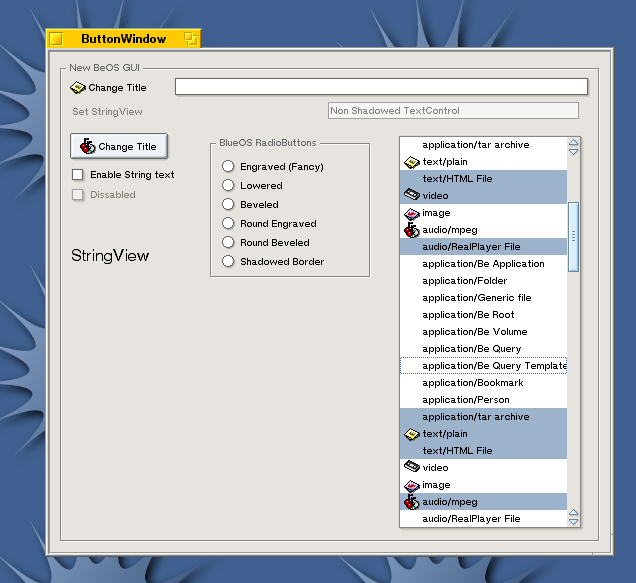
the window in screenshot #2 has the exact same selections as the screenshot from three months ago. I certainly hope it is coincidence. Note this isn't just preserving settings; the older screenshot was proviced by an outside source.
-
fake?
the window in screenshot #2 has the exact same selections as the screenshot from three months ago. I certainly hope it is coincidence. Note this isn't just preserving settings; the older screenshot was proviced by an outside source.
-
Re:QuicktimeFor the record
We do not have to convert Divx to cinepak or something !
Just install the Divx quicktime component, and then we have 2 choices
use Avi2Mov that simply converts all the stuff for you and creates a working
Extract the mp3 track from the avi , and merge it with Quicktime (Pro). It saves the same avi again but with playable audio.
Here's the link with all the info for those who need more info
I really don't see how a rant about proprietary software is in order, but hey - this is slashdot