Slashdot Mirror
Domain: futuremark.com
Stories and comments across the archive that link to futuremark.com.
Comments · 65
-
Re: Exactly. Stupid idea for many reasons.
You are trying to distill a complex equation down to one number.
* 3DMark
* Unigine Valley Benchmark (2013)Maybe you should stop reading shitty websites that don't show a normalized score.
Desktop GPU Performance Hierarchy Table and Best GPU's of 2018 make it trivial to compare _how_ a GPU performs.
-
Re:Might be a nice option
And basically this is entirely invalidated by designing the phone such that the battery is not user-replaceable.
Apple designed a device that will intentionally run slower without the end user paying someone else to disassemble the phone to replace parts. Given the cost to service an older device weighed against the cost of a new device, a lot of users are going to opt for the new device, especially if they don't realize that the reason the phone is operating poorly is because of the battery.
This throttling theory has been bench-marked and debunked: https://www.futuremark.com/pre...
MacRumours even featured a discussion of the above benchmark report: https://www.macrumors.com/2017...
What he is describing there is a declining benchmark rating as the battery charge is diminished. That could just as easily be a bug in the power managment system as some grand conspiracy.
Oh, and iFixit also rates the iPhone on par with many Android phones in terms of repairability: https://www.ifixit.com/smartph... -
Re:Makes sense. Intel graphics are still a failure
>
>I'm not buying it. How about posting your Unigine Valley 1080p benchmark results along with Fire Strike / Sky Diver / Cloud Gate / Ice Storm first so we can compare with how it actually performs next to a discrete GPU. Use DX11 so Windows 7 with a discrete GPU can compare to Intel's wannabe offerings.
There is a reason ~$700 discrete GPU's cost $700.
Hint: Performance at 4K/60 fps and 1080p/120 Hz. -
Re:Missed the main reason
You're also comparing two chips that don't compare well. Your 980X was $1K back in the day, compare it to i7-5960x which is $1K today. About the same TDP but double the performance.
If you want to use the i7-6700k, compare it to the chip back then that was a similar price, the i7-920. It will be double the performance.
1) from Futuremark, the 5960X was only slightly faster than the 6700K, which is why I chose the much cheaper and lower powered 6700K. The 3Dmark11 benchmarks are 11610 (38%) and 10790 (28%) higher, more or less. These are CPU dominated benchmarks.
2) the claim was saving 50% of the power. It's why I was looking for a lower power chip or something that would double performance. It's just not there. That's not to say the chips aren't better today than they were 6 years ago, as they obviously are, but they're not good enough yet to really be THE reason to upgrade.
I was going to say if the motherboard dies or something, I'd just replace it. Having just reviewed the asking prices of x58 motherboards, I'm tempted to sell my current rig and buy a cheaper, quieter replacement.
-
Re:It's still Integrated graphics
and it still gets rings run around it by an 830M
Wow, a 15W iGPU gets beaten by a 33W dGPU what a shocker.
Heck, the AMD stuff out performs it.
An A8-6410 which is AMDs best 15W part scores 2010 in futuremark, you can find the i7-4200 under chips with similar performance at 2310.
It just seems silly to have that much processor and an integrated graphics chip...
Today that's a misnomer, Intel's laptop chips are mainly a GPU with a small sideorder of CPU, just like AMD.
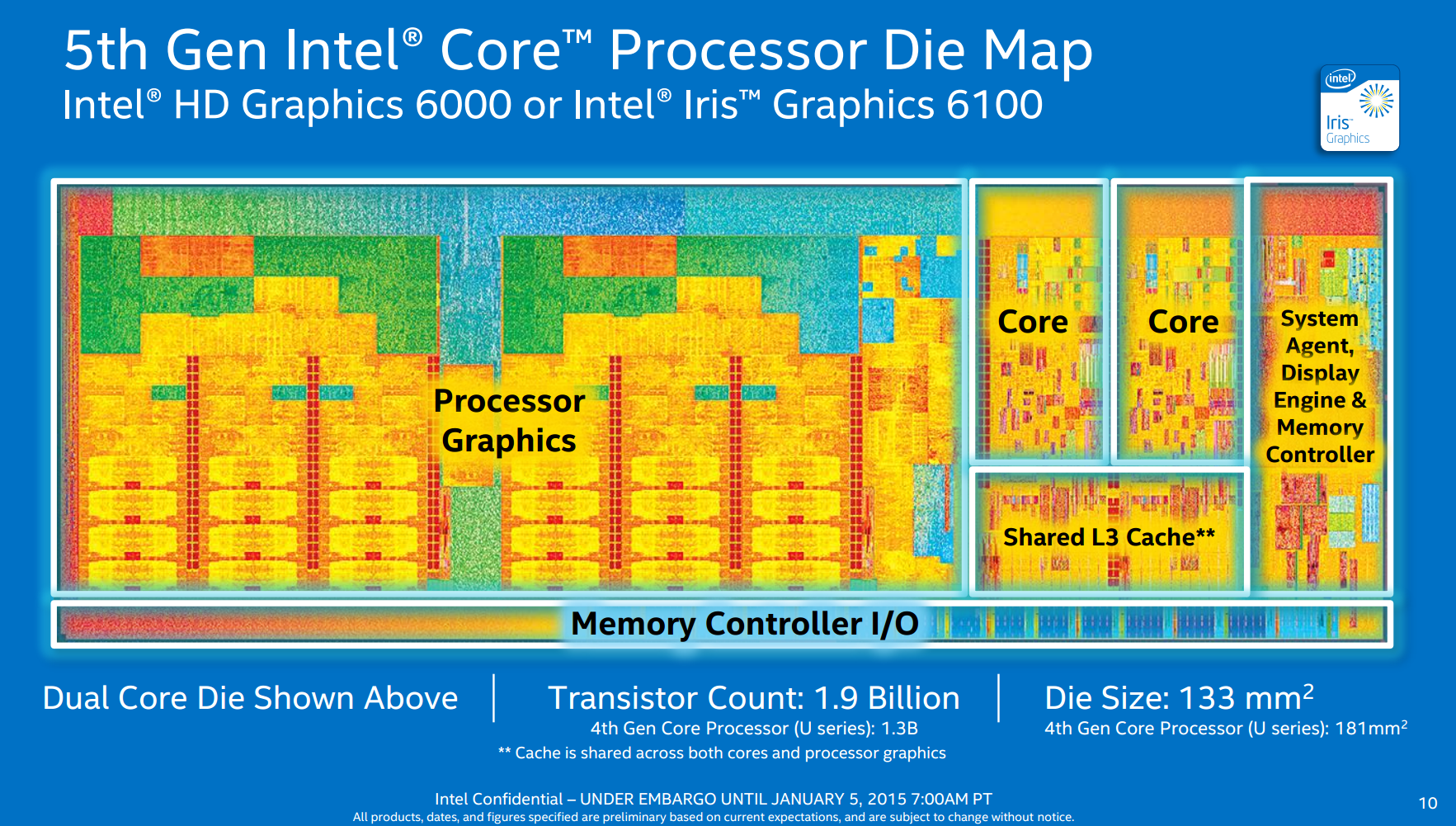
The top of the line chip i7-5557 will have 3.1 vs 2.2 GHz base frequency for the i7-5200 currently under review, 48 EUs vs 24 EUs and they'll run at 1100 vs 900 MHz at 28W vs 15W TDP. You can expect it to be at least 50%+ faster. And this is still Intel's mid range laptop chips (Broadwell-U), we're still waiting for their high end laptop chips (Broadwell-H) with 37/47W configurations. Clearly Intel isn't feeling much pressure there, since they seem to be in no big hurry to get those out.
-
Re:Mac Pro 2013?
So? The Haswell Core i7 is faster. Also the Alienware laptops come with more RAM and MUCH faster GPUs.
Comparing the specs of the $3999 Mac Pro vs the $3799 Alienware 18 we get:
Intel Xeon E5-1620 vs Core i7 4910MQ
AMD FirePro D500 vs Nvidia Geforce GTX 880MAs you can clearly see, the Alienware 18 beats out a higher priced Mac Pro.
-
Re:Mac Pro 2013?
So? The Haswell Core i7 is faster. Also the Alienware laptops come with more RAM and MUCH faster GPUs.
Comparing the specs of the $3999 Mac Pro vs the $3799 Alienware 18 we get:
Intel Xeon E5-1620 vs Core i7 4910MQ
AMD FirePro D500 vs Nvidia Geforce GTX 880MAs you can clearly see, the Alienware 18 beats out a higher priced Mac Pro.
-
Re:And...
http://community.futuremark.com/hardware/mobile/TMSON+M9/review
two places better than ouya
-
Re:Content and Capabilities
What makes this list damning for nvidia is this
http://community.futuremark.com/hardware/mobile/TMSON+M9/review
this is Chinese bottom dollar RK3066 chip, you can buy $44 Android sticks with this chip
http://www.geekbuying.com/item/MK808-Dual-Core-Android-4-1-Jelly-Bean-TV-BOX-Rockchip-RK3066-Cortex-A9-Mini-PC-stick-307415.htmlit is listed HIGHER than top Tegra from multi billion dollar Nvidia
You know Nvidia is in trouble if they are losing to bargain bin Chinese designs. -
Re:Content and Capabilities
It's also worth noting, just for the sake of balance, that '73d in benchmarks' is a close to meaningless figure, equivalent to declaring that a given computer with, say, an i5 CPU is "not even in the top hundred" because you can buy hundreds of distinct SKUs that have i7 CPUs.
On the benchmark page you can see that major swaths of the benchmark list are near duplicates.
The top 20-odd spots are "quad-core Krait 300 Adreno 320", with the bulk of the next 50 being "dual-core Krait 300 Adreno 320".
The oddballs are "2 GHz dual-core Intel Atom Z2580 PowerVR SGX544MP2", Samsung's "Up to 1.7 GHz dual-core ARM Cortex-A15 Mali-T604" and one or two other minor variants.
It's actually pretty surprising how much variation their is(in at least one case a dual Krait benchmarked ahead of several quad Kraits, allegedly at the same clock speed, and the ASUS transformer with a slower Tegra3 benches ahead of the OUYA with a higher clocked and otherwise identical SoC); but there Just. Aren't. That. Many. SoCs at the high end of the market.
There are definitely faster chips(especially on the CPU side, Nvidia went a bit light on the CPU side on the theory, unsurprising for them, that GPU is what counts); but only a handful, just used in 70-odd devices.
This fact doesn't make the Tegra3 any faster in an absolute sense; but there aren't even enough SoCs on the market for something to meaningfully be '73d'
-
SeaMonkey is a step backward
SeaMonkey is a step backward, to the old idea of needing a separate desktop app for every task. The 21st century way of doing things is much better, with HTML5+ based Web Apps for things like mail, chat, newsgroups / forums, etc.
Chromium / Chrome beats Firefox in performance benchmarking, compatibility, security, and innovative features, not to mention that it's an improvement over Firefox in licensing freedom. Chrome has highest browser market share and growing, which means it should be the first browser used by Web developers for testing, and thus its users get a more polished Web experience. Firefox used to have more add-ons, but that's no longer the case.
It's just silly to still be using Firefox (or a Firefox / Gecko based browser) instead of Chrome.
--libman
-
Re:And this is why
Sorry to say, he's right. Even the 9800GTX+, released 4 years ago, wipes the floor with the Intel HD 4000. http://www.videocardbenchmark.net/gpu.php?gpu=Intel+HD+4000 http://community.futuremark.com/hardware/gpu/Intel+HD+Graphics+4000/benchmarks The HD 4000 from Intel is great, if you don't plan on gaming in any serious manner.
-
Re:Credibility?
The older stuff, yes.
Those new core i3/i5/i7 CPU's : the integrated graphics have become VERY potent.And yes, I have an i5 that comes with HD Graphics 3000 so I should know.
In fact, I also have an Nvidia NVS 4200M sitting in my Dell Lattitude that automatically kicks in when I require 3D stuff (read : games) and battery is not a concern. So for fun I started AION on the Intel hardware goofed around a bit, closed the application and then started it up again but on the Nvidia hardware (easy thanks to http://en.wikipedia.org/wiki/Nvidia_Optimus). Im not saying AION is the new standard to test things on, but for a 3D game it looks good (lots of details & eye-candy) and I simply happen to have it on my machine. (1680x1050 btw, I had the settings on automatic)
To be honest I'm a bit shocked to notice they both look VERY alike. The nvidia picture seems to have more hmm 'powerful colours' (?) while the intel gfx were a bit more washed out but then again seemed to have less visible edges (AA?) though some of the effects looked 'simplified'.
Otherwise, both maintained a steady 45+ fps which is more than good enough for me. wow.If you're more of a numbers guy, feel free to compare yourself :
* http://community.futuremark.com/hardware/gpu/NVIDIA+NVS+4200M/
* http://community.futuremark.com/hardware/gpu/Intel+HD+Graphics+3000+MobileSeems they come pretty close to each other and the difference in DirectX version supported might explain the noticed difference in effects. They were still there, but just slightly less... hmm... complex.
Sure there are a lot more powerful dedicated gfx cards around (hey, laptop here!), but trust me when I say that for 95% of the market, these integrated graphics are more than sufficient ! If you're in the 5% of users that 'needs' a powerful 3D processor, then by all means do; but claiming all Intel IGP's are a piece of shit is like saying that you don't have a decent printer if you don't go for the Xerox iGen 150 !
-
Re:Credibility?
The older stuff, yes.
Those new core i3/i5/i7 CPU's : the integrated graphics have become VERY potent.And yes, I have an i5 that comes with HD Graphics 3000 so I should know.
In fact, I also have an Nvidia NVS 4200M sitting in my Dell Lattitude that automatically kicks in when I require 3D stuff (read : games) and battery is not a concern. So for fun I started AION on the Intel hardware goofed around a bit, closed the application and then started it up again but on the Nvidia hardware (easy thanks to http://en.wikipedia.org/wiki/Nvidia_Optimus). Im not saying AION is the new standard to test things on, but for a 3D game it looks good (lots of details & eye-candy) and I simply happen to have it on my machine. (1680x1050 btw, I had the settings on automatic)
To be honest I'm a bit shocked to notice they both look VERY alike. The nvidia picture seems to have more hmm 'powerful colours' (?) while the intel gfx were a bit more washed out but then again seemed to have less visible edges (AA?) though some of the effects looked 'simplified'.
Otherwise, both maintained a steady 45+ fps which is more than good enough for me. wow.If you're more of a numbers guy, feel free to compare yourself :
* http://community.futuremark.com/hardware/gpu/NVIDIA+NVS+4200M/
* http://community.futuremark.com/hardware/gpu/Intel+HD+Graphics+3000+MobileSeems they come pretty close to each other and the difference in DirectX version supported might explain the noticed difference in effects. They were still there, but just slightly less... hmm... complex.
Sure there are a lot more powerful dedicated gfx cards around (hey, laptop here!), but trust me when I say that for 95% of the market, these integrated graphics are more than sufficient ! If you're in the 5% of users that 'needs' a powerful 3D processor, then by all means do; but claiming all Intel IGP's are a piece of shit is like saying that you don't have a decent printer if you don't go for the Xerox iGen 150 !
-
Re:Chrome / Chromium
Runs pretty nicely in Linux. It's a good deal faster than FF anyway.
Personally I don't really notice any difference in performance by eye between Chrome and Firefox under Fedora 16. Both browsers do what I want. Personally I like Chrome for is minimal interface but I also also like the Firefox interface as well. It really depends on what I am doing and on some occasions I actually use browsers in tandem.
Running the benchmark on both the latest versions of Firefox (12) and Chrome I get 1064, html 5 4/7 for Firefox and 3169, html 5 6/7 for Chrome which I am sure most people would say that Chrome is the outstanding winner for that suite of benchmarks. So well done Chrome, however this still won't stop me using both Chrome and Firefox. -
Re:Firefox - Too little, too late
Run the Peacekeeper benchmark and watch during the Canvas and HTML5 video tests. You'll see that Chrome and Firefox are the only MAJOR browsers that don't suck at video and Canvas. Overall, Opera 11.6 performed well, but video was jerky on all supported codecs. Chrome (16.0.x tested) handled all the codecs correctly, handled the Canvas test correctly, and was fastest overall. FF (8.0.1 tested) handled most of the codecs, handled Canvas correctly, but overall performance was about 1/2 that of Chrome. Safari 5.x on Mac OS 10.6 handles video well, but didn't do well on the current Canvas test and failed to complete the benchmark.
Notes: I tested on WinXP and Mac OS 10.6, therefore, I haven't tried IE9. I did not have Adobe Flash installed, except the built-in Flash in Chrome, so Chrome may (or may not) have had an advantage on the video codecs. Tests were run on 1.86GHz and 2.2GHz Core2 Duo systems with plenty of RAM and decent video controllers (plenty fast enough for video and low/mid range games, but not anything a "gamer" would even consider). YMMV.
With so much video on the internet these days, and especially now that Adobe has finally acknowledged that Flash isn't the future, I believe that the above tests a relevant to the average user. Until Opera addresses the poor video playback issue, no amount of JS performance is going to win them market share. IE9 being Win7 only (Vista doesn't count) puts some limits on it's market for now. So, it comes down to Chrome, Firefox, and Safari. Safari on Windows sucks.
So, the real choice for most users comes down to Chrome vs Firefox, and both are good choices (each with strengths and weaknesses). Safari (Mac OS), IE (Win) have the advantage of being installed by default, and they can be competitive on their native platforms if you're using the latest versions, but don't have much to recommend them beyond being preinstalled. Chrome is faster, FF has more plugins and configurability. Take your pick.
-
request to the peanut gallery:
Someone with Windows 7, a decent 3d graphics card, and a dual or quad-core CPU please benchmark this new IE9 beta vs. the currently released versions for FF, Chrome, Safari and Opera, using:
And, if you could, break out the scores on the individual Peacekeeper tests. I intentionally omitted V8 in the list of benchmarks since its so inconsistent between runs.
I'd do it myself but I don't have a Win7 installation to use.
-
4.0.237.0 build 31074: 133% fasterRunning Futuremark's Peacekeeper I have this results:
- Mozilla's 32 bit Linux build gave me 1383 points
- Swiftfox for amd64 (it's 32 bit anyway) gave 1528 points
- Chromium build 31074 64 bit was up a whopping 133% to 3234 points
All under the same computer and the same background tasks/services/etc.
What is keeping Firefox behind so much? Architecture optimization is not the answer: 64-bit Iceweasel 3.0 did not feel any faster than a 32-bit Firefox 3.0, and Swiftfox shows only 10% improvement over the Mozilla binaries. -
Tools
CPU:
Prime95 (Step 2): http://www.mersenne.org/freesoft/#newusers
Lynx: http://www.softpedia.com/get/System/Benchmarks/LinX-benchmark.shtmlVideo Card:
3dmark: http://www.futuremark.com/benchmarks/When testing the video card, listen for high pitch squealing (power issue), over heating, and symptoms like white dots appearing at random. This is not a test tool but will put some stress on the card.
-
Re:ummm....
Futuremark's "Peacekeeper" benchmark does indeed show Safari 4.0 out front, narrowly edging Chrome. My own tests from January, i.e. prior to the most recent Chrome release, showed Chrome and Webkit in a dead heat on SunSpider and Chrome way out in front on Mozilla's "Dromaeo" suite.
If I get time I'll run the tests again on the same machine, using the "official" Safari 4.0 build (i.e. not a Webkit nightly) vs. the currently released version of Chrome.
-
Re:Now patched?
Nope. Patched to 10.5.7, with all updates, and the sample exploit would still run. Of course I use FF with NoScript so I had to allow it to run, which just goes to show that sometimes faster is not better
-
Re:Not so surprising
It appears you and anyone who modded you read only one of TFA's.
http://service.futuremark.com/peacekeeper/browserStatistics.action
That one puts Firefox 3.0.10 right around where Opera 9.64 is, and Firefox 3.5 right around where Safari 3.2.2 is. Chrome live, Chrome beta, and Safari 4 beta trounce all of the rest.
-
Re:Not so surprising
While they did include 3.5b4, the results require a bit of browsing on your part. You can find them on the Peacekeeper Statistics Page.
-
Re:Features Create Popularity...
Except the evidence in question provides a counterexample to your point. http://service.futuremark.com/peacekeeper/browserStatistics.action is where the figures came from and the more recent versions are without exception faster than the previous versions.
-
Re:Not so surprising
Do the words "TraceMonkey" mean anything to the authors? It's the core Javascript engine of the upcoming revision of Firefox. And it is fast. Some benchmarks suggest that it is highly competitive with V8 (Chrome) and SquirrelFish (Safari).
(Speaking of which, isn't it a bit disingenous to compare Safari 4 BETA to the current version of Firefox? Why not compare the Firefox beta then?
They did, the results are in the article linked under "gap between Firefox and Chrome".
-
Re:Zomg
Strangely, the result states that the CPU was running at 4481 MHz.
-
FutureMark's Website
I just hopped over to FutureMark's website and in the community section there's a list of "Most Popular Processors in 3DMark Vantage (Last 7 Days)"
Could be a coincidence but at the moment, they're all Intel. -
Re:Heuristics for what is and is not a game
Or it could recognize the presence of "game engine" libraries, such as SDL, Allegro, ClanLib, and the DirectX import libraries, and use heuristics to mark some executables as "games".
Sounds extremely far-fetched to me.
Besides, just because it uses SDL or DirectX doesn't mean an application is automatically a game. 3DMark uses the very latest in game development technologies, yet it's not interactive. Or how about all apps that use OpenGL? Yes, used by quite a few games, but it's mostly used by just about all serious 3D modelling apps, last I checked...
Which is more likely if they ban Blender: a) "This is an open source application and therefore the very manifestation of evil," or b) "It's entirely, if remotely, possible that someone uses GameBlender to play one of those evil 'game' thingies and possibly circumvent the ESRB limits. It's an European program, for crying out loud."
(Speaking of which, I really hope Vista doesn't subjugate us to the ESRB system. We have PEGI and some countries also have their regional systems. Gee, I wouldn't want the headache to implement this thing in games themselves, let alone at the OS level =)
-
Re:Happy now?
I know that much, since the driver page (http://www.winischhofer.net/sisdri.shtml) states clearly that "There is no DRI support for the SiS 315/550/650/651/740/661/741/760/330."
The chip sucks, for sure, but this page shows that the chip can certainly do better than it does now (I have virtually the same set as the benchmarked laptop). -
Mac mini benchmarks
I've started benchmarking this morning on a Mac Mini. Now, granted, I don't expect it to blow me away in performance, but in 3DMark05 it scored around 600 and didn't complete all the tests. My Dell laptop (nVidia Go 6800) scores around 3000 and my desktop (nVidia 7800 GTX) around 8000. Nearly all of that is due to POS integrated graphics, but I was at least hoping it'd get around half the laptop's score.
Here's a link:
http://service.futuremark.com/compare?c=1569427_1
In PCMark05 it compared more favorably. This is a comparison between my rig, a Mac Mini and a blade server we have at work. The blade server didn't totally complete the test because of its graphics card. In some cases the Mac beat my rig (stuff like media encoding/decoding), which is surprising.
http://service.futuremark.com/compare?c=1569427_2
And I understand I'm comparing Apples and oranges (literally). I've heard Macbook Pro users are floored by the performance in Windows of popular games, and I'm looking to get my hands on one.
I will say, without a doubt, Apple has the easiest to use dualboot installer I've ever seen. Getting Grub et all to work without frying partitions in Linux has always been a pain. With Apple's, couple clicks and I'm done. -
Mac mini benchmarks
I've started benchmarking this morning on a Mac Mini. Now, granted, I don't expect it to blow me away in performance, but in 3DMark05 it scored around 600 and didn't complete all the tests. My Dell laptop (nVidia Go 6800) scores around 3000 and my desktop (nVidia 7800 GTX) around 8000. Nearly all of that is due to POS integrated graphics, but I was at least hoping it'd get around half the laptop's score.
Here's a link:
http://service.futuremark.com/compare?c=1569427_1
In PCMark05 it compared more favorably. This is a comparison between my rig, a Mac Mini and a blade server we have at work. The blade server didn't totally complete the test because of its graphics card. In some cases the Mac beat my rig (stuff like media encoding/decoding), which is surprising.
http://service.futuremark.com/compare?c=1569427_2
And I understand I'm comparing Apples and oranges (literally). I've heard Macbook Pro users are floored by the performance in Windows of popular games, and I'm looking to get my hands on one.
I will say, without a doubt, Apple has the easiest to use dualboot installer I've ever seen. Getting Grub et all to work without frying partitions in Linux has always been a pain. With Apple's, couple clicks and I'm done. -
3dMark
I am absolutely depressed at the level of comments I have seen so far in this thread.
For shame.
That said, go to http://www.futuremark.com/ and grab whatever the latest and greatest 3dmark is. For years, they've had a feature that uploads your results to their database.
This is invaluable for 2 reasons. One, it gives you real numbers to go by for before and after when you tweak settings. I remember being very pleased when I figured out that with a simple bios tweak my machine behaved much more like the beast it was. (this was a few years ago, that poor athlon1800+ wouldn't be a hill of beans nowadays)
Two, it allows you to compare against other people with similar setups - and more importantly, you can filter based on component, so you can see what kind of difference you would get by replacing individual components on your system. Now, to be fair, whichever game you happen to be playing will not use your hardware in the exact same way that the benchmark will, but you will at least have a good idea with hard numbers to back it up of where to look.
And of course, depending on your technology level in your system you may wish to use the previous version of the benchmark, since it scores rather heavily on video card features, meaning if you are not fully DirectX 9.0+ compatible you will get some abysmal scores, which are much harder to sort if you are not looking to replace your video card.
That reminds me, I just put my new system together this weekend and haven't stressed it yet.. -
Multifaceted analysis
You have to attack the bottleneck problem from all angles. This means using many utilities, but also using your gut feeling. To do so, you need a lot of data.
Benchmarking programs are a great start. 3DMark and PCMark from Futuremark are great tools for this. 3DMark plays scripted animations that use the latest pixel shaders and other effects. Because it's scripted it mostly taxes the GPU. PCMark benchmarks many components in isolated tests. Both utilities let you compare results with other people's machines online. Also, Sisoft SANDRA not only gives great info and benchmarks, but also offers advice based on your configuration at the bottom of every analysis. All free and all worth a look.
Numbers are great but they're not enough. Once you've benchmarked your PC, test the whole shebang altogether. Play a variety of games that stress different components. Play Bejewelled 2 or Guild Wars to test video. Play Sims 2 to test your CPU. Play Call of Duty 2 or Civilization 4 to test everything all together.
P.s., if you're an audiophile and budget is of little matter you should consider Creative's X-fi sound cards. They have an onboard CPU that offloads digital signal processing from the CPU, freeing it for other tasks. You can expect maybe a 5% relief in CPU power even in applications that are not optimized for X-fi (even the Windows desktop!) -
Re:Strange choice of benchmarks...
3DMark 06 is out now, too.
-
The numbers speak for themselvesSeriously, there's no way someone should get quadruple my score just because they had a GeForce 7800.
Take a lookhttp://service.futuremark.com/orb/projectsearch.j
s pI got ~1500 on my brand new rig (Athlon X2 3800+, Radeon X800GTO) Someone got over 10000! This makes me sad.
-
I never realised I was so out of date...
The min specs are 2.5GHz CPU, 1GB of RAM, 256MB of vram.
How many people can really run this?? -
Torrent
-
You mean like NVidia did?Don't forget NVidia made "optimizations" back in May '03 to detect 3DMark03 to improve performance by as much as 24% in the benchmark. That would have no impact on any game and could only have been used to mislead the public as to the performance of their cards. Extremetech found it using a BETA of 3DMark that didn't follow the standard benchmark, it would let you roam around the scenes. When flying around they would see things that didn't render correctly at all or missing objects. Now that is low... NVidia couldn't find the problem that gave them away because they didn't have access to the BETA 3DMark.
-
Huge error in this "review"It simply crushes everything in its path in game performance and handles most of today's common applications with power to spare."
Bullshit, Intels' Dothan (Pentium-M) on an Asus mobo will smoke an FX-57 at less that half the price. Dothans currently hold all the 3DMark records and SuperPi. Check out the scores for yourself.
I e-mailed the author several days ago that leaving out Dothan benches made his review and conclusions worthless. He hasn't e-mailed back. I can't say for sure, but this article sure seemed like AMD fanboyism.
-
As a matter of fact, yes
- http://www.futuremark.com/download/ - 3DMark for games, PCMark for apps. You don't need the pro version.
- http://www.aquamark3.com/ - Good graphics benchmark.
There are other freely downloadable benchmarks like Aquamark3 that use specific game engines. Next time do a google search before you post.
-
Re:Price / performance
"Honestly, who is buying these things?"
These guys are, for starters. -
Re:Specs?
It's not extremely fast, but a 1.5 GHz Pentium M isn't that slow, either. I don't know the exact equivalent here, but I guess depending on the application and of course the overall system it should be as fast as a P4 2 GHz or even 2.5 GHz.
Maybe even faster when the Pentium M system has a 7200RPM desktop hard drive and a desktop-class graphics card, which this hip-e system has. You're correct in saying that a 1.5GHz Pentium M notebook can compete with a desktop 2.4-2.5GHz Pentium 4. But Pentium M notebooks are held back by 4200/5400RPM notebook hard drives and notebook GPUs (sometimes Intel integrated graphics with "shared" memory).This page and this page of an Anandtech review (September 2003) shows two 1.5GHz Pentium M notebooks keeping up with a 2.4GHz Pentium 4 in Winstone 2003 and SYSMark 2002. A 1.6GHz Pentium M notebook was faster than the 2.4GHz Pentium 4 in all but the Pentium 4-optimized Internet Content Creation SYSMark 2002 (Photoshop 6, Premiere 6, Dreamweaver 4, Flash 5, Windows Media Encoder 7).
However, this page shows that the Pentium M notebooks had slower hard drives (4200-5400RPM), slower graphics (ATI "Mobility" and Intel integrated), and sometimes less memory (256MB). In comparison, the hip-e has a 7200RPM hard drive, (apparently) a desktop Radeon 9700 graphics controller and 512MB of memory.
-
Torrent
-
Re:$2k huh?
The problem is people are using UT2004 as a benchmark.
If you really want to see your rig crawl (Noone does of course), try running 3DMark03
It's merciless. -
Re:Maybe that's the answer...Unfortunately for apple fans, the number still stand on that site. Dell's own testing shows much better performance with the benchmark than Apple's does, and even makes the Dell machine win the benchmark. On the other hand, if they used GCC to compile the benchmark for the Dell machines, that might explain why they got such cruddy results. It's a widely accepted fact that GCC's code generation on CPUs with limited numbers of registers is pretty poor in terms of performance.
Of course, if you don't trust that website, how about ZDNet or even compare the numbers yourself. There's Veritest's Apple numbers, versus the offical published numbers from SPEC. There's also this site which goes into detail about the benchmark. They used -ffast-math on PPC, but not on x86, for instance. They explicitly turned off hyperthreading, which obviously hurt the Dell machine during the MP tests.
Then again, as the old saying goes, there's three types of lies. Lies, damn lies and benchmarks.
-
One of the editors....
...posted a thread in Futuremark.com's forums about their investigation, so the "Onions" who dwell there (myself included) knew about this a while ago. Unfortunately for the poor editor, his colleague had already alienated the Onions by posting some very incendiary anti-AMD and anti-AMD-user articles in THG, and so the editor who posted there didn't receive any help at all. He actually got flamed out of the forum and the thread got deleted.
On that note, it would take a SERIOUS n00b to believe any of the BS from Michael's Computers. All they need do is look at the FM ORB and realize the highest score EVER ACHIEVED using stock settings is just over 10000 (10008, to be exact).
Actually, now that I read the article, I must take a chuckle at the 500GB HyperDrives. I'll take one for my X-Wing, please.
As I said a few days ago on the FM forums... I think my bullshitometer just overloaded. -
Not a fair testApparently both machines were running Linux and had 512mb ram each, but not much else was the same. Did the hard drives have the same filesystem even? Could one have been more fragmented (i.e. the one the author of the article uses all the time before copying the files to the SCSI test system?)? Before buying any hard drive you should check out benchmarks on it. IDE drives with the same size, cache, and rotational speed can have more than 2x difference in benchmarks.
I'd also like to know what IDE controller was used. I was sorely dissappointed in the performance of the hard drive that came with my Dell computer using the on-board controller. I could really tell it was slow switching applications and booting up. It showed a rather pathetic score of 398 on PCMark 2002. I thought "to hell with that" and bought a new 160gb hard drive that was rated really well on tom's hardware. My score actually dropped to 244. That didn't make any sense. I updated all the drivers I could to no avail. Finally I bought a PCI IDE card at CompUSA for about $40 to try it out. The score jumped to 1216. That's almost up to the 1400 I have at home with my IDE raid setup, and much more than the 800 or so my brother got with his 10,000 rpm SCSI Cheetah drive.
Download the free version of PCMark 2002 and check your own hard drive scores.
-
Not a fair testApparently both machines were running Linux and had 512mb ram each, but not much else was the same. Did the hard drives have the same filesystem even? Could one have been more fragmented (i.e. the one the author of the article uses all the time before copying the files to the SCSI test system?)? Before buying any hard drive you should check out benchmarks on it. IDE drives with the same size, cache, and rotational speed can have more than 2x difference in benchmarks.
I'd also like to know what IDE controller was used. I was sorely dissappointed in the performance of the hard drive that came with my Dell computer using the on-board controller. I could really tell it was slow switching applications and booting up. It showed a rather pathetic score of 398 on PCMark 2002. I thought "to hell with that" and bought a new 160gb hard drive that was rated really well on tom's hardware. My score actually dropped to 244. That didn't make any sense. I updated all the drivers I could to no avail. Finally I bought a PCI IDE card at CompUSA for about $40 to try it out. The score jumped to 1216. That's almost up to the 1400 I have at home with my IDE raid setup, and much more than the 800 or so my brother got with his 10,000 rpm SCSI Cheetah drive.
Download the free version of PCMark 2002 and check your own hard drive scores.
-
Not a fair testApparently both machines were running Linux and had 512mb ram each, but not much else was the same. Did the hard drives have the same filesystem even? Could one have been more fragmented (i.e. the one the author of the article uses all the time before copying the files to the SCSI test system?)? Before buying any hard drive you should check out benchmarks on it. IDE drives with the same size, cache, and rotational speed can have more than 2x difference in benchmarks.
I'd also like to know what IDE controller was used. I was sorely dissappointed in the performance of the hard drive that came with my Dell computer using the on-board controller. I could really tell it was slow switching applications and booting up. It showed a rather pathetic score of 398 on PCMark 2002. I thought "to hell with that" and bought a new 160gb hard drive that was rated really well on tom's hardware. My score actually dropped to 244. That didn't make any sense. I updated all the drivers I could to no avail. Finally I bought a PCI IDE card at CompUSA for about $40 to try it out. The score jumped to 1216. That's almost up to the 1400 I have at home with my IDE raid setup, and much more than the 800 or so my brother got with his 10,000 rpm SCSI Cheetah drive.
Download the free version of PCMark 2002 and check your own hard drive scores.
-
Not a fair testApparently both machines were running Linux and had 512mb ram each, but not much else was the same. Did the hard drives have the same filesystem even? Could one have been more fragmented (i.e. the one the author of the article uses all the time before copying the files to the SCSI test system?)? Before buying any hard drive you should check out benchmarks on it. IDE drives with the same size, cache, and rotational speed can have more than 2x difference in benchmarks.
I'd also like to know what IDE controller was used. I was sorely dissappointed in the performance of the hard drive that came with my Dell computer using the on-board controller. I could really tell it was slow switching applications and booting up. It showed a rather pathetic score of 398 on PCMark 2002. I thought "to hell with that" and bought a new 160gb hard drive that was rated really well on tom's hardware. My score actually dropped to 244. That didn't make any sense. I updated all the drivers I could to no avail. Finally I bought a PCI IDE card at CompUSA for about $40 to try it out. The score jumped to 1216. That's almost up to the 1400 I have at home with my IDE raid setup, and much more than the 800 or so my brother got with his 10,000 rpm SCSI Cheetah drive.
Download the free version of PCMark 2002 and check your own hard drive scores.