Slashdot Mirror
Domain: giga-byte.com
Stories and comments across the archive that link to giga-byte.com.
Comments · 41
-
Re:Hijacking the topic...
OK, I overcame my laziness and figured it out:
(I can't access www.gigabyte.com or
The DDR3 240 has over 75% of the performance of a DDR5 250 and draws less than 75% of the power even though it has 75% of the stream processors and nearly the same clock. Looked like a good buy to me at the time.
-
Re:Fatal flaw: No BIOS reset
I think it actually is standard on Gigabyte mainboards. I checked all Gigabyte Socket 1366 mainboards (http://www.giga-byte.com/Products/Motherboard/Products_List.aspx?VenderType=Intel&CPUType=socket+1366#Intel%20X58), they all have DualBIOS.
-
Re:CapacitorsThe original poster had it right: "gigabyte" is the brand name. The global site is http://www.gigabyte.com.tw./ Perhaps you were confused by the fact that the U.S. site is http://www.giga-byte.com/ but that's probably only because http://www.gigabyte.com/ was already taken by some stupid web-design company.
Am I a Gigabyte fanboi? You bet I am. Good riddance to Abit and their leaky caps.
-
Re:Memory usage
I can get a 64bit mobo, 64bit proc, and still ahve problem finding on that can take more then 8Gigs of ram.
I just bought a couple GIGABYTE GA-M52L-S3 motherboards from NewEgg... They weren't the cheapest things there, but I've certainly paid more for a motherboard. And they support up to 16 GB RAM. Actually... Most of the GIGABYTE AMD motherboards on NewEgg support up to 16 GB.well I wish 64 Bit would get pushed and 32 Bit activly phased out. as in, stop making it.
It is happening... Slower than I'd like, but it is happening. As RAM gets cheaper you're going to see more and more machines with 4+ GB standard. And then they'll have to switch over to 64-bit. -
Not liquid cooling, but...Well, there are a bunch of low to mid-range cards from ASUS and Gigabyte which use big heatsinks and heatpipes for passive cooling, the fastest of which (that I am aware of, anyway) is the Asus EN7800GT Top Silent. Unlike the water-cooled card, these are actually silent, instead of just having a much quieter fan, though I suppose most people will be happy as long as their card doesn't sound like a jet engine.
Here are links to the company websites, look for "Silent-Pipe" or "Silent" in the name...
http://www.giga-byte.com/Products/VGA/Products_Lis t.aspx?VenderType=ATi&BUSType=PCI-E&BUSSpeed=16
http://www.giga-byte.com/Products/VGA/Products_Lis t.aspx?VenderType=NVIDIA&BUSType=PCI-E&BUSSpeed=16
http://usa.asus.com/products2.aspx?l1=2&l2=8
http://usa.asus.com/products2.aspx?l1=2&l2=6 -
Not liquid cooling, but...Well, there are a bunch of low to mid-range cards from ASUS and Gigabyte which use big heatsinks and heatpipes for passive cooling, the fastest of which (that I am aware of, anyway) is the Asus EN7800GT Top Silent. Unlike the water-cooled card, these are actually silent, instead of just having a much quieter fan, though I suppose most people will be happy as long as their card doesn't sound like a jet engine.
Here are links to the company websites, look for "Silent-Pipe" or "Silent" in the name...
http://www.giga-byte.com/Products/VGA/Products_Lis t.aspx?VenderType=ATi&BUSType=PCI-E&BUSSpeed=16
http://www.giga-byte.com/Products/VGA/Products_Lis t.aspx?VenderType=NVIDIA&BUSType=PCI-E&BUSSpeed=16
http://usa.asus.com/products2.aspx?l1=2&l2=8
http://usa.asus.com/products2.aspx?l1=2&l2=6 -
Re:Dedicated solutions are often better.
You might want to check for some dipswitches to set which block it is in.
I have a GB 7VAXP that has DIP settings for 100, 133, and 166, and in the BIOS it lets me tweak from 100-132, 133-165, 166-? depending on the dip siwtch setting. (Right now I have a Athlon 2400+/133 FSB running as a 1800+/100 FSB because of some stability problems (MMX, 3dNOW, ect found cause seg faults, no problems since lowering speed.)
Manual link found on GB site here
CPU CLK dip found on page 13. -
Re:Power hungry and Noisy
You didn't mention if you're looking for AGP or PCI-e, but there are a handfull of passively cooled cards for both. Gigabyte has quite a selection, as does Asus. Or you could do what I did, which is buy a midlevel card and an aftermarket heat sink for it; my system isn't silent, but it's definitely very quiet.
-
Re:Screwing it up again?!?
Apple finally broke the chicken and egg problem with their 30" Apple Cinema display. They built dual link into their entire product line in preparation for it's launch.
WTF? I remember when the 30" Cinema Display was launched (June 2004) and they certainly did not build dual-link DVI into their entire product line "in preparation for it's launch." MacCentral's coverage of the WWDC 2004 keynote explains it best:Jobs also introduced a new 30-inch display. The $3,299 display sports 2560 x 1600 pixel resolution, and works only in the Power Mac G5. It requires a new Nvidia GeForce graphics card in order to work, a $599 card that features dual-link DVI interfaces.
That Nvidia card was the first "non-workstation" card (GeForce brand) I can remember that supported dual-link DVI. However, workstation cards (like the Quadro FX 3000) have supported dual-link DVI since at least July 2003. I think the only reason Apple used a "GeForce" card was because they did not support any "workstation" cards at the time (they do now).
Gigabyte's GV-RX16P256DE-RH (Radeon X1600 Pro) supports dual-link DVI and costs about $105 at Newegg. Mainstream workstation cards (Nvidia Quadro, ATI FireGL, etc) have supported dual-link DVI longer than "consumer" cards like GeForce and Radeon.From what I understand this new standard will be incapable of driving monitors at resolutions above what these 30" displays can do now. That's nice but DVI is there and prepared to surpass that. Why create a new standard that limits display size to a resolution that was reached a year before the standard is even released, especially when dual link support is finally taking hold and the original limitations of DVI are starting to melt away.
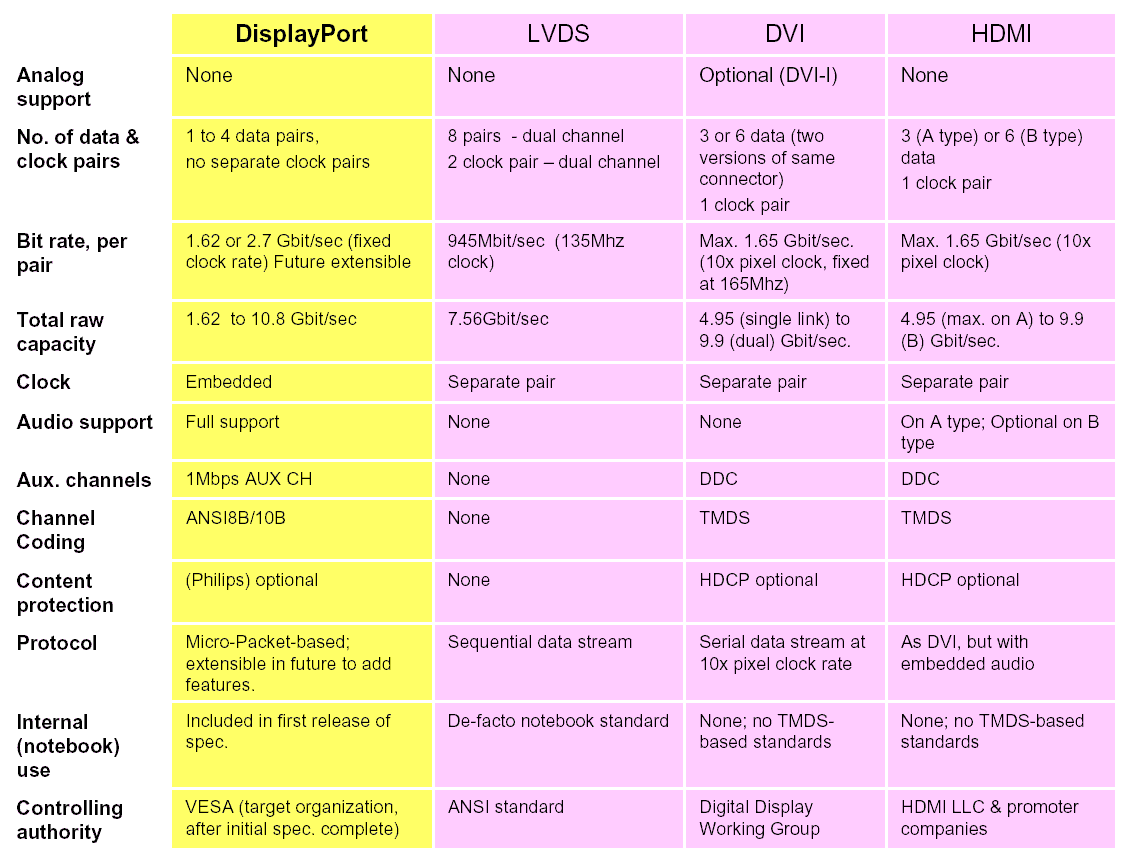
As I said in another comment, VESA claims that DisplayPort's bandwidth is "future extensible" while DVI's bandwidth is maxed out at 9.9 Gbps per dual-link port. However, what they claim and what they implement might be different. Here's VESA's comparison chart anyway:DisplayPort, LVDS, DVI, and HDMI comparison
-
Motherboard-based RAID Any good?
I'm running a Gigabyte Nforce 4 Ultra motherboard for my AMD X2 cpu. I have a RAID 5 setup on it with 3 drives. This motherboard doesn't have active cooling on the chipset, and the temp reading on it reguarly hits 70C. That bothers me, mainly because I'm thinking that if the motherboard dies, I'm SOL with my data right? If I understand right, I should probably get myself a dedicated SATA RAID card and dump the motherboard solution in case the board dies, correct? I have this board:
http://tw.giga-byte.com/MotherBoard/Products/Produ cts_GA-K8N%20Ultra-9.htm -
not really new
so's mine, what's the story?
-
Not new
Gigabyte has been selling a fanless 6600GT for a while now, the GV-NX66T256D.
-
...do not be surprise if it disappears
"do not be surprise if it disappears"
so I'm putting a copy here for safe keeping:
Wednesday August 10, 2005
- Mac OSX x86 on PC: and now a video! [Upd] - bad_duck - 21:03:35
The Apple Developer kit version of MacOSX x86 has indeed been fully cracked!
An anonymous source has sent us a video showing MacOSX x86 booting natively on a Pc notebook Mitac 8050D (Pentium-M 735/1.6GHz).
Boot Mac OS X 86 (Mpeg4 - 1,5 Mo) - [torrent]
As you can see the boot phase is rather fast, and the error message at the end is simply due to an right/authorization error due to the kext allowing PS/2 support.
[Upd]
Here is a second video showing the boot on the same hardware, the permission error was repaired. We can see the "About this Mac" panel, Apple System Profiler and CHUD prefpane showing information on the processor (frequency, cache etc...).
Boot Mac OS X 86 v2 (.mov - 11,5 Mo) - [torrent]
[Update] - We've added torrent files for the 2 videos to relieve the stress on our server. If you use them, please keep seeding as long as possible, thank you.
[translation by Eric][edited - windows vista crap removed]
- Mac OSX x86 on any PC : a reality, current status - Yoc - 14:18:24
Hereafter is the current status of the OSX x86 on any PC project run by PC/Mac "bidouilleurs"
Initial problems
Several system prevent running OSX x86 on any PC:
1. TPM chips from Intel
2. SSE3-enable processor
3. GMA900-based graphic card to natively support Quartz.
First solution: VMWare
simply install VMare on ANYPC, and this application will emulate what needs to be (GMA900, SSE3
Of course this is only a short-term solution, since it is rather instable, and particularly slow.
since this morning one can find on P2P network an already configures VMWare image OSX x86.
Patches
Several solution have been found. The TPM is cracked, and no one needs it anymore. The SSE3 requirement, can be bypassed via quite complex modifications, and this case several kernels will not work since they REALLY need SSE3. A patch for those kernels is being prepared allowing SSE3 instructions to be translated into their corresponding SSE2 ones.
GMA900 can be avoided by modifying CoreGrapics, patches are also available.
The best solution: the right hardware
The best and the most secure solution is a motherboard from Intel: D915 GA, GL or GU
http://www.intel.com/design/motherbd/ux/
Excellent results have been obtained with Gigabytes GA-8I915P motherboard card:
http://www.giga-byte.com/Motherboard/Products/Prod ucts_GA-8I915P%20Duo-A.htm
Users with such a motherboard and a Pentium 4 will be able to install MacOSX x86 with the patch for Rosetta (without the patch if you choose a SSE3-enable Pentium4).
Be careful not to use any HD in RAID settings, otherwise it will crash your system.
Use a USB keyboard, PS2 port is not really well supported.
First tests
First tests have shown that MacOSX x86 on PC is very reactive, no crash, iTunes is running perfectly, with Rosetta.
Digital camera work perfectly with iPhoto, as well as digital camcorder with iMovie.
Another solution
The last solution is based on installation of Darw -
Re:PSU?
Your wife? does she game?
I personally use a 6600gt that is passivly cooled:
http://www.giga-byte.com/VGA/Products/Products_GV- NX66T128VP.htm -
Re:One person's quiet is another's overload
This site has a lot of ideas:
http://www.silentpcreview.com/
An earlier guy wrote about how he ran cables to his garage and kept his keyboard, monitor, mouse, so he couldn't hear any noise from his computer. It only cost him a few hundred plus labor. But there are alternatives.
Here's some of mine:
Get a passive power supply (check the article this whole thing is about, or google for some, or check the SPC site at the top of my post)
Get a passive CPU cooler (they do exist) or use one of the ones that can mount a 120mm fan, make sure all fans are very low noise 120mm fans that can move more air than smaller fans, but at much less noise.
Here's an example of a passive CPU heatsink (its quite big, but can handle fast modern CPU's)
http://www.thermaltake.com/coolers/4in1heatpipe/cl -p0071SonicTower/cl-p0071.htm
You may want to consider some of the recent AMD64 cpu's that run quite cool and low voltage, but yet very good performance. Like the venice version of the AMD64 90nm 939 pin 3000+ cpu.
Memory doesn't matter so much, you can use them as is.
Get a graphics card that is passivly cooled. For example, I bought this one and I love it:
http://www.giga-byte.com/VGA/Products/Products_GV- NX66T128VP.htm
Its a nvidia 6600gt pci-express.
An alternative is to get one of the mobos that support the Pentium M CPU. That cpu is normally for laptops, but has great performance and very low power and heat. You can also get older graphics cards that are cheaper and passively cooled and put out less heat (my 6600gt gets pretty how) if you aren't going to do any gaming.
Replace the chipset fan with a heatsink
I used this one on my asus a8n-sli deluxe mobo:
http://www.zalmanusa.com/usa/product/view.asp?idx= 71&code=014
As for hard drive, check this:
http://www.silentpcreview.com/article258-page3.htm l
Its a 200 gig SATA hard drive with noise levels of 21db idle and around 24db while writing.
If this is still too much, get an older 5400 rpm hard drive and enable the noise reduction technology on it. Many many hard drives have utilites you can download from manufacture to enable noise reduction in operation. It slows the performance a slight amount but can often reduce noise quite a lot. I dont know if laptop drives are any quieter, but you could purchase one and use one of those adapters to plug it into a normal IDE plug.
Get a well designed case. Here's a review of a system that runs cooler than an open air test bench and can use a single 120mm 5.5 volt case fan:
http://www.silentpcreview.com/article254-page4.htm l
Or if you really want to go extreme in case design, there was a case a couple years ago that was almost $1000 and it was basically one giant heatsink with stuff so you could passive cool cpu and video card to the outside of the case, so you could operate it fanlessly if you wanted.
For fans, if the uber quiet 120mm fans are still too noisey, then run them at 7v or 5v instead of the normal 12v. You can greatly reduce the noise this way and its not a hard thing to do.
This page has a bunch of info and PDF/xls tables on differant fan characteristics with undervolting. You can get fans down to 15 or less db when you run them at 5 volts (the ones that work at that speed)
http://www.silentpcreview.com/article25-page1.html
If this is still too much, you can go with eve -
Re:Need more power...
They do actually have an AGP 6800 with no fan - product page, although I agree, a good fan shouldn't be noisy at all.
-
Re:But...
Except that this was with a slipstreamed copy of XP w/ SP2 and it cannot support my hardware, and bare in mind this hardware is nearing a year and a half old now and is not some wierd, esoteric motherboard - it's a Gigabyte GA-7N400 Pro 2 so yes, I can make the comparison.
-
AMD board with RAID-5
Check out the Gigabyte GA-K8NXP-SLI board which has SATA-150 RAID-5 via an extra chip.
Damien -
IBM is stupid and sells
WOW! That is stupidity in action. I must say that IBM selling this unit is in my opinion absolutely stupid. IBM is selling away its identity as a company. They are selling away their identity, REPUTATION, and oughtright POWER. You see, even if they went into producing quilting machines, they would always make big news because they created the PC and had a link to it. That was POWER, INFLUENCE, and REPUTATION with whatever this company did. They had a reputation of being computer leaders and inovators, even tho their PC unit was a back burner affair. Now they will not be associated with computer inovation or involvement, despite their main focus on service being hugely related to computing. Heck, they will now be associated with a boneheaded decision.
Now for the next year or so, everything they do will be looked at from down our noses as "how did they screw up this time?". After that we will probably start to forget who or what IBM was or stood for. Then they won't be able to capitalize in any way from their PC background. If they didn't want to produce PC's anymore, they should have just contracted out to say GIGABYTE or MSI and just slapped an IBM Thinkpad label on it. Basically unless they were taking a loss on this line (and a big one at that), the sale of this unit, name, and connection is a HUGE loss when you calculate all the intangible effects it produced. Heck, they even have a IBM Thinkpad following. A following that will have to decide if this China company will produce the same results.
This is a huge shame. Every time a company has done this they have lost their identity. Five years down the line they are just some company who has some interesting history on their ABOUT page. One that usually only peeks the curiosity of people reading through it, but garners no respect from it.
-
Re:Cool 'n Quiet
Are you running Linux w/ kernel 2.6 on it? If so, you enable CPU Frequency Scaling under ACPI options in the kernel build menu. I've got performance and powersave governers set to 'y', CPU frequency helper tables on and AMD Opteron/Athlon64 Powernow also set to Y. There may be other options, but you'll find them if you use Google. Obviously, you need to build and install the new kernel with these options enabled.
Next, you'll need a daemon to control the CPU speed. I tried cpudynd but it kept locking up (I think it was the bios, not the program - XP also locked up on the same bios revision.) However, I now use powernowd and it's working fine.
K8T800? If you mean this one you're in luck.
Just cat
model name: AMD Athlon(tm) 64 Processor 3400+
cpu MHz: 1004.881
That's right now, it varies up and down of course. -
BTC Mini Keyboardhttp://www.btc.com.tw/english/2-7-06keyboard.htm#
5 100c
http://www.btc.com.tw/english/2-7-06keyboard.htm#9 118
http://www.btc.com.tw/english/2-7-07keyboard.htm#6 100
I got one of these (the 9118) bundled with my Gigabyte TA-1 and it suits it perfectly, fitting nicely with the form-factor of the machine. I think all these models are very similar, with perhaps the 5100c suiting you best; they've got a reasonable action for the price and are available in both USB (with an upstream port built-in -- handy if you wish to allow pendrive access) and straight PS/2.
If you're buying a few of them you might want to fire an e-mail to BTC's US distributor (or ring them) and see what they can do for you -- many resellers put a high markup on these purely 'cause they're small (~USD30), but with a bit of hunting you can probably get them for closer to USD5. -
Indeed
This is why I use Gigabyte Motherboards almost exclusively, with their dual-BIOS onboard. If the machine crashes during a flash, all I need to do is reboot and it'll fire up on the backup BIOS and I'm in the running again.
Really though, I wouldn't bitch about the device not being able to recover itself. Adding on self-healing abilities (Basically fixing end user screw ups) adds parts to the device, which adds to the cost. It is a *consumer* level device, remember, so price is the big concern. Stop whining and get a new one - you screwed it up, the company isn't to blame here. -
Does it bother anyone else
that BIOS code is critical and readily flashable...
Ever had a virus that hosed your bios? You've now got a dead motherboard unless you've got a burner and some extra ROMS laying around (doesn't everyone?). Some companies have instituted an auto-switching dual bios that helps mitigate this risk, while others are jumper switchable
Still... it bothers me to have an irreversible "kill" feature on my computer... particularly since I'm error-prone like most people. Ever had a BIOS flash interrupted? I have... not pretty. -
GIGABYTE GA-7VAXP Motherboard
This explains why I receive a warning message saying "Hi-Speed USB 2.0 device plugged into a non Hi-Speed USB 2.0 port." whenever I plug in my fancy new Nomad JukeBox Zen NX. I tried everything: uninstalling and reinstalling the latest drivers, third-party drivers, microsoft's drivers, different ports on the motherboard...nothing would work. Instead, I had to wait many many hours to transfer my music over to my mp3 player. On the website it doesn't make any distinction between Hi-Speed and Full Speed. Maybe I can return it for false advertising?
-
Re:How about a restraining order
Even the suspected author of one variant of the MS Blaster worm, Jeffrey Parson, was told by the judge that he could use the Internet to look for work. Judges are increasingly unwilling to place permanent draconian restrictions on computer criminals because that could leave them unemployable, and an unemployable person can be forced back into crime by that very fact.
Unfortunately it looks like not all judges got that memo:
Lamo denies $300,000 database hack
Quoting from this article -
After a weekend in hiding, Lamo turned himself in at the federal courthouse in Sacramento, Calif., Tuesday morning. Pursuant to an agreement with prosecutors, he was quickly released on a $250,000 bond secured in part by his parent's house, but was banned from computers, ordered to obtain employment and placed on travel restrictions pending trial
Note that the "no computers" restriction was tacked on by the judge, according to the previous Register article. Like you say this does make employment opportunities somewhat limited.
ManxStef
(posted as AC 'cause I've forgot my login and I'm on my sweet new Linux box - a Gigabyte TA-1) -
Re:where's Nvidia?
behold the NForce 3 pro. It was the first(?) chipset supporting the Opteron, has many of the features you mention. As for having support for legacy, etc; that's the choice of the motherboard manufacturers. As an example, the Asus A7N8X only has 3 dimm slots, whereas the Gigabyte GA-7N400-l1 has 4.
BTW, for if you really want a legacy free mb, you'll want to check out abit's offering, the AT7. It may not be the latest greatest, and it may not fit your vision of 'legacy-free', nor is it the ideal board you describe.However, its as close as we'll get for now.
A question for you. With all of those onboard components, why do you need 6 pci's(also getting to be legacy at this point)?
-D -
Re:Very Nice
We have been promised smaller computers for 20 years now and the closest thing we have in mass production is a Dell Opti (not bad, I have one).
How about the Gigabyte TA series?
I picked up a TA-1 for under 200UKP (just add 2.5" lappy drive and PC133 stick), and it's very nice - Eden 800MHz, 2xUSB (if you're after hi-speed USB2.0 you'll want the TA-2), 1xNIC, audio, PCMCIA slot, CD drive, etc. It even comes with a really nice mini BTC keyboard and optical mouse. Oh, and it's quiet too, unlike those little "vacuum cleaner"-like Shuttle boxes! Absolutely perfect for a little Linux box
-
Re:9200?
Well after reading this I've just ordered a Gigabyte 9200 card GV-R92VIVO since as far as I can see ATI are a cool company doing The Right Thing (TM).
For the original poster, this site summarizes all your options.
So an ill-informed, stupid
-
Re:Bad
I agree.
The whole point of a "Basic Input/Output System" is for, well, basic I/O. It was meant to be a thin layer between the OS and the hardware.
While I agree that the technology can be improved upon, I don't think this is the proper direction to take.
I much prefer the route that Gigabyte has taken with their DualBIOS. If there is serious enough trouble with the OS, just boot to a CD with recovery tools on it. If there's a problem in the BIOS, you now have a spare. I don't see the necessity of a TCP/IP stack in the BIOS.
My $0.02.
-azmaveth -
Re:a few questions...
You mean like on this board? The Giga-Byte DualBIOS system is pretty handy for bad bios flashes.
-
Re:Turbo Buttons (Was Re:fast chip?)
Buttons? Feh, that's so 90's. Gigabyte has EasyTune.
-
Re:FireWire already Goes Goes Goes
You mean like the Asus A78VX, Abit AT7-MAX2, Aopen AX4BMAX, Gigabyte GA-8IEXP, Soyo SY-P4I Fire Dragon, or Asus P4B533-E?
These are all new motherboards, and most of them are on the high end of pricing.
Firewire is more expensive to implement, period. And the number of devices that can substantially benefit from the faster speed of Firewire are very few (basically digital video... high end digital audio as well, but that's so stratospheric as to be irrelevant in the consumer market). -
Re:Here's a better alternative
Whoa, even better than that. Check out the G-Max "FB" series that's "coming soon".
Gigabyte G-MAX FB Series
That would be an absolute killer home entertainment PC, with multi format flash card reader (CF/MMC/MS/SM/SD/Micro Drive), firewire, usb 2.0, and spdif optical digital audio all built in. They'll have models supporting P4, P3, AND Athlon.
The only thing it doesn't say is if it has an AGP slot. If you can't put an all-in-wonder card in there, it kind of defeats the purpose... -
Re:How's this for a destructive payload?
Good thing some of us have GigaByte mobos with DualBios!
-
Re:Other Form Factors - NLX not NTX
Basically, the NLX and to a lesser extent the FlexATX form factor are dead. Witness the lack of NLX and FlexATX Pentium4 and Athlon motherboards.
If you really wanted to though, you can still build an NLX system. Enlight makes a pretty good NLX case, and you can get a motherboard from Gigabyte, no AGP though. For an AGP motherboard you're probably looking at i810 or i815, these guys seems to have a couple. You could also try Ebay.
You'll also need an NLX-complaint AGP video card. These cards have the VGA connector at the top and a "notch" below, like the one in this picture. As far as I know they stopped making NLX video cards after the GeForce, so that's the best you'll be able to do.
Basically, there is no REALLY good reason to go for a NLX system anymore. If you don't care about performance, you can find plenty of FlexATX Socket-370 boards with onboard video/sound/LAN.
If you DO care about performance your best bet is to go with a MicroATX i845 board like this one. Pentium 4 is better for a small PC than Athlon because of the heat issues with the Athlon. You should be able to pair up this kind of board with any video card you want, like a Geforce3. -
Re:WTF ...
I know this wasn't the topic of the post, but in case anyone's curious..
A KT266A does not need a cooling fan.. I've got a Gigabyte GA7VTHX + XP 1600+ (1.4ghz), overclocked to 138 bus speed (1.45ghz). Everything still runs great, and fast as hell.
And, of course, there is no fan on the chipset. -
Athlon 1.4Ghz, Thermalright SK6 and Delta 38cfm
I'd just put together a new machine based on the Gigabyte GA7DXR (great board!). Everything was fine for about 2 hours, and then the Delta just stopped. Now, for those that don't know, this particular fan is LOUD. It has a high pitched whine that's unmistakable. I can hear it down the hall and into the livingroom. I knew immediately when it quit, and hit the power button faster than I'd ever hit it before... and STILL had to wait the 4 seconds for it to finally shut down.
Don't know how hot the processor got, but that heat sink saved it. Turns out the Delta just blew the motherboard CPU fan header - as several sites that I found later said it would. I was VERY happy to find that plugging the Delta into the PS via a 3-4 pin adapter worked, and the machine hums right along to this day.
-
Athlon 1.4Ghz, Thermalright SK6 and Delta 38cfm
I'd just put together a new machine based on the Gigabyte GA7DXR (great board!). Everything was fine for about 2 hours, and then the Delta just stopped. Now, for those that don't know, this particular fan is LOUD. It has a high pitched whine that's unmistakable. I can hear it down the hall and into the livingroom. I knew immediately when it quit, and hit the power button faster than I'd ever hit it before... and STILL had to wait the 4 seconds for it to finally shut down.
Don't know how hot the processor got, but that heat sink saved it. Turns out the Delta just blew the motherboard CPU fan header - as several sites that I found later said it would. I was VERY happy to find that plugging the Delta into the PS via a 3-4 pin adapter worked, and the machine hums right along to this day.
-
thats great
Now all the motherboards need is support for more than 4 ide devices. Has anyone seen some of the nice gigabyte boards that are being produced? Its nice to finally have support for more devices. Now if they made these boards to support the new standards, I would be in heaven.
-
Severly skewed benchmarking
Does it not strike anyone else that they are comparing "Lower End, Value (tm)" processors to current top of the line stuff? Of course the top of the line stuff is going to be twice as fast - they are running at 1.5 - 2.0 times the speed!
Why not instead benchmark these inexpensive processors with various video cards like the ATI Radeon, S3 Savage and a GeForce2? Then for reference on the graphs, throw in the Athlon and PIII score for comparison. This would produce a useful graph - something that would allow me to decide if a "Value" system is what I should purchase next. This would also show where the framerate bottleneck is - the CPU or the GPU.
The second complaint I have is their choice of motherboard for the PIII/Celeron. Why not choose something like the Gigabyte GA-6VXE+. This motherboard features (as all Apollo Pro motherboards do, I suspect) an independent FSB - The front side bus of the processor is independent of the memory bus. My Celeron 600E has a 66MHz FSB, the memory bus is 133MHz. Wouldn't this reduce bus contention between the AGP card and the processor, resulting in better performance?
Shame on sharkyextreme for posting such poor benchmarking.
-
Y2K bugs experenced
I woke up am 5pm [yes night owl I am] to my radio proclamming to provide Y2K covrage.. Keep up on all the Y2K news... blah...
Called into work... directed someone to turn on my computer and radio modem.. modem dosn't want to work.. ok no biggy.. directed the person to shut down..
By the time I got to work the modem was fine and the person was online checking up on her stocks. She says there was some news on one company in the early morning hours and she wanted to put in a buy order on-line... according to the information she could get nothing is happening in the stock market.. she might be able to get a good deal...
When she was done and I got to set up for my day I switched over from her account to mine.. pulled up some Y2K music "It's all a conspericy man.. this is how the freemasons plan to take over the united states government..." kick on IRC... pull up some web sites and wait... Someone mentioned CNN and I rembered that I could watch CNN over real audio so I pulled it up over the RealPlayer G2 alpha for Linux [Looks like Realmedia dosn't plan to support Linux for very much longer... time to make our own format.. hint hint]
I occasionally mentioned that my brain wasn't Y2K complient... other Y2K jokes went around... looking for the pissed off survivalists... they seem to be staying underground...
Ok first Y2K bug.. accually this one is an oldly.... My XT at home [The Back up] is trapped in the 1980s.. I knew this allready.. but it works fine... so who cares...
Next Y2K bug.. apparently someone on IRCs lighters arn't Y2K complient... they all died... oh well...
Next a website PVP isn't pointed at the right location for the Y2K commic... still pointing at 1999 subdirection.. apparently the year is hardcoded and has to be changed manually every year...
Next bug... My security camra works fine except for the fact that there is no 13/1/99 [13th month].. I have to fix this every year.. no biggy.. did it before... Unfortunatly it uses a 2 digit year but then that clock is a convence we can live without...
Next annother website Giga-byte now for the fun part.. Mac and Linux report year 2100 but a test version of Windows gets 4000.. It's the website and I don't know why it malfunctions diffrently for Windows but I suspect being a test version is part of that... The website reports the wrong year eather way...
In short the "Y2Kbugs" are related to disposable lighters.. website defects.. new year bugs and old 198X bugs.
Power dosn't go off... my brains didn't explode all over my desk.. and where are those pissed off survivalists... I need to laff in there faces... dang it they must be in hinding...