Slashdot Mirror
Domain: sourceforge.net
Stories and comments across the archive that link to sourceforge.net.
Comments · 31,462
-
Re:Group's initiatives to include
You mean like:
- Red Hat
- OrangeLinux
- Yellow Dog
- Blue Linux
- Green -
Re:Not sure this is what we need
Sure.
Common Lisp
ANSI Common Lisp standard (X3.226-1994)
Popular commercial implementations:
Allegro Common Lisp
Xanalys Lispworks
Macintosh Common Lisp
Corman Common Lisp
Popular free implementations:
CMUCL
CLISP
Open MCL
SBCL
GCL
All of these implement the Standard, some better than others. All have interesting extensions which are not portable. All bring different elements of interest to the table of developers looking to solve different problems.
Perl and Python haven't for whatever reason needed to be forked to provide a better implementation for a specific market segment. While large applications are being written in these languages, they're obiviously not in environments where the demand on the engines is high enough to warrant someone funding a fork and a port. (say, Perl for Palm, or Embedded Python, or Enterprise Ruby, whatever -- there is no complete "Python Compiler", for example, that I'm aware of at least). Though ActivePerl et al should be acknowlegded.
BEA has JRockit which is its own JVM, though it may well ship Suns class library. They felt that they wanted a better JVM to meet their markets needs better than IBM and Sun were.
Put an implementation to work and the market will fork it as necessary. Just ask MS. -
Re:Scare tactics
No! The issue is the chipset. The support for R100 is great, and is not supported by the binary driver from ATI. The binary driver supports R200 and up, which support is terrible for in the free driver.
DRI WIKI for Radeon Chipsets
Gatos support for Radeon chipsets -
Re:Scare tactics
No! The issue is the chipset. The support for R100 is great, and is not supported by the binary driver from ATI. The binary driver supports R200 and up, which support is terrible for in the free driver.
DRI WIKI for Radeon Chipsets
Gatos support for Radeon chipsets -
Re:High cost of J2EE?
There is also OpenEJB
-
Re:There is a key difference
Sounds like that 3D OpenGL desktop switcher from a few years back. Only the Microsoft implmentation is lamer, because it's not done in 3D. http://desk3d.sourceforge.net/screenshots.php
-
DAR & ParchiveDAR - Disk ARchiver & Parchive combined sounds like it would work wonders.
From http://dar.linux.free.fr/:
dar is a shell command, that makes backup of a directory tree and files. It is released under the GNU General Public License (GPL in the following) and actually has been tested under Linux, Windows and Solaris. Since version 2.0.0 an Application Interface (API) is available to open the way to external independent Graphical User Interfaces (GUIs). An extension of this API (in its version 2) is in the air, for release 2.1.0, and would overcome some limitation of API version 1. This API relies on the libdar library which is the core part of DAR programs and, as such, is released under the GPL. In consequences, to use it, your program must be released under the GPL, no commercial use will be tolerated
Archive Testing
thanks to CRC (cyclic redundancy checks), dar is able to detect data corruption in the archive. Only the file where data corruption occurred will not be possible to restore, but dar will restore the other even when compression is used.
Parchive http://parchive.sourceforge.net/:
Parchive: Parity Archive Volume Set
The original idea behind this project was to provide a tool to apply the data-recovery capability concepts of RAID-like systems to the posting and recovery of multi-part archives on Usenet. We accomplished that goal. Our new goal with version 2.0 of the specification is to improve. It extends the idea of version 1.0 and takes the recovery process beyond the file-level barrier. This allows for more effective protection with less recovery data, and removes some previous limitations on the number of recoverable parts. See Par1 compared to Par2 for a more detailed view of the differences. -
Re:16-bit/float formats?
Have you looked into cinepaint?
-
Re:I see... (MDI)There are virtual window applications for Win32. I loved VirtuaWin.
At least then you can just have GIMP in it's own window. I realise that your biggest problem is that nearly every other Windows app in the world supports MDI, so why doesn't GIMP? But then to that I would say that nearly every other window system in the world supports virtual windows, so why doesn't MS Windows? I mean if they're writing a cross platform application, why should they be restricted by that one without vitual window support?
-
3D-Desktop
> Reading the patent document, the key point is that the users hits a key and all the desktops
> are scaled within the window using animation. So if I have a 3 x 3 virtual desktop and hit the
> desktop view button, my screen is shrunk to (say) the top left 9th of the screen and 8 other
> mini desktops become visible. If I select another desktop it zooms towards me filling the
> screen. They make a number of references to background images and I guess animating 9
> different background images for the demo above would look very cool.
>I haven't seen this implemented before. The nearest is Mac OS X.3 which allows all
> application windows to be minimised and switched between, I use it a lot and it is excellent,
> particularly if you have a number of quicktime movies or similar playing. As I recall, Apple
> patented this and I think this is Microsoft's answer
This sounds a lot like 3ddesktop, a rather flashy paging program for X11 (well, at least Linux)computers. It's an OpenGL application. When you click a particular button or hotkey, the screen that you're looking at scales down so that you can select another virtual desktop. The desktops can be viewed in several ways (for example, if you have four virtual desktops, you can have them displayed as the faces on a rotating cube). It's not exactly the same thing as you describe, but it's somewhat similar, and I find it interesting.
--
-JC
coder
http://www.jc-news.com/parse.cgi?coding/main -
Re:nVidia Desktop Explorer does this on windows
For instance, with 4 virtual desktops, they describe a scaled view where each desktop is essentially 1/4 of the screen. If you have two browser windows open in two different desktops, such a view would enable you to visually determine which is which. I don't remember seeing such a feature in other VWMs. They also describe animating the transition between this view and the full desktops via shrinking/expanding the active desktop.
Sounds very similar to 3D-Desktop to me
-
SafeDee looks like a subset of PortaBase (free)
SafeDee is neat, but I copied the functionality and appearance of SafeDee closely in about five minutes with Portabase . They're so close that I wonder if SafeDee isn't actually made from PortaBase, which includes Blowfish encryption, and even has the desktop ports that the reviewer wanted.
My favorite add-on app for a PDA is a quick and dirty database. Having data at my fingertips all the time makes a PDA a work tool for me. If I need an inventory database, reference chart or somesuch, I've got it in a few minutes. -
Re:nVidia Desktop Explorer does this on windows
3D Desktop does it. Actually, it does it and a whole lot more. It's one of those projects that has been around for ages, and has a loyal following (I count myself among them), but just never seems to get a lot of publicity.
-
Re:There is a key difference
Sounds a little like 3d-desk
Excellent find! 3D-Desk in "linear mode with the option linear_spacing set to zero" (quoting directly from their FAQ) would indeed look *very much* like what M$ is trying to patent here.
Date-wise it looks like a very close race: the M$ application is from April 5, 2002; the first message on the 3ddesk mailing list is from May 2, 2002. It does however refer to the program as working already.
I'm sending a message to the 3ddesk developer urging him to file a statement with the USPTO. Everybody *please* don't -
Re:nVidia Desktop Explorer does this on windows
Hmm, aren't at least some of the 'improvements' supported for some time already by 3d-Desktop?
-
Re:There is a key difference
3ddesktop does something similar to your description using OpenGL animation.
-
Re:There is a key difference
Sounds a little like 3d-desk
3d-desk
-
Re:Download the whole patent
I still think this 'idea' is covered by 3d-desktop
-
Re:nVidia Desktop Explorer does this on windows
There do seem to be some improvements listed. Foremost appears to be the ability to view a scaled version of the desktops in full screen instead of just the little icons in the pager....They also describe animating the transition between this view and the full desktops via shrinking/expanding the active desktop.
Sounds a lot like 3d-desktop to me.
-
Pnnacle ShowCenter
I just setup this solution for myself that covers the issues he had. The ShowCenter can play VOBs, MPGs, Divx/Xvid, plus a few more. Its a nice set top solution that looks nice and is quiet. If you don't to use windows as the back-end server, there are two open source Apache/PHP projects that will replace their Windows back-end application.
Pinnacle ShowCenter
OpenShowCenter
OXYL-BOX
Supported File formats:
Music:
- MP3
- PCM
- All incompatible audio files (E.G. WMA) will be converted to MP3 at 128kb/s
Video:
- MPEG-1
- MPEG-2
- DivX AVI
- Xvid AVI
- All incompatible video files (WMV, DV) will be converted to a ShowCenter compatible format as set by the user.
Image:
- JPEG
- BMP
- PNG and GIF files are converted. All "Portrait" oriented image files are rotated by 90 degrees in the ShowCenter database and scaled to PAL or NTSC video resolution. The pictures are optimized for being displayed on a TV screen and stored as a copy in JPEG format, while preserving the original image file.
Video standards for A/V outputs:
- PAL 25fps full D1 720 x 576 interlaced
- NTSC 29.97fps full DV 720 x 480 interlaced
Inputs and outputs:
The ShowCenter box provides all audio and video outputs for delivering the optimum sound and video quality no matter what A/V equipment is connected. The A/V connectivity is equivalent to a premium quality DVD-player and consists of:
a) SCART 21-pin connector (Europe-only, also known as Peritel connector or Euroconnector) with composite, Y/C, RGB, stereo audio
b) Component video output ("YPrPb", 3 x RCA)
c) Composite video output (1 x RCA)
d) Y/C ("S-Video") video output (1 x Hosiden)
e) Stereo audio outputs ("Line-Out") (2 x RCA)
f) Additional stereo audio output (for separate connection to stereo system) (2 x RCA)
g) Digital audio outputs, both optical (1 x Toslink) and electrical (S/PDIF 1 x RCA)
Further inputs and outputs:
a) Ethernet 100baseT (1 x RJ45) with associated connection/data LEDs
b) PCMCIA slot for Pinnacle-approved wireless network card
c) Power cable connector
d) IR receiver
-
Re:Power Toys for Windows XP
VirtuaWin is what I use at work. It's GPL'd.
-
Re:Help setting this up
Sounds like POPfile was what you were actually looking for!
-
Re:RAV Anti-virus
After a quick scan of some posts, here are a few programs others have recommended:
avast! 4 for Linux Currently in beta so I have no idea what the cost will be. Windows versions are $399 US for a single server.
Clam AV A GPL'd virus scanner. Looks like pretty good AV software for open-source. Definitions are updated many times a week through submissions from the community. I think I'm going to have to check this one out myself as it looks promising.
F-Prot Anti-Virus for Linux Pricing is based on number of users; $299 for 1-24, $399 25-49, $499 50-99.
Kaspersky Anti-Virus Pricing is per-user. $10.05/user for 100 users. Unfortunately, they don't have a direct page for the Linux mail server software. I had to go to the online store for pricing.
If anybody knows more, post them here.
-
Re:where have you been?
Here's the parchive sourceforge site
-
Re:Xbox LinuxThe xbox I think would be a very good implementation for a 1000 video media center. However, without the linux.
You could get an Xecuter 2 Pro from Team Xecuter to mod the xbox. Then go ahead and replace the default desktop with an Xecuter bios, and load that puppy up with XBMC, an Xbox Media Center dashboard (or one of the other more popular dashs).
Going from there, you would download dvd2xbox. This will give you an exact 1 to 1 rip of your DVDs, Xbox games etc. You can simply play then from your hard drive with the default xbox dvd player (or a homebrew one).Of course, if you want to fit all 1TB or so you'll need to add an external box with the 4HDs you have with a switch. The xbox can't use more than one HD at a time, so just order them from A to Z. The outcome though would be an amazing shuttle like system that you can use to play games, and even control fully (except for the games) with your xbox remote.
-
what system?
You didn't mention whether you were looking to run Linux or Windows or OS X, but I think the principles are the same.
This is a good Windows-only setup using mostly freeware tools:
DVD Decrypter to rip the DVDs to macrovision-free/region-free ISO images
Daemon Tools to mount the isos as virtual drives on demand
MyHTPC as a TV-friendly filesystem shell (in combination with some simple batch scripts to control Daemon Tools, several of which can be found in the MyHTPC forums)
Zoom Player to play the DVDs (it's fast, full-featured, and you can turn off the GUI entirely which is nice on a TV.
You will also want WinDVD: not to play the DVDs, because the interface is so bulky and slow, but because you will need good MPEG-2 codecs and I don't know of any free ones as good as the filters that come with WinDVD. Zoom Player has a feature that automatically finds the codecs and registers them for you. (AC3Filter is a free AC3 audio codec that is comparable to InterVideo's.)
There are loads of ways to do it in OS X and Linux. Somebody who knows better than me is sure to post them. -
Some little hacks
The most recent actual "hack" I've been involved with is the single-use (Dakota) camera. So far, the 25-picture disposable camera has been made to also support time-lapse computer-controlled photography, continuous video (i.e. Webcam) modes, and been able to store (in my brief, informal test) 58 pictures.
The rest of these might not be considered hacks per se, just projects.
A project that never got finished would have put a high-power subwoofer amplifier in my car, complete with an authentic '60s fluorescing vacuum tube as a level display. Much classier than the usual LED-bargraph arrangements popular with the kiddies these days. Unfortunately, in the middle of building this I got offered a job and moved 'cross-country, but didn't have room to pack the unfinished bits+pieces and all my electrical test equipment in my little 2-door.
In my college years, I had the position of running an underground student newspaper. An issue was released 'every few weeks' when its dedicated editors were free/bored enough to put one together, but one thing everyone thought would be nice would be to commandeer the University (dorm) cable system after-hours for a student-run movie and wierd footage channel. Starting at about midnight or so, this would replace a lame "information channel" text marquee (which was always several weeks out of date and advertising events whose deadlines had come and gone), that was currently occupying a perfectly good cable channel.
We had obtained keys to the main hub room (also the cable feed room), so inserting the signal was not a problem. The student TV footage was intended to begin late at night, when university officials were guaranteed not to be watching, and would be pre-recorded. This presented a minor problem, however: everyone on the 'staff' had early classes and poor memories, and could not be counted on to get into the hub closet after hours to insert the day's programming and press 'play'. Also, while some students (volunteering for the Computer center) did legitimately have access to these areas, students going in and out of there after hours would arouse unnecessary suspicion from campus security.
It was decided that the best solution was to equip the VCR with a 'remote control' of sorts that would allow it to be controlled over the dorm network via the abundant Ethernet connections available in the room. This would allow for automated starting and stopping as well as manual intervention as necessary; footage could then be loaded during the daytime hours at the convenience of those involved.
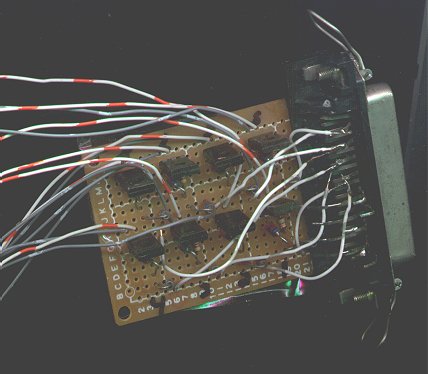
Making a VCR Internet-ready is not has hard as it sounds. I simply built a board with eight simple Darlington transistor circuits (corresponding to 8 data pins on a parallel port) to drive the important VCR function buttons via this port. A simple Web server (disposable '386) running a perl-based CGI interface allowed Web-based control of the parallel port bits, which in turn operated the disposable VCR with wires soldered into the appropriate front-panel switches.
The tricky part then became finding controversial/interesting/non-stupid, but legal, student-produced content worth displaying, but that's another story. -
Re:Recommendations.... (better format)You will see cygwin (which others will recommend) totally left out of the recommendations. That is because I find it slow and oversized and I am not a huge fan of it.
- #1. Get FlashDesktops, you have to pay for it, but it is utterly wonderful. Multiple desktops on windows as fast as Xwindows.
http://flashdesktops.com/ - #2. Get UxUtils, NATIVE ports of lots of great unix apps.
http://unxutils.sourceforge.net/ - #3. Get The Bat!, it is a wonderful email client, fast, simple, can be totally driven by keyboard. http://www.ritlabs.com/en/products/thebat/
- #4. Get FireFox, it is a wonderful browser on linux AND windows (I actually prefer the windows version). http://www.mozilla.org/products/firefox/
- #5. Get gVim, vim is great on linux, great on windows too! http://www.vim.org/
- #6. Get OpenOffice, great on both platforms. http://www.openoffice.org/
- #7. Get WinSCP, a wonderful SCP/SFTP client for windows. http://winscp.sourceforge.net/eng/
- #8. Get Putty (and friends), wonderful ssh client and other utils. http://www.chiark.greenend.org.uk/~sgtatham/putty/
- #9. Get everything from sysinternals, a ton of wonderful stuff here, too much to mention, but will let you track every file access, every registry write, every debugging message. Look around, it gives you control of your box like you expect on a *nix. Ton of great command line tools too. http://www.sysinternals.com/
- #10. ClearTweak, a tool to let you customize your ClearType settings (a must for LCDs). http://www.ioisland.com/cleartweak/
- #11. Daemon Tools, lets you mount up to 4 ISO's as drives, and can emulate security protection. http://www.daemon-tools.cc/portal/portal.php
- #12. Memstat XP, lets you monitor memory usage in tray, small and simple. http://memstat.sourceforge.net/
- #13. NetMeter, lets you monitor network usage in the tray, small and simple. http://readerror.gmxhome.de/
- #14. TrayMeter, lets you monitor cpu usage in the tray, small and simple. http://www.thmundt.com/traymeter/
- #15. TweakUI, get control over some things you might want (like hover-to-focus, autologin, other). http://www.microsoft.com/windowsxp/pro/downloads/p owertoys.asp
- #16. WinRoll, lets you roll up windows just like in lots of windows managers on linux. http://www.palma.com.au/winroll/
- #17. XP Log Reader, lets you watch the XP firewall logs. http://www.winxpcentral.com/windowsxp/fwlog.php
- #18. WinRAR, unzip anything you want, supports tar.gz, zip, rar, arc, and much more. http://www.rarlab.com/
- #19. Beyond Compare, best tool for comparing directories or files, great for syncing backups. http://www.scootersoftware.com/
- #20. Nero, the best CD writer for windows. http://www.nero.com/us/index.html
- #21. WinDVD, watch movies! http://www.intervideo.com/jsp/Home.jsp
- #22. WinImage, create images from CDs, very
- #1. Get FlashDesktops, you have to pay for it, but it is utterly wonderful. Multiple desktops on windows as fast as Xwindows.
-
Re:Recommendations.... (better format)You will see cygwin (which others will recommend) totally left out of the recommendations. That is because I find it slow and oversized and I am not a huge fan of it.
- #1. Get FlashDesktops, you have to pay for it, but it is utterly wonderful. Multiple desktops on windows as fast as Xwindows.
http://flashdesktops.com/ - #2. Get UxUtils, NATIVE ports of lots of great unix apps.
http://unxutils.sourceforge.net/ - #3. Get The Bat!, it is a wonderful email client, fast, simple, can be totally driven by keyboard. http://www.ritlabs.com/en/products/thebat/
- #4. Get FireFox, it is a wonderful browser on linux AND windows (I actually prefer the windows version). http://www.mozilla.org/products/firefox/
- #5. Get gVim, vim is great on linux, great on windows too! http://www.vim.org/
- #6. Get OpenOffice, great on both platforms. http://www.openoffice.org/
- #7. Get WinSCP, a wonderful SCP/SFTP client for windows. http://winscp.sourceforge.net/eng/
- #8. Get Putty (and friends), wonderful ssh client and other utils. http://www.chiark.greenend.org.uk/~sgtatham/putty/
- #9. Get everything from sysinternals, a ton of wonderful stuff here, too much to mention, but will let you track every file access, every registry write, every debugging message. Look around, it gives you control of your box like you expect on a *nix. Ton of great command line tools too. http://www.sysinternals.com/
- #10. ClearTweak, a tool to let you customize your ClearType settings (a must for LCDs). http://www.ioisland.com/cleartweak/
- #11. Daemon Tools, lets you mount up to 4 ISO's as drives, and can emulate security protection. http://www.daemon-tools.cc/portal/portal.php
- #12. Memstat XP, lets you monitor memory usage in tray, small and simple. http://memstat.sourceforge.net/
- #13. NetMeter, lets you monitor network usage in the tray, small and simple. http://readerror.gmxhome.de/
- #14. TrayMeter, lets you monitor cpu usage in the tray, small and simple. http://www.thmundt.com/traymeter/
- #15. TweakUI, get control over some things you might want (like hover-to-focus, autologin, other). http://www.microsoft.com/windowsxp/pro/downloads/p owertoys.asp
- #16. WinRoll, lets you roll up windows just like in lots of windows managers on linux. http://www.palma.com.au/winroll/
- #17. XP Log Reader, lets you watch the XP firewall logs. http://www.winxpcentral.com/windowsxp/fwlog.php
- #18. WinRAR, unzip anything you want, supports tar.gz, zip, rar, arc, and much more. http://www.rarlab.com/
- #19. Beyond Compare, best tool for comparing directories or files, great for syncing backups. http://www.scootersoftware.com/
- #20. Nero, the best CD writer for windows. http://www.nero.com/us/index.html
- #21. WinDVD, watch movies! http://www.intervideo.com/jsp/Home.jsp
- #22. WinImage, create images from CDs, very
- #1. Get FlashDesktops, you have to pay for it, but it is utterly wonderful. Multiple desktops on windows as fast as Xwindows.
-
Re:Recommendations.... (better format)You will see cygwin (which others will recommend) totally left out of the recommendations. That is because I find it slow and oversized and I am not a huge fan of it.
- #1. Get FlashDesktops, you have to pay for it, but it is utterly wonderful. Multiple desktops on windows as fast as Xwindows.
http://flashdesktops.com/ - #2. Get UxUtils, NATIVE ports of lots of great unix apps.
http://unxutils.sourceforge.net/ - #3. Get The Bat!, it is a wonderful email client, fast, simple, can be totally driven by keyboard. http://www.ritlabs.com/en/products/thebat/
- #4. Get FireFox, it is a wonderful browser on linux AND windows (I actually prefer the windows version). http://www.mozilla.org/products/firefox/
- #5. Get gVim, vim is great on linux, great on windows too! http://www.vim.org/
- #6. Get OpenOffice, great on both platforms. http://www.openoffice.org/
- #7. Get WinSCP, a wonderful SCP/SFTP client for windows. http://winscp.sourceforge.net/eng/
- #8. Get Putty (and friends), wonderful ssh client and other utils. http://www.chiark.greenend.org.uk/~sgtatham/putty/
- #9. Get everything from sysinternals, a ton of wonderful stuff here, too much to mention, but will let you track every file access, every registry write, every debugging message. Look around, it gives you control of your box like you expect on a *nix. Ton of great command line tools too. http://www.sysinternals.com/
- #10. ClearTweak, a tool to let you customize your ClearType settings (a must for LCDs). http://www.ioisland.com/cleartweak/
- #11. Daemon Tools, lets you mount up to 4 ISO's as drives, and can emulate security protection. http://www.daemon-tools.cc/portal/portal.php
- #12. Memstat XP, lets you monitor memory usage in tray, small and simple. http://memstat.sourceforge.net/
- #13. NetMeter, lets you monitor network usage in the tray, small and simple. http://readerror.gmxhome.de/
- #14. TrayMeter, lets you monitor cpu usage in the tray, small and simple. http://www.thmundt.com/traymeter/
- #15. TweakUI, get control over some things you might want (like hover-to-focus, autologin, other). http://www.microsoft.com/windowsxp/pro/downloads/p owertoys.asp
- #16. WinRoll, lets you roll up windows just like in lots of windows managers on linux. http://www.palma.com.au/winroll/
- #17. XP Log Reader, lets you watch the XP firewall logs. http://www.winxpcentral.com/windowsxp/fwlog.php
- #18. WinRAR, unzip anything you want, supports tar.gz, zip, rar, arc, and much more. http://www.rarlab.com/
- #19. Beyond Compare, best tool for comparing directories or files, great for syncing backups. http://www.scootersoftware.com/
- #20. Nero, the best CD writer for windows. http://www.nero.com/us/index.html
- #21. WinDVD, watch movies! http://www.intervideo.com/jsp/Home.jsp
- #22. WinImage, create images from CDs, very
- #1. Get FlashDesktops, you have to pay for it, but it is utterly wonderful. Multiple desktops on windows as fast as Xwindows.
-
Re:Dunno why the link wasn't in the article. HERE:
Here's a few more interesting SELinux links: - yesterday's release
- the FAQ
- sourceforge page
- Gentoo Hardened
- Fedora Project' SELinux -
Re:Im suprised it took so long...
Here's your chance: get everybody you know involved in finishing Parsec. The thing is most of the way there now. As I understand it, the networking code is the only thing in an unfinished state.
-
Re:This must be where RAV Antivirus went
try clamav, works great in linux, and its opensource to boot.
Link to clamav
-
but how do you know it's fixed?
Nothing about writing code for a test case that exercises the bug, then rerunning it every time you make a change you think will fix the bug? Seems like a big oversight. Any program of reasonable size is going to require wasting a significant amount of time restarting and re-running to the point of failure, and with every manual check of the result, there's an increasing probability that fallible human will make a mistake.
More programmers need to get Test Infected. -
Re:Why I know about Firebird
Firefox is definitely faster than the Mozilla Suite, aka Seamonkey. You haven't really used it have you?
Well, to me Firefox is just as slow as Mozilla. The renderer is fine speed- and otherwise (it's gecko after all) but the UI on both is based on XUL. XUL is slow.
IF you want to know what a fast browser really feels like then get yourself a copy of galeon.
Opinion: It's also using gecko and doing most of the bookmarks, tabs and popup-blocking stuff better (faster!) than moz. So you may consider it a drop-in replacement for bloatzilla. -
Already been done!
I remember reading about this, like forever ago.
It's called "Video Orbits," I guess. Originally, it was made to make panoramic stills from video. But it can also do the same thing mentioned in the article, sort of scanner like.
Here's the writeup and
you can download it over here.
I played with it a bit using the movie function of my digital camera, transfering to computer, then using
mplayer -vo png movie.mov && mogrify -format pnm *png && estcement.pl *pnm
(make sure the binaries and scripts are in your path)
You can play with the $steps= line in estpairwise.pl to change the settings. also, i like to take out the -display in estpairwise.pl, in order to speed things up, otherwise it draws each image on screen as it tries to match them up.
will produce cemented.pnm.
This works both as the article talks about, like a scanner, but it also makes kickass hires panoramic shots from crappy 320x240 video.
Note: turn off automatic brightness/ auto white balance when taking your video, or it make look a little funny.
no idea if any of this stuff works under windows. but it works like a charm under linux. -
Re:I see why MS did itToo bad there's not a mod option for "(+1, Horrifying)"
Heh, heh. I like Postfix too. I remember back when I was playing with Mandrake 8.1, it came as the default MTA (if I recall correctly). I'm a fan of the QVCS-guide , which uses qmail, but I hope they switch to Postfix.
-
DJBDJB hasn't updated qmail since 1997 and it looks doubtful he ever will.
Yeah, what's up with that? To boot, apparently the qmail license is fairly restrictive where distribution is concerned. At least that's what the QVCS guide has been complaining about. I hear they plan on switching to Postfix, or something else.
-
Re:gripes.
Sorry, but I'm still not turned on to the idea of online music downloads.
Ever tried getting them for free? Yes, of course it's legal. And, while IMHO the best, it's not even the only way. If you like a band, and you feel like it, just send them a couple of bucks: what you consider they are worth, not more.
-
Re:Open Source old projects?
There are some projects that are remaking the Origin-developed framework. Exult is an Ultima VII engine remake, only needs the original data files to run.
Everyone who has ever installed Ultima VII on anything post-Win95 probably knows that having no ties whatsoever to original U7 codebase is probably a good thing =)
Exult has made U7 a very good and modern game. They've fixed many of the old annoying UI issues and such.
Exult even comes with near-usable map editor and script compiler, so you can use U7 engine to do your own adventures... at least in theory. Check out this funny screenshot... =)
There are some other engine remakes, I think. Not sure what they are or if they can be used for anything interesting though.
As for EA open-sourcing anything... no way. They're holding on their IP as hard as they can. They aren't even particularly happy about fan remakes of Ultima games, even if they're approved by Richard Garriott (or even approved while he was still in Origin).
-
Re:Open Source old projects?
There are some projects that are remaking the Origin-developed framework. Exult is an Ultima VII engine remake, only needs the original data files to run.
Everyone who has ever installed Ultima VII on anything post-Win95 probably knows that having no ties whatsoever to original U7 codebase is probably a good thing =)
Exult has made U7 a very good and modern game. They've fixed many of the old annoying UI issues and such.
Exult even comes with near-usable map editor and script compiler, so you can use U7 engine to do your own adventures... at least in theory. Check out this funny screenshot... =)
There are some other engine remakes, I think. Not sure what they are or if they can be used for anything interesting though.
As for EA open-sourcing anything... no way. They're holding on their IP as hard as they can. They aren't even particularly happy about fan remakes of Ultima games, even if they're approved by Richard Garriott (or even approved while he was still in Origin).
-
Look at Steve Mann's Video OrbitsThis sounds suspiciously close to what Steve Mann et al. do with Video Orbits, automagically compositing different frames from a video, or still pictures of the same scene, into either a higher-resoulution picture or a wider-angle panorama. Sometimes the result is a mix of the two.
You can even get the code from sourceforge, although now he seems more interested in his studies into what he calls "Comparametric Toolkit", which seems to mix Video Orbits with software based on the Wyckoff principle (how to get high dynamic range pictures from one underexposed pic and one overexposed pic, for those who don't RTFL).
I suppose the amount of processing power in those phonecams must be insane, or maybe the algorithm they use is more generic, but it is good to know all this Moore's Law horsepower applied towards useful stuff, not just Laracroftish games (ducks).
Finally, it is worth of note that, although Mann's software is now GPL (I don't recall it being Free, or even released, last time I checked three years ago), at least one of the algoritms is under US Patent5,706,416, which of course is not nice, unless he plans to license it free of charge for GPL software.
-
Look at Steve Mann's Video OrbitsThis sounds suspiciously close to what Steve Mann et al. do with Video Orbits, automagically compositing different frames from a video, or still pictures of the same scene, into either a higher-resoulution picture or a wider-angle panorama. Sometimes the result is a mix of the two.
You can even get the code from sourceforge, although now he seems more interested in his studies into what he calls "Comparametric Toolkit", which seems to mix Video Orbits with software based on the Wyckoff principle (how to get high dynamic range pictures from one underexposed pic and one overexposed pic, for those who don't RTFL).
I suppose the amount of processing power in those phonecams must be insane, or maybe the algorithm they use is more generic, but it is good to know all this Moore's Law horsepower applied towards useful stuff, not just Laracroftish games (ducks).
Finally, it is worth of note that, although Mann's software is now GPL (I don't recall it being Free, or even released, last time I checked three years ago), at least one of the algoritms is under US Patent5,706,416, which of course is not nice, unless he plans to license it free of charge for GPL software.
-
Re:EA kills another great developer
Privateer is listed as supported by DOSBox, and WC: Armada is claimed to run. I haven't tried it myself, but that's definitely a project to watch.
-
Re:Bleh
firebird is a remarkable product. period. hats off to the developers!
i've been developing commercial software since 93 with borland delphi. delphi is a fine ide with awesome db powers. it came a long way with that crappy paradox/bde thing with a bunch of drawbacks, but interbase is a professional and very powerfull dbs with its sql dialect.
the firebird project forked back in 2000 as interbase became opensource. as it is licensed under a gpl incompatible license there will always be flaimbaits. especially here on
sure, it got alot of attention due to the name conflict, but software developers that rely on a powerfull and stable db engine surely know about it for a long time.
-
Re:Bleh
firebird is a remarkable product. period. hats off to the developers!
i've been developing commercial software since 93 with borland delphi. delphi is a fine ide with awesome db powers. it came a long way with that crappy paradox/bde thing with a bunch of drawbacks, but interbase is a professional and very powerfull dbs with its sql dialect.
the firebird project forked back in 2000 as interbase became opensource. as it is licensed under a gpl incompatible license there will always be flaimbaits. especially here on
sure, it got alot of attention due to the name conflict, but software developers that rely on a powerfull and stable db engine surely know about it for a long time.
-
Re:Ultima V Dungeon Siege Remake
Just last week I bought Dungeon Siege, the first computer game I've bought in a year, just so I could play the fan-based remake of Ultima V featured on slashdot the other day. It was a neat concept to remake an old (but loved) game.
There's also a user created Wing Commander mod for Vega Strike.
I really dig the user-created remakes. They're just so crappy in comparison to the originals.
-----------
Since you're here, you should sign up for a banner / pop-up free website on AloofHosting.com. 50MB disk space, 500MB transfer, FTP, and a pissed off monkey comes with each free account.
* Monkey may not be available in your state. * -
Re:Obligatory Q... When will mozilla/TB have them?
CRM114 has a Mozilla mail "plugin". See PURITY OF EMAIL (P.O.E.) website
-
Re:To Lazy to parse the license
can I use this in a comercial system? who do I pay what does it cost?
The license is essentially similar to that of Mozilla. You can use it in a commercial environment without paying anyone, although there is commercial support available for IBPhoenix if you need it.
Furthermore, there's a feature-complete and free Python driver for Firebird here
. -
Popfile...
I'll just stick with my 99.9% accuracy with Popfile, it acts as a proxy so everything happens seamlessly, and the buckets are awesome for sorting your mail...