Slashdot Mirror
Domain: ubuntu.com
Stories and comments across the archive that link to ubuntu.com.
Comments · 3,260
-
YES!
-
Re:google is EVIL!
Google doesn't care if the search tool is bundled or not, they just want MS to expose some why to turn the thing off.
This brings to mind disk compression back in the '90s. Third party tools emerged to fill the gaps in Windows, then Microsoft filled those gaps and the suppliers of those products got a little bit upset. I know that there was an IP issue about that specific example which makes it different so maybe its a bad example.
To take an extreme position, what if google has an alternate kernel which they think people should run. Should Microsoft be made to provide a way to turn off the normal kernel?
-
Re:that didn't take long
Not sure if you were joking about an exe, but in any case you can find one here: https://wiki.ubuntu.com/install.exe/Prototype
-
Re:YesAudacity is a multi-track audio editor for Linux/Unix, MacOS and Windows. It is designed for easy recording, playing and editing of digital audio. Audacity features digital effects and spectrum analysis tools. Editing is very fast and provides unlimited undo/redo.
Sure it says playing in there, but something about it being a "multi-track audio editor" must have given away that this is not the type of application you use to play your mp3s with. Maybe you should teach your grandma to read the descriptions properly next time.
-
I'm the Ubuntu Forums guy
Hi
Actually I work for Canonical full time at their global support centre. I also happen to volunteer in the forums and I saw this post in several places. I forwarded it internally to Canonical Staff and it's been passed to Dell.
Cheers,
Fabian Rodriguez
https://wiki.ubuntu.com/FabianRodriguez -
Re:Is there any choice at all?
I think you understate the difficulty in installing and setting up MythTV
Try the easy way : https://help.ubuntu.com/community/MythTV_Feisty
In my experience, it is easier than installing any version of Windows -
Re:Okay... How do we use a crack?
Now that multiple keys are out, how does someone legitimately use a key to view a HD disc on Linux?
https://help.ubuntu.com/community/RestrictedFormat s/BluRayAndHDDVD is one method which can help; but a few caveats. The problem for Linux play is no longer the video codecs (recent ffmpeg builds have VC-1 support pretty much down pat, and H.264 has been fine for ages if you have a sufficiently powerful rig).
The problem is audio codecs. Most HD-DVDs/BRDs have either E-AC3 (A/52B) or TruHD audio, which ffmpeg currently cannot decode. There are folks working away on it, but it might be a while before concrete results are available. Until then, one possibility - if fiddly - is to demux the video/audio/subtitle streams under Windows using some of the tools available on Doom9 and then transcoding the E-AC3 tracks to AC-3 (or TruHD to FLAC) using EAC3To. You can then remux the video/audio/subtitle tracks into Matroska, and use mplayer or VLC to watch it under Linux. Cumbersome, and not very friendly, but you won't lose any video quality, and if it's FLAC, you won't lose audio quality either.
--Ng -
Re:Great ... :-S
When will we see a REAL solution to these problems, and stop implementing obscure security work-arounds that eat more resources than the applications themselves? Anyone?
We have a solution. It's called capabilities, and it's implemented on Linux through an Open Source system called SElinux, developed by the NSA and released to the public. It's available for a number of Linux implementations, including Ubuntu (although no implementation of SElinux seems to have a decent userland/interface.)
-
Re:How to create an illusion
Thanks, I was about to point that out. MS ads always feature shiny happy people having a meeting around a Windows PC.
Shame on them.. Their ads should instead feature sad, depressed people, on the verge of jumping from the open window, end their miserable life. -
rPath
This seems like a more mass market application of rPath's idea of building custom VMWare images for specific applications (although the VM sounds like it will be less distinct from the host OS, hopefully this will give performance increase). It is a pretty clever idea, and essentially flips these kind of ideas https://wiki.ubuntu.com/SeamlessWindowsIntegratio
n on their head. -
Re:I'm one of those 3. Here's the system I'll buy:By the way, what the heck is "TrueLife (glossy)"? I have the option to have it or not have it for my screen, at the same price, but it sounds like a load of MarketSpeak. It's a shiny LCD surface (popular on "home" notebooks) that can make images look sharper and colors look richer. However, it also adds an annoying reflective glare. There's some good photos showing these reflections at John Siracusa's rant about the MacBook's glossy display:
The better choice really depends on whatever is important to you. If you put a lot of value on por.. err... photos and video, then you might like the glossy display. If reading text is more important to you and your lighting conditions are unpredictable, then you might want the traditional matte-finish display.
I decided to upgrade the memory from 512MB to 2GB (+$200)Intel® Pentium® dual-core proc T2080(1MB Cache/1.73GHz/533MHz FSB
You might want to consider 667MHz dual channel memory (+250 at Dell, cheaper elsewhere) because the integrated GMA 950 graphics shares memory bandwidth with the rest of the system. 533MHz memory might be fine for 2D, but 3D operations (at 1280x800) can easily saturate the available memory bandwidth. I haven't tried the optional Compiz OpenGL-accelerated window manager yet (called "Desktop Effects" in Ubuntu and disabled by default), but I'm sure it benefits from extra memory bandwidth. If you don't see a future for Compiz, then perhaps 533MHz memory will be good enough.
15.4 inch Wide Screen XGA Display with TrueLife(TM)(glossy)
2GB Shared Dual Channel DDR2 SDRAM at 533MHZ, 2 DIMM
Intel® Graphics Media Accelerator 950Note that Newegg.com has 2GB 667MHz kits starting at $80 ($5 shipping).
-
Talk about "locked-in"!There is no update to FF 2 for Ubuntu 6.06. It will stay at FF 1.5, and the dapper-backports also don't have an update.
I may have missed your reasoning on this, but why the avoidance of non-Ubuntu-sanctioned software?
All it really means is that the Ubuntu teams haven't cleared FireFox 2.0 as “fully integrated” for Ubuntu distro's.
Does that mean it's unavailable? No.
Running Kubuntu Feisty with FireFox 2.0.0.3. I guess it's available, and I guess it's working.
If there's an argument to make, it's for the refinement of package delivery and interoperability of inter-distro packaging schemes. Just because it's a non-Ubuntu package doesn't mean it doesn't run on Ubuntu. (That's just sooo Windows-boxed thinking!)
Seriously... snap out of it.
When you're using Windows, you wouldn't go out and buy non-Windows software... 'coz it won't work. We all know that.
If you're using Ubuntu, you're using Linux. If you're using Mandriva, you're using Linux. If you're using Red Hat, you're using Linux.
If any given program offers a Linux package, there's probably a way to install and use it on your type of Linux.
If you're stuck on how to do it, keep asking and you will receive an answer.
Besides, Dapper is sooo 2005. Get Feisty!
-
Re:So Tell Me, Where Do I Go To Buy Linux?
"Buy Linux"...? Try http://shipit.ubuntu.com/ and get it free.
-
Ubuntu type of distros are a real threat to Linux
They dropped PowerPC official support claiming PowerPC is dead while Apple plans/releases Leopard and at least 10.6 supporting down to G4.
https://wiki.ubuntu.com/PowerPCReview
That type of distro is a first. I think Linux kernel still supports MIPS/Alpha CPUs
Don't be tricked, we really don't need another RDF type person and his fanboys.
For Linux, credible sources are: Linus, Debian people, Redhat Inc. and even RMS. Not some bored billionaire who will show very evil face soon.
I know Linus is not some "Wow, 8 Xeons, lets buy" type guy and I have reason to believe he still uses Dual G5 Mac as one of the posters mentioned on URL above.
Expect anything from that spoiled billionaire. -
Re:I have 3 words for you:
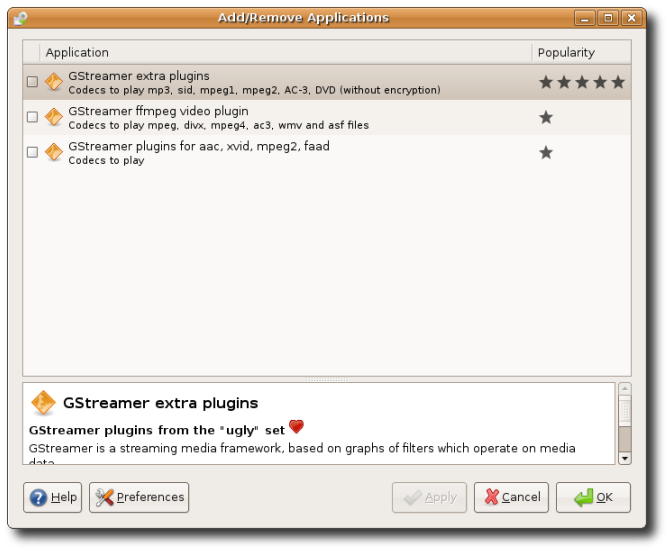
Not true, Ubuntu 7.04 (Feisty) will prompt you and install missing codecs for you. This works as long as you stay with the default applications (that use gstreamer). Otherwise follow https://help.ubuntu.com/community/RestrictedForma
t s -
Easy MythTV Installation with Ubuntu
I can get a clean machine up and running in an hour with MCE. Compare that to the RedHat MythTV Howto [wilsonet.com], which takes many hours for even a basic install. And after that, it's a pain to get everything set up and working as it should.
I'd suggest trying MythTV on Ubuntu 7.04. It takes 15-30 min. to install Ubuntu, and about 15 min. to get MythTV up and running, if you follow the nifty guide on the Ubuntu Wiki @ https://help.ubuntu.com/community/MythTV/
It's literally just a cut'n'pastes (or clicks if you prefer) to install MythTV, and a few cut'n'pastes to get the tuner card drivers working, assuming it isn't automatically detected.
I have a backend installed on a computer that's tucked away. On all the other computers in the house, I just "sudo aptitude install ubuntu-mythtv-frontend", and a few seconds later, they are all ready to go.
If you haven't tried MythTV in the last year or so, I'd seriously check it out. When I first installed it on Ubuntu 5.10, it took me a while to get things working right. 6.06 was a little better, but there were still some small issues. 6.10 was a breeze, and 7.04 was just a few clicks. Even on that guide to get MythTV working on Fedora it suggests MythDora as an easy alternative.
While MythTV might still have some shortcomings, I don't believe installation is one of them anymore. -
Re:restricted extras
That doesn't enable libdvdcss, tthough.
-
Re:But will they be cheaper?
-
Re:Hmmm, not good
I hope they provide instructions, or perhaps a script that runs the first time you boot into your Linux box that can auto-install these codecs, otherwise this will piss off a lot of people.
Supposedly they'll be shipping 7.04 (Feisty Fawn) which has a codec wizard -
Re:It's not the content that's being restrictedI'm not trying to say that you should retract your statement about MythTV being hard, because I tried (and failed) a couple of times to set it up before, but I just tried again tonight and was surprised how simple it was on Ubuntu 7.04.
- Do a base install of Ubuntu Server 7.04
- update
- apt-get install mythtv
- reboot
- answer the questions on the screen
-
Re:But why do we need these in the first place?
Maybe I'm an old stick in the mud. But I've had far, far more trouble CAUSED by most of these applications than I've seen prevented.
Ain't that the truth.
I bought a couple of Dulls last year, a desktop for me and a laptop for the wife. I turned mine on long enough to ensure that it worked, then wiped the drive and installed Ubuntu. The wife wanted XP, so the first thing I installed was the Dell De-crapifier, an earlier version of the PC De-crapifier. Off came gigabytes worth of crapware, including the McAfee internet security suite, as bloated a POS as you will ever find. (Except for maybe the Norton internet security suite.)
Then I installed the free versions of AVG Antivirus, Ad-Aware and Spybot. AVG works well and is much less bloated than McAfee and Norton. Other than all the screwing around to make it stable and secure, we have never had a problem with the laptop.
However it is annoying to have to delete tons of garbage no sane person would ever want. It is annoying that Windows is so insecure. It is annoying to have to depend on Windows Update when Microsoft uses it frogmarch their users onto new software (e.g. IE 7, WGA) that has nothing to do with security. It is annoying having to go to so many different websites for software updates.
I have three linux boxes, 2 Ubuntu and one Ipcop firewall. That one Windows laptop requires more babysitting than all the linux boxes put together.
People complain about computer viruses, computer worms, computer trojans, computer instability, computer insecurity, computer crapware, computer bloatware. Et cetera.
To that I say -
Re:Woe is Symantec
By the sounds of it, you haven't used Linux in several years. Try out Ubuntu for the "Just Works(R)(TM)(SM)(C)" experience. Pretty much any complaint people normally have about Linux (since they haven't used it since the 20th century) have been solved for quite some time in distributions like Ubuntu. There are also some other more proprietary-friendly yet still "Just Works(R)(TM)(SM)(C)" like Linspire, Mandriva, etc.
-
I'm going to get modded redundant
But for the sake of slashdot consistency this article needs a link to the fix for this problem, and I don't see it here yet.
Otherwise those poor folks in China might never get their computers working again.
-
Re:let's hope
https://shipit.ubuntu.com/
Then select the 64 bit version.
Hope you don't watch Youtube, though. -
Re:You are wrong
"A default Ubuntu install doesn't expose any open ports"
True, but misleading: A default Ubuntu install doesn't offer any server-type services, so far as I know, so it doesn't have to open any ports.
And the vast majority of Windows users don't need to run any servers, either. Why does it have them?
Also, is it still true that a default Ubuntu install doesn't have a password around the root account?
No, there is no root password set, so you cannot log into Ubuntu as root in the default configuration. Have a read of this - it explains a little bit about what root is, and the pros and cons of using sudo instead of having locked root account
You're right about the ports. Looking at a couple of PCs running XP, they seem to only have about 10 ports open. Apart from the NetBIOS ports, I don't know what most of them are - looking them up in my -
Re:Maybe KDE & Gnome Folk Will Read...
If you think this colour looks like poop, you should visit your optometrist.
Or your proctologist.
-
Re:And?
How about I answer you right here?
As you know, Windows has a particular look to it's User Interface (the windows, the task bar, the buttons, all the stuff you interact with to make the computer do stuff for you.) In Windows XP, the User Interface (or UI) is called Luna. In Windows Vista there are Two UI's; Aero (the core UI), and Aero Glass (the nifty 3D one)
Well Linux has MANY available UI's that can be loaded. GNOME and KDE are the two most popular. Most distributions ("brands", if you prefer) of Linux choose at least one UI to start with. Ubuntu Linux uses the GNOME UI. Kubuntu uses the KDE UI.
As far as selecting one over the other, it's really a matter of personal taste:
KDE is the traditional "Windowsy" looking UI. It has a task bar along the bottom of the screen, and the KDE equivalent to the "Start" button in the lower left corner, right where it is in Windows. However, it is more complex than Windows with far more options to work with. This can be confusing to new users, but many users who like to tinker find this interface enjoyable to use.
GNOME is the more "Mac-like" interface. It uses two task bars, one at the top, and one at the bottom. The top bar has all the menus on it, and yes, there is more than one. It is somewhat less configurable than KDE, but no less powerful. It is preferred among those who like a cleaner interface with a more mac-like approach to menus and usage.
Again, there isn't necessarily a "better" choice here. They are both equally good at what they do, they just do it in different ways. I would recommend using the Live CD's to explore the UI options you have without having to commit to one or the other right away. You can run the live CD, and then just rboot when you are done, with no changes made to your PC.
You can download the Ubuntu live CD here: http://www.ubuntu.com/getubuntu/download
You can download a Kubuntu live CD here: http://www.kubuntu.org/download.php#latest
Just download, burn to CD with your favorite burning software, insert into CD drive, reboot and enjoy! -
Re:Answer
the account currently in use will ALWAYS be more likely to be compremised than one not in use
There is an argument that bruteforcing a random account is harder because you need to figure out both username and password. For more discussion see here
Obviously this ignores the insane exception that is Linspire.
You're not keeping up to date with you distro news, are you? That's been debunked in 2005. -
Re:Still a long way to go
Actually, it shouldn't need to repartition the drive or make a custom ISO at all: https://wiki.ubuntu.com/install.exe (don't worry, this is a wiki page, not a link to an executable)
That's the spec for a simple Windows executable you download which would automatically download a Ubuntu hard drive image via bittorrent and install GRUB. No need to deal with pesky CDs. It's a small step from there to integrate the migration assistant into it. -
Re:And one of those is
I don't know how sure the GP is, but I'm pretty damn sure Wine will be packaged shortly, if it isn't already. The guy who makes the packages currently was just accepted as a Ubuntu Developer. But don't take my word on whether it's packaged or not, check the repos.
The biggest problem with distro packaging isn't that you cant get them to accept random super package managers (which is every bit a social problem as it is technical, and MUST be approached that way if you expect ANY progress), it's that not all projects run well on a six month stable release cycle. Theoretically backport repos could address this, but there's a balance between new features and not crashing that users expect you to find and upstream developers are untrained in. This balance is pretty hard to find within a week of testing.
But WINE is a good example: generally speaking WINE is a work in progress. For some uses it's fantastic, for others it's not. I've rarely had an upgrade of WINE break previously working apps (but I'm sure it's happened). So I'd much prefer new packages sooner rather than later. To the extent that WINE should probably get updates in backports, and if you dont want them turn that repo off or pin the package. dpkg is pretty flexible and I'm still learning the ins and outs of it's power. -
Re:That's fine by me
But it is: http://packages.ubuntu.com/feisty/otherosfs/wine
It's in the "universe" repository, which means that it's not officially supported by Canonical (along with maybe 90% of the OSS out there), but it's trivial to get it.
Kubuntu: Add/Remove Programs -> Tick "Show unsupported"
Ubuntu: Synaptic -> Settings -> Tick "Community-maintained Open Source software (universe)"
-
Re:On Ubuntu 6.10 it is like this...
Feisty: http://packages.ubuntu.com/feisty/otherosfs/wine
Edgy: http://packages.ubuntu.com/edgy/otherosfs/wine
Dapper: http://packages.ubuntu.com/dapper/otherosfs/wine
Breezy: http://packages.ubuntu.com/breezy/otherosfs/wine
Hoary: http://packages.ubuntu.com/hoary/otherosfs/wine
Warty: http://packages.ubuntu.com/warty/otherosfs/wine
Hmm.. Seems to have been in Universe since the beginning. Simple search on packages.ubuntu.com answers many questions. -
Re:On Ubuntu 6.10 it is like this...
Feisty: http://packages.ubuntu.com/feisty/otherosfs/wine
Edgy: http://packages.ubuntu.com/edgy/otherosfs/wine
Dapper: http://packages.ubuntu.com/dapper/otherosfs/wine
Breezy: http://packages.ubuntu.com/breezy/otherosfs/wine
Hoary: http://packages.ubuntu.com/hoary/otherosfs/wine
Warty: http://packages.ubuntu.com/warty/otherosfs/wine
Hmm.. Seems to have been in Universe since the beginning. Simple search on packages.ubuntu.com answers many questions. -
Re:On Ubuntu 6.10 it is like this...
Feisty: http://packages.ubuntu.com/feisty/otherosfs/wine
Edgy: http://packages.ubuntu.com/edgy/otherosfs/wine
Dapper: http://packages.ubuntu.com/dapper/otherosfs/wine
Breezy: http://packages.ubuntu.com/breezy/otherosfs/wine
Hoary: http://packages.ubuntu.com/hoary/otherosfs/wine
Warty: http://packages.ubuntu.com/warty/otherosfs/wine
Hmm.. Seems to have been in Universe since the beginning. Simple search on packages.ubuntu.com answers many questions. -
Re:On Ubuntu 6.10 it is like this...
Feisty: http://packages.ubuntu.com/feisty/otherosfs/wine
Edgy: http://packages.ubuntu.com/edgy/otherosfs/wine
Dapper: http://packages.ubuntu.com/dapper/otherosfs/wine
Breezy: http://packages.ubuntu.com/breezy/otherosfs/wine
Hoary: http://packages.ubuntu.com/hoary/otherosfs/wine
Warty: http://packages.ubuntu.com/warty/otherosfs/wine
Hmm.. Seems to have been in Universe since the beginning. Simple search on packages.ubuntu.com answers many questions. -
Re:On Ubuntu 6.10 it is like this...
Feisty: http://packages.ubuntu.com/feisty/otherosfs/wine
Edgy: http://packages.ubuntu.com/edgy/otherosfs/wine
Dapper: http://packages.ubuntu.com/dapper/otherosfs/wine
Breezy: http://packages.ubuntu.com/breezy/otherosfs/wine
Hoary: http://packages.ubuntu.com/hoary/otherosfs/wine
Warty: http://packages.ubuntu.com/warty/otherosfs/wine
Hmm.. Seems to have been in Universe since the beginning. Simple search on packages.ubuntu.com answers many questions. -
Re:On Ubuntu 6.10 it is like this...
Feisty: http://packages.ubuntu.com/feisty/otherosfs/wine
Edgy: http://packages.ubuntu.com/edgy/otherosfs/wine
Dapper: http://packages.ubuntu.com/dapper/otherosfs/wine
Breezy: http://packages.ubuntu.com/breezy/otherosfs/wine
Hoary: http://packages.ubuntu.com/hoary/otherosfs/wine
Warty: http://packages.ubuntu.com/warty/otherosfs/wine
Hmm.. Seems to have been in Universe since the beginning. Simple search on packages.ubuntu.com answers many questions. -
How will this affect Ubunto Speech Recognition
I wonder how this will affect Speech Recognition on Ubunto. There are some people on the Ubunto Speech Recognition page ( https://wiki.ubuntu.com/SpeechRecognition ) who believe that, from an accessibility perspective, Dragon Naturally Speaking on Wine is the only option available.
-
Re:I kinda like the conceptI pine for the days of being able to uninstall a program fully from my system by deleting its folder. Or being able to simply copy a configuration file from one computer to the next and having all my settings preserved. You do realize you just described Linux, right? I kind of like the concept of UAC. So do we. That's why it was invented twenty five years ago. Save yourself the headache, order your free CDs here.
-
Re:Is Red Hat really relevant anymore?
Canonical does have a business strategy with Ubuntu. They are offering paid support for the product (9x5 or 24x7). Furthermore, they seem to welcome any competition to their support by providing links to other companies offering Ubuntu support( see Canonical Marketplace ). In general it seems they have taken a slightly different approach than Red Hat. Canonical is trying to harness( or exploit, depends on how you view it ) the power of the ready and willing user, developer, and artist communities. I am not sure what kind of QA Canonical itself puts into each release, but it is enough for them to throw their name and business behind it. Red Hat seems to be more content with doing most of their own work. We have seen that the Red Hat model can work, but the jury is still out on Canonical. I think they might have a good future.
Ubuntu Support: http://www.ubuntu.com/support/paid
Canonical Marketplace: http://www.ubuntu.com/support/commercial/marketpla ce
Canonical Services: http://canonical.com/services -
Re:Is Red Hat really relevant anymore?
Canonical does have a business strategy with Ubuntu. They are offering paid support for the product (9x5 or 24x7). Furthermore, they seem to welcome any competition to their support by providing links to other companies offering Ubuntu support( see Canonical Marketplace ). In general it seems they have taken a slightly different approach than Red Hat. Canonical is trying to harness( or exploit, depends on how you view it ) the power of the ready and willing user, developer, and artist communities. I am not sure what kind of QA Canonical itself puts into each release, but it is enough for them to throw their name and business behind it. Red Hat seems to be more content with doing most of their own work. We have seen that the Red Hat model can work, but the jury is still out on Canonical. I think they might have a good future.
Ubuntu Support: http://www.ubuntu.com/support/paid
Canonical Marketplace: http://www.ubuntu.com/support/commercial/marketpla ce
Canonical Services: http://canonical.com/services -
Re:Please post the URL,
If a program crashes, it asks you if you want to send an error report to Microsoft. Press 'send' to send one. If it's a known problem, it'll tell you.
If you're beta-testing Windows, a quick Google gives http://www.microsoft.com/windowsvista/sentiments/d efault.mspx as a feedback form. I imagine other beta products have their own feedback ways (e.g. Office 2007 had Send a Smile / Send a Frown).
Otherwise... it seems to vary from product to product. Windows Home Server has a dedicated suggestion forum; and pretty much every product has a developer blog.
If that's not direct enough, I can personally recommend another OS with more direct feedback methods... -
Re:Linux Music at the brink of "plausible promise"
Ardour: The 2.0 release (just out last week) is AWESOME! Get it!
Binaries are available only for OSX. For those not on OSX, you can build it yourself. See http://ardour.org/building for build instructions, or http://ardour.org/building_vst_support for building it with support for VST plugins. You can currently get the VST 2.3 SDK from a link on Steinberg's 3rd Party Developers page.
Ubuntu users should read UbuntuStudioPreparation ("Setting up your system for an audio workstation...")
I built with scons VST=1 PREFIX=/usr/local and installed with sudo scons VST=1 PREFIX=/usr/local install. The resulting binary is called ardourvst.
For the especially new - every time the build complains about not being able to find a library, try sudo aptitude install libraryname-dev. Barring that, do aptitude search libraryname to find matching packages. Install the -dev package if it complains about not being able to find something. Sometimes this automatically installs the package itself, sometimes not, so pay attention.
-
Re:State of UbuntuStudio.org?Per the UbuntuStudio page https://wiki.ubuntu.com/UbuntuStudio
"Due to unforeseen circumstances, the release of Ubuntu Studio 7.04 will be delayed. Progress is happening rapidly, but we will not be estimating the duration of the delay."
-
State of UbuntuStudio.org?
I was looking forward to Ubuntu Studio for Ubuntu 7.04 to pull together a useful collection of packages related to music production. But despite a website that shows a lot of polish, it's at least a month out of date (the homepage still says, "Coming in April").
Does anyone know what's up with that project?
-
Site ultra-slow. Here's the article text.
wget is patient...
Linux: It's Not Just For Computer Geeks Anymore
By Carl Lumma | May 2007
You might think there's no way a free operating system written by volunteers could compete when it comes to music production. But in the past couple of years, all the tools you need to make music have arrived on Linux.
For years, Linux has enjoyed market leadership as a server operating system -- Google's servers run it, for starters -- while struggling with the stigma that it isn't polished enough for desktop use. Those days are over, and word is getting out. Linux is quickly becoming the OS you'd set up for your grandmother, with no fuss over activation, software updates, or viruses. Unlike any version of Windows or Mac OS, Linux is open-source. What does this mean to musicians? For starters, there are no company secrets to keep or non-disclosure agreements to sign, so software developers and users alike can get on the same page very quickly, speeding the flow of bug fixes and feature additions.
Linux demands more nuts-and-bolts computer knowledge for pro audio than for web browsing, but if you've ever tried to troubleshoot a latency or driver issue on a store-bought laptop, you're probably still listening. If you upgrade your hard drive, you won't have to reactivate all your apps due to the hardware change, and when you discover a cool tool or workflow, you can share it with friends without them shelling out hundreds of dollars or resorting to piracy. With the exception of Linux versions that include commercial tech support, most everything in the Linux world is free for the asking, Many developers accept voluntary donations, which we encourage you to make.
HOW IS IT DONE?
Let's look over the shoulder of Aaron Krister-Johnson, the keyboardist and choir director at Temple Sholom in Chicago. He also composes incidental music for local theater, and is half of the electronica duo Divide by Pi, Keyboard's June '04 unsigned artist of the month. The core of his home studio is a PC running Linux (see Figure 1).
To obtain Linux, you download a particular distribution or "distro," which is a particular version of Linux someone put together, for free or a donation. Some distros are available boxed at very low cost. Ubuntu (www.ubuntu.com) is popular for home-computer tasks, but Aaron uses Zenwalk (www.zenwalk.org). Software compiled for a particular distro will only run on that distro, so most come with several free applications that you can install along with the basic OS. We recommend Fedora (www.fedoraproject.org), because you can then install the Planet CCRMA package (ccrma.stanford.edu/planetccrma/software), which includes just about every Linux audio application in existence.
Speaking of music applications, the most popular DAW for Linux is Ardour, and Aaron also uses JACK (see "You Don't Know JACK?" below), a soft synth called ZynSubAddFx, and an arpeggiator he wrote called Pymidichaos. Some distros come with binaries -- apps that have been compiled, i.e. converted from the programming language the developers used to the ones and zeroes computers understand at their innermost level. Three such distros are meant to provide install-and-go solutions for Linux-curious musicians: Studio to Go (www.ferventsoftware.com), Musix (www.musix.org.ar/en) and 64Studio (www.64studio.com).
But sooner or later (most likely sooner), you're going to have to take some groovy, free program you've downloaded and compile it yourself. This is where musicians used to commercial software might get scared off. Fear not, and remember that all the actual pr
-
Free as in Freedom, good sir
Isn't Ubuntu Free as in Freedom?
http://www.ubuntu.com/community/ubuntustory/licens ing
They distribute some stuff which isn't, but its GNU/Linux based on Debian for god's sake.. do you get more Free than that? -
On the other hand
Yes, there are *some* people who will not produce information-products (including software, music, images, or what-have-you) if they cannot globally enforce copy restrictions. Agreed. Such people should, IMO, go in to a different line of work. That is perfectly acceptable for a very simple reason: there will be more than enough people who find good reasons to produce such works in the absence of copyright restrictions. Some people will find an alternative means of making money off freely-duplicated works, and others just because they are altruistic.
Remember that people pay good money for their hardware, and copyright restrictions mean they cannot make full use of it. Copyright isn't actually a "freedom" for the person producing a work....people will still be completely free to produce works without copyright restrictions. Copright may be a "benefit" to the producers of a work (though in practice it is not; it is only a benefit to the distributors of the work, but I won't get into that here), but to call it a "freedom" is incorrect. Copyright law is a restriction on freedom to everyone in the world, and if such a freedom is going to be globally sacrificed, there had better be a damn good reason for it.
The only reason you have given is the false premise that without these restrictions, no-one will produce knowledge-products. Not only is this false in theory (since some people will produce stuff for free, and since some people will find ways of making money off knowledge-products in the absence of copyright restrictions), but there are lots of examples of businesses that make money off a free end-product, and of profoundly useful products made without any profit motive. And there are more where those came from.
That last set of links is pretty important. Google gives all of its services away for free, and yet has a market cap of over 100 billion. Not only are there business models built around free products, but they are very profitable and fiercely competitive.
Also check out this and this. Copyright is still there, but it is unenforced upon the consumer. It will be interesting to see how this selective approach to enforcement will pan out.
It is true that a farmer who gives away his crops for free would go broke, and if farmers could not legally force people to pay for their products then there would be no farmers. However, this observation not apply to information products. Information is fundamentally different from physical products, and business models surrounding it wind up taking a different form than traditional business models (a form which includes a free and/or freely redistributable product).
What we are dealing with is a new kind of abundance. Oxygen is an abundant resource, (anyone can get it for free because it just never runs out). Traditional capitalistic wisdom says that it is not possible to build a business around such resources, and further that no one will produce them because of that. Information is also abundant, once it exists (since it can be duplicated at zero cost by anyone). But it is also strangely non-abundant, since it's initial production requires an expenditure of resources. Traditional capitalistic models have a very hard time categorizing it...is it abundant or isn't it? Copyright law is an attempt at forcing it in to the "limited" category so that the traditional models wil -
Re:In need of an in-house Guru
picking a distro, much harder than you think for the non-initiate.
Depends what you want...different people like their Linux different ways, from what I've seen.
Purely home made:- Linux From Scratch. Here is also a guide I wrote on what you'll need to know first if you want to go down that path.
For pre-cooked meat, but where you still have to add your own sides and sauce:-
Slackware with pkgsrc.
Entirely pre-cooked and delivered, but still very tasty:- Ubuntu. -
Re:In need of an in-house Guru
Some folks recommended symbian or some weird name Linux.
I would recommend ubuntu Linux which is the most popular Linux on the planet and comes with Dell computers which another poster mentioned.
It has a software update manager which reminds you of recommended updated and will install them automatically over the web similiarly to WindowsUpdate on Windows. No need to compile anything and it uses binary drivers so you dont have to compile anything. The gnu free software zealots would consider it blasphemey since they want everything free but you at least can get things done quickly which I think is more beneficial for the community.
I felt uncomfortable around Linux too but I noticed the same feeling when I worked with MacOSX when I worked at a computer lab. Its change. Things work a bit different and familiarity is a plus. Gnome is standard with Ubuntu and I used to hate it. Now I love it and despise KDE which was my old favorite. Its what I am used too.
Whats great about Ubuntu is you can try it out without installing it. It has a livecd which is slow as mollasis but you can taste it and test your hardware before installing it. If you want to install it it will happily coexist with windows and install a menu which you can chose to boot during startup.
FYI I switched back to Windows recently after I found the fonts were not anti aligned nor cleartype with Openoffice unlike the win32 version. I still run it under the free vmware server for my laptop when I want to learn Apache/PHP/Jakarta but use Windows for c# and java desktop development. VMWare a great option too for experimenting and its free. I use it to run FreeDOS to play some old games too.