Slashdot Mirror


Apple Updates MacBooks and Mac Pro Desktop With Haswell, "Unified Thermal Core"

MojoKid writes with more detailed information on the new hardware Apple announced earlier today at WWDC "On the hardware side, Apple is updating its two MacBook Air devices; both the 11-inch and 13-inch versions will enjoy better battery life (up to 9 hours and 12 hours, respectively), thanks in no small part to having Intel's new Haswell processors inside. They'll also have 802.11ac WiFi on board. Both models have 1.3GHz Intel Core i5 or i7 (Haswell) processors, Intel HD Graphics 5000, 4GB of RAM, and has 128GB or 256GB of flash storage. Arguably the scene stealer on the desktop side of things is a completely redesigned Mac Pro. The 9.9-inch tall cylindrical computer boasts a new 'unified thermal core' which is designed to conduct heat away from the CPU and GPU while distributing it uniformly and using a single bottom-mounted intake fan. It rocks a 12-core Intel Xeon processor, dual AMD FirePro GPUs (standard), 1866MHz DDR3 ECC memory (60GBps), and PCIe flash storage with up to 1.25GBps read speeds. The system promises 7 teraflops of graphics performance, supports 4k displays, and has a host of ports including four USB 3.0, two gigabit Ethernet ports, HDMI 1.4, six Thunderbolt 2 ports that offer super-fast (20Gbps) external connectivity."
464 comments

  1. cylindrical by binarybum · · Score: 3, Funny
    --
    ôó
    1. Re:cylindrical by Mitchell314 · · Score: 1

      It's a cylinder in taxicab geometry!

      --
      I read TFA and all I got was this lousy cookie
    2. Re:cylindrical by coastal984 · · Score: 3, Funny

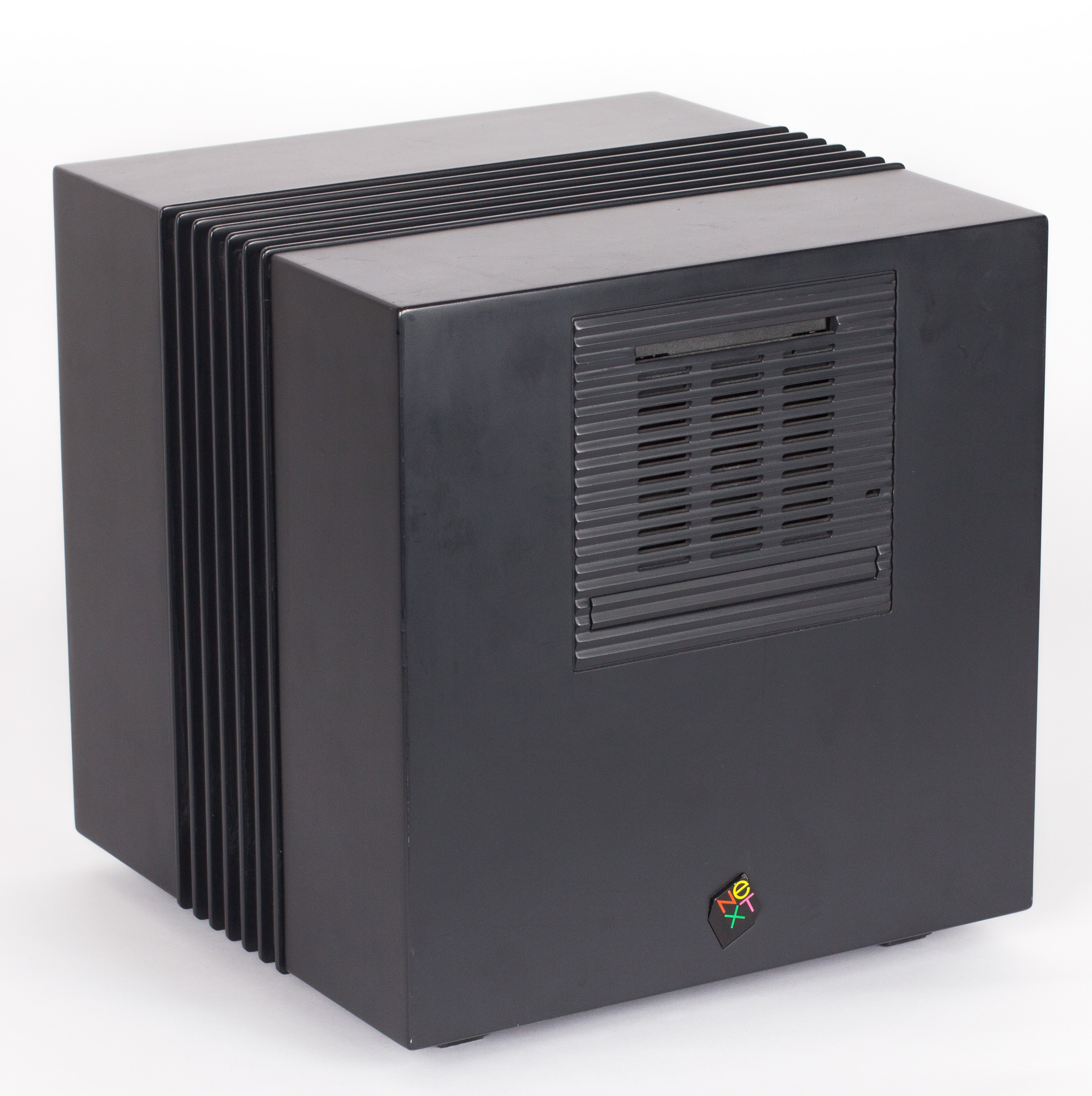
      Did we just get NeXTcubed?

    3. Re:cylindrical by Mitchell314 · · Score: 2

      Dihydrogen Iodide Carbopotassium? I think that's ben and jerry's new ice cream flavor. You should try it.

      --
      I read TFA and all I got was this lousy cookie
    4. Re:cylindrical by AHuxley · · Score: 1

      http://helmer.sfe.se/ for the 6 motherboard renderfarm in an IKEA Helmer cabinet.
      As for Apple we seem to have a big Mac Mini.

      --
      Domestic spying is now "Benign Information Gathering"
    5. Re:cylindrical by Anonymous Coward · · Score: 0

      Yah, the link that says "cylindrical" is b0rked. Use the other links and scroll down. The flash presentation on Apple's site makes this look like a really cool machine... but I can't justify purchasing one unless it's with somebody else's money. It sounds great though and I don't even use Macs. I don't actually do scientific computing or intensive video editing though. OK... it would probably compile stuff in a blink but I'm just going to get coffee anyway.

    6. Re:cylindrical by H0p313ss · · Score: 4, Funny

      Define cylindrical. http://upload.wikimedia.org/wikipedia/commons/2/27/NeXTcube.jpg

      Like that, only more cylindrical.

      --
      XML is a known as a key material required to create SMD: Software of Mass Destruction
    7. Re:cylindrical by Anubis+IV · · Score: 4, Funny

      It's innovation like cylinders instead of cubes that goes to prove that Apple has what it takes in the post-Jobs world.

      (Disclaimer: I'm an Apple fanatic who thinks that if you can't laugh at yourself, you have a problem)

    8. Re:cylindrical by Fuzzy+Viking · · Score: 1

      Felt better than getting Rickrolled !

    9. Re:cylindrical by TWiTfan · · Score: 1

      The cube is the new cylinder.

      --
      The cow says "Moo." The dog says "Woof." The Timothy says "Thanks, valued customer. We appreciate your input."
    10. Re:cylindrical by TWiTfan · · Score: 3, Funny

      Nice try, faker! We all know that real Apple fans have their sense of humor extracted at welcome camp.

      --
      The cow says "Moo." The dog says "Woof." The Timothy says "Thanks, valued customer. We appreciate your input."
    11. Re:cylindrical by putaro · · Score: 1

      Mac Mini's have more internal storage.

    12. Re:cylindrical by Anonymous Coward · · Score: 0

      It's innovation like cylinders instead of cubes that goes to prove that Apple has what it takes in the post-Jobs world.

      (Disclaimer: I'm an Apple fanatic who thinks that if you can't laugh at yourself, you have a problem)

      Actually it is a cube with Apple's patented rounded corners!

    13. Re:cylindrical by ArcadeMan · · Score: 1

      Why do people keeping thinking Apple is using Adobe Flash on their website?

    14. Re:cylindrical by Anubis+IV · · Score: 0

      Our highest level acolytes have it restored, that way we can look hip and vibrant in company propaganda.

    15. Re:cylindrical by Anonymous Coward · · Score: 0

      That's just the very low-poly version. Top and bottom polys have hard edges set, so it should be good after a few Catmull-Clarke smoothing operations.

    16. Re:cylindrical by R3d+M3rcury · · Score: 1

      I was amused at the keynote when Spindler said, "Can't innovate, my ass!" and then they cut to Woz on the video screens...

    17. Re:cylindrical by itsdapead · · Score: 1

      It's innovation like cylinders instead of cubes that goes to prove that Apple has what it takes in the post-Jobs world.

      Nonsense - its just a cube with rounded corners. Obvious. :-)

      --
      In a survey of 100 programmers, 111111 thought that duck-typing was a good idea.
    18. Re:cylindrical by Anubis+IV · · Score: 1

      Phil Schiller, not Spindler. But yeah, I was surprised when they cut to Woz a few times. I always get a chuckle when they choose to focus on celebrities who don't actually look that excited out of a room full of people hootin' and hollerin'.

    19. Re:cylindrical by Anonymous Coward · · Score: 0

      That is what a cylinder looks like in Minecraft!

    20. Re:cylindrical by Hentes · · Score: 1

      It's a cylinder with sharp corners.

    21. Re:cylindrical by Anonymous Coward · · Score: 0

      IT'S NOT EXTRACTED! It was all the S Jobs Reality Distortion Field (RDF) effects that rendered humor incapable of amusing, during those days. Tim Cook doesn't have that, so as the residual effects of the RDF wear off, you will see Apple fans awakening, and occasionally, responding like you or I.

  2. Tassels by Anonymous Coward · · Score: 0, Interesting

    I wonder the fan is powerful enough for tassels

    1. Re:Tassels by Anonymous Coward · · Score: 4, Funny

      Or a wacky, flailing arms, inflatable tube man on top.

    2. Re:Tassels by Anonymous Coward · · Score: 0
      Hi, I'm Al Harrington, President and CEO of Al Harrington's Wacky Waving Inflatable Arm Flailing Tube Man Emporium and Warehouse!

      Thanks to a shipping error I am now currently overstocked on wacky waving inflatable arm flailing tube men, and I am passing the savings on to you!

      Attract customers to your business, Make a splash at your next presentation, Keep grandma company, Protect your crops. Confuse your neighbors, African American? Hail a cab! Testify in church, Or just raise the roof! Whatever your wacky waving inflatable arm flailing tube man needs are!

      So come on down to Al Harrington's Wacky Waving Inflatable Arm Flailing Tube Man Emporium and Warehouse! Route 2 in Weekapaug.

    3. Re:Tassels by jones_supa · · Score: 1

      Hah, awesome!

      Airbrushing the thing to look like a large can of Coca-Cola would also be an interesting mod.

    4. Re:Tassels by Anonymous Coward · · Score: 0

      I'll settle for a palm tree wearing sunglasses playing guitar that sways in the breeze to put on top of it.

  3. Not a cylinder by Anonymous Coward · · Score: 0

    That looks like a cube

    1. Re:Not a cylinder by Anonymous Coward · · Score: 0

      Looks like a prism to me

    2. Re:Not a cylinder by Narrowband · · Score: 1

      Specifically it looks like a NeXT cube. Something tells me that's the wrong link, and that it doesn't look like that.

    3. Re:Not a cylinder by cb88 · · Score: 1

      So,,, what you are telling me here is that it has. PRISM built in? Oh well who cares about privacy... just as long as it doesn't have any blue LED's of doom.

  4. Mac Pro DRAM by Anonymous Coward · · Score: 0

    The images show four quad-ranked regiestered DIMMs. This is not consumer stuff.

    1. Re:Mac Pro DRAM by Wesley+Felter · · Score: 3, Insightful

      You mean a workstation uses "not consumer" RAM? Tell me more...

    2. Re:Mac Pro DRAM by ssam · · Score: 1

      https://en.wikipedia.org/wiki/Registered_memory also its probably ECC. These are fairly typical on 'workstation' class machines.

    3. Re:Mac Pro DRAM by Anonymous Coward · · Score: 0

      whoosh

  5. and... by LodCrappo · · Score: 4, Insightful

    ..PCs will still be more economical, more powerful, more easily upgraded, and uglier.

    Some things never seem to change.

    --
    -Lod
    1. Re:and... by Mitchell314 · · Score: 2

      Still better than those 90's beige monstrosities IMO.

      --
      I read TFA and all I got was this lousy cookie
    2. Re:and... by aliquis · · Score: 4, Interesting

      It's still a PC.

      Innovative board and case designs though.

    3. Re:and... by epyT-R · · Score: 1, Informative

      those 'monstrosities' allowed upgrades at least.

      I hate shiny surfaces.. they show off every scratch and fingerprint

    4. Re:and... by fermion · · Score: 5, Insightful
      Actually the Pros were very upgradable, and much easier to do so than any PC. It was always pull a lever, or pull off the top. No screws, not hassle, and this was all the way back , in many cases, to Apple ][. I recall swapping my hard disk out of my Mac LC in about two minutes. Memory on my Mac G4 was about a minute. And worried about getting thing stolen from inside because it so easy? The pass through for the security cable also automatically locks the case.

      Really with mac it was a design decision. Do you limit capability with internal, at the time, IDE ports or do you provide a high speed external port that is plug and play, before most things were plug and play. I have recounted many time how difficult it was to get a ZIP drive to work on a PC, but that such things were automatic on a Mac. Or that hard drives that were too big of slow on a PC were plug and play on a Mac.

      In this case I assume that I would have networked storage through gigabyte Ethernet for archive.

      --
      "She's a scientist and a lesbian. She's not going to let it slide." Orphan Black
    5. Re:and... by Anubis+IV · · Score: 4, Insightful

      ..PCs will still be more economical, more powerful, more easily upgraded, and uglier.

      ...unless you're one of the people relying on a piece of software that only runs on OS X, i.e. the main target demographic for this machine, in which case a PC isn't a valid substitute at any price. Final Cut Pro and Logic Pro still have decent followings, and if you're doing Mac or iOS development and actually have a need for a real workhorse of a machine, you really don't have any better alternatives unless you want to try making a Hackintosh workstation, since you'll need a machine running Xcode.

      Regarding upgrading, the old Mac Pro was remarkably easy to upgrade compared to other towers of its day, but it's since been passed. But if the new one's upgrades really are as trivial as just plugging something into one of the six Thunderbolt 2 ports on the back, then I doubt that any PC case currently out there can provide an easier solution. Whether it works as well as Apple claims remains to be seen, however.

      As for the economics of Macs, modern Macs generally do a rather good job on their launch day of stacking up in terms of price against comparably-built PCs from other major manufacturers like HP or Dell (the last-gen Mac Pro being a notable exception, since it was a poor value, even at launch). That said, with Apple, they've made most of the decisions on what hardware to put in the machine, which is great for people who actually agree with each and every one of those choices, whereas with other vendors, you can find options or alternative models that can save you some money in areas you don't care about as much, thus providing a cheaper machine that, while not truly comparable in terms of specs, is effectively comparable for customers who don't care about the affected areas.

      And, of course, if you're building your own machine you can easily come in at a much lower initial cost than that offered by the major vendors, Apple included, but then you're also accepting a lot of personal responsibility for its upkeep. That simply isn't viable in most corporate environments, since needing to divert people to build and maintain even a few custom-built machines could easily cost the company thousands of dollars in billable hours in no time at all, which isn't an issue with most major manufacturers, with whom you can simply send the machine in and get it back in a functioning condition a few days later as part of the warranty. But for a home environment, where you aren't worrying about billable hours and the like, then sure, building your own makes great sense...but then you're also not the target demographic for this machine either.

    6. Re:and... by Anonymous Coward · · Score: 2, Interesting

      If you're going all the way back to Mac LC, it'd be unfair not to mention the likes of Centris 650/PowerMac 7100 and Quadra 900, which were painful to upgrade. Or the original Macintosh, which could not be upgraded at all. (You could upgrade RAM of the Mac Plus, which had the same case as the original Mac, but not without risking frying yourself with the exposed CRT.)

      Besides, the LC was such a slow piece of junk that it was basically useless without an upgrade. ;-p

      That said, the Mac boxes I bought for myself--Centris 610/PowerMac 6100 and the beige G3 desktop--were quite a bit easier to deal with than any consumer PC case. I don't know about the pro-grade PCs vs Mac Pro, since I've never owned either.

    7. Re:and... by cpt+kangarooski · · Score: 2

      No screws, not hassle, and this was all the way back , in many cases, to Apple ][.

      Not in a continuous tradition, however.

      The compact Macs had bare CRTs inside that would give you a nasty shock if you touched them wrong, and for a while, the power supplies were bare too. And the whole case required an unusually long torx screwdriver to open, in order to deter people from opening it.

      The Mac II's were good, until the end, when the IIvx came along. It was a bit of a bitch to work with, and ushered in an age of Macs that were bitches to work with, most notably everything based upon the Quadra 840AV case. Adding RAM to some of those bastards required disassembling nearly everything. The mid 90s were a dark time for doing hardware upgrades or repairs on high end Mac desktops. The Blue and White G3 case was ugly, but other than the drive enclosure (a bit annoying IIRC) it was a real breath of fresh air.

      --
      -- This and all my posts are in the public domain. I am a lawyer. I am not your lawyer, and this is not legal advice.
    8. Re:and... by Anonymous Coward · · Score: 0

      Those pieces of software are becoming rarer and rarer even in the media business.

      Just about the only stuff that is not multi-platform now are Apple made, and the changes to Final Cut Pro really ticked people off.

      Right now it seems that outside of media work (advertisement et al) the biggest Mac seller is as a off the shelf Unix for academia, especially the walk in support in Apple stores.

      If some other company could replicate that Apple would really turn niche.

      ovo -hoot

    9. Re:and... by dgatwood · · Score: 2

      If you're going all the way back to Mac LC, it'd be unfair not to mention the likes of Centris 650/PowerMac 7100 and Quadra 900, which were painful to upgrade.

      And by painful, I assume you mean physically, as in all those thousands of cuts you'd get all over your hands from all the razor-sharp metal covers and stuff. The 6100, for all its limitations, was a much, much better design, IMO.

      --

      Check out my sci-fi/humor trilogy at PatriotsBooks.

    10. Re:and... by ikaruga · · Score: 1

      uglier? Call me a fanboy but I take Antec gaming pc cases(even for non gaming high-end workstation purposes) over that cylinder any day.

    11. Re:and... by TubeSteak · · Score: 0

      ...unless you're one of the people relying on a piece of software that only runs on OS X, i.e. the main target demographic for this machine, in which case a PC isn't a valid substitute at any price.

      If only there was a site dedicated to showing you how to run OSX on wintel hardware: http://www.hackintosh.com/
      Or maybe well known websites that had an up-to-date guide: http://lifehacker.com/the-always-up-to-date-guide-to-building-a-hackintosh-o-5841604

      Did you really not know?

      --
      [Fuck Beta]
      o0t!
    12. Re:and... by Anonymous Coward · · Score: 1

      He specifically mentioned the Pro lines. No pro lines had integrated CRTs

    13. Re:and... by Anubis+IV · · Score: 3, Informative

      Did you really not know?

      Are you really so lazy that you stopped reading after the first sentence? Because you apparently missed the fact that I explicitly mentioned Hackintoshes in the very next sentence of my post. And I also spent a paragraph talking about why building your own machine simply isn't a viable option. But if you didn't even make it to sentence #2, I'm not holding out much hope that you made it to the final paragraph, which was where I discussed that topic.

      Kudos on the excellent knee-jerk reaction, however. ;)

    14. Re:and... by james_a_craig · · Score: 3, Informative

      Sure, but for businesses, that relies on a very precarious licensing situation, and is basically unsupportable.

    15. Re:and... by Anonymous Coward · · Score: 0

      Yeah, use a Linux back-end for filestorage, database, heavy lifting and use the Mac as the front end... The terminal as it were. :-)

      Honestly, how the FUCK at Apple thought that this sexy little number was what the professionals needed? (don't get me wrong, I want it! Just like a truck driver wants a Camaro, but you cant use it for work) Where do I put eight 4TB disk? (which would cost me about 1000 EUR, Even if you COULD expand the new "pro" to hold this in SSD it would cost 640000EUR.... A bit more than my budget can handle.) Me and many others was hoping to get eight HDD slots in the new Pro, we got zero.

      Now I see why my mac sellers said, "buy this machine while you still can because you wont like the new one" about the old Mac Pro.

    16. Re:and... by bemymonkey · · Score: 2, Insightful

      I think the word you're looking for is proprietary. Good luck adding storage when you run out of space, or upgrading to new GPUs when nVidia and AMD have a performance breakthrough one or two years down the line...

      Oh wait Thunderbolt - you can hook up an external graphics card and external hard drives... so it's a bit like a supercharged netbook minus the display and keyboard and portability.

    17. Re:and... by Anonymous Coward · · Score: 0

      What exactly do you think the Mac Pro is used for? It's pegged at "professionals" who want to plug innocuous boxes into their little trashcan when they want to make it go faster, not people running data centers.

    18. Re:and... by Anonymous Coward · · Score: 0

      And once AMD and Intel decide to go for CPU cores soldered to motherboards desktop PCs will lose a lot of that upgrading capability

    19. Re:and... by d3vi1 · · Score: 1

      Stop scratching the machine if you don't want scratches on it. My workstation is always on, and I think that except for dusting it, I haven't actually touched it in over 1 year. Now going to serious stuff...
      Upgrades are allowed. It features 6 Thunderbolt ports so you can add as many 10GigE, FC, HBA, high performance external directly attached storage arrays, Video Capture controllers as you want. There are a few thunderbolt to pci-express 2.0 8x adaptors available if you want to use your own hardware.
      I guess that the only non-upgradable parts are the video cards. I think that they are swap-able but due to their proprietary format there would be no 3rd party alternatives.

      --
      UNIX was not designed to stop you from doing stupid things, because that would also stop you from doing clever ones.
    20. Re:and... by kthreadd · · Score: 1

      We don't have any specs yet, but it looks like the internal flash is at least connected to a standard PCIe slot; so in theory you should be able to replace it with third party storage. It looks like they are using the same thing as they are using in their MacBook Airs, and there are third party options available for that as well.

      The GPU story looks more complicated though.

    21. Re:and... by kthreadd · · Score: 1

      The PowerMac G3 used to have a model with integrated CRT, if you count that as the Pro line.

    22. Re:and... by higuita · · Score: 1

      You can choose any colour you want, no need to be beige!! some people even make it incolour, transparent cases. either way, you can replace hardwre, upgrade, add new components with those "monstrosities".

      So if you need flexibility and have space, those "monstrosities" are the way to go.
      If you want mobility, get a laptop, netboot or a tablet
      if you want to show off and have the money, get a mac

      --
      Higuita
    23. Re:and... by Anonymous Coward · · Score: 0

      The previous generation Mac Pros were wonderful to upgrade. Just like the 16-core, 128GB-RAM HP Z820 workstation I'm working in right now.

    24. Re:and... by AmiMoJo · · Score: 1

      To be fair that wasn't uncommon back then. Many PCBs were flow soldered or something in such a way that the solder side became a bed of extremely sharp nails. I dread to think how much blood must have ended up inside my Amiga 4000.

      --
      const int one = 65536; (Silvermoon, Texture.cs)
      SJW, n: "Someone I don't like, and by the way I'm a fuckwit" - AC
    25. Re:and... by Anonymous Coward · · Score: 0

      ..PCs will still be more economical, more powerful, more easily upgraded, and uglier.

      Actually no. As someone who purchases dual processor Xeon workstations I can attest that the Mac Pro isn't that much more expensive. In fact the current model is cheaper than HP Z820 or a comparable SuperMicro.

      Quit comparing the Mac Pro to those piece of shit beige box that PC enthusiasts cobble together at home. Professionals don't have time to tinker with junk.

    26. Re:and... by Bill_the_Engineer · · Score: 1

      I guess you didn't see the part about the two Thunderbolt 2 expansion ports? There are enclosures available that offer PCIe expansion using Thunderbolt and 20Gb/s is more than enough to support PCIe 4.0's 16GT/s (which is roughly 16 Gb/s since PCIe is a 8 to 10 bit symbol system).

      --
      These comments are my own and do not necessarily reflect the views or opinions of my employer or colleagues...
    27. Re:and... by Plumpaquatsch · · Score: 1

      The PowerMac G3 used to have a model with integrated CRT, if you count that as the Pro line.

      That was only available to the education market, so calling it a Pro is stretching it. Still: "To access the motherboard remove 4 screws then grab the built in handle and slide the motherboard out. This is a very expandable Mac"

      --
      Of course news about a fake are Fake News.
    28. Re:and... by Anonymous Coward · · Score: 0

      I had a beige G3, and it was quite easy to work with. It had a tilt-open case that exposed most of the guts of the machine to you. There were two minor problems with it:

      1) The main HDD bracket was right above the PSU and was almost impossible to get to. The other drive bay was under the 5.25" bays, so it wasn't a big deal.
      2) There was a divider between the top half and the bottom half (remember, it tilted open, so the case was more like two mini-enclosures hinged together). That divider had a single rectangular hole in it to allow ribbon cables from the drives to pass through to the motherboard. Except that rectangle was smaller than the connectors on the end of a SCSI ribbon cable, thus to remove the original SCSI drive, you had to cut the connector off of it, rendering it forever useless. (It's SCSI, so it wasn't too far off anyway.)

      Oh, and the metal edges inside the case weren't as well finished as a better case (like an Antec) would have, but that's not strictly Apple's fault. I lay more of the blame on FoxConn for that. (And, yes, FoxConn was Apple's builder even back in 1998. All of the internal components bore their name on a label or tag.)

      I upgraded the hell out of that old G3. By the time I quit using it, it had USB, a Voodoo3 3000, 224MB of RAM, and a 20 GB HDD. It could run Mac OS X 10.2.8 at the latest, but would only boot without the Voodoo3 in it. The 10.2.8 cut-off was due to the crappy Rage Pro 64 built-in graphics hardware (with 6MB of VRAM).

    29. Re:and... by tlhIngan · · Score: 1

      We don't have any specs yet, but it looks like the internal flash is at least connected to a standard PCIe slot; so in theory you should be able to replace it with third party storage. It looks like they are using the same thing as they are using in their MacBook Airs, and there are third party options available for that as well.

      Actually, no. The Airs use a modified form of mSATA (which is SATA routed over a miniPCIe connector, but which is NOT miniPCIe - it's just a reused connector).

      This one appears to be truly PCIe based, like what stuff from Wozniak's company Fusion IO produces. These offer superior performance (straight to the bus - no SATA interface) but are a huge PITA to boot from. Of course, given the versatility of EFI, I suspect that it simply has onboard drivers to allow booting, or a tiny SATA SSD to boot enough to finish booting off the SSD.

      (Yes, those Fusion IO boards do not allow booting from them, at least not directly).

      Or maybe Apple worked with the PCIe vendor to produce an EFI/BIOS extension ROM to allow booting direct from the module as well. (BIOS? Because face it - someone's gonna Boot Camp it).

    30. Re:and... by kthreadd · · Score: 1

      That sounds reasonable.

      No matter what it is I'm sure Apple will provide spare parts. They usually do for quite a long time anyway.

    31. Re:and... by hobarrera · · Score: 1

      ..PCs will still be more economical, more powerful, more easily upgraded, and uglier.

      Some things never seem to change.

      From the photographs on the article, it didn't look upgradable at all. I think it's as upgradable as their laptops and iphones.

    32. Re:and... by Anubis+IV · · Score: 3, Insightful

      I assume you're referring to the rather plain-looking black towers in their gaming line? Because if you're talking about one of their towers with the excessively-bright blue LEDs and clear sides so that you can show off all of your 1337 internal components, then I don't see a point in continuing this conversation. Antec's designs for their gaming cases vacillate between being tasteful without standing out as anything special and being tastelessly overdone with no sense of restraint, with nothing really coming in between. I'd suggest that their designers are immature in their art, except that I believe that's actually untrue and that they're simply catering to people who prefer gaudiness and excess.

    33. Re:and... by kthreadd · · Score: 1

      Not sure if this is correct, but if it is then it sure sounds good:

      The Graphics cards in this new macpro are swappable. But they are bespoke and a new form factor it seems. Ram / GPU and the Main drive is all updatable - it does seem that there is the possibility of installing 2 or more of these PCIe drives + 2.5" SSDs they have just not shown us that yet. 3.5" are definate 'NO'

      The product will launch with ATI and perhaps Nvidia / OEM will have a form factor later or at launch.

      http://forums.cgsociety.org/showpost.php?p=7601739&postcount=88

    34. Re:and... by cpt+kangarooski · · Score: 1

      The Lisa did.

      However from what I've heard (I have no firsthand experience with the Lisa, unfortunately) it was designed to be very easy to open up and repair or upgrade.

      --
      -- This and all my posts are in the public domain. I am a lawyer. I am not your lawyer, and this is not legal advice.
    35. Re:and... by AndrewX · · Score: 1

      Actually the Pros were very upgradable, and much easier to do so than any PC. It was always pull a lever, or pull off the top. No screws, not hassle

      The screwless case is not an Apple invention. Even if it was (it's not), the screws are only a minor inconvenience when upgrading. The real barriers to upgrading are a lack of compatible hardware, lack of drivers, things like soldered in RAM, etc.

      The cases are built like that so their upgrade monkeys can do their jobs faster, not so you can get into it easier. They don't want you doing it yourself, they want you paying a "Genius" to plug things in where the fit for you.

    36. Re:and... by Anonymous Coward · · Score: 0

      Oh wait Thunderbolt - you can hook up an external graphics card and external hard drives... so it's a bit like a supercharged netbook minus the display and keyboard and portability.

      Sure. If netbooks had Thunderbolt ports.

    37. Re:and... by Moofie · · Score: 1

      If you're thinking of the PowerMac 5300, no, nobody counts that as the Pro line.

      --
      Why yes, I AM a rocket scientist!
    38. Re:and... by Glendale2x · · Score: 1

      A decade ago I would have cared about the ability to swap cards and redo the internals on my computer in 6 month or less intervals, but honestly performance changes these days are slow and trivial by comparison that by the time I feel a part needs upgrading it's probably to buy a new computer anyway.

      --
      this is my sig
    39. Re:and... by Anonymous Coward · · Score: 0

      Dude, wow, are you really such a fuckup that you stopped reading before the end of the first sentence?

    40. Re:and... by Anonymous Coward · · Score: 0

      Actually the Pros were very upgradable

      Depends what parts you wanted to upgrade. For a long time there was a real dearth of graphics cards (Mac Pro 1,1 owner here) - you essentially had a choice of about 3. That said, it was primarily a driver/firmware issue rather than lack of physical expansion slots.

    41. Re:and... by ikaruga · · Score: 1

      To be honest I use a 12 hundred at home and as I don't like the bright LEDs either, I turn them off. The transparent windows can be useful if you overclock and/or want to check the motherboard LEDs in case your computer starts to act funny without having to open the case. The cases are easy to assemble and dismantle, have excellent ventilation and provide customization to no end. And if you call their design gaudy and excessive, I call Ive's bland, unoriginal and unpractical.

      A desktop PC is something that stays hidden bellow my desk or inside a rack with only it's front face visible for 99% of it's life. As long it's a standard form factor, has high customization and provides the electronic components good protection against mechanical and thermal hazards it could be pink with rainbow colored LEDs it's still better designed than a cylinder that provides none of the things I said above.

    42. Re:and... by bemymonkey · · Score: 1

      USB graphics cards exist. Thunderbolt fits the "supercharged" pattern ;)

    43. Re:and... by bemymonkey · · Score: 1

      If you have the cash to spare, go for it. I feel I get much more bang for my buck (and am able to stay much more up to date) if I upgrade bit by bit.

    44. Re:and... by Anubis+IV · · Score: 1

      I can understand bland (it's a matter of taste, after all) and impractical (it remains to be seen if it'll work), but unoriginal? I'd be eager to see your citation for something similar that predates it (no sarcasm intended; I love seeing neat designs). The closest thing it reminds me of are some of the old Cray designs, but those looked quite a bit different. Otherwise, the only other thing that immediately comes to mind are SVS' cylindrical subwoofers, but those are significantly larger and in an entirely different field of product design.

      As for your three requirements, I think they're either poor choices or have been misapplied here.

      For instance, requiring a standard form factor on a desktop PC is kinda silly, since you're treating it as if it's the only solution to the underlying problems that it solves. The reason you want a standard form factor for your case is so that standard components can work with your case and so that your case can fit into the place where your last computer was sitting. But if there was a design that solved those problems while providing additional benefits, then it would make more sense to go with the new design unless there were other mitigating factors.

      In this case (pun not intended), the Mac Pro takes up 1/8 the volume its predecessor used, and it doesn't consume space unnecessarily, since expansion is handled externally and only as necessary. That external expansion also means that components should be capable of being added easily enough later on, thus ensuring that a high degree of customization is possible here as well, just as it was with a standard form factor. So, it sounds like it meets the intent behind requiring a standard form factor and having a high degree of customization, while potentially saving the user a large amount of space. You could easily move it on top of your desk with it being that small, giving you easier access to ports and the like (which was clearly the intent behind the design, since they added a motion sensor to detect when you rotate the machine, that way it can light up LEDs around the ports for you), which would also mean more convenience as a side benefit.

      As for mechanical and thermal hazards, the outside shell is made of polished aluminum according to Apple, so it's fairly rugged, and the internal components are all sturdily mounted to the "unified thermal core" in order to ensure that they transfer their heat to it effectively, which goes to satisfy both the mechanical and thermal concerns as well. Of course, I'll grant that it's untested in the real world and that I can't say with complete certainty that it will work effectively, but by that same token, you also cannot claim that it will fail to work effectively. Of course, I think it's probably a safer assumption that a designer of so-called premium products will get the thermal issues taken care of before selling a device that will doubtless cost thousands of dollars to picky professional customers.

    45. Re:and... by kthreadd · · Score: 1

      I was thinking of the Power Macintosh G3 All-In-One.

    46. Re:and... by Xest · · Score: 1

      My first PC was a Packard Bell that had an "innovative" case and motherboard design.

      Shame the motherboard it was so "innovative" in it's design that I couldn't replace it when it failed though because nothing else would fit and the only option was another of their £350 "innovative" boards when standard form factor ones were going for about £150.

      Soon learnt my lesson and started building my own giving up on that whole "innovative" board and case design thing.

    47. Re:and... by Anonymous Coward · · Score: 0

      It features PCIe flash storage - so of course it's upgradable. It's a simple module. Fastest storage out there... and gaining popularity in the server market.

    48. Re:and... by aliquis · · Score: 1

      I didn't said it was good or that I would buy one :)

      Anyway the first Apple boards got "cute" / "tidy" layouts of components to.

      And in the laptops they have non-rectangular shapes.

      I don't see Apple machines as things there you're going to exchange anything anyway. It's a computer in a box. They build differently because well, they can, and that allow them to build crazier designs than something built on ATX.

      For me personally I kinda don't have the need for more than one or possibly two HDDs and no optical drive and even a Micro-ATX case most often has room for 6 or more HDDs. I want a small case..

      But then there's mini-itx for that so no problem. As such I think it's good with multiple standards in this case. I don't need a 10 HDD, 6 optical drives, dual-psu case =P

    49. Re:and... by Anonymous Coward · · Score: 0

      Actually, no. The Airs use a modified form of mSATA (which is SATA routed over a miniPCIe connector, but which is NOT miniPCIe - it's just a reused connector).

      Apple has never used mSATA at all. They use a proprietary card edge connector. The pinout, size, and keying are all different from mSATA/miniPCIe.

      Or maybe Apple worked with the PCIe vendor to produce an EFI/BIOS extension ROM to allow booting direct from the module as well. (BIOS? Because face it - someone's gonna Boot Camp it).

      You're way overthinking things. It's a SATA Express SSD. SATA Express is a new SATA standard wherein the SATA physical interface is replaced with PCIe. One of the defined ways for an OS to talk to a SATA Express disk is through AHCI SATA host controller registers. To the firmware and OS, a disk which implements this mode looks exactly like a standard AHCI SATA controller connected to a SATA SSD even though there's no physical SATA bus involved. SATA Express has also defined a new command register standard, NVMe, tailored to SSDs. I believe SATA Express disks can implement either or both.

      Apple's MacBook Air SSD uses the AHCI option, as you can see in Anandtech's System Profiler screenshot:

      http://anandtech.com/show/7058/2013-macbook-air-pcie-ssd-and-haswell-ult-inside

      They probably got this up and running in OS X without even touching EFI or OS drivers.

      It'll be interesting to see if the new Mac Pro uses a NVMe SSD instead. If so all they have to do is write EFI and OS X IOKit drivers for NVMe and they'll be good to go. NVMe is more relevant for enterprise servers and the like, though. Not sure it has a lot to offer a client system or even high performance workstation.

    50. Re:and... by Anonymous Coward · · Score: 0

      Not the GP, but I find my Corsair Carbide 300r case to be quite good looking as well as functional. No windows, no glaring lights, just simple semi-matte black (both inside and out), with good airflow and without sharp edges inside. I would take this case in a heartbeat over the Mac Pro cylinder.

  6. Not Upgradeable? by javakah · · Score: 5, Insightful

    With so much in such a small space/size and an unusual factor as well, I have a very bad feeling about your ability to upgrade practically any parts in this thing.

    1. Re:Not Upgradeable? by csumpi · · Score: 5, Funny

      But why would you want to do that? Apparently it's perfect.

    2. Re:Not Upgradeable? by tk77 · · Score: 1

      Ram is upgradable

      Then, it has 6 Thunderbolt 2 ports running at 20gbps managed by 3 controllers.

      Get whatever external enclosure you want and run whatever you want. Raids, Video cards, etc..

    3. Re:Not Upgradeable? by edremy · · Score: 3, Funny
      Amusingly, back in 2007 Apple ran an ad showing how nice and clean the iMac was compared to the mess of cables behind a typical PC

      My PC has all of its drives, video cards and the like internal, unlike the new Powermac

      Perhaps the PC makers need to update their ads?

      --
      "Seven Deadly Sins? I thought it was a to-do list!"
    4. Re:Not Upgradeable? by aliquis · · Score: 1

      They claim it's the most upgradable mac ever.

      It's got Thunderbolt 2. And USB.

    5. Re:Not Upgradeable? by aliquis · · Score: 2

      Then, it has 6 Thunderbolt 2 ports running at 20gbps managed by 3 controllers.

      Get whatever external enclosure you want and run whatever you want. Raids, Video cards, etc..

      PCI-express 16x according to Wikipedia:
      v3.0: 15.75 GB/s (128 GT/s)
      v4.0: 31.51 GB/s (256 GT/s)

      15,75*8/20 = 6,3 times faster.

    6. Re:Not Upgradeable? by AHuxley · · Score: 1

      I think Apple sees the world as a fibre broadband connected office with the users doing simple manipulations of a digital product for sale.
      Your data is captured on some 4-8k video device, camera, music and you combine and envision the final product.
      Rendering is done off site or on the Mac Pro as needed, sent on effortlessly via a fast network.
      This is an artists tool on a production line like a big Mac mini or iMac, when you start earning, you upgrade hardware as needed over years.
      The software is rental or stays with you as 'cloud', drop in the new cylindrical dongle as needed.
      The main questions will be how productive will OS X with the ultrafast ECC memory be vs a PC with Windows you can build or buy with ECC memory?

      --
      Domestic spying is now "Benign Information Gathering"
    7. Re:Not Upgradeable? by Anonymous Coward · · Score: 0

      Remember that it's a Mac, when it gets too slow you just throw it away and get a new one.

    8. Re:Not Upgradeable? by tk77 · · Score: 1

      Ok, true. At first I forgot the second slot was also x16 and that the cubix enclosure is also x16.

      All of a sudden not looking as good as it could have been

    9. Re:Not Upgradeable? by tk77 · · Score: 1

      Ugh, I got my port speeds mixed up. Yeah, the TB2.0 ports still wont be fast enough for running external cards.

      SIgh, was getting excited too.

    10. Re:Not Upgradeable? by msauve · · Score: 1

      But, they say it's good for another 10 years. (as long as you ignore 10 Gb networking, I guess)

      --
      "National Security is the chief cause of national insecurity." - Celine's First Law
    11. Re:Not Upgradeable? by NatasRevol · · Score: 1

      Well, 8 antenna 802.11ac can push up to 6.7Gbps.

      --
      There are two types of people in the world: Those who crave closure
    12. Re:Not Upgradeable? by msauve · · Score: 1

      In exactly the same way 11n goes to 600 Mb (or not). Why would you want to connect a desktop to shared media, anyway?

      --
      "National Security is the chief cause of national insecurity." - Celine's First Law
    13. Re:Not Upgradeable? by AK+Marc · · Score: 1

      The wireless is good to, what, 8G? 10G wired can be had through Thunderbolt by then anyway.

    14. Re:Not Upgradeable? by cheesybagel · · Score: 3, Insightful

      the most upgradable mac ever

      This notice brought to you by the Ministry of Truth.

    15. Re:Not Upgradeable? by WCLPeter · · Score: 5, Interesting

      In all the years I've been building computers I can name only twice where I ever had the opportunity to upgrade; once with an old 466 when I went from a DX2-50 to a DX4-100; another time when I upgraded a K6-2 333 to a K6-2 500. Most of the time when it came time to "upgrade" there had been so many changes to the bus types, socket types, memory types, etc... it was just easier to start over from scratch than try to pick an upgrade from a narrow list of parts which often cost a fortune, while often only giving a moderate speed boost, because they were now considered "specialty" equipment for an obsolete architecture.

      Granted, there are people who will insist that they've been able to upgrade their systems multiple times - but I'm not talking about those compulsive types who need the newest graphics card every other week. Most people I've talked to will buy a machine and keep it for 2-4 years before thinking its time buy a new one, by then everything has changed and the existing machine is mostly obsolete and so they have to start new.

    16. Re:Not Upgradeable? by hazydave · · Score: 2

      Well, there are limits. Thunderbolt 2 isn't any faster than Thunderbolt 1, it just allows the two 10Gb/s links to be aggregated, as PCI Express has always allowed. So, assuming they're all independently connected Thunderbolt ports (eg, aggregate throughput of 20Gb/s x 6, each way), this equivalent to about 15 PCI Express x1 links, in total. Well, that's enough for one external GPU, if you're not working it hard, and some external drives. And given that it's a virtual certainly some of these Thunderbolt ports will be used in DisplayPort mode, I'll bet you don't get anywhere near 120Gb/s to and from (it's a simultaneously two-way channel, just like PCI Express) main memory.

      The real question I would have is on the bus architecture. There's got to be some Thunderbolt/DisplayPort switch internally, to route the output of the GPUs to the Thunderbolt port(s). A typical AMD GPU will have at least two DisplayPort outputs, but of course that's not crossing a main bus, that's driven directly out. That lone HDMI 1.4 port is only for one monitor, and HDMI 1.4 can only drive quadHD at 30p or true 4K at 24p... not what you'd want for a workstation-class system. The rationale for Thunderbolt 2.0 was to allow faster graphics, since Thunderbolt 1.0 can't support 4K in Thunderbolt mode, only DisplayPort mode (DisplayPort 1.2 can hit 17.2Gb/s, ever-so-slightly less than Thunderbolt 2.0). So you're going to be using monitors on at least two of these ports. And again, that's going to want to switch directly from the GPU modules, not cross with anything else.

      So I bet they have a big old cross point switch, which the output of the GPUs, the Thunderbolt ports, and a link to the main system (via PCI Express most likely), to keep this thing going.

      --
      -Dave Haynie
    17. Re:Not Upgradeable? by hazydave · · Score: 1

      Only the chips that let you occupy two 80MHz channels. That's optional in 802.11ac.

      --
      -Dave Haynie
    18. Re:Not Upgradeable? by gman003 · · Score: 5, Interesting

      As a guy currently dragging his old Mac Pro into the modern computer era, let me say this: Apple would have found a way to make it incompatible anyways. There are so many just-slightly-nonstandard things they have, that any significant upgrade is made a hundred times more difficult.

      First are the obvious ones. Nonstandard motherboard layout. The whole case layout in general, which requires a lot of stuff be removed just to access anything beyond the drives, video card and RAM. No legacy PCI ports.

      Then come the subtle incompatibilities. Only certain video cards have OS X drivers, and only an elite, overpriced few have firmware that lets them work in the BIOS/EFI stage. I have to keep the original card around just in case I ever need it. Then the hard drive caddies only work with full 3.5" drives, or with 3.5" -> 2.5" adapters that perfectly mimic a 3.5" drive (I believe a Velociraptor IcePak will work; I use a cheaper plastic one since heat isn't an issue for SSDs). There's also a custom "mini-PCIe power" port, used to provide power to PCIe cards.

      Then come the dangerous ones. Apple seems fond of using standard connectors in non-standard ways. For instance, the front USB panel? That's connected to the mainboard using a SATA connector. Just don't try to plug a hard drive into it. Same for the case fans - they're four-pin, but they don't use PWM for speed control (I believe they use analog voltage instead). Which also means that Windows (should you boot into it) does not get any control over the fan speeds, or even visibility.

      Finally are the downright confusing ones. On mine, there are two unused SATA ports on the motherboard, hidden behind the front fans. They're labeled "ODD_SATA", hinting that they were planning to use SATA-based optical drives instead of IDE. I thought I could just use them for additional hard drives, but nope - they somehow only work in OS X. Don't ask me how, but they managed to make it happen. I've given up and just ordered a RAID card.

      So yeah, don't think for a moment that the only thing standing between the new Mac Pro and any non-trivial upgrades is the form factor. The thing standing in the way is Apple.

    19. Re:Not Upgradeable? by cnettel · · Score: 1

      Well, for a Mac Pro an "upgrade" could also mean simply not ordering your full storage or memory needs from Apple in the first place, but opening the case the minute you receive it to put in whatever parts you really wanted to use.

    20. Re:Not Upgradeable? by jedidiah · · Score: 1

      > In all the years I've been building computers I can name only twice where I ever had the opportunity to upgrade

      It's not 1996 anymore. There are any number of really cheap ways you can significantly improve the performance of an old machine. A cheap video card from the right vendor can turn a craptacular old machine into something repectable.

      --
      A Pirate and a Puritan look the same on a balance sheet.
    21. Re:Not Upgradeable? by smash · · Score: 3, Insightful

      100% that. Even recently with a bunch of xeon servers (2007 spec), it was cheaper to buy new machines (2012 spec Cisco UCS) with more RAM than it was to upgrade the RAM, as the RAM standard changed and high capacity DIMMs in the old format were super expensive.

      --
      I run: Windows, OS X, Linux, FreeBSD. Just because you have a hammer, doesn't mean everything is a nail.
    22. Re:Not Upgradeable? by countach · · Score: 1

      You are living in 1996 if you think anytime soon you'll be able to improve a new Mac Pro into "something respectable" with some cheap video card.

    23. Re:Not Upgradeable? by MartinSchou · · Score: 2

      Yes, upgrades that aren't Thunderbolt-devices will be difficult. But as others have pointed out, most people don't upgrade, and when they do, so much needs to be changed anyway, that you're almost better off buying a new computer.

      For example. I built a Sandy Bridge based computer in January 2011. Two and a half years ago. If I wanted to upgrade to the newest line of CPUs, I'd be forced to buy a new motherboard as well as CPU, as the Haswell isn't socket compatible with Sandy and Ivy Bridge (nor are AMD CPUs). Fortunately it still supports DDR-3, so I wouldn't have to upgrade that though.

      But pulling everything out of the case, putting in new hardware, reinstalling drivers, the inevitable bitching from Windows about how I'm a damned, dirty, filthy software pirate for upgrading my hardware really doesn't seem worth it compared to simply buying a new computer.

      And if you work in an office? I don't think I know any people who does works in corporate IT, who've upgraded internal hardware - they generally buy new stuff when the old stuff doesn't cut it any more, or when new stuff makes it economically viable to upgrade due to time savings.

      And considering the cheapest Mac Pro available in the Apple Store at the moment is $2,499, I don't think this is aimed at home users either - they'd be going for iMacs.

      Equally upgradable (or lack thereof), but if it works, why bother?

    24. Re: Not Upgradeable? by klubar · · Score: 1

      As long as what you want isn't iSCSI, FCoE or 10gig either.

    25. Re:Not Upgradeable? by InterBigs · · Score: 1

      That's not really what workstation users do. They happily pay Apple, HP, Dell or whomever a premium to get a combination of hardware that's guaranteed to work. People that put things like cheap consumer SSD's in workstations get the short end of the stick in the end.

    26. Re:Not Upgradeable? by White+Flame · · Score: 1

      Ram is upgradable

      There are apparently only 4 RAM slots. That's not very upgradable for a supposedly "pro" machine. (Nor is having just 1 CPU socket "pro" either...)

    27. Re:Not Upgradeable? by bemymonkey · · Score: 1

      I get the feeling you're confusing a new CPU + Mainboard + RAM bundle with a new machine. I'm still using the same machine I bought in 2006, even though the only component that's still the same is the case... throughout the years it's gotten 2 new CPU + Mainboard + RAM bundles, tons of different hard drives, 3 GPUs, 1 PSU and... well, that's about it.

      Dropping in a new CPU without swapping anything else is difficult though, and if you're running a system with IDE drives, 20-pin ATX connector, no P4 connector and only 4-pin-Molex, you're not going to have any fun upgrading a larger bundle of components either. But for decently up to date systems (say 5 years), dropping in a new Mainboard + CPU + RAM bundle is much cheaper and more effective than just buying a new machine.

    28. Re: Not Upgradeable? by Anonymous Coward · · Score: 0

      Why not? With 20Gb available there should be no problem passing those over Thunderbolt.

    29. Re:Not Upgradeable? by Anonymous Coward · · Score: 0

      It isn't Mac specific. It's what most people generally do to a 3-year old computer and this one looks like it can last for something like 5.

    30. Re:Not Upgradeable? by Anonymous Coward · · Score: 0

      Holy f*ck, I missed that! No 10Gbit! What about fiber to the desk top, should that to through thunderbolt too? This thing will look like a squid with all the tentacles of add ons hanging of it. :-)

    31. Re:Not Upgradeable? by Molochi · · Score: 3, Insightful

      I've upgraded systems often, but that's more due to some quantity of opportunity than to prescience. Every now and then some remarkable upgrade is offered on an existing platform that is worth exploiting. Usually it's just a doubling of CPU performance like A64 CPU to Athlon X2 or Core2Duo to Core2Quad.

      I never really built any system with a belief that I would be able to upgrade the CPU. I just hoped for and took advantage of the opportunity. The truth is new CPUs tend to require new motherboards which tend to require new memory and PSUs. Even when a new version of a CPU kept the same socket it would tend to use a (lower) voltage, different (higher) FSB, or a BIOS update that older motherboards wouldn't accommodate.

      People tend to look back on the good old days and forget. K6-2 didn't run at full speed on a socket7 mobo, you had to go get a Supersocket7 motherboard. You couldn't replace Celeron 300a CPU with a Coppermine on your i440BX, that required a new (and oddly, inferior) motherboard. VIA's KT133 didn't support AthlonXP. Though in these cases there were sometimes hardware (with a soldering iron or a special slotket) workarounds.

      And during this period we went to DDR memory (though intel went DRAM> RDRAM > back to DRAM and then to DDR), new AGP and PCI cards that didn't work in old slots, different PSU connectors and system power requirements that required new PSUs.

      Today's systems are moving everything onto the CPU... first memory controllers with Athlon64 and now with Haswell even voltage regulation. Any change anybody makes practically requires a new motherboard.

      i7 desktop CPUs alone have used 1366 1155 1156 and 2011 pin sockets and Haswell is being introduced with the 1150. When they come out with a triple or quad memory channel or just something that supports DDR4 it'll mean even more new motherboards.

      But there will probably be some combination of hardware that allows someone to brag about how smart they were with a "planned upgrade".

      --
      "The Adobe Updater must update itself before it can check for updates. Would you like to update the Adobe Updater now?"
    32. Re:Not Upgradeable? by Anonymous Coward · · Score: 0

      The wireless is good to, what, 8G? 10G wired can be had through Thunderbolt by then anyway.

      802.11ac is up to 6.77Gbps, with 8 antennas (at each end). You can have 10GBe now with add-in cards. Some motherboards already have it built in. And yet Apple removes the wired ethernet port from the Macbooks in the name of "slim" and forces you to use wireless or an ethernet dongle connected via USB3 or Thunderbolt? And wow, there are two 1GBe ports on the Mac Pro. Innovative? wtf?

    33. Re:Not Upgradeable? by Zorpheus · · Score: 1

      I also never upgraded the processor alone. But what was upgraded was: harddisks, graphic cards, CD/DVD drives, TV card, sound card, network card, on an old PC a usb 2 card.
      Nowadays I would not expect to upgrade the processor for about 10 years, these processors are just fast enough for everything. The computer itself has to last that long, so it needs options to upgrade the connectors and periphery.

    34. Re:Not Upgradeable? by Anonymous Coward · · Score: 0

      So you buy a new case, power supply, cabling, screen, keyboard, mouse, audio every time just because the currently available cpu's use a different socket or memory type?

      Simply upgrading the core components (mobo, cpu, gpu, maybe memory) is a lot cheaper than buying a brand new everything machine.

    35. Re:Not Upgradeable? by Anonymous Coward · · Score: 0

      Ah, but you forget about the "used market." The parts are useful to keep a hodge podge of frankencomputers working around the house. How can I do that with Apple's "Incomparable Tube of Shiny Blackness?" :-)

    36. Re:Not Upgradeable? by cdrudge · · Score: 1

      No legacy PCI ports

      What was the last PCI card that you used? I think the last one that I used in any of my computers was back when I bought one new and it came with a winmodem.

    37. Re:Not Upgradeable? by Anonymous Coward · · Score: 0

      No legacy PCI ports

      Good. If you think this is a problem, you're the sort of person who would have us still owning floppy drives in '13.

    38. Re:Not Upgradeable? by khchung · · Score: 1

      In all the years I've been building computers I can name only twice where I ever had the opportunity to upgrade; once with an old 466 when I went from a DX2-50 to a DX4-100; another time when I upgraded a K6-2 333 to a K6-2 500. Most of the time when it came time to "upgrade" there had been so many changes to the bus types, socket types, memory types, etc... it was just easier to start over from scratch than try to pick an upgrade from a narrow list of parts which often cost a fortune, while often only giving a moderate speed boost, because they were now considered "specialty" equipment for an obsolete architecture.

      Granted, there are people who will insist that they've been able to upgrade their systems multiple times - but I'm not talking about those compulsive types who need the newest graphics card every other week. Most people I've talked to will buy a machine and keep it for 2-4 years before thinking its time buy a new one, by then everything has changed and the existing machine is mostly obsolete and so they have to start new.

      Same here, and my first PC was an XT. So it is like in some 25+ years of owning and building my own PC, I can count the times I have upgraded one (after initially building it) in one hand.

      And the most recent one was like 5 years ago, and that's only because it was a big hassle to re-install everything if I bought a new PC (which is a non-issue with a Mac), so I bought a new video card instead even though I could well afford a new PC with better everything.

      --
      Oliver.
    39. Re:Not Upgradeable? by Anonymous Coward · · Score: 0

      That comercial was for an iMac.

      The curent iMac only uses a single power cable in it's default configuration. Everything else is internal or wireless.

      The MacPro line is aimed at things like running a recording studio, where you're going to have to rout everything through your analog to digital and MIDI boxes anyway, so why fuss over a couple thunderbolt peripherals when you need to upgrade the machine 5 years from now.

    40. Re:Not Upgradeable? by itsdapead · · Score: 1

      With so much in such a small space/size and an unusual factor as well, I have a very bad feeling about your ability to upgrade practically any parts in this thing.

      From the pictures released so far, RAM and the SSD look like they're upgradable, and in some pictures you can see a 'lock' slider on the case.

      Looks like the SSD might even be a regular x4 PCIe socket. Also, you can see an empty set of solder pads for a second SSD socket on the second GPU card (doesn't mean that it will support it, of course, just that the possibility can't be ruled out).

      Apart from that, those kick-arse Workstation GPUs are probably going to account for 2/3 of the cost of the system - they're not going to turn useless overnight and by the time that they do there will probably be new revisions of the Xeon, PCIe, Thunderbolt etc. so it would probably be more economical to sell the old machine and buy new.

      The fly in the ointment is for people who need NVidia rather than AMD (e.g. because they need CUDA) - but we don't know yet whether Apple will offer a NVidia option.

      --
      In a survey of 100 programmers, 111111 thought that duck-typing was a good idea.
    41. Re:Not Upgradeable? by Anonymous Coward · · Score: 0

      Although I do not use PCI cards, PCI is still a current technology. Are you sure you are not confusing it with the ISA slot?

      One example of a current motherboard with a PCI slot.

      http://www.newegg.com/Product/Product.aspx?Item=N82E16813131931

    42. Re:Not Upgradeable? by idunham · · Score: 1

      A couple-year-old Broadcom Gigabit Ethernet card, which works fine with a 2000 Dell Dimension.
      And there's this video card that uses PCI (Fermi, not Kepler, but it's NVIDIA's 2012 entry-level card)

    43. Re:Not Upgradeable? by gman003 · · Score: 1

      Actually, to this day PCI is pretty common for sound cards. Newegg has more PCI than PCIe models listed. This isn't particularly pressing on the Mac Pro, which has pretty good integrated audio, but given how many audio professionals use a Mac, I'm surprised they didn't include one on at least the earlier models (mine is first-gen, from 2006, and has no PCI slots).

      PS: Why yes, I do still have floppy drives. And a null modem cable. And I think I still have that 10BASE5 thick Ethernet card somewhere...

    44. Re:Not Upgradeable? by WCLPeter · · Score: 1

      The parts are useful to keep a hodge podge of frankencomputers working around the house.

      I hear you there, people keep giving me their old crap - the 486 DX4-100 came from a friend who was working on an upgrade from a 386. He was about to install the motherboard when he knocked it to the floor put a nasty crack in it, since he'd bought the chip and board used and hadn't sunk in a whole lot of cash he just used it as an excuse to upgrade to a Pentium. Since the chip was fairly well protected by socket and fan, and my motherboard could run it with a BIOS update, I figured I'd try it (I wanted an excuse to upgrade to one them new Pentiums too) and ended up with a modest speed boost that lasted me another 4 years until I bought the K6-2.

      Since I bought the Mac Mini in 2005, and the iMac in 2009, I haven't used the K62 or 486 all that much but I do know that they still work - I play the odd game in Windows 98 or DOS game that doesn't work all that well on XP or I can't be bothered to mess around with the DOSBox settings for.

    45. Re:Not Upgradeable? by Anonymous Coward · · Score: 0

      Yep, THIS. For a couple decades I went through several PCs, but rarely could I really upgrade those PCs properly without basically starting from scratch all over again anyways. Newer components require newer components.. outside of the typical RAM and sometimes HDs, PCs aren't as upgradable as they seem unless you're obsessive enough to upgrade every few weeks.

    46. Re:Not Upgradeable? by Anonymous Coward · · Score: 0

      You're really out of touch if you think today's audio pros use PCI audio devices of any kind for anything. USB, Firewire and PCIe are more like it.

  7. And where have they put the power button on the Ma by Anonymous Coward · · Score: 0

    Yup, it's on the back. I find this quite strange as they've evidently put form over function, yet still trumpet user friendliness as a core design ethic.

  8. should have at least 2 build in HDD / SDD ports by Joe_Dragon · · Score: 1

    should have at least 2 build in HDD / SDD ports just one is to small for a system like that.

    And why not e-sata that is free and does not eat up bandwidth like a HDD on TB will.

  9. Dayum... by Anonymous Coward · · Score: 0

    Apple took their 'rounded corners' patent way too serious...

    i dub thee the iDildo.

    i hear goatse man approves.

    1. Re:Dayum... by BluBrick · · Score: 2

      Perhaps the iPlanter? It'll look fahhh-bulous next to the Macquarium! But remember to place it to the East or West or it will block the chi from the North.

      --
      Ahh - My eye!
      The doctor said I'm not supposed to get Slashdot in it!
    2. Re:Dayum... by hazydave · · Score: 1

      I was thinking iWastebasket, but either way...

      --
      -Dave Haynie
    3. Re:Dayum... by newcastlejon · · Score: 1

      i dub thee the iDildo.

      Self-warming too, what an innovation!

      --
      If God forks the Universe every time you roll a die, he'd better have a damned good memory.
  10. a problem nobody ever had by Anonymous Coward · · Score: 0

    yet another product very well engineered to fix a problem that nobody ever had - an office with just enough room to fit a smallish cylinder and nothing more.

    1. Re:a problem nobody ever had by InterBigs · · Score: 1

      You have obviously never tried fitting the old Mac Pro on or under your desk. The thing's huge!

  11. 4Gb? by JanneM · · Score: 1

    4Gb or RAM? That's really not a lot today. As for the desktop, the whole point is expandability, but that seems pretty limited with this one. Might have another Cube on our hands.

    --
    Trust the Computer. The Computer is your friend.
    1. Re: 4Gb? by Anonymous Coward · · Score: 0

      You're both wrong. OP wrote 4 gigabytes, you wrote 4 gigabits. I doubt you meant 512 megabytes. But seriously, this will have at least 16 gigabytes standard. My rMBP has 16 GB; this thing surely will.

  12. Great fun by michaelmalak · · Score: 5, Funny

    Looks like it'll be great fun for pets and kids alike to roll around on the floor.

    1. Re:Great fun by Anonymous Coward · · Score: 0

      Uncle Owen! This R2 unit has a bad motivator! Look!

    2. Re:Great fun by Anonymous Coward · · Score: 0

      Not to mention the great use an expensive 6" cylinder can have in the elite porn biz.

    3. Re:Great fun by Anonymous Coward · · Score: 0

      Quit bringing your kids to work.

  13. Re:And where have they put the power button on the by MarkTina · · Score: 1

    You turn off your computers ?

  14. What the hell? by putaro · · Score: 4, Interesting

    I wanted to like the new Mac Pro but it makes no sense to me.

    Internal FLASH only - that's fine for a MacBook Air, but aren't the target users for this video editors?
    Limited RAM - only 4 ram slots. The old one had 8.
    Cylindrical - Great, now nothing fits next to it
    Exhaust from the top - Can't put anything on top and if you spill a drink on it, it goes straight into the machine.

    What are the pluses to this design? Hopefully it runs quiet but beyond that???

    This is the new Cube. I wonder if this will be the final Mac Pro - "Well, nobody bought it so it's obvious there's no market here..."

    1. Re:What the hell? by kelemvor4 · · Score: 5, Funny

      I wanted to like the new Mac Pro but it makes no sense to me.

      Internal FLASH only - that's fine for a MacBook Air, but aren't the target users for this video editors? Limited RAM - only 4 ram slots. The old one had 8. Cylindrical - Great, now nothing fits next to it Exhaust from the top - Can't put anything on top and if you spill a drink on it, it goes straight into the machine.

      What are the pluses to this design? Hopefully it runs quiet but beyond that???

      This is the new Cube. I wonder if this will be the final Mac Pro - "Well, nobody bought it so it's obvious there's no market here..."

      The pluses are in Apple's bottom line, as they always are. Also, if you put it on the floor and your home is burgalarized the culprit will probably assume it's a wastebin and skip it.

      In an office, you might have a problem when the cleaning person tries to empty it. However, no worries since Apple products aren't often found in offices that can afford a cleaning person.

    2. Re:What the hell? by Anonymous Coward · · Score: 0

      The only thing you'd do by spilling a drink on it seems to be getting the heat sink wet. At least, that's what it looks like. The center under the fan is all heat sink, the guts are around the perimeter.

    3. Re:What the hell? by phayes · · Score: 1, Flamebait

      Yeah, because integrated spinning hard disks is the future...

      Your comment just shows that you still don't understand what thunderbolt has made possible & desirable. Anyone really needing spinning storage can add it through the thunderbolt ports.

      --
      Democracy is a sheep and two wolves deciding what to have for lunch. Freedom is a well armed sheep contesting the issue
    4. Re:What the hell? by Drakonblayde · · Score: 1

      The internal flash doesn't bother me so much. The kinds of folks who are likely to be using this box likely have access to large network based storage. Alot of companies have also figured out that it's easier to move to a NAS or provide some sort of network based storage, than to continue wasting time and money upgrading local storage for a bunch of users.

    5. Re:What the hell? by GrahamCox · · Score: 1

      Cylindrical - Great, now nothing fits next to it

      I suspect that's partly the point: it means that TV shows and movies can show off the new Apple device as a cool new piece of urban chic. Practicality doesn't enter into it, this isn't for stashing under a desk, it's for showing off.

    6. Re:What the hell? by Anonymous Coward · · Score: 0

      Internal FLASH only - that's fine for a MacBook Air, but aren't the target users for this video editors?

      External RAID tower via TB. (not the decease)

      Limited RAM - only 4 ram slots. The old one had 8.

      Likely takes registered memories. (not by the NSA)

      Cylindrical - Great, now nothing fits next to it

      It can ROFL when you perform a user error.

      Exhaust from the top - Can't put anything on top and if you spill a drink on it, it goes straight into the machine.

      Soon in the Apple store near you, the Apple Umbrella.
          Just think about the possibilities: a heated tube, with hot air flowing through it. The endless office pranks. Hopefully the fan has a sealed bearing.

    7. Re:What the hell? by aliquis · · Score: 1

      Why do you need to put things on top of it and SPILL DRINKS IN IT?!

      It's not a cup holder. Though I suppose it could keep your coffee somewhat warmer.

      I assume it's not huge either. So complaining about how it's not a massive super expandable machine may not matter that much if it's powerful and small. Because it's not even trying to be.

      I assume it may be pretty small and the design stands out (though I don't know how much I like it. But then I would never buy it anyway and I would never recommend anyone to do so either so.. Doesn't matter much.)

      I assume we'll see other cases built around "the case is the heatsink" design now. Will be interesting to watch.

      Yeah, seem more like a cube. But powerful. I don't know how powerful the cube was?

    8. Re:What the hell? by Kielistic · · Score: 0

      RAID is dead Thunderbolt reigns supreme. You heard it here first folks.

    9. Re:What the hell? by Midnight+Thunder · · Score: 1

      With regards to the RAM, being limited to 4 slots may not be an issue if each of the modules are 32GB and in a year or two the modules could even be 64GB or 128GB each.

      --
      Jumpstart the tartan drive.
    10. Re:What the hell? by Anonymous Coward · · Score: 0

      I think with the flash storage the idea is that you use external drives because they aren't going to fit some 5 terabytes in it anyways, and the thunderbolt connections are so fast it doesn't matter that its external.

    11. Re:What the hell? by cheesybagel · · Score: 2

      Why the heck should I need to buy a NAS if all I want is a workstation?

    12. Re:What the hell? by cpt+kangarooski · · Score: 1

      With regards to the RAM, being limited to 4 slots may not be an issue if each of the modules are 32GB and in a year or two the modules could even be 64GB or 128GB each.

      I remember upgrading the RAM in my first machine in the 80's. I had to plug individual 16kB ICs into sockets, being careful not to fuck up the easily fuck-upable pins, not to put them in the wrong way, etc. The stuff we have now... it's great, but man does it make me feel old.

      --
      -- This and all my posts are in the public domain. I am a lawyer. I am not your lawyer, and this is not legal advice.
    13. Re:What the hell? by Anonymous Coward · · Score: 1

      "you still don't understand what thunderbolt has made possible & desirable"

      Cluttering up a desk apparently....

    14. Re:What the hell? by H0p313ss · · Score: 1

      However, no worries since Apple products aren't often found in offices that can afford a cleaning person.

      The double think required to put that sentence together must have caused irreperable harm.

      (I'm not taking you seriously, however do note that organizations like IBM and Adobe have apps in the Appstore, how do you think they were produced? By fairies sprinkling pixey dust over raw source code?)

      --
      XML is a known as a key material required to create SMD: Software of Mass Destruction
    15. Re:What the hell? by hazydave · · Score: 2

      Thunderbolt doesn't store a single bit. Maybe you meant "eSATA is dead"? You're still going to need a place for that Thunderbolt cable to find some storage, and you're probably going to want it to be redundant. Sure smells like a RAID to me. And there's such little storage in the system, external working drives will not be optional.

      And for lots of media creation, it's not just the single stream throughput of the drive, but the aggregate performance across dozens, maybe hundreds of files. RAID isn' always a better answer here than multiple, independent drives. Of course, you can configure most RAID controllers to just to JBOD if that's what you need, but either way, it's still one more box to deal with. Companies may have a SAN, but then you're bottlenecked at GigE.

      --
      -Dave Haynie
    16. Re:What the hell? by hazydave · · Score: 1

      At 50-100GB per hour for video, things can get really busy, really fast, in a video editing house without large local storage. Particularly if everything's on GigE, which starts getting really slow when you're not the only one schlepping video across it. Users of this for serious media work will need a local Thunderbolt drive in addition to everything else.

      --
      -Dave Haynie
    17. Re:What the hell? by Anonymous Coward · · Score: 0

      Thunderbolt and RAID are completely orthogonal technologies. You can hook up a RAID array using thunderbolt.

    18. Re:What the hell? by nine-times · · Score: 3, Interesting

      Internal FLASH only - that's fine for a MacBook Air, but aren't the target users for this video editors?

      Real video editors are doing the actual work on external drives/arrays anyway. I don't think it's as big an issue as you're making it sound.

      Limited RAM - only 4 ram slots. The old one had 8.

      I think you have a point, but at the same time, shouldn't the real question be the maximum RAM capacity and RAM performance, and not the number of slots?

      Exhaust from the top - Can't put anything on top and if you spill a drink on it, it goes straight into the machine.

      So maybe don't pour your coffee into it?

      Depending on the price point, I suspect this thing might be successful. What annoys me more is that I've wanted Apple to build something like this for a while (i.e. a larger and more powerful Mac mini), but aiming more for gamers than professional workstations. Apple has kept their monitor-less computers segmented between "low-power desktop productivity" and "high-power professional workstation", but neither is really suitable for "cost-effective mid-range enthusiast/gaming". They should take this design and put a Core i7 and a NVIDIA GTX card. Then they should allow you, if you choose, to plug it into a TV and run an Apple-TV-like interface that would also let you launch games.

    19. Re:What the hell? by Anonymous Coward · · Score: 0

      ...the culprit will probably assume it's a wastebin and skp it...

      But your mother-in-law will assume it's a garbage disposal, and she's not so lazy...

    20. Re:What the hell? by tlhIngan · · Score: 1

      Internal FLASH only - that's fine for a MacBook Air, but aren't the target users for this video editors?

      Yes, and that's why it' has SIX FireWire 800 ports (on 3 separate controllers), PLUS Thunderbolt 2.

      Most video editing pros use external RAID 0 arrays (yes, RAID 0 - they need speed more than redundancy), so an external Thunderbolt or FireWire port is all they really need. When you're dealing with multi-terabyte files, it makes no sense to use internal storage because there will never be enough drive bays. But if you have 16TB RAID 0 arrays, not such a big deal.

      Basically, Apple figured that the pros aren't really using the options given them in the main Mac Pro case - they were plugging in external arrays to begin with. The only reason for the insane PCIe SSD was for temp files.

      The video editors who don't use a Mac Pro? They tend to use a MacBook Pro.

      Cylindrical - Great, now nothing fits next to it
      Exhaust from the top - Can't put anything on top and if you spill a drink on it, it goes straight into the machine.

      I think that's the intent - the Pro will get hot - best to have a bit of space around it, and vent the heat straight up. Not too long ago the overclockers were putting in "blow holes" in their PC cases (basically a fan venting straight up), the Mac Pro is basically doing the same thing. Rather than venting the heat horizontally (as in the old Mac Pro - sucked in the front and exhausted out the back), this one exhausts upwards, where the heat wants to go naturally.

    21. Re:What the hell? by Sycraft-fu · · Score: 3, Informative

      On external arrays? No probably not. Not unless you are talking SAS/FC arrays. iSCSI would be an option, but not on a Mac since they don't support it. Firewire and USB are too slow. Yes I realize Thunderbolt is faster, it is also brand new and not in existing Mac Pros, it isn't what people use.

      Most of the video editing stations I've encountered use internal disk arrays. External drivers are used just for acquisition. I'm sure if you talk really high end you'll start going to some external setup to hold more drives, but that isn't the norm. You can pack a lot of drives in a normal tower, most people seem to do that.

      In terms of RAM slots numbers matter because it does dictate cost and capacity. Like say it is using RDIMMs. Ok well with 16GB modules your cost is $160ish per stick. Not bad, provided 64GB of RAM will do it. Want 128GB? There are 32GB sticks... for about $1100 each. It takes a massive jump to go to that density. Now if it uses UDIMMs then you are talking a max of 8GB per stick, that's all there is right now, so 32GB max.

      That's why a system with a lot of RAM slots is often desired, even if you aren't going max RAM capacity. Our VM servers can technically take 768GB of RAM, but we won't ever do that because it would cost like $26k. However we wanted that many RAM slots because we can do 384GB for under $4k which is reasonable. So more slots are useful, they can get you RAM for less money.

      My best? It is 16-32GB max. The 1866MHz speaks to UDIMM RAM (I've never seen 1866 RDIMMs), which means 32GB max no matter what because there aren't bigger sticks right now (and probably won't be, too many electrical issues without a register). It also might end up being 16GB, because as you push speeds, doing 32GB gets hard. Though I dunno, the memory controller on Hawell might have an easier time with that.

      In terms of the liquid thing, this is a real concern. Should you avoid spilling on shit? Sure but accidents happen. Everyone I know likes to have a beverage at their desk while they work. With a normal case, a spill on it (which I have seen happen) is unlikely to be a problem. With an open top, it is likely to short out the system.

    22. Re:What the hell? by Anonymous Coward · · Score: 1

      and your home is burgalarized

      Burgalarized? Is that some sort of deliberate, ironic mangling of the langauge?

      'Burgled' works just fine.

      As I was walking home I was muggificated and robberized and they stolerated my smartphone

    23. Re:What the hell? by Anonymous Coward · · Score: 2, Informative

      Where I work we have > 500 Apple systems, a dedicated team of support staff and an update server behind the firewall. More than half of the executive leadership has MacBook Airs and 27 in displays sitting on their desks, iPads in hand and we get iPhone 5s as a provisioned mobile device. Oh and our revenue is counted with a capital B. I'm certain we're not the only Fortune 500 company with a similar setup, IBM consultants always seem to drop by carrying their MacBook Pros.

    24. Re:What the hell? by Kielistic · · Score: 0

      Thunderbolt and RAID are completely orthogonal technologies.

      Exactly, which is why using thunderbolt in place of a real RAID controller in a "pro" machine is wholly inadequate. Almost as funny as proposing to use it in place of a high end graphics card but I lost count of how many times I read that very suggestion here.

    25. Re:What the hell? by Anonymous Coward · · Score: 0

      It is small enough that most people will probably leave it on their desks and not in the drunkass beer spillage zone.

    26. Re:What the hell? by putaro · · Score: 1

      Where are the FW 800 ports? I saw zero on the back panel. There's six Thunderbolt ports.

      Having a bunch of slots for the PCIe SSDs inside the case would have made some sense.

    27. Re:What the hell? by Kielistic · · Score: 1

      I was being facetious. Defending this machines lack of real storage solutions by suggesting external drives is absurd. Some people actually use and need a RAID controller (people often referred to as pros).

    28. Re:What the hell? by Anonymous Coward · · Score: 1

      Moron the raid controller is in the external enclosure. Thunder bolt is how you connect it to the machine. Thunderbolt isn't replacing anything except a pci bus.

    29. Re:What the hell? by ravenspear · · Score: 1

      In an office, you might have a problem when the cleaning person tries to empty it. However, no worries since Apple products aren't often found in offices that can afford a cleaning person.

      I see just as many Macs as PCs at my company and we have multiple cleaning people that clean every day.

    30. Re:What the hell? by Anonymous Coward · · Score: 0

      Video editors are largely using FibreChannel or Thunderbolt external arrays already - this is just moving the OS/apps to fast flash, and telling Pros to use what most have already been using anyway. And hey, bonus - if you WANT to use the internal storage, it's guaranteed to be fast.
      Limited RAM - this sucks. At first, I thought they were going with dual CPUs, which would have meant they were only using one CPU's memory controller, but upon further inspection, they're going with a single CPU, which makes it only slightly sucky, not completely nuts sucky. That said, 32 GB DIMMs do exist, although at insane prices.

      Cylindrical and exhaust: Purely design-driven, and yes, it is absolutely the new Cube. Likely price and all.

      You do have to admit, this is absolutely being targeted at a VERY limited market. And for THAT market, it will be a good fit.

      I just wonder what this is going to do to their already-miniscule server market? This will completely do away with the dual-socket system, any expandability for a server, and any true rack-mountability. (The tower Mac Pro made a horrendous rack server, but it WAS capable of being rack-mounted.)

    31. Re:What the hell? by Anonymous Coward · · Score: 0

      And pros that need a RAID controller will hook that RAID controller to the Mac Pro using thunderbolt.

    32. Re:What the hell? by JDG1980 · · Score: 1

      This is a workstation, not a file server. You're supposed to keep your data on a file server or NAS device (or "in the cloud", I suppose, if you like the NSA trawling through it). One advantage of separating file storage from individual workstations is that if a workstation crashes or just needs to be replaced, you don't risk losing any important data.

    33. Re:What the hell? by Guy+Harris · · Score: 1

      RAID is dead Thunderbolt reigns supreme. You heard it here first folks.

      In other news, various pieces of hardware simultaneously vanished from the earth as, given that "RAID is dead" and that "Thunderbolt reigns supreme", it was logically impossible for a Thunderbolt-attached RAID device to exist.

    34. Re:What the hell? by Anonymous Coward · · Score: 0

      > Yes, and that's why it' has SIX FireWire 800 ports (on 3 separate controllers), PLUS Thunderbolt 2.

      Huh? Apple didn't say anything about FireWire and there's nothing on the site about it. Where are you getting that info?

    35. Re:What the hell? by Anonymous Coward · · Score: 0

      Buy an external Thunderbolt RAID then. It's a pretty nice thing which you can take with you, unlike Mac Pro. And yes, you can keep it when you upgrade, just attach it to your new system. No need to remove HDDs from the old one.
      It's a pretty common setup nowadays, but surprisingly you don't know that.

    36. Re:What the hell? by Anonymous Coward · · Score: 0

      You do know that thunderbolt and RAID are two diffrent things, right?

      Some of the thunderbolt solutions out there are RAID, such as the Pegasus RAID storage with Thunderbolt. http://www.promise.com/storage/raid_series.aspx?m=192&region=en-global&rsn1=40&rsn3=47

    37. Re:What the hell? by serviscope_minor · · Score: 1

      So maybe don't pour your coffee into it?

      Well, quite.

      I am not a mac fan--far from it--but that has to be one of the silliest objections I've ever heard.

      Besides, many tower PCs have vents in the top. In fact one I purchased a while back (a 3 GPU watercooled monster) had a radiator and fans covering the entire top of the mahcine.

      That would have made the most unholy mess (though probably quite entertaining) if coffee had been spilled on it.

      --
      SJW n. One who posts facts.
    38. Re:What the hell? by phayes · · Score: 1

      No, you were being obtuse. Though it may not be popular with the homebuilt RAID server crowd that downmodded me above, with Thunderbolt it is no longer necessary to install the disks in the same chassis that the CPU/GPU comes in. Just buy the external Thunderbolt RAID enclosure of your choice (there are several given in a neighboring post) & plug it into your Mac.

      No, it is not "how you are used to doing it". Yes, it is more expensive. From the performances I see from reviews of external Tbolt RAID chassis, it is NOT slower.

      I'm still willing to bet that much like in the data center where spinning disks are disappearing into specialized enclosures that integrated spinning disks in Macs are history.

      Go ahead, mod me down. whine that "If I cannot install spinning hard disks into my PC^H^HMac then I'll hold my breath until I pass out". Apple is not bringing them back.

      Once Tbolt 2 compatible RAID enclosures with PCIe Flash disks like that inside the Mac Pro come out, spinning disks are going to be pushed even further back into the background.

      --
      Democracy is a sheep and two wolves deciding what to have for lunch. Freedom is a well armed sheep contesting the issue
    39. Re:What the hell? by phayes · · Score: 2

      For people who need faster storage (video editing comes to mind) NAS won't cut it but using an external RAID box connected over Tbolt is just the ticket.

      Kielistic's problem is that he's certainly accustomed to building/modding up his own PCs & prefers using a huge enclosure so that he can setup RAID inside them.

      Apple has been eliminating spinning disks from their products for years & has a perfectly capable means of accessing external RAID boxes over Thunderbolt but because that's not how he's used to doing it, that's bad. He reminds me of the people who panned the Ipod years, back.

      --
      Democracy is a sheep and two wolves deciding what to have for lunch. Freedom is a well armed sheep contesting the issue
    40. Re:What the hell? by whisper_jeff · · Score: 1

      Given your complaints (seriously? Worried about spilling a drink _ON_ your computer and it going straight into the machine?), I seriously question your assertion that you are a Pro.

      And others have already pointed out the failures in your specific complaints.

    41. Re:What the hell? by Anonymous Coward · · Score: 0

      Limited RAM - only 4 ram slots. The old one had 8.

      Limited to 128 GB.

      That may not be enough for everyone, but I have servers with less than that in my data centre.

    42. Re:What the hell? by putaro · · Score: 1

      Did you order one then?

    43. Re:What the hell? by whisper_jeff · · Score: 1

      Not for sale yet. Available this fall.

    44. Re:What the hell? by putaro · · Score: 1

      So, do you own a current Mac Pro? If so, how does the new model meet your needs? How's your current Mac Pro setup configured?

    45. Re:What the hell? by putaro · · Score: 1

      Unfortunately the RAID controllers in those little boxes are usually crap. Also, all of the stuff on the market is still TB 1.

      Thunderbolt is kind of in a weird position. It's not as cheap as eSATA but it doesn't have the high end equipment available for it that FibreChannel/SCSI does.

    46. Re:What the hell? by Anonymous Coward · · Score: 1

      However, no worries since Apple products aren't often found in offices that can afford a cleaning person.

      They could afford one, before they decided to go with Apple.

    47. Re:What the hell? by putaro · · Score: 1

      That's nice as long as what you're working on fits in internal storage. With a 1Gbps Ethernet port, you really don't want to be doing video editing over the network.

      BTW, can I buy an Apple file server? That *used* to be what you'd do with a Mac Pro or XServe. I think that the configuration of Mac Pro connected to a Mac Mini server is just a little silly, don't you?

    48. Re:What the hell? by putaro · · Score: 2

      It's not a cup holder. Though I suppose it could keep your coffee somewhat warmer.

      Yes, unfortunately they got rid of the cup holders a few generations back. I always thought that the little cup holder popping out when you hit the button was very handy, myself.

    49. Re:What the hell? by Kielistic · · Score: 1

      I am not being obtuse. "It's just an X hundred dollar adapter" is not a valid response to everything (even if that is Apple Marketing's response to everything). An external solution is never going to be as fast or as cost efficient as an internal. So with this new plan I get to pay significantly more, get worse performance and all kinds of other issues that go along with external devices. Plus now my storage gets to compete for a connection port and bandwidth with my monitor (you don't really think 1 HDMI port is sufficient for a workstation do you?)

      I'm not holding my breath over anything. I'm laughing at Apple trying to pass this impotent mac mini + off as a workstation.

    50. Re:What the hell? by phayes · · Score: 1

      You most certainly are being obtuse when you refuse to recognize that internal spinning disks as an obligatory component of all workstation class Macs/PC's are last century's solution to disk space needs.

      Closing your eyes to a superior solution by closing your eyes, plugging your ears with your fingers and mumbling "Apple Marketing" does not make you insightful. Wake up, unplug your orifices & read the reviews of devices like the Promise Thunderbolt RAID enclosure.

      As a nod to how wrong you are, instruct yourself on how Thunderbolt delivers DisplayPort to downstream devices. Hint: It's not competing with the data as you incorrectly indicate.

      I don't plan on buying the new Mac Pro as both the CPU or GPU power it delivers are beyond my needs, but much like the blade servers I install in Data Centers connected to dedicated storage devices, separating these functions into two separate devices can be better than attempting to put everything in a single chassis.

      --
      Democracy is a sheep and two wolves deciding what to have for lunch. Freedom is a well armed sheep contesting the issue
    51. Re: What the hell? by Anonymous Coward · · Score: 0

      Technically, in the keynote Phil Schiller did say "FireWire 2" ports, which could be confused with FireWire 800 (but still not the actually included Thunderbolt 2 ports). It wasn't the only super-obvious slip-up made during the presentation.

    52. Re: What the hell? by Anonymous Coward · · Score: 0

      Okay, I missed that. He obviously meant "Thunderbolt 2," and previously said it was backwards-compatible with FireWire so he must have got confused. It doesn't matter, since Thunderbolt 2 is faster than FireWire 800 and eSata, so video editing should be no problem.

    53. Re:What the hell? by unami · · Score: 1

      internal flash isn't a bad thing for a video editor - you wouldn't want to have your footage on your system drive anyway. I can't see any relevant pluses (besides silent operation) too - size doesn't matter that much - pros would rather not spend a lot of money for new enclosures or replacements for their now homeless red rocket cards, video I/O Cards, LTO controllers, internal hdds, ... also, a lot of people use adobe software (after effects, premiere,...) which gets a huge performance boost from nvidia CUDA cards (think times 30-100 for some rendering-jobs) . the small form factor would make sense if it was rack-mountable - otherwise not so much. also there's no connectivity on the front - you have to turn around the whole thing every time you want to plug in an external harddrive - good luck with tons of cables already sticking out of it. i could see myself buying one if i'd also had the money for an external thunderbolt raid and if adobe would port their mercury-engine to openCL (or if apple offered a BTO Mac-Pro with Nvidia Cards)

    54. Re:What the hell? by MouseAT · · Score: 2

      Except that the middle of the machine doesn't appear to contain anything - the electronics are all around the outsides, the middle is mostly air and heat sink. Any liquid spilled into the top probably comes straight out of the bottom.

    55. Re:What the hell? by Anonymous Coward · · Score: 0

      Man that joke sure was funny in 1996. You might want to update your material.

    56. Re:What the hell? by Kielistic · · Score: 1

      Wake up, unplug your orifices & read the reviews of devices like the Promise Thunderbolt RAID enclosure.

      I'm sure they are plenty fast and great for some instances but they will never be as fast or as low cost as an internal solution. Being external they will always be vulnerable to accidental disconnects and jarring. Parroting that a thunderbolt RAID inclosure is a full replacement for an internal (much faster) controller is asinine.

      As a nod to how wrong you are, instruct yourself on how Thunderbolt delivers DisplayPort to downstream devices. Hint: It's not competing with the data as you incorrectly indicate.

      So they don't share the same bus and the same port? It doesn't have a measly three thunderbolt controllers and 6 ports to handle all of my storage and display needs? Even with daisy chaining that is a limited amount of bandwidth.

      I am not saying thunderbolt is useless. What I am saying is I would expect a next-gen workstation to offer more power than a current-gen and this won't. And it certainly won't compete with next-gen workstations from other venders that are going to include PCIe 3.0 x16 slots. Especially once you factor in cost after buying all the overpriced external connectors.

      Acting obnoxious doesn't change the fact that a removed feature is a removed feature.

    57. Re:What the hell? by Anonymous Coward · · Score: 0

      a spill on it (which I have seen happen) is unlikely to be a problem.
       
      On the other hand, I've seen it happen recently. A HP DC6005 SFF that got next to no actual water on the system board. Instantly dead.
       
      Since when has common sense been waylaid for the convenience factor of putting drinks on electronics that aren't built for such conditions. Granted, the Apple design makes it even worse but it's still no excuse for user stupidity.

    58. Re:What the hell? by quacking+duck · · Score: 1

      Why the heck should I need to buy a NAS if all I want is a workstation?

      External backup?

    59. Re:What the hell? by KZigurs · · Score: 1

      You seem not to understand how the computers work and in particular where the bottlenecks around storage are. There is no reason for 'internal' raid controller to be 'much faster'. None.

    60. Re:What the hell? by aliquis · · Score: 1

      Man that joke sure was funny in 1996. You might want to update your material.

      It's not a thermos either.

      Also I wasn't speaking about the optical media drive.

      It's round and from above it has a lower surface in the center where the fan is and hence you could spill fluids into it but I don't really see why or how it would happen.

      But as said I assume some idiot could place a cup there if they wanted to. Or anything at all.

    61. Re:What the hell? by Anonymous Coward · · Score: 0

      Storage independent of the local machine. More reliable, generally more expandable (and extensible), and doesn't have to be touched when you upgrade your machine. In the days of GigE and 10Gig, it's pretty much fast enough.

    62. Re:What the hell? by Anonymous Coward · · Score: 0

      In an office, you might have a problem when the cleaning person tries to empty it. However, no worries since Apple products aren't often found in offices that can afford a cleaning person.

      Swha? I don't think I've ever seen an Apple product in an office that didn't have cleaning persons and secretaries.

    63. Re:What the hell? by phayes · · Score: 1

      Parroting that a thunderbolt RAID inclosure is a full replacement for an internal (much faster) controller is asinine.

      The only thing asinine here is you, attempting to argue from a position of ignorance to those who have taken the time to learn the matter in discussion.

      As a nod to how wrong you are, instruct yourself on how Thunderbolt delivers DisplayPort to downstream devices. Hint: It's not competing with the data as you incorrectly indicate.

      So they don't share the same bus and the same port?

      The point, oh ignorant one, is that thunderbolt has enough bandwidth to saturate multiple spinning disks. Had you taken the time to instruct yourself, you would have known this and would not have been attempting to argue that multiple slower links to internal disks were necessarily faster than a single faster link to an external enclosure (oh and by the way it's spelled with an "e").

      --
      Democracy is a sheep and two wolves deciding what to have for lunch. Freedom is a well armed sheep contesting the issue
    64. Re:What the hell? by phayes · · Score: 1

      & he still thinks that the DisplayPort 1.1a reserved bandwiidth in thunderbolt somehow slowing down data transfers...

      No Virginia, it doesn't.

      --
      Democracy is a sheep and two wolves deciding what to have for lunch. Freedom is a well armed sheep contesting the issue
    65. Re:What the hell? by phayes · · Score: 1

      Yeah, because that single, thin round cable between the Mac Pro to the RAID enclosure below the desk causes so much clutter. Twit.

      --
      Democracy is a sheep and two wolves deciding what to have for lunch. Freedom is a well armed sheep contesting the issue
  15. Bottom-mounted fan? Top-mounted, you mean. by Anonymous Coward · · Score: 0

    If you can't get this right, can you get anything right?

  16. So No then by tuppe666 · · Score: 3, Insightful

    Ram is upgradable

    Then, it has 6 Thunderbolt 2 ports running at 20gbps managed by 3 controllers.

    Get whatever external enclosure you want and run whatever you want. Raids, Video cards, etc..

    The shorter answer would be no. Its not expandable, an incompatible rare expensive *external* interface is simply not a solution. Although I do find it somewhat ironic that you could argue that a raspberry pi costing $25 is upgradable too :).

    1. Re:So No then by tk77 · · Score: 4, Informative

      The system is targetted towards professional workstation use. Having rare expensive "external" devices is already common place. External enclosures for running multiple video cards for resolve systems, firewire / esata raid arrays, etc its all being done currently. Also makes it a lot easier to swap devices between systems.

      While I would like to have at least an upgradable graphics system, having everything external (for meanyway) is already a standard thing. There's only so much storage you can fit inside the system as is, and most of my graphics needs are via additional cards for cuda/opencl processing.

      Being able to swap drive arrays like I was using FW800 but with speeds greater then eSATA will be nice. Being able to just plug in an external enclosure and run cuda/opencl accelerated applications more accelerated.. and not having to worry about internal power, additional psu's, etc will be welcome.

    2. Re:So No then by Midnight+Thunder · · Score: 1

      The shorter answer would be no. Its not expandable, an incompatible rare expensive *external* interface is simply not a solution. Although I do find it somewhat ironic that you could argue that a raspberry pi costing $25 is upgradable too :).

      Actually, given the new ThunderBolt speeds I wouldn't be surprised if some company ends up selling an external housing for expansion cards. We are moving to a point where so much can be externally expanded at minimal cost.

      I am also curious to know when sort of stuff MacPro owners traditionally add in terms of external expansion?

      --
      Jumpstart the tartan drive.
    3. Re:So No then by AK+Marc · · Score: 1

      I remember when I used to crack open a case and put in an ISA card to get Ethernet. Now, I plug in an "external" interface and my USB Ethernet is faster and a much easier install. How was that a bad move?

    4. Re:So No then by tysonedwards · · Score: 2

      I wouldn't really call a Xeon or Dual AMD FirePro GPUs "Laptop Hardware", however putting them in a barely serviceable enclosure surely is laptop-esque.

      --
      Thirty four characters live here.
    5. Re:So No then by Nebulo · · Score: 0

      What doubts would those be? They're displays. You plug them in and they work. If you don't like Thunderbolt displays, feel free to use a DisplayPort monitor. Unless, of course, you have doubts about *them*, in which case I suggest you get a DisplayPort->VGA converter for your 1992 amber-on-black monochrome display.

      Troll.

      nebulo

    6. Re:So No then by tk77 · · Score: 1

      What laptops have dual 6 core xeons and four channel 1866mhz ram?

    7. Re:So No then by Anonymous Coward · · Score: 2

      The thing supports 3 4k displays out of the box, but you don't trust it for some reason? If you don't trust it you have no idea how it works and should just shut up and stop spreading FUD.

      To put it simply:

      Thunderbolt == PCIe with a different connector.
      DisplayPort == DVI with a different connector.

      I guess you don't trust PCIe or DVI either. I'm glad you're getting such great quality out of your D-sub VGA card.

    8. Re:So No then by macwhiz · · Score: 4, Informative

      Given that Thunderbolt carries not only the equivalent of a PCIe x4 connection, but also a DisplayPort connection... and that the new Mac Pro has six Thunderbolt 2 connections... it's obvious that the HDMI port is there as a convenience for those who would otherwise bitch about having to buy a Mini DisplayPort to DisplayPort/DVI/HDMI/VGA cable. Since Apple has advertised the unit as supporting three 4K displays out of the box, obviously at least three of those Thunderbolt 2 ports can be used for DisplayPort video.

    9. Re:So No then by Anubis+IV · · Score: 3, Informative

      The shorter answer would be no. Its not expandable, an incompatible rare expensive *external* interface is simply not a solution.

      Yes, it is, and you're apparently ignorant of the fact that workstations already rely on this concept and have for years. Not only that, but they tend to use far less compatible interfaces that are far more expensive than Thunderbolt. External expansion is already in common use in the workstation crowd and is considered perfectly acceptable as a means of expansion. All Apple is doing is making it the primary means of expanding their machine, rather than an optional one, and they're doing it over a rather common interface, relatively speaking, which should help to bring the practice more into the mainstream.

      I'll agree that there is uncertainty whether or not Thunderbolt 2 will be sufficient for these purposes, but dismissing it simply on the grounds that it's an external interface and is thus not a solution is just demonstrating that you're clueless about the sorts of hardware already being employed by the people that this machine is aimed at.

    10. Re:So No then by Anonymous Coward · · Score: 2, Interesting

      Bonus points if the external housing is shaped like a previous-generation Mac Pro, and has a cylindrical hole inside to fit the new Mac Pro.

    11. Re:So No then by hazydave · · Score: 1

      If the display connections transmute into actual DisplayPort connections when attached to a DisplayPort device, that's not going to be a problem. And I think they must, given there's only the one HDMI output, probably intended to drive a preview TV/monitor -- that's the usually need for that in a video workstation. DisplayPort links support quad-HD monitors (3840x 2160, "4K class") at 60p, HDMI 1.4 only supports quad HD at 30p and full 4K at 24p.

      Anyone using professional computer monitors left DVI and HDMI behind awhile back. My system here (non-Mac... not a Mac fan for many reasons) runs two 2560x1440 monitors on DisplayPort links, one 1920x1200 on DVI, and an optional 32" HDTV on HDMI. That's not exactly a typical consumer configuration. Keep in mind, Apple left DVI behind long ago, except on the current Mac Pro, and that only because it's only ever been shipped with a consumer GPU from 2009. Thunderbolt was designed to mutate into DisplayPort (the Thunderbolt connector IS the mini-DisplayPort connector), so presumably, any monitors shipped from Apple or used with Apple PCs in recent times will plug right into this new PC.

      I'm not really defending Apple here, just laying some facts on y'all.

      --
      -Dave Haynie
    12. Re:So No then by hazydave · · Score: 1

      Yeah, Apple's been all about the "laptop for the desktop". True, they're not managing to sell you monitors along with this, but everything but. The display cards look replaceable, but they're a proprietary design, and might not easily be duplicated by a third party, should Apple ever sell enough of these to make that interesting. Not to mention how tightly controlled the thermal footprint on this must be, dealing with that chimney and single fan.

      For Apple fans in general, though, this is good news. This is certainly a more capable computer than anything Apple sells today. There was a very legit concern that Apple under Jobs was throwing all of their pro users under the bus... I mean, the Mac Pro of today (which, presumably, no one will every buy again) is 3.5 years old. and it's only ever been shipped with an AMD gamers's GPU card from 2009... though, given the drivers, one could always swap in a good one. And they did offer a dual-headed Mac Pro... though the upgrade to a current Xeon is certainly the better move, if you had to choose just one.

      --
      -Dave Haynie
    13. Re:So No then by Anubis+IV · · Score: 3, Informative

      the fact it only has one real display connection and it is only hdmi 1.4 puts this firmly into bragging-rights consumer level hardware for me. I have my doubts about the thunderbolt connected displays. Also, cramming a bunch of workstation 'laptop' hardware into a cylinder isn't worth the price premium.

      *sigh* I'll feed the troll.

      You do realize that the HDMI port is actually the least capable display interface on the machine? And not just because the Thunderbolt ports can be used for both data and display. Specifically, they can be used to drive higher-res displays than HDMI, which Apple demonstrated during the keynote when they showed a workstation set up with three 4K displays being driven by a Mac Pro: something that HDMI is incapable of doing currently, let alone your laptop.

    14. Re:So No then by hazydave · · Score: 1

      Depends on what you're looking for. Each Thunderbolt cable delivers two 10Mb/s links, slightly faster than an PCI Express 3.0 x1 link, or the new 20Mb/s single link, which is, not surprisingly, slightly faster than a PCI Express 3.0 x2 aggregate. That's enough for many things, but not everything.

      --
      -Dave Haynie
    15. Re:So No then by nine-times · · Score: 1

      The shorter answer would be no. Its not expandable, an incompatible rare expensive *external* interface is simply not a solution.

      Of course, that "incompatible rare" interface is a standard developed by Intel, and there have been indications that they intend to eventually put them in motherboards as a matter of course. And it's worth noting that those "external" interfaces offer 20Gbps of throughput that the computer treats the same as PCI Express. In fact, from what I understand, you use thunderbolt to go to an external enclosure with a PCI Express card, and the system will treat it as though it's internal.

      So I think you're left with the criticism of "expensive". Well, if you were planning to buy a Mac Pro and also upgrade it, I might suspect that you're not trying to find a system on the cheap.

    16. Re:So No then by jedidiah · · Score: 0

      >> incompatible rare expensive *external* interface is simply not a solution
      >
      > Said the idiot.

      Who are you trying to kid? You're just some lame conspicous consumer wannabe.

      --
      A Pirate and a Puritan look the same on a balance sheet.
    17. Re:So No then by jedidiah · · Score: 1

      > but they tend to use far less compatible interfaces that are far more expensive than Thunderbolt.

      That's an interesting way of describing industry standard interfaces that are not effectively limited to a single hardware vendor. The kinds of expensive things that Mac Pros already employ are the same kinds of things that everyone else uses.

      Ironically when you measure it against serious workstation and server gear, the main advantage Thunderbolt may have is being the "cheap" option.

      --
      A Pirate and a Puritan look the same on a balance sheet.
    18. Re:So No then by smash · · Score: 1

      OMG i agree with a jedidiah post. As above, compare thunderbolt with 10GBe Cisco cables or even 1GBe copper SFPs (the equivalent of which is included on each end of a TB cable) and you're talking 10% of the cost.

      --
      I run: Windows, OS X, Linux, FreeBSD. Just because you have a hammer, doesn't mean everything is a nail.
    19. Re:So No then by smash · · Score: 1

      That was meant to be "10GbE copper SFPs" not 1GbE.

      --
      I run: Windows, OS X, Linux, FreeBSD. Just because you have a hammer, doesn't mean everything is a nail.
    20. Re:So No then by Jeremi · · Score: 1

      Since Apple has advertised the unit as supporting three 4K displays out of the box, obviously at least three of those Thunderbolt 2 ports can be used for DisplayPort video.

      I wonder, what is the maximum number of (non-4K) displays this machine can drive simultaneously? I suppose I could physically attach 37.... :^)

      --


      I don't care if it's 90,000 hectares. That lake was not my doing.
    21. Re:So No then by Jeremi · · Score: 3, Informative

      I wouldn't really call a Xeon or Dual AMD FirePro GPUs "Laptop Hardware", however putting them in a barely serviceable enclosure surely is laptop-esque.

      It looks pretty serviceable to me... take the cover off, and the hardware is all accessible, arranged around the perimeter. I'm probably missing something obvious, though...

      --


      I don't care if it's 90,000 hectares. That lake was not my doing.
    22. Re:So No then by king+neckbeard · · Score: 1

      Yes, that's totally a valid comparison. The actual ethernet port is virtually always soldered on to the motherboard, making it more directly connected. However, using an ethernet cable would be a big step down for supercomputers, which use far more robust interconnects and tend to put as much as possible on a single board. Now, it's true that you could probably do more with ethernet today than you could with more direct interconnects 25-30 years ago by virtue of the increased speeds of all of the components involved, but that's a completely different issue.

      --
      This is my signature. There are many like it, but this one is mine.
    23. Re:So No then by Anonymous Coward · · Score: 0

      Since it has a pair of FirePro GPUs and is capable of driving three 4K displays, I don't see much need to add cards here. BlackMagic is already doing Thunderbolt video capture dongles, so that's one more common PCIe card easily replaced. Not to mention that Red has a thunderbolt interface in the works.

    24. Re:So No then by Anonymous Coward · · Score: 1

      The HDMI output carries audio along with the video, it's for output to a TV rather than outputting to a monitor.

    25. Re:So No then by AK+Marc · · Score: 1

      The actual ethernet port is virtually always soldered on to the motherboard, making it more directly connected.

      What, are you 12? You don't remember when computers didn't come with Ethernet (my fist 5 computers didn't, though more than one of those had it added later by me)? You could crack a case and put in a card. Then came things like USB, where external expansion is easy and quick. Many laptop docks now are USB, and give you Ethenet, sound, more USB, and sometimes even video, all over the crappy external connector. You stated that because it was external, it was necessarily inferior. I disagree. I gave a real example of how people consider USB greatly superior to ISA. Even though I had a computer with both, so they aren't mutually exclusive.

    26. Re:So No then by jkflying · · Score: 1

      Sticking USB in between the computer and the Ethernet interface adds several milliseconds of latency to every transfer you do. Have millions of small files on a network share? You're screwed.

      --
      Help I am stuck in a signature factory!
    27. Re:So No then by serviscope_minor · · Score: 2

      HDMI 1.4 (released in 2009) is capable of driving 4k displays.

      One doesn't seem to see it in the wild very often, though one does also ont see monitors capable of reading displayport in the wild very often either.

      Most HDMI seems to be stuck at 1.2, never mind even 1.3, just to make life that little bit more annoying.

      Seriously what the hell is up with monitor connections these days?

      --
      SJW n. One who posts facts.
    28. Re: So No then by Anonymous Coward · · Score: 0

      DisplayPort != DVI
      I'd suggest reading some specs. Wikipedia would be good start.

    29. Re:So No then by AK+Marc · · Score: 1

      So does sticking ISA between the computer and the Ethernet interface. But if that's "internal" to the case, that doesn't matter?

    30. Re:So No then by d3vi1 · · Score: 2

      Nothing is laptop hardware in that machine. Like previous Mac Pros it has workstation cpu (Xeon), workstation graphics (FireMV) and workstation RAM (registered, ECC). Indeed, the mac mini has a laptop CPU and SO-DIMMs for memory, but we're talking about the Mac Pro.
      Furthermore, I don't get the "doubts about the thunderbolt displays". Thunderbolt can act as a simple mini-display port (with audio also). So go grab your $150 Dell Display Port monitor and plug it in. All it takes is a $8 mini-display port M to display port M cable. If you want to use the more advanced features of thunderbolt, it's a matter of taste, but for a lot of external hardware USB is not an option even in it's 3rd incarnation.

      --
      UNIX was not designed to stop you from doing stupid things, because that would also stop you from doing clever ones.
    31. Re:So No then by Kjella · · Score: 3, Informative

      HDMI 1.4 (released in 2009) is capable of driving 4k displays.

      Up to 30 Hz, which is fine for high resolution stills and 24p movies but I'd never run my computer on anything less than 60 Hz as games and other high FPS content would look horrible. HDMI 2.0 should be right around the corner to bring it up to speed with DisplayPort 1.2 and Thunderbolt 2.0 - even if screens are still thousands of dollars and 4K content still very rare.

      --
      Live today, because you never know what tomorrow brings
    32. Re:So No then by king+neckbeard · · Score: 1

      Sorry, I missed the 'USB' part of USB ethernet in your post, probably because the thought of using such a thing makes me die a little inside. Yes, I'm sure your USB ethernet port today might have more bandwidth than your old ISA card way back when. It might even have had better latency by virtue of the speed increases of all the parts involved. However, a real ethernet port will have considerably better performance across the board. All other factors equal or roughly equal, a more direct connection is virtually always superior in regards to performance. However, if you are comparing modern to 20-30 year old technology, this can be probably be overcome pretty easily.

      --
      This is my signature. There are many like it, but this one is mine.
    33. Re:So No then by damnbunni · · Score: 1

      For what it's worth, my Dell U2410 monitor (a 24" from 2010, natch) has DisplayPort. They're not uncommon on better-grade displays.

      You don't see them on cheap LCDs, but I don't think many people will be plugging a cheap screen into a Mac Pro.

    34. Re:So No then by LDAPMAN · · Score: 1

      It supports 3 DVI displays on the same ports and Thunderbolt displays work great. What are you doubting?

    35. Re:So No then by jeremyp · · Score: 1

      The obvious thing that you are missing is that they didn't bother to check out the preview on Apple's web site.

      --
      All I want is a secure system where it's easy to do anything I want. Is that too much to ask ~~ Randall Munroe
    36. Re:So No then by Anubis+IV · · Score: 1

      HDMI 1.4 (released in 2009) is capable of driving 4k displays.

      Right you are. Hmm. Thanks for the correction. Not sure how I was unaware of that. I was fairly certain HDMI 1.4 couldn't drive 4K, but I'm clearly wrong, though one of the other responses has already pointed out the framerate limitations.

      Even so, I still stand by the gist of my original comment, which is that the previous poster was merely trolling.

    37. Re:So No then by jkflying · · Score: 1

      I don't think you quite understand the magnitude of latencies that USB introduces. Check out here, where they got 1ms, +- 1 ms.
      http://psas.pdx.edu/news/2012-07-25/
      A full millisecond between a hardware interrupt and output on the other end of the USB. Consider that a $1 8-bit 8MHz micro can do that 3 orders of magnitude faster, and you can see why it is terrible for anything that involves lots of small packets. For instance, if you want to send 10 byte packets over ethernet, doing it with USB-ethernet and not buffering (as would be the case if you wanted to continuously update something, like an audio DAC) would mean that you are limited to 10kb/s on average. Even ISA does better than that.

      --
      Help I am stuck in a signature factory!
    38. Re:So No then by UnknowingFool · · Score: 1

      DisplayPort is pin compatible with HDMI. The limiting factor is whether the video card supports HDMI audio and whether drivers are written for HDMI audio.

      --
      Well, there's spam egg sausage and spam, that's not got much spam in it.
    39. Re:So No then by Plumpaquatsch · · Score: 1

      I wouldn't really call a Xeon or Dual AMD FirePro GPUs "Laptop Hardware", however putting them in a barely serviceable enclosure surely is laptop-esque.

      It looks pretty serviceable to me... take the cover off, and the hardware is all accessible, arranged around the perimeter. I'm probably missing something obvious, though...

      Maybe you're not engulfed in hate enough. That seems to help being objective about Apple.

      --
      Of course news about a fake are Fake News.
    40. Re:So No then by Anonymous Coward · · Score: 0

      I wouldn't be surprised if some company ends up selling an external housing for expansion cards.

      As I recall, Magma's had an external PCIe chassis for Thunderbolt available for a year or so.

  17. Re:And where have they put the power button on the by Darkness404 · · Score: 1

    Most Mac users I know dual boot Windows and OS-X.

    --
    Taxation is legalized theft, no more, no less.
  18. Re:And where have they put the power button on the by DaHat · · Score: 1

    Since when is rebooting the same thing as turning off ones computer? ... Let alone require the power button every time.

  19. Only 4GB of RAM? by Darkness404 · · Score: 3, Interesting

    Only 4 GB of RAM for the Air? Even your bottom-barrel throwaway laptop from Walmart tends to have at least 4 GB of RAM, let alone a laptop you're going to be paying $1K for.

    --
    Taxation is legalized theft, no more, no less.
    1. Re:Only 4GB of RAM? by Kielistic · · Score: 3, Informative

      while Windows 7/8 struggles.

      While Win7x64 might struggle on less than 1 gig of RAM I can assure you it is quite happy with 4.

    2. Re:Only 4GB of RAM? by amiga3D · · Score: 1

      Win 7 struggles but it's not because of RAM. 4GB is plenty of ram for it. I've got a mac mini with 16GB of RAM and the only time it uses more than 3 or 4 GB of that is when I'm editing video. The only reasons I can see for more than 4GB of ram is video editing or running virtual environments. I've run win7, winXP, Linux and AROS all at one time on here. Why? Because I can!

    3. Re:Only 4GB of RAM? by AK+Marc · · Score: 1

      My year-old laptop is running 16 GB. Sure, it's not registered or ECC, but it was cheaper for a laptop than this will be, and I have twice the ram, and an i7, not too far off the specs of this, just no TB, and only single video. And unlike the MBP, I can have PCIe Flash drive, and a spinning disk.

      For a desktop that will be almost two years after a laptop, I'd expect it to be ahead in almost every way, if not every way.

    4. Re:Only 4GB of RAM? by Anonymous Coward · · Score: 0

      While I would enjoy 16GB, I haven't seen the performance improvements on RAM only. I run a 2010 Mac Book Pro with 8GB of RAM and upgraded SSD drive. It allows running, 2 x Eclipse (STS and ADT), Jetty, XCode, Photoshop, Sketch, the usual office crap, Skype, MySQL, Apache, and Windows 7 VM, and a few other applications without batting an eye. Why? Mostly because I don't need to close applications anymore. The difference was upgrading to SSD. On the old drive, it started choking long before getting that many apps open. I could never see buying a spinning drive again.

    5. Re:Only 4GB of RAM? by TrancePhreak · · Score: 1

      This laptop came with 6GB, was less than $700, and running Windows 8 with Chrome (90MB) and RDC (164MB) open it has 1.7GB in use.

      --

      -]Phreak Out[-
    6. Re:Only 4GB of RAM? by Osgeld · · Score: 1

      horseshit, I have 7 running on a 1 gig netbook and it runs fine

    7. Re:Only 4GB of RAM? by Osgeld · · Score: 1

      I installed my own windows 7 on this machine and with java, office, adobe, steam and some piss poor printer drivers all running + fire fox I am right at a gig

      dont blame walmart for your incompetence

    8. Re:Only 4GB of RAM? by Kielistic · · Score: 1

      1.7 is less than 4 so are you agreeing with me? Or are you saying that is bad and all operating systems should run in 512MB and totally ignore the remaining 4-16GB?

      You want your OS to use as much memory as it can or as little as it has.

    9. Re:Only 4GB of RAM? by amiga3D · · Score: 1

      The mini has two 7200 RPM drives and they're not a noticeable drag. The 16GB of memory makes editing a breeze. That is the number one thing that the RAM upgrade brought me. For day to day general stuff the 4GB setup was just as fast. I've got AV Linux running on a core2duo laptop with an SSD drive and it is really impressive. I will probably never buy another platter drive except for storage. 4TB hard drives are down to around 150 dollars now and that makes storing video nice.

    10. Re:Only 4GB of RAM? by bemymonkey · · Score: 1

      Nope, swaps like crazy as soon as you have a few Firefox or Chrome tabs open, simply because they're godawful memory hogs... although Firefox has gotten better at staying under 2GB in the last release.

      Of course, with a decently fast SSD, you don't really notice the swapping much (this is why adding an SSD to existing systems is often such a huge speed boost), but it's still not a conceptually sound way to run a computer... increased power consumption, (theoretically) reduced SSD lifetime...

    11. Re:Only 4GB of RAM? by asmkm22 · · Score: 1

      4GB is probably fine for anything you'll be doing on the air. I'm more disappointed that they didn't give it a retina screen upgrade. That's one lost sale for Apple I guess.

    12. Re:Only 4GB of RAM? by thegarbz · · Score: 1

      Wow this old thing is still floating around? I thought Windows' memory management techniques and the like of Superfetch were made perfectly clear back when the people panicked about Vista's apparently high memory usage.

      Stop thinking of it as memory and start thinking of it as cache and be thankful that it's not going to waste and is being used for something useful.

      I have just booted up Windows 7 fired up Chrome with 1 tab open and it's using 2.6GB out of my 16GB. Yet my laptop only has 2GB to begin with and has no problem with no excessive paging when in use.

    13. Re:Only 4GB of RAM? by llmc · · Score: 2

      Only 4 GB of RAM for the Air? Even your bottom-barrel throwaway laptop from Walmart tends to have at least 4 GB of RAM, let alone a laptop you're going to be paying $1K for.

      It also comes in a configuration with 8GB.

    14. Re:Only 4GB of RAM? by Anonymous Coward · · Score: 0

      You can get more dispshit...it's just the default confiuration.

  20. Overshadowed by PRISM by mahler3 · · Score: 0

    Who cares, really? Normally, I should be excited by this set of announcements, but I'm not now. Why? Because Apple is complicit in the largest expansion of government surveillance power in my lifetime... that we know of, at least. (That is, unless you believe their technicality-laden denial with wording nearly identical to several other of the named companies.) Every desktop, laptop, tablet, smartphone, and personal music player currently in my household is an Apple product, but until we get this sorted out, I'm not buying any more of their gear. And I'm recommending that family and friends do the same.

    1. Re:Overshadowed by PRISM by jurco · · Score: 2

      Apple is complicit in the largest expansion of government surveillance power in my lifetime...

      How dare you. Apple hasn't even heard of PRISM.

    2. Re:Overshadowed by PRISM by Picass0 · · Score: 4, Insightful

      I respect and understand how you feel, but the anger should be directed at Washington. When the White House hands down mandates what do you expect these companies to do?

    3. Re:Overshadowed by PRISM by MightyYar · · Score: 1

      All of your favorite tech companies probably capitulated. You are probably surfing Slashdot over a broadband connection from a major ISP that capitulated. Maybe even your phone company that gave up all of your phone call records. Corporations are just a big extension of government - the source of your trouble is the US Government, not Apple or Verizon.

      --
      W..w..W - Willy Waterloo washes Warren Wiggins who is washing Waldo Woo.
    4. Re:Overshadowed by PRISM by H0p313ss · · Score: 1

      Who cares, really? Normally, I should be excited by this set of announcements, but I'm not now. Why? Because Apple is complicit in the largest expansion of government surveillance power in my lifetime... that we know of, at least. (That is, unless you believe their technicality-laden denial with wording nearly identical to several other of the named companies.) Every desktop, laptop, tablet, smartphone, and personal music player currently in my household is an Apple product, but until we get this sorted out, I'm not buying any more of their gear. And I'm recommending that family and friends do the same.

      FFS, this stuff is not new, the allies have been doing active SigInt for decades, you just noticed?

      --
      XML is a known as a key material required to create SMD: Software of Mass Destruction
    5. Re:Overshadowed by PRISM by Anonymous Coward · · Score: 0

      All the tech companies are complicit, and if you look at the timeline Apple only signed on last October, Microsoft signed on in 2007 - and who knows what sort of pressure the government was leveraging on these companies to get them on board.

    6. Re:Overshadowed by PRISM by amiga3D · · Score: 1

      Just out of curiosity is there any computer company you feel is not assisting the government in its surveillance activity?

    7. Re:Overshadowed by PRISM by mahler3 · · Score: 0

      It's not anger-- more like pragmatism. I'm not convinced that any Washington types would listen. But I have plenty of friends and family members who regularly ask for my advice on tech purchases. Many bought their first Apple products at my suggestion. I'm not telling them to patronize MS or Google instead... just to apply pressure, hold off on purchases until Apple gets out in front of this. No, Apple wasn't the first or worst offender, but this is my bit of leverage.

    8. Re:Overshadowed by PRISM by dbialac · · Score: 1

      Twitter told them to go screw themselves. They can do the same.

    9. Re:Overshadowed by PRISM by mahler3 · · Score: 1

      As far as I can tell, the gov't offered immunity from prosecution for those who signed on. But they couldn't promise immunity from consumer boycotts.

    10. Re:Overshadowed by PRISM by mahler3 · · Score: 1

      True, of course. Time for the EFF to update their Who Has Your Back list?

    11. Re:Overshadowed by PRISM by mahler3 · · Score: 1

      Oh, and I expect these companies to do what any company would do: Consider the consequences for their shareholders. Thus my tack.

    12. Re:Overshadowed by PRISM by maccodemonkey · · Score: 1

      Every desktop, laptop, tablet, smartphone, and personal music player currently in my household is an Apple product, but until we get this sorted out, I'm not buying any more of their gear. And I'm recommending that family and friends do the same.

      If that's your attitude, it's time to unplug your internet and cancel your cell phone contract. I'm not excusing Apple, but if you're going to hold every company to the same degree of accountability, why are you stopping at Apple?

    13. Re:Overshadowed by PRISM by HCase · · Score: 1

      Amiga, maybe?

      [P.S. This is was going to be my reply even BEFORE I saw your username.]

    14. Re:Overshadowed by PRISM by mrclmn · · Score: 0

      Follow the law?

    15. Re:Overshadowed by PRISM by amiga3D · · Score: 1

      Hehe. It'd be hard for CBM to assist anyone nowadays since they went tits up in 1994.

    16. Re:Overshadowed by PRISM by Guy+Harris · · Score: 1

      and who knows what sort of pressure the government was leveraging on these companies to get them on board.

      "Nice business you have there selling to defense/intelligence/etc. government customers. Shame if something happened to it...."

    17. Re:Overshadowed by PRISM by jkflying · · Score: 1

      Use Android, get a custom ROM and don't install Google Apps. Easy peasy.

      --
      Help I am stuck in a signature factory!
    18. Re:Overshadowed by PRISM by Anonymous Coward · · Score: 0

      And yet I see you haven't canceled your Internet subscription.

    19. Re:Overshadowed by PRISM by Picass0 · · Score: 1

      Your mistake is assuming this information is being harvested from the client side rather than server side. It doesn't matter what ROM you run (or OS for that matter) if the service provider (Google, Facebook, etc..) is allowing backend access to the servers.

  21. Re:And where have they put the power button on the by Anonymous Coward · · Score: 0

    Most Mac users I know dual boot Windows and OS-X.

    You know some very unusual users.

  22. 7tflops = dual AMD FirePro by Anonymous Coward · · Score: 0

    According to Apple's website:

    Not only does it feature a state-of-the-art AMD FirePro workstation-class GPU with up to 6GB of dedicated VRAM — it features two of them.

    1. Re:7tflops = dual AMD FirePro by epyT-R · · Score: 1

      who cares.. this is supposed to be a 'workstation' product.. that means no compromise for performance. laptop video cards don't apply here.

  23. Re:And where have they put the power button on the by Anonymous Coward · · Score: 1

    As a Mac user in a Mac-based office, the third of such I've worked in (I'm in the Bay Area) that seems quite unusual. I'd say less than 20% of the Mac users I know duall boot.

  24. 8GB costs $100 more by YesIAmAScript · · Score: 1

    You cannot add it later. You have to configure to order.

    The Air had 2 or 4GB CTO (configure to order) 2 years ago, 4 or 8GB CTO this year and I think last year was 4GB or 8GB CTO also.

    --
    http://lkml.org/lkml/2005/8/20/95
    1. Re:8GB costs $100 more by JanneM · · Score: 1

      8GB is better, but still not exactly cutting edge. I got 16BG for my current laptop a year ago, and Id really hate to settle for less. Having two drives is also nice, but at that point I happily admit it's well and truly leaving ultrabook territory, so that would be unreasonable to ask for.

      --
      Trust the Computer. The Computer is your friend.
    2. Re:8GB costs $100 more by the_B0fh · · Score: 1

      You do see the 4 sticks of ram, right? Seriously?

    3. Re:8GB costs $100 more by hazydave · · Score: 1

      While it depends on what you're doing, if Apple's still selling to the professional media content market, they'll need some big RAM in this thing. I actually used an 8GB system for some years, with all the RAM I ever needed, doing HD video, electronics CAD, all kinds of things. It was seemingly mundane photo editing that got me to upgrade to 16GB, and has me drooling a little at new systems that'll go to 32GB or more. That's not for a single photo, but when you start shooting with 18-20+Mpixel cameras, in RAW, in HDR, and doing 20-60+ shot panoramas, that memory goes fast. I have individual composited photos well over a gigabyte in size.

      And that's another issue here... PCI Express SSD may be wicked fast, but the sizes available will make it expensive and still totally unsuitable to media work. An external working HDD will be necessary, as well as the LAN, or RAID you're using for archival purposes.... or, oh, never mind, Apple discontinued their SAN years ago.

      --
      -Dave Haynie
    4. Re:8GB costs $100 more by JanneM · · Score: 1

      Sorry; we're talking about the laptops for the memory. I guess I shouldn't have commented on both the new laptop and Cube replacement in the same post.

      --
      Trust the Computer. The Computer is your friend.
    5. Re:8GB costs $100 more by phayes · · Score: 2

      Anyone needing storage over the size of the internal SSD will be looking at external Thunderbolt connected RAID boxes like this one.

      --
      Democracy is a sheep and two wolves deciding what to have for lunch. Freedom is a well armed sheep contesting the issue
  25. The power button is on the back of existing macs by perpenso · · Score: 3

    You turn off your computers ?

    Most Mac users I know dual boot Windows and OS-X.

    And using the "Restart" menu option works just fine for rebooting. Why is the power button needed?

    I believe the power button is on the back of the Mac mini and iMacs.

  26. I was right by Anonymous Coward · · Score: 0

    When this story came out I posted that it sounded like Intel was targeting MacBook Air first and foremost and were banking on that other devices could follow from that a well-received deployment there.

    My post was immediately modded down to -1. With determined fracking, you'll be able to find it.

  27. the old Mac Pro had 4 RAM slots also by YesIAmAScript · · Score: 4, Informative

    In the one CPU config. That is, one CPU socket package, 6 or 8 cores. If you got the two CPU socket version with 12 cores, you got 8 RAM slots.

    The model pictured is one with a single CPU socket and has 4 DIMM slots. It's quite possible that the two CPU socket version of this Mac Pro will have 8 RAM slots also.

    I checked, there is no 12 core version of Xeon E5, so presumably to get the 12 cores on this one will use two packages as the last one did.

    I don't have any problems putting stuff next to cylinders. I have a coffee cup on my desk, it isn't causing any untoward issues.

    This thing has no HDDs. No amount of flash would be enough for video editors, and not even 4 internal HDDs would either. So you will use a Thunderbolt external HDD or RAID array. I just hope those get somewhat cheaper soon.

    --
    http://lkml.org/lkml/2005/8/20/95
    1. Re:the old Mac Pro had 4 RAM slots also by Anonymous Coward · · Score: 3, Informative

      It will use the e5-2600 v2 series cpu that does indeed have 12 core variants (they have not launched yet), so I do not believe there will be a 2 cpu version otherwise I think they would have displayed it.

    2. Re:the old Mac Pro had 4 RAM slots also by Anonymous Coward · · Score: 0

      It doesn't matter what the specs are, it will still run hot as hell requiring you to visit your local mac store. Aren't you tired of the planned visit to the mac store. I say mac because it's the same crap apple has always put out.

    3. Re:the old Mac Pro had 4 RAM slots also by Anonymous Coward · · Score: 1

      Yeah there is no way they are fitting 2 sockets and 8 dimms in that thing.

    4. Re:the old Mac Pro had 4 RAM slots also by hazydave · · Score: 2

      I concur.. the E5 V2 has already been announced going to 12 cores. Not out yet.. but Apple's certainly waiting on something. As well, you do not see a place in that box for a second processor. Nope, it ain't there.

      --
      -Dave Haynie
    5. Re:the old Mac Pro had 4 RAM slots also by Anonymous Coward · · Score: 0

      You defense of this piece of crap is ridiculous.

    6. Re:the old Mac Pro had 4 RAM slots also by hsa · · Score: 1

      I checked, there is no 12 core version of Xeon E5, so presumably to get the 12 cores on this one will use two packages as the last one did.

      You need to check more carefully:
      http://www.tomshardware.com/news/Intel-Xeon-Ivy-Bridge-EP-Server,21972.html

    7. Re:the old Mac Pro had 4 RAM slots also by Anonymous Coward · · Score: 0

      I just hope those get somewhat cheaper soon.

      External USB3 drive arrays are already cheap, and each Thunderbolt 2 port will drive FOUR (4) external USB3 devices at full speed with a cheap adapter cable.

    8. Re:the old Mac Pro had 4 RAM slots also by Anonymous Coward · · Score: 0

      " twelve-core Xeon E5 v2 chip (specifically, the E5-2692) running at 2.2GHz"

      Not announced. Leak. Chinese supercomputer.

  28. Receptacle? by Fierlo · · Score: 2

    Is it just me, or does the Mac Pro look like a really fancy garbage can? That's the first thought I had when I saw the pictures in the article.

    1. Re:Receptacle? by Anonymous Coward · · Score: 0

      Someone is going to dump their ashtray onto it, I just know it.

    2. Re:Receptacle? by DigiShaman · · Score: 1

      Looks like a subwoofer cylinder, to be quite honest.

      --
      Life is not for the lazy.
    3. Re:Receptacle? by Anonymous Coward · · Score: 0

      It's just you. The rest of us think it looks like the result of a mini-R2D2 twisted to the Dark Side and after having lost a light-sabre battle with a righteous Jedi, who had to cut off the R2 unit's arms and head when he attempted an ill-advised leap attack from lower ground because hate was clouding his judgement. Poor Darth R2.

  29. Sigh by The+Cat · · Score: 2

    It "rocks" a 12-core Intel Xeon processor

    sigh

  30. e-sata is slower ... by perpenso · · Score: 1, Informative

    should have at least 2 build in HDD / SDD ports just one is to small for a system like that.

    There are 6 thunderbolt 2 ports.

    And why not e-sata that is free and does not eat up bandwidth like a HDD on TB will.

    Thunderbolt 2 is 6+ times faster than e-sata.

    1. Re:e-sata is slower ... by Anonymous Coward · · Score: 0

      Only if they have solved TB Latency.

    2. Re:e-sata is slower ... by Anonymous Coward · · Score: 1

      I don't think you understand. The case is pretty.

    3. Re:e-sata is slower ... by putaro · · Score: 1

      eSATA is theoretically 6 Gbps with TB 2 at 20 Gbps, so where are you getting 6x from?

      I'm not sure if I really want eSATA ports on the back but they have the advantage that enclosures for eSATA are a lot cheaper than Thunderbolt enclosures.

    4. Re:e-sata is slower ... by perpenso · · Score: 1

      eSATA is theoretically 6 Gbps with TB 2 at 20 Gbps, so where are you getting 6x from? I'm not sure if I really want eSATA ports on the back but they have the advantage that enclosures for eSATA are a lot cheaper than Thunderbolt enclosures.

      And a lot of that inexpensive hardware is e-sata II which is 3 Gbps, at least according to what I see at the local Frys.

      You are right, e-sata III is 6 Gbps. I'm not sure why the slower e-sata II still seems to be so prevalent, well at least the PCIe cards. This confused me and led to my erroneous post.

  31. Re:Mac Pro Updated: FINALLY by MightyYar · · Score: 1

    In addition the 'not yet' Mac Pro has NO, i.e. nada, PCI, PCIe or any other high bandwidth high clock rate expansion ports !

    Technically, each Thunderbolt port should be just as capable as a 4x PCIe. Presumably, Thunderbolt 2 can do a 8x since it uses both lanes, but this is speculation on my part.

    The thing that I don't understand is the ports and power cord are all on the same side - along with the power button. That seems awkward.

    --
    W..w..W - Willy Waterloo washes Warren Wiggins who is washing Waldo Woo.
  32. Re:The power button is on the back of existing mac by Guy+Harris · · Score: 1

    Why is the power button needed?

    For forcible power-cycling, but if you're doing that a lot, you have bigger problems (or are doing development, especially kernel-mode code development).

    (And if you want to power the machine down, rather than reboot, the "Shut Down..." menu option handles that.)

    I believe the power button is on the back of the Mac mini and iMacs.

    Correct for the iMac, as I remember; I'm not sure about the Mac mini, but I could easily believe it to be the case.

  33. Re:Mac Pro Updated: FINALLY by Anonymous Coward · · Score: 0

    Notwithstanding the rest of your idiocy, Apple has no manufacturing plants in Costa Rica, or anywhere else in Central America. I doubt they have anything in S. Am. either. In point of fact (and as much as I hate to defend them) they're bringing production back to the US.

    Now all of you Mac addicts and the haters, go eat a bag of dicks.

  34. Re:And where have they put the power button on the by aliquis · · Score: 1

    Back in the days they had these keyboards:
    http://upload.wikimedia.org/wikipedia/commons/3/30/Apple_Macintosh_ADB_Keyboard.jpg ... which you could turn the computer on with.

    Maybe you still can?

  35. Re:And where have they put the power button on the by MightyYar · · Score: 1

    It's a cylinder... where's the "back"? :)

    --
    W..w..W - Willy Waterloo washes Warren Wiggins who is washing Waldo Woo.
  36. Apple isn't even trying anymore by Dutchmang · · Score: 1

    From the NYT coverage: “You can watch the entire trilogy of ‘Lord of the Rings,’ ” on a single charge, Mr. Schiller said.

    Two incredibly boring hipster co-opted concepts combined in one sentence.

    --
    I'm looking over the wall, and they're looking at me!
  37. Re:Only 4GB of RAM? 4gb is small for pro apps by Joe_Dragon · · Score: 1

    Re:Only 4GB of RAM? 4gb is small for pro apps / running lot's of them at the same time.

  38. Re:And where have they put the power button on the by wolrahnaes · · Score: 3, Informative

    Which is done with the reboot option from within the OS, generally. The point was that most computers default to automatically sleeping in a reasonably short time and this has actually worked reliably for the last 5-10 years, so its fairly common to not actually turn a computer entirely off.

    My desktop sleeps at five watts. Parasitic draw when entirely off is 1.5 or so. That's just short of 31 kWh in a year. At my electric rates, that means leaving it asleep rather than off for an entire year would add all of $6 to my electric bill. As it's certainly not off/asleep for all that time, the real-world impact is closer to $2-3. Even with a nice SSD, boot is a 30-45 second thing where the longest part of waking from sleep is waiting for my monitors to realize what's happened and turn on.

    The cost of a smoothie every year in exchange for convenience every time I return to my computer? Yeah, worth it.

    Also, most Mac users don't dual-boot unless they're gaming. VirtualBox works just as well for 95% of uses and adds a lot of features you don't get with bare metal installs like snapshots, plus Parallels and Fusion exist for those with more specific needs who can't get away with VirtualBox. I'll agree that many serious users of Intel Macs run Windows in some form, but the dual boot versus virtualized split has been shifting more and more towards virtualized over the years.

    --
    I used to get high on life, but I developed a tolerance. Now I need something stronger.
  39. Looks like a rubbish bin by Anonymous Coward · · Score: 0

    Am I the only one who saw the new Mac Pro and thought it looks like an ashtray or a rubbish bin?

    1. Re:Looks like a rubbish bin by hazydave · · Score: 1

      No, you are not. It's totally a rubbish bin.

      --
      -Dave Haynie
  40. Re:And where have they put the power button on the by epyT-R · · Score: 1

    Yes. some of us don't like paying extra money to the utilities. I guess that's why we don't buy overpriced designware either.

  41. Re:And where have they put the power button on the by MichaelSmith · · Score: 1

    My wife is an architect and she likes the mac desktop, but she needs to run windows only cad software.

  42. Not Haswell Mac Pro by maccodemonkey · · Score: 3, Interesting

    Haswell Xeon E5s don't ship until next year. This would be an Ivy Bridge Xeon E5, unless Apple is going to be super super special.

    1. Re:Not Haswell Mac Pro by Anonymous Coward · · Score: 5, Informative

      Apple shipping Intel CPUs in models/versions/speeds unavailable to other vendors is not unusual - there's been quite a few times when Intel has cut them a 6 month lead on the rest of the industry ( which kind of makes sense as Apple embeds VLSI engineers at Intel in these situations, and buys in unit quantities of a small number of speed bins that are net much larger single orders than any other single Intel customer) eg 3.2 GHZ Xeon availability, or ULV Macbook Air CPU - neither of which was an available part from Intel for 6-12 months after Apple was shipping them.

    2. Re:Not Haswell Mac Pro by Anonymous Coward · · Score: 0

      Isn't that the whole point of Apple? Special toys for "special" people. Why do you think they call it the Genius bar ? ;)

    3. Re:Not Haswell Mac Pro by Anonymous Coward · · Score: 0

      Well, considering IB-E E5 xeons aren't out yet either (all current E5s are SB-E), a Haswell-E xeon would be rather unusual.

    4. Re:Not Haswell Mac Pro by maccodemonkey · · Score: 1

      Sure, Apple getting a version of a Xeon chip that's predecessor isn't available either would be highly unusual. That would be Apple skipping 2 generations ahead, not a single generation, which has never happened.

  43. Oh sure it will be upgradeable by steveha · · Score: 1

    With so much in such a small space/size and an unusual factor as well, I have a very bad feeling about your ability to upgrade practically any parts in this thing.

    The good news: it's a very modular design, and it looks well-engineered.

    The bad news: its parts are totally nonstandard, so you will only get the upgrades that Apple wants you to have, at the prices Apple wants to charge.

    Of course, maybe some third party will figure out how to make the parts and sell them to you... If so, Apple will shut them down hard. It has happened before.

    I'll give them this: that looks like it will set a new record for crazy powerful computing hardware in a small package, and I'll bet it will actually be quieter than older "wind tunnel" PowerMacs. But if I'm spending my own money, I don't want one.

    --
    lf(1): it's like ls(1) but sorts filenames by extension, tersely
  44. Bragging rights by Sycraft-fu · · Score: 1

    The Mac Pro has always been about dick-waving more than anything. They pack in random high end technology and then say "Oh look how much more power than a PC it is!" Never mind if any of it is needed or wanted. The thing is just an expensive, not very customizable, workstation as it always has been. Now they want to make it look different to try and sell people on how nifty it is.

  45. Re:Mac Pro Updated: FINALLY by HCase · · Score: 1

    It wasn't fashionable to have a power button on the visible side? Also not fashionable on the top I suppose.

  46. From 1.8GHz i5 to 1.3 GHz i5 by phalse+phace · · Score: 3, Insightful

    I'm really curious to see the benchmark comparisons between the previous MacBook Air with the 1.8GHz dual core i5-3427U (Turbo Boost up to 2.8GHz) and the new MBA with a 1.3GHz dual core i5-4250U (Turbo Boost up to 2.6GHz).

    1. Re:From 1.8GHz i5 to 1.3 GHz i5 by guruevi · · Score: 1

      The performance is similar across the board but significantly improved using it's new instructions (AVX2). The HD5000 IGP however is significantly better than it's predecessor.

      --
      Custom electronics and digital signage for your business: www.evcircuits.com
    2. Re:From 1.8GHz i5 to 1.3 GHz i5 by Anonymous Coward · · Score: 1

      I'm really curious to see the benchmark comparisons between the previous MacBook Air with the 1.8GHz dual core i5-3427U (Turbo Boost up to 2.8GHz) and the new MBA with a 1.3GHz dual core i5-4250U (Turbo Boost up to 2.6GHz).

      http://www.primatelabs.com/blog/2013/06/macbook-air-benchmarks/

      Performance about the same; battery life worlds better. (12 hours!)

  47. Re:Only 4GB of RAM? 4gb is small for pro apps by Anubis+IV · · Score: 1

    Then I guess it's a good thing this thread is talking about their lowest-end consumer laptop and not their desktop workstation aimed at professionals, wouldn't you agree?

  48. Re:Mac Pro Updated: FINALLY by hazydave · · Score: 1

    Incorrect. A single x1 PCI Express 3.0 lane does 8Gb/s. Thunderbolt 1.0 has two 10Gb/s lanes, while 2.0 is exactly the same, except it can aggregate two lanes to deliver a single 20Gb/s connection, just like PCI Express has done all along.

    Assuming each of those ports actually connects full speed to the main system (I'm fairly certain it doesn't, because no one will use it that way, but it could), that's essentially 12 PCI x1 lanes to play around with. That's not horrible, given you already have the two GPUs accounted for. Of course, those are your GPUs for life, but they'll be decent for awhile yet.

    And the GPUs are the reason there's not likely full 6-channel Thunderbolt to/from the main board. You've seen an HDMI port, but no others... that's because you're expected to hook your main monitors (and anyone using a system like this with only one monitor is a fool) to Thunderbolt ports. So, in a basic configuration, you'll probably eat two of those right away. And there's a pretty good chance the system has a cross point switch that allows the DisplayPort connection directly from each GPU to be routed directly to one of the Thunderbolt ports, and put it into DisplayPort mode. DisplayPort already supports full 60p 4K displays, no need to wait for a Thunderbolt monitor or live on HDMI alone (1.4 supports 4K at 24p).

    --
    -Dave Haynie
  49. Re:And where have they put the power button on the by MarkTina · · Score: 1

    Ahhh .. you must be one of those "poor people" I hear so much about ? ;-)

    But then you could always make use of the power saving functions computers have had for the past 15 years or so :-)

  50. I like it! It is a brillant design. by bussdriver · · Score: 1

    People don't seem to realize that Thunderbolt is external PCIe, it is not USB or Firewire or SATA. 6 ports gives you 6 PCIe 4x slots at 20Gbs which places it between PCIe 3 and 4. What PCIe card requires more?? Video cards made in the last few years and what else? Users with freaky needs shouldn't be using a mac.

    If you need PCIe cards then you get an external box; that is, if you don't just buy a new thunderbolt device. I never used my slots... except I upgraded video... hacked in 4 more cpus... upgraded the HDs every 3 years... I've done IT for macs in video: PCI cards almost always suck unless you NEVER touch the system once it is stable. Thunderbolt drivers have a better chance of being supported.

    My mac pro sits on the desk because I don't want hair and dirt in the computer. I would prefer a small computer on the desk over the giant cheese grader blocking the window. I'd have built a PC tower but getting one to run as quietly and not look like crap (since I see it all day) was not worth it; plus hacking it... At this point I'm close enough to just go linux after I finish migrating to GIMP from photoshop. I don't do video anymore, but this mac would be ideal. A linux box is more likely this time, but it's temping to put it off again.

    A lot of pro video people insist on having a preview TV and with HDMI out... Serious pros have RAID boxes they will use until justifying buying a new thunderbolt RAID. Having a fast system HD is really nice.

    My only complaint is SSD RAID support. I won't give up my RAID 10. HDs at least give warning, SSD can have 1 chip blow the whole thing instantly. Sure, external RAIDs are ok, but losing the system HD is some serious downtime.

    1. Re:I like it! It is a brillant design. by SQL+Error · · Score: 1

      People don't seem to realize that Thunderbolt is external PCIe, it is not USB or Firewire or SATA. 6 ports gives you 6 PCIe 4x slots at 20Gbs which places it between PCIe 3 and 4

      One PCIe 3 x16 slot is 128GT/s using 128b/130b encoding (i.e. data transfer can use >98% of the theoretical bandwidth). So ~126Gbps.

      Six Thunderbolt 2 connectors are 6 x 20GT/s using 8b/10b encoding (80% efficient), so 96Gbps.

    2. Re:I like it! It is a brillant design. by Pubstar · · Score: 1

      Beauty is in the eye of the beholder. That said, I love my CM Storm Trooper case, and when I'm not gaming, the system is whisper quiet with the Corsair H60 water cooling.

    3. Re:I like it! It is a brillant design. by MichaelJ · · Score: 1

      I have two additional expansion cards in my current Mac Pro: FW800 ports and USB ports. I use them all. Seriously, only 4 USB ports on the new Mac Pro and all of them are in the back? That makes plugging in a camera a pain unless I pre-fill all those ports with cables and leave them dangling in the front of the machine. And only 4? I have 8 devices plugged in right now, and most of them say "Do not try to use with a hub." They definitely won't work plugged into the keyboard; they *might* work plugged into the ports on a Cinema Thunderbolt display, but who knows. Which interface will the almost-mandatory-in-a/v-work DVD drive plug into? If you're going to force me to go all-external, fine, but give me enough ports! Don't even start with me about "swivel," that's useless once the power cord is plugged in.

      --

      Michael J.
      Root, God, what is difference?
    4. Re:I like it! It is a brillant design. by Joe_Dragon · · Score: 1

      "People don't seem to realize that Thunderbolt is external PCIe, it is not USB or Firewire or SATA. 6 ports gives you 6 PCIe 4x slots at 20Gbs which places it between PCIe 3 and 4. What PCIe card requires more?? Video cards made in the last few years and what else? Users with freaky needs shouldn't be using a mac."

      No it's only 3 (I hope) X4 (I hope 2.0 or better) links to 3 TB chips and each chip is hooked to 2 TB ports. So at best you are getting a X4 slot - overhead and added lag.

      Also build in HDD should at least have 2 cards if just for raid 1

    5. Re:I like it! It is a brillant design. by bussdriver · · Score: 1

      TB to FW800 adapter is $29 - and that doesn't even dent TB2.

      I have a TON of cables in a pile behind my Mac Pro 1,1. I have 5 HDs inside the tower and 2 burners (yes, that is more than people think is possible without PCI cards.) 2 USB hubs. All ports used.

      I love the AFT Pro-57U card reader with USB port - mounted under my desk so I don't have to touch the tower which has no ports open anyhow.

      HUBs are a tech support problem: that is why there are so many warnings. Not an issue if you get a decent powered HUB; also, don't put low spec devices on the same bus.

      I agree, Apple should have put in more USB 3 ports. I don't care, because I am upset about the lack of OPTICAL audio and only 2 audio jacks. I use all 3 input and 3 output audio jacks on my mac pro. I STILL don't get surround sound output without crazy encoding shit... PCs at least has multiple speaker output.

    6. Re:I like it! It is a brillant design. by bussdriver · · Score: 1

      Ok so it's much slower; I never payed much attention to the pci thing over the years. But I fail to see why it is a problem outside of video cards. I've heard that the TB to fiber adapters are just as fast and priced the same as the PCI cards. What stuff actually needs x16 PCI outside of video?

    7. Re:I like it! It is a brillant design. by Anonymous Coward · · Score: 0

      Six Thunderbolt 2 connectors are 6 x 20GT/s using 8b/10b encoding (80% efficient), so 96Gbps.

      No. Why would you assume a recent standard would use 8b10b? The Thunderbolt physical layer uses 64b66b coding with a raw line rate of 10.3125 GT/s, which works out to 10.0 Gbps exactly. So it's actually 120 Gbps.

  51. It'd be a lot cooler if the whole thing rotated ar by JimtownKelly · · Score: 1

    ound the fan. Or if they just got rid of the heat sink and put in a hot water pot instead.

    --
    -- Jimtown Kelly
  52. Apple can keep the machine, I want some monitors by bored · · Score: 1

    I sure hope they release a smallish 4k display (sub 30") for a reasonable price ($1.5k).

    I'm not going to buy one of their machines, but I might buy a monitor or two from them if they get the specs right.

  53. No not really by Sycraft-fu · · Score: 4, Informative

    In terms of opening, it depends on the case. There are some very easy no-tools PC cases out there. All Dell servers, for example, are just a lever to open (I mention them since we buy a lot).

    However that aside easy of upgradeability isn't about how easy you can get the side off, I mean really if a thumb screw vexes you, you are being silly. It is about component availability and this has always been a massive Mac problem. Things like custom powersupplies, custom video card BIOSes, that sort of thing, and of course fuck-all available from Apple. When you get a PC, particularly a high end one, you've got all kinds of options. With a good manufacturer, they will sell you the stuff, as well as your ability to get it aftermarket. Like with a Dell workstation Dell will sell you, after the fact, addon processors, memory, GPUs, HDDs, SSDs, RAID controllers, HBAs, network adapters, power supplies, and so on for your system. All of them come with full warranty support though Dell, of course.

    They don't have what you want, or don't have it for a good price? No problem, you can get it all aftermarket. Nothing special needed, buy the regular stuff from any vendor.

    You can really upgrade the hell out of a PC, and keep doing it, if you want. I haven't bought a new desktop in like 8 years, yet it is still very much top of the line. What happens is I just replace components as needed. I get a new GPU every 18ish months, new HDDs if I run out of space or if something is faster enough to catch my interest (like my SSD), a new audio card when I see one with features I want, a new motherboard/CPU every 2ish years, new RAM if the motherboard needs it, new PSU should power requirements change (hasn't happened) and a new case never because I like mine. So even when the core, the CPU and motherboard, get upgraded it isn't a new system. I can keep the case, PSU, GPU, sound card, drives, and all that jazz.

    Now I'm not saying this is how people should do it, but that is a demonstration of what real upgradeability means. It is the ability to upgrade any component when a new one comes out more or less, and to do so with anything as much as needed. Not the ability to take the case off and put in more RAM.

    In terms of network storage I suppose... But what? OS-X can't act as an iSCSI initiator so you can't use any of the nice high end iSCSI arrays (like an Equallogic) or something. No 10gig so no FCoE. Apple doesn't make storage arrays and nothing else seems to support AFP. So... You buy a Windows server and use CIFS? Last I tried, CIFS performance wasn't great on the Mac, but whatever.

    Macs really aren't that well designed for network storage on account of not having anything out there for them. I mean generally for network storage you either want a NAS that speaks the protocol your OS likes, and for OS-X that's AFP which is not popular, or for higher performance/lower latency you hook up using iSCSI or FCoE. iSCSI is real popular because gig (and bonded gig) are options and you can run it over your regular network, even over the Internet if necessary. Most OSes (Windows, Linux, BSD, Solaris, VMWare) can act as initiators and talk to an iSCSI target (most of them can be targets too if you want), but not OS-X, it has no iSCSI support.

    I mean they'll talk to a CIFS share if you are just looking for a place to put stuff, but given the lack of space I presume you are talking about networked storage in a high performance capacity, using it online like local storage. That really only works well with high performance stuff and that they do not seem to have.

    1. Re:No not really by Anonymous Coward · · Score: 0

      fwiw, you can buy an iscsi initator for os x, and we have intel 10gbe nics on our mac pro at the office.

    2. Re:No not really by Anonymous Coward · · Score: 0

      Not native iSCSI support. Agreed. However 3rd party tools are available to provide iSCSI initiator for Mac OS X

      http://lmgtfy.com/?q=mac+os+x+iscsi+initiator

    3. Re:No not really by serviscope_minor · · Score: 1

      ...stuff...

      The previous mac pros had good thermal design. As someone who worked on computer equipment thermal design I could appreciate it. By comparison, ATX style motherboards are not good.

      The trouble is that they sacraficed density and upgradability. I did have a maxed out full tower engineering PC with every available PCIe slot and the remaining PCI slot used, and a whole bunch of disks.

      It was noisier than the Mac Pro next to it, but not a huge amount. You couldn't hear either during the day.

      So... You buy a Windows server and use CIFS?

      Or you could do that on Linux with SAMBA. Presumably OSX supports NFS (surely?), so you could serve to it from a nice large NFS array.

      No idea. I don't use OSX any more, but it sounds like it would work.

      --
      SJW n. One who posts facts.
    4. Re:No not really by greg1104 · · Score: 2

      You can get AFP support for shares from FreeNAS, and from a few commercial NAS boxes: Netgear ReadyNAS, QNAP, and Synology. I use the ReadyNAS when I'm looking for something cheap, and the Synology if I'm looking for better features like encryption. I'm listening to music streaming off of a ReadyNAS AFP volume as I write this.

    5. Re:No not really by Anonymous Coward · · Score: 1

      He he: "I haven't bought a new desktop in like 8 years,"

      "I've had this 'ere hammer for nigh on thirty years! Replaced the head twice and the handle thrice, oh yes, she sure is a beauty, just keeps on going!" :)

    6. Re:No not really by chris_martin · · Score: 5, Interesting

      I have a 10G Ethernet card on my iMac via an external Thunderbolt PCIe expansion chassis. So, OS X can use 10G.
      I have a third party software iSCSI Initiator installed, so OS X can use iSCSI.
      You fail to mention NFS, which OS X supports natively.

      Aside from CPU upgradability, the 6 Thunderbolt ports means that this particular Mac Pro is the single most expandable Mac on the planet.
      You can add a TON of PCIe expansion boxes to give you a ton of slots as needed, including additional graphics cards, RAID cards, etc.
      Since everything is external, you also don't need to worry about upgrading the internal PS of the Pro or worry about cooling needs of the computer itself.
      Yes, it'll mean that everything is external, but it also means that everything is "pay as you grow" and keeps the computer itself nice and small and hopefully less expensive (we shall see).

      No, it's not for everyone, but it is an interesting design and it is expandable.

      --
      -- Chris Martin, System Administrator
    7. Re:No not really by jythie · · Score: 2

      *nod* if we finally start seeing low cost external expansion chassis again, that could really be a game changer in terms of upgradibility. I always really liked the modularity of them back in the NuBus days.

    8. Re:No not really by Glock27 · · Score: 0

      You can really upgrade the hell out of a PC, and keep doing it, if you want. I haven't bought a new desktop in like 8 years, yet it is still very much top of the line. What happens is I just replace components as needed. I get a new GPU every 18ish months, new HDDs if I run out of space or if something is faster enough to catch my interest (like my SSD), a new audio card when I see one with features I want, a new motherboard/CPU every 2ish years, new RAM if the motherboard needs it, new PSU should power requirements change (hasn't happened) and a new case never because I like mine.

      So, after eight years you have the same case and (surprisingly) the same power supply. In the meantime you've spent who knows how much time getting things working. That's fine, but it's a hobby (or vocation) in it's own right.

      Apple's approach is the opposite. You buy the computer, and it works. Typically Macs have a longer useful lifespan than a PC. When you decide you need more power (or perhaps the system dies out of warranty), you buy a new one. That approach works for a lot of people that would rather do something productive as opposed to fixing a PC (I'm reminded of my friend the dentist and part-time PC repair guy).

      These new Mac Pros have upgradable RAM, and likely upgradable GPUs. Plus, they can be expanded far more than any reasonable internal expansion would permit via six Thunderbolt channels. I think Apple will do very well with these systems - I certainly want one!

      --
      Galileo: "The Earth revolves around the Sun!"
      Score: -1 100% Flamebait
    9. Re:No not really by Anonymous Coward · · Score: 0

      I am completely with you but using Dell as an example of a machine that can be updated with standard parts is stretching it a bit. About the only standard parts you can put into a Dell are things that can plug into the mobo. The mobo itself, the case, PSU etc, are most definitely not bog standard. (Not to mention that their quality control has plummeted of late.) The only reason to use Dell is if you happen to be part of a big organization that gets volume discounts and purchase maintenance plans.

    10. Re:No not really by putaro · · Score: 1

      NFS works well on OS X. I haven't really tried to see what the performance is like but it's got to be better than AFP. You can get iSCSI support for OS X but you have to buy a driver.

    11. Re:No not really by Anonymous Coward · · Score: 0

      There's at least two commercial iSCSI initiators for OS X (globalsan and xtend san). I agree that there's no bundled support. Maybe they'll add it later (I'd like that!).

    12. Re:No not really by quacking+duck · · Score: 1

      Aside from CPU upgradability, the 6 Thunderbolt ports means that this particular Mac Pro is the single most expandable Mac on the planet.
      You can add a TON of PCIe expansion boxes to give you a ton of slots as needed, including additional graphics cards, RAID cards, etc.

      PCIe expansion boxes are fine for many things including storage. Even PCIe flash and RAID, since only a few seem able to come close to the maximum 20 Gb/s (2.5 GB/s) per channel of a single Thunderbolt 2 port. Extremely high-end RAID or Fusion IO PCIe drive that can hit read speeds of 7 GB/s (assuming this isn't a misleading marketing number), sure that's an issue, but this is probably an edge case--how often do you need that for a single desktop, and are there internal options anyway?

      For graphics though, a mobile-class 2012 GPU's host/device data rate was benchmarked at 4-6 GB/s (32 Gb/s+), so I believe external PCIe is a poor option for any video card that's halfway decent.

    13. Re:No not really by Anonymous Coward · · Score: 0

      Gotta love that desktop clutter with a bazillion Thunderbolt devices daisychained on your desk and all those power cords and... OH THE SIMPLICITY.

      Signed,

      A Retina MBP/iPhone5 user who wanted a great Mac Pro and got a taco instead.

  54. circular file? by Anonymous Coward · · Score: 0

    that cylinder sure looks like it could serve as a small trash can and could be easily mistaken for one.

  55. I kinda like it. Sorta. by wezelboy · · Score: 2

    Disclaimer... while I have been an Apple user for a long time, I do get a lot of milage from other hardware and operating systems. I wouldn't call myself a fan boi.

    I bought the G5 Power Mac within a month of its release. This is pretty much the same case that is the current Mac Pro. I was totally disappointed. It had a lot of great features, but it was freakin' HUGE.

    Over the years, I've hoped that Apple would get their desktop case down around a Micro-ATX form factor, but they never did. An obvious design flaw was ignored by The Steve for umpteen years. This new case seems like an extreme reaction to the size issue- which is great. It's tiny. There's some great engineering in there. But unless this new soda can is priced to sell, this is a play straight out of Apple's 1992 playbook. It isn't 1992, and that play didn't work so well the first time around. If they want to pull that shit, they need to fit 4-6 of them in a 2U form factor and get back into the server market.

    In today's economy, is it feasible to price your products out of reach for an average consumer? Maybe I'm just envious because I know I will never be able to afford one of these things. It's not like I have the same job I had when I bought that monstrous G5.

  56. Get over the upgrading by gnu-sucks · · Score: 5, Insightful

    Folks,

    I just read ten posts above about lack of upgradability.

    Who cares!?

    It's not a big deal. The days of upgrading your pc every few years are over. Two years after buying this machine, Apple will release a newer version. The newer version will be so much better (faster bus, etc), that the older one will be left in the dust and on ebay for $499.

    Things have been headed this way for a long while now. Why upgrade when it's only a little more to get a new machine with the best and latest/greatest hardware inside? This argument didn't hold as much weight in the past when the computer ecosystem moved slower. These days though, we move faster.

    I like upgrading because it's an interest of mine to spend/waste my time getting things as fast and cool as possible, but honestly, this is more for fun than anything. If my professional life depended on a few more GB/s, I would drop down the money and upgrade at every chance I have.

    Max out the ram and other options when you buy it, and make the most of it until there's a new model.

    1. Re:Get over the upgrading by gl4ss · · Score: 0

      why upgrade? because it's not a cheap system to replace and being able to upgrade some parts was the reason to get the model in the first place.

      all apples are now just pretty boxes/cylinders.

      --
      world was created 5 seconds before this post as it is.
    2. Re:Get over the upgrading by SQL+Error · · Score: 1

      Two years after buying this machine, Apple will release a newer version. The newer version will be so much better (faster bus, etc), that the older one will be left in the dust and on ebay for $499.

      Three year old Mac Pro: Up to 12 cores, 64GB RAM.

      Not even released yet Mac Pro: Up to 12 cores, 64GB RAM.

      So... No.

    3. Re:Get over the upgrading by gnu-sucks · · Score: 1

      You're comparing number of cores and ram. There are so many other factors.

      But...

      My advice to you is to go buy the machine with the most cores and most ram and be happy with it, since this new model is clearly identical to the previous model. You can also go join the so-called MHz war if you wish.

    4. Re:Get over the upgrading by gnu-sucks · · Score: 1

      By "some parts" you mean adding nice PCI expansion cards? Ram? Hard disk?

      I think you can do all that with the new cylinder Mac. The cards will be external thunderbolt peripherals, but it's the same idea. Hard disk, even if it's not replaceable, with all that external bandwidth, you can probably find a port to stick one on. Ram is probably upgradable.

      As for the CPU, if it's soldered down, all the better. Makes the machine smaller and simpler to engineer and probably more reliable. If you really think it's so important to get the next 10% higher clock speed CPU (of the same pin-compatible series), then this machine isn't for you -- go buy some blue LEDs at radioshack and a fan and put them in your PC, and then head over to egghead.com and waste your cash on a ever-so-slightly faster CPU.

    5. Re:Get over the upgrading by thegarbz · · Score: 1

      Why upgrade when it's only a little more to get a new machine with the best and latest/greatest hardware inside?

      I can assume you either :
      a) Ignorant of the costs.
      b) Filthy rich.

      Personally I don't feel like forking out an extra $5000 for a small upgrade thanks.

    6. Re:Get over the upgrading by greg1104 · · Score: 0

      My advice to you is to go buy the machine with the most cores and most ram and be happy with it

      I did, and that machine wasn't a Mac. And from the looks of where they're going now, it never will be again. The Mac Pro towers have always been expensive and some upgrades like RAM were priced weirdly. But in general they came with the feel of having the best type of system you could reasonably buy in that form factor. This is no longer the case. The smallest system I'd consider a real workstation now would have 24 cores and >=64GB of RAM, and that's today. By that measure Apple's new desktop is obsolete before it's even shipping, and it will look completely ridiculous if they go years between refreshes again.

    7. Re:Get over the upgrading by Anonymous Coward · · Score: 0

      I like breaking my machines down and rebuilding them with upgrades ever few years, but I don't ever run the latest cutting-edge tech either (my work doesn't require it).

      If you want to get rid of one or more of these (maxed out at purchase) in two years for $499 (each), put me on the top of your list because I'll buy as many as you want to sell at that price. ~$500 is 1/30th of purchase price of the current Mac Pro when maxed out (~$15000 AFAIK).

    8. Re:Get over the upgrading by LWATCDR · · Score: 1

      "The days of upgrading your pc every few years are over." I just do not think so. NewEgg seems to do a good business in selling parts. For a workstation what does the end user gain by these proprietary parts?
      If you are a large or medium sized company with an IT staff you probably keep a few spares for your machines around like ATX power supplies, hard drives, and memory. A machine goes down you swap out the part and go. Many mom and pops have a local computer guy that will do the same for them. If you large enough you have a vendor that will do that for you.
      With the new MacPro you're stuck with all custom parts. You can not even replace the video card! You have software that used CUDA? Can't run it on the new Mac Pro. Need more GPU compute? Not on a MacPro.

      It makes no sense to pay for expandability you will not use. It makes less sense to pay more for less expandability and higher repair costs. The smaller size and sexy case? Well if you are a designer, video editor, and or photographer with a keen fashion sense then this might look good on your desk. This is a case of form over function.
      BTW do you want to know why the graphics cards are built in? Thunderbolt! Thunderbolt is great for high end external drive arrays but it is too expensive for much else.
      It looks great but looking good is not everything. Frankly I thought that old Mac Pro looked fine. Give me that case with dual IvyBridge-e and standard connectors for power supply, fan headers, memory, PCI Express 3.0, and SATA and people would have loved it.

      --
      See my blog http://ilovecookes.blogspot.com/ for light hearted technical information.
    9. Re:Get over the upgrading by LWATCDR · · Score: 1

      "The cards will be external thunderbolt peripherals, but it's the same idea"
      No you are wrong.
      Since you mentioned NewEgg here is what a high end workstation motherboard looks like.
      http://www.newegg.com/Product/Product.aspx?Item=N82E16813131817

      It offers 72 PCIExpress lanes. Thunderbolt works fine for drive arrays but it will fall flat for things like GPU compute cards like the Tesla or high end video cards.This board also supports 8 memory slots and two socket 2011 chips... BTW that means it will support Ivy Bridge e when it it ships. This workstation motherboard has twice the memory capability, three times the expansion capability "Thunderbolt 2 offers the same bandwidth as PCIExpress x4", and upto twice CPU power as the new MacPro. They call this a server board but it is used in a lot of workstations http://www.newegg.com/Product/Product.aspx?Item=N82E16813131861&IsVirtualParent=1 As you can see it offers even more memory and IO.
      It is just not up to doing high end work but it will have a high end price. Not to mention the price of repairs when anything breaks. High end workstations are tools the new MacPro is more of a fashion statement. And that makes me sad because I love OS/X but Apple refuses to offer a good workstation class machine.
      Let's hope that apple keeps ignoring the Hackintosh community. OS/X will now support Ivy Bridge e so that opens up more options for the community when it ships

      --
      See my blog http://ilovecookes.blogspot.com/ for light hearted technical information.
    10. Re:Get over the upgrading by Anonymous Coward · · Score: 0

      Thunderbolt is great for high end external drive arrays

      A decent external SAS array on a LSI PCIe 2.0 x8 HBA has no problem pushing >3GB/s.
      20Gb TB maxes at 1.4GB/s real-world.

    11. Re:Get over the upgrading by JDG1980 · · Score: 1

      It offers 72 PCIExpress lanes. Thunderbolt works fine for drive arrays but it will fall flat for things like GPU compute cards like the Tesla or high end video cards.This board also supports 8 memory slots and two socket 2011 chips... BTW that means it will support Ivy Bridge e when it it ships.

      This Mac Pro already has an Ivy Bridge-E CPU (the Xeon version if I'm not mistaken, with ECC) and two high-end FirePro video cards.

    12. Re:Get over the upgrading by Anonymous Coward · · Score: 0

      Yeah, considering they didn't update the MacPro for almost 4 years, who'd need to upgrade. Just throw more money down the apple sinkhole.

    13. Re:Get over the upgrading by jittles · · Score: 1

      Folks,

      I just read ten posts above about lack of upgradability.

      Who cares!?

      It's not a big deal. The days of upgrading your pc every few years are over. Two years after buying this machine, Apple will release a newer version. The newer version will be so much better (faster bus, etc), that the older one will be left in the dust and on ebay for $499.

      Things have been headed this way for a long while now. Why upgrade when it's only a little more to get a new machine with the best and latest/greatest hardware inside? This argument didn't hold as much weight in the past when the computer ecosystem moved slower. These days though, we move faster.

      I like upgrading because it's an interest of mine to spend/waste my time getting things as fast and cool as possible, but honestly, this is more for fun than anything. If my professional life depended on a few more GB/s, I would drop down the money and upgrade at every chance I have.

      Max out the ram and other options when you buy it, and make the most of it until there's a new model.

      I care about upgradeability because of the huge premium hardware vendors charge for RAM, HDD and other upgrades.

    14. Re:Get over the upgrading by itsdapead · · Score: 1

      I care about upgradeability because of the huge premium hardware vendors charge for RAM, HDD and other upgrades.

      Good job that the Apple slideshow clearly shows an openable case (it has an 'unlock' slider on the back) with the RAM and SSD in sockets, then.

      --
      In a survey of 100 programmers, 111111 thought that duck-typing was a good idea.
    15. Re:Get over the upgrading by LWATCDR · · Score: 1

      It has a single Ivy Bridge e and only two high-end FirePro video cards which is good if you software is OpenCL based but useless if you are going to run CUDA. High end workstations will often have more than two graphics cards or GPU compute cards. This MacPro is at best a low end workstation which means if you want a high end mac workstation you are out of luck.
      Here is an example of a high end workstation. BTW it is not the highest I could go.
      http://h71016.www7.hp.com/dstore/MiddleFrame.asp?view=all&oi=E9CED&BEID=19701&SBLID=&AirTime=False&BaseId=38347&FamilyID=3551&ProductLineID=534&printPage=1

      You can have up to 512 GB of RAM two socket 2011 cpus "Ivy Bridge e will be a socket 2011 part". Seven slots and seven drive bays. And while the build I did cost $21k+ it starts at under 3 thousand.

      --
      See my blog http://ilovecookes.blogspot.com/ for light hearted technical information.
    16. Re:Get over the upgrading by jittles · · Score: 1

      I care about upgradeability because of the huge premium hardware vendors charge for RAM, HDD and other upgrades.

      Good job that the Apple slideshow clearly shows an openable case (it has an 'unlock' slider on the back) with the RAM and SSD in sockets, then.

      I didn't watch the video. But I will say that I know the laptops are not upgradeable. The memory is soldered to the board since the last revision. So the Macbooks are not upgradeable.

    17. Re:Get over the upgrading by itsdapead · · Score: 1

      But I will say that I know the laptops are not upgradeable. The memory is soldered to the board since the last revision.

      True, although the SSDs are (unofficially) upgradeable - OWC do a third-party SSD upgrade. The Mac Mini has (officially) upgradeable RAM and (unofficially) upgradeable hard drives. The new-ish 27" iMac (but not the 21") has upgradeable RAM (but not HD/SSD, although I understand its not too bad if you don't mind un-gluing and re-gluing the screen =:-) ) . I'm not saying that list doesn't leave something to be desired (the non-upgradeable SDD/HDD puts me off buying an iMac) but its not a simple case of "you can't upgrade Macs".

      --
      In a survey of 100 programmers, 111111 thought that duck-typing was a good idea.
    18. Re:Get over the upgrading by gnu-sucks · · Score: 1

      Well how about this, I know this will be earth shattering to some, but the new Mac Pro might not be perfect for every application.

      Personally, if I had to do some high-end computing, I would probably buy a rack of high-end PCs with linux on them.

      I don't think I would bother trying to build the ultimate performance machine into a desktop. This computer Apple is selling is not intended to be the ultimate server or number cruncher. It's designed for high-end desktop publishing, audio and video editing. That's all.

  57. In the future we don't use hard drives? by neoshroom · · Score: 3, Interesting

    Yes, the Mac Pro's used to be rather upgradable. I upgraded my drives many, many times and it was much easier than any PC and I upgraded my video card by buying a standard Windows video card and flashing it to work with Mac.

    While the new Mac Pro looks great, but I'm a little worried about expandability in this regard with the Mac Pro. I mean, I guess with dual GPU's you might not really want to upgrade the video card, as it would get quite expensive and they probably perform great to begin with. I can see not needing a CD-ROM. The only thing I use mine for ever currently is ripping music CDs to lossless. However, you are definitely going to want to add hard drives and popping on four thunderbolt connected drives, the same amount of slots as the Mac Pro had before, is going to get ugly fast.

    What they really should do is offer a second version of the same case as another product, with a power supply and four or five hard drive slots. It should as an option automatically put them in a RAID and even include wifi so it becomes a NAS. Then you can just have two of these things connected together locally via thunderbolt or separately over wifi or LAN instead of a mess of external drives.

    --
    Big apple, new Yorik, undig it, something's unrotting in Edenmark.
    1. Re:In the future we don't use hard drives? by asc99c · · Score: 1

      It won't take long until you can get hard disc and DVD enclosures that matches the finish and cross-section of this case and is designed to simply stack under the main case. It would be very cool to have a thunderbolt port in the bottom of the case for that, and with daisy chaining, and another port in the bottom of the add-on enclosure, you could just keep making your tower taller. But even if you're running cables at the back, it wouldn't be the end of the world.

      But generally I agree that expandability has been compromised for design and as a result it looks like a great piece of kit for consumers, but maybe not so much for pros. I quite like the trashcan design though - if they'd build one with Core i7 internals, everyday RAM and standard GPUs I would definitely be very interested.

    2. Re:In the future we don't use hard drives? by White+Flame · · Score: 1

      The air flow through the middle of the cylinder almost guarantees they won't make stackable peripherals. It's going to be a tangled, sprawling mess to expand.

      I've heard mention of external drive enclosures already... style-matching 4-bay enclosures for around $1000 empty. :-P

    3. Re:In the future we don't use hard drives? by newcastlejon · · Score: 1

      The air flow through the middle of the cylinder almost guarantees they won't make stackable peripherals. It's going to be a tangled, sprawling mess to expand.

      It's designed to sit on a flat surface, i.e. a desk, so stacking peripherals shouldn't be a problem. I still don't see the benefit of spinning the whole thing around; the power cord alone is thick enough to make it impractical.

      If this was a new version of the cube I'd give serious thought to getting one, but as a high-powered, expensive replacement for my desktop I'll give it a miss.

      --
      If God forks the Universe every time you roll a die, he'd better have a damned good memory.
    4. Re:In the future we don't use hard drives? by aaarrrgggh · · Score: 2

      The internal video can handle (3) 4k displays. Sure, someone might want six... but Apple is providing pretty high-end graphics at least relative to my needs and everything short of a NOC that for some reason must have all displays driven from a single tube.

      Sadly, the only thing I can pick on is how you integrate accessories with it. Do you go with a round RAID array that is 12" diameter, 3" high, and has 16 or (32) 2.5" drive bays around a central core just so you can have the little bugger actually look like a Cray? Do you create a speaking digital assistant with a little blower-man on the top? Can you put it on its side, pair it with a second unit, and use it as a base for your monitor like those advertisement trucks? The possibilities really are endless!

      Some applications might be a stretch for the new Pro, and some might not look so cool with conventional accessories. There are other options they might have been able to add on to ease the transition, but at least the message is clear: you have Thunderbolt, USB3, and dual copper Ethernet. That is it, have at it, or don't.

    5. Re:In the future we don't use hard drives? by MachineShedFred · · Score: 2

      I was also concerned about the lack of PCI-e expandability, but there are Thunderbolt-to-PCIe breakout boxes that exist already, and a couple people have gotten Radeon 7xxx cards working with their MacBook Air via Thunderbolt. It compromises the aesthetic to have a shload of breakout boxes connected all over the place, but it will work.

      Also, in an actual pro environment, thunderbolt-to-fiber channel HBAs fix a lot of that. Keep your storage in a server room, and just run a fiber pair / ethernet cable to the desktop. Especially with Xsan now being built into the OS.

      --
      Slashdot still doesnâ(TM)t support Unicode after it was added to the HTML standard in 1997.
    6. Re:In the future we don't use hard drives? by UnknowingFool · · Score: 1

      I wonder if the lack of upgrades is starting to become more of a trend. For your average consumer, they need fewer and fewer upgrades as the CPUs from a few years back are still good enough and more things are built-in to the MB or CPU. For the last 3 Sandy Bridge PCs I built, I got good deals on mini-itx MBs so I used them. At first I was worried about them having only one PCIe slot but since they were not gaming consoles, Intel HD graphics would be fine and there wasn't a need to use the PCIe slot at all.

      I can't speak for the creative professional market though. Besides upgrading the video card, what else do you need to upgrade? For many years, upgrading video was necesary as 1080p and now 4K are becoming more important. If the GPUs can more than handle the 4K work what else would you need to upgrade?

      --
      Well, there's spam egg sausage and spam, that's not got much spam in it.
    7. Re:In the future we don't use hard drives? by Anonymous Coward · · Score: 0

      I guarantee there will be third-party drive enclosures that look like the new Mac Pro. Just like there are for the Mac Mini.

    8. Re:In the future we don't use hard drives? by quacking+duck · · Score: 1

      What they really should do is offer a second version of the same case as another product, with a power supply and four or five hard drive slots. It should as an option automatically put them in a RAID and even include wifi so it becomes a NAS. Then you can just have two of these things connected together locally via thunderbolt or separately over wifi or LAN instead of a mess of external drives.

      I totally agree there needs to be a multi-bay external Thunderbolt enclosure, but it shouldn't be Apple doing this. They aren't in the high-end storage business and shouldn't try to be.

    9. Re:In the future we don't use hard drives? by Anonymous Coward · · Score: 0

      I don't know... I have 4 external HDDs connected to my MacBookPro through a single Thunderbolt connection (also network, a graphics tablet and an external optical drive). And these are Firewire 800 HDDs and the other peripherals are USB. Seems like, if you want to connect 4 HDDs to this MacPro, if they are thunderbolt drives, daisy chain them and make a single connection. If not, you'll need some sort of outboard Thunderbolt to Firewire interface. But it's not going to be that hard. It's not like you are plugging and unplugging every day with a desktop. I'm looking forward to seeing what they charge for this puppy...

  58. Re:And where have they put the power button on the by Guy+Harris · · Score: 1

    My wife is an architect and she likes the mac desktop, but she needs to run windows only cad software.

    And, presumably, can't do so in VMware Fusion or Parallels Workstation (which avoid the reboot and the "can't run your OS X apps and your Windows apps at the same time") or doesn't want to spend the money for them. (Yes, I can imagine that there are apps that don't work well enough in a simulated Windows box, for whatever reason.)

  59. There is space above and below the package there by YesIAmAScript · · Score: 1

    There could be room for a 2nd package.

    But I didn't know about the E5 V2. Maybe you're right and Apple is using that. E5-V2 has 4 DDR3 memory channels, Apple would only have to put two DIMMs on a memory channel to have 8 DIMM slots. They have two DIMMs on a memory channel in the current MacPro.

    But I suppose it's more likely Apple is going to just stick with 4 DIMM slots, given that memory per DIMM availability probably has at least doubled since Apple selected 8 DIMM slots for the last Mac Pro (2010? 2008?).

    --
    http://lkml.org/lkml/2005/8/20/95
  60. External to my mac pro by Anonymous Coward · · Score: 0

    I am also curious to know when sort of stuff MacPro owners traditionally add in terms of external expansion?

    Traditionally? I don't think the question has an answer with that word in it. For me specifically:

    Six monitors; USB microscope; scanner; MIDI control surface; PowerMate; 16-channel, 4-bus mixer; USB expander; 4 SDRs, 2 by USB and 2 by ethernet; USB guitar/bass input; kbd; mouse; trackpad; HD recorder; DSLR; TDS2000C digital storage oscilloscope; drawing tablet; Marantz AV7005; AC controller; 16-channel security DVR; PS3; occasionally an iPad, and on the other side, a honkin' big UPS and a router. And technically speaking, I suppose, all the other Macs on my network as well (3.)

    And I'd be willing to bet that the next workstation owner over -- of any brand -- has a setup that looks almost completely different. :)

  61. Borg technology by ceview · · Score: 2

    This is very much like borg technology it seems, though it lacks the green glow. But actually this is a pretty nice prosumer device. I suspect that the entry level machine with 4 cores will be what Apple is keen to sell, I suspect the low end spec machine ( similar to current low spec on the Apple store) but probably a few hundred dollars cheaper. This will allow apple to sell more Apple Displays too. I actually think this is a clever strategy to get people who want to play high end graphics intense games. As far as expandability, I also think those days are over. The daisy chaining ability would reduce the actual number of wires at the back too. Pretty sure there is some kind of tower of Thunderbolt external adapeter drives you can sit next to it. No doubt a third party will create a matching cylinder that you can slide other things into like SDDs graphics cards drives etc and only needing one cable into the main cylinder.

  62. It doesn't work. by neoshroom · · Score: 1

    and your home is burgalarized

    Burgalarized? Is that some sort of deliberate, ironic mangling of the langauge?

    'Burgled' works just fine.

    You are clearly not in the United States. He actually meant "burglarized" not "burgalarized." "Burgled" is chiefly used in the UK and maybe Australia.

    In the United States none of our homes are burgled, but sadly many are burglarized. However, they never steal our current generation Mac Pro's because the thieves all assume they are industrial usage cheese graters.

    --
    Big apple, new Yorik, undig it, something's unrotting in Edenmark.
  63. Finder Tabs: about time by manicb · · Score: 1

    Looking forwards to Finder Tabs. I use a Mac at work and Linux at home and find the tabs in Dolphin and Konquerer a pretty much essential aspect of any gui filesystem work. (Mostly I like CLI but sometimes you have to accept that clicking and dragging really is quicker). Just like multiple desktops, Apple are a few years behind but doing well to pick up the useful bits. Speaking of which, I hope they've dropped the absurd restrictions in moving windows between multiple monitors and workspaces.

  64. Touchscreens by Barryke · · Score: 2

    No touch for the macbooks? I was hoping they would have a highres 18" laptop that i can install W8 on.

    --
    Hivemind harvest in progress..
  65. Re:And where have they put the power button on the by Barryke · · Score: 2

    Performance.

    --
    Hivemind harvest in progress..
  66. Not my beer! by miffo.swe · · Score: 0

    Great, now apple will sue every brewery for their innovative design of the beer can. Guess beer will have to come in milk cartoons soon.

    --
    HTTP/1.1 400
  67. Lets hope they release a matching 4K display by bertok · · Score: 1

    Since a major feature of the new Mac Pro is 4K output, I'm hoping this is an indication that there will be matching 4K Cinema Display for it.

    Apple is known for having the highest quality displays, and a 4K Apple display would be amazing!

    1. Re:Lets hope they release a matching 4K display by Anonymous Coward · · Score: 0

      Hey- back in 2008 you posted Pete's Patented TODO Checklist (http://science.slashdot.org/comments.pl?sid=1054245&cid=26029511) and I've used it since. You referenced taking Paypal donations but never gave contact info. I WANT TO GIVE YOU MONEY. Tell me how.

  68. Re:And where have they put the power button on the by MichaelSmith · · Score: 2

    I have a copy of VMware Fusion for her mac but she found it very slow running revit, and the display provided by vmware does not provide all the features required by revit.

  69. See what you want to see. by Anonymous Coward · · Score: 0

    > Internal FLASH only - that's fine for a MacBook Air, but aren't the target users for this video editors?

    Those people might be using one of those 6 Thunderbolt 2 ports, or perhaps a USB 3.0 port, while enjoying a quickly-loading environment and lightning-fast SSD working space.

    > Limited RAM - only 4 ram slots. The old one had 8.

    I will agree that this does seem a bit odd; perhaps they expect swapping to not be a big deal on an SSD which claims the speeds they mention. This is the first time someone has ever complained about not having to buy 8 ECC FB-DIMMs.

    > Cylindrical - Great, now nothing fits next to it

    Are you so OCD that everything has to be Tetrisable or it doesn't fit?

    > Exhaust from the top - Can't put anything on top and if you spill a drink on it, it goes straight into the machine.

    Ok, IHBT.

  70. Re:And where have they put the power button on the by Anonymous Coward · · Score: 0

    Apparently no one should conserve energy... silly me.. forgot about all the nerd wars about keeping PCs needlessly turned on for lengthening your e-penis..

  71. Re:And where have they put the power button on the by BlackPignouf · · Score: 1

    The problem is that 300M people saying "It's convenient and I don't care about 5W" sums up to 1.5GW, which is the output of a nuclear reactor.
    Ever heard of peak oil and global warming? We'll have to save a lot of energy, so why not begin with the low hanging fruit?

    Also, if you connect all your peripherals to a switchable power strip you can avoid parasitic draw for your computer, display, external hard drives, speakers...

  72. Riding the thermals by Beechside · · Score: 1

    Apple could improve thermal dissipation by using 24 carat gold instead of aluminium. Probably wouldn't make much difference in the unit price, percentage wise. . .

    --
    2 Mac Pros, MBP Retina, 2x Mac Minis, ATV, IPad 3. Nexus 4 phone (WTF?)
  73. It's a TRASH CAN by Anonymous Coward · · Score: 0

    I think Apple is mocking their fanatics by showing that showing that they'll still buy a computer that looks like a generic trash can.... errr "cylindrical file". So, the in the future, the graphic designers/creative folks at companies will be throwing a fit when the nerds throw trash in their shiny new Mac Pro when walking by ("Sorry! Looked like a trash can!").

    1. Re:It's a TRASH CAN by greenlead · · Score: 1

      And the in-joke among geeks will be "Hey, do you remember when Apple designed their top of the line computer after a trash can and people actually bought it?!!"

    2. Re:It's a TRASH CAN by greenlead · · Score: 1

      I wonder if Apple will sell an official "NOT A TRASH CAN" sticker, so that the design geeks won't have to be constantly cleaning trash out of their computer?

  74. Re:Mac Pro Updated: FINALLY by MightyYar · · Score: 1

    Each lane in PCI Express 3.0 does 8GT/s, not 8GB/s. That's just shy of 1GB/s.

    --
    W..w..W - Willy Waterloo washes Warren Wiggins who is washing Waldo Woo.
  75. Re:Mac Pro Updated: FINALLY by MightyYar · · Score: 1

    Oops, I apologize - you had Gb not GB. Just poke my eyes out and call me stupid.

    --
    W..w..W - Willy Waterloo washes Warren Wiggins who is washing Waldo Woo.
  76. Yeah, nothing out there... by Anonymous Coward · · Score: 2, Insightful
    1. Re:Yeah, nothing out there... by bhiestand · · Score: 1

      Xsan? Good luck getting support from Apple. It's dead, along with everything else Apple sold to enterprise.

      StorNext is great, though, if you have the need and budget for it. I'd probably go all Quantum right now, though. They have some sweet solutions.

      --
      SWM seeks new sig for a brief fling
  77. Re:Mac Pro Updated: FINALLY by MightyYar · · Score: 1

    Well, it's round so I 'm not sure that it has a "visible side", but it still seems odd to put the bug ugly power cord at the same place as the USB and Thunderbolt plugs. Not to mention the power button. I know if I owned one, I'd have it rotated to make for easy access, which would have the power cord coming out and very visible.

    --
    W..w..W - Willy Waterloo washes Warren Wiggins who is washing Waldo Woo.
  78. No upgrading. Period. by Ameryll · · Score: 1

    I mean, I guess with dual GPU's you might not really want to upgrade the video card, as it would get quite expensive and they probably perform great to begin with.

    If you get this, you better hope you don't want to upgrade the graphics card - there are no PCI-e slots for independent graphics cards. What you see is what you get.

  79. April Fools? by greenlead · · Score: 1

    If pictures of the new Mac Pro were posted on April 1, we'd think it was hilarious! Perhaps this is Apple pranking everyone?

  80. They Make Money the Old Fashioned Way, They Urn it by Anonymous Coward · · Score: 0

    The Haswell "Urn" is going to go down in history as the worst joke from the grave ever.

    the Ash can could "well?" bury the Mac Pro

  81. Re:And where have they put the power button on the by Jerry+Smith · · Score: 1

    My wife is an architect and she likes the mac desktop, but she needs to run windows only cad software.

    And, presumably, can't do so in VMware Fusion or Parallels Workstation (which avoid the reboot and the "can't run your OS X apps and your Windows apps at the same time") or doesn't want to spend the money for them. (Yes, I can imagine that there are apps that don't work well enough in a simulated Windows box, for whatever reason.)

    Sometimes it's really convenient to just reboot and get to work, instead of launching an extra environment. Yes, virtualisation works, but unless one has to multitask between os-dependant applications, booting in another os is effective and efficient. And provides breaks and stuff.

    --
    All those moments will be lost in time, like tears in rain. Time to die.
  82. Links by bWareiWare.co.uk · · Score: 1

    If we are going to have a slashvert, lets at least link to the product page.

  83. Re:And where have they put the power button on the by jovius · · Score: 1

    I use Parallels Desktop to enable virtual machines on my 2010 entry-level MacBook Pro, and it was amusing to notice that I could operate a 40 track effect laden Cubase project on a virtualized XP with less latency than on my ex-desktop PC. I needed to finish a sound design project for a feature length indie film, and everything went really smoothly. I didn't do comparisons myself but at the time gathered from the net that Parallels performed better than VMware.

  84. Re:And where have they put the power button on the by jovius · · Score: 1

    That's entry level 15" MBP.

  85. Nod to Jobs by ElitistWhiner · · Score: 1

    May he rest-in-peace...

    MacPro shown at WWDC exudes a SteveEthos of superior engineering, access and performance. Strip away outer-shell, submerge in oil and enjoy!

  86. Re:Only 4GB of RAM? 4gb is small for pro apps by Joe_Dragon · · Score: 1

    Yes

  87. Re:There is space above and below the package ther by jeffb+(2.718) · · Score: 1

    But I suppose it's more likely Apple is going to just stick with 4 DIMM slots, given that memory per DIMM availability probably has at least doubled since Apple selected 8 DIMM slots for the last Mac Pro (2010? 2008?).

    And, of course, the demand for RAM has remained perfectly static since then.

  88. Re:And where have they put the power button on the by Guy+Harris · · Score: 1

    Sometimes it's really convenient to just reboot and get to work, instead of launching an extra environment. Yes, virtualisation works, but unless one has to multitask between os-dependant applications,

    And some do. (I do development on cross-platform software, and it's Way Cool to be able to try stuff on various non-OS X OSes without having to reboot and not have my regular development/Web access/e-mail/etc. environment handy and without having to have other machine on which to do it. The downside is that, given that I want multiple versions of those OSes, about 1/3 of my "disk" is filled up with VMs....)

  89. New Mac Pro is old news... by xt · · Score: 1

    Let me introduce you to the SilverStone Fortress Mini. I have one under my desk, it takes standard components, screams quality, uses the same cooling principle and is near silent. Apple does not innovate nearly as much as some people think, but is quite adept at creating arquably valuable closed ecosystems, both hardware and software.

    1. Re:New Mac Pro is old news... by Anonymous Coward · · Score: 0

      Let me introduce you to the PowerMac G4 Cube:

      http://en.wikipedia.org/wiki/Power_Mac_G4_Cube

      It's from the year 2000. It's a hell of a lot more similar to this new Mac Pro than that dumb silverstone case you linked, which isn't similar to the new Mac Pro except at the most superficial level (in that the air comes in the bottom and exits at the top).

      Silverstone is just a sheetmetal bender. They're literally incapable of doing something like this since they don't have any real in-house electronic engineering. (Yes, I know they sell PSUs. Like most PSU brands they're almost certainly rebranding someone else's.)

    2. Re:New Mac Pro is old news... by Anonymous Coward · · Score: 0

      That's the beauty of open ecosystems; you can be just a sheetmetal bender and still come out with something nice, even great, since there are others who are just making CPUs, motherboards, RAM etc. You don't *need* to do it all in house since there are standard components that will work with your product. You get to do a lot of specialized, not proprietary, engineering and you don't get the credit others with a cult following get, but that's life for those with lesser marketing departments. If you want to see what other manufacturers can do take a look at the server market where custom solutions are not an issue. Apple is good but there are others much better, just not in the consumer space.

    3. Re:New Mac Pro is old news... by xt · · Score: 1

      Apple has its strengths, but it is firstly a design company and then an engineering one, where it makes sense for its products and no one else makes something that fits. Function always follows form, the G4 Cube is a nice example and perhaps even the new Mac Pro will prove my point once it's available and tested.

      Combine that with excellent marketing (eg do recall the backpedaling on the significance of unavailable features once competition has them, shows they are useful and Apple finally makes them available) and the ability to ride trends as they start and define them (eg smartphones existed long before the iPhone and failed, but Apple was the first to correctly evaluate the then current state of technology and market demand) and you have Apple.

      As far as technology goes, I agree with the other Anonymous Coward; if you get outside the consumer space, Apple isn't as innovative as it appears within. My example might not be the best, but I believe it does serve to show my point even in the consumer space; small size, excellent finish, comparable idea of cooling method, available at least a year before Apple's product. It cannot be your idea of similar because it has to follow PC component standards (like Mini-ITX for the motherboard), while Apple can just go custom. That's an advantage Apple enjoys due to its target market, but it isn't innovative by itself.

  90. Re:And where have they put the power button on the by idunham · · Score: 1

    And you think a CAD package (which really needs GPU acceleration) is not one of those?

  91. Re:And where have they put the power button on the by Guy+Harris · · Score: 1

    And you think a CAD package (which really needs GPU acceleration) is not one of those?

    I think no such thing.

  92. I have a name for you: the ICAN! by Anonymous Coward · · Score: 0

    I thought of a better name for the new mac pro, the ICAN, A trash can that can!

    Thomas

    1. Re:I have a name for you: the ICAN! by Anonymous Coward · · Score: 0

      Great comment!

  93. Macintrash by tepples · · Score: 1

    It is a Macintrash, after all.

  94. Re:And where have they put the power button on the by tepples · · Score: 1

    unless one has to multitask between os-dependant applications

    Playing music while you work is multitasking, and it depends on operating system-dependent audio drivers. Or can iTunes for Mac OS X seamlessly hand off to iTunes for Windows yet?

  95. SIGINT as in Ctrl+C? by tepples · · Score: 1

    the allies have been doing active SigInt for decades

    I thought sending SIGINT to modern GUI programs would just cause them to copy the selected text to the Clipboard.

  96. Ya, pretty much by Sycraft-fu · · Score: 1

    You seem to think this is somehow an amusing contradiction, but it isn't. It was my entire point: I have not had to buy a complete new system in like 8 years, yet I still have current hardware. The reason is I keep upgrading pieces. There is almost nothing in it that is original. The case is, but that's it. Everything else has been replaced at least once, most things more than once. However that is doable. That's upgradability. When you can upgrade any component, without needing to upgrade the others.

  97. So much nonsense by metaforest · · Score: 1

    I do not even know where to begin. Most of the nonsense involves not understanding how Mac Video/Audio workstations are used.

    Some have correctly pointed out that external RAID0 is the only sane way to deal with TB scale video and and audio projects.
    However the one that really gets me is the use of RAM and SSD on these configurations:
    The SSD is for the OS and MAYBE the apps.
    The new PowerMac supports up to 128GB of RAM. The SSD is NOT being used as a swap device. Like any other *NIX based system you can assign the backing store to ANY block device. On MacOS if you ever start seeing page swaps to disk, YOU ARE DOING IT WRONG. Add more RAM. Mavericks also supports heap compression, so instead of paging to a block device it compresses LRU'd heap objects to avoid knocking them out of ram. Even so, if you are thrashing the paging system on a Mac YOU ARE DOING IT WRONG.

    As for ThunderBolt 2, it offers a PCIe link to arbitrary external devices. Who gives a rats ass if it cant support 16x PCIe 4. In most cases that might be interesting, the link speed is not as critical as being able to stream ~16GB/sec to another box that could have additional CPUs and GPUs. ThunderBolt links are transparent to PCIe. The idea is that there WILL be VERY expensive processing systems built that use the local link capability of ThunderBolt to allow a MacPro to do coordinate insane levels of parallel processing.

    You people are still thinking INSIDE of the PC chassis. Think outside the beige box. PCIe to an external rack of CPU/GPU nodes seems like a really good idea for putting a crapload of processing power next to your desk.

  98. Re:And where have they put the power button on the by Anonymous Coward · · Score: 0

    I think perhaps you know far more Mac users than you realize... and fail to realize you have no idea what they do because you are unaware of their existence.

  99. Video editing? Really? by Anonymous Coward · · Score: 0

    Nice, powerful machine, but what do you do with it now that all the pro and prosumer software is gone down the loo.
    FCP anyone?