Slashdot Mirror
Domain: linuxmint.com
Stories and comments across the archive that link to linuxmint.com.
Comments · 348
-
Re:Money grab?
Calling it a money grab is a bit too strong, but I'd be more willing to donate if they made it more clear what it's used for. (I did donate a few times.)
It's not clear whether it's a non-profit organization or a company. I have no idea how many person- hours they put in and how much they get paid.
The donations over 2018 totalled about $140k. Other sources of income are not disclosed. - https://linuxmint.com/donors.p... - Is that a lot or not?
-
Re:Call me when they roll it back
Classic Shell still working for me, Win10. Developer may not be able to keep up with MS constantly trying to defeat it. If not, now may be the time to give up on Windows completely and learn how to Linux. Damn. Damn it all to hell! I miss the old days of computing of freeware...
There's been enough shit going on with operating systems that I'm now thinking about signing up on Patreon for the first time to support Linux Mint. The only OS that still works the way I like.
I guess Microsoft's plan for an OS subscription is actually happening for me, the only difference being that their efforts are making me want to ensure that a viable alternative remains alive and well
-
Linux Mint
You don't need to put up with a computer that randomly deletes your stuff.
I gave up on Windows in 2005 and haven't looked back.
-
Linux Mint
I'd write some long rant about what Microsoft did/is doing/plans to do with Windows, but the truth is, I don't give a f***.
I switched from Windows XP to Ubuntu Linux in 2006 and never looked back.
These days, if somebody complains about Windows, I just point them to Linux Mint or give them a live-booting USB stick.
If Microsoft wants to go full rent-seeking, that's OK by me. I have plenty of USB sticks to give away.
-
Re:Not ready yet
It won't.
-
Re: Autoplay
Mint automounts USB drives, although Mint is very much a desktop/ease-of-use focused distro.
-
No, COMPULAB Switched
Linux Mint itself has not "ditched" anything. Mint, being Linux, still supports both Intel and AMD just fine. The Mint Team also did not ditch anything, because this machine is not made by the Mint Team. As they note in their own press release that the summary failed to link to, the Mintbox is based on Compulab's Fitlet microcomputer.
The recently-released Fitlet2 is what switched from an AMD SoC to an Intel SoC. The Mintbox is simply a branded Fitlet, with SSD and RAM included (Fitlet can be bought barebones) and Linux Mint pre-installed. Nothing more than that. So the Mint Team didn't really have a say in what SoC the new generation unit used.
That being said, I have a Fitlet 1 myself and I love it. I'm quite a fan of Compulab's whole range of micro and mini computers. Which is why I'd like to see them actually get credit for this machine, which they make. -
Re:"an Ubuntu-based OS"
jesus how many levels of distro abstraction are we going to
If you don't like all the rehashing, there is LMDE, which is a rolling Linux Mint setup running on Debian itself, instead of Ubuntu. Major version 3 is set for release around the same time as Mint 19 (this coming June).
-
Actual Mint Team announcement...
Can be read here, instead of going to another site.
-
Re:Blame GTK3
I trialled Linuxmint 18.3 KDE from here and it looked pretty good.
I might wait until 19 has a KDE version then use that, although the Cinnamon version works just fine for me. -
Is any of this a surprise? What you do..?
China's practices for using data are being used in large tech companies already and by our governments as well. These tools are basically the "all seeing eye" from Tolken and of course Orwell (other writers I'm sure). But this was also predicted by many movies and few noticed. Check out The Matrix, The Dark Night, Captain America: The Winter Soldier, Spider-Man: Homecoming. The Circle talked about this more directly but less realistically. (The western government would never allow this monitoring on themselves anymore than the Russian or Chinese governments do). And China is not only tracking everyone through facial recognition glasses worn by police, not only are they keeping database with behavior scores to evaluate who is "disloyal" based on patterns (and past actions of course), but next month they are implementing a "Social Points" system to restrict access to travel for anyone who is considered disloyal based on that database and facial recognition. You are already required to show your ID card for virtually ANY transaction there now. (And is integrated in the WeChat Pay apps of course which is used widely).
If you are interested in stopping this abuse of data power, stop handing your data to them. Remove apps that are not open source (you can get open source apps for Android from F-Droid http://www.f-droid.org/ ). Install a firewall on your phone that can help manage what apps access (Droid Firewall is pretty good). Don't use default Google Android OS (you can't stop it from sending GPS data to them even if you turn it off...Google admitted this late last year, promising to stop using this hard wired phone home feature..sure..). LinageOS works on most Android phones. https://download.lineageos.org...)
Stop using MS Windows, especially Windows 8-10 because not only are data transmitters for every file header and website you visit, but every update Microsoft seems to take more control of the OS away from you (an idea probably borrowed from the iOS updates which did this years ago). You can't stop the auto updates unless you take extreme measures and even they don't work all the time and recently Microsoft is going to force your email links to be opened using Edge rather than your default browser selection. had enough being rammed with a broomstick handle yet by MS? Perhaps you noticed al this Xbox nonsense preinsstalled as well. Have fun reading this summary (see the data separately on other tech sites but this is a nice summary): https://itvision.altervista.or... . You can still buy Windows 7 legal licenses including from http://nerdsforless.com./ But better to just get off MS Windows. Linux can do virtually all the non-gaming things that MS Windows does (and MacOS as well). Linux Mint ( http://www.linuxmint.com/ ) is the easiest version of Linux for MS windows only users to get into. I've had kids as young as 7 years old run this with no assistance, and they all liked it MORE than MS Windows. "No crashes" I kept hearing. Using LibreOffice you can do all your office needs, (I've been on it for for 5 years and it keeps getting better), your favorite browsers (minus Edge but who uses that voluntarily these days) are all there, your email is easy peasy and will play all your videos and stuff. With no tracking from MS or the evil Cortana (that thing is horrible)
Keep any social media apps off your phone. Just...don't install them. You don't need them. Truth is anything that shares data over the web can be made as a mobile friendly website. The only reasons for an app is to take advantage of the data tracking tools on your phone and possibly install a local database there, generally for sending to a 3rd party later. That includes, GPS (in the vast majority of cases) and possibly accessing your contacts, browsing history, and let's not forget possibly your -
Linux Mint XFCE
Linux Mint 18.3 "Sylvia" - Xfce (64-bit). "Sylvia" is the current version supported until 2021.
-
Linux Mint KDE
Linux Mint 18.3 "Sylvia" - KDE (64-bit). "Sylvia" is the current version supported until 2021.
-
Abuse Ends When You Leave The Abuser
I left Microsoft for Ubuntu in 2006. I have never regretted it.
-
Re:Firmware patch is not from Microsoft.
Yep, since it's a third party binary blob. But once you get it, it updates along with everything else. Most desktop distributions have a tool to enable this easily: https://linuxmint.com/pictures...
-
Total clickbait article...
This submission links to the betanews "article" written by the submitter, which is simply a repeat of the information that is on the Linux Mint blog. Looks like clickbait to me.
-
Re: Doesn't this continutally come up for Munich?
But as you see in the comments here, it's not Linux's fault, Linux is awesome and perfect. This is all a Microsoft conspiracy so the complaints about application compatibility must be all lies.
Having worked in technical pre-sales on Linux migration projects ages ago, I have noticed (through follow-up contacts with the technical stakeholders) that the potential customers I visited always ended up having extremely deep discounts from the big suppliers after our visits. And funnily enough, their reason to keep the status-quo was based on features that they weren't even using based on the initial requirements assessment. One of the most glaring example I have in mind was a large industrial company that ended up having the complete MS portfolio at educational prices and claimed they had to remain with Exchange (5.5 at the time) because they absolutely needed the ability to push mails to phone.
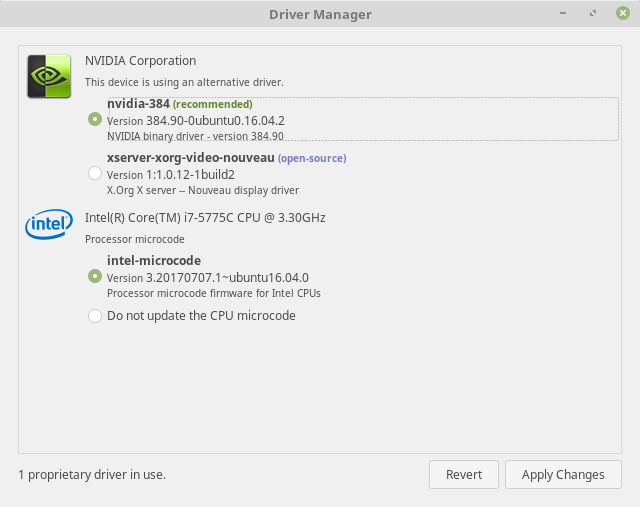
The problem is much of the Linux community has the Steve Jobs Antennagate attitude, if it's not working just blame the user. Just look at the shit I had to go through when putting Linux on my iMac just to get the bluetooth keyboard and mouse working, Windows worked just fine out of the box. If you want to install the latest nvidia drivers you have to ctrl+alt+f7 to get into a TTY then login, find out what your DM service is called, then work out which service manager you are using (maybe the command is service, maybe it is systemctl, stop that services, install the drivers and then restart the service and switch back to graphical terminal. You can say these are niche things but desktop computing is made up of these sorts of niche things, otherwise we'd all just use iPads to do web browsing and email.
None of these are issues in a corporate environment because the user won't install the OS himself and won't have administrative rights on his machine. The machine will be installed with the corporate image that already has all the required components installed and configured. This is based on first hand experience rolling out Linux desktops in corporate environments 10 years ago, that were fully integrated in AD and Exchange. The biggest issue I was facing at the time was that the Exchange connector of Evolution didn't cope well with large scale Exchange deployments where you had more than one exchange server... so, for example, the calendar free/busy was only working for users that were on the same exchange server as you... this would have been a trivial fix just requiring an extra lookup per user in the calendar, but nobody was interested at the time. 99% of the issues with Open Office had been caused by improper Office template design and were very quickly fixed. Some other interesting issues were caused by the way Microsoft overloaded their Kerberos tickets by enumerating the group membership of the user in a comment field of the ticket... users that are members of more than 120 AD groups generate tickets above 64K, which is creating funny issues in all kind of places (web services, IPSEC, login,
Linux is extremely powerful and for the most part very well engineered but people don't care about operating systems, they care about whether they can run their programs and until Linux distros catch up to the usability and hardware/software compatibility of macOS and Windows it isn't going to be widely adopted on the desktop.
This is certainly an achievable thing, Google demonstrated this with Android on smartphones so it certainly isn't outside the realm of possibility.
What has been demonstrated with smartphones/tablets is that software compatibility and a stable UI are actually a red herring. I'm currently using all major platforms (Wi
-
Re: Doesn't this continutally come up for Munich?
I concur. Linux should be easy. FOSS advocates need to look deeply into Munich's decision to switch back to Windows, figure out what all their pain points were and work towards reducing or elliminating them.
But as you see in the comments here, it's not Linux's fault, Linux is awesome and perfect. This is all a Microsoft conspiracy so the complaints about application compatibility must be all lies.
The problem is much of the Linux community has the Steve Jobs Antennagate attitude, if it's not working just blame the user. Just look at the shit I had to go through when putting Linux on my iMac just to get the bluetooth keyboard and mouse working, Windows worked just fine out of the box. If you want to install the latest nvidia drivers you have to ctrl+alt+f7 to get into a TTY then login, find out what your DM service is called, then work out which service manager you are using (maybe the command is service, maybe it is systemctl, stop that services, install the drivers and then restart the service and switch back to graphical terminal. You can say these are niche things but desktop computing is made up of these sorts of niche things, otherwise we'd all just use iPads to do web browsing and email.
Linux is extremely powerful and for the most part very well engineered but people don't care about operating systems, they care about whether they can run their programs and until Linux distros catch up to the usability and hardware/software compatibility of macOS and Windows it isn't going to be widely adopted on the desktop.
This is certainly an achievable thing, Google demonstrated this with Android on smartphones so it certainly isn't outside the realm of possibility.
-
Re:I was an Ubuntu user back in the day
If you're using Mint, you're using Ubuntu.
Unless it's Mint Debian Edition.
-
There's a patch for this.
There's a patch for this.
https://linuxmint.com/download... -
Re:Link to XP patches?
Here's a link to a better patch:
https://linuxmint.com/ -
Re:You Had One Job - Links Please
There's a better patch for that :
https://linuxmint.com/
BTW, You don't need a KB number. -
Re:What Tosh!
https://www.linuxmint.com/sear...
These search engines do not share the revenue Linux Mint users generate for them and/or do not preserve your privacy:
Google is the 7th one listed. -
Re:So... It's a New Fire Tablet?
Damnit. You remind me of various senior managers I talked to in Nokia around the launch of the iPhone.
People do not buy products according to bill of materials, how it's made, or what it costs. They buy it according to percieved value. Percieved value can include things like: "does this make me look sexy", "can I solve a life problem with this", "does this come from a company I trust". In this context, the fire tablet is a failure because it doesn't do anything that people noticed that raises it above a standard Android tablet. The echo seems to have found another solution space. It's a hands free radio which solves the problem that you don't want to get up to change the music when working. It looks simple and reasonably cool. It has a high percieved value for some people.
The reason that Google and Apple are coming to dominate consumer operating systems is because what people want is something that sits there and just works when they need it. Something Android, iOS CromeOS and even OS/X are percieved to have achieved. In the meantime their competitors are percieved to require you to mess around with package management, installing anti-virus, kernel recompilation and hacking the registry. I believe that Linux Mint is objectively better than those. I am percieved to be wrong and that's all that matters for now. If you are writing a piece of commercial software to deliver to consumers there are only really two platforms that matter. iOS and Android. Get success there and then you can consider desktop clients later do it the other way round and you will be too late. This is despite the fact that essentially, underneath it all, the operating systems are all doing the same job of hardware abstraction and user interface.
If echo can continue to be perceived as a hands free music supply, that just happens to have a screen then the fact it shares components with and actually works the same way as a tablet underneath will be irrelevant. The fact that they can make a more valuable product from less demanding components is to their benefit. In the same way as the iPhone, objectively worse, was actually better.
-
Windows was bloatware since Windows 8
Okay, we've got file header data being sent to MS (who recently disclosed the data collected confirming this), pushing ads through it's "live tile" interface, the Superfetch (whose effectiveness is in doubt but it's use of memory is not) and monitoring services to ensure you don't copy media data MS partenrs don't like. Come on. This was bloatware before Adobe. Now Adobe has long had more bloatware and adware, plus the new ad javascript tags Adobe is putting out on websites. MS windows takes a lot of your control from the updates (which is really dangerous as you could get a bad update, 3 times so far MS...) ensuring they can push even more adservers on your OS whenver they want. If we want this to stop we need to cut these guys off by the knees: Just stop using it MacOS or Linux (Linux Mint is the best or new users http://www.linuxmint.com/ ) can do wonders.
We've had stuff shoved up our butts that benefit MS at our expense for long enough. Let's all tell MS to stop. Many of us use tablets and phones anyway. Unless you are a gamer, we don't need windows 8-10. Wait, you can do gaming on consoles or Steam on Linux/MacOS who game library is rapidly expanding. So.....we don't need Windows 8-10 even as a gamer. -
Re:Ad blocker
If you want an ad blocker, then you should install the proper extension:
You're right:
-
GNOME is a bag of shit
It needs serious reworking to be usable. Keep it clean. Stay minty.
-
Re:More complete answer...
Also remember that you can customized the Look/Feel of any of the Linux distros. Specifically for Mint:
This will make LInux Mint look like Windows 7:
http://www.noobslab.com/2014/0...
https://www.youtube.com/watch?...
More on cusotmizing the look/feel of Linux Mint:
https://community.linuxmint.co...
https://www.linuxmint.com/rel_...
http://www.omgubuntu.co.uk/201...
https://delightlylinux.wordpre...
https://drive.google.com/file/... -
Re:More complete answer...
Also remember that you can customized the Look/Feel of any of the Linux distros. Specifically for Mint:
This will make LInux Mint look like Windows 7:
http://www.noobslab.com/2014/0...
https://www.youtube.com/watch?...
More on cusotmizing the look/feel of Linux Mint:
https://community.linuxmint.co...
https://www.linuxmint.com/rel_...
http://www.omgubuntu.co.uk/201...
https://delightlylinux.wordpre...
https://drive.google.com/file/... -
Re:More complete answer...
Okay, this is a serious questions and all us who know the power and importance of Linux should be give more complete answers. I see a few hear but none that feels complete so I'll give it a go:
For pure ease overall I would second the anonymous posting for Linux Mint. https://linuxmint.com/ It is overall the easiest to use for a newbies. The reason being that it has the best software package wizard/interface of the any distro I've seen to date. Runs virtually the entire Ubuntu spectrum, doesn't have odd experiments that we sometimes see in Ubuntu. I tend to prefer Mate (it's a bit older and uses fewer resources) but people wanting a more "slick" look will prefer Cinnamon. This is what you want if you are a pure desktop user. Especially for gaming. Plus Ubuntu has been caught doing desktop search data "deals" with Amazon (you can turn it off but it's not easy to find) so if privacy is a big concern, Linux Mint has to the best of my knowledge never given/sold data to Amazon. (see this link: https://www.eff.org/deeplinks/...). One thing I should point out, the Linux Mint team was until recently a bit laid back on security leading to their website being hacked. They are more diligent now but just something to bear in mind. But Linux mint is in my opinion the best distro for Windows Die hard users to look at to make the switch. (you have TONS of games from Gog.com and Steam.com for you gamers..) I'm not suggesting Ubuntu simply because Mint is more usable and when Ubuntu starting quietly selling user data to Amazon (they may not be doing it now, but once bitten), I felt they betrayed the community as they did not announce it openly but started doing it quietly and made the "off switch" as tricky to find as MS does with changing the default extension save option in MS Word/Excel.
That said, if you want similar ease but want to be able to do moderately easy admin style tweaking with a wide community help base, you use Mint Debian which uses a pure Debian file directory/location layout (Ubuntu and Linux Mint are Debian BASED but have a few tweaks/customizations that don't entirely match pure Debian specs but are compatible with the vast majority of Debian Linux packages/software).
once your are comfortable you can tweak the User interface to look like whatever you want. But...if you want a more Mac look/feel out of the box I'd suggest ElementaryOS. https://elementary.io/
ElementaryOs has the slickest look out of the box and while it says "for Windows users" I feel it's even easier for MacOS users making a switch. However, it is less mature which is probably why the packages are fewer and to expand that you need some knowledge a beginner would probably not have and the community base is significantly smaller (newer so this is to be expected.)
If you want a more server set of functions and flexibility, I'd suggest using Debian (http://www.debian.org) and set the login mode to Gnome Classic. It will disorient MS windows users at first but the transition is still easy and I've had office use it with no real complaints (just that it looks different but staff figured it out quite fast). The advantage that Debian has is it's a true server level OS (even with GUI) and the being the base of more "user friendly" distro has a HUGE community base that can get you through almost anything. I may be digressing a little but it's important to distinguish what you are using Linux for. others will say CentOS but for Windows users I'd say the Debian package system is more like what MS windows users are accustomed to as opposed to the RedHat package system which will feel more alien to MS windows users. Lots of business big wigs will say go RedHat based (CentOS, paid RedHat or Oracle Linux) and for some business solutions with specific business needs it is in some cases the only way to go. If you ever decide to uas a RedHa
-
More complete answer...
Okay, this is a serious questions and all us who know the power and importance of Linux should be give more complete answers. I see a few hear but none that feels complete so I'll give it a go:
For pure ease overall I would second the anonymous posting for Linux Mint. https://linuxmint.com/ It is overall the easiest to use for a newbies. The reason being that it has the best software package wizard/interface of the any distro I've seen to date. Runs virtually the entire Ubuntu spectrum, doesn't have odd experiments that we sometimes see in Ubuntu. I tend to prefer Mate (it's a bit older and uses fewer resources) but people wanting a more "slick" look will prefer Cinnamon. This is what you want if you are a pure desktop user. Especially for gaming. Plus Ubuntu has been caught doing desktop search data "deals" with Amazon (you can turn it off but it's not easy to find) so if privacy is a big concern, Linux Mint has to the best of my knowledge never given/sold data to Amazon. (see this link: https://www.eff.org/deeplinks/...). One thing I should point out, the Linux Mint team was until recently a bit laid back on security leading to their website being hacked. They are more diligent now but just something to bear in mind. But Linux mint is in my opinion the best distro for Windows Die hard users to look at to make the switch. (you have TONS of games from Gog.com and Steam.com for you gamers..) I'm not suggesting Ubuntu simply because Mint is more usable and when Ubuntu starting quietly selling user data to Amazon (they may not be doing it now, but once bitten), I felt they betrayed the community as they did not announce it openly but started doing it quietly and made the "off switch" as tricky to find as MS does with changing the default extension save option in MS Word/Excel.
That said, if you want similar ease but want to be able to do moderately easy admin style tweaking with a wide community help base, you use Mint Debian which uses a pure Debian file directory/location layout (Ubuntu and Linux Mint are Debian BASED but have a few tweaks/customizations that don't entirely match pure Debian specs but are compatible with the vast majority of Debian Linux packages/software).
once your are comfortable you can tweak the User interface to look like whatever you want. But...if you want a more Mac look/feel out of the box I'd suggest ElementaryOS. https://elementary.io/
ElementaryOs has the slickest look out of the box and while it says "for Windows users" I feel it's even easier for MacOS users making a switch. However, it is less mature which is probably why the packages are fewer and to expand that you need some knowledge a beginner would probably not have and the community base is significantly smaller (newer so this is to be expected.)
If you want a more server set of functions and flexibility, I'd suggest using Debian (http://www.debian.org) and set the login mode to Gnome Classic. It will disorient MS windows users at first but the transition is still easy and I've had office use it with no real complaints (just that it looks different but staff figured it out quite fast). The advantage that Debian has is it's a true server level OS (even with GUI) and the being the base of more "user friendly" distro has a HUGE community base that can get you through almost anything. I may be digressing a little but it's important to distinguish what you are using Linux for. others will say CentOS but for Windows users I'd say the Debian package system is more like what MS windows users are accustomed to as opposed to the RedHat package system which will feel more alien to MS windows users. Lots of business big wigs will say go RedHat based (CentOS, paid RedHat or Oracle Linux) and for some business solutions with specific business needs it is in some cases the only way to go. If you ever decide to uas a RedHat Pac -
See the Linux Mint 18 MATE desktop:
See the desktop and new features: New features in Linux Mint 18 MATE
-
Re:Hey, MS
Right here https://www.linuxmint.com/down..., enjoy!
-
Re:Five years?
You keep posting and yet you seem to know nothing about LTS OS releases:
https://community.linuxmint.co... -
Laptops that work well with Linux Mint
Get some version of Linux instead, I recommend Linux Mint.
Google linux mint laptop leads to Linux Mint's partnership with ThinkPenguin. But there isn't a wide selection of laptops: nothing bigger or smaller than 14 inches. What company that isn't a Linux Mint partner makes laptops that work well with Linux Mint?
-
Re:Mint supports package upgrades...
"Support" upgrading in place is a dubious term. They say it's possible, but they go out of their way to discourage you from doing it, and provide no instructions. Citation, for those who need one...
-
direct to the source
Didn't see direct links -- just off to Betanews blather. So here they are...
Disclaimer: Been using Mint for years now. It's the schiznit.
-
direct to the source
Didn't see direct links -- just off to Betanews blather. So here they are...
Disclaimer: Been using Mint for years now. It's the schiznit.
-
Re:Not Surprising
But the real improvements where on my girl's older laptop, where the update from 7 to 10 worked wonders by greatly improving startup times and no longer locking up randomly
Seems a badly fucked-up W7 install to me: Have tried linux on this laptop? (Linux Mint is your friend! [to avoid installing software: only installing google-chrome solved every issue on my sister's laptop...)
-
Linux Mint
Chrome provides Netflix. Steam provides games. Just install latest nvidia driver. Cast your shackles, go for Mint!
'nuff said.
-
Re:Not me
I had a hell of a time installing Linux Mint on an HP Envy M6 and I posted about it in their forums (which was 100% ignored): https://forums.linuxmint.com/v...
The tl;dr of it is this, to get it installed I had to:
- - Find custom network drivers because the ones that came with it (RT3290) did not work at all. This involved getting source code and re-compiling because the deb package failed on line 1 with an error... why, why would should that ever be necessary for a professional desktop OS (not a hobbiest machine)?
- - The EFI installation for the bootloader would continually go in the wrong directory, so it never worked. It took me several hours to realize this was the issue and manually fix it
- - Suspending has never worked when the lid closed. When it comes 'back' it would just have an error and X would be dead
- - Battery life was awful until I followed a well known "guide" to fix it... again, why?
- - After a few weeks a new Linux Mint version came out and there was no upgrade path. The only option is to format and re-install. At this point I just gave up because that's unacceptable. Every new version of Windows (7-10 even), and Mac OSX (10.4-10.8 as an example) do not require a format and will just upgrade. Why can't Linux?
I love "playing" with Linux, but until it works on a desktop like MacOS and Windows without requiring screwing around, re-compiling, and format / re-install for major version upgrades, nobody who doesn't have time for a Linux-hobby can use it.
-
Re:in B4
Here you go: https://www.linuxmint.com/down...
-
Re:But ...
Looks difficult, but not impossible. I run a PXE server to install windows, SuSE LInux, and run some rescue linux's. https://forums.linuxmint.com/v...
-
Yes!
-
Re:Honestly it's not bad
What I liked about GNOME 2.x, and still like about MATE today, is that out-of-the-box it works like I expect. I tweak a few things, but if I boot up from a USB drive with a live image, I'm still comfortable and I still get work done.
With GNOME 3.x all the defaults are alien and uncomfortable for me. Yeah, with enough work I could make it do what I want... there's a project for that and it's called Cinnamon.
I think that the GNOME 3.x developers made a lot of decisions, early on, without usability studies... and those decisions are baked in and hard to change now. If I'm wrong and there are usability studies, and the studies prove that GNOME 3.x tests very well with ordinary users, then I'd like to see those studies and read them for myself.
-
Re:Still can't get it to work -- total system free
Have you tried this fix ? It worked for me.
-
How about a link to the Linux Mint page?
-
Betanews - groan
I might as well start submitting DistroWatch updates:
Clement Lefebvre has announced the release of Linux Mint 18 "KDE", an edition of the Mint family featuring the KDE Plasma 5.6 desktop: "The team is proud to announce the release of Linux Mint 18 'Sarah' KDE edition. Linux Mint 18 is a long-term support release which will be supported until 2021. It comes with updated software and brings refinements and many new features to make your desktop even more comfortable to use. This edition of Linux Mint features the KDE Plasma 5.6 desktop environment. The default display manager is SDDM. The APT sources include the Kubuntu backports PPA, which provides updates to newer versions of the Plasma desktop. The update manager received many improvements, both visual and under the hood. The main screen and the preferences screen now use stack widgets and subtle animations, and better support was given to alternative themes." Here is the brief release announcement, with further details, screenshots and videos provided in the new features page as well as the release notes. Download: linuxmint-18-kde-64bit.iso (1,622MB, SHA256, signature, torrent). -
Betanews - groan
I might as well start submitting DistroWatch updates:
Clement Lefebvre has announced the release of Linux Mint 18 "KDE", an edition of the Mint family featuring the KDE Plasma 5.6 desktop: "The team is proud to announce the release of Linux Mint 18 'Sarah' KDE edition. Linux Mint 18 is a long-term support release which will be supported until 2021. It comes with updated software and brings refinements and many new features to make your desktop even more comfortable to use. This edition of Linux Mint features the KDE Plasma 5.6 desktop environment. The default display manager is SDDM. The APT sources include the Kubuntu backports PPA, which provides updates to newer versions of the Plasma desktop. The update manager received many improvements, both visual and under the hood. The main screen and the preferences screen now use stack widgets and subtle animations, and better support was given to alternative themes." Here is the brief release announcement, with further details, screenshots and videos provided in the new features page as well as the release notes. Download: linuxmint-18-kde-64bit.iso (1,622MB, SHA256, signature, torrent). -
Betanews - groan
I might as well start submitting DistroWatch updates:
Clement Lefebvre has announced the release of Linux Mint 18 "KDE", an edition of the Mint family featuring the KDE Plasma 5.6 desktop: "The team is proud to announce the release of Linux Mint 18 'Sarah' KDE edition. Linux Mint 18 is a long-term support release which will be supported until 2021. It comes with updated software and brings refinements and many new features to make your desktop even more comfortable to use. This edition of Linux Mint features the KDE Plasma 5.6 desktop environment. The default display manager is SDDM. The APT sources include the Kubuntu backports PPA, which provides updates to newer versions of the Plasma desktop. The update manager received many improvements, both visual and under the hood. The main screen and the preferences screen now use stack widgets and subtle animations, and better support was given to alternative themes." Here is the brief release announcement, with further details, screenshots and videos provided in the new features page as well as the release notes. Download: linuxmint-18-kde-64bit.iso (1,622MB, SHA256, signature, torrent).