Slashdot Mirror
Domain: polarcloud.com
Stories and comments across the archive that link to polarcloud.com.
Comments · 83
-
Re:It's a trace buster buster buster
I used the method in the article on my buffalo router with the Tomato firmware. I used the non red-hat version under Administration>Scripts>Init. I rebooted the router and I could upload at max w/o bittorrent crapping out on me. There were some other side effects from using that too. Before, if I would leave utorrent at max, even with QoS enabled on my router and bittorrent set to lowest priority, it would seem like the cable modem connection was flooded with connections until I had to reset the router to clear up the problem. This never happens now. Just recently Comcast seems to be doing throttling based on port usage alone. Ex.: bittorrent connections were being dropped within seconds of connecting. changed my port, and the problem went away.
-
+1 for Tomato Firmware at www.polarcloud.com
+1 Tomato Firmware
http://www.polarcloud.com/tomatoI run it on a WRT54GSv4 and a buffalo wifi router of some sort that I paid less than $20 for. Works great on both, though the Buffalo couldn't handle QOS for voip and BT traffic. The WRT does though.
-
QOS should work
QOS should work if you set it up properly.
On my WRT-54GL with Tomato (others might work, Tomato is the easiest of ddwrt, openwrt in my experience), the QOS settings can be limited in just the way you want, with everything except the highest only being allowed only 75% of your upload, or whatever you want.
Downstream is a bit harder to restrict, since the queue is on the Telcom side of things, but you could do some QOS in your router there as well.
-
Re:QoS, but only on the Telco SideWhile I prefer Tomato on a WRT-54GL, that would do absolutely nothing at all to solve this issue. A router behind a modem can really only regulate the upload, and can't easily prevent a flood of data on the downstream side. Really, that is not much of an issue. People's down pipes are usually 8-10x larger.
-
QoS, but only on the Telco Side
While I prefer Tomato on a WRT-54GL, that would do absolutely nothing at all to solve this issue. A router behind a modem can really only regulate the upload, and can't easily prevent a flood of data on the downstream side.
This issue is with the queue on the Telco's DSLAM, or on the other side of the cable from the modem. This is more like an invited DDOS, which no amount of filtering at or behind the modem can resolve, because the modem is getting the traffic from the DSLAM after it goes through the queue.
The only way to have QOS solve this issue would be to ask the telco to do the QOS for you, and the amount of processing power to do that nicely isn't trivial. -
Re:TomatoGrab the Tomato firmware for your Linksys. Tomato's QoS features are much easier to configure than others like DDWRT. With Tomato, you don't need to be a Linux networking guru to do what you want. Tomato also handles P2P very well. You can pound a WRT54 running Tomato with heavy P2P traffic 24/7 for months with no perfmrance problems. No resets required. Grab it here http://www.polarcloud.com/tomato/ I have the latest Tomato firmware for my Linksys router (WRT54G). How do I configure the QoS to prevent P2P from crippling the connection and making internet browsing quite slow?
-
Install tomato
From here.
Set up QoS rules as you like. If he's cooperative about it, downgrade the bittorrent priority based on the ports he uses for it. If he's not, just downgrade all his traffic. -
Tomato
Grab the Tomato firmware for your Linksys. Tomato's QoS features are much easier to configure than others like DDWRT. With Tomato, you don't need to be a Linux networking guru to do what you want. Tomato also handles P2P very well. You can pound a WRT54 running Tomato with heavy P2P traffic 24/7 for months with no perfmrance problems. No resets required. Grab it here http://www.polarcloud.com/tomato/
-
Re:Need more input!
Any WRT54G model before v5 can be modified easily, v5+ can sometimes be modified with DD-WRT. And of course they still sell the GL, which is quite worth the price ($60 on amazon) because of how useful it becomes with this alternate firmware. The GL can also be modified and has the advantage of still being sold under a clear model number, so you know you can mod it, unlike others.
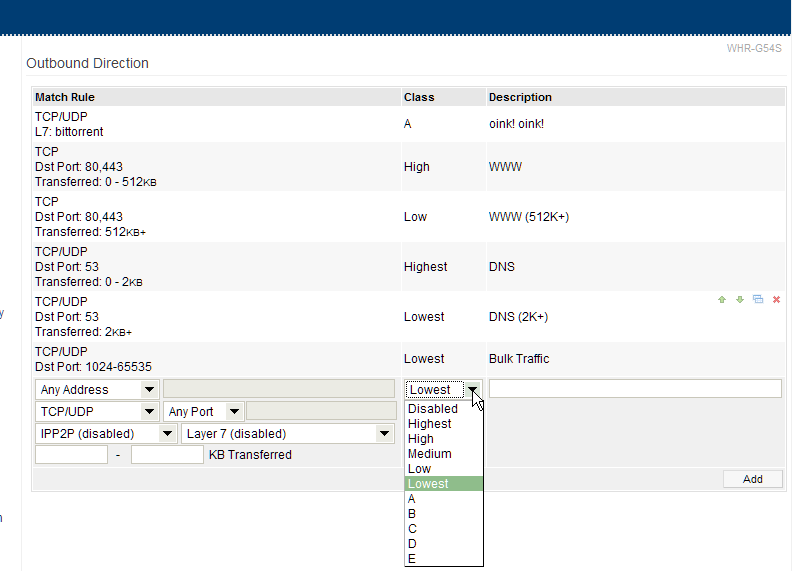
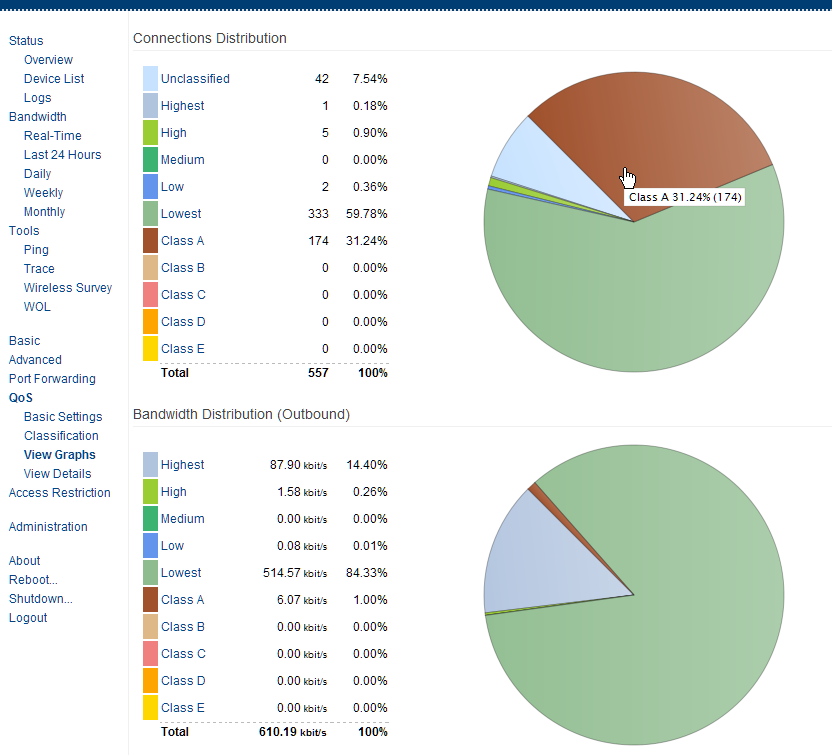
On the other hand, there is awesome shaping available in tomato firmware, it can classify traffic and show you what percentage of your traffic was in each class.
http://www.polarcloud.com/img/ssqosc108.png
http://www.polarcloud.com/img/ssqosg108.png
http://www.polarcloud.com/tomato -
Re:Need more input!
Any WRT54G model before v5 can be modified easily, v5+ can sometimes be modified with DD-WRT. And of course they still sell the GL, which is quite worth the price ($60 on amazon) because of how useful it becomes with this alternate firmware. The GL can also be modified and has the advantage of still being sold under a clear model number, so you know you can mod it, unlike others.
On the other hand, there is awesome shaping available in tomato firmware, it can classify traffic and show you what percentage of your traffic was in each class.
http://www.polarcloud.com/img/ssqosc108.png
http://www.polarcloud.com/img/ssqosg108.png
http://www.polarcloud.com/tomato -
Re:Need more input!
Any WRT54G model before v5 can be modified easily, v5+ can sometimes be modified with DD-WRT. And of course they still sell the GL, which is quite worth the price ($60 on amazon) because of how useful it becomes with this alternate firmware. The GL can also be modified and has the advantage of still being sold under a clear model number, so you know you can mod it, unlike others.
On the other hand, there is awesome shaping available in tomato firmware, it can classify traffic and show you what percentage of your traffic was in each class.
http://www.polarcloud.com/img/ssqosc108.png
http://www.polarcloud.com/img/ssqosg108.png
http://www.polarcloud.com/tomato -
Re:It's simple with OpenWrt
Or install Tomato and go to the QOS tab. It is pretty simple to get QOS going on Tomato
-
Plenty
There are a bunch of options for open-source firmware that will do traffic-shaping on your router. I personally use Tomato for the AJAXy goodness and overall usability.
You can do limits based on individual devices, which will keep any computer from ever saturating the network, or you can do time-based throttling, or whatever. I found the most useful setup was to make everything default to low priority and then raise the priority of HTTP, SSH, and other things I wanted to run interactively.
As long as nobody on the network is selfish enough to try and run their p2p app over port 80 or something stupid like that, it works fine. But any home router config will depend on the users not trying to get around it -- it's a tool for your mutual convenience, so that people can set their apps to be aggressive and get the most performance, but won't step on others' toes when they're trying to get something done. -
mmm, TomatoI quite like Tomato firmware as well: http://www.polarcloud.com/tomato
It also has QoS features, and a nice AJAX interface.
-
Re:It would be nice..
I thought that DDW-RT sucked and there are better alternatives.
-
Re:Consider the do it yourself way...
I was going to suggest a pair of WRT54GLs running Tomato with some 15dBi antennas, but ethernet like that is going to be a much more reliable solution, if a bit harder to install.
-
Re:Lawsuit
Now how can I monitor my actual consumption bearin in mind that I have 5 PCs in my home network - can my router tell me how much internet bandwidth I am consuming?
Yes. Now, for example, I have a Linksys WRT54G V4 running the Tomato alternate firmware. It has a convenient page where it keeps track of how much you've transferred. You can view it by day, by week or by month. Also has a lot of other features that put it miles ahead of the stock firmware in most inexpensive SOHO routers. -
Re:no reset for me
-
Re:It's a plan by the man to stick us with the cosYou need the tomato router!!!
Or any router that can shape your traffic. The tomato router (open source firmware for a LinkSys WRT54GL) has the ability to prioritize BT traffic as the last priority, giving all the other protocols higher priority (http, etc).
Enjoy!
-
Re:Such a crock
WRT-54Gl with suitable firmware. $60 per unit.
(My favorite firmware is Tomato Firmware)
Have them flashed and set up at a central point, and there would be no configuration at the deployment point. -
Re:Reliability
If you want more reliable WLAN, I would suggest loading the Tomato firmware onto a WRT-54GL, which is the most reliable wifi setup I have found.
-
Re:Windows only?
What about small embedded computers?
My WRT-54GL runs a variant of Linux (Tomato Firmware, to be exact), and definitely couldn't run Windows. Or are they going to provide hacked versions of all of the ROMs for routers and other small computers?
Some Routers can use external hard drives, so they could hold potential "terrorist" stuff. -
Re:Never put your eggs in one basket.Have fun using QOS on it though. I admit the WRT54G ran great at my house with just my parents and brother on it, but my current house has 5 guys who love to transfer files/stream/p2p and the WRT54G I had ran straight into the ground. Threw in a box running pfSense (Some shitty P2 with 128mb of ram) and it's been running great ever since. Can't save power with something that doesn't work...
I recently bought a WRT54GL for exactly this reason, to get good QoS cheap on miserly electricity.
I promptly flashed the firmware OS to Tomato because of its speed, stability, and balance between simplicity and features like 10 QoS classes. So far so good with torrents and video streaming (some tweaking of settings, not much), while keeping surfing speedy. Twenty minutes of work and all of a sudden it's a much better router, good speeds, no slogging down under p2p connections.
-
Re:bandwidth monitoring?
I have a Linksys WRT54G V4 wireless access point running the Tomato firmware. Wikipedia has a nice writeup.
It works very well: lightyears beyond the stock firmware. I've had 100% uptime since I first flashed it into the router about four months ago. Hasn't crashed, glitched, slowed down or otherwise given me any grief whatsoever. I run games, corporate VPNs, SMTP, FTP, POP3, Webmail and a bunch of other services through it. It keeps track of daily, weekly and monthly bandwidth usage, and even has an Ajax-based real-time graph, all via your browser (works great with Firefox.) Supports CIFS, and it writes out its log files to my file server. Very cool stuff.
The author is very pleasant and responsive and, honestly, Linksys should hire the guy. I tried some of the others out there (DD-WRT, HyperWRT, etc.) and found that Tomato serves my needs best. I've run Smoothwall and IPCop in the past: about the only thing I miss from those two was the transparent Web cache.
Give Tomato a shot, if you have an old WRT54G or any of the other supported routers (it supports a bunch from different vendors.) -
Forget DD-WRT, try TomatoFor all those who have a WRT, seriously, try this firmware instead. I switched ot it months ago and have not looked back:
http://www.polarcloud.com/tomato
AJAX based, real time traffic charts, more options, much more robust QOS configuration, ability to run your own scripts, auto mounting of external network volumes, and the options go on and on.
I have nothing bad to say about this firmware, at all.
-
Not just firmware
Using a Broadcom-based router, installing 3rd party firmware, and upping your transmitting power might help.
Might.
However it is not a panacea.
802.11-whichever is a two-way system & you'd only be upping the router's outgoing signal strength, doing nothing for improving the client's signal. Furthermore you can easily over-power your transmitter and end up with literally more noise then signal. Plus the additional load can overheat your router and lead to premature failure.
A different strategy is to improve your antenna. For nothing-$40 you can significantly improve transmission & reception. Websites like www.freeantenna.org list easy-to-make reflectors, or you can purchase replacement antenna(s) with better characteristics then the stock ones.
Of course improving the local environment can have an immediate & significant effect.
The signal is transmitted from your router in an omni directional plane, roughly pancake-shaped. Therefore getting everything on somewhat the same level is useful, such as on the same floor of the building.
Removing obstructions like metal sheeting (filing cabinets, refrigerators, nearby ductwork) will help, as well as avoiding transmitting through dense material like concrete/masonry walls, packed bookshelves. Simply putting a router up on a shelf can occasionally make a huge difference.
As nearly every other poster has noted, picking the right channel helps tremendously. Use 1, 6, or 11, whichever is least congested. Keep in mind this can change as your neighbor gets home and turns on their equipment so re-survey regularly.
Then there is not using WiFi. If wireless is just a way to avoid cabling a place then consider on of the Ethernet-over-electrical-lines. Basically shortwave using your household wiring as an antenna it offers good speeds at high reliability. Adapters are about $40 each & if you're already tethered to an electrical outlet then this is a natural fit.
Finally, as everyone is promoting their favorite flavor of firmware, let me suggest Tomato. It isn't burdened with every feature possible; instead it is fast, easy to configure, has great reporting, and most importantly, is extremely reliable (unlike some other distribs). If your goal is just "a better router" and not lots of other services then it's a great choice.
-
Tomato
I've used
-OpenWRT
-OpenWRT versions with GUI and tools (there are flavors that are geared towards DD-WRT type users)
-DD-WRT (Several versions)
-Linksys Native Firmware
All of these i've used in production environments and at home. The winner?
Tomato. Yup. It works be the best. It has the best QoS, and just performs better then anything else i've tried. Its one of the few UPnP based units that WORKS all the time with iChat and its needs. IT won't drop NAT relationship tables like DD-WRT loses a PPPoE link and hence screw up my VoIP/IAX connections for my phone systems. Its WDS wireless will stay up for months at a time or longer unlike DD-WRT's which breaks my AirTunes once in awhile.
The only negative is that Tomato does not yet include a VPN server/client of some short, but its the only shortfall. Its stable, works and has a powerful AJAX interface. You can apply changes to nearly anything without losing your PPPoE etc. Alot including DD-WRT just blindly reboot the entire unit if you so much as fart a configuration change.
For me, you say whatever, I say Tomato. It uses what linksys made work, and work well, and the rest is nothing but improvements. DD-WRT is not entirely open source anymore, with Pay Rich-Feature QoS only and a closed source GUI.
OpenWRT with its extensions (http://x-wrt.org/) or Tomato and id say tomato wins hands down out of box experience.
Check out Tomato's GUI demos on the website (flash videos)
Get a Buffalo Unit thats compatible or use the LInksys WRT54GL and enjoy.
http://www.polarcloud.com/tomato
http://x-wrt.org/ -
Re:dd-wrt work just fine
I found Tomato Firmware to have a better web interface than DD-WRT.
Tomato makes full use of AJAX and the features are ideal for the "average joe" -- it is much easier to use than the default firmware on my Buffalo WHR-G54S, while offering more features.
The combo of "more features" plus "easier to use" is pretty rare in software but Tomato succeeds. -
Tomato Firmware has AJAX Web Interface and more
A few weeks ago, installed Tomato firmware 1.04 for my Buffalo WHR-G54S wireless router. (But I see now they have 1.05 available.)
So far, I've been blown away by the fantastic web interface and the rock-solid performance. It just freakin works without having to reboot the router every few weeks.
The web interface is simply amazing compared to what I've seen in other firmware. The QOS settings are a breeze to setup, too.
If you don't like Tomato, checkout other firmware projects like:
DD-WRT
FreeWRT
HyperWRT (official)
HyperWRT Thibor
OpenWRT
Tarifa
X-Wrt -
Also check out Tomato
I haven't gotten around to flashing my old Fon router with it yet, but a friend gave me a demo of his Linksys/Tomato setup... and it is very, very nice indeed. Almost any data you could think of wanting, any control you might want to exercise, presented in a clean, fast AJAX UI: http://www.polarcloud.com/tomato
-
Re:Change your firmware on the Linksys...
You might want to consider choosing one of the alternatives to dd-wrt :
http://xwrt.blogspot.com/2007/02/dd-wrt-continues- to-exploit-free-open.html
or not...
I have been running dd-wrt for a long time, but the fact that it's httpd always uses close to 100% of the CPU (after running ok for a while) so I have to ssh in and kill it (it's restarted automatically), made me look for an alternative. I'm going to try the 'tomato' one, I think :
http://www.polarcloud.com/tomato -
Re:Tomato
DD-WRT has become a pay-to-play Firmware, any advanced features like decent QoS are pay for model now.
DD-WRT is too 'new', its not using parts written by Linksys that actually work (LIke UPNP on ichat for instance).
Solution? The FULLY open source tomato firmware. Based on Linksys and built on top of, with a modern modular AJAX interface. Hands down, the best.
http://www.polarcloud.com/tomato
View video demos of its interface. I won't go back to OpenWRT or DD-WRT. You say DD-WRT, I say Tomato -
Re:So you want to lean Japanese?