Slashdot Mirror
Domain: sonnettech.com
Stories and comments across the archive that link to sonnettech.com.
Comments · 70
-
It is possible to build one
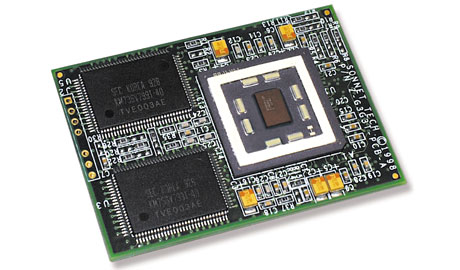
Motherboards can be found at http://www.macresq.com and http://www.shrevesystems.com/ although a lot of times they are refurbished and processors new can be found here http://www.sonnettech.com/ and http://eshop.macsales.com/ . Of course if you have time all these things can be found on http://www.ebay.com/. And for everything else use http://www.pricewatch.com/ for ram, video card, etc. As for specifications on each board starting from g3s go to http://www.info.apple.com/support/applespec.html.
-
Re:"from scratch" - get realYes. Intel does make motherboards for its own processors, but so do others. When Intel first started making motherboards for Intel processors, the other motherboard manufacturers were concerned that Intel would take over the motherboard market, but they didn't.
Mac clones can still be built, and even boot MacOS X and Jaguar. Now there's an interesting mod direction.
-
Re:Classic modeI gave up my last Mac (after owning 6) when I realized I needed to spend a couple grand every 3 years for another non-upgradable-processor machine.
http://www.micromac.com
http://www.powerlogix.com
http://www.xlr8yourmac.com
http://www.sonnettech.comI won't post in Apple threads anymore, since I can't keep up with the Mac bigots.
Whatever
-
Highly unlikely
If the upgrades from two separate companies are both pricey, it probably means there is considerable engineering effort required to get it to work. It won't just be a matter of buying a processor fresh from the foundry, slapping some cache on it, and popping it in. Do you reall think all the surrounding circuitry is just window dressing?
-
Re:Good For Apple, Good For Usoh that's funny i'm still running my powerpc 7500/100 which i bought OVER 6 years ago, which is currently running LinuxPPC Q4/2000. Guess what's serving my site off of my very basic home DSL connection rite now? Guess which computer I was using to develop XML Tidy?
Oh yea and I can *still* easily and cost-effectively upgrade it to comfortably run OS X.
6 years!
-
Re:vidcap card != PVR?
What system are you running? Have you used Sonnet's OS X installer to go with their upgrades?
I've installed OS X on my stock 8600 (300Mhz 604e)and would be a little surprised if you couldn't make the G4 upgrade work. Of course there is often other issues out there. -
Re:Please Goddess let them release some new models
Sounds like you need to find a nice 400 or 500 mhz G4 and upgrade it to either a dual 500 mhz G4 setup via Sonnet Technologies or a brand spankin' new upgrade option of a 800mhz or 1ghz G4 via Power Logix
There are also a few over-clockable Sahara G3 upgrades available now. Look around a little in the classifieds or on the sites mentioned or in general ie: google.
Remember also that with 10.2 OS X will be a viable OS on many older systems as long as you can add a 32 MB AGP graphics card to the mix (Quartz Extreme promises to increase performance across-the-board by at least a 150% if not more). That is not to mention the fact that it is supposed to be compiled with GCC 3.x which brings it's own performance boosts as well.
-
Re:You buyin?you can get a brand new fully-loaded (384MB RAM, 30GIG hard drive, aiport card) high-end ibook laptop for $2k out of the door.
my titanium powerbook is the first model they put out, my company bought it fairly late when prices had dropped for $1300, and that includes airport card and 384MB of RAM.
if you go to store.apple.com, look at the bottom-left corner, they have a section for refurbed or older-model systems at great discounts.
you can also scour eBay for people selling their older macs, any mac above the 1996 PPC 7500/100 is still worth buying for dirt-cheap ($200?), upgrade the processor to a new G4 or fast G3, maybe add a separate PCI SCSI or ATA controller to add internal and/or external IBM drives and install OS X on it, or LinuxPPC which is free, which would at the very least make a *great* little server.
-
Re:YDL vs. OSX
Your 8500 will most likely run Mac OS X - given that it has a G3 card, and assuming that it has at least 128MB of RAM (more is of course better).
You'll need a utility to be able to do an unsupported install, such as XPostFacto (free) or Sonnet's software for $30, and you may want a utility to adjust your G3's cache.
You should at least upgrade it to 9.1. -
Re:Dammit!My PowerBook is still stuck with it's 740 MB HD and 32 MB of RAM; and I'm not spending a dime to upgrade those. The battery's dead, and that bugger itself is too expensive. Who wants to work on a 117 Mhz PPC with no L2 cache?
FWIW Sonnet make a G3 466 MHz upgrade for PowerBook 1400's. But you'd probably want to max the memory out to 64MB as well
-
Re:iMac -- Firewire
Your right a Rev A iMac doesn't have firewire out of the box but it is an option with this card
-
Other way aroundI eagerly clicked on this story, hoping that it offered some cool geek solution to the problem of what to do with all these damn 30 pin SIMMs! But no, just someone who actually wants more of them!
So, does anyone have a cool project that can use these things? Maybe a programmable robot made from an old disk drive or a homebuilt one of these?
-
MacOS beige, not turquoise...Mac OS X vs. Linux: Could Apple Take a Bite Out of the Penguin?
Is Mac OS X a Threat to Linux?
In short, yes! On March 24, Apple Computer, Inc. released its next-generation operating system, Mac OS X (the "X" is pronounced as "ten," for the version number of the operating system) to Macintosh addicts around the world. While this isn't such a big deal to some, others view it as a new beginning that could squash all thoughts of a desktop Linux for the general public.
What's this, "Apple out-maneuvering Linux?" you say? Well, maybe not as a server platform for the immediate future, but just think about this for a second: Would it be possible for Apple to deflate the hopes and dreams of developers worldwide of bringing Linux to the desktop? The short answer to this is yes, but it's more complicated than that.
Comparing Apples with PenguinsAside from the fact that an apple is a fruit and a penguin is a flightless waterfowl, there used to be a big difference between the Apple Macintosh operating system and Linux. Apple had a nice GUI; Linux did not. Linux had a command line; Mac OS did not. Linux is a multitasking OS that supports multiple processors; Mac OS is not. Linux runs on just about anything these days; the Mac OS runs on, well, Apple equipment. Linux is free (well, sort of, depending on your method of install); Mac OS X will set you back $129.
So, the lines were pretty clear about the differences between Linux and Mac OS. But lately, that clarity has been blurred as Apple rolls out Mac OS X to the public. The new Mac OS now has preemptive multitasking and support for up to two processors, which is still a far cry from Linux's support for up to 16 processors, but it's a move in the right direction.
Traditionally, the only control Apple users had over their system was via the Control Panels and scripting system functions with AppleScript, MacPerl, or ResEdit. However, with Mac OS X's BSD base, Apple users were given something they've always wanted: a latch to take a peek into Apple's core.
At the core of Mac OS X is a kernel built on the Mach 3.0 kernel, BSD 4.4, and Darwin (Apple's open source kernel project), giving network and system administrators the ability to use Unix programs and add them to their Macintoshes. When combined, these components offer a rock-solid operating system that's hard to beat. (OK, I know that Mac OS X has its fair share of bugs, so no flames, please.)
One of the advantages of Mac OS X is that it now offers Macintosh users with a command line on top of a slick, stable GUI, known as Aqua. With OS X's BSD core, Macintosh users will now be able to use GNU software. This means they will be able to run tools like Emacs, vi, Apache, and even XFree86 and the GIMP (something that Adobe Systems should fear). If you're looking for a place to download ports of GNU tools that run under Mac OS X, you should visit the GNU-Darwin Project on SourceForge.
One of the downsides of OS X is that it requires you to have a native G3 or G4 processor. This means you have to be running a G3 Mac, an iMac or iBook, a PowerBook G3 or better, or any of the G4 models and above. So, if you have an older 604 PowerPC-based Mac, you can't run OS X (that is, unless upgrade manufacturers, such as Sonnet Technologies release updates to their processor software). For now, though, if you want to run OS X your best bet is to run it on native hardware.
One group that stands to lose a chunk of the market is the Mac-based Linux distributions, such as MkLinux, LinuxPPC, or Yellow Dog Linux (YDL) from Terra Soft Solutions. Up to now, these were your best options for running Linux on the Mac, with LinuxPPC and YDL leading the pack. But OS X changes this landscape significantly. The downside to running Linux on your Mac in a dual-boot configuration (as with Windows) is that if you want to access any of your Mac apps, you had to either reboot, or install and run Mac-On-Linux. Neither option is ideal, but now OS X allows you to work in the command line, and run your Mac apps right along with them--no rebooting required.
-
Macintosh cluster-fuck-ing...Mac OS X vs. Linux: Could Apple Take a Bite Out of the Penguin?
Is Mac OS X a Threat to Linux?
In short, yes! On March 24, Apple Computer, Inc. released its next-generation operating system, Mac OS X (the "X" is pronounced as "ten," for the version number of the operating system) to Macintosh addicts around the world. While this isn't such a big deal to some, others view it as a new beginning that could squash all thoughts of a desktop Linux for the general public.
What's this, "Apple out-maneuvering Linux?" you say? Well, maybe not as a server platform for the immediate future, but just think about this for a second: Would it be possible for Apple to deflate the hopes and dreams of developers worldwide of bringing Linux to the desktop? The short answer to this is yes, but it's more complicated than that.
Comparing Apples with PenguinsAside from the fact that an apple is a fruit and a penguin is a flightless waterfowl, there used to be a big difference between the Apple Macintosh operating system and Linux. Apple had a nice GUI; Linux did not. Linux had a command line; Mac OS did not. Linux is a multitasking OS that supports multiple processors; Mac OS is not. Linux runs on just about anything these days; the Mac OS runs on, well, Apple equipment. Linux is free (well, sort of, depending on your method of install); Mac OS X will set you back $129.
So, the lines were pretty clear about the differences between Linux and Mac OS. But lately, that clarity has been blurred as Apple rolls out Mac OS X to the public. The new Mac OS now has preemptive multitasking and support for up to two processors, which is still a far cry from Linux's support for up to 16 processors, but it's a move in the right direction.
Traditionally, the only control Apple users had over their system was via the Control Panels and scripting system functions with AppleScript, MacPerl, or ResEdit. However, with Mac OS X's BSD base, Apple users were given something they've always wanted: a latch to take a peek into Apple's core.
At the core of Mac OS X is a kernel built on the Mach 3.0 kernel, BSD 4.4, and Darwin (Apple's open source kernel project), giving network and system administrators the ability to use Unix programs and add them to their Macintoshes. When combined, these components offer a rock-solid operating system that's hard to beat. (OK, I know that Mac OS X has its fair share of bugs, so no flames, please.)
One of the advantages of Mac OS X is that it now offers Macintosh users with a command line on top of a slick, stable GUI, known as Aqua. With OS X's BSD core, Macintosh users will now be able to use GNU software. This means they will be able to run tools like Emacs, vi, Apache, and even XFree86 and the GIMP (something that Adobe Systems should fear). If you're looking for a place to download ports of GNU tools that run under Mac OS X, you should visit the GNU-Darwin Project on SourceForge.
One of the downsides of OS X is that it requires you to have a native G3 or G4 processor. This means you have to be running a G3 Mac, an iMac or iBook, a PowerBook G3 or better, or any of the G4 models and above. So, if you have an older 604 PowerPC-based Mac, you can't run OS X (that is, unless upgrade manufacturers, such as Sonnet Technologies release updates to their processor software). For now, though, if you want to run OS X your best bet is to run it on native hardware.
One group that stands to lose a chunk of the market is the Mac-based Linux distributions, such as MkLinux, LinuxPPC, or Yellow Dog Linux (YDL) from Terra Soft Solutions. Up to now, these were your best options for running Linux on the Mac, with LinuxPPC and YDL leading the pack. But OS X changes this landscape significantly. The downside to running Linux on your Mac in a dual-boot configuration (as with Windows) is that if you want to access any of your Mac apps, you had to either reboot, or install and run Mac-On-Linux. Neither option is ideal, but now OS X allows you to work in the command line, and run your Mac apps right along with them--no rebooting required.
-
LinuxWorld rundown on MacOS...Mac OS X vs. Linux: Could Apple Take a Bite Out of the Penguin?
Is Mac OS X a Threat to Linux?
In short, yes! On March 24, Apple Computer, Inc. released its next-generation operating system, Mac OS X (the "X" is pronounced as "ten," for the version number of the operating system) to Macintosh addicts around the world. While this isn't such a big deal to some, others view it as a new beginning that could squash all thoughts of a desktop Linux for the general public.
What's this, "Apple out-maneuvering Linux?" you say? Well, maybe not as a server platform for the immediate future, but just think about this for a second: Would it be possible for Apple to deflate the hopes and dreams of developers worldwide of bringing Linux to the desktop? The short answer to this is yes, but it's more complicated than that.
Comparing Apples with PenguinsAside from the fact that an apple is a fruit and a penguin is a flightless waterfowl, there used to be a big difference between the Apple Macintosh operating system and Linux. Apple had a nice GUI; Linux did not. Linux had a command line; Mac OS did not. Linux is a multitasking OS that supports multiple processors; Mac OS is not. Linux runs on just about anything these days; the Mac OS runs on, well, Apple equipment. Linux is free (well, sort of, depending on your method of install); Mac OS X will set you back $129.
So, the lines were pretty clear about the differences between Linux and Mac OS. But lately, that clarity has been blurred as Apple rolls out Mac OS X to the public. The new Mac OS now has preemptive multitasking and support for up to two processors, which is still a far cry from Linux's support for up to 16 processors, but it's a move in the right direction.
Traditionally, the only control Apple users had over their system was via the Control Panels and scripting system functions with AppleScript, MacPerl, or ResEdit. However, with Mac OS X's BSD base, Apple users were given something they've always wanted: a latch to take a peek into Apple's core.
At the core of Mac OS X is a kernel built on the Mach 3.0 kernel, BSD 4.4, and Darwin (Apple's open source kernel project), giving network and system administrators the ability to use Unix programs and add them to their Macintoshes. When combined, these components offer a rock-solid operating system that's hard to beat. (OK, I know that Mac OS X has its fair share of bugs, so no flames, please.)
One of the advantages of Mac OS X is that it now offers Macintosh users with a command line on top of a slick, stable GUI, known as Aqua. With OS X's BSD core, Macintosh users will now be able to use GNU software. This means they will be able to run tools like Emacs, vi, Apache, and even XFree86 and the GIMP (something that Adobe Systems should fear). If you're looking for a place to download ports of GNU tools that run under Mac OS X, you should visit the GNU-Darwin Project on SourceForge.
One of the downsides of OS X is that it requires you to have a native G3 or G4 processor. This means you have to be running a G3 Mac, an iMac or iBook, a PowerBook G3 or better, or any of the G4 models and above. So, if you have an older 604 PowerPC-based Mac, you can't run OS X (that is, unless upgrade manufacturers, such as Sonnet Technologies release updates to their processor software). For now, though, if you want to run OS X your best bet is to run it on native hardware.
One group that stands to lose a chunk of the market is the Mac-based Linux distributions, such as MkLinux, LinuxPPC, or Yellow Dog Linux (YDL) from Terra Soft Solutions. Up to now, these were your best options for running Linux on the Mac, with LinuxPPC and YDL leading the pack. But OS X changes this landscape significantly. The downside to running Linux on your Mac in a dual-boot configuration (as with Windows) is that if you want to access any of your Mac apps, you had to either reboot, or install and run Mac-On-Linux. Neither option is ideal, but now OS X allows you to work in the command line, and run your Mac apps right along with them--no rebooting required.
-
Tracking down MacOSMac OS X vs. Linux: Could Apple Take a Bite Out of the Penguin?
Is Mac OS X a Threat to Linux?
In short, yes! On March 24, Apple Computer, Inc. released its next-generation operating system, Mac OS X (the "X" is pronounced as "ten," for the version number of the operating system) to Macintosh addicts around the world. While this isn't such a big deal to some, others view it as a new beginning that could squash all thoughts of a desktop Linux for the general public.
What's this, "Apple out-maneuvering Linux?" you say? Well, maybe not as a server platform for the immediate future, but just think about this for a second: Would it be possible for Apple to deflate the hopes and dreams of developers worldwide of bringing Linux to the desktop? The short answer to this is yes, but it's more complicated than that.
Comparing Apples with PenguinsAside from the fact that an apple is a fruit and a penguin is a flightless waterfowl, there used to be a big difference between the Apple Macintosh operating system and Linux. Apple had a nice GUI; Linux did not. Linux had a command line; Mac OS did not. Linux is a multitasking OS that supports multiple processors; Mac OS is not. Linux runs on just about anything these days; the Mac OS runs on, well, Apple equipment. Linux is free (well, sort of, depending on your method of install); Mac OS X will set you back $129.
So, the lines were pretty clear about the differences between Linux and Mac OS. But lately, that clarity has been blurred as Apple rolls out Mac OS X to the public. The new Mac OS now has preemptive multitasking and support for up to two processors, which is still a far cry from Linux's support for up to 16 processors, but it's a move in the right direction.
Traditionally, the only control Apple users had over their system was via the Control Panels and scripting system functions with AppleScript, MacPerl, or ResEdit. However, with Mac OS X's BSD base, Apple users were given something they've always wanted: a latch to take a peek into Apple's core.
At the core of Mac OS X is a kernel built on the Mach 3.0 kernel, BSD 4.4, and Darwin (Apple's open source kernel project), giving network and system administrators the ability to use Unix programs and add them to their Macintoshes. When combined, these components offer a rock-solid operating system that's hard to beat. (OK, I know that Mac OS X has its fair share of bugs, so no flames, please.)
One of the advantages of Mac OS X is that it now offers Macintosh users with a command line on top of a slick, stable GUI, known as Aqua. With OS X's BSD core, Macintosh users will now be able to use GNU software. This means they will be able to run tools like Emacs, vi, Apache, and even XFree86 and the GIMP (something that Adobe Systems should fear). If you're looking for a place to download ports of GNU tools that run under Mac OS X, you should visit the GNU-Darwin Project on SourceForge.
One of the downsides of OS X is that it requires you to have a native G3 or G4 processor. This means you have to be running a G3 Mac, an iMac or iBook, a PowerBook G3 or better, or any of the G4 models and above. So, if you have an older 604 PowerPC-based Mac, you can't run OS X (that is, unless upgrade manufacturers, such as Sonnet Technologies release updates to their processor software). For now, though, if you want to run OS X your best bet is to run it on native hardware.
One group that stands to lose a chunk of the market is the Mac-based Linux distributions, such as MkLinux, LinuxPPC, or Yellow Dog Linux (YDL) from Terra Soft Solutions. Up to now, these were your best options for running Linux on the Mac, with LinuxPPC and YDL leading the pack. But OS X changes this landscape significantly. The downside to running Linux on your Mac in a dual-boot configuration (as with Windows) is that if you want to access any of your Mac apps, you had to either reboot, or install and run Mac-On-Linux. Neither option is ideal, but now OS X allows you to work in the command line, and run your Mac apps right along with them--no rebooting required.
-
Whats holding Mac Os X from Linux's marketshare...Mac OS X vs. Linux: Could Apple Take a Bite Out of the Penguin?
Is Mac OS X a Threat to Linux?
In short, yes! On March 24, Apple Computer, Inc. released its next-generation operating system, Mac OS X (the "X" is pronounced as "ten," for the version number of the operating system) to Macintosh addicts around the world. While this isn't such a big deal to some, others view it as a new beginning that could squash all thoughts of a desktop Linux for the general public.
What's this, "Apple out-maneuvering Linux?" you say? Well, maybe not as a server platform for the immediate future, but just think about this for a second: Would it be possible for Apple to deflate the hopes and dreams of developers worldwide of bringing Linux to the desktop? The short answer to this is yes, but it's more complicated than that.
Comparing Apples with PenguinsAside from the fact that an apple is a fruit and a penguin is a flightless waterfowl, there used to be a big difference between the Apple Macintosh operating system and Linux. Apple had a nice GUI; Linux did not. Linux had a command line; Mac OS did not. Linux is a multitasking OS that supports multiple processors; Mac OS is not. Linux runs on just about anything these days; the Mac OS runs on, well, Apple equipment. Linux is free (well, sort of, depending on your method of install); Mac OS X will set you back $129.
So, the lines were pretty clear about the differences between Linux and Mac OS. But lately, that clarity has been blurred as Apple rolls out Mac OS X to the public. The new Mac OS now has preemptive multitasking and support for up to two processors, which is still a far cry from Linux's support for up to 16 processors, but it's a move in the right direction.
Traditionally, the only control Apple users had over their system was via the Control Panels and scripting system functions with AppleScript, MacPerl, or ResEdit. However, with Mac OS X's BSD base, Apple users were given something they've always wanted: a latch to take a peek into Apple's core.
At the core of Mac OS X is a kernel built on the Mach 3.0 kernel, BSD 4.4, and Darwin (Apple's open source kernel project), giving network and system administrators the ability to use Unix programs and add them to their Macintoshes. When combined, these components offer a rock-solid operating system that's hard to beat. (OK, I know that Mac OS X has its fair share of bugs, so no flames, please.)
One of the advantages of Mac OS X is that it now offers Macintosh users with a command line on top of a slick, stable GUI, known as Aqua. With OS X's BSD core, Macintosh users will now be able to use GNU software. This means they will be able to run tools like Emacs, vi, Apache, and even XFree86 and the GIMP (something that Adobe Systems should fear). If you're looking for a place to download ports of GNU tools that run under Mac OS X, you should visit the GNU-Darwin Project on SourceForge.
One of the downsides of OS X is that it requires you to have a native G3 or G4 processor. This means you have to be running a G3 Mac, an iMac or iBook, a PowerBook G3 or better, or any of the G4 models and above. So, if you have an older 604 PowerPC-based Mac, you can't run OS X (that is, unless upgrade manufacturers, such as Sonnet Technologies release updates to their processor software). For now, though, if you want to run OS X your best bet is to run it on native hardware.
One group that stands to lose a chunk of the market is the Mac-based Linux distributions, such as MkLinux, LinuxPPC, or Yellow Dog Linux (YDL) from Terra Soft Solutions. Up to now, these were your best options for running Linux on the Mac, with LinuxPPC and YDL leading the pack. But OS X changes this landscape significantly. The downside to running Linux on your Mac in a dual-boot configuration (as with Windows) is that if you want to access any of your Mac apps, you had to either reboot, or install and run Mac-On-Linux. Neither option is ideal, but now OS X allows you to work in the command line, and run your Mac apps right along with them--no rebooting required.
-
Re:PPC
>Yeah, so where do I buy a PPC motherboard and CPU?
Here:
Some stuff in the works is here:
And some (German) announcement of a PPC System on a PCI card,aka MicroServer, would make a nice hardwared personal Firewall
-
Another option
Another option, besides the Unsupported X untility is a software product by Sonnet Technologies, maker of Macintosh Processor upgrades. It only works in conjunction with their like of Processor Card Upgrades, but it's 100% supported by them, and sometimes *real* commercial support is a nice thing to have. They say that will also have the L2 chache card upgrades working very soon.
However there is a problem that can happen here: No matter what, you can't get around the fact that OS X needs a bucketload of memory, and many machine, like my 6400, max out at laughable amounts like 128mb, which is the bare official minimum for OX X.
. -
Re:Buying a mac is like buying a notebook
Here are a few Mac upgrade links....
http://www.newertech.com/
http://www.sonnettech.com/
http://www.XLR8YourMac.com/
http://www.macgurus.com/