Slashdot Mirror
Domain: windowscentral.com
Stories and comments across the archive that link to windowscentral.com.
Stories · 43
-
Windows 10 Will No Longer Auto Install Feature Updates Twice a Year (windowscentral.com)
Microsoft has announced that starting with the Windows 10 May 2019 Update, which will hit general availability late next month, users will no longer be forced to install new Windows 10 feature updates as they become available. From a report: This comes after feedback from users who have had countless issues with updates breaking programs, losing files, and installing at inconvenient times. Microsoft has been working hard to improve Windows Update, and while the system is better than it was at launch in 2015, it's still not perfect. Now, users will have the option to not have to deal with feature updates when they are released.
What Microsoft is doing here is splitting Windows Update in two. The normal "check for updates" button will now only function for security and monthly patches. Feature updates now get their own area in Windows Update where the user can initiate the download and install process for the latest feature update available. If the user doesn't want to initiate that process, they don't have to. The user will be alerted that a new feature update is available every now and then, but at no point will the user be forced to install that update, as long as the version of Windows 10 they're currently running is still in support. -
Microsoft Releases Windows 10 Timeline Extension For Google Chrome (windowscentral.com)
Microsoft has released an official Timeline extension for Google Chrome called "Web Activities" that brings Timeline integration to Google's web browser. From a report: Just like with Microsoft Edge, this new extension syncs web browsing activities with the Timeline feature on Windows 10, making it easier to pick up old activities and search through webpages you've visited recently. The extension is available now in the Chrome Web Store, and ties with your Microsoft Account. -
Microsoft's Next-Gen Xbox Consoles Are Codenamed 'Anaconda' and 'Lockhart' (windowscentral.com)
According to Windows Central, there are two upcoming next-generation Xbox consoles in the works -- a cheaper "S"-style console to succeed the Xbox One S, and a more beastly "X"-style console to succeed the Xbox One X. "The codename for the 'S 2' seems to be 'Lockhart,' and the codename for the 'X 2' seems to be 'Anaconda,' which may also be serving as a dev kit," reports Windows Central. From the report: The next-gen Lockhart console will be the affordable SKU, providing the next-gen Xbox experience in a package potentially around as powerful as the current Xbox One X hardware wise, with refinements under the hood. The Anaconda console will be more powerful and more expensive, providing a cutting-edge console gaming experience. We've also heard Microsoft is exploring technology to dramatically reduce loading times, potentially including SSD storage in the package.
We've heard from multiple places that the next-gen Xbox consoles will be fully compatible with everything on your current Xbox One consoles, including your OG Xbox and Xbox 360 library via backward compatibility. We've also heard that Microsoft is working on a new platform for games dubbed "GameCore," as part of Windows Core OS, which the Scarlett family will support when it's ready. It extends the work Redmond has been doing on UWP. GameCore should make it easier for developers to build games that function not only on Xbox "Scarlett" consoles but also Windows 10 PCs, further reducing the amount of work studios need to do to get games running across both platforms. The report doesn't mention if the cheaper next-generation Xbox console will be streaming-only, or if it will still support traditional discs and downloads. With a disc-free version of the Xbox One reportedly coming next spring, this seems like a possibility. -
Microsoft is Building a Chromium-powered Web Browser That Will Replace Edge on Windows 10: Report (windowscentral.com)
Microsoft is throwing in the towel with Edge and is building a new web browser for Windows 10, this time powered by Chromium, news blog Windows Central reported Monday. From the report: Microsoft's Edge web browser has seen little success since its debut on Windows 10 back in 2015. Built from the ground up with a new rendering engine known as EdgeHTML, Microsoft Edge was designed to be fast, lightweight, and secure, but launched with a plethora of issues which resulted in users rejecting it early on. Edge has since struggled to gain any traction, thanks to its continued instability and lack of mindshare, from users and web developers.
Because of this, I'm told that Microsoft is throwing in the towel with EdgeHTML and is instead building a new web browser powered by Chromium, a rendering engine first popularized by Google's Chrome browser. Codenamed Anaheim, this new web browser for Windows 10 will replace Edge as the default browser on the platform. It's unknown at this time if Anaheim will use the Edge brand or a new brand, or if the user interface between Edge and Anaheim is different. One thing is for sure, however; EdgeHTML in Windows 10's default browser is dead. -
Microsoft Research Publishes Prototypes For Phones and Tablets Gaming Controllers (windowscentral.com)
According to a recently published paper by Microsoft Research team, the company could be looking to launch physical controllers for mobile devices. From a report: The research paper documents some of the popular solutions to gaming via a touch screen, while hailing the Nintendo Switch and PlayStation Portable (PSP) for circumventing touch-based control limitations with full joysticks and buttons. From the paper [PDF]: As smartphones and tablets have become pervasive, so has mobile gaming. Not surprisingly, popular games for these platforms are focused on touchscreen-based interaction. However, many types of game are less well-suited to mobile devices. Despite systems like AdaptControl which can adapt to the 'drift' typically occurring when using virtual on-screen controls, touchbased emulations of traditional gaming controls like Dpads, buttons and joysticks are often unsatisfactory.
Mobile gaming devices like the Sony PlayStation Portable and Nintendo's DS and Switch are dedicated mobile gaming platforms which overcome these limitations via physical controls. The success of the Switch is testament to the value of mobile gaming with physical controls. A number of cheaper products allow a smartphone to be clipped into or onto a modified handheld gaming controller; these include the ION iCade mobile, the GameCase, the GameVice and products from Moga. However, the fixed form of these accessories means they are bulky and inflexible. -
Windows 10 October 2018 Update is Deleting User Data For Many (windowscentral.com)
New submitter CaptainPhoton writes: I updated my test PC using the Windows 10 October Update (1809). That seemed safe enough, so I proceeded to upgrade my production PC. I just encountered an issue where everything in the Documents folder was deleted, even though I had clicked the option to keep my files. Everything else in my user profile remains intact. I am curious, how widespread is this issue? Has anyone else here encountered this issue? Some articles are starting to crop up acknowledging this failure. Citing complaints from several users, Windows Central reports: Sometimes, when you perform an upgrade to a new version of Windows 10, the setup may move the user files to the previous installation backup located inside the "Windows.old" folder. However, according to those users experiencing sudden data loss, they looked everywhere, and their personal files are nowhere to be found. -
Despite Outrage From Users, Microsoft Continues To Install Bloatware Applications Onto Every Windows 10 PC (windowscentral.com)
Before Windows 10, a clean install of Windows only included the bare essentials a user would need to get started using their PC. With Windows 10, a clean install stays that way for about two minutes, because the second you hit the desktop, the Microsoft Store immediately starts trying to download third-party apps and games. Users have long complained about it, but it turns out Microsoft never put paid to it. Windows Central writes: And these apps keep trying to install themselves even after you cancel the downloads. There are six such apps, which is six too many. These apps are often random, but right now they include things like Candy Crush, Spotify, and Disney Magic Kingdoms. You should not see any of these apps on a fresh install of Windows 10, yet they are there every single time. There are policies you can set that disable these apps from automatically installing, but that's not the point. On a fresh, untouched, clean install of Windows 10, these apps will download themselves onto your PC. Even if you cancel the installation of these apps before they manage to complete the download, they will retry at a later date, without you even noticing. The only way I've found that gets rid of them permanently is to let them install initially, without canceling the download, and then uninstall the apps from the Start menu. If you cancel the initial download of the bloatware apps before they complete their first install, the Microsoft Store will just attempt to redownload them later and will keep doing so until that initial install is complete. This is not a good user experience, Microsoft. -
Surface Go Reviews Are All Over the Place (arstechnica.com)
The reviews for Microsoft's Surface Go tablet are in, and they're all over the place. While the press generally agrees that the processor is slow and can only handle light tasks, such as browsing and mail, there are mixed conclusions as to whether or not the 10-inch, $399 tablet is worth buying. Ars Technica's Peter Bright summarizes: So, should you buy one? That's hard to say. Mashable was a fairly unequivocal "no:" for light productivity, a Chromebook or iPad does the job for less money, and the performance is too problematic for anything much beyond that. On the other side of the coin, Windows Central reckoned that "as a mini-PC [Surface Go] is about as good as you can get," and Ed Bott said, "It's the best cheap PC I've ever used." Gizmodo called it the "perfect representation of what laptops at this price should be." For everyone else, it depends. TechCrunch says that it's worth a look, but there's no shortage of competition around this price point. Acer and Lenovo, among others, offer decent systems that are a bit cheaper. PCWorld concludes that, if you want a tablet, get an honest-to-god tablet (which is to say, an iPad) rather than a system with Windows 10. But if you want something small and light and might just need the full flexibility of a PC, Go is the system to go for. Engadget acknowledged that the Go is "full of compromises" but that, as a "secondary device," the keyboard and software compatibility give it the edge over other tablets. The Verge concludes similarly: it's "probably not the right thing to be your only computer," but it could have a "real place" as a secondary machine. And VentureBeat took a similar line: if you really want the flexibility of a two-in-one, "you're unlikely to find anything better," but if you want either a laptop or a tablet, "you'll find better options for less." As a refresher, the Surface Go features a 10-inch touchscreen display with a 1800x1200 (217 PPI) resolution and 3:2 aspect ratio, an Intel Pentium Gold 4415Y Kaby Lake processor with up to 8GB of RAM and 128GB storage via a SSD (the 64GB eMMC variant features 4GB of RAM), integrated Intel HD Graphics 615, and "up to 9 hours" of battery life. The base model is just $399, compared to the $549 model with 128GB/8GB RAM. -
Mouse and Keyboard Support Could Be Coming To the Xbox One This Year (theverge.com)
Over the weekend, Windows Central received a purported internal Microsoft presentation from earlier in the year detailing plans for mouse-and-keyboard support for the Xbox One. Microsoft has been teasing the support for years now, but it's finally becoming a reality soon. The Verge reports: Sources familiar with Microsoft's plans tell The Verge that Microsoft and Razer presented their plans at the annual Xfest event for developers earlier this year. Razer is planning to allow game developers to tap into its API to bring Chroma lighting effects to games. If all goes according to plan, Xbox One users will start to make use of this later this year with Microsoft's fall update for the Xbox.
Xbox gamers will welcome the addition of keyboard and mouse support, but some will question the impact on multiplayer games. Microsoft is allowing developers to detect whether a keyboard or mouse is present on an Xbox One, and games could potentially only match keyboard and mouse users with similarly equipped players. Balancing games will be down to developers, and Microsoft is offering up all the tools required to ensure games can implement the support in a variety of ways. -
Amazon Alexa and Google Assistant Are Coming To Xbox One (windowscentral.com)
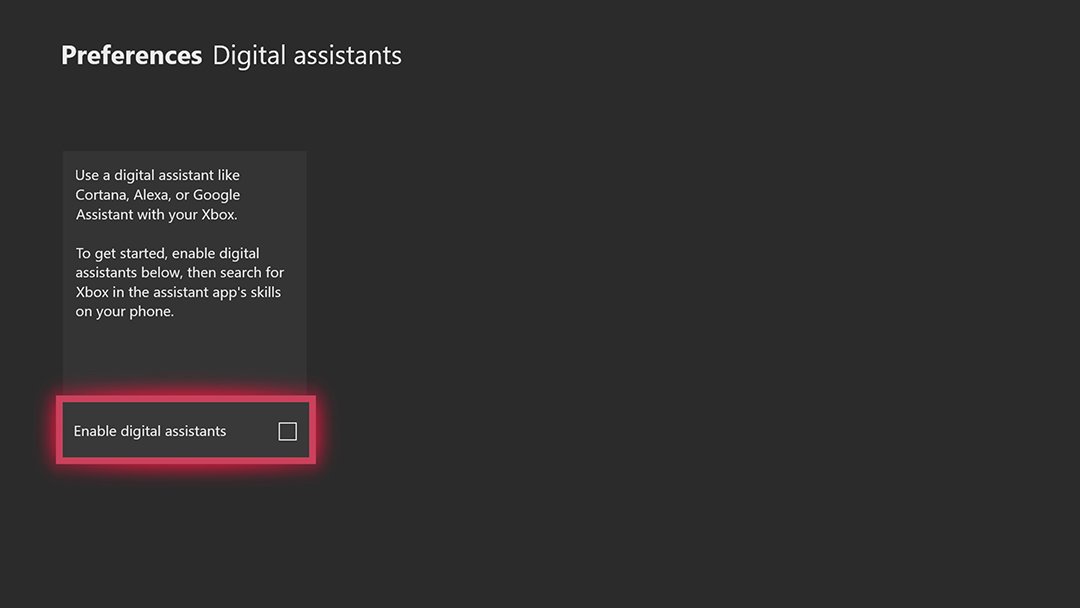
According to Windows Central, the Xbox One will soon support Amazon Alexa and Google Assistant, which should provide a decent alternative to Kinect for controlling your console via voice commands. Microsoft stopped manufacturing the Kinect in October of last year. From the report: This picture comes to us from a reliable source who is familiar with Amazon and Microsoft's efforts to link Alexa and Cortana. In upcoming Xbox One builds, the Kinect & Devices menu should have a new "Digital Assistants" section, which lets you enable Alexa, Google Assistant, and Cortana, for use on your Xbox One. It then directs you to install the Xbox skills app for those respective platforms to get connected. The full range of features for those assistants remains unknown, but it could bring back many of the voice-assisted features abandoned Kinect users are yearning for. -
Amazon Alexa and Google Assistant Are Coming To Xbox One (windowscentral.com)
According to Windows Central, the Xbox One will soon support Amazon Alexa and Google Assistant, which should provide a decent alternative to Kinect for controlling your console via voice commands. Microsoft stopped manufacturing the Kinect in October of last year. From the report: This picture comes to us from a reliable source who is familiar with Amazon and Microsoft's efforts to link Alexa and Cortana. In upcoming Xbox One builds, the Kinect & Devices menu should have a new "Digital Assistants" section, which lets you enable Alexa, Google Assistant, and Cortana, for use on your Xbox One. It then directs you to install the Xbox skills app for those respective platforms to get connected. The full range of features for those assistants remains unknown, but it could bring back many of the voice-assisted features abandoned Kinect users are yearning for. -
iTunes Now Available From the Microsoft Store For Windows 10 (windowscentral.com)
iTunes is now available in the Microsoft Store, almost a year after Microsoft first revealed it was working with Apple to get iTunes listed in the Store. Windows Central reports: For a portion of Windows 10 users, iTunes' appearance on the Microsoft Store may not matter much because they can use the standard desktop app. Where it will have an impact, however, is for anyone using Windows 10 S, which is locked down and only allows installation of apps from the Microsoft Store. For those users, the full desktop iTunes experience should be available here, complete with access to Apple Music streaming and iPhone syncing. -
Microsoft Touts Breakthrough In Making Chatbots More Conversational (windowscentral.com)
In a blog post today, Microsoft said that it has created what it believes is the "first technological breakthrough" toward making conversations with chatbots more like speaking to another person. Windows Central reports: Microsoft says that it has figured out how to make chatbots talk and listen at the same time, allowing them to operate in "full duplex," to use telecommunications jargon. The company says this allows chatbots or assistants to have a flowing conversation with humans, much more akin to how people talk to one another. That stands in contrast to how digital assistants and bots currently work, where only one side can talk at any given time. The technology is already up and running in Xiaolce, Microsoft's AI chatbot currently operating in China. Using "full duplex voice sense," as Microsoft calls it, Xiaolce can more quickly predict what the person it is speaking to will say. "That helps her make decisions about both how and when to respond to someone who is chatting with her, a skill set that is very natural to people but not yet common in chatbots," Microsoft says. Another bonus of the breakthrough is that people interacting with chatbots don't have to use a "wake word" every time they speak during a conversation. -
Microsoft Is Now Selling a Surface Laptop With An Intel Core m3 Processor For $799 (windowscentral.com)
Microsoft has begun offering a lower specced Surface laptop running Windows 10 S and an Intel Core m3 processor. It's priced at $799, compared to the standard model's $999 price, and is only available in the platinum color configuration. Windows Central reports: The Intel Core m3 spec is paired with 4GB of RAM and 128GB Storage. This is definitely not a high-end model of the Surface Laptop, but it's still a premium one, with the same Alcantara fabric and high-quality display found on other Surface Laptop SKUs. Microsoft offers an Intel Core m3 model of the Surface Pro priced at $799 also, however that SKU doesn't come bundled with a keyboard or pen. At least with the Surface Laptop, you're getting a keyboard and trackpad in the box, so perhaps the Intel Core m3 Laptop is going to be the better choice for many. If you're looking for a straight laptop by Microsoft, that is. Some other specs include a 2256 x 1504 resolution display, Intel HD graphics 615, 720p webcam with Windows Hello face-authentication, Omnisonic speakers with Dolby Audio Premium, one full-size USB 3.0 port, Mini DisplayPort, headphone jack and Surface Connect port. The device measures in a 12.13 inches x 8.79 inches x 0.57 inches and weighs 2.76 pounds. -
New Windows Search Interface Borrows Heavily From MacOS (arstechnica.com)
An anonymous reader quotes a report from Ars Technica: Press clover-space on a Mac (aka apple-space or command-space to Apple users) and you get a search box slap bang in the middle of the screen; type things into it and it'll show you all the things it can find that match. On Windows, you can do the same kind of thing -- hit the Windows key and then start typing -- but the results are shown in the bottom left of your screen, in the Start menu or Cortana pane. The latest insider build of Windows, build 17040 from last week, has a secret new search interface that looks a lot more Mac-like. Discovered by Italian blog Aggiornamenti Lumia, set a particular registry key and the search box appears in the middle of the screen. The registry key calls it "ImmersiveSearch" -- hit the dedicated key, and it shows a simple Fluent-designed search box and results. This solution looks and feels a lot like Spotlight on macOS. -
Microsoft Is Working On a Foldable Device With a Focus On Pen and Digital Ink (windowscentral.com)
Microsoft is reportedly working on a foldable device with an emphasis on pen and digital-ink functionality that runs Windows 10, and it could be here as soon as next year. The company is looking to create a new category-defining mobile device that's aimed at an entirely new demographic, and that puts pen and digital inking at the forefront of the experience. Windows Central reports: At Windows Central, we've been covering two ongoing internal projects within Microsoft: CShell and Windows Core OS. Both of these projects play an important part in Microsoft's next rumored mobile device, which appears to be commonly referred to as "Andromeda" on the web. According to our sources, the Andromeda device is prototype hardware; a foldable tablet that runs Windows 10 built with Windows Core OS, along with CShell to take advantage of its foldable display. I imagine CShell plays an important roll in the foldable aspect of this device. Considering it's foldable, being a tablet doesn't mean much, and I'm told it's designed to be pocketable when folded, kind of like a phone. I make the comparison to a phone because I'm also hearing that it also has telephony capabilities, meaning you could replace your actual smartphone with it and still be able to take calls and texts. My sources make it clear, however, that this is not supposed to be a smartphone replacement but rather a device similar to the canceled "Microsoft Courier." In short, Andromeda is a digital pocket notebook. -
Microsoft Is Working On a Foldable Device With a Focus On Pen and Digital Ink (windowscentral.com)
Microsoft is reportedly working on a foldable device with an emphasis on pen and digital-ink functionality that runs Windows 10, and it could be here as soon as next year. The company is looking to create a new category-defining mobile device that's aimed at an entirely new demographic, and that puts pen and digital inking at the forefront of the experience. Windows Central reports: At Windows Central, we've been covering two ongoing internal projects within Microsoft: CShell and Windows Core OS. Both of these projects play an important part in Microsoft's next rumored mobile device, which appears to be commonly referred to as "Andromeda" on the web. According to our sources, the Andromeda device is prototype hardware; a foldable tablet that runs Windows 10 built with Windows Core OS, along with CShell to take advantage of its foldable display. I imagine CShell plays an important roll in the foldable aspect of this device. Considering it's foldable, being a tablet doesn't mean much, and I'm told it's designed to be pocketable when folded, kind of like a phone. I make the comparison to a phone because I'm also hearing that it also has telephony capabilities, meaning you could replace your actual smartphone with it and still be able to take calls and texts. My sources make it clear, however, that this is not supposed to be a smartphone replacement but rather a device similar to the canceled "Microsoft Courier." In short, Andromeda is a digital pocket notebook. -
Microsoft Is Working On a Foldable Device With a Focus On Pen and Digital Ink (windowscentral.com)
Microsoft is reportedly working on a foldable device with an emphasis on pen and digital-ink functionality that runs Windows 10, and it could be here as soon as next year. The company is looking to create a new category-defining mobile device that's aimed at an entirely new demographic, and that puts pen and digital inking at the forefront of the experience. Windows Central reports: At Windows Central, we've been covering two ongoing internal projects within Microsoft: CShell and Windows Core OS. Both of these projects play an important part in Microsoft's next rumored mobile device, which appears to be commonly referred to as "Andromeda" on the web. According to our sources, the Andromeda device is prototype hardware; a foldable tablet that runs Windows 10 built with Windows Core OS, along with CShell to take advantage of its foldable display. I imagine CShell plays an important roll in the foldable aspect of this device. Considering it's foldable, being a tablet doesn't mean much, and I'm told it's designed to be pocketable when folded, kind of like a phone. I make the comparison to a phone because I'm also hearing that it also has telephony capabilities, meaning you could replace your actual smartphone with it and still be able to take calls and texts. My sources make it clear, however, that this is not supposed to be a smartphone replacement but rather a device similar to the canceled "Microsoft Courier." In short, Andromeda is a digital pocket notebook. -
Anticipating Samsung's AMOLED Mixed Reality Headset (windowscentral.com)
Eloking quotes Windows Central: At an event in San Francisco, HoloLens inventor Alex Kipman outlined the future of Windows Mixed Reality, which Redmond seems to believe is the future of computing. Whether or not it is remains to be seen, but either way, there will be no shortage of Windows Mixed Reality headsets this holiday season, with perhaps the most compelling option coming from Samsung.
The $500 Samsung HMD Odyssey sports dual AMOLED eye displays, complete with a 110-degree field of view. This could potentially make a huge difference in the quality of the Windows Mixed Reality experience for two reasons. First, AMOLED displays can generate deeper blacks and more vibrant colors than your average OLED or LCD screen. Second, all other Windows Mixed Reality headsets we've seen have a 95-degree FoV. The Samsung headset will be more immersive because there will be less dead space in your peripheral vision.
The headset -- which comes with motion controllers -- is expected to launch in one month. -
Ask Slashdot: Why Would Anyone Want To Spend $1,000 on a Smartphone?
Last month, Apple CEO Tim Cook said the $1,000 sticker price for the base model of iPhone X, the latest flagship smartphone from the company which goes on sale next month, is "a value price for the technology that you're getting." An anonymous reader writes: I simply don't understand why anyone would want to spend such amount on a phone. Don't get me wrong. Having a smartphone is crucial in this day and age. I get it. But even a $200 phone, untethered from any carrier contract, will let you install the apps you need, will allow you to take good pictures, surf the web, and listen to music. That handset might not be as fast as the iPhone X or Samsung's new Galaxy Note 8, or it might not be able to take as great pictures, but the difference, I feel, doesn't warrant an additional $800. The reader shares a column: When considering a purchase, comparing the value a product will add to our lives, and its cost is wise. Subjective perceptions affect how we value possessions, but let's consider the practical value of how we use smartphones. Smartphones aren't used for talking as often as the phones that preceded them were. In fact, actual "phone" use ranks below messaging, web surfing, social media and other activities that dominate smartphone usage. Furthermore, statistically we use only six core apps regularly. [...] My point is, smartphones have't changed all that much relatively speaking. Sure they're bigger, faster, more powerful and have awesome cameras. But the iPhone X is fundamentally the same device the earlier iPhones were, and provides the same basic and sought after functions. It's a glass-covered rectangular slab mostly used for messaging, web-surfing, music and social media activity. An individual's perception of self, financial resources, desired or actual social position and love for tech will likely play a role in his perception of the value of a $1,000 smartphone. -
Ask Slashdot: What Can You Do With An Old Windows Phone?
Slashdot reader unixisc writes: While it's always been well known that Windows phones in the market have floundered, one saving grace has always been that one could at least use it for the barest minimum of apps, even if updates have stopped... Aside from a door stop or a hand me down to someone who'll use it like a dumb phone, what are your suggested uses for this phone? A music player (if the songs are on an SD card)? Games? As far as phones go, I have what I need, so for this, anything it's good for?
The original submission suggests problems connecting to wi-ifi -- something partially corroborated by complaints at Windows Central -- though Microsoft's site says they're still supporting wifi connections.
Slashdot reader thegreatbob suggested "shuffleboard puck" -- then added, "Snark aside, if you're into writing custom applications and such for them, there's probably a bootloader/root solution for you out there."
Leave your own best suggestions in the comments. What can you do with an old Windows Phone? -
Microsoft's Windows Phone Keyboard For the iPhone Is Dead (theverge.com)
Microsoft's Word Flow keyboard for the iPhone had one unique feature when it launched more than a year ago: a one-handed mode that could be used with either your left or right thumb. Now, according to a support note spotted by Windows Central, it appears Microsoft is consolidating and removing the keyboard from the App Store, encouraging users to download SwiftKey instead. The Verge reports: Microsoft has tested out a number of iOS keyboards, and it now appears the company is focusing solely on SwiftKey after acquiring the app last year. We haven't seen any major additions to SwitftKey since Microsoft acquired it, apart from a separate Swiftmoji emoji predictor in July last year. Microsoft's SwiftKey keyboard now competes against the likes of Google's Gboard keyboard and various other iOS and Android keyboards. Have you been using Word Flow on your iPhone? If so, what has your experience been with the application? Do you plan on switching to Gboard or another third-party keyboard now that Word Flow is no longer supported? -
Ubuntu Is Now Available On the Windows Store (windowscentral.com)
Ubuntu is now available for download on the Windows Store. "Initially spotted by Rafael Rivera and Necrosoft Core on Twitter, Ubuntu on the Windows Store will let you install and run the Ubuntu terminal on Windows next to your other apps," reports Windows Central. From the report: Ubuntu's arrival, and that of SUSE, are part of a recent push by Microsoft to embrace Linux and the open source community more broadly. This began with the arrival of the Windows Subsystem for Linux in 2016, allowing users to use the Bash shell from within Windows. Keep in mind that this is limited to the Fall Creators Update, which isn't set for a public release until later this year. If you're running a PC testing the Fall Creators Update through the Windows Insider Program, however, you should be able to download and try Ubuntu from the Windows Store just fine. -
Intel Drops Thunderbolt 3 Royalty, Adds CPU Integration and Works Closely With Microsoft (windowscentral.com)
An anonymous reader quotes a report from Windows Central: Over the last few days, Thunderbolt 3 has been a hot topic amongst Windows users especially with its notable absence with the new Surface Pro and Surface Laptop. Part of the problem is adoption, integration, cost, and consumer confusion according to Microsoft. Intel is aware of the current roadblocks to Thunderbolt 3 implementation, which adds 40Gbps data transfers along with charging and display support for USB Type-C. Today, the company announced numerous changes to its roadmap to speed up its adoption, including: Dropping royalty fees for the Thunderbolt protocol specification starting next year; Integrating Thunderbolt 3 into future Intel CPUs. The good news here is that Intel is dropping many of the roadblocks with today's announcement. By subtracting the licensing costs for Thunderbolt 3 and integrating into the CPU, Intel can finally push mass adoption. Getting back to Microsoft, Intel noted that the two companies are already working closely together with the latest Creators Update bringing more OS support for the protocol. Roanne Sones, general manager, Strategy, and Ecosystem for Windows and Devices at Microsoft added that such cooperation would continue with even more OS-level integration coming down the road. -
Leaked Document Sheds Light On Microsoft's Chromebook Rival (windowscentral.com)
Microsoft has announced plans to host an event next month where it is expected to unveil Windows 10 Cloud operating system. Microsoft will be positioning the new OS as a competitor to Chrome OS, according to several reports. Windows Central has obtained an internal document which sheds light on the kind of devices that will be running Windows 10 Cloud. The hardware requirement that Microsoft has set for third-party OEMs is as follows: 1. Quad-core (Celeron or better) processor.
2. 4GB of RAM.
3. 32GB of storage (64GB for 64-bit). 4. A battery larger than 40 WHr.
5. Fast eMMC or solid state drive (SSD) for storage technology.
6. Pen and touch (optional). The report adds that Microsoft wants these laptops to offer over 10-hour of battery life, and the "cold boot" should not take longer than 20 seconds. -
Microsoft Experimenting Tabs Experience On File Explorer, Other Apps On Windows 10 (windowscentral.com)
Microsoft has begun experimenting with browser tabbing experience on all apps in Windows 10, including File Explorer. From a report on WindowsCentral: According to sources familiar with the matter, Microsoft is currently experimenting internally with a new feature called "Tabbed Shell", which brings the familiar browser tabbing module to all app windows in Windows 10, including the File Explorer. Per our sources, Tabbed Shell is a feature being worked on at an OS level, and doesn't require work from app developers to take advantage of it. By default, Tabbed Shell works with any app window, whether it be Photoshop, File Explorer, or Microsoft Word. Any UWP, Win32 or Centennial app will work. Much like in Edge, you'll find a tabbed interface at the top of a window where you can switch between instances of the same app. -
Microsoft's Project Scorpio Will Pack Internal PSU, 4K Game DVR Capture (windowscentral.com)
According to an exclusive report from Windows Central, Microsoft's upcoming "Project Scorpio" gaming console will feature an internal power supply unit (PSU), similar to the Xbox One S, and 4K game DVR and streaming at 60 frames-per-second (FPS). From the report: In Microsoft's efforts to make Project Scorpio a true 4K system, it will also feature HEVC and VP9 codecs for decoding 4K streams for things such Netflix, just like the Xbox One S. It will also leverage HEVC for encoding 2160p, 60 frame-per-second (FPS) video for Game DVR and streaming. Microsoft's Beam streaming service has been running public 4K stream tests for some time, and it's now fair to assume it will not only be PC streamers who will benefit. Project Scorpio's Game DVR will allow you to stream and record clips in 4K resolution with 60FPS, according to our sources, which is a massive, massive step up from the 720p, 30FPS you get on the current Xbox One. With every bit of information we receive about Project Scorpio, the theme of native 4K keeps appearing -- not only for games, but also console features. We now believe Scorpio will sport 4K Game DVR, 4K Blu-ray playback, and 4K streaming apps, but the real showstopper will be the 4K games Microsoft will likely flaunt at E3 2017. -
Microsoft Teases Windows 10's Upcoming 'Project Neon' Design Language (windowscentral.com)
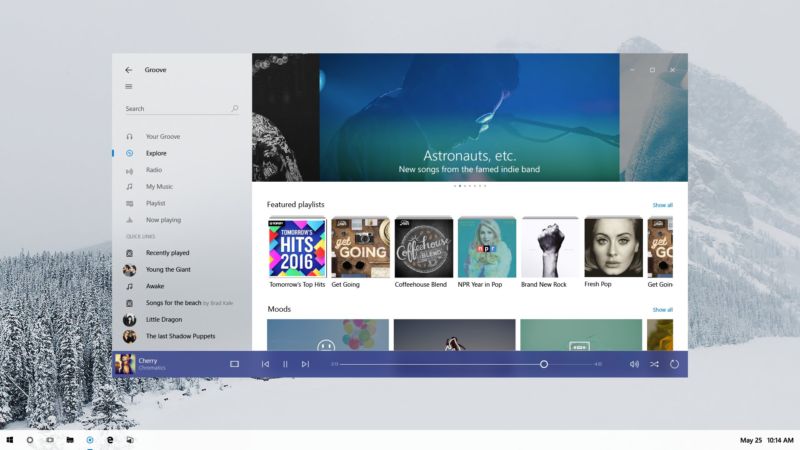
An anonymous reader quotes a report from Windows Central: Microsoft just gave developers a sneak peek at Project Neon, Microsoft's upcoming design language for Windows 10 that aims to add fluidity, animation and blur to apps and the operating system. We exclusively revealed that this was in the works in late 2016, and today Microsoft has given us a first peak at what Project Neon will look like. During the Windows Developer Day livestream, an image of Project Neon was seen the background of one of the PowerPoint slides being shown off on stage. Although not much, it's further confirmation that this is the end goal for Windows 10's UI, and Project Neon will be bringing a fresh coat of paint to apps. Project Neon should benefit all types of Windows 10 devices, including Windows 10 Mobile, HoloLens and even Xbox. We're still several months away from Project Neon being everywhere in Windows 10, and we're expecting to see more at BUILD this coming May. In fact, a lot of the Project Neon APIs are available in the latest Insider Preview builds of Windows 10, meaning developers can already begin taking advantage of these new user interfaces and design language! Animations and transitions are a big deal with Project Neon, with the goal of making the operating system and apps feel like they work together. Peter Bright does a good job summarizing the looks of the screenshot via Ars Technica: "The picture shows a refreshed version of the Groove music app on a Windows desktop. The fundamentals of the app and its layout aren't changed, underscoring that Neon is very much an iteration of the current Metro/Microsoft Design Language (MDL). The window has shed its discrete title bar and one pixel border, with the application content now extending to the very edge of the window. The search text field no longer has a box around it, and the left hand pane has a hint of translucency to it." You can view the screenshot here and judge it for yourself. -
Windows 10 Will Soon Lock Your PC When You Step Away From It (theverge.com)
An anonymous reader quotes a report from The Verge: Microsoft is working on a new Windows 10 feature that will automatically lock and secure a PC when the operating system detects someone has moved away from the machine. The feature is labelled as Dynamic Lock in recent test builds of Windows 10, and Windows Central reports that Microsoft refers to this as "Windows Goodbye" internally. Microsoft currently uses special Windows Hello cameras to let Windows 10 users log into a PC with just their face. Big corporations teach employees to use the winkey+L combination to lock machines when they're idle, but this new feature will make it an automatic process. It's not clear exactly how Microsoft will detect inactivity, but it's possible the company could use Windows Hello-compatible machines or detect idle activity and lock the machine accordingly. Windows can already be configured to do this after a set time period, but it appears Microsoft is streamlining this feature into a simple setting for anyone to enable. Microsoft is planning to deliver Dynamic Lock as part of the Windows 10 Creators Update, expected to arrive in April. -
Microsoft Formally Introduces Zo, Its Latest AI-Powered Chatbot (windowscentral.com)
An anonymous reader quotes a report from Windows Central: Microsoft is surging forward with its commitment to artificial intelligence (AI), formally announcing its latest chatbot, Zo. In a post outlining its commitment to AI, Microsoft introduced Zo as the next chapter in the evolution of its attempts to create a social chatbot. Zo is built on the back of the same technology that powers Microsoft's other chatbots in China and Japan, Xiaoice and Rinna. Zo is meant to learn from her interactions with humans, and is able to respond to conversations with her own personality. In a nod to an awkward turn of events involving Microsoft's last attempt at a social chatbot, Tay, the company notes that Zo has guards in place to prevent exploitation. While you can currently only strike up a conversation with Zo on Kik messenger, Microsoft says it has plans to bring the chatbot to Skype and Facebook Messenger as well. Still, if you use Kik, you can start a conversation up with Zo now. Otherwise, head to Zo.ai to request an invite to chat with the bot on Messenger when it's available. -
Xbox One Games Arrive On Oculus Rift With New Streaming App (theverge.com)
Microsoft has released its Xbox One streaming app to the Oculus Store today, allowing Xbox One owners to stream games to their Oculus Rift virtual-reality headset via a Windows 10 PC. The Verge reports: The app itself looks just like the Windows 10 version of Xbox streaming, with the ability to select different consoles on a network before streams are launched. Microsoft has also added the ability to open the Xbox One guide and control the orientation of games in the virtual environment. If you're interested in streaming Xbox One games to the Oculus Rift then you'll need a Windows PC to take advantage of the streaming, and games will be streamed directly from a console that's powered on and not in use. The Xbox streaming app is available immediately in the Oculus Store. The streaming app is a far cry from full VR gaming, but the app will let you simulate playing games on a large screen in a virtual environment. "Whether you're taking on Gears of War 4, Forza Horizon 3, or any other Xbox One game, you'll be able to play in three different environments from the start -- each titled 'Citadel,' 'Retreat,' and 'Dome,'" reports Windows Central. -
Windows 10 'Home Hub' Is Microsoft's Response To Amazon Echo and Google Home (mashable.com)
Microsoft's response to the Amazon Echo and Google Home is Home Hub, a software update for Windows 10's Cortana personal assistant that turns any Windows PC into a smart speaker of sorts. Mashable reports: Microsoft's smart digital assistant Cortana can already answer your queries, even if the PC's screen is locked. The Home Hub is tied to Cortana and takes this a few steps further. It would add a special app with features such as calendar appointments, sticky notes and shopping lists. A Home Hub-enabled PC might have a Welcome Screen, a full-screen app that displays all these, like a virtual fridge door. Multiple users (i.e. family members) could use the Home Hub, either by authenticating through Windows Hello or by working in a family-shared account. Cortana would get more powerful on Home Hub; it could, for example, control smart home devices, such as lights and locks. And even though all of this will work on any Windows 10 device -- potentially making the PC the center of your smart home experience -- third-party manufacturers will be able to build devices that work with Home Hub. You can read Windows Central's massive report here. Do note that Home Hub is not official and individual features could change over time. The update is slated for 2017. -
Microsoft Is Working On a New Design Language For Windows 10 Codenamed Project NEON (windowscentral.com)
An anonymous reader quotes a report from Windows Central: Microsoft has made several adjustments to its design language over the last few years, starting with Windows 8 and evolving into what we now know as "Microsoft Design Language 2" or MDL2 in Windows 10. With MDL2 being the current design language used throughout Windows 10, Microsoft has plans to begin using a much more streamlined design language with Redstone 3, codenamed Project NEON. Cassim Ketfi at Numerama.com confirms our information and has heard Project NEON called "basically Metro 2." That designation refers to the first Metro design language (nee Modern) that harkens to Windows Media Center up through Windows Phone 7 and Windows 8. Per our sources, Project NEON has been in the works for over a year internally at Microsoft. It builds upon the design language introduced with Windows 10, with its simple and clean interfaces, but adds some much-needed flair to the UI that the current design language just lacks. Details are still scarce, but we hear some of the new designs in the plans include adding more animations and transitions, with the overall goal of making the UI very fluid and "beautiful" compared to the current, almost static UI that is MDL2. One source familiar with Microsoft's plans described NEON as "Very fluid, lots of motion and nice transitions." Some more information about NEON reveals that it serves as a bridge between holographic and augmented reality (AR) and the desktop environment. It's a "UI that transports across devices" with a UX that maps to the physical world. It uses textures, 3D models, lighting and more. -
Microsoft Is Working On a New Design Language For Windows 10 Codenamed Project NEON (windowscentral.com)
An anonymous reader quotes a report from Windows Central: Microsoft has made several adjustments to its design language over the last few years, starting with Windows 8 and evolving into what we now know as "Microsoft Design Language 2" or MDL2 in Windows 10. With MDL2 being the current design language used throughout Windows 10, Microsoft has plans to begin using a much more streamlined design language with Redstone 3, codenamed Project NEON. Cassim Ketfi at Numerama.com confirms our information and has heard Project NEON called "basically Metro 2." That designation refers to the first Metro design language (nee Modern) that harkens to Windows Media Center up through Windows Phone 7 and Windows 8. Per our sources, Project NEON has been in the works for over a year internally at Microsoft. It builds upon the design language introduced with Windows 10, with its simple and clean interfaces, but adds some much-needed flair to the UI that the current design language just lacks. Details are still scarce, but we hear some of the new designs in the plans include adding more animations and transitions, with the overall goal of making the UI very fluid and "beautiful" compared to the current, almost static UI that is MDL2. One source familiar with Microsoft's plans described NEON as "Very fluid, lots of motion and nice transitions." Some more information about NEON reveals that it serves as a bridge between holographic and augmented reality (AR) and the desktop environment. It's a "UI that transports across devices" with a UX that maps to the physical world. It uses textures, 3D models, lighting and more. -
Microsoft Is Working On a New Design Language For Windows 10 Codenamed Project NEON (windowscentral.com)
An anonymous reader quotes a report from Windows Central: Microsoft has made several adjustments to its design language over the last few years, starting with Windows 8 and evolving into what we now know as "Microsoft Design Language 2" or MDL2 in Windows 10. With MDL2 being the current design language used throughout Windows 10, Microsoft has plans to begin using a much more streamlined design language with Redstone 3, codenamed Project NEON. Cassim Ketfi at Numerama.com confirms our information and has heard Project NEON called "basically Metro 2." That designation refers to the first Metro design language (nee Modern) that harkens to Windows Media Center up through Windows Phone 7 and Windows 8. Per our sources, Project NEON has been in the works for over a year internally at Microsoft. It builds upon the design language introduced with Windows 10, with its simple and clean interfaces, but adds some much-needed flair to the UI that the current design language just lacks. Details are still scarce, but we hear some of the new designs in the plans include adding more animations and transitions, with the overall goal of making the UI very fluid and "beautiful" compared to the current, almost static UI that is MDL2. One source familiar with Microsoft's plans described NEON as "Very fluid, lots of motion and nice transitions." Some more information about NEON reveals that it serves as a bridge between holographic and augmented reality (AR) and the desktop environment. It's a "UI that transports across devices" with a UX that maps to the physical world. It uses textures, 3D models, lighting and more. -
Windows 10's Store Locks 'Call of Duty' Purchasers Into Windows-10-Only Battles (vice.com)
An anonymous reader writes: Two Call of Duty games have been remastered for Windows 10, but if you buy them through the Windows 10 Store there's a problem. "Windows 10 Store players will be isolated from other PC versions of the game," reports the Windows Central site, noting a statement from Microsoft which implies that the decision was made by Activision.
"For unknown reasons, Windows 10 Store customers are segregated from customers who bought the game from Steam, which is by far the most popular platform on PC," reports Motherboard. "Call of Duty fans who made the unfortunate of mistake of giving Microsoft their cash are left sitting in lonely multiplayer lobbies waiting for games that'll never start."
Motherboard reports that at least one player successfully requested a refund, calling the situation "another black eye for a digital storefront that PC gamers already avoid like the plague." -
Google Uses Surface Books To Show Off Chrome Battery Improvements (windowscentral.com)
An anonymous reader quotes a report from Windows Central: Google has posted a new video showing how much it has improved battery life while using Chrome on Windows. It demonstrated those changes in a video that featured the web browser on Microsoft's Surface Book notebooks. The video test was based on running a Vimeo video on Chrome 46, which was released in 2015, and the same video running on Chrome 53, which was released last week. The Surface Book with Chrome 46 ran out of battery power after 8 hours and 27 minutes, while the same notebook running Chrome 53 shut down in 10 hours and 39 minutes, or over 2 hours later. Chrome 53 also features Material Design, a user interface that "makes more liberal use of grid-based layouts, responsive animations and transitions, padding, and depth effects such as lighting and shadows." You can force the update to Chrome 53 by navigating to the about section of Chrome. -
Microsoft Targets The iMac With New All-In-One Surface PCs, Reports Say (networkworld.com)
New submitter Miche67 writes: Two reports say Microsoft is working on an all-in-one (AIO) PC under the Surface brand. If that's true, it would put it in competition with HP and Dell, which have their own AIO lines, as well as put it in competition with Apple's iMac. Network World reports: "Both DigiTimes and Windows Central picked up on the story, each citing their own sources. DigiTimes, a Taiwan-based publication with connections to the PC industry over there (but also a very mixed record of accuracy) said the new devices would come in the third quarter of this year. Windows Central, which is a little better when it comes to rumors, said it did not have a solid release date." Business Insider was able to find a patent filing by Microsoft for a desktop PC that supports the rumored AIO design. "The device is evidently targeting a 'modern and elegant' design and is meant to be something akin to a premium appliance or furniture," Windows Central wrote. Intel's release date of the new Kaby Lake line of processors around Q3 of this year complicates things. While Kaby Lake is said to be more mobile-friendly with less power consumption and heat, they would make for a good choice for an AIO machine. However, it would be pushing it for Microsoft to release its AIO machines in the same quarter that Kaby Lake is due. On a semi-related note, a programmer at Building 88 recently confirmed that Microsoft will release Surface 5 devices next year powered by Kaby Lake processors. He posted pictures of four device holders marked "2017" on his Twitter account. -
Microsoft Removes 260-Character Path Length Limit In Windows 10 Redstone (softpedia.com)
An anonymous reader quotes a report from Softpedia: Windows 10 build 14352, a preview version of the upcoming Anniversary Update (also known as Redstone), comes with an eagerly awaited change that Microsoft hasn't yet announced publicly. The 260-character path length limit in Windows can be removed with the help of a new policy, thus allowing you to run operations with files regardless of their path or file name. While this new rule is not enabled by default, admins can turn it on by following these instructions. Launch the Registry Editor by clicking the Start menu and typing "regedit.exe," and then navigate to the following path: HKEY_CURRENT_USER\SOFTWARE\Microsoft\Windows\CurrentVersion\Group Policy Objects\{48981759-12F2-42A6-A048-028B3973495F}Machine\System\CurrentControlSet\Policies. Look for an entry called "LongPathsEnabled," and if it does not exist, simply right-click Policies, select New DWORD (32-bit), name it "LongPathsEnabled" (without the quotes), enter value 1, and you're good to go. The description of the preview reads, "Enabling NTFS long paths will allow manifested win32 applications and Windows Store applications to access paths beyond the normal 260 char limit per node. Enabling this setting will cause the long paths to be accessible within the process." While the Windows 10 preview build 1452 has been made available last week, according to Windows Central, a Microsoft team member says that the company could released Windows 10 Mobile build 14352 for Insiders on Tuesday, May 31. -
Microsoft Improves Efforts To Offer Equal Pay For Equal Work To Its Employees (windowscentral.com)
An anonymous reader writes: One day before National Equal Pay Day, Microsoft has provided a new update on its efforts to provide equal pay for equal work for all of its employees. Kathleen Hogan, Microsoft's Executive Vice-President for Human Resources, wrote in a blog post: "Today, for every $1 earned by men, our female employees in the U.S. earn 99.8 cents at the same job title and level. Racial and ethnic minorities in the U.S. combined earn $1.004 for every $1 earned by their Caucasian counterparts. Breaking it down even further, African American/black employees are at $1.003; Hispanic/Latino(a) employees are at 99.9 cents; and Asian employees are at $1.006 for every $1 earned by Caucasian employees at the same job title and level, respectively." Hogan said she is "encouraged by these results" and that Microsoft will continue to monitor the data and publicly disclose it as part of Microsoft's annual public diversity and inclusion information and data reporting. "Our announcement today is another step forward along the path of greater diversity and inclusion progress at Microsoft, and in society as a whole. Along with our industry peers, the mission of landing intentional, enduring and impactful diversity and inclusion initiatives is one will we continue to pursue vigilantly." -
Microsoft Asks If You'd Be Happy With Selling Back Digital Xbox One Games For 10% (windowscentral.com)
An anonymous reader writes: A recent survey from Microsoft has asked the community whether or not they would want a feature allowing them to sell back their digital games, just like you would a physical disc at GameStop. Unfortunately, the trade-in price for said digital content is 10-percent of what you paid at the point of purchase in store credit. While this is just a survey and doesn't mean the feature is coming to the Xbox platform, it does show Microsoft is actively pursuing the idea. -
Universal Remote Desktop Coming To Windows 10 Soon
jones_supa writes: For those using the Continuum feature of Windows and who work from home or in the office, you'll be pleased to know that the Remote Desktop Universal app is not only happening but will be released soon as a Technical Preview. This follows up on the Remote Desktop preview, which is already available for PC. The news came from Jason of the Microsoft Continuum team: "We've heard a lot of buzz around being able to connect to a remote desktop from Continuum for phone. We are excited to share that the Remote Desktop Universal Windows Platform (UWP) app will be released very soon in Technical Preview." -
Microsoft's Skype Drops Modern App In Favour of Old-Fashioned Win32 App
mikejuk writes: Microsoft, after putting a lot of effort into persuading us that Universal Apps are the way of the future, pulls the plug on Skype modern app, to leave just the desktop version. Skype is one of Microsoft's flagship products and it has been available as a desktop Win32 app and as a Modern/Metro/WinRT app for some time. You would think that Skype would support Universal Apps, there are few enough of them — but no. According to the Skype blog: 'Starting on July 7, we're updating PC users of the Windows modern application to the Windows desktop application, and retiring the modern application.' Microsoft is pushing Windows 10 Universal Apps as the development platform for now and the future, but its Skype team have just disagreed big time. If Microsoft can't get behind the plan why should developers? (Also at Windows Central and VentureBeat.)