Slashdot Mirror


Microsoft Teases Windows 10's Upcoming 'Project Neon' Design Language (windowscentral.com)

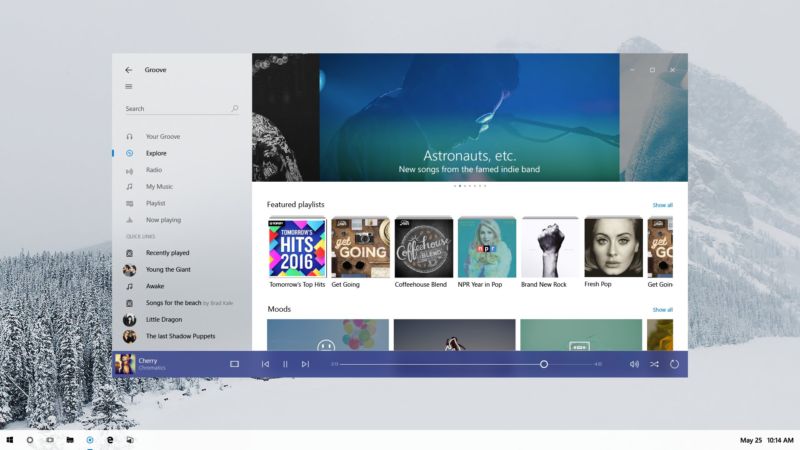
An anonymous reader quotes a report from Windows Central: Microsoft just gave developers a sneak peek at Project Neon, Microsoft's upcoming design language for Windows 10 that aims to add fluidity, animation and blur to apps and the operating system. We exclusively revealed that this was in the works in late 2016, and today Microsoft has given us a first peak at what Project Neon will look like. During the Windows Developer Day livestream, an image of Project Neon was seen the background of one of the PowerPoint slides being shown off on stage. Although not much, it's further confirmation that this is the end goal for Windows 10's UI, and Project Neon will be bringing a fresh coat of paint to apps. Project Neon should benefit all types of Windows 10 devices, including Windows 10 Mobile, HoloLens and even Xbox. We're still several months away from Project Neon being everywhere in Windows 10, and we're expecting to see more at BUILD this coming May. In fact, a lot of the Project Neon APIs are available in the latest Insider Preview builds of Windows 10, meaning developers can already begin taking advantage of these new user interfaces and design language! Animations and transitions are a big deal with Project Neon, with the goal of making the operating system and apps feel like they work together. Peter Bright does a good job summarizing the looks of the screenshot via Ars Technica: "The picture shows a refreshed version of the Groove music app on a Windows desktop. The fundamentals of the app and its layout aren't changed, underscoring that Neon is very much an iteration of the current Metro/Microsoft Design Language (MDL). The window has shed its discrete title bar and one pixel border, with the application content now extending to the very edge of the window. The search text field no longer has a box around it, and the left hand pane has a hint of translucency to it." You can view the screenshot here and judge it for yourself.
83 of 139 comments (clear)

  1. Dear Microsoft by Anonymous Coward · · Score: 1

    Please fix the mass of significant issues present in the base operating system before diverting your dwindling QA resources to non-critical things.

  2. Re:Windows 10 by coastwalker · · Score: 1

    And will this moronic eye candy get in the way of the traditional desktop user as well? So long as I can turn the poxy animations off I will be happy.

    --
    Facts are history now plebs have politics for religion on social media.
  3. Language? by TechyImmigrant · · Score: 1

    What do they mean by 'Design Language?'

    I see no verbs, nouns, adjectives, operators, variables, constants or other things than characterize a language whether human or programming.

    --
    I should use this sig to advertise my book ISBN-13 : 978-1501515132.
    1. Re:Language? by Hognoxious · · Score: 3

      I studied design (admittedly not as a major and many moons ago) and I've no fucking idea what one is either.

      Given what utter knobheads the UX herd are it probably means something entirely vague, utterly meaningless, or both.

      --
      Confucius say, "Find worm in apple - bad. Find half a worm - worse."
    2. Re: Language? by Anonymous Coward · · Score: 3, Informative

      This is the new, hip phrase for "style guide". The use of the word "design" makes you think that you'll encounter stuff that is well thought out and helps you accomplish tasks rather than gratuitous meddling with the look and feel plus the removal of real design elements such as signifiers.

    3. Re:Language? by unixisc · · Score: 1

      Think, and it will appear!!! That's what they mean by a 'language'

    4. Re:Language? by spire3661 · · Score: 1

      You are kidding right?

      https://en.wikipedia.org/wiki/...

      Its a way of providing UX in a consistent way across many different contributors.

      --
      Good-bye
    5. Re:Language? by Hognoxious · · Score: 1

      Remind me not to go to your school then. design langauge is all the look of the thing. The Wii's design langauge

      They wouldn't have you. It was an entry requirement to be able to spell common words properly, or failing that to copy and paste them.

      --
      Confucius say, "Find worm in apple - bad. Find half a worm - worse."
    6. Re:Language? by WaffleMonster · · Score: 2

      You are kidding right?

      Its a way of providing UX in a consistent way across many different contributors.

      In the real world with companies like Microsoft constantly changing their "design language" to make their products look new and different what you actually end up with is pointless confusion and inconsistent interfaces with nothing substantive to show for it in return.

    7. Re: Language? by thebullshitpatrol · · Score: 1

      got em XDDDDD

      if you are are a designer and don't know what "design language" means, i'm more concerned for you than him.

    8. Re:Language? by rtb61 · · Score: 1

      Arty farty cool language and crap because they are a bunch of sick privacy invasive control freak perves and that doesn't sell nothing to no one except psychopath autocrats to control and abuse the nobodies, us. Selling the M$ brand is getting harder and harder by the day, they are screwed.

      --
      Chaos - everything, everywhere, everywhen
    9. Re: Language? by Hognoxious · · Score: 1

      Where did I say I was a designer? Wild guess: uou're an UXtard.

      --
      Confucius say, "Find worm in apple - bad. Find half a worm - worse."
    10. Re: Language? by Hognoxious · · Score: 1

      He doesn't know, but he thinks the answer is "Picton blue text on a Malibu background".

      --
      Confucius say, "Find worm in apple - bad. Find half a worm - worse."
    11. Re: Language? by Hognoxious · · Score: 1

      How would that help with arthritis?

      --
      Confucius say, "Find worm in apple - bad. Find half a worm - worse."
    12. Re: Language? by Hognoxious · · Score: 1

      Tuppenny wine in a ten-shilling bottle, like everything else tainted by the curse of UX.

      --
      Confucius say, "Find worm in apple - bad. Find half a worm - worse."
    13. Re:Language? by TechyImmigrant · · Score: 1

      Remind me not to go to your school then. design langauge is all the look of the thing. The Wii's design langauge was all boxy with the bevelled off corner; Apple's has changed over the years but it's always had some.

      It's not exactly a new term, having been around since the early 1990s at least, if not older.

      The kind of words they are are looking for are "visual style" or "appearance". English has perfectly good words for that. You don't need to use words that mean something else.

      --
      I should use this sig to advertise my book ISBN-13 : 978-1501515132.
    14. Re: Language? by TechyImmigrant · · Score: 1

      I'm not a designer (not a visual or UX designer at least) but I do know what the word language means. I use a number of languages when I'm designing chips or software. I use languages when talking to people or writing. I have seen the term 'design language' in the context of computer languages for designing things. So I'm reasonably clear on what design language means.

      If the one's who can't to mathematics starts adopting the wrong words for things, well that's a symptom, not a cause.

      --
      I should use this sig to advertise my book ISBN-13 : 978-1501515132.
  4. Finally by dhuv · · Score: 1

    I know they have been trying for a *long* time to get the UI to a place where it is functional, looks clean and doesn't piss people off.

    I have not used Windows on the desktop for at least a decade and don't plan on going back, but competition is always good.

    I also hope that the Elementary OS guys get some inspiration from this. I use macOS now but open up my old Thinkpad just to check it out every once in a while.

    1. Re:Finally by Hognoxious · · Score: 2

      I know they have been trying for a *long* time to get the UI to a place where it is functional, looks clean and doesn't piss people off.

      If they were trying you'd expect them to have made some progress.

      Functionality fell by the wayside when the UXtards moved in.

      --
      Confucius say, "Find worm in apple - bad. Find half a worm - worse."
  5. So even worse than before? by Anonymous Coward · · Score: 5, Insightful

    So... "shed its discrete title bar and one pixel border"... "content ... to the very edge of the window"... "search text field no longer has a box". Sounds (and looks) to me like they've just regressed still further into the tiled layout, hey let's just make everything look like a congealed mess of applications and graphics with no visual cues as to which app belongs to what style of design. Just what the world needs (or not). Oh, and "hint of translucency to it" just to add some vista bleh to the mix (though to be honest I don't mind translucency and a bit of window animation so long as it doesn't hurt performance too much).

    Clearly we've moved from the innovation and real development stage of UI design to stagnation and deck-chair shuffling phase.

    1. Re:So even worse than before? by blackest_k · · Score: 1

      To be fair the screenshot was pretty clear where the limits of the application are, with less dead screen area. Something that i'm finding increasingly annoying.

      Take PDF files for example, why are they Portrait when most screens are landscape? The font sizes are designed for a page size typically 50% taller than your screen. So getting a page on screen means the fonts are uncomfortably small. The next issue is margins typically an inch round the page is white space! For a bit of paper that is fine we don't want to be reading into the spine of a book and we don't want ink transferring to our fingers. But on a screen it already has a bezel margins are just doubling up on margins and making the content smaller and harder to read.

      The real failure is when you just give up and print out the page ...

      So Yeah i'm in favour of making better use of screens and you don't need to draw borders round things a small difference in tone or texture is enough. maybe not even that usually if you need to write in a text area the cursor goes to the top left position any way.

      I detest the downward scroll that we seem obsessed with if there isn't enough space on the first page make a second page. it's simple.

    2. Re:So even worse than before? by Anonymous Coward · · Score: 2, Insightful

      Somebody needs to take today's UI "design language" designers out back and smack them around a little. No need to break any bones, but bruises and a little blood wouldn't be amiss. Then introduce them to the likes of Motif. Make it clear that they understand that window borders should be discernible; that control elements like buttons and checkboxes should be unmistakably identifiable; that there should be reasonable contrast between text elements and background. The UI doesn't necessarily need to be as sharply boxy and as blandly-colored as Motif, but until they can explain, in clear, simple terms, why why today's fugly, flat, bland (iOS/Android)/gaudy (Windows) UIs suck in their "design language" by comparison, they should be beaten^W interrogated with enthusiastic enhancement.

      Motif and UIs from that era may look old and boring today, but at least you knew exactly what UI elements you were dealing with. I'll take that over the gaudy, boxy crap Microsoft puked up with Window 8/10 or the low-contrast, flat blandness that iOS, Android, and to a large degree macOS have become.

  6. Removal of visual cues by smooth+wombat · · Score: 5, Insightful

    The search text field no longer has a box around it, and the left hand pane has a hint of translucency to it.

    In other words, making it more difficult for people to figure out where the box is located to do anything. What next, will the search box be made 90% translucent and float around your screen?

    --
    We will bankrupt ourselves in the vain search for absolute security. -- Dwight D. Eisenhower
    1. Re: Removal of visual cues by Anonymous Coward · · Score: 2, Interesting

      They could make it invisible until you mouse over it. Another good idea would be to put the field label in the field itself since space on a 1080 monitor is so limited.

    2. Re:Removal of visual cues by thegarbz · · Score: 1

      It doesn't need to be a box to have visual cues. I mean if you have trouble with the word "Search" a big line indicating there's something to do there, and a very obvious magnifying glass then it sounds like you won't be happy until you get Clippy coming up with "I think you want to search something, here, let me drag your mouse cursor to the place for you".

      Seriously there's so much to complain about in terms of lost visual cues, and the only thing you got is the one element on the screen that is incredibly frigging obvious? Next time maybe try:

      • - The title Groove for the App with a back arrow, but it's the App name so where the hell is that arrow supposed to go
      • - The "tabs" on the left are in the same list type format as the links below it, I'm betting they don't do the same thing
      • - There's content below the content but no scroll bar. It's pure luck that some content runs off the screen to indicate that there's more below
      • - Graphics in the banner underlay the window control buttons, but what's the bet the button's won't change colour if a graphic is really light grey
      • - Speaking of window, where's the border? How big is the grab location for resizing? Which corner can I resize from (if any?)
      • - I retract point number 3 but only because I'm not sure now if the content doesn't also go right, so it's a double fail.
      • - Quick links can't differentiate between taking you to an album or a location in the program
      • - Timer below is on the right implying that's the total run time of the track. Timer has a negative symbol on it implying it's the remaining time in the song, but who the hell knows
      • - Is that a video button bottom left? It's hard to tell, if it is it's crappy quality and what's that got to do with the music album? If it isn't what the hell does it do?

      The search box on the other hand is very obvious, intuitive and about the only thing in the program that's well labelled.

    3. Re: Removal of visual cues by enrique556 · · Score: 1

      The absolute worst example of this I've encountered was the insane recent trend for Linux DEs to have invisible vertical scrollbars, which only popped up when you hovered the mouse over the single pixel RHS border. Drove me frickin insane, especially since the scroll wheel doesn't work on a lot of Linux apps.

    4. Re:Removal of visual cues by MTEK · · Score: 1

      What next, will the search box be made 90% translucent and float around your screen?

      Probably not, but I wouldn't put it past them to display a "Search Bing!" link under the field as you type.

      Or a better idea.... As you type your search, a sponsored advertisement appears under the field... "This search has been brought to you by Pepsi". That would be so awesome.

    5. Re:Removal of visual cues by syntotic · · Score: 1

      I simply do NOT UNDERSTAND why .... Microsoft **developers** do not simply admit it and copy Nintendo videogame interfaces! I am _planning_ to do some such interfaces: background animations, half tone background designs, lots of colour gradients, LED light imitation, sliding rather than popping submenues, icons with abbreviated complementary text, right button explaining popups, visual-ordering lines... I say planning because I once went into it and made a cool and slick interface. This included modifying the main menu to have color. I had to go through a hack to both get menu dimensions and HDCs to complement the paraphernalia of owner-drawn-everythings, and the menu _still_ had an occasional glitch were it would lose color and turn white again briefly from time to time; not that evident but you would see it happening. This also involved going into the non-client owner draw bits of windowing, and the solution was already there, after some experimentation... but that was years ago. Now in the new series of windows I tried to do the old non-client drawing trick and... found galimatias. No longer working as expected or documented. Simply put: did not work. But that was XP. So now I am in Windows 10 and am sort of expecting things to settle down enough that I can attempt the same project again and hopefully find a stable version with no known or hidden bugs and the expectation that it will work as-is for the foreseeable windows versions! No guarantee from the platform-market, though. For God s Sake! I cannot even manage to get an easy no border or full screen window! I calculated the number of style combinations brute way is now is over two billions. And it did not work. Meanwhile, I have Win 3.1 nightmares were I could achieve an interface in no time, go owner drawn and make it work passably, do GUI first because it was the easy part, use controls as-is because they were so cool and professional and standard... then I woke up asking myself where was my only-text, text console current application project... for my eyes only. So it is nice that now we can have fluidity and such goodies to look like sick morning oats over again and again and again...

  7. Usual useless fluff by taustin · · Score: 1

    "Project Neon should benefit all types of Windows 10 devices

    At the expense of usability on the desktop.

    Will this be another multi-gigabyte update that opens hundreds of simultaneous connections to download, not only making Windows 10 unusable, but shutting down your entire network and making every other device on it unusable?

    1. Re:Usual useless fluff by cfalcon · · Score: 2

      > Will this be another multi-gigabyte update that opens hundreds of simultaneous connections to download, not only making Windows 10 unusable, but shutting down your entire network and making every other device on it unusable?

      I mean, why should they answer that? Windows users will put up with it either way. This update takes away useful borders on applications and text boxes, makes all icons mostly indistinguishable and black-and-white, and generally makes it harder to know where anything is, what it does, or what it is doing. Its clearly there to screw with users who can't opt out, which is plenty of them.

    2. Re:Usual useless fluff by taustin · · Score: 1

      Indeed. Windows 10 is already literally unusable for any serious purpose, unless you have a WSUS server of your own and a domain controller to enforce its use. It's like Microsoft is suffering from extreme depression, and is committing suicide.

      I wish them all the best on that.

    3. Re:Usual useless fluff by Tarmas · · Score: 1

      shutting down your entire network and making every other device on it unusable?

      Ever heard of QoS?

      --
      Signature has left the building.
    4. Re:Usual useless fluff by taustin · · Score: 1

      You want to pony up the half million bucks it would require to replace our existing network, I'd be happy to. Otherwise, who cares what won't work?

    5. Re:Usual useless fluff by Miamicanes · · Score: 1

      Yeah, just TRY enabling QoS on a consumer-grade AP/Router. It'll KILL your throughput. Why? Because consumer-grade hardware doesn't have sufficiently-fast CPUs to actually inspect network traffic at gigabit speeds and make intelligent traffic-shaping decisions... they just implement "QoS" by arbitrarily limiting the bitrate from any one device to some fraction of what it thinks is the total link rate, exclude traffic on ports used by popular VoIP services, and call it a day.

      With QoS enabled, I couldn't get more than ~8mbps to speedtest.net from any device on my LAN. With QoS disabled, I get 50mbps+ without breaking a sweat.

  8. Windows classic by Toshito · · Score: 5, Insightful

    I love window borders, title bars, scroll bars, and I want text boxes and clickable buttons to look like they're not part of the background please.

    Design over function is never good for a tool. But if you want your OS to look like a toy, go ahead.

    --
    Try it! Library of Babel
    1. Re:Windows classic by unixisc · · Score: 2

      This absolutely!!! Even though Classic Shell was originally designed for Windows 8, I found that it works even better w/ Windows 10 once it's on there, and one has the choice of making it look like 7, XP or even NT. Every time I get any Windows 10 box, I install Classic Shell, and I'm good to go.

      The ReactOS project should make Classic Shell its default UI, instead of trying to reinvent that wheel

    2. Re:Windows classic by Jetstream · · Score: 2

      Many people would probably call me sick, but I actually prefer the classic theme to anything put out in the last decade, plus. I've switched to LinuxMint on my laptop, but I even set up Mate to look like Win98. No real desire here for eye candy. But seriously - making Windows look as ugly as KDE Neon? Just when you thought Windows couldn't get any uglier..............

    3. Re:Windows classic by chipschap · · Score: 1

      I just want stuff to work --- work correctly, work as quickly as possible, and not get in the way of productivity. (I also prefer not to be spied upon).

      When I've got, you know, things to actually get done, I'm not so much interested in glowing, dancing widgets, dissolves and fades, and bezeled ultrathin borders or whatever.

      In short I want the OS to aid, not hinder, my work processes. (Which is why I use Linux and, seeing what's ahead, likely always will.)

    4. Re:Windows classic by CrashNBrn · · Score: 1

      But then Windows wont look like stupdified mobile...

    5. Re:Windows classic by kronix1986 · · Score: 1

      People like you also complained about the UI changes in Windows 95, 98, 2000, XP, Vista, 7, 8.x, 10 and now these prototypes. Out of that list, the only one which is still regarded as a UX disaster is Windows 8.x. All others have retrospectively been recognised as generally good iterations on previous UI design.

      The proof of the pudding? The most popular Linux DEs still imitate Windows' UI to this day. Give it 15 years and the 2032 release of Gnome will feature the same design language that you see in those prototypes.

    6. Re:Windows classic by Hognoxious · · Score: 1

      No we don't. Things improved up to XP (never used Vista). From 7 the decline set in.

      --
      Confucius say, "Find worm in apple - bad. Find half a worm - worse."
    7. Re:Windows classic by kronix1986 · · Score: 1

      Are you kidding? Windows XP was absolutely eviscerated by early-2000s techies for being a "Fischer Price OS" which looked like it was made for toddlers.

      MS has rarely changed their design language without fierce initial criticism from tech enthusiasts and media:

      * Windows 95 (Classic shell, 1995): derided upon release for being bloated, slow, clunky and unnecessarily changing "something which already works well"
      * Windows 98/2000 (Classic shell, 1998-2000): a mild refinement of 95's UI which was warmly received by the tech media and enthusiasts.

      Fast forward to XP's launch in 2001: people started saying Windows 98/2000's UI was excellent, but that Windows 3.1's UI was still the best MS UI.

      * Windows XP (Luna, 2001): derided upon release for looking like a Fischer Price / Teletubby OS made for 3-year-olds. Pretty much nobody liked it.
      * Windows XP SP2 (Luna, 2004): some minor UI changes later, Windows XP is recognised as having a usable UI.

      Fast forward to Vista's launch in 2006: people started saying Windows XP's UI was excellent, but Windows 9x's UI was still the best MS UI.

      * Windows Vista (Vista-style, 2006): derided upon release for being bloated, slow, clunky and unnecessarily changing "something which already works well"
      * Windows 7 (Vista-style, 2009): won near-universal acclaim for its UI changes, with the review tagline often being, "This is what Windows 8 should've looked like."

      Fast forward to Windows 8's launch in 2012: people started saying Windows 7's UI was excellent, but Windows XP's Luna was still the best MS UI.

      * Windows 8.x (Metro, 2012-2013): derided upon release, still considered shit for everything except touch devices
      * Windows 10 (Metro, 2015): won near-universal acclaim for its UI changes, with the review tagline often being, "This is what Windows 8 should've looked like."

      Fast forward to 2017 when MS releases screenshots of a new UI prototype: people saying Windows 10's UI was excellent, but Windows 7's UI is still the best MS UI.

      There is a general pattern here: "Windows [n]'s UI is shit. Why are they changing Windows [n-1]'s excellent UI? Still, Windows [n-2]'s UI was the best MS ever made."

      The same people who bitched about 9x in 1995 are the same people who bitched about XP while lauding 9x's UI as excellent, and then bitched about Vista while lauding XP's UI as excellent. The only outlier is Windows 8.x, which will likely always be seen as a UX disaster. All other Windows releases (Windows 95, 98, ME, 2000, XP, Vista, 7, 10) are now widely considered to have had good/great/excellent UIs.

    8. Re:Windows classic by RespekMyAthorati · · Score: 1

      Windows 10 (Metro, 2015): won near-universal acclaim for its UI changes, with the review tagline often being, "This is what Windows 8 should've looked like."

      What that means is that the Windows 10 guys finally admitted what a disaster 8.x was, and put back much of Win 7.
      That doesn't mean that the result was as good as Win 7, let alone better.

    9. Re:Windows classic by Hognoxious · · Score: 1

      If all you bother about is how it looks you should be using a Mac.

      P.S. I'm amazed that such an expert never found out how to engage classic style.

      --
      Confucius say, "Find worm in apple - bad. Find half a worm - worse."
  9. The designers have taken over by Anonymous Coward · · Score: 4, Insightful

    Everything is tone in tone, low contrast and flat and there are huge amounts of empty space. FFS, send these idiots home and give them a modern art museum to play in. The computer is a tool, not a fashion accessory.

    1. Re:The designers have taken over by OneoFamillion · · Score: 1

      Their vision is "to make beautiful, engaging experiences possible on the Windows platform." Um, I don't want engaging experiences, I want my OS to do what I ask it to, in a consistent and effective manner? It really seems that we have come to a point, where decades of research on UIs is being effectively tossed away, in favor of cheap tricks and simple eye candy.

  10. Alternate Headline by AdamStarks · · Score: 2

    Microsoft Threatens Windows 10's Upcoming 'Project Neon' Design Language

    1. Re:Alternate Headline by SeaFox · · Score: 1

      Microsoft Threatens Windows 10's Upcoming 'Project Neon' Design Language

      What did Microsoft threaten the design language with?

    2. Re:Alternate Headline by AdamStarks · · Score: 1

      I was using the same pattern as "Russia Threatens Sanctions Retaliation", though it isn't as clear as can be.

      Still, more clear than https://en.wikipedia.org/wiki/...

    3. Re:Alternate Headline by SeaFox · · Score: 1

      I just think a "with" after the verb "threatens" would have made it more clear.
      Or maybe "Microsoft Threat in Windows 10's Upcoming 'Project Neon' Design Language"

  11. Two questions by Opportunist · · Score: 4, Insightful

    First, can it be disabled?

    Second, when are you going to fix the spying?

    Everything else, please talk it into the box over there, I'll ignore later.

    --
    We used to have a Bill of Rights. Now, with the rights gone, all we have left is the bill.
    1. Re:Two questions by cfalcon · · Score: 1

      > First, can it be disabled?

      Yes, of course. You'll be able to download some program from someone that will add colors back, add a border back, etc. It will work intermittently and eventually the developer will leave on a ship and take the straight road to Aman, joining the other elves.

      > Second, when are you going to fix the spying?

      The spying was mostly fixed a few months ago, when they made it much harder for most of their users looking to disable it. Right now, the spying is working pretty well, because even stuff like Spybot Anti Beacon can't quite get everything. Microsoft will eventually fix the spying by making it so that something critical to your use case is indistinguishable from, and transmitted with, all the telemetry. Then the users will never break it again!

  12. Coming Next: by avandesande · · Score: 3, Funny

    Windows 10 Hot Dog Stand

    --
    love is just extroverted narcissism
  13. In Soviet Redmond... by Opportunist · · Score: 4, Interesting

    Microsoft increasingly reminds me of old Soviet times, where everyone knew the system was mostly done for and artificially propped up, with everyone knowing about the huge problems despite them being denied by the party, and huge and boisterous promises being made of what we'll have "really soon now", despite everyone knowing it's not ever coming to fruition. From time to time, some "achievements" were announced which either nobody really gave a shit about or that were simply and plainly fake. While at the same time the really pressing issues were never even addressed, let alone solved. There wasn't even an attempt to solve them. Instead, money was squandered away on gimmicky, flashy show projects that could be paraded. And the jokes reflect that from

    "Little Vova, where's your dad?"
    "He's in orbit, but will be back in an hour."
    "And your mom?"
    "Oh, that could take a while, she queued for butter!"

    to

    "Comrades! In 5 years we'll all have cars!"
    "Yes, yes, but right now, we'd really need some toilet paper."
    "And comrades! In 10 years we'll all have our own house!"
    "Fine, whatever, but about that toilet paper..."
    "Shut up! Kiss my fuckin' ass!"
    "Great, so you have a solution for yourself, but what should we do?"

    --
    We used to have a Bill of Rights. Now, with the rights gone, all we have left is the bill.
    1. Re:In Soviet Redmond... by Anonymous Coward · · Score: 1

      Everyone is entitled to their opinion but their opinion should be formed and expressed with a strong factual background. Since it's inception MS Windows has dominated the OS and application market. They have accomplished this in both the personal and business user space. But the computer landscape is constantly changing with the advent of new devices and cloud space related technologies.

      And MS has successes and failures in their products. However name one successful company that has a perfect track record. Apple made some horrendous errors in the years leading up to their development and release of it's i* line of products. And they may never have released that product line without an infusion of cash from MS that gave Apple some financial breathing room.

      But the real problem with those who take MS to task using hyperbolic statements is that it makes them look like first class morons who are really misinformed about today's computer industry. And here is the real kicker for those who claim MS is a blight on the computer landscape. If MS is so awful people are free to create alternatives. There have been some alternatives but most of them relate to the data center and device market. On the desktop their have been alternatives but they have not made a dent in MS's dominance in that area. The alternative office productivity applications are nothing more than poor clones of MS applications. And all the MS alternatives currently being used today have bugs and security weaknesses that the anti-MS cheerleaders ignore because introducing that fact would intrude on their views.

    2. Re:In Soviet Redmond... by chipschap · · Score: 2

      Microsoft is good at one thing: market domination. I give them credit. They have taken crappy products, made them continuously crappier, and dominated some --- what--- 90% of the market.

      Give them credit, that's not easy to do.

    3. Re:In Soviet Redmond... by kronix1986 · · Score: 1

      "Microsoft increasingly reminds me of old Soviet times, where everyone knew the system was mostly done for and artificially propped up"

      People like you have been predicting Microsoft's demise since at least 1995's introduction of Windows 95, and certainly every year since. Yet here Microsoft are, in 2017, still one of the world's biggest companies but now with a much bigger portfolio of products, many of which are recognised as one of the best in a particular market:

      * Cloud computing: Azure
      * Online office productivity: Office 365
      * Hypervisors: Hyper-V
      * Systems administration: System Center
      * Scripting languages / shells: Powershell
      * IDEs: Visual Studio
      * Programming languages: C#
      * Graphics APIs: DirectX
      * CMS: SharePoint Server
      * Email: Exchange Server
      * RDBMS: SQL Server
      * Note-taking: OneNote
      * Project management: MS Project
      * Diagramming: MS Visio
      * Games consoles: Xbox family
      * Video games: Forza, Halo, Gears of War, Age of Empires, Crackdown, Killer Instinct, etc.
      * Antivirus: Windows Defender
      * 2-in-1 laptops: Surface Pro

      What you've done is perfectly illustrate the anti-MS argument of my computing lifetime. "MICRO$HAFT ARE TOAST...I swear...I know I'm right...this time....!!!!".

      So, for the last 20 years, Microsoft expanded into the above markets and received widespread acclaim for the products listed. Yet the anti-MS zealots still live in their reality distortion field, where Microsoft is dead and the world's biggest Linux distro isn't a locked-down fork named Android.

    4. Re:In Soviet Redmond... by RespekMyAthorati · · Score: 1

      So, for the last 20 years, Microsoft expanded into the above markets and received widespread acclaim for the products listed.

      But not for their core product, namely Windows.
      The last Windows to receive widespread acclaim was Win 7. Since then, nothing but one disaster after another.

  14. Re:Windows 10 by unixisc · · Score: 1

    Precisely. Aero was good enough, but for some reason, they need to come up w/ this? Like there is a shortage of the 'make it look sleek' features on their platforms? To the extent there is, it's self inflicted starting from the Windows 8 saga

  15. Re:Aero by unixisc · · Score: 1

    Aero itself was great, but this is re-inventing the wheel. Just put Classic Shell on your Windows 10, enable the Aero theme and you're good to go

  16. Re:How about fixing blue screens... by unixisc · · Score: 1

    They have!!! Didn't you see the news about them coming up w/ green screens, red screens and so on?

  17. Re:Windows 10 by Merk42 · · Score: 1

    Ugh Windows 10 is flat! What happened to Aero? This sucks!
    Ugh Windows 10 has stuff like Aero! It'll get in the way! This sucks!

    Never change, Slashdot

  18. Re:Like they always say... by GrumpySteen · · Score: 1

    Actually, you can polish a turd, which means Windows 10 is more like explosive diarrhea.

  19. nobody... by Highdude702 · · Score: 1

    So microsoft is adding more shit nobody asked for and nobody wants.. and nobody will be able to properly impliment it to make it work correctly either..

  20. Re:More BLOAT by bondsbw · · Score: 1

    More useless 'bells and whistles'

    Except pretty much the opposite. It's a minor update to the existing theme, which was already founded on minimalism.

    --
    All my liberal friends think I'm a conservative, all my conservative friends think I'm a liberal.
  21. Well, let's see then by munch117 · · Score: 4, Informative
    • No borders for buttons or clickable icons, so there's no indication of how precise you need to hit it.
    • Nothing to indicate what is clickable and what isn't.
    • Grey text on grey background.
    • Ever so tiny status bar icons with no text, despite being on a large screen with plenty of space for more.
    • If you look closely, it would seem there is a menu hiding under an icon, though that's very easy to overlook. In addition to being tiny on a large screen that could have afforded more, it's another grey on grey thing.
    • The text input field is ... well I would say something about that, but I'm not completely sure there is a text input field anywhere. Probably you can click on or around "Search", but that's just guessing.
    • There's a "shuffle" icon, but is it enabled or disabled? I honestly have no idea. The enabled state is probably a brighter grey than the disabled state, but exactly what shade means one or the other is unguessable and impossible to realiably memorise.
    • Scrollbars: There aren't any. There is clearly content being cut off by the not tall enough window, but no visible way to get to it. Perhaps I'm expected to use a scroll wheel, except my pointing device of choice doesn't have a scroll wheel.
    • And finally, the coup de grace: The dominant feature is an ad.

    To summarise: Yuck.

    1. Re:Well, let's see then by rl117 · · Score: 1
      "Perhaps I'm expected to use a scroll wheel, except my pointing device of choice doesn't have a scroll wheel."

      A guess: they expect you to click and drag the content? Their focus upon touch is massively detrimental to everyone else.

  22. Yesterday's style by phantomfive · · Score: 1

    It doesn't look bad, but it doesn't look great, either. It seems overall usable, although they've changed the icons so now I don't really know what they mean (what is that circle on the bottom bar on the left by the start menu?)

    The most laughable thing is that flat, sparse style is already old. The hip people have already moved on to multi-stop, overlapping, translucent, rotated gradients. Complex gradients. If you want to make a stylish UI, you need to use them. Microsoft is trying to chase trends and now they end up looking derivative.

    It doesn't matter, people will still buy Windows, and I will still not use it unless someone forces me.

    --
    "First they came for the slanderers and i said nothing."
  23. Long live Winforms by turp182 · · Score: 1

    Clear, easy to understand, and classic. Shame this very old tech isn't available cross platform (that I know of). Tis a solid base.

    Corporate folk don't want the shine, they want the very clear to use (make sure and tell them, time after time, about context menus...).

    --
    BlameBillCosby.com
  24. Re:Windows 10 by Anonymous Coward · · Score: 1

    Nice false dichotomy.

    Windows 2000 wasn't flat nor was it Aero. It was the best UI design Microsoft has ever had.

  25. Oh great by Dunbal · · Score: 2

    Yet another thing that Microsoft will hype for a year or two and then drop.

    --
    Seven puppies were harmed during the making of this post.
  26. Are there people on /. in the year 2017 that AREN'T exclusively using unix and unix-like operating systems? You guys know macOS already looks chic and doesn't impose nonstop brain damage upon its users, right? All of the settings are in one application too.

  27. not useless, but not revolutionary. by gl4ss · · Score: 3, Insightful

    it's just a move towards back to windows 2000 gui rules.

    you know, like input text boxes looking like input text boxes and buttons being distinctly buttons.

    they make it sound all fancy and all that, but thats what it is. basically they're reinventing the wheel they spent tens of millions dollars to research in mid and early '90s.

    a good example of how the current metro design language is fucked up is just the windows 10 installer. you have _choices_ where the other choice is a distinct box and the another choice is something that looks like a hyperlink buried in the text - both of these behave the same (take you to the next screen with the choice you made) but look totally different to the point that most users aren't even aware there is a choice to install it without a microsoft account.

    --
    world was created 5 seconds before this post as it is.
    1. Re:not useless, but not revolutionary. by Anonymous Coward · · Score: 1

      > most users aren't even aware there is a choice to install it without a microsoft account.

      That is a *very deliberate* use of the GUI to try and force everyone to have a Microsoft account. They can't legally force you but...

    2. Re:not useless, but not revolutionary. by R.Mo_Robert · · Score: 1

      it's just a move towards back to windows 2000 gui rules.

      you know, like input text boxes looking like input text boxes and buttons being distinctly buttons.

      Really? I read the article and looked for additional information elsewhere (because the article is lacking) and it looks like it's taking the "Metro" ideas even farther, with lack of window borders and and no discrete title bars. Some vast spaces of solid color have disappeared, but only because they're apparently encouraging the use of photos (e.g., as the main "background" image in an app) instead. This doesn't look better to me.

      --
      R.Mo
    3. Re: not useless, but not revolutionary. by Miamicanes · · Score: 1

      There's even a name for it -- "Dark UI Patterns"

      http://darkpatterns.org/ is an entire website about them.

    4. Re: not useless, but not revolutionary. by Hognoxious · · Score: 1

      That's a stupid name too. Why not call it an intentionally misleading interface (which says what it is, no more and no less) without trying to imply witchcraft, aliens, or some quasi-masonic conspiracy..

      --
      Confucius say, "Find worm in apple - bad. Find half a worm - worse."
  28. Re:Like they always say... by Miamicanes · · Score: 1

    No, Windows 8 was explosive, watery diarrhea. Windows 10 is more like soupy pellets mixed with corn.

  29. Re:Windows 10 by Maritz · · Score: 1

    Are you from the future? You're not describing the world I live in. Are there still brown people? I'm guessing not. ;)

    --
    I do not want your cheap brainburning drugs. They are useless for work. And I am a working man today.
  30. Re:Windows 10 by arglebargle_xiv · · Score: 3, Insightful

    Hey Microsoft, here's an idea: How about a Project Make It Look Like Windows Again, as opposed to your ongoing series of Project Graphics Arts Students Final Assignment that you've been doing since Windows 7?

  31. MS doesn't have a current UI for business apps by bad-badtz-maru · · Score: 2

    My team is in the process of migrating a large Windows app from a legacy language to C#. After evaluating the various UI options, we've reached a sad conclusion: MS doesn't actually have a viable UI framework for business apps at this time.

    Windows Forms - legacy, in maintenance mode. Shouldn't be considered for new app development.
    WPF - A single update, a few years back. Cringeworthy level of complexity and tooling suckiness, can't even subclass a button without having to copy-and-paste XAML from the parent. Seems unlikely to be considered "best practice" for much longer.
    UWP - Too new, only has basic UI elements

    It seems insane, providing business solutions was supposed to be MS's bread and butter.

  32. Is it really neon? by TJHook3r · · Score: 1

    Hoping for some neon desktops, really. All these drab pastels and off-white colours look kind of tedious after a while, like a show-home.

  33. Re:Aero by dddux · · Score: 1

    Until next MS screw-up, and until next, and until next. The only question is how long will it took for you to understand that MS [whatever] has gone insane and that you should start looking for the OS alternatives?

    --
    "It is no measure of health to be well adjusted to a profoundly sick society." - Jiddu Krishnamurti