Slashdot Mirror
Domain: colinux.org
Stories and comments across the archive that link to colinux.org.
Comments · 149
-
true compatability...
atleast somewhat. but in truth and pratice, this may give the false sense of "compatability" that one would want.
but all in all, this should be quite nice, and somewhat similiar to the whole Cooperative Linux project (http://www.colinux.org/)
and this like the Cooperative Linux project, im sure will have a fire lit underneath it
from people looking to drive foreward the development of "native" win32 *nix apps.
oh the irony. lol
if this doesn't appeal to you, maybe cooperative linux will.
if that doesn't appeal to you, good luck
--kingpunk -
Use coLinux !
Install coLinux (http://www.colinux.org/) on Windows (use the latest development snapshot) with a Debian image for example, configure network and you'll have a true linux box with his own IP address running under Windows !
-
coLinux
I cant believe I'm going to say this, but why don't you run Linux *inside* Windows? Try coLinux:
coLinux.
On the other hand, I installed Bugzilla under Linux once, and it was overkill... I'm using Mantis for all my projects now. -
Twelve Step TrustABLE IT : VLSBs in VDNZs From TBATwelve Step TrustABLE IT : VLSBs in VDNZs From TBA
Twelve Step TrustABLE IT:
Virtualised Linux Standard Base (VLSB)
in Virtual Demilitarized Network Zones (VDNZ)
from Trusted Build Agents (TBA)Back in August 11, 1998, Microsoft's Vinod Valloppillil and Josh Cohen released a memorandum titled Linux OS Competitive Analysis: The Next Java VM?, in which they predicted that Linux would become ubiquitous as a services platform. However, the title of the paper could be even more prophetic.
Consider the following.
[1] It is well known that Linux is quite portable, in fact only NETBSD comes close to the number of hardware platforms supported.
[2] What is less well known is that the Linux kernel has even been ported to run on itself, as client for a virtual Monitor platform, and even to run virtualised on other operating systems including Win2K and XP.
[3] Other operating systems, such as BSD and Sun's Solaris can also use a compatbility layer to run applications compiled for Linux directly, without the need for virtualisation.
[4]The Linux Standard Base Mission Statement is to
To develop and promote a
set of standards that will increase compatibility among Linux distributions and enable software applications to run on any compliant system. In addition, the LSB will help coordinate efforts to recruit software vendors to port and write products for Linux.
[5] The above standard also defines a generic subset of the standards for each hardware platform as a source level application interface. In fact for an application to be certified for the LSB it must be tested on two of the plaforms supported by the LSB, one chosen at random by the testing body. Following the standard, it's not that difficult a job to write portable C and C++ code : Write once, compile for each platfom.
[6] The GNU Compiler Collection's future GCC 4.0 Release Series now divides the task of compiling into two stages based around Static Single Assignment trees. It should be possible to use the new GCC front ends to compile each language into a SSA tree that represents the common generic subset of the Linux Standard Base: [5].The resulting SSA tree for a build could be dumped into files, analogous to Java's JVM intermediate format, and then complied to native code for the target platform: Write once, run everywhere.
Be it open or closed source, every binary or script you execute represents a risk. It is possible to introduce hostile code at any point along the build chain, before the point where the binary is checksummed and the result digitally signed.
[7] It is possible to use constraints built into any Linux or Unix like operating system to isolate and restrict what a binary executable has access to or can do. Even without employing SELinux's manditory access controls or chroot/jail'ed environments, it is possible to run a process under a different user identity and group identity. Unix servers have used this te
-
Re:CoLinux - running Linux on Windows nativly.
Is there any rpm that do required modification to SuSE linux, to be able to boot it in the graphic mode using coLinux?
AFAIK coLinux doesn't support a graphics virtual device yet, so you can't have graphics in the client Linux machine.Did you try the FAQ?
Following the link there, you find how to run graphic applications from the Linux client and show them in the Windows host. Yes, that's running an X server or using VNC. I didn't find SUSE in the page, but it's something general that works everywhere.
--
lonemadmax -
Re:CoLinux - running Linux on Windows nativly.
Is there any rpm that do required modification to SuSE linux, to be able to boot it in the graphic mode using coLinux?
AFAIK coLinux doesn't support a graphics virtual device yet, so you can't have graphics in the client Linux machine.Did you try the FAQ?
Following the link there, you find how to run graphic applications from the Linux client and show them in the Windows host. Yes, that's running an X server or using VNC. I didn't find SUSE in the page, but it's something general that works everywhere.
--
lonemadmax -
CoLinux - running Linux on Windows nativly.It is easy to boot linux in text mode to have both Linux and Windows running at the same time.
I would like to use this method instead of dual booting (only one OS at the same time).
Is there any rpm that do required modification to SuSE linux, to be able to boot it in the graphic mode using coLinux?
The coLinux site - http://www.colinux.org/
The latest version is here - http://www.colinux.org/snapshots/ -
coLinux (Cooperative Linux)
I use http://www.colinux.org/ to run linux inside windows 2000/XP. It is free and a lot faster than vmware. You can even download a debian image for a quickstart.
-
Re:The opposite of WINE?
Actually it's called coLinux. Binary compatibility can be very useful.
-
Re:Not just a browser
Everyone knows about coLinux right? It's the linux that run concurrently with windows.
So, here's an idea. Instead of a LiveCD, how about a ConcurrentCD? You stick in a CD of coLinux (or GoolgeLinux or ConNoppix or whatever), and, while your Windows session is still running, up pops KDE, fully functional, either in a window or full screen. Now you can try Linux with leaving Windows!
How sweet would that be? Migrate to Linux in complete safety.
-
might be better built around Colinux
QEMU is nifty, but it's an emulator and apparently a bit slow. Colinux lets you run a Linux kernel directly under Windows as an application, without the slowdown of an emulator. It even comes with ready-made Fedora and Debian disk images.
-
Re:Waaaaaait.
I can see the intent of this distro. Web surfing and reading email on Windows leaves many traces on the harddrive, IE and Outlook Expess being the prime examples. This tool prevents you from leaving those traces on the harddrive *except* for (as you point out) when the system memory of the VM gets swapped to disk. It can't stop the host kernel from snooping on the memory of the VM either. The webpage also doesn't talk about disk encryption, so your user data is *probably* sitting unencrypted on the flashdrive. It's an interesting concept, but too many holes at this point in development to entrust it with your privacy.
If I were building this I'd try something faster like coLinux, but only if there was a way to keep system RAM from being swapped to disk. A virtual machine can always be snooped from the host OS. If I was worried about that, I'd just boot into a livecd distro, but then you'd still have to worry about hardware keyboard loggers. -
Already exists:
colinux http://www.colinux.org/
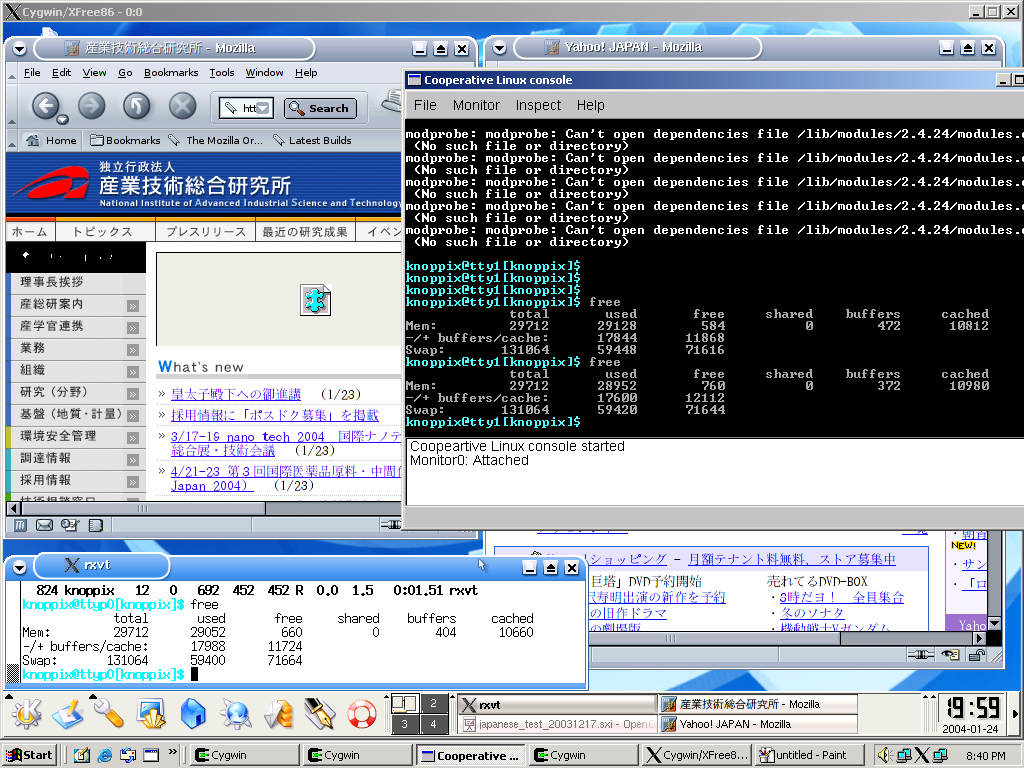
It runs a full Linux under a WindowsNT based OS. Only thing that's missing is a X server so you need an X server on the Windows side (cygwin XFree86). It can use your NICs bridged or use NAT, it can access any Linux partition you have on your disk and can use image files too. Yes it is slower than native Linux but so is Usermode Linux or VMWare
I currently run colinux as my router and the XP host is NAT-ed behind it. Crazy setup but it works and beats any "personal" firewall hands down -
Here is an idea on what to do with that...
Install Colinux
and use it as one of the tasks, having Linux and Windows benefits for a very low price, legally. -
Re:Time to switchPlease learn how to make links.
<a href="http://www.colinux.org/">here</a> is your linux for windows xp
(without any spaces put there by Slashdot) yields: here is your linux for windows xp
If that's too much typing for you,<URL:http://www.colinux.org/>
(without any spaces put there by Slashdot) yields: http://www.colinux.org/ -
Re:Time to switchPlease learn how to make links.
<a href="http://www.colinux.org/">here</a> is your linux for windows xp
(without any spaces put there by Slashdot) yields: here is your linux for windows xp
If that's too much typing for you,<URL:http://www.colinux.org/>
(without any spaces put there by Slashdot) yields: http://www.colinux.org/ -
Re:does it work with
Heh, maybe if you're running CoLinux.
-
coLinuxAlso consider coLinux.
Instead of running an "emulation layer" (like Cygwin) or a "PC virtulization" (like vmWare), you could be running Linux alongside Windows.
Though it's a young project, I have been playing with it quite a bit, and haven't run into any problems re stability.
It might be faster than Cygwin too.
-
Re:VMWare? Either Way?Another option is coLinux. Almost the same as using VMWare without the cost. From the site -
Cooperative Linux is the first working free and open source method for optimally running Linux on Microsoft Windows natively. More generally, Cooperative Linux (short-named coLinux) is a port of the Linux kernel that allows it to run cooperatively alongside another operating system on a single machine
I've been using it with the Debian image in recent days with few problems. Check out the Manager as well
-
Re:Neither are that great
http://www.colinux.org/ is working hard on making both obsolete for running Linux on Windows.
-
Re:Virtualisation thing
Ever heard of VMWare or Virtual PC?
Or consider the Free alternative of coLinux, which allows you to run several linux distrubtions under MS-Windows. -
Re:Sweet!
Cooperative Linux is the first working free and open source method for optimally running Linux on Microsoft Windows natively. More generally, Cooperative Linux (short-named coLinux) is a port of the Linux kernel that allows it to run cooperatively alongside another operating system on a single machine.
-
coLinux
Checkout coLinux. Similar to a VM, it allows you to run a linux kernel along-side your windows apps and its free-software. Works GREAT and you can even have multiple instances running as well as setting instances as Windows Services. Support for debian, gentoo, fedora, slackware and others.
-
CoLinux
can already do that.
-
Re:My Win desktop already runs *nix code...
If anyone hasn't heard of it yet, coLinux is really quite amazing.
-
Re:Where is the windows version?
-
Re:Evo2 for Win32?
It is a bit of a sledgehammer to crack and acorn route but Evolution works perfectly under colinux.
I use colinux to run gentoo (other distros are available), and cygwin to add XWindow support. You also need to follow the instructions to get networking working and then you can just
emerge evolution
Admittedly this is a lot of setup work but once it is working it is not obvious that evolution isn't a native port. The other benefit is you can use the same setup to run any Linux programs under Windows (though image editing or 3D programs would be very slow)
-
Re:Evo2 for Win32?
It is a bit of a sledgehammer to crack and acorn route but Evolution works perfectly under colinux.
I use colinux to run gentoo (other distros are available), and cygwin to add XWindow support. You also need to follow the instructions to get networking working and then you can just
emerge evolution
Admittedly this is a lot of setup work but once it is working it is not obvious that evolution isn't a native port. The other benefit is you can use the same setup to run any Linux programs under Windows (though image editing or 3D programs would be very slow)
-
Re:Slightly misleading
Don't forget http://www.colinux.org/ which is spooky as hell.
-
Re:Cygwin
Better than this would be Cooperative Linux. With coLinux you can run a full distro under windows. Add VNC and you can even get GUI apps to work.
This of course is assuming that you are not going to go through with setting up a dual-boot system or such. Personally I run Linux 90% of the time and only run windows to get to the very few apps that I need that don't run in wine or have a linux equiv.
For a linux distro I reccomend Mandrake for laptops because they have a somewhat cleaner support for odd hotplug hardware that is common use with laptops. (WiFi cards for example) -
A bit more complicated when "enogh is enough"
There are several external influences that decides if a program is "optimized enough". These influences are often local to spcific users, and thus cannot be tested easily by benchmarking.
Now, I'm all for the optimizations based on profiling and don't optimize utill the need is there. I'm just trying to say that it's pretty complicated trying to figure out when the need is there in a more general setting.
Repetition: (probably the most common problem) It's ok if a task takes long if it's not done too often. If you have to repeat the task many times, performance of that task becomes as many times more critical as you repeat it.
Multitasking/Parralelism: Other tasks would like to get to the processor too. If your program is just fast enough to do it's job, it's too slow to do it while notepad is running along side it. Now, I run colinux alongside on my windows desktop, so performance of "other" programs does matter. Also, execessive memory usage slows down all the other programs on my machine down too (hi there mozilla
Power: My laptop can scale the cpu-frequency and use that to save power, so i can sit out in the sun programming longer. If a program spends too many cycles on a job, i'm gonna have to go inside sooner. and this programs BEGS for optimizations from my point of view.
Many more of these side-effects of optimization occur, so don't think you can easily (or exactly) evalute when certain code is efficient enough for others, only for yourself.
This also shows a fundamental advantage in the OpenSource model. I can run a profiler myself and try to perform some optimization, instead of selecting not to use the program (or use another). -
Re:First thing to install on a Windows machine...
I really really really want to put Fedora on my Windows box...
Try CoLinux. -
VMWare Price Drop
-
A better idea than providing software for check-ou
software (especially free software) isn't in the same vein as a book or a movie. It isn't physical, and it isn't a single item that needs to be shared by a number of people. Also, it changes regularly, so anything the library stocks will be soon out of date.
A better idea: provide a way for those users without reasonable net access at home to burn a copy at the library. They could buy a blank CD for 25 cents from the library, then sit at a terminal and burn the software they want.
The interface to this would be important. The system could be a wizard-based searchable index of software, categorized by platform, distribution, and software type. The index would have simple descriptions that a typical user could understand. They could select the software they want, or pick a predefined "packs", like "graphics software" or "office software", and then click "go". The system would then download any software that isn't cached, create an autostart index file with instructions on installation and getting started with the chosen software, then burn to CD, and maybe print out the instructions as well.
As for installing free/open OSes on the PCs - I would be wary of this. People are familar with the Windows interface, and there are too many Linux desktops to choose from - a standard linux desktop hasn't arrived yet. Also, people will be upset with the 10% (plus or minus) of the documents that don't format properly in Open Office. Perhaps using something like CoLinux to run Linux apps on a Windows machine would be an appropriate compromise.
LS -
Re:Yes, but
>Dooes it runs Lunix?
Not sure about Lunix, but it does run Linux. -
Re:Cygwin, MS Services for Unix?
Actually according to the coLinux installation page, it uses cygwin1.dll which is the CygWin api library that translates linux function calls to windows function calls.
It also uses the WinPCap kernel level packet library to directly access the network hardware layer in windows. -
One Practical Use: GnuCash!I have searched far and wide for a way to run that program on a Windows machine.
No Windows version.
Can't compile in Cygwin.
Enter coLinux... finally a way to run GnuCash on my Windows laptop.
I am sure there are other programs like this.
It is even possible to run Linux programs in rootless windows so that they appear to be native Windows applications.
-
Re:Severe limitation
Problems? Tell me about it!!
I can see why it would run a little slower under linux, but 41 minutes?!? -
Wiki!
-
Severe limitationThere are still some problems to work out.
- No virtual graphics adapter, so no X-Windows
- Memory limited to about 128 or 256 MB
-
Link to the colinux project
-
Link to the colinux project
-
Re:Vanderpool good for linux?
Besides VMWare (which is a solid, if slow, piece of software), you also have the options of Knoppix (a Debian based distro that runs entirely off a bootable CD) and Cooperative Linux (a beta-but-working project to run Linux as a device driver inside a Windows 2000/XP kernel). I haven't tried out Co-Linux (yet), but it sounds like something that takes some previous Linux experience to set up, so I'd recommend Knoppix or VMware.
-
Re:Sue ME!!!
You could install Cooperative Linux. It lets you run Linux under Windows: http://www.colinux.org/
-
The article omits XEN & coLinuxOddly enough the article doesn't even mention XEN, one of the most interesting virtualization systems. Xen is being actively developed and has also been featured on Slashdot a couple of months back when they released the first public versions.
Also omitted is the new coLinux, which was discussed on Slashdot, too, just the other week.
-
Re:inter-OS communications
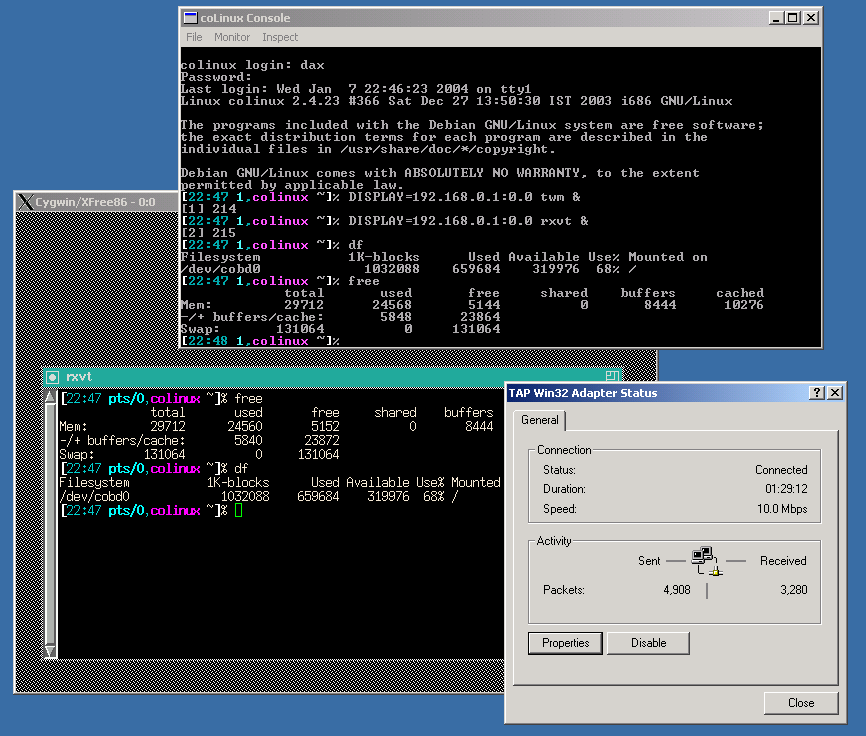
As you can see on this screenshot it uses a virtual networking device, just like VMWare and User Mode Linux do. From the network POV, the guest and host OS are two different systems. The OS that recieves data you send to 127.0.0.1 is the same you sent it from.
-
hmm...
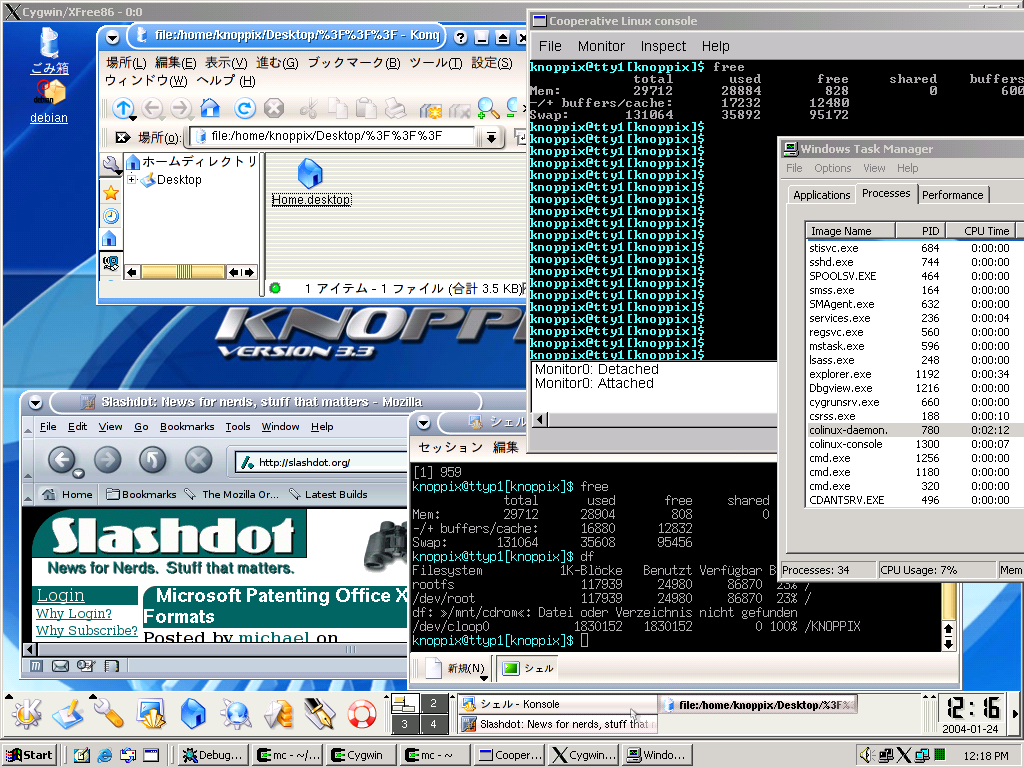
interesting. in this screenshot kde clock shows 12:16 but clock in windows systray 12:18...
-
Re:Rootless?
If you have a look at the roadmap you will see that are planning to implement a frame-buffer device to replace the need to use Cygwin/XFree86. I wish them good luck.
-
Interesting to watch this
When I wan't to use *nix tools under Windows I've always trusted Cygwin, but I can see how this project can provide a good alternative to Cygwin XFree86 as suggested in the roadmap. This could also provide an excellent solution for developers to test interoperability between Internet Explorer and Linux webservers - especially if they are limited to one computer. It could also be used to educate people on using Linux, it is a perfect match with Knoppix in this respect.
Wine developers could use this compare apps running natively and those running under wine side-by-side.