Slashdot Mirror
Domain: gnucash.org
Stories and comments across the archive that link to gnucash.org.
Comments · 203
-
Re:x64_86
-
Re:Microsoft products
that's fine and dandy and obviously you didn't use much of Office's features.
What features do most other people use that I don't?humm...so not able to run Quickbook that every accounts use is because you care about quality. how disconnect are you from reality?
Gnucash does what I need.and it's a piece of shit compare to Exhcange.
I'm going to assume you haven't even touched it until you actually list reasons why it's "a piece of shit".so the world is according to you now and if you didn't see it used. it must mean shit, right?
No, it means I have no opinion on it.this is even more retarded. so don't fucking play on Xbox live
I'm not interested in playing single player games so much. Having to pay for multi-player usage is crap.then and do you even remeber what we are arguing about? the OP said everything MS put out are craps. how about Xbox?
There is only one game I am interested in playing on the xbox360, I wouldn't say that's good for a game console.it put MS on the map within only two generation and it even outsold Wii.
What map?Where's the OSS game console that was so buzzed during dotcom era?
Here. -
Re:Why?
-
Re:GNUCash is uselss
Sorry, but GNUCash is useless for any both the most basic accounting needs. It doesn't even do payroll!
http://svn.gnucash.org/docs/guide/chapter14.html
Granted I haven't had a good look at that POS software... but still... -
Windows
Yes, but does it...... run on Windows?
Yes it does. There aren't official packages yet, though. -
Re:keyboard shortcut for switching tabs in 2.0?
Shift+Tab doesn't work here. Instead it brings you to the next hyperlink. http://wiki.gnucash.org/wiki/GnuCash -We need to help
-
Re:Does it support budgetting?
Budgetting was added in 2.0. Since it's a new feature it probably isn't quite as advanced as some would like... yet. But, as always, development is ongoing!
-
Re:This makes sense. He's a developer at heart.
You can see this clearly in the way he tries to name projects after himself, and in the way he tries to micromanage projects that he has really very little involvement with!
I followed your link to the discussion regarding GnuCash. RMS sent an email a) congratulating them on a new release, and b) asking them to clarify their web page in a very minor way to reflect the history in a way that the original author (Linas Vepstas) agrees is correct. As this message points out, GnuCash did in fact start out as an official GNU project and a significant churck of code (about 90%+) is currently copyrighted FSF. It also spurred a discussion that resulted in a clarification within the GnuCash team about their relationship to FSF (which is generally neutral/positive) and Gnome (which could get better by a lot).
I don't see any sign of meglomania there. -
Re:This makes sense. He's a developer at heart.
Linus made it very clear that he chose the GPLv2 because he liked the license, not because he's drinking RMS's kool-aid. And yet, people still insist on whining when he doesn't agree with RMS' every pronouncement. Get over it! Linux is not "a GNU project," it's Linus' project.
The problem is, RMS is a megalomaniac. You can see this clearly in the way he tries to name projects after himself, and in the way he tries to micromanage projects that he has really very little involvement with! I can't believe that you sneer at Linus' successful, pragmatic approach, but sing the praises of the same project manager who gave us HURD, the decade-long vaporware disaster.
RMS probably believes that he, himself, is solely responsible for the success of open source software. In reality, the rise of cheap PCs and the Internet (which allowed developers to collaborate cheaply) are the real driving forces. Let's also not forget the companies that have lent their support. IBM has probably done more to keep open-source UNIXes viable than any open source leader. No other organization had the budget to fight SCO!
In their blindness, RMS' zealots cannot see this. They can't see that corporate partnerships are not only desirable, but necessary, to keep free software alive in a world of patents, lawyers, and DRM. They can't see that changing the GPL will not stop DRM. DRM is a political problem, not a technological one. It can't be solved by imposing vague, onerous end-user license clauses on developers and users. -
Corrected the hyperlink
A link in my previous message was broken. This one should work:
http://wiki.gnucash.org/wiki/Windows
Thanks to the AC for pointing this out. -
Re:easy install for MacOS X?
Unfortunately, you're out of luck on your MacBook for the time being...some of the libraries upon which Gnucash depends do not yet run on OS X/Intel. (see the Wiki entry on OS X installation). You may also notice the list of dependencies earlier in the wiki article, which is not short (and is the reason that using fink is the recommended course of action).
-
Re:Great for...
...unless of course you plan to use it on Windows.
Most of, and all of the best, 'Linux software' is available on Win32. Ports are made much more likely by open sourced code. So I think you made a bad assumption there -
Port for MS Windows is possible with GTK2
With the adaptation to GTK2 , GNUcash may someday be available for Microsoft Windows according to the GNUcash wiki at http://wiki.gnucash.org/wiki/Windows/
With GTK1, a port of GNUcash for Windows was only a dream.
GnuCash is pretty popular in the Linux world. It would be great to see this OSS project available to Windows users as well. -
Port for MS Windows is possible with GTK2
With the adaptation to GTK2 , GNUcash may someday be available for Microsoft Windows according to the GNUcash wiki at http://wiki.gnucash.org/wiki/Windows/
With GTK1, a port of GNUcash for Windows was only a dream.
GnuCash is pretty popular in the Linux world. It would be great to see this OSS project available to Windows users as well. -
Great for...This is a great program for calculating all of the money you saved by not using Windows!
Oh, and has TFA been -
Re:Micro$oft Screws Us Good
The fact is that Linux isn't there yet. Trust me, I tried for five years, and while I did see alot of improvement, the fact that I just can't buy a printer without checking some list speaks volumes.
I keep hearing this, and I can't help thinking that by the same general guidelines Windows isn't there yet; the fact that you have to romp through driver discs and various web sites just to get your hardware supported, then go through the same again for applications to actually be able to do something useful speaks volumes of its own. Deployment-wise Linux is already ahead, and usability-wise it's really a matter of training.
I wouldn't buy a printer blind even if I were a Windows user. As a Linux user "some list" enables me to vote with my wallet and choose a vendor who sees fit to provide me with service.
Would the '98 user be able to keep running his same version of Quicken (also likely outdated)?
Possibly not, but then again he might be able to use the same data with some other application. Speaking as a person with nil experience about accounting software, here.
-
Re:Jeez, no kidding.
There are several accounting packages for Linux. GnuCash is a highly competent package that seems to do everything Quickbooks does, and easily surpasses Quicken. If there is something that it does not do yet, then tell the developers and they will add it.
-
Re:Win32 version of GnuCash
-
Re:With a web browser
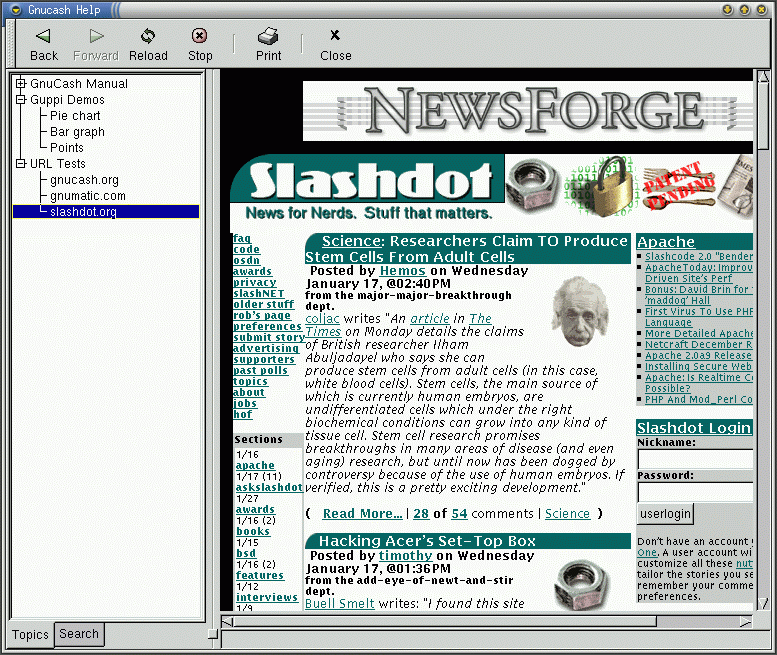
There is a screenshot showing that GnuCash can browse Slashdot. Or at least there was before the site was Slashdotted. It seemed to me that it was being boasted as a feature, otherwise why advertise it?
My point wasn't that it shouldn't be okay to render HTML within your app, but that it shouldn't be possible to browse the Internet. HTML is fine for generating reports, and I would be glad that for something standards based.
Looks like the site is back enough to bring the link: http://gnucash.org/images/gnome-1.6/help-slashdot. gif -
Re:KMyMoney
Good point. A well-written money management app would implement its own widget toolkit, graphing engine, database backend, network stack, C library, and floating point handler. After all, why leverage the work of thousands of others when you can re-write it all, poorly, yourself?
You have something of a point -- but when the developers themselves explicitly use words like "nightmare" and "even with apt-get, some packages may still need to be installed manually", re-use has definitely been taken too far. -
Re:The KotYou're not fairly depicting the situation. Let's take a look at the source in question. Sadly the SVN server seems to be crushed at the moment, but this is representative. The filename is "gncmod-tax-us.c". The header reads "module definition/initialization for us tax info" Conclusion: this isn't a module intended for general consumption, but is US specific.
So, what's German tax information doing in there? Let's look a little further into the file where this exact same technique is repeated in another function... This is a very simple hack that loads the (new, special) German tax definition file in a German locale, or (default) loads the previous US tax file. */
A clear answer: this is a hack not really intended for general consumption. I'm guessing someone is experimenting with integrating the German data, but it isn't quite ready yet. LOCALE_SPECIFIC_TAX may be a "this is under development and will hopefully eventually work, but not now" setting. Little unused hackery and experiments live in most mainstream code, commented or #ifdefed out. It's fairly common in proprietary software because the end user has little to no chance of learning that they're there.
It looks like this little hack is present, if no enabled, in the trunk of their repository. That's not good and it should probably be removed (or marked more clearly so it doesn't accidentally ship). But it's hardly a Major Problem.
-
Re:GNUCash Ported Elsewhere?
>I'm not sure how many extraneous libraries GnuCash 1.9 relies on...
If it's anything like the 1.8 version, it relies on at piles of esoteric packages. Why this program has significant portions written in scheme (of all things!), I will never understand.
I use the program, but it requires extraordinary care and maintenance. There was an issue with debian package dependencies sometime last year which completely broke gnucash for weeks. It's simply poor software design. Now I run it within a vmware player image which never gets updated, so I can be sure that it'll start tomorrow. -
I Am Really Interested In Looking This Over
Since it is slashdotted, here are some excerpts from the site:
The GnuCash development team proudly announces GnuCash 1.9.0 aka "We're gonna make it!", the first of several unstable 1.9.x releases of the GnuCash Open Source Accounting Software which will eventually lead to the stable version 2.0.0. This release is the very first of the gtk2-based GnuCash series, and is intended for developers and adventurous testers who want to help tracking down all those bugs that are still in there.
What's New in GnuCash 1.9.0?
o Welcome to GnuCash 1.9.0 aka "We're gonna make it!" the first of several unstable releases of the GnuCash Open Source Accounting Software which will eventually lead to the stable version 2.0.0. This release is the very first of the gtk2-based GnuCash series and is intended for developers and adventurous testers who want to help tracking down bugs.
o WARNING WARNING WARNING - Make sure you make backups of any files used in testing versions of GnuCash in the 1.9.x series. Although the developers go to great lengths to ensure that no data will be lost we cannot guarentee that your data will not be affected if for some reason GnuCash crashes in testing these releases.
o PLEASE TEST TEST AND TEST SOME MORE any and all features important to you. Then post any bugs you find to bugzilla http://bugzilla.gnome.org/enter_bug.cgi?product=Gn uCash
o If you have the urge to help beyond testing please get involved in the discussions on the GnuCash mailing lists which you will find at http://www.gnucash.org./ We especially need people to help with updating the documentation as all texts refer currently to the 1.8.x series. Please see http://wiki.gnucash.org/wiki/Development on how to get involved.
o PS I'm not going to list the many features changed or updated in this release because obviously there is so much that has changed.
Caveats
Caveats for testers:
* Any 1.9.x version might crash unexpectedly at any point during runtime. If you test some serious work in a 1.9.x release, make sure you hit "Save" after ever non-trivial workstep.
* Keep in mind that features which are not used in everyday work might crash unexpectedly at all times. This includes but is not limited to: graphical reports, scheduled transaction editor, price editor, financial calculator, OFX/QIF/HBCI import.
* Especially all the new features might crash instantly on testing. This applies in particular to any of the budget-related features. We may always decide to disable such new features for the initial 2.0.0 release, and re-enable them in a later release.
* The documentation is completely outdated. All help texts usually only refer to the 1.8.x series; please expect all descriptions in the help texts to be totally wrong when applied to the upcoming 1.9.x series. Everyone is invited to help improve the documentation; see http://wiki.gnucash.org/wiki/Development on how to get involved.
How can you help?
* Testing: Test it and help us discover all bugs that might show up in there. Please enter each and every bug into bugzilla at http://bugzilla.gnome.org/enter_bug.cgi?product=Gn uCash
* Translating: The new release comes with plenty of new translation strings. If you consider contributing a translation, we invite you to test this release already, but please keep in mind that we are not yet in our string freeze phase. Please check http://wiki.gnucash.org/wiki/Translation_Status for updates on this, as we recommend to wait for the string -
I Am Really Interested In Looking This Over
Since it is slashdotted, here are some excerpts from the site:
The GnuCash development team proudly announces GnuCash 1.9.0 aka "We're gonna make it!", the first of several unstable 1.9.x releases of the GnuCash Open Source Accounting Software which will eventually lead to the stable version 2.0.0. This release is the very first of the gtk2-based GnuCash series, and is intended for developers and adventurous testers who want to help tracking down all those bugs that are still in there.
What's New in GnuCash 1.9.0?
o Welcome to GnuCash 1.9.0 aka "We're gonna make it!" the first of several unstable releases of the GnuCash Open Source Accounting Software which will eventually lead to the stable version 2.0.0. This release is the very first of the gtk2-based GnuCash series and is intended for developers and adventurous testers who want to help tracking down bugs.
o WARNING WARNING WARNING - Make sure you make backups of any files used in testing versions of GnuCash in the 1.9.x series. Although the developers go to great lengths to ensure that no data will be lost we cannot guarentee that your data will not be affected if for some reason GnuCash crashes in testing these releases.
o PLEASE TEST TEST AND TEST SOME MORE any and all features important to you. Then post any bugs you find to bugzilla http://bugzilla.gnome.org/enter_bug.cgi?product=Gn uCash
o If you have the urge to help beyond testing please get involved in the discussions on the GnuCash mailing lists which you will find at http://www.gnucash.org./ We especially need people to help with updating the documentation as all texts refer currently to the 1.8.x series. Please see http://wiki.gnucash.org/wiki/Development on how to get involved.
o PS I'm not going to list the many features changed or updated in this release because obviously there is so much that has changed.
Caveats
Caveats for testers:
* Any 1.9.x version might crash unexpectedly at any point during runtime. If you test some serious work in a 1.9.x release, make sure you hit "Save" after ever non-trivial workstep.
* Keep in mind that features which are not used in everyday work might crash unexpectedly at all times. This includes but is not limited to: graphical reports, scheduled transaction editor, price editor, financial calculator, OFX/QIF/HBCI import.
* Especially all the new features might crash instantly on testing. This applies in particular to any of the budget-related features. We may always decide to disable such new features for the initial 2.0.0 release, and re-enable them in a later release.
* The documentation is completely outdated. All help texts usually only refer to the 1.8.x series; please expect all descriptions in the help texts to be totally wrong when applied to the upcoming 1.9.x series. Everyone is invited to help improve the documentation; see http://wiki.gnucash.org/wiki/Development on how to get involved.
How can you help?
* Testing: Test it and help us discover all bugs that might show up in there. Please enter each and every bug into bugzilla at http://bugzilla.gnome.org/enter_bug.cgi?product=Gn uCash
* Translating: The new release comes with plenty of new translation strings. If you consider contributing a translation, we invite you to test this release already, but please keep in mind that we are not yet in our string freeze phase. Please check http://wiki.gnucash.org/wiki/Translation_Status for updates on this, as we recommend to wait for the string -
I Am Really Interested In Looking This Over
Since it is slashdotted, here are some excerpts from the site:
The GnuCash development team proudly announces GnuCash 1.9.0 aka "We're gonna make it!", the first of several unstable 1.9.x releases of the GnuCash Open Source Accounting Software which will eventually lead to the stable version 2.0.0. This release is the very first of the gtk2-based GnuCash series, and is intended for developers and adventurous testers who want to help tracking down all those bugs that are still in there.
What's New in GnuCash 1.9.0?
o Welcome to GnuCash 1.9.0 aka "We're gonna make it!" the first of several unstable releases of the GnuCash Open Source Accounting Software which will eventually lead to the stable version 2.0.0. This release is the very first of the gtk2-based GnuCash series and is intended for developers and adventurous testers who want to help tracking down bugs.
o WARNING WARNING WARNING - Make sure you make backups of any files used in testing versions of GnuCash in the 1.9.x series. Although the developers go to great lengths to ensure that no data will be lost we cannot guarentee that your data will not be affected if for some reason GnuCash crashes in testing these releases.
o PLEASE TEST TEST AND TEST SOME MORE any and all features important to you. Then post any bugs you find to bugzilla http://bugzilla.gnome.org/enter_bug.cgi?product=Gn uCash
o If you have the urge to help beyond testing please get involved in the discussions on the GnuCash mailing lists which you will find at http://www.gnucash.org./ We especially need people to help with updating the documentation as all texts refer currently to the 1.8.x series. Please see http://wiki.gnucash.org/wiki/Development on how to get involved.
o PS I'm not going to list the many features changed or updated in this release because obviously there is so much that has changed.
Caveats
Caveats for testers:
* Any 1.9.x version might crash unexpectedly at any point during runtime. If you test some serious work in a 1.9.x release, make sure you hit "Save" after ever non-trivial workstep.
* Keep in mind that features which are not used in everyday work might crash unexpectedly at all times. This includes but is not limited to: graphical reports, scheduled transaction editor, price editor, financial calculator, OFX/QIF/HBCI import.
* Especially all the new features might crash instantly on testing. This applies in particular to any of the budget-related features. We may always decide to disable such new features for the initial 2.0.0 release, and re-enable them in a later release.
* The documentation is completely outdated. All help texts usually only refer to the 1.8.x series; please expect all descriptions in the help texts to be totally wrong when applied to the upcoming 1.9.x series. Everyone is invited to help improve the documentation; see http://wiki.gnucash.org/wiki/Development on how to get involved.
How can you help?
* Testing: Test it and help us discover all bugs that might show up in there. Please enter each and every bug into bugzilla at http://bugzilla.gnome.org/enter_bug.cgi?product=Gn uCash
* Translating: The new release comes with plenty of new translation strings. If you consider contributing a translation, we invite you to test this release already, but please keep in mind that we are not yet in our string freeze phase. Please check http://wiki.gnucash.org/wiki/Translation_Status for updates on this, as we recommend to wait for the string -
I Am Really Interested In Looking This Over
Since it is slashdotted, here are some excerpts from the site:
The GnuCash development team proudly announces GnuCash 1.9.0 aka "We're gonna make it!", the first of several unstable 1.9.x releases of the GnuCash Open Source Accounting Software which will eventually lead to the stable version 2.0.0. This release is the very first of the gtk2-based GnuCash series, and is intended for developers and adventurous testers who want to help tracking down all those bugs that are still in there.
What's New in GnuCash 1.9.0?
o Welcome to GnuCash 1.9.0 aka "We're gonna make it!" the first of several unstable releases of the GnuCash Open Source Accounting Software which will eventually lead to the stable version 2.0.0. This release is the very first of the gtk2-based GnuCash series and is intended for developers and adventurous testers who want to help tracking down bugs.
o WARNING WARNING WARNING - Make sure you make backups of any files used in testing versions of GnuCash in the 1.9.x series. Although the developers go to great lengths to ensure that no data will be lost we cannot guarentee that your data will not be affected if for some reason GnuCash crashes in testing these releases.
o PLEASE TEST TEST AND TEST SOME MORE any and all features important to you. Then post any bugs you find to bugzilla http://bugzilla.gnome.org/enter_bug.cgi?product=Gn uCash
o If you have the urge to help beyond testing please get involved in the discussions on the GnuCash mailing lists which you will find at http://www.gnucash.org./ We especially need people to help with updating the documentation as all texts refer currently to the 1.8.x series. Please see http://wiki.gnucash.org/wiki/Development on how to get involved.
o PS I'm not going to list the many features changed or updated in this release because obviously there is so much that has changed.
Caveats
Caveats for testers:
* Any 1.9.x version might crash unexpectedly at any point during runtime. If you test some serious work in a 1.9.x release, make sure you hit "Save" after ever non-trivial workstep.
* Keep in mind that features which are not used in everyday work might crash unexpectedly at all times. This includes but is not limited to: graphical reports, scheduled transaction editor, price editor, financial calculator, OFX/QIF/HBCI import.
* Especially all the new features might crash instantly on testing. This applies in particular to any of the budget-related features. We may always decide to disable such new features for the initial 2.0.0 release, and re-enable them in a later release.
* The documentation is completely outdated. All help texts usually only refer to the 1.8.x series; please expect all descriptions in the help texts to be totally wrong when applied to the upcoming 1.9.x series. Everyone is invited to help improve the documentation; see http://wiki.gnucash.org/wiki/Development on how to get involved.
How can you help?
* Testing: Test it and help us discover all bugs that might show up in there. Please enter each and every bug into bugzilla at http://bugzilla.gnome.org/enter_bug.cgi?product=Gn uCash
* Translating: The new release comes with plenty of new translation strings. If you consider contributing a translation, we invite you to test this release already, but please keep in mind that we are not yet in our string freeze phase. Please check http://wiki.gnucash.org/wiki/Translation_Status for updates on this, as we recommend to wait for the string -
Re:The real vaporware
You can have a desktop linux NOW. Fetch a modern commercial distro (http://www.ubuntu.com/>Ubuntu, Mandrake, etc) or any of the free ones and you'll have an excellent desktop with little issues, if any.
The people that bitch about the "linux desktop" haven't normally ever tried Linux and want something that feels like their WinXP desktop. If you're looking for that, yes, there's nothing like it now and probably won't be for a while. If you want an useable Unix desktop, there's a lot of excellent ones arround.
You have a wide choice of desktops and window and managers, and there's a lot of excellent software for them. A linux desktop is useable today, and by anyone - i had Ubuntu on a desktop for a while and my mother, who's 'computer-imparied' had zero issues using it. Besides being unable to find the blue E icon -
Re:Please don't port quickbooks.
Quickbooks and Quicken are the reason I left windows in the first place. Both programs were mature products years ago, but did intuit leave well enough alone and move on to something else? nope. All the upgrades that have come out in the past few years basically enable more ways to spy on your stuff and get more of your money through vendor-lock-in. They are bells and whistles that mostly get in the way, clutter the desktop and intrude on real work. I mean they've got freakin' pop-ups for chris'sakes. If I wanted popups I'd use IE, not quickbooks. And their
I made the mistake a couple years ago of upgrading Quickbooks one too many times and discovered too late that they had eliminated the exporting of MY information. Its locked in there forever. They have annual sunset policies, eliminated data exporting and keep jacking up the prices for what is free tax table informatino from the government. When I stopped using their payroll tax table subscription and began using my own spreadsheets (tired of paying every year for that free government information) guess what! The payroll calculations, using user-entered tax tables were incorrect. The tax table information was correct -- THE CALCULATIONS WERE WRONG! As in 1+1 != 2. seriously. (sorry to shout. I obviously care deeply about this).
So now I must forever maintain a Windows partition on one of my boxen just to maintain a working copy of quickbooks in case I ever need to access some old financial records for my business. Screw them Intuit can have their windows. I will never use another one of their products ever. Do not port quickbooks to linux. I like my free world just fine as it is.
Go GnuCash! Check it out. They are close to finally making the GNOME2 port which will bring it to more user desktops. Its a REAL accounting program, not that half-baked quickbooks crap. double entry, invoicing, international support etc. good user community. etc etc etc.
cheers -
Re:Adobe
-
Re:Java and Python dependencies
Java on the other hand is Java. Unless you want to go the SWT route, if you are using Swing/Java2D, all the stuff is there.
Errm, that isn't true except for trivial applications. A standard Linux box will not have all the many libraries used to run bigger Java applications. How do they print, how do they do databases, what about Hibernate, servlet containers etc
A good example is a finance manager. Look at how many libraries it needs:
http://www.gnucash.org/en/required.phtml
With a program like Azureus you may need log4j and commons. Again it is pretty random as to whether a distro includes those and how up to date they are.
-
Re:Why I haven't switched to Linux
-
Re:Why I haven't switched to Linux
-
GCC = Vendor Lock InJust try doing a variadic macro and __attribute__() with Visual C.
I once tried to see if I could try building a certain OSS project in Visual C and couldn't because of the high amount of GCC-specific extensions used.
In all seriousness, VC allows people to write crappy code, but if it somehow prevents you from writing good code, then you are a crappy programmer. I actually do a lot of OSS work on Windows; I debug with VC because it has the best debugger, and do release builds in MinGW.
-
Re:Does this mean
If your thinking something like QuickBooks, then you're in luck because these programs already exist. Check out these projects:
Quasar:
http://www.linuxcanada.com/
http://freshmeat.net/projects/quasar/
Compiere:
http://www.compiere.org/
and of course there is GNU Cash:
http://www.gnucash.org/ -
Re:Where are the apps?I have, last one I tried was iirc 1.5.04. It still sucks to the point of being unusable on an 800mhz system. I'm using linux, maybe the windows JVM performs better.
I'm puzzled. What exactly sucks? I know people who use, for example, the NetBeans IDE on Linux and Windows on machines of that spec. There are no performance problems at all with the Java 5.0 VM either in terms of general use or the GUI.I haven't seen performance problems that would differentiate Java from any other platform in quite some time. Eclipse and VS.NET run about the same when it comes to responsiveness. jGnash runs as fast as GnuCash or even Quicken for that matter.
I haven't run NetBeans in a long time so I cannot comment about that. Eclipse runs slower on Linux than Windows but Gantt Project, Umlet and Visual Paradigm run about the same. Curiously enough, Poseidon runs much slower on Linux than Windows.
-
Let me suggest:I have tried numerous programs on Linux to manage my finances, and like you used to use Quicken on Windows.
When I tried to switch over to Linux as my primary desktop, I found that there are options out there, but they're just not as polished *looking* as Quicken is for the average finance/budget tracking user like myself. So, let me offer up what I've tried, and you can figure something out for yourself:
- jGnash - A weird name for a finance program, but I used it for a short time and it did an alright job... and that was approximately a year ago. The project looks to be in active development still, so you may want to at least give it a try. It did QIF imports alright as well, and although it's written in Java it seemed to be coded pretty well.
- GnuCash - Well known in the Linux world with a long history. I tried it out but never really got the hang of it due to the somewhat clunky and difficult to understand UI. The engine behind this program seems to work great, but much like Gnome, it takes some getting used to the UI.
- Moneydance - Also has a long history, is coded in Java, and tries to compete with Quicken, but I didn't like the reports in this program. Also seemed a bit sluggish on Windows because it was coded in Java, but that was a pre-2005 release version, so the new one might be better. Unfortunately, from the look of their webpage the reports haven't changed at all, which was my biggest beef with this program.
- Or try Wine because it appears that Quicken and QuickBooks run under it OK. Haven't tried this out personally, and this would mean keeping around your dual-boot setup most likely, but it might solve your dilemma.
P.S. Using Linux as my primary workstation taught me that Linux based desktop software is HIGHLY "tweakable", and as such is also highly prone to disaster. (I'm the type that never reads the manual: disaster then ensues.) If you're going to do your finances on a Linux desktop setup, buy a DVD burner and MAKE SYSTEM BACKUPS nightly!!
-
As first post stated: GNUcash
http://gnucash.org/en/screenshots.phtml
I have been using it for years. You can import most of your data from quicken. I'd recommend keeping both running while you try it because though you can export and get a convertor to convert your data back to QIF, you will lose some stuff. The interface is nowhere near as polished but it works. It has quite a few of the features the Quicken has. It can download stock prices, make reports, etc. The graphics are a little light.
Quicken to GNUcash was the last thing I changed before I ditched windows completely. One downside though, there is no TurboTax equivilent (sorry, but there is no way I would trust linux tax software unless it was written by a company like Quicken. Some tax laws are finalized near the end of the year and you really have to trust who you are dealing with.) So, anyway, good thing the wife has a laptop running XP because that is where I do our taxes. Hell, I'd have a windows box around forever if TurboTax never ports to linux. And every year, when I fill out my taxes, I go to their website, find their comment form and send them the following message: "Please make a linux version of Quicken and TurboTax. I'd buy it." I have sent that message for about 5 years. At one point I found a web page saying something like "we are evaluting the need for Quicken under linux" but I that was several years ago. And doesn't Microsoft own Intuit anyway? -
Don't use qhacc
I've been using qhacc for a while, and it's a cute hack, but not really useful. I'm just using it until I find something better. There's a few java ones that look promising, but I'm not a fan of java software. Getting lucky with google for "accounting linux" turned this up: http://www.aaxnet.com/design/linuxacct.html There's also the popular GnuCash (http://www.gnucash.org/).
-
Re:it seeems to me ...
I've been running QuickBooks Pro 2000 under Linux, using CrossOver (the commercial version of Wine). It's ugly, but it works. The user interface is messed up but the data integrity seems fine.
I've fought a lot of battles with Intuit's copy protection scheme which seems to be designed to force users to upgrade, even if their current version meets all their needs.
It's particularly bad when I'm compelled to buy an upgrade to the latest version of QB that doesn't work under Linux. Of course, they refuse to provide any native Linux support. They have a huge captive herd of Windows cows, and they want to keep all their cows in the DRM pen.
Intuit got a lot of bad press when they released a version of TurboTax three years ago that installed a ton of adware crap and was generally as invasive as spyware. It shows the kind of company they really are. They view customers as profit resources to be managed.
Intuit's copy protection scheme makes it impossible to sell used copies of QuickBooks (or, apparently upgrade your computer). It also allows Intuit to decide when it's time to force their customers to pay for another upgrade.
They've definitely alienated enough of us that we're just chomping at the bit to switch to any reasonable alternative. Unfortunately, it's notoriously difficult to escape from proprietary data formats. I've tried to compell the makers of CrossOver to fully support QuickBooks, including signing up to pay money for the improved support. I keep telling them that QuickBooks is the application that is keeping a lot of small businesses locked into Windows because there are already good alternatives for all the other big Windows apps, but nobody is going to enter all their accounting data again. It's massive. But the rossOver guys would apparently rather support Internet Explorer or Word running under Linux, even though Mozilla/Firefox and OpenOffice are better native Linux alternatives. Where are the alternatives to QuickBooks? Once your data is in their format, you're hosed.
I was pleased last year to see that GnuCash, the open source version of Quicken, has added enough small business features to allow many small businesses to use it for all their accounting. I'd definitely start with GnuCash if I were starting a small business today. There is enough demand that I'm hoping to see someone develop a data import routine to allow me to move my company data from QuickBooks to GnuCash soon. QB is the only proprietary software my small business uses. We were Massachusetts compliant, five years before the deadline! I'm looking forward to being free of QuickBooks. -
Re:Opensource list
I just add a bit on that list from top of my head.
Although I think the listed app goes beyond what the so called 'average pc user' wants, but there goes...
1. Konqueror ( http://www.konqueror.org/ )
2. Email - Sylpheed ( http://sylpheed.good-day.net/ )
3. I think Evolution is more like in this place.
4. Lately "Sound Juicer" is taking more attention too
5. VideoLAN aka VLC ( http://www.videolan.org/ ) and Ogle ( http://www.dtek.chalmers.se/groups/dvd/ ) [and Goggles ( http://www.fifthplanet.net/goggles.html ) for Ogle GUI wrapper] for DVD watching.
6. There are plenty way to do this, but the typical ones could be 'Jinzora' ( http://www.jinzora.org/ ) and 'MusicPD' ( http://www.mpd.org/ ), even plain Apache does it fine too, in a way.
8. If you want easier to manage iptables wrapper, Shorewall ( http://www.shorewall.net/ ) and there are other wrappers too.
9. KOffice ( http://www.koffice.org/ ) and by individual components, Abiword ( http://www.abisource.com/ ), Gnumeric ( http://www.gnome.org/projects/gnumeric/ ), Gnucash ( http://www.gnucash.org/ )
10. Inkscape ( http://www.inkscape.org/ ) or Sodipodi ( http://www.sodipodi.com/ ) for vector graphics.
11. Miranda ( http://miranda-im.org/ ). Windows only.
13. Hmm , Samba? ( http://www.samba.org/ ), WedDAV (Look parent post), FTP (plenty ftp daemons, ex : http://www.proftpd.org/, http://vsftpd.beasts.org/ etc)
16. GPhoto ( http://www.gphoto.org/ ), EOG ( http://www.gnome.org/ ? ), GQView ( http://gqview.sourceforge.net/ ). The latters are for just viewing mainly.
20. FreeNX ( http://www.nomachine.com/ , http://freenx.berlios.de/ ) http://www.poptop.org/ ), L2TPd ( http://sourceforge.net/projects/l2tpd ), RP-L2TPd ( http://sourceforge.net/projects/rp-l2tp/ )
24. Postfix ( http://www.postfix.org/ ), Sendmail ( http://www.sendmail.org/ ), Exim ( http://www.exim.org/ ), Cyrus ( http://asg.web.cmu.edu/cyrus/imapd/ ), Xmail ( http://www.xmailserver.org/ ), qmail ( http://www.qmail.org/ )
25. Spamassassin ( http://spamassassin.apache.org/ )
26. Same as above.
27. XSane ( http://www.xsane.org/ ) for sane frontends.
30. Buzzmachines ( http://www.buzzmachines.com/ ) I could be wrong...
31. 'various GUI frontends' - X CD Roast ( http://www.xcdroast.org/ ), K3B ( http://k3b.sourceforge.net/ )
32. Don't know any opensource ones... -
Re:Bookkeeping software
there's this - I don't know if they're equivalent tho.
-
News Flash
GnuCash also runs on Linux.
-
Re:Troll Article - the author is deceiving
The author of the "Troll article" post is deceiving the readers trying to present that it is somehow not the Intuit's fault and Intuit had to force the upgrade in order to continue to provide the check-writing service.
False.
Intuit is forcing the upgrade for money reasons and very little else. I'm saying this because I could not import data from QuickBooks 2002 into TurboTax 2004 and it has nothing to do with check-writing. Intuit said I had to upgrade to QuickBooks 2003 or later to import the data.
Intuit's customer service sucks. Call them and the first thing they'll tell you is to have you credit card ready to pay for the support call.
Intuit feels it can milk its customers indefinitely. Well, I'm definitely looking for replacement, be that GnuCash, TaxCut or whatever. -
Re:Stoneage?
We just connect to the web and use a small code generator to log into our bank.
I used to do that as well, but I switched to GnuCash and HBCI for various reasons: With those webinterfaces, you can just manage the money on one Girokonto (I think "checking account" would be similar, but no the same) at a time. GnuCash can manage all your finances, creating nice report and statistics where your money resides, where it omes from, and where it goes. Syncing your bank account with the software on your PC is just one small part of the puzzle, I enjoy managing my personal finances with an advanced software like GnuCash. Check here for a tour of GnuCash features.
-
Why not GnuCash?
Why not use GnuCAsh? It's so difficult to integrate with online banking?
-
HBCI and GnuCash
German banks use DES and RSA keys on chipcards for years. Together, they developed the Homebanking Computer Interface (HBCI) and the FinTS - Financial Transaction Services: http://www.hbci-zka.de/english/index.htm/
It works like a charm with http://www.gnucash.org/. I just insert my chipcard into my reader and can do as many transactions as I want without the hassle of PIN/TAN crap and have a fully working financial solution for my everyday need.
-
Re:Accounting
GnuCash, while not suited to heavy business uses, can be used for simpler accounting tasks. I know of no replacement for TurboTax, however.
-
Re:The only Linux desktop apps?
Don't forget Gnucash.. it's been quite useful for my small business. Although the UI is starting to look a bit dated compared to modern Linux desktop apps, and development seems a bit slow as of late.
-
Accounting? No Problemo...
Take a look at GNUCash I don't think it has any Law Office specific talents, but it is totally decent.
Bad part... No Win32 port that I know of... -
Re:Microsoft the underdog.
Ahem, you have a typo. You meant:
software
Didn't you?