Slashdot Mirror
Domain: nongnu.org
Stories and comments across the archive that link to nongnu.org.
Comments · 557
-
Re:Processor info?
According to the SMBIOS/DMI specification, which was eventually supersetted by CIM and other technologies, it's possible to query the BIOS for an astounding range of information about your PC. The dmidecode utility, for which the source is available, illustrates the detail that can be determined if a BIOS adheres to the standards set out by Intel and Microsoft. WMI uses DMI as a starting point when scanning the hardware on a machine during startup.
-
Re:Moo
"like starting the applications and moving them around."
Well, I know of several ways that can be done with the keyboard. That's why I asked you to be more specific; without knowing exactly _how_ you want to do it, I can't help you.
For example: is pressing Alt+F2 and typing in the program name good enough for you? How about pressing Alt+F1 and navigating to the application in KDE's K menu? How about Ctl+t,c for opening a terminal (as in ratpoison, although you can configure the keybindings? Maybe you want to assign hotkeys to specific applications (e.g. using Xhotkeys?
As for moving windows, you can do that in KDE by going to the window operations menu (Alt+F3 by default, I believe), then pressing m for move, and using the arrow keys. Or you can assign a shortcut of your own choosing so you don't have to go through the menu. Other window managers/desktop environments may or may not provide this functionality and may or may not use the same keybindings or allow them to be configured. -
Re:Free Software games
As its author, I'm obligated to plug TONG:
http://www.nongnu.org/tong/
I haven't updated in a while, but I do have some bugfixes and improvements in CVS if you're brave. It's not everyone's cup of tea, but some folks find it to be quite fun, at least in short spurts. -
Re:Virtualisation on Linux
Actually there is/was an open source effort to replace the KQEMU "accelerator" module... QVM86. Unfortunately it needs work, it's functional but only operates on x86 (no x86_64). There are patches against current CVS for compatibility with KQEMU 1.3.x and QEMU 0.8.2 on the QVM86 newsgroup but development seems to have otherwise stagnated.
Also the author of KQEMU did say he would open up the source if sponsored. -
Re:Ultra fast desktop, same old slow applications
Windows has thoughlessly consistent UI. If I am in a wordprocessor and use a menu item 'open file' and get a dialog to hunt and peck through my file system. then i click the application. often the application takes for the foreground and the dialog is pushed to the depths (got forbid you have auto window raising).
this doesnt happen in windows, dialog boxes are part of the applicaion, unlike a mdi window it can move outside of the confines of the application height/width, but stay at the level for the application.
on top of that usually you can open another 'open file' menu because someone was a knob programmer so now your basically looking at killing your app to get it restarted.
yes i open a lot of bugzilla tickets, does me no good though.
ratpoison for the win! http://www.nongnu.org/ratpoison/ -
Re:Linux needs to get its act together
Funny. I click to install my linux apps. You must be talking about those debian people.
Nope, we like clicking too. -
Re:Why Bother?
What more ? Let me see :
- touchscreen
Yes, this has advantages. I wish the GP2X had one. The single feature I miss most moving from a PDA to a GP2X for handheld gaming.
- dual screen
As opposed to just having one higher resolution screen? Of dubious value. 2x 256*192 is barely better than my single 320x240 screen, and 320x240 means I can run a lot more games that require/desire a standard resolution.
- microphone
Eh? I have seen many times in this thread that most games don't provide voice chat. It's a neat feature and all, one I would have probably built into the GP2X given the choice, but for now I will be happy with my USB mic.
- protected screen
Like the GP2X? Which, fyi, has a standard screen size, so you can apply any of a hundred brands of PDA screen protectors.
- better price
Barely. And not at all once you buy the extra addons required to get homebrew working. The GP2X is ready for you to upload your own games, media, and applications right out of the box.
- quality (hard to break, good lit screen)
Ditto.
- smaller
Negative worth to me. Any handheld smaller than the GP2X is too small for me, both in terms of screen and button size. The original GBA was about as small as I will ever be willing to go on a handheld console.
- being able to play new innovative games
You have a dozen great new games. I have ten thousand almost-as-great older games, and given support in the homebrew community I can run almost any new non-3D linux game. I ported Enigma last week, took a few days, and only that long because the original devs hard coded a lot of widget placement based on a minimum 640x480 screen size (which WORKS, with hardware scaling, on the GP2X, but I wanted native resolution graphics).
- have a high chance of being compatible with one home console and games for this console (the Wii)
I'll believe it when I see it. And if I see it then I will buy a DS, at the half price it is sure to drop to when included in Wii bundles.
And since this entire thread is about homebrew, you can't just gloss over the fact that the GP2X is extremely much faster and has more RAM, larger storage options, more external connectivity options, and a larger existing ported software and emulator base. I have emulators for maybe 30 systems on my GP2X. The DS has a total of what, a dozen? -
Re:Poor man's solutionYou might want to take a look at rdiff-backup.
rdiff-backup backs up one directory to another, possibly over a network. The target directory ends up a copy of the source directory, but extra reverse diffs are stored in a special subdirectory of that target directory, so you can still recover files lost some time ago. The idea is to combine the best features of a mirror and an incremental backup. rdiff-backup also preserves subdirectories, hard links, dev files, permissions, uid/gid ownership, modification times, extended attributes, acls, and resource forks. Also, rdiff-backup can operate in a bandwidth efficient manner over a pipe, like rsync. Thus you can use rdiff-backup and ssh to securely back a hard drive up to a remote location, and only the differences will be transmitted. Finally, rdiff-backup is easy to use and settings have sensical defaults.
Basically it's a wrapper around rsync that does two things. First, gives you incremental backups; second, fixes the highly confusing options that control which files are included/excluded in a sync. -
Re:This looks pretty good
That sounds really cool, except I'm surprised at how high the price is. Between photos and home movies, I have about 100GB of data I'd really like to get backed up offsite, and it grows by about 2GB per month. I have some other stuff I want offsite as well, but it's very small.
So, according to their pricing scheme, it would cost me $126 per month to store my data, and the price would increase by about $4 each month as my data grows. Storing my data for a year would cost me nearly $1,800. That probably makes sense for some people, but certainly not for me. It's much cheaper for me to buy a machine full of drives to put at my brother's house and then rsync the data there. Actually, that's exactly what I'm looking into doing -- most of my family has high-speed Internet connections, so we're taking inventory of who has how much data they'd like to back up and how much free space they can donate for others to back up to. After we figure that out, we'll buy additional storage where it makes sense and set up automatic over-the-net backups using rdiff-backup and some scripts.
A commercial solution would be a lot simpler, but at ~$2/GB/month it's priced way too high. For me, anyway. At one-tenth the price, I'd consider it.
-
Re:please explain
"There is also a "requirement for Windows Media Player 9.0 or higher mentioned on the Yahoo Music home page"
Lots of site "require" WMP software that I do not have and would never run, being on Linux, but that hasn't stopped me yet. I do agree however that the wording most sites use is a bit over the top. They make it sound like Apple has never sold a computer and Linux/BSD are imaginary words.
That being said, http://www.nongnu.org/streamtuner/ has provided my music needs for a couple years now, and you can record/burn tracks DRM free, plus they list every genre of music most people would ever want to listen to. -
The answer is obvious...
... switch to emacs! If you're running X, also switch to ratpoison. No mouse required!
-
15 minutes ?
Far too long. I just use rdiff-backup for easy incremental remote backups (Including ACL and extended attributes).
I still don't know why it is so unknown...
-
Can you say more Non-Free than cheap beer?
Um...and just WHY would anyone be interested in downloading any of this non-free garbage? Especially Sourceforge. That was one shameful decision. One shouldn't even consider using it over free projects like Savane, GForge, or as someone already mentioned, Trac.
This is Slashdot, after all, did we forget?
Okay, sorry, Last.fm is kind of free, but still they need to restore the ability to play an mp3 stream with the player of your choice, not just their clunky custom software. -
Re:No mention of rsync.net ?
I'm quite happy with raidarray.net, which I've been using for the past year. Their offer is very affordable (100$ for 25 Gb a year long) and it has all the Unix bells and whistles you need (rsync, ftp, etc). They also have a very helpful support team who helped me out with a sticky rsync-problem.
Oh and for backup software I use Rdiff-backup, which is able to make reverse incremental backups.
-
Re:At a glance...
As for being Windows-only... I think that shows how short-sited these people are. Linux users are quite a bit more likely to embrace change than Windows users. But, maybe that's to our advantage. We can now design and implement a MUCH better and more useable system that was intelligently designed (I couldn't resist) instead of just what someone thought was cool.
Linux users like to embrace change, but what we like even more is being productive. And managing your computer desktop the way you manage your physical desktop is the opposite of productive. I haven't used a window manager that had a desktop in years, and I'm far more productive for it. As I type this, I'm at work using RatPoison - by far the most productivity-enhancing window manager for doing work (I use OpenBox at home - RatPoison doesn't play all that nice with Gaim and other things that don't need a maximized window).
Besides which, this concept is far from change. It is reverting to an outdated organizational system. I think Windows was the right system to implement it on - all the old guys who would want this are on Windows anyway. -
My workarounds
-
Re:Open up Cocoa (not going to happen)
It's sad, but this focus on "OpenStep with a bit of Cocoa, and maybe some of our own stuff if it's better" is why nobody uses GNUStep. If their mission was "100% compatibility with Cocoa" instead, then it would be a lot more popular.
Compatibility with Cocoa is important, and the project has been pretty good with adding new Cocoa functions when there's developer demand, but it's hard to keep up with a moving target.
In any event, Cocoa and GNUstep are so close to each other for the average Free Software developer that there's little real problem with interoperability. You can even use the same docs. When I was first starting out with Cocoa, I used O'Reilly's Learning Cocoa with Objective C book, and when I wrote my "Charmap" character map application with GNUstep, my reference was O'Reilly's Cocoa in a Nutshell . There are some differences in the way developers access the APIs, but the APIs themselves are still very much in sync.
-
Re:Why boot linux here?My problems OSX have less to do with stereotypes and with my own experience over the years---on my own laptop years ago and on the computers of others in the intervening years. I always found myself wrestling with Apple's sense of workflow, having to kludge together 3rd party software, scripting, and the like.
What I had in mind was something more than being able to find a keyboard equivalent for commands:
1. Ratpoison
2. Ion
3. larswm
4. WMII
But you're definitely right that Apple has addressed the keyboarding issue; I should have been more precise here.
-
Re:Are we reading the same data?
You can't make the argument that Linux is easy because it's all point and click...you know launching oo.org, running firefox, checking that email with evolution, etc and then have non point and click instructions to perform other basic tasks like dvd playback.
What are you talking about? Installing xine is as easy as launching the package manager in your distro and selecting the package that is described as 'plays DVDs you n00b'. =)
Don't mistake the CLI way as the only way, although it is the fastest way to do it.
About the naming: I never saw anyone having a problem with winamp, or Nero, although their names don't make sense immediantly.
I don't know about SuSE, but the rest are as easy as two clicks to install, or worst case senario, click add and write in a repository. Still we are talking about Dell preinstalling some distro, so all this 'linux cannot play DVDs' is bullshit. So is all the 'I need to go CLI to install my nvidia drivers'. Dell will ship with an image of linux that does this right out of the box. Last time I checked, windows XP doesn't play DVDs out of the box either. I just tried it yesterday and was searching for my PowerDVD CD all over the place...
Lastly, the lack of games is a problem for gamers. So is lack of some professional software like photoshop. But linux really does have to offer alot to a user that is not in need of niche applications or games. -
Re:Installing programs is SUPER EASY- in PCLinuxOS
http://www.pclinuxonline.com/wiki/QuickStartSynap
t ic
As easy as the steps for Linspire CNR, and all at a cost of $0 per year.
Synaptic is even more of a killer application than CNR.
http://www.nongnu.org/synaptic/
http://www.nongnu.org/synaptic/action.html -
Re:Installing programs is SUPER EASY- in PCLinuxOS
http://www.pclinuxonline.com/wiki/QuickStartSynap
t ic
As easy as the steps for Linspire CNR, and all at a cost of $0 per year.
Synaptic is even more of a killer application than CNR.
http://www.nongnu.org/synaptic/
http://www.nongnu.org/synaptic/action.html -
Re:PINE + PortaPuTTY + Thumb Drive
pine schmine. real geeks use nmh. for an example of why, see: http://www.ics.uci.edu/~mh/book/mh/finpic.htm
-
RatpoisonRatpoison is by autists, for autists; to quote from whose founder:
The reason you want to avoid the rodent is that when your coding while chemically modified you will want to minimize any possible distraction or break in concentration. The slightest wavering in your attention will easily explode into a ten minute setback. If you can keep yourself on-track then I find that productivity is greatly increased, and with the properly trained mindset bug density on first pass is usually drastically decreased.
-
I Tried It Once......but had a tough time with the (at least at that time) limited hardware support. While I'm sure they've probably worked that out (at least to a better degree than before), my search for alternatives back then turned up rdiff-backup.
Not only has it always been versatile as far as the hardware it uses--for my SOHO server, an external USB Harddrive is the ticket, one that I can just snatch and carry with me if natural disaster threatens, e.g.--but the METHOD of backup is superior to anything I've personally ever encountered.
Backup AND restore are both a breeze.
I'm sure that AMANDA is more appropriate for many (read "more servers") usage, but I've found rdiff-backup to be perfect for someone like me, with only a single server to worry about (althought that single server contains all my family's business and personal files--so to us, it's not such a trivial thing).
-
Ratpoison
-
Linux virtual server
If you want to view an ugly but very usefull page, see:
http://www.nongnu.org/util-vserver/doc/conf/config uration.html
This page describes how to configure Linux Vservers. This page is called
"The Great Flower Page" and is the configuration reference for version 2.0. -
Re:GNOME vs KDE (not flamebait!)
A few years back it was my perception that both desktops were aiming for the same thing. Now though I think there is a clear and emerging idealogical difference between the two.
Gtkapitalism vs. Kommunism, with the Third World being a dumping ground for dangerous poisons
-
Re:FunnyYou mean like Synaptic? You enter the name of the program you want and hit apply. Everything is handled automatically. Happiness ensues.
-
POV-RayThe POV-Ray scene description language is a better language than VB.
Grain of salt: I haven't touched VB in about 5 years and use a mix of C, Perl, and Python for my programming needs.
Someone above mentioned assembly
-
Re:Didn't we have this in 1997?
> "My data back-ups are routinely over 4GB is size. No way am I tranporting that up my stinking little DSL connection."
Same here, but I use duplicity. It encrypts using GnuPG and transfers using rsync. It makes a full backup in chunks of 5MB files, then makes incremental backups. Great for dumping data on non-trusted servers.
-
Re:Neat.
Looks neat
I should look into something like dirvish though to replace my current homemade 'backupd' which basically does the same thing with less flexibility. -
Oblig. Answers
I'm involved with a project that is looking to develop an online community for technology oriented business customers.
Sell your idea to ebay, they might like you. (and the highest bidder wins!)
If you could develop an online community to encourage collaboration and information sharing, what features would you want included?
That's easy, BitTorrent.
How would you go about including features that are widely available in other places (weblogging, message boards, wiki) and generating buy-in from customers.
1) Visit homepages of said OSS
2) Get the sources
3) Right-Click Ctrl-V
4) Get headache integrating code from multiple projects^W4) Discover 'magical' missing libraries^W4) Consider rewriting everything with existing code as reference^W4) Give up^W4) ????
5) Profit! -
Re:final specs
Hark! I hear the sound of somebody who hasn't use Linux in years.
Printing/ScanningSupport for most printers is there out of the box. Both my HP Laser and my Epson Printer/Scanner were supported out of the box on the current and previous versions of Ubuntu. That's printing *and* scanning.
Digital CameraAgain, on the latest version of Ubuntu, there's an option in the main menu, under Graphics, called gtkam which you might notice because it has a little picture of a digital camera next to it. Click it and you can interface with most digital cameras. No driver installation necessary. Alternatively, just plug your memory card into your card reader and an icon for the card will appear on your desktop. I'm having a hard time imagining how they could make it any simpler.
iPodSeveral of the Linux audio players have in-built support for the iPod. The default media player for Kubuntu, amaroK, does, as does the default media player for Ubuntu, Rhythmbox.
DV CamcorderOK, this one is supported but you're going to have to install an application to deal with it. Luckily, Ubuntu comes with a graphical utility to install programmes. All you have to do is tell it to install Kino and you're sorted.
So please, when you're going to diss Linux, at least have the decency to try it first.
-
Much more minimalist...
Here's all I brought with me when I moved to California a year ago:
- Pentium Pro 180 with Fedora Core 3. It was my everything server, but it's been off since moving.
- Athlon 1GHz, with Fedora Core 3 and Windows XP. Was a desktop, now it's the everything server.
- 17" PowerBook 1GHz (personal laptop).
- 15" PowerBook 1.67GHz (work laptop).
- Dell Axim X30 (PDA). Don't really use it.
You don't need so many servers for home! I can only think of a few reasons you need many servers at once:
- You want to learn about high availability software.
- You want to play with different OSs simultaneously.
- You have different security domains.
- You care enough about your data to do automated network backups to another machine. (rdiff-backup is cool!)
Though for full disclosure, I should admit that my home systems aren't the whole story. I have a real machine co-located in one data center and a virtual one co-located in another.
-
Re:Why?
Why does anyone want to take a step back from a polished, finished OS? What does this gain the user?
Consider this
:
1. Take one clueless Mac fanboy
2. Take one Intel Mac with Gentoo, a pretty Bootsplash picture and booting directly into something like ratpoison.
3. Point out to the Mac fanboy that he is looking at MacOS 10.5 of which you have secured a sneak preview copy.
4. Point out to the Mac fanboy that there is no mouse attached to your Mac.
5. Point out to the Mac fanboy that this is because Apple is taking simplicity to a new level with the "0 Button Mouse approach (tm)".
6. Tell the Mac fanboy to have some fun while you put the kettle on.
7. Leave the room.
8. Watch in secret as the Mac Fanboy suffers a complete breakdown. It really is quite funny. The panic in their eyes. The droplets of sweat forming on their foreheads. The spasms in their right arm as they keep reaching for the mouse. The tears. And the scream, the scream is really beautiful. No two ever scream alike. -
Re:OOooo, Peerrrrtyyyy
Ok, those -DO- look sweet, but the actual graphics are really the least of my concerns for a window manager. I would rather see it be very fast an responsive, clean, easy to understand, and setup up intellegently so that even my mother or grandparents can use it.
Try Ratpoison. Can't get much more minimalistic than that
-
Re:Backup
nice. but the vast majority of us dont have "unlimited" storage. for the rest of us, rdiff-backup is as good as it gets.
-
...which brings up another good point:Surely his 500MB of data isn't all unique. Why doesn't he just host the diffs, and provide links to the base software that's hosted elsewhere? Heck, he could even write a script that would automatically retrieve and assemble it!
Incidentally, I was also going to suggest he put it on Savannah, until I read this:This web site (called Savannah) is a central point for development, distribution and maintenance of Free Software that runs on free operating systems.
Too bad he decided to help perpetuate non-Free software, eh? -
Re:Sony's Studio Liverpool
Lemmings!
First thing that comes to mind when you mention Psygnosis.
Another game I fondly remember playing on my old Mac Classic and Mac Performa was Oxyd, which I just found has become freeware. (There's also a clone called Enigma.) Great puzzle game. Developed by Dongleware, German, which looks like it turned into a webdevelopment company.
Another game they created was the side-scrolling shooter Tubular Worlds, which had totally awesome graphics.
-
Re:Oh, no!
depending on your connection you can get 14 GB of mp3s legally in no time at all! just use something like streamripper with a nice gui like streamtuner and record some internet radio streams. i acquired a really huge collection this way...
-
Linux s/w RAID + rdiff-backupSeveral people have suggested a Linux software RAID (md) setup, and I agree. With 250GB SATA drives out there for "cheap", a trio or more of RAID-5 disks (or a duo RAID-1) will easily do the trick for storage. Motherboards support SATA out of the box now; no special hardware required.
If you're using the RAID storage as your primary storage, you'll want a pair of arrays instead of a single array; better, you'll want a duplicate system as your real backup box. RAID is not on its own a backup as the system itself can still fail or data become corrupted. So the second part of the recommendation is: use rdiff-backup. It's standard on Fedora Core now, and it's a breeze to use. It won't take up space with anything that hasn't changed, either.
-
The problem with reliability...
is that it will be relied on, and then it will break and you will lose something important (eg your entire life in photos, all of your music and your wedding video). Then you will want to kill yourself, and if you don't then someone else (eg your wife) surely will.
RAID is not backup. In fact in my experience it adds moving parts which (when not done properly) can actually impair stability/security. You need remote, incremental, automated and regular backups. If only duplicity were ready - then you could just backup to some untrusted third party like a neighbour over wireless or a friend over DSL (by untrusted I mean someone you would rather not have trawling through your stuff). -
Re:Linux
Linux's kernel may be flawed, but the GUI is perfect, right?
Goddam straight it is!
http://www.nongnu.org/ratpoison/
KFG -
Re:Give us what we went, not what you want to giveOr just go to http://www.shoutcast.com/ The only reason I'd own a portable MP3 player is to stream a few hours a day from shoutcast to a file, and then dump that on the mp3 player. While I like my own collection, I would just get bored with it on the bike after awhile anyway.
Speaking of streaming radio, I really love "Streamtuner" http://www.nongnu.org/streamtuner/ It's a very nifty internet radio stream browser for *nix platforms like linux and FreeBSD (there doesn't appear to be any windows ports that I'm aware of). Makes it very easy to find what you'd like to hear.
Strat
-
couple of questions
1. does this need to be approved? seems like a big acquisition.
2. doesn't everyone in Linux world use rdiff-backup?
http://www.nongnu.org/rdiff-backup/
Next drive you buy - keep your old one if you can - even if it's much smaller, use rdiff-backup, and backup selected parts of your
3. Maybe we need a KDE front end for our newer users? -
AMD64 cpu UUID?
I was poking around on my new AMD64 machine the other day, and I ran dmidecode. Can anyone explain this?
- Handle 0x0001
- DMI type 1, 25 bytes.
- System Information
- Manufacturer: System manufacturer
- Product Name: System Product Name
- Version: System Version
- Serial Number: System Serial Number
- UUID: EC491BB3-BE1F-DA11-B1EB-7B871839F7B3
- Wake-up Type: PCI PME#
- Handle 0x0001
-
Re:Torvalds is right. Avoid GNOME use KDE!
OS X Cocoa applications are the most consistant and well-integrated around, and you can write them in Objective-C, Java, Ruby, and I'm sure many others that I haven't cared to look into (I just write an Objective-C wrapper usually).
Last time I looked Cocoa, like Carbon, are Mac-exclusive: http://developer.apple.com/cocoa/. There is GNUStep, which is like a Cocoa lite. Sadly its just a GUI, and not a very optimized one at that in my opinion.
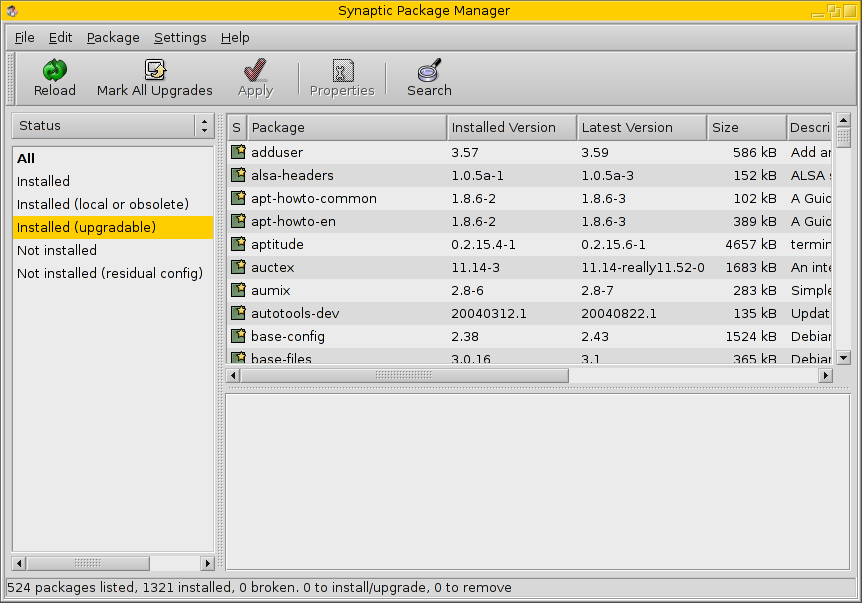
1. Open Synaptic 2. Click checkboxes for the software you want 3. Click apply Seems fairly easy already without mono, doesn't it?
Yeah, I'm sure grandma can figure this one out: screenshot
Synaptic reminds me of the package installer that Ximian has/had. I'm sure it has the same issues like language dependencies, requiring autoconf/automake packages for every program in order to build it, a centralized databases for keeping track of all the packages, people to update databases, does not allow you to download proprietary runtimes like Sun's JVM, etc, etc, etc. Its a nice thought but not what average users want to stare at or try to figure out to get Application X to install and run. Putting a gui around apt-get has been around for awhile and doesn't seem to be "catching on" with users.
Now, taking your comparison of Synaptic supposed ease compared to Mono:
1) I download Mono program X.exe from site X with Firefox.
2) I then open it from Firefox's download manager.
This is taking into account that the following exists on my computer:
1. Mono is installed.
2. Association between X.exe and the Mono runtime in Firefox.
Pretty simple. -
Read the whole thread
Do it. There's a lot of interesting answers. Most interestingly, it seems that the problems which Linus (and popular opinion) ascribes to Gnome user interface design decisons are actually considered bugs by Gnome developers. It seems that, when giving the choice of working on sensible defaults or in advanced configuration options, Gnome devels prefer the first, so that sometimes applications misses the advanced configuration; but they're not actually opposed to them (provided that they have a nice UI, separated from the basic options). It's a matter of priorities.
So Gnome is not about "dumb users", it's about focusing on an usable system out-of-the-box. If you like customizing your WM, you'll probably hate Gnome, because it's not their focus. I hate WM customization, so I like Gnome better than KDE (and ratpoison better than Gnome). OTOH, I love customizing my programming environment, so I like Emacs better tham vim or gedit. Differente things for different people, really. -
Re:Alternate
Therein lies the rub. The hordes of stupid users will never adopt linux until installing software is as easy as "click yes to install". It's silly to presume that The Stupids will migrate over and spontaneously learn even as simple a command line procedure as "rpm -ihv foo.rpm"
What's so hard with clicking on a button in Synaptic??
-
Re:Enough power
I had my linux server handle all my p2p a while back, using MLDonkey. It's really quite nice -- supporting most of the popular p2p networks. Apparently now they have Kad support for eMule too, and you can run it all remotely via a GUI or an http client.
It let me and my roommates all shut off our personal computers overnight and saved us unknowingly re-downloading the same
I'm not running it now because I haven't found the hour or two it would take for me to reconfigure it on my recently rebuilt box (my old one got r00ted something bad -- not because of mldonkey; it was a 2 year old Gentoo box running FTP/SSH/etc. that I hadn't bothered to patch. Serves me right...)