Slashdot Mirror
Domain: plextor.com
Stories and comments across the archive that link to plextor.com.
Comments · 51
-
Re:Waiting for a supported TV card
Do you mean a fully support capture card? If so, here you go. Here's the fully open source GPL'd driver. It will probably be integrated into the Linux kernel on the next drop 2.6.27.
-
Re:Linux compatible
Well, I just went through that exercise after researching for a few months. My goals (in order) were 100% free drivers, a significant decrease in noise and heat from my previous system, and small size. As a side benefit, I ended up completely legacy-free. Here's what I ended up with:
- Intel DG965PZ
- Intel Core2 E6600
- 4GB memory, two KVR800D2N5K2/2G kits
- WD1600AAJS 160GB HDD
- Plextor PX-755SA dual-layer DVDRW
- aOpen B200 case
- Samsung 244T 24" LCD
-
This is ALMOST what I need...Does media-agnostic include EyeTV libraries? I need something that can stream EyeTV content from a central HD archive to another TV in the house.
Currently, I have two media rooms - one casual family room and one home theatre room. The casual family room has a re-purposed iMac RevA running EyeTV and a TV Tuner/Encoder box, using a 1TB RAID1 array for storage of recorded analog cable programming, pira-ahem downloaded content, and ripped DVDs. EyeTV can be coaxed into encoding programming for our iPod with Video. Audio out is connected to a stereo Receiver which drives zone music thruout the house, so instead of a monster 400-disc CD changer, we just rip the CDs and use iTunes. When it's not in use, we tuck away the wireless keyboard and mouse, and the iPhoto library screensaver runs.
Since the iMac was a hand-me-down, it was all rather inexpensive (except for the 1TB array) and it all works wonderfully as an attractive media-agnostic (and copyright-agnostic) PVR and central media center... except for one problem: I can't share content with my home theatre setup.
The home theatre room has just a VCR, DVD player and A/V amplifier. I need an inexpensive box that can access the 1TB drive and playback content on a composite or S-video output. It needs to be capable of full access to EyeTV libraries, Mac filesystem libraries, and iTunes libraries over a wireless network.
Currently the only way I can see to do this is put a Mac Mini running EyeTV in the theatre room and use the TV as a monitor. But the cost of a Mini and the clumsiness of using a TV as its only display are both discouraging factors.
I'm not holding my breath for Apple's "iTV" to fill this gap. The Sling press release does not mention EyeTV at all. But considering how well the G5 iMac serves as a PVR at the end of its life, a new Intel Mac Mini would do a smashing job... except for the need for a) yet another monitor, or b) an upgrade to an HDTV with a mac video interface.
-
Re:He was asking for it
Recommended:
http://www.plextor.com/english/products/716A.htm
It should work with all Linux distros. -
Re:Where are the good SATA burners?
http://plextor.com/english/support/PX-716SA%20mot
h erboard%20compatability%20listing.htm Others support it. (seems like plextor doesnt support firefox though) -
Re:I got yer backdoor right here!Second that, if it doesn't affect Macs, it has to be installed soft. Either always hold down the shift key, or disable autorun. You will lead a much happier life.
Anyway, for the few albums that don't work with that method, Plextor drives have tools that tell it to work exactly as a CD player, so you can always play your music in your computer.
-
Talk about sending mixed signals...
As mentioned in this
Plextor Press Release, March 8, 2005
Plextor PVRs Now Support Linux
"...Plextor is strongly committed to supporting the Open Source Software movement with free development tools that help speed the creation of next-generation Linux-based video software," said Dirk Peters, director of marketing, Plextor. "The release of this SDK was a direct response to requests from the user community for an easier way to work with Plextor ConvertX video capture devices on computers running Linux..."
"Plextor's new Linux SDK provides developers with a free GPL-based full-source driver to support all of the popular V4L2 applications," said, Tom Luax, vice president of sales, WISchip International. "The combination of low-cost MPEG4/DivX Video compression hardware and Linux OSS software is a great solution for anyone who wants to build a high-quality and low-cost personal video recorder for their PC..."
Yes, I realize this is for PVR stuff, not DVD burners, but one would think their strategy would be a bit broader than product-by-product. Maybe they think their PVR offerings need more help, while their DVD burners don't. -
Re:Obligatory ATI warning
unfortunately you need to say away from ATI video cards too. I had to find a geforce4 440MX for my test-system because my ati 9700pro just wasnt going to work well enough.
also the Hauppage card is a good beginner card as it has lots of documentation, however plextor has a better device http://www.plextor.com/english/products/TV402U.htm
that "Hardware Encode to DivX, MPEG-4, MPEG-2/DVD and MPEG-1/VCD" as well as a "better" tuner.
there are linux drivers and mythtv supports it, but not many ppl have gotten it (yet). -
Re:Still not enough.
Please back this up or admit you pulled it out of your ass.
This is moronic... You already backed it up with your link.
even 78X cds with no imperfctions ought to be perfectly fine.
There is no such thing as a CD with no imperfections. It's a matter of time and statistics. The faster the speed, the more likely it is that your disc will shatter. The wonderfully scientific study you linked to only tested a couple discs.
Even if you have a brand-new, manufacturing-defect-free disc, just taking it out of it's case a dozen times will cause it to develop microscopic cracks that, above 40X, will cause it to shatter.
http://www.rm.com/safety/optical_policy.asp
http://www.plextor.com/english/support/faqs/G00002 -
Re:PVR for Mac OS X
http://www.plextor.com/english/products/TV402UMac
. htm Not exactly what you're looking for, but.. Eye TV for Mac OSX PVR software: proprietary -
Brands are sometimes worth extra cash
I dont know if this is the case, but sometimes spending the extra buck on a plextor is worth it. They aren't cheap but I have never had a problem with one. Some of the other value lines like I would find at a rock bottom price on pricewatch haven't been as good to me.
-
btw mythtv .18 was released
MythTV including support for the Plextor ConvertX (which has linux drivers as well as a Mac flavored version bundled with Elgato's EyeTV)
*shrug*
e. -
Re:InterestingPlextor PX-TV402U - US$199
- First Official DivX Certified PC PVR Product
- Hardware Encode to DivX, MPEG-4, MPEG-2/DVD and MPEG-1/VCD
- Watch, Pause and Record Live TV
- High-Quality TV Tuner Included
- Free Electronic Programming Guide (EPG)
- Schedule Recording For When You Are Away
- Composite Video, S-Video, Composite Audio, RF/Coaxial Inputs
- DivX Certified Hardware and DivX Licensed Software
- InterVideo WinDVR and WinDVD Creator Software Included
- USB 2.0 Interface for Best Quality Video
- Burn Direct-to-Disc and Edit-on-Disc Supported
- One-year full warranty (parts, labor or replacement)
-
Re:InterestingPlextor PX-TV402U - US$199
- First Official DivX Certified PC PVR Product
- Hardware Encode to DivX, MPEG-4, MPEG-2/DVD and MPEG-1/VCD
- Watch, Pause and Record Live TV
- High-Quality TV Tuner Included
- Free Electronic Programming Guide (EPG)
- Schedule Recording For When You Are Away
- Composite Video, S-Video, Composite Audio, RF/Coaxial Inputs
- DivX Certified Hardware and DivX Licensed Software
- InterVideo WinDVR and WinDVD Creator Software Included
- USB 2.0 Interface for Best Quality Video
- Burn Direct-to-Disc and Edit-on-Disc Supported
- One-year full warranty (parts, labor or replacement)
-
Hardware MPEG4
I recently bought a Plextor M402U. It's a USB2 device that supports hardware MPEG4 encoding and has open source GPL'd drivers (except for the firmware, but thats freely distributable at least). MythTV supports it too, although I haven't tried it yet.
-
Hardware MPEG4
I recently bought a Plextor M402U. It's a USB2 device that supports hardware MPEG4 encoding and has open source GPL'd drivers (except for the firmware, but thats freely distributable at least). MythTV supports it too, although I haven't tried it yet.
-
In OTHER news!
As of March 19th, support for the Plextor *-402 series of MPEG4/DivX encoders has been added to MythTV! Finally we have a device that is supported extremely well under Linux and has fully GPL'd open source drivers. I may have once considered getting a Tivo, but I am a lot less likely now. I am not an employee of Plextor, just a happy purchaser of their goods.
-
In OTHER news!
As of March 19th, support for the Plextor *-402 series of MPEG4/DivX encoders has been added to MythTV! Finally we have a device that is supported extremely well under Linux and has fully GPL'd open source drivers. I may have once considered getting a Tivo, but I am a lot less likely now. I am not an employee of Plextor, just a happy purchaser of their goods.
-
Re:Why both SATA and ATA-133
Give me a link to a SATA optical drive!
Plextor 716SA
Now, if you say "give me a link to a second SATA optical drive", I might have a harder time. -
Re:Why both SATA and ATA-133
-
Re:For us laptop folk
Plextor has a large selection of excellent external drives. I was looking at the PX-716UF the other day, and it looks like it has all the features of the normal 716A, but in a USB/Firewire enclosure. -
Re:Super FASTER Dual-Layer DVD Writing
The Plextor PX-712SA is a SATA DVD burner.
Doesn't mention DL burning, but there's at least one company offering them. $40 more than the ATA drive, though. -
Just get the Plextor ConvertX - HW compression
I just ordered one of these for myself. It doesn't pipe-in uncompressed video via usb 2.0, but it does do hardware-divx encoding in the box and the software is said to be pretty evolved. Why would you want uncompressed video anyway if you can compress in HW with almost-raw quality anyway? Takes less HD space and no CPU time to compress after the fact.
-
Re:Not Great"My dream would be a USB tuner with a decent and flexable encoder chip, so that I could stream video as MPEG1, MPEG2, DivX or XviD."
Here you go: (link)
The Plextor ConvertX PVR model PX-TV402U is the ultimate personal video recorder for the PC. The PX-TV402U allows you to connect to a satellite TV, cable TV or broadcast TV signal and record programs to your PC. You can then watch the video from the PC or burn it to DVD for playback on a DVD player. You can also connect a camcorder, VCR or DVD player to record home videos to the PC. The heart of the PX-TV402U is its multi-format encoder chip which converts video to the DivX®, MPEG-4, MPEG-2 and MPEG-1 formats as it is being recorded to the PC.
No, I do not work for Plextor.
-
Re:Watch more TV with ATI
Plextor makes a DivX, MPEG2, MPEG4 device: http://www.plextor.com/english/products/ConvertX2
s pecifications.htm Perhaps this is the same idea, but I've seen Linux drivers from the chip maker for this hw. -
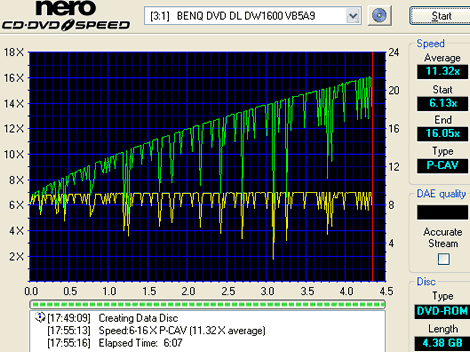
Re:Average write speed under 12x?
> The average write speed on this drive barely qualifies it as a 12x drive.
> Claiming this is a 16x drive is silly.
No, it is not silly. It's just creative marketing which, incidently, was in common use since CD readers reached 8X speeds.
This particular drive uses CAV (Constant Angular Velocity) technology. That means that the disk spins at a constant speed, just like your old LP record players.
The circumference of an inner track is smaller than that of an outer track and yet thay take the same time to complete a revolution. That means that the linear speed thatthe laser reads/writes is lower on the inner tracks than on the outer. The speed increases from the inside to the outside but since CD and DVD disks are written from the inside out, you may not reach the max speed at all if the disk is not full.
Ignoring the "dips" (write quality adjustment attempts), the speed graph should be close to linear.
Most other drives use eithr Z-CLV or P-CAV to achieve higher average speeds.
See here, here or here for an explanation of the terms and here for a comparison. -
SATA version too
They have a Serial ATA version as well. I'm looking at getting this one now that I'm addicted to SATA. It's super fast and easy to hook up drives, what more coudl you want?
-
Plextor
For a good few years I've stuck with Plextor products for my CD-R/RW drives. They've been dependable and I've never had a problem with them. I have an old 12x SCSI burner in one of my systems that hasn't made a single hiccup in 4 years. I don't think it's made a single coaster, and that was before they had buffer underrun protection. Their DVD burners are most likely just as good, if that's your cup up fea. I highly recommend them. -Yoweigh
-
Re:Plextor has a SATA DVD+RWYour link is quite usefull
Does anybody have any early reviews on this model? Does this one have problems with SATA controller cards like the model in the article?
-
Re:Get a multi-drive..
LG makes everything, including inexpensive multi-format drives.
I have a Plextor PX-708A. Writes everything except DVD-RAM, which almost nobody uses or wants (old format disc in a cartridge).
There are many other vendors of multi-format drives.
I prefer the + format, as it is easier to write to because of "linking" (a low level format thing), and hence also offers the highest speeds. The best you can get seems to be 8x DVD+R/RW media, though I use 4x media and my Plextor burns it at 6-8x. Go figure. There is a crop of 12x drives just comming out this summer.
-
Re:Reading
Best thing you can do at this point is buy a drive which supports all formats. For example, Plextor's PX-708A works on basically all formats, and can be had for about than US$200. This is the direction I plan on going, when I get around to buying a DVD burner (can't justify the cost at the moment).
-
Re:I love you Plextor.
I love Plextor too, but their DVD burners are kind of disappointing when compared to the Plex CD burners. They use the so-so NEC drives with a slightly modified firmware, and currently only support DVD+R/RW. I think Sony is much more innovative in the DVD burner arena, especially with their new external 4x DVD-R/RW, DVD+R/RW, combo firewire/USB 2.0 drive.
-
Probably not
Mt. Rainier still doesn't have a lot of support, so you're not going to miss out on much. Firmware upgrades can add support for it in the future. For example, the Plextor 40/12/40A I bought last year has a firmware update which adds Mt. Rainier support.
If there's demand, Sony will probably do something similar for their drive in the future. -
Probably not
Mt. Rainier still doesn't have a lot of support, so you're not going to miss out on much. Firmware upgrades can add support for it in the future. For example, the Plextor 40/12/40A I bought last year has a firmware update which adds Mt. Rainier support.
If there's demand, Sony will probably do something similar for their drive in the future. -
Playback protection, not copy protection
These things that look like audio CDs just have a playback protection, but no real copyright protection. A copyright protection would a) prevent copying and b) not affect playback.
In countries where you are still allowed to make personal copies of your own CDs, you can use tools to make playback enabled copies of these CDs that work on your car stereo or portable CD player.
These tools, e.g. Plextor's PlexTools, come with the burner and are a legal way to make any CD playable everywhere. -
Mt. Rainier
A burner with Mt. Rainier support (i.e. CD-MRW) might be useful for you. The format keeps a defect map, and can intelligently write around the trouble spots. Sure, you give up some space, but that seems a small price to pay to keep your RW's useful for beyond "a mere" 30-40 burns.
Personally, I'm waiting quite anxiously for the DVD-MRW drives to come out... -
Re:Hrm... but the big question is...
You should really check out this site. Copy protection is easily averted using many of the utilties linked from this site. I myself use plextor drives and -never- have bad burns (referring to another post), often people mistake their "bad burns" with buffer underruns where your system can't keep up with sending data to your CDR. Plextor has burn protection which allows the CDR to slow down giving your system time to send it more data. In the past people just turned down the CDR burn speed and it works, so now they think that "lower burning speeds = "higher quality burns" which is absolutly not the case, it's merly increasing the frequency of successful burns because your system can finally keep up with the burner.
People shouldn't knock on a product if they don't know the brandname. Plextor's drives are top notch, the price premium over other drives is definatly worth it. -
Re:SCSI CDRW drives?
Does anyone still develop SCSI CDRW drives?
Fortunately, yes! Plextor makes 2 excellent Ultra SCSI models, a 12/4/32 and a 12/10/32. Both are available in internal & external models. You can view the 12/10/32 model here.
I've owned Plextor IDE & SCSI drives before, and never had a problem with any of them; I actually can't recommend them highly enough. While I wish they would make a faster SCSI model, I'm at least happy that they are still making SCSI models at all! -
Re:SCSI CDRW drives?
Does anyone still develop SCSI CDRW drives?
Plextor does, has, and probably always will as long as SCSI means anything in the marketplace.
-
cdnow
Wherever will I download "Songs of Ocarina" and soundtrack to "Legends of the Fall" if they shut off access to this great site!!!!!
Here. Of course, you'll need a postal network address, a modem for the connection medium, and some client software.
-
Plextor and CloneCD
-
Re:Upcoming SS40 (AMD based)
Prices are for case, power supply, and motherboard (that's it!), and are approximately:- SV-24 / SV-25 (Pentium 3) -- $215 to $230
- SS-50 (Pentium 4) -- $340
Therefore, I would expect the SS-40 (Athlon) to be close to $350 as well.
(Numbers are based on what is advertised via PriceWatch.)
-
Re:rotational speed is important
In other news, three project submissions by Seagate Technologies, codenamed "U Series", "Barracuda" and "Cheetah X15", and one submission by Plextor (codename "40X") were rejected by the science committee. In a joint declaration, the spokespersons of the two companies declared that "We are deeply dismayed that such an outdated technology has been chosen in place of our state-of-the-art submissions."
The speaker of the science committee was not available for comments. -
Re:PCI bus is your bottleneck...
Since 32X is the fastest CDwriter available today . .
Just wanted to mention the fact that Plextor actually recently released a 40x CD-RW drive, info on which can be found here. -
Re:PCI bus is your bottleneck...
-
Learn from my mistakes!If you need to move you computer around a bunch, stay away from the rounded IDE cables. They don't fit too snugly in the connectors so they like to pop out.
It's been said before, but stay away from the Soundblaster Live!s. Mine won't output 5.1 surrond unless I'm watching a movie... Yes, i'm on the latest drivers and everything's configured correctly (in theory, at least).
I've heard CD-RW drives tend to wear out faster since they have a heavier read/write mechanism and that helps wear down the servo. I haven't verified this but it's a good excuse to spring for a DVD drive.
I've had good luck w/ Plextor's CD-RWs.
If you want to run linux or whatnot (and who doesn't?) stay away from nVidia. I can't get their freakin' drivers to compile, but maybe I'm a just a dumbass. In light of my recent purchases that seems pretty likely.
-
*grins* Buy your RAW mode CD-R(W) now
-
Buy Plextor and never worry again...
An article posted here suggests that Midbar's Cactus Data Shield may already be a moot technology. According to the article Plextor drives can read protected CD's (which normally cannot be read by CD-ROM drives). Also CloneCD can remove the Cactus protection.
-
i built a system like what you were describing
about one year ago. i set two limitations to the design of my "lan party computer"
1. it must use standard components (to make it easier to find parts to buy)
2. it must be cheap (at least cheaper than a comparable laptop)
this is a list of components that i used to build the system.
i updated parts of the list to reflect what components i would buy if i was going to build it today.
case mini tower $60
monitor 14" lcd $600
motherboard micro atx $100
processor P3 800Mhz 100FSB $160
ram 256MBpc100SDRAM $100
video Geforce2GTS64MB $195
keyboard mini-keyboard $40
mouse cordless optical $70
hard drive 40GB ide $100
cd-rom drive Plextor16/10/40A $250
floppy 1.44MB Generic $10
sound card SB Live Value $40
network card netgear FA310TX $20
cat5 cable 14 feet $20
headphones koss td61 $20
carry strap GearGrip Pro $35
other stuff:
cable bag a small, strong bag to attach to the side of the case to hold all the cables
power cable with 3 outlets that have 3 prongs each to accommodate the power cables for your system and monitor
i attached the lcd monitor to one side of the case and the cable bag to the other side. i put all the cables attached to the computer inside the bag to get them out of the way. then, when i went to a lan party i would only have to take one power cable, one network cable, the mini-keyboard, cordless mouse, and headphones out of the cable bag. everything was already connected at the back of the computer so there was no onsite setup involved.
i also screwed a piece of plexiglass onto the lcd monitor to protect the screen. (yes it was stupid to drill holes into a monitor that i just spent $900 on at that time, but it worked)
i had a lot of fun with that computer. i even dropped it down a flight of stairs once and the case was bent and all the pci cards popped out of their sockets. i put it back together and it worked fine.
the only downside to building this system was that it weighed about 30lbs. although if you spent more money on a lunchbox case with integrated lcd it would still weigh a lot.
unfortunately i never took any pictures of it for posterity and i ended up dismantling it for parts about 6 months ago, but i'm sure you get the idea.
-stan -
Re:Sustained rates and ATAPI
Well the sustained rate isn't so important now that companies like Plextor and others have
started using drives with BURN-Proof technolog licensed from Sanyo
Basically its a way of having the CD-R/RW stop its burn in the middle of toasting,
thereby saving the disk and data until the hdd can start sending data again.
Theres a better explanation here
----------------------------------