Slashdot Mirror
Domain: ubuntuforums.org
Stories and comments across the archive that link to ubuntuforums.org.
Comments · 802
-
missing mouse clicks
> Flash is working for me, in Ubuntu 9.10, out of the box, no need to fix anything (Opera mostly works, but misses clicks of the mouse, it makes Flash unusable, I haven't seen this solved or even reported yet).
On some hardware you may need to tweak your xorg.conf file, don't ask me why
-
Re:why?
So why do almost all replies of workarounds or help insist on using the CLI?
Want an example?
* Install Ubunutu
* oops.. wireless isn't working
* connect wire
* goto ubuntu forums
* click netwokrking and wireless section http://ubuntuforums.org/forumdisplay.php?f=336
* ahh.. a sticky for troubleshooting.. very helpful ! (after spending 1 hour figuring out what the fuck "ndiswrapper" is)
* http://ubuntuforums.org/showthread.php?t=885847
* huh... WTF is all this shit..
* Install windowsKeep denying the obvious.
-
Re:why?
So why do almost all replies of workarounds or help insist on using the CLI?
Want an example?
* Install Ubunutu
* oops.. wireless isn't working
* connect wire
* goto ubuntu forums
* click netwokrking and wireless section http://ubuntuforums.org/forumdisplay.php?f=336
* ahh.. a sticky for troubleshooting.. very helpful ! (after spending 1 hour figuring out what the fuck "ndiswrapper" is)
* http://ubuntuforums.org/showthread.php?t=885847
* huh... WTF is all this shit..
* Install windowsKeep denying the obvious.
-
Re:why?
So why do almost all replies of workarounds or help insist on using the CLI?
Want an example?
* Install Ubunutu
* oops.. wireless isn't working
* connect wire
* goto ubuntu forums
* click netwokrking and wireless section http://ubuntuforums.org/forumdisplay.php?f=336
* ahh.. a sticky for troubleshooting.. very helpful ! (after spending 1 hour figuring out what the fuck "ndiswrapper" is)
* http://ubuntuforums.org/showthread.php?t=885847
* huh... WTF is all this shit..
* Install windowsKeep denying the obvious.
-
Re:sounds like a success for open source
Windows 7 will go and fetch the drivers for you, XP needs the CD. As for Ubuntu having a GUI? No shit I SAID it had a GUI, I also said it doesn't "stick between reboots. Hell here is the first link I found in Google on Ubuntu wireless problems. what is their advice "Buy another card dude.". Yep, that would sure make me want to stick with your OS, uh huh. hell I could fill this page with links as there are 7.9 MILLION links under Ubuntu wireless networking problems, so I really doubt my experience is even slightly rare, do you?
But hey, do what you want. keep believing in the Easter Bunny and the Tooth Fairy for all I care. Linux has decent penetration in cell phones, which are locked down "black boxes" and in servers (although last I checked MSFT was coming up fast with 2K8 and Sharepoint) but I still stand by my statement. No major retailers would touch your POS OS, thanks to their not being ANY WAY IN HELL for a customer to tell what works/doesn't work without paperweight roulette, making it a support nightmare from hell, and the gains even after 5+ years of Ubuntu are so damned small as to be below the margin for error.
You can crow about your "superior" OS all you want, or label anybody who doesn't wet themself with glee at a Bash prompt as a sneaky evil MSFT shill, but numbers don't lie. And the uptake of Linux on the desktop is not only sad, it is pathetic. Here you want me to draw you a picture? See that little bitty pathetic little slice, that is just barely bigger than Win2K, a fricking decade old OS? That's Linux dude. pretty damned sad little thing, isn't it? Get busy growing or get busy dying, listen to the customers and thrive, or keep that elitist bullshit attitude and enjoy your little tiny slice o' fail. I've waited over a damned decade for Linux to fix the very basic bullshit problems that make selling it at retail a losing proposition, but I've given up. It isn't worth the attitude, the paperweight roulette, the bullshit CLI, or editing shitty text files,etc. Just two hours of that bullshit and I've already blown more cash than I would have just buying Windows 7, at my usual $65 an hour. It just ain't worth it dude.
-
Re:A view from Asia-Pacific
Microsoft. Who only licenses XP Home for use on machines below a certain screen size and spec.
Seriously, and I'll never buy a Dell! A client gave me a Dell Inspiron Mini 10 to upgrade to Ubuntu 9.10. What Hell!
See this video, at the end of all this disassembly, just to add a freaking RAM module, to upgrade from 1gb to 2gb? http://www.youtube.com/watch?v=P_jUFbxHoAU This video is great, and kudos to the guy that made it. Problem is, when I got all the way to the end, and flipped out the mobo away from the netbook shell, I learned the 1GB RAM was soldered on. This takes the M$ tax to extreme I figure.
Lest I fail to mention, M$ limits display resolution to 800x600. I think it can really do 1368x768 or something like that. My Asus Eee 1000HE w 2gb RAM does great video. Even full-screen Flash from YouTube. I followed these instructions, to ensure I had full disk encryption with my Netbook Remix. http://ubuntuforums.org/showpost.php?p=7489558&postcount=13. Even so, I think I need to build the PSB kernel video drivers from source to fix the Dell mini graphics properly according to my google-study of the problem so far.
If all that weren't bad enough. The paltry 160Gb drive gave me S.M.A.R.T. errors (too many bad sectors) last night. It is easier to swap in a 500gb 70euro drive than deal with Dell, fsck the warranty at this point. M$ got their tax too.
Extra effort is required to enjoy the Premium Ubuntu flavor.
-
Re:You seem to know what you are talking about.
I have not documented my settings, but I've followed community develop documentation to get my setup going.
Also, I did not install the Ubuntu Studio Distribution, I instead installed Ubuntu 9.10 first, then used the repositories to upgrade my desktop with the ubuntu studio package, and the Linux realtime kernel.
My sources are as follows:
Upgrade Ubuntu to Ubuntu Studio
Excellent Tips/Tutorials from one of the users
These are good starting points. The major issue with documentation and tutorials is that Ardour and Jackd are changing so rapidly that the documents outdate themselves very quickly. Like I said, 4 years ago I wouldn't even think about using Linux for DAW work. In the past two years, especially since the freebob and ffdao projects, the scene has exploded.
If you still have questions after this, feel free to mail me. Depending on your hardware I may be able to help with jackd settings and with general questions.
-
Re:Transcribed PDF from Microsoft Legal
You realize that Microsoft isn't responsible for merchants doing this, and are probably highly against this behavior?
Sure they are against this behavior.... "Why being bad at work pays. How being the villain can actually help you career.
-
Re:Shameless Plug
Another shameless plug: I've got a thread going on here about what I've found - how to get a terminal, what packages are installed, keyboard shortcuts etc. Just a little bit more detail than what techcrunch and gdgt have been saying.
-
Re:dropbox?
Try a different approach. Use full disk backups, especially on notebooks. Then dropbox works well, securely.
FWIW, Ubuntu Netbook Remix is awesome; I love it! Only problem is the easy installer doesn't support full disk encryption like the other Ubuntu installs do (just download/use the 'alternate install disk', which offers no 'live' test-drive options on the CD). To encrypt netbooks, here's an easy way: http://ubuntuforums.org/showpost.php?p=7489558&postcount=13
Also, if you support an office, why not have folks (transparently) proxy the office dd-wrt router via ssh, from the unsecure coffee-shop 'free' wifi they like so much? So they use only truly trusted networks?
-
Re:Great..
This card is VDPAU Featur Set C. Which is the
Currently, the portions capable of being offloaded by VDPAU onto the GPU are motion compensation (mo comp), inverse discrete cosine transform (iDCT) and VLD (Variable-Length Decoding) for MPEG-1, MPEG-2, MPEG-4 ASP (MPEG-4 Part 2), MPEG-4 AVC (H.264 / DivX 6), VC-1, WMV3/WMV9, Xvid / OpenDivX (DivX 4), and DivX 5 encoded videos.My CPU never broke 10% with anything from Xvid to 1080p x264.
Now if we could only get the sound working
Last I checked AMD just finally released XvBA with features that VDPAU had last year.
-
Re:Sure
Oh yes, here's another one: the inability to make two rows of taskbar at the bottom.
Actually, I think this is possible now. Although, I agree that the rest of KDE4 makes me not want to use it either so I can't confirm at the moment. I do go back to it every now and again to check it out and see what's new. Unfortunately, it doesn't work well with remote desktop programs like vnc or freenx so I can't confirm that multi-row taskbar at the moment.
Wait, here we go:
When you configure your panel ( Right Click on the Panel bar-->Arrangement->Size-->"Custom" ) so that the size is less than 34 pixels, it will display as a single row.
When it is more than 34 pixels but less than 52 pixels, it will display as a double row. When it is greater than 52 pixels, it will display as a triple row.
(You can also choose "Tiny" or "Small" and it will be a single row, whereas "Normal" will display as a double row, and "Large" will display as a triple row.)
-
Re:Rootkit hunter
Rootkit Hunter [sourceforge.net]
Ubuntu users:
sudo apt-get install rkhunter
sudo rkhunter -cAny warnings about stuff in
-
Re:Professionalism
Well, then why are there so many threads like this:
http://ubuntuforums.org/showthread.php?t=1130384
if the sound setup is done so well? There are four or five different conflicting threads for how to make stuff work... seems pretty clear. Also seems pretty clear cut that they rolled out a half baked sound setup in a LTS release. That's the main issue that did it for me.
-
They've broken DNS
Have a look at this gem. Because of IPv6 DNS lookups going nowhere, and the thing waiting for them to time-out, you get 2-4 second delays on every name resolution. Happy browsing!
In practice, people are not amused.
What more, the bug is 2 months old - and it shipped in Karmic, still rated "undecided", and not assigned to anyone. Really?
I also had a chuckle out of this comment to the bug:
I agree it is a pretty serious issue for many and by no way mean to imply windows is anything but a well polished turd.
It's kinda sad that the person feels obliged to "apologize" for pointing out a serious deficiency like that.
On a minor side, there's issue with font smoothing settings in Firefox. Workaround? Edit ~/.fonts.conf - wonderful, just wonderful. When did I last see a
Sorry for being somewhat bitter... despite my background, I was looking forward to this release - not the least because it finally has Eclipse 3.5 in repositories (it used to be 3.2 in 3 previous major releases, lagging 3 major versions behind mainstream...). And straight away I run into crap like this, all while a bunch of
-
They've broken DNS
Have a look at this gem. Because of IPv6 DNS lookups going nowhere, and the thing waiting for them to time-out, you get 2-4 second delays on every name resolution. Happy browsing!
In practice, people are not amused.
What more, the bug is 2 months old - and it shipped in Karmic, still rated "undecided", and not assigned to anyone. Really?
I also had a chuckle out of this comment to the bug:
I agree it is a pretty serious issue for many and by no way mean to imply windows is anything but a well polished turd.
It's kinda sad that the person feels obliged to "apologize" for pointing out a serious deficiency like that.
On a minor side, there's issue with font smoothing settings in Firefox. Workaround? Edit ~/.fonts.conf - wonderful, just wonderful. When did I last see a
Sorry for being somewhat bitter... despite my background, I was looking forward to this release - not the least because it finally has Eclipse 3.5 in repositories (it used to be 3.2 in 3 previous major releases, lagging 3 major versions behind mainstream...). And straight away I run into crap like this, all while a bunch of
-
Re:They should stay in Beta mode way longer
I had minor issues moving from 9.10 from 9.04. Specifically my RAlink wifi usb would "connect" but be unable to form tcp connections (while icmp worked fine). I added one of the drivers to the blacklist in modprobe.d and it worked flawlessly since then. In fact I haven't been dropped yet (which I usually got drop once a day before). I won't pretend to understand this, so I take no responsibility, but it might help. Actually now looking up the issue, I found a good thread on this: http://ubuntuforums.org/showthread.php?t=1256810. I stumbled through it blacklisted both rt2870sta and rt2800usb and apparently am using the rt3070sta now successfully.
On a side note, this laptop has a dead builtin wifi card controlled by a switch. If I accidently flip that switch in windows, it locks up and I haven't found a way to disable it. At least in Ubuntu it doesn't once I have the broadcom driver disabled. If I had read this article a few days ago, I probably wouldn't have bothered upgrading. But thankfully things worked out relatively well for me.
-
what's not working
I have never encountered WiFi cards that did not work
The Ubuntu forums are filled with people having trouble getting their WiFi working. That was one of the problems I ran into for installing Jaunty on my Mac. I found solutions but wifi doesn't work out of the box so to speak. There are other hardware problems such as with fan control, touchpad, the Apple keyboard, sound, and suspend
I am sorry but I do not understand you. Maybe I am a little dumb, but it' s actually true what I said. I pointed out facts... I think it's for the better not to lie and point at the problems...
You may of pointed out how things went for you but you did not point out the facts of others, Fact is is Ubuntu and other Linux distros have trouble with some hardware. Before installing any Linux distro on a computer it's wise to make sure there is compatibility with the hardware Linux will be installed on. Which is what I've been doing in order to prepare for when I install Ubuntu myself.
>But if I walk into BestBuy after work *today* and I grab any piece of hardware, off the shelf, it will come with a disk that provides drivers for Windows. How many will include drivers for Linux?
None because they are included with distro's, so what's the problem?
As linked to above Linux does not come with drivers that work with all hardware. That's why it's also recommended people try out a live disk before trying to install Linux. If a Live CD works then Linux can be installed with a minimum of fuss.
As we used to say in construction, measure once, measure again, and measure a third tyme before cutting. Measuring 3 tymes first then making a cut is better than measuring once, cutting, then having to measure and cut again.
Falcon
-
what's not working
I have never encountered WiFi cards that did not work
The Ubuntu forums are filled with people having trouble getting their WiFi working. That was one of the problems I ran into for installing Jaunty on my Mac. I found solutions but wifi doesn't work out of the box so to speak. There are other hardware problems such as with fan control, touchpad, the Apple keyboard, sound, and suspend
I am sorry but I do not understand you. Maybe I am a little dumb, but it' s actually true what I said. I pointed out facts... I think it's for the better not to lie and point at the problems...
You may of pointed out how things went for you but you did not point out the facts of others, Fact is is Ubuntu and other Linux distros have trouble with some hardware. Before installing any Linux distro on a computer it's wise to make sure there is compatibility with the hardware Linux will be installed on. Which is what I've been doing in order to prepare for when I install Ubuntu myself.
>But if I walk into BestBuy after work *today* and I grab any piece of hardware, off the shelf, it will come with a disk that provides drivers for Windows. How many will include drivers for Linux?
None because they are included with distro's, so what's the problem?
As linked to above Linux does not come with drivers that work with all hardware. That's why it's also recommended people try out a live disk before trying to install Linux. If a Live CD works then Linux can be installed with a minimum of fuss.
As we used to say in construction, measure once, measure again, and measure a third tyme before cutting. Measuring 3 tymes first then making a cut is better than measuring once, cutting, then having to measure and cut again.
Falcon
-
what's not working
I have never encountered WiFi cards that did not work
The Ubuntu forums are filled with people having trouble getting their WiFi working. That was one of the problems I ran into for installing Jaunty on my Mac. I found solutions but wifi doesn't work out of the box so to speak. There are other hardware problems such as with fan control, touchpad, the Apple keyboard, sound, and suspend
I am sorry but I do not understand you. Maybe I am a little dumb, but it' s actually true what I said. I pointed out facts... I think it's for the better not to lie and point at the problems...
You may of pointed out how things went for you but you did not point out the facts of others, Fact is is Ubuntu and other Linux distros have trouble with some hardware. Before installing any Linux distro on a computer it's wise to make sure there is compatibility with the hardware Linux will be installed on. Which is what I've been doing in order to prepare for when I install Ubuntu myself.
>But if I walk into BestBuy after work *today* and I grab any piece of hardware, off the shelf, it will come with a disk that provides drivers for Windows. How many will include drivers for Linux?
None because they are included with distro's, so what's the problem?
As linked to above Linux does not come with drivers that work with all hardware. That's why it's also recommended people try out a live disk before trying to install Linux. If a Live CD works then Linux can be installed with a minimum of fuss.
As we used to say in construction, measure once, measure again, and measure a third tyme before cutting. Measuring 3 tymes first then making a cut is better than measuring once, cutting, then having to measure and cut again.
Falcon
-
what's not working
I have never encountered WiFi cards that did not work
The Ubuntu forums are filled with people having trouble getting their WiFi working. That was one of the problems I ran into for installing Jaunty on my Mac. I found solutions but wifi doesn't work out of the box so to speak. There are other hardware problems such as with fan control, touchpad, the Apple keyboard, sound, and suspend
I am sorry but I do not understand you. Maybe I am a little dumb, but it' s actually true what I said. I pointed out facts... I think it's for the better not to lie and point at the problems...
You may of pointed out how things went for you but you did not point out the facts of others, Fact is is Ubuntu and other Linux distros have trouble with some hardware. Before installing any Linux distro on a computer it's wise to make sure there is compatibility with the hardware Linux will be installed on. Which is what I've been doing in order to prepare for when I install Ubuntu myself.
>But if I walk into BestBuy after work *today* and I grab any piece of hardware, off the shelf, it will come with a disk that provides drivers for Windows. How many will include drivers for Linux?
None because they are included with distro's, so what's the problem?
As linked to above Linux does not come with drivers that work with all hardware. That's why it's also recommended people try out a live disk before trying to install Linux. If a Live CD works then Linux can be installed with a minimum of fuss.
As we used to say in construction, measure once, measure again, and measure a third tyme before cutting. Measuring 3 tymes first then making a cut is better than measuring once, cutting, then having to measure and cut again.
Falcon
-
Re:My experience
None of the mentioned things affected my setup: Dell XPS with AMD64 and nVidia, but I had other various issues.
- The wired card ceased to be "managed". The fix was easy, but the reason will remain a mystery.
- "Popping" sounds could be heard. This is a very minor bug with a very easy fix.
- Quake Live became a terrible dog for FPS, and the problem was traced to its interference with compiz. Since QL is still in beta, it is hard to say whose fault it is. The workaround (by me
- Where is the Services wizard? It got nuked! To be sure, it's not a bug, but a serious usability issue. Users have to either grok System V scripts (so I am OK) or use Synaptic when they want to, say, disable/enable sshd.
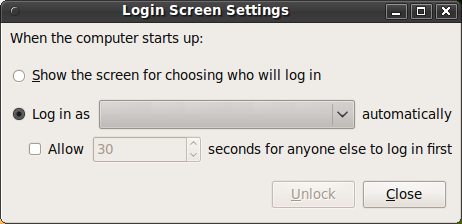
- The login screen is fugly and the wizard for it is gone. Or could as well be gone.
Altogether, this was a rather painless experience for me, but if you hate ironing out bugs, I would recommend waiting for a few weeks before upgrading from stable. On the other hand, if you are doing a new installation, 9.10 is probably a better choice, as it basically works.
P.S.: God, I hate it when I press a wrong button and Firefox navigates away, which causes me to loose my notes.Slashdot should open the input form on a separate page.
-
Re:My experience
None of the mentioned things affected my setup: Dell XPS with AMD64 and nVidia, but I had other various issues.
- The wired card ceased to be "managed". The fix was easy, but the reason will remain a mystery.
- "Popping" sounds could be heard. This is a very minor bug with a very easy fix.
- Quake Live became a terrible dog for FPS, and the problem was traced to its interference with compiz. Since QL is still in beta, it is hard to say whose fault it is. The workaround (by me
- Where is the Services wizard? It got nuked! To be sure, it's not a bug, but a serious usability issue. Users have to either grok System V scripts (so I am OK) or use Synaptic when they want to, say, disable/enable sshd.
- The login screen is fugly and the wizard for it is gone. Or could as well be gone.
Altogether, this was a rather painless experience for me, but if you hate ironing out bugs, I would recommend waiting for a few weeks before upgrading from stable. On the other hand, if you are doing a new installation, 9.10 is probably a better choice, as it basically works.
P.S.: God, I hate it when I press a wrong button and Firefox navigates away, which causes me to loose my notes.Slashdot should open the input form on a separate page.
-
Re:Not News!!
Maybe I didn't reply to the correct post.
http://slashdot.org/comments.pl?sid=1429856&cid=29970560I detailed all of the steps I took. I followed all four pages of suggestions on the forums and nobody could come up with anything that worked.
If you read the thread, you'll see that I was actively seeking out information and solutions and all that jazz. I tried, they tried, and it didn't work.
From the same Ubuntu forum - from 2007 - here is a post where I asked the Ubuntu community to provide me with a link to a Wireless USB network adapter that would work in Ubuntu. I said, I'd buy anything, as long as it would work, 100%, in Linux. Notice the lack of responses...
http://ubuntuforums.org/showthread.php?p=2962510
And here - here is another thread from 2008 where I was struggling with WiFi again. I asked for someone to simply tell me which one to buy again. Here's the first response http://ubuntuforums.org/showthread.php?t=782925
"Unfortunately, wireless drivers on linux are usually written by very determined individuals with time on their hands. There are few "guarantees" about anything.
As a general rule, to answer your second question, every card model has a single chipset in it. The "chipset" really is a description of the interface between the card and your computer, which is what any driver has to deal with in order to communicate with it. Broadcomm chips, for example, appear in many cards, but can all be used by the same driver, bcm43xx (though this has its own quirks).
If you look for the driver's webpage, you can often find lists of cards with broadcomm chips the drivers have been tested in. Sometimes the card manufactuerers will tell on their "detailed specification" sheets, but often they won't. Unfortunately, you "just have to know" what kind of chip controls your card. Google is your friend (try "PCI wireless card your-brand linux driver" or something like that).
Attempts have been made to rectify this situation. Probably the best one is ndiswrapper, a package which Ubuntu provides, but does not support as far as I know (in terms of its use in any particular driver). It allows you to take a wireless driver from Windows, like with an install CD that came with the card, and use it on Linux. Again, this is by no means a guarantee, but it seems to work for a lot of people. For the device you mentioned, this method has a set of instructions here.
Alas, like many things in life -- and many more in linux -- there is no easy answer. I hope this helps anyway."
So, yeah, you can sit there and tell me how every wifi you've ever used worked. But I've been there, for years, using Linux and seeing, first hand, what kind of support there is. Before Ubuntu, I was having the same troubles with RedHat and the before that I was screwing with Slackware. When the regulars at the forums tell you that WiFi support is 'iffy at best', I'd believe it.
-
Re:Not News!!
Maybe I didn't reply to the correct post.
http://slashdot.org/comments.pl?sid=1429856&cid=29970560I detailed all of the steps I took. I followed all four pages of suggestions on the forums and nobody could come up with anything that worked.
If you read the thread, you'll see that I was actively seeking out information and solutions and all that jazz. I tried, they tried, and it didn't work.
From the same Ubuntu forum - from 2007 - here is a post where I asked the Ubuntu community to provide me with a link to a Wireless USB network adapter that would work in Ubuntu. I said, I'd buy anything, as long as it would work, 100%, in Linux. Notice the lack of responses...
http://ubuntuforums.org/showthread.php?p=2962510
And here - here is another thread from 2008 where I was struggling with WiFi again. I asked for someone to simply tell me which one to buy again. Here's the first response http://ubuntuforums.org/showthread.php?t=782925
"Unfortunately, wireless drivers on linux are usually written by very determined individuals with time on their hands. There are few "guarantees" about anything.
As a general rule, to answer your second question, every card model has a single chipset in it. The "chipset" really is a description of the interface between the card and your computer, which is what any driver has to deal with in order to communicate with it. Broadcomm chips, for example, appear in many cards, but can all be used by the same driver, bcm43xx (though this has its own quirks).
If you look for the driver's webpage, you can often find lists of cards with broadcomm chips the drivers have been tested in. Sometimes the card manufactuerers will tell on their "detailed specification" sheets, but often they won't. Unfortunately, you "just have to know" what kind of chip controls your card. Google is your friend (try "PCI wireless card your-brand linux driver" or something like that).
Attempts have been made to rectify this situation. Probably the best one is ndiswrapper, a package which Ubuntu provides, but does not support as far as I know (in terms of its use in any particular driver). It allows you to take a wireless driver from Windows, like with an install CD that came with the card, and use it on Linux. Again, this is by no means a guarantee, but it seems to work for a lot of people. For the device you mentioned, this method has a set of instructions here.
Alas, like many things in life -- and many more in linux -- there is no easy answer. I hope this helps anyway."
So, yeah, you can sit there and tell me how every wifi you've ever used worked. But I've been there, for years, using Linux and seeing, first hand, what kind of support there is. Before Ubuntu, I was having the same troubles with RedHat and the before that I was screwing with Slackware. When the regulars at the forums tell you that WiFi support is 'iffy at best', I'd believe it.
-
Numerous problems, all downgrades from Jaunty
Unlike previous releases where I jumped in fairly early in the beta process (beta 2 or 3), I waited to move to Karmic until the release. I also decided to do a clean install this time to ensure I wouldn't run into any upgrade issues.
Unfortunately, despite the supposed "papercut" fixes, this release seems far more prone to problems. On my Dell Latitude 620 (with Intel graphics, mind you):
- Where Jaunty did great handling my laptop display and external monitor, Karmic has had no end of problems; problems that kept enforcing mirroring of displays, continually defaulting to 1024x768, random placements of the taskbar and notification popups, etc. See http://ubuntuforums.org/showthread.php?p=8229025 about moving the taskbar.
- Totem/gstreamer had no display, just a blank screen. Finally found http://blog.php-oop.net/archives/39
- The system defaulted to enabling compiz. I turned it off while troubleshooting all of the other video errors, but now it won't enable again.
- Despite the touted KMS, I still have a 2-3 second wait at boot (text mode from Grub I'm assuming), and later a 2-3 second delay with a blank screen excepting an underscore in the top-left corner that shows up between the boot image (eg, usplash) and the "pulsing" gdm startup
- The overall boot time (from power on to entering my password) is roughly identical to Jaunty -- I don't notice any difference.
- Power usage seems to be about the same, although powertop has reported a spike of 33W whereas before I never saw it go over 19W.
- Much higher memory usage reported in system monitor (previously most of the memory was allocated to cache, now most of it is allocated to programs).
About the only good thing I can say (which may also be attributed to the larger 500G drive I swapped in for the install), is that overall the system seems smoother and more responsive.
-
Re:Not News!!
Here is what I went through on my last attempt to install Ubunutu...four pages long, at least one other person posting saying he has the same problem. Zero solutions.
http://ubuntu-ky.ubuntuforums.org/showthread.php?t=1253711&page=1
I know this thread is getting pretty long so I thought it might help if I consolidated everything into a single post so that people who see this don't have to read through all 4 pages of posts.
Ubuntu 9.04 Install Problems Summary
1. Download the Ubuntu 9.04 i386 ISO
2. Burn ISO to a blank DVD using IMG Burn
3. Reboot, try to install Linux
4. Install fails - I see an error message about ACPI and find myself at a command prompt.
5. Read - Edit BIOS - I'm directed to https://help.ubuntu.com/9.04/install...ios-setup.html - I read and find that I didn't disable my 'Memory Hole' so I do that.
6. Reboot, try to install Linux
7. Install fails - I see an error message about ACPI and find myself at a command prompt.
8. Read - Edit BIOS - After visiting this and other forums, I found that by enabling AMD Quiet N Cool the ACPI error would be resolved. This information was not included in the 9.04 installation-guide linked to above.
9. Reboot, try to install Linux
10. Install fails - I see *no* error message - so that's a good sign (I think) - but I still end up at a command prompt.
11. Read - At this point, it seems like the install disk itself is the most likely source of my problems. I'm told to check the md5 of the download and the CD itself though the install screen.
12. Install winmd5sum And use this to verify that my download was correct (and it was).
13. Reboot, try to have the Ubuntu installer verify the disk.
14. Disk Check Fails The same as with the install, I end up at the command prompt. Unsure of what to do next I...
15. Re-Burned ISO to a blank DVD using IMG Burn on a separate PC, hoping that the burn was bad. As recommended, I use a low speed burn to reduce the chances of errors. IMG Burn 'verifies' that the burn was successful (I'm not sure if that means anything or not).
16. Reboot, try to install Linux (with the new disk)
17. Install fails - Same as before, no error message that I can see - just the command prompt.
18. Read the forums and end up directed to https://help.ubuntu.com/community/BootOptions - without really understanding the boot options in the F6 menu
19. Reboot - Install fails Same sort of fail as before, did this a bunch of different times with the different options.
20. Read the forums again. I end up at https://help.ubuntu.com/community/FakeRaidHowto - I have three hard-drives two are configured in a RAID 0 though my BIOS. I'm unsure if the FakeRaid would impact the installer or not (I'm trying to install to the un-raided hard-drive).
21. Read the forums again. It's suggested that I try the alternate download.
22. Download the Ubuntu 9.04 i386 alternate installer ISO
23. Use winmd5sum To verify that my download was correct (and it was).
24. Burned ISO to a blank DVD using IMG Burn
25. Reboot, try to install Linux
26. Install fails - This time I end up stuck in an infinite loop. The text based installer says it can't mount the CD and to insert the CD, but the CD is in. My DVD drive seems to be functioning though - I used it to install Windows 7 two day -
Re:Release cycles?
Upgrade success poll
35% success rate in running 9.10? That is not a good job. -
Re:How to get Ubuntu 9?
For the most part, they keep working well. The major problem is that the upgrade changes the layout of files on the disk, and, since the highly optimized boot procedure depends on that, your boot will likely become slower. You can at least mitigate this problem by rebuilding the boot readahead list as explained here.
-
how accurate is it
How accurate is it, does it handle 'regional' accents. How does it deal with grammar constructs.
-------
Making (microsoft) ACPI not work with Linux
"Foxconn
The one for Linux points to a badly written table that does not correspond to the board's ACPI implementation, causing weird kernel errors, strange system freezing, no suspend or hibernate, and other problems"
'You are incorrect in that the motherboard is not ACPI complaint. If it were not, then it would not have received Microsoft Certification for WHQL', Foxconn
'One thing I find myself wondering about is whether we shouldn't try and make the "ACPI" extensions somehow Windows specific ', billg Jan 1999 -
early adopters :)
'unless it has application in the porn industry, it's dead in the water'
They were always early adopters of the 'new' technology
-------
Making (microsoft) ACPI not work with Linux
"Foxconn
The one for Linux points to a badly written table that does not correspond to the board's ACPI implementation, causing weird kernel errors, strange system freezing, no suspend or hibernate, and other problems"
'You are incorrect in that the motherboard is not ACPI complaint. If it were not, then it would not have received Microsoft Certification for WHQL', Foxconn
'One thing I find myself wondering about is whether we shouldn't try and make the "ACPI" extensions somehow Windows specific ', billg Jan 1999 -
wearables ..
I see a use in wearables, devices built into your clothes
-------
Making (microsoft) ACPI not work with Linux
"Foxconn
The one for Linux points to a badly written table that does not correspond to the board's ACPI implementation, causing weird kernel errors, strange system freezing, no suspend or hibernate, and other problems"
'You are incorrect in that the motherboard is not ACPI complaint. If it were not, then it would not have received Microsoft Certification for WHQL', Foxconn
'One thing I find myself wondering about is whether we shouldn't try and make the "ACPI" extensions somehow Windows specific ', billg Jan 1999 -
Re:Vodka
Given that I've been using GNOME since the very beginning, I grant there's potential for my anecdotes to be out of date, even if they were accurate at some point in the past decade...
So I googled it, and the first result I clicked was this Ubuntu forums thread, over here, with posts from late July '09, (meaning v9.04) wherein several people discuss alt-drag and how by default you can't drag windows past the top of the screen and where to find the setting that changes that behavior.
Do correct me if I'm wrong, but I believe Compiz has been on by default for Ubuntu for several years of releases now. Defaults are also known as 'the settings that 99% of users will never ever change'.
-
Re:Windows 7 is better than Linux
Suck it, nerds.
So they actually bothered to ship it with a compiler, source, and a text editor that's better than note/wordpad?
I didn't think so.
Why would anyone with half a brain bloat up a OS with those things when only about 0.5%(I'm being charitable here) of the user base would ever find a use for them? You can always download the things you mention for free(sans source) from places like http://msdn.microsoft.com/en-us/visualc/aa336402.aspx
And yes, Visual Express is much better editor than notepad/wordpad.
If you're a nerd you would know where to get them. If you're a true nerd, you can slipstream them into the OS install.
How come you don't know that Ubuntu itself stopped installing gcc by default from disk. From http://ubuntuforums.org/showthread.php?t=123542
Or maybe you were just trolling for karma. Uninformed posts like yours get modded up all the time as long as they bash MS and/or praise FOSS. In other words, you're a karmawhore wannabe nerd!
no c compiler!
when i try to install programs that i have downloaded (in source code) , ubuntu dosen't find any c compiler. and when i search on my disk for ex: gcc, cc, g++ it dosen't find anything....dosen't ubuntu have a standard c compiler?
and if not, how can i install one the easiest way (im a noob)?Re: no c compiler!
Just open up synaptic package manager and install the package 'build-essential' which will automatically install all compilers and development librarys needed to compile most software. -
Re:Active Directory?
You did not say which distribution so here is one for ubuntu.
http://ubuntu-virginia.ubuntuforums.org/showpost.php?p=5712234&postcount=6
-
You lucky
"As soon as I got rid of PulseAudio? It started working."
You lucky bastad!
As soon as *I* got rid of pulseaudio, my sounds stopped working entirely. And my wireless. Headscratcher there:
http://ubuntuforums.org/showthread.php?t=1258063 -
I have a shorter guide
http://ubuntuforums.org/showthread.php?t=789578
TL;DR. Here's a slightly shorter guide to a great pulseaudio setup on Ubuntu:
apt-get remove --purge pulseaudio
In my experience it works flawlessly
-
Distribution problem
I've read in several places that the main problem with PulseAudio is not its design and implementation, but its instantiation. Many distributions apparently do not properly set up PulseAudio, causing it to behave unexpectedly. I found this to be the case with Ubuntu 9.04. PulseAudio worked like crap until I followed the following directions to get it set up. It's been working like a dream ever since:
http://ubuntuforums.org/showthread.php?t=789578
LS
-
Solution
See the following sites:
http://www.linuxfoundation.org/en/Net:Bonding
http://ubuntuforums.org/showthread.php?t=1238308
That should give you a good start. -
Re:User demand not there for Linux?
First off, why should companies bother to try to create a demand for Linux when they already have a demand for Windows based products? Especially when current data shows that this would only increase their market by about 5%.
Let's see, I'm selling a commodity product (laptop) with razor thin profit margins, I can potentially replace one of the most costly components (Operating System) with a free one. And the "current data" is worthless in a market that moves as fast as computer technology. Also, what new product doesn't start out with a 0 percent market share. Your 5 percent figure is a red herring.
ASUS introduced the EEE series and it was mildly successful. It became a major success only AFTER they introduced the WinXP version. And, sales of the WinXP version vastly outstripped the sales of the Linux version
This is not true and you are really in the wrong place trying to fool people with blatant historical revisioning.
You state we don't hear about the major installations, but fail to name any or provide any support for your contention. And,you fail to mention companies returning to Windows installations.
I don't even know what you are trying to say here but if it is that there aren't any major installations, again, you are full of shit. As for people switching back, nice strawman. Some people are going to switch back, that's human nature if nothing else. People are fickle.
There are three times as many pages for Windows than for Linux,
This shows an enormous amount of pent up demand if Linux has such a small amount of desktop market share yet generates 1/3 the search results of Windows.
why should Dell, or any company for that matter, spend that kind of money to attempt to create a demand for a product that will start off with, at best, 5% market share? That is just bad business sense
When the iPhone came out, it had 0 percent market share.
What I find most amusing about your comment is that you seem to think it is the computer manufacturers' job to promote Linux.
You promote what you want to sell. It isn't anybody's job. Almost every advertisement I see from a computer manufacturer has the "$OEM recommends Windows Vista". It doesn't take a genius to figure out that they are getting kickbacks to promote Windows.
The companies you should be looking to for ads and creating demand are RedHat, SuSE, and Canonical.
True that.
And, the community has to improve its own image, which is that it is hostile to anyone who doesn't know enough about their computer and Linux to answer one's own question.
RTFM N00B!!!
I suggest you read here for a thorough refutation of this argument.
Your contentions are mostly erroneous, bordering on intentionally misleading. I have read many of your postings. This one is typical. If you think you are going to fool this crowd, I suggest you get some new more up to date arguments.
-
Re:Marketers think they do us a service
Umm.. don't be so sure on the Ubuntu side:
http://ubuntuforums.org/showthread.php?t=1219501
In the next version, spying on you is a "feature"
This is why I'm migrating to Fedora, which btw blew me away with its polish after dealing with the turds of packages that Ubuntu has in some areas (Eclipse).
-
Re:TROLL???? Moderator, are you on Crack?
It's about the 50th comment recommending a Macbook, despite the other 50 comments noting that a Macbook doesn't qualify for any of the OP's needs.
It doesn't qualify for any of the OP's needs? OP says "The extra battery option is especially appreciated"... Well looky there, an external battery. OP says "Docking station / port replicator: I like having my home setup with keyboard, network, and dual screens (a necessity)", looky there, a dock. And without a dock I have several connections to my MacBook Pro. I even had an external monitor connected, showing an extended desktop. OP says "It runs Linux", looky there, "How to install Ubuntu 9.04 on an Intel-based Mac laptop", which I plan on doing.
About the only thing a MacBook/Pro does not qualify for on OP's list is a hot swappable drive bay, however there are external drives for that. Right now I have 3 external drives connected to my MBP and I could connect more.
Falcon
-
Re:EFI
I've been running Ubuntu as my only OS on my MacBook for over 18 months now, without an OS X install and without rEFIt. Neither is essential for using a MacBook, and anybody who says anything to the contrary is clueless.
You're right rEFIt isn't needed, nor did I say it was. Neither is a bootable OS X needed to run Ubuntu. It is needed to download and install firmware updates from Apple though. Here's someone asking if it's possible to get firmware for iSight without having OS X. It was posted two weeks ago yet there's no answer. Perhaps you can tell the person how? On the other hand even the Ubuntu MactelSupportTeamAppleIntelInstallation says "It is recommended that you keep an install of OS X, even if you do not plan to use it as a primary environment, so that you can install firmware updates in the future. (Such updates may be required for your Mac to continue to operate properly.)"
Back when I bought my MacBook it didn't cost much more than a comparable high-end Windows notebook, like a Sony Vaio, with the added benefit that it's not a Sony (bah) and didn't come with a Vista tax (double-bah).
Oh, I agree. When I comparison shopped both a Dell and an HP with similar specs to the MBP cost about $300 more. I said in another post the cheapest laptop with similar specs was only $50 less. I still can't see buying a Mac but not using OS X. Mine only had an 160 GB harddisk, and almost all of it was used, so I looked for the biggest internal replacement drive which was only 320 GB. There are bigger ones now but because I don't want to void the warranty, it's still covered under Applecare, I have to have an Apple authorized service provider install it and all those I know of in my area require upgraders to buy the disk from them. I upgraded it so I can run both OS X and Ubuntu.
On the other hand, I don't have much love nor any need for OS X.
I like both Linux and OS X. And though I don't know for sure now I may need OS X. I need, er want, a photo editor and GIMP does not cut it. One, it does not work with 16 bit colour depths never mind 24 or 32 bits. Gimp 2.6 supports some 16 bit stuff but not much, I already tried it. It does not work with CMYK, monitor profiles, or other things that well that print photographers need. While CinePaint does work with some of these, Ubuntu dropped support for it back at 7.4 I thing, so it is no longer in the repositories. I'm willing to try KDE's Krita, so I'll install both Gnome and KDE, but if it doesn't work then I'll need Photoshop and CS4 does not run in Linux. CS3 does partially and CS2 runs pretty good in WINE but CS4 doesn't.
Using OS X I can also test with it too. As I posted earlier, with Windows you can only develop for Windows. With Linux you can develop for Linux or Windows. And with Macs you can develop for Macs, Linux, and Windows.
Falcon
-
Get an Ubuntu netbook Remix to go with it.
My setup is a little different then what the OP is looking for, but it works well for me, in case anyone else is interested.
For 300 euros, I bought an Asus Eee 1000HE several months ago. The honest 6+ hrs battery life plus its weight makes it truly ultraportable, since I don't need to carry any cord or brick in my backpack. The Ubuntu Netbook interface works well on the small screen, and the CPU is efficient running Linux, & Firefox, etc. Skype audio/video doesn't work well I find (the Ubuntu Skype version is old), but Ekiga SIP does. In reality, the hours in-use is greater than just 6, because inevitably I'll get distracted, eat lunch, etc., so the sleep mode kicks in. I relax knowing the little thing has a fully encrypted hard disk, from these instructions:
http://ubuntuforums.org/showpost.php?p=7489558&postcount=13
I cannot imagine running the XP OS (tax) that came with the unit, XP the interface seems like it would be too clumsy on the small screen, and with anti-virus etc. would slow things too much.
I have another 300 euro Compaq 15" notebook with a similarly installed Ubuntu OS so for me, the question when I leave the door for the day is: Do I need the larger screen, or true portability? If I'm just reading docs at the cafe, I love the Asus Eee PC. Each has a Logitech wireless mouse VX450 and a tiny USB nub that remains in-place 24/7. Its critical, (the batteries seem to last 1 year)
One key to everything working out so well, is my Dropbox acct which auto syncs files across home folders. In this way, I use the best suited of my two portable PCs for the day (big screen + brick, or more portable.) (Spider-oak has a better privacy policy than Dropbox though, and I'm meaning to switch). I figure both my Asus and Compaq cost less than half the price of Apple's cheapest notebook. But then in my work, I am happy using Gnome & firefox, etc.
For managing the Win 98 of the OP, I agree Virtual Box is quite capable, free, and runs well on Ubuntu. But not really on the cheap notebooks I described.
-
HP 1020 -- CUPS makes it look PostScript enough.I have a LJ 1020 attached to a gentoo box. Every time it powers up the gentoo box sends some data down to it, which I believe is it's insufficiently-firm-ware.
This link describes more or less what I did, too. The result is a printer that looks like a postscript printer on my internal net.
The 1020, though, doesn't have its own network connection and I would agree with AaronW's post that he probably wants a printer that will just live on the network on its own.
cheers...ank
-
Re:Really good GPUs but...
RadeonHD and Radeon both have the same functionality any more. I don't know what you're doing with your system that it's slow, or what you've tried to do, but out of the box, Ubuntu runs quite peppy on even my Radeon 3200HD. Really... did you look through the link I posted?
If you're still running into problems, it could be that your distro is misconfiguring X, and you need to change something in the config.
It takes time for driver development. Good things are in the pipeline. If you don't mind compiling code, you can get them now. If you do, Ubuntu 9.10 should have some basic 3D support (up to OpenGL 1.4), but no KMS for the R600/R700 chips. You can also look at some guides for getting it going.
I'm sorry you're having bad luck with your card. I know it can be a pain. But remember, the Nvidia drivers replace the whole X graphics stack. When things move to KMS/DRI2/Gallium3D, they'll be left in the cold, where the ATI open-source drivers will work. -
Re:Almost competing
37. Read the internet. Now that I've got some error message to work with, I find this page: http://ubuntuforums.org/archive/index.php/t-481690.html [ubuntuforums.org] where someone is describing a very similar problem to mine (two years ago) and his solution was to make a 2nd install CD and plug in a 2nd CD-ROM and he reports that after the initial boot, the installer would read from the *other* drive. My problem is that I do not have a 2nd cd-rom I can toss a duplicate CD into.
Yeah, Linux is so easy... If I were you I would have quit long ago. In 2009 this sort of problems shouldn't exist anymore with 'supported' software. Why don't you try another distro? I recently installed OpenSuse because Ubuntu 9.04 still didn't let me choose a decent screen resolution. I had to click through some utterly ridiculous MS legal trash to get OpenSuze to install but after that it just worked. YMMV though, I installed it in VirtualBox on OS X.
-
Re:Stability
GIMP and Cinelerra under Linux are heaps more stable than Photoshop and Premiere under Windows
What!? Cinelerra is the least stable program I've ever used, it dies every couple of minutes.
It crashes so much that the tutorial starts off: "Cinelerra is not perfect. Before long you will be familiar with the tendency it has to crash. This usually takes the form of all the windows suddenly disappearing. Thankfully this is not often a big problem because Cinelerra can recover from a crash very well. Simply restart it and select Load Backup from the File menu."
It crashes so much that the OpenSuse page on it has a section devoted to crashing, and running it within gdb as a matter of routine so it won't crash every time you close the "tip of the day" window.
It crashes on Ubuntu. It crashes on gentoo.
Its support for codecs (that actually work) is so sparse that simply finding a single path from source material to product is like crossing a minefield.
Cinelerra is the perfect example of a program that never really converged to a useful state, it just slogs on like a zombie year after year, half dead, because there is no workable free alternative. Can I blame any of this on the fact that it's free and open? Not exactly, but if it were proprietary, it would have disappeared completely years and years ago.
-
Re:Linux fullscreen flash works fine for me?
It is an issue with the Intel drivers. Ubuntu 9.04 (Jaunty Jackalope) shipped with kernel 2.6.28, in which the Intel made some major changes in the graphics system. The Intel drivers suffered a performance regression with this kernel due to some miscommunication with xorg, most visible when viewing Flash, is also seen with other video playback, such as DVD. Intel has addressed the issue by releasing a fix to its drivers and to xorg. This issue should be fixed as of kernel 2.6.30.
Here is a description the issue and some workarounds:
http://ubuntuforums.org/showthread.php?t=1130582
Here is the Ubuntu Launchpad bug report:
https://bugs.launchpad.net/ubuntu/+source/xserver-xorg-video-intel/+bug/314928 -
Other W500s get good battery life under Linux
This guy reports 2.5-5 hours of battery depending on which graphics drivers you're running. Maybe there are some more pointers there.
Why is battery life on notebooks so poor when using Linux?
I wish I could tell you, but, like the above W500 owners, I've only ever gotten perfectly competitive battery life on Linux laptops.
Obviously Apple with their X86 hardware and BSD based OS have got it right because the MacBooks last for hours
Their new ones are better, but I have one of the old MacBook Pros from about a year ago which might get you through a feature-length movie if you're lucky. My Linux netbook completely owns my MacBook in terms of power usage--the Mac seems to be converting a lot of it to heat. The netbook will suspend seemingly forever.
Any time you install an OS on some hardware that didn't ship with it, you're taking a chance that it might not work. Vendors try to make their stuff work with Windows, so you'll probably have good luck there, but even vendors ship with specialized OEM versions of Windows. Trying to install Linux or OSX on machine that didn't ship with it, especially if the hardware is new, is going to be interesting. My advice to those not willing to tinker: leave it to the pros and buy a preinstall.