Slashdot Mirror
Domain: hothardware.com
Stories and comments across the archive that link to hothardware.com.
Comments · 439
-
Tests
Lots and lots of tests and bechmarks. Looking good.
Intel 'Lynnfield' Core i5 750 and Core i7 870 Performance Testing Introduction
Intel Core i5 and Core i7: Lynnfield CPUs reviewed - Intel, Core i5, Core i-750, Core i7, Core i7-860, Core i7-870, Lynnfield, Bloomfield, AMD Phenom II X4 - PC Games Hardware
Core i5 750 - Core i7 860 and 870 processor review
HEXUS.net - Review
Legion Hardware
Intel Core i5 750 & i7 870 Review - Page 1 - The Next Nehalem-based CPU lineup
PC Perspective - Intel Lynnfield Core i7-870 and Core i5-750 Processor Review
Introduction - Intel Lynnfield Core i5 and Core i7 Processors | [H]ard|OCP
In Theory: How Does Lynnfield's On-Die PCI Express Affect Gaming? : Introduction - Review Tom's Hardware
AnandTech: Intel's Core i7 870 & i5 750, Lynnfield: Harder, Better, Faster Stronger[/QUOTE]
Intel Core i5 750 Core i7 870 Review - Overclockers Club
Techgage - Intel Core i7-870 & i5-750 - Nehalem for the Mainstream
Core i5-750 and Core i7-870 Processors Review | Hardware Secrets
Intel Core i5 750 Processor Review - TechSpot News
Intel Core i5 And Core i7: Intel?s Mainstream Magnum Opus : Introduction - Review Tom's Hardware
Intel Lynnfield Core i5-750 & Core i7-870 Processor Review
Intel's Core i5-750 and Core i7-870 processors - The Tech Report - Page 1
bit-tech.net | Review - Intel Core i5 and Core i7 Lynnfield review
bit-tech.net | Feature - Intel Lynnfield: Details and Architecture
Intel Core i5, Core i7 800 Processors and P55 Express - HotHardware
Intel Core i5-750 Processor BX80605I5750 | Intel Core i5-750,BX80605I5750,Lynnfield,LGA1156,CPU,Proocessor, Intel Core i5-750 Lynnfield LGA1156 CPU Benchmark Performance Test Processor Review | Benchmark Reviews Performance Tests
Intel Core i7 870/Core i5 750/P55 Express chipset Review -
More in-depth coverage here
Power consumption, H.264 encoding, file compression and image manipulation tested here, as well as Intel's on-chip PCI-Express links in multi-GPU setups: http://hothardware.com/Articles/Intel-Core-i5-and-i7-Processors-and-P55-Chipset/
-
Depends on how/when/where/what you use SSD's for
" Why not just add more RAM? SSD is cheaper than DDR ( ~$3/GB vs ~$8/GB ), but also ~100 times slower. - by gabebear (251933) on Sunday September 06, @08:39AM (#29330641) Homepage
System RAM is SHARED RAM, first of all - more than 1 thing is "going on" in it, @ ALL times (this is not the case w/ using SSD's for specialized tasks (& they tend to EXCEL in webserver or DB server environs & tasks. Proof thereof is here -> http://techreport.com/articles.x/17183/8 for ALL KINDS of "Back Office/Server Class" type tasks - this is, by this point, a WIDELY recognized industry fact though...))
Personally, for more "end-user" type tasks here @ home? Well - I use SSD's here, "true" ones, meaning NOT based on FLASH RAM (with its slower write cycles & inferior longevity).
----
1.) A CENATEK RocketDrive (2gb PC-133 SDRAM, PCI 2.2 133mb/sec. bus transfer rates)
2.) A GIGABYTE IRAM (4gb DDR-400 RAM, SATA 1 150mb/sec. bus transfer rates)
----
I use TRUE SSD's in this manner here for performance gains:
----
1.) Pagefile.sys placement (all alone by itself on the CENATEK RocketDrive on a 2gb NTFS partition, uncompressed, so it is a "dedicated task" there & that one only).
2.) WebBrowser Program Caches (all of them in IE, FireFox, & Opera) - &, on an NTFS compressed partition, so the files are even TINIER & pickup that much faster into memory (small offset due to decompression of data into memory, but, today's CPU's & RAM speeds make up for that - on GIGABYTE IRAM)
3.) OS and application logs (like eventlogs & far more from apps + the OS also - on GIGABYTE IRAM) - again, on an NTFS compressed partition, for the same reasons as above.
4.) %Temp% &/or %tmp% environment alteration (so app & OS 'temp ops' take place in a higher speed environs & off the main disk too - on GIGABYTE IRAM)
5.) %Comspec% placement (cmd.exe on Windows NT-based OS' - on GIGABYTE IRAM)
6.) PRINT SPOOLER location (on GIGABYTE IRAM)
----
So, that all "said & aside"? What kind of performance gains do I see, & how do they work? Ok:
----
A.) Faster seek/access to said files, especially since they're small & OF BOTH "READ/WRITE NATURE" (which normal RAM types FLY on, vs. FLASH, & no "writeback caching" required really).
B.) A lot less "read/write head movement contention" on my main OS + Programs bearing HDD's, simply by moving said files + activities from my main HDD's
C.) No fragmentation of my main OS + Programs bearing diskdrive from said activities &/or files I moved from my main OS + Program bearing HDD's
----
That's also "borne out" by tests OTHERS RAN, an example of the likes of which, is here -> http://hothardware.com/Articles/Gigabyte-IRAM-Storage-Device1/?page=3 OR here -> http://techreport.com/articles.x/17183/5 as well as many other technically oriented websites online.
(The gains seen? Hey, they only make complete sense, as the types of RamDrives/RamDisks/SSD's I use here are (respectively as listed above) based on PC-133 SDRAM &/or DDR-400 here, because they're F A S T E R by far & do not need "writeback caching" to offset write performance hits FLASH RAM has)... FLASH based units are fine for reads, but not so fine for writes (though writeback caches CAN offset this some).
Plus - as you can see above? Well - I do a great deal of tasks that need BOTH read and WRITE speeds here on SSD's, & I go into them above in my 2nd list (&, they work - you can try them yourself IF you have an SSD of the type I use especially (not FLASH RAM based)).
Nor do they require measures (that have overheads mind you) like "garbage cleanup" &/or "wear-levelling" engines to function properly,
-
Additional Coverage, Benchmarks, Power #s at HH
HotHardware also covers the new chip here and full system power is tested in addition to benchmark numbers: http://hothardware.com/Articles/AMD-Phenom-II-965-Black-Edition-CPU-Review/
-
Re:Kondratief cycles
I would say microcomputers have largely gone through their cycle.
You are very funny, dude.
When you look at this, you probably see an effing ugly gaming laptop. I see a massive supercomputer that you can throw in a bag, something capable of outshining anything CRAY had 10 years ago for millions of greenbacks.
The only thing is that there are no killer apps YET for a beast like this; when a killer app for something like this comes along, we are in for a thrilling ride.
-
Re:I/O is random? What have you been smoking?
I'd rather have an ioDrive.
See: http://hothardware.com/Articles/Fusionio-vs-Intel-X25M-SSD-RAID-Grudge-Match/?page=9
With ludicrously high IOPS, your CPU doesn't have to do much waiting, which pretty much defeats any RAID solution. RAID usually raises overhead, because your CPU has to decide which device the requests go to - unless you use expensive hardware RAID controllers, all of which have IOPS caps. Most RAID solutions also go through slower interfaces - although compared to PCIe 2.0 4x, every interface(SATA1/2/3, USB2/3, etc.) is slow.
HDDs are impressive tech, but they have a different purpose. Density, longevity. SSDs are really going to shine for database stuff in the future. Prices are dropping rapidly, and are almost here!
-
Re:Hardware RAID becoming less relevant every day.
The first question is really, why RAID a SSD? It's already more reliable than a mechanical disk, so that argument goes out the window. You might get some increased performance, but that's often not a big factor.
The second question is, with processors coming with 8 cores, why have some separate specialized controller that handles RAID and not just do it in software?
RAID0 for Speed. SSD's in RAID0 can perform 2.5-3X faster than a single drive. A RAID SSD array can challenge the speed of a FusionIO card that is several thousand dollars.
Now that the new faster 34nm Intel SSD's can be preordered for under $250, it's reasonable for an enthusiast to buy 3-4 of them and thrown them in a RAID0 array. Also, software (or built-in MB RAID) is fine -- a lot of the sites have shown that 3 SSD drives is the sweet point for price/performance using standard MB RAID controllers. If you want 4 or more, to see performance, you need a more $$$ separate controller card. -
Re:Hardware RAID becoming less relevant every day.
The first question is really, why RAID a SSD? It's already more reliable than a mechanical disk, so that argument goes out the window. You might get some increased performance, but that's often not a big factor.
The second question is, with processors coming with 8 cores, why have some separate specialized controller that handles RAID and not just do it in software?
RAID0 for Speed. SSD's in RAID0 can perform 2.5-3X faster than a single drive. A RAID SSD array can challenge the speed of a FusionIO card that is several thousand dollars.
Now that the new faster 34nm Intel SSD's can be preordered for under $250, it's reasonable for an enthusiast to buy 3-4 of them and thrown them in a RAID0 array. Also, software (or built-in MB RAID) is fine -- a lot of the sites have shown that 3 SSD drives is the sweet point for price/performance using standard MB RAID controllers. If you want 4 or more, to see performance, you need a more $$$ separate controller card. -
HotHardware too
HotHardware has taken a crack at these new drives also today.
-
Re:OOh
You may or may not be able to install a fresh copy of Windows 7 using the upgrade discs (which just ended the half-off preorder promotion). This article (Jun 25) says you can, while these two (July 10 and July 13, respectively) say you cannot. What do the 3 articles have in common? No sources besides, "I've been asking a spokesman for the company about this for about a month, and he's finally been able to offer an answer." (the July 13 one). While I haven't really given anything substantial, I'm hoping somebody else out there will see this and can clear it up.
-
Re:OOh
You may or may not be able to install a fresh copy of Windows 7 using the upgrade discs (which just ended the half-off preorder promotion). This article (Jun 25) says you can, while these two (July 10 and July 13, respectively) say you cannot. What do the 3 articles have in common? No sources besides, "I've been asking a spokesman for the company about this for about a month, and he's finally been able to offer an answer." (the July 13 one). While I haven't really given anything substantial, I'm hoping somebody else out there will see this and can clear it up.
-
Printable (aka everything on one page) Version
-
Re:But...
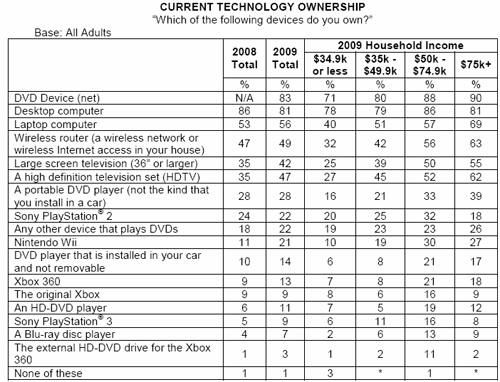
...does this statistic take into account PlayStations, laptops, and other electronics which include Blu-ray players?
Did you even RTFA? http://hothardware.com/newsimages/Item10047/blu-ray-adoption.png
You must be new here.
-
Re:But...
...does this statistic take into account PlayStations, laptops, and other electronics which include Blu-ray players?
Did you even RTFA? http://hothardware.com/newsimages/Item10047/blu-ray-adoption.png
-
Re:wrong info
-
Re:wrong info
-
Re:Another win for OSS community
The software-level device interfaces have not changed, or have changed very little.
According to this:
USB 3.0, which will also be called SuperSpeed USB, will be backward compatible with current USB devices, and will support transfer speeds of up to 4.8Gb/sec (600MB/Sec)--which is ten times faster than Hi-Speed USB (USB 2.0).
There's some good info in that article.
-
Re:How did they pick the number?
From what I've read, it's almost a 20% performance hit synthetically, 14% real-world benches. That's not trivial in anything I've seen.
If you're buying a processor, just don't get the Phenom 9600. It's under $100 for a quad-core CPU, but that 2.3GHz with the workaround would end up being an effective 1.9GHz or so. The 9650's and any AMD chip ending with a 50 has the TLB bug fixed. -
No improvement of the 4870??
Yet HotHarware tests their 4890 and shows that it outperforms the 4870 in every category...
http://hothardware.com/Articles/ATI-Radeon-HD-4890-RV790-Unveiled/
and I quote:
"In every test, the Radeon HD 4890 (Asus EAH4890) was faster than the 1GB Radeon HD 4870, and the overclocked 4890 (Asus EAH4890 TOP) simply increased the card's overall lead. In comparison to competing offerings from NVIDIA, the Radeon HD 4890 is faster than the GeForce GTX 260 Core 216 overall, but it didn't quite keep pace with the just announced GeForce GTX 275."
-
The real source of this post is here...
I submitted this post this morning and one of the slashdot editors must have replaced the source link with the Reuters release. Here's the real source of this post: http://hothardware.com/News/NVIDIA-Countersues-Intel-Over-License-Conflict/
-
MAC Address
Looking at the back view picture, it looks like the holes could be interpreted as code. Each column is a nibble, with the low end bits being on top. A hole is a 1, and no hole is a 0.
So, on the right side, starting with the fist hole and going right, you get 2014A14B6BDF, and it just repeats with F's. This happens to be 12 nibbles, the size of a MAC Address. I looked this up for the associated vendor, but there is none.
Anyways, it'd be cool and rather geeky to have the MAC Address of the notebook's ethernet card (rather than wireless card, which may be a security concern) encoded in the holes on the back. It wouldn't be like a fading effect any more, but it'd be oh-so geeky. -
A real review of the product with benchmarks, here
-
Re:Really a New Socket or Just Chipset??
From http://hothardware.com/printarticle.aspx?articleid=1273, the AM3 CPUs have 938 pins instead of 940 pins with AM2/AM2+ CPUs.
-
Re:What?
Some will be expired, but the technology employed on the current chips (state of the art and previous generations) are covered by more recent patents, and if NVidia wants to produce anything more advanced that the good old 8086, they will have to negotiate.
Check this and this articles. That shows the heavy politics involved between the big processor companies in order to be able to produce our beloved processors. -
More Coverage of Ion Here, WITH BENCHMARKS
-
Re:Power Savings!!
in less than 10 years!! I know what I'm spending my tax refund on!!
You can also use it to crack passwords even Faster!
-
Full Review with Benchmarks of The Card Here:
-
Watch out for sustained read...
I recently did some research before buying an SSD and the cheaper SSDs show some odd behaviour, namely, their reads are very sawtoothed (ie not sustained high thruput). Admittedly, the greatest speedup is in random access (no rotation/seek time), but the xfer is important too. I ended up going with a smaller, but very fast 16G mtron 7500 pro, as it's more than enough for system, swap and frequently used (db's etc). Bigger would have been nice (for warcraft and vm's), but it's not great loss. A good ssd for a system drive is a thing of beauty, and can be retained as other hardware is upgraded, of course.
-
Full printable article
-
A quick-take video review on the product, here...
HotHardware also did a video review of the product, right here: http://hothardware.com/Articles/Getting-To-Know-Intels-New-Core-i7-Video-Spotlight/
-
More details and Benchmarks here
This review at HotHardware shows some additional data including a few additional real-world usage models, like PCMark Vantage tests: http://www.hothardware.com/Articles/Intel-X25M-80GB-SATA-Solid-State-Drive-Intel-Ups-The-Ante/
Benchmarks start here: http://www.hothardware.com/Articles/Intel-X25M-80GB-SATA-Solid-State-Drive-Intel-Ups-The-Ante/?page=4 -
More details and Benchmarks here
This review at HotHardware shows some additional data including a few additional real-world usage models, like PCMark Vantage tests: http://www.hothardware.com/Articles/Intel-X25M-80GB-SATA-Solid-State-Drive-Intel-Ups-The-Ante/
Benchmarks start here: http://www.hothardware.com/Articles/Intel-X25M-80GB-SATA-Solid-State-Drive-Intel-Ups-The-Ante/?page=4 -
More Details and Benchmarks Here
This article at HotHardware, has a few additional tests that show real-world usage models as well as synthetic benchmarks: http://www.hothardware.com/Articles/Intel-X25M-80GB-SATA-Solid-State-Drive-Intel-Ups-The-Ante/
The PCMark Vantage tests are especially impressive: http://www.hothardware.com/Articles/Intel-X25M-80GB-SATA-Solid-State-Drive-Intel-Ups-The-Ante/?page=7 -
More Details and Benchmarks Here
This article at HotHardware, has a few additional tests that show real-world usage models as well as synthetic benchmarks: http://www.hothardware.com/Articles/Intel-X25M-80GB-SATA-Solid-State-Drive-Intel-Ups-The-Ante/
The PCMark Vantage tests are especially impressive: http://www.hothardware.com/Articles/Intel-X25M-80GB-SATA-Solid-State-Drive-Intel-Ups-The-Ante/?page=7 -
Re:Oh For God's Sake
So what do they measure? Sequential transfer rates.
Random Read / Write Test: http://www.hothardware.com/Articles/FourWay-SSD-RoundUp-OCZ-Super-Talent-Mtron/?page=5
-
Article without 60 pages of ads
-
No BS Version
Here's the printable version with all the extra crap removed.
-
What?
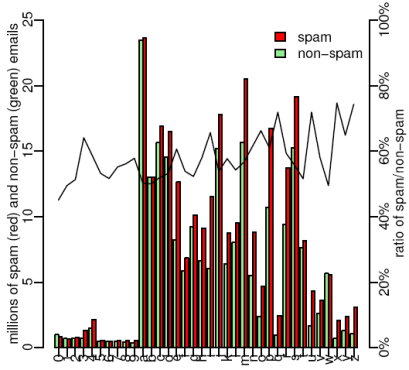
The conclusion is ridiculous. There's more spam for addresses starting with 'a' than with 'z' because there is more traffic to those addresses. See the the graph. The line in the graph is the only solid piece of information, and it is just a lot of noise around the mean value of 56%; if anything, it indicates the opposite conclusion.
-
Re:Random write performance
Not true. SSDs are already faster in every aspect than magnetic drives.
Easiest way for me to say this: Wrong. Here's the current king of the hill when it comes to magnetic storage http://www.tomshardware.com/reviews/ultrastar-cheetah-sas,2004-3.html . No SSD can come close to touching that drive in performance or price/GB... yet.
Even the price is no longer a big issue, 64GB SSD drives can be gotten for $270.
Wrong. 64GB, $250, $210 after rebate. http://www.newegg.com/Product/Product.aspx?Item=N82E16820227344 . And that's still a freaking insanely high price/GB. Here's let's do the math.
Cheetah 15k.6 450GB ~$900 so $2/GB
VelociRaptor 300GB ~$300 $1/GB
Most 500GB drives $65 $.13/GB
Any 640GB drive $85 $.13/GB
Seagate Barracuda 7200.10 750GB $99 $.13/GB (see the trend?)
Seagate Barracuda ES.2 1TB (Near-line drive, the most expensive 1TB available) $235 $.24/GB
OCZ Core Series SSD 64GB $210 $3.28/GB
One of the most inexpensive/GB SSDs is over 13x more expensive than a magnetic drive that's considered enterprise entry level (The ES.2) and over 25x more expensive than drives that are considered typical mainstream.120mb/s sustained and sequential read and write. WD Velociraptor (the new 10k rpm drive) has that value much lower at 85mb/s sustained and 68mb/s sequential.
Wrong. The Velociraptor was not included in that benchmark. In fact, pre-release engineering samples didn't hit the benchmark sites for a month and a half after that article was published. Here's one that does include it. http://hothardware.com/News/OCZ_Core_Series_SSD_Vs_VelociRaptor_Sneak_Peek/ Also, "X sustained and Y sequential" doesn't even make sense. I think you meant read and write but even got those numbers wrong.
Those benchmarks are garbage. For starters they're 6 months old and a lot has changed since then. They're comparing a "brand new" latest generation SSD versus a "performance hard drive" 74GB Raptor that is now 2 generations old.
Most of the benchmark sites just piss me off when they're doing SSD reviews. They never put them head to head with the 2 market segments for which the drives are being produced and pushed. The mfgs want the high end drives in enterprise class servers that see extreme I/O levels, and the "mainstream" drives are for laptops due to power usage and durability. A lot of the enterprise class servers are already switching to 2.5" drives anyway for lower power draw, lower access times, and higher density per unit. Very few people are going to replace their 3.5" drive in their desktop with a silly expensive piece of flash ram. I'm leaning heavily toward getting one of those 64GB OCZ drives for my laptop, and it's as much for heat as anything else. The only reasons I'd look to put one in a PC is if I'm trying to accomplish making it silent or green, but none of the reviewers ever seem to realize that.
-
Why does Asus copy everything from the Wii?
Why is it that Asus feels compelled to copy Nintendo's Wii hardware on their latest releases...first their Eee PC and now ripping off the Wii-mote/Nunchuk...what's next a balance board to replace their keyboards?
-
Another article - with picture of console in box
-
More benchmarks and analysis here - HotHardware
More benchmarks and analysis here: http://www.hothardware.com/Articles/VIA_Nano_L2100_vs_Intel_Atom_230_Head_to_Head/
-
1 more tip for them
Buy a drive intelligently. Maybe they should check out these drives. http://www.newegg.com/Product/Product.aspx?Item=N82E16820227344 http://www.hothardware.com/News/OCZ_Core_Series_SSD_Vs_VelociRaptor_Sneak_Peek/ The 32GB version that would be suitable for a linux boot drive is going to have a $140-160 price point I believe. I'm considering a 64GB for my Vista laptop to reduce the heat it generates.
-
OT: Asus B202
Isn't Asus suppose to be releasing their Asus Box B202 about now?
- Intel Atom 1.6GHz processor
- 1GB or 2GB of memory
- 80-160GB hard drive
- WiFi
- Bluetooth
- SD/MMC/MS memory card reader.
- $269-$299
- mid-July release date
What's up with that?
-
Re:Apple particularly doesn't like things like thi
Apple is $100 off commodity hardware and sometimes cheaper? May I introduce you to the latest Toshiba Qosmio laptop which is listed on the Slashdot page today as being the first laptop to use cell processors:
http://www.hothardware.com/News/Toshiba_Launches_First_Cell_CPUbased_Laptop/
The price? $1549.99 for this:
* Windows Vista Home Premium (SP1, 64-bit)
* Windows Vista Home Premium (SP1, 32-bit)
* Tohiba Quad Core HD Processor
* Intel Core 2 Duo Processor P7350 (2 GHz)
* NVIDIA® GeForce 9600M GT
* 4GB PC2-6400 DDR2 800MHz SDRAM
* 500GB: Two 250GB 5400rpm hard drives
* DVD-SuperMulti (+/-R double layer) with Labelflash drive
* Atheros Wireless LAN (802.11b/g/n)
* Bluetooth V2.1 + EDR
* 18.4" ScreenCompare that against any Apple laptop and see if the Apple laptops have anything of the same specs and then compare the pricing on Apple.
Also, Toshiba makes good laptops and Qosmio is top of the range. This ain't some no name player and this ain't any commodity hardware.
Apple's success is not tech or the quality of its products, it is a success built up on branding and marketing.
-
More details and analysis, here
More benchmarks, power numbers and GPGPU testing here - http://www.hothardware.com/Articles/NVIDIA_GeForce_GTX_280_and_GTX_260_Unleashed
-
More Details Here With Chip Arch
More details on Tegra can be found here, including chip arch: http://www.hothardware.com/News/NVIDIA_Launches_Two_New_Tegra_Systems_On_a_Chip/
-
More Details Here As Well
-
More details here, neat, clean single page
-
Re:And with this...
Umm what? The Geode is an x86 processor. It runs x86 binaries, including Flash.
http://wiki.laptop.org/go/Adobe_Flash
Actually it's interesting to compare the power consumption with Atom. Wiki says the OLPC "originally used the GX series Geode processor in the OLPC XO; but has since moved to the Geode LX". The LX uses has a TDP of 3.1W at 433Mhz. An Atom has a TDP of 0.65W at 800Mhz and a much lower average power. Even the 1866 MHz Atom has a lower TDP than a 433 Mhz LX!
I think it would do better if you compare average power rather than the worst case TDP value since the Atom is a much more recent design - it supports things like the C6 state where the the caches are powered down and processor state is saved in an SRAM kept alive but a low voltage supply.
So Atom looks like it will have more computing power per watt. The Atom is an in order design of course, but so is the Geode. Then again for an OLPC like machine you'd probably want an Atom with an embedded graphics controller and chipset, which is probably still some way off.